
External Antennas
2.5G mGig
Catalyst 9800
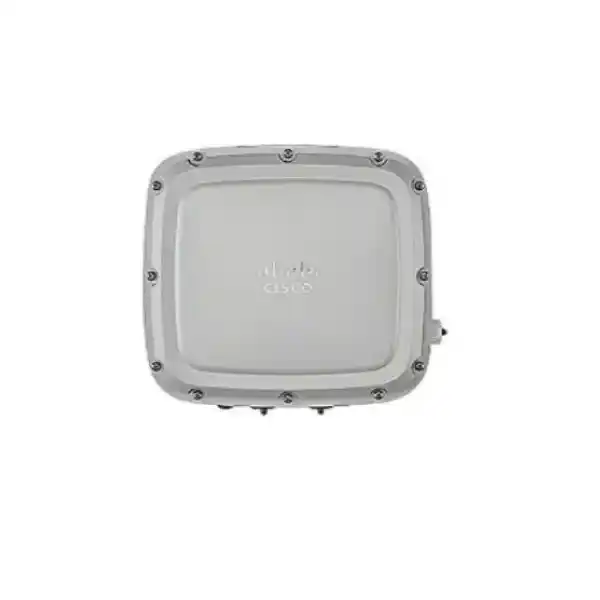
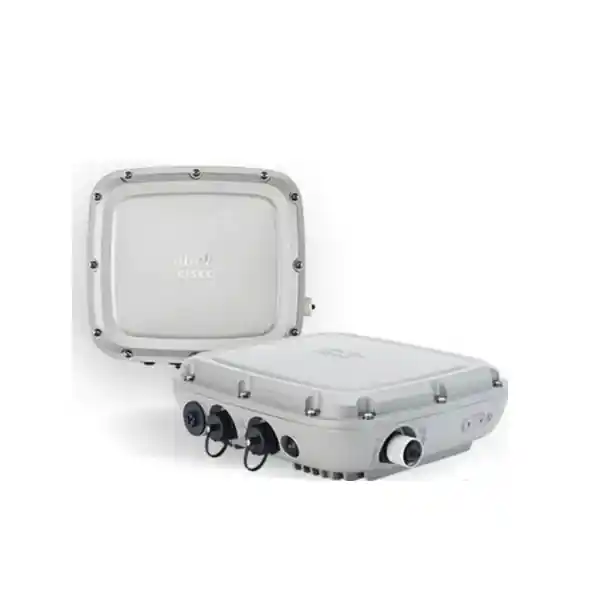
Cisco Catalyst C9124AXE outdoor wireless for sites that need antenna flexibility
The Cisco Catalyst C9124AXE is the external‑antenna model in the Catalyst 9124AX outdoor access point family. It is intended for enterprise and service-provider environments where reliable Wi‑Fi must extend beyond conventional indoor ceilings and where the antenna pattern needs to be selected for the actual site. Instead of locking the deployment into one built-in antenna shape, the C9124AXE provides six external antenna ports so the wireless design can use compatible Cisco antenna options selected around coverage direction, mounting height, distance, obstacles and client locations.
For buyers in Tanzania, this is a product to specify as part of a complete outdoor wireless design rather than as a stand-alone box. The access point, regulatory-domain code, antennas, RF accessories, mounting method, power source, switching, controller software and grounding approach all affect the final result. FourTeck Tanzania can use your project information to prepare a more accurate quotation and bill of materials, but the exact regional part number and accessories should be confirmed before ordering.
Choose the C9124AXE when you need rugged outdoor Wi‑Fi 6 plus deliberate antenna selection. If a simple built‑in omnidirectional or built‑in directional pattern is enough, another 9124AX model may simplify the installation. If you need external antennas, however, the AXE model gives the RF designer substantially more control over how coverage is shaped.
Quick product information
| Product family | Cisco Catalyst 9124AX Series outdoor access points |
|---|---|
| Model type | C9124AXE external-antenna outdoor access point; exact suffix depends on regulatory domain |
| Wireless generation | Wi‑Fi 6 / IEEE 802.11ax on 2.4 GHz and 5 GHz |
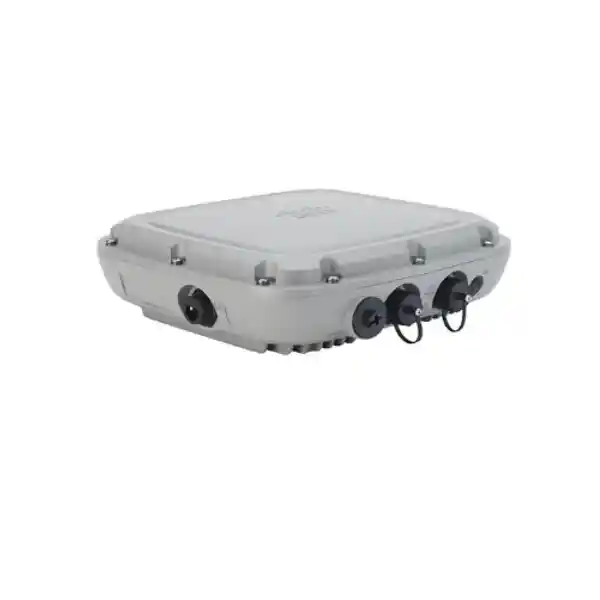
| Antenna interface | Six external N‑Female antenna ports; selected ports support Cisco Self‑Identifying Antennas |
| Primary wired uplink | 100/1000/2500BASE‑T multigigabit Ethernet |
| Additional interfaces | Gigabit Ethernet SFP, 10/100/1000 Ethernet downlink with conditional PoE‑out, RJ‑45 management console |
| Controller platform | Cisco Catalyst 9800 Series Wireless Controllers |
| Outdoor protection | IP66/IP67 enclosure rating |
| Operating temperature | -40°C to 65°C without solar loading; -40°C to 55°C with solar loading |
| Dimensions and weight | Approx. 25.9 × 23.3 × 8.1 cm; approximately 3.1 kg without mounting brackets |
The headline specifications are only the starting point. Power mode changes the available radio streams and wired features, and antenna choice changes the coverage pattern. For this reason, a quotation should confirm not only the access point itself but also the intended PoE or DC source, antenna set, cable or lightning-protection components, mounting hardware and controller environment.
Why external antennas matter on an outdoor access point
Outdoor wireless coverage is rarely uniform. A warehouse yard may require coverage along loading lanes rather than behind the building. A campus walkway may need a controlled pattern that follows pedestrian paths. A resort, school compound, logistics area or industrial site may have open spaces mixed with concrete walls, metal structures, trees, vehicles and changing client positions. In those environments, antenna selection can be as important as the access point radio itself.
The C9124AXE exposes six antenna ports. Four ports support both 2.4 GHz and 5 GHz, while two additional ports are dedicated to 5 GHz. Cisco documents compatible external antennas and supports Self‑Identifying Antenna functionality on designated ports. This allows a qualified wireless designer to select antenna characteristics that suit the deployment rather than accepting one fixed pattern. The access point is certified by Cisco for antenna gain up to 13 dBi on 2.4 GHz and 5 GHz, subject to the correct supported antenna, regulatory domain and local radio rules.
That flexibility also means the buying decision has more dependencies. “External antenna” does not mean that any antenna with the right connector should be attached. Antenna model, supported frequency bands, gain, cable loss, connector type, mounting orientation and the configured regulatory domain must be considered together. If remote antennas are used through RF cable, the design should also account for cable loss and appropriate surge or lightning protection. Cisco lists dedicated RF cables and a lightning arrestor option for relevant installations.
A practical procurement request should therefore include a simple site sketch or floor/site plan, proposed AP position, approximate mounting height, areas that must receive coverage, expected client types, any point-to-area or directional requirement, and whether the antennas will be installed directly on the AP or remotely. That information helps avoid a common mistake: ordering the correct access point but the wrong antenna system.
Wi‑Fi 6 radio design and capacity features
The Catalyst 9124AX family is based on Wi‑Fi 6, also known as IEEE 802.11ax. For enterprise networks, the important value of Wi‑Fi 6 is not simply a higher headline speed. The standard adds mechanisms intended to use shared airtime more efficiently when many clients and traffic types compete for the same radio resources. The C9124AXE supports uplink and downlink OFDMA, uplink and downlink MU‑MIMO, BSS coloring, Target Wake Time and beamforming capabilities associated with Cisco’s implementation.
OFDMA can divide a channel into smaller resource units so multiple client transmissions can be scheduled more efficiently. MU‑MIMO allows spatial streams to be used across multiple compatible clients. BSS coloring helps devices distinguish overlapping basic service sets so spectrum can be reused more effectively where neighboring cells are present. Target Wake Time can help compatible battery-powered clients spend more time sleeping between scheduled exchanges. These features are useful in mixed-device environments, but actual benefit depends on client support, RF conditions, channel design and the controller configuration.
The C9124AXE is unusual within the family because its radio architecture can operate in dual-radio or dynamic tri-radio modes. In dual-radio mode, Cisco documents concurrent 2.4 GHz and 5 GHz operation with up to 4×4 operation on each serving band. In tri-radio mode, the 5 GHz capacity can be divided across two 2×2 radios while the 2.4 GHz serving radio operates as 2×2 for the supported channel configuration. The design choice should be made based on channel availability, client distribution, interference, expected density and the controller design rather than simply enabling more radios because the option exists.
Cisco’s data sheet lists an aggregate 802.11ax PHY data rate up to 5.38 Gbps under the relevant channel configuration. That figure is a theoretical physical-layer rate, not a promise of application throughput for one user. Real throughput is lower and depends on factors including channel width, modulation, client capability, signal-to-noise ratio, retransmissions, interference, airtime contention, protocol overhead and the wired uplink. For purchasing decisions, it is better to size coverage and capacity around expected users and applications than around the maximum PHY figure.
The access point also includes Cisco RF ASIC capabilities used for spectrum intelligence and security-related functions, together with an integrated Bluetooth Low Energy/IoT radio. For organisations already using Cisco wireless operations tools, these capabilities can contribute to a broader managed architecture. Exact software features and entitlements should be checked against the intended Cisco IOS XE release, controller platform and licensing arrangement in the quotation.
Power planning is critical: not every PoE mode gives full capability
The power source is one of the most important design checks for the C9124AXE. The access point can accept 802.3af PoE, 802.3at PoE+, 802.3bt PoE++, Cisco UPOE or auxiliary DC power, but those inputs do not provide the same operating capability. A switch port that can make the AP boot is not automatically a switch port that can run the full radio and interface configuration.
| Power input | Practical effect | Planning note |
|---|---|---|
| 802.3af | Serving radios are disabled in Cisco’s reduced-power matrix. | Do not treat basic 802.3af as a normal production power target for this AP. |
| 802.3at PoE+ | Dual-radio operation is reduced to 2×2, mGig is limited to 1G, and SFP/PoE-out capability is restricted. | Suitable only after confirming that the reduced feature set matches the design. |
| 802.3bt / Cisco UPOE | Supports the higher-capability radio modes, 2.5G mGig and the broader interface feature set documented by Cisco. | Preferred when the project expects full wired and radio capability. |
| Auxiliary DC | Can support full capability when the DC source meets Cisco’s requirements. | Important for designs using the SFP uplink or separate outdoor power architecture; confirm exact supply and installation details. |
Cisco’s installation documentation gives a more detailed reduced-power matrix. It shows that full dual-radio 4×4 operation and 2.5 Gigabit Ethernet are available with the appropriate 802.3bt/UPOE or DC power arrangement, while lower-power modes remove features. In tri-radio mode, the higher-power input is also important. This is why an existing access switch must be checked by exact model, PoE standard, per-port budget and available system power before the AP is quoted as a drop-in replacement.
When planning a Tanzania deployment, include the existing switch model and available PoE budget in the request. If the site cannot supply the required power directly, Cisco offers power-injector options, but the injector choice affects Ethernet speed and installation design. Some outdoor 60 W injectors documented for the platform operate at Gigabit Ethernet rather than 2.5G mGig, so the complete path from switch to injector to AP should be reviewed rather than assuming every high-wattage injector preserves multigigabit throughput.
Wired interfaces, uplink choices and downstream connectivity
The main copper uplink is a 100/1000/2500BASE‑T multigigabit Ethernet interface. That 2.5G option is valuable because a modern Wi‑Fi 6 cell can generate more aggregate traffic than a traditional 1 Gigabit uplink can comfortably carry under some conditions. To benefit from the 2.5G path, however, the upstream switch must support a compatible multigigabit port and the AP must receive the power level required for mGig operation. A design with a 2.5G-capable access point connected to a 1G-only switch will still be constrained by the wired network.
The C9124AXE also includes a Gigabit Ethernet SFP interface and a separate 10/100/1000 Ethernet interface that can act as a downlink. Cisco documents conditional 802.3af-compliant PoE output on that downlink when the AP itself is powered by a suitable 802.3bt/UPOE source or an adequate DC source. This can be useful for selected designs, but it should not be assumed as always available because the feature is directly tied to the AP’s power budget.
If the project intends to use the SFP interface as the uplink, the powering architecture deserves particular attention. Cisco’s hardware guide notes specific constraints around the SFP port and DC power. The quotation should therefore state whether copper mGig or SFP is intended as the network uplink and how the AP will be powered. This avoids discovering during installation that the planned fiber handoff and PoE method are incompatible with the intended topology.
The access point also has an RJ‑45 management console port for installation and troubleshooting. Outdoor network designs should keep access to service points practical while preserving weather sealing. Unused ports must remain correctly sealed, and glands should match the cable type. Cisco specifically distinguishes the supplied CAT 5e gland from the orderable CAT 6/6A gland kit, so cabling selection should be included in the installation bill of materials rather than treated as a generic field detail.
Built for exposed environments
The C9124AXE is designed as an outdoor access point rather than an indoor AP placed inside a protective box. Cisco rates the enclosure IP66/IP67 and specifies operation from -40°C to 65°C without solar loading or -40°C to 55°C with solar loading. Cisco also documents operation in condensing humidity, resistance to sustained wind and wind gusts, corrosion testing, solar-radiation testing and vibration testing. These specifications support use in demanding installations, but good installation practice remains essential.
Outdoor reliability depends on more than the enclosure rating. The installer must preserve cable seals, use suitable outdoor-rated shielded cable, create proper drip loops where required, ground the AP correctly and protect remote antenna paths appropriately. Mounting hardware must be matched to the wall, pole or support structure and installed by personnel familiar with outdoor wireless, grounding and site safety. The antenna itself must also be suitable for the environmental exposure of the installation.
For Tanzania projects, climatic conditions can vary significantly by location and site type, so the product should be designed around the real environment rather than a national average. A coastal or industrial installation may raise different corrosion and mounting questions than a protected building compound. A high, exposed pole may require different attention to wind loading, grounding and serviceability than an AP installed under an eave. Those are site-engineering questions, not reasons to assume the AP will automatically succeed or fail in a particular city.
The C9124AXE’s approximately 3.1 kg device weight also matters when selecting brackets and supports. Cisco provides mounting options for vertical wall or pole installation for the AXE model, including a bracket variant designed to accommodate the AC/DC power supply. Confirm the bracket in the bill of materials; mounting hardware should not be presumed to be part of every order simply because the AP itself is designed for outdoor use.
Controller, software and enterprise management
Cisco lists the Catalyst 9800 Series Wireless Controllers as the supported WLAN controller family for the C9124AXE. This makes the product most relevant to organisations that already operate, or plan to operate, a Cisco Catalyst wireless architecture. A buyer replacing an older outdoor AP should therefore check controller compatibility and Cisco IOS XE release requirements rather than matching only the physical coverage role.
Cisco’s data sheet states that the C9124AXE requires Cisco IOS XE 17.6.2 or later as its baseline software support. In practice, the chosen release should also be checked against the controller hardware or virtual platform, the wider AP estate, feature requirements and Cisco’s current recommended software guidance. A network with mixed AP generations may need a release plan that balances new hardware support with the lifecycle and compatibility of existing devices.
The platform supports enterprise capabilities associated with Cisco DNA Software and Cisco’s wireless architecture, including integration paths for Cisco Spaces, Cisco Identity Services Engine and assurance/analytics functions where appropriately licensed and configured. Cisco’s current wireless ordering guidance states that Wi‑Fi 6 access points connecting to Catalyst 9800 Series Wireless Controllers require a Cisco DNA Software subscription, with Essentials and Advantage tiers available in supported subscription terms. The access point hardware purchase should therefore not be treated as the complete software entitlement. Licensing and subscription terms should be clearly identified in the commercial proposal so the buyer understands the full operational requirement.
Security capabilities include WPA3 support and WPA3‑Enterprise 192 support in the product’s 802.11ax feature set. The platform also incorporates Cisco Trust Anchor technologies such as image signing and secure boot as part of the Catalyst 9100 family security design. Actual network security still depends on how authentication, segmentation, controller policy, RADIUS/identity services, firmware maintenance and monitoring are configured.
For a new deployment, provide the current controller model, software release, existing AP families and intended licensing approach. If there is no existing Cisco wireless controller, state that clearly. The quote then needs to consider whether the project requires a controller platform and software subscriptions in addition to the access points. Treating the AP price as the entire wireless solution can leave a significant design gap.
Common business scenarios
Campus and compound coverage
Useful where outdoor paths, courtyards, perimeter areas or building-to-building spaces require enterprise Wi‑Fi and the antenna pattern needs to be chosen around the site layout.
Warehouses and logistics yards
Suitable for outdoor operational areas using handheld terminals, tablets, mobile workstations or other Wi‑Fi clients, subject to a proper RF survey and antenna design around metal, vehicles and changing stock.
Hospitality and public spaces
Can extend managed wireless into poolsides, gardens, external seating, walkways or event areas when the environment and client density are within the engineered design.
Industrial and utility sites
The rugged enclosure and external-antenna options can fit industrial outdoor networks, but hazardous-area requirements, special certifications or site-specific safety rules must be evaluated separately rather than assumed.
Education and healthcare grounds
A candidate for managed outdoor coverage between buildings or in open campus spaces where the organisation already uses Cisco enterprise wireless and requires consistent policy and controller management.
Targeted directional coverage
Especially relevant where a fixed built‑in antenna does not give the desired shape and the designer needs an approved directional or remote antenna arrangement to serve a defined zone.
These scenarios are examples, not automatic design approvals. Outdoor wireless is sensitive to mounting height, antenna pattern, line of sight, interference, client transmit power, channel plan and obstacles. A site survey or predictive design may be appropriate before final quantities are confirmed, especially where coverage is business-critical or the site has complex RF conditions.
How the C9124AXE compares with the other 9124AX outdoor models
The 9124AX family includes three main outdoor antenna approaches. The C9124AXI uses internal omnidirectional antennas. The C9124AXD uses internal directional antennas. The C9124AXE uses external antennas. All three belong to the same broader Wi‑Fi 6 outdoor family, but they solve different installation problems.
| Model | Antenna approach | Why choose it | Key trade-off |
|---|---|---|---|
| C9124AXI | Internal omnidirectional | Simpler installation where broad coverage around the AP is appropriate. | Less freedom to tailor or remotely place the antenna pattern. |
| C9124AXD | Internal directional | Useful when a directional pattern fits the target area and a self-contained unit is preferred. | The built-in directional pattern may not suit every geometry or mounting position. |
| C9124AXE | External antennas | Best when compatible antenna selection, antenna placement or RF pattern flexibility is a design requirement. | More components and more RF-design decisions must be correct. |
The most expensive or most flexible option is not automatically the best one. If the AP can be positioned where the built-in antenna pattern already matches the required coverage, an internal-antenna model may reduce installation complexity. Choose AXE when the external-antenna capability solves a specific coverage or mounting problem and when the project can support the additional antenna, RF accessory and installation planning.
What to include in a complete C9124AXE bill of materials
An outdoor AP quote is most useful when it lists the full installation scope rather than only the access point. Depending on the site, the required components may include several of the following items. The exact choice should be validated against Cisco ordering guidance and the site design.
- Correct C9124AXE regulatory-domain part number: the “x” suffix varies by regulatory domain, and Cisco requires country approval to be checked for the intended market.
- Compatible external antennas: selected for the bands, gain, coverage shape, mounting arrangement and supported Cisco configuration.
- RF cables where antennas are remote: cable length and loss must be included in the radio design, not added later without recalculation.
- Lightning or surge protection where required: Cisco lists an antenna lightning arrestor accessory for relevant remote-antenna arrangements, while site grounding must follow applicable installation requirements.
- Mounting bracket: for the AXE model, Cisco lists vertical mounting options including AIR‑MNT‑VERT1 and AIR‑MNT‑VERT2 configurations.
- Power architecture: 802.3bt/UPOE, suitable DC power or another validated arrangement if full AP capability is required.
- Cabling and glands: shielded outdoor-rated Ethernet and the correct gland kit for CAT 5e versus CAT 6/6A; fiber gland requirements if SFP is used.
- Upstream switching: confirm multigigabit support, VLAN design, PoE budget, uplink capacity and redundancy requirements.
- Catalyst 9800 controller and software: identify existing controller resources or include the required controller/licensing architecture if the project is new.
- Installation and survey scope: include mounting, grounding, weather sealing, cable routing, antenna alignment, testing and documentation as required by the project.
This checklist is intentionally broader than a conventional product listing because the C9124AXE is part of a system. Leaving antennas, brackets or power decisions until installation day can cause delays, reduced performance or expensive rework. A complete quote should make optional and required components clear before procurement approval.
Tanzania deployment and procurement guidance
For a Tanzania project, the exact regulatory-domain suffix is a mandatory procurement check. Cisco explicitly states that customers must verify whether the access point model is approved for use in the individual country and identify the corresponding regulatory domain. Because the generic C9124AXE name does not by itself identify that suffix, a quotation should not silently substitute a regional code. The exact orderable part number should be confirmed for Tanzania before the purchase order is released.
The same principle applies to antennas. Antenna gain and supported radio combinations interact with regulatory limits, so the final antenna set should be validated with the intended regulatory-domain configuration. A buyer who already has older Cisco outdoor antennas should provide the antenna part numbers rather than assuming they can be reused. Mechanical connector compatibility alone is not enough evidence of supported operation.
Power and cabling should also be reviewed against what is actually available at the site. If the AP will be connected to an existing Cisco or third-party switch, share the switch model and available PoE class. If a long copper run is planned, share the approximate cable distance and cable category. If fiber is required to reach the AP, state the fiber type, available SFP interfaces and planned local power arrangement. If an outdoor injector or AC/DC supply will be installed, the enclosure, grounding and local installation method must be suitable for the physical environment.
For multi-site projects, standardisation is valuable but should not erase site differences. One site may use a wall-mounted AP with directly attached antennas, while another requires a pole, remote antennas and a separate power source. Build a standard bill of materials for the common design, then document exceptions per location. This makes purchasing easier while preserving the technical details that installers need.
FourTeck Tanzania can prepare the enquiry around the exact requested model and can help identify the information needed for a complete quote. Stock, delivery schedule, support entitlement and commercial terms should be confirmed for the specific part numbers and quantity at quotation stage rather than inferred from this product page.
Site survey and design questions before you order
A well-designed outdoor Wi‑Fi network starts with questions that are easy to answer but often missing from a simple product enquiry. Before finalising quantity and antenna choice, document the practical requirement in enough detail for an RF designer or integrator to make informed decisions.
Mark where users actually need service and where coverage is unnecessary. Include outdoor dimensions, paths, yards, building faces and areas hidden by obstacles.
Estimate normal and peak devices, not just employee count. Events, shift changes or loading activity can create short periods of much higher wireless demand.
Identify voice, video, handheld scanning, standard internet access, tablets, IoT traffic or other business applications that may influence capacity and roaming design.
State the proposed wall, pole, mast or structure, mounting height, accessibility and whether the AP or antennas need to be placed away from the network handoff.
Provide switch model, PoE capability, cable type, fiber requirement, expected distance and whether DC power is available at the mounting location.
List controller model, IOS XE version, current AP families and licensing approach so compatibility and migration implications can be checked before ordering.
Client transmit power is especially important outdoors. A high-gain access point antenna may allow the AP signal to be heard far away, but the client still needs to transmit back successfully. Good outdoor design therefore considers both directions of the link and does not judge coverage only by how far the SSID can be seen on a phone.
Installation considerations that protect performance and serviceability
Cisco’s installation documentation calls for a site survey and proper preparation before mounting the AP. The supporting network should be configured, DHCP/controller discovery should be planned, and the installer should understand the mounting, bridging and grounding requirements. That preparation matters because outdoor troubleshooting is more costly once lifts, ladders, pole access or restricted areas are involved.
Use outdoor-rated shielded Ethernet cable and preserve weather seals at every cable entry. Cisco’s supplied CAT 5e gland is intended for CAT 5e cable; Cisco provides a separate orderable gland for CAT 6/6A. If the chosen cable diameter does not match the gland, weather sealing can be compromised even if the Ethernet link works initially. Cable routing should include appropriate strain relief and drip loops, and unused interfaces should remain sealed according to the installation guidance.
Grounding is a safety and reliability requirement, not a cosmetic accessory. The AP includes a grounding pad and Cisco supplies a ground lug kit, but the site grounding method and conductor must follow the applicable installation rules. Remote antennas and exposed RF cables may also need surge protection. For pole and rooftop deployments, involve personnel experienced with outdoor network installation rather than treating the work as a standard indoor AP swap.
Antenna placement should be documented after installation. Record antenna part numbers, orientation, cable lengths and the port connections used on the C9124AXE. This is especially valuable because some ports support both bands while the two additional ports are 5 GHz only, and designated ports support Self‑Identifying Antenna functionality. Accurate installation records reduce confusion during later troubleshooting or expansion.
After installation, validate more than simple connectivity. Check negotiated Ethernet speed, received power mode, AP radio state, controller join status, channel/power assignment, client association, roaming where relevant, application performance and coverage at the boundaries of the intended service area. A successful ping near the AP is not an acceptance test for an outdoor wireless design.
Important limitations and buying checks
The C9124AXE is a capable platform, but several limitations should be understood before procurement. First, it is a Wi‑Fi 6 product operating in 2.4 GHz and 5 GHz; it is not a 6 GHz Wi‑Fi 6E or Wi‑Fi 7 access point. If the project specifically requires 6 GHz spectrum or Wi‑Fi 7 features, the wireless platform should be reviewed rather than choosing this model solely because it is a rugged outdoor Catalyst AP.
Second, the external-antenna design increases flexibility but also increases design responsibility. Antennas, RF cables, arrestors and mounting parts may be separate order items. The page should not be read as a promise that every accessory shown in Cisco documentation is included with the access point. Confirm the exact bill of materials on the quotation.
Third, lower-power PoE modes reduce functionality. If the existing switch only provides 802.3at, the AP can run in a reduced dual-radio configuration, but it does not deliver the full 4×4/mGig feature set. Basic 802.3af leaves the serving radios disabled according to Cisco’s reduced-power matrix. Full expectations require a full-power design.
Fourth, outdoor range is not a fixed number. The correct range depends on antenna model and gain, antenna height, channel and transmit-power rules, client capability, noise, line of sight, obstacles and required data rate. A seller cannot responsibly promise a universal number of metres for all C9124AXE installations.
Finally, verify lifecycle, software release and security notices as part of operational planning. Cisco currently lists the Catalyst 9124AX Series as available to order, but product status and recommended software can change over time. The purchasing and network teams should use current Cisco guidance when the order is placed and when the AP is commissioned.
Frequently asked questions
Is the Cisco C9124AXE an indoor or outdoor access point?
It is an outdoor access point in the Catalyst 9124AX family. Cisco rates the enclosure IP66/IP67 and publishes outdoor environmental specifications for temperature, humidity, wind, corrosion, solar radiation and vibration.
Does the C9124AXE include built-in Wi‑Fi antennas?
The AXE model is designed for external Wi‑Fi antennas. It provides six external N‑Female antenna ports. Antenna selection is part of the system design and should use supported Cisco antenna options for the intended bands, gain and regulatory configuration.
How many spatial streams does the C9124AXE support?
In dual-radio mode, Cisco documents up to 4×4 operation for the 2.4 GHz and 5 GHz serving radios. The platform can also operate in a tri-radio mode that divides the serving radios differently, including two 2×2 5 GHz radios. Actual operation depends on power mode, channel configuration and controller design.
Will a normal PoE+ switch power it?
802.3at PoE+ can power a reduced dual-radio configuration, but the AP is limited compared with the full-power mode. Cisco’s matrix shows 2×2 radios and 1G Ethernet under 802.3at. If you require full radio capability and 2.5G mGig, plan for the appropriate 802.3bt/UPOE or DC arrangement.
Can it use a fiber uplink?
The AP includes a Gigabit Ethernet SFP interface. If the design intends to use it, confirm the supported SFP, gland/weatherproofing requirements and DC-power arrangement described in Cisco’s installation guidance. Do not assume the same topology as the copper PoE-in interface.
Which controller manages the C9124AXE?
Cisco lists Catalyst 9800 Series Wireless Controllers as the supported WLAN controller family. The controller model, IOS XE release and licensing should be checked against the rest of the wireless estate before purchase.
Is it Wi‑Fi 6E?
No. The C9124AXE is a Wi‑Fi 6 / 802.11ax access point using 2.4 GHz and 5 GHz. If 6 GHz operation is a requirement, review a platform designed for Wi‑Fi 6E or newer outdoor wireless requirements.
Can I reuse an antenna from an older Cisco outdoor AP?
Only after compatibility is confirmed for the exact antenna part number, bands, gain, connector arrangement and regulatory-domain configuration. Physical connector fit alone is not enough to establish that an antenna is supported for the C9124AXE.
What is the maximum outdoor range?
There is no single responsible range figure for every deployment. Range depends heavily on antenna choice, local power limits, mounting height, interference, obstacles, required throughput and client transmit capability. Use a survey or engineered coverage model for business-critical projects.
Is the mounting bracket included?
Do not assume so. Cisco provides orderable mounting options for the 9124AX family, and the quotation should state the selected bracket explicitly. For the AXE model, vertical mounting options are documented for wall or pole installations.
What information should I send for a Tanzania quote?
Provide quantity, deployment location, coverage area, AP mounting height, client estimate, application types, preferred antenna style if known, switch model and PoE capability, copper or fiber uplink requirement, existing Catalyst 9800 controller details and any required installation scope. This helps the quote include the correct AP suffix and supporting components.
Request a Cisco C9124AXE project quote for Tanzania
For the most useful quotation, send the required quantity together with a short description of the outdoor area, proposed mounting location, expected client count, existing switch model, PoE capability, copper or fiber uplink preference and current Cisco wireless controller environment. If you already know the antenna or bracket part numbers, include them; otherwise, describe the coverage shape you need.
The final quote should confirm the exact Tanzania-appropriate regulatory-domain part number, antennas, mounting hardware, power method, cabling accessories, controller/software requirements and any installation items. Price, stock, delivery timing and support terms should be confirmed for the exact bill of materials at quotation stage.
Product specification summary
Cisco Catalyst C9124AXE is an external-antenna Wi‑Fi 6 outdoor access point in the Catalyst 9124AX Series. It supports 2.4 GHz and 5 GHz 802.11ax, uplink/downlink OFDMA and MU‑MIMO, six external antenna ports, 2.5 Gigabit multigigabit Ethernet, Gigabit Ethernet SFP, a Gigabit downlink interface with conditional PoE-out, integrated BLE/IoT capability, IP66/IP67 environmental protection and management through Cisco Catalyst 9800 Series Wireless Controllers. Cisco documents an operating range down to -40°C and up to 65°C without solar loading or 55°C with solar loading.
The generic C9124AXE name is not a complete order code because the final suffix represents the regulatory domain. Verify the exact part number and country approval before ordering for Tanzania. Full feature operation also depends on adequate power; lower PoE modes reduce or disable serving-radio and interface capability. Use this product as part of a designed outdoor wireless solution with compatible antennas, appropriate mounting and grounding, suitable switching and the required controller/software environment.




Reviews
There are no reviews yet.