
Industrial wireless for demanding outdoor networks
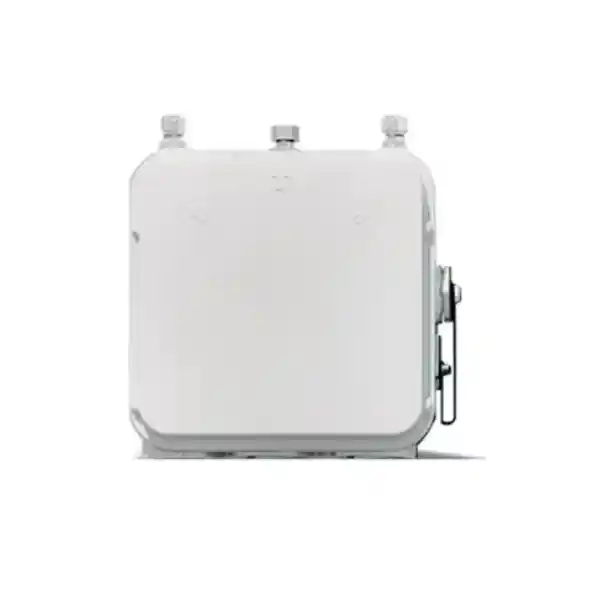
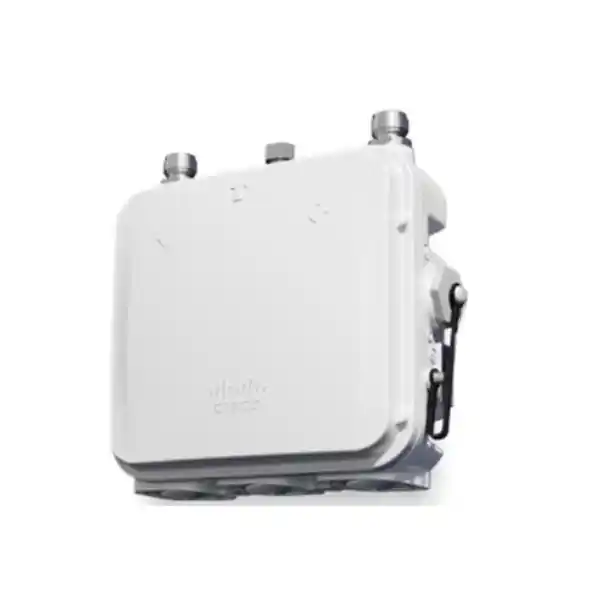
Cisco Catalyst IW9165D Heavy Duty Industrial Access Point
The Cisco Catalyst IW9165D is built for organisations that need to extend reliable wireless connectivity where conventional indoor access points are not appropriate and where running fibre may be difficult, expensive or operationally disruptive. It combines rugged outdoor construction, directional wireless capability, modern Wi‑Fi 6/6E radio technology and Cisco Ultra-Reliable Wireless Backhaul options in a platform designed for industrial and mission-critical networking.
For a Tanzania deployment, the important question is not simply whether the IW9165D is powerful enough. The design must also match the intended operating mode, permitted regulatory domain, antenna plan, power source, mounting location, required Ethernet interfaces and the applications that will cross the wireless link. FourTeck can use those project details to help prepare a configuration and quotation request without assuming local stock, price, lead time or regulatory approval.
Quick fit: when the IW9165D makes sense
Outdoor point-to-point or point-to-multipoint
A built-in directional antenna and optional external antenna connections make the platform suitable for engineered wireless links between buildings, yards, process areas, wayside locations or remote assets.
Industrial backhaul
URWB software is intended for high-reliability backhaul use cases, including environments with mobile equipment or network paths where wired fibre is impractical.
Rugged exposed installations
The IP66/IP67-rated enclosure, wide temperature range and pole-mount orientation are designed for demanding outdoor conditions when the unit is installed according to Cisco requirements.
Modern 5/6 GHz designs
The IW9165D uses two 2×2 radios for 5 GHz and 5/6 GHz operation. It does not include a 2.4 GHz radio, so legacy 2.4 GHz client coverage should not be part of the requirement.
Key technical points at a glance
| Wireless architecture | Two 2×2 data radios: one 5 GHz radio and one 5/6 GHz radio; Wi‑Fi 6/6E-ready subject to local spectrum approval. |
| Built-in directional antenna | 15 dBi peak gain, dual polarization, 30° azimuth and 30° elevation beamwidth, specified across 4900–5925 MHz. |
| External antenna connectivity | Two N-Type antenna ports plus a TNC GNSS antenna port; approved antenna selection depends on regulatory and deployment requirements. |
| Wired interfaces | One 100M/1G/2.5G Multigigabit Ethernet interface and one 100M/1G Ethernet interface, with optional M12 adaptation. |
| Power | 24–48 VDC or supported PoE methods. Cisco specifies a 20 W power budget on 24–48 VDC or 802.3at PoE+ for full 2×2 operation. |
| Environmental rating | EN/IEC 60529 IP66 and IP67; correct cable glands or M12 adapters are required on Ethernet and power interfaces to maintain IP67. |
| Physical format | Approximately 18.3 × 9.1 × 18.0 cm and 2.0 kg, with pole mounting and adjustable tilt/slant options. |
What the Cisco Catalyst IW9165D is designed to do
The IW9165D sits in Cisco’s industrial wireless portfolio as a heavy-duty access point focused on outdoor and industrial connectivity. Cisco positions it for fixed wireless infrastructure, backhaul and mobile-asset connectivity, with a built-in directional antenna that can simplify long-range link design where a directional pattern is appropriate. The same enclosure also provides external antenna ports so designers are not locked into a single radiation pattern for every project.
That combination matters in industrial projects because “wireless coverage” can mean several different things. A conventional office access point normally concentrates on providing nearby user devices with general Wi‑Fi service. An industrial backhaul device may instead need to connect two network segments across an open area, carry traffic from moving machinery, bridge a section where fibre cannot be installed, or support a resilient radio topology around operational equipment. The IW9165D is much closer to that second category, although Cisco also provides a Wi‑Fi AP software option for the hardware.
The platform therefore needs to be specified as part of a network design rather than purchased only by model name. The required order code and software mode depend on the planned radio technology and regulatory domain. For Tanzania projects, a useful quotation request should identify whether the requirement is ordinary Wi‑Fi access, fixed wireless backhaul, point-to-point, point-to-multipoint, mesh, or mobility-oriented URWB. That distinction drives licensing, software, antenna and commissioning decisions.
Important limitation: no 2.4 GHz radio
Cisco’s current configuration documentation states that the IW9165D does not support a 2.4 GHz radio. This is a major selection point. If the site must directly serve older 2.4 GHz-only scanners, handheld devices, sensors or guest clients, a different or additional access-point design may be required. The IW9165D should be evaluated as a 5 GHz / 5-or-6 GHz industrial platform, with any 6 GHz operation dependent on the country’s regulatory approval and the correct approved configuration.
Wi‑Fi 6/6E radio architecture
The IW9165 family uses two 2×2 data radios. Cisco specifies one 5 GHz radio supporting 20, 40 and 80 MHz channel widths, and one 5/6 GHz radio supporting 20, 40, 80 and 160 MHz channel widths. This architecture gives network designers flexibility to separate roles or make use of wider channels where the regulatory environment, interference conditions and link budget justify them. The fact that a device can technically support a wide channel does not mean the widest channel should always be selected; in industrial networks, reliability, spectrum reuse, interference and predictable coverage can be more important than maximum headline bandwidth.
Wi‑Fi 6, based on IEEE 802.11ax, improves efficiency compared with earlier Wi‑Fi generations and supports the IW9165D’s 2×2 MIMO architecture. Wi‑Fi 6E extends Wi‑Fi 6 operation into the 6 GHz band, but Cisco explicitly makes 6 GHz availability subject to each country’s approval. For Tanzanian deployments, procurement and design should therefore avoid assuming that every international 6 GHz configuration can be used locally. Confirm the regulatory domain, permitted frequencies, selected antenna and software settings for the actual project before deployment.
The built-in directional antenna is another important engineering characteristic. Cisco specifies 15 dBi peak gain, dual polarization and approximately 30-degree beamwidth in both azimuth and elevation across 4900–5925 MHz. A directional antenna concentrates energy into a narrower coverage area than a general omnidirectional antenna. This can be useful for building-to-building links, yard coverage from a defined mounting point, corridor-style coverage and targeted backhaul, but it also means orientation matters. Physical alignment, height, obstructions, Fresnel-zone clearance and the movement path of mobile assets can strongly affect performance.
Two external N-Type antenna ports provide another design path when the integrated directional pattern does not match the application. This gives integrators the ability to select a compatible external antenna for the required topology. Antenna choice should be treated as part of the radio design and not as an interchangeable accessory decision: frequency support, connector type, gain, regulatory limits, cable loss, mounting and environmental exposure all need to be checked together.
Wi‑Fi AP mode versus Ultra-Reliable Wireless Backhaul
One of the most useful aspects of the IW9165D family is that Cisco supports more than one operational approach on the hardware. The Wi‑Fi AP option uses Cisco IOS XE software and integrates into Cisco enterprise wireless architecture. The URWB option uses Cisco Unified Industrial Wireless software for industrial backhaul. Choosing between them should begin with the traffic and mobility requirement, not simply a preference for one management interface.
Choose Wi‑Fi AP mode when
The project needs the IW9165D to participate as an industrial access point in a Cisco wireless environment, and the planned clients, controller design, software release and licensing align with that architecture. This can be useful when an organisation wants a rugged outdoor AP form factor while maintaining Cisco enterprise wireless operations.
Choose URWB when
The priority is industrial wireless backhaul, especially for fixed infrastructure, moving assets or paths where reliable low-latency handoff and resilient connectivity are central to the application. Cisco positions URWB for mission-critical operations and for extending networks where fibre is not feasible or economical.
Cisco describes URWB as providing high availability, very low latency and seamless handoffs, and its published IW9165 material discusses MultiPath Operations for additional resilience in URWB mode. Those capabilities are most valuable when the application has a clear operational reason for them: for example, traffic from automated equipment, industrial control-adjacent systems, mobile video, or other workloads where unstable handoff or intermittent backhaul could disrupt operations. They should not be used as a substitute for proper RF planning, redundancy design or application testing.
The software image and licence package are therefore commercial as well as technical decisions. Cisco’s current data sheet lists Industrial Wireless Cisco DNA Essentials and Advantage options for Wi‑Fi licensing, while standalone URWB has Network Essentials, Network Advantage and Network Premier licence options plus service tiers. The correct combination depends on required features and deployment architecture. A quotation should identify the intended software mode and licence level so the hardware is not priced without the software dependencies needed to operate it as planned.
Ethernet and power planning
The IW9165D provides one Multigigabit Ethernet interface supporting 100 Mbps, 1 Gbps and 2.5 Gbps operation and a second Ethernet interface supporting 100 Mbps and 1 Gbps. This is useful for industrial designs that need a faster wired uplink while retaining a secondary wired connection, but the actual port role depends on the selected software mode and configuration. Cisco’s current CAPWAP documentation identifies the multigigabit interface as the uplink in common AP modes.
Power selection affects capability. Cisco’s data sheet lists a 20 W power budget with 24–48 VDC or 802.3at PoE+, maintaining 2×2 operation on both data radios and 2.5 Gbps Multigigabit Ethernet with the secondary 1 Gigabit interface available. Under 802.3af PoE, the published table shows a reduced 12.95 W budget, 1×1 radio operation, a 1 Gbps multigigabit-port rate and the secondary 1 Gigabit interface unavailable. In other words, “the AP powers on” is not the same as “the AP operates with the intended feature set.”
For project design, verify the upstream switch or injector, cable distance, cable category, surge environment and power redundancy strategy. Where DC power is used, confirm the available voltage range and installation method. Where PoE is used, check the actual power available at the device after cable loss, not only the nominal switch specification. Cisco notes that power required at the power-sourcing equipment can depend on cable length and environmental factors.
The weather sealing around these interfaces is equally important. Cisco specifies that PG 13.5 glands or M12 adapters must be used with Ethernet and power interfaces to meet the IP67 rating. This means the enclosure rating should never be treated as independent of the cable-entry components and installation workmanship. Outdoor network reliability often fails at connectors, grounding, surge protection or sealing rather than at the radio itself.
Rugged design for exposed industrial environments
Cisco lists the IW9165D with EN/IEC 60529 IP66 and IP67 environmental ratings. In practical terms, this makes the platform appropriate for carefully engineered deployments where dust, rain and outdoor exposure are expected. It does not remove the need for correct mounting, sealing, cable preparation, grounding and lightning protection. The installation should be designed as a complete outdoor system rather than as a sealed box attached to an unprotected cable run.
The published operating range is also designed for demanding conditions. Cisco specifies operation from -40°C to +60°C with solar load and still air. An extended DC-powered operating range of -50°C to +75°C is listed without solar loading and in still air, with cold start limited to -40°C. The data sheet also specifies 0% to 95% non-condensing operating humidity, operating altitude up to 4,500 metres and sustained wind resistance up to 257 km/h. These figures are useful for engineering review, but local installation conditions such as direct sun, cabinet effects, mounting surface temperature and exposure still need to be considered.
The unit weighs about 2.0 kg and measures approximately 18.3 cm wide, 9.1 cm long and 18.0 cm high. Cisco lists pole mounting with vertical tilt and slant adjustment. For a directional link, mounting stiffness and repeatable antenna alignment matter because a narrow beam can lose performance if the bracket moves, twists or is installed on an unsuitable pole. Wind loading should therefore be considered together with mounting hardware and antenna orientation.
For Tanzania projects in industrial yards, logistics sites, utilities, large compounds, transport infrastructure, mining-related operations or remote process areas, these environmental characteristics can be useful, but the final suitability still depends on the exact site. Salt exposure, corrosive atmospheres, lightning risk, dust type, hazardous-area classification and access for maintenance are examples of factors that may require additional engineering or a different certified product.
Security foundation and device visibility
Cisco’s IW9165 Series documentation highlights Trust Anchor technologies intended to help protect hardware and software authenticity. The listed capabilities include image signing, Secure Boot and a Cisco Trust Anchor module. For industrial networks, this hardware-rooted security foundation is relevant because wireless infrastructure may be installed in exposed or distributed locations where physical access is harder to control than in a data centre or office communications room.
The platform also includes GNSS functionality that can provide device coordinates and integrated Bluetooth Low Energy hardware for location-related use cases. Cisco’s current data sheet flags Bluetooth 5 functionality as dependent on a future software upgrade, so a project should verify software support before specifying BLE as an active requirement. These capabilities should be enabled and integrated only where the planned software mode, privacy requirements and operational architecture call for them.
Security planning should extend beyond the access point. Define how the device will be managed, which controller or management platform will be used, how administrative access is protected, how software images will be maintained, how credentials and certificates are handled, and how configuration backups are controlled. Segmentation, firewall policy and application traffic paths should be part of the same design. In an industrial environment, the wireless layer is one component of a larger operational network, not a stand-alone security boundary.
Tanzania deployment planning: questions to answer before ordering
A successful IW9165D project starts with the site and application. The following design questions help turn a model request into an implementable bill of materials. They are especially important for a product that combines multiple radio modes, regulatory variants, directional antennas and industrial power options.
1. What is the link doing?
State whether the requirement is client Wi‑Fi, building-to-building backhaul, point-to-multipoint distribution, mesh, mobile-asset connectivity or a resilient industrial path. The answer determines software mode and topology.
2. Which band is required?
Plan for 5 GHz and only use 6 GHz where the regulatory domain, country rules, antenna and software configuration permit it. Do not specify the IW9165D for 2.4 GHz client service.
3. What is the path profile?
Document distance, mounting heights, terrain, buildings, vegetation, moving vehicles and other obstructions. A clear line of sight alone may not be enough; the radio path and Fresnel clearance should be assessed.
4. Is the integrated antenna suitable?
The 15 dBi directional pattern is useful for targeted links, but some sites may need approved external sector, horn, panel or other antenna options. Antenna selection changes coverage and link budget.
5. How will the AP be powered?
Confirm 24–48 VDC, PoE+ or another supported method and verify the available power budget. Avoid designing for full radio capability if only 802.3af power is available.
6. How will the outdoor interfaces be protected?
Specify the correct glands or M12 adapters, suitable outdoor cable, grounding, surge protection and installation materials. The IP rating depends on correct interface sealing.
7. What software and licences are required?
Identify Wi‑Fi AP or URWB operation, the management architecture, required licence tier and software compatibility before the commercial quote is finalised.
8. What applications depend on the link?
List video, telemetry, control traffic, voice, enterprise data or other workloads. Define required throughput, latency, availability, roaming behaviour and acceptable outage impact.
Why a site survey and link design still matter
Industrial wireless hardware can be rugged and high-performing while still producing disappointing results if it is installed without RF planning. Cisco recommends preinstallation planning and site-survey work. For directional backhaul, the design should include mounting coordinates, height, distance, antenna orientation, channel plan, expected interference, cable route, grounding and power. For mobile use, the path should be evaluated along the route rather than only at one static location.
Where the application is operationally critical, validate the proposed design under realistic traffic and environmental conditions before treating the wireless link as production-ready. This is particularly important when the link will replace fibre, support moving equipment or carry traffic that is sensitive to roaming interruption. The IW9165D provides the radio platform; application resilience still depends on the complete architecture.
Common business and industrial scenarios
Building-to-building network extension
Use a directional link to connect a remote building, workshop, gatehouse or service area where trenching fibre is not practical. The design should confirm distance, line of sight, interference and redundancy expectations.
Yard and campus backhaul
Distribute network connectivity across a large outdoor compound using point-to-point, point-to-multipoint or mesh designs where the chosen software mode and radio plan support the required architecture.
Mobile industrial assets
URWB can be considered for moving vehicles or machines where seamless wireless handoff and resilient backhaul are important. The route, handoff zones, latency requirement and client-side architecture should be engineered together.
Remote cameras and operational data
A wireless backhaul path may carry surveillance, telemetry or other IP traffic from a remote area. Required bandwidth should be calculated from real workloads, and surge protection plus power continuity should be designed at the edge.
Temporary or difficult civil works
Where fibre construction would create significant civil work, operational interruption or cost, an engineered wireless link can provide an alternative. Suitability should still be based on long-term capacity and reliability needs.
Rugged outdoor Wi‑Fi
In Wi‑Fi AP mode, the IW9165D can serve as a rugged Cisco access point for compatible 5/6 GHz client environments. It should not be selected where 2.4 GHz service is a requirement.
How to choose between integrated and external antennas
The integrated directional antenna is one of the IW9165D’s strongest differentiators because it can reduce the number of separate radio components required for a targeted link. With 15 dBi peak gain and a 30-degree beamwidth, it is suited to scenarios where the designer wants energy concentrated toward a defined area or counterpart radio. This can simplify the physical bill of materials and make the enclosure attractive for repeatable outdoor deployments.
External antennas become valuable when the desired coverage shape differs from that built-in pattern. A sector design may need wider horizontal coverage. A horn antenna may be useful where controlled coverage and reduced interference between nearby links are priorities. Other directional patterns may be better for a specific distance or mounting geometry. The external N-Type connections give the designer options, but the selected antenna must be supported for the product, suitable for the frequency band and allowed under the regulatory domain.
Cable loss also matters. Long RF jumper runs can reduce the benefit of antenna gain, especially at higher frequencies. A better design is often to place the radio close to the antenna and extend Ethernet or fibre elsewhere in the network rather than run unnecessary RF cable. Outdoor connectors should be weatherproofed using approved practices, and mounting should prevent water ingress or cable strain.
Software, licensing and lifecycle considerations
Cisco lists separate minimum software families for the IW9165D’s URWB and Wi‑Fi AP operation. The data sheet identifies Cisco Unified Industrial Wireless software for the URWB version and Cisco IOS XE for the AP version. Because feature support evolves across releases, project documentation should record the intended software train, controller compatibility and any feature dependencies rather than assuming that every capability is available in every release.
Licensing should be requested at the same time as the hardware. For Wi‑Fi, Cisco lists Industrial Wireless Cisco DNA Essentials and Advantage licences. For standalone URWB, Cisco publishes Network Essentials, Network Advantage and Network Premier choices, along with industrial wireless service options. The correct licence is driven by required functionality and support model. A buyer should ask for hardware, licence term or entitlement, required accessories and support assumptions to be itemised on the quotation.
Cisco currently lists the IW9165D product line as available to order. That vendor status does not establish local Tanzania stock, delivery time or project availability. Commercial availability can vary by exact regulatory-domain part number, licence, antenna, accessories, order quantity and supply route. Confirm the final part numbers before purchase and avoid substituting an apparently similar regional code without checking country approval.
Procurement checklist for a useful quote
To obtain a more accurate Cisco IW9165D quotation for Tanzania, provide as much of the following information as possible. If some details are not yet known, they can be treated as design questions rather than guessed.
- Required quantity and project destination in Tanzania.
- Wi‑Fi AP or URWB requirement, including whether the design is fixed or supports moving assets.
- Link topology: point-to-point, point-to-multipoint, mesh or local client access.
- Approximate link distances, mounting heights and any known obstructions.
- Expected application traffic, throughput and latency requirements.
- Existing Cisco wireless controllers, switching, management platform and software versions.
- Power method: DC, PoE+ or other supported infrastructure, including switch or injector model if known.
- Integrated directional antenna versus external antenna requirement.
- Required outdoor cabling, M12 adapters, glands, mounting hardware, surge protection and grounding scope.
- Any regulatory, security, documentation, testing or handover requirements for the project.
Frequently asked questions
Is the Cisco Catalyst IW9165D a normal outdoor Wi‑Fi access point?
It can operate as a Cisco Wi‑Fi access point with the appropriate software, but its design is strongly oriented toward industrial and outdoor backhaul use. The built-in directional antenna, URWB option, rugged enclosure and targeted 5/6 GHz architecture distinguish it from general outdoor Wi‑Fi products designed primarily for broad omnidirectional client coverage. Select it when those industrial characteristics match the network requirement.
Does the IW9165D support 2.4 GHz Wi‑Fi?
No. Cisco’s current configuration guide states that the IW9165D does not support a 2.4 GHz radio. This is important for sites with legacy 2.4 GHz-only devices. If those clients must connect directly, the wireless design should include another compatible access point or a different model that supports the required band.
Can the IW9165D use 6 GHz in Tanzania?
The hardware is Wi‑Fi 6E-ready and the second radio supports 5/6 GHz operation, but Cisco states that 6 GHz availability is subject to each country’s regulatory approval. Do not assume that a 6 GHz configuration used in another country is automatically permitted in Tanzania. Confirm the correct regulatory domain, frequencies, antenna and current local requirements for the project before enabling or purchasing around 6 GHz operation.
What is URWB and why would I choose it?
Cisco Ultra-Reliable Wireless Backhaul is designed for highly reliable industrial wireless connectivity, including moving assets and network extensions where fibre is difficult or uneconomical. Cisco positions it for seamless handoffs and very low latency, with additional resilience features available in URWB operation. It is appropriate when the use case is industrial backhaul rather than ordinary office Wi‑Fi and when the application requirements justify the architecture.
Can I power the IW9165D with standard PoE?
Cisco lists 802.3af PoE support, but the published power table shows reduced capability at that power level: the radios operate as 1×1, the multigigabit port operates at 1 Gbps and the secondary 1 Gigabit Ethernet port is unavailable. For the full 2×2 radio configuration and 2.5 Gbps Ethernet capability, Cisco lists a 20 W budget with 802.3at PoE+ or 24–48 VDC. Power should therefore be designed around the required feature set, not simply electrical compatibility.
Is the IW9165D waterproof?
Cisco specifies IP66 and IP67 environmental ratings under EN/IEC 60529, but installation details matter. The data sheet states that appropriate PG 13.5 glands or M12 adapters must be used with Ethernet and power interfaces to meet IP67. Outdoor cable entries, grounding and connector sealing should be included in the installation scope rather than assumed to be automatic from the enclosure rating.
Does the built-in directional antenna remove the need for RF planning?
No. A directional antenna can simplify some link designs, but it increases the importance of correct orientation and path planning. Distance, obstructions, Fresnel clearance, interference, mounting stability, channel selection and counterpart antenna design all affect performance. A site survey or engineered link assessment is recommended for important industrial or backhaul deployments.
What should I send FourTeck for a Cisco IW9165D quote?
Send the quantity, Tanzania destination, intended operating mode, link topology, approximate distances, mounting locations, desired antenna approach, power source, required accessories, existing Cisco environment and application requirements. If the exact regulatory-domain part number or licence is not known, provide the site and technical requirement so the configuration can be reviewed before the quote is finalised.
Request a Cisco IW9165D configuration review
If your project needs rugged outdoor Wi‑Fi or industrial wireless backhaul in Tanzania, share the site requirement rather than only the product name. A useful review can confirm the intended Wi‑Fi or URWB mode, regulatory-domain requirement, antenna approach, power method, licensing and installation accessories before the commercial bill of materials is prepared.
Provide the link purpose, quantity, location, approximate distance, power source and existing network details to start a project-specific quotation.




Reviews
There are no reviews yet.