
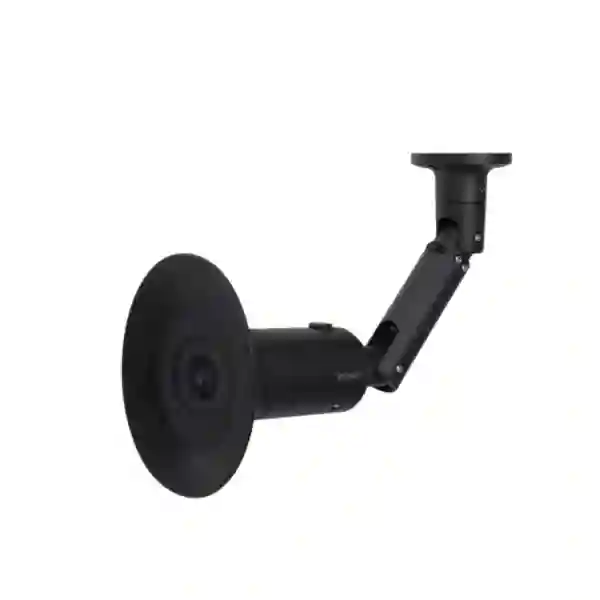
GLASS-FACING IP CAMERA · TANZANIA PRODUCT GUIDE
Hanwha TNO-6010M 2MP Glass-Facing Network Camera
Need a forward-facing security view through a windscreen or fixed glass panel? This specialist Full HD camera combines a reflection-reducing hood, adjustable mount, wide-angle 2.8mm lens, 150dB WDR and rugged construction. It is intended for carefully planned vehicle and sheltered glass-facing installations, not for thermal imaging.
For Tanzania projects, request a compatibility and accessory review before purchasing. The M12 PoE connection, mounting position, recorder and glass conditions should all be verified; local stock and pricing are not confirmed on this page.
Key specifications at a glance
Figures above refer to manufacturer product specifications. Actual suitability, configuration, connected accessories and supported functions should be checked for the project.
What this specialist camera is designed to solve
Recording a useful view through a vehicle windscreen or another fixed glass panel presents a different challenge from mounting an ordinary CCTV camera on a wall. Reflections from dashboard lights, changing daylight, vibrations and limited mounting space can make footage difficult to interpret. The Hanwha TNO-6010M addresses this particular installation problem with a glass-facing housing arrangement, adjustable mounting hardware and image-processing features suited to demanding forward-facing views. It is a visible-light network camera, not a thermal sensor or a device for measuring temperature.
Its clearest fit is an engineered video-surveillance project where a camera must look out through a window while remaining positioned securely behind it. Typical applications cited by the manufacturer include vehicle windscreens and banking drive-up monitoring. For a Tanzania deployment, a buyer should begin with the glass geometry, intended view, recorder connection and operating environment rather than selecting a camera by megapixel count alone. The right result depends on the complete installation, not on any single specification.
Who should evaluate the TNO-6010M
Fleet integrators, transport security teams, system consultants and operators responsible for fixed viewing positions behind glass are the natural audiences for this model. It may be considered when a front-facing image is needed for incident review, operational context or the documentation of activity visible outside a vehicle. A secure window in a drive-through or a similar protected viewing station can also make use of its specialist hood and adjustable mounting design, provided dimensions and camera positioning are checked first.
The camera is less suitable as a universal replacement for every indoor dome or outdoor bullet camera. A site that requires optical zoom, a narrower long-distance view, onboard infrared lighting, thermal imaging or direct wireless networking should compare other camera classes. Likewise, installation behind deeply tinted, heated or highly reflective glass should be tested with the actual glazing. Identifying these limitations during specification is more useful than discovering them after mounting, cabling and recorder configuration have been completed.
Full HD recording with a high frame-rate option
The 1/2.8-inch CMOS sensor supports Full HD 1920 × 1080 video. Hanwha specifies a maximum of 60 frames per second for H.265 and H.264 in 60Hz operation, with a 50fps option in 50Hz operation. Higher frame rates can help provide more temporal detail when vehicles, people or surrounding scenes are moving. That does not guarantee readable number plates or identification at every speed: shutter settings, illumination, viewing distance and image scale still determine what can be resolved.
Select frame rate alongside your operational goal. Continuous situational recording may not need the maximum frame rate, while a fast-changing scene could justify it if the recorder and storage system can accommodate the resulting workload. Evaluate a sample at the proposed resolution, compression, exposure and lighting conditions. Confirm the real event you need to see, rather than assuming that a headline frame-rate figure will produce the necessary evidence under all conditions or through every type of window.
Wide 2.8mm fixed lens and scene coverage
The built-in 2.8mm fixed lens offers a horizontal field of view of 113.7 degrees, a vertical field of view of 61.5 degrees and a diagonal field of view of 134.5 degrees. This is useful for seeing a broad forward scene without relying on a motorised zoom mechanism. A wide angle can capture road context, gate approaches and activity spread across the front of a vehicle, but objects at the far end of the scene occupy fewer pixels than they would with a narrower lens.
Survey where the camera will sit and what must actually appear in the frame. Decide whether the goal is broad overview, near-field activity or identification at a specific distance. The manufacturer lists manual focus, so installation should include focus verification at the expected subject distances. Do not equate a 2.8mm lens with a universal viewing distance. Document the intended capture area, likely obstructions, the shape of the glass and the position of objects close to the camera before fixing the mount.
Glass-facing hood and reflection management
The manufacturer describes a lens hood intended to reduce reflections from glass, with ventilation holes intended to limit condensation buildup. This matters when a bright dashboard, cabin display or internal room lighting reflects toward the lens. Correct placement can help the camera look through the window rather than recording the room or cabin reflected in it. The hood is part of the product’s specific value proposition; it is not simply a cosmetic cover around a standard surveillance lens.
A hood cannot eliminate every reflection. Curved glass, heavy tint, dirty glass, scratched coatings and strong light sources at certain angles can still interfere with the image. An installer should test daytime and nighttime conditions, including interior lighting that may be switched on after dark. Keep the hood appropriately positioned, avoid obstructing its ventilation features and check the manufacturer’s mounting guidance. A small change in contact position or alignment can materially change the view through the glass.
Adjustable mount and mechanical security
The assembly has an adjustable length and dual-joint configuration to help fit the camera to a mounting position and front glass. Hanwha also identifies serrations and Nylock hardware designed to reduce unwanted loosening in harsh environments. These features make the model relevant to installations where vibration and a fixed viewing angle both matter. The goal is to set the camera correctly once and keep the optical axis as consistent as practical during normal operation.
Before installation, measure clearance around any windscreen trim, vehicle controls, mirrors, shading bands, sun visors or protected glass frame. Check whether the chosen location provides a sound fixing surface and whether it could interfere with driver visibility or safety equipment. Use the manufacturer’s supplied mounting instructions rather than improvising fasteners. After adjustment, examine the actual recorded picture while the installation is in normal operation. Security of the mount and quality of the image must be verified together.
150dB wide dynamic range for difficult light
A quoted 150dB wide dynamic range is one of the most notable imaging features of this model. WDR is intended to help retain visible detail when bright areas and dark areas occur in the same frame, such as a sunlit road ahead of a comparatively dark vehicle interior. The camera also lists backlight compensation and highlight compensation options. These functions provide tools for adapting the image to difficult exposure conditions, particularly in glass-facing work.
WDR is not a substitute for adequate illumination or careful placement. Very intense direct light, glare, glass reflections and rapid exposure changes can still degrade a scene. During commissioning, compare the settings in realistic conditions rather than enabling every compensation feature by default. Examine details in both the brightest and darkest areas relevant to your purpose. A setting that improves the appearance of one scene may not provide the cleanest evidence in another, especially where people and vehicles move across contrasting backgrounds.
Day and night operation without assumptions
The manufacturer specifies automatic day/night operation with a removable infrared-cut filter and minimum illumination ratings of 0.04 lux in colour and 0.004 lux in black and white under its stated test conditions. These figures demonstrate sensitivity under specified exposure and lens settings; they are not a promise of useful footage in complete darkness. The product description does not advertise a built-in infrared illuminator, so do not plan a zero-light deployment on the assumption that one is present.
For night-time forward-facing work, evaluate actual available light from the scene, including vehicle headlights, external lighting and nearby reflective surfaces. If additional illumination is needed, its wavelength, location and reflections through the glass need design review. A light source positioned on the wrong side of the window can create more glare than useful detail. Run a nighttime test using the same glass, camera placement and exposure settings that the finished system will use.
Gyro-assisted digital image stabilisation
The TNO-6010M includes digital image stabilisation supported by a built-in gyro sensor. In a moving or vibrating installation, this feature can help limit the visible effect of smaller camera movements. Its practical value is strongest when paired with a properly secured mount and appropriate mechanical routing of cables. The image remains dependent on the severity of movement, lens characteristics, exposure time and physical mounting arrangement, so stabilisation should be treated as one layer of an overall design.
It is important not to describe digital stabilisation as a guarantee against blurred footage. Long exposure in low light can still cause motion blur, and excessive vibration can affect both the camera and the structure carrying it. Confirm mount rigidity before trying to solve a mechanical problem through image settings. When testing a vehicle installation, review footage under representative driving or idling conditions as appropriate and permitted, and check whether small but important objects remain recognisable.
Environmental protection and operating range
Hanwha lists IP66, IK10 and NEMA 4X for the model, alongside an operating temperature range from -30°C to +55°C and a specified non-condensing humidity limit. These ratings describe particular product protections under defined standards; they do not make every attached cable, connector, bracket or enclosure automatically equivalent. The mounting location, ingress protection of any mating connector and long-term exposure to heat all matter when assessing a complete installation.
In Tanzania, site conditions can vary significantly between a sheltered internal mounting position and equipment exposed to heat, dust, moisture or vibration. Treat the actual location as a design input rather than assuming a countrywide climate condition. Check the camera’s position relative to direct sunlight through glass, potential water ingress and ventilation. Verify that all connected components have suitable ratings and that temperature inside the intended mounting area stays within the supported operating limit.
EN 50155 and mobile-system planning
The manufacturer’s product specification lists EN 50155 among the model’s standards. That makes the camera relevant to conversations about transportation and rolling-stock environments, but it does not by itself certify the buyer’s complete installation or guarantee compatibility with every vehicle power and recorder arrangement. Equipment selection for a transport project still requires checking the applicable project requirements, electrical architecture, mechanical protection and integration documents for the precise installation.
When preparing a transport specification, separate product-level characteristics from system-level acceptance tests. Confirm connector retention, cable routing, startup behaviour, recorder operation and safe installation. A project might also have internal fleet standards, procurement requirements or approval processes not represented by a camera datasheet. The camera’s listed rating is a useful input into evaluation, not a replacement for engineering approval or the vehicle operator’s own deployment procedures.
PoE power requirements
The TNO-6010M uses Power over Ethernet specified as IEEE 802.3af, Class 3, through its M12 Ethernet connection. Hanwha gives typical power consumption of approximately 4.3W and maximum consumption of 8W. This makes it possible to plan network data and camera power using an appropriate PoE source rather than assuming a separate local mains adapter is required at the camera. The power design still needs to account for the actual source, cabling and any connected conversion hardware.
Check the PoE budget of the recorder, network switch or injector intended to supply the device. A nominally compatible output may not be enough if other connected devices consume the remaining available budget or if the link uses unsuitable adapters. In vehicle projects, the PoE source itself must be powered from a suitable, engineered system. Confirm the full power path and protective arrangements before installation. Avoid assuming the camera accepts a different direct-input voltage merely because a particular vehicle system provides one.
M12 Ethernet versus conventional RJ45
The network interface on this camera is M12 rather than the conventional RJ45 socket found on many office switches and standard IP cameras. Hanwha notes that an RJ45 adapter is available. This distinction should be highlighted before ordering because an integrator may otherwise receive a camera that cannot be connected directly to their existing patch lead. Verify the exact mating connector and adapter arrangement required for the planned switch, recorder or vehicle networking system.
Connector selection is particularly important where vibration, moisture, service access and cable strain are relevant. Confirm approved cable specifications, connector gender, pin arrangement and any conversion accessories against the current manufacturer documentation. Do not assume an adapter or cable assembly is included in the package unless a verified quotation explicitly lists it. If a project is replacing an existing camera, photograph and identify the existing connector before treating the new model as a drop-in replacement.
Accessories and package checks before quotation
The camera specification is only one part of an installable system. A useful quotation request should identify the required M12 network lead, any M12-to-RJ45 conversion, suitable PoE equipment, mounting hardware, recording destination and storage medium. The seller should confirm what is included with the exact supplied package. The user’s selected recorder platform also matters, because a camera can support a standard protocol without supporting every advanced recorder feature through that protocol.
Where the camera will be mounted behind glass, send a measurement of available space and a description of the mounting surface. State whether the project involves a fixed window or a vehicle and whether there are existing cable routes to reuse. This allows a more meaningful compatibility review than requesting only the camera model and quantity. It also reduces the risk of discovering missing accessories or mechanical conflicts after equipment arrives.
H.265, H.264 and MJPEG streaming options
Hanwha specifies H.265, H.264 and MJPEG video compression, with WiseStream II support. This gives the integrator options when balancing image quality, bandwidth, storage and compatibility with a recorder or video-management platform. H.265 can be useful in systems that fully support it, but older clients or analytics tools may require H.264. MJPEG may serve specific compatibility or preview needs. The appropriate choice depends on the endpoint and the operational requirement.
Do not select a codec in isolation. Check the recorder’s supported profiles, simultaneous stream count, decoding capability and retrieval workflow. If a remote monitoring connection has limited throughput, test the picture at the bitrates likely to be available under normal conditions. Confirm that important fine details survive compression in the intended scene. It can be more helpful to adjust resolution, frame rate and retention policy together than to force an aggressive bitrate and assume the recorded image remains adequate.
Multiple streams and viewing profiles
The manufacturer lists up to ten configurable streaming profiles. Multiple profiles can help an integrator provide a high-quality recording stream and separate lower-bandwidth streams for live viewing or another compatible consumer. This can reduce the need for every client to request the same heavy stream. However, actual performance depends on the configured mix of resolutions, frame rates, codecs and connected systems, as well as network conditions.
Plan profiles according to the project’s viewing pattern. A recorder may need the main stream continuously, while a control room may view several cameras in a grid and request an alternate stream for detailed examination. Document which profile each client uses and test simultaneous behaviour. Do not assume that ten profiles imply unlimited concurrent users, unlimited processing capacity or a fixed amount of bandwidth. A successful design checks the total network and recording workload.
Bandwidth budgeting for mobile or remote links
Where footage is sent beyond the local recording network, the connection becomes part of image quality and availability. A remote vehicle or site link may experience changing capacity, delay or interruptions. The camera’s compression and multiple-stream options provide design flexibility, but they cannot create bandwidth where none exists. Decide whether the primary need is live supervision, reliable local capture, scheduled footage transfer or retrieval after an event.
For a Tanzania project, the safest approach is to use measured connectivity and the actual operating pattern rather than assume uniform mobile or fixed-network performance. Check upload capacity, data usage implications and what happens if the communication link fails. A local recorder or edge-storage strategy may form part of resilience planning, subject to compatibility and storage limits. Include cybersecurity and access controls before exposing any video system beyond its protected network.
microSD edge recording and retention
A built-in slot supports one microSD, SDHC or SDXC card with a manufacturer-listed maximum capacity of 256GB. Edge storage can be relevant for event recording or as part of a wider resilience strategy, depending on the configured recording mode. Card capacity alone does not specify how long footage will remain available. Retention depends on codec, resolution, motion, frame rate, bitrate, event frequency, overwrite rules and card health.
A memory card should be selected for the intended write workload and environmental conditions, and the exact supported card requirements should be checked in the current camera documentation. Confirm whether the recording mode requires continuous or event-based writing. Test retrieval and time synchronisation, and establish a process for handling failed or worn media. Important evidence may also require a recorder-side backup or an operational export procedure, especially if the camera or its storage could be lost during an incident.
Recorder and VMS interoperability
Hanwha lists ONVIF Profiles S, G and T, alongside SUNAPI and a supported network protocol set. These interfaces can facilitate integration with suitable network video recorders and video-management systems. They should not be interpreted as a guarantee that every third-party recorder supports every camera feature, analytic event or edge-storage function. Profiles and vendor-specific controls can expose different capabilities depending on firmware and software versions.
Before purchase, check the intended recorder or VMS against its current device-compatibility documentation. Test live view, desired recording resolution, date and time, playback, event handling, user rights and any required analytic notifications. If a proprietary feature is important, verify that it is specifically supported rather than relying on a generic ONVIF connection. Document firmware, recorder version and configuration so that the final system can be reproduced and supported consistently.
Network security and device management
The manufacturer identifies security measures including signed firmware, secure boot, HTTPS, authentication controls, access restrictions and logging. These features provide tools for hardening an IP camera, but they do not automatically make an installation secure. The deployment team still needs strong unique credentials, appropriate firmware, a protected network design and clear responsibilities for ongoing maintenance and access reviews.
Place the camera on a suitably controlled surveillance network and avoid publishing a device management interface directly to the internet. Check whether remote support, mobile viewing or integrations genuinely require external connections. Maintain an inventory of devices and firmware versions, protect exported footage and restrict who can change camera settings. For facilities handling personal information, agree on practical policies for access, retention and disclosure. Treat security as a repeatable operational process, not a one-time configuration checkbox.
Motion, tampering and virtual-zone analytics
Available analytics listed by Hanwha include motion detection, tampering, defocus, virtual line and area events, loitering and direction-based detection. These can help trigger review or recording actions around defined scene activity. The ability to configure an event should not be confused with guaranteed detection of every relevant incident. Reflections, a moving viewpoint, fluctuating illumination and normal scene movement can all influence how analytic rules behave.
A forward-facing camera attached to a moving vehicle may have a very different background from a fixed camera watching a gate or window. For this reason, configure only rules that match the real scene and test them during ordinary operation. Consider whether a static line-crossing rule makes sense when the camera itself moves. Review false alarms and missed events before basing an operational response on the analytic output. Human review may still be necessary for consequential decisions.
Detection features and responsible expectations
The specification also names functions such as face detection and digital auto tracking. Detection terminology should be understood carefully: locating a face-like region in a video frame is not the same as confirming someone’s identity, and digital tracking is not equivalent to a mechanically rotating camera with optical zoom. The available feature set is useful for evaluating possible workflows, but it should be checked with actual firmware and recorder integration before being included as a project deliverable.
For each proposed analytic use, describe the measurable outcome: what event should be recorded, what notification should arrive and who will review it. Test difficult conditions, including night scenes, obscured views, weather changes and glass reflections. Establish privacy restrictions and retention limits appropriate to the deployment. If the project demands a formally validated identification, traffic-enforcement or access-control result, seek a system designed and approved for that use rather than assuming this general network-camera feature list is sufficient.
Event capture, notification and evidence handling
The manufacturer describes event-triggered recording and notification functions, including recording to supported storage and file or notification workflows using compatible system configuration. This can make sense for a fixed glass-facing station where operators want to review activity outside a protected space. The entire evidence chain must still be designed: an analytic trigger, dependable timekeeping, a recording destination, permissions and a way to retrieve footage after an incident.
Agree in advance what should happen when the network is disconnected or the recorder is unavailable. Confirm whether alerts are monitored and whether the chosen recording medium has enough capacity for the intended retention period. Test that timestamps match across the camera and recorder. Keep recorded clips protected from unauthorised alteration and limit access to people with a legitimate operational reason. A sophisticated alert list is not useful if no one can locate or interpret the footage when needed.
Privacy masks and appropriate framing
The camera supports configurable privacy masking areas. This is useful when a wide field of view includes regions that are not necessary for the security objective, such as nearby private windows, unrelated workstations or a portion of a public area beyond the intended observation zone. Good framing and carefully placed masks can help minimise unnecessary recording without compromising the essential scene.
Masks should be verified after the camera is mounted and the image orientation is finalised. A mask set during an early test may no longer cover the correct area if the mount moves or the view is rotated. Consider the responsibilities of the organisation operating the camera and any applicable data-handling rules. Avoid interpreting available privacy controls as a complete legal compliance solution. Operational policy, notices where required, access permissions and retention decisions remain important.
Vehicle windscreen and fleet applications
In a fleet-oriented installation, a forward-facing camera can provide context around the path of travel or an incident involving the area ahead of the vehicle. The specialised hood, adjustable mount, digital stabilisation and wide-angle lens are relevant characteristics to evaluate. Actual suitability depends on where the unit can be safely installed and whether the camera sees a clean optical path through the windscreen.
Vehicle configuration varies, so confirm the view in the exact vehicle type rather than relying on photographs of a different installation. Check interference with driver sight lines and existing safety systems, and examine cable security and service access. If the operator requires onboard recording, a separate compatible mobile recorder and a suitable power design may be needed. The camera itself should not be described as a complete dash-camera solution with location tracking or connectivity features that its specification does not establish.
Drive-through and sheltered glass monitoring
Hanwha also describes banking drive-up monitoring among common applications. In these environments a camera may need to see vehicles, customers or events outside a glass partition while remaining mounted on the protected side. The hood may help reduce reflections from interior lighting, while the wide-angle view provides context over a relatively broad area. This is a specialised use case in which the mounting relationship to the glass is central to success.
Before selecting the unit for a fixed drive-through window, confirm the target detail needed at the actual distance. A very wide lens might capture the surrounding activity well but provide too few pixels for a small item far from the camera. Evaluate security lighting, glass treatment, possible condensation, camera access for cleaning and recorder integration. Do not assume that a camera designed to face glass will reliably read a number plate, identify a person or detect a transaction without scenario-specific testing.
Gatehouse and facility viewing positions
A protected control room or gatehouse with an exterior-facing window can present a similar optical challenge, although the suitability of this model should be confirmed by the installer. A camera behind glass can avoid some exposure issues, but it introduces reflections, window maintenance and lens-position considerations. The fixed 2.8mm view is potentially helpful for a broad approach area rather than a tightly framed close-up.
List the subjects that matter: an approaching vehicle, a pedestrian access route or a general overview of the entrance. If the project requires readable identifying detail at a long distance, a different optical arrangement may be better. Confirm whether the host location provides an appropriate mounting surface and protected cable route. The aim is to match the camera’s actual field of view and installation design to the security requirement, not to assign it every possible role in a multi-camera site.
Planning for Tanzanian project conditions
Tanzania is the intended market for this content, but local product supply, support coverage, pricing and delivery conditions have not been verified for this specific listing. A sound project proposal should therefore separate what the manufacturer confirms about the model from what a local quotation must establish. Site-specific heat, lighting, network access, mounting space and power conditions should be recorded before finalising equipment quantities or accessories.
For a fixed facility, the design may focus on structured cabling, PoE budget, protected network access and recording retention. For a vehicle, connector retention, vibration, safe cable routes and the source of PoE power may be more important. Neither environment should inherit assumptions from the other. Request documentation and a compatibility review for the actual installation. Do not treat international technical ratings as proof of any unverified Tanzania-specific regulatory approval, installation service or stock position.
Temperature, glass and heat-management checks
The specified operating range of -30°C to +55°C is useful for equipment screening, but temperature at the camera is what matters. A small space behind a windscreen or directly exposed window may become much hotter than the surrounding air. The same area can experience glare, dust or condensation depending on the operating environment. These factors should be checked during both site survey and equipment acceptance.
Consider available airflow, direct sun exposure, nearby heat sources and whether the mount obstructs the camera’s intended ventilation or service access. The manufacturer’s hood includes ventilation holes associated with condensation management; these should not be covered without an approved installation reason. If the expected operating condition exceeds the published limits, choose a different mounting arrangement or device. Avoid promising continuous reliability simply because the product has a rugged enclosure rating.
Pre-installation survey checklist
A concise survey should capture the dimensions and angle of the glass, distance to the main subjects, expected lighting, available mounting points and cable pathway. Record whether the surface is curved, tinted, heated or coated. Identify how the camera will be powered, how its M12 interface will connect to the network and where recordings will be stored. The survey should also name who is responsible for setting the required view and approving it.
Photographs of the proposed camera position and sample images through the glass are especially helpful when reviewing an unfamiliar vehicle or window. Check local safety requirements and any constraints on driver visibility or equipment mounting. Identify other devices that may share power or network capacity. A good survey turns an ambiguous request for a camera into a defined capture requirement, reducing the need for rework after hardware and accessories are selected.
Installation sequence and practical checks
Start with a safe, authorised mounting location and follow the manufacturer’s latest instructions for the hardware and permissible adjustments. Position the lens and hood relative to the glass without creating stress on the glass or obstructing the camera’s intended functions. Route the cable to avoid pinching, strain and accidental disconnection. Use the verified M12 mating connection and suitable PoE source. Initial setup should be done on a protected network.
Next, verify the live picture and adjust aim and manual focus while observing the actual area to be recorded. Check for visible reflections under both interior and exterior lighting. Confirm the required rotation, exposure, WDR and stabilisation settings. Do not finalise the mounting position before testing at the time of day or operating condition that matters most. Record the configuration and verify that it remains stable after the installation is in normal use.
Commissioning and acceptance tests
An acceptance test should demonstrate more than the presence of an image on screen. Confirm the selected resolution and frame rate, expected field of view, correct timestamp, recorded playback, alarm handling and storage behaviour. Verify the requested network and recorder integration, including any advanced features that are essential to the customer. Check stream performance during simultaneous monitoring and confirm that security settings are applied.
Test the camera in realistic bright and dim conditions, and with normal sources of reflection visible. For transport installations, inspect the effect of representative vibration and movement where safe to do so. Keep sample clips that show whether required details can be recognised, and document any settings used. If the project has an agreed pass or fail criterion, it should be measurable. An attractive daytime live image alone is not a complete commissioning result.
Common troubleshooting points
If the camera cannot join the network, first confirm PoE availability, the M12 connection, adapter suitability and network configuration. Check whether the selected recorder supports the configured codec and resolution. For a picture that looks washed out or ghosted, inspect the glass surface, hood position and nearby light sources. If the image is soft, confirm manual focus and look for vibration or exposure-related motion blur before concluding that the sensor is faulty.
For missed analytic events, examine the camera’s movement, scene changes and event-rule configuration. If remote viewing is inconsistent, compare local recording with the available link capacity. Recording gaps may result from storage policy, unavailable media, network conditions or integration problems. Troubleshoot systematically and preserve a log of changes. Avoid introducing unverified firmware, incompatible accessories or ad hoc power connections as an attempted quick fix.
Storage sizing and lifecycle decisions
A complete estimate of recording storage needs a proposed bitrate, daily recording duration, retention period and number of cameras. The available edge-storage slot is not enough information to calculate a responsible retention promise. Motion complexity and frame rate can cause storage needs to vary, while recorder-side redundancy and export policies add further requirements. For important footage, decide how it will be protected if the camera, memory card or network path fails.
Product lifecycle is also a procurement consideration. A published manufacturer specification does not establish inventory in Tanzania, current lead times or future firmware support for a particular purchase channel. Ask the supplier to verify the offered device, current support status and any manufacturer-recommended replacement when relevant. Record these answers alongside the compatibility assessment so that expansion, maintenance and replacement can be planned deliberately rather than discovered during an urgent repair.
Comparing with a general-purpose IP camera
The TNO-6010M’s distinctive strengths lie in its glass-facing hood, adjustable mounting arrangement, rugged mobile-oriented design and networking features. A conventional indoor dome may be easier to install where there is no glass, while an outdoor bullet may be preferable where direct exterior mounting is possible and the required viewing direction is straightforward. An infrared camera may suit a dark scene that this model cannot illuminate on its own.
Compare models against the same questions: What must be seen? How far away is it? Does the camera face through glass? Is the view fixed or moving? Is the environment subject to vibration? What recorder, cabling and power are already installed? This method avoids paying for specialist features that are not needed and helps prevent choosing an ordinary camera for an unusually challenging glass-facing position.
Important limitations to confirm
This model has a fixed lens with manual focus, so it does not offer the framing flexibility of an optical zoom lens. Its wide field of view can limit fine detail at distance. The listed 2MP resolution is useful for many overview tasks, but cannot guarantee identification or plate reading. The camera is a visible-light network device and should not be specified as a thermal imaging camera or temperature measurement device. The manufacturer’s feature summary does not establish built-in infrared illumination.
An M12 Ethernet interface may require additional cable or adapter components when connecting to a conventional RJ45 installation. A supported ONVIF profile does not assure every recorder function, and the edge-storage limit does not determine retention on its own. Finally, international product specifications do not verify local price, stock, import arrangements, warranty terms or installer coverage. These checks belong in the project quotation and system design.
What to include in a quote request
For an accurate equipment proposal, specify the camera model, required quantity, installation environment and intended purpose of the footage. State whether it is behind a windscreen or fixed glass, describe the mounting surface and provide approximate dimensions and viewing distances. Identify available PoE ports or injectors, the current recorder or VMS, network interface type and desired retention period. Explain any critical event alerts or privacy requirements.
Ask that the response distinguish camera hardware from required accessories, installation work and integration checks. The quote should explicitly state whether an M12-to-RJ45 adapter or mating cable is supplied, what storage arrangement is proposed and what compatibility has been confirmed. Request clarification of local supply and warranty rather than assuming either. With these details, the next step can focus on a workable solution rather than a model-only price comparison.
Frequently asked questions
Is the Hanwha TNO-6010M a thermal camera?
No. It is a 2MP visible-light glass-facing network camera. It is intended to record video through glass and is not specified as a thermal imaging or temperature measurement product.
Can it be mounted behind a vehicle windscreen?
That is one of its stated applications. The hood and adjustable dual-joint mount are designed for glass-facing positions. Actual fit, safe mounting, reflection control and visibility must be checked on the specific vehicle.
Does it need a network cable or support standard PoE?
It uses IEEE 802.3af Class 3 PoE through an M12 Ethernet connector. Check the switch or injector, mating cable and any required M12-to-RJ45 adapter before ordering.
What recording quality does it provide?
The camera provides up to 1920 × 1080 resolution, with up to 60fps for H.265 or H.264 in supported 60Hz operation. Effective detail depends on lens coverage, lighting, exposure and recorder configuration.
Can it record to a memory card?
Yes. Hanwha specifies one microSD, SDHC or SDXC slot supporting up to 256GB. Recording duration and resilience depend on configured bitrate, event policy, media suitability and whether a separate recorder is used.
Will it connect to an existing NVR?
It supports ONVIF Profiles S, G and T and other network interfaces. Confirm the exact NVR model, software or firmware version, recording features and analytic-event support before treating integration as approved.
Is it appropriate for outdoor or vibrating environments?
The manufacturer lists IP66, IK10, NEMA 4X, EN 50155 and an operating range from -30°C to +55°C. The complete installation still needs suitable connectors, mounting, power and environmental assessment.
Does it work in total darkness?
Low-light sensitivity and automatic day/night functionality are specified, but built-in infrared lighting is not advertised. Complete darkness would require a separately engineered lighting or camera solution.
Can it read licence plates reliably?
No such outcome should be assumed from its 2MP wide-angle specification. Plate readability requires scene-specific evaluation of distance, angle, illumination, exposure, motion and capture requirements.
Are Tanzanian pricing, stock and installation services confirmed?
Not by the product specifications. Ask for a current Tanzania quotation and have the supplier explicitly confirm inventory, accessory scope, lead time, warranty and any proposed installation or integration services.
Request a Hanwha TNO-6010M project quote
Share your required quantity, application, mounting location, glass type, network or recorder details and any necessary M12 connection accessories. Request confirmation of the exact package, local availability, pricing, warranty and compatibility before placing an order.
Ask FourTeck Tanzania for a product and integration review. No unverified checkout or contact destination is linked here.




Reviews
There are no reviews yet.