
Specialist IP Surveillance • Tanzania
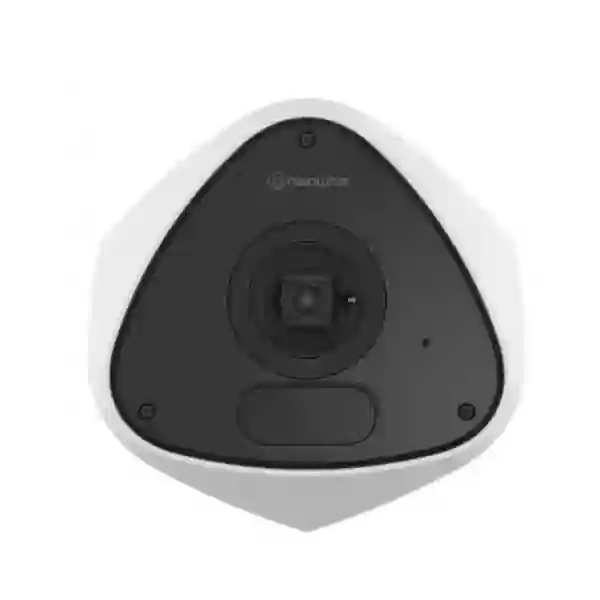
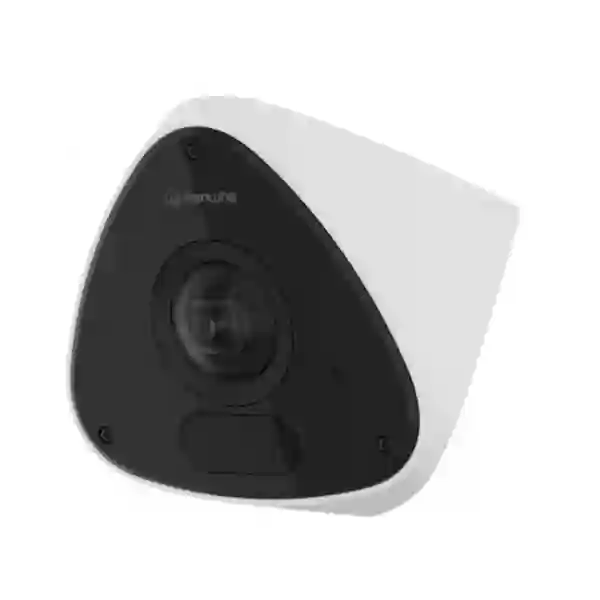
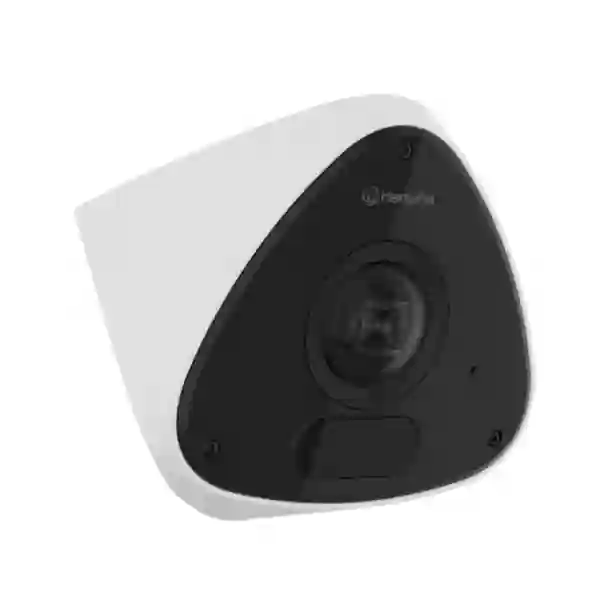
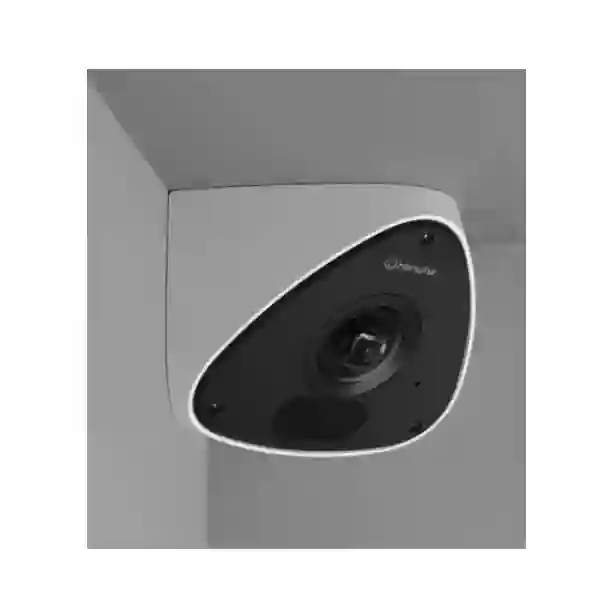
Hanwha TNV-C7013RC AI Corner-Mount Camera
A 3MP anti-ligature network camera for carefully designed observation in secure and sensitive environments.
Need a dependable corner view and a safer enclosure for a specialist room? Review the viewing geometry, analytics, recording requirements and site-specific safety plan before requesting an exact-model quote.
Key camera specifications at a glance
| Camera type | AI anti-ligature corner-mount IP camera |
|---|---|
| Imaging | 1/1.8-inch CMOS, maximum 3MP |
| Lens | 2.39 mm fixed, F2.0 |
| Field of view | Horizontal 128°, vertical 100° |
| Night vision | 940 nm WiseIR, rated up to 15 m |
| Video formats | H.265, H.264, MJPEG |
| Wide dynamic range | 120 dB |
| Analytics | Object classes, virtual line and virtual area events |
| Power | IEEE 802.3af PoE Class 3 or 12 V DC |
| Memory card | One microSD-family slot, up to 1 TB in current detailed specification |
| Operating conditions | −10°C to +55°C, non-condensing humidity |
| Physical protection | Manufacturer lists IP66 / IP69 and IK11 classifications |
Specifications reflect manufacturer information; verify the offered regional variant, firmware and current technical documentation before ordering.
Purpose and site suitability
What is the TNV-C7013RC designed to do?
The Hanwha TNV-C7013RC is a specialized network surveillance camera for facilities that need a robust view of a room while reducing the protrusions associated with ordinary camera housings. It brings an anti-ligature corner-mount form factor together with AI-assisted video analytics, wide-angle imaging and discreet infrared illumination. It is especially relevant when staff supervise individuals in higher-risk environments, although no camera by itself makes a room safe. The practical question is whether its mounting arrangement, field of view, monitoring procedures and image retention policy match the risks identified for the particular space.
Use it as one element of a documented security and safeguarding design. Before procurement, define the room purpose, occupant profile, privacy requirements, who will review alerts, and what staff can do when an event occurs. A fixed wide-angle camera is excellent for overview in some room shapes but is not a substitute for detailed facial identification at every distance. Its safety-oriented housing is a design benefit, not a blanket guarantee against tampering or harm.
Who should evaluate this model?
Potential buyers include public and private institutions responsible for secure accommodation, clinical observation, specialist treatment rooms, custody settings and other supervised spaces. A facilities manager may value the protected enclosure; a security team may prioritise dependable events and usable footage; clinicians may focus on how observation respects dignity; and IT staff must assess network security and storage. These needs should be resolved together rather than allowing the camera specification alone to set policy.
Ask security, safeguarding, clinical or welfare leadership, IT, maintenance and procurement to review an example room before choosing quantities. Decisions about audio capture, camera placement, staff access, retention periods and escalation must follow the institution’s approved procedures. The manufacturer describes corrections and mental-health facilities as intended settings, but suitability still depends on a professional site assessment and the requirements of the responsible organisation.
The value of a purpose-built corner camera
A conventional dome mounted on a ceiling may introduce an unsuitable shape or be difficult to position in a high-risk room. The TNV-C7013RC is intended for a corner installation and uses an anti-ligature housing designed to minimise accessible attachment opportunities. The room corner also gives a natural vantage point for a wide overview, particularly when the camera is mounted high and its view remains clear of tall furniture.
An anti-ligature label should never replace physical inspection. Examine the wall-to-housing junction, fixing quality, substrate strength, adjacent fixtures and any cable-entry option. Inspect how the assembly sits on the actual finished walls, including irregular surfaces. If the deployment involves specialist safety requirements, ask a qualified professional to confirm that the complete installed assembly meets those requirements rather than assuming the standalone camera delivers a compliant room.
Where the camera is not the best fit
A fixed 2.39 mm wide-angle lens cannot zoom optically onto a distant subject. Where a security brief requires detailed identification at a gate, cash point or distant outdoor perimeter, an appropriately selected varifocal, telephoto or dedicated identification camera may be more suitable. The corner form factor may also be unnecessary in ordinary corridors or offices, where other camera styles can be simpler to position and maintain.
Do not assume the camera will automatically detect falls, self-harm, medical distress or every prohibited action. The advertised analytics focus on object classes and configured line, area, motion and related events. Those functions can support operators but need careful testing and human assessment. Use the model where the mechanical design, viewing geometry and available analytics directly solve a defined problem, not merely because it includes the word AI.
Image quality and viewing coverage
Three-megapixel detail in context
The camera supports a maximum picture size of 2048 by 1536 pixels, commonly described as 3MP. This is useful for an overview of a secure room because the image includes more vertical scene information than a similarly wide 16:9 crop. The image sensor is specified as a 1/1.8-inch CMOS device, while H.265 and H.264 streams support up to 30 frames per second at 60 Hz or 25 frames per second at 50 Hz.
The number of pixels must be considered alongside distance, lens angle, lighting and compression. A person at the far side of a large room occupies fewer pixels than someone near the camera; even a good image cannot recover detail that was never captured. Establish the required detection, observation, recognition or identification outcome, then test sample footage from the intended mounting height. The right measure of image quality is whether staff can make the decisions the site actually requires.
How the 128-degree field of view behaves
Hanwha specifies a 128-degree horizontal field of view and a 100-degree vertical field of view from the fixed 2.39 mm lens. This broad view can be useful for a rectangular or square room when the camera is positioned in a suitable upper corner. However, the angle printed on a datasheet describes an optical field, not proof that every point in every room will be visible. Recesses, bedheads, wardrobes, open doors and partitions may obstruct critical parts of the scene.
Plan coverage from a scaled room sketch and, preferably, an on-site demonstration. Verify the distance to each area of concern and identify whether objects near the bottom of the camera view are distorted or obscured. Set expectations about faces and small details toward the edges of a wide-angle picture. If any relevant zone remains hidden, alter the design or add another camera instead of presenting a single-device solution as complete coverage.
Night vision without a conspicuous red glow
The integrated WiseIR system uses infrared light at 940 nm, a wavelength described by the manufacturer as invisible illumination. Its stated viewing length is up to 15 metres. In sensitive accommodation this may be preferable to a highly visible infrared emitter, but actual useful detail depends on camera angle, surface reflectivity, subject distance, environmental conditions and exposure settings. The infrared distance is not an identification guarantee at 15 metres.
During acceptance testing, check complete darkness, partial room light and changes between conditions. Pay attention to bedding, reflective wall coatings, bright door openings and objects close to the lens, which may influence automatic exposure or infrared reflection. Review whether the camera’s day/night changeover produces usable images throughout the shift. Document any dark zones, motion blur or overexposed nearby surfaces and adjust the design before staff depend on the footage.
Wide dynamic range and changing light
The manufacturer specifies 120 dB wide dynamic range along with backlight compensation features. These controls help when a scene contains both bright and dark areas, for example a secure room with a daylight window and a dim interior. Wide dynamic range can make the combined scene easier to interpret, but it cannot eliminate every backlighting problem, and aggressive image processing may produce artifacts under certain lighting conditions.
Test with the actual curtains, door positions, corridor lights and other conditions expected at the site. Check both day and night images, especially whether people remain visible when entering from a brightly lit passage. Avoid relying on a single ideal test frame. Camera performance should be assessed during movement as well as while subjects stand still; settings that look good in a static snapshot may not be optimal for recognising activity.
Codec selection and recording efficiency
H.265, H.264 and MJPEG are listed as video compression options, with WiseStream III and multiple stream profiles available. For a video management system, these choices affect picture quality, storage demand and decoder compatibility. H.265 can be useful where the receiving recorder and workstations support it, while H.264 remains a common interoperability option. MJPEG may help selected legacy use cases but is not always the most storage-efficient format.
Plan storage using actual bit rates rather than generic claims that a codec will halve capacity. Record sample clips under bright, dark, still and busy conditions, then measure network traffic and playback performance. Verify whether different operators need different streams for live display and evidence export. Set a retention policy based on the institution’s lawful requirements and operational purpose; increased compression should not compromise the detail needed for responsible review.
AI analytics and operator workflows
Object classification and useful alarms
The TNV-C7013RC supports AI classification of people, faces, vehicles and licence plates, as well as configured events such as object detection, line crossing, direction, intrusion, entry, exit and loitering. Those categories are camera capabilities, not a promise that every class is relevant in a room. In a supervised accommodation setting, a person entering a defined zone may be much more useful than a vehicle alert that has no practical meaning.
Begin with a short operational question: which event requires a response, and what evidence will staff need? Set only the rules that directly support that question. Test representative conditions with permitted participants and adjust regions, object classes and schedules. Analytics can reduce some irrelevant motion alerts, but environmental changes, occlusion and behaviour outside the configured rules can still affect results. Keep a trained operator in the decision process.
Virtual lines, directions and restricted areas
Virtual-line and virtual-area tools let a designer define a region within the image and configure events for specified movement. Examples include someone crossing a marked threshold or entering a restricted part of a monitored room. Because the image is viewed from one corner, perspective matters: a line drawn on a video frame may behave differently from a physical line on the floor if a person approaches from another angle.
Use a repeatable commissioning procedure. Mark the rule on a plan, walk the intended routes, test entry and exit from different directions, and record whether the operator receives the expected alert. Consider staff authorised to enter the area and any routine activities that would trigger unnecessary notifications. A useful alarm plan has clear ownership, operating hours, an acknowledged-response procedure and periodic review rather than a large collection of rules that nobody monitors.
Loitering and motion events
Loitering, movement and area-based events are available, but they must be interpreted carefully in environments where waiting, resting or repetitive movement may be normal. An event generated by a rule is a signal that a predefined condition occurred; it does not establish intent, danger or a clinical conclusion. Cameras cannot substitute for observation policies developed by trained staff.
Before enabling a rule, establish a baseline of ordinary activity in the specific room. Decide which alerts should appear on a live screen, be logged for later review or call for immediate human verification. Make thresholds conservative enough to be actionable without ignoring potentially significant movement. Monitor nuisance-alert rates after commissioning, especially following changes to furniture, lighting or occupancy. Document who is permitted to change rules so that a software adjustment does not silently change the institution’s supervision approach.
Clothing-colour detection: a narrow capability
Hanwha lists clothing-colour detection for orange, black and red under specified illumination conditions. This may help a controlled facility with a particular uniform policy, but it should not be described as a universal apparel detector or as reliable across all fabrics and lighting. The regional material also associates the function with colour-mode operation. Treat it as a specialised analytic that requires a relevant operational use case and practical validation.
Do not use clothing colour alone to determine someone’s identity, status or behaviour. Test shades, shadows, occlusion, garments with multiple colours and the actual fluorescent or natural lighting used on site. If there is no clear policy that benefits from these three classes, leave the function unconfigured. That approach reduces wasted operator effort and avoids making unsupported assumptions about people from appearance.
DetectionShot and investigation context
The product documentation describes DetectionShot thumbnails and classified objects that can help operators review relevant portions of a recording. The practical value is faster navigation to candidate footage, not automatic proof of what happened. Staff should be able to move from an event summary to the original recording, view the moments before and after it, and preserve the appropriate evidence when necessary.
Test the intended investigation workflow with the chosen recording platform. Check event timestamps, system clock synchronisation, search filters, user permissions and export formats. Establish procedures for retaining context so that a cropped thumbnail does not mislead a reviewer. If analytics metadata is needed outside the camera, confirm that the exact recorder or software release can receive and interpret it. Compatibility at the protocol level does not guarantee identical search features across all systems.
Safety, privacy and responsible use
Anti-ligature is a system-level design issue
The protected housing is a defining feature of this model, but a vulnerable environment must be evaluated as a whole. Installation screws, wall gaps, mounting height, nearby fixtures and optional accessories can affect the finished result. The camera is not a clinical intervention and cannot remove the need for trained personnel, room design and risk-assessment procedures. It should be selected in conjunction with the standards and practices required by the institution.
Arrange a physical review of the completed mount, not just the product drawing. Check whether any projection or accessible edge has been introduced during cable routing or maintenance. Confirm who is responsible for periodic inspections and what prompts an out-of-cycle inspection. Keep a record of accepted mounting details so that replacement work preserves the intended design. Never advertise a room as harm-proof because a camera is described as anti-ligature.
Respecting dignity in sensitive rooms
Observation in treatment, custody and other controlled environments raises questions beyond image quality. Decide where cameras are appropriate, which spaces should never be recorded, how occupants are informed where required, who can access live feeds and how long footage is kept. These are organisational and legal decisions that require review under applicable rules; camera functionality does not confer authority to record.
The camera supports privacy masking zones, which may help exclude parts of a view, but software masks should be tested in all relevant streaming and recording workflows. Limit accounts to staff with a justified purpose and review access logs. Where audio collection is inappropriate, configure and verify that the microphone is not recording or transmitting. A documented privacy assessment should accompany the technical sign-off, especially when vulnerable people or clinical activities may be visible.
Audio: available, but not always appropriate
The manufacturer lists a built-in microphone, selectable external audio input and line-level audio output. These are technical capabilities rather than a recommendation to record sound in every installation. Audio can capture sensitive conversations that are not necessary for a security objective, and legal or institutional restrictions may apply. Avoid activating it simply because the hardware supports it.
Decide first whether an audio use case has been approved, whether people must receive notice and who may listen to or export recordings. If the goal is strictly visual observation, disable unused audio functions and confirm that the recorder is not storing an unexpected sound track. Where staff genuinely need audio, evaluate acoustics, noise, permitted retention and the response process in addition to camera specifications. Treat voice data with the same seriousness as video.
What analytics cannot decide
AI events can indicate patterns selected by the operator, but they do not diagnose a health condition, assess someone’s intent or guarantee detection of emergencies. A person may be hidden by bedding or furniture, the frame may be backlit, or an action may occur outside the configured area. Even when a notification is correct, the speed and adequacy of the human response remain outside the camera’s control.
Write an operational standard that distinguishes technical alerts from safeguarding decisions. Specify when an operator should verify video, contact on-site personnel and record the outcome. Review cases where an event was missed or was unnecessary and update the configuration if justified. A responsible procurement process asks not only what a system detects in a demonstration but how staff use and govern it after months of ordinary operation.
Network, cybersecurity and integration
Connecting to an IP surveillance network
The camera uses an RJ-45 network connection and supports standard IP communication. A network deployment should specify the switch location, cable path, bandwidth reservation and firewall segmentation before installation. In high-risk facilities, the cable path must also fit the physical safety plan, not merely reach the nearest switch. Reliable video requires more than the camera’s image sensor: switches, recording servers and the local time service all play a part.
Document addressing, device names and a management VLAN or equivalent segmented architecture where appropriate. Limit camera access to necessary operators and services. Use consistent time settings for every recorder and camera so a security incident can be reconstructed accurately. Verify the cable route and network performance under load rather than only opening a successful live preview during commissioning. Recording continuity must be tested through ordinary network interruptions and recovery.
PoE or 12 V DC power
Hanwha specifies IEEE 802.3af Class 3 Power over Ethernet or 12 V DC input, with maximum consumption of about 12.95 W on PoE and 12.7 W on DC. PoE can simplify cabling when compatible switches are already installed. A local DC supply may fit an existing approved infrastructure, but installation should be designed by competent personnel with the necessary electrical protection.
Calculate the switch’s total PoE budget across every connected device, not just one camera. Reserve capacity for the worst-case demand rather than the typical operating number. In locations where recording cannot be interrupted casually, consider whether network switches, recorders and relevant links require appropriate backup power. A UPS connected only to the camera will not preserve recording if the network or NVR loses power. Test recovery after a planned outage and document the result.
ONVIF and video-management compatibility
The manufacturer lists ONVIF Profiles S, G, T and M, plus SUNAPI and other integration mechanisms. These can provide useful pathways into existing video management software, including video transport and selected metadata functions. However, profiles describe supported standards rather than a guarantee that every third-party recorder exposes every advanced camera feature. AI search, event mapping, audio, encryption and firmware-specific functions may vary.
Ask the integrator to verify the exact NVR or VMS version, licensed features, camera firmware and intended stream settings. Perform a functional interoperability test: add the device, display live video, record and replay, subscribe to required events, confirm time synchronisation and export a sample clip. If the buyer needs AI metadata searches, confirm those separately. Plan future firmware and VMS upgrades together to avoid breaking a dependable workflow.
Layered device security
Listed security capabilities include signed and encrypted firmware protection, secure boot, network authentication options, HTTPS-related secure communications, IP-based access controls and a trusted platform module. These provide a stronger foundation than simply assigning a default password, but secure features need deliberate configuration. The final security posture also depends on the recorder, workstation, network and people administering them.
Require unique credentials, least-privilege roles, an approved firmware maintenance process and restricted management access. Disable interfaces and services that are not required, review security events and keep a controlled record of configuration changes. Do not expose the camera directly to the public internet merely to make remote viewing convenient. A secure remote-access design should be approved by the institution’s IT security function and tested after changes. Compliance with internal security requirements must be confirmed independently.
Storage and retention choices
The current detailed manufacturer specification lists one microSD, SDHC or SDXC slot supporting up to 1 TB; some regional summary text presents a lower figure. Verify the card and firmware combination against current vendor guidance before procurement. Edge storage can contribute to resilience or event recording, but it does not automatically replace a central recorder, redundant storage or an evidence-handling procedure.
Calculate capacity from the actual stream settings, event frequency, retention period and intended operating schedule. Confirm recording behaviour when the network is disconnected, what happens when a card is full and how missing segments are reported. For sensitive footage, consider encrypted storage functions where supported and a disciplined replacement process for worn or failed media. A storage card’s nominal capacity is not a promise of a particular number of recording days.
Installation and environmental planning
Room survey before specifying quantity
Start with measurements rather than the number of rooms alone. Identify room width, length, ceiling height, door swing, major fixtures, sleeping areas, privacy-sensitive zones and any viewing obstruction. The wide field of view is valuable only when the mounting geometry matches the room. A single corner camera in one room could be appropriate while another room with deep recesses may need a different arrangement.
Create a marked-up plan showing the proposed camera, the actual line of sight and the expected monitoring objective for each space. Review the scene at typical occupant height and identify where furniture may move during normal use. Check the surface material and access arrangements for safe maintenance. Use a test camera or manufacturer planning method to validate the view before ordering a large batch. Keep spare capacity in the overall recorder and network design for any coverage changes.
Mounting the housing correctly
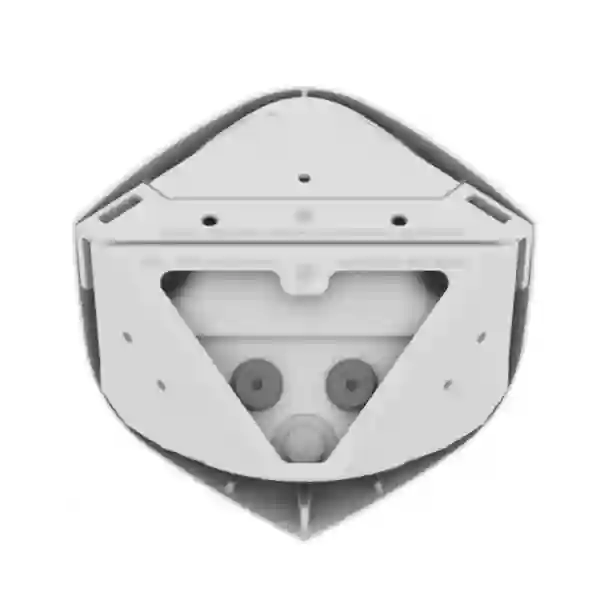
The physical camera is specified at approximately 198.3 by 104.8 by 198.6 mm and about 1.935 kg. Those details matter when assessing wall or corner construction, suitable fixings and installation access. Follow the manufacturer’s installation instructions for the mounting bracket, cable entry, sealing and fasteners. Poorly fitted hardware can compromise both image direction and the intended safety-oriented shape of the enclosure.
A competent installer should check that the proposed substrate carries the assembly securely and that every cable penetration is appropriately finished. In environments with elevated safeguarding needs, ensure the final fit has no unintended gap, unsecured cover or accessible cable. Maintain the equipment according to an agreed inspection schedule. Photographs and installation records can help later maintenance teams preserve the original mounting intent rather than improvising an incompatible repair.
Optional accessories need their own assessment
The SPG-VAN13W conduit dome cover is listed by Hanwha as an accessory for this model. Accessory compatibility alone does not establish suitability for a specialised anti-ligature space. Regional manufacturer notes caution that this conduit option is not intended for anti-ligature environments. Buyers should therefore assess the proposed cable route and enclosure arrangement against the site’s safety design before selecting extras.
Separate ordinary security installation requirements from high-risk clinical or custodial requirements. A conduit arrangement that is convenient in a standard facility may introduce a projection or other concern in a sensitive room. Ask the designer to document whether each accessory is essential, what alternatives are approved and how the finished assembly will be inspected. Do not use an accessory merely because it appears in the camera catalogue.
Heat, moisture and exposure
The manufacturer specifies an operating temperature of approximately minus 10 to plus 55 degrees Celsius and up to 95 percent relative humidity under non-condensing conditions. Its environmental and impact classifications include protections such as IP66 and IK11 in current detailed specifications. Those are laboratory classifications that must be interpreted with the actual installed enclosure, cable routing and maintenance conditions.
For a Tanzanian project, check the room’s heat, ventilation, moisture exposure and cleaning methods rather than assuming a national climate profile describes every site. A protected rating does not make poor wiring, an unsealed penetration or unsuitable cleaning chemicals harmless. Verify the installation instructions for any wash-down or exposed location, and keep environmental conditions within the approved range. Where the room has persistent condensation or special chemical cleaning, obtain a specific technical assessment.
Day-to-day maintenance and verification
A camera in a secure room may be difficult to access during occupancy, making preventive planning valuable. Develop a periodic check covering image focus and cleanliness, infrared performance, recorded footage, the physical housing, cable seals, event delivery, clock settings and storage condition. Include a safe process for taking the room or camera out of service and notifying the responsible team when monitoring is unavailable.
Retest a representative set of analytics after major firmware changes or changes in room layout. Keep incident recordings separate from routine maintenance samples according to policy. Record faults in a log that identifies the affected room and dates of loss of coverage. A high-quality camera can still create a surveillance gap if a failed switch, full recorder or dirty lens goes unnoticed. Make the maintenance plan part of procurement, not an afterthought.
Choosing, budgeting and commissioning
A buyer’s comparison checklist
Compare candidate cameras against the actual task: anti-ligature construction, corner geometry, fixed versus adjustable lens, infrared behaviour, impact resistance, video resolution, recording format, integration capability and practical maintenance access. A higher-megapixel camera may be preferable for one room, while this model’s safety-focused housing and broad view may matter more in another. Avoid selecting on resolution or price alone.
Ask vendors to explain what is included in a complete installation. Mounting hardware, cabling, network power, recorder capacity, permissions, configuration, event testing and operator training can be as important as the camera itself. Request demonstrations of the chosen model in realistic light, especially if a supplier claims that one camera covers an entire room. Claims about coverage should be backed by a layout and a tested observation objective.
Questions to include in a quote
A useful request should state the exact model TNV-C7013RC, required quantity, site environment, planned mounting height, recording platform, analytics use case, retention period, network arrangement and any special safety constraints. Ask for clear separation between equipment, required accessories, installation, commissioning, training and any optional services. This makes competing proposals easier to evaluate.
For purchases intended for Tanzania, request written confirmation of the offered unit’s specification and regional suitability, as well as the supplier’s actual price, stock position, lead time and applicable support terms. None of these commercial terms should be assumed from an international catalogue. If the source of the quote differs from the installer, clarify responsibility for firmware, compatibility, warranty administration and after-sales assistance. A complete quote should describe deliverables, not just a box price.
How to assess total project cost
The camera itself is only one component of the system cost. Other possible items include survey time, safe access equipment, mounts and suitable fixings, protected cable routes, PoE switch capacity, network security configuration, NVR or VMS licensing, recording storage, backup power, testing and staff familiarisation. The cost profile of a specialist room differs from a straightforward office surveillance installation.
Model both the initial capital requirement and the ongoing work required to keep the system dependable. Include replacement storage media, firmware management, inspections, secure evidence export and fault response. For a multi-room facility, consider the operational cost of reviewing unnecessary alarms. Effective configuration can be more valuable than activating every available event. Do not treat unverified local taxes, duties or delivery charges as fixed facts; request a project-specific commercial schedule.
Commissioning and acceptance testing
Define pass or fail criteria before installation starts. A workable test might require clear footage at defined positions, acceptable IR coverage when lights are off, recording continuity, reliable alert delivery and verified access controls. The criteria should reflect the room’s approved use and safeguarding procedures, not vague promises of perfect monitoring. Test image quality while people move, doors open and the lighting changes.
Record a sample from each relevant scene and obtain sign-off from the designated facility representative. Include checks of audio configuration, privacy masks, system clocks, network outage recovery, recording playback and evidence export. Validate analytics at the intended thresholds and document situations where alarms are not expected. Keep a commissioning record with the camera identifier, room, firmware version, VMS configuration and outstanding limitations so future teams understand the system’s actual capabilities.
Operator training and alert ownership
Staff training should explain what each enabled analytic means, how to review its video evidence and when to escalate to a human responder. A line-crossing alert is not a diagnosis or automatically a security incident. Different events may require different procedures depending on the room and time of day. The institution should determine who receives an alert, what acknowledgment is required and how a missed response is investigated.
Use realistic exercises rather than relying on a slide presentation. Show what happens when the camera is obstructed, an event is ambiguous or a network connection is lost. Teach operators to preserve original footage and to avoid drawing conclusions from a single thumbnail. Periodically review alerts and operating procedures with supervisors. The aim is a system that makes staff decisions clearer while preserving accountability, not an unattended AI notification feed.
A responsible procurement decision
Choose the Hanwha TNV-C7013RC when the project benefits from the combination of corner placement, anti-ligature construction, wide 3MP imaging and configurable analytics, and when the installed system can be properly governed. If the main objective is a long-distance identity shot or a general-purpose panoramic view in an ordinary commercial area, reconsider whether this specialist camera offers the best balance of performance and cost.
The next step is a structured site review and an exact-model quotation. Share a non-sensitive description of the rooms, the intended recording system, mounting constraints, required retention and the operational goals. Ask the supplier to identify any assumptions requiring confirmation. Keeping design, commissioning, privacy and maintenance requirements visible before purchase reduces the likelihood of a camera that works technically but fails to meet the facility’s actual needs.
Frequently asked questions
Is the TNV-C7013RC a 3MP camera?
Yes. The maximum listed resolution is 2048 by 1536 pixels. Select the recording stream and compression settings in the recorder or VMS, then verify the resulting image at the room’s required viewing distances. Resolution alone does not guarantee identification of every person in a wide scene.
Why is it described as anti-ligature?
The manufacturer positions the camera’s corner-mount housing for corrections and mental-health environments, where reducing accessible attachment points matters. The entire installed assembly, including fixings, cable routing and nearby features, still requires the facility’s safety assessment. No single device should be described as making a room risk-free.
Can it see in a dark room?
The camera includes 940 nm WiseIR with a stated viewing length of up to 15 metres. Actual usable detail depends on room layout, subject distance, reflective surfaces and exposure. Test the intended scene in complete darkness and low light before accepting the installation.
Does it record audio?
A microphone and related audio connections are supported, but they should only be enabled where the organisation has approved an appropriate use. Recording sound may raise separate privacy and legal obligations. Confirm whether audio is disabled or captured during installation and on the connected recording platform.
Can its AI automatically identify emergencies?
No such guarantee should be made. The listed analytics include object classification and configurable events such as virtual-area intrusion, line crossing and loitering. The camera does not replace clinical assessment, staff supervision or emergency response procedures. Human review remains essential.
What power supply does the camera require?
The manufacturer specifies IEEE 802.3af Class 3 PoE or 12 V DC input. The detailed table states a maximum of 12.95 W on PoE. Ensure the switch’s power budget includes all connected devices and that any backup-power design also supports the recorder and network.
Can I use a third-party recorder?
Potentially. The camera lists ONVIF Profiles S, G, T and M alongside other integration interfaces. However, recording, event metadata, audio and advanced search features must be tested against the exact recorder, VMS release and firmware configuration. Standards support is not a guarantee of complete feature parity.
How much microSD storage is supported?
The current detailed global specification lists one microSD-family slot with up to 1 TB capacity. Some regional summary copy contains a different figure. Confirm supported card types and capacity against current manufacturer documentation and the actual firmware before purchasing media. Recording duration must be calculated separately.
Is the lens adjustable?
The camera has a fixed 2.39 mm lens rather than a motorised optical zoom. Its wide field of view makes corner coverage possible in suitable rooms, but it is not the best tool for every distant detail requirement. Map the room and test the intended observation positions.
Is it suitable for outdoor installation?
The manufacturer publishes environmental and impact ratings, including IP66-related protection, and a stated operating range of minus 10 to plus 55 degrees Celsius. Suitability still depends on the site, correctly installed seals and approved cable entry. Follow the latest installation guidance for exposure, cleaning and mounting.
Does the camera have a built-in recorder?
It can support edge recording using compatible microSD-family media, while integration with a central recorder or VMS is also relevant. These arrangements are not identical. Decide how footage is retained, recovered and audited during network outages, and test the actual recording workflow before use.
Can clothing-colour analytics be used for any uniform?
The documented classes are orange, black and red, subject to operating conditions. That is narrower than universal colour recognition. Validate any proposed use with the actual uniform, lighting and procedures. An appearance-based event should not be treated as identity verification or proof of wrongdoing.
Does it guarantee no blind spots?
No. Even a 128-degree horizontal field of view can be obstructed by doors, furniture, recesses or poor mounting geometry. Review a scaled room plan and test sample footage from representative positions. Additional cameras or a different mounting strategy may be needed for some spaces.
What details are needed for a Tanzania quotation?
Provide the exact model, approximate quantity, room type, mounting conditions, required recording period, existing network or VMS and the intended alert workflow. Ask the supplier to confirm pricing, supply availability, regional applicability, delivery arrangements, support and project-specific installation scope in writing.
Can this camera replace staff monitoring?
No. Cameras and analytics provide additional information but cannot guarantee that events are detected, correctly understood or acted upon. A robust operating model includes staff training, risk assessment, alert review, documented escalation and regular technical checks. It must account for periods when the camera or network is unavailable.
Should firmware be updated?
Firmware management is part of maintaining a secure network device. Check the manufacturer’s approved release information, assess VMS compatibility and follow a controlled maintenance window with backup configuration and post-upgrade testing. Do not install an unverified firmware package or assume that every update is appropriate without review.
Request a TNV-C7013RC quotation
Ask FourTeck Tanzania to review your project requirements for the Hanwha TNV-C7013RC, including the room layout, safety priorities, recording system, network, and installation scope. Request written confirmation of model availability, price, support terms and any required accessories.
For accurate guidance, share non-sensitive site requirements rather than images or details that identify vulnerable occupants.




Reviews
There are no reviews yet.