
T-Series • Mobile surveillance • Tanzania buyer guide
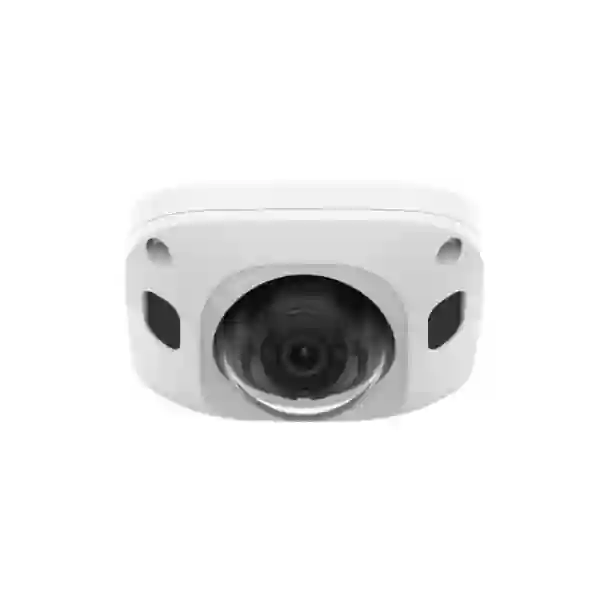
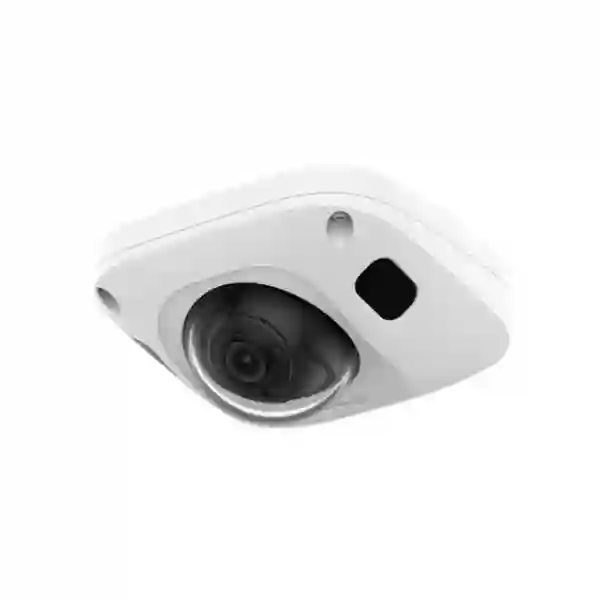
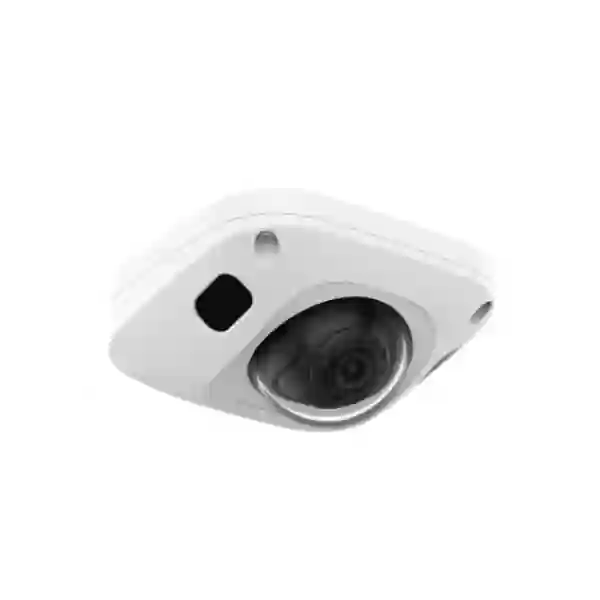
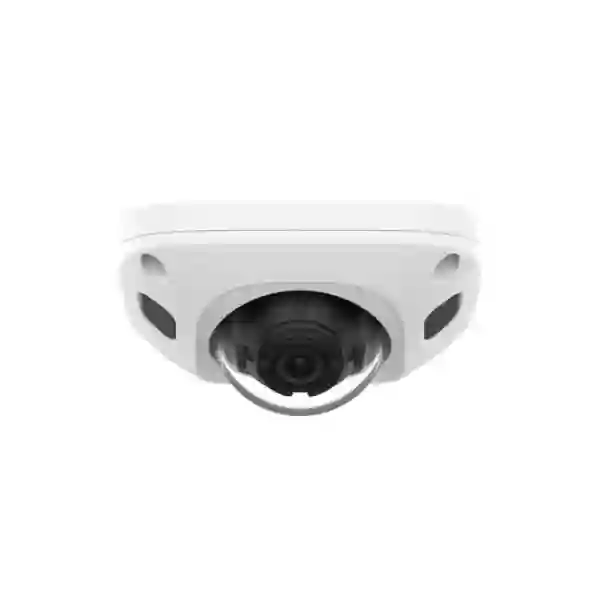
Hanwha TNV-C8014RM 5MP AI IR Mobile Camera
Specify resilient video surveillance for suitable bus, rail and fleet environments with a compact fixed-lens camera, onboard AI and infrared support. The most important buying checks are the view you need, your recorder integration and the M12 PoE network connection.
Fast decision summary
Choose this model for a suitable mobile surveillance position requiring a wide 5MP view, infrared illumination, rugged construction and onboard analytics. Confirm the fixed lens meets the evidence task and confirm the M12 PoE connection before specifying accessories. Software compatibility, recording retention, cloud services, Tanzania pricing and stock require project-specific verification.
| Manufacturer / model | Hanwha Vision / TNV-C8014RM |
|---|---|
| Camera category | T-Series 5MP AI infrared mobile network camera |
| Sensor and maximum resolution | 1/2.8-inch CMOS; 2592 × 1944 pixels |
| Video frame rate | H.265/H.264 up to 30 fps (60 Hz) or 25 fps (50 Hz) |
| Lens and angle | Fixed 3.0 mm, F1.6; H 100°, V 73°, D 129° |
| Day/night / IR | Automatic IR-cut filter; IR viewable length up to 30 m |
| Dynamic range | 120 dB WDR |
| AI functions | Person/vehicle classification; virtual line/area; selected counting and business-intelligence functions |
| Compression | H.265, H.264, MJPEG; WiseStream III |
| Audio | Built-in microphone, selectable audio input and line output |
| Network / power | M12 Ethernet; PoE IEEE 802.3af Class 3; max 7.2 W |
| Storage | One microSD/SDHC/SDXC slot, maximum 256 GB |
| Protection | IP66, IK10; hard-coated dome |
| Stabilization / heater | Gyro-assisted digital image stabilization, shock detection, built-in heater |
| Operating range | −40°C to +55°C; start-up above −30°C |
| Approximate size / mass | 106 × 105 × 55 mm; 466 g |
| Interoperability | ONVIF S/G/T/M, SUNAPI; verify platform feature support |
Specifications are based on Hanwha Vision manufacturer product information; final configuration and firmware should be checked for the selected project.
Is this the right camera for your project?
The Hanwha TNV-C8014RM is intended for buyers who need a compact network camera that can keep working in a moving or space-constrained installation. Typical project discussions involve passenger vehicles, rail carriages, fleet assets, depots and other locations where a low-profile camera and resilient housing are useful. It is especially relevant when an operator wants recorded video plus useful event metadata rather than a simple continuous picture. The manufacturer describes it as a T-Series 5MP AI mobile IR camera, which is a more informative classification than treating it as a generic outdoor dome.
Start with the actual scene, not the megapixel figure. Identify whether the operator must observe a doorway, a passenger aisle, a driver-facing area, a compartment or a vehicle exterior. Establish what must be visible in daylight and at night, whether analytics are needed, and where recordings will be reviewed. The fixed 3 mm lens is wide rather than optically zoomable, and the available pixel detail must be shared across the chosen view. Confirm the final requirements with a site or vehicle survey before fixing quantities.
Where the mobile design adds practical value
A moving vehicle introduces vibration, changing illumination, compact mounting locations and maintenance constraints. An ordinary camera specified for a static indoor wall may not address those conditions in the same way. The TNV-C8014RM combines a compact form factor with a hard-coated dome, shock detection and digital image stabilization using a built-in gyro sensor. These are useful design characteristics when a camera is mounted in a bus or rail vehicle, but they do not eliminate the need for suitable mechanical fixing, cable strain relief and vehicle-level testing.
Consider how technicians will access the device once installed. A camera above a passenger aisle may be straightforward to position during construction but inconvenient to reach during routine service. Plan for secure cable routing, enough working clearance to remove covers when authorized, and a configuration method that can be documented for the fleet. Consider the vehicle’s cleaning regime and any risk of bags, hands or equipment striking the housing. In a fleet rollout, consistency of mounting position can be as important as the hardware specification.
Understand the 5MP image in context
The camera’s maximum image resolution is 2592 by 1944 pixels, or approximately five megapixels. With H.265 or H.264, its stated maximum frame rate is 30 fps on a 60 Hz setting and 25 fps on a 50 Hz setting. MJPEG is supported, but the maximum at full 5MP is lower, so compression selection is relevant to performance. A higher pixel count can preserve more scene detail than a lower-resolution view, provided the camera is mounted at an appropriate distance and the recorded stream retains enough quality.
Resolution alone does not decide whether footage is suitable for recognizing an individual or understanding an incident. Motion blur, reflections, infrared exposure, lens angle, compression, obstructions and recording quality all matter. For an operator concerned about faces at a doorway, capture sample clips with people walking at normal speed in both directions. For a whole-compartment view, check the farthest seating rows and near edges. A short evidence-based test will tell you more than comparing megapixel numbers without reference to the installation.
What the fixed 3 mm lens means
The TNV-C8014RM uses a 3.0 mm fixed focal lens with a listed 100° horizontal, 73° vertical and 129° diagonal field of view. This is valuable when a broad view is needed from a short distance, for example across a passage or into a vehicle interior. However, it is not a motorized zoom lens. The installer has limited mechanical adjustments for alignment, but cannot remotely narrow the field of view to increase optical magnification after commissioning.
A wide view may include more context while assigning fewer pixels to distant details. Draw the camera position onto a floor plan and identify the closest and farthest relevant points. Confirm whether the important action takes place centrally or near a curved edge where distortion may be more noticeable. Check sightlines around grab rails, partitions, doors, shelving and passengers. For a long narrow aisle or a specific external target, another focal length or an additional camera may be a better choice than pushing one wide-angle view beyond its intended purpose.
Plan low-light footage, not just daylight footage
The manufacturer’s low-light specification is 0.03 lux in colour and 0.003 lux in black and white under the stated test conditions. The camera also has automatic day and night operation using an infrared-cut filter. These figures establish a technical reference point, but they should not be read as a promise that every real scene will produce identifiable detail at the same light level. A moving subject, reflective clothing, dirty dome or sudden light transition can change the result considerably.
Transport scenes are especially variable. A bus may travel from bright sun into a shaded terminal, while interior lighting may turn down during a journey. Agree which activity needs to be captured in darkness, and test with the actual cabin lights, windows and vehicle materials. Review whether exposure settings preserve faces as people move instead of merely producing a bright still image. Check image quality on the intended recorder rather than only in a live preview, because a secondary stream or different bitrate can conceal problems until footage is retrieved.
Use the integrated IR with realistic expectations
The built-in infrared illuminator is specified with a viewable length of up to 30 metres. That figure is a useful starting point for design, not a guaranteed recognition distance. Actual visibility depends on the target’s reflectivity, the camera angle, the surrounding surfaces and the level of detail required. A wide-angle lens can show a large scene without making distant objects sufficiently large for an identification task. For night use, specify the nearest and farthest intended subjects, then review recordings under representative operating conditions.
In vehicle interiors, infrared can reflect from windows, glossy panels, mirrors or close objects. Glass that separates the lens from a subject may cause particularly troublesome reflections. Position the camera to reduce bright surfaces close to the illuminator, keep the dome clean and avoid assumptions that IR will see clearly through every window. If an external scene must be captured from behind glazing, test that exact arrangement. An additional camera placed at a better location may improve the result more than simply increasing expected infrared range.
Manage backlight and mixed exposure
The model includes 120 dB wide dynamic range along with other image-processing options such as backlight compensation. This matters when a doorway opens onto bright sunlight while the interior remains much darker. Without a suitable exposure strategy, the opening can appear washed out or the nearby passengers can become silhouettes. WDR helps balance challenging brightness differences, but extreme scenes still deserve testing. Review the result during peak sunshine, in overcast conditions and at night if those situations affect the security objective.
Do not assume the most aggressive processing setting is always best. Excessive noise reduction may reduce fine texture, while a slow exposure can blur moving people. Compare settings using the movement and lighting that matter to the customer. In a vehicle, glare can change as the direction of travel changes, so a single stationary demonstration may be misleading. Record an evaluation sequence rather than relying on a screenshot. Note which settings are approved, and replicate them deliberately when additional cameras are deployed.
Interpret IP66 and IK10 correctly
Hanwha lists IP66 ingress protection and IK10 impact protection for the TNV-C8014RM. These ratings are relevant for exposed, dusty or frequently handled surroundings and can make the device a stronger candidate than an unprotected interior camera. The hard-coated dome is another useful detail. Nevertheless, the ratings apply to the product under specified conditions, not automatically to every cable joint, mounting penetration or accessory added at the installation site. The overall system is only as robust as the completed installation.
An exterior installation needs suitable sealing at every relevant connection and mounting point. Inside a passenger vehicle, assess exposure to cleaning chemicals, accidental knocks and intentional interference. Verify the mounting surface and fasteners separately rather than assuming an impact-rated camera can be secured to any thin panel. Check the finished assembly for movement after a test drive or vibration evaluation. If the project has an unusual chemical, salt-spray or pressure-washing requirement, obtain compatibility guidance before treating IP66 as universal protection.
Why vibration and shock features matter
The camera incorporates gyro-assisted digital image stabilization and a shock-detection capability. Stabilization can help reduce visible disturbance caused by vehicle motion, while a shock event may be useful as a trigger for monitoring or investigation. These functions do not replace sound mechanical mounting, and they should not be treated as a promise of perfectly stable pictures on every route. A poorly secured bracket or loose panel can still create severe image movement, and sudden impacts can obscure the scene at the moment of interest.
During commissioning, test across the real operating envelope rather than only with the vehicle parked. Include idling, acceleration, braking, rougher surfaces and doors opening or closing where appropriate. Review recorded footage for judder and rolling motion. Decide what a shock notification should mean operationally: an alert may prompt a review, but it is not proof of vandalism or a collision. Establish thresholds and an investigation process that reduce unnecessary notifications while preserving useful evidence.
Heater, condensation and temperature changes
A built-in heater is among the model’s published features, and the manufacturer describes its purpose in addressing fogging associated with sudden temperature shifts. Such changes are realistic when a vehicle moves between cool, air-conditioned interiors and warm humid surroundings. The specification also states an operating range from minus 40°C to plus 55°C and includes an air vent for humidity control. Those figures refer to defined product conditions; they should be considered alongside actual enclosure and installation temperatures.
For a Tanzania deployment, pay particular attention to heat accumulation in parked vehicles, ceiling voids and areas exposed to direct sunlight. Ambient air temperature may not equal the temperature at the camera housing. Check whether condensation forms on the glazing or dome after the climate control changes. Avoid trapping the camera in a sealed custom enclosure without assessing thermal behaviour and ventilation. A heater can be helpful, but it is not a substitute for correct placement, drainage, proper sealing and maintenance access.
Power planning: use the specified PoE method
The manufacturer specifies IEEE 802.3af Power over Ethernet, Class 3, with power consumption listed at a maximum of 7.2 W and a typical 4.2 W. This matters because transport vehicles may use a battery or vehicle DC bus rather than a conventional office network supply. The proposed network equipment must provide suitable PoE to the camera through an appropriate design. Do not connect an arbitrary vehicle voltage directly to the camera or assume that an unspecified adapter will provide compatible electrical protection.
Calculate capacity for the full system, not one camera in isolation. Include all cameras, networking, recorders, storage, any DC conversion, start-up behaviour and power interruption requirements. Consider what happens during engine cranking, charging variations and planned shutdown. Determine whether video should continue while the vehicle is parked and, if so, for how long. The camera’s modest published power consumption may assist budgeting, but the electrical installation requires its own engineering assessment and suitable protective equipment.
M12 Ethernet is a critical ordering detail
Unlike many building cameras with a conventional external RJ-45 connection, this model uses an M12 network connector. The manufacturer’s product page explicitly says an M12-to-RJ-45 adapter is not included. That detail should be addressed before a quotation is accepted. A project using standard Ethernet switches may need a suitable adapter or designed cable assembly, and a vehicle installation may call for a network solution appropriate to vibration and movement.
Check the entire physical link: connector type, mating cable, pin configuration, sealing, routing, bend radius and strain relief. Review the space needed to connect and disconnect the cable during servicing. Confirm how PoE reaches the unit through the chosen path, and test the complete arrangement with the target switch or recorder. Do not assume that all M12 cables are interchangeable simply because the connector name is familiar. A correct camera with the wrong cable or unavailable adapter can delay commissioning unnecessarily.
Frame rate and recorded quality are separate choices
A maximum of 30 frames per second at 5MP can be useful for scenes with movement, but actual configuration should reflect the recording objective and available storage. Operators observing a quiet corridor may use different settings from those inspecting busy boarding activity. Frame rate, resolution, codec and bitrate interact. Reducing the bitrate too far can produce compression artefacts, while a low frame rate can miss important transitions. Plan around the useful evidence needed during an incident.
Set acceptance criteria before making these tradeoffs. For example, review whether a person entering a doorway remains visible through the full movement and whether clothing and carried objects can be distinguished at the intended distance. Use actual recording playback, not only the live stream. Test the network when several cameras are transmitting simultaneously and include the effects of temporary link loss. A strong installation balances image quality, event coverage, retention and manageable network load rather than maximizing every setting without context.
H.265, H.264, MJPEG and WiseStream III
The TNV-C8014RM supports H.265, H.264 and MJPEG video compression. Hanwha also lists WiseStream III, an AI-assisted smart codec technology. These choices can help a system designer manage bandwidth and storage, depending on compatible recording equipment and scene complexity. Do not assume every VMS, browser or recorder can decode every profile equally. A codec that reduces data volume is useful only when the receiving system can record, play back and export it reliably.
Confirm compatibility with the intended viewing clients, mobile operations centre and evidence export workflow. A mixed fleet may contain older recording devices, so test the required stream profile before standardizing on it. Determine whether live viewing and high-quality recorded evidence require different profiles. Scene motion, nighttime noise and analytics overlays can influence the amount of information encoded. Storage estimates should be based on the planned bitrate or a monitored trial, not on a universal percentage of savings attributed to a codec.
AI classification of people and vehicles
The camera’s built-in AI engine supports person and vehicle classification. Published attributes include upper and lower clothing colours for people, and type and colour information for certain vehicles. These capabilities can help operators focus on relevant events instead of treating every image movement as equally important. For example, a system may be configured to pay attention to an entry boundary or a defined monitored area. Classification is still dependent on the scene and the visibility of the object.
AI detections are decision aids, not conclusive statements about identity, intent or behaviour. Occlusion, reflective windows, crowds, shadows, camera angle and fast motion can affect what is detected. If the system will support safety, compliance or disciplinary decisions, establish a human review step. Confirm which attributes and events are available in the chosen firmware and integration. Test the feature in the intended camera position using representative footage rather than presenting a list of theoretical AI functions as a guaranteed project outcome.
Virtual lines and areas for useful alerts
Hanwha’s specification lists virtual-line crossing and direction rules, virtual-area functions for loitering, intrusion, entering and exiting, and AI-based motion detection. These are useful building blocks for monitoring a doorway, access-controlled compartment or restricted route. The most effective configuration starts with a clear question: which event needs attention, who should receive it, and what action follows? A rule that generates frequent irrelevant alerts can reduce operational value even when the detector is functioning correctly.
Draw detection regions around actual movement paths and avoid boundaries where passengers, cleaning staff or passing vehicles create predictable nuisance events. Consider the periods when the vehicle is in service, parked or being maintained. Use distinct schedules or alert handling where the platform supports them. Check how event metadata reaches the recorder, whether images and video can be retrieved, and what happens if the network is offline. Always test the full notification and evidence workflow, not only the rule setup screen.
People counting and operational analytics
The published business-intelligence functions include people counting, queue management, heatmap and vehicle counting. Such analytics may support operational questions as well as security questions, but the correct feature depends on where the camera is installed and how the scene is framed. A camera covering a whole passenger cabin is not automatically the best counting sensor for a narrow doorway, and a doorway count is not automatically an accurate measure of unique passengers over a complete journey.
Before using counts for reports, define the counting boundary, expected flow direction, time interval and tolerance for errors. Test groups boarding together, people reversing direction, partial occlusion and staff movement. Validate the results against a reasonable manual sample. The data may be useful for trends even when it is not suitable for billing, enforcement or exact headcounts. Verify whether the intended VMS can consume, store and report the analytic output, since an advertised on-camera capability does not by itself establish a complete dashboard workflow.
From analytics events to actionable evidence
The camera supports several event-related output methods, including network notifications, image transfers and recording actions described in the manufacturer documentation. It also supports protocols such as MQTT that may be relevant to a wider system architecture. The practical value comes from integrating a detected event with the exact video segment, time and camera identity that operators need. Plan how the control room will distinguish routine activity from an event requiring immediate escalation.
Record the expected sequence: event occurs, camera marks or transmits it, the platform receives it, the operator sees the relevant location, and a clip can be exported when authorized. Test network disconnections and recovery so that operational teams know which signals they can trust. Do not promise that every notification format or automation works with an arbitrary third-party product. Different recorders and firmware versions may support only a subset of the available interface, so validate the complete configuration before purchase.
Local edge storage and recording continuity
A microSD, SDHC or SDXC slot supports one card with a stated maximum capacity of 256 GB. Edge storage may be useful for selected recording strategies or as part of a resilience plan, subject to configuration and platform support. The card is not evidence that all footage will remain available indefinitely. Retention depends on bitrate, frame rate, recording schedule, event frequency, overwrite policy and the card’s actual usable capacity. The purchaser should confirm whether a suitable card is supplied or must be ordered separately.
If recordings may be affected by intermittent vehicle connectivity, discuss a tested recovery and retrieval procedure. A local recording option can be helpful, but confirm how footage is synchronized or collected and how a failed card is identified. Select storage media suitable for the workload and operating environment, and plan replacement and health checks. Consider security controls when removable media contains sensitive images. A reliable design specifies what happens to footage when network, power or storage is unavailable rather than treating a memory slot as automatic redundancy.
Recording and retention calculations
Storage planning should begin with the number of cameras, expected average bitrate, daily active hours and retention period. A stream set to a higher resolution or bitrate typically consumes more capacity than a lighter stream, while motion-triggered recording depends on the actual amount of activity and the pre-event and post-event settings. A planning calculator can produce an estimate, but the strongest input is a representative measured stream. Do not base a fleet budget on an unverified sample rate from another camera or environment.
Consider separate needs for recent operational review and longer evidence retention. A vehicle may keep short-term footage locally and transfer selected events to a central system, but the exact arrangement requires approved hardware, network capacity and a retrieval policy. Confirm who can export a clip, how integrity is preserved, and how old data is deleted. Make room for overheads, future growth and maintenance. Tanzania buyers should agree the operational and legal retention requirements with their own organization before selecting disks, cards or communications capacity.
Compatibility with VMS and recorders
The product specification lists ONVIF profiles S, G, T and M, together with SUNAPI and Hanwha Vision’s open-platform interfaces. These provide a useful starting point when selecting network video management software or an NVR. However, standards support is not a promise that every analytic event, audio feature, camera setting and metadata field will appear in every third-party application. Integration depth depends on the receiving product, its version, licensing and how the connection is configured.
For a new project, test live video, recording, playback, event search, timestamp accuracy, permissions, firmware compatibility and evidence export using the exact proposed VMS. If person or vehicle attributes are central to the use case, prove they can be viewed or searched in the management system. If only standard video is needed, a simpler setup may be adequate. Document software versions, camera profiles and required licences before rollout. This reduces the risk of discovering a missing feature only after multiple vehicles have been fitted.
Cloud connectivity should be checked by service
Hanwha identifies direct cloud connection support and lists compatibility with selected Hanwha cloud services in some regional product documentation. These capabilities may be relevant for organizations that want remote oversight, health monitoring or centralized operational workflows. Nevertheless, cloud availability, supported features, subscription requirements, region and data-handling arrangements must be checked for the exact service and intended market. A camera being cloud-capable does not establish that an internet connection, cloud account or paid service is included.
For mobile deployments, connectivity can be intermittent. Consider whether video should be viewed continuously over cellular networks, uploaded only on selected events or reviewed when vehicles return to a depot. Each model has different bandwidth, operating-cost and security implications. Confirm network coverage along actual routes rather than relying on a general city-level assumption. If cloud services are proposed, ask where recordings and metadata will reside, what permissions apply, and how the system behaves offline. Avoid choosing cloud architecture solely from a marketing label.
Cybersecurity as part of the purchase specification
The camera documentation identifies encrypted firmware, secure boot, signed firmware, credential protection, HTTPS communication, network authentication options and audit logging. It also lists AES-256 encryption for SD-card partitions. These are useful capabilities for a camera that may be connected to an operational fleet network. They reduce certain risks when configured and maintained appropriately, but none of them makes a complete video system automatically secure. Camera security also depends on switches, accounts, recorders, remote access and ongoing administrative practice.
Plan unique credentials, suitable access roles, controlled firmware updates, secure time synchronization, network segmentation and a response process for lost or compromised equipment. Review logs when investigating changes or incidents. Disable unnecessary services where the configuration allows and keep a record of approved settings. In a fleet, avoid unmanaged configuration drift across many devices. Test the update procedure on a representative camera before deploying it widely, and ensure authorized administrators retain a supported method of recovery if an update or configuration change does not behave as expected.
Privacy, audio and responsible monitoring
The TNV-C8014RM includes a microphone and supports privacy-mask functions, including dynamic masking described by Hanwha. These features deserve deliberate treatment when a camera is placed where passengers, employees or members of the public may be filmed. A built-in microphone does not mean audio should always be recorded. The organization deploying the system should determine whether audio is required, permitted and proportionate, and should document that decision before activation.
Plan camera views around legitimate operational objectives while avoiding unnecessary coverage of private spaces. Decide who can access live images, stored footage and analytic attributes. Apply retention, deletion, export and incident-review rules appropriate to the organization’s obligations. Privacy masking may be helpful in a specific workflow, but verify how it operates in recordings and with the chosen VMS before relying on it. Make notices and access procedures part of the implementation plan where required. Technical possibility and lawful operational permission are separate questions.
Operating environment and physical dimensions
The published operating temperature range is minus 40°C to plus 55°C, with a qualification that start-up should occur above minus 30°C. The housing dimensions are approximately 106 by 105 by 55 mm, and the listed weight is about 466 g. These figures help an installer assess ceiling clearance, structural support and access to the connector. They should be checked against final mechanical drawings before holes are drilled or a mounting bracket is fabricated.
A compact body can fit where a larger dome might obstruct passenger movement, but the complete installed footprint includes the cable path and any accessories. Measure the available depth above and below the mounting surface and consider vibration, tampering and cleaning access. A vehicle with low ceilings may benefit from discreet positioning, yet the camera must still retain an unobstructed view. Confirm material compatibility with the supporting panel and fasteners. Product dimensions are valuable planning inputs, not a substitute for a mechanical installation review.
Rail and vehicle standards: evaluate scope carefully
Hanwha lists EN 50155 among the standards associated with this model, together with several environmental and electromagnetic compatibility standards. That is relevant when evaluating equipment for certain rail or transport applications. However, an equipment-level standard reference does not prove that a complete installed vehicle surveillance system satisfies every railway operator specification, project tender or local legal requirement. Confirm the exact certificate, revision and scope needed for the tender before making a compliance claim.
Where an authority requires evidence of vibration endurance, EMC, fire behaviour, electrical safety or particular documentation, request the appropriate current documents and compare them with the procurement specification. Verify mounting hardware and any power conversion equipment separately, as those items can affect system acceptance. If the project is not rail-related, avoid using a rail standard as a substitute for assessing actual local operating conditions. For Tanzania projects, do not infer national approvals or permissions from international standard references alone.
Useful bus and minibus application scenarios
In a bus, a camera like this may be considered for the entry area, passenger cabin or a controlled equipment compartment. The field of view should be selected around a specific operational question such as reviewing boarding incidents, investigating damage or understanding activity near a door. Where the scene changes rapidly, test both the image and the relevant analytic rule during actual passenger movement. A good design often uses several views with clear responsibilities rather than trying to cover every requirement from a single mounting point.
Minibuses and smaller vehicles can be more restrictive. A camera that fits physically may still have a poor line of sight due to partitions, door frames or crowded seating. Consider where passengers may strike the dome and where cleaning staff need access. If the objective includes a driver’s area, define appropriate privacy and safety boundaries. No single camera model can guarantee clear evidence of every seat or external event. A sketch, trial mounting and short recorded evaluation can prevent expensive changes after vehicles enter service.
Passenger rail and carriage monitoring scenarios
Rail carriages can present long sightlines, repeated seating patterns, vibration and demanding certification procedures. A compact AI mobile camera may form part of a wider carriage surveillance design when the mechanical and electrical environment is appropriate. Different locations within the carriage require different assessment: a doorway may prioritize crossing movement, while an aisle view may prioritize overall incident context. Match the number and position of cameras to coverage objectives rather than assuming a headline infrared range will translate into full-carriage identification.
Where recording is centralized, assess network architecture between carriages, power distribution and what happens when a link is interrupted. Make sure the operator can locate footage by carriage, camera and time. Agree how analytic notifications should be used in a busy transport setting to avoid alert fatigue. Verify procurement documentation against the specific rail project requirements. The published camera standards and features inform selection, but the complete transport solution requires its own design, integration and acceptance testing.
Depots, service vehicles and other fixed placements
Although the TNV-C8014RM is positioned for mobile environments, a buyer may also consider it for a confined fixed installation where impact protection and a compact profile are valuable. In a depot, for example, the requirement may be observation of a narrow access point or an interior workshop location. A fixed location still needs proper lens framing, power and network compatibility. Do not choose this model solely because it has a rugged reputation; compare its specialist connector and fixed lens with alternatives that may suit building infrastructure more directly.
For an external loading or service area, check the full viewing geometry and surrounding lighting. A wide lens can establish context but may not make distant plates, badges or faces sufficiently detailed. When the task is long-distance identification, optical zoom, another focal length or additional lighting may matter more. Where environmental exposure is significant, check how all connectors and cable penetrations are protected. The right solution is the one that meets the evidence requirement with manageable installation and maintenance, not necessarily the one with the longest feature list.
Commissioning tests worth putting in writing
Commissioning should include a physical inspection, a network and power test, an image-quality review, a recording check and an event or analytics check where applicable. Confirm the camera’s correct identity in the management system and record the installed location. Test day and night scenes, doorway movement, glare, audio settings if authorized and the effect of vibrations. Where a vehicle network is used, examine the behaviour during expected power changes and temporary communication loss. The acceptance process should reflect what operators will need later.
Keep a short sample of footage from each approved installation pattern and note the camera settings used to produce it. Verify timestamps against the fleet system, review user permissions and test evidence export. If analytics are enabled, measure a representative sample rather than assuming the default thresholds are appropriate. Check the integrity of cable fixation and any seals after operation. Document outstanding issues and their owners before accepting the rollout. A repeatable commissioning record makes troubleshooting and future vehicle additions much easier.
Long-term maintenance and lifecycle planning
A camera that works on the first day still needs a practical maintenance plan. Transport operators should consider dome cleaning, connector inspection, firmware control, storage health, clock accuracy and periodic review of recorded image quality. Vibration can loosen poorly installed fixings, while dust and cleaning residue can degrade night images. Set responsibilities for the fleet team, security staff and technology integrator so that a report of missing video leads to a clear diagnostic process rather than uncertainty about who owns the fault.
Plan how replacement cameras will be configured consistently and how evidence will be preserved during repair. Record approved firmware versions, configuration backups where supported and the identity of connected network equipment. Review changes to privacy policy, access permissions and retention when the service evolves. Where the vehicle is frequently unavailable for maintenance, provide a safe access strategy before installation. A well-documented lifecycle plan can be more important to reliability than a marginal specification difference between competing cameras.
How to compare this model with alternatives
For a shortlist, compare cameras by the exact task they must perform. The TNV-C8014RM offers a wide 3 mm fixed view, 5MP capture, IR illumination, onboard AI, a protected compact housing and an M12 network connection. A conventional indoor dome may be easier to connect to office-style Ethernet but less suited to mobile mounting demands. A varifocal or narrower-lens model may provide more useful detail at a specific distance, while a camera with different analytics may be preferable for specialized detection.
Also compare the hidden system requirements: connector adapters, PoE design, mounting options, recorder licenses, supported event metadata, storage capacity and maintenance access. Avoid assuming models within the same series are identical; lens and feature differences need exact-model verification. If a buyer expects optical zoom, built-in cellular networking, onboard GPS or a complete recorder, those capabilities should not be inferred from this camera listing. A clear comparison of requirements and exclusions prevents a camera from being chosen for features it was never specified to provide.
Questions for Tanzania procurement teams
Before requesting a quotation for a Tanzania project, prepare the quantity, intended vehicle or site type, expected mounting positions, operating hours and desired evidence standard. State whether the installation is new or will connect to an existing recorder and network. Share the make and model of any proposed VMS or NVR if compatibility is important. The project team should also specify whether connectivity is permanent, depot-based or intermittent, and how clips must be retrieved by authorized personnel.
Ask the supplier to identify the exact camera model, required M12 cable or adapter, PoE equipment, brackets, storage and any software or service items separately. Confirm local availability, total price, delivery arrangements, installation scope and warranty terms through the actual offer; none should be assumed from a technical description. If the requirement is governed by a fleet tender or a regulator, provide that specification for review. Clear requirements make it easier to compare complete, workable proposals instead of incomparable camera-only prices.
Common limitations to discuss before ordering
The most important limitations are practical rather than obscure. The lens is fixed, so distant detail cannot be recovered through optical zoom. The 30 m infrared value is a viewability reference, not a promise of identifying a person at 30 m. The M12 Ethernet interface is different from a typical RJ-45 camera connection, and the manufacturer’s page notes that the adapter is not included. The edge-storage slot does not supply a memory card or guarantee a particular recording duration. Analytics require appropriate positioning and integration.
Add to that the distinction between product capabilities and finished-system capabilities. The camera does not by itself establish cellular coverage, continuous cloud recording, passenger counting accuracy, local licensing, fleet management or incident response. A privacy mask does not replace an organizational privacy policy, and a compliance listing for the device does not certify every installation accessory. These points do not diminish the value of the camera; they help buyers allocate budget correctly and define the scope of acceptance testing.
Make the quote useful from the first conversation
A well-prepared request includes a simple drawing or photograph of the proposed camera position, the view needed, the approximate distance to important subjects and the conditions in which footage must be reviewed. Include expected motion, indoor or external exposure, available network points and the source of electrical power. If a mobile platform is involved, explain whether recordings must remain available during network outages or while the vehicle is parked. These details shape the recommendation and help identify necessary accessories.
Request a line-by-line scope covering equipment, compatibility checks, mounting, configuration, commissioning and any separately priced maintenance or software component. Ask which claims can be demonstrated before full deployment. When the application involves a fleet, consider a single-vehicle trial with agreed acceptance measures. FourTeck Tanzania can use the provided project requirements to prepare an appropriate quotation request for review, without this page implying verified stock, pricing, service coverage or guaranteed deployment outcomes.
Frequently asked questions
What is the TNV-C8014RM?
It is a Hanwha Vision T-Series 5MP AI infrared mobile network camera. The model combines a fixed 3 mm wide-angle lens, onboard analytics, a compact hardened enclosure and a network interface intended to suit suitable transport installations. It is a camera rather than a complete recording or fleet management system.
Does it record at 5MP and 30 frames per second?
Hanwha specifies up to 2592 by 1944 resolution and 30 fps or 25 fps under the relevant 60 Hz or 50 Hz setting using H.265 or H.264. The settings and receiving equipment must support the intended stream. Full-resolution MJPEG has a lower published maximum frame rate.
Does it have night vision?
Yes. The camera has built-in IR illumination with a stated viewable length of up to 30 metres. That distance is not an identification guarantee. Test the actual dark scene, subject movement, reflections and required evidence detail before committing to the final camera position.
Can it use a regular RJ-45 network cable?
The camera presents an M12 network connection rather than a standard external RJ-45 socket. Hanwha notes that the M12-to-RJ-45 adapter is not included. Select and verify the correct cabling, adaptor and PoE path with the proposed network equipment.
How is the camera powered?
The published input is IEEE 802.3af PoE Class 3, with a maximum power consumption of 7.2 W. Design the vehicle or site power system to deliver compatible PoE. Do not connect an unspecified vehicle DC voltage directly to the device.
Can it recognize people and vehicles with AI?
It supports AI-based person and vehicle classification and selected appearance attributes. Performance varies with scene conditions, camera position and integration. Classification should support operational review, not be treated as infallible identification of a specific person or vehicle.
Is it suitable for buses and rail carriages?
The product is designed for mobile surveillance and is described by Hanwha in connection with transport use cases. Suitability for a particular fleet still depends on mounting, power, network, evidence needs and applicable project requirements. Review standards documentation for the exact tender.
Is the housing protected against water and impact?
Hanwha lists IP66 ingress protection and IK10 impact protection. The completed installation, including connectors and penetrations, needs appropriate protection as well. These ratings do not establish resistance to every chemical, cleaning method or installation fault.
Does it support microSD recording?
The camera lists one microSD, SDHC or SDXC slot with support for a card up to 256 GB. Recording duration depends on the configuration and usage. Confirm the planned card, recording mode and retrieval procedure; do not assume the card is included.
Will it work with my existing NVR or VMS?
The device lists ONVIF profiles S, G, T and M and SUNAPI. That supports compatibility evaluation, but feature depth varies by recorder, software and version. Verify live viewing, recording, metadata, playback and export with the exact proposed system.
Can audio be recorded?
The device has a built-in microphone and specified audio interfaces. Whether audio should be enabled depends on the operator’s purpose, privacy policy and applicable obligations. Test the intended VMS integration and obtain appropriate approval before using audio monitoring.
What should I send to request a quotation in Tanzania?
Provide quantities, mounting locations, vehicle or site type, required view, network and power arrangement, recording retention, preferred VMS and any tender standards. Ask for the exact model and necessary M12 and PoE accessories. Price, availability, supply terms and installation services must be confirmed in the quotation.
Request a TNV-C8014RM project quotation
Share your required quantities, vehicle or site layout, camera locations, recording objectives, network and PoE equipment, storage retention, preferred VMS and any tender requirements. Ask for an itemized review of the camera, the necessary M12 cable or adapter, mounting provisions and software compatibility. Availability, supply terms and final Tanzania pricing are confirmed only in a project-specific offer.
Next step: Request a configuration review and quotation from FourTeck Tanzania.




Reviews
There are no reviews yet.