
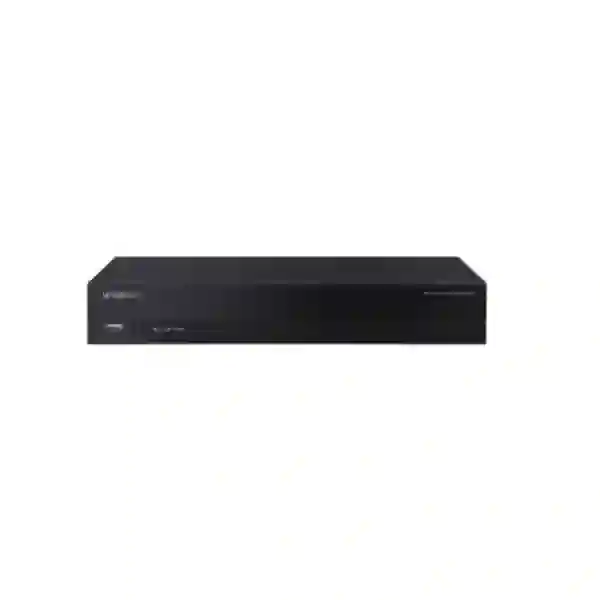
Hanwha ARN-410S 4-Channel NVR for IP CCTV Systems
Plan a four-camera security recording system with a compact Hanwha Vision recorder that combines four PoE camera connections, support for up to 8MP video, 40Mbps recording bandwidth, HDMI monitoring, and one HDD bay rated for up to 6TB. The right choice depends on matching these specifications to your cameras, recording duration, power requirements, and actual site conditions.
At a glance: what you are buying
The Hanwha ARN-410S is a 4-channel network video recorder, not a camera, monitor, or complete CCTV package on its own. It accepts compatible IP camera video, records footage to a supported internal hard drive, and provides local and network viewing functions. For a small Tanzanian business seeking a tidy four-camera solution, its integrated PoE ports can simplify the equipment plan, provided the cameras fit the shared 35W power allowance.
The strongest procurement approach is to confirm the four intended camera views, each camera’s power and bitrate, the required retention period, and the people who need playback access. Then request a quotation for the exact combination of NVR, cameras, storage, power accessories, network hardware, and installation services. That avoids assuming that the device’s headline specifications automatically define the complete installed system.
Hanwha ARN-410S specifications
Use this table to compare the required camera design with the recorder’s published limits. Figures are manufacturer specifications, not promises about the contents of an individual Tanzania sales package.
| Manufacturer / model | Hanwha Vision / ARN-410S |
|---|---|
| Device type | Network video recorder (NVR), 4 channels |
| Camera input resolution | CIF to 8MP, subject to supported camera configuration |
| Video compression | H.265, H.264, MJPEG |
| Maximum recording bandwidth | 40Mbps |
| Maximum playback bandwidth | 32Mbps |
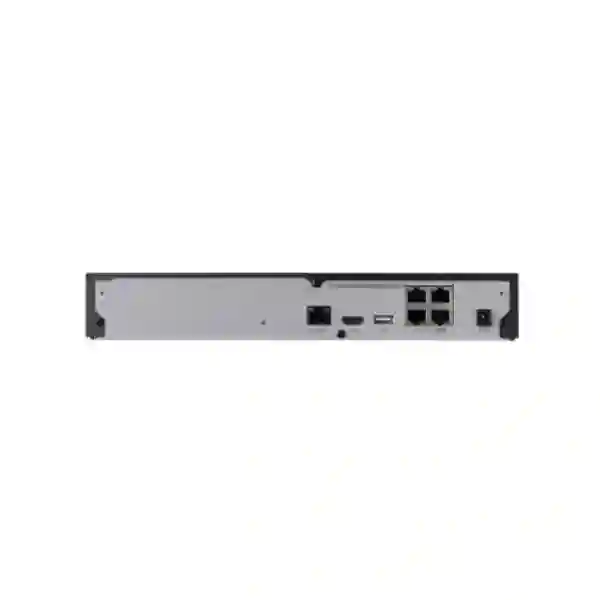
| Integrated camera ports | 4 × 10/100 PoE RJ-45 |
| Separate network connection | 1 × 10/100 RJ-45 WAN |
| Combined PoE power budget | 35W |
| Disk bays / capacity | 1 × SATA; up to 6TB HDD |
| Local monitor | HDMI, up to 3840 × 2160 at 30Hz |
| Power supply input | 54V DC, 1.20A |
| Maximum device consumption | 52W (1 HDD, PoE on), manufacturer specification |
| Operating conditions | 0–40°C; 20–85% relative humidity |
| Approximate enclosure size | 300 × 47 × 208.7mm |
| Approximate weight | 1.03kg |
What the ARN-410S does for a small surveillance system
The Hanwha ARN-410S is a network video recorder for an installation that needs up to four IP camera channels, local recording, and a practical way to review footage. It combines a recorder, four network-camera PoE ports, an HDMI monitor output, and a single internal hard-drive bay in a compact metal unit. The useful buying question is not simply how many cameras will connect; it is whether the camera stream sizes, power needs, desired retention period, and future expansion plans fit its stated limits.
For a shop counter, reception desk, small office, entrance lobby, or similar compact site, four channels can be straightforward to manage. A four-channel plan could cover an entrance, transaction area, corridor, and exit, but those are examples rather than a claim about any particular property’s security requirements. The camera positions should follow the actual risks and viewing conditions, not merely fill four available sockets.
Choose this recorder when four cameras are likely to remain sufficient and the project values an integrated PoE arrangement. A buyer expecting additional cameras or several separate disk bays should evaluate a higher-capacity NVR before purchase. Request a model-specific configuration review rather than assuming that all four-camera systems behave identically.
Key specifications and their real-world meaning
The manufacturer rates the ARN-410S for four network camera inputs with supported recording resolutions from CIF up to 8MP. Its maximum incoming recording bandwidth is 40Mbps, and the stated playback bandwidth is 32Mbps. These figures describe recorder resource limits; they do not promise that any arbitrary combination of four high-bitrate camera profiles will record as expected. Selected frame rates, codecs, scene motion, and camera configuration still matter.
Four built-in 10/100 PoE LAN ports simplify a direct camera connection, while a separate 10/100 RJ-45 WAN connection serves the wider network. An HDMI output supports a local 4K display signal at up to 3840 × 2160 and 30Hz. That monitor specification should not be confused with a promise that every live view will always display four individual 8MP streams at full frame rate.
One SATA hard-drive slot supports an HDD of up to 6TB according to the official product specification. The recorder accepts H.265, H.264, and MJPEG video compression formats, and the combined PoE power budget is 35W. The manufacturer lists 54V DC, 1.20A input and maximum recorder consumption of 52W with one drive and PoE active. Check the offered package for the drive and the correct power adapter.
Who should consider this four-channel recorder?
The ARN-410S is worth considering for a location where a focused camera layout matters more than a large camera count. A small retail business could record the sales area, an entrance, a stock-room access point, and a secondary circulation route. An office may use four cameras for a reception area, access door, passage, and shared entrance. These are planning patterns, not claims that the device alone meets a security or regulatory requirement.
Property managers should define the actual question each camera must answer. Is the goal to see whether a door was opened, understand movement across a floor, identify a transaction event, or review an incident time? Those different objectives affect lens selection, camera positioning, lighting, resolution, and how recordings are searched. Recording infrastructure should be selected after the viewing task is understood.
The limitation is easy to explain: the recorder offers four camera channels, not a spare bank of channels for effortless expansion. If the design is already at four cameras and another zone may need coverage, planning a larger recorder or a separate recorder architecture may be more sensible than replacing equipment soon after installation.
Four PoE ports: convenience with a shared power ceiling
Power over Ethernet can make a small CCTV deployment neater because compatible IP cameras can receive power and data through an Ethernet cable connected to a recorder PoE port. The ARN-410S offers four such camera-facing ports. That can remove the need for an individual wall adapter at every camera, but it does not remove the need to check cable quality, electrical safety, routing, and the camera’s exact power specification.
The important number is the 35W total PoE budget. A camera’s ordinary power use may increase when infrared illumination, heating, or other supported features operate. Add the specified maximum consumption of every planned camera, not only its nominal daytime load. Four cameras drawing an assumed 12W each would require 48W and therefore would not fit a 35W shared budget, even though four physical sockets are present.
When reviewing camera proposals, separate port count from usable power. Verify each camera’s PoE standard and maximum power demand, ensure the combined figure stays within the documented recorder budget, and allow a sensible engineering margin. If the cameras cannot fit, discuss an appropriate external PoE network design rather than assuming the built-in ports will power anything with an Ethernet connector.
Camera resolution and the 40Mbps recording limit
An 8MP-rated input means the recorder can accept supported network-camera profiles up to that resolution; it does not automatically turn a lower-resolution camera into an 8MP camera. A sharp result depends on optics, image sensor, mounting distance, lighting, and compression settings. High pixel counts can help with scene detail, but practical identification goals should be tested against the camera’s view and distance.
The total recording bandwidth limit is 40Mbps. In a four-camera configuration, bandwidth must be allocated across the camera streams that the NVR records. As a simple planning illustration, four streams configured at 6Mbps each represent 24Mbps of incoming recording traffic before considering changes in scene complexity. That arithmetic does not guarantee a particular frame rate or retention result; actual encoding behaviour must be assessed with the selected cameras.
If every camera is configured near a high bitrate, the aggregate can consume the budget quickly. Conversely, selecting H.265 where all devices support it may help reduce storage needs compared with a less efficient setup at comparable visual quality. Verify supported profiles and run a real recording test with busy scenes, darkness, and any analytics overlays before declaring the design complete.
Storage capacity: one drive, up to 6TB
The ARN-410S has one SATA drive bay with a manufacturer-stated maximum HDD capacity of 6TB. A single drive is straightforward to plan, but it is not the same as a redundant disk array. If the hard drive develops a fault, footage stored only on that drive may become unavailable. A business that needs resilient retention, central archiving, or protected evidence export should specify those requirements explicitly.
Storage capacity is not the number of days you can confidently promise. Recording time depends on the number of cameras, their actual average bitrate, codec, frame rate, resolution, scene motion, and whether recording is continuous or event-triggered. A camera looking at a relatively static wall may consume video differently from one viewing traffic or a busy shop. Night-time infrared noise can also change compression behaviour.
Ask the supplier whether the quoted unit includes an installed surveillance-rated HDD, and if so its brand, capacity, and support conditions. Do not treat the maximum supported size as an included capacity. Request an actual retention estimate tied to the intended recording profiles, keep a documented date-and-time setting, and plan how important clips will be exported and protected when an incident occurs.
How to estimate video retention responsibly
A useful storage estimate starts with the expected average recording bitrate rather than the camera’s highest advertised resolution. As a rough mathematical illustration, one constant stream at 4Mbps uses about 43GB per day in decimal units before file-system and operating overheads. Four such streams would be about 173GB per day, and 14 days would require approximately 2.42TB of raw video data. This is an example, not a promised performance figure for the ARN-410S.
Reality changes the estimate. Variable bitrate encoding adjusts the data rate when movement, detail, or lighting changes. Continuous recording fills space differently from an event schedule. Recorded audio, actual usable disk capacity, reserved space, and the recorder’s storage management all matter. A quote that simply divides the printed disk size by an optimistic marketing number can leave the customer with fewer days than expected.
To decide sensibly, state a retention target, select real camera models, capture their desired image quality and recording schedule, and have the installer calculate both average and worst-case usage. Then commission the system, observe actual consumption, and adjust settings within evidence-quality requirements. Recheck retention after camera replacements or major changes to the scene.
Understanding H.265, H.264 and MJPEG
The recorder lists H.265, H.264, and MJPEG recording support. These are compression formats for sending and storing camera video; they are not three independent image-quality grades. H.265 can be more storage-efficient than H.264 in suitable conditions, but effective savings vary with the camera encoder, scene content, resolution, motion, and chosen settings. MJPEG generally behaves differently again because it encodes image frames rather than using the same temporal techniques.
The practical choice starts with camera and recorder compatibility. An IP camera might support several profiles, yet certain features or third-party connections work best with particular codecs. Configure the cameras for the quality the operation needs, check that playback works both locally and through intended software, and record the codec selection in the system handover.
Do not save disk space by reducing quality without understanding what will be lost. A low bitrate may look acceptable during a quiet daytime demonstration but obscure details when movement, shadows, or complex patterns enter the picture. Compare sample recordings at the same viewing scale and under representative operating conditions before approving the chosen profile.
Local HDMI monitoring versus actual camera detail
An HDMI monitor can be useful at a reception counter or secure control point where a member of staff needs a quick view of camera activity. Hanwha states that the ARN-410S provides a 4K HDMI output, with the interface specification listing 3840 × 2160 at 30Hz. That is the output format of the local display connection; it should not be read as a guarantee about each incoming camera stream.
The size of the monitor, the chosen multi-camera layout, and the position of the viewer affect what can be recognised. Showing four images on one screen gives broad situational awareness but allocates less screen space to each camera. If an operator needs to study a face, package label, or entry detail, switching to a single-camera view or reviewing recorded footage may be more appropriate.
Plan the monitor’s placement, privacy, cable length, mounting, and power supply along with the recorder. Do not place a live CCTV display where unauthorised visitors can observe sensitive areas. During handover, test the configured HDMI mode, all desired multiview layouts, and recorded playback so stakeholders understand how to use the system rather than just seeing that the screen powers on.
Recording schedules, events and evidence review
The official specification lists normal recording, dual-stream modes, scheduled recording, continuous or event schedules, pre-event and post-event options, and bookmarks. These controls help align footage capture with the site’s operating hours and incident-review needs. For a front entrance, continuous recording may be preferred where a missing interval would be costly. For a low-activity location, an event plan could be considered if the triggering method is well understood.
Event-based recording requires careful commissioning. Motion detection can be affected by lighting changes, foliage, reflections, or moving shadows. Video analytics events depend on what the actual camera can generate and what the recorder accepts; a general event menu does not mean the ARN-410S itself adds every form of camera-side intelligence. Test the event path and verify that expected footage is retained before relying on a schedule.
For evidence review, establish an incident procedure: locate the relevant camera, confirm timestamps, identify the beginning and end of the sequence, export the needed recording, and preserve an untouched copy under the business’s own procedures. The recorder’s search and backup capabilities can assist, but a reliable process matters as much as a feature list.
Playback, search and export tools
The manufacturer lists a maximum playback bandwidth of 32Mbps and recording search options including date and time, event lists, text search, and smart search. Whether a particular search feature is available or behaves as expected may depend on firmware, recorded data, camera features, and the software interface. This is an area to demonstrate with the exact proposed system rather than rely only on a printed feature name.
Local viewing can help a manager check footage without keeping a separate computer open. Remote search can be convenient for an authorised person, although the available bandwidth and concurrent connections remain limited. The product specification describes local and remote playback arrangements, so consider who will review footage and how often several people may need access at the same time.
Backup options include local GUI formats and network exports described by the manufacturer. Before relying on exports as evidence, try a short sample, verify that the recipient can open it with an appropriate player, retain timestamp context, and document where the file is stored. USB ports are provided, but the presence of a USB port alone does not guarantee that every drive, format, or export workflow will be suitable.
Remote viewing without ignoring cybersecurity
The manufacturer’s product information lists QR-code-based P2P configuration and remote access through the Wisenet Viewer and Wisenet Mobile ecosystem. These functions may simplify access for authorised operators, but an internet connection and application support should be tested against the current recorder firmware and intended client version. A separate manufacturer compatibility list may not contain every model described on an older product page, so avoid a blanket compatibility guarantee.
Remote access must be part of a deliberate security policy. Change initial credentials, give individual users only the access they require, review device firmware, protect the site router, and limit unnecessary exposure. Do not forward arbitrary internet-facing ports merely because a remote login is convenient. Whether P2P, VPN, or a managed access design is best depends on the customer’s network controls and risk tolerance.
Check the expected mobile-network conditions and the internet connection at the site before promising smooth off-site video. Upload capacity, shared traffic, latency, and remote viewing profiles influence the experience. A high-quality local recording can coexist with a lower-bitrate remote viewing stream, but the exact configuration must be tested. Document who can see footage, how access is revoked, and how access logs are reviewed.
Networking and camera protocol compatibility
The ARN-410S lists SUNAPI and ONVIF support for network cameras, with ONVIF Profile S included among the published network protocols. That provides a useful starting point when considering compatible cameras, including some third-party devices. It is not proof that every camera advertised as ONVIF-capable will work with every recorder feature. Discovery, live video, audio, PTZ, analytics events, and camera configuration can have different degrees of interoperability.
For a mixed-brand project, check the exact camera model, firmware, video profile, authentication method, and event behaviour. A live image alone is not a full compatibility test. Confirm that recordings start as expected, playback is usable, timestamps agree, events appear where intended, and the system recovers after a power or network interruption.
The recorder has four PoE camera ports and a separate RJ-45 network connection rated at 10/100. That physical layout is practical for a simple deployment but does not imply unlimited data throughput. Plan IP addressing, network isolation where appropriate, DHCP or static assignment, and router permissions with the site’s administrator. Avoid connecting the security system to an unknown network without approval or an agreed responsibility for ongoing maintenance.
A sensible four-camera layout for a small shop
Consider a compact shop that wants to understand entry movement, the counter area, the main merchandise route, and the rear access door. Those four objectives map naturally to four camera channels, but the placement must account for sunlight through the entrance, counter height, display obstructions, and any security or privacy rules applicable to the site. The recorder cannot compensate for a badly positioned camera.
A front-door camera might need balanced lighting to handle a bright outdoor scene and a darker room. A counter camera may need a viewing angle that shows interactions without recording information that should remain private. A rear-door camera should be selected for the actual ambient conditions. These are camera-selection questions, not intrinsic features supplied by the ARN-410S, and should be scoped separately.
Before installation, draw the floor plan, identify desired views, estimate cable distances, check PoE loads, and define how footage will be reviewed. The NVR’s compact footprint is useful where the four-channel plan is deliberate. It is less suitable where the layout may require a fifth camera, because there is no fifth recording channel to assign.
Small-office and reception applications
A small office may need to investigate unauthorised entry, review reception incidents, or observe shared areas after business hours. With four channels, the design should prioritise those objectives instead of treating every square metre as a surveillance target. Reception desks, internal entrances, circulation paths, and authorised loading or parking access are examples to evaluate. Avoid placing cameras in private spaces or capturing more personal information than the organisation is entitled to process.
Where the office has a local administrator, an HDMI display can give access to live views and footage review without requiring every staff member to have a remote account. If some managers need remote review, define named access rights, approval and revocation procedures, and a record of exported clips. Video systems are business records as well as hardware, and clear ownership reduces confusion when an incident occurs.
If the office wants future expansion, central management of several sites, or advanced analytics that depend on specialised cameras or licenses, confirm whether the full proposed architecture provides those functions. Do not assume that the entry-level four-channel device substitutes for a larger platform simply because it can connect to a network.
Installation planning in Tanzanian operating conditions
For a Tanzania deployment, begin with the actual building conditions rather than generic assumptions. Assess the indoor location where the recorder will sit, the available mains power, surge protection approach, equipment ventilation, network cabling, and whether a UPS is required by the customer’s continuity objectives. The ARN-410S is rated for operating temperatures from 0°C to 40°C and relative humidity from 20% to 85%, so the chosen enclosure and room must remain within those published limits.
Warm rooms, closed cupboards, and crowded shelves can prevent equipment from cooling properly. Place the recorder where air can circulate and where only authorised personnel can reach the power, storage, and network connections. Keep it away from water, dust accumulation, and accidental cable disturbance. The compact chassis makes placement easier, but a small recorder still needs service access and controlled environmental conditions.
Confirm the power supply and electrical installation against the actual site. A UPS may help prevent abrupt shutdowns, but its sizing depends on the recorder, monitor, network devices, and required runtime. Do not promise local stock, installation coverage, or compatibility with a specific mobile provider without a verified offer and technical review.
Network and power continuity checklist
A security recording design should define what happens when the power fails and what happens when the internet fails. A recorder connected to local cameras may still be able to record locally when external internet service is unavailable, depending on the installed network and power arrangement. Remote viewing, off-site notifications, and hosted integrations may stop working during the same interruption. Test the actual configuration instead of making broad uptime assumptions.
An appropriately selected UPS can support short interruptions, but the system designer must calculate the connected load and battery runtime. Include the recorder’s stated consumption, any PoE cameras powered through it, external switches, router, monitor where necessary, and other devices that are essential to the intended service. A UPS sized only for the NVR may leave the upstream network unavailable.
Add a simple restart test to commissioning: safely simulate a permitted power interruption, check that the unit returns online, verify the correct date and time, confirm all cameras reconnect, and inspect newly recorded footage. If the site has frequent power events, set a periodic check for disk health and recording status. Reliability depends on the complete installation, not just the recorder specification.
Access control and privacy considerations
Video footage may identify staff, visitors, customers, or vehicles, so access and retention decisions should be considered during procurement. Define the purpose of recording, which staff roles may view live video, who may export clips, how footage is protected, and who authorises disclosure. Applicable privacy, employment, and sector requirements should be checked for the particular organisation and its operations rather than assumed from the recorder’s features.
The product provides user-access and security features, but settings still need human governance. Give users individual credentials where supported, limit administrator access, and remove accounts when roles change. Record the handover of administrator information securely. Do not display sensitive camera views in public-facing areas or distribute screenshots through personal messaging accounts without an approved business procedure.
Set a written retention target that reflects a legitimate need and relevant obligations. Keeping footage forever is not necessarily better, while an overly short period may defeat the purpose of the investment. Agree an incident-export and deletion process, test that access restrictions work, and ensure responsible staff know what the system can and cannot establish from a recording.
Evidence quality starts at camera selection
An NVR stores video from cameras; it does not create detail absent from the original image. If the business needs to see vehicle movement, monitor a doorway, or investigate a transaction, the required field of view and subject detail should lead the camera selection. An 8MP-capable recorder supports higher-resolution cameras within its specifications, but lens choice and mounting geometry determine whether the relevant action is visible.
Day and night conditions can differ substantially. Backlight, reflection, low light, and infrared glare may hide details even when a scene looks acceptable in a daytime demo. Ask for test footage from the intended installation angle, not only a manufacturer’s promotional image. Include conditions when doors are open, artificial lights are off, or objects move quickly.
Audio support and camera analytics should be specified only where needed, lawful, and compatible with the chosen models. Do not infer that an NVR advertised with 4-channel network audio automatically supplies microphones or grants permission to record conversations. A responsible procurement brief states the desired outcome, then asks the installer to demonstrate it at the designed camera positions.
Commissioning: a practical acceptance sequence
Begin commissioning by confirming that the equipment delivered matches the ordered model, power supply, drive configuration, and selected camera list. Record device serial information privately in the customer’s asset register rather than posting it in public documentation. Examine cable termination, PoE budget, cable labels, network settings, and whether the NVR and cameras are physically secured. Check environmental conditions around the recorder before leaving it in normal operation.
Next, verify the camera views under realistic daylight and night-time conditions. Record a test clip from every channel. Check the recording schedule, video codec, image quality, frame rate, and actual bitrate. Review timestamp accuracy against the site’s agreed time source, and confirm that the expected operator can find footage without administrator assistance. This is also the point to validate any promised events or notifications.
Finally, test live HDMI output, remote access if included in scope, user permissions, clip export, restart and reconnection behaviour, and available storage. Give the customer a simple guide with screenshots or instructions tailored to their software version. The best acceptance test is not that all four camera thumbnails are visible; it is that the system can answer the customer’s defined incident-review questions when needed.
- Verify every camera records footage that can actually be played back.
- Measure or observe real disk use before confirming retention expectations.
- Document firmware versions and access ownership at handover.
- Show the customer how to export a sample clip without changing the original recording.
Ongoing checks after the recorder is installed
Small recorders are often installed and then forgotten until an incident occurs. A light routine can prevent avoidable surprises. Check that each camera still produces the intended picture, the recorder shows healthy recording status, the date and time remain accurate, and no unexpected disk or network warnings are present. These checks can be quick, but they should have an owner and a documented schedule.
Review footage periodically rather than relying entirely on the live screen. A working live feed does not prove that recordings are being stored for the expected period or that playback works. Confirm the oldest available recording is consistent with the retention plan, and revisit it when settings change or additional scene activity increases bitrate.
Firmware and client software require a controlled maintenance approach. Verify model compatibility, read the manufacturer’s release instructions, back up configuration information where appropriate, and arrange updates during an agreed window. Re-test recording, camera reconnection, remote access, and playback after changes. Do not install unverified firmware or assume that a feature available on a newer NVR will be added to the ARN-410S.
Where this NVR is not the best fit
A four-channel recorder is not ideal when a design already requires five or more IP cameras. It may also be the wrong choice when the operator needs several independently serviceable hard-drive bays, built-in disk redundancy, a much larger aggregate recording bitrate, or a large number of simultaneous high-resolution remote viewers. Buying a larger system early can be more economical than an immediate capacity upgrade.
Consider camera power requirements carefully. Four high-consumption cameras may not fit the 35W combined PoE allowance. For a project with powered heaters, strong IR illuminators, or other demanding accessories, verify the exact camera specifications and the proposed power architecture. The NVR’s four physical PoE ports do not override their documented shared limit.
An advanced investigation workflow may require features beyond a basic four-camera recorder, including specific analytics, integrations, evidence retention controls, or centrally managed multi-site operations. Some capabilities can come from compatible cameras or software, but their presence must be established by a tested solution. If those requirements are essential, ask for a written design showing each component that delivers them.
Comparing the ARN-410S with a larger NVR
The relevant comparison is not simply whether an eight-channel or sixteen-channel recorder has more sockets. Evaluate how many cameras the business needs today, the number it may need later, aggregate ingest bandwidth, PoE power budget, disk architecture, playback requirements, remote-user needs, physical space, and operational responsibility. An eight-channel label alone does not explain the whole specification, and larger models should be checked individually.
The ARN-410S offers a compact approach to a deliberately limited four-camera plan. A larger recorder may make sense for a growing warehouse, multiple separate rooms, or a site with expected additional entrances. If the site wants one recorder now and expansion later, document the likely number and type of future cameras so the upgrade choice is based on an actual use case.
An important purchasing distinction is total system cost rather than the NVR purchase price alone. Cameras, HDD, cabling, mounting, power continuity, monitor, commissioning, maintenance, and operator training can represent material project costs. Request an itemised bill of materials so it is clear what is included, what is optional, and which assumptions the quotation uses.
Questions to ask before requesting a quote
Start the discussion with a floor plan or a clear description of the areas to protect. State how many cameras are planned, whether any may be added, and what each camera should show. Ask the supplier to identify the proposed camera models and explain how the combined power and video bitrate fit the ARN-410S specifications. A good quote connects the model’s limits to actual camera choices rather than repeating only marketing bullets.
Specify the required footage retention period, whether an HDD is included, the recording schedule, local monitor needs, and remote access expectations. Ask for the network prerequisites, any UPS and surge-protection arrangement, and whether an existing router can safely support the design. If a customer already owns cameras, provide their exact model names and firmware versions for compatibility evaluation.
Clarify what installation, training, support, software setup, and warranty terms are included in the actual offer. Do not assume these services or terms from this product description. Request confirmation of availability, final price, tax treatment, and delivery terms from the sales team, because no Tanzania-specific commercial details are verified here.
Tanzania procurement and deployment checklist
Before placing an order for a Hanwha ARN-410S in Tanzania, capture the operational requirement in writing. Note the business type, viewing locations, expected camera count, operating schedule, connectivity at the building, and the person responsible for footage review. This prevents a generic four-camera quotation from becoming a system that cannot answer the customer’s practical questions.
Ask for a bill of materials naming each camera, the NVR, disk size if included, power and data cables, network equipment, mounting items, surge or backup-power provisions where necessary, and commissioning work. Confirm that each proposed camera fits both the NVR’s supported video profile and total PoE budget. If a third-party camera is proposed, make a recorded demonstration of the important functions part of acceptance.
Check that the offered unit, service arrangement, and power accessories are suitable for the actual delivery location and operating environment. Supplier stock, pricing in Tanzanian shillings, warranties, delivery windows, and installation reach are offer-specific matters and must be confirmed separately. This page describes verified technical characteristics, not an assurance that a particular package or service is currently available.
Simple troubleshooting when a camera disappears
If a camera suddenly goes offline, begin by checking the recorder’s channel status and the physical network path. Look for a loose connector, damaged cable, power interruption, or a network address change. If several cameras disappear together, investigate shared power and the recorder’s PoE budget before assuming every camera has failed. Avoid repeatedly disconnecting live cables without appropriate procedures.
Check the camera’s specified power draw and the cumulative load, particularly if faults appear at night when infrared equipment activates. A link light or live thumbnail does not establish that all functions are stable. For a camera reachable through another network path, review protocol selection and authentication according to the manufacturer’s instructions.
Document the observed error, time, affected channel, recent configuration changes, and any recorder warnings before contacting technical support. Do not perform firmware resets or disk formatting as a first response; they can complicate incident review or erase important evidence. When footage matters, preserve what is accessible and involve the designated system administrator.
Interpreting the 4K and 8MP marketing terms
The numbers 4K and 8MP often appear together in recorder descriptions, but they refer to different aspects of a video system. The 8MP camera support is a recording input specification. The 4K HDMI figure describes the local display output format. The amount of useful visual detail depends on the original camera image, the recorder’s decoding and multiview arrangement, and the actual display.
A four-camera grid on a 4K monitor is convenient for seeing activity across several viewpoints. It is not equivalent to viewing four separate full-resolution images at their native size. In the same way, a high-resolution recorded stream may still be hard to use if the camera is mounted too high, faces strong glare, or lacks sufficient lighting.
Compare systems using real sample footage and the final monitoring workflow. Decide whether an operator needs broad live awareness, close inspection of individual recordings, or both. Then check the combination of camera, NVR, monitor, and user interface with that task rather than choosing on headline resolution alone.
Integration and management expectations
The manufacturer’s specification mentions web viewing, network protocols, SUNAPI, ONVIF, and named client software. These interfaces provide possible ways to monitor and manage a compatible installation. They should not be treated as an unlimited promise of integration with every third-party video management platform, access-control system, alarm service, or mobile device.
For a project with an existing VMS or mixed-brand cameras, request a compatibility matrix and demonstration using the actual NVR firmware, camera firmware, and VMS version. Confirm live streams, recording control where relevant, event handling, PTZ if required, user rights, playback, and exports. A successful connection over one protocol does not necessarily make all application features available.
Confirm the responsibilities of the person who will maintain those integrations. Software or firmware updates can change compatibility. Keep a configuration record that identifies the tested versions and the approved way to restore operation. That is especially important where the business has limited on-site IT support and depends on external installers for troubleshooting.
What should be included in an installation handover?
A proper handover should give the customer confidence that the recorder does what was purchased. Include an inventory of the NVR, cameras, storage drive, monitor arrangement, and backup-power devices where supplied. Provide a channel map showing which physical area corresponds to each recording channel and note any intentional blind spots or accepted limitations.
Demonstrate daily actions to the responsible staff: switching camera views, finding a particular date and time, reviewing an incident, exporting a clip, recognising warning messages, and requesting service. Give the administrator secure access information through an agreed private channel, not a public document. Record the firmware versions and the configured retention expectation.
Agree who checks recording health, who may add users, how a device fault is escalated, and when changes should be re-tested. Confirm the scope of any supplier warranty or support separately rather than inferring it from the manufacturer brand. These operational details turn a functioning four-channel installation into a system the organisation can actually use.
Frequently asked questions
How many cameras can the Hanwha ARN-410S record?
It supports up to four IP camera channels. A fifth camera is not covered by the stated four-channel capacity even if more network sockets exist elsewhere on a site. Plan an alternative recorder or architecture if more than four recording channels are required.
Does the ARN-410S include a hard drive?
The official specification states one SATA bay supporting an HDD up to 6TB, but it does not establish the drive included in a particular seller’s package. Ask for the actual offered HDD capacity and whether a suitable drive is installed before placing an order.
Can it record 8MP IP cameras?
The manufacturer lists network-camera resolutions up to 8MP. The selected camera must be compatible, and the combined recording traffic must stay within the 40Mbps recording limit. Image quality and recording performance should be tested using the intended settings.
What is the total PoE power available?
The four built-in PoE camera ports share a published 35W budget. Add the maximum power needs of all connected cameras, including any higher draw in night operation. Four ports do not mean four unrestricted high-power camera connections.
Can I watch footage remotely on a phone?
Hanwha’s product information mentions QR-code-based P2P and the Wisenet mobile ecosystem. Verify current application, firmware, account, and network compatibility for the exact recorder before committing to a remote-viewing workflow. Access must be secured and permissioned.
Is the HDMI output the same as four 8MP live images?
No. The stated HDMI output supports a 4K monitor signal, while 8MP is the rated supported network-camera resolution. The live multiview result depends on the recorder’s decoding and layout behaviour. Ask to see the intended monitor arrangement in operation.
How many days of recording will 6TB provide?
There is no universal retention figure. It depends on actual camera bitrate, codec, recording hours, movement, and usable disk space. The correct approach is to model the intended configuration, commission it, and check real storage consumption over time.
Will any ONVIF camera work?
ONVIF support is a useful interoperability starting point, not proof that every third-party model and function will work. Test the camera’s live feed, recording, playback, time synchronisation, and required events with the exact recorder firmware and configuration.
Can the NVR keep recording when the internet is down?
Local recording can be possible without internet if the local camera connections, recording configuration, storage, and power remain operational. Remote access and online notifications may be interrupted. Verify the actual site’s network and backup-power arrangement during acceptance testing.
Can I add another camera later?
The product is specified for four camera channels. If the installation already uses all four, you should plan an upgrade or another properly designed recording solution rather than assuming a spare recording channel can be unlocked.
Does this product include analytics or audio equipment?
The recorder can receive supported camera events and network audio according to its specifications, but that does not mean microphones or all analytics features are bundled. Check individual camera capabilities, licensing where applicable, interoperability, and local requirements before relying on these functions.
What do I need for a quotation in Tanzania?
Provide the camera count, a description of the viewing areas, required retention period, preferred camera models if known, remote-access needs, power conditions, and the intended installation site. Ask for written confirmation of the exact supplied package, availability, service terms, and pricing.
Request a configuration and quotation review
Ready to evaluate the Hanwha ARN-410S for a four-camera CCTV installation in Tanzania? Share your proposed camera models, site viewing requirements, recording duration, PoE power demands, and whether you need a hard drive, monitor, UPS, remote access setup, or commissioning.
Ask FourTeck Tanzania to confirm the exact offer, camera compatibility, configuration, local availability, commercial terms, and any requested services before ordering. No local price, stock status, delivery promise, or warranty is stated here without a confirmed quotation.




Reviews
There are no reviews yet.