
Hanwha Vision · Four-channel network video recorder
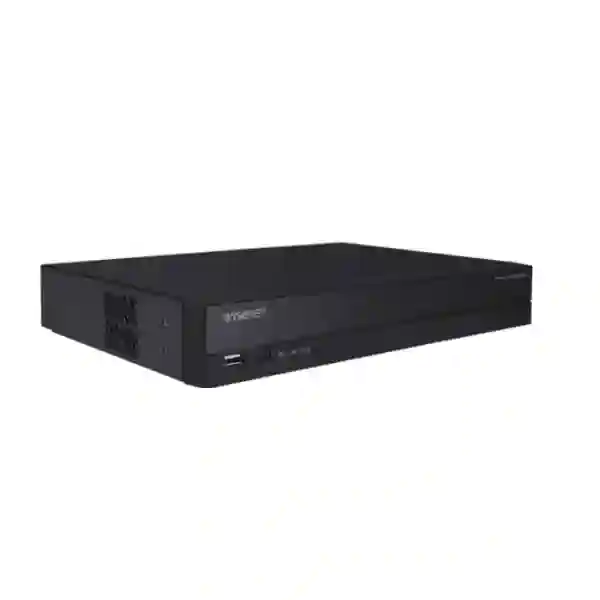
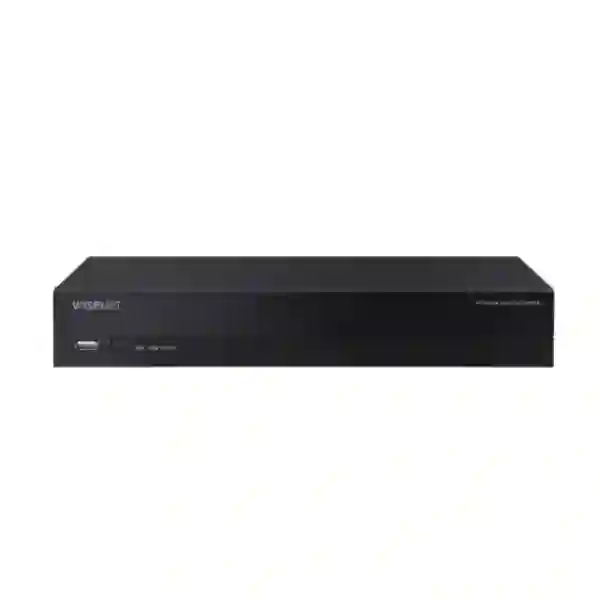
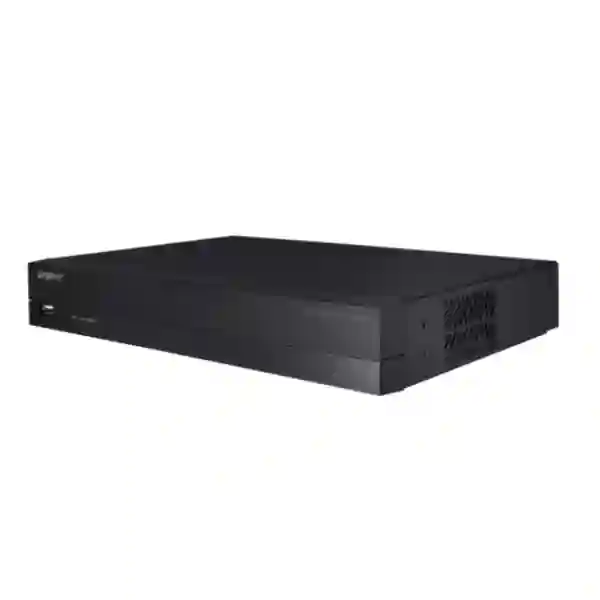
Hanwha LRN-410S 4-Channel 5MP NVR with PoE Switch
Plan a reliable small-site IP CCTV recording setup with four camera inputs, integrated PoE power, H.265 compression and flexible local or supported remote playback. The Hanwha LRN-410S NVR is a focused choice when four cameras are enough and the storage and bandwidth requirements have been checked.
For Tanzania enquiries, request confirmation of the exact supplied equipment, camera compatibility, hard disk, installation scope and current commercial terms before purchase.
Key specifications at a glance
A practical recorder for four-camera surveillance
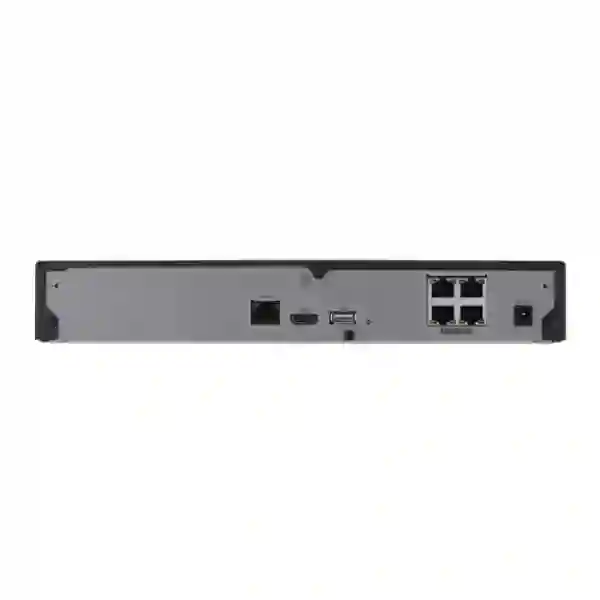
The Hanwha LRN-410S NVR is designed for organisations that want one manageable recording point for a small IP camera installation. It connects up to four supported network cameras, supplies power through four integrated PoE ports and records footage to an internal hard disk. A local HDMI monitor provides a straightforward way to review views and recorded events without depending on a continuously connected computer. For an office, shop, reception desk or compact facility, this is a clear alternative to assembling a recorder and separate PoE switch.
The principal buying question is not simply whether the recorder has four connectors. It is whether the selected cameras, their settings, the required recording period and the available network conditions fit within the model’s real limits. The LRN-410S supports camera resolution up to 5 megapixels, H.265, H.264 and MJPEG compression, a stated maximum recording bandwidth of 30 Mbps, and a single SATA hard drive with a stated maximum capacity of 6 TB. Those figures should drive the design.
For projects in Tanzania, request a specification-led quotation rather than assuming every four-camera system will deliver the same retention or image detail. Provide the camera models, preferred viewing locations, expected recording hours and required evidence-retention period. The recorder can then be evaluated against the actual installation rather than a generic package description.
What the model does—and what it does not
This unit is a network video recorder, or NVR, rather than an IP camera or an analogue DVR. It receives digital video streams from compatible network cameras, writes them to an installed drive and makes recorded material available for supported local or network playback. The Ethernet connections serve different purposes: four PoE camera ports simplify local camera wiring, while the separate network connection is used for the wider network and supported remote access.
Because the recorder supports four channels, it is a defined four-camera solution. A buyer who expects to add a fifth or sixth camera should plan for a higher-channel recorder before installation instead of relying on an informal future upgrade. The 5MP camera limit also matters: do not assume that connecting an 8MP or 4K camera means this recorder will record the full native resolution. Camera profiles and supported modes must be checked individually.
It is equally important to separate recorder capabilities from services. Internet connectivity, cloud storage, professional installation, a hard disk, a display, cameras and a power backup should not be assumed to be included with the recorder. Confirm the exact contents of any quotation and verify current application support and manufacturer documentation for the firmware version being supplied.
Who should consider this four-channel NVR
The best fit is a fixed, modest-size surveillance layout with no more than four camera positions. Examples include a storefront with entrance and checkout views, a small office with reception and corridor coverage, or a controlled room requiring a few defined observation points. These are examples of deployment patterns, not claims that any particular business has installed the product. Camera placement, lighting, privacy and line-of-sight often affect results more than the recorder model alone.
Teams that need simple local review may appreciate an HDMI-connected display and a mouse-driven interface. Those who want access while away from the premises can assess the manufacturer’s documented network and P2P capabilities, subject to compatible software, correct configuration and a working network. Businesses with occasional incident investigations can plan scheduled or event-based recording rather than keeping the system focused only on live pictures.
Choose a different class of recorder if the design requires more than four cameras, higher-than-5MP recording, several internal disks, very large retention reserves or substantial system expansion. A multi-building deployment with long cable runs may also call for a network design beyond the integrated PoE ports. These are design decisions, not defects; a properly sized recorder is usually easier to operate and maintain.
Four PoE ports and the camera power budget
Power over Ethernet, normally shortened to PoE, carries camera data and compatible electrical power over the same Ethernet cable. The four integrated camera ports simplify installations where cameras can be wired directly back to the recorder. Fewer separate power adapters can mean a cleaner equipment area and fewer local outlets, but installers should still use suitable network cabling and observe supported distances, termination practices and cable protection.
The published product datasheet specifies a total PoE power budget of up to 35 W. That number is a combined allowance, not 35 W for each camera. Before selecting four cameras, add their maximum stated PoE power consumption and allow for start-up, infrared illumination, powered accessories and any other supported demand. If the aggregate requirement exceeds the recorder’s available budget, the connection plan must be redesigned with suitable external power or network equipment.
PoE compatibility should be confirmed by reading the precise camera and recorder specifications. A camera that turns on successfully in daylight may draw more power when its infrared illumination activates, so testing only under bright conditions is not sufficient. Outdoor cable entry points, surge exposure and grounding should be assessed by a competent installer. The recorder’s PoE ports are convenient, but they do not remove normal electrical and network installation responsibilities.
Understanding the 5MP camera limit
The LRN-410S is described by Hanwha Vision as a four-channel, 5MP NVR. Five megapixels refers to a supported upper camera resolution class, not a guarantee that every camera will provide useful identification at every distance. A wider angle covers more of the scene but may show fewer pixels across a person’s face or a vehicle detail. A carefully selected lens and camera mounting position can matter as much as headline resolution.
Image performance also depends on frame rate, exposure, lighting, compression, motion and camera firmware. A scene with fast movement or strong backlighting may need deliberate camera configuration. The recorder’s datasheet describes supported decoding capabilities, but an overall system should be tested under representative conditions rather than assuming all channels will achieve every maximum specification simultaneously.
Before ordering, document what each camera must reveal: general activity, an entrance event, a cashier position, a door opening or a narrow area of interest. Then match field of view and camera performance to that evidence requirement. Record a short sample, review it on the intended display and evaluate day and night conditions. The NVR stores the available stream; it cannot restore detail that the camera never captured.
Why H.265, H.264 and MJPEG support matters
The recorder supports H.265, H.264 and MJPEG video formats. These are methods used to encode camera video before storage or transmission. The choice affects bandwidth and hard-disk usage, but it also depends on what the connected camera can produce and what the playback workflow can decode. H.265 can use less data than H.264 for comparable scenes and settings, yet real savings vary with content, camera implementation and configuration.
Do not compare storage plans using the codec name alone. An outdoor entrance with continuous movement, rain, trees or changing light may generate a different bitrate from a quiet indoor corridor. Higher frame rates and quality settings can also increase storage demand. When evidence needs are strict, retain appropriate detail rather than lowering bitrate just to meet an arbitrary number of days.
For mixed-camera projects, check each recording stream independently. Some cameras may offer a codec or profile that a different camera does not, while a third-party device may expose only a subset of controls to the recorder. A short practical recording test can reveal problems with image quality, seeking, event timestamps or playback long before the full retention period is required.
Recording bandwidth: plan around the real ceiling
The current Hanwha Vision product page and the model datasheet identify maximum network camera recording bandwidth of 30 Mbps. This is the combined input recording allowance, not a promise of 30 Mbps for each camera. An older product-line brochure lists a different figure, so planning against the current model-specific documentation is the more cautious approach. Reconfirm the exact hardware and firmware documentation when finalising a technical order.
As an illustration, four cameras averaging 4 Mbps each would contribute about 16 Mbps of camera traffic for recording, which is within the stated 30 Mbps limit before allowing for other variations. Four streams that each demand 9 Mbps would total about 36 Mbps and therefore exceed that nominal recording ceiling. These examples are arithmetic illustrations, not guaranteed camera settings or a capacity recommendation.
Ask the camera supplier for estimated average and peak bitrates under the intended resolution, frame rate and scene conditions. A recording design should leave room for busy scenes and not operate permanently at the published maximum. Bandwidth, storage and remote viewing are separate constraints: a setup can fit on the internal disk but still be unsuitable if the incoming recording streams exceed the recorder’s limits.
What the single 6TB drive allowance means
The LRN-410S provides one internal SATA drive position and supports a stated maximum capacity of 6 TB. It does not advertise multiple internal drives for a large archive or a mirrored RAID array. A single-drive design can be appropriate for a compact site, provided the buyer understands that recording duration depends on the chosen hard disk, camera bitrates and recording schedule. Capacity is a maximum supported configuration, not an indication that a 6TB drive is included.
Select a surveillance-appropriate disk from the current supported or compatibility guidance for this recorder. Confirm the exact capacity and installation state on the quotation: no drive, preinstalled drive or separately supplied drive are materially different offers. A desktop disk and a recorder-approved surveillance disk may have different intended operating characteristics, so the purchase should not be treated as a generic storage accessory decision.
One installed hard disk is also a single storage point of failure. Important material should be exported promptly under a defined process, and the organisation should establish what happens when disk-health warnings or recording interruptions appear. The recorder’s local archive helps day-to-day review, but it should not be described as an automatic disaster-recovery or off-site backup solution.
Estimate retention before choosing an HDD
Retention means how long the system can keep recorded footage before available storage is used or older recordings are overwritten according to configuration. A useful first estimate starts with the sum of average recording bitrates across all active cameras. Multiply that combined megabits-per-second figure by 86,400 seconds per day, divide by eight to convert bits to bytes, and then account for the storage units used. The result is a theoretical daily amount before file-system overhead and operating variations.
For example, four cameras averaging 2 Mbps each create a combined 8 Mbps stream. Continuous recording at that rate is approximately 86.4 GB per day on a decimal basis, or about 2.6 TB over 30 days before overhead and variation. Four cameras averaging 4 Mbps instead generate roughly twice that daily amount. These figures are planning illustrations only; they do not certify a particular number of days on a real installed disk.
A realistic retention plan allows for peaks, disk capacity presentation, recording format and reserve space. If the client needs 30, 45 or 60 days of retrievable footage, test the design rather than assuming it from nominal disk size. Verify settings after installation, review storage trends and ensure any retention obligation or internal policy is clearly documented.
Continuous, scheduled and event-oriented recording
The model documentation describes normal, scheduled continuous or event recording, pre-event and post-event options, and dual-track recording. This gives administrators ways to tailor recording to operational needs. A reception area may need all-day coverage during business hours, while a low-activity room might benefit from event-led review. The appropriate approach depends on what must be documented and how reliably the camera can trigger relevant events.
Event recording can reduce unnecessary material in some conditions, but it should not be treated as a universal substitute for continuous recording. Motion detection can miss subtle actions or generate unwanted events when shadows, headlights, fans or vegetation move. Detection methods and analytics originate in the camera and its supported integration; the recorder should not be marketed as providing every analytic feature independently.
Set pre-event and post-event intervals to preserve the context around incidents. Test at least one real trigger per camera and confirm that both the footage and event time are usable. Where a security policy requires an uninterrupted timeline, continuous recording may be more suitable. Retention should be recalculated after actual recording modes and camera streams are agreed.
Live viewing on an HDMI monitor
An HDMI connection enables a local monitor to show the recorder interface and camera views. The model datasheet lists HDMI output modes of 1920 by 1080 and 1280 by 720. This local output specification should not be confused with the supported 5MP input recording capability: an image can be recorded at a higher camera resolution than the live display output shown on a standard monitor.
Local monitoring may be useful at a reception desk, security station or supervisor’s work area. Consider whether staff need a continuous four-camera overview, occasional spot-checks or controlled access only when investigating an incident. Position the monitor so authorised staff can use it without exposing sensitive video unnecessarily to visitors or passers-by.
Verify display and recorder compatibility with the actual HDMI cable, monitor resolution and intended operating layout. The recorder should be installed in a secured, ventilated equipment position rather than placed only where a display cable happens to reach. For longer display runs, the cable and signal-extension design should be treated as an installation item rather than assumed to work without testing.
Remote access and QR-code P2P setup
Hanwha Vision documents a P2P service using QR-code connection for the LRN-410S, together with supported network and mobile viewing functions. This can make remote access more convenient than relying on direct local use alone. Remote viewing remains dependent on the recorder configuration, supported viewing application, internet access and any security policies of the organisation.
Before enabling access, decide who needs live viewing, who may search recordings and who may export evidence. A remote user working from a mobile connection may experience different image fluidity from someone using a local monitor. The datasheet lists a maximum transmission bandwidth of 20 Mbps; it is important not to confuse this with the separate 30 Mbps incoming recording figure. Available internet upload capacity and competing network traffic will also affect the experience.
Check the currently supported application and firmware for the exact recorder rather than assuming that an older application name will remain compatible indefinitely. Use unique credentials, document ownership of accounts and confirm the connection from the real devices staff will use. Remote access is a useful capability, but it is not a substitute for an agreed access-control policy.
Camera compatibility and ONVIF
The product documentation identifies Wisenet and ONVIF camera protocol support. ONVIF can help integrate some third-party IP cameras, but the label alone does not guarantee full functionality across every camera and recorder combination. Video recording may work while camera-side analytics, event names, PTZ controls, audio, configuration menus or firmware management behave differently from native integration.
Compatibility checks should start with the exact camera model, firmware, profile and desired video parameters. Confirm the connection method, supported codec, resolution, frame rate, event triggers and audio needs. If the installation has existing cameras, test one of each model before purchasing all of the remaining equipment. This reduces the risk of discovering that a core feature is unavailable only after cables and cameras are installed.
For new designs, selecting cameras from a supported compatibility list can make deployment more predictable. An ONVIF-compatible camera is not automatically an appropriate PoE load or a suitable optical choice. Treat network compatibility, power requirements and picture quality as three separate tests. If the procurement includes mixed brands, record which functions have been verified and which remain conditional.
Planning the LAN and internet connection
A compact recorder still benefits from a deliberate network design. The datasheet lists a separate 10/100BASE-T network connection alongside the four PoE camera ports. The wider network may be used for authorised workstation access, maintenance and remote viewing. Confirm that the existing router, switching and addressing arrangements can accommodate the recorder without changing unrelated systems unexpectedly.
Decide whether the CCTV environment should be isolated using appropriate network segmentation and firewall rules. A shared guest network is generally not an appropriate management path for security recording equipment. Where cameras are located across separate switches or long links, verify that the actual design is supported, since direct-plug simplicity does not remove network routing, address conflicts or bandwidth constraints.
Document IP addressing, DNS, time synchronisation, router ownership and any ports or services required by the approved access method. Avoid publishing or exposing unnecessary services to the internet. Test both local recording and remote access after any router change, because a local camera feed continuing to work does not necessarily prove remote viewing is still operational.
Protecting recordings and account access
Security footage may show customers, staff, visitors and operational processes. Access should therefore be treated as a controlled business function, not a shared convenience password. The datasheet identifies HTTPS login authentication, IP address filtering, user access logging and supported network authentication mechanisms. Their availability does not remove the responsibility to configure the device appropriately and keep credentials under organisational control.
Assign individual users wherever the workflow permits, limit administrative privileges and revoke access when roles change. Review logs when investigating unexpected access, playback failures or configuration changes. Prefer a managed path for remote access and follow current manufacturer guidance for firmware updates and supported security settings.
Retention and evidence handling also require policy decisions outside the product specification. Define which authorised people may search, copy or delete recordings, and document how exported footage is transferred and stored. Organisations should obtain local legal or compliance advice where surveillance notices, employee monitoring or privacy requirements apply. This product description does not claim any particular Tanzanian legal approval or exemption.
Power continuity and practical resilience
The published electrical specification lists a 54 V DC power input and a maximum consumption figure of 47 W with one hard disk and PoE enabled. An appropriate power adapter and cable arrangement must be confirmed for the exact supply package. Interruptions to the electrical supply can stop recording unless the entire necessary CCTV chain is protected by a suitable backup strategy.
Where the site requires recording through outages, size an uninterruptible power supply against the recorder’s actual load, the selected cameras, networking equipment and desired backup duration. Battery runtime should be calculated from the complete system and tested, not inferred from the NVR’s power figure alone. If remote monitoring depends on a router or modem, those devices need a compatible power continuity plan as well.
After any extended shutdown, verify that the system restarts, cameras reconnect, correct time is restored and new video is recorded. A camera that displays a live picture after power returns should still be checked for playback and event functionality. Recording continuity is an operational process involving electricity, storage and network recovery—not a guarantee implied by the model name.
Placement, ventilation and local site conditions
The datasheet specifies an operating temperature range from 0°C to 40°C and relative humidity from 20% to 85%. These limits matter when choosing the equipment position. A closed metal cupboard in direct sunlight, a dusty workshop corner or a poorly ventilated back room can expose electronics to conditions different from the surrounding building temperature.
For a Tanzanian project, assess the actual interior equipment area rather than using climate assumptions about an entire region. Arrange adequate ventilation, protection from water entry and physical security appropriate to the site. Avoid placing the recorder near sources of heat, persistent vibration or unnecessary handling. The compact chassis is not a claim of outdoor weatherproofing.
Provide room for cables to bend safely, for the disk to be serviced and for indicators to be checked. Keep power and data wiring identifiable. Labelling each camera’s cable, name and intended view can save time during later fault investigation. A disciplined cabinet layout supports both system reliability and the people who must maintain it.
Four-camera layouts that solve a defined problem
A small retail premises might place cameras at the customer entrance, sales floor, payment point and goods handover area. A professional office might instead prioritise reception, a shared passage, a controlled doorway and a storage room. A small facility could monitor access points and a particular operational zone. The exact positions should follow a site survey, and any personal or sensitive spaces require deliberate privacy assessment.
Camera roles should be decided before mounting hardware. An overview camera helps reconstruct movement across a room, while a narrower view may be needed for clearer visual evidence at a doorway. One camera cannot always fulfil both requirements. Avoid overpromising facial recognition, number-plate readability or incident detection merely because a camera is labelled 5MP.
A four-channel recorder encourages prioritisation. Identify the four most important observation tasks, test whether each view is effective at the intended mounting height, and confirm whether a fifth viewpoint would materially improve the system. If the answer is yes, a higher-channel recorder may be a better initial purchase than squeezing five objectives into four inputs.
Recording for shops, offices and small facilities
Retail buyers often ask whether footage will help review disputed transactions or follow an incident from entrance to exit. The relevant design factors are camera positioning, available detail, accurate timestamps and reliable retrieval. A recorder cannot resolve an ambiguous image created by an obstructed camera or poor lighting, so sample evidence should be evaluated before acceptance.
Office administrators may focus on controlling access to viewing, separating ordinary staff from security operators and maintaining a suitable archive period. The LRN-410S can be considered for a small network camera system, but organisations with multiple sites or centralised policies should examine whether a larger management architecture is required. The existence of network viewing does not automatically make this recorder an enterprise video management platform.
In storage rooms, workshops or compact service areas, camera exposure to dust, heat, sunlight or changing light may drive camera choice. The recorder itself should remain in a suitable protected location. Each proposed sector use case should be converted into a clear viewing and retention requirement, then checked against the four-channel and storage limits.
Choosing cameras to pair with the NVR
Start with the question each camera must answer and the light available at the scene. An indoor corridor may need a different lens, housing and infrared approach from an outdoor entrance. Confirm camera resolution does not exceed the supported recording mode you intend to use, and check the codec and frame rate combination required for that task.
Next, add the expected PoE consumption of each camera, especially under night-time illumination. Compare the sum with the recorder’s 35 W total PoE allowance. A camera may technically support the network but still require an external power solution if the complete set exceeds the available budget. Where cameras are powered from other network equipment, confirm the intended data path and recorder compatibility separately.
Finally, assess whether the camera events or analytics that staff expect will reach the NVR in a useful way. Some analysis occurs at the camera, and not every ONVIF integration exposes every event. When possible, test the proposed camera and recorder together using representative footage. Procurement based only on matching brand names or connector types is not enough.
A simple installation and commissioning sequence
Begin with a site survey and a written four-camera schedule. Record each viewpoint’s purpose, proposed model, mounting height, cable route, expected lighting, estimated bitrate and power draw. Decide where the NVR, disk, monitor and backup power will be located. Confirm that cable runs can be installed safely without creating unnecessary exposure to weather, sharp edges or electrical interference.
Install and label structured cabling, verify the physical connections and connect the compatible camera equipment. Prepare the recorder with an approved hard disk and complete the manufacturer-supported initial setup. Configure time, camera streams, recording schedules and access accounts. Do not leave default or temporary administrator credentials in service. If using P2P or remote access, enable it only after the organisation has approved the relevant security settings.
Commission each camera under daytime and night-time conditions. Verify live view, actual recorded playback, event triggers, available disk space, user permissions and export of a representative evidence clip. Simulate an ordinary interruption where safe to confirm recovery behaviour. Handover should include essential configuration notes, approved login ownership, a maintenance contact process and instructions for retrieving footage.
Acceptance tests before a system is signed off
An acceptance test should prove the system’s real outcome, not just show that four small video thumbnails appear. Confirm the correct camera name and location in the display, assess scene coverage and focus, and check that time and date information are consistent. Record a brief clip with movement in each view, then play it back from the disk to establish that recording is active.
Review one event-based recording where that mode is enabled, and inspect whether pre-event context is preserved. Test an authorised remote user if remote access forms part of the scope. Confirm that an ordinary user cannot perform administrative tasks that have not been assigned. Make sure staff understand which recording actions are automatic and which require manual intervention.
Record test results and the final operating configuration. Where retention is especially important, monitor actual disk usage over time and compare it with the planning estimate. A signed acceptance checklist helps buyers distinguish a functioning installation from a box that has merely been powered on.
Routine checks and ongoing maintenance
A surveillance system should have a simple recurring review process. Check that all expected cameras are online, recent footage is available, disk status is normal and the correct time is displayed. A periodic short playback check is more meaningful than relying entirely on a live picture. A camera can appear connected while its configured recording conditions differ from the operating requirement.
Review account permissions, access logs and software update guidance according to the organisation’s security practices. Firmware work should follow manufacturer instructions for the exact device and be scheduled to avoid losing important recording coverage. Changes to camera profiles, router settings or hard-disk configuration can affect retention and remote access, so test after significant changes.
Keep a basic incident and maintenance log. Record camera replacements, disk changes, unusual outages, settings updates and evidence exports. Where a single drive is used, plan how the organisation would handle its failure and the possible loss of footage. The recorder offers useful functionality, but dependable security operation depends on maintenance as well as hardware.
Retrieving and exporting evidence
The datasheet describes local GUI backup in its supported formats and network-based exports such as JPG and AVI, subject to the applicable workflow. In practice, an evidence request starts by identifying the relevant camera, approximate time window and incident description. Search the timeline, confirm the correct recording and export the smallest useful interval without losing necessary context.
Staff should verify that the exported file opens correctly on the intended review device before treating the task as complete. Note the date, time, camera identity, person making the export and destination used for authorised storage. Avoid unnecessary duplication and uncontrolled sharing of sensitive material. A clear procedure matters when different shifts or team members need to retrieve footage.
If footage may become part of a formal investigation, preserve the original recorded material where possible and obtain appropriate procedural or legal advice on evidence handling. The recorder’s ability to generate a file does not itself establish chain of custody or admissibility. Plan these steps in advance rather than designing the process during a stressful incident.
When an alternative NVR is more appropriate
An eight-channel or sixteen-channel NVR may be the better choice when expansion is likely, because the LRN-410S has four recording channels. A model supporting higher camera resolution may be needed where the required stream exceeds 5MP. More complex projects might require multiple drive bays, additional recording bandwidth, different network interfaces or a more extensive management environment.
Do not assume that another Hanwha recorder shares this model’s bandwidth, PoE budget or display capabilities. Similar names can describe materially different systems. Compare the specifications line by line: maximum channels, camera resolution, aggregate recording bitrate, storage bays and supported total capacity, PoE allocation, remote functions and compatibility with existing cameras.
The lowest initial equipment price is not always the lowest project cost. Replacing a recorder after a fifth camera is requested, adding unplanned power equipment or losing required retention because disk capacity was not calculated can be disruptive. A short planning conversation before purchase helps identify where a different recorder class would offer a more suitable lifetime fit.
Questions to settle before requesting a quotation
Prepare the site type, four proposed camera locations, desired recording resolution, frame rate and typical recording schedule. Include the exact existing camera models if this is an upgrade rather than a new installation. State whether the system must operate at night, whether any camera requires a heater or high-power infrared illumination, and whether the planned PoE total has been checked.
Specify the desired retention in days and whether continuous or event-led recording is acceptable. Confirm whether a surveillance hard disk should be included and whether the quote needs installation, network configuration, monitor, UPS, surge protection, cabling or training. These items should be explicit rather than assumed to be part of the recorder package.
Ask the supplier to confirm current product availability, the exact supplied configuration, compatible software, service terms and any applicable warranty. No Tanzania-specific price, delivery period or stock status is stated here because it has not been verified for this listing. A complete quote should distinguish confirmed items from optional accessories and site-dependent work.
Before you decide: the essential specification checks
The key verified parameters are four IP camera channels, camera resolution up to 5MP, H.265/H.264/MJPEG compression, 30 Mbps maximum recording bandwidth, four integrated PoE ports and a total PoE budget of 35 W. Storage is one SATA position supporting a drive up to 6 TB. There is an HDMI local output, network viewing functionality and documented P2P QR-code setup.
The datasheet lists 20 Mbps maximum transmission bandwidth, a nominal 54 V DC input, 0°C to 40°C operating temperature and 20% to 85% operating relative humidity. It also describes local and remote playback, selected camera-event handling and network security functions. These are device specifications; they do not establish how many days a particular installation will record or what remote performance any internet connection will provide.
The decisive next step is to match those limits to the installation. Confirm each camera’s technical profile and power requirement, calculate the aggregate bitrate, choose the disk based on a realistic retention estimate and specify the access policy. That turns a model comparison into a project that can be installed and accepted confidently.
Request a specification-led Tanzania quotation
If your installation calls for up to four network cameras and a compact recorder with integrated PoE, the Hanwha LRN-410S NVR deserves consideration. Share your camera requirements, the required recording period, current network arrangements and whether the system needs local or remote monitoring. A quotation can then state exactly which recorder configuration and additional equipment are proposed.
Ask for confirmation of compatible cameras, disk inclusion, available stock, commercial terms and any installation services before proceeding. Where the application requires more channels, additional storage resilience or higher-resolution recording, request an alternative recorder comparison rather than relying on an unsuitable configuration. The goal is a usable recording system, not simply a hardware part number.
Frequently asked questions
How many CCTV cameras can the Hanwha LRN-410S record?
The model is specified for up to four IP camera channels. Four integrated PoE ports also provide a convenient direct connection path for compatible powered cameras. Adding a fifth camera is not a documented way to expand recording capacity; choose a higher-channel NVR if five or more simultaneous camera recordings are required.
Can this NVR record 4K or 8MP video?
The LRN-410S is advertised for cameras up to 5MP. It should not be represented as an 8MP or 4K recording solution. If you need full-resolution recording from an 8MP camera, evaluate an NVR whose published input and recording capabilities explicitly support that requirement.
Does it have four PoE ports?
Yes. The manufacturer documents four integrated PoE camera connections and a total PoE power budget of up to 35 W. That is a combined limit, so add all connected cameras’ maximum consumption rather than assigning the full budget to every port.
Is a 6TB hard disk included?
The manufacturer states that the single SATA drive position supports up to 6 TB. This is a maximum capacity specification and does not confirm a drive is installed in any particular seller’s package. Ask the supplier to identify the actual fitted disk and approved model.
How many recording days can I expect?
Retention depends on how many cameras are active, each camera’s average bitrate, compression, resolution, frame rate and recording schedule. Four 2 Mbps continuous streams theoretically generate about 86.4 GB daily before overhead. Use a site-specific estimate and verify actual disk usage after commissioning.
What is the recording bandwidth limit?
The current model-specific Hanwha Vision page and datasheet list a maximum recording bandwidth of 30 Mbps. That figure applies to the combined incoming recording streams, not to each camera separately. Camera bitrates and peaks should be planned below that total.
Does it work with third-party IP cameras?
The datasheet identifies ONVIF support alongside Wisenet integration. Third-party compatibility is conditional on the exact camera and its firmware, codec, resolution and supported events. Test essential functions, including playback and any required event triggers, before making a full deployment commitment.
Can I view the cameras on a phone?
The product documentation describes supported mobile viewing and a P2P QR-code connection method. Actual use depends on the recorder firmware, supported application, account configuration, network access and the organisation’s security policy. Verify the current supported app before purchase.
Can I see video without an internet connection?
A local HDMI monitor can be used for supported on-site viewing and playback when the recorder and cameras are functioning. Internet access is not the same requirement as the local camera recording path. Off-site viewing generally needs suitable network connectivity and an approved remote access setup.
Does H.265 guarantee twice as many recording days?
No. H.265 is an efficient video compression format, but actual storage savings depend on scene complexity, camera encoding, quality settings and movement. A quiet corridor and a busy road entrance can produce very different bitrates even with the same codec. Verify retention using expected streams.
What happens if the power fails?
Recording depends on power to the NVR and its connected equipment. An appropriately designed UPS can support the system for a limited period, but capacity and runtime must be calculated for the entire load. Test recovery, camera reconnection and recording after power is restored.
Can the recorder replace a separate PoE switch?
For a simple four-camera layout using compatible cameras within the total power budget, the integrated ports can reduce the need for a separate camera PoE switch. A larger or distributed network, different power requirements or longer cabling design may still require additional equipment.
Is it suitable for outdoor installation?
The recorder itself should be housed in a protected and appropriately ventilated indoor equipment position. Its documented operating limits are 0°C to 40°C and 20% to 85% relative humidity. Weather-exposed camera locations require suitable outdoor-rated cameras and carefully designed cabling.
What should I provide to get the right quotation in Tanzania?
Share the number and models of cameras, installation environment, required recording days, whether an HDD is needed, and the proposed remote viewing and power backup requirements. Ask for an itemised configuration with confirmed commercial terms. Stock, price, delivery and warranty details must be verified for the actual offer.
Request a Hanwha LRN-410S quotation
Tell FourTeck Tanzania about the camera models, four desired viewpoints, required retention period, power-backup expectations and whether you need monitoring from a phone or local display. Ask for an itemised quote confirming the recorder, drive, accessories and any offered services. This enquiry step does not imply verified stock or a guaranteed delivery time.
Contact FourTeck Tanzania for a confirmed configuration and quotation.




Reviews
There are no reviews yet.