
HANWHA VISION · NETWORK VIDEO RECORDING
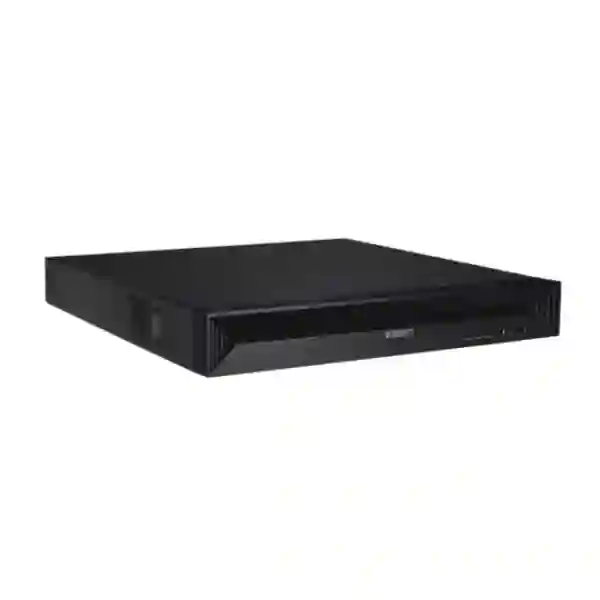
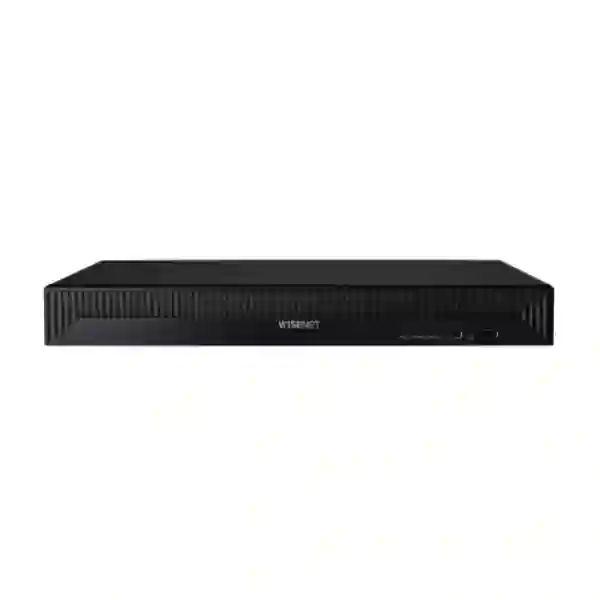
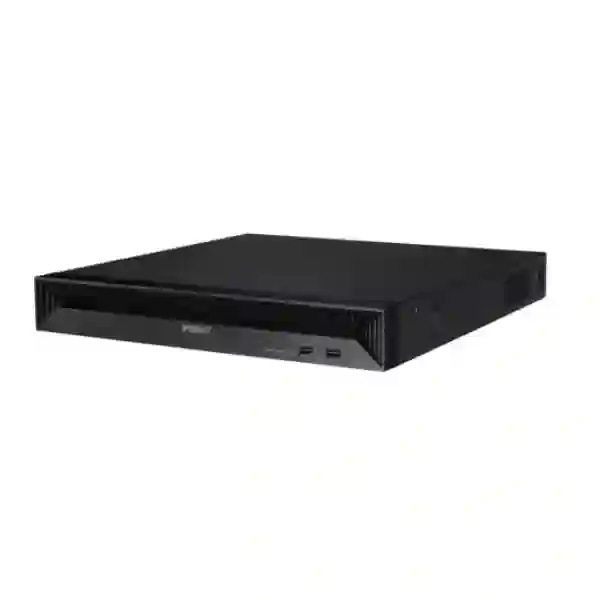
Hanwha QRN-1630S 16-Channel PoE Network Video Recorder
Planning a reliable IP CCTV system for a business premises? The Hanwha QRN-1630S 16-channel NVR brings up to sixteen cameras into a central recorder with integrated PoE connections, local monitoring, searchable recordings and an expandable two-drive storage arrangement. It is a practical candidate for a carefully engineered small or medium surveillance deployment.
Before ordering, verify your camera models, total power consumption, expected recording bitrate and retention target. Request an itemised solution proposal for your Tanzania project; product pricing, stock, delivery and installation terms must be confirmed separately.
QRN-1630S at a glance
Figures are manufacturer-published device limits and features, not a guarantee that every maximum can be reached simultaneously in every configuration. Confirm camera interoperability, compatible drives and current firmware for the intended site.
Technical specifications buyers should verify
| Network-camera inputs | Up to 16 channels; resolutions up to 8 MP |
|---|---|
| Recording bandwidth | Maximum 128 Mbps aggregate |
| Recording codecs | H.265, H.264, MJPEG |
| PoE camera connections | 16 integrated 10/100 camera ports; 130 W total budget |
| Internal disks | Two SATA positions; up to 10 TB each, 20 TB total |
| Local monitor outputs | HDMI1: up to 3840 × 2160 / 30 Hz; HDMI2: up to 1920 × 1080 / 60 Hz |
| Playback bandwidth | Maximum 32 Mbps |
| Camera protocols | SUNAPI; ONVIF support including Profile S as specified |
| Alarm connections | Four inputs and two outputs |
| Power input | 100–240 V AC, 50/60 Hz |
| Power consumption | Maximum 200 W under the manufacturer’s stated loaded conditions |
| Operating environment | 0°C to 40°C; 20% to 85% relative humidity |
| Approximate body dimensions | 370 × 50.7 × 320 mm |
Manufacturer information may vary by region or firmware revision. Confirm the exact supplied product specification and supported accessory combinations when requesting a quotation.
A 16-camera recording platform for planned surveillance
The Hanwha QRN-1630S is a network video recorder designed to bring cameras, recording, local viewing and evidence retrieval into one manageable system. It accepts up to sixteen IP camera channels, supports camera resolutions up to 8 megapixels and has sixteen integrated Power over Ethernet connections. For a buyer planning an office, shop, workshop, education building or multi-area premises in Tanzania, the practical attraction is a clear central recorder rather than a collection of disconnected cameras. The exact camera selection and site design still determine whether the resulting system meets its security objectives.
A well-chosen recorder should do more than accommodate today’s camera count. It must manage the aggregate video bitrate, supply sufficient power to connected cameras, retain footage for the required period and remain practical to operate during an incident. The QRN-1630S provides a manufacturer-rated 128 Mbps recording bandwidth, H.265, H.264 and MJPEG recording support, and two SATA hard-drive positions. Those capacities create a useful starting point, but they should be translated into a site-specific camera, power and storage schedule before a purchasing decision is made.
This product is most relevant when a premises owner, installer or facilities team wants local recording of multiple network cameras and a straightforward route to reviewing events. It is not a guarantee of sixteen high-resolution streams at every imaginable bitrate, nor is it a substitute for a resilient network or a suitable backup policy. Ask for a configuration proposal that identifies each camera, the proposed video settings, the storage plan and the way recordings will be accessed. That makes the specification meaningful for everyday operation.
Why the sixteen-channel limit matters
A channel represents a camera video source that the recorder can register and manage. The QRN-1630S supports a maximum of sixteen network camera inputs, so a planned system with twelve cameras has room for four additional inputs, while a site with seventeen required cameras already exceeds this recorder’s published channel count. Map each entrance, circulation area, reception desk, loading point and other approved coverage area to a camera before choosing the device. Avoid selecting cameras solely to fill every available port; each one should answer a specific security or operational question.
Resolution is a separate decision from channel count. The device accepts cameras with resolutions up to 8 MP, but a higher pixel count does not automatically produce usable evidence in every scene. Field of view, lens selection, lighting, mounting height and motion can matter just as much. An 8 MP camera overlooking a broad yard may serve a different purpose from a lower-resolution camera closely framing an access point. Ask the installer to show sample views or a design drawing that demonstrates identification and overview requirements rather than quoting megapixels alone.
Future expansion also deserves a deliberate allowance. If a business expects an additional doorway, new building or extra loading lane, reserve channels and calculate the associated bandwidth and PoE load now. A channel may be available while the power or storage budget is already tight. Conversely, if fewer than sixteen cameras are needed for the foreseeable future, compare the total cost and operating needs with a smaller recorder. Capacity is useful when it is matched to an actual expansion plan.
Integrated PoE: simpler cabling, with a shared power budget
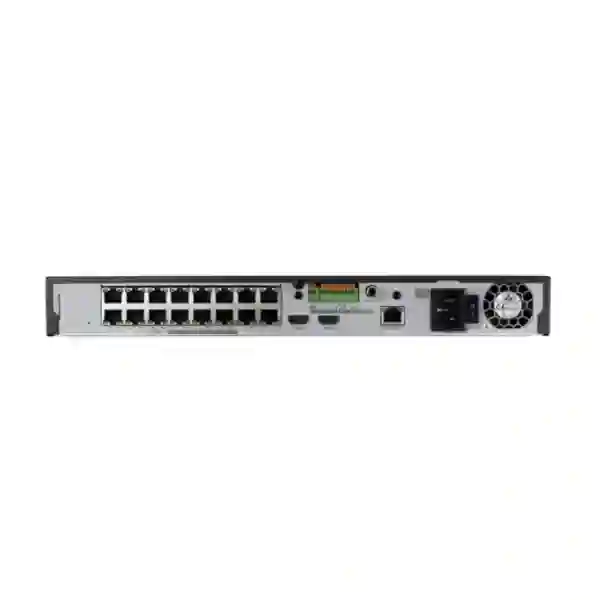
The recorder includes sixteen 10/100 Ethernet PoE camera ports and Hanwha specifies a total PoE budget of 130 W. Power over Ethernet can let a compatible camera receive data and electrical power through one network cable, avoiding a separate local power adaptor at each camera. That can simplify cabling and fault isolation for nearby camera runs. The recorder’s integrated ports are therefore attractive in a centralised CCTV cabinet where cables are terminated together and equipment can be labelled consistently.
The 130 W figure is a total shared allowance, not 130 W per port. Sixteen cameras each consuming 10 W would require 160 W before any other allowance and would therefore exceed that budget. Actual consumption changes with camera model, infrared illumination, heaters, motorised functions and operating conditions. Check each manufacturer’s maximum stated power draw, not only its normal daytime value. Add the proposed loads together, include an engineering margin and confirm each camera’s PoE class and port compatibility before promising plug-and-play operation.
Long cable runs, damaged connectors and poor-quality cable can cause intermittent problems even when the power calculation looks acceptable. Use suitable structured cabling, respect the applicable Ethernet distance limits and document patching. For high-draw cameras or an installation whose aggregate load exceeds 130 W, evaluate an appropriately rated external PoE switch or injector and a compatible network design. Integrated PoE is a convenience, but the reliability of the camera network still depends on physical workmanship, power sizing and maintenance access.
128 Mbps recording bandwidth: calculate the actual workload
Hanwha rates the QRN-1630S for a maximum aggregate network-camera recording bandwidth of 128 Mbps. This is not a promise that each connected camera can send 128 Mbps simultaneously. A useful first calculation is to add the expected recording bitrates of all active camera streams. For example, sixteen streams planned at an average of 6 Mbps produce an illustrative combined load of 96 Mbps. That arithmetic leaves nominal headroom, but a complete design should also consider bitrate peaks, stream behaviour, settings changes and any additional manufacturer limits.
A camera’s actual bitrate depends on resolution, frames per second, video compression, image complexity and whether variable or constant bitrate is selected. A static office corridor may behave differently from a busy gate with vehicles, moving trees and nighttime noise. Recording schedules and event-based settings can also change the volume of data. Request a bitrate estimate for the actual camera models and operating scenes, then check that the total falls comfortably within the recorder’s published ingestion limit. A simple camera-count comparison is not enough.
Recording bandwidth should also be distinguished from playback and remote viewing bandwidth. Hanwha states a maximum playback bandwidth of 32 Mbps for this model, while remote access is influenced by the recorder configuration, network topology and the available uplink. An installation that records smoothly can still feel slow when several users request high-quality footage over a constrained connection. Plan live viewing, review, export and remote workflows as separate operational requirements.
H.265, H.264 and MJPEG: choosing recording settings
The QRN-1630S supports H.265, H.264 and MJPEG compression. H.265 can be useful where compatible cameras and viewers permit efficient storage of detailed video, whereas H.264 may be preferable when a particular integration or export workflow needs broader decoding support. MJPEG is available for suitable use cases but can require considerably more bandwidth or storage than inter-frame codecs. The correct choice is the one that preserves the evidence needed by the site while remaining manageable throughout recording, playback and export.
Do not assume a codec setting alone determines how many days of footage will fit. Frame rate, target bitrate, scene activity, lighting, noise and camera processing all matter. An aggressive compression setting may save space but reduce detail in moving subjects, precisely where an investigation needs clear frames. Compare representative test clips from the intended scene, including night views, moving people or vehicles and moments of rapid change. The footage must be useful, not merely small.
When creating a consistent multi-camera system, document a recording profile for each camera group. Entrances may deserve different frame rates from general overview cameras, and a service counter may need a different retention priority from a peripheral corridor. If dual-stream recording or lower-bandwidth viewing profiles are configured, test the relationship between them rather than assuming the substream replaces the main evidence stream. Good compression planning balances detail, storage, network demand and the practical capacity of reviewing personnel.
Two SATA bays and storage planning
Hanwha specifies two SATA hard-drive slots, each supporting a drive capacity of up to 10 TB, for a maximum supported aggregate capacity of 20 TB. These are capacity limits, not a statement that disks are included in the supplied product or that every disk on the market is supported. Confirm the exact package contents and consult the manufacturer’s current hard-drive compatibility information before selecting surveillance-rated storage. Capacity should be quoted alongside the intended recording policy rather than as a standalone selling point.
The number of retained days is not fixed by the recorder model. A site recording all cameras continuously at high bitrates will use capacity much faster than a site with fewer cameras or a carefully configured event schedule. Raw capacity also differs from practical usable recording space because formatting, system functions and any chosen storage arrangement can reduce what remains for video. If footage must be retained for a particular policy period, calculate against realistic average and peak bitrates and validate the result with a commissioned system.
Storage health and replacement procedures matter over the life of a CCTV deployment. A large disk does not remove the possibility of drive failure or accidental loss. Decide how storage alerts will be monitored, who checks disk health and how evidence will be exported when an incident occurs. Where retention is critical, evaluate whether a separate archival or backup method is required. Do not describe a two-bay recorder as a full disaster-recovery system without confirming the exact supported functions and architecture.
How to estimate retention before choosing disks
A straightforward starting estimate converts aggregate average bitrate into approximate daily recorded data. Each 1 Mbps recorded continuously for a day represents roughly 10.8 GB of raw data using decimal units, before allowing for system overhead and variation. On that basis, a combined average of 40 Mbps is approximately 432 GB per day, while 80 Mbps is approximately 864 GB per day. These are planning illustrations, not manufacturer guarantees or measured QRN-1630S performance figures.
To turn the estimate into a design, identify the required retention days, each camera’s likely average bitrate, whether recordings are continuous or event-driven, and a conservative allowance for unexpectedly busy scenes. Estimate the total volume, add an appropriate margin and compare it with realistically usable capacity. If the result is greater than the supported internal storage, revise the recording profile or evaluate another solution rather than assuming a 20 TB label solves the problem. Evidence policies should determine storage decisions.
A practical commissioning test is to record the actual cameras through representative operating periods, check observed bitrate and storage use, and project retention from real data. Review the oldest available footage periodically after installation to see whether it matches expectations. If management later increases camera resolution or frame rate, repeat the capacity calculation. Treat retention as a monitored service outcome that requires configuration and checks, not a fixed feature of the recorder alone.
Local monitors and an operator-friendly viewing arrangement
This model provides two HDMI outputs. Hanwha lists HDMI1 at up to 3840 × 2160 at 30 Hz and HDMI2 at up to 1920 × 1080 at 60 Hz, with supported layout and display modes. A local screen can help reception, security staff or management watch defined camera groups and retrieve footage without relying entirely on an external computer. The relevant question is what an operator must see at once, not just whether a monitor is technically supported.
For example, a security desk might reserve prominent positions for the vehicle entrance, pedestrian gate and main corridor, while another view covers secondary cameras. Select the layout, monitor size, viewing distance and video stream settings so that operators can actually understand the imagery. Sixteen small tiles on a distant screen may be less useful than a carefully chosen sequence of focused views. Validate display decoding and frame-rate requirements using the intended mix of camera resolutions.
The manufacturer’s local playback and live-display specifications have separate limits. A 4K monitor connection does not mean every camera can be simultaneously decoded at full 8 MP and full frame rate. If a team expects detailed forensic review, demonstrate that workflow during commissioning and confirm the chosen display configuration. Position monitors securely and limit who can access the recorder’s local controls. A high-quality screen setup should support quick decisions while protecting sensitive images.
Finding, reviewing and exporting an incident
Recording is only valuable when someone can find relevant video during a real event. The QRN-1630S supports searches by time and date and includes event-related and smart-search functions described by Hanwha. The available functionality can depend on camera capabilities, recording settings and configured event sources. For a buyer, the useful test is a realistic incident exercise: locate a defined time window, review footage from more than one camera and export a copy that the authorised recipient can open.
Create a basic evidence workflow before installation is handed over. Record the time source used by the NVR and cameras, the roles permitted to export footage, the method for labelling incident files and the location where exported files are stored. A correctly timestamped recording reduces confusion when two cameras show successive parts of an event. Test the export format and any necessary playback software on a separate authorised workstation so that evidence is not trapped inside the recorder.
Hanwha lists file-backup formats and multi-channel playback capabilities, but those should be tested with the exact firmware and operator process that the site will use. Security personnel may need brief training in playback speed, bookmarking, date filters and export controls. Limit unnecessary copying and establish a retention policy appropriate to the organisation’s obligations. A short, documented process can be more valuable than a long feature list when an incident needs urgent attention.
Events, alarm connections and operational responses
The manufacturer lists four alarm inputs and two alarm outputs, alongside event triggers involving video loss, camera events and selected analytics or sensors when supported. This permits useful system designs in which a recorder responds to more than continuous video alone. For example, a configured external input may be associated with an alert or recording event, while a compatible camera event may help an operator locate a relevant clip. Actual responses depend on supported hardware, camera configuration and rules.
An alarm integration should be designed from a written cause-and-effect list. Identify what event is expected, which device creates it, what the recorder should do, who receives notification and how false alarms will be handled. Test each connection under normal and fault conditions. Do not assume the NVR itself supplies sophisticated object-recognition analytics just because it can receive analytics events from compatible cameras. Camera-side capabilities and compatibility remain important procurement checks.
Operational usefulness also requires notification discipline. A system that reports every motion event from a busy road may overwhelm staff, while one that suppresses everything may miss incidents. Set priorities for camera disconnection, storage trouble and events that genuinely need attention. Check that notifications reach the intended authorised people, that network failures do not silently invalidate expectations and that events are reviewed periodically. Technology supports response processes; it does not substitute for them.
Camera compatibility and ONVIF planning
Hanwha lists SUNAPI and ONVIF support for the QRN-1630S, including ONVIF Profile S in its network specifications. These standards can assist with integrating network cameras and other systems, but protocol support is not a guarantee that every function on every third-party camera will work. Live video may be available while motion events, configuration controls, audio, analytics, PTZ or edge-recovery functions are restricted. A compatibility test should identify exactly which features are required.
For an installation using Hanwha cameras, confirm the models, firmware versions, supported video profiles and power requirements. For a mixed-brand installation, ask for a model-by-model compatibility matrix and a demonstration of recording, restart recovery, search and any required event or PTZ controls. Record how cameras will be discovered, authenticated and given stable network addresses. This approach prevents the misleading assumption that any ONVIF label means full functional equivalence.
A buyer replacing an older recorder should consider migration carefully. Existing IP cameras may have outdated firmware, unsuitable compression defaults or unknown administrator credentials. Check whether they still receive security updates and whether their video and event behaviour is satisfactory on the new platform. Where support is uncertain, a controlled pilot involving the most demanding cameras is a better decision than committing the entire installation on a basic protocol statement.
Network layout and remote-access performance
Although sixteen camera PoE ports are built into the device, a complete installation still needs a considered IP network. Hanwha lists gigabit network connectivity in addition to the camera-port interfaces. Decide which traffic stays on the camera-facing side, which services need access from management workstations and how remote viewing will pass through the organisation’s existing network. Document addressing, switch connections and routes so that troubleshooting remains possible after the original installer leaves.
Where appropriate, isolate CCTV traffic from unrelated business devices and give administrative access only to authorised users. Avoid unnecessary public exposure of recorder services. A remote camera that depends on wireless bridges or a separate switch introduces additional bandwidth, power and availability considerations; it is not made automatically reliable by the recorder’s channel count. Check the full route of each video stream, not merely the link from the NVR to its monitor.
Remote viewing quality depends partly on the available internet uplink and the number of concurrent streams. If several people need mobile access, test realistic simultaneous use using the intended viewer and connection method. Use an approved secure approach, consider lower-bandwidth viewing profiles where appropriate and confirm that remote access does not interfere with the recorder’s core duty. A good design keeps reliable local recording as the priority while giving remote users useful visibility.
Mobile viewing, software and permissions
Hanwha lists P2P connection using a QR-code process and compatibility with viewing tools including Wisenet mobile and Wisenet Viewer. These can make remote access convenient where the service and software are supported and configured appropriately. Availability of an app or service may change by platform, region or software version. Before promising access to management, verify the current supported method, confirm device and account requirements and carry out a real test from outside the premises network.
A security manager, site owner and external technician should not automatically share a single administrator account. Define user roles, strong unique credentials and a revocation process for staff changes. Restrict recording export, configuration and remote administration to those who actually need them. Record the business owner of the system and establish how passwords and recovery information will be transferred securely at handover. These everyday controls reduce avoidable access problems.
When evaluating software integration, distinguish basic live viewing from advanced video-management workflows. Hanwha lists several supported viewers and integration interfaces, but features, licensing conditions and compatibility should be checked for the actual deployment. An organisation that wants multiple sites, sophisticated audit reporting or central security operations may need additional software or a different architecture. The QRN-1630S can form a local recording foundation without being presented as an entire enterprise management platform on its own.
Cybersecurity and ongoing administration
A recorder is a networked computer that stores potentially sensitive video. Hanwha documents security-related features for this model including IP-address filtering, access logs, 802.1X support, device certificates and signed firmware. The presence of those functions does not mean a system is automatically secure. Security depends on how it is configured, the condition of every connected camera, update practices and the broader network. Treat CCTV as part of the organisation’s IT estate.
Change default credentials where applicable, use individual authorised accounts, set appropriate permissions and keep a protected inventory of serial numbers and firmware versions. Review the manufacturer’s supported update path before changing firmware and follow a tested maintenance process. Restrict inbound network access and avoid leaving management interfaces exposed to the open internet without an approved security design. Verify time synchronisation because accurate timestamps and access logs are important for investigation and accountability.
Review how footage is used and retained. CCTV can protect a premises, but unnecessary access or indefinite storage may create privacy and governance problems. Decide who may view live images, who may export recordings, who authorises disclosures and when data should be deleted. Check local legal or organisational requirements with the appropriate adviser; this product description does not claim specific Tanzanian regulatory approval or legal compliance. The strongest deployment combines technical controls with clear operating responsibility.
ARB and continuity: understand the supported recovery path
Hanwha lists Automatic Recovery Backup, or ARB, among the QRN-1630S capabilities, and describes it in connection with edge recording retrieval. This can be relevant where compatible cameras have their own recording medium and footage must be recovered after a temporary connection interruption. It is important to establish which camera models and configurations support the function, how recovery is triggered and what limitations apply. ARB should not be described as unlimited fail-safe recording.
Consider the different types of outage separately. A short network interruption may be a different problem from a camera losing power, a damaged cable, a failed hard disk or a building-wide electrical outage. Recovery functions cannot create video that was never captured. Ask the installer to test a controlled disconnect and reconnect scenario with an approved camera and to demonstrate what, if anything, is recovered. Record the actual outcome rather than treating a feature name as proof of continuity.
Where business policy requires stronger resilience, evaluate a suitable uninterruptible power supply, monitoring and backup strategy. Determine the expected runtime of the recorder, cameras, networking equipment and any external switches under the chosen UPS. Make sure recovery after a power event is checked, including correct time, recording resumption and event notification. Continuity is an end-to-end system property supported by infrastructure, configuration and operating procedures, not only by the NVR specification.
Power, ventilation and the installation environment
The manufacturer’s electrical specification lists a 100–240 V AC, 50/60 Hz input and maximum power consumption of 200 W with two hard drives and PoE in use. Site designers should consider the whole cabinet load rather than treating that figure as a constant measured draw. A UPS, monitor, router and additional network switch all add demand. Verify the local supply, earthing, suitable protection and any required electrical work through a competent professional before installation.
Hanwha rates the operating environment at 0°C to 40°C and 20% to 85% relative humidity. These limits are especially relevant where equipment is placed in a hot, poorly ventilated store room or a dusty cabinet. The recorder should not be assumed to tolerate direct outdoor exposure, rain or temperatures above its published range. Select an indoor mounting location with ventilation, physical security, service clearance and a reasonable temperature profile during the hottest expected operating periods.
The listed enclosure dimensions are approximately 370 × 50.7 × 320 mm, with a device weight of about 2.87 kg. Check shelf or cabinet space, cable bend clearance, power access and the room needed for routine maintenance. Label camera connections and avoid placing the NVR where ordinary staff can unplug it accidentally. Good equipment-room preparation reduces future downtime and makes an already busy facilities team more willing to carry out proper inspections.
Practical premises scenarios
In a retail environment, a sixteen-channel layout might bring together entrance coverage, service-counter views, aisles and a receiving area. The important design questions are whether image detail is adequate at the points of interest and how quickly a supervisor can find an event. Recording settings should match opening hours, lighting conditions and the organisation’s evidence policy. If the customer requires facial identification or transaction analysis, those objectives need camera and workflow planning beyond the NVR alone.
For a small warehouse or workshop, fixed cameras may cover access doors, loading areas, internal movement routes and safety-sensitive zones that the organisation is entitled to monitor. Nighttime infrared operation can change PoE consumption, and moving equipment can make recording bitrate less predictable. Plan cable paths and camera protection around site conditions. A clear system drawing helps everyone distinguish camera placement requirements from the recorder’s electrical and channel capacities.
An office or education-related property may need a different balance between overview coverage, privacy controls and access permissions. Managers may want rapid review of entrances while restricting images from other areas. Assign permissions carefully, establish signage and privacy processes as required by applicable rules, and ensure footage is not retained longer than necessary. The recorder is versatile across these examples, but the suitability of a final design depends on lawful coverage choices and verified camera compatibility.
What to compare before committing to this model
Start with the true camera count and any planned expansion. If sixteen channels are already fully allocated, a higher-channel recorder may be more appropriate. Next check the calculated aggregate recording bitrate against the 128 Mbps ceiling. A design with fewer cameras could still exceed the bandwidth limit if the streams are unusually demanding. The relevant comparison therefore includes both count and data rate, not a headline channel number in isolation.
Then examine the 130 W PoE budget and two-drive, 20 TB maximum supported internal capacity. High-draw PTZ or specialist cameras may require a different power approach, and longer retention periods may require greater storage capacity or a changed system design. Evaluate each limitation alongside the planned cameras and video quality. A slightly smaller or larger product can be a better purchase if it more closely fits the load, rather than encouraging compromises after installation.
Finally, compare operator functions and support requirements: local displays, third-party camera controls, mobile access, event handling, export formats and maintenance responsibilities. Require evidence that the intended features work together at the planned scale. Avoid relying on unverified claims about local stock, warranty, installation reach or software licences when comparing offers. A written, itemised quotation should specify the NVR, disk configuration, cameras, power infrastructure, labour and any optional software or service components.
A realistic total-cost-of-ownership checklist
The recorder’s purchase price is only one part of a working surveillance system. Other possible costs include cameras, appropriate cable, mounting hardware, hard disks, monitors, a UPS, networking equipment, labour, commissioning and staff training. The exact items differ by site, and no Tanzania selling price is stated here because none has been verified for this listing. Ask for a transparent quotation that distinguishes included equipment from optional additions and names the technical assumptions behind the design.
Operating costs also matter. Recorders and cameras use electricity continuously in many deployments, and disks or UPS batteries may eventually need replacement. A remote service arrangement, periodic firmware maintenance and incident support may be valuable, but such services must be specified and confirmed rather than assumed. If footage is business-critical, define who is responsible for verifying that recording continues every day and how quickly faults should be escalated under the actual agreement.
Good procurement gives the customer a maintainable system rather than a box of features. Request as-built documentation, usernames and ownership arrangements transferred securely, a copy of the video settings, a camera schedule, storage calculations and an agreed test report. Confirm the applicable manufacturer and seller terms separately. A clear handover protects the investment, helps future technicians and makes capacity expansion or equipment replacement easier to evaluate.
Commissioning and handover tests worth requiring
Begin by verifying the physical and logical inventory. Confirm that the received device is the exact QRN-1630S model, record its serial number privately, document installed disk models and capacities, and identify each camera by location and network address. Check every PoE port being used and verify that the combined maximum camera load has been considered. Power-cycle approved parts of the system during testing to confirm that connections and recording recover as expected.
Next validate the quality of the recorded evidence. Review day and night images from representative cameras, compare configured frame rates and bitrates with the design, and test a recording export. Exercise date-based searches, event filters, local display layouts and authorised remote viewing. Measure actual storage usage over a useful interval and compare it with the planned retention target. Record any limitations discovered and correct them before final acceptance, rather than leaving them as undocumented surprises.
Finish with operational ownership. Agree who receives camera-offline and storage alerts, who approves remote accounts, how firmware updates will be assessed and who responds when recordings are missing. Provide a simple user guide and a contact path from the actual supplier agreement. Test the secure offboarding of a user and confirm that no unnecessary default or shared privileges remain. A signed handover checklist turns a specification sheet into an accountable, usable surveillance service.
Frequently asked questions about the QRN-1630S
Does the QRN-1630S record sixteen cameras at once?
It has sixteen network-camera channels, but each camera’s bitrate contributes to the 128 Mbps maximum recording bandwidth. A proposed sixteen-camera configuration should be checked against that combined limit, PoE demand and the selected storage policy. Channel capacity alone does not establish every possible recording profile.
Can I connect 8 MP cameras?
Yes. Hanwha states support for network-camera resolutions up to 8 MP. Confirm the exact camera models, codecs, frame rates and total bitrate before purchase. Good results also depend on lenses, lighting, field of view and placement rather than resolution alone.
Are all sixteen PoE ports able to power high-draw cameras?
Do not assume that. The recorder’s total PoE budget is 130 W shared across the connected cameras. Add the maximum expected consumption of the selected cameras, including night modes and motorised features, and check interface compatibility. An external power solution may be necessary for a demanding installation.
How much hard-drive storage is supported?
The published hardware specification provides two SATA bays supporting up to 10 TB per drive, for a maximum supported total of 20 TB. Check the current manufacturer compatibility information and the seller’s package contents; the supported maximum is not a promise that any hard disk ships installed.
How many days of video can it keep?
There is no universal retention period. It depends on the number of cameras, their average bitrates, recording schedules and practical usable disk capacity. Calculate retention for the proposed settings, allow for variation and confirm it using measured recording data after installation.
Can I use cameras from another manufacturer?
ONVIF and SUNAPI are listed, but support for specific third-party camera features cannot be assumed. Verify video, events, PTZ, audio and other required functions for the exact device and firmware. A small compatibility test is strongly advised before upgrading an existing mixed-camera installation.
Does it support viewing through a phone?
Hanwha lists QR-code-based P2P connection and compatible mobile viewing tools. The exact app, supported software version, service availability and security arrangement should be verified for the actual installation. Remote performance also depends on network connectivity and configured access permissions.
Can the recorder display 4K locally?
Yes. Hanwha lists HDMI1 output at up to 3840 × 2160 at 30 Hz. Its second HDMI output is specified up to 1920 × 1080 at 60 Hz. Check supported layouts and decoding limits for the proposed number and resolution of simultaneously viewed cameras.
Does it continue recording through a power cut?
The recorder requires power and should not be represented as operating through an outage without a suitable backup-power design. Plan the UPS and its load for the NVR, cameras and essential network equipment. Test resumption of recording when the normal supply returns.
What does ARB do?
ARB refers to Automatic Recovery Backup, which Hanwha associates with compatible edge-recording recovery scenarios. The necessary camera capabilities and configuration must be checked. It should not be confused with a general guarantee against lost footage, power failures or damaged storage.
Is the recorder suitable for a hot equipment room?
Only within its specified environment. Hanwha lists an operating range of 0°C to 40°C and relative humidity of 20% to 85%. Provide a secure, ventilated indoor location and assess actual room conditions, especially when other networking equipment contributes heat.
Does this listing include hard disks, installation or a Tanzania warranty?
Those commercial details have not been verified. Request confirmation of the exact package, installed disk configuration, applicable warranty terms, installation scope and any support service before placing an order. No local price, stock status or delivery promise is implied by this product information.
What should I send when requesting a quote?
Provide the intended number and models of cameras, a simple coverage plan, required recording days, expected remote users, available network and power conditions, and any important event or integration requirement. Ask for a system proposal that explicitly checks PoE, bandwidth, storage, compatibility and handover responsibilities.
Request a configuration-led quote in Tanzania
The Hanwha QRN-1630S 16-channel NVR should be specified alongside suitable cameras, verified PoE demand, recording settings, compatible storage and a clear support plan. Share your coverage objectives, proposed camera count, target recording days and preferred viewing workflow when requesting a quotation. Ask for confirmation of the exact product package, local commercial terms and any additional equipment required.
Next step: contact FourTeck Tanzania to request a tailored product and CCTV system quotation. No unverified stock, pricing or installation commitment is implied.




Reviews
There are no reviews yet.