
Legacy surveillance hardware | Tanzania buyer guide
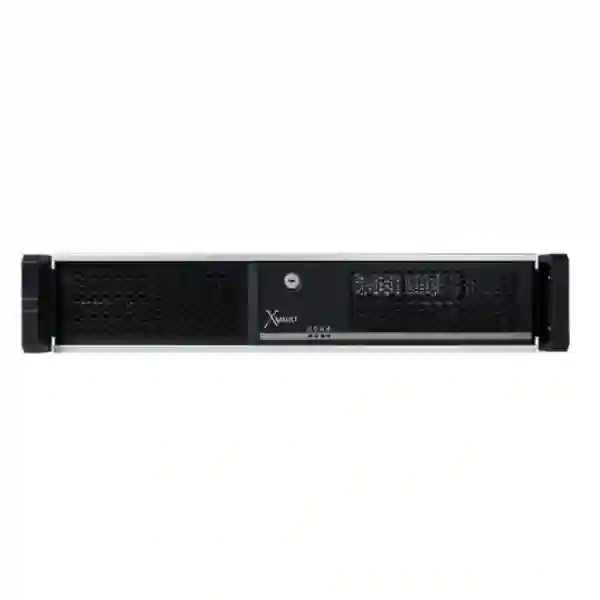
Hanwha SRN-32SEN 32-Channel Video Storage Appliance
Review the model’s original capabilities, understand its discontinued status, and identify what must be verified before retaining, replacing or evaluating this legacy Samsung Techwin-era recorder.
Quick answer for buyers
The Hanwha SRN-32SEN is a legacy 32-channel, 2U rackmount video storage appliance. Historic documents indicate an Intel Core i5 platform and storage offerings reaching 12 TB raw, but do not establish any currently available configuration. Hanwha Vision lists it as discontinued. For a new project, evaluate a supported recorder first; for an installed system, check software, drives, cameras, security and evidence export before making a keep-or-replace decision.
Historical specification at a glance
| Model | SRN-32SEN (Samsung Techwin / Hanwha) |
|---|---|
| Product class | 32-channel video storage appliance; 2U rackmount |
| Processor family | Fourth-generation Intel Core i5 in original model-family literature |
| Historical raw-storage options | 2 TB / 4 TB / 8 TB; up to 12 TB listed in legacy sources |
| Original OS family | Windows 7 Professional for Embedded Systems |
| Original OS medium | Separate 120 GB SSD in historical datasheet |
| Legacy connection references | Single Gigabit Ethernet; DVI, VGA, HDMI video outputs |
| Drive-bay layout | Conflicting legacy descriptions; verify physical unit |
| RAID and PoE | Do not assume; verify actual implementation |
| Current lifecycle | Discontinued per Hanwha Vision |
Specifications refer to historical documentation and should not be read as the specification, support status or contents of an unidentified unit.
What the SRN-32SEN is—and why its age matters
The Hanwha SRN-32SEN is a legacy video storage appliance from the Samsung Techwin era, described in original product literature as a 32-channel, 2U rackmount system. Its intended role was to give security teams a dedicated computer-based platform for collecting, retaining and viewing video from a suitably designed surveillance installation. It belongs to an earlier generation of IP video infrastructure. A buyer assessing one today should therefore separate its historical specification from the features, security updates, software support and compatibility expected of a new recorder.
Hanwha Vision’s product directory identifies the SRN-32SEN by model name and describes it as discontinued. Discontinued does not automatically mean a unit has stopped working; many legacy appliances can still perform a limited, established job. It does mean the purchasing decision should involve more than counting camera channels. Check serviceability, operating-system support, access to replacement drives, current application licensing, export options, and whether the unit can be safely isolated from untrusted networks. Where those answers cannot be established, replacement planning is generally the more prudent route.
For a Tanzanian buyer, this page is primarily a model-identification and technical-evaluation guide. It is useful when auditing an existing site, assessing a second-hand quotation, sourcing a replacement for an installed appliance, or preparing a migration. No particular stock position, local warranty, installation coverage or sale price is asserted here. Request a configuration-specific assessment rather than relying on the model code alone, because old equipment can have different drive populations, software images, licenses and component histories.
The product’s original branding may appear as Samsung, Samsung Techwin, Hanwha Techwin or Hanwha Vision in quotations, labels or archived documentation. That naming history should not be confused with four separate models. Match the full model identifier, serial label, appliance chassis and storage configuration before accepting a specification sheet or spare-parts suggestion. A 32-channel model designation describes the intended recorder category; it does not establish the condition, readiness or security posture of a particular unit offered today.
Legacy hardware specification: what can be stated confidently
Original Samsung Techwin catalogue material describes a 2U, 32-channel SRN-32SEN using a fourth-generation Intel Core i5 processor and supporting historical configurations of up to 12 TB raw capacity. A legacy Samsung-branded specification sheet additionally describes 4 GB DDR3 memory, a separate 120 GB SSD for the operating system, one Gigabit Ethernet interface, and DVI, VGA and HDMI display connections. These are historical model-family details, not a guarantee that any offered appliance has every component installed or functioning.
Legacy documents disagree about the physical drive layout. One Samsung-branded specification describes four hot-swappable 3.5-inch data bays, while some retailer listings describe two bays. The live manufacturer product-page feature bullets also appear to repeat details from the smaller 16-channel model, despite naming the SRN-32SEN as 32-channel. For that reason, the safe procurement practice is to request clear chassis photographs, the exact revision or part suffix, and an inventory of populated and empty bays. The drive-bay count is intentionally not promised for an unidentified unit.
The earlier published platform specification lists Microsoft Windows 7 Professional for Embedded Systems as the original operating-system family. It also describes a dedicated SSD for system software rather than relying solely on recording disks for boot activity. This separation was a sensible design characteristic for its generation, but it does not make the platform equivalent to a modern security-hardened NVR. Confirm what operating system and recording software are actually installed, whether activation and licensing are valid, and whether a supported maintenance route exists.
A legacy specification lists a nominal 510 W power-supply rating, operation at approximately 0 to 35 degrees Celsius, and a single Gigabit Ethernet port. These values help frame a site-readiness conversation but should not be used as a purchase acceptance test without checking the exact hardware revision. Power-supply wattage is a capacity rating, not a constant electricity-consumption figure. Video connectors are not equivalent to guaranteed multimonitor features, and the presence of a network interface does not establish modern network-security capabilities.
Do not assume an integrated PoE switch, modern H.265 recording support, RAID protection, redundant power, cloud management, artificial-intelligence analytics, or native compatibility with every new Hanwha camera. Those properties require model- and software-specific verification. Original documentation for one legacy configuration explicitly marks RAID options as unavailable. When resilience is important, assess the actual storage layout and backup process rather than interpreting a visible group of drive bays as proof of disk redundancy.
Understanding the 32-channel designation
A channel is a logical place for a video source in a recording system. The SRN-32SEN’s 32-channel designation is historically associated with the ability to handle a system of up to 32 video inputs under its intended software and performance conditions. It is not a blanket commitment that 32 contemporary high-resolution cameras will work simultaneously. Resolution, frame rate, codec, configured bit rate, event rules, and recorder software each influence the practical operating envelope.
When you assess an existing deployment, start with the list of cameras actually connected, not merely the maximum channel label printed on the server. Record each camera model, firmware release, stream profile, transmission protocol, target recording rate and intended retention period. A recorder that performed adequately with older low-resolution video may struggle when a camera is replaced by a newer model using a different codec or delivering far more data per second. Capacity and compatibility must be revisited whenever the capture profile changes.
The original Samsung-era reference material describes configurations based on 1.3-megapixel cameras at 15 frames per second. This is historical design context, not a certification for every stream combination. A security designer should not extrapolate directly from those conditions to modern 4K recording, high-frame-rate capture or advanced multi-stream analytics. Ask for a controlled proof of concept with the specific cameras and video profiles expected to operate on site before committing a legacy appliance to a critical role.
Live viewing, recording, playback and export may place different loads on a server. A system can appear stable while recording yet respond poorly when operators simultaneously search multiple long timelines or export evidence. Validate the whole operational workflow: identify an event, locate the time interval, view the relevant cameras, export a usable file, and confirm its integrity on an authorized review computer. The objective is not merely to see pictures on a screen but to preserve footage that can be retrieved reliably when needed.
Storage capacity, retention and the meaning of raw terabytes
Original literature associates the SRN-32SEN family with 2 TB, 4 TB, 8 TB and up to 12 TB raw storage configurations. These are historical configuration examples rather than inventory claims. A device with a 12 TB headline does not necessarily contain 12 TB of healthy installed drives, and raw disk capacity is not the same as retention-ready capacity. File-system overhead, reserved space, disk failures, recording settings and any implemented protection scheme can reduce the usable amount.
Retention planning begins with what the site needs to retain, not with whichever disk capacity happens to be inside a refurbished chassis. Determine the required number of days, which cameras need continuous coverage, whether any cameras record on motion or schedule, and how many simultaneous streams are expected. Ask the responsible security, operations and legal stakeholders to define the target rather than assuming every business needs the same retention policy. Longer retention requires either more capacity, lower recorded data volume, or a change in archive strategy.
As a simple sizing illustration, a continuous video stream averaging 2 megabits per second produces roughly 21.6 gigabytes per day before overhead. Thirty-two such streams would collectively produce about 691 gigabytes per day. At that illustrative rate, 4 TB of raw disk capacity would represent fewer than six days of data before overhead and reserve space. This is not a measured SRN-32SEN performance figure. Real video bit rates are variable and depend on scene detail, camera settings, compression, motion and recording schedules.
A camera pointed at a quiet doorway may consume less storage than a camera viewing traffic, changing light or detailed movement, even if the two cameras share a nominal resolution. Night-time noise, frequent headlights, rain and vegetation can increase scene complexity. For a practical estimate, sample actual video over ordinary and demanding periods, compare average and peak bit rates, and build room for growth. Use the recorder’s own observed disk-usage behavior wherever it can be measured safely and accurately.
Plan separately for everyday retention and incident preservation. The main recording store may be cyclic and overwrite its oldest material. Evidence needed for an investigation should be exported through an approved workflow and protected from routine deletion. Confirm playback availability, timestamps, file formats, access controls and restoration procedures before an incident occurs. A large recording disk does not replace an evidence-handling policy, and a storage calculation alone does not demonstrate that the organization can recover footage after a failure.
When evaluating a used appliance, inspect every drive’s capacity, health report, operating hours where available, error history, mounting, and compatibility with the chassis. Check that the internal operating-system SSD is not confused with the video-storage disks. Test disk alerts, graceful restart and recovery from power interruption under controlled conditions. Where original drives are no longer trustworthy or replacements are difficult to source, the total lifecycle cost may exceed the apparent saving from keeping the old server.
Camera and video-management compatibility
The SRN-32SEN was introduced in the context of Samsung Techwin’s surveillance and recording ecosystem. In a legacy installation, the working arrangement may depend on a particular Samsung Security Manager generation, recording-server component, license, database or device driver. Confirm the software product name and exact release on the installed server, and document the license ownership before reinstallation or migration. A chassis alone is not proof that the necessary recording-software entitlement accompanies it.
Treat ONVIF and RTSP as compatibility topics requiring testing rather than universal solutions. An IP camera may expose a stream that an older recording application cannot decode or control properly. Another may deliver live video but fail on events, search, camera settings, audio or PTZ commands. Protocol-level interoperability is not the same as feature parity. Build a camera-by-camera matrix, noting which functions actually work with the installed software version instead of assuming the broader manufacturer’s brand guarantees compatibility.
If a site is upgrading cameras, identify codec options and stream profiles supported by both ends. A modern camera may default to settings the legacy recorder cannot use, while an alternate H.264 profile could be more compatible; this is a possibility to test, not a promise. Check time synchronization, frame-rate negotiation, camera authentication, reconnection after network interruption and recording continuity across a reboot. Avoid changing a functioning critical security system without a tested rollback plan.
Do not infer compatibility with Hanwha’s current Wisenet Viewer or AI-focused recording products merely because the same manufacturer name appears on the badge. Applications evolve and may maintain separate device support lists. Ask for the relevant software documentation, supported operating-system matrix and a live demonstration if the proposed use includes new client devices. If compatibility depends on unsupported software or disabling protections, that dependency should weigh heavily against continued production deployment.
Networking and deployment planning
A legacy video appliance sits inside a broader network design. Cameras send data, switches carry the traffic, the recording server writes streams, and authorized operators retrieve footage. A historical one-port Gigabit Ethernet specification should prompt a throughput assessment, not a claim of unlimited recording capacity. Review aggregate stream rates, peak traffic, switch uplinks, network errors and concurrent playback demand. Account for non-camera traffic if devices share links, and leave appropriate operational headroom rather than designing for a theoretical peak interface speed.
Keep the surveillance network logically restricted. An older Windows-based recorder should not be placed directly on the public internet or given unrestricted access to corporate systems. Where continued use is unavoidable, involve qualified administrators in segmentation, firewall policy, limited management access and monitoring. Avoid exposing remote-desktop or recorder service ports to unknown hosts. Remote access needs an approved, auditable architecture designed around current enterprise security requirements, not an improvised port-forwarding rule.
Many legacy rackmount storage appliances are not standalone plug-and-play camera kits. The presence or absence of external PoE switching, compatible cameras, separate video-management licenses and operator workstations must be checked for the actual installation. Prepare a simple diagram showing the cameras, power sources, network switches, recording appliance, viewing stations and backup destination. That diagram is often more useful for fault diagnosis than a supplier quotation listing only the recorder model.
Set consistent time across cameras, recorder and review clients. Time drift can compromise incident reconstruction even when video is otherwise intact. Verify time-zone configuration, daylight-saving behavior where relevant, and which system supplies authoritative timestamps. Also plan for a UPS, orderly shutdown, equipment labeling, and maintenance access. In Tanzania, where individual sites may have differing power and connectivity conditions, the appropriate continuity design should be based on the building’s measured operating environment rather than generalized location assumptions.
Security and software-support implications
The historical specification’s Windows 7 Professional for Embedded Systems platform is a major consideration in 2026. Microsoft records Windows 7’s general extended-support end in January 2020 and the end of its conventional extended-security-update period in January 2023. Specific embedded servicing arrangements can differ, so the exact installed edition and contract should still be checked. However, no buyer should assume that a legacy machine receives normal security fixes simply because it boots successfully.
An unpatched recording server can become an entry point to a larger business network. Password policy, local accounts, remote services, antivirus compatibility, removable media, browser components and file sharing all warrant review. Security controls available on newer systems may be absent or difficult to maintain on this generation. If administrators cannot document a credible support path and compensating controls, treat the issue as an operational risk, not merely a cosmetic software-version difference.
Prioritize a supported replacement for a new security deployment or a site requiring modern compliance, central monitoring and long-term assurance. A legacy SRN-32SEN may still have a temporary role while preserving an established system during a controlled migration, but that is different from recommending it as a new security standard. The safe decision depends on the consequences of recording failure, unauthorized access, data loss and inability to export evidence when a real incident occurs.
Before taking ownership of a used unit, establish whether stored video belongs to the previous operator and whether disks have been securely and lawfully handled. The seller should not transfer unrelated footage, credentials or configuration secrets. After an authorized handover, rotate credentials, review accounts, confirm software licensing, inspect logging and establish custody of any retained evidence. Do not perform destructive resets or disk wiping on a live or evidential system without the customer’s explicit authorization and a verified recovery plan.
Cybersecurity reviews should include how the appliance would be recovered after malware, ransomware, hardware failure or an unexpected reboot. Determine whether system images, installers, activation details and configuration exports exist and are valid. Reinstalling legacy software may be impossible if media or entitlements are missing. This recovery limitation is especially important for aging machines: a unit that runs today but cannot be rebuilt tomorrow may be unsuitable for business-critical surveillance.
Physical installation and site readiness
The 2U rackmount form factor is intended for an equipment rack, but rack depth, mounting rail design, rear clearance and loaded weight must be confirmed against the exact chassis. Do not assume rails, cables or a power lead accompany a used appliance. Leave room for airflow and maintenance without blocking adjacent equipment. A quick physical inspection should include fans, optical-drive area, front controls, connectors, bay latches and signs of corrosion, dust accumulation or improvised repairs.
The original environmental documentation indicates a relatively modest upper operating-temperature limit for this generation. An equipment room that frequently becomes hot or dusty can reduce component reliability. Assess ambient temperature at the rack, ventilation, air-conditioning maintenance, dust exposure and cable routing. Keep hardware away from leaks and unprotected outdoor spaces. If the intended location cannot maintain appropriate conditions, redesign the enclosure or choose equipment rated for the actual environment.
Power planning requires more than checking the plug. Confirm the appliance’s input specification, actual power-supply module, local outlet condition and UPS compatibility before energizing it. A nameplate power-supply rating does not mean the system draws that amount continuously. Test clean shutdown and start-up with the site’s chosen UPS arrangement, and check whether any attached network switches and cameras also need backup power. A recorder with working batteries but powerless upstream cameras cannot preserve video coverage.
Arrange the rack so that a technician can replace a failed data disk, inspect status indicators or connect a local screen without dismantling other systems. Maintain clear asset labels showing model, role, installed software version, authorized administrator and support contact. The benefits of the rackmount approach depend on disciplined operations; without documentation, even a physically accessible server can be difficult to support when its original installer is no longer available.
Evaluating an existing or second-hand SRN-32SEN
Start the evaluation with exact identification: photograph the front and rear, read the model and full suffix, note the serial number privately, and record the software and operating-system versions shown by the running appliance. Compare the observed hardware with the appropriate original documentation. Because historical references disagree on drive-bay count and some model-page bullets are inconsistent, physical confirmation is essential. Ask the seller to distinguish installed disks from maximum advertised capability.
Request an operational demonstration using the actual number and types of cameras required. Observe stable recording, live display, search, playback and a complete sample export. Repeat the exercise after a controlled restart. Review network errors, storage warnings, application logs and any evidence of frequent service failures. A boot screen, green status light or screenshot of a camera view is not an adequate substitute for proving the whole recording-and-retrieval process.
Confirm what is included in the quotation: chassis, hard disks, operating-system SSD, licensed software, installation media, mounting hardware, keyboard or input accessories if needed, and any management client. Ask who is responsible for configuration, transfer of lawful records, data migration, commissioning and support. Do not presume a historic manufacturer’s warranty remains valid. A supplier can quote a serviced legacy unit, but the warranty terms and repair path should be documented for that specific transaction.
Compare the total ownership cost of continued operation with a supported alternative. Include drive replacements, electricity, cooling, specialist maintenance, licensing uncertainty, downtime exposure and eventual migration work. A low hardware purchase price can be outweighed by an inability to patch software or replace a failed component. For a buyer whose priority is reliable future operation rather than preserving an existing application, a current supported recorder or server platform will usually merit serious consideration.
Migration planning for a live surveillance site
Begin with an inventory that maps each camera to its recording server, IP address, physical area, desired quality and retention requirement. Document which workflows depend on the old platform: live monitoring, incident search, export, user permissions, alarm handling and any central management software. This reveals whether replacing the SRN-32SEN is simply a recorder swap or a wider migration involving cameras, network capacity, client software and operational procedures.
Select a supported target platform by measured requirements rather than simply buying another 32-channel label. Specify camera resolution and frame rate, codecs, aggregate recording throughput, desired retention, usable storage after redundancy, backup strategy, user concurrency and expansion capacity. Ask the vendor to demonstrate the relevant camera combinations and application features. Treat software subscriptions, license migration and compatibility with retained cameras as separate acceptance items.
Run an overlap period where practical and lawful, so that critical cameras continue recording while the new environment is commissioned. Compare timestamps, image quality, event playback and export on the new system. Keep a clear cutover log, agreed rollback criteria and responsibility for notifying operators. Do not assume old recorded video will import into the new recorder: proprietary databases and native clip formats can make historical archives difficult to transfer.
Create a preservation plan for footage that must remain accessible after the old machine is removed. Record the date range, camera source, original format, export checksum or verification method where feasible, ownership and authorized access process. Test that exported files open on an approved review system without depending on an unavailable legacy workstation. A migration should not end with the new NVR working if the organization has lost access to records it still needs.
After cutover, revoke obsolete access, remove network exposure for the old server, document the decommissioning decision, and handle storage media according to the organization’s retention and disposal policies. If the appliance is being kept as an offline archive, it still needs a clear custodian and recovery procedure. If it is being retired, make sure no business-critical recording, scheduled report or background process remains dependent on it.
Where a legacy appliance may or may not fit
Existing small security room: a known, working SRN-32SEN may justify a short-term continuity plan if its cameras, software and evidence-export workflow have been validated and the security risks are contained. Its age should be visible in the risk register and a migration date should be considered. Such a use is different from asserting that the appliance is a suitable choice for a newly commissioned business with several years of anticipated growth.
Large facility with many modern cameras: if the target includes high-resolution streams, multiple monitoring stations or sophisticated analytics, do not rely on the legacy 32-channel designation. Profile the actual traffic, supported codecs and client workloads. A modern recorder or properly sized recording server should be compared against documented capacity requirements, including resilience and update support. The decision should be driven by tested behavior rather than a similarly numbered channel count.
Site with limited technical staffing: older Windows-based recording appliances can require specialist recovery knowledge, especially when their original software and licensing records are unavailable. Factor in who will handle software failures, failed disks, camera additions and account changes after installation. A supported platform with current documentation and a clear service path may offer better operational value than a legacy unit whose upkeep depends on one knowledgeable individual.
Evidence-sensitive environment: reliable timestamping, export, chain of custody, access control and recoverability may be more important than a nominal storage figure. If the unit cannot demonstrate the required controls or withstand a failure scenario, do not use it as the sole source of critical footage. Design evidence management and backup procedures with the organization’s actual legal, operational and contractual obligations in mind; no compliance status is claimed for this model.
Temporary migration bridge: when the SRN-32SEN is already installed, running and documented, it may serve during phased replacement while new cameras and recording systems are tested. Keep the arrangement as constrained as possible, set a defined handover plan, and verify that necessary recording remains uninterrupted. Temporary use should have an owner, end condition and fallback procedure, rather than becoming an indefinite substitute for a supported security architecture.
Practical acceptance checklist
Model identity: confirm the SRN-32SEN label and any capacity suffix, record the actual processor and memory, photograph drive bays and connectors, and reconcile differences with the seller’s description. If identifying details cannot be matched reliably, postpone configuration-specific procurement. Do not substitute a similarly named SRN model’s specifications or copy an unrelated distributor’s SKU into the target product record.
Recording proof: connect representative approved cameras, capture sustained video, simulate typical network traffic, verify live viewing and playback, and export a sample incident segment. Include at least one restart and one controlled network interruption in the test plan. Check recovered recordings and time consistency afterward. A pass should mean the actual operations team can find and retrieve useful footage, not just that a technical installer can log in.
Storage proof: list the installed disk types and capacities, inspect drive health, confirm what capacity the application reports, and measure a representative day of recording. Document the expected overwrite behavior and any alert thresholds. Test that a full or failed disk produces an actionable warning, and confirm the response procedure. Never claim RAID, uninterrupted recording or a particular retention period without verifying the installed configuration.
Security proof: identify the installed Windows edition, patch history, recording-software version, administrator accounts, permitted network routes and backup procedure. Have a responsible technical reviewer approve any continued use of unsupported components. Where the environment requires supported software, use the audit to define the replacement rather than weakening the security standard just to retain the existing hardware.
Commercial proof: obtain a written description of the unit’s condition, included media and licenses, acceptance conditions, return terms if any, and the party responsible for on-site commissioning. Ask whether compatible replacement parts and installation services can actually be provided for the quoted unit. Check taxes, shipping, supply and delivery only against a real quotation; no Tanzania-specific commercial terms are represented on this page.
Frequently asked questions
Is the Hanwha SRN-32SEN still a current product?
No. Hanwha Vision’s public product listing marks the SRN-32SEN as discontinued. That designation does not prove that a particular installed unit has stopped working, but it changes the purchasing and maintenance decision. Check whether a seller can supply the exact working configuration and whether your organization can tolerate the support and cybersecurity limitations of a legacy Windows-based appliance.
How many cameras can the SRN-32SEN handle?
The model was marketed as a 32-channel video storage appliance. Actual performance depends on the software entitlement, resolution, frame rate, codec, individual stream bit rates and simultaneous viewing or export demands. A 32-channel label must not be interpreted as certification for 32 modern 4K streams. Request testing with the intended cameras and recording profiles.
Does the SRN-32SEN support 12 TB?
Historical Samsung Techwin material lists storage configurations reaching 12 TB of raw capacity. That figure is not a promise of installed or usable space on a particular unit. Count and inspect the physical drives, confirm the exact hardware version, and calculate retention using realistic video bit rates. Any conflicting drive-bay descriptions should be resolved by physical inspection.
Is the SRN-32SEN a standalone NVR with built-in PoE?
It is a legacy rackmount video storage appliance and should not be assumed to include an integrated camera power switch. Review the existing system’s network topology, recording software, camera licenses and power requirements. If the project requires plug-and-play camera connectivity or integrated PoE, compare the requirements against a clearly specified current recorder instead of inferring those features here.
Can it record newer Hanwha IP cameras?
Compatibility cannot be guaranteed from the brand name or channel number. Confirm camera protocol, codec, resolution, authentication and feature support with the exact installed recording-software release. A camera that offers a usable RTSP stream may still have limited events, PTZ or playback functions. A supervised end-to-end trial is the appropriate way to establish practical compatibility.
What operating system was supplied originally?
Legacy specification sheets identify Windows 7 Professional for Embedded Systems and a separate operating-system SSD. The actual software image on a used or maintained unit may differ, so inspect it. Windows 7’s standard support lifecycle has ended; administrators should establish whether any edition-specific servicing exists and should not expose an unmaintained appliance to untrusted networks.
Does it have RAID or redundant power?
Do not assume either capability. One historical specification lists RAID options as unavailable, and published materials vary in their descriptions of the chassis and drive count. A row of disks or a large power-supply rating is not proof of redundancy. Verify the hardware, installed storage controller and real failure behavior before making a resilience claim.
How do I estimate recording days?
Multiply the average recorded bit rate by the number of active streams and recording time, then convert the resulting data volume into disk capacity. Allow for file-system overhead, space reservations, variable scene complexity and any redundancy scheme. Base the final forecast on actual camera measurements and confirm the recorder’s overwrite policy. Raw terabytes alone cannot provide a credible retention answer.
Can historical video be moved to a replacement NVR?
Do not assume direct database migration is possible. First identify the original recording application and native recording format. Export important footage through a verified procedure, preserve the relevant timestamps and metadata, and test playback on an approved system. The new recorder may be able to ingest live cameras while old footage remains in a separate managed archive.
Is a refurbished SRN-32SEN appropriate for a new Tanzania project?
For a new deployment, a currently supported platform should normally be evaluated first because security maintenance, compatible cameras, spare parts and software continuity matter over the system’s lifetime. A refurbished legacy unit may make sense only under a clearly defined, tested and risk-accepted scenario. Obtain a configuration-specific technical assessment and written commercial terms instead of relying on a generic product description.
Request a configuration-specific assessment
For an existing Hanwha SRN-32SEN, prepare the full model suffix, software version, camera inventory, target retention period and photographs of the actual chassis. Explain whether your goal is troubleshooting, migration or evaluation of a possible legacy replacement. Ask FourTeck Tanzania for a technical discussion and a quotation only after compatibility, availability and commercial terms have been confirmed for the particular requirement.
No stock, pricing, service coverage, warranty or modern-software compatibility is implied by this informational page.




Reviews
There are no reviews yet.