
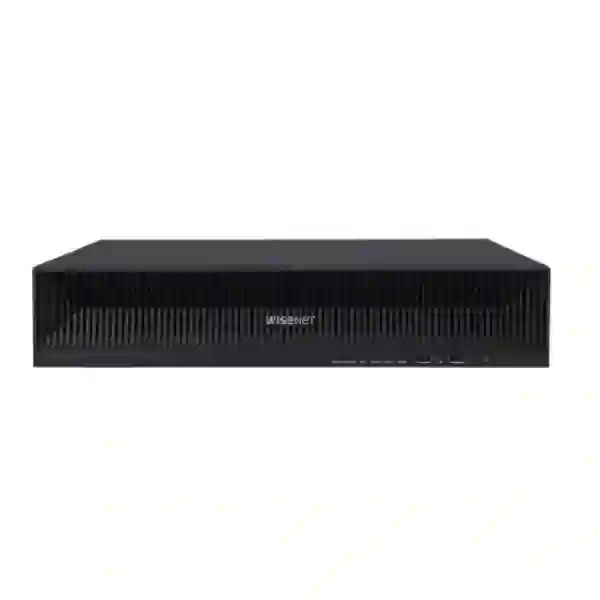
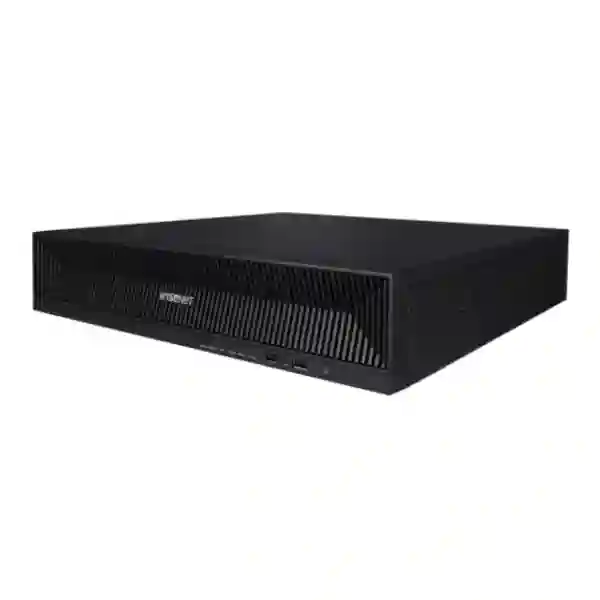
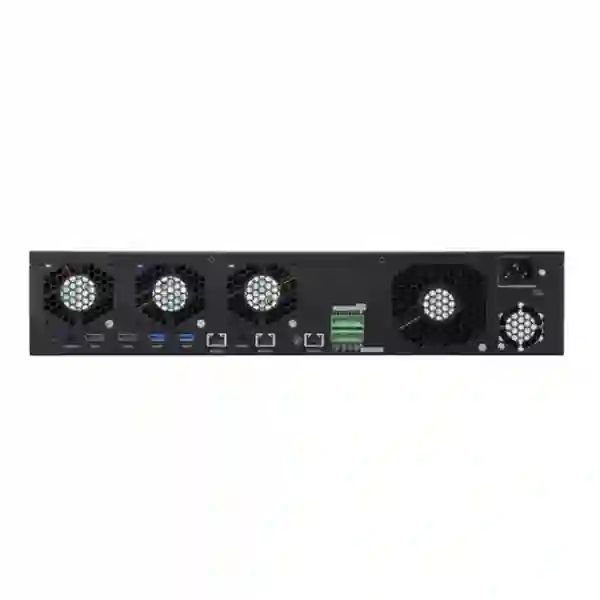
Hanwha XRN-3210B2 32-Channel Network Video Recorder
The Hanwha XRN-3210B2 32-channel NVR can be considered when assessing an established IP video surveillance system, comparing replacement equipment or planning a carefully verified new deployment. Its features include support for up to 32 cameras, up to 32 MP input resolution, compatible AI-camera metadata search and eight internal SATA bays. The key purchasing consideration is not simply the stated maximum capacity: the actual recording mode, storage configuration, compatibility and ongoing product support determine fit. Hanwha Vision has marked this particular model discontinued, so a responsible Tanzania quotation should confirm exact availability and evaluate the manufacturer-named successor where appropriate.
Lifecycle note: manufacturer discontinued. Request confirmation of the exact model and any proposed replacement before ordering.
At a glance: verified technical specification
| Model | XRN-3210B2 |
|---|---|
| Manufacturer | Hanwha Vision |
| Network camera inputs | Up to 32 channels |
| Camera resolution support | Up to 32 MP |
| Recording compression | H.265, H.264, MJPEG |
| Recording throughput | Normal: up to 150 Mbps; distributed: up to 400 Mbps |
| Internal drive bays | 8 SATA; supported HDDs up to 10 TB each |
| Maximum stated raw internal capacity | Up to 80 TB with compatible drives |
| Display outputs | HDMI 1: up to 3840 × 2160 at 30 Hz; HDMI 2: up to 1920 × 1080 at 60 Hz |
| Network integration | SUNAPI and ONVIF |
| Playback bandwidth | Up to 32 Mbps |
| External storage | iSCSI support listed |
| Power input | 100–240 VAC, 50/60 Hz |
| Maximum documented consumption | 138 W with eight 10 TB drives |
| Operating conditions | 0–40°C; 20–85% relative humidity |
| Lifecycle | Discontinued according to Hanwha Vision |
All maxima are manufacturer specifications subject to supported configurations. Storage media, local stock, pricing and commercial terms have not been verified for a Tanzania listing.
Buyer decision in one minute
Choose this model for review only after confirming the exact camera schedule, normal-versus-distributed recording configuration, expected video retention and compatible storage. For a new installation, evaluate the current manufacturer-named replacement because lifecycle support matters. A purchase decision also requires a separately verified Tanzania quotation, including any disks, networking, commissioning and support arrangements.
What this recorder is—and what its lifecycle means
The Hanwha XRN-3210B2 is a 32-channel network video recorder designed to collect, retain, display and retrieve video from compatible IP surveillance cameras. It is relevant to buyers planning a multi-camera installation, replacing an existing recorder or maintaining a system that already uses this exact model. Hanwha Vision documents support for camera resolutions up to 32 megapixels, several compression formats, dual monitor output and eight internal SATA drive bays. These figures describe the device’s capabilities, not a promise that any particular mix of cameras will perform identically under every recording profile. A sensible buying decision starts with the camera list, retention requirement and operating conditions, rather than with the maximum specification printed on the label.
An important lifecycle qualification applies: the manufacturer marks XRN-3210B2 as discontinued and names XRN-3220B2 as a replacement on its Canadian product page. That does not establish the availability, warranty arrangements, local support or commercial suitability of either model in Tanzania. For an existing installation, request confirmation of parts and firmware support before committing to a long operating period. For a new project, compare the complete replacement specification and regional supply position as well as the quoted price. A discontinued model can still be a relevant reference for servicing or compatibility assessment, but should not be presented as a current-stock product without evidence.
Identify the workload before choosing a 32-channel recorder
Thirty-two channels means the recorder can register up to 32 network camera inputs; it does not mean that each of those cameras can run at its highest possible resolution, frame rate and bitrate simultaneously. Identify the intended fields of view first: entrances, loading areas, stock rooms, corridors, parking spaces, office access points and other locations may need different capture quality. Count each camera as one channel, then document resolution, target frames per second, intended compression codec, expected average and peak bitrate, and whether continuous or event-based recording is required. An installation with 20 modest streams can have a very different network and storage profile from one using 20 high-resolution streams.
Build a channel schedule that also reserves capacity for legitimate expansion, while recognising the 32-input limit. If a facility may add cameras in another building or expand in stages, ask whether one recorder remains practical or several recorders provide better fault isolation. Confirm what video is operationally important: facial detail at a doorway, vehicle movements at a gate, or broad situational awareness across a yard. Those objectives should drive lens selection, placement, lighting and bitrate. The recorder cannot restore detail that was never captured or correct camera angles that miss the event. Assess the whole system rather than treating channel count as a substitute for surveillance design.
Understand the recording-bandwidth distinction
The XRN-3210B2’s headline recording figure is up to 400 Mbps, but the current manufacturer specification differentiates between distributed mode at up to 400 Mbps and normal mode at up to 150 Mbps. This is a material planning detail. A bill of materials should say which recorder mode is intended and how the cameras are distributed across the associated network connections. It is unsafe to assume 400 Mbps is available in every configuration simply because the marketing summary uses that number. Recording bandwidth is also different from playback bandwidth, network switch uplink capacity or the internet connection needed for remote viewing.
Prepare a bitrate budget using measured or manufacturer-estimated streams and leave practical margin for changing scene complexity, movement, frame rate, profiles and future cameras. For illustration, 24 streams averaging 4 Mbps represent approximately 96 Mbps before engineering margin; the actual load depends on configured profiles. If the project approaches the relevant mode’s limit, revise camera settings, architecture or recorder choice. Test the final configuration during busy scenes rather than only in a quiet room. A recorder that registers every camera but drops recording frames during peak activity has not met the operational requirement. Ask the installer to document the selected mode and observed load during acceptance testing.
Camera resolution and practical playback
Hanwha lists camera input resolution support from CIF to 32 MP. High-resolution compatibility is useful when detailed images are necessary, but camera resolution is only one part of video quality. The system also depends on lens, sensor performance, exposure, lighting, compression, motion speed, network stability and disk availability. A high-megapixel camera overlooking an entrance may justify additional bitrate and storage; another camera monitoring a long corridor may not. The objective is usable evidence, not simply the largest pixel count. Confirm the camera’s actual encoding profile against the recorder’s supported codec and resolution combination before specification approval.
Do not confuse capture resolution with the number of high-resolution live views that can be decoded smoothly at once. The manufacturer publishes separate decoding capabilities for different resolutions, and the device’s local display resources have limits. An operator watching many tiles may need lower-resolution secondary streams, while the main recorded streams retain the detail required for later investigation. The specification also distinguishes recording from playback; listed playback bandwidth is up to 32 Mbps. An acceptance test should check normal live view, full-screen review, multi-camera review and export. That test often reveals workflow limitations before a control room is handed over to security staff.
Compression: H.265, H.264 and MJPEG
The recorder supports H.265, H.264 and MJPEG. H.265 can make storage and network usage more efficient than older methods for many scenes, although the actual saving depends on content, camera settings, encoder implementation and playback requirements. H.264 remains useful for compatibility with older cameras and some downstream viewing systems. MJPEG may serve specific workflows, but its bandwidth and storage behaviour should be assessed rather than assumed. Select compression by checking both sides of each connection: the camera must output a format and profile that the recorder can ingest, while operators and export recipients must be able to review the resulting files.
Do not calculate disk capacity from codec names alone. A poorly tuned H.265 stream can still consume substantial storage, and an aggressive bitrate ceiling may reduce evidence quality in scenes with heavy motion. Consider day and night profiles, rain or changing illumination, long periods of stillness, vehicle traffic and the trade-off between noise suppression and fine detail. Hanwha also describes WiseStream support on its product material; any benefit depends on the camera and configured system. Configure and evaluate a few representative cameras first, then apply a documented profile policy across comparable locations. Keep a record of each profile so future maintenance does not silently alter retention or image quality.
Eight drive bays and capacity planning
The XRN-3210B2 has eight SATA drive bays. The manufacturer lists support for up to 10 TB per compatible drive, yielding a maximum stated internal raw capacity of 80 TB when eight supported 10 TB drives are installed. Raw capacity is not the same as available recording space. Filesystem requirements, recording behaviour, reserved space and operational policy affect usable retention. Nor does the 80 TB figure mean the unit necessarily ships with eight drives: the HDD quantity and supplied capacity must be established from the exact quotation. Verify supported drive models using the manufacturer’s compatibility information before purchase or replacement.
Define the retention target by site policy and applicable requirements, then work backwards to the needed effective storage. Continuous recording usually needs much more space than genuinely intermittent event recording, but event frequency can be unpredictable. Plan for the busiest expected days and allow reasonable overhead. If the customer must keep several weeks of recordings, a quoted capacity should be accompanied by a written estimate using the actual number of streams, average rates and hours of recording. Revisit the calculation if cameras are upgraded, switched to higher frame rates or moved from event to continuous recording. Capacity planning is a lifecycle activity, not a one-time figure.
A transparent recording-retention calculation
A useful approximate starting formula is daily decimal terabytes equal to the aggregate recording rate in Mbps multiplied by 0.0108. This comes from converting bits to bytes and seconds to a 24-hour day; it is an engineering estimate, not a guaranteed usable-capacity result. For example, an aggregate 80 Mbps continuous stream consumes roughly 0.864 TB per day before filesystem overhead and any special recorder behaviour. Thirty days at that sustained aggregate rate would require roughly 25.9 TB of nominal video data. Those examples are illustrative calculations rather than an endorsed configuration or a promise of the number of days this device will retain.
Apply the same method with actual streams, making separate estimates for normal and high-activity conditions. If the requirement is retention of incident footage rather than continuous footage, specify the pre-event and post-event windows and estimate expected event volume. Document whether audio is recorded, because it also contributes data. Recheck the retention estimate on a live system after representative operating periods and compare it with the oldest available recordings. If the observed retention falls below policy, investigate camera bitrate changes, event frequency, overwrite settings and disk health before altering the specification. Recording duration should be a measured acceptance criterion, not a number copied from a generic advertisement.
Drive selection, maintenance and replacement
Surveillance recording places repeated write demands on storage. A practical deployment should use drive models explicitly compatible with the recorder, supported firmware and the intended environment. Ask whether disks are included, which capacities and models are quoted, whether installation is included and how replacement will be handled. The manufacturer publishes a supported-HDD compatibility reference; a drive having a matching SATA connector is not by itself proof of compatibility. Check also how the recorder displays drive alarms and whether routine maintenance procedures cover fault investigation, cable inspection and safe replacement.
Treat an HDD replacement as an evidence-management event. Before removing a drive, check what recordings must be retained, whether data needs to be exported and whether the unit is operating normally. Maintain appropriate chain-of-custody procedures for storage that may contain sensitive images. Do not assume that a high headline capacity means continuous recording will survive a disk failure. A fault notification policy should identify who receives alerts, how quickly a technician investigates and how a temporary monitoring gap is documented. Replacement media should be validated by a recording and playback test after the work is complete, rather than accepted solely because the recorder recognises the disk.
Do not assume RAID is included
The exact model suffix matters. The XRN-3210B2 product specification describes eight SATA drives and does not list RAID 5 or RAID 6 as an included feature. Hanwha’s differently named XRN-3210RB2 is explicitly described with RAID capabilities, so its specifications must not be transferred to this model. The distinction is crucial for projects where the cost of footage loss or downtime is high. Even where redundancy features are present on some equipment, they are not substitutes for backup, maintenance or a documented recovery plan. Specify the resilience requirement explicitly instead of inferring it from the physical number of drive bays.
For a critical site, ask how recording continuity should be maintained if a drive, recorder, network path or power supply fails. Define the tolerable gap and the required restoration method. The XRN-3210B2 manufacturer documentation mentions ARB and N+1 failover features, but these are system-level capabilities with dependencies on compatible cameras, software, configuration and additional equipment. Their presence in a product description does not mean a single installed recorder is automatically fault tolerant. Ask for a system diagram and a live demonstration if such resilience is part of the proposal. The correct design may require extra hardware and a more comprehensive commissioning process.
Dual HDMI displays and operator ergonomics
The model lists two HDMI outputs: HDMI 1 supports up to 3840 by 2160 at 30 Hz, and HDMI 2 supports up to 1920 by 1080 at 60 Hz. This allows a control room to plan more than one display, for example a primary camera overview and a secondary operational view. However, HDMI specifications describe output capability, not a guarantee of identical performance for every combination of cameras, layouts and monitor sizes. Check supported screen modes and practical decoding resources. Choose monitors with appropriate resolution and viewing distance so staff can recognise activity without straining to inspect tiny tiles.
A useful control-room design starts with the operator’s typical tasks. Continuous awareness may call for selected priority cameras rather than all 32 squeezed into a single grid. Reviewing an incident may be better on a larger individual view or through dedicated playback. Verify how the local interface handles layouts, virtual channels and full-screen playback, and ensure staff understand how to move from an alarm to its associated footage. Cable distances, equipment placement, switch location and protected access to the recorder also affect reliability. The installation should make it easy to act on events, not merely display the most possible video tiles at one time.
Local, browser and mobile access
Hanwha specifies local operation along with web and mobile viewing options. The product material identifies browser-based operation, supported client applications and mobile live-view and playback functions. These are useful when an authorised manager needs to review a site away from the control room, but access arrangements should be decided during design. Determine who can view live video, who can search recordings, who can export evidence and who can change settings. An organisation may need separate permissions for security operators, supervisors and technical maintainers rather than one shared administrator login.
Remote access also depends on the site’s external connectivity and security architecture. A reliable local recorder does not make a slow or unstable internet link disappear. Size the uplink for the number of remote viewers and the actual viewing profiles, and avoid exposing equipment unnecessarily to the public internet. Consider secure remote access methods appropriate to the organisation, strong authentication practices and monitored account activity. Confirm which software versions and devices remain supported for the product’s lifecycle status. Because the XRN-3210B2 is discontinued, remote-client compatibility and security maintenance deserve extra attention before choosing it for a fresh long-term installation.
Camera compatibility with SUNAPI and ONVIF
The XRN-3210B2 lists SUNAPI and ONVIF support for camera connections. SUNAPI is Hanwha’s integration interface, while ONVIF provides a standards-based route for certain interoperability functions. Neither label guarantees that every feature of every third-party camera will operate exactly as it does on the camera’s native software. Basic video, audio, motion events, analytics, configuration controls and PTZ functions may have different levels of support. If cameras from multiple manufacturers are proposed, obtain an exact model-and-firmware compatibility plan rather than relying on the phrase ONVIF compatible.
A sensible integration test registers each camera, checks stable live streams, verifies playback, synchronises time, confirms event delivery and tests required controls. Repeat the test after any camera firmware change that affects streaming or metadata. For Hanwha cameras, confirm which functions depend on SUNAPI and which recorder firmware release is required. If replacing another recorder in an existing system, record the old camera profiles before migration so important settings can be reproduced. Account for licensing or software requirements associated with other parts of the surveillance system without assuming they are covered by this hardware’s price. Interoperability should be verified through task-based testing, not a protocol logo.
AI metadata search needs compatible cameras
Hanwha describes AI attribute or metadata search support when the XRN-3210B2 is connected to compatible Wisenet or Hanwha AI cameras. This is not the same as saying that the NVR turns ordinary cameras into AI cameras. The camera and its analytics generate the relevant metadata, and the recorder can make supported information available for investigation. Before promising searches based on people, vehicles or object attributes, confirm the exact camera model, analytics capabilities, recording configuration and software version. Search options can differ with the connected devices and deployment choices.
For a buyer, the practical question is how quickly staff can find a relevant event. A security team might want to narrow a search to movement near a loading entrance or a vehicle passing a specific view. That usefulness depends first on a well-positioned camera, suitable lighting and correctly configured analytics. Define a few real investigation scenarios and ask for an on-site demonstration using the proposed cameras. Check the ease of searching, reviewing and exporting the results, not only whether a feature label appears in a menu. Analytics should help investigators, but false detections, missed classifications and incomplete metadata remain operational possibilities that must be managed.
Event recording and alarms
The recorder supports recording schedules, continuous and event-based recording, along with pre-event and post-event options. Hanwha lists triggers including alarm input, video loss, camera motion or analytics events and dynamic events. Available actions include notifications and certain output or camera-control responses. This makes it possible to develop an event-driven operating procedure, but the value comes from how accurately triggers are configured. Too many alerts can cause operator fatigue; too few can leave a meaningful incident unnoticed. Decide which events demand immediate action and which are intended mainly to simplify later review.
Start with a response matrix: identify each event, its source, the responsible person, the desired action and how an incident is closed. A camera-disconnection alert should go to someone who can investigate network or power faults. An access-area alarm may require a guard to inspect a live image and follow the site’s security procedure. Test notification paths during operating hours and outside them. If an email or push service is relied upon, verify network, account and device dependencies. Event recording should also be tested with realistic motion and lighting changes. Do not assume an event engine automatically creates a complete evidence record without attention to pre-event time, post-event time and retention.
PTZ camera workflows and situational review
The XRN-3210B2 documentation includes PTZ control through its user interface and compatible viewing tools, with support for camera presets. That is useful where an operator must reposition an appropriate PTZ camera to follow activity or inspect a wider area. PTZ is not a replacement for fixed-camera coverage of critical locations: when a moving camera looks in one direction, it may not record another. Use fixed cameras for essential evidence and PTZ capability as a supplementary tool where the risk assessment justifies it. Test control responsiveness, presets and the authority given to each operator.
The model also references fisheye dewarping support, subject to the documented local and software context. Dewarping can make a compatible wide-angle view easier for people to interpret, but lens geometry and available recorded detail still matter. If a project includes fisheye cameras, test the actual playback and export workflow so incident footage is usable by the intended recipients. Training should cover retrieving the native recorded scene as well as viewing an adjusted perspective where supported. Check how concurrent users affect command ownership: two people trying to steer one camera can disrupt each other. Operational rules are part of the design, not an afterthought.
Network architecture for reliable recording
The manufacturer lists three gigabit RJ-45 Ethernet interfaces on the XRN-3210B2. Their existence does not remove the need for sound IP network design. Cameras normally require appropriate network switching, cabling and power arrangements. Plan how camera VLANs or subnets connect to the recorder, how the recording streams are distributed, and how administration and remote viewing are controlled. If power over Ethernet is desired at the camera, specify compatible PoE switches or injectors as separate infrastructure; do not assume these recorder network ports are integrated PoE camera outputs.
Calculate switch port counts, PoE budgets, uplink load and cable distances against the actual camera schedule. In larger buildings, separate switches or network segments can make fault finding easier, while redundant connectivity may improve resilience if deliberately engineered. Network time synchronisation matters because cameras and recorders need trustworthy timestamps for incident reconstruction. Maintain an IP address plan, label ports and keep firmware and configuration records. During commissioning, examine packet loss, image interruptions and recovery after a switch restart. A recorder may have generous nominal bandwidth yet still suffer gaps when an upstream switch is oversubscribed or a poor cable causes intermittent packet errors.
Security configuration and access control
Video records may include sensitive operational and personal information, so security configuration matters as much as image quality. The manufacturer lists features including access logs, IP filtering, secure protocols, certificates and signed firmware. Their usefulness depends on proper configuration and supported software. Change default credentials, assign individually accountable users where possible, limit administrative access and review who is entitled to live viewing, playback and export. Place the recorder in a secured physical location and restrict access to storage media, USB ports and network administration interfaces according to the organisation’s policy.
For remote administration, use a controlled network path instead of relying on unnecessary public exposure. Maintain current information about supported firmware and relevant security advisories, especially because the model is discontinued. Before a major firmware upgrade, verify the applicability of the release to the exact model, back up configuration and plan a rollback or recovery process supported by the manufacturer. Audit actions should include changes to recording schedules, user accounts, camera registrations and time settings. A successful project should be able to explain who accessed a clip, why it was exported and how the original evidence remained protected. Technical controls support those procedures but do not replace them.
Power continuity and the Tanzania operating environment
The published electrical input is 100 to 240 VAC, 50 or 60 Hz, with a specified maximum consumption of 138 W when populated with eight 10 TB hard drives. The recorder’s own consumption is only one part of the system’s electrical demand: cameras, PoE switches, routers, monitors and any supporting servers need separate allowances. For a Tanzania installation, review the actual site’s power quality, outage history, earthing arrangement and protected supply design. A UPS can be considered for the recording infrastructure, but runtime should be calculated from the full connected load rather than only the recorder’s rating.
The documented operating temperature range is 0 to 40 degrees Celsius and operating humidity is 20 to 85 percent relative humidity. A cabinet’s internal temperature can exceed the surrounding room temperature, particularly with multiple disks and nearby switches. Provide ventilation and clearance, monitor cooling performance and consider environmental alarms for unattended locations. Avoid placing critical recording equipment in a dusty or poorly ventilated enclosure. During commissioning, demonstrate orderly recovery after a power interruption and confirm that camera streams resume without manual intervention where expected. Do not claim a particular UPS runtime, protection level or local electrical certification without verifying the complete installation.
Rack location, access and physical security
The chassis is listed at approximately 438 by 86 by 434.9 millimetres, with a weight around 7.5 kilograms before hard drives. Those dimensions help establish cabinet depth, shelf selection, cable access and service clearance. Confirm the actual rack mounting arrangement and accessories supplied in the quoted package; a nominally rack-friendly shape does not establish which brackets or rails are included. Eight populated disks add weight, while power and network cables need safe routing behind the unit. Install the recorder where maintenance personnel can see status indicators and replace equipment without disturbing other infrastructure.
Physical placement also affects confidentiality and business continuity. The recorder should not be easily unplugged, removed or accessed by unauthorised visitors. Consider lockable enclosures, sensible room access, environmental conditions and a process for keeping keys or administrator credentials. Label cables and record which camera or switch each connection serves. Leave enough space to access disks and connectors without pulling against attached wiring. The equipment location should also support the operators’ viewing arrangement without forcing long, fragile or undocumented display runs. A well-planned cabinet saves time whenever the system needs investigation, expansion or repair.
Playback, export and incident evidence
The XRN-3210B2 offers calendar and event-based searching together with playback controls and file-backup functions documented by Hanwha. These are important operational capabilities because recording is only useful if an authorised person can quickly retrieve the needed footage. Define the expected incident workflow before deployment: how staff identify the time range, select cameras, verify timestamps, include context before and after the event, and preserve the necessary files. A search feature may be available in the interface, but a practical test should demonstrate the entire workflow from reported incident to a readable exported clip.
File format and recipient software matter. Hanwha documentation lists GUI backup options and network export formats, but customers should test the actual output on their approved review computers. Record the filename, camera identity, time interval and export operator as part of the evidence-handling process. Maintain an independent authorised archive when a video must be retained beyond normal overwrite time. Consider whether screenshots suffice for a routine operational question or whether full video is necessary for a formal inquiry. Do not rely on an investigator remembering undocumented settings during a high-pressure event. Written instructions and a short practice exercise make the security investment much more useful.
Routine maintenance and health checks
A multi-camera recorder requires ongoing attention even when it appears to run unattended. Set a schedule for checking camera connectivity, disk health, recording availability, time accuracy, alert delivery and the age of the oldest retained video. The device’s system and event logs can support fault investigation, but someone needs to review them and act on meaningful warnings. Keep an equipment register with recorder model, serial information, installed drive details, camera addresses, switch locations and configuration backups. Establish who can approve changes to image quality, retention settings and user permissions.
Maintenance should include a representative playback test, not just a green status light on the front panel. Check images from the most important cameras, especially at night or under challenging conditions. Review whether new activities or physical changes have created blind spots. If a disk fails, avoid indiscriminate resets that could affect valuable evidence. Plan updates according to supported release notes and change-management procedures, and preserve a record of the result. For discontinued equipment, document a replacement strategy and availability of compatible parts before a fault makes the decision urgent. Successful maintenance means proving that the system still serves its original security objectives.
Right-size the installation for real environments
An office or mixed-use building might allocate cameras across entrances, corridors, receiving points and restricted rooms. The main design challenge is often not reaching 32 channels but choosing which views need higher frame rates, longer retention or immediate alerts. A warehouse may place greater emphasis on loading areas and overnight motion, with lighting conditions affecting compression and analytics. A compound or campus-style installation may have cameras at distant gates and separate network segments, making switch topology and resilience especially important. These are planning examples rather than claims about any particular customer installation or FourTeck service coverage.
For each environment, define measurable acceptance criteria: all selected cameras record reliably, priority cameras deliver the required detail, incident playback works, and oldest-footage retention meets the approved policy. Ask a supplier to identify which requirements the XRN-3210B2 meets directly and which depend on compatible cameras, switches, storage, software or other equipment. Where the deployment includes many remote viewers or substantial system expansion, consider whether a different architecture is more suitable. A technically compatible recorder is not automatically the lowest-risk or lowest-lifetime-cost solution for every business. The goal is dependable footage and manageable operations, not the fullest feature checklist.
Plan expansion without exceeding operating limits
Projects tend to change after installation. A customer may add loading bays, subdivide a building or require more detail from an existing entrance. Preserve a camera schedule that clearly identifies used channels and planned additions, but recognise that adding a camera affects more than channel count. It can raise total incoming bitrate, disk consumption, live-decoding demands, switch traffic, PoE requirements and remote viewing load. A specification that has room for a few more channels may still have little bandwidth or retention headroom. Document those independent constraints so expansion does not quietly reduce the quality of existing coverage.
When projecting future growth, compare one larger system against multiple smaller recording domains. Several recorders may simplify physical separation and operational responsibility, but they can also increase management complexity. Check whether chosen monitoring software and evidence processes support the proposed arrangement. Do not assume an upgrade path solely because two Hanwha model numbers look similar; validate hard-drive compatibility, camera support, software versions, licensing and configuration migration separately. If growth is likely within the planned service life, a current-generation alternative may warrant attention even when an older discontinued model initially appears adequate. This decision should be made transparently at quote stage.
How to evaluate the manufacturer-named replacement
Hanwha Vision names XRN-3220B2 as a replacement for XRN-3210B2 on an official regional product listing. Replacement naming is a useful starting point, not proof that the units are identical or that a direct swap requires no redesign. Ask for a side-by-side technical assessment covering inputs, recording bandwidth, storage capacity and supported disk sizes, resilience features, outputs, camera integration, power and physical dimensions. Confirm current software, security-support status and regional supply arrangements. A proposal should highlight both preserved capabilities and changes in behaviour rather than presenting the successor merely as a newer label.
Existing installations raise additional questions: will old recordings need to remain accessible, can configuration be exported safely, and will the new unit support every required camera event? Check remote-client compatibility and whether security staff need training on a changed interface. For a net-new Tanzania project, request a quotation identifying the exact model and accessories offered, with clear notes about any discontinued-model substitution. The choice should be based on compatibility, supportability, resilience and total installed cost. Do not interpret the existence of a manufacturer replacement as a confirmed FourTeck stock position, a local offer, or a universal recommendation to replace a working system immediately.
Procurement questions that prevent surprises
Before accepting a quotation, ask whether it refers precisely to XRN-3210B2 or a proposed alternative. Obtain written confirmation of the device condition and lifecycle status, the supplied number and model of HDDs, included cables or mounting accessories, compatible cameras and required network switching. Ask who will configure recording mode, alarms and user accounts, and who will provide the as-built configuration documents. Separate equipment pricing from design, installation, storage, commissioning, training and ongoing support so the scope can be compared meaningfully across offers. Pricing in Tanzanian shillings should only be displayed when verified for the exact commercial offer.
Also clarify the intended retention period and the process for testing it. Request an acceptance checklist covering recording at peak load, multi-camera playback, evidence export, user access, time synchronisation and recovery after an outage. If analytics are promised, require a demonstration with the exact proposed camera types. Ask how failed drives and discontinued components would be handled, and whether a new model would change support arrangements. Warranty, import, delivery and installation commitments are commercial terms requiring separate verification, not conclusions that can be drawn from a product datasheet. A well-scoped quotation makes the customer’s real operating obligations visible before purchase.
A staged commissioning and handover method
Begin with a site survey and agreed camera schedule. Establish network addressing, estimated bitrates, desired retention and display requirements before connecting all cameras. Bring the recorder onto the approved network, apply supported configuration, set secure administrator credentials and register cameras in manageable groups. Verify each camera’s field of view and both live and recorded streams. Configure continuous or event recording according to the operating plan, then test activity during relevant day and night conditions. Record the measured incoming load and retained storage behaviour so the actual system can be compared with design assumptions.
Next, configure alert destinations, operator roles, remote access and evidence export policy. Exercise video-loss alerts, camera reconnects, power restoration and a representative incident search. Where failover or ARB is specified, demonstrate the complete supported system rather than checking only a menu setting. Handover should include approved account ownership, a current device list, retention estimates, maintenance contacts where contracted and a concise user guide. Train staff in routine viewing, responding to alarms and exporting footage. Final acceptance should be documented with exceptions, not merely an assertion that pictures appeared on the monitors. These steps apply whether maintaining this model or assessing a modern replacement.
Questions to settle before requesting a quote
A practical specification begins with a simple set of decisions: how many cameras need to connect now, how many may be added, which views are critical, and what retention period applies? Next determine expected aggregate bitrate for the selected recording mode, compatible disk quantities and models, and whether resilient recording or evidence backup is required. Confirm which monitors, mobile users and control-room functions are essential. Finally, check the physical site for network routes, power continuity, cabinet space, cooling and access control. A complete answer helps avoid buying capacity that will never be used or overlooking a limit that only appears during a busy event.
It is equally important to state what has not been verified. This product page does not promise Tanzania inventory, a selling price, local warranties, import status, installation coverage or a delivery time. It describes independently documented manufacturer capabilities and the questions that a buyer should resolve before ordering. The exact listing SKU has not been supplied and must not be inferred from the model code. For the XRN-3210B2, pay special attention to lifecycle status, mode-specific recording bandwidth and the absence of a verified RAID feature on this precise model. Those distinctions help the buyer compare a practical solution rather than a misleading collection of maximum numbers.
Frequently asked questions
How many cameras can the XRN-3210B2 record?
It accepts up to 32 compatible IP camera inputs. The practical combination of resolution, frame rate and bitrate must still fit the chosen recording mode and storage plan. A channel slot alone does not reserve unlimited network or playback capacity. Create a camera schedule and verify the completed configuration at peak activity.
Does it record at 400 Mbps in every mode?
No. The current manufacturer specification differentiates normal mode, up to 150 Mbps, from distributed mode, up to 400 Mbps. Ask the integrator which mode is intended, how the network is connected and what performance has been measured. Do not design around the headline figure without confirming the operational configuration.
Is 80 TB included in the box?
Not necessarily. Eight SATA slots and a maximum stated internal raw capacity of 80 TB describe the platform’s supported configuration, not the contents of an individual quotation. The buyer must confirm exactly which hard drives are supplied, their compatible models, capacities and installed condition. Retention time will depend on the actual recordings.
How many days of video will 80 TB hold?
There is no single correct number. Retention depends on aggregate bitrate, codec, frame rate, scene motion, continuous versus event recording and usable disk space. Obtain a retention calculation for the real camera list, then measure the oldest available footage after commissioning. A capacity claim without camera profiles and operating assumptions is not a reliable retention promise.
Does the XRN-3210B2 support RAID?
The manufacturer’s specifications for this exact model do not list RAID 5 or RAID 6. Do not borrow RAID specifications from the separately named XRN-3210RB2. If disk redundancy is a requirement, ask for an explicitly documented supported model and a recovery design. Any recorder also needs a separate plan for preserving important exported evidence.
Does the NVR provide PoE for 32 cameras?
The published model interface includes Ethernet connections but does not list 32 integrated PoE camera ports. A design using PoE IP cameras should therefore identify external compatible switches or injectors and their power budgets. Confirm cabling, cable lengths, network segmentation and the effect of a switch outage on the recording system.
Can it connect to third-party cameras?
The manufacturer specifies ONVIF and SUNAPI protocol support, which can help integration. However, detailed functions such as analytics events, PTZ, audio and camera configuration may vary by model and firmware. Test the exact third-party devices and required workflows before accepting a mixed-camera installation. Protocol support should not be treated as a blanket feature guarantee.
Does it have AI search built in?
The recorder supports searches using compatible Hanwha AI camera metadata; it does not promise to create those analytics for any ordinary video stream. Camera model, firmware, field of view and analytics configuration matter. Request a demonstration based on the intended investigation questions and the exact cameras in the project.
Can users review video remotely?
The device supports remote viewing interfaces and compatible software, but remote performance depends on secure network configuration, available connectivity, authorised users and the relevant software support status. Plan upload capacity and access controls before enabling remote operations. For a discontinued recorder, verify current application compatibility and security maintenance.
What monitor connections are available?
The specification lists two HDMI outputs: one supporting up to 4K at 30 Hz and another supporting up to 1080p at 60 Hz. The most usable screen layout depends on camera count, local decoding limits and the operator’s tasks. Test preferred layouts and incident playback with the actual monitors.
Is the XRN-3210B2 still a current product?
Hanwha Vision marks the model discontinued on its official product information and identifies XRN-3220B2 as a replacement in a regional catalogue. That is not a statement about current Tanzania inventory or the exact terms of any available offer. Ask for model confirmation and a reviewed alternative where suitable.
What should a Tanzania buyer verify before ordering?
Confirm the exact model, lifecycle status, actual disk configuration, camera compatibility, required recording mode, retention target, power and network infrastructure, and the scope of commissioning. Obtain separate confirmation of price, availability, warranty, delivery and any installation service. These local commercial details cannot be inferred from manufacturer specifications.
Request a verified recorder specification and quotation
Tell FourTeck Tanzania your required camera count, camera models, average bitrates, recording schedule, retention period, display and remote-access needs, and power or network constraints. Ask for confirmation of the exact model offered, the discontinued-product implications, compatible HDDs and a supported alternative where necessary. Pricing, stock, delivery, warranty and installation scope should be confirmed in the formal quote.
Next step: request a model-specific compatibility review and quotation from FourTeck Tanzania.




Reviews
There are no reviews yet.