
Hanwha Vision • Business IP surveillance
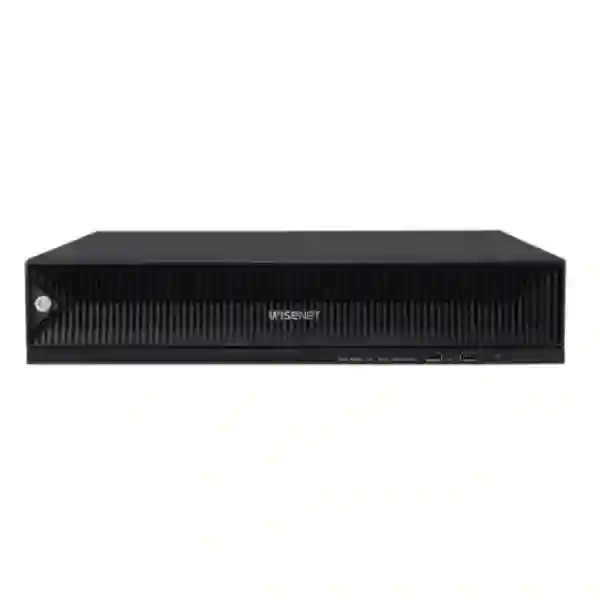
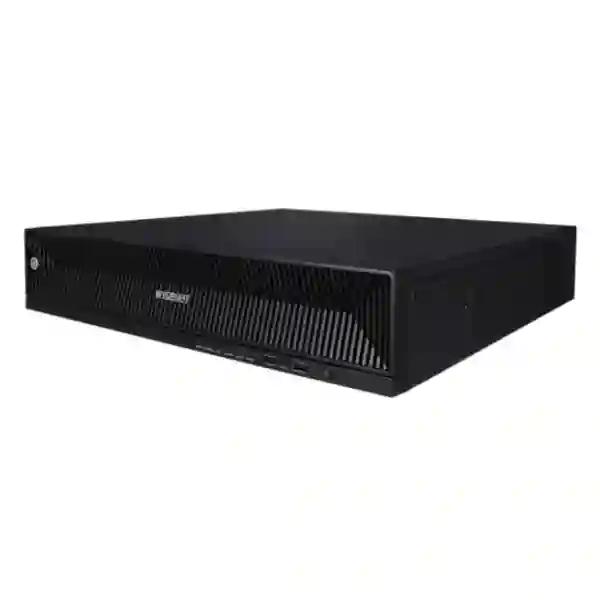
Hanwha Vision XRN-3210RB2 32-Channel Network Video Recorder
A professional 32-channel NVR with eight SATA bays, RAID 5/6 storage protection, dual HDMI output and optional AI-assisted searching through compatible Hanwha AI cameras. Match the configuration to your camera streams, retention requirements and operational priorities.
*Recording bandwidth is operating-mode dependent. No price, stock status or installed drive capacity is implied.
Verified specifications at a glance
These are manufacturer-described capabilities for the exact XRN-3210RB2 model. Operating-mode, camera and drive compatibility conditions still apply. A supplier quotation must separately identify any included storage or accessories.
| Camera inputs | Up to 32 network camera channels |
|---|---|
| Resolution support | Up to 32 MP camera input; performance depends on mode |
| Video encoding | H.265 / H.264 / MJPEG |
| Recording throughput | Up to 400 Mbps in relevant modes; normal mode listed at up to 150 Mbps |
| RAID degraded / rebuild | Up to 320 Mbps recording bandwidth as specified |
| Hard-drive bays | 8 SATA bays; up to 10 TB per supported drive |
| Maximum raw non-RAID capacity | Up to 80 TB; usable RAID capacity is lower |
| Disk protection | RAID 5 / RAID 6, single array |
| Video outputs | HDMI 1: up to 4K at 30 Hz; HDMI 2: up to 1080p at 60 Hz |
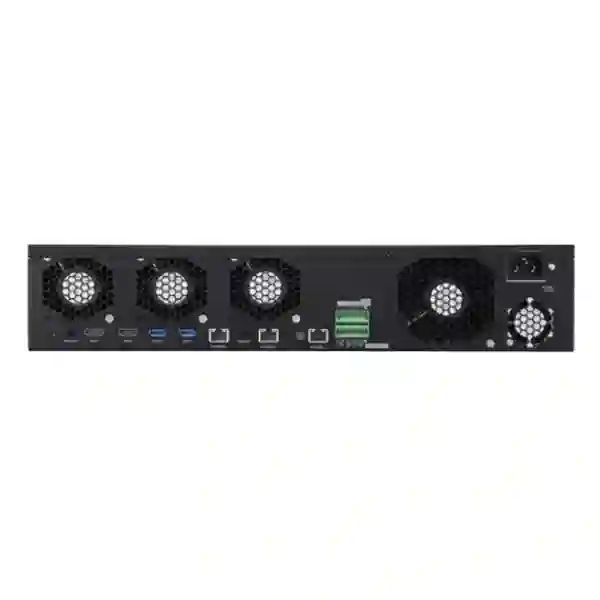
| Ethernet | 3 × RJ-45, 1 Gbps |
| Alarm I/O | 8 inputs, 4 outputs |
| USB ports | 4 (2 front USB 2.0, 2 rear USB 3.0) |
| AI-assisted search | Object-attribute search with compatible Hanwha AI cameras |
| Operating conditions | 0–40 °C; 20–85% RH |
| Power | 100–240 VAC; maximum listed 160 W with eight 10 TB drives |
| Dimensions / weight | 438 × 86 × 434.9 mm; about 9.1 kg excluding HDDs |
Choose recording capacity for a real 32-camera system
The Hanwha XRN-3210RB2 32-channel NVR is intended for organizations that need one manageable recording platform for up to 32 IP camera channels. A commercial surveillance installation usually has several demands at once: staff need live video, supervisors need timely evidence retrieval, administrators need controlled remote access, and the storage system must preserve footage according to a defined retention policy. Choosing a recorder by camera count alone can leave important gaps. This model combines a high channel ceiling with selectable recording modes, extensive drive accommodation and practical monitoring connections, but it still needs correct system design.
It is suitable for a central security room, a building with multiple camera zones, or an established surveillance network being upgraded from smaller recorders. Its published maximum network camera resolution reaches 32 megapixels, while H.265, H.264 and MJPEG offer recording-format options. RAID 5 and RAID 6 are useful where a failed disk must not immediately leave all recorded footage exposed to a single drive problem. With compatible Hanwha AI cameras, metadata-based search can help operators navigate events faster than reviewing every timeline manually.
For a useful quotation, start with the installed and planned camera count, camera models, per-camera stream settings, required days of retention, and number of people who will monitor or retrieve recordings. Share whether the site already has PoE switches, structured cabling, an equipment rack and a UPS. Those details determine the recorder configuration more accurately than simply asking for a 32-channel unit. FourTeck Tanzania can review the proposed bill of materials without this page promising any particular inventory, price or installation coverage.
What the 32-channel rating actually means
A channel is a logical camera stream position managed by the recorder, not a physical camera socket on its rear panel. The XRN-3210RB2 can register up to 32 network camera inputs. It does not have 32 dedicated PoE camera connectors. Cameras typically connect through a properly designed Ethernet switching network, with camera power supplied by an appropriate PoE switch or a separate compatible power source. When comparing equipment, this distinction matters because the network switch, fibre uplinks, cable lengths and power budget remain separate parts of the project.
Not every channel has to use the same resolution or compression setting. A loading entrance might warrant more image detail, while a low-activity corridor might use a different stream profile. The mix should follow the evidence required from each scene, available network bandwidth and retention target. The manufacturer lists support from CIF through 32 MP, but a supported maximum camera resolution should never be interpreted as a promise that all 32 channels can simultaneously operate at their individual maximum settings. Aggregate recording throughput and practical decoding limits still apply.
Think about future growth before every channel is allocated. If an organization has 31 cameras today and expects several more next quarter, this recorder may not be the right single-device capacity plan. Expanding camera coverage can also change storage consumption and the load imposed by remote clients. A useful system design includes headroom and an agreed route to expansion rather than filling every available channel and discovering constraints after deployment.
Recording bandwidth: the number to calculate first
Hanwha lists maximum network camera recording throughput up to 400 Mbps, but this figure depends on operating mode. The manufacturer’s specification distinguishes normal recording mode at up to 150 Mbps from distributed mode at up to 400 Mbps. It also specifies RAID-mode recording up to 400 Mbps under normal conditions and up to 320 Mbps during a degraded or rebuilding state. A purchase decision should therefore identify which operating mode the installation will actually use, not simply assume a universal 400 Mbps allowance.
A basic bandwidth worksheet should record each camera’s selected main-stream bitrate, frame rate, resolution, compression type and likely motion level. Add the expected streams together and retain an engineering margin for operational changes. Variable-bit-rate video can rise when a scene becomes busy, illuminated differently or exposed to weather. A design that only works when cameras are viewing quiet scenes is not robust. For projects with high-resolution cameras, ask for a validated recording schedule and operating-mode plan before confirming the hardware.
Recording throughput is also different from playback and remote viewing bandwidth. Operators may want live multi-camera display, recording exports and remote investigation while the system is continuously ingesting video. Those activities need their own review. The manufacturer’s listed playback bandwidth differs by RAID mode, and different local-display resolutions have different decoding capabilities. If the main goal is uninterrupted evidence capture, prioritize recording headroom and storage integrity over an attractive headline number.
Resolution and codecs without confusing the limits
The recorder supports H.265, H.264 and MJPEG. Compression changes the relationship between image quality, motion, processing requirements, bandwidth and disk consumption. H.265 can be useful when supported by the complete camera-and-recorder workflow, especially where storage is expensive, but it does not guarantee a fixed percentage of savings. The result depends on scene complexity, camera encoding configuration and motion. Compatibility with existing cameras should be checked before migrating a recording profile.
Hanwha identifies resolutions from CIF to 32 MP for supported network camera inputs. The specification also distinguishes certain decoding and playback scenarios: 32 MP at a stated 15 fps under H.265 in the local decoding table, and 12 MP at 30 fps under H.265 in that same table. These are mode-specific decoding figures, not blanket assurances about every simultaneous recording channel. An engineer should separately review capture quality, continuous ingest, local mosaics and evidence export rather than treating them as a single performance metric.
Start with what an investigator needs to see. An entrance camera may need a face or transaction detail; a perimeter camera may need an overview; a vehicle lane may require a focused view. Higher resolution can improve detail when optics, lighting, distance and exposure are appropriate, but merely buying a higher-megapixel camera will not correct a poorly positioned lens. The recorder should preserve an appropriate stream from a well-designed camera layout, not compensate for scene problems that should have been solved at the camera.
Eight SATA bays: raw capacity versus usable capacity
The XRN-3210RB2 has eight SATA drive bays. Hanwha specifies support for drives up to 10 TB each and up to 80 TB total in non-RAID configuration. That 80 TB figure is a maximum raw installed-capacity statement; it is not an advertised amount of available recording space in a RAID-protected build. Formatting, reserved space and drive-protection choices can reduce what is usable. The actual shipment could contain no drives or a configured drive set depending on the seller’s exact offer, so hard-drive inclusion must be confirmed in the quotation.
Retention planning begins with recording bitrates, not disk labels. Ask how many days the organization wants to retain footage, whether every camera records continuously, which events require higher quality, and whether audio is retained. Storage estimates should account for day and night scene variations as well as seasonal or business-hour changes. A facility requiring round-the-clock capture will normally need a different disk plan from one using event-oriented recording. The estimates should be checked after camera stream profiles are commissioned.
Specify surveillance-suitable drives from Hanwha’s current compatibility guidance, and verify approved individual capacities for the firmware and drive model in question. Avoid assuming any arbitrary desktop hard drive will be appropriate for sustained, multi-stream video writing. Plan a safe process for disk identification, health checking, replacement, documentation and secure disposal. If the security policy requires a minimum number of retained days, treat that requirement as a measured commissioning criterion rather than a sales adjective.
RAID 5, RAID 6 and what protection does not cover
RAID is a way to keep stored data accessible through certain drive failures, subject to the configuration and operating state. This recorder supports RAID 5 and RAID 6 with a single array, according to Hanwha. RAID 5 uses parity to withstand one failed member drive in a properly configured array. RAID 6 adds another layer of parity and is commonly selected when tolerance of two drive failures is important. The tradeoff is less usable capacity than an unprotected collection of disks. Verify the intended drive count, RAID level and rebuild procedure before finalizing the bill of materials.
RAID does not replace a backup policy. It cannot undo a recording deleted by an authorized user, a retention period that was too short, a security incident involving administrator credentials, a site-wide power or environmental event, or the loss of the recorder itself. Organizations that need certain recordings preserved for investigations should define a separate export and secure-custody workflow. Exports should be tested with the software actually used by the recipient, not assumed to be suitable because a backup menu exists.
The manufacturer publishes recording-mode performance during a degraded or rebuilding array, and that figure is lower than the normal RAID-mode maximum. It follows that the recording load should be engineered with margin for a disk failure. Teams also need procedures for alarms, replacement drives, configuration records and post-rebuild verification. A disk-health alert is only valuable if someone is responsible for acting on it. The right RAID level is the one that matches the organization’s tolerance for capacity loss, replacement effort and interruption.
Drive service and the meaning of hot swap
Hanwha’s specification describes hot-swappable drive support, but service procedures and applicable configurations must follow the manufacturer’s instructions. Do not assume that any disk can be removed from a running recorder without affecting evidence. A system that has not been placed in the intended protected storage mode may behave very differently from a correctly configured RAID array. An operator should identify the failed bay, confirm the exact drive type and status, and follow approved replacement steps.
A maintenance plan should record the drive inventory, serials where operationally appropriate, installed capacity, array arrangement, firmware level and expected recovery actions. The plan should include regular checks of drive alarms and a practical way to notify the right person. Rebuilds can require time and impose additional performance demands, so the appropriate recording settings and site monitoring should be considered throughout that process.
When discussing serviceability, ask whether accessible rack space, ventilation, controlled physical access and a defined after-hours escalation path are in place. For a security system that runs continuously, a hard-drive failure is an operations event and not merely a hardware detail. Confirm whether any requested spare drives are part of the purchase offer; do not infer replacement stock, warranty or response times from the recorder’s technical specifications.
AI-assisted search works with the right cameras
The XRN-3210RB2 supports AI object-attribute search when paired with compatible Hanwha AI cameras. This is an important architectural detail: the recorder should not be marketed as independently creating every AI analytic result from ordinary video. The connected AI camera must produce the relevant metadata, and the selected camera model, software version and search capability must support the desired workflow. Compatibility should be verified for the actual cameras proposed.
Attribute-led investigation can help an operator narrow a large pool of recordings. Depending on the supported camera and its analytics, an investigation may focus on characteristics associated with people or vehicles rather than viewing every minute of footage. That can be useful when tracing an event across entrances, shared circulation areas or parking zones. However, the existence of metadata filtering is not a guarantee that every individual, vehicle or characteristic will be recognized correctly.
AI-assisted retrieval should complement clear camera placement, appropriate lighting, trained operators and a defensible evidence-management procedure. Set expectations about false matches and missed events. Establish who may perform searches, how results are reviewed, and when footage is escalated. An evaluator should request a demonstration using representative camera types and actual recording conditions, then assess the speed and usefulness of the search method before deciding that it meets the site’s investigation needs.
Event recording, alerts and operator workflows
The NVR supports continuous recording, scheduled recording, event-related recording, dual-stream options and bookmarks. It can respond to categories such as alarm inputs, loss of video and camera-originated events, depending on equipment integration. Hanwha also describes dynamic event support, designed to make certain newer camera events available without a corresponding recorder software update. That feature should not be taken to mean unlimited compatibility with every third-party analytic or future camera event.
The event response functions listed by the manufacturer include email, push notification, alarm output, buzzer, monitor output, PTZ preset actions and other supported integrations. Before enabling notifications, decide which occurrences warrant immediate attention and which should appear only in an operator review queue. A badly tuned motion rule can produce many unnecessary alerts; an overly restrictive rule can miss meaningful activity. Commission cameras in real site conditions and revise the event rules accordingly.
Bookmarks can help operations teams mark important segments for later review. The published feature summary describes management of up to 100 bookmark sets. A useful incident procedure still requires staff to record the reason for the bookmark, relevant camera names, approximate event time and follow-up action. Alerts should have an owner and an escalation method. The NVR can provide the technical event mechanisms, while the organization must design the human response that makes them worthwhile.
Finding and exporting evidence after an incident
Investigations depend on accurate time, predictable camera naming and a search method that security staff can use under pressure. The recorder supports calendar-based search, event lists, text search and smart search under specified conditions. It also supports playback controls for navigating recorded video. These functions are much more useful when camera clocks are synchronized, time zones are documented and an operator knows exactly which zones each camera covers.
Hanwha lists backup and export formats through local and network interfaces, including supported video and image formats. Before relying on any format for an official investigation, test export from the actual firmware in use and open the file on the receiving system. Check whether required date, time and camera context remain understandable. Confirm that the procedure respects organizational permission settings and preserves an accountable record of who obtained the footage.
A standard evidence checklist should cover the requested time range, camera identifiers, authenticity or integrity procedure as required by the organization, export destination, authorised recipient and storage of the original recording. Agree how soon footage must be retrieved before retention overwrite occurs. Recorder features can speed the process, but evidence quality ultimately depends on well-maintained clocks, sufficient storage, secure accounts and consistent operating practice.
Two HDMI displays for the local control room
The NVR offers two HDMI connections. Hanwha lists HDMI 1 at up to 3840 × 2160 at 30 Hz and HDMI 2 at up to 1920 × 1080 at 60 Hz. These different outputs allow a local monitoring arrangement that might use one higher-resolution screen for general overview and a second for another operational view, within supported display modes. The manufacturer’s local-monitor specification also differentiates clone and expanded screen layouts.
A large video wall does not automatically improve observation. If too many small pictures are displayed, staff may struggle to identify what matters. Choose the number of tiles, viewing distance and screen size according to actual tasks. A receptionist watching one entrance, a guard monitoring multiple doors and an investigation officer reviewing footage need different screen layouts. Configure the system for the people using it rather than setting every camera to show at the same size.
Consider physical monitor location, tamper resistance, cable routing, glare, lighting and screen operation during a power interruption. Playback and setup functions may be assigned to a particular output, so validate the live-view and playback arrangement in the proposed console design. Operators should know how to move from a multi-camera overview to a specific camera and then to its recorded timeline without disrupting essential monitoring.
Network design and physical connectivity
Three one-gigabit Ethernet RJ-45 interfaces are listed for the recorder. These are network interfaces, not 32 individual PoE outputs. A deployment must provide camera network connectivity and the appropriate power architecture independently. Determine the uplink path from each switch to the recording location, especially where many high-bitrate cameras share an aggregation switch. Link capacity, switching backplane, multicast behavior where used, cable quality and fibre links can all affect a real installation.
A practical design separates surveillance traffic from unrelated business traffic where operationally and technically appropriate. Use a documented IP addressing plan, define who may reach the recorder and restrict administrative interfaces. It can be sensible to isolate cameras that do not require general internet access, but the exact segmentation must follow the organization’s network requirements and maintenance approach. An NVR cannot compensate for oversubscribed switches or recurring packet loss.
Before installation, assess the path from the farthest camera to the control room, whether outdoor runs require surge and earthing measures, and whether remote viewing traffic will cross a limited upstream internet connection. The published recording figure describes supported recorder ingest under relevant conditions, not a guarantee that an undersized office network will carry the same traffic. Commissioning should include stress tests during busy periods and observation of video-loss or network alarms.
Interoperability with Hanwha and third-party cameras
The manufacturer lists SUNAPI and ONVIF support and identifies ONVIF Profile S among network protocols. These capabilities are useful when the site combines camera models or software integrations, but a protocol name is not a blanket interoperability guarantee. Camera discovery, main-stream and sub-stream control, PTZ, audio, events, smart analytics and metadata support can differ significantly between brands and models. Confirm the functions that matter, not merely whether a video picture appears.
With Hanwha cameras, integration may expose more device-specific setup and analytic options. With third-party cameras, the available functions depend on their implementations and compatibility with the recorder firmware. If a project will retain older cameras during migration, compile a compatibility matrix with camera brand, model, firmware, resolution, codec, stream count, events and any required control features. Validate the most complex cameras before buying a complete group.
Software ecosystem planning is equally important. Hanwha lists several supported viewer applications and interfaces, including WAVE, SSM, a web viewer and mobile viewing options in its technical material. Verify current application support and licensing or deployment requirements for the specific implementation. Avoid promising that a VMS, mobile application or third-party integration has all desired features until the intended combination has been tested.
Remote monitoring and access management
Remote viewing can be convenient for authorized management teams, but it adds security and bandwidth responsibilities. The NVR supports network access and listed mobile and web interfaces, with simultaneous-user limits that vary by activity. A design should distinguish local operators from remote investigators, live unicast viewers, multicast consumers and people requesting search or playback. Many clients viewing high-quality streams can place load on the recorder and the site’s internet uplink.
Hanwha lists security mechanisms including IP filtering, access logs, certificate-related functions, 802.1X and signed firmware. These are building blocks rather than a finished security policy. Assign individual accounts where appropriate, restrict privileges, use strong authentication practices supported by the chosen firmware, and document how remote access is provided. Avoid exposing management interfaces directly to the public internet simply because a network connection is available.
Agree an account life-cycle process before handover. Someone should be responsible for adding operators, reviewing permissions, disabling departed users, updating supported firmware and checking event logs. If a mobile app is in scope, confirm supported device operating systems and the organization’s rules for lost or replaced phones. The aim is to make footage accessible to the people who need it without making security footage easier to reach than the business systems it protects.
Recording continuity and incident resilience
The manufacturer lists N+1 failover and ARB support among its functions. These should be assessed as features within a correctly designed and compatible surveillance architecture, not as automatic assurances of uninterrupted recording in every configuration. An N+1 strategy requires the appropriate participating systems, their configured relationship, supported firmware and a tested transition process. Automatic Recovery Backup likewise depends on the cameras and topology that support it.
Ask a specific failure question: what happens if a drive stops working, the recorder loses power, a camera becomes disconnected, the switch fails, or the internet link goes down? Each failure has a different remedy. RAID addresses certain drive failures; UPS addresses a defined period of electrical interruption; resilient switching and network paths address selected transport failures; camera-side buffering features may address other situations when supported. No single NVR feature solves all of them.
Organizations should write a recovery priority list with practical steps. For example, a critical entrance may be more important to restore than a secondary overview camera, and a high-risk event may require an immediate secure export. Test alerts, confirm who receives them, and record the steps for bringing the recorder back to normal operation. Resilience comes from design, monitoring and rehearsed procedures as well as hardware support.
Power, rack space and operating environment
Hanwha specifies 100–240 VAC input at 50/60 Hz for this recorder, with maximum power consumption of 160 W in the published configuration using eight 10 TB drives. These figures help inform power distribution and UPS design, but the total backup-power calculation must also include switches, cameras, routers, monitors and other essential devices. A surveillance recorder staying on while the camera PoE switches shut down will not preserve useful new video from those cameras.
The chassis dimensions are listed as 438.0 × 86.0 × 434.9 mm and its weight without drives as approximately 9.1 kg. Check actual rack depth, shelf or rail requirements, power access, service clearance and airflow before approving the equipment location. The manufacturer’s supported ambient operating range is 0°C to 40°C with 20% to 85% relative humidity. A plant room or poorly ventilated cabinet can exceed sensible equipment conditions even when the outdoor climate seems manageable.
For locations subject to power fluctuations, dust or heat, plan suitable electrical protection, cable management and controlled ventilation. Do not assume weatherproof construction or an outdoor enclosure rating for the recorder. Its security value depends on a stable indoor environment, protected network connections and access restricted to authorised personnel. The rack layout should also permit safe drive servicing and observation of the recorder’s operating indicators.
Practical design considerations for Tanzania
A surveillance installation in Tanzania should be specified for the actual building, electrical supply and data infrastructure rather than relying on a generic national checklist. Where an internet connection is intermittent, distinguish local recording from optional remote viewing: recording should be designed to operate on the local camera network, while remote access depends on the chosen connectivity arrangement. Confirm the behavior of any cloud-facing or external notification functions independently of the recorder’s core local recording workflow.
Power continuity deserves early attention. Identify which cameras, PoE switches and network devices must continue operating during an outage, decide how much backup time is required, and size the UPS or other power solution around measured loads and manufacturer specifications. Consider heat and dust around the equipment room, physical access control and secure placement of exported evidence. These considerations are broadly useful, but they do not represent a claim that a particular location, installation service or power condition has been verified.
If the organization has multiple branches, decide whether each location will retain its own recorder, whether central review is needed and what network links will carry any remote traffic. Review information-handling expectations with the customer’s legal and security teams where relevant. The product’s technical features are not a substitute for checking the organization’s privacy, retention and access obligations. Any site-specific installation and support arrangements should be clarified in an actual scope of work.
Common surveillance deployment scenarios
In a mixed-use office building, the 32 channels could cover selected entrances, corridors, lifts, public spaces and parking approaches. The important design decision is not to allocate an equal bitrate to every camera. A main entrance might justify higher image detail and continuous coverage, while a lower-risk area might follow a different recording schedule. A local control-room display and role-based playback access could then support both day-to-day monitoring and incident response.
For a warehouse or logistics environment, teams may want coverage of loading bays, store entrances, staging areas and vehicle movements. Camera placement should account for moving forklifts, high-contrast doorway lighting and areas where identification matters. If compatible AI cameras are installed, metadata-based search may help narrow review of particular people or vehicle characteristics. The precise capability must be demonstrated using the chosen devices, and it should not be described as guaranteed recognition.
In hospitality, education or multi-unit property settings, the same recorder might be used for shared entrances and security-sensitive common areas, subject to the organization’s policies. Privacy-sensitive locations need special consideration. In every scenario, establish authorised viewing roles, retention objectives, incident export procedures and who responds to alerts. A recorder is a platform for those workflows, not a reason to collect footage in places where it may be inappropriate.
How this model differs from a basic NVR choice
Buyers comparing recorders should separate four questions: how many cameras can be registered, how much video can be ingested, how much footage can be retained, and what happens when a drive fails. A basic 32-channel recorder might meet the first question without offering the same drive-bay count or RAID capabilities. Conversely, a larger recorder can be unnecessary for a small system whose camera count and future expansion are tightly bounded. Fit matters more than automatically buying the most capable chassis.
The XRN-3210RB2 is notable for its 32-channel architecture, eight SATA bays, RAID 5/6 and support for AI-assisted search when paired with compatible AI cameras. The closely named XRN-3210B2 is a different model; do not assume identical RAID behavior based on similar names. Confirm the exact suffix on the equipment quotation and product label. If a project depends on protected multi-drive storage, that distinction deserves explicit attention.
For operations with more than 32 cameras or substantial growth ahead, consider a multi-recorder design or a platform sized for a larger channel count. For a small shop with only a few cameras, this system may introduce more capacity and operational complexity than is required. The best choice follows the camera schedule, retention mathematics, level of acceptable downtime and skills of the people responsible for the system.
A buyer’s configuration checklist before quotation
A complete request should contain a camera schedule with manufacturer, model, resolution, intended codec, main-stream bitrate, frame rate and expected hours of recording. Include a site plan showing camera zones and how they connect to switches. Record the number of remote and local users, the required live-view layouts and the access rights each role should have. Indicate whether the site will reuse existing cameras or install a new Hanwha camera system.
For storage, specify target retention days, daily recording pattern, desired RAID level, preferred drive sizes if already validated, and whether existing footage must be migrated. The quotation should separate the recorder chassis, included or separately purchased drives, network switches, rack accessories, UPS, monitors, commissioning effort and any optional software or integration costs. Confirm which elements are included rather than assuming the highest raw-capacity figure is provided out of the box.
The business should also decide its evidence-export process, maintenance responsibility, alert escalation and acceptable outage period. If multiple branches are involved, describe the location of each recorder and how review will be coordinated. This checklist makes competing quotes easier to compare and gives the installer a clearer acceptance standard. A transparent specification is more valuable than a vague description such as ’32-channel surveillance package’.
Commissioning: what acceptance testing should cover
After the recorder and cameras are installed, verify that all planned channels connect and record using the approved stream profiles. Check for unexpected video loss, dropped frames, incorrect dates or mismatched time zones. Confirm that recordings remain searchable after changes in camera schedule and that live monitoring does not prevent expected recording functions. An acceptance test should use representative day, night and busy-scene footage rather than only a quiet daytime demonstration.
Test the configured storage array and ensure operators understand the difference between a drive warning and a recorder fault. Verify the intended warning recipients, notification methods and maintenance instructions. If the system uses AI search, demonstrate it with the actual supported cameras and explain the limitations of object attributes and search matches. If remote viewing is enabled, test account permissions over the permitted network path and confirm acceptable performance at the site’s realistic upload speed.
Complete the handover with a documented camera list, configuration backup process where supported, responsible administrators, operating instructions, password-handling arrangements and escalation contacts chosen by the customer. Record firmware versions, drive inventory, retention estimate and agreed test results. A signed operational checklist helps avoid a situation where the hardware was installed successfully but the organization cannot reliably find or preserve footage when an incident occurs.
Security and governance after installation
Video data should be treated as business-sensitive information. Establish a clear purpose for each camera, control who can view or export footage, and set a retention period that matches the organization’s approved requirements. A simple written policy can cover account assignment, log review, staff training, evidence requests and the process for deleting data when it is no longer needed. These are governance decisions; they should not be inferred from the recorder’s maximum capacity.
Good cyber hygiene includes changing default credentials, restricting network access, reviewing available security updates and removing unnecessary remote services. Follow current Hanwha documentation for the firmware actually installed. Where the site uses a separate video management system, define which application controls user access and how the NVR’s own privileges interact with it. Test a lower-privilege operator account so that search, export and configuration functions behave as intended.
Periodically revisit the camera count, recording bitrates, storage consumption, disk alerts and user permissions. Business activities change, and an arrangement that met retention goals when the recorder was installed may no longer do so after more cameras or higher-resolution profiles are added. Maintain an owner for system health and an approval process for changes. The XRN-3210RB2 can be a capable recording component when its surrounding operational practices are maintained.
Questions worth settling before placing an order
Confirm the exact model suffix XRN-3210RB2, whether hard disks are included, what drive capacities are proposed and which RAID level will be commissioned. Ask for a retention estimate based on the real cameras rather than a nominal disk size. Confirm the precise camera compatibility scope, any AI camera dependency, chosen recording mode and the practical bandwidth budget. These answers can expose hidden scope differences between apparently similar quotations.
Check whether the required installation includes PoE switches, cabling, a monitored UPS, local monitors, rack equipment, authorised remote-access configuration, alerts and operator training. If the system must connect to existing enterprise software or a third-party monitoring centre, validate the actual interface. Finally, agree a commissioning checklist that covers recording, playback, export, operator permissions and disk-fault response.
To discuss this recorder with FourTeck Tanzania, provide your camera schedule, desired retention period, preferred resilience level and existing network details. Request a configuration-led quotation for the Hanwha XRN-3210RB2 32-channel NVR, with the proposed drive arrangement and supporting equipment stated explicitly. Product availability, shipment configuration, local installation options, warranty and price should be confirmed in the resulting offer rather than inferred from this technical overview.
Frequently asked questions about the XRN-3210RB2
Is this a 32-camera PoE recorder?
It supports up to 32 network camera inputs, but the 32 channels are logical recording channels, not 32 physical PoE connectors. The published rear interfaces include three one-gigabit Ethernet ports. IP cameras normally connect over an appropriate switching network, and their PoE or other power arrangements must be specified separately. This is an essential difference when preparing a full quotation: a recorder alone does not provide all of the cables, switches and power required to connect 32 cameras.
Does the XRN-3210RB2 support RAID 6?
Yes. Hanwha lists both RAID 5 and RAID 6 support for the XRN-3210RB2, with a single array. The choice affects usable capacity and disk-failure tolerance. The exact drive set and supported procedure should be confirmed before commissioning. RAID does not replace a separate export or backup procedure for important evidence. An organization should define how it reacts to drive alarms, who replaces failed drives and how completion of a rebuild is checked.
Does 80 TB mean 80 TB of recorded video is available?
No. Eight supported 10 TB drives give the manufacturer’s stated maximum of 80 TB in non-RAID configuration. Once an array is configured, parity, formatting and system overhead change the usable capacity. Retention also depends on the camera stream bitrates, compression profiles, frame rates, recording schedule and scene activity. Ask for a calculated usable capacity and an expected retention estimate for the specific proposed drive arrangement. Do not treat maximum raw capacity as a guaranteed number of recording days.
Can it use 32 MP cameras?
The manufacturer lists supported network-camera resolution up to 32 MP. However, a maximum supported camera resolution is not the same as unlimited decoding or recording performance across all 32 channels. Local decoding specifications and supported frame rates vary by mode and codec, while aggregate recording throughput is capped by the chosen operating mode. Confirm the actual camera mix and stream settings before specifying high-megapixel coverage throughout the installation.
Does AI search work with any camera?
AI-assisted object-attribute searching is identified for compatible Hanwha AI cameras. It is not a promise that ordinary third-party streams acquire full AI search functionality merely by connecting to the recorder. Confirm the intended camera model, firmware, emitted metadata and the specific attributes that staff need to search. Test representative footage when possible. Results should be reviewed by trained people because automated classification and retrieval can miss relevant clips or surface unhelpful matches.
How much recording bandwidth is available?
Hanwha lists recording throughput up to 400 Mbps in applicable configurations. Its detailed technical table distinguishes normal mode at up to 150 Mbps, distributed mode at up to 400 Mbps, normal RAID operation at up to 400 Mbps and degraded or rebuild RAID operation at up to 320 Mbps. These mode-dependent figures make planning essential. Add the configured camera bitrates, account for busy scenes and retain headroom so that an ordinary fault or unexpected scene change does not put recording reliability at risk.
Can the recorder feed two monitors?
Yes. The NVR has two HDMI outputs. The listed maximum formats are 3840 × 2160 at 30 Hz for HDMI 1 and 1920 × 1080 at 60 Hz for HDMI 2. Local layout options depend on the selected display mode. An installer should confirm which screen handles setup or playback, choose a useful multi-camera layout and test that operators can quickly enlarge a critical camera. Display capability is separate from network ingest and recorded-video retention.
Will it work when the internet is down?
The key distinction is between local IP camera recording and remotely accessed services. A properly configured local recording network should be designed independently of an external internet connection. Remote viewing, cloud-related connections or off-site notifications may stop when their communication path fails. A UPS may also be needed to maintain the recorder, cameras and switches during electricity interruptions. Confirm the exact topology and test the response to internet, network-switch and power failures before relying on a continuity plan.
Are hard drives, a UPS and cameras included?
Do not assume they are. This page describes the recorder’s technical capabilities, not a verified sales bundle. Different offers may contain a chassis without drives or a configured solution with storage. Ask the supplier to state drive count and capacity, RAID setup, included accessories, switches, cameras, UPS, software requirements, installation items and commissioning responsibilities in the written quotation. This avoids treating optional project components as included products.
Is the XRN-3210RB2 the same as XRN-3210B2?
No. They are distinct model numbers and should not be substituted without technical review. The XRN-3210RB2 is the model whose official documentation explicitly lists RAID 5/6 support. Closely related model names can share some performance characteristics without having the same storage-protection capabilities. Verify the exact model suffix on the supplier’s proposal, equipment label and manufacturer documentation, especially when resilient multi-drive recording is part of the purchasing requirement.
Request a configuration-led quotation
Tell FourTeck Tanzania how many cameras you have, their models and bitrates, your required recording days and whether you need RAID 5 or RAID 6. Ask for a clearly specified XRN-3210RB2 recorder offer that separates the chassis, compatible storage and supporting infrastructure.
Please confirm price, exact drive inclusion, lead time, warranty, delivery and any professional services directly in the quotation. No unverified local commercial claims are made on this page.




Reviews
There are no reviews yet.