
Hanwha Vision | Network video recording
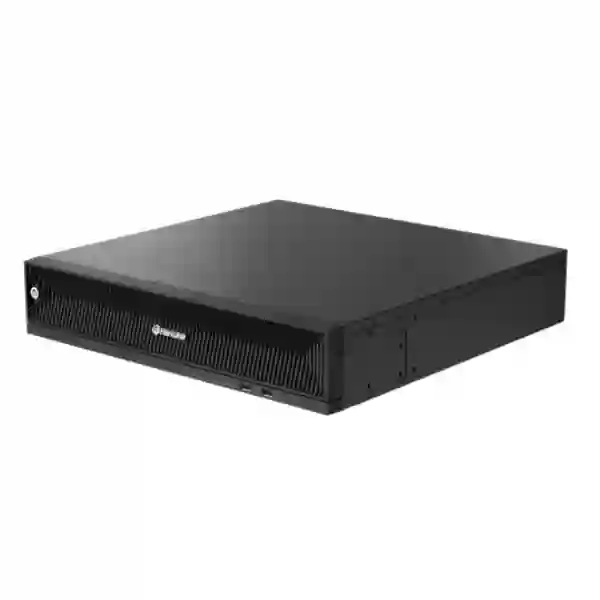
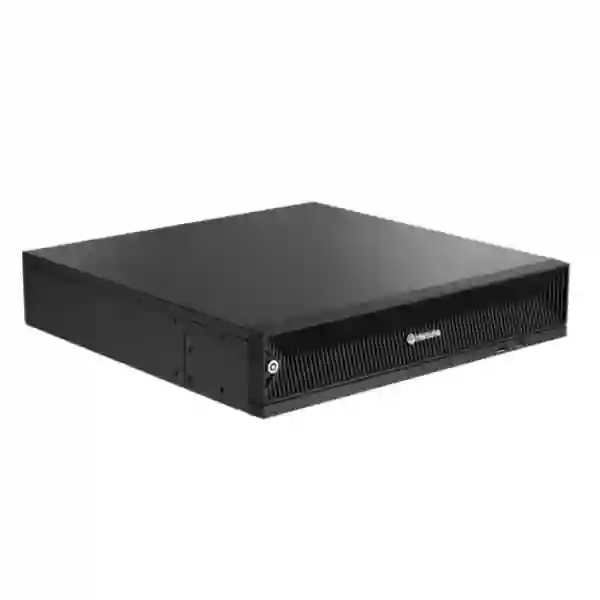
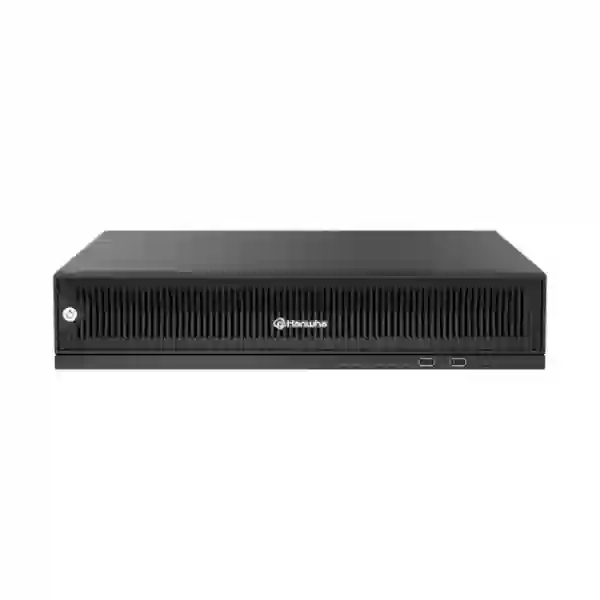
Hanwha XRN-3220RB2 32-Channel NVR in Tanzania
Centralise up to 32 IP cameras with RAID-capable recording, flexible review and security-focused system features. Choose an exact camera, disk and recording configuration for your organisation rather than relying on headline specifications alone.
At a glance: what the recorder actually supports
| Camera channels | Up to 32 IP cameras |
|---|---|
| Camera input resolution | Up to 32MP |
| Video encoding | H.265, H.264, MJPEG |
| Recording bandwidth | Up to 520Mbps, mode-dependent |
| Internal disk bays | 8 SATA; up to 10TB per compatible drive |
| Maximum raw capacity | 80TB without RAID, not usable RAID capacity |
| Disk protection | RAID 5 / RAID 6, single array |
| Local video outputs | 2 HDMI |
| Network and alarm interfaces | 3 gigabit RJ-45; 8 alarm inputs; 4 outputs |
| Security features | TPM, signed firmware, TLS, access controls |
| AI object search | Requires compatible Hanwha AI cameras |
| Operating environment | 0–40°C; 20–85% RH |
Published specifications describe hardware capability, not the contents of a particular offer. Storage drives, camera compatibility, price, stock and installation arrangements must be confirmed for the exact quotation.
A 32-camera recorder for planned security operations
The Hanwha XRN-3220RB2 helps a security team consolidate IP camera recordings in one managed recorder rather than depend on separate devices at each viewing position. It is relevant when several entrances, corridors, public spaces, delivery points and operational areas require continuous observation and an orderly way to recover evidence. Up to 32 camera channels give the designer a clear upper limit for the recorder itself. That channel count should be compared with today’s camera schedule and future expansion plans before an order is placed.
Buyers should choose this model for a reason beyond its channel count. The case for the recorder is its combination of high-resolution camera support, flexible recording modes, RAID-capable disk architecture and integrated viewing tools. A good quotation must cover the complete system around it: compatible cameras, switching, cabling, hard disks, monitoring screens, access policy and protected power. FourTeck Tanzania can be asked to review the bill of materials and confirm the appropriate offer without assuming that every accessory or disk is included.
Start with a realistic camera schedule
Before choosing an NVR, write down each camera position, its reason for existing and the resolution actually needed. A reception camera may need a different field of view from a vehicle access point or a stockroom. Include fixed cameras, panoramic or fisheye cameras and any PTZ units separately. Although the recorder accepts up to 32 network cameras, available channels do not guarantee that any combination of video profiles will deliver the desired live-screen experience. The camera plan should identify required frame rates and viewing positions as well as quantities.
Reserve capacity deliberately. A site expecting to install 30 cameras on day one will have fewer physical camera channels available for later changes than a site installing 20. Where the plan is already above 32 cameras, compare a larger recording architecture instead of assuming that virtual channels create additional recording inputs. Virtual channels support flexible viewing; they are not extra licensed camera inputs. A documented channel schedule makes later commissioning, support and incident retrieval much more predictable.
Camera resolution and decoding are different questions
The recorder supports camera input resolutions up to 32MP, which is useful when the selected camera has a high-resolution sensor. However, supported input resolution is not the same as the number of full-resolution images that can be decoded simultaneously on a local monitor. Hanwha’s published decoding specifications vary with resolution, frame rate, codec and channel count. At the highest listed 32MP decode setting, H.265 and a 15fps specification are indicated. Buyers should not interpret 32 channels as a promise of 32 simultaneous 32MP live views.
Choose camera resolution from evidential requirements. More pixels can help with a properly positioned camera, but lighting, lens selection, compression and scene movement still affect useful detail. Identify the cameras that must show faces, packages or operational actions, and test sample video under their actual lighting conditions. During acceptance testing, confirm both the recorded file quality and the performance of the operator’s chosen multi-camera display layout. Those are related but separately testable design outcomes.
Recording bandwidth needs a working-mode check
Hanwha lists up to 520Mbps recording bandwidth for the XRN-3220RB2, but the operating mode matters. Its published specification distinguishes distributed operation at up to 520Mbps from non-RAID normal operation at up to 300Mbps; RAID-mode figures are specified separately. Consequently a proposal that quotes only the headline 520Mbps without describing the intended storage and recording configuration is incomplete. The designer should check the current manufacturer specification and intended settings rather than applying the headline value indiscriminately.
Add the likely bitrates of every recording profile, allowing for high-motion scenes, changes in image quality and other operational demand. A camera at one configured bitrate is not proof that its actual traffic will always remain constant. Use measured or realistically estimated video traffic, not simply the number of cameras. Review inbound traffic, expected playback activity and remote-viewing demand as different workloads. This helps avoid a recorder that appears generous on paper but is poorly matched to its most demanding operating hours.
Why H.265, H.264 and MJPEG matter
Support for H.265, H.264 and MJPEG gives the system designer choices when integrating cameras. H.265 can reduce storage and transmission needs in suitable camera profiles compared with less efficient encoding, while H.264 remains useful in environments where an endpoint requires it. MJPEG may be relevant for particular compatibility or operational scenarios. Actual savings depend on scene complexity, camera configuration and quality targets, so no fixed compression saving should be promised as a general result.
A disciplined deployment uses a recording profile for evidence and, where supported, a suitable lower-demand stream for routine viewing. Check the camera and recorder combination before relying on dual-stream operation. The most important decision is not to select the smallest possible file: it is to produce a recording that preserves needed detail for the intended retention period. Test moving subjects, night scenes and crowded frames, because those conditions expose a recording profile’s limitations far better than an empty daytime corridor.
Eight SATA bays and the meaning of 80TB
The XRN-3220RB2 provides eight SATA hard-drive bays. Hanwha’s published maximum is 10TB per supported drive, giving up to 80TB of raw disk capacity in non-RAID mode when eight suitable 10TB drives are used. This is a maximum supported configuration, not a claim that 80TB of disks are supplied with every recorder. The exact supplied drive population must be written on the quotation. The manufacturer maintains a model-specific drive compatibility resource, which should be checked before choosing disks or replacements.
Raw disk capacity is also different from the amount available for video after formatting, redundancy and other overheads. Do not present 80TB as the usable video-recording capacity of a RAID 5 or RAID 6 configuration. Disk selection is part of the design, not a small purchasing detail. Consider approved HDD model numbers, their intended surveillance workload, operating temperature, support arrangements and the consequences of replacing one during service. A large disk that is detected by the recorder is not necessarily a manufacturer-approved disk.
RAID 5: capacity balanced with disk-failure tolerance
RAID 5 is useful when the buyer wants protection against the failure of one drive within a correctly configured array while retaining more effective capacity than some stronger redundancy arrangements. In simple terms, the array spreads data and parity across disks so that one failed drive does not automatically make the array unusable. It still depends on supported drive quantities, correct setup and healthy remaining disks. Hanwha lists a single RAID 5 or RAID 6 array for the XRN-3220RB2.
RAID is not the same as an archive or independently protected evidence copy. Deletion, malicious access, recorder damage and multiple drive failures can still cause loss. An appropriate plan includes alarm response, drive replacement procedure, monitored array health and a separate evidence-export policy. RAID 5 should therefore be chosen after comparing the consequences of losing recorded evidence, replacement time and the amount of disk space the organisation is prepared to dedicate to redundancy. Verify the currently applicable drive-count requirement in Hanwha’s guidance before implementation.
RAID 6: when additional redundancy is worth the space
RAID 6 is another published storage option for the RAID-capable XRN-3220RB2. Compared with RAID 5, it is designed to tolerate two drive failures within a correctly configured array, but it uses more capacity for parity. That tradeoff may make sense for a deployment where recording continuity during storage problems is a higher priority than obtaining maximum raw-capacity efficiency. The useful capacity depends on the exact disks and configuration, so it should be calculated from the chosen bill of materials.
RAID 6 does not remove the need for appropriate backup, maintenance or physical security. A damaged recorder, incorrectly configured array, compromised credentials or loss affecting the whole appliance is outside the protection provided by parity alone. Arrange an acceptance demonstration of disk-status reporting and define who receives storage warnings. If the installation team proposes RAID 6, ask them to document why it is appropriate, the resulting usable capacity, expected retention and the procedure for replacing a faulty compatible drive.
Plan the retention period from video demand
The number of days a recorder can retain footage is not a fixed specification of the XRN-3220RB2. It depends on how much usable storage is installed and how much data cameras actually generate. Total camera bitrate, frame rate, scene complexity, resolution, continuous versus event recording, compression settings and audio can all affect the result. The desired retention period should be written down before choosing disk capacity. It is risky to buy drives first and ask how many days they support only after commissioning.
For a credible sizing exercise, list every recording profile and expected daily duty cycle. Estimate storage using the complete camera schedule, then allow an engineering margin for varying traffic, formatting and RAID overhead. Revisit the design if cameras will be added later or if the business expects longer retention during investigations. A useful acceptance test confirms that the earliest available recordings are consistent with the retention policy, while the system still has enough headroom for the chosen recording mode and monitoring activity.
Disk compatibility and replacement procedures
Hanwha’s support guidance warns that a drive may be detected and even display a normal status without appearing on the approved compatibility list for a specific recorder. This distinction matters when a site replaces a failed drive with an apparently similar disk purchased at short notice. The complete hard-drive manufacturer model number, suffix and capacity should be compared with the current compatibility information for the exact NVR model, including the relevant RAID field.
The recorder supports hot-swappable drives, but a drive replacement should still follow the approved model-specific procedure and the site’s data-protection plan. Hot swap does not mean that any disk can be inserted without risk or that an array will recover instantly. Assign responsibility for handling degraded-array warnings, documenting the failed slot, verifying the new drive and checking recording afterward. Where evidence is important, preserve necessary exports before operations that could reinitialise or format a drive. Commissioning should include a recording and playback check after storage changes.
iSCSI and external storage considerations
External iSCSI storage is listed among the recorder’s supported storage capabilities. This can be relevant where an organisation has a network-storage strategy and an engineering reason to use it. However, listing iSCSI support is not a promise of compatibility with any arbitrary storage appliance, nor does it show that external storage can replace every design function of the internal disks. The full architecture should be checked against current documentation and supported configurations.
An external-storage proposal must consider network paths, available bandwidth, authentication, storage-system resilience and what happens when the storage network is interrupted. It also needs operational ownership: who monitors capacity, who maintains the storage system and who is responsible if recordings are unavailable? For many buyers an appropriately sized internal HDD configuration is simpler. Select iSCSI only where its operational value outweighs integration and support complexity, and insist on an end-to-end test of recording and retrieval before site acceptance.
Choose event, continuous and scheduled recording deliberately
The device offers continuous, event-based and scheduled recording options, along with pre-event and post-event handling. These options let an operator define different policies for different camera positions. For example, an always-important entrance can require continuous recording, while another camera might use event emphasis for particular situations. The decision should follow the evidence requirement rather than a generic storage-saving preference. Motion-based recording can miss useful context if the trigger, scene or camera configuration is unsuitable.
During system design, decide what must be recorded before an event, how long to continue afterward and which events require attention. Test movement at different speeds, lighting transitions and possible obstructions. Document who can change schedules and what happens during holidays or changed operating hours. Operators should know how to confirm a recording schedule is active and how to locate an incident that began before an alarm. The aim is reliable evidence, not just a low disk-usage figure.
Alarm inputs, outputs and practical responses
The XRN-3220RB2 includes eight alarm inputs and four alarm outputs, supporting the integration of compatible external signals and site responses. The published event actions include options such as email, event push, PTZ preset, alarm output, buzzer and monitor output. These features are useful only when the relevant devices, permissions and network services are properly connected. A plan should define which events deserve a visible alert and which should simply be recorded for later review.
Avoid creating an alarm system that overwhelms staff with trivial notifications. Separate critical conditions from routine motion, define the expected operator response and verify the receiving addresses or devices. If a door signal, camera event or external system is connected, test a real event from source to notification to recorded evidence. Keep a record of the action mapping for future maintenance. Integration capability is not a guarantee that every third-party device or event type will work without verification.
AI search depends on the connected cameras
Hanwha lists object-attribute AI search for this recorder when it is used with compatible Hanwha AI cameras. This is a useful distinction for buyers evaluating fast incident review, but it should not be described as an independent AI engine that adds identical analytics to every existing camera. Searchable attributes and workflows depend on the camera’s capabilities, supported metadata and the overall configuration. An ordinary third-party IP camera may record video successfully without providing the same AI-assisted search functions.
Ask the integrator to identify the precise camera models and the search questions the site expects to answer. Examples might include narrowing an investigation to recordings of a selected object category or time window, where supported. During acceptance, generate representative scenes and confirm that metadata appears and can be searched as intended. Camera placement, lighting and occlusion can affect analytics quality. The right buying question is whether the full camera-and-recorder combination supports the required workflow, not whether the recorder’s brochure includes the letters AI.
Fast incident retrieval and playback workflow
The published recorder specifications describe playback bandwidth up to 200Mbps and search modes including time, event, text, bookmark and smart search. Such tools can reduce the effort required to find relevant footage when an operator knows the approximate location or time of an event. Useful searching still depends on correct clock settings, meaningful camera names, a sensible event configuration and sufficient retained footage. A technically capable recorder can be frustrating if the commissioning team leaves cameras labelled only by default channel numbers.
Design a repeatable incident workflow: identify the camera, select the estimated time, narrow the recording, review preceding and following context, export the relevant material and record the evidence-handling details. Check the chosen format can be opened by the intended recipient. Where footage may be used in a formal investigation, agree on chain-of-custody and access rules in advance. Verify playback performance with the planned number of operator sessions instead of assuming the maximum published figure describes all conditions.
Dual HDMI for the local monitoring position
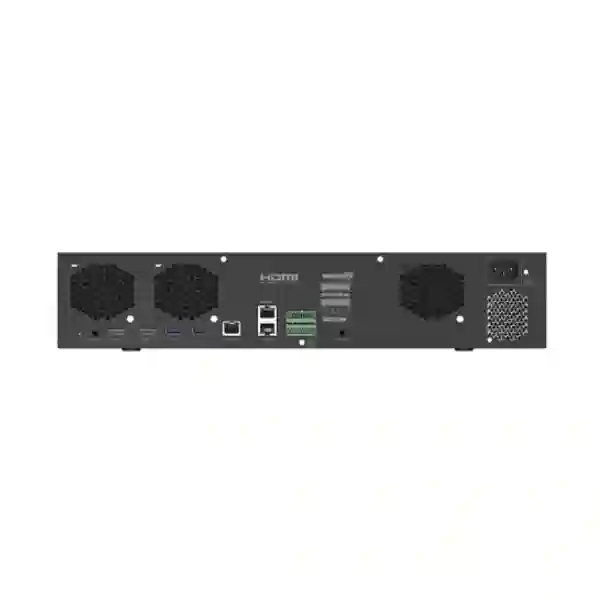
The recorder provides two HDMI outputs. Hanwha specifies HDMI 1 up to 3840 by 2160 at 30Hz and HDMI 2 up to 1920 by 1080 at 60Hz. This makes it possible to create an operator-oriented display arrangement using suitable monitors. The local interface offers dynamic layouts and virtual-channel viewing, which can help staff focus on priority images while retaining access to other camera views. The configuration must respect the recorder’s published decoding limits.
Before buying screens, decide how many views operators genuinely need at once and which cameras require larger windows. A wall filled with tiny images can be less useful than a carefully chosen priority layout. Test live display, playback access and on-screen event controls at the intended monitoring desk. HDMI cable lengths, monitor resolution, power protection and physical workstation layout all matter. Two outputs do not automatically mean two fully independent unrestricted display workstations; confirm the supported display modes against the intended operation.
Dynamic layouts and virtual-channel viewing
Dynamic layout allows an operator to adjust how available video appears on screen, rather than being confined to one fixed grid. Virtual-channel viewing is particularly relevant when multiple camera feeds need to be shown around a primary view. This is useful in practical monitoring: a guard might enlarge a vehicle gate while keeping nearby approach cameras visible, or focus on a dispatch bay while retaining context from adjacent aisles. It can make a multi-camera system easier to operate under pressure.
Viewing flexibility should be documented as part of the security workflow. Create a normal-day layout, an incident layout and any supervisor-oriented view that the interface supports. Check which controls require additional permissions, and train operators to return to a known layout after an incident. The goal is better situational awareness, not an impressive number of video tiles. Remember that a virtual channel is a display function, not a method of exceeding the device’s 32 IP camera input limit.
Remote viewing, browsers and user limits
The manufacturer’s specifications identify web viewing and supported viewer applications, including Wisenet Viewer and Wisenet mobile, alongside other Hanwha management software. Supported desktop environments and browsers are defined by the relevant current release information. The recorder also has specific limits for simultaneous local and remote playback and remote users. Do not assume that every member of a large operations team can open unlimited independent viewing sessions without design consequences.
Plan access by role: the on-site security operator, the designated supervisor, the administrator and any authorised investigator may need different permissions. Test the actual viewer version and device platform before deployment. Remote access requires an appropriate network and cybersecurity design, including an approved secure access method. A QR-code or P2P configuration feature should not be treated as permission to expose the recorder indiscriminately to the internet. Maintain a named-user register, access review procedure and clear policy for removal of departing staff.
Camera interoperability: SUNAPI and ONVIF
The recorder lists SUNAPI and ONVIF support for IP camera communication. These capabilities are important when assessing a mix of Hanwha cameras and selected third-party cameras, but protocol support alone is not a guarantee that every control, event or analytic function is interchangeable. Basic video connectivity may work while advanced metadata, edge analytics, PTZ details or special features require a particular camera family or integration path. An exact-model compatibility check is therefore a normal part of responsible procurement.
Create an integration matrix showing camera make, model, firmware, intended stream, required event features and expected recording mode. For each non-Hanwha camera, test connection, timestamp, video continuity, motion or alarm events, playback and any required configuration controls. Use the same test approach for existing cameras being retained during an upgrade. This prevents an expensive surprise where the recorder accepts video, yet a critical operational feature is missing or supported only through a different software configuration.
PTZ, fisheye and specialised camera uses
Hanwha lists PTZ control via its local and web interfaces, together with specified controller compatibility and support for presets. Fisheye dewarping is also supported in published operating contexts. These can be valuable in high-coverage positions or sites with moving cameras, but the benefits depend on the actual camera and its capabilities. A recorder does not turn an ordinary fixed camera into a PTZ unit or make a fisheye image appear where the camera itself has no fisheye lens.
For PTZ deployment, document home positions, patrol behaviour and who may take manual control. Decide whether the camera should retain a preferred overview or investigate a selected incident, because movement can change coverage. For fisheye cameras, test the supported dewarping mode and playback workflow with the intended screen. Confirm that essential evidence remains obtainable from recorded material, not just from a live corrected view. Special camera features should be purchased and accepted as complete end-to-end functions rather than isolated catalogue claims.
Cybersecurity starts with configuration
Integrated TPM support, signed firmware, TLS, access logging, IP address filtering and 802.1X are included in the manufacturer’s published security feature set. These features are relevant for organisations that need a defensible security architecture, but they are not a substitute for proper commissioning or ongoing administration. Avoid interpreting any device security feature as a guarantee that a deployment cannot be compromised. The best protection depends on firmware management, account control, network segmentation and the wider site’s operating practices.
Use unique credentials, limit administrative accounts and provide operators with only the rights they need. Keep cameras and the NVR on an appropriate protected network, restrict inbound access and document secure remote maintenance. Review device logs and time synchronisation, and plan how firmware updates will be evaluated and applied. Where organisational policy requires external compliance evidence, obtain the exact current manufacturer documentation and assess it against that policy. Neither a manufacturer logo nor a published security capability automatically establishes local regulatory approval.
N+1 failover and automatic recovery backup
Hanwha identifies N+1 failover and Automatic Recovery Backup, or ARB, among the recorder’s capabilities. These features are relevant where a site is evaluating recording continuity, but they are not activated simply by purchasing one recorder. A failover architecture requires appropriate additional hardware and design, while recovery functions depend on supported devices, setup and operational conditions. The full solution should be planned and tested rather than inferred from a feature list.
Ask the design team to describe each failure scenario: loss of one camera link, network interruption, disk failure, NVR power loss and complete recorder failure. Which recordings remain accessible, which are recovered later and which need an independently protected copy? Record the recovery expectations in measurable terms without assuming zero data loss or instant switching. Test the actual intended redundancy configuration during acceptance, and make sure operations staff understand the alarms that indicate a degraded or recovering system.
Power requirements and energy planning
The recorder’s electrical specification states 100 to 240 VAC, 50/60Hz power input, with maximum power consumption listed at 162W when eight hard drives are installed. This is information for electrical and UPS planning, not a promise about the power used by the cameras, network switches, monitors or any external storage. The complete surveillance system must be evaluated as one electrical load, including all critical components needed to keep recording during an interruption.
For a Tanzania deployment, ask the installer to assess local site power quality, available earthing, protected distribution and the required duration of backup power. Size the UPS from the actual full-system equipment list and desired runtime. A recorder can remain on while the cameras become unavailable if their switches have no backup power, so both sides of the video path matter. Include safe shutdown and restart behaviour in testing. Do not infer that a rack power strip alone provides electrical protection or continuity.
Operating temperature, humidity and enclosure design
Hanwha publishes an operating temperature range of 0°C to 40°C and operating humidity of 20% to 85% relative humidity for the XRN-3220RB2. These environmental limits should be checked against the real equipment room, including conditions when air conditioning is off or the room is unattended. Equipment placed in a small enclosed cabinet may experience higher internal temperatures than the surrounding office. Disk population and nearby devices can also affect cabinet heat.
Check airflow, dust exposure, room access and the routing of power and network cables. Avoid installation positions that expose the recorder to water, condensation, unfiltered dust or obstructed ventilation. A secure, serviceable location is preferable to a cabinet chosen solely because it is convenient. Include temperature management and maintenance access in the proposal, particularly where a site has extended operating hours. If the site regularly exceeds the specified environment, redesign the equipment location rather than assuming the recorder will tolerate it indefinitely.
Physical dimensions and service clearance
The published chassis dimensions are approximately 438 by 86 by 434.9mm, and the weight is about 8.8kg without HDDs. Those figures help a designer evaluate shelf, rack and cabinet accommodation, although mounting accessories and the exact mechanical arrangement must be verified for the proposed configuration. A cabinet needs space for connectors, power, cable bends, ventilation and the safe handling of drives. It is a mistake to size the cabinet to the bare chassis alone.
Consider the maintenance path as well as initial installation. Technicians may need to identify a drive, review indicators, connect a local display or access rear network cabling. Label ports and cables, retain a clear circuit inventory and provide secure physical access for authorised maintenance personnel. If monitoring staff operate the NVR from a separate room, confirm the required network or display connections. A well-organised hardware layout reduces service disruption and helps operators diagnose faults without moving unrelated live equipment.
Three gigabit interfaces and network segmentation
The XRN-3220RB2 lists three RJ-45 gigabit network interfaces. This flexibility can support different network design requirements, but the presence of three interfaces does not itself establish an intended topology or a guaranteed aggregate recording speed. The network architect should use the current manufacturer documentation to confirm supported interface roles, routing and configuration. The recorder’s maximum recording bandwidth also remains a separate constraint from the rated speed of an individual Ethernet port.
Identify camera-network traffic, management access and any corporate-network connection before choosing switch ports and network segmentation. Calculate expected traffic over the relevant uplinks, allow for simultaneous recording and viewing, and avoid a single congested link serving unrelated high-volume services. The NVR’s network ports should not be assumed to provide PoE power to cameras. Specify suitable camera power and PoE switches separately when required. A documented topology makes future troubleshooting far easier than an undocumented collection of patch cables.
Video export, evidence handling and auditability
The manufacturer describes local and network backup or export formats and several playback options. Exporting video is often the reason a business buys a dependable recording system in the first place: when an incident occurs, an authorised person needs the right footage without changing it accidentally. The export process should be rehearsed in advance, including playback of a saved file on the receiving equipment. Some recipients may need a standard video file, while other workflows benefit from a manufacturer-specific format with appropriate player support.
Agree on evidence ownership, file naming, storage location, access control and retention for exported incidents. Preserve accurate time information, record who made the export and keep the source recording protected for as long as policy requires. The NVR should be part of a written evidence procedure rather than the procedure itself. Where personal information is present, the organisation should assess its applicable privacy and legal obligations with qualified advisers; equipment specifications do not determine the full compliance requirements of a given installation.
Site design for shops, offices and warehouses
A shop may prioritise entry points, tills, customer circulation and stock access. An office could focus on entrances, shared circulation and critical equipment rooms. A warehouse may need loading bays, gate approaches and high-value inventory areas. The same 32-channel recorder can support different camera layouts, but each environment requires distinct camera placement, lens selection, lighting and retention decisions. An oversized channel allowance does not compensate for a blind spot at a critical doorway or unreadable images under difficult lighting.
Translate risks into a position plan before selecting recording settings. Identify which cameras need continuous capture and which may benefit from event workflows. Note any conditions that make a camera difficult to use, including backlighting, night movement or long viewing distances. Determine who watches video in real time and who usually accesses it after an event. Those operational differences drive monitor layouts, alert policy, remote viewing permissions and the value of AI-compatible cameras much more than a generic product-feature checklist.
Multi-building and campus planning
For a campus or property with multiple connected buildings, a recorder at a central location may be attractive, but camera traffic must reliably reach it. Distance, cable infrastructure, switching and the presence of multiple network segments all influence the design. The device’s 32-channel limit remains the same regardless of how many buildings are attached. A dispersed installation may also change the required response when one building loses connectivity, which is why network resilience needs explicit consideration.
Map cameras to their buildings and network paths, then identify any common points of failure. Account for shared uplinks, power interruptions, remote maintenance needs and the consequences of recording traffic crossing a congested backbone. If several operational teams require independent video access, check user and playback limits rather than promising unconstrained simultaneous viewing. A multi-site solution may sometimes need multiple recorders or a different management architecture. The correct choice follows the infrastructure and failure analysis, not a desire to force every camera onto one appliance.
Commissioning: prove the intended outcome
Commissioning should demonstrate that all configured cameras record as expected, not simply that their thumbnails appear on a monitor. Check channel numbering, video quality, frame rates, local display, event actions, recorded audio where intended, playback and exports. Verify network interruption behaviour, time synchronisation, storage alerts and authorised remote access. Confirm the actual installed disk population and RAID configuration against the purchase order. An acceptance document should record the delivered equipment identifiers and final settings.
A practical acceptance exercise includes a sample event at several camera positions, a search by date and time, a review using the operator layout, an evidence export and a recovery check after a controlled maintenance scenario. Include failures that are safe to test, such as a planned camera disconnect, while avoiding destructive procedures without an approved maintenance plan. Train the site’s nominated administrators and operators on routine checks and escalation. Written handover documentation is as important as the demonstration itself.
Upgrade planning from an older recording system
An upgrade is not only a recorder swap. Existing cameras may use older firmware, incompatible event interfaces or recording profiles that no longer suit the site’s retention expectations. A new NVR can expose weaknesses in the original cabling, switching, access rules and naming conventions. Start by collecting the camera inventory, network diagram, storage policy and a list of current operational frustrations. If historical footage must be kept, document how it will remain available when the old recorder is removed.
Plan a pilot that proves several representative camera types before moving all channels. Test one high-resolution unit, one third-party camera if present, one PTZ if applicable and a camera with required analytics. Confirm time accuracy and export needs before cutover. Arrange a controlled period in which the new recording and operator workflows are evaluated. The XRN-3220RB2 may be a suitable successor for a 32-camera architecture, but the completed solution must be demonstrated with the site’s actual devices and requirements.
Compare RAID and non-RAID model variants carefully
Hanwha lists both the XRN-3220RB2 and the similarly named XRN-3220B2. The RB2 version is the RAID 5/6-capable model covered here, while the manufacturer’s listing for the B2 variant describes it as non-RAID. This single letter difference has commercial and operational implications when the buyer expects disk redundancy. Quotes should display the complete model designation and indicate whether drives, accessories and configuration services are included.
It is useful to compare the two against the site’s real storage policy, rather than assume the more expensive or more feature-rich option is automatically the right decision. If disk-failure tolerance is a requirement, document it and choose a supported RAID-capable configuration. If the use case is modest and an independent backup strategy exists, a different product may be evaluated. Never substitute one model number for the other simply because both advertise 32 channels and eight disk bays. Verify the complete ordered part number at handover.
How to request a useful Tanzania quotation
A helpful enquiry states the intended number of IP cameras, each camera model or approximate resolution, expected recording frame rates, required retention period, preferred RAID level, monitoring locations and desired remote-access arrangement. Mention whether cameras already exist and whether new network switches or a UPS must be included. If the site is upgrading, identify any third-party integrations or archived-video requirements. This gives the supplier the information needed to propose a workable system rather than a recorder-only price with major omissions.
Ask FourTeck Tanzania to confirm the precise XRN-3220RB2 configuration, included HDD sizes and approved models, usable RAID capacity, accessories, availability, quoted price, warranty terms and support arrangements in writing. Do not treat manufacturer maximum values as an indication of the specific stock configuration. Seek a site-specific technical review when installation conditions are uncertain. The most useful next step is an itemised quote with a recording-capacity explanation and a clear statement of what is and is not included.
Procurement decision checklist
Check the exact model designation; current manufacturer specifications; camera count and resolution; expected aggregate bitrate; recording mode; surveillance HDD compatibility; raw versus usable storage; required days of footage; RAID level; and expected recovery procedure. Confirm camera protocol interoperability and whether AI search is actually needed with compatible cameras. These checks distinguish genuine requirements from attractive but unused features. They also support fair comparison if a purchasing team obtains more than one technical proposal.
Next review the operational requirements: monitor arrangement, staff permissions, remote viewing, alarm integration, power backup, cabinet environment, maintenance access and ongoing support responsibility. Ask for testing criteria before purchase so the installer and customer agree what successful delivery looks like. Record any uncertainties in the quotation instead of hiding them behind phrases such as fully compatible or future-proof. An appropriately specified surveillance system is easier to operate, maintain and audit over its useful life.
Frequently asked questions
These answers explain the practical differences between the recorder’s stated capabilities and the configuration your site may need.
Is the XRN-3220RB2 a 32-channel IP NVR?
Yes. Hanwha Vision specifies up to 32 network camera inputs for the XRN-3220RB2. The number of channels is a hard planning consideration, not a guarantee of 32 simultaneous full-resolution decoded views. Confirm recording bitrate and local display requirements for the chosen camera mix. A camera schedule with location, model, required profile and future expansion helps determine whether this class of recorder is the right size.
Does the NVR come with 80TB of storage?
Not necessarily. Eight SATA bays can support up to 80TB of raw capacity with compatible 10TB drives in a non-RAID configuration. That maximum does not establish which HDDs, if any, are included in a specific commercial offer. With RAID 5 or RAID 6, usable capacity will be lower than raw installed capacity. Ask for the actual drive population and usable capacity in the quotation before estimating retention.
Does this model support RAID 5 and RAID 6?
Yes. The XRN-3220RB2 is the RAID-capable variant, and Hanwha publishes RAID 5/6 support. RAID configuration requires a supported disk population and suitable drives. Disk redundancy can help with certain drive failures but does not replace separate evidence exports or backup. Check the current model-specific HDD compatibility and RAID guidance before purchasing disks or beginning an array build.
What is the difference between XRN-3220RB2 and XRN-3220B2?
Hanwha identifies the XRN-3220RB2 as the model offering RAID 5/6, while the similarly named XRN-3220B2 is identified as non-RAID. Both should be treated as distinct product choices even if headline channel and storage-bay counts look similar. Always match the complete model number on the quotation and delivery paperwork to the specified storage-protection requirement.
Can it work with existing third-party IP cameras?
The recorder supports ONVIF and SUNAPI protocols, but successful integration depends on the exact camera model, firmware, stream profile and features required. A third-party camera may support basic recording without providing the same event metadata or AI search experience as a compatible Hanwha camera. Run a compatibility test for video, time settings, playback, PTZ and events before relying on existing devices in a production upgrade.
Does the recorder provide AI search without AI cameras?
Do not assume so. Hanwha’s published object-attribute AI search is identified as compatible with Hanwha AI cameras. The camera must supply supported analytics or metadata for the intended function. A normal recording from an unrelated IP camera does not automatically gain all object-attribute search capabilities. Confirm camera model support and demonstrate the specific search function during acceptance.
How many days of recording will be stored?
There is no universal answer. Retention depends on installed usable storage, the number of cameras, their bitrates, compression, frame rates and recording schedules. RAID also reduces usable capacity relative to raw disks. Request a storage calculation for the proposed camera profiles and include margin for changing scene conditions. An acceptance test should establish that recording is continuous or event-based according to the agreed policy.
What is the headline recording bandwidth?
Hanwha advertises up to 520Mbps, but its published specification differentiates recording modes, including a lower figure for normal non-RAID operation and specific figures for RAID operation. Do not plan solely from the headline number. Have the installer calculate total expected camera bitrate against the exact planned mode and verify the current manufacturer specification before finalising the system design.
Can staff use two screens?
The recorder offers dual HDMI output with published resolution and refresh-rate limits for each port. Dynamic layouts and virtual-channel viewing help organise the pictures shown to an operator. However, what can be displayed simultaneously also depends on the decoding load and operating mode. Design the intended monitor layout and demonstrate it with real cameras before accepting the installation.
Will the NVR power the IP cameras?
The published connection list specifies network interfaces, not a built-in bank of camera PoE ports. Do not assume that plugging cameras into the recorder provides their electrical power. Most network surveillance designs need a separate, correctly sized PoE switching or other camera power arrangement. Include camera power and network switches in both the purchasing specification and the UPS calculation.
Is the XRN-3220RB2 suitable for a hot equipment room?
The manufacturer specifies an operating temperature from 0°C to 40°C and 20% to 85% relative humidity. A site must verify the actual conditions inside the intended cabinet or room, including periods of high ambient heat and loss of cooling. Keep ventilation paths clear and avoid moisture or condensation. If measured conditions are outside the specified range, choose a more suitable location or improve environmental control.
How do we request a quote for Tanzania?
Provide the camera quantity, any existing camera models, requested retention, RAID preference, available network infrastructure, intended monitor and remote access arrangements, and power-backup needs. Ask for the full recorder configuration, compatible HDDs, any required switches or accessories, warranty terms, availability and price to be confirmed on the offer. A quotation should distinguish verified equipment specifications from site-specific installation and service commitments.
Request an XRN-3220RB2 configuration and quote
Ask FourTeck Tanzania to review your number of cameras, required video retention, recording bandwidth, compatible surveillance drives, preferred RAID configuration and viewing requirements. Request a written bill of materials showing every included component, the usable capacity and the service terms relevant to your site.
Please confirm availability, pricing, warranty and installation support as part of the quotation. No unstated commercial commitment is implied by this product description.




Reviews
There are no reviews yet.