
Hanwha Vision • Compact network recording
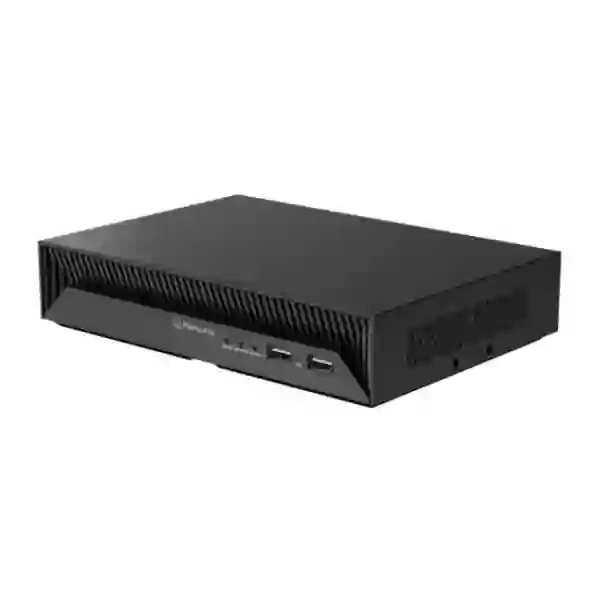
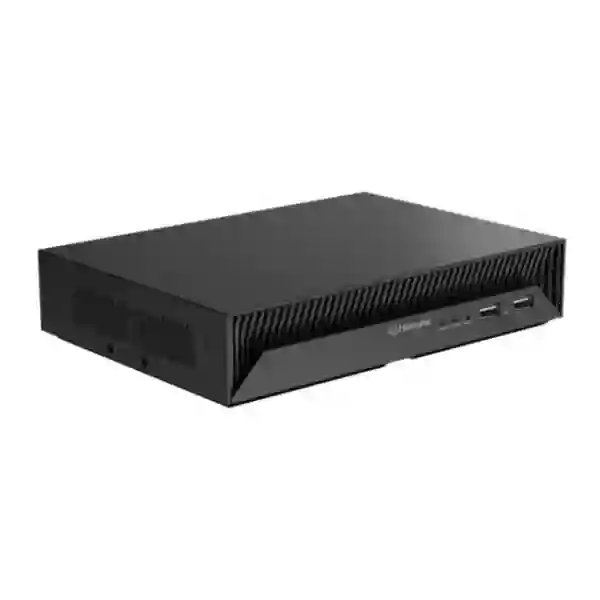
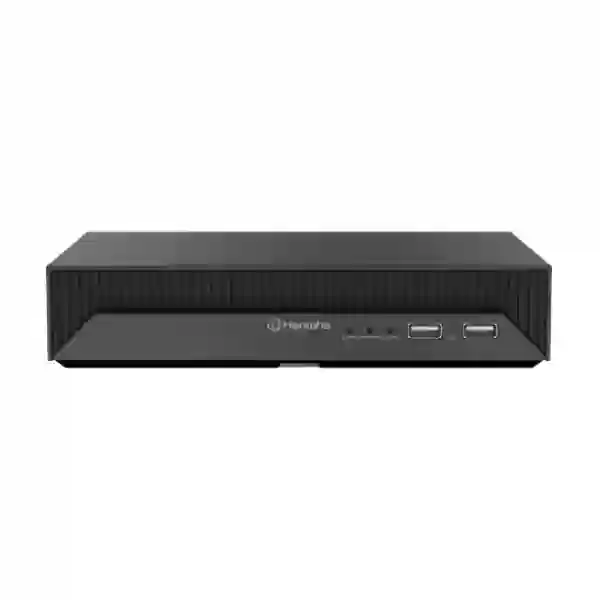
Hanwha XRN-426S-1T 4-Channel AI NVR with 1TB SSD
A space-saving recorder for up to four compatible IP cameras, with integrated PoE, quiet solid-state storage and AI-search support when paired with suitable Hanwha AI cameras. Plan the full installation around the camera bitrate, power budget and retention you actually need.
Key specifications at a glance
Use these figures as design limits, not as guarantees of retention or full compatibility with every camera. All relevant system requirements should be checked together.
Who this recorder is designed for
The Hanwha XRN-426S-1T is intended for sites that need a manageable four-camera IP surveillance system without the bulk of a conventional rack recorder. Its 1TB solid-state drive and compact, fanless enclosure make it especially relevant where there is limited room near a reception counter, supervisor desk, security station or small equipment cabinet. It gives operators a local recording point while supporting live viewing, playback and event searches from suitable client software.
A typical buyer may be protecting a small shop entrance, office corridor, reception area or residential access point. The important starting question is not simply whether four cameras can connect, but whether four channels, the 40Mbps recording limit, the 50W shared PoE budget and the 1TB installed storage meet the actual recording plan. FourTeck Tanzania can use those requirements to help frame a suitable product enquiry, without assuming that every deployment needs the same cameras or retention period.
What the 1T model includes
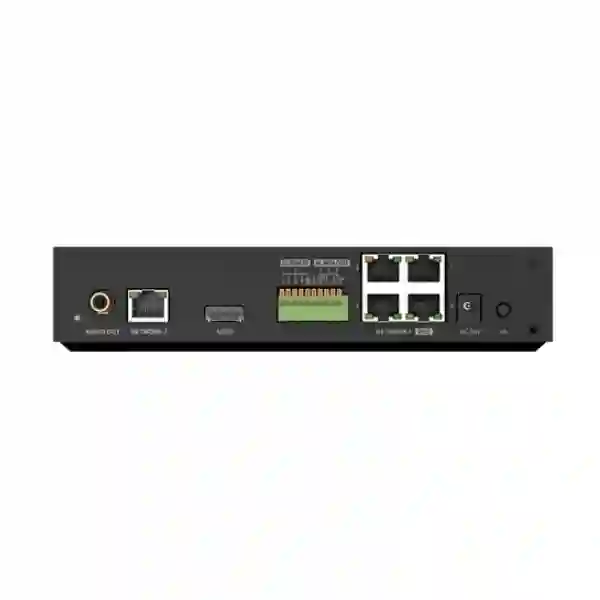
The model suffix identifies the version supplied by Hanwha Vision with a pre-installed 1TB SSD. This is not a blank chassis waiting for a separate conventional hard disk. The recorder provides up to four network-camera channels, four built-in PoE/PoE+ camera ports, a separate Gigabit network uplink, an HDMI monitor output, two front USB 2.0 connections and alarm interfaces. Its embedded Linux software handles recording, playback, camera management and compatible remote access.
The recorder is a recording and management device rather than a complete CCTV kit. Cameras, display equipment, network cabling, suitable surge protection and the wider power arrangement need to be specified for the particular site. Buyers should also confirm the accessories and regional package configuration on a quotation. A model name and standard datasheet establish technical capabilities; they do not establish Tanzania stock, selling price, delivery time or the exact contents of an individual sales package.
Understand the four-channel limit
A channel is a recording input for a network camera. This NVR can register a maximum of four camera channels, so a site with four entrance, cashier, corridor and loading-area views has no spare channel for a fifth location. It is useful to map every required camera view before choosing the recorder. One camera with several available streams does not automatically create extra physical camera capacity, and future expansion must be considered separately from the initial installation.
If additional views are likely soon, evaluate a higher-channel NVR rather than assuming an unrestricted upgrade is possible. Camera placement also matters: a carefully aimed four-camera plan can be more valuable than cameras that overlook the same area but fail to identify the event that matters. The four-channel capacity is a fixed design characteristic of this model, not a software licence allowance that can be increased through a general settings change.
Recording bandwidth and image quality
Hanwha Vision specifies a maximum network-camera recording bandwidth of 40Mbps. This total is shared by the camera streams being recorded; it is not a promise of 40Mbps for every connected camera. A four-camera plan therefore needs a practical bitrate budget based on resolution, frame rate, compression format, scene motion and the camera’s encoding settings. An 8MP camera can be supported, but the maximum accepted resolution does not itself determine the bitrate needed for clear evidence.
During design, estimate the worst plausible combined stream rate, then leave headroom rather than allocating the full published ceiling in every normal condition. Busy entrances, moving trees, low-light image noise and increased frame rates can affect video bitrates, especially with variable-rate encoding. Ask which views need detailed identification and which only need situational awareness. Test the final camera profiles under realistic day and night conditions before deciding that the system has met the evidence requirement.
Planning recording retention on the 1TB SSD
The installed SSD offers a simple starting point, but a 1TB label is not a guaranteed number of recording days. Retention depends mainly on the total average recording bitrate and how long the cameras record each day. Continuous capture stores more data than a carefully configured event schedule, while 8MP streams and busy scenes may consume space more quickly than lower-bitrate examples. System overhead and usable drive capacity further reduce the capacity available for footage.
As an illustrative calculation using decimal 1TB and uninterrupted recording, four cameras averaging 2Mbps each produce about 86GB per day, or roughly 11.6 theoretical days before allowances. At 4Mbps per camera the estimate is about 5.8 days; at 8Mbps per camera it is about 2.9 days. These figures are not manufacturer retention guarantees and should never be quoted as committed retention. Confirm the user’s required days, recording profiles, activity patterns and available storage margin through a documented sizing exercise.
Choosing H.265, H.264 or MJPEG
The recorder supports H.265, H.264 and MJPEG, giving integrators flexibility with compatible camera streams. H.265 may reduce storage demand for a similar visual target compared with older compression arrangements, but actual savings depend on camera settings, picture content and viewing or export requirements. H.264 remains relevant where compatibility is important. MJPEG serves some specialised integration needs but may be less storage-efficient for continuous video recording.
Codec selection is a system decision rather than an isolated checkbox. Verify that every selected camera supplies the required resolution, frame rate and codec to this recorder, and that the operator’s viewing and export workflow can handle the resulting files. Test footage from challenging lighting and motion, not only a static daytime image. Compression should preserve the details the security team actually needs to review, such as movement direction, clothing characteristics or an incident sequence.
PoE: four ports with one shared power budget
Four built-in 10/100Mbps RJ-45 camera connections support PoE or PoE+, with a combined 50W power budget. The critical point is that 50W is shared across the four ports; it is not 50W available at each connection. If four cameras are installed, compare the sum of their specified maximum consumption against the total, allowing for infrared illumination, startup demand and other enabled features. A camera that fits the network port may still exceed the practical power allowance.
A sensible four-camera design uses each camera’s official power specification rather than estimating from its appearance. Long cable runs, connection quality and local installation conditions should also be checked. If the proposed camera mix cannot stay within the recorder’s PoE limits, design a supported external power or network solution instead of expecting the NVR to supply more energy. Any additional switch must be accounted for in the network design and does not increase the recorder’s four-channel ceiling.
Network ports and physical topology
The four camera-facing PoE interfaces are separate from the recorder’s 1Gbps network uplink. A straightforward arrangement connects compatible IP cameras to the integrated PoE ports and uses the uplink to reach an authorised management network. The topology should make it clear where the NVR, viewing computers, router, mobile access service and any additional switches connect. Avoid using the recorder’s camera ports as though they were a general-purpose high-capacity office network switch.
Site planning should also account for IP addresses, time synchronisation, name resolution, network segmentation and internet access policy. Local recording does not require an operator to watch a live stream all day, but remote functions depend on the surrounding network and its security controls. For locations with unreliable connectivity, prioritise reliable local camera-to-recorder traffic and decide whether off-site monitoring is essential or supplementary. Document the finished topology so troubleshooting does not depend on guesswork.
Local display through HDMI
An HDMI connection supports a local monitor output up to 3840 by 2160 at 30Hz. This makes the compact unit practical for a small security desk or supervisor screen, provided the display and cable arrangement are compatible. The NVR supports multi-view layouts for its four camera channels as well as playback views. Local display capability should not be confused with an assurance that every high-resolution camera can be decoded simultaneously at its maximum frame rate.
Hanwha’s published local decoding examples include a single 8MP stream at 30fps or four 1080p streams at 30fps. Choose the screen layout and camera profiles to suit the work being done: a reception team may prefer four overview images, while an investigator may temporarily open a single high-detail view. Screen output resolution, recorded camera resolution and simultaneous decoding performance describe different parts of the system and should be evaluated separately.
Viewing and managing recordings
Hanwha Vision lists Wisenet Viewer, Wisenet Mobile, web viewing and other supported management software among the ways to interact with the recorder. These tools can help authorised users access live images, review a timeline and manage compatible devices. The appropriate interface depends on whether the operator is at the site, using a dedicated workstation or checking an incident remotely. Design the workflow around the actual roles rather than installing every available application by default.
For a small business, one person might oversee live monitoring while another occasionally retrieves incident footage. Agree who may change camera settings, who can search recordings, and who can export evidence. Train users on how to distinguish a recorded event from a missed notification. Application compatibility and features may evolve by version, so verify supported operating systems, firmware and software releases during installation rather than relying on an older screenshot or tutorial.
Remote access with security in mind
The XRN-426S-1T supports P2P QR-code connection features and mobile viewing through compatible Hanwha software. That can make legitimate remote checks practical for an owner or manager who is away from the premises. Remote viewing still relies on device configuration, authorised accounts, the local internet connection and the chosen access method. An NVR having a remote-access feature does not mean every site’s network will allow reliable connections without configuration.
Decide in advance who needs off-site access and for what purpose. Use strong unique credentials, least-privilege permissions and a secure configuration approved by the site’s network administrator. Avoid casually exposing management ports to the public internet. Maintain records of access rights when staff change roles. The convenient option is not always the most appropriate for organisations handling sensitive footage, and the final remote-access plan should follow the owner’s security and privacy requirements.
AI search requires compatible cameras
The AI search capability is one of the recorder’s distinguishing features, but the source of the intelligence must be stated correctly. Hanwha Vision specifies object-attribute search when the unit is integrated with compatible Hanwha AI cameras. It should not be described as a recorder that independently converts every ordinary IP camera feed into full AI analytics. The camera must generate the relevant metadata, and the recorder or viewer must support the intended search workflow.
For a site owner, the value is faster investigation when suitable metadata exists. Rather than manually scanning all footage, an operator may be able to narrow searches to relevant people or vehicles and review matching events. Supported attributes and accuracy depend on the camera model, scene, firmware and configuration. Test the actual camera-recorder combination before treating a particular search filter as an operational promise. AI assists investigation; it does not replace human verification of a recording.
Event rules and useful notifications
Camera analytics and recorder events can support actions such as an email, an event push notification, a buzzer, a PTZ preset or a configured alarm output. The product also supports triggers that may involve video loss, camera events and alarm inputs. These tools are most useful when an organisation decides which situations merit attention and who should act. Sending every possible motion alert to every user usually creates noise rather than better security.
Set a small number of meaningful rules first, such as a camera going offline, an access-area event outside expected hours or a defined analytic alarm from a compatible camera. Then review false alerts in actual operating conditions. Notification delivery can depend on network access and service configuration, so the absence of a phone notification should not be mistaken for proof that nothing occurred. Keep local recording and incident-response procedures clearly defined even when mobile alerts are enabled.
Automatic Recovery Backup explained
ARB, or Automatic Recovery Backup, is listed among the supported continuity features. In compatible deployments, it can work with relevant camera-side recording to help recover footage when connectivity is interrupted. This should be treated as a system-level capability requiring appropriately supported cameras, storage and settings. It does not mean the recorder can reconstruct frames that were never captured or that all camera models provide interchangeable backup functions.
Before relying on ARB, confirm the chosen camera’s edge-storage capability, appropriate memory-card specification where applicable, firmware compatibility and recovery workflow. Simulate a controlled connection interruption and check which recordings become available afterward. Document how time stamps are reconciled and how staff identify a gap. A continuity plan is only meaningful when the site has tested the whole chain, including power, network, camera storage and the recorder’s event logs.
N+1 failover is not a free spare recorder
Hanwha lists N+1 failover support, which can contribute to a more resilient architecture when a compatible standby NVR and suitable system configuration are in place. For a small installation, it is important not to mistake this feature for a backup machine included in the box. The base XRN-426S-1T remains one physical recording appliance. High-availability design can require additional equipment, correct network connectivity and validation of the selected devices.
Organisations for which lost recordings are unacceptable should ask for a separate continuity design instead of relying on a feature label. Identify what happens if the recorder loses power, if the camera network fails or if the storage device becomes unusable. Test recovery and monitoring alerts. Consider whether the additional system complexity is proportionate to the site’s risk. The appropriate goal is a clearly understood recovery procedure, not an unsupported promise of zero downtime.
Cybersecurity features and responsibilities
Published security functions include signed firmware, device certificates, IP filtering, user access logs and 802.1X support. These capabilities help administrators build a safer recording environment, but they are not a substitute for configuration or maintenance. Firmware should be obtained through authorised channels, reviewed for compatibility and installed according to an approved change procedure. Default credentials and unnecessary access should not remain in place after commissioning.
For a practical security baseline, document administrator ownership, separate daily-use accounts, time settings, network boundaries, backup procedures and software update responsibility. Review logs after important incidents and remove accounts that no longer belong to active personnel. If a site connects video equipment to a larger business network, involve whoever manages that network. Manufacturer security controls work best as part of a coherent policy, not as an assumption that a device is permanently secure by itself.
Privacy and responsible camera placement
Surveillance affects employees, visitors, residents and customers as well as the organisation purchasing the equipment. The camera plan should have a legitimate purpose, sensible placement, controlled access and a defined period for retaining footage. Avoid capturing private areas or unnecessary neighbouring property. Decide how people are informed about monitoring and who may release footage before the first camera is switched on. These are operational responsibilities independent of the recorder’s specification.
For Tanzania deployments, local legal and organisational requirements should be checked with qualified advisers where relevant; the product page does not assert regulatory approval, legal compliance or a particular retention mandate. A recording system can store sensitive personal information even when it has only four cameras. Keep export records, protect copies used for investigations and dispose of outdated files appropriately. Review policy whenever a camera is moved or the use of footage changes.
Choosing camera locations for evidence
Start with the security questions a recording must answer. Does the business need to verify who entered, observe the path of a delivery, review a transaction area or confirm when an entrance was opened? Each question may require a different lens, placement and image resolution. The NVR supports cameras up to 8MP, but high resolution cannot compensate for a poor angle, unsuitable lighting or a subject appearing too small in the frame.
Walk the premises during normal operating conditions and after dark. Note strong backlighting, reflective surfaces, direct sun, headlight glare and areas where people frequently block the view. Check the camera’s own environmental rating when planning outdoor coverage; the NVR’s indoor operating limits do not describe weather protection for a camera. Use sample recordings to verify that the installed view answers the original question before approving the camera layout.
Small retail and cashier scenarios
A compact four-channel system can suit a shop that wants to observe a main door, sales counter, stockroom access and a key passageway. In this scenario, the value comes from a coherent record of movement between those locations, not from simply counting devices. Place cameras to minimise blind spots, and ensure that the cashier view captures useful context without unnecessarily recording private information. The store’s lighting and opening hours should shape the recording schedule.
For a retail site, discuss whether recording should continue overnight, whether an owner needs occasional mobile access and how quickly staff need to retrieve an incident. Consider the storage effect of constant movement near a busy entrance. If an AI-enabled Hanwha camera is chosen for a particular view, confirm exactly which metadata searches it can provide. The recorder’s compact size can simplify placement, but secure physical installation and power protection still matter.
Reception, clinic and service-counter environments
Reception areas often have limited equipment space and a need for discreet operation. Hanwha’s fanless SSD approach is useful in settings where a noisy, bulky recorder would be inconvenient. A possible four-view arrangement might cover a public entrance, a general reception overview, a waiting-area circulation route and an authorised service passage. That example is a planning illustration rather than a claim that every healthcare or office environment should use these exact camera positions.
Extra care is needed wherever personal information, vulnerable visitors or confidential conversations may be present. Video placement and audio settings should be justified and reviewed under the site’s policies. Operators may need live situational awareness but not permanent access to exported recordings. Use role-based permissions and establish rules for incident requests. If the environment requires strict privacy controls or very long retention, validate those needs separately before selecting a compact 1TB recorder.
Offices and small professional premises
For a small office, the four channels may support entrance awareness, a corridor, a reception desk and an equipment-room approach. Choose views that help verify incidents without creating unnecessary surveillance of routine private work. A compact NVR can be located away from the main working area, but it should not be hidden in a place where ventilation, access for maintenance or cable management becomes difficult. The operating temperature limit still applies.
An office procurement checklist should include expected future expansion, user accounts, retention policy and whether facilities staff can maintain the system. If the business has several sites, management through compatible Hanwha software may offer a more organised viewing experience, subject to the network and software design. Do not assume the recorder alone provides a complete multi-site service. The quality of the result will depend on the cameras, installation, credentials and documented operating procedures.
Residential gates and managed buildings
A four-camera recorder may be considered for a residence, small apartment reception or managed building where a modest number of IP views is enough. Possible priorities include a gate, main approach, entry lobby and shared circulation point. An SSD-based recorder is useful when space is limited and a fanless unit is desirable. However, the buyer should not choose the model merely because it is small; video retention, number of required views and night-time image quality remain decisive.
For homes or managed properties, decide which users may see live video and which may export historical footage. Shared credentials are harder to audit and should be avoided. Review where mobile alerts will be sent and how long recordings need to remain available during travel or site closure. Equipment that is indoors may still face heat, dust or power interruptions, so a suitable housing and backup-power approach should be specified for the particular location.
Small storerooms and loading points
A compact recorder can also serve a small storage area or loading-point office where four well-placed views cover the essential movement routes. The crucial issue may be seeing where goods entered, who accessed a door and whether an incident occurred during a shift change. High-resolution footage is useful only when faces, packages or vehicle movements occupy enough of the image. Plan cameras around real sightlines rather than adopting a generic four-corner layout.
Storage areas can present difficult lighting transitions and more demanding camera power requirements, particularly if infrared illumination or outdoor-rated equipment is involved. Calculate the 50W shared PoE budget with those needs in mind. If a larger yard, several doors or many loading bays must be covered, a four-channel NVR may be too restrictive. Consider the final camera count before cabling is installed, because changing the recorder later can be more disruptive than choosing sufficient capacity initially.
Power continuity for local conditions
A stable power arrangement is a practical requirement in any recording deployment. The product uses a 54VDC, 1.67A power input through its adaptor, and Hanwha specifies maximum consumption of 68W with PoE enabled. This figure helps frame electrical planning but does not by itself choose a UPS. Backup runtime depends on the full load, conversion losses, battery condition and all other equipment that must stay powered.
Assess the camera power draw, network equipment, router, viewing device and recorder together. If a backup system powers only the NVR while the cameras or network switch lose electricity, the security objective may not be met. Select an appropriate protected electrical supply and verify the adaptor supplied for the local installation; do not assume any particular plug or mains configuration from the NVR’s DC rating. Test safe recovery after outages and keep the power arrangement accessible for servicing.
Heat, humidity and equipment positioning
Hanwha rates operation from 0°C to 40°C and 20% to 85% relative humidity. Those limits matter when choosing a cupboard, ceiling void, desk enclosure or guard station. A compact chassis is easy to place, but a small enclosed box near direct sunlight or hot electronics may exceed the environmental rating. The product is not presented as an outdoor weatherproof recorder, so it should be protected against moisture, dust and physical interference.
The design does not require a cooling fan, which can reduce noise, but that does not eliminate the need for appropriate air circulation around installed equipment. Avoid blocking ventilation paths or burying the recorder beneath paperwork. Plan cable strain relief and enough service space to reach connectors. In warmer premises, check the actual temperature in the intended equipment location during the hottest expected operating period, rather than assuming room temperature is always representative.
Mounting choices and service access
The manufacturer describes wall, tabletop and monitor-adjacent mounting options, supported by compact dimensions of 200 by 140 by 42mm and an approximate weight of 660g. That can help an installer place the device unobtrusively. The enclosure is black metal, and its small footprint can be useful where a traditional recorder would be awkward. Any specific included bracket or accessory should be confirmed against the regional package being quoted.
Mount the recorder where cabling cannot be accidentally unplugged and where authorised staff can inspect status indicators, reset procedures and service connections. Ensure that a nearby monitor mount or wall fixing is appropriate for the total load and does not restrict ventilation. A tidy installation also separates network and power runs, labels camera cables and leaves a small amount of slack for maintenance. Concealment should never compromise support access or safe electrical practice.
Alarm, audio and PTZ connections
The published interface includes four alarm inputs and two alarm outputs, an RCA audio output and network audio support. The unit also provides PTZ controls and preset functions for suitable connected cameras. These features can support a more capable small surveillance design, but the required devices must be compatible and configured. An alarm connector does not automatically include a sensor, siren or access-control system, and PTZ functionality needs a camera able to respond to the relevant commands.
Define alarm behaviour in plain terms: what event starts it, who receives it and what action should follow. If two-way audio is needed, confirm the camera’s audio features, legal permissions and the exact integration path. Test event timing and recovery after a network disconnection. For many sites, reliable video recording and one or two meaningful alerts are more valuable than a complex set of automation rules that nobody has been trained to maintain.
Using ONVIF and other camera brands
The specification lists SUNAPI and ONVIF camera protocols, including ONVIF Profile S support. This helps assess interoperability, but it does not establish complete feature parity across every third-party camera. Basic live streaming may work while advanced event metadata, AI attribute search, detailed camera configuration or certain audio functions do not. Treat each proposed camera model and firmware combination as an item to validate, particularly when the buyer is reusing existing equipment.
For a mixed-camera site, prepare a compatibility matrix showing video stream, codec, recording resolution, PTZ, event rules, time synchronisation, audio and remote viewing requirements. Test the most important items before installation. If the buyer’s main reason for selecting this NVR is AI search, confirm the compatible Hanwha AI camera path rather than relying on generic ONVIF support. Open protocol support improves options; it is not a substitute for product-level compatibility checks.
Exports and incident evidence handling
The recorder supports local and network-oriented backup or export formats identified in Hanwha’s technical specification. A useful evidence process should be planned before an incident occurs: identify the date and time range, confirm the relevant camera, preserve the original recording where possible and export a viewable copy in an agreed format. Operators should know how to replay an export on the equipment used by the intended recipient, not only on the NVR itself.
Reliable time synchronisation is especially important when reviewing events across several cameras or systems. Record who requested an export, who produced it, where the copy is stored and how it will be protected. Avoid distributing video through informal personal accounts. The NVR makes files available through supported workflows, but chain-of-custody and access decisions remain the organisation’s responsibility. Practice a simple retrieval exercise during commissioning so urgent requests do not become a training session.
A practical commissioning sequence
Begin with a survey and a written four-camera plan. Confirm that each camera suits the scene, has the required resolution and uses a tested recording profile. Calculate shared PoE load and expected combined bitrate. Identify the location for the NVR and verify its heat, humidity, network and power conditions. Label cable routes before the system is switched on. Then connect devices in an orderly sequence and confirm every channel is recording reliably.
Next set administrator and operator accounts, accurate time, event schedules, approved remote access and any AI metadata workflow that is supported by the chosen cameras. Test live viewing, saved footage, playback, export and notifications. Review estimated retention after real activity has been recorded, rather than relying only on theoretical calculations. Finally document software versions, camera addresses, service contacts and a recovery procedure. A completed installation should be easy for the next authorised technician to understand.
Long-term maintenance and operating checks
A small recorder should have a straightforward maintenance schedule. Review camera health, recording status, free space, event logs, correct time and remote-access permissions at an interval appropriate to the organisation. Verify that important recordings can still be played and exported. Keep firmware and client software versions documented, and evaluate manufacturer security updates before installation. If an SSD or camera reaches a fault state, investigate it promptly rather than assuming a visible live image proves all recording functions work.
Retention needs can change over time as the business adds activity, increases resolution or adjusts camera settings. A camera added to a different part of the premises can increase scene complexity and storage use even when the channel count stays unchanged. Revisit the bitrate budget after significant changes. Keep spare installation details and secure configuration backups where supported. Routine checks are less dramatic than emergency troubleshooting, but they are what make a compact recorder dependable in everyday use.
Recognising when another recorder is a better fit
The XRN-426S-1T is a good candidate when the requirements fit within four camera channels, the 40Mbps recording ceiling, the 50W total PoE supply and the retention achievable on its installed 1TB SSD. It is less suitable when a buyer already needs six or eight cameras, high aggregate bitrates, unusually long continuous retention or a large internal storage expansion path. The model has one M.2 SSD slot; do not assume it accepts multiple hard disks or conventional RAID arrays.
Consider a higher-channel or higher-storage recorder if the proposed design exceeds those limits. An external switch can solve some cabling or PoE distribution issues but will not create additional recording channels. Likewise, adding higher-resolution cameras does not increase the SSD capacity. Product selection should reflect the whole site, future growth, operational resilience and the footage retention policy. A realistic comparison is more useful than buying the smallest available device and discovering its fixed limits after installation.
Questions to resolve before requesting a quotation
A useful request includes the exact model, number of cameras, camera make and model, needed resolution, approximate recording hours, required retention days and remote-access expectations. Also describe whether AI object searches are essential, since that changes camera compatibility requirements. If existing cameras will be reused, identify their current codecs and supported protocols. If the location has a hot equipment room or frequent power disruption, include that information so the design can address it.
Ask the seller to confirm current Tanzania availability, quoted package contents, applicable warranty terms, price, lead time and any separate accessories; none of those commercial details is established by the manufacturer’s standard specification alone. Request clarity about who supplies installation, configuration and ongoing support rather than assuming they are bundled with hardware. The result should be an itemised, understandable offer that can be compared against the stated requirements without relying on unsupported promises.
Final selection guide for Tanzania buyers
Choose this compact Hanwha recorder when a four-camera system, quiet solid-state storage and manageable local operation are priorities. Verify that the combined PoE consumption stays within 50W and camera recording traffic fits under 40Mbps. Plan retention from measured or responsibly estimated stream bitrates. Use a compatible Hanwha AI camera if object-attribute search is a core requirement. Define remote access and recording permissions with the people who will manage footage.
Before approving a purchase, confirm the proposed camera mix, mounting arrangement, power protection and operating environment. The published specifications are strong foundations for a design, but they do not answer site-specific questions by themselves. Share your camera plan and desired retention period with FourTeck Tanzania to request a product quotation and compatibility review. Pricing, local stock, delivery and service details should be confirmed in the actual offer rather than inferred from an international datasheet.
Illustrative continuous-recording capacity
The following figures assume four cameras recording continuously, decimal 1TB nominal storage and no allowance for reserved capacity or overhead. Actual days will be lower or different according to configuration and footage complexity.
| Average per camera | Total bitrate | Theoretical days |
|---|---|---|
| 2Mbps | 8Mbps | about 11.6 |
| 4Mbps | 16Mbps | about 5.8 |
| 8Mbps | 32Mbps | about 2.9 |
Frequently asked questions
Does this recorder include storage?
Yes. The exact XRN-426S-1T model is specified with a pre-installed 1TB M.2 solid-state drive. Usable space and actual recording days depend on configuration, bitrate and recording activity. It is not appropriate to assume a fixed retention period simply because the capacity is 1TB.
Can it record four 8MP cameras?
Hanwha specifies support for camera inputs up to 8MP and a maximum of four channels. The cameras’ combined recording traffic must stay within the NVR’s 40Mbps limit, and available display decoding is a separate consideration. Validate the selected streams under real scene conditions before making a performance commitment.
Is AI object search available with any camera?
No. Hanwha specifically identifies AI object-attribute search when used with compatible Hanwha AI cameras. Third-party or basic IP cameras should not be assumed to supply the required metadata. Confirm the exact camera models and supported search categories before deployment.
Does each PoE port provide 50W?
No. The total PoE budget is 50W shared across four PoE/PoE+ camera ports. Add up each camera’s maximum expected consumption, including night illumination and enabled accessories, and leave suitable headroom. Four connectors do not mean four independent 50W power allocations.
How many days of video fit on 1TB?
There is no universal number. At an illustrative continuous total stream of 8Mbps, decimal 1TB is about 11.6 theoretical days before usable-capacity and overhead allowances; 16Mbps gives about 5.8 days. Motion, quality settings, recording schedules and storage overhead change the actual result.
Can a phone view recorded video remotely?
The recorder supports compatible Hanwha mobile viewing and P2P QR-code connection features. A working arrangement still requires authorised configuration and suitable network access. Decide who needs remote viewing, use individual credentials and avoid unnecessary exposure of management interfaces to the public internet.
Will it work with ONVIF IP cameras?
The recorder supports ONVIF and SUNAPI protocols, but protocol support alone does not guarantee every function of every camera. Test recording, resolution, audio, PTZ and any analytics required for the project. Advanced Hanwha AI searches have their own compatibility dependencies.
Is this recorder suitable for outdoor installation?
The recorder is specified for operation at 0°C to 40°C and 20% to 85% relative humidity. It should be placed in a suitably protected environment, not treated as a weatherproof outdoor camera housing. Check the actual temperature and conditions where it will be mounted.
Does failover mean there is a backup recorder in the box?
No. N+1 failover is a supported system capability, not an included second NVR. A working failover arrangement needs compatible additional equipment, correct configuration and testing. Discuss recovery objectives separately when continuous surveillance is essential.
Can the system be expanded beyond four cameras?
Not by simply connecting more cameras or adding an Ethernet switch. This model has a four-channel recording limit. If the site needs additional camera views, evaluate a recorder with more channels before committing to the installation and cable routes.
Does the device require a traditional hard drive?
No. This version is supplied with a 1TB SSD and one M.2 SSD slot. Its compact SSD architecture is a central reason to choose the model. Do not plan an upgrade using multiple conventional SATA hard disks or assume unrestricted internal expansion.
What information should I send for a quote?
Specify the exact XRN-426S-1T model, how many cameras you need, intended scenes, resolution, recording schedule and days of retention. Mention remote monitoring, AI search requirements, existing camera equipment and power conditions. Ask for confirmation of Tanzania pricing, availability, included accessories and warranty in the resulting offer.
Request an XRN-426S-1T quotation for Tanzania
Tell FourTeck Tanzania how many cameras you need, the required footage-retention period, whether AI search matters and where the recorder will operate. Request confirmation of compatibility, accessories, current local stock, pricing, warranty and delivery details in the formal quotation.
Next step: Contact FourTeck Tanzania to review your four-camera recording plan.




Reviews
There are no reviews yet.