
FOUR-CHANNEL NETWORK VIDEO RECORDING
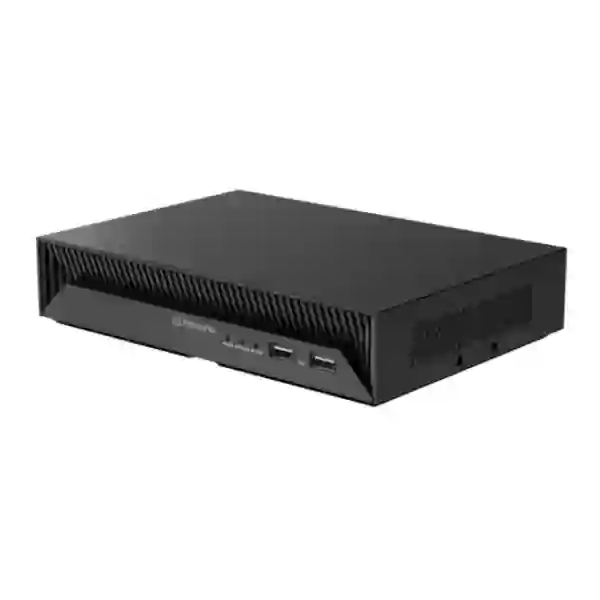
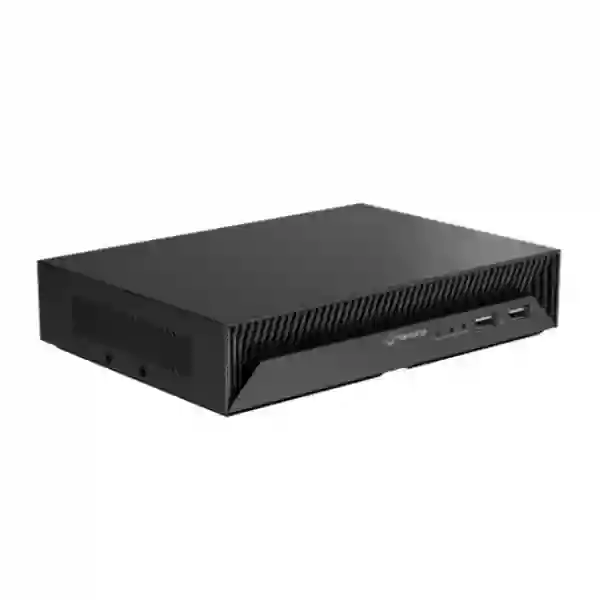
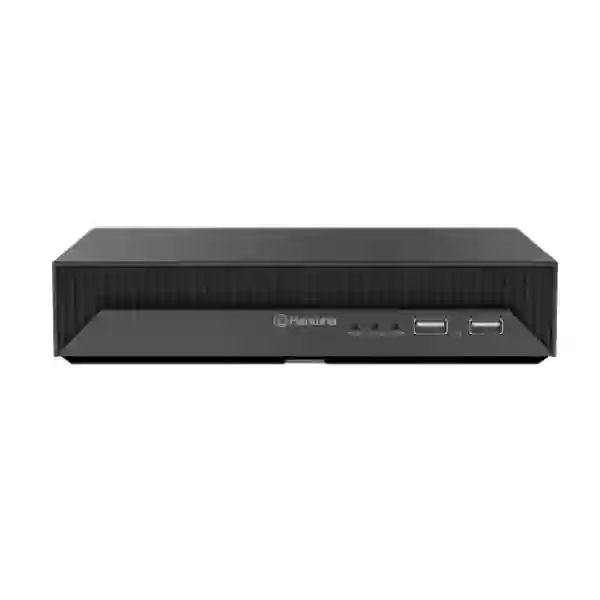
Hanwha XRN-426S-2T | 4CH AI NVR with 2TB SSD
A compact, solid-state surveillance recorder for up to four IP cameras. Assess recording performance, camera power, AI compatibility and retention before choosing it for your Tanzania security project.
Verified specifications at a glance
These specifications describe the exact Hanwha Vision model. Configuration, firmware and camera compatibility must still be verified for a complete installation.
| Parameter | XRN-426S-2T specification |
|---|---|
| Channels | Up to 4 network cameras |
| Camera resolution | CIF to 8MP |
| Storage | Pre-installed 2TB M.2 SSD |
| Recording bandwidth | Up to 40Mbps aggregate |
| Video codecs | H.265, H.264, MJPEG |
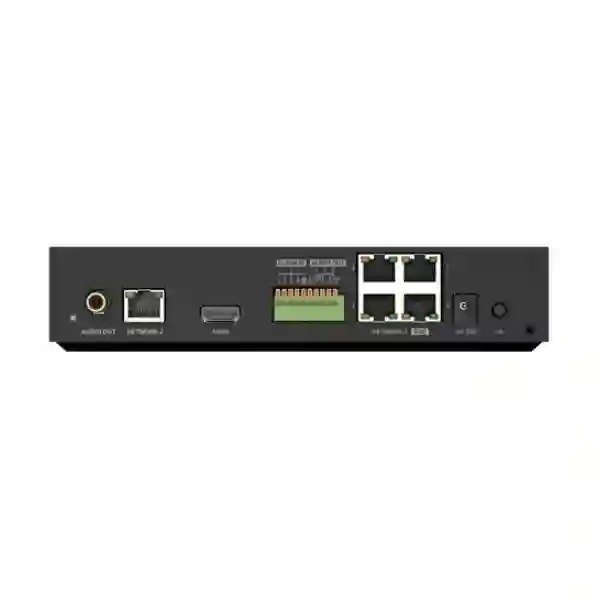
| Camera-side network | 4 × 10/100Mbps PoE RJ-45 |
| PoE power budget | 50W total |
| Network uplink | 1 × 1Gbps RJ-45 |
| Monitor output | 1 × HDMI, up to 3840 × 2160 at 30Hz |
| Integration protocols | SUNAPI, ONVIF |
| AI object-attribute search | With compatible Hanwha AI cameras |
| Operating range | 0°C to 40°C; 20%–85% relative humidity |
| DC power | 54VDC / 1.67A adapter |
| Dimensions and mass | 200 × 140 × 42mm; approximately 0.66kg |
Who this compact recorder is designed for
The Hanwha XRN-426S-2T is a compact network video recorder for an installation needing no more than four IP-camera channels. It brings camera power connections, recording, local monitoring and investigation tools into one appliance. That makes it a practical candidate for a small shop, a reception area, a professional office, a compact storeroom or a defined entrance-and-exit surveillance zone. It is not intended to replace a large multi-channel recording server. First decide whether four camera views can cover the important activity without blind spots, then assess image quality, retention and management needs.
For a buyer in Tanzania, the sensible starting point is the site survey rather than the recorder alone. Identify the entry points, cash-handling locations, inventory movements or other activities that must be documented. Decide who will review footage and how an incident will be exported. Only then establish whether this model’s four-channel capacity, 2TB solid-state storage and network integration fit the installation. Request a complete design and quote rather than assuming that the recorder alone is a finished CCTV system.
Four camera channels: a clear boundary
A four-channel NVR records up to four supported network camera streams as camera channels. Each camera position should therefore justify its place in the system. A typical plan might allocate separate views to the primary entrance, customer-service counter, delivery doorway and stock area, but the right layout depends on the site. The presence of four physical PoE ports does not mean that a fifth camera becomes supported by plugging in an additional network switch. The recorder’s recording-channel limit remains four.
When planning future expansion, ask a direct question: will the location need five or more simultaneously recorded cameras during the useful life of the system? If the answer is likely yes, choosing a higher-channel recorder at the outset may reduce later migration work. If the answer is firmly no, a compact four-channel platform can make the project easier to specify. Multiple viewing layouts or remote clients do not increase the supported number of recorded camera channels.
Choose views by the evidence you need
Good surveillance design starts with what an operator needs to recognize, not the megapixel rating on a box. A general overview camera may show movement through a room, while an identification-focused camera needs a tighter field of view at the relevant doorway or transaction point. Lighting, lens selection, mounting height, subject distance and nighttime conditions can be more important than the resolution number by itself. Test the intended view using actual footage before finalizing installation positions.
Avoid asking one wide-angle camera to perform several incompatible jobs. A camera showing an entire warehouse aisle may be useful for activity awareness but insufficient for reading fine details across the full scene. Conversely, a closely framed entrance may miss surrounding movement. With only four recording channels, each view must be deliberately assigned. Discuss whether people identification, vehicle observation, cash-desk monitoring or general scene awareness is the main objective at each point, and choose cameras accordingly.
Up to 8MP per supported network camera
Hanwha Vision specifies support for camera resolutions from CIF through 8MP on this recorder. That describes the maximum supported camera image resolution, not a promise that every four-camera combination can record any chosen frame rate and compression settings without constraint. Resolution, frames per second and configured bitrate must be considered together. A high-resolution camera set to an unnecessarily high bitrate may use storage and bandwidth quickly without improving the evidence the customer actually needs.
The HDMI output supports up to 3840 by 2160 at 30Hz for local display, but display output and recording input are different specifications. The recorder can present multiple views locally, subject to its decoding capabilities. When a buyer wants smooth live display of four streams, ask the installer to verify the selected camera profiles and display layout against the current supported decoding figures. Do not equate the HDMI resolution with the resolution recorded by every attached camera.
Understand the 40Mbps recording ceiling
The manufacturer’s maximum aggregate network-camera recording bandwidth is 40Mbps. It is a shared budget across the connected cameras, not a 40Mbps allowance for each channel. As an illustrative planning exercise, four cameras configured for 6Mbps each would request around 24Mbps before allowing for operational variation; four configured for 12Mbps each would exceed the published 40Mbps recording figure. The precise combination must be tested with the actual cameras, codec, scene complexity and frame-rate settings.
A recording bandwidth limit matters most when settings change after handover. Increasing frame rates, enabling an additional video profile or changing compression on several cameras can alter the total stream load. A responsible commissioning process records the agreed profiles and checks the NVR’s recording status under realistic busy-scene conditions. Keep operating headroom rather than designing every camera to consume an exact theoretical share of the published maximum. This reduces the likelihood of avoidable capacity problems.
What the pre-installed 2TB SSD means
The XRN-426S-2T includes a pre-installed 2TB solid-state drive. Hanwha lists one M.2 SSD slot for the product. For the buyer, this means the recorder arrives with recording storage specified by the manufacturer, rather than relying on the installer to choose a separate spinning hard disk. The compact solid-state arrangement also suits locations where space and fan noise matter. It does not mean that exactly 2TB will always be available for user video after formatting, reserved capacity and file-system overhead.
An SSD does not provide unlimited video retention or immunity from failure. Continuous recording still consumes capacity, and any storage device requires monitoring, backup decisions and a replacement plan. Do not assume that a second internal drive can be added for mirroring; the published hardware lists a single M.2 SSD slot. If long retention, large archives or drive redundancy are essential, specify those needs separately and consider whether a different storage architecture is more suitable.
Estimate retention before ordering
The central storage question is not simply whether the NVR says 2TB. It is how long the specific combination of camera streams will remain available before old recordings are overwritten under the selected recording policy. Combined average bitrate, continuous versus event-based recording, hours of activity, image complexity, frame rates and audio all influence the answer. H.265 may lower storage consumption compared with less efficient encoding under suitable conditions, but the actual saving depends on camera support and configuration.
One useful rough calculation is that a combined average recording rate of 1Mbps represents about 10.8GB of data per day before storage overhead. A combined 12Mbps would therefore be about 129.6GB per day, or roughly fifteen days against a nominal 2TB capacity in idealized arithmetic. This is an illustration, not a retention guarantee: usable capacity, variable bitrate, events, file-system behavior and settings can shorten or extend it. Have the installer calculate the actual target retention with sample camera bitrates and validate it after commissioning.
Select codecs and stream profiles deliberately
This NVR supports H.265, H.264 and MJPEG recording formats. Choosing the right codec is a system decision because both the recorder and the selected camera must support the desired profile. Where H.265 is supported by the full workflow, it may be appropriate for efficient ongoing storage. H.264 can be useful where compatibility with an export, viewer or legacy integration matters. MJPEG has different bandwidth and storage characteristics and should not be selected merely because it appears in the supported-codec list.
Video systems commonly use distinct recording and viewing profiles. The high-quality stream should preserve the evidence required, while a lower-demand stream may be suitable for certain remote viewing situations. The model supports dual-stream recording modes, but the specific behavior and integration should be tested against the chosen cameras. Record the codec, resolution, frame rate, bitrate control method and audio choice in the handover document. These details are needed to reproduce storage estimates and diagnose later changes.
Four PoE ports and their shared power budget
The appliance provides four 10/100Mbps PoE camera-network ports and an overall PoE power budget of 50W. The important limit is the total available power, not simply the number of sockets. Four cameras that each demand 15W would create a 60W requirement before considering operating conditions, so that combination would not fit the published 50W aggregate budget. Check every camera’s maximum power requirement, including infrared lighting, heating or other enabled features, rather than relying only on typical daytime consumption.
A compatible camera may require more power at night than during a daylight demonstration. High-powered accessories or motors can further affect demand. Verify both the per-port PoE behavior and the sum of the cameras’ maximum rated loads with current manufacturer documentation before ordering. If the project needs a camera that exceeds the available power arrangement, discuss an appropriately engineered external power or PoE solution. The NVR’s four-channel recording limit still applies even when cameras receive power elsewhere.
Cabling and the network connection
Each PoE camera connection should use suitable Ethernet cable, correct terminations and a route protected from avoidable damage. The recorder’s four camera-side network interfaces are specified as 10/100Mbps PoE ports. It also has a separate RJ-45 network uplink specified at 1Gbps. These are different interface roles: camera cabling, local client access and remote access must be designed around the intended network topology instead of treating every port as interchangeable.
For a site with cables running through humid areas, ceiling spaces or exposed routes, ask the installer about cable grade, containment, labeling, earthing and surge-protection needs appropriate to the actual installation. Test every run, document which camera connects to each port and leave clear access for maintenance. Record the assigned IP addresses and any separated camera network. A tidy physical installation improves fault isolation and reduces the risk that a loose connection or unmanaged change interrupts recording.
SUNAPI and ONVIF interoperability
Hanwha Vision specifies SUNAPI and ONVIF support for network camera integration. SUNAPI is a Hanwha interface used within its video ecosystem, while ONVIF provides standardized interoperability paths for compatible equipment. These terms should guide compatibility assessment, but they are not a blanket promise that any camera labeled IP or ONVIF will expose every feature through the recorder. Basic video, events, audio, PTZ, advanced analytics and setup functions can differ according to camera model and firmware.
Before confirming a mixed-camera design, make a small compatibility checklist with exact camera models and their intended functions. Establish whether the requirement is only recording and playback or also motion events, alarm actions, PTZ presets and advanced metadata. Confirm firmware and integration support from current vendor documentation and, where possible, a working test. An installer should explicitly identify which functions are expected to work and which are not guaranteed, especially when integrating cameras from different manufacturers.
AI search is conditional on compatible AI cameras
The recorder is marketed as an AI NVR, but this description needs a precise qualification. Its object-attribute AI search capability is specified when the NVR is integrated with compatible Hanwha AI cameras. The recorder label does not mean that an ordinary non-AI camera automatically gains object classification or all of Hanwha’s camera-based analytics. Advanced event and metadata workflows depend on suitable camera capabilities, correct configuration and the integration supported by the deployed firmware.
Buyers should define the exact investigation question they want AI-assisted search to answer. For example, the objective may be locating relevant events using available object attributes rather than manually reviewing many hours of footage. Check which attributes the selected camera produces, whether the recorder indexes them as required and how the results are presented in the intended viewer. Never purchase on the assumption that all object types, colors or attributes will be searchable without verifying support for the exact camera and firmware combination.
Make investigations faster without overstating AI
The commercial value of searchable footage is the ability to move from an incident report to relevant video efficiently. A sensible workflow records the time range, camera location and event description first. The operator can then use time, event, text, bookmark or suitable AI-assisted searches where supported. Search results should be reviewed visually, because automated tagging and camera analytics are aids to investigation rather than definitive evidence that an event did or did not occur.
For retail or workplace investigations, establish an access procedure so only authorized personnel can view, export and share footage. Keep incident notes separate from casual viewing, preserve the original recording where feasible and record what was exported. The system supports several search and export mechanisms, but the organization’s operational policy determines whether they produce a traceable and useful outcome. Staff training is as important as the presence of a search menu.
Recording schedules and event capture
Hanwha lists normal recording, dual-stream recording, scheduled continuous or event recording, pre-event and post-event recording, and bookmarks. These options allow a project to choose the recording behavior appropriate to its security objective. Continuous capture is simpler when the need is a complete record of activity, while event-driven arrangements may help manage storage in selected locations. The tradeoff is that events can be missed if the trigger, detection zone, sensitivity or underlying camera configuration is unsuitable.
A store entrance may benefit from continuous coverage during trading and after hours, whereas a low-activity area might use a separately validated event strategy. The exact policy depends on the business requirement, not a universal best setting. Ask the installer to demonstrate how recording starts and stops, how pre-event footage is included and what happens when a camera disconnects. Test expected and unexpected conditions, including night scenes, changes in light and people moving near the edge of detection regions.
Alerts are useful only with an owner
The published event features include video loss, camera-generated events and alarm inputs, with actions such as email, event push, alarm output, buzzer and other supported control or integration responses. The presence of those capabilities does not automatically create a monitored security service. Someone must specify which events matter, who receives notifications, what hours they are responsible and which actions they should take when an alert arrives.
An overly sensitive system can create notification fatigue. Too few alerts can mean that camera failures or incidents are overlooked. During commissioning, choose practical triggers, verify recipient settings and test real delivery over the intended network. Build a short response guide for staff: identify the camera, check the time, review the clip and escalate according to the site’s policy. Where a third-party alarm or monitoring service is involved, validate interfaces and responsibilities independently instead of assuming that integration is automatic.
Local HDMI viewing and day-to-day use
A single HDMI output supports local monitoring at up to 3840 by 2160 resolution and 30Hz. This is helpful when staff need to check live camera views at the recorder location without depending solely on a remote computer. The published display features include flexible layout options and up to four local divisions for the connected cameras. The user interface can support live monitoring, playback and investigation, subject to the product’s permissions and decoding performance.
Determine where the monitor, recorder and operator will physically sit. A clear live view is valuable, but a recorder should not be installed in an unsecured public space merely because an HDMI cable needs to reach a counter. Consider a protected equipment location, suitable display routing and access-controlled operators. If the project needs two independent local displays or multiple dedicated control-room outputs, verify those requirements separately; the stated hardware includes one HDMI connector, not an assumed dual-HDMI arrangement.
Remote viewing and internet considerations
Hanwha lists web viewing, mobile viewing and P2P connection support using a QR-code setup flow. Supported viewers named in the manufacturer’s product details include Wisenet Viewer, Wisenet mobile and related management tools, alongside supported web access. These features provide options for authorized users to review cameras away from the recorder, but they still require a correctly configured, reliable network and appropriate user permissions. Mobile access availability and setup details should be confirmed for the actual software and firmware.
For remote access from a Tanzanian site, assess the real upstream internet connection, local router policy, latency, outage patterns and data usage. Live video can consume substantial upstream bandwidth, particularly when several people view high-quality streams at once. Use suitable viewing profiles and restrict accounts according to responsibility. Avoid treating QR-code enrollment as a substitute for security planning. Confirm that the desired remote access method is allowed by the customer’s IT policy and that any cloud-related data handling is understood.
Practical cybersecurity safeguards
Surveillance footage may contain personal or commercially sensitive information. This recorder lists security functions including user access logs, IP filtering, 802.1X, TLS, signed firmware and device-certificate-related controls. Which measures should be enabled depends on the network architecture, firmware and IT requirements. Security should be established before broad remote access is introduced, not postponed until an incident occurs. Start by changing default credentials, using distinct accounts and limiting administrative permissions.
Keep the recorder and cameras on a managed network with sensible segmentation, protected routing and properly controlled access. Document the firmware baseline and an update-review process that considers vendor security notices and any compatibility implications. Disable services that are not needed for the installation, supervise who has credentials and promptly revoke access when roles change. If the site has a professional IT administrator, align camera-network settings with the existing organization policy rather than creating an unmanaged parallel network.
ARB, failover and realistic resilience
The product specification lists ARB support and N+1 failover-related capability. These terms are valuable to ask about, but their inclusion in a feature list does not mean that a standalone recorder with one SSD automatically provides a redundant recording system. Any resilience arrangement depends on the supported cameras, second-system architecture, configuration and compatibility conditions. The proposed project should state the failure scenario it aims to survive and exactly how the chosen components would respond.
Ask what happens during a camera-network interruption, temporary power loss, SSD fault or NVR hardware failure. A suitably configured camera and recording design may support recovery behaviors in some scenarios, while others require backup power, extra hardware or an operational response. Demonstrate relevant restoration and recovery procedures before relying on them. Do not describe ARB or N+1 as a replacement for backups, maintenance and incident procedures; they solve different parts of the continuity problem.
Evidence export and handover discipline
Manufacturer information lists local export formats including recorder, SEC, AVI and JPG, and network export options including AVI and PNG. The right export method depends on whether the objective is video review, a still image, internal incident documentation or controlled evidence handover. Operators should test exported files with the intended playback or review software. A file existing on a USB drive does not by itself confirm that it can be opened, that the relevant time range is present or that the context has been preserved.
Set up a written method for naming exported material, recording the source camera and incident time, limiting access and retaining a protected copy when required. Synchronize the recorder clock with a reliable time source and check the displayed time zone during commissioning. When formal evidence procedures apply, obtain guidance appropriate to the organization’s legal obligations. The aim is to avoid discovering after a serious incident that a clip is incomplete, mislabeled or accessible to the wrong people.
Power continuity for the complete system
The recorder is specified for 54VDC at 1.67A through a DC adapter, with a maximum consumption of 68W with PoE enabled and 18W without PoE. A power design should account for the recorder, its connected cameras and supporting network equipment. A compatible UPS may help during short mains interruptions, but runtime depends on the actual electrical load, battery condition and UPS specification. No particular backup duration is implied by the recorder’s electrical rating.
At sites where power interruptions could affect security, agree on the minimum acceptable recording continuity. Consider whether the router or local network also needs backup power for alerts and remote access. Safely route the supplied power connection, avoid overloaded outlets and plan how staff will detect an unexpected shutdown. Commissioning should include a controlled power-loss and recovery check within the limits approved for the site. A recorded uptime requirement should drive the backup design, not a generic claim that CCTV runs continuously.
Physical installation and environmental limits
The recorder is approximately 200 by 140 by 42 millimeters and weighs about 0.66 kilograms, according to the published mechanical specification. Its compact form can help when equipment space is limited, but installation still needs accessible ports, secure mounting and appropriate cable management. The published operating range is 0°C to 40°C with operating relative humidity of 20% to 85%. Those are equipment limits, not a guarantee that every enclosed cabinet or unventilated room will remain within them.
Assess local heat build-up, direct sunlight, moisture exposure and the condition of the intended cabinet before selecting a position. Keep vents and connectors clear as required by the installation documentation, even when the model is described as fanless by product suppliers. If the site regularly exceeds the stated environmental range, improve the installation environment or select equipment rated for the actual conditions. Do not place the device outdoors or in a wet location simply because its cameras may be weather-resistant.
System maintenance after commissioning
A recorder should be treated as maintained infrastructure rather than a box that can be forgotten once video appears on a monitor. Establish a schedule for checking camera views, recording status, storage health, timestamps, event settings and remote access. Verify that night images still meet the intended purpose, particularly after seasonal lighting changes or physical alterations to a site. Monitor storage usage and confirm that the effective recorded-history window matches the original requirement.
Keep an installation record showing exact camera models, firmware versions, cable labels, IP assignments, configured bitrates, authorized accounts and the location of exported incident files. Review relevant vendor firmware updates using a controlled process that includes compatibility checks and a recovery plan. Document who receives fault reports and who is permitted to make configuration changes. These relatively simple habits are often more valuable to the customer than adding features that the staff never learn to operate.
Selecting cameras to pair with the NVR
Choose cameras that match the job and that have verified integration with the recorder. The camera comparison should include field of view, image quality under expected lighting, nighttime behavior, weather protection where required, supported recording codec, maximum network bitrate and electrical power draw. If object-attribute AI search is a deciding feature, add compatibility with the corresponding Hanwha AI camera metadata to the checklist. Do not treat a generic AI label as proof that a particular search workflow is supported.
A project can fail either by choosing an underpowered camera or by choosing cameras whose combined bandwidth and power demand exceed the NVR’s limits. For each proposed camera, the supplier should present the intended profile and its rated maximum PoE consumption. For a mixed-manufacturer project, test the exact desired events and controls instead of relying only on an ONVIF logo. It is acceptable to choose simpler cameras for ordinary overview positions when advanced analytics are not required there.
Small retail and customer-facing premises
A compact shop can use a four-camera layout to document the main entrance, counter area, interior customer movement and a storage or staff-only doorway. In that scenario the NVR’s four PoE ports simplify connection planning, while a local HDMI monitor gives an authorized operator a familiar overview. The customer should still establish the purpose of each view and avoid pointing cameras toward irrelevant private areas. Check whether counter lighting, reflections and busy peak periods affect image usefulness.
For this use case, a practical acceptance test is to replay a representative busy period, locate a specific event by time and export a short clip in a format the manager can open. Confirm that motion and other event settings work after hours, and that remote viewing is limited to approved users. If the customer expects to add several new cameras when the business expands, record that requirement now; the four-channel limit may make a different NVR a better long-term choice.
Offices, storerooms and controlled access points
A small office or storeroom may prioritize evidence around doors, delivery transfers, equipment rooms and shared access areas. The recorder’s compact footprint may fit a managed communications cabinet or secure administrative area when environmental limits are respected. A four-view plan can be sensible when the monitored zones are clearly defined. Where a large floor has multiple aisles or remote access points, four cameras may not provide sufficient coverage, no matter how capable the recorder is.
Talk through the incident types the organization actually needs to investigate: unauthorized entry, a disputed delivery, after-hours movement or an equipment-area alarm. Then define camera placement, image detail, retention and who is authorized to review footage. Do not promise that analytics alone will detect every relevant incident. In environments sharing IT infrastructure, agree on network segregation, supported time synchronization and a maintenance owner before connecting the system to production networks.
How it differs from a larger NVR or cloud-only plan
The XRN-426S-2T gives a buyer a dedicated local recording appliance with four camera inputs, integrated PoE and pre-installed SSD storage. A larger-channel NVR may be preferable where additional views are expected or where retention requirements call for a different drive configuration. A separately managed video server may be appropriate for more complex centralized monitoring. A cloud-first architecture may have a different balance of local storage, recurring services, connectivity and operational responsibilities. None of these alternatives is automatically superior for every site.
Compare solutions against an explicit requirement list instead of headline labels. The main factors are recorded channel count, evidence quality, required days of history, physical installation conditions, camera compatibility, remote users, security policy, maintenance responsibility and total life-cycle cost. If internet connectivity is unreliable, understand which functions remain local and which remote services depend on access. If the organization’s policy restricts remote connectivity, select a topology consistent with that policy.
A clear installation and acceptance process
A good project begins with a site visit and written camera-position schedule. Next comes a capacity check covering four channels, each camera’s required settings, the shared 40Mbps recording budget and the overall 50W PoE budget. The installer should determine whether the 2TB SSD can support the desired recorded-history target using representative bitrates. Only after these checks should the final camera and cabling bill of materials be approved. That order prevents avoidable compromises during installation.
At commissioning, test each camera by day and at night, verify actual recording and playback, inspect timestamps, run a controlled disconnection test and demonstrate event notifications where used. Review authorized local and remote account access. Export a test file and open it on the intended review device. Hand over cable labels, settings, firmware versions, access procedures and a maintenance schedule. Agree who can request configuration changes after acceptance so the installation remains supportable.
Questions to settle before requesting a quote
Provide the intended number of cameras, whether any must be compatible Hanwha AI models, the main scenes to be captured, required days of recorded history and any need for continuous recording. Specify whether a local display is needed, how many people may review footage and whether the IT team permits remote access. If the site has existing cameras, submit their exact model numbers and firmware information for compatibility checking. State whether backup power and alarm integration are included in the project scope.
The quote should distinguish the recorder from cameras, cables, mounting accessories, network work, power backup, configuration and training. Ask for the final selected camera list, a PoE budget calculation, a recording-bandwidth estimate and an expected retention range. Because neither a Tanzania selling price nor local stock information has been verified for this listing, request current commercial terms directly. The target listing SKU also needs confirmation from the seller; the model number is not evidence of a FourTeck inventory SKU.
Important limitations that affect purchasing
Buyers should know the boundaries as clearly as the benefits. The maximum camera count is four, the combined recording bandwidth is 40Mbps, the built-in storage is a pre-installed 2TB SSD, and the shared camera PoE budget is 50W. Object-attribute AI search depends on suitable Hanwha AI cameras. HDMI is provided for a local monitor, but a second HDMI output is not specified. These constraints are important because the best NVR is the one sized for the actual job, not merely the one with the longest feature list.
The manufacturer’s specifications can change with product revisions and firmware. Any proposed integrated system should therefore be checked against current documentation, particularly where analytics, remote access, failover or third-party cameras are central to the business requirement. Product certifications listed for other markets do not by themselves establish a Tanzanian regulatory approval or a local commercial guarantee. Availability, warranty coverage, deployment service areas and delivery commitments must be confirmed for the particular quotation.
Frequently asked questions about the Hanwha XRN-426S-2T
Can I connect five cameras if I add a PoE switch?
No. The model supports a maximum of four recorded network-camera channels. An additional switch changes the physical network arrangement but does not increase that channel limit. If five or more cameras are expected, specify a different channel capacity.
Does the 2TB SSD guarantee thirty days of footage?
No. Storage retention depends on combined average camera bitrates, recording hours, codec, scene complexity and overhead. Ask for a retention estimate based on the final camera settings, then verify the real recorded-history window after the system has been running.
Is the recorder itself performing all AI analysis?
Not for every camera. Hanwha specifies object-attribute AI search when integrated with compatible Hanwha AI cameras. Confirm camera model, metadata capabilities and supported firmware before ordering if AI search is a primary requirement.
Can the NVR record 8MP cameras?
The published camera resolution range extends up to 8MP. Overall performance still depends on the aggregate 40Mbps recording limit and selected stream settings. Resolution support should not be confused with an unlimited bitrate or frame-rate guarantee.
Does it include a hard drive?
It includes a pre-installed 2TB SSD in a single M.2 SSD slot, according to Hanwha Vision. The storage technology is solid state, not a separately specified mechanical desktop hard disk. Confirm any proposed replacement or service procedure with the vendor.
Can all four cameras receive power through the recorder?
Four 10/100Mbps PoE ports are provided, subject to the combined 50W PoE budget and the compatibility and power needs of each camera. A full-power calculation is necessary, particularly for equipment with variable nighttime consumption.
Does ONVIF guarantee every feature of a third-party camera?
No. ONVIF compatibility can support interoperability, but camera-specific events, PTZ functions, audio and AI metadata may not all be available. Test the exact feature set needed with the chosen camera model and software versions.
Can I connect a 4K monitor?
The specified HDMI output supports 3840 by 2160 at 30Hz. A compatible monitor can be used for local viewing, subject to supported display layouts and decoding capability. The local HDMI specification does not increase the number of recordable cameras.
Can footage be viewed away from the premises?
The NVR lists browser, mobile viewing and P2P setup capabilities. Their use depends on configured accounts, supported software, security policy and sufficient connectivity. Confirm the intended remote-access method and avoid exposing administrative services unnecessarily.
What happens if electricity fails?
Recording depends on a functioning power supply. A properly sized UPS and supporting network backup can be considered, but runtime is not a stated feature of the NVR. Recovery behavior should be tested and documented for the selected installation.
Is ARB the same as having two drives in the recorder?
No. ARB and failover are system-level resilience features with configuration and compatibility requirements. A built-in redundant disk pair is not specified; the published hardware lists one M.2 SSD slot. Request a separate continuity design when needed.
Is a price or warranty confirmed in Tanzania?
Not in this description. Request a current itemized quotation and written confirmation of any local delivery, warranty, installation or support terms. No Tanzanian stock, price or service commitment should be inferred from specifications published for the model.
Request a Tanzania CCTV project quotation
Tell FourTeck the number and exact models of cameras, required footage retention, desired AI search functions, power and internet conditions, and whether installation accessories or configuration support are needed. Request written confirmation of current price, availability, warranty terms and compatibility for the proposed system.
Ask for a verified bill of materials and recording-capacity plan before purchase.




Reviews
There are no reviews yet.