
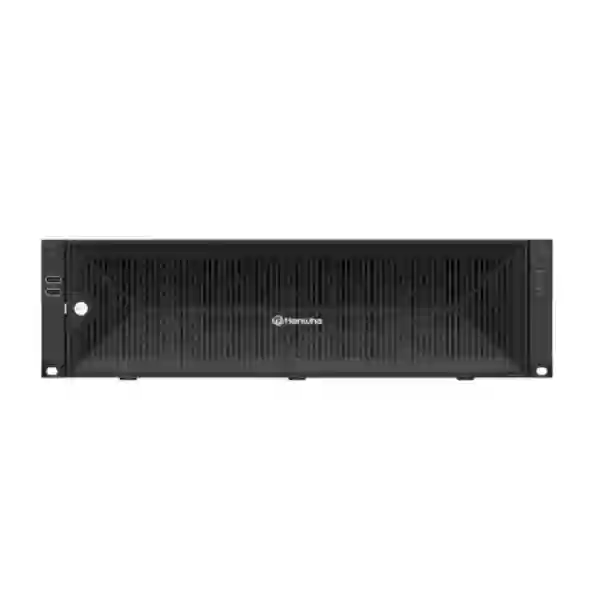
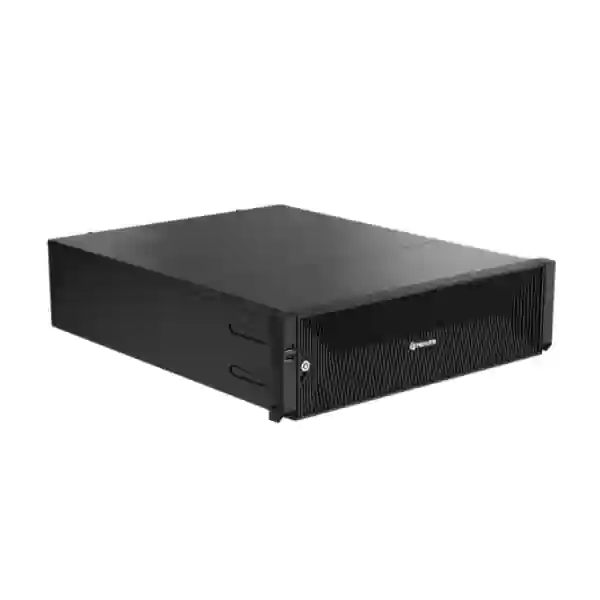
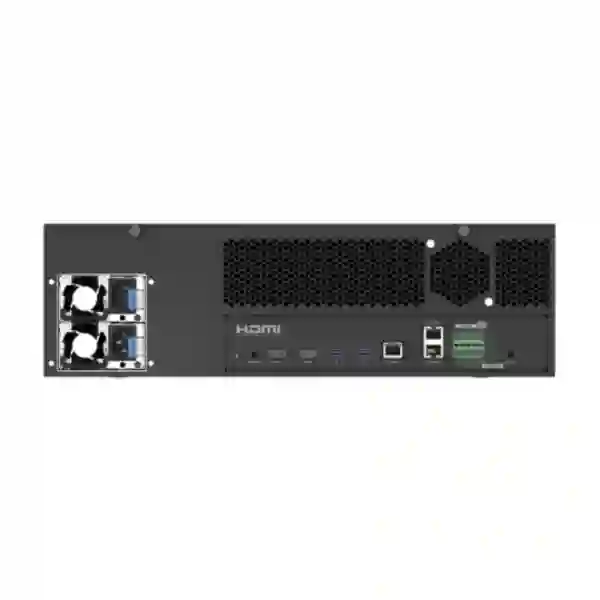
Hanwha Vision XRN-6420DB4 64-Channel NVR
A capacity-focused recorder for up to 64 network cameras, featuring sixteen SATA bays, supported RAID protection, dual AC power inlets and professional surveillance review workflows. Plan the full camera, storage and network system before ordering.
At a glance: is this the right recorder?
Best suited to a carefully engineered medium-to-large IP surveillance deployment requiring substantial channel capacity, significant drive expansion options and a resilience-conscious design. Confirm the actual camera and bitrate budget, usable RAID capacity, viewing workloads and maintenance plan before choosing a storage configuration.
Sites needing many centrally managed IP camera recordings, planned retention and structured evidence review.
High-bitrate deployments, third-party analytics, detailed decoding needs, HDD compatibility and RAID overhead.
Included disks, a fixed retention period, Tanzania stock, local warranty, installation or unrestricted AI search.
Verified technical specifications
| Item | Hanwha XRN-6420DB4 |
|---|---|
| Camera input | Up to 64 network camera channels |
| Camera resolution | Up to 32 MP supported, subject to decoding and stream constraints |
| Video compression | H.265, H.264, MJPEG |
| Recording bandwidth | Up to 520 Mbps distributed; up to 300 Mbps normal; mode-specific RAID figures |
| Playback bandwidth | Up to 200 Mbps |
| Internal storage | 16 SATA bays; up to 10 TB per supported drive; maximum 160 TB raw non-RAID |
| Drive resilience | RAID 5/6; supported hot-swap configuration; verify drive compatibility |
| Display outputs | HDMI 1: 4K/30 Hz; HDMI 2: 1080p/60 Hz |
| Networking | 3 × 1 Gbps RJ-45 ports |
| Alarm connections | 8 inputs and 4 outputs |
| USB | 2 × front USB 2.0; 2 × rear USB 3.0 |
| Power | Two AC inlets; 100–240 VAC, 50/60 Hz; dual SMPS |
| Maximum power consumption | 265 W with 16 HDDs, per manufacturer |
| Operating environment | 0–40°C; 20–85% RH |
| Physical size | Approx. 440 × 132 × 571.1 mm |
| Weight | Approx. 15.1 kg, without HDDs |
| Cybersecurity features | TPM, signed firmware, TLS, IP filtering, logging, 802.1X |
| AI search | Supported with compatible Hanwha AI cameras |
Technical figures reflect manufacturer information and can change with revisions, modes and firmware. Storage capacity is raw, and exact compatibility and commercial configuration require confirmation.
A recording platform for demanding IP surveillance
The Hanwha XRN-6420DB4 64-channel NVR is intended for projects in which camera count, video detail and evidence availability must be planned together. A warehouse with several entrances, a manufacturing campus with separated operational zones or a large institutional property may need many simultaneous camera streams. This recorder provides a central place to collect those streams, review events and manage recording policies rather than treating each camera as a completely isolated device. Its maximum channel count is a technical ceiling, not a promise that every combination of resolution, frame rate and bitrate will run without careful design.
Buyers should start with the outcome they need: continuous coverage of defined areas, a documented retention period, useful image quality and reliable access during incidents. Only then should they choose drive counts, recording modes and network capacity. The XRN-6420DB4 combines substantial recording bandwidth, a large SATA chassis and operational tools such as dynamic layouts and event handling. It is especially worth evaluating when a smaller recorder would require numerous separate units or provide too little room for storage planning.
The appropriate next step is a system schedule showing each camera model, stream settings, estimated bitrate, retention policy, planned viewing stations and operational responsibilities. That schedule turns an impressive specification into an accountable design. It also exposes possible gaps, such as incompatible camera features, insufficient storage after RAID overhead or a site network that cannot consistently deliver the desired video traffic.
What 64 channels actually means
Up to 64 network camera channels can be connected to the recorder, subject to the manufacturer’s supported configurations. A channel is not a fixed amount of storage or bandwidth. One camera generating a modest stream may consume far fewer resources than a high-resolution camera running at a higher frame rate with a complex scene. Therefore, a plan with 64 cameras still needs a separate bitrate calculation. Camera channel count tells you how many sources can be managed; it does not establish the quality or length of recording automatically.
Before specifying cameras, distinguish between live-view requirements and recorded-evidence requirements. Reception staff might only need compact live tiles, whereas an investigation team may require a higher-quality recording from critical entry points. Profiles and dual-stream recording can help separate those purposes when configured and supported. However, channel limits, decoding limits, client limits and recording bandwidth are different constraints. A successful 64-camera design respects all of them rather than assuming a single headline figure covers every workload.
Allow for sensible growth if expansion is likely. A site installing 58 cameras immediately has much less channel headroom than a site installing 36. Future cameras may also use higher resolutions and bitrates. If the expected expansion exceeds 64 channels or the required aggregate recording bandwidth, consider a coordinated multi-recorder architecture instead of forcing the design onto one chassis.
Recording bandwidth and the difference between modes
Hanwha specifies recording bandwidth of up to 520 Mbps in distributed mode and up to 300 Mbps in normal mode. The manufacturer’s specification also describes up to 520 Mbps in normal RAID operation and during RAID degraded or rebuild conditions. These figures must be interpreted in the context of the chosen recording mode and supported configuration. Quoting 520 Mbps without mentioning the mode distinction can lead to an unsuitable procurement decision, particularly when the project depends on many relatively high-bitrate streams.
Build a bitrate budget from actual camera settings or realistic scene measurements. Record the main stream bitrate, expected motion levels, video codec, frame rate, resolution and whether audio is enabled. Add the planned simultaneous load and maintain operational headroom instead of sizing the equipment to run permanently at a published maximum. Video scenes with moving foliage, vehicle headlights or busy public areas can behave differently from a static demonstration image; variable bitrate should be considered in retention planning.
Recording and playback are not the same capacity figure. The manufacturer states playback bandwidth of up to 200 Mbps. A busy investigation room reviewing numerous streams, while other operators watch live images, should be evaluated separately from ingest. Seek a test or agreed acceptance criteria for demanding simultaneous workloads, especially where control-room display smoothness is an operational requirement.
Resolution, codecs and image-quality choices
The recorder supports network camera resolutions up to 32 MP and H.265, H.264 and MJPEG recording. That does not mean 64 channels of 32 MP video can all be decoded locally at full frame rate at once. The manufacturer gives separate decoding examples: 32 MP at 15 fps for H.265, 12 MP at 30 fps for H.265, and selected multi-channel combinations at lower resolutions. The actual camera, stream, output layout and codec matter to what an operator can view simultaneously.
H.265 can reduce the amount of data needed for comparable visual quality in suitable settings, but the saving is not a fixed universal percentage. More compression can also affect forensic detail if bitrate is pushed too low. Set a practical evidence requirement for each scene: identification at a doorway, general activity in an aisle, overview of a yard or observation of a loading bay. Then choose the field of view, camera, lens, lighting, resolution and compression profile together.
For mixed fleets, verify each camera’s supported codecs and ONVIF or SUNAPI behavior rather than assuming that every feature crosses vendors. A third-party camera may provide basic video recording while advanced analytics, alarm metadata, device configuration or specialized playback remain limited. The purchasing decision should reflect actual feature interoperability, not merely whether an image appears during a basic connection test.
Sixteen drive bays and realistic storage capacity
The XRN-6420DB4 provides 16 SATA drive positions and specifies up to 10 TB per supported drive, giving a maximum 160 TB raw non-RAID capacity. Raw capacity is only the starting point. Formatting, recorder overhead, RAID parity, spare-drive choices and operational reserve can all reduce the space available to retain video. Do not describe the 160 TB headline as usable encrypted evidence capacity or as a guaranteed number of recording days.
Before buying drives, check the manufacturer’s current compatibility information for supported models, capacities and firmware. Drives suited to continuous surveillance workloads should be selected with an appropriate reliability and workload profile, but compatibility must still be confirmed. The exact procurement may include fewer than 16 drives initially; that choice affects usable capacity, array behavior, resilience and opportunities to expand. A populated drive bay is not equivalent to a backup, and a healthy RAID array is not proof that video evidence is permanently protected.
Ask for a retention estimate showing each camera group, bitrate, recording hours, motion or event behavior and the calculation assumptions. Run at least a normal case and a more demanding case. If a policy requires longer evidence retention, consider the consequences of higher resolution, continuous recording and additional cameras before promising an archive duration.
How to estimate recording retention
A useful first-pass calculation converts total average recording bitrate into data per day. One megabit per second sustained for 24 hours represents approximately 10.8 gigabytes before filesystem and other overhead, using decimal units. As an illustration rather than a model guarantee, a combined 100 Mbps sustained video load produces about 1.08 TB per day. Actual storage consumption varies with codecs, camera behavior, event schedules, audio, metadata and the recorder’s implementation. The result should therefore be validated against the chosen recording profiles.
Suppose a site asks for thirty days of continuous video. Multiply the estimated daily recording volume by thirty, then compare that demand against usable disk space after RAID overhead and reserves. Test a high-activity scenario as well as an average day. If events are recorded selectively, examine the consequences of motion detection errors and unexpected overnight activity. Retention estimates built only on a quiet scene are likely to understate storage needs for busy working areas.
Keep a documented margin for unexpected bitrate growth, replacement drives and periods of elevated incident activity. Where footage must be retained for legal, contractual or investigative reasons, confirm the applicable organizational rules and make a separate export or preservation procedure. Recorder capacity planning supports retention; it does not replace a written evidence-retention policy.
RAID 5, RAID 6 and what each protects
Hanwha specifies RAID 5 and RAID 6 with arrays of up to eight drives each, supporting two arrays. RAID 5 provides parity-based tolerance for a single drive failure within an appropriately configured array; RAID 6 provides tolerance for two drive failures within an array. RAID changes usable capacity and recovery behavior, and the manufacturer requires a minimum number of drives depending on RAID type. Confirm the supported setup before specifying the drive count.
The buyer’s choice should be informed by how many drives are installed, how much capacity is required, the replacement process and the acceptable risk during rebuild. Large-capacity drives can make replacement and rebuilding operationally significant. Hot swap can simplify replacement in the supported RAID configuration, but removing a drive without verifying status and procedures can create serious risk. Operators should know how the recorder reports disk health, alarms and degraded arrays.
RAID is not an off-device backup. It does not independently protect against theft of the recorder, a destructive incident in the equipment room, malicious deletion, simultaneous hardware damage or every possible filesystem issue. If critical recordings need independent preservation, plan controlled exports or a separately managed evidence repository in addition to RAID.
Redundant power and site continuity
The DB4 variant has two AC power inlets and a dual switched-mode power supply arrangement; this is an important differentiator from the similarly named XRN-6420B4 model, which is specified with one AC power inlet. Redundant power supplies can strengthen equipment resilience, but they do not create a backup electrical source on their own. Two cables connected to the same failed source will not provide continuity during an outage.
Where the operating requirement calls for continued surveillance, review the upstream power design, appropriately sized UPS equipment, surge protection and electrical earthing with qualified personnel. The recorder accepts 100–240 VAC at 50/60 Hz within the manufacturer’s published tolerance. Its stated maximum power consumption is 265 W with sixteen drives installed. Power sizing should also include cameras, network switches, storage peripherals, displays and any supporting network equipment needed to keep the system functioning.
A resilience plan should cover more than electricity. Decide who receives alarms, how staff identify a disconnected camera, what happens after a recorder restart and which person checks that recordings resume. Redundant components are valuable only when maintenance procedures, monitoring and the wider infrastructure support the intended outcome.
Control-room displays and practical layouts
Two HDMI outputs support local viewing, with HDMI 1 specified up to 3840 × 2160 at 30 Hz and HDMI 2 up to 1920 × 1080 at 60 Hz. Clone and expanded display modes provide options for different operator arrangements. Hanwha also describes dynamic layout and virtual channel view functions. These tools can help a control-room operator prioritize important areas rather than relying exclusively on a crowded grid of equal-sized images.
Design the screen arrangement around the tasks people actually perform. An entry-control operator may need several large live tiles, while a broader security desk benefits from overview scenes and quick access to an incident camera. Showing all 64 channels simultaneously is not always the most useful approach, especially when images become too small to interpret. Use defined display groups, camera naming conventions and clear escalation steps.
Monitor output specifications are not a guarantee that every input decodes at full native resolution and frame rate at the same moment. Use the manufacturer’s decoding performance information when specifying a demanding display layout. If the site requires video walls or additional concurrent workstations, evaluate the wider viewing software and client architecture rather than assuming two local HDMI ports satisfy every monitoring requirement.
Search, playback and evidence retrieval
Investigations depend on locating relevant moments quickly and exporting recordings in a usable form. The recorder supports search modes including time, event, text, bookmarks and smart search as documented by Hanwha. It also offers recording modes for continuous schedules, event conditions and pre/post-event capture. These functions are useful when operators need to narrow an incident window without searching through an entire day of video.
Plan the search process before an incident. Camera names, clock synchronization and a recorded site map can be more valuable than a sophisticated feature nobody knows how to operate. Establish whether operators search by event, timeline or camera group; then test what is saved in each export format and how a receiving party verifies the file. Local and network export options differ, so the team should know which method fits its evidence procedure.
Playback access also needs permissions and workload planning. Hanwha lists up to 200 Mbps playback bandwidth, and user limits vary by interface and function. Avoid treating every client, web session and mobile app as an unlimited simultaneous workstation. Test a realistic multi-user review scenario during commissioning, and document procedures for retaining original evidence without accidental overwriting.
AI-assisted searches: important compatibility limit
The XRN-6420DB4 supports object-attribute AI search when used with compatible Hanwha AI cameras. This distinction is essential. The NVR is not a substitute for installing and configuring cameras that generate the relevant analytics metadata. A conventional ONVIF camera may stream video successfully without providing the same AI search experience. The exact analytic attributes available depend on the supported camera, feature and software combination.
Ask what the operator actually needs to find: a person entering a zone, a vehicle moving through a gate or a more specific event. Then verify that the selected camera generates suitable metadata for the desired search. The existence of a general AI label does not establish recognition accuracy for a particular environment, lighting condition or viewpoint. Test representative footage in the actual scene before making operational promises.
Analytics are best treated as an aid to review, not independent proof of what happened. Maintain a pathway to inspect the original video, timestamps and contextual camera coverage. Where analytics could influence security responses, define how staff confirm events and what should happen when a result is incomplete or ambiguous.
Camera interoperability and commissioning tests
Hanwha lists SUNAPI and ONVIF support, including ONVIF Profile S in its networking information. That provides a useful basis for integrating supported IP cameras, but protocol support alone does not verify all combinations of vendor, firmware, audio, event triggers or PTZ commands. A camera that connects for live streaming may still require special configuration to record the intended stream or relay events correctly.
Build a compatibility matrix before procurement. Include manufacturer, exact camera model, firmware, resolution, codec, stream count, audio capability, desired analytics, PTZ behavior and planned alarm functions. Flag every feature that needs a working demonstration. When using older cameras, confirm their video formats and security capabilities instead of treating legacy support as an automatic benefit.
Commissioning should test normal recording, video loss recovery, time synchronization, event recording, remote access, actual decoding workloads and evidence export. Record the results so future maintenance personnel can distinguish a verified working configuration from a theoretical specification. If cameras are added later, review how new firmware and profiles affect bandwidth, storage and recorder stability.
Network topology and switch design
The recorder provides three 1 Gbps RJ-45 Ethernet interfaces in the manufacturer’s specifications. Network architecture must still reflect actual camera traffic, monitoring clients, remote access and site segmentation. A number printed on an Ethernet port describes link capability, not the guaranteed performance of the entire surveillance network. Congestion elsewhere, incorrect switch uplinks or unstable cabling can interrupt recordings even when the NVR itself has spare capacity.
Consider separate camera and management network zones, correctly sized switching, secure IP addressing, an appropriate routing policy and controlled administrator access. If cameras are on remote buildings or connected through wireless links, evaluate latency, packet loss and the consequences of intermittent connectivity. The network should account for camera video streams, any configuration traffic, firmware work and operator playback without unnecessary contention.
Document port connections and ownership of each network component. A technician should be able to identify whether a stopped recording comes from camera power, a failed switch, a disconnected cable, a changed address or the recorder. This reduces repair time and avoids treating all faults as storage or NVR faults. Validate traffic under daytime and high-activity conditions instead of only during initial low-load setup.
Remote viewing, client tools and access policy
Hanwha lists Wisenet Viewer, Wisenet mobile, WAVE, SSM and a web viewer among software or viewing options, with supported functions and deployment requirements varying. Mobile access can support an authorized supervisor checking live scenes, while an investigation team may prefer a workstation with a larger timeline and export workflow. Choose the actual client software according to the operator role, compatibility and licensing or configuration requirements of the complete system.
Remote access needs a security plan. Do not expose sensitive management interfaces unnecessarily, reuse shared passwords or assume that convenience features replace network controls. Use role-based accounts, strong authentication methods where supported, documented access approvals and protected remote connectivity. Decide which users can watch live video, replay footage, export evidence, administer cameras or change retention settings.
Specify the remote viewing load separately from the recording load. An internet connection used for off-site viewing may become the practical bottleneck, particularly if several users request high-quality streams concurrently. Test a representative connection from the intended site and client device, including restricted mobile-network conditions if those are relevant to the organization.
Cybersecurity and trustworthy maintenance
The XRN-6420DB4 includes a Trusted Platform Module, signed firmware and listed protections including TLS, IP-address filtering, access logging and 802.1X support. These are meaningful platform capabilities, but security depends on how the recorder and network are configured and maintained. A TPM alone does not make a complete surveillance deployment invulnerable to attack, nor does it remove the need to protect accounts and monitor firmware updates.
Define responsibility for firmware maintenance and changes before commissioning. Check manufacturer release guidance and the exact device model, back up authorized configuration information and schedule updates through a tested process. Administrative accounts should be individual where feasible, and passwords and access should be reviewed when staff roles change. Logging should help the organization investigate unauthorized access or configuration errors.
Segmentation, physical rack security, protected network paths and a formal incident response procedure complement device security features. Where procurement requires a particular certification or regulatory standard, verify its applicability to the exact tender and jurisdiction instead of assuming a global product icon proves local approval. The manufacturer’s NDAA positioning should not be reworded as a Tanzanian regulatory certification.
Alarm inputs, outputs and operational responses
The manufacturer’s interface information includes eight alarm inputs and four alarm outputs. The recorder also supports events relating to camera conditions, video loss and selected analytics, with actions including notifications and alarm outputs. These features are useful only if the alarm design identifies the trigger, intended recipient and required operator response. An event that nobody receives or understands may have little practical value.
For example, an organization might want an alert when a priority camera disconnects during working hours, or an event-based recording schedule for a controlled entry. Determine the expected behavior, whether a delay or confirmation is necessary and how staff distinguish urgent events from routine movement. Match camera capabilities and contact wiring with the supported recorder functions before specifying integration with third-party systems.
Test every critical alarm path end to end. That means creating a representative event, checking the recorder log, confirming the notification channel and verifying the operator’s response. Review false alarms and missed detections during the first operational period. A stable, understandable alarm workflow generally serves security staff better than a large collection of untested notifications.
Failover, ARB and resilience boundaries
The platform lists N+1 failover and ARB (Automatic Recovery Backup) support. These features may be relevant to organizations that cannot easily tolerate interrupted recording, but they should be treated as parts of a designed system, not automatic guarantees. The necessary compatible equipment, topology, camera support and configuration must be confirmed for the selected deployment. A single purchased recorder does not by itself create an N+1 failover installation.
ARB can be useful in supported network-disruption scenarios, while failover planning addresses particular recorder outage scenarios. The operating team should understand which events are protected, which require human intervention and how recovered footage is verified. It is particularly important to differentiate between redundancy of power supplies, RAID drive redundancy, network recovery and recorder-level failover. Each addresses a different failure mode.
Develop an acceptance test that covers loss of a disk, interruption of the camera network, a planned power transfer and restoration after maintenance where appropriate. Record the test conditions and limits. Business continuity depends on cameras, switches, storage, power and procedures all working together, so purchasing one resilient component does not eliminate every single point of failure.
Rack space, cooling and operating environment
The metal chassis measures approximately 440 × 132 × 571.1 mm and weighs about 15.1 kg without hard drives, according to Hanwha. Its deep chassis and eventual populated weight must be considered when choosing a rack, shelves, rails and service clearance. Confirm physical mounting accessories and the rack’s load capacity for the actual delivered configuration rather than assuming any shallow enclosure will fit.
The published operating temperature range is 0°C to 40°C, with operating relative humidity of 20% to 85%. These conditions apply at the equipment, not merely at an outdoor weather station or building entrance. A closed cabinet without sufficient air movement can become much hotter than the surrounding room. Plan ventilation, dust control, cable routing, fan clearance and monitored room conditions, especially in equipment spaces that may become warm during an electrical or air-conditioning interruption.
Operational reliability also depends on orderly maintenance. Label disk locations, power feeds, network ports and alarms; keep the rack accessible to authorized technicians; and protect the equipment from moisture and unplanned handling. The site survey should confirm that environmental, electrical and physical-security requirements can be met before the recorder is ordered.
Tanzania project planning without unsupported local promises
For a surveillance project in Tanzania, the key local questions are the same practical questions that shape any reliable installation: Is the camera network stable? Can the equipment room remain within the specified temperature and humidity range? Is protected electrical power available? Who maintains the cameras and recorder? Is the organization prepared to handle access to recorded footage appropriately? These requirements should be established from the exact site rather than inferred from a city name or a generic country description.
Large premises may include outdoor cameras, separate blocks, distant gates or existing mixed-brand equipment. A local project survey should identify transmission distances, fiber or copper uplinks, network segmentation, lightning or surge exposure, mounting locations, access control and available support personnel. It should also distinguish a supply-only purchase from a design-and-commissioning requirement, since the information needed for a quotation differs.
Product price, Tanzania stock, import terms, delivery, warranties, on-site installation coverage and official local approvals have not been verified for this listing. Those details should be confirmed through a current quotation and supporting documents. The absence of such figures on this page is intentional: buyers need dependable commercial information, not invented certainty.
Applications that benefit from centralized high-channel recording
Industrial and logistics facilities may require evidence from vehicle approaches, loading docks, production areas, controlled entrances and perimeter cameras. These sites often have many cameras serving different tasks. A 64-channel recorder can be considered where those streams can be aggregated within the actual bitrate, storage and network limits. Retention policy may vary by zone, and a control room may need different layouts for day and night operations.
Institutions and large commercial properties may also benefit from centralized time-based review, recorded event searches and structured user permissions. In such settings, the principal design challenge is rarely just the number of cameras. It is ensuring that an authorized operator can find the right scene quickly, retrieve a usable recording and understand whether any channel was unavailable during the relevant period.
Multi-building sites should be assessed for distribution architecture. It may be more appropriate to use separate recorders or a broader video-management design when connectivity is constrained or incident teams require independent operations. Compare operational resilience, maintenance complexity, bandwidth and evidence workflows before deciding to centralize every camera in one location.
How this model differs from a smaller NVR
A smaller recorder can be a sensible choice for a modest, fixed camera count and limited retention demand. The XRN-6420DB4 becomes more relevant when more channels, extensive drive capacity and resilience functions support an identifiable operational requirement. Paying for unused channels and bays without a growth plan may not be efficient. Conversely, choosing an undersized recorder can create future replacement costs and fragmented management when a site expands.
Compare at least five design dimensions rather than only hardware price: supported channel count, aggregate recording bitrate, usable storage after redundancy, viewing and decoding requirements, and recovery arrangements. Add environmental and maintenance considerations, since a larger recorder places different demands on rack space, power and drive replacement. Assess the whole solution, including suitable cameras, compatible HDDs, switches, software and commissioning work.
Where the installation requires more than one recorder, decide whether centralized software, operator training and evidence naming conventions can maintain a consistent workflow. The model is a platform component, not a complete installation on its own. Its real value lies in matching technical headroom to a properly defined security operation.
DB4 versus B4: avoid a model-number mistake
The XRN-6420DB4 and XRN-6420B4 share a closely related product family and several headline specifications, including 64 channels, large SATA capacity and RAID options. A crucial verified distinction is the power configuration: the DB4 has two AC power inlets and dual supply hardware, whereas the B4 is documented with one AC power inlet. A buyer requesting the DB4 for a resilience design should insist that the exact suffix appears on the formal quotation and delivery documents.
Do not substitute one model for the other merely because both appear in a distributor catalogue under a similar title. Confirm the manufacturer part number, physical power arrangement and all project-critical functions against the current exact-model specification. The differences may matter to rack wiring, maintenance strategy and continuity planning even if the camera count is identical.
This is also why the model identifier should not be confused with the seller’s internal SKU. The manufacturer model is XRN-6420DB4. A FourTeck Tanzania listing SKU has not been supplied, so no SKU should be assumed or copied from another merchant.
Project design questions to answer before requesting a quote
Prepare a camera schedule with the number of units, the exact proposed models, location and purpose of each camera, recording resolution, frame rate, codec and indicative bitrate. Identify any existing cameras that must be retained and confirm firmware versions where interoperability matters. The schedule should state whether the project expects built-in camera analytics, recorded audio, PTZ controls or alarm integration. These items are often the source of integration questions that are missed in a simple recorder-only order.
Specify the desired recording period, whether it is continuous or event-based, the expected access patterns, and the proposed response to disk or power failures. Include the number of operator workstations, control-room display requirements, remote user locations and any evidence export obligations. The quote should distinguish empty chassis from fitted drives and should list the proposed HDD configuration rather than presenting 160 TB as if included by default.
Finally, record site factors such as available rack depth, UPS design, network uplinks, equipment-room conditions and maintenance responsibility. With this information, an equipment selection can be checked against a concrete performance and retention model. A quote based only on ’64 cameras’ cannot reliably establish capacity or availability for a real surveillance site.
Installation and acceptance testing checklist
Start with an equipment inventory that records the delivered model, accessories, drives and firmware. Verify the power supply arrangement, rack fit, supported disk configuration and correct labeling. Configure the recorder in a protected management environment. Apply approved camera naming conventions, date and time settings, user permissions and recording schedules before allowing the system to be treated as operational.
During commissioning, prove that every camera records at the intended profile and that the aggregate workload remains within the relevant mode limit. Check a range of scenes, not just an empty corridor. Verify live viewing, timeline search, alarm handling, export, remote permissions and the ability to identify a channel or disk problem. If RAID, failover or ARB are included in the solution, test their intended behavior according to the supported deployment design.
Keep an acceptance record with the results of key tests and the observed usable capacity. Include the configured retention estimate and a follow-up plan to compare it with actual storage use. Train the designated staff to recognize status indicators and to perform basic retrieval without granting broader administrator privileges than necessary.
Operations, upkeep and lifecycle planning
After handover, the system needs a maintenance rhythm. Assign responsibility for reviewing HDD and RAID health, connectivity, alerts, free space, firmware advisories, time accuracy and remote access accounts. A device may continue showing live video even while a recording problem is developing, so operational checks should include sample playback and successful export from representative cameras.
Decide who keeps configuration records and how changes are approved. A camera moved to a different field of view may change bitrate demand and affect forensic usefulness. Additional cameras can increase recording load and shorten retention. Firmware updates or client software changes may also require compatibility testing. Keeping a concise change record is often more valuable than trying to reconstruct the entire system after an incident.
Treat evidence management as a separate responsibility. Define how urgent recordings are preserved, who may request exports, where copies are stored and how access is audited. The NVR can facilitate recording and retrieval, but the organization remains responsible for sound handling policies and the security of extracted material.
Common procurement misunderstandings
First, ’64-channel’ does not mean every camera can run at any resolution and any frame rate simultaneously. Second, ‘160 TB’ is a maximum raw drive figure rather than usable space or a supplied disk bundle. Third, ‘520 Mbps’ has mode-specific context, so it should not be used as a universal sustained ingest promise without checking configuration. Fourth, RAID reduces some disk-failure risks but is not the same as a separate backup. These distinctions should appear in any technical evaluation.
Fifth, AI search depends on compatible Hanwha AI cameras and suitable metadata. Sixth, two power supplies do not remove the need for resilient upstream electricity. Seventh, basic ONVIF connectivity is not proof that every specialized function of every third-party camera will work. Eighth, remote-access capability should not be confused with safe exposure of management services to the public internet.
Clearing up these points early makes quotations comparable. It helps purchasing teams avoid paying for features the installation cannot use and gives technical teams a fair basis for specifying cameras, storage and acceptance tests. The relevant outcome is a reliable surveillance workflow, not the longest possible feature list.
A practical decision summary
Choose the Hanwha XRN-6420DB4 64-channel NVR when a verified project design calls for substantial IP camera capacity, large on-board storage potential, supported redundancy options and managed review workflows. Its combination of sixteen SATA bays, dual-power-supply design, 32 MP camera support and differentiated recording modes can make it attractive for sizeable installations. It should not be selected solely because a site has many cameras; the workload and operational design must also fit.
Before approving a purchase, request confirmation of the exact DB4 model, suitable HDD models, intended RAID layout, usable capacity, estimated retention, expected aggregate bitrate and client or analytics interoperability. Confirm what is included in the commercial offer, and do not assume that drives, installation, third-party licenses or local support arrangements are included without explicit documentation.
For a Tanzania-based procurement, the most useful first conversation is a requirements review. Supply the camera list, site topology, retention target and operational constraints, then request a configuration-led quotation. That process creates a clearer basis for comparison and lowers the chance of expensive surprises during deployment.
Frequently asked questions
Is the XRN-6420DB4 a 64-channel NVR?
Yes. Hanwha specifies support for up to 64 network camera channels. The supported camera count and the achievable recording performance are separate limits. A project should still calculate aggregate video bitrate, video profiles and viewing workloads, especially if many cameras use high resolution or high frame rates.
Are hard drives included in the purchase?
The manufacturer’s product description identifies a no-HDD configuration. The exact contents of any FourTeck Tanzania quote have not been verified, so buyers should request a drive-by-drive bill of materials. The 16-bay, 160 TB figures describe maximum supported raw storage, not a promise that a supplied unit contains 160 TB of disks.
How much video can 160 TB store?
There is no universal answer. Retention depends on usable storage after RAID and other overhead, camera bitrates, codecs, schedules, scene activity and audio. For initial planning, each sustained 1 Mbps represents about 10.8 GB per day in decimal units. A configuration-specific retention calculation and post-installation verification are essential.
Does the recorder support RAID 5 and RAID 6?
Yes. Hanwha specifies RAID 5/6 with supported array rules and drive-count requirements. RAID increases tolerance for certain disk failures but reduces usable capacity. It does not replace an independently protected evidence backup. Confirm supported HDDs, array design and replacement procedures for the final configuration.
What is the recording bandwidth?
The published figure reaches 520 Mbps in distributed mode; normal mode is listed at up to 300 Mbps. The manufacturer separately specifies RAID recording behavior. A system designer should use the limit appropriate to the selected mode and leave practical headroom after estimating all camera streams.
Does AI search work with any IP camera?
No. The manufacturer specifies object-attribute AI search in combination with compatible Hanwha AI cameras. Basic streaming from another camera does not establish support for the same analytics metadata. Verify camera models, firmware and desired search attributes before promising an AI-assisted workflow.
Can the unit show 4K video on a local monitor?
Yes. HDMI 1 is specified at up to 3840 × 2160 at 30 Hz, while HDMI 2 is specified at up to 1920 × 1080 at 60 Hz. The display resolution should not be confused with the number of high-resolution streams the device can decode at once. Check the applicable decoding limits for a demanding monitor layout.
Why does the model have two power inputs?
The XRN-6420DB4 has two AC power inlets and a dual-supply arrangement, distinguishing it from the single-inlet XRN-6420B4. This supports resilience planning, but upstream power feeds and UPS equipment determine whether the installation can remain powered during an electrical interruption.
Can it work with third-party ONVIF cameras?
The recorder supports ONVIF and SUNAPI. Specific third-party camera interoperability must still be tested for video streams, event metadata, audio, PTZ controls and other desired functions. Include exact camera models and firmware versions in the project review rather than relying on the protocol label alone.
Does the recorder provide remote and mobile viewing?
Hanwha identifies supported viewer software and mobile workflows. Actual usability depends on compatible client versions, network setup, user privileges and available connectivity. Secure the access design and test the intended number of simultaneous viewers rather than assuming unrestricted remote sessions.
Is the XRN-6420DB4 suitable for Tanzanian installations?
It can be considered for a Tanzania deployment when the technical design fits the site. Verify ambient conditions, protected power, camera and drive compatibility, network quality, maintenance arrangements and the commercial terms. No claim about local stock, installation coverage, certification, delivery or pricing is made without an exact verified offer.
Does the NVR guarantee that recordings survive every failure?
No. RAID, dual power supplies, ARB and supported failover features address different risks under specific configurations. They do not eliminate every failure mode, nor do they replace evidence export, operational monitoring or off-device preservation. Ask for a documented resilience design and acceptance tests.
How do I request the right quotation?
Provide the camera schedule, required retention period, expected recording bitrate, preferred RAID protection, operator viewing needs, remote access requirements and installation environment. Ask that the quote state the exact XRN-6420DB4 model and what drives, accessories, software or services are included. Confirm commercial terms separately.
Request a configuration-led quotation
Share the number and types of cameras, target retention period, expected bitrates, RAID preference, site network, rack conditions and required viewing features. Ask for the exact XRN-6420DB4 model and a fully itemized quotation stating the included drives and services. FourTeck Tanzania can assess the stated requirements through its usual verified enquiry channel; no unverified pricing, stock or service commitment is implied here.




Reviews
There are no reviews yet.