
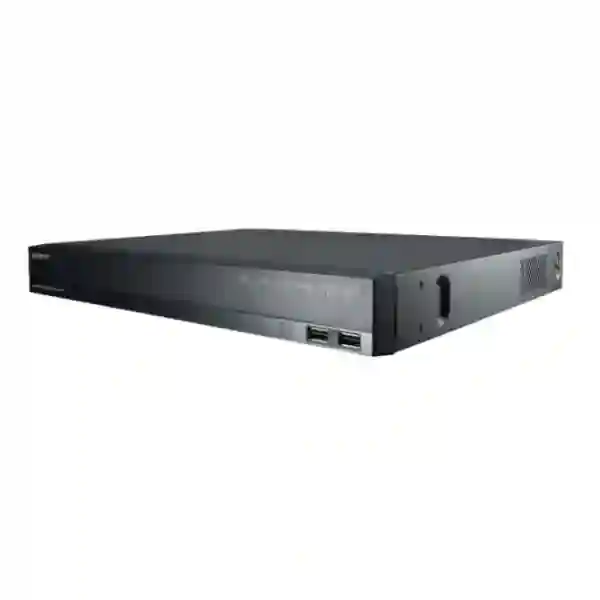
Hanwha Vision XRN-K820S-4T 8-Channel NVR with 4TB
A practical recording hub for compatible IP cameras, supplied in the 4TB configuration. Evaluate it by camera coverage, total bitrate, verified storage retention and secure operation—not by channel count alone.
Technical snapshot
The figures below reflect manufacturer material for the exact K variant where available. Confirm the supplied revision and current compatibility documents for final system design.
| Manufacturer | Hanwha Vision |
|---|---|
| Exact model | XRN-K820S-4T |
| Product type | Network video recorder (NVR) |
| Maximum channels | 8 network cameras |
| Included storage | 4TB HDD configuration |
| Recording bandwidth | Up to 120Mbps (published maximum) |
| Recording formats | H.265, H.264, MJPEG |
| Recorded resolution range | CIF to 32MP, subject to system limits |
| Drive positions | 2 SATA; catalogue lists up to 12TB |
| Camera protocols | SUNAPI, ONVIF |
| Monitor interface | HDMI and VGA configurations (confirm revision) |
| Power input | 100–240VAC ±10%, 50/60Hz |
| Rated maximum consumption | 160W |
| PoE arrangement | Obtain exact-model confirmation before purchase |
Who this recorder is for
The Hanwha Vision XRN-K820S-4T is an eight-channel network video recorder for organisations that want to retain and review footage from compatible IP surveillance cameras. The model designation is particularly important: the K variant with the 4T suffix should not be confused with a similarly named recorder in another regional product family. Manufacturer literature identifies this exact model with a supplied 4TB hard drive, a maximum recording bandwidth of 120Mbps and two SATA drive positions. Those are useful planning figures, not a promise that every proposed camera configuration will fit without adjustment.
For a business purchasing surveillance equipment in Tanzania, the right starting point is the number of camera views that actually protect entrances, cash-handling areas, corridors, goods, vehicles and other defined risks. An eight-channel recorder is attractive when eight or fewer independent IP camera streams meet that plan. It is not suitable as the only recorder if the design already needs more than eight channels. Confirm the final camera schedule, recording policy and power architecture before committing to the equipment.
A buying decision in one minute
Choose this product when you need a compact recording hub rather than a generic promise of smarter surveillance. It can aggregate supported network-camera streams, provide local recording and enable operators to find recorded events through supported search and playback functions. Its supplied disk is a starting capacity, not an automatic guarantee of a particular number of retention days. The performance you experience depends on camera bitrates, recording profiles, schedules and how much footage is preserved.
Check four questions before asking for a quotation. Are eight channels sufficient after leaving room for realistic expansion? Is 120Mbps enough for the combined incoming recording streams at the settings you need? Does the included 4TB storage align with your retention policy, with allowance for system overhead? And has the exact K variant’s camera power and network connection arrangement been confirmed? A supplier should answer those questions with the actual camera models and proposed configuration, not only a brief catalogue headline.
Verified model essentials
Hanwha Vision’s published 2026 product lineup identifies the XRN-K820S-4T as an eight-channel recorder using a Linux-based platform. It lists H.265, H.264 and MJPEG as recording compression formats, a camera resolution range extending up to 32 megapixels, a maximum 120Mbps recording figure, and two SATA storage positions with a catalogue maximum of 12TB. Its 4T designation is the pre-fitted 4TB variant. Confirm disk compatibility and the interpretation of any storage ceiling against the manufacturer’s current compatibility guidance before purchasing an additional drive.
The same product family is described with SUNAPI and ONVIF network camera protocol support, with monitoring arrangements that depend on configured outputs and viewing software. Protocol support is valuable for integrations, but it is not proof that every camera feature will operate across every third-party device. For procurement, request a precise technical schedule showing camera make and model, firmware, resolutions, frame rates, codec selection, network topology, power source and installed disk capacity. This makes the specification useful as a system proposal rather than an isolated list of impressive numbers.
Where eight channels work well
Eight camera positions can be enough for a focused retail site, small office, service counter, workshop, reception area or other modest footprint when camera placement is designed around the real risks. A typical design might prioritise public entry, staff access, a stockroom entrance and selected transaction points rather than attempting to cover every square metre indiscriminately. Camera field of view, mounting position and lighting often contribute more to usable evidence than simply buying the highest megapixel count available.
Do not treat an eight-channel capacity as a requirement to populate all eight connections immediately. Some projects benefit from starting with four or six cameras and reserving the remainder for a justified expansion. Other projects should select a larger recorder from the outset, particularly when there are several buildings, multiple entrances, an extensive perimeter or planned future growth. A site survey, camera schedule and scene-by-scene objectives will reveal the correct choice long before hardware is installed.
Map cameras to operational questions
Each camera should have an objective: identify who entered a controlled door, show the movement of deliveries, record a vehicle approach or provide an overview of a busy customer area. Recording an attractive wide-angle image is not necessarily the same as capturing enough detail for an investigation. Write down what an operator must be able to distinguish at each location, then choose camera lens, resolution and position to support that requirement.
For the recorder, translate those decisions into a channel and bitrate schedule. An entrance camera may require a different image profile from a general corridor view. A low-light location may generate a different compression workload after dark. Camera count, scene complexity, frame rate and retention period should therefore be assessed together. When comparing quotations, ask that every camera be listed against its intended purpose and its proposed recording settings so alternatives can be evaluated fairly.
Recording bandwidth versus camera count
The published maximum recording bandwidth is 120Mbps for this exact model. That number is a combined recorder-side recording limit, not an allowance of 120Mbps per connected camera. Eight devices transmitting at an average of 8Mbps each would imply roughly 64Mbps of camera video before allowing for stream variability and other design considerations. This is only an illustration, not a recommended bitrate or a calculated guarantee of performance. Scenes with rapid movement, rain, shadows or complex textures can change encoded bitrate.
A useful commissioning test measures actual camera throughput under representative daytime and nighttime conditions. Select realistic codecs, frame rates and quality targets, then review the combined recorder load. Keep operational headroom instead of engineering a configuration that succeeds only in an ideal demonstration. Also separate incoming recording bandwidth from network bandwidth required for viewing, backup and remote operation. The recorder’s headline number cannot replace an end-to-end network design.
What the 4TB hard drive means
The XRN-K820S-4T designation identifies the version supplied with 4TB of disk storage. This matters because two listings with almost identical names may have different included drive packages. The supplied capacity is a physical storage starting point, while the amount available for video can be affected by formatting, file management and recorder operation. It should never be described as a guaranteed number of days of continuous footage without a specific camera and recording profile.
When requesting a quote, ask whether the proposed unit includes the factory-specified 4TB drive, whether the drive is appropriate for continuous video recording, and what recording settings the supplier used for any retention estimate. Distinguish installed capacity from maximum supported capacity. If a later storage upgrade is part of the plan, require confirmation of compatible drive models, installation requirements and backup arrangements before deleting or replacing existing recordings.
How to estimate retention responsibly
Video retention is driven mainly by how many streams are recorded, their average bitrates and the number of hours they record. A preliminary calculation starts with the average combined bitrate, converts it into storage used per day, and compares that with the practical usable disk capacity. Continuous recording typically requires more space than a carefully configured event-based schedule, although event activity can surge when motion is frequent or poorly defined. Real scenes rarely behave exactly like a simple storage calculator.
Ask the installer to produce a retention estimate for normal working days, nights, busy periods and weekends. Include audio where enabled, different camera stream settings, event pre-recording and post-recording where supported, and sufficient overhead. Then verify the result using actual stored footage during commissioning. If the organisation has a fixed retention policy, choose disk capacity and recording settings to meet that policy instead of hoping the included 4TB drive will be enough.
When additional storage is sensible
The manufacturer’s lineup lists two SATA positions and a maximum storage figure of 12TB for the K model. That makes storage planning part of the selection process, but it does not mean that every hard drive or every possible combination is automatically compatible. The official drive compatibility list and current firmware guidance should be checked for the specific procurement. A larger total disk pool can extend retention or support more demanding recording settings, although real results still depend on camera traffic.
Before requesting an upgrade, decide whether the underlying problem is insufficient capacity or excessive recording data. Sometimes an appropriate codec choice, lower unnecessary frame rate or improved event settings avoids waste without sacrificing evidence value. In other cases, maintaining high image quality is essential and more storage is the correct answer. Ask the supplier to document drive sizes, intended usable capacity, replacement procedures and what happens to footage when a disk is changed or reaches capacity.
Codecs and image settings
The exact model is listed with H.265, H.264 and MJPEG recording formats. Compression determines how much storage and bandwidth a given video stream consumes, but codec selection must match the connected cameras and the operational viewing workflow. The newest codec is not automatically optimal when older monitoring clients, integrations or specific camera profiles are involved. Actual compression efficiency varies with the scene, camera processing and chosen quality controls.
A sensible system design uses the image quality needed for the security objective, then adjusts compression and frame rate to meet bandwidth and storage limits. Test critical views at the time of day when they are most difficult, not only in good light. Verify playback on the intended local monitor and authorised remote client. Record the final settings in the handover documents so future maintenance does not accidentally downgrade evidence quality or overwhelm recorder capacity.
Understanding the 32MP figure
Hanwha Vision’s catalogue describes a supported recording resolution range reaching 32MP for this NVR. It is a compatibility ceiling for supported camera streams, not an assertion that every connected camera is 32MP, that the recorder generates that resolution, or that eight such streams can run at arbitrary frame rates within the bandwidth budget. High resolution also does not automatically produce identifiable images when lighting, viewing distance, lens selection or motion blur are wrong.
If a project requires an unusually high-resolution camera, check the complete camera-to-recorder combination: codec, supported stream profile, frame rate, bitrate, live display capability and playback workflow. The ability to record a high-resolution stream is separate from the resolution of a connected monitor’s output. For many practical installations, a balanced mix of camera resolutions provides better coverage than specifying the maximum number for every position. Capture the exception requirements early and validate them with an actual configuration test.
Local monitor and control-room planning
The manufacturer literature for this model family identifies HDMI and VGA viewing arrangements, with Full HD dual-monitor operation and Ultra HD HDMI output described for the exact K variant. Confirm the current product revision and output settings before including specific displays in a procurement bill. Local viewing needs should be agreed in advance: an operator who watches several cameras simultaneously has different priorities from a manager who reviews one incident at a time.
Plan where the recorder will sit, how displays and input devices connect, and who has permission to use them. A secure equipment area often offers better protection than an exposed front counter. Think about monitor readability, camera naming, the arrangement of important views, access to playback and emergency access if the main network connection is interrupted. A clean viewing workflow makes the recorder more useful than a wall of poorly labelled video windows.
Network camera compatibility
SUNAPI and ONVIF appear in Hanwha Vision’s catalogue specifications for the XRN-K820S-4T. They provide a basis for compatible camera connectivity, but interoperability must still be confirmed at the camera-model and firmware level. A camera that produces live video may not expose the same event types, metadata, motion settings or management options through every integration path. Do not promise full analytical feature parity just because two devices recognise the same protocol name.
Create a compatibility checklist for every proposed camera. Confirm basic video, required codecs, resolution and frame rate, time synchronisation, event handling, playback, administrator access and any specialised functions the buyer expects. Where third-party cameras are involved, request a demonstration or written compatibility confirmation for the exact firmware combinations. Record any limitations clearly in the proposal. This is especially important when upgrading a site that already has IP cameras from more than one manufacturer.
Do not assume a PoE specification
Power over Ethernet can simplify a camera installation by carrying network communication and electrical power through suitable structured cabling. However, the published manufacturer comparison for the exact K suffix does not establish a PoE power budget in the same way as it does for the similarly named XRN-820S-4T. Some independent listings describe PoE capabilities, creating a variant-specific detail that must be settled before procurement. Do not size a project around an assumed number of powered recorder ports.
Ask the supplier for a current rear-panel image, exact interface and PoE specifications, and confirmation of the delivered regional hardware revision. If camera power is to be supplied by a separate PoE switch, include that switch’s power budget, network uplink capacity, surge protection and backup power in the design. Each connected camera has its own maximum consumption, which may increase when infrared illumination or other features are active. Total power demand matters just as much as the number of ports.
Plan the network before connecting equipment
An NVR is part of a network, so footage reliability depends on the switches, cabling, addressing and bandwidth around it. Recorders and cameras may be housed in one room or distributed through a larger facility. In either case, a clean topology helps technicians find faults and allows authorised staff to distinguish camera problems from recorder problems. Label cable runs and network endpoints, document IP addresses and ensure camera traffic does not compete unnecessarily with unrelated office systems.
Plan a sensible security boundary between surveillance devices and ordinary user computers. Avoid exposing the recorder directly to the public internet without a verified secure access design. Consider how video is viewed over a local area network, how maintenance access is authorised, and whether branch-to-branch traffic or remote viewing will affect the connection. The published recording limit is only one constraint; switches, cable quality and upstream links have their own limits. Confirm those in the system test.
Remote viewing and mobile access
Many buyers expect a surveillance recorder to support checking selected views when they are away from the premises. The manufacturer catalogue lists viewing software within its ecosystem, but a particular remote access workflow should be confirmed for the deployed firmware, approved applications and network design. An internet connection is not required for every local recording task, while internet connectivity alone does not make remote access secure or reliable. Access methods should be selected deliberately, not enabled merely because a quick demonstration is available.
Decide who needs remote access, which cameras they may view, whether playback and export are permitted, and how access will be revoked when duties change. Review account security and the operating environment of mobile devices. If remote video performance is important, test it on the actual connection available to the site. Upload capacity, simultaneous viewers, stream selection and network security controls can all affect responsiveness. Include a short user guide with the installation handover.
Power and environmental considerations
The exact K model’s manufacturer specification lists a 100–240VAC, 50/60Hz input range and a maximum electrical consumption figure of 160W. Treat the maximum figure as a design reference rather than a statement that the recorder always consumes that amount. A reliable surveillance installation also needs to consider the power draw of cameras, network switches, local monitors and any external storage or supporting equipment. All of those loads affect backup-power selection.
Place the recorder in a ventilated, secure location and check its operating environment. Manufacturer-associated documentation lists an operating temperature range of 0°C to 40°C for the device family; do not assume that a hot, dusty cabinet will remain within the supported range. When designing a Tanzania site, account for actual room temperature, equipment density, ventilation and the operating conditions at that specific premises. Add an appropriate power continuity strategy when loss of recording during an interruption would be unacceptable.
Power continuity and incident readiness
A recorder that stops during a power interruption cannot capture an event occurring while it is offline. That makes backup-power planning more than a convenience. Calculate the total load for the recorder, network equipment and essential cameras, then decide the runtime needed for your particular threat scenario. Consider how cameras will continue receiving power if the main switch or distribution equipment is on a separate circuit. A backup system supporting only the recorder may leave it with no camera feeds.
Ask the installer to perform a controlled loss-of-mains test once the system is commissioned. Confirm that the equipment continues recording for the intended interval, that the network recovers cleanly and that the recorder restarts correctly after power returns. Also verify accurate date and time after an outage. If surge or lightning exposure is a site-specific concern, consult a qualified electrical professional about suitable protection, earthing and cable routes rather than assuming that an ordinary power strip solves the problem.
Security administration and access control
Recorded video may contain sensitive information about staff, customers, visitors and daily operations. The NVR should therefore be managed as a security system with identifiable users, clear privileges and documented responsibility. Avoid shared administrator credentials for everyday viewing when role-based accounts can meet the task. Separate routine viewing from system configuration, user management and evidence export. Store credentials securely and remove access promptly when an authorised person’s role changes.
Installation security also includes changing default access settings, reviewing supported authentication options, restricting unnecessary network exposure and protecting the hardware against tampering. The specific cybersecurity controls available can vary by firmware, so base configuration on the current manufacturer guidance for the supplied unit. Keep a record of who can access the system and how maintenance is authorised. These steps support trustworthy surveillance operation without implying that any product alone can guarantee privacy, cybersecurity or regulatory compliance.
Firmware and routine maintenance
An NVR should not be treated as a fit-and-forget appliance. Camera compatibility, user interfaces, supported security functions and defect corrections can change through firmware updates. For the exact recorder revision, check the manufacturer support channel for the applicable firmware and release notes. Never install software intended for a similarly named but different model on the assumption that the labels are close enough. Plan updates during a controlled maintenance window after considering the risk of recording interruption.
Routine checks should include whether each expected camera is online, whether recording is taking place, whether disk health alerts exist, whether the date and time are correct, and whether authorised users can replay a sample incident. Review logs and any recurring fault messages. Document the results and the corrective action taken. A short, consistent monthly inspection is more valuable than discovering an unnoticed recording failure only after a security incident has occurred.
Searching and reviewing footage
The exact K variant appears in Hanwha Vision’s catalogue with search modes covering date and time, event logs, text search and smart search. Availability and practical usefulness may depend on system setup and connected camera capabilities. Before procurement, ask the supplier to demonstrate the actual incident-review workflow for the proposed equipment and firmware. An operator should be able to locate footage using the controls available to their role without needing unnecessary administrator privileges.
Plan how incident reports will record the approximate time, camera location, description and evidence reference. A good camera naming scheme can make a difference when several views look similar. Test playback at both ordinary and busy recording periods, and check whether the operator can correlate events across nearby cameras. If specialised analytics or object-search features are required, insist on a compatibility demonstration rather than relying on a broad claim about the recorder’s product family.
AI search needs exact camera verification
Some materials discussing the wider Hanwha Vision recorder family describe AI-assisted searches when paired with compatible AI cameras. That must not be interpreted as a promise that the XRN-K820S-4T performs every form of AI analysis independently. The current manufacturer catalogue’s presentation of features differs between closely related K and non-K versions. Buyers who require object attributes, people or vehicle searches, or specific event metadata should obtain explicit confirmation for the delivered model and attached cameras.
Describe the operational question first. For example, does the operator need to review movement during a time window, search by a camera-generated event, or filter by an attribute created by a compatible analytical camera? Those are different capabilities with different integration requirements. Test the complete chain from camera event generation to recorder indexing, searching and export. If the demonstration does not show the required result, record that limitation and compare a suitable alternate solution.
Evidence export and response procedures
A recording system is most useful when footage can be reviewed and preserved in a dependable way after an incident. Define who is permitted to export video, where exported files are kept and how the organisation records the reason for each extraction. Where a compatible export workflow exists, test file playback on the intended review computer and ensure that timestamps and camera references can be understood. Do not assume a particular file format or cryptographic evidence function without checking the current documentation.
A simple evidence procedure can specify the incident reference, source camera, start and end time, authorised person, destination storage device and transfer record. Protect exported copies from casual access or accidental deletion. The recorder’s live disk storage is for operational retention; important incident footage may require a separately governed preservation process. Organisations with formal legal, contractual or sector requirements should have their retention and disclosure procedures reviewed by their responsible adviser rather than inferred from the recorder’s available disk space.
Site survey checklist
A practical survey begins with a floor plan and a list of operational risks. Mark each proposed camera with the area it must cover, the level of detail required, light conditions and the route back to the network. Confirm suitable mounting points, weather exposure for outdoor cameras and access to maintenance. The recorder location should be protected from casual access but still serviceable for authorised technicians. Any assumptions about conduit, cable distance or building work should be documented.
Next, record the existing network equipment, available electrical circuits, intended displays and internet access expectations. Check whether the organisation already owns cameras that must be reused, and whether their firmware and interfaces are compatible. Agree the retention objective before choosing final disks. Finally, identify training needs: who watches live video, who investigates incidents, who maintains user accounts and who calls for service. A quote based on this checklist is easier to compare and less likely to conceal essential installation work.
A sensible installation sequence
Begin by confirming the bill of materials and the exact XRN-K820S-4T variant being delivered. Inspect the device, installed storage and supplied accessories against the agreed specification before mounting anything. Document the recorder serial number privately for asset management and retain the appropriate purchase record. Configure network settings and access controls in a secure environment, then connect cameras one at a time to isolate problems. Verify each camera’s image quality and recording settings as it is added.
After all channels are configured, test local viewing, searches, recording schedules and authorised remote access if required. Record a sample across daytime and nighttime conditions, verify time synchronisation and check the measured combined bandwidth. Test power restoration and the alert workflow. Complete the handover with account ownership, a camera schedule, an updated network diagram, maintenance responsibilities and a record of any unsupported requested features. Completion should mean operational evidence, not simply an illuminated power indicator.
Performance tests worth requesting
A supplier demonstration should use the actual expected camera count and settings, not just a single stream at default quality. Observe simultaneous recording while viewing live video and replaying a recent incident. Check the effect of a busy scene, night illumination and changes in network load. Confirm that a lost camera connection is noticed and that the configured response works. Where the project specifies a certain retention period, measure actual daily disk use during a representative pilot and revise the estimate if needed.
Performance testing should also include user experience. Can the authorised operator distinguish cameras quickly, find a previous event and export it without confusion? Are time and date displayed consistently? Are the security settings understandable to the future administrator? Record the result of each test as passed, failed or requiring further action. An acceptance sheet protects both buyer and installer because it converts vague requirements into specific observations.
What to include in a supplier quotation
An effective quotation for this recorder should identify the manufacturer, the exact XRN-K820S-4T suffix and the supplied 4TB storage configuration. It should list each camera and its intended profile, network switches and any separate PoE equipment, cables, mounting components, protective equipment, displays, backup power and labour. Request confirmation of compatible storage and software revisions. Specify which items are included, which are optional and what site conditions might require a variation.
Commercial matters should be stated explicitly rather than inferred. Ask for a written local price and currency, itemised taxes where relevant, availability confirmation, delivery arrangement, warranty terms and the party responsible for installation and support. None of these terms can be established from the recorder’s manufacturer specification alone. The buyer should compare quotes against the same acceptance criteria, including recording quality and retention, instead of choosing solely by the lowest headline hardware price.
Budget for the whole surveillance system
The recorder is only one element of total project cost. Cameras, lenses, mounts, network devices, storage, structured cabling, installation, power continuity and operator training may all materially affect the final price. Ongoing costs can include electricity, equipment servicing, replacement disks, network services and changes to the camera layout. A low initial recorder price can be misleading if essential infrastructure has been omitted. Conversely, a well-designed small system should not require unnecessary equipment merely to appear comprehensive.
Estimate costs against a clearly defined scope and expected service life. Ask whether the project includes documentation and training, whether a spare drive or support arrangement is needed, and who will inspect the system after installation. Compare the financial effect of increased retention or added cameras before approving changes. If the system is expected to expand beyond eight channels, it may be better to evaluate another recorder capacity now rather than fund a premature replacement later.
Tanzania deployment considerations
A Tanzania-facing procurement discussion should reflect the conditions at the actual installation site rather than assume that every building has the same network, power or operating environment. Assess room ventilation, heat exposure, dust, humidity, cable routes and the reliability of the available connection. Identify who will maintain the system and how authorised users will access it. Treat local installation, delivery, stock and warranty coverage as items requiring written confirmation from the seller, not as implied features of the hardware.
For sites with intermittent internet connectivity, decide which functions must continue locally and which depend on remote connections. For sites where power interruptions are a business risk, include the recorder and essential network path in a continuity assessment. If there are privacy, employee monitoring or sector-specific requirements, confirm the applicable obligations with responsible local advisers. Avoid representing a Korean product classification or certification as equivalent to a Tanzania-specific approval without separate evidence.
Understanding the TTA designation
Hanwha Vision’s Korean-language product lineup identifies the K variant with a TTA-related verification designation. This is useful for distinguishing the exact product line from other regionally marketed versions, but it does not itself demonstrate that the unit holds an approval or certification required in Tanzania. A buyer should not assume that a qualification issued for one jurisdiction satisfies procurement, import or regulatory requirements elsewhere.
If a tender or internal standard specifies a security certification, request the actual certificate, its scope, model coverage and validity from an authoritative source. Match the certification model exactly, including suffixes where applicable. If an institution needs documented conformity for procurement, the relevant purchasing team should review the evidence before issuing an order. The product can be discussed in terms of its published technical capabilities without promising approval status or suitability for a regulated deployment that has not been separately verified.
Comparison with similar recorder options
Model naming can cause avoidable mistakes. The XRN-K820S-4T should not be merged with the XRN-820S-4T or the XRN-K820S without carefully comparing the delivered configuration. The 4T suffix distinguishes the supplied disk package, while the K variant has a separate manufacturer catalogue entry and may differ in features, interface details or regional documentation. Even when two products share an eight-channel designation, they are not automatically interchangeable for a tender or integration.
A buyer comparing alternatives should look at channel count, verified recording bandwidth, included and expandable storage, camera resolution support, power architecture, display connections, software compatibility, security documentation and local support arrangements. If the intended installation requires more than eight cameras, compare a recorder with sufficient channel capacity. If it requires advanced analytics or a specific camera search function, request an end-to-end demonstration. Choose against the workflow and evidence requirements, not a superficial similarity in model labels.
Common mistakes to avoid
The first mistake is assuming that the provided 4TB disk guarantees a specific retention period. The second is buying eight high-resolution cameras without calculating their combined recording bandwidth. The third is assuming a PoE port count or power budget from a different model’s datasheet. A fourth is equating support for a network protocol with full integration of every analytical feature. Any one of those misunderstandings can produce a system that appears satisfactory at installation but fails to deliver the needed evidence.
Other avoidable errors include placing the recorder in a hot unsecured room, forgetting backup power for network devices, sharing administrative passwords, neglecting firmware maintenance and failing to test playback. A disciplined proposal addresses the whole workflow: capture, transfer, record, find, preserve and maintain. Ask the installer to describe what happens when a camera loses power, a disk fills or an authorised user needs footage urgently. These scenarios reveal more about readiness than a generic feature list.
A practical procurement checklist
Before confirming the purchase, verify the name XRN-K820S-4T on the supplier’s offer and the unit label. Confirm the included 4TB drive, supported camera count, 120Mbps published recording ceiling, current compatible-drive guidance and exact interfaces. Resolve the PoE arrangement in writing. Confirm that all intended camera models, codecs and firmware versions work with the proposed recorder. Ask for an evidence-based retention estimate and identify the location and power source of the recording equipment.
Before accepting the installed solution, confirm that each camera records at the agreed quality, that important events can be located, and that authorised exports work. Check secure accounts, password custody, update responsibility, network documentation and recovery after a short power outage. Keep an equipment inventory and written record of outstanding items. This checklist helps a buyer request a meaningful quotation in Tanzania while avoiding unsupported promises about local price, stock or service terms.
Frequently asked questions
Does the XRN-K820S-4T record eight IP cameras?
It is identified in Hanwha Vision’s published lineup as an eight-channel network video recorder. Whether a proposed set of eight camera streams can operate at the requested settings depends on their compatibility and combined recording bitrate. Check the final camera schedule against the published recording limit.
Does the 4T model include a 4TB hard drive?
The manufacturer model designation and product listings identify the 4T variant as the configuration supplied with 4TB. Ask the seller to list the installed drive and its condition on the exact quotation. Do not assume an identically named model without the suffix includes the same disk.
How many days can 4TB record?
There is no responsible universal answer. Retention varies by camera count, average bitrate, codec, resolution, frame rate, operating schedule and available disk capacity. Request a configuration-specific estimate and validate it using recorded footage after installation.
Can it record 32MP cameras?
The manufacturer catalogue lists recording resolution support up to 32MP, subject to compatible camera streams and the recorder’s other performance limits. A maximum supported resolution does not mean every channel can use any frame rate or bitrate simultaneously.
Does it include eight PoE camera power ports?
Do not assume that from a general product-family description. Available sources differ about the exact K variant’s PoE arrangement. Require the supplier to confirm its interfaces, power budget and any separate switch needed for the delivered device.
Is AI search built into this exact model?
Some related Hanwha recorder and camera combinations provide enhanced search capabilities, but those claims do not establish every function on the K variant. Ask for a demonstration using the exact recorder, camera models and firmware before specifying AI-assisted search as a required deliverable.
Will ONVIF cameras work?
Hanwha Vision lists ONVIF among the supported camera protocols for this model. That is a starting point for integration, not a blanket guarantee that every third-party camera, event, codec or advanced feature will work. Test your exact camera models.
Can the recording storage be expanded?
The manufacturer’s lineup describes two SATA positions and a maximum storage figure of 12TB. Ask for the current drive compatibility list and a written upgrade proposal. Confirm supported capacity, recording preservation and service procedures before buying replacement disks.
Does it need internet access to record?
A correctly configured local recording system can be designed to operate on its local camera network, while remote viewing and certain services may depend on network access. Confirm the precise deployment architecture and test its behaviour during an internet outage.
Can I buy it with a Tanzania warranty or installation?
Warranty, stock, delivery, local service and installation terms must be confirmed by the seller for the proposed transaction. The manufacturer specification does not establish those commercial arrangements. Request them in writing with the quotation.
Request a configuration-specific Tanzania quotation
Share the proposed camera count, camera models, recording quality, retention target, site conditions and any existing network equipment. Ask for confirmation of the exact XRN-K820S-4T hardware revision, supplied 4TB disk, PoE approach, software compatibility and itemised installation and support terms.
Contact FourTeck Tanzania for product configuration and quotation details. Price, availability, delivery and support must be verified for your request.




Reviews
There are no reviews yet.