
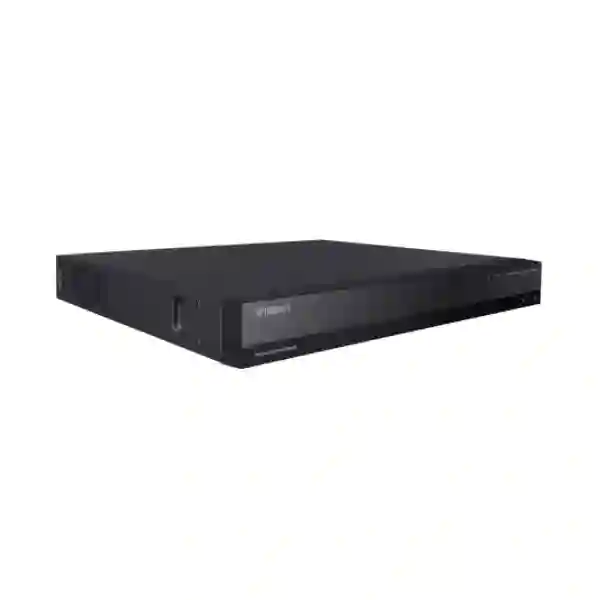
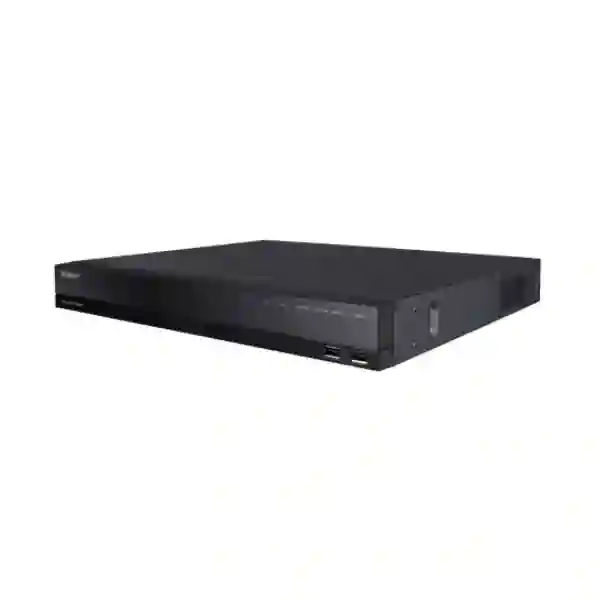
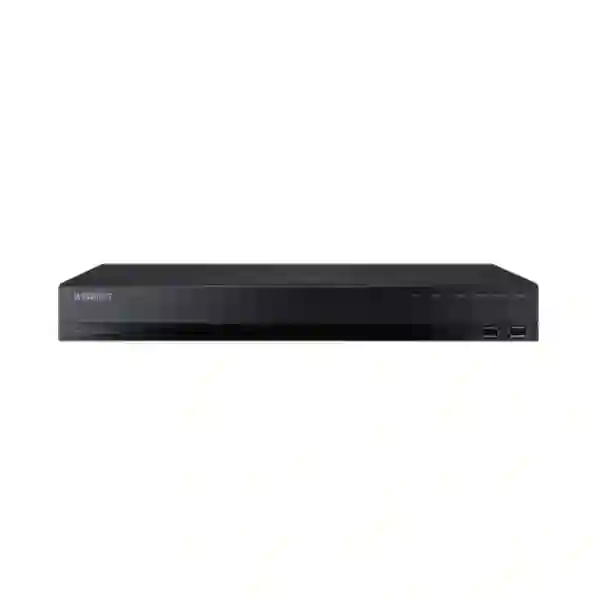
Hanwha HRX-1620 16-Channel Pentabrid DVR
The Hanwha HRX-1620 16-channel pentabrid DVR is a flexible recording platform for CCTV installations combining legacy coaxial cameras and selected network cameras. It supports AHD, HDTVI, HDCVI, CVBS and IP formats, with up to sixteen analog channels plus two additional IP channels in a documented mixed configuration. It also provides H.265, H.264 and MJPEG compression, HDMI and VGA viewing, and two SATA drive positions supporting up to 6TB each. The important buying qualification is that Hanwha Vision marks this exact model discontinued. If you are maintaining an existing installation or considering remaining stock in Tanzania, compare compatibility, storage, recording rates and continued support before making a decision.
Key specifications at a glance
| Product type | 16-channel pentabrid digital video recorder |
|---|---|
| Video families | AHD, HDTVI, HDCVI, CVBS and IP |
| Typical mixed capacity | Up to 16 analog + 2 network cameras; 18 total |
| Recording resolution | Up to 8MP, subject to format and frame-rate limits |
| Analog recording examples | 8MP at 8 fps; 5MP at 12 fps; 2MP at 30 fps |
| Compression | H.265, H.264 and MJPEG |
| Storage | 2 SATA HDD bays; up to 6TB per drive |
| Display | HDMI and VGA; monitor modes depend on configuration |
| Network integration | SUNAPI / ONVIF-related support; verify camera model |
| Lifecycle | Discontinued according to Hanwha Vision |
| Local commercial details | Availability, pricing, warranty and package contents require confirmation |
Specifications describe the manufacturer-documented device. Your actual supported camera formats, firmware functions, retention and commercial offer must be checked against the proposed equipment and installation conditions.
Start with the right buying decision
The Hanwha HRX-1620 is a 16-channel pentabrid digital video recorder designed around mixed analog and network surveillance. It is particularly relevant when an existing CCTV installation has working coaxial cables and cameras, but the owner wants a more flexible recording platform rather than replacing every camera at the same time. The recorder brings several analog video formats together with IP camera support, so the practical starting point is an inventory of what is already installed, not simply the number of connectors shown on a product photograph.
There is an important lifecycle consideration before ordering. Hanwha Vision marks this exact model as discontinued. That status does not prove whether an individual dealer has remaining units, whether a particular unit is new, or whether repair parts can be sourced. It does mean a buyer should ask about the actual condition of the offered recorder, software support, hard-drive inclusion, and the suitability of currently supplied alternatives. Avoid treating a discontinued specification as a promise of local availability.
For a Tanzania-based business planning a new CCTV system, the sensible comparison is between maintaining valuable coaxial infrastructure and moving toward a network-focused system. For an existing HRX-1620 owner, the same specifications help identify replacement requirements, storage limits and camera connections. Tell the supplier the existing camera models, recording objectives and site constraints so the recommendation is anchored to a working design rather than a headline channel count.
What pentabrid compatibility means in practice
Pentabrid refers to the five video input families addressed by the recorder: AHD, HDTVI, HDCVI, CVBS and IP. The first four describe analog video signals carried through coaxial connections, while IP cameras communicate across a data network. The distinction matters because two cameras can look similar in a catalogue while requiring different recording interfaces. A physically compatible BNC connector is not by itself proof that a camera’s signal format and resolution will be accepted.
AHD, HDTVI and HDCVI are high-definition analog technologies. CVBS describes traditional standard-definition composite video. The HRX-1620 offers a way to consider legacy and higher-resolution analog sources in one migration plan. However, individual supported resolutions differ by signal type, and an installer should match the actual camera output format and frame rate to the recorder’s documented limits. Features available from one camera technology should not automatically be assumed for every other technology.
Network camera support adds flexibility, but compatibility is still a model-level check. Hanwha documents SUNAPI and ONVIF-related network camera integration for this recorder. ONVIF support is a useful interoperability starting point, not a blanket assurance that every camera from every brand will expose identical controls, events or playback behavior. Before procurement, identify the camera’s firmware, intended stream format and desired features, then verify them in the proposed configuration.
Understanding the channel limit without surprises
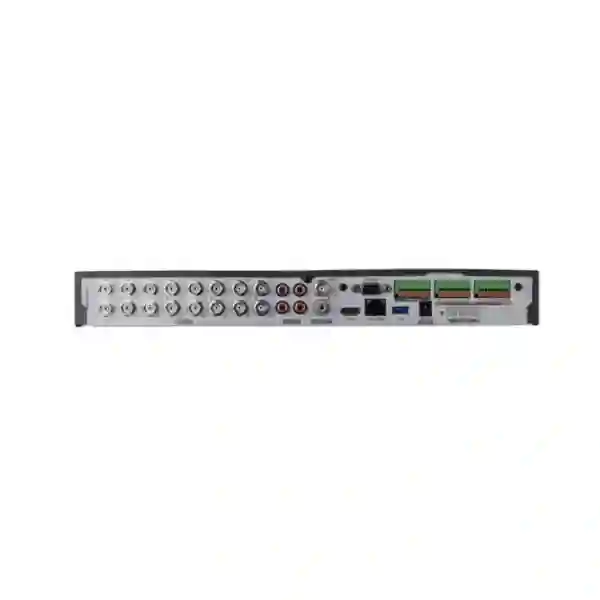
The HRX-1620 provides 16 physical analog video inputs. Hanwha’s published headline specification identifies a configuration of up to sixteen analog channels plus two additional network channels, with an overall maximum of eighteen channels. That is the clearest way to describe a typical mixed system: retain sixteen supported coaxial cameras and add up to two compatible IP cameras. It is not accurate to describe the recorder as having eighteen physical BNC inputs or unlimited IP expansion.
Hanwha also describes migration of analog channels to IP channels. In planning terms, that means the camera mix may evolve as older cameras are removed, while the total permitted configuration still needs checking against the recorder’s operating software and capacity. A business that expects to replace many analog cameras with IP cameras should have its intended final camera count confirmed explicitly instead of interpreting the two additional IP channels as the only network-related possibility in every configuration.
Count actual recording sources, not merely areas of a property. A warehouse entrance might need separate views for vehicles, pedestrians and loading activity. A retail checkout may require a wide context view and a closer detail view. Write down which cameras must record continuously, which are event-based and whether future expansion is likely. This helps reveal when a recorder sized for the present system will become a constraint within the next upgrade phase.
Resolution and recording frame rates
The recorder supports camera resolutions up to 8 megapixels, but maximum resolution and maximum frame rate are not interchangeable promises. Hanwha lists representative analog recording rates of 8 frames per second at 8MP, 12 frames per second at 5MP and 30 frames per second at 2MP. A detailed manufacturer datasheet also identifies 4MP recording at a lower frame rate than 2MP. Exact results depend on the input signal, video standard and camera capability.
This distinction is relevant when choosing cameras for fast-moving scenes. A high-resolution image may reveal useful still-frame detail, while a higher frame rate can provide a smoother record of movement. At a vehicle entrance, for example, a site might prioritize readable context, appropriate shutter settings and adequate lighting rather than selecting the highest pixel count on the box. At a low-activity store room, lower frame rates may be acceptable if that meets the evidence requirement.
The HDMI output’s ability to display a high-resolution picture must not be confused with recording every connected camera at 8MP and 30 frames per second. Display, capture, compression, playback and export each have their own constraints. Ask for a demonstration using the actual camera models, chosen resolution, recording mode and representative motion. The goal is a usable recorded result, not a specification that looks impressive until the footage is reviewed.
Hard drives, capacity and recording retention
The HRX-1620 has two SATA hard-drive positions, and Hanwha specifies support for drives up to 6TB in each position, or 12TB in total under the published specification. Capacity is a physical storage limit, not a fixed number of recording days. A 12TB installation can retain substantially different amounts of footage depending on how many cameras are active, their stream bitrates, their resolution and frame rate, their compression mode and whether recording is continuous or event-based.
Begin storage planning with the retention period your organisation actually requires. Then record the number of cameras, expected operating hours, average and peak bitrates, scene movement, desired image quality and any need to preserve incidents separately. H.265 can improve storage efficiency compared with older compression in suitable conditions, but it does not guarantee one universal percentage saving. Busy scenes, changing lighting and different camera encoders can produce very different file sizes.
Confirm whether the offered recorder includes hard drives, which drive models are suitable for sustained surveillance recording and how failed or full drives will be handled. The two drive positions do not, by themselves, establish a particular redundancy or RAID feature. If the organisation cannot afford to lose evidence when a disk fails, ask for a separate, verified backup and resilience design. An installation checklist should include disk health monitoring, a test export and a review of the oldest available footage after the system has run under realistic conditions.
Live display, control-room workflow and spot viewing
Hanwha lists HDMI and VGA local monitor connections for the HRX-1620, together with a BNC spot output in its detailed datasheet. This offers options for viewing camera feeds at the recorder and arranging a local operator position. The HDMI specification includes 3840 by 2160 output capability, while VGA has its own limits. A site should verify how the intended monitor layout behaves with the chosen cameras, displays, screen resolutions and recording software version.
Consider how staff will actually use the surveillance display. A guard who watches entrances throughout a shift needs a different screen arrangement from a manager who opens footage only when there is an incident. Decide how many camera tiles must remain visible, which views deserve a larger window, and whether a second display provides useful separation. A dual-output feature should not be interpreted as two entirely independent full-featured workstations without checking the exact display modes.
Operator ergonomics affect surveillance quality. Place screens where glare, dust, heat and public access are controlled. Label camera channels with meaningful locations, not only numbers. Ensure that authorised staff know how to switch layouts, check whether recording is active and find the correct timestamp. A carefully designed layout makes footage more useful, even when the same recorder and cameras are retained.
Events, search and reviewing an incident
A recorder is useful not only when it captures video, but when staff can locate the relevant event afterward. Hanwha specifies recording modes including manual, scheduled, continuous and event-based operation. Its published capabilities include camera-related triggers such as video loss and motion or tampering indications, with additional event types available from supported network cameras. The availability and precision of any particular analytic event depend on the connected camera and the configured integration.
The product highlights smart search for network cameras. This qualifier is important: buyers should not assume that an analog channel has the same event search functions merely because both sources appear in a common interface. For an incident-handling workflow, confirm how a user searches by time and channel, how quickly footage can be reviewed, and which events can be filtered on the proposed cameras. Test both routine playback and an actual simulated event.
Evidence handling also requires process. Before an incident occurs, decide who may export video, where exported files are stored, how filenames and timestamps are documented, and how access is limited. The detailed technical literature identifies several backup file formats, but receiving parties may have their own playback requirements. Export a sample, open it on the intended review computer and confirm date and time accuracy. Preserve the original recording where appropriate and document any editing or conversion performed for sharing.
Alarm contacts, PTZ and related integrations
The published technical data identifies alarm input and output connections as well as interfaces for camera control. In particular, the manufacturer datasheet lists sixteen alarm inputs and four alarm outputs, plus RS-485 and supported coaxial control methods. These interfaces may matter where CCTV is part of a staffed security desk, gate arrangement or external alarm workflow. They should not be sold as turnkey compatibility with every sensor, alarm panel or pan-tilt-zoom camera.
A practical alarm design begins with an event matrix. Identify the event source, what the recorder should do, who must be notified and how the response will be tested. A camera going offline is different from an intrusion signal, and neither should be treated automatically as confirmation of a security incident. Where an alarm output is used to trigger another device, an installer needs the correct electrical interface and safe wiring rather than assuming that all contact types are interchangeable.
For PTZ cameras, verify both the video path and the control path. Coaxial control can simplify certain legacy installations, while network control uses different protocols and permission settings. Presets, event-triggered movements and operator control should be checked with the exact camera models. Document the normal resting view so moving a PTZ camera does not accidentally leave a critical entrance unobserved.
IP networking and camera interoperability
Connecting an IP camera is more than plugging it into the same switch as the recorder. Plan an addressing scheme, network capacity, supported stream settings, credentials, time synchronisation and access rules. The detailed HRX-1620 datasheet identifies a gigabit Ethernet interface and network-camera support that includes SUNAPI and ONVIF-related functionality. Those capabilities help frame a design, but a particular camera model must still be verified before a final bill of materials is approved.
For mixed analog and network systems, map which video travels through coaxial cable and which video crosses Ethernet. Network cameras may need separate power arrangements and switching equipment; the recorder’s Ethernet connector is not evidence of built-in PoE for all camera channels. A larger site may also need cabling tests, surge considerations, VLAN planning and a review of available upstream bandwidth. These are installation considerations, not additional features being claimed for the unit.
Keep a compatibility record that includes manufacturer, exact camera model, firmware revision, stream resolution, codec, intended events and any required PTZ functions. If third-party software must view video, confirm its exact support rather than relying on a generic statement about integration. For a system that will be maintained over several years, this record is often more valuable than an incomplete list of brands said to be compatible.
Remote viewing and responsible access
Hanwha’s product overview describes QR-code-based P2P connection and its historical documentation names remote viewing tools. These are useful starting points when a business owner or security supervisor needs to review a site away from the recording room. Because this is a discontinued model, the continued availability of a particular cloud relay service, mobile application or operating-system version should be confirmed for the exact device and firmware before remote access is promised.
Remote viewing quality depends on the site’s uplink speed, network stability and camera stream settings. A recorder might display footage perfectly on a local monitor while remote users experience delays over a congested connection. Decide whether remote access is for occasional incident checks, routine management review or continual off-site monitoring. Each use case creates different requirements for bandwidth, user permissions and logging.
Security should determine how access is provided. Use distinct named accounts where supported, restrict privileges, review password practices, protect the router and avoid exposing services to the internet without a considered security design. Test the service with a controlled account and revoke that account to confirm the administrative process. A functional remote connection is only one component of a reliable remote-surveillance arrangement.
Cybersecurity, privacy and evidence governance
A network-connected recorder handles sensitive images and potentially sensitive events. Its security therefore deserves attention during procurement and throughout operation, especially when the platform is no longer in active production. Ask the manufacturer or qualified support channel which firmware is applicable, whether security updates remain available, what services can be disabled and how credentials can be managed. Do not assume a firmware file shown for a related model is suitable for this exact recorder.
Separate surveillance equipment from unnecessary public or guest network access where the network design allows it. Set strong administrator credentials, provide limited operator access and keep a record of who is permitted to export video. Review device logs if available and monitor for unexpected loss of connectivity. The most appropriate safeguards depend on the organisation’s network and the actual functions supported by the installed software; a product name alone cannot establish security assurance.
The organisation should also decide why each camera is installed, who can view footage, how long recordings are kept and when they may be shared. Post clear notices where appropriate and check applicable requirements for the operating environment in Tanzania with a qualified adviser. This page does not make a claim of Tanzanian regulatory approval or determine any buyer’s compliance obligations. Good documentation helps the team treat surveillance evidence as controlled information rather than an unrestricted video archive.
Audit existing cameras before reusing coaxial cables
The strongest use case for a pentabrid recorder is often a thoughtful upgrade of an existing site. Begin with a channel-by-channel survey rather than assuming every cable and camera can remain untouched. Record camera location, brand, exact model, video output type, resolution, condition, power supply, cable length and the quality of the current image. Check whether the camera is providing color, night detail and adequate coverage at the times the business actually operates.
Cable reuse may save disruption, but inspect the full signal path. Poor connectors, corroded joints, damaged cable and unsuitable power arrangements can cause intermittent failures that appear to be recorder faults. A quick daytime picture is not enough to validate an installation. Test at night, during switching events and under typical electrical load. If a camera is being upgraded to a higher-resolution analog format, test the result over the existing run instead of relying on connector compatibility alone.
Prioritise changes by operational need. A working camera covering a quiet store corridor might remain for another phase, while a blurred entrance camera may need replacement immediately. Record what is to be retained, replaced or converted to IP. This approach creates a credible upgrade budget and reduces the risk of purchasing an expensive recorder that still delivers poor evidence because the weakest part of the system was never addressed.
Power, heat and physical installation considerations
The manufacturer datasheet specifies a 12V DC input for this recorder, with power consumption dependent on the installed configuration. The equipment is designed for an indoor operating environment with documented temperature and humidity limits. An installer should check the exact datasheet revision and the room’s actual conditions rather than assuming that any cabinet or unventilated ceiling space is acceptable. Sustained heat can affect both electronic equipment and the hard drives that hold recordings.
For a Tanzania installation, consider the site’s real electrical conditions, including outages, voltage fluctuations and any reliance on generator or inverter power. A properly sized, compatible uninterruptible power arrangement may be worth evaluating for the recorder, network devices and essential cameras. That is a design recommendation, not a claim that a particular backup system is included. Power resilience must cover the complete recording path: a running DVR cannot record an IP camera that has lost power upstream.
Protect cables against accidental disconnection and provide enough ventilation around the recorder. Keep unauthorised people from reaching the device or removing drives, and ensure maintenance staff can safely access it. Where dust or moisture is a concern, choose an appropriate protected installation location without restricting airflow. Record the power supply specification and have the installer demonstrate what happens when mains power fails and returns.
Situations where this recorder can make sense
A retail operation with an existing bank of analog cameras may value a recorder that can maintain familiar views while adding a small number of network feeds. The design should focus on entrances, checkout areas, delivery access and the quality required for incident review. If there is a major expansion planned, compare the complete long-term channel requirement against the HRX-1620’s published limits before choosing the hardware.
A warehouse or workshop may have coaxial runs already installed across a large building. Reusing serviceable infrastructure can be practical, but only after checking cable quality, electrical conditions and each camera’s actual video format. Loading zones and perimeter approaches may need different frame rates and image detail from quiet storage aisles. Event schedules and recording retention should reflect those differences without assuming that smart search applies equally to every analog channel.
A school, office or multi-building organisation may need defined access for several authorised staff members. The evaluation should include operator training, user permissions, export procedures, time synchronisation and privacy requirements, not just the recorder’s connectivity. These are example applications rather than claims of installations or approved customer references. In every setting, the correct decision depends on the existing cameras, evidence objectives, lifecycle risk and options now available through the procurement channel.
Compare the HRX-1620 with a current alternative
The model’s discontinued status changes the buying equation. A remaining unit could still match an established installation, but a buyer planning a system expected to run for many years should compare it with currently supported recorders. The comparison must include camera format coverage, practical recording rates, drive limits, network access, security maintenance and availability of trained support. A newer model is not automatically a drop-in replacement merely because it has the same channel count.
An analog-focused replacement may be attractive when most working cameras use coaxial signal formats. A network video recorder may be more appropriate when the site is moving primarily to IP cameras and needs network-centred features. A hybrid approach may preserve some older camera investments while leaving room for staged changes. Compare the full installed cost: cameras, cabling, storage, switches, power, remote access configuration, commissioning and future support.
Ask any supplier to explain which existing cameras are known to work, which features will change and what happens to stored recordings during migration. Distinguish a quoted recorder from a complete installed solution. Where a specific replacement model is proposed, request its manufacturer documentation and a compatibility demonstration. That is a safer decision process than assuming the HRX-1620 and a similarly named recorder have interchangeable hardware, drive capacity or firmware.
A practical quote and procurement checklist
For a useful quotation, provide a camera schedule showing the installed quantity, signal formats, resolutions and locations. Include the desired number of additional cameras, retention target, monitor requirements and whether video must be reviewed remotely. Tell the supplier which event integrations, alarm contacts or PTZ functions are business-critical. A list of existing camera model numbers reduces guesswork and helps expose incompatibilities while changes can still be made.
Ask the seller to state clearly whether the quoted HRX-1620 is new old stock, refurbished, used or another condition, and what is included in the package. Confirm storage drives, power adapter, installation accessories and any required licensing separately. Because the manufacturer identifies the model as discontinued, request explicit information on warranty terms offered by the actual seller, available technical support and the path to replacement if the equipment fails. No warranty, stock or delivery commitment is assumed here.
The proposal should identify who configures the recorder, who performs camera compatibility tests, what acceptance criteria apply and who holds administrator credentials after commissioning. If the quote covers installation, ask for clear boundaries around cable repairs, network changes and power backup. A complete procurement record makes it easier to compare proposals fairly and prevents a low recorder-only price from hiding the work needed to produce a dependable surveillance system.
Commissioning: test the recorded result, not just the live image
A sensible commissioning process starts with a labelled camera list and a verified time setting. Each input should be checked for the expected format, picture quality, night performance and recording schedule. On mixed systems, ensure the network cameras reconnect after a restart and that there are no duplicate addresses. Where an alarm or PTZ feature has been specified, create a safe test event and confirm the intended response occurs.
Next, test storage and search. Confirm that the installed drives are recognised, recording continues as designed and playback can be performed for the important channels. Export a short sample using the intended method and verify it can be read by the people who will handle incidents. Check the video timestamps and determine how the system will be kept aligned with a reliable time source. An otherwise usable recording can become difficult to interpret when event times are wrong.
Finally, rehearse abnormal conditions. Disconnect a test camera, simulate a controlled power interruption where safe, check user access and verify that recovery is documented. Train more than one authorised person to find footage, export it correctly and report a storage warning. Record the installed firmware, camera settings and administrative handover in the acceptance file. These steps convert a technically powered-on unit into an operationally understood security tool.
Operating and maintaining an installed HRX-1620
Owners of an existing recorder should establish a simple maintenance routine. Check that critical cameras remain online, review the earliest retained recording against the intended retention target, investigate disk alerts and test playback periodically. A live picture alone is not proof that every channel is being recorded as expected. Operators should also note cameras whose view has drifted, become obstructed or developed poor night visibility.
When software or hardware changes are proposed, document the current working state first. Use the correct model-specific update guidance from the manufacturer or an authorised technical resource and avoid cross-loading firmware from a related model. Because the HRX-1620 is discontinued, plan for eventual hardware replacement even if the existing installation remains operational. Keep camera inventories, cable labels, export procedures and account records current so a future migration is manageable.
Revisit the original security objective as the site changes. Additional doors, changed working hours, new lighting or faster vehicle movements may make an old camera plan inadequate. A periodic review should ask whether recordings still answer the questions the organisation would ask after an incident. This operational discipline often improves the usefulness of an installed CCTV system more than adding features that nobody has time to configure or maintain.
Frequently asked questions
Is the Hanwha HRX-1620 still a current model?
Hanwha Vision labels the exact HRX-1620 model discontinued. That statement is about manufacturer lifecycle status; it does not determine what an individual Tanzania seller currently has in stock. Request confirmation of the offered unit’s condition, applicable support arrangements and available alternatives before committing to a purchase.
How many cameras does it support?
Its physical analog interface provides sixteen BNC camera inputs. The manufacturer’s headline configuration supports up to sixteen analog feeds plus two network cameras, with eighteen channels in total. Network-channel substitution is described in the product literature, but the final camera mix should be confirmed with the exact device configuration rather than inferred from the number of ports.
Does it work with AHD, HDTVI, HDCVI and older CVBS cameras?
These formats are among the five video input families identified by Hanwha. Compatibility still depends on the signal format selected in each camera, the supported resolution and practical cabling conditions. Provide the exact camera models and test representative channels before replacing a working recorder or ordering new cameras.
Can it record at 8MP?
Yes, 8MP is among the documented maximum recording resolutions. Hanwha lists a representative analog recording rate of eight frames per second per channel at 8MP, compared with higher rates at lower resolutions. An 8MP capability must not be interpreted as thirty frames per second at that resolution for every channel.
How much recording storage can be installed?
Hanwha specifies two SATA drive positions with up to 6TB supported in each slot, giving a published maximum of 12TB total. This capacity does not guarantee a particular retention period or provide proof that hard drives are included in a seller’s package. A proper storage plan requires bitrate, camera count, recording hours and retention requirements.
Will its smart search work on all analog cameras?
The manufacturer’s key feature description limits smart search to network cameras. Standard playback and other event functions may still be available for analog sources, but do not promise identical search capabilities across camera types. Test the actual search workflow for every event that matters to your organisation.
Can the HRX-1620 be monitored on a phone?
The historical product documentation describes mobile viewing support and a QR-code P2P connection feature. Since the device is discontinued, confirm whether the required current mobile application, remote service and phone operating-system versions still support the installed firmware. Remote use also depends on appropriate network access and security settings.
Are hard drives and surveillance cameras included?
The recorder specification does not establish the contents of any particular seller’s offer. Some historical listings describe recorder-only packages without storage, but the actual quote must state precisely what is included. Ask about surveillance-grade drives, camera units, power accessories, installation labour and commissioning as separate line items.
Is it suitable for a new CCTV installation in Tanzania?
It may be a technically relevant reference for a site retaining compatible coaxial cameras, but discontinued status is a significant buying consideration. For a new deployment, compare current recorder options, camera compatibility, local electrical conditions, retention objectives and future expansion. Do not rely on assumptions about Tanzania stock, warranty or regulatory approval.
What should be checked before replacing an existing DVR?
List each camera model and video format, required recording resolution, expected footage retention, monitor connections and any alarm or PTZ integrations. Confirm how existing recordings will be preserved and whether the replacement requires network, power or cable changes. Test at least one representative camera of every type before the final changeover.
Does HDMI output mean every camera records 4K video at full speed?
No. Display output capability, maximum input resolution and recorded frame rate describe different parts of the system. The HRX-1620 has an HDMI output option, while its published recording frame rates vary by resolution and source. Ask to inspect recorded samples rather than judging evidence quality solely from the monitor specification.
How can a buyer request the right quote?
Share the site type, installed camera schedule, existing recorder details, desired additional channels, recording retention target and remote access needs. Ask for an explicit statement of the HRX-1620’s availability or a suitable current alternative, plus the storage, installation and support terms. This gives the supplier enough context to propose an appropriate configuration.
Request HRX-1620 Availability or a Current Alternative
Planning a mixed-camera installation or maintaining an existing HRX-1620? Ask for a product suitability review using your camera models, video formats, installed channel count, desired retention period, remote access needs and storage requirements. Confirm whether this discontinued model is actually offered, the condition of any offered unit and the precise commercial terms. If it is not appropriate for your project, request a comparison against a currently supplied recorder that meets the same operational requirements.
Share your camera schedule and site requirements through FourTeck Tanzania’s usual enquiry channel. No price, stock level, delivery term or installation coverage is represented on this page.




Reviews
There are no reviews yet.