
Hanwha Vision • Video recording • Tanzania buyer guide
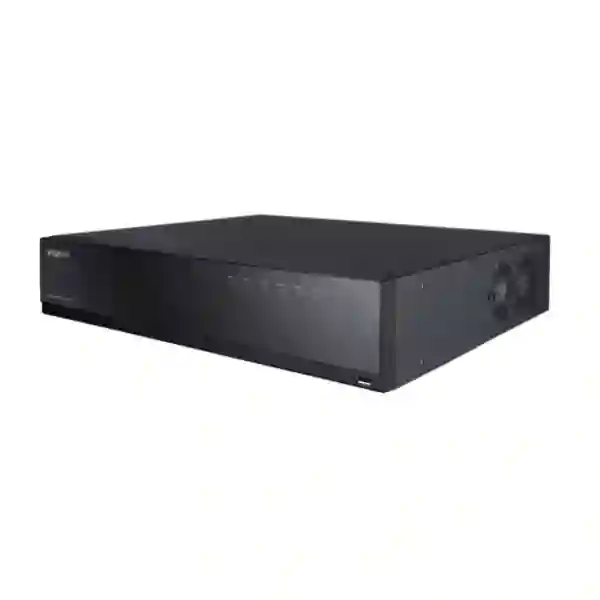
Hanwha HRX-1632 16-Channel Pentabrid DVR
Keep compatible analogue CCTV cameras in service while evaluating selected IP upgrades. This recorder offers five video signal families, H.265/H.264/MJPEG recording and room for four supported SATA hard drives. The right choice depends on your existing camera list, channel mix, video quality needs and retention target.
Next step: request a compatibility and storage review for the exact installation before ordering.
At a glance: what matters to buyers
- Five camera technologies: AHD, HDTVI, HDCVI, CVBS and IP.
- Channel planning: sixteen channels total, with up to eight IP channels in the supported mix.
- Storage: four SATA bays, up to 6TB per compatible drive.
- Recording: H.265/H.264/MJPEG and published analogue frame-rate constraints.
- Access: HDMI/VGA local viewing, supported remote clients and event features.
- Before purchase: confirm camera models, throughput, installed drives and local commercial terms.
Verified technical overview
The following is a decision-oriented summary of the manufacturer’s HRX-1632 specifications. Compatible options and configured performance depend on the actual site. Confirm the applicable official support document and firmware during procurement.
| Product | Hanwha Vision / Wisenet HRX-1632 |
|---|---|
| Recorder type | 16-channel five-in-one Pentabrid DVR |
| Compatible source families | AHD, HDTVI, HDCVI, CVBS and supported IP cameras |
| Overall channel statement | 16 channels total; up to 16 analogue or up to 8 IP within supported mix |
| Analogue camera inputs | 16 BNC inputs |
| Supported analogue HD signals | AHD, HDTVI and HDCVI up to 4MP; CVBS PAL/NTSC |
| Network-camera protocols | SUNAPI and ONVIF; verify exact camera interoperability |
| IP stream resolution | Network cameras specified up to 8MP; subject to system limits |
| Recording compression | H.265, H.264, MJPEG |
| Selected analogue recording rates | 4MP half and 2MP: 15/12fps (NTSC/PAL), per published sheet |
| Recording bandwidth | Up to 80Mbps |
| Playback bandwidth | Up to 32Mbps |
| Hard-drive bays | 4 × SATA |
| Published storage ceiling | Up to 6TB per supported drive; 24TB raw total |
| Display outputs | HDMI and VGA; dual-monitor support |
| Alarm connections | 16 inputs and 4 outputs |
| Coaxial control | Supported for applicable camera/control protocols |
| Remote viewing | Supported Wisenet clients and QR-code P2P feature, compatibility dependent |
| Recorder power input | 100–240V AC ±10%, 50/60Hz |
| Published maximum consumption | Approximately 120W with four 6TB HDDs |
| Size (W × H × D) | 440 × 88 × 384.8mm, approximately |
| Operating conditions | 0°C to 40°C; 20%–85% relative humidity |
| Bundle, price and Tanzania availability | Confirm in a written quotation; not verified |
A practical recorder for mixed CCTV systems
The Hanwha HRX-1632 16-channel Pentabrid DVR is designed for organisations that want to manage existing coaxial CCTV cameras without committing to an immediate, site-wide change to network cameras. It accepts AHD, HDTVI, HDCVI and conventional CVBS video inputs, while also supporting selected IP cameras. That flexibility is particularly relevant when cables and cameras remain serviceable but the recorder needs replacement. A sensible purchase begins with a current camera inventory, including the signal type and resolution at every location, rather than with the headline channel count alone.
For a shop, office, education facility, residential compound or industrial site in Tanzania, the commercial question is whether the recorder fits the actual installed cameras, future additions, recording requirements and maintenance arrangement. The HRX-1632 can be considered for staged modernisation, local viewing and managed access to recorded footage. It should not be treated as a universal replacement for any sixteen-camera system without compatibility checks. Ask FourTeck Tanzania to review the channel schedule, storage requirement, camera models and network design before finalising an equipment quotation.
What five-in-one Pentabrid means
Pentabrid describes five supported video signal families: AHD, HDTVI, HDCVI, CVBS and IP. The first four are commonly associated with coaxial camera installations, whereas IP cameras deliver their streams over a network. This breadth helps an installer assess whether different generations of surveillance equipment can share one recording platform. It does not mean that every camera from every manufacturer will function, that every feature will be available, or that all supported formats provide identical image quality and frame rates. A model-by-model test remains important.
In a real migration, you might retain usable analogue cameras at low-risk entrances, replace failed units with compatible HD-over-coax cameras, and introduce IP cameras where a new viewpoint or network cable is practical. The recorder’s flexibility reduces the pressure to replace all working infrastructure at once. However, the whole project still needs a single documented channel plan and sufficient recording capacity. Record signal formats next to camera positions so that a technician can verify inputs before equipment is installed or removed.
Understand the actual channel limit before ordering
The manufacturer’s headline describes a total of sixteen channels, supporting a maximum of sixteen analogue channels or a maximum of eight network channels within the recorder’s stated configuration. These are limits inside the same overall recording platform. In particular, do not assume that a fully populated sixteen-camera analogue installation can automatically accept eight additional IP cameras to create twenty-four independent channels. That interpretation is inconsistent with the manufacturer’s total-channel statement and could lead to an incorrectly sized project.
If the site already has sixteen active coaxial cameras and needs more viewpoints, review which channels might be replaced, whether an additional recorder is necessary, or whether a different NVR or hybrid model is more appropriate. When planning a mixed configuration, confirm the permitted analogue-to-IP combination against current firmware and the manufacturer’s documentation. Do not reserve all sixteen channels for legacy equipment and promise spare network capacity without first validating the exact proposed mix with the installer or supplier.
Check existing analogue cameras individually
AHD, HDTVI and HDCVI cameras can have several resolution and output-mode settings, and older CVBS cameras may operate in PAL or NTSC formats. The HRX-1632 is specified for analogue input resolutions up to 4MP in the supported HD formats, along with conventional CVBS. Inventory each camera by brand, model, signal, selected resolution and power arrangement. A camera advertised as high resolution is not necessarily useful at its highest setting if that output falls outside this recorder’s supported analogue input specifications.
Camera compatibility is more than a picture appearing on the screen. Check reliable video synchronisation, day-to-night switching, time stamps, motion events, control features and image quality over a representative period. Inspect coaxial connectors and cable routes, because poor terminations or damaged cable can mimic camera incompatibility. Before changing camera settings, document the existing configuration so it can be restored. For long-running installations, an on-site test with representative cameras is more informative than relying on the word “hybrid” alone.
Plan IP camera compatibility with equal care
Hanwha’s published technical information identifies support for network cameras using SUNAPI and ONVIF, with a maximum of eight IP channels and network-camera resolution up to 8MP. That IP resolution is not the same as the stated analogue input limit, and it does not erase the total recorder channel constraint. An IP camera should be evaluated for its specific codec, stream resolution, frame rate, authentication requirements and supported protocol functions. A claimed ONVIF capability is a starting point for interoperability testing, not a guarantee of identical features.
Some network-camera events, audio functions or advanced analytics may not be available through a generic integration even if live video works. Confirm the exact stream settings that the recorder can ingest and the functions it can record or display. Check where the camera will obtain power; a suitable external network and, when applicable, PoE equipment may be required. Include switches, structured cabling, address allocation and network security in the project cost rather than budgeting for the recorder alone.
Resolution and frame-rate decisions
An important limitation of this model is its published analogue recording rate. Hanwha specifies approximately 15/12 frames per second at 4MP half resolution and 15/12 frames per second at 2MP, depending on the NTSC or PAL configuration. Supported 720p and 960H modes have different published rates. The maximum achieved rate also depends on the incoming camera stream. Do not equate a camera’s advertised maximum resolution or live-view frame rate with the rate at which this recorder archives footage.
For scenes such as fast-moving gates, vehicle approaches or cash-handling points, footage requirements should be agreed before installation. Determine whether the image detail and recorded frame rate are sufficient for the operational purpose. For some locations, reliable continuous coverage at a modest frame rate is more useful than a higher nominal resolution with gaps or excessive storage demand. If the application requires high-frame-rate 4MP or 8MP recording on many channels, compare newer recorder models rather than assuming this DVR can meet that requirement.
Compression choices and image quality
The recorder lists H.265, H.264 and MJPEG among its supported compression formats. A more efficient codec can reduce the quantity of stored data for similar footage, but actual file size varies with the scene, camera encoding settings, resolution, frame rate, quality target and movement. Compression should be configured as part of a complete recording policy, not merely selected by choosing the smallest possible bit rate. Excessive compression may remove detail that is essential when reviewing an incident.
Discuss the scenes that need clear faces, entrance activity, vehicle movements or general situational awareness, then test representative recorded clips. Keep source and playback quality distinct: the live monitor can display an image differently from the stored stream. Use a repeatable test where operators view and export known events from relevant cameras. If older cameras or software impose codec restrictions, verify them before standardising settings. The recorder’s stated support for several codecs does not imply that every camera and viewing application supports every combination.
Storage capacity: four SATA drive bays
Hanwha lists four internal SATA hard-drive positions, with a published maximum of 6TB per supported drive, or up to 24TB of raw installed drive capacity. That figure is a hardware ceiling, not a promise of twenty-four terabytes of usable recorded evidence, a fixed number of retention days, or an indication that drives are included with the exact product being quoted. Recording duration depends on capacity actually installed, drive allocation, configured streams, bitrate, recording schedule and any reserve required by the recorder.
Request an explicit drive bill of materials and check the manufacturer-supported HDD list for the applicable product and firmware. Storage hardware should be selected for surveillance use and installed with suitable cooling and power protection. Clarify whether a quoted unit comes without disks, with one disk, or with another factory or reseller configuration; do not infer the bundle from the model name. Before commissioning, verify that the recorder recognises the installed drives, reports their health correctly and actually retains sample recordings across the planned channels.
Calculate retention from recording assumptions
A retention target such as a specified number of days is a design requirement, not a property guaranteed by the HRX-1632. Start with the number of active cameras, their primary recording bitrate and the hours per day that each stream will be stored. Continuous recording produces different storage demand from a schedule that records only during selected periods or around events. Motion-based recording is also scene-dependent: a busy corridor may create much more footage than a quiet storeroom. Include headroom for unexpected activity and future camera adjustments.
Make a sample calculation using the chosen bitrates and then verify it through real recordings after commissioning. For illustration of the method, multiply each camera’s average megabits per second by time and convert from bits into bytes before summing channels; this is a planning calculation, not a device-specific retention guarantee. Retention must also account for the site’s privacy policy and any legal preservation obligations. When the requirement is strict, a measured acceptance period and periodic review are more trustworthy than an unqualified promise of “thirty days” on a product listing.
Recording throughput and stream budgets
The published recording bandwidth limit for the HRX-1632 is 80Mbps, while its playback bandwidth is stated as 32Mbps. These values are relevant when choosing simultaneous IP and analogue recording settings and when deciding how many operators may inspect recorded video at once. They are different metrics and should not be substituted for one another. Design the combined incoming stream load below the recorder’s supported limits, allowing for real variations in encoded bitrate and the behaviour of the configured cameras.
A sixteen-camera system with individually acceptable settings can still perform poorly if the combined stream design exceeds the platform’s resources. Record a stream schedule with camera name, codec, resolution, target frame rate and expected bitrate. Review whether simultaneous live viewing, mobile access, playback and export affect the use case, then test the actual installed configuration. Where the required image quality and number of streams cannot fit inside the limits, changing the recorder architecture is more responsible than cutting every stream’s bitrate until the figures appear to fit.
Local monitor and operator workflow
The recorder provides HDMI and VGA outputs and is described by the manufacturer as supporting dual-monitor use. This makes it suitable for a defined local operating position where authorised staff need to see multiple camera views and inspect recordings. The available display output modes are separate from stored video resolution. Make sure the monitor, cable lengths, layout and workspace support the operator’s real tasks rather than assuming two connectors automatically create a complete control-room solution.
An effective viewing setup needs practical camera names, consistent time settings, sensible screen layouts and a clear method for moving from live view to evidence search. Decide which entrances or operational zones should be visible first and which cameras may be opened only when an event occurs. For sites that need several independent monitoring desks, evaluate the supported remote client functions and user limits. A desktop monitor showing all channels is not proof that every user can simultaneously export or search without performance constraints.
Remote access without exposing the network
Hanwha advertises a P2P service with QR-code connection for this recorder, and its technical materials describe remote viewing through supported Wisenet tools and mobile devices. These capabilities can help authorised users inspect footage while away from the equipment room, subject to network connectivity, available services, firmware and client compatibility. They should not be represented as a guarantee of permanent free cloud recording or as proof that any mobile app version will remain compatible indefinitely.
Before enabling remote access, identify who genuinely needs it and apply individual accounts, strong passwords, limited privileges and documented account-removal procedures. Prefer a secure network arrangement approved by the organisation’s IT team. Avoid casual router port forwarding, shared administrator credentials and unmanaged access from personal devices. Test both live and playback functions on the intended connection and check data consumption. A remote-access plan should include the response to lost phones, staff departures and changes to the internet service.
Cybersecurity and firmware management
The HRX-1632 technical documentation lists security-related functions including account access logging, IP filtering and protected communications or credentials. Those features are useful only when they are configured and maintained. The recorder should be treated as a network-connected system, not as an appliance that can be left permanently on a default account. Give administrators named responsibilities for password rotation, user reviews, clock synchronisation, security patches and approval of external access.
Before deployment, check the official Hanwha Vision support information for the exact hardware model and applicable firmware. Confirm the image file, upgrade method, release notes and backup procedure rather than applying software intended for a similarly numbered recorder. Make a record of the installed version and configuration, then validate live and recorded video after any update. If the unit is older or cannot satisfy the organisation’s security lifecycle requirements, that consideration may outweigh the short-term savings from keeping existing equipment.
Recording schedules and event-driven workflows
Published recording modes for the HRX-1632 include manual, continuous or event-based schedules, and pre/post-event handling. These options help tailor the archive to the activity patterns at different camera locations. For example, a loading zone might warrant continuous recording during deliveries while another low-traffic area uses a documented event policy. However, events can be missed when camera placement, lighting, sensitivity or trigger conditions are poorly configured. Event-only recording is not an automatic replacement for a defined evidence-retention policy.
Specify the operational outcome first: what should a security officer be able to review after a door opens, an alarm activates or footage is requested? Then configure a consistent time window before and after the event and test common scenarios. Review false triggers from vegetation, lighting changes, insects and passing traffic. The number of events, their quality and the quantity of stored data should be evaluated together. Where missing a brief event would be unacceptable, consider continuous recording and use events primarily as search aids.
Alarm inputs, outputs and external integration
The published interface specification includes sixteen alarm inputs and four alarm outputs. These hardware points can support a more structured surveillance workflow when paired with compatible sensors and the appropriate system design. A door contact, equipment signal or other approved trigger may be used to draw attention to a camera or event, while relay outputs can be part of a documented notification arrangement. The exact wiring, electrical ratings and supported behaviours must be checked against the installation guide.
Do not connect security devices or powered equipment directly on the basis of connector counts. A qualified installer should verify dry-contact versus powered inputs, isolation requirements, event mapping and the consequences of a fault. Decide who responds to an alert and what happens if nobody is present. A buzzer or email alone does not constitute a monitored alarm service. Test the full journey from trigger, to recorder event, to authorised review, including the failure modes caused by power loss or network interruption.
PTZ and coaxial camera control
Hanwha identifies coaxial control support for compatible analogue protocols, alongside PTZ control through the recorder’s user interface and supported viewing tools. This can be valuable where an existing motorised camera is retained during a recording-system upgrade. However, PTZ features depend on the connected camera and its protocol, cabling, configuration and permissions. A successful video connection does not prove that pan, tilt, zoom, presets or other commands are supported end to end.
Before promising PTZ operation, record the camera make and model, existing control protocol, relevant wiring and preset requirements. Test the commands at the intended monitoring position and with remote clients if they will be used. Consider operator access so that two people do not issue conflicting commands to a critical viewpoint. Decide whether a fixed camera should supplement a mobile camera for uninterrupted evidence. The control specification is a compatibility opportunity, not a substitute for an integration test with the exact equipment.
Search, playback and evidence export
A useful CCTV system must produce footage that can be located, viewed and exported when required. The HRX-1632 technical sheet describes local and remote search/playback functions and file-backup options. The value of those features depends on time accuracy, clear camera naming, retained recordings and staff familiarity with the workflow. Teams should test a realistic request such as locating a short event during a particular shift, reviewing more than one viewpoint and saving a file that can be opened on an authorised review computer.
Establish an evidence-handling procedure before an incident occurs. It should define who can export footage, where authorised copies are stored, how requests are logged and when original material must be preserved. Do not assume a particular export format is playable on every computer without testing the relevant viewer. When footage may be used for investigations or formal proceedings, document the device clock, camera identity, operator action and continuity of the copied files. Operational practice matters as much as the recorder’s output menu.
Audio recording requires an explicit design
The technical specification references line-level audio connections, with four built-in line inputs and an optional extension arrangement described for additional inputs, together with an audio output. This should not be interpreted as an assurance that a standard unit contains every possible audio accessory or that any camera microphone can be connected directly. Verify the exact ports, expansion cable requirement, supported audio source, recording mode and user permissions before including audio in a quotation.
Audio capture changes both technical and privacy requirements. Determine whether sound is actually needed for the stated security purpose, whether individuals should be notified, and which local policies or legal duties apply. Test audio levels, synchronisation with video and playback permissions in a controlled environment. Avoid assuming that audio follows every coaxial channel automatically, or that two-way audio is supported for every mixed-brand network camera. If the project does not require sound, document that decision instead of enabling unused functions.
Power, ventilation and installation environment
The published HRX-1632 electrical specification identifies a 100–240V AC input and a maximum power consumption figure of approximately 120W for the cited configuration with four hard drives. The enclosure is approximately 440mm wide, 88mm high and 385mm deep. These measurements help with cabinet selection, but they do not include the total space required for cable bends, airflow and maintenance access. A cabinet should be chosen for the whole system, including switching, power distribution and any backup power equipment.
Manufacturer literature specifies an operating temperature range of 0°C to 40°C and relative humidity conditions of 20% to 85%. For Tanzanian installations where equipment rooms can become hot, dusty or vulnerable to interruptions, verify the actual indoor environment instead of assuming the building will remain within those limits. Plan ventilation, stable power and an appropriately sized UPS according to a qualified electrical design. Record what happens when mains power fails, how the system restarts and whether cameras and network switches remain powered alongside the recorder.
A controlled installation sequence
Start installation with a signed camera schedule and a drawing of the intended equipment location. Label and inspect the existing coaxial cables, separate usable cameras from known faults, and verify the intended IP network. Check the inventory of hard drives, mounts, cables, monitors and required accessories against the purchase scope. Before moving the old recorder, determine whether its stored footage must be retained, exported or handled under an established evidence policy. A replacement should not accidentally destroy needed recordings.
After mounting the recorder, configure the clock, administrative accounts and each camera in a methodical order. Check video inputs individually before building the final multi-camera layout. Then apply recording schedules, storage settings, alert rules, remote access and user permissions. Validate at least one complete recording-and-playback cycle across a range of cameras, rather than only inspecting the live display. Handover should include device identifiers, firmware details, an as-built channel map, operating instructions and a documented process for future changes.
Phased migration from analogue to IP
The most useful benefit of this product is the possibility of scheduling changes instead of treating every camera as a single replacement event. A first phase may stabilise the recorder and document the existing coaxial estate. A second phase can replace low-performing analogue cameras or address difficult viewpoints with carefully selected IP models. A later phase might move more functionality to a fully networked architecture if that better matches image quality, analytics, cyber-security or scalability requirements.
Each phase should have measurable acceptance criteria: all designated cameras record; footage survives routine restarts; the required retention target is observed; alarms operate; and authorised users can retrieve evidence. Review the channel ceiling every time a camera changes format. A mixed system with eight IP cameras still has to respect the recorder’s stated total-channel limit, so migration is not an unlimited expansion strategy. If the site expects rapid growth or wants high-resolution IP recording across many streams, plan the end state first and decide whether a dedicated NVR offers a better long-term investment.
Retail stores and customer-facing premises
Retail deployments often balance entrances, customer circulation, goods-receiving areas and cash-handling positions. A hybrid recorder can make sense where the existing coaxial cameras continue to cover general areas while selected views are upgraded to meet an identified evidence need. Begin by ranking locations according to the incident questions staff actually need to answer. A wide overview may support movement tracking, while a more carefully positioned camera may be needed where identifying activity or objects is the primary goal.
Decide who watches live footage and who is authorised to perform searches after an incident. Ensure that the stored picture is legible at the planned camera distance, not merely on a bright demonstration screen. Review lighting, reflections, concealment and recording of busy periods, then revisit the storage calculation. For premises with frequent public traffic, document the video-retention policy and the process for responding to legitimate footage requests. The recorder is one part of the system; camera positioning and operating procedures determine much of the result.
Warehouses, workshops and logistics areas
Industrial and logistics sites can have a mixture of long cable routes, loading bays, perimeter areas, internal stores and equipment entrances. An existing coaxial system might provide useful coverage even if some cameras have reached the end of their service life. The HRX-1632 is relevant when continuity of those feeds matters and the proposed number and format of cameras fit its technical limits. Assess each location’s actual light level, movement speed, maintenance access and the evidence detail required for an investigation.
For exposed or dusty environments, the recorder itself should normally be kept in a suitable protected indoor location within its environmental limits. Outdoor camera housings, lighting, surge protection and field power arrangements require separate evaluation. Validate that loading activities can be reviewed at the recorder’s configured frame rate and that a common timestamp is available across relevant footage. Where several operational teams request access, define their privileges. Do not assume that a system designed for simple security oversight automatically meets specialised industrial process-monitoring or safety-system requirements.
Offices, schools and multi-user premises
An office or educational facility often needs controlled access to video from entrances, corridors, reception areas and shared spaces. A Pentabrid design may preserve the value of an earlier analogue installation while allowing selected IP cameras to be considered for updated coverage. However, video access should be tied to a defined operational need. The person who maintains the recorder need not have the same permissions as someone permitted only to view a small group of cameras.
Agree on privacy expectations, access-control practices, signage where relevant and retention procedures before activating the system. Staff should know how to report a camera fault and who can authorise an export. Check whether users require local viewing, mobile access or both, and verify the supported concurrent functions. If the location has strict safeguarding, privacy or audit requirements, build those requirements into the equipment selection and commissioning checklist rather than relying on generic CCTV feature descriptions.
Tanzania deployment considerations
For an installation intended for Tanzania, the most useful local planning questions concern electricity continuity, equipment-room conditions, available network service, the existing cable estate and who will maintain the system. These requirements differ by site and cannot be inferred from the country name alone. Plan resilience based on a survey of the actual premises, with particular attention to the recorder, connected cameras, switches and the local monitor if monitoring must continue through a power interruption.
Confirm whether remote viewing will operate over the premises’ internet connection and whether bandwidth, address management or security policy could affect it. If footage must remain within an organisation’s premises, document the archive location and any permitted remote-access arrangements. Buyers should also request written confirmation of the exact hardware bundle, storage drives, support scope and commercial terms. No price, local stock status, installation coverage, certification for Tanzania or lead time is implied by this product information; such details require a verified offer.
When a dedicated NVR may be a better choice
The HRX-1632 is not automatically the preferred recorder for a new, all-IP surveillance estate. A purpose-selected network video recorder may offer a more appropriate channel count, higher simultaneous camera bandwidth, current high-resolution recording capabilities or a different approach to network-camera management. The right comparison is not DVR against NVR as labels; it is a feature-by-feature evaluation against the number of cameras, supported models, required resolution, recording rate, storage design and remote-user workflow.
Conversely, discarding compatible coaxial infrastructure may increase project cost and disruption without an operational benefit at every position. A hybrid recorder can be a disciplined interim or long-term choice when the needed recording quality, channel mix and security requirements are met. Ask for a comparison using the same camera schedule and retention target rather than comparing only published drive-bay totals. Confirm lifecycle and firmware support for the specific unit being considered, especially when comparing an established model with a newer recorder family.
What to include in a quotation request
A useful quotation request starts with the number of installed analogue cameras, their signal formats and resolutions, and the number of IP cameras proposed immediately and later. Include the target recording duration, operating hours, need for continuous or event-based recording, monitor locations and remote-user requirements. Describe the available cabinet, electrical backup, network switches and any older hardware that must be retained. State whether the project covers supply alone, configuration or full site installation rather than leaving that distinction implicit.
Request confirmation of the exact HRX-1632 hardware configuration, supported HDD models and capacities, any required audio or other accessories, software or client compatibility and the conditions of after-sales support. Ask the supplier to identify exclusions such as cameras, storage media, UPS, network hardware and labour. A written technical schedule allows competing offers to be evaluated fairly. It also gives the installer a checklist for acceptance testing, making it easier to distinguish a camera-side fault from a recorder-side issue after deployment.
Commissioning tests that matter
An acceptance test should begin with all intended video sources connected and named correctly. Verify day and night views, expected recording frame rates, the chosen codec profiles, the configured retention policy and the health of each storage drive. Reboot the recorder under controlled conditions and confirm that normal recording resumes. Test at least one alarm event and the search process for an event whose time is known. Use an exported sample to confirm that authorised viewers can open and inspect the footage.
Next, test network and power scenarios relevant to the site. Confirm the behaviour of IP streams when a switch or camera disconnects, and the user-facing notification when video is lost. Check the permissions of accounts with different roles, as well as remote access on the approved network. Record any settings that were adjusted after tests and preserve the completed commissioning record. If a required task fails, correct it before handover; successful live display alone is not sufficient acceptance for a recorded-security system.
Maintenance and ongoing ownership
A recorder operates as part of a changing system. Camera lenses become dirty, cables deteriorate, hard drives age, passwords need review, and software versions eventually change. Assign an owner for periodic checks of recording status, timestamps, storage health, alerts and the ability to export representative footage. Consider a documented maintenance calendar rather than relying on staff to notice faults during an incident. Where the recorder is kept in a warm or dusty room, include inspections of ventilation and environmental conditions.
Keep a secure configuration record and an authorised contact list so that equipment replacement or account recovery does not depend on one employee. Review firmware and security guidance from the manufacturer as part of normal maintenance, while verifying compatibility before changing a production device. If the required retention period or camera inventory changes, recalculate storage and throughput instead of assuming the original specification remains sufficient. Good operational discipline helps preserve evidence quality and reduces the risk that a minor undetected fault will become a critical gap.
Decision checklist before purchase
The product is a strong candidate for evaluation when a site has a significant number of compatible analogue cameras, wants a structured path toward limited IP integration, and can work within the published recording and storage limits. The decision should be paused when the camera inventory is unknown, when every existing channel is already occupied and additional cameras are expected, or when high-frame-rate high-resolution recording is essential. It is also worth reviewing alternatives if firmware lifecycle, network integration or an all-IP architecture is the dominant requirement.
FourTeck Tanzania can use a clear channel list and retention brief to help identify what needs verification before a quote is issued. The most useful next step is to share the camera schedule, proposed IP additions, required recording duration and installation conditions. A properly scoped recommendation should distinguish verified capabilities from assumptions and name any dependent equipment. That approach helps avoid both overspending on unnecessary replacement and underspecifying a recorder that cannot support the site once it becomes operational.
Frequently asked questions about the HRX-1632
These answers address practical procurement and installation questions. Exact camera compatibility and local commercial conditions should be confirmed for the proposed site.
Is the Hanwha HRX-1632 a 16-channel DVR or a 24-channel DVR?
It is described by the manufacturer as a sixteen-channel Pentabrid recorder. The specification lists up to sixteen analogue channels and up to eight network channels inside the supported overall configuration. It should not be sold as twenty-four simultaneously independent recording channels. The precise analogue/IP mix for a project needs verification against the intended firmware and camera schedule.
Can I keep existing coaxial CCTV cameras?
Potentially, yes. The recorder accepts supported AHD, HDTVI, HDCVI and CVBS signals, which makes it relevant for a retrofit using existing coaxial wiring. Check the particular camera model, its output format, resolution and cable condition. A physical BNC connection alone does not prove compatibility with every existing camera or advanced function.
Does this recorder support IP cameras?
Yes, Hanwha specifies support for network cameras using SUNAPI and ONVIF, with a maximum of eight IP channels under its published configuration. Confirm the selected camera’s stream and protocol compatibility, the total channel mix and the bandwidth budget. IP cameras may need separate network switching, configuration and power arrangements that are outside the DVR hardware itself.
Does the HRX-1632 record 4MP video at 30fps?
Do not assume so. The published analogue recording specification describes 4MP half-resolution and 2MP modes at 15/12 frames per second, depending on video standard. Other supported resolutions have different limits. Camera input frame rate, codec settings and overall device load matter. If sustained 30fps recording at higher resolutions is essential, evaluate alternative recorders against that requirement.
How many hard drives can be installed?
The manufacturer specifies four internal SATA drive positions, with support published for drives up to 6TB each and a 24TB raw capacity ceiling. That does not confirm how many drives are included with a particular quotation. Supported drive models, firmware compatibility, usable space and projected retention should be checked before purchase and again after commissioning.
How long will recorded CCTV footage be retained?
There is no universal number of days. Retention depends on installed disk capacity, active cameras, actual video bitrates, frame rates, scene activity and continuous versus scheduled or event recording. Set a target based on operational and privacy needs, calculate an initial storage budget and verify the result by measuring real footage under representative site conditions.
Can authorised staff watch CCTV on a phone?
The product lists mobile-viewing support and QR-code-based P2P connection features. Actual availability depends on the compatible client, firmware, network access and account permissions. Configure remote access securely, test the exact live and playback tasks and maintain a procedure to revoke access. Do not assume that the feature includes cloud archive storage or unrestricted user access.
Does the device power IP cameras over PoE?
Plan camera power separately unless a current hardware inspection and official documentation identify an appropriate built-in power feature. The published network connection is an Ethernet interface, not evidence of a bank of PoE camera ports. A separate PoE switch or appropriate power supply may be needed, and its consumption should be included in the UPS and network design.
Is the recorder suitable for a hot equipment room?
The referenced technical specification provides a 0°C to 40°C operating temperature range. A site survey should verify that the enclosure and room remain within applicable limits, particularly during power outages or reduced ventilation. Rack space, dust management and cooling need to be considered along with the recorder’s drives and associated network hardware.
What information is needed to request a quote in Tanzania?
Provide the number and models of analogue cameras, any planned IP cameras, desired retention period, recording quality needs, local monitor requirements, network and power arrangements, and whether supply or installation is required. Ask for a written statement of disk configuration, accessories, support terms, availability and price. These commercial details are not established by the manufacturer’s feature list alone.
Can I use it with every ONVIF camera?
No universal compatibility should be claimed. ONVIF support provides an integration mechanism, but profiles, encoding, authentication, recording triggers and advanced camera functions vary. Request exact-model compatibility checks, ideally with real streams from the proposed cameras. A working live image is only the first of several tests needed for a reliable recorded-security system.
What should be checked before replacing an older DVR?
Confirm the original recordings have been preserved as required, document all camera inputs and control features, inspect coaxial cable quality, and verify that analogue output formats are supported. Recalculate storage and ensure that the sixteen-channel total limit meets both current and future needs. After replacement, confirm recorded playback, exports, alarms, remote access, clock accuracy and power-restoration behaviour before signing off.
Request a technical review and quote
Share your existing camera schedule, the number of planned IP cameras, desired video retention, required image detail, and the installation environment with FourTeck Tanzania. Request confirmation of the exact recorder and drive bundle, supported camera mix, appropriate accessories, installation scope, availability, pricing and after-sales conditions before placing an order.
Ask for a Hanwha HRX-1632 compatibility and storage assessment.




Reviews
There are no reviews yet.