
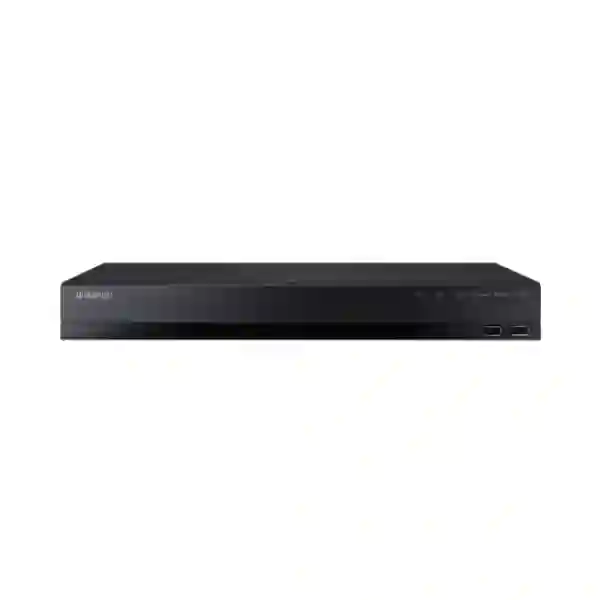
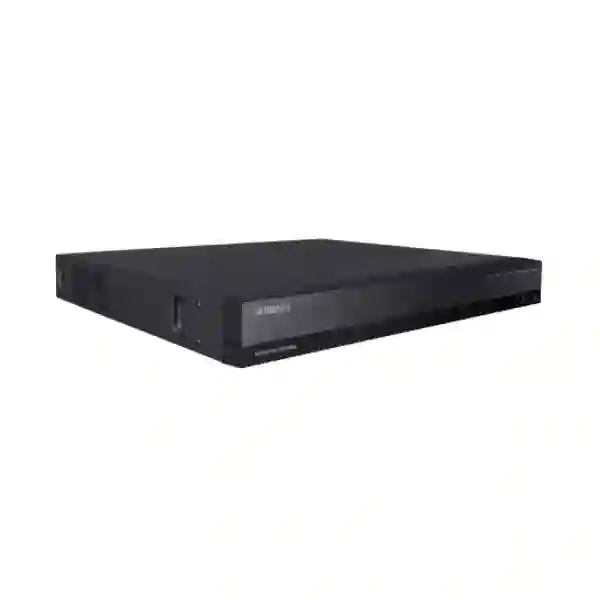
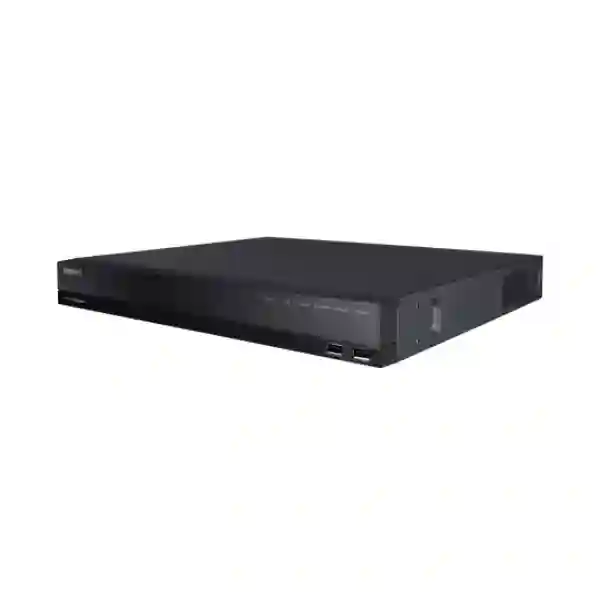
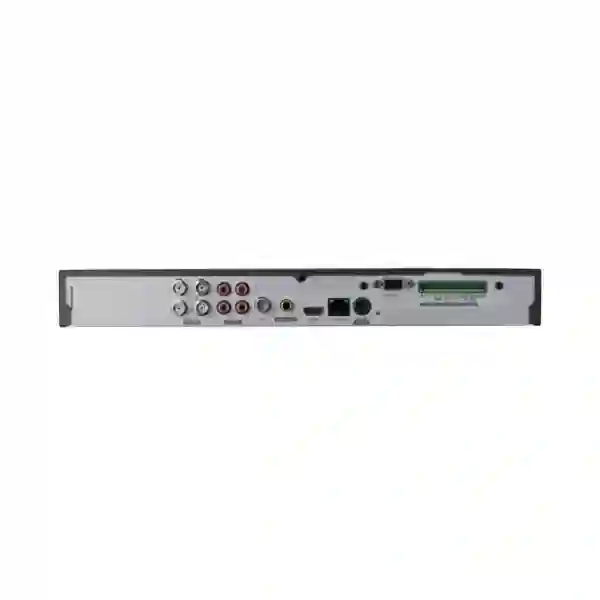
Hanwha HRX-421 4-Channel Pentabrid DVR
Keep compatible coaxial CCTV cameras in service while planning a controlled move to IP video. The HRX-421 offers four analog BNC inputs and up to six total channels in supported mixed configurations.
Verified technical snapshot
These figures describe the reviewed manufacturer model specification, not a promise about hard drives included in a particular offer or compatibility with every camera.
| Camera inputs | 4 analog BNC inputs; up to 6 total channels with compatible IP configuration |
|---|---|
| Video types | AHD, HDTVI, HDCVI, CVBS and IP |
| Analog resolution | Up to 8MP with model-specific limits; 8MP analog on one channel |
| Recording rate examples | 8MP: 8fps; 5MP: 12fps; 4MP: 15fps; 2MP: 30fps (NTSC values) |
| Compression | H.265 / H.264 / MJPEG |
| Storage | 2 SATA bays; up to 6TB per drive in reviewed datasheet |
| Display | HDMI, VGA, BNC spot output |
| Audio and alarm | 4 audio inputs / 1 audio output; 4 alarm inputs / 2 relay outputs |
| Networking | RJ-45 Ethernet; supported Wisenet and ONVIF/SUNAPI functions |
| Power and environment | 12V DC; 0–40°C; 20–85% RH |
Quick fit assessment
Consider the HRX-421 when
- You have four or fewer compatible analog cameras
- You want a limited IP-camera migration path
- Two internal SATA bays suit the retention plan
- You can secure and maintain a networked recorder
Reassess the design when
- More than six simultaneous views are required
- Several 8MP analog streams are essential
- Long retention exceeds the supported storage plan
- The recorder must be exposed to harsh outdoor conditions
What is the Hanwha HRX-421 and who is it for?
The Hanwha HRX-421 is a four-input Pentabrid digital video recorder for video-surveillance installations that need to retain compatible coaxial cameras while accommodating network cameras. Pentabrid refers to the supported camera signal families: AHD, HDTVI, HDCVI, conventional CVBS and IP. It is not a six-port analog DVR. There are four BNC analog camera inputs, and the recorder can operate with as many as six total camera channels through a suitable combination of analog and IP sources.
This architecture is attractive when the site already has working coaxial cable and cameras, because a recorder replacement may be possible without discarding every installed camera. A small retail premises, administration room, reception area, residence or modest warehouse may have four established views and want to add a network camera for another viewpoint. The decision should begin with a camera inventory: signal standard, resolution, frame rate, power method, cable condition, and the evidence-retention period expected by the operator.
The HRX-421 is best understood as a transitional recording platform rather than an unlimited expansion solution. It cannot promise that every third-party camera will interoperate, and its six-channel ceiling is important when estimating future growth. For a Tanzania purchase enquiry, ask for an exact compatibility review and a storage plan before choosing disks or replacing cameras. Confirm the hardware variant, included accessories and software support for the unit being quoted.
Understand the four analog inputs and six-channel maximum
The recorder provides four physical BNC video inputs. With all four analog inputs occupied, the manufacturer describes two additional IP channels for a maximum of six simultaneous camera channels. Its documentation also describes migration of analog channels to network channels, allowing a network-oriented arrangement within the six-channel limit. This does not mean that four analog plus six IP cameras can all record together. Write down the intended camera mix before configuring the system.
Consider a location with analog views at a front entrance, counter, stockroom and back door. Those four existing feeds may remain on the coaxial inputs while two suitable IP cameras provide a wider overview or another location. The network cameras need an appropriate network connection and power arrangement; they are not plugged into the BNC connectors. An Ethernet switch and possibly PoE equipment may be required outside the recorder, depending on the selected cameras.
If future plans already involve eight, twelve or sixteen simultaneous views, start by evaluating a recorder designed for that count. Buying a six-channel device for a site likely to grow beyond six creates a predictable replacement cost. Where the exact channel-migration configuration matters, consult the appropriate Hanwha configuration guide or verify it during commissioning rather than treating the maximum figure as a guarantee of every conceivable camera combination.
Five signal families: what Pentabrid compatibility actually means
AHD, HDTVI and HDCVI are different high-definition analog video signalling families that use coaxial connections. CVBS is conventional standard-definition composite video, while IP cameras send video across a network. The HRX-421 lists all five families, giving existing mixed installations more options than an analog-only recorder. However, a listed family is not a universal promise: individual camera resolutions, recording modes, control protocols and firmware revisions still need checking.
The published analog input list covers AHD and HDTVI at up to 8MP and HDCVI at up to 5MP, plus CVBS. The manufacturer’s detailed specification adds a noteworthy limitation: 8MP analog recording is supported on only one analog channel. Buyers who intend to install several 8MP coaxial cameras should clarify the simultaneous-resolution limitations rather than rely on the headline up-to-8MP number alone.
A practical compatibility test uses the real camera model and the intended main-stream setting, not just the logo on the housing. Check whether the video format is correctly detected, whether nighttime images remain stable, whether the recorder accepts the camera’s frame rate, and whether playback exports correctly. If the camera includes extra features such as audio or coaxial control, test those separately. This avoids discovering after installation that video works but a desired auxiliary function does not.
Choosing a resolution that matches the recording requirement
Resolution describes the amount of picture detail, but it is only one dimension of useful security footage. Camera angle, lens choice, lighting, compression and motion are equally important. The HRX-421 specification lists analog recording rates of up to 8 frames per second at 8MP, 12 fps at 5MP, 15 fps at 4MP and 30 fps at 2MP for NTSC-type settings. PAL settings differ for some modes, and actual maximums depend on the input camera.
This creates a meaningful design choice. A high-resolution view might help record detail in a mostly static scene, while a faster 2MP mode may better represent movement in an active corridor. The correct choice depends on the objective: identifying activity, following a moving person, observing a door or preserving a broad overview. Do not assume 8MP means continuous 30 fps recording. Similarly, a monitor showing a 4K menu does not mean every recorded channel is stored in 4K at full motion.
When requesting a configuration, specify each camera’s resolution and target recording frame rate, then test playback under realistic lighting. It is useful to compare a short sample from the proposed high-resolution mode against a lower-resolution, higher-frame-rate mode. That real footage helps decide whether additional pixels or smoother motion will produce more valuable evidence for the site.
H.265, H.264 and MJPEG: what compression changes
The recorder lists H.265, H.264 and MJPEG as supported video compression formats. Compression reduces the amount of data needed to store and transmit video, though exact savings depend on scene movement, lighting, detail, profile settings and the cameras themselves. H.265 can be efficient for compatible recording streams, but the existence of an H.265 option is not a promise that every input will use it or that storage consumption will fall by a fixed percentage.
Recording requirements should be translated into a bandwidth and retention plan rather than guessed from the number of hard drives. A busy entrance with constant movement and uneven lighting may require more storage than a calm corridor recorded with the same nominal resolution. Scene noise at night can also increase bitrate. Choose the codec after verifying support throughout the camera, recorder, playback and export workflow, especially when footage may need to be examined away from the original site.
The manufacturer quotes recording bandwidth figures up to 25 Mbps for an analog-only arrangement and up to 17 Mbps for a network-camera-only arrangement in its specification. These are device planning constraints, not guaranteed per-camera bitrates or internet upload speeds. A qualified installer should examine the intended mix and the full product specifications. If a design exceeds the recorder’s supported throughput, reducing image quality merely to make it fit may be a poor security tradeoff.
Hard-drive bays, capacity and evidence retention
The HRX-421 has two internal SATA hard-drive bays. The published specification supports up to 6 TB per bay, or a maximum stated total of 12 TB when suitable drives are fitted. This is the physical storage limit described in the reviewed manufacturer material, not a statement that a particular listing includes installed disks. The number and capacity of supplied hard drives must be confirmed separately in the exact quote.
Retention duration is determined by the combined bitrate of active cameras, continuous versus event recording, daily operating hours, recording quality and the amount of storage reserved for other purposes. As a planning illustration, four cameras recording at 2 Mbps each create about 8 Mbps before protocol overhead or any extra channels are considered. That means roughly 86.4 gigabytes of video per day in decimal units, before allowing for variations, reserve capacity and formatting. It is an example calculation, not a guaranteed HRX-421 result.
Decide whether the business needs a few days of review or a substantially longer evidence window, and include exceptional events in the estimate. Use compatible surveillance-oriented disks selected against current manufacturer guidance and confirm whether drive health monitoring is configured. Recording overwrite protects continuity but can remove old footage automatically. A documented export process and a responsible retention policy are just as important as total terabytes.
Recording modes: continuous, scheduled and event-based
The manufacturer lists manual, scheduled, continuous and event-related recording capabilities, including pre-event and post-event options. Continuous recording is straightforward when a complete timeline is needed, but it uses storage during quiet periods. Schedule-based recording aligns recording behaviour with business hours or other operating windows. Event-driven recording may be useful for low-activity areas, although events can be missed if detection is poorly tuned or the expected trigger is unavailable.
A mixed strategy may be more sensible than treating every camera alike. For example, a front door could record continuously while an internal area uses a tailored schedule. Where a camera is important for incident investigation, event-only recording may leave gaps around the moment an incident begins or after motion stops. Test event trigger sensitivity in daylight and darkness, including moving shadows, reflections and repeated staff activity.
Recording mode choices should be tied to a clear operational question: what must the reviewer be able to see and for how long? Document the settings as part of handover so they can be restored after maintenance or hardware replacement. When event notifications are enabled, verify that a failed notification does not prevent local recording. A recording system and an alerting system provide different safeguards and should be validated separately.
Playback, searches and exporting evidence
Recorded footage is valuable only when someone can locate and retrieve the relevant interval. HRX-421 manufacturer documentation describes date-and-time search, event-oriented search, backup features and smart search functions for supported network-camera material. Smart search is not presented as a universal feature for every analog camera. When planning a deployment, specify what staff need to search: an incident time, a camera view, a detected movement or a supported video-analytics event.
The local interface is described as supporting simultaneous playback of up to six channels, subject to playback bandwidth, while mobile and web playback have their own documented limitations. Those limits matter if several people expect to inspect different recordings at the same time. Staff should be trained to export a short, complete incident interval with context before and after an event, rather than recording a phone video of the monitor.
Test the preferred export format on a separate computer before incidents occur. The specification lists backup options including BU and EXE with player, with AVI under the WebViewer context. Make sure the evidence can be opened by the intended recipient, that the original recording is preserved, and that local data-handling requirements are respected. A simple evidence log recording who exported material, when and why improves accountability without requiring unsupported product features.
HDMI, VGA and spot output for local viewing
The HRX-421 offers one HDMI output, one VGA output and a composite BNC spot output. HDMI is specified for display resolutions including 3840 by 2160, while VGA supports conventional monitor resolutions. These outputs serve different viewing needs. A main screen can be used for configuration and live video, while the separate spot output may support a simpler monitoring arrangement where its supported functions are sufficient.
Select a monitor based on the physical viewing distance and the number of images it will show, not only its headline pixel count. On a small screen, dividing the picture among several cameras can make objects difficult to recognise. A larger screen may be appropriate for a staffed desk, while a discreet wall-mounted display might be enough for an overview. Check connector types, supported output modes and cable runs in advance.
Do not confuse 4K HDMI display capability with recording every camera at 8MP and high frame rate. Display output, video input, decoding and recorded stream settings are separate specifications. During commissioning, test camera layouts, live-view legibility, the on-screen clock and the ability to find a saved clip. If an operator needs a permanent public display, also consider privacy, access control and whether the spot-output behaviour matches that requirement.
Remote monitoring through the Wisenet ecosystem
The recorder is documented for network access through supported Hanwha viewing tools and mobile viewing. Hanwha’s support information identifies HRX-421 among compatible recorder models for Wisenet Viewer, and its P2P guidance identifies the model for Wisenet Mobile setup. Actual software behaviour can depend on application and firmware versions, available network access and current vendor support, so confirm the intended client before promising a specific feature.
P2P and QR-code setup are listed manufacturer functions that can simplify mobile enrolment in supported circumstances. Hanwha’s support notes distinguish the mobile P2P route from PC access: the QR-code or UID flow should not be assumed to give a desktop browser the same connection path. For staff viewing off site, test account permissions, network quality, mobile data use and the steps necessary after a phone is replaced.
Remote access must be deployed securely. Change initial passwords, use unique strong credentials, apply appropriate device and network updates, and limit accounts to the views users genuinely need. Avoid exposing a recorder directly to the internet solely for convenience. The correct access method depends on the site’s network policy and the manufacturer’s current guidance. For a Tanzania business, also assess upstream connectivity and what happens when an internet connection is interrupted.
Audio, alarms and integration considerations
Beyond video, the HRX-421 specification describes four audio line inputs, one line output, four alarm inputs and two relay outputs. Those connections may help an installation coordinate cameras with compatible external sensors or other equipment, but each use case needs interface, electrical and configuration checks. An alarm input does not automatically supply a detector, and a relay output does not power arbitrary connected machinery.
Before ordering, list the source of each desired audio signal and sensor, the required connectors, contact types and control logic. Ensure that audio collection is lawful and appropriate for the location, and communicate recording practices where necessary. If an alarm is intended to notify a responsible person, test the entire chain from sensor actuation to recording, local indication and any configured message or output.
The recorder also includes RS-485/422 for supported PTZ control arrangements and certain coaxial-control functionality. This can matter when replacing a DVR in a system with compatible remotely controlled cameras. However, the camera’s signalling format and PTZ control protocol are separate questions; neither should be inferred from the presence of a BNC plug. Request an end-to-end PTZ test before treating pan, tilt or zoom control as confirmed.
Planning compatible IP cameras and network equipment
An IP camera sends encoded video over an Ethernet or other supported network connection, which means network design becomes part of the CCTV design. The HRX-421 lists SUNAPI and ONVIF in its network-camera support documentation. Those protocol families are useful interoperability starting points, but profile support alone does not guarantee every analytic event, audio feature, image setting or firmware combination. Check the specific IP camera model against the recorder configuration.
Unlike a recorder with integrated camera PoE ports, the HRX-421 specification should not be read as a promise of built-in PoE camera power. Plan any required PoE switch or injector, the power budget, network cabling, surge protection and switch capacity separately. Establish which camera streams will be recorded and which are intended for lower-bandwidth viewing. This is especially important when the link serving a camera also carries unrelated business traffic.
Use a managed and documented network setup where appropriate. Keep recorder and cameras on known addresses, use time synchronisation, restrict unnecessary services, and confirm that video survives ordinary network events. If a network camera has onboard memory or recovery functions, verify whether those features are supported by the chosen combination. Do not promise seamless recovery without a documented, tested configuration.
Choosing the right placement and camera fields of view
A recorder cannot correct a poorly positioned camera after the event. Before confirming an HRX-421 system, define what each viewpoint must accomplish. An entrance camera may need a tighter field of view than a general room overview. A delivery area may require a view of activity and a separate view of identifying detail. Lighting, reflections, obstructions and typical movement paths determine whether the recorded image answers the real security question.
Test after dark, during opening and closing, and in ordinary busy conditions rather than reviewing only a still daytime image. Camera locations that appear sensible on a floor plan may be defeated by shelving, door movement or backlighting. If cameras are outdoors, choose outdoor-rated camera equipment, safe wiring and weather protection independently of the recorder. The HRX-421 itself is intended for an appropriate protected indoor installation.
When a small property has more potential viewpoints than available channels, prioritise the views that answer the highest-value operational questions. The six-channel maximum is a genuine constraint, so avoid using it as the only selection criterion. If simultaneous coverage of every approach and room is essential, compare a larger recorder before compromising on location or abandoning important views.
Installation environment, temperature and power protection
Manufacturer specifications list an operating temperature range of 0 to 40 degrees Celsius and relative humidity of 20 to 85 percent for the HRX-421. The recorder is not presented as an outdoor weatherproof product. Installation in an enclosed cabinet, poorly ventilated storeroom or sun-heated enclosure should be assessed against those limits. The appropriate operating environment matters both for electronics and for the health of installed hard drives.
The unit uses 12V DC input, with the reviewed specification indicating maximum power consumption of 28 watts when fitted with two 6TB drives. That figure is a device specification for a stated configuration, not the power requirement of the connected cameras, PoE switch, monitors or internet equipment. A complete power budget should cover all components and account for inrush, conversion losses and the required backup time.
Where electricity interruptions are a concern, consider a properly sized uninterruptible power supply and a documented shutdown procedure. The manufacturer’s manual recommends protection against abrupt outages that can affect drives or recovery time. Ensure airflow is not blocked, cables cannot be accidentally disconnected, and the device is accessible for authorised maintenance. Avoid describing the product as suitable for uncontrolled high-temperature locations merely because it is a security device.
Network security, accounts and operational permissions
Video equipment should be treated as connected infrastructure rather than a set-and-forget appliance. During first setup, establish a strong administrator password, synchronise the recorder’s clock, document ownership and enable only the functions that the site requires. Assign separate operator accounts where practical instead of circulating one administrator credential. A clear access policy makes it easier to revoke credentials when responsibilities change.
Check the vendor’s applicable firmware and security advisories for the exact model and hardware revision. The existence of current viewing software does not prove that all recorder firmware branches receive the same updates. Keep a maintenance record with the installed firmware version, camera versions, backup settings and approved remote access method. Before applying any update, review vendor instructions and record the configuration needed for recovery.
Physical access deserves similar attention. Keep the recorder in a controlled area, restrict who can remove disks or USB media, and avoid displaying administrator menus on public-facing screens. If footage contains identifiable people, establish appropriate authorisation and retention practices. A buyer may need help preparing a policy alongside equipment selection, but legal compliance and local approval cannot be assumed from the model name.
Practical applications in small sites and mixed CCTV systems
A small shop with four serviceable coaxial cameras can assess the HRX-421 as a way to modernise recording while testing two additional compatible IP viewpoints. The benefit is preserving potentially useful cabling and cameras while gaining a planned migration path. The risk is that the old cameras, especially at night, may not deliver the evidence quality now required. A site survey should determine whether recorder replacement alone is enough.
At a compact office, four camera views might cover entry, reception, a shared work area and a secure room, subject to privacy considerations. The selection question is not simply whether the unit records all four, but whether staff can find events, retrieve footage and maintain the system without excessive complexity. Storage needs are affected by operating hours and access frequency. Remote viewing may be useful but should not replace a reliable local recording strategy.
For a workshop or small warehouse, vibration, dust, heat and cable distance can complicate installation. The recorder should be placed in a protected, ventilated location, with camera cabling and power selected for each environment. If the facility expects to add multiple buildings or many future cameras, a larger network-video architecture may be a more durable investment. The HRX-421 suits a considered small system, not every site with security cameras.
Comparing HRX-421 with HRX-420 and larger recorders
Hanwha’s historical line-up distinguishes the HRX-421 from the HRX-420 even though both belong to the four-channel Pentabrid family. The HRX-421 specification lists two SATA bays and four audio inputs with two relay outputs, whereas the HRX-420 is shown with one SATA bay, one audio input and one relay output. Those differences are relevant when the buyer needs more internal storage flexibility or extra alarm connections.
Do not choose solely on a model number or assume a higher number means a specific camera count. Compare the exact number of simultaneous channels, supported camera formats, recording bandwidth, storage positions, auxiliary interfaces and the manufacturer’s lifecycle guidance. For a project with future expansion beyond six channels, an eight- or sixteen-channel option may be more suitable even if the initial camera count is modest.
Availability and current replacement models should be verified during quotation rather than inferred from an old product brochure. Manufacturer specifications published for an older model can remain useful technical references, but they are not confirmation that a unit is in production or available locally. Any proposed substitute should be assessed against the current cameras, existing wiring, export requirements and planned retention period before approval.
Cost planning without unsupported local price assumptions
The total cost of a CCTV recorder project includes more than the recorder chassis. Account for the hard drives required to meet retention targets, camera compatibility work, any adapters, local display, cables, network switches, power protection, mounting and commissioning. An installation that reuses existing coaxial cameras may avoid some hardware replacements, but only if the camera condition and supported video modes justify that approach.
Ask a supplier to clarify whether the quote includes a recorder with zero, one or two installed hard drives. Also ask which disk capacities and drive types have been selected, whether cameras and accessories are included, and what assumptions are made about recording days and image quality. Different configurations cannot be compared fairly by looking only at the device name or a bare-chassis price.
No Tanzanian-shilling price, stock statement, delivery commitment, warranty duration or local installation coverage is asserted here because those commercial details have not been verified for the intended listing. Request an itemised quotation that identifies every component, compatibility test, commissioning task and applicable service term. This allows the purchaser to understand both the up-front amount and the cost of future storage or camera changes.
A sensible pre-purchase checklist for Tanzania buyers
Begin with the existing camera schedule: each camera’s manufacturer, model, video signal family, resolution, desired frame rate, location and power source. Record whether analog coaxial cables and connectors are usable and whether any camera requires audio, PTZ or an unusual control protocol. Check the number of desired IP cameras and whether they have a suitable network and independent power source.
Next, decide the evidence window. Specify whether important views need continuous recording, scheduled recording or events; calculate the storage demand using realistic bitrates; and compare that requirement with the verified two-bay, 6TB-per-drive specification. Identify who will review footage, which devices they will use, how access will be secured and how the team will export an incident clip. Establish whether the available network is adequate for remote use.
Finally, obtain a quote that confirms the exact Hanwha HRX-421 variant, hard-disk inclusion, power adapter, firmware or software support, replacement-part position and commissioning scope. Do not assume that all compatible software applications offer the same capabilities on this model. If the system must grow beyond six cameras or run in an environment outside the published operating range, review an alternative design before buying.
Commissioning and acceptance testing that buyers can request
At installation, connect every intended camera and confirm that the correct video format, resolution and main-stream recording rate are displayed. Record short test sequences in both bright and poor light. Play the clips back locally to check that the timestamps, camera titles and image quality meet the original requirement. If using a mix of coaxial and IP cameras, verify the complete simultaneous camera count in the actual configuration.
Fit the specified drives and confirm they are recognised correctly. Test continuous and scheduled recording, event triggers, any alarm contacts and an evidence export to removable media. Inspect the exported file on the intended viewing computer. If mobile access is authorised, enrol the device through the supported method, then verify live view and playback using an external network rather than only the office Wi-Fi.
Complete an outage and restart test under safe conditions, document any expected interruptions, and verify that normal recording resumes. Confirm the real temperatures inside the enclosure, the recording retention estimate, operator account permissions and the maintenance contact. A written acceptance record converts a list of advertised features into evidence that the delivered system performs the functions the buyer actually needs.
Ongoing maintenance, storage health and incident readiness
Routine checks help prevent a recorder from looking operational while failing to preserve useful evidence. Review the recorded timeline, camera status, storage health and available capacity on a defined schedule. The manufacturer’s manual discusses hard-drive health monitoring and advises periodic checks of recording status. A drive that has reached the end of its useful life can affect the ability to retrieve footage, making preventive replacement a planning issue.
Maintain clear records of firmware changes, password ownership, camera replacements, network modifications and storage upgrades. If an operator changes a camera bitrate or resolution, revisit the retention calculation. When alarm or event detection settings are changed, test them again under representative conditions. Updates to routers or switches can also affect remote viewing without necessarily stopping local recording.
Practise a simple incident workflow: note the time and camera, find the original footage, preserve a suitable interval, export it in a usable format and log who received it. Store exported clips appropriately and follow the organisation’s retention and privacy rules. A recorder cannot replace responsible procedures, but sensible checks and training make the HRX-421 a more dependable part of a small surveillance system.
Frequently asked questions
Is the Hanwha HRX-421 a four-channel or six-channel recorder?
It has four physical analog BNC inputs. The manufacturer describes support for two additional network cameras when all four analog inputs are used, giving a maximum of six simultaneous channels. Some configurations can migrate analog positions to IP channels within that ceiling. It is therefore described as a four-channel Pentabrid DVR with up to six total recording channels, not as a six-input coaxial recorder. Confirm the intended mix before installation.
Can it reuse existing coaxial CCTV cameras?
Potentially, yes. The HRX-421 lists AHD, HDTVI, HDCVI and CVBS among its analog signal types. Compatibility still depends on the camera’s actual output format, resolution, frame rate and any control or audio functions. Ask for a test using the existing camera model, especially when replacing an older recorder. Reusing cabling can be useful, but damaged connectors and poor camera images may still justify targeted replacements.
Can it record every analog camera at 8MP?
Do not assume so. Manufacturer documentation lists up to 8MP analog input and specifically states an 8MP analog recording limitation of one channel. Its other recording modes have different frame-rate ceilings. The appropriate approach is to specify the proposed resolution for every camera and verify the entire simultaneous configuration. A headline 8MP specification does not establish four-channel 8MP recording at high frame rates.
What are the maximum analog recording frame rates?
The reviewed specification gives indicative NTSC-mode rates of 8 fps at 8MP, 12 fps at 5MP, 15 fps at 4MP and 30 fps at 2MP. PAL modes vary for some resolutions, and the camera’s own frame rate is an additional limit. Choose settings using the motion and detail needed from each view. Higher spatial resolution does not always provide the smoothest depiction of moving activity.
How many hard drives does the HRX-421 support?
Two internal SATA hard-drive bays are listed, each supporting up to 6TB in the reviewed manufacturer specification, for up to 12TB total. That describes supported capacity, not what ships in a particular carton or quotation. Ask which disks are included, whether they have been approved for the recorder and how many days of recording the proposed camera configuration is estimated to retain.
Does it supply power to IP cameras?
The published HRX-421 interface specification identifies an Ethernet network port but does not establish integrated camera PoE outputs. Plan camera power separately, typically with suitable equipment such as a PoE switch or the camera’s designated power supply. Check the power budget and cable length for the real devices. Do not assume that connecting a camera to the network automatically provides its electrical power.
Can I view footage from a phone?
Hanwha documentation lists mobile remote viewing and P2P or QR-code enrolment for HRX-421, subject to supported applications, software versions and network conditions. Secure accounts and network access are important. Test both live and recorded playback during handover. The mobile P2P approach should not be assumed to work identically for a PC browser; use the manufacturer’s documented method for each client type.
Does it work with Wisenet Viewer?
Hanwha’s device-compatibility support material includes HRX-421 among supported recorder models for Wisenet Viewer. That statement is not a guarantee of every feature on every software or firmware version. Confirm the desired live view, playback, export and connection method on the intended client. An acceptance test is better than relying on a general compatibility label where operational details matter.
Can HDMI display 4K video?
The manufacturer’s output specification includes a 3840 by 2160 HDMI display mode. That says the recorder can provide a 4K output mode; it does not mean all cameras are recorded at 4K and 30 fps simultaneously. The recorded result depends on camera type, input resolution, compression, bandwidth and frame-rate limits. Always verify the actual saved footage, not just the monitor’s advertised resolution.
Can the recorder use PTZ and external alarms?
The HRX-421 includes documented RS-485/422 PTZ interfaces, coaxial-control support, four alarm inputs and two relay outputs. Actual operation depends on matching the camera or sensor protocol, electrical characteristics and configuration. It is important to test physical controls and alarm actions, not merely confirm the terminal count. Any integration with access-control or safety equipment should follow the relevant equipment instructions.
Does H.265 guarantee more recording days?
No fixed retention figure can be guaranteed from the codec alone. H.265 may reduce data requirements in compatible circumstances, but the result depends on movement, light, scene complexity, bitrate settings, camera count and the drive capacity installed. Ask for a storage estimate based on realistic camera profiles, then verify usage in operation. A codec label by itself does not establish a 30-day or other retention period.
Is the HRX-421 appropriate for outdoor installation?
The manufacturer describes an operating range of 0 to 40 degrees Celsius and 20 to 85 percent relative humidity and provides indoor installation precautions. Do not treat the recorder chassis as weatherproof. Mount it in a dry, secure, ventilated indoor location with suitable power protection. Outdoor cameras need their own environmental rating, surge planning and correctly installed cables, regardless of the recorder used indoors.
Does the recorder include a hard disk, warranty or Tanzanian price?
Those commercial details have not been established for this intended listing. The model may appear in different configurations in the market, and a specification sheet cannot verify what is in a seller’s package. Request an itemised quote stating the included drive configuration, any accessories, applicable service terms and final price in the offered currency. Avoid transferring a different retailer’s bundle details to this listing.
Should I choose HRX-421 or an eight-channel model?
Choose based on the required camera count, recording bandwidth, storage retention, integration requirements and future plans. HRX-421 is intended for a compact system with a maximum of six total channels. If additional views are likely, choosing a recorder with greater documented capacity may avoid a future migration. Compare each candidate’s exact supported camera standards and stream limits, not only the number printed on the box.
What information should I send when asking for a quotation?
Provide your site type, number and models of existing cameras, how many IP cameras you intend to add, desired recording days, required audio or alarms, remote-viewing needs and whether any hard drives can be reused. Mention the monitor, network and backup-power equipment already available. Ask for the quoted variant, included drives, firmware support and an acceptance test. Never send private login credentials in a public enquiry.
Request a Hanwha HRX-421 compatibility and quotation review
For a Tanzania CCTV project, provide your existing camera models, number of new IP cameras, recording retention target and site conditions. Ask FourTeck Tanzania to confirm the exact recorder configuration, drive inclusion, replacement or lifecycle considerations, local commercial terms and installation requirements before ordering. An itemised quotation and tested camera plan are more useful than an unverified online price.
Ask for an itemised quote and a camera-compatibility check.




Reviews
There are no reviews yet.