
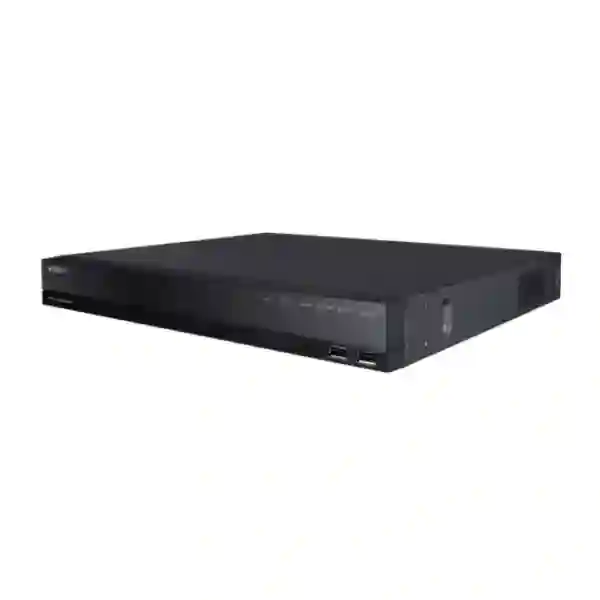
Hanwha Vision HRX-435-2T 4-Channel Pentabrid DVR with 2TB Storage
Keep suitable existing coaxial cameras in service while adding the option of compatible network cameras. The Hanwha HRX-435-2T combines four analogue inputs, support for up to two additional IP cameras and a manufacturer-documented 2TB storage configuration in a compact recording platform.
Best considered for small, defined CCTV installations where camera compatibility, recording quality, storage retention and a dependable operating plan matter more than an inflated channel count. Request a configuration review before ordering in Tanzania.
Quick buying answer
Choose this recorder when you have up to four compatible coaxial cameras, want the option of connecting two supported IP cameras, and can meet your retention goal with its 2TB factory configuration or approved storage expansion. Do not select it purely because it can accept 8MP video: at the highest analogue resolutions the available recording frame rate is lower, and some surveillance tasks need smoother motion. The quotation should confirm the actual installed hard drive, camera compatibility and complete installation scope.
Verified technical overview
| Specification | Hanwha HRX-435-2T |
|---|---|
| Manufacturer / model | Hanwha Vision / HRX-435-2T (HRX-435 platform, 2TB configuration) |
| Recorder type | 5-in-1 Pentabrid digital video recorder |
| Analogue inputs | 4 BNC channels |
| Compatible signal formats | AHD, HDTVI, HDCVI, CVBS and supported IP streams |
| Additional network cameras | Up to 2 compatible IP cameras alongside four analogue cameras |
| Maximum supported camera resolution | Up to 8MP; recording frame rate varies by resolution |
| Analogue recording examples | 8MP: 8fps; 5MP: 12fps; 2MP: 30/25fps (NTSC/PAL) |
| Compression | H.265, H.264, MJPEG |
| Recording bandwidth | Maximum 30Mbps |
| Storage configuration | 2TB factory variant; confirm exact drive installation on quote |
| Storage expansion | 2 SATA bays; up to 6TB per bay, 12TB total |
| Monitor outputs | HDMI and VGA |
| Camera protocols | SUNAPI and ONVIF for supported network camera connections |
| Ethernet | 1 x RJ-45 10/100 BASE-T |
| USB | 2 x front USB 2.0 |
| Alarm I/O | 4 inputs; 2 relay outputs |
| Power | 12V DC; manufacturer lists maximum 40W with two 6TB drives |
| Environmental rating | Operating 0°C to 40°C; 20–85% relative humidity |
| Enclosure dimensions | Approximately 370 x 44 x 320mm |
| Remote use | Supported Wisenet mobile and QR-code P2P functions, subject to current setup compatibility |
The table describes the manufacturer-published HRX-435 platform and the documented HRX-435-2T storage variant. A specific sale may differ in accessories, drive installation, firmware and service package. Verify those commercial details independently before ordering.
Choosing a recorder for an existing CCTV installation
The Hanwha Vision HRX-435-2T is designed for projects that need to retain working coaxial security cameras while introducing a more capable recording platform. Its principal appeal is flexibility: four analogue BNC inputs accommodate several established video signal formats, while supported network camera connections enable a measured transition toward IP surveillance. For a small shop, office, reception area, workshop or controlled entrance with a modest camera count, that can avoid replacing every functioning camera and cable merely because an older recorder is obsolete. A successful upgrade still depends on confirming the individual camera formats, resolution, power arrangements and site wiring before equipment is ordered.
This is a recorder rather than a complete CCTV kit. Camera selection, suitable power supplies, a monitor, network connectivity, backup arrangements and any installation accessories must be considered separately. The model designation HRX-435-2T corresponds to a factory 2TB storage configuration in Hanwha Vision’s product catalogue. Buyers should have the exact supplied drive arrangement and remaining usable capacity confirmed on the quotation, particularly when a specified retention period is important. The 2TB figure is not a promise of a fixed number of recording days, because footage size varies with camera count, scene activity and recording settings.
What the five-in-one Pentabrid design means
Pentabrid describes the recorder’s ability to work with multiple video technologies instead of requiring one fixed analogue format. The HRX-435 family supports AHD, HDTVI, HDCVI, conventional CVBS and compatible IP camera inputs. That matters where an installation has evolved over several years: one area may have an older standard-definition camera while another uses an HD-over-coax model. A recorder that recognises the relevant input standards can create a practical migration path, reducing pressure to replace equipment that still meets the site’s operational needs. Pentabrid does not mean all equipment is universally interoperable, however; each actual camera and function should be verified.
When evaluating existing cameras, identify the output mode shown in their technical specifications, not merely the brand name or megapixel rating. Check whether a camera can switch between AHD, TVI, CVI or CVBS, and whether the selected output resolution is within the recorder’s supported range. Coaxial video and network video also have different wiring requirements: IP cameras need a suitable Ethernet path and independent power or a compatible PoE network arrangement. The DVR’s network socket is not a built-in multiport PoE switch. A careful compatibility inventory is especially valuable when cameras have been serviced or replaced by different contractors over time.
Understanding four analogue channels and additional IP support
The recorder provides four physical analogue BNC camera inputs. Its published specifications also allow two additional network camera channels, with a total system capacity of up to six camera channels in the four-analogue-plus-two-IP arrangement. For purchase planning, think of the HRX-435-2T as a four-channel coaxial recorder that can support a small number of compatible IP cameras, rather than a six-socket analogue DVR. A sixth camera cannot simply be attached to a fifth BNC connector because that connector is not present. The installed mix and supported configuration must be confirmed before commissioning, especially if replacing an older recorder with a different channel count.
A useful example is a premises with four functioning cameras covering a shop floor, counter, entrance and rear access. Those four cameras can be assessed for the BNC inputs while two network camera positions might be considered for a new loading area or office corridor. Before specifying additional IP units, check camera protocols, video profiles, frame rates, passwords, network addressing and total recorder bandwidth. A larger building, eight or more analogue camera locations, or substantial planned expansion may be better served by a higher-channel hybrid recorder or dedicated NVR instead of forcing a six-channel design to meet a larger need.
Camera signal compatibility and resolution
According to Hanwha Vision’s HRX-435 specifications, its analogue inputs support AHD, HDTVI and HDCVI signal families at resolutions that include 8MP, 5MP, 4MP, 1080p and 720p, as well as CVBS NTSC/PAL sources. Network camera support covers resolutions up to 8MP and protocols including Hanwha SUNAPI and ONVIF. This is useful when a buyer has mixed generations of cameras, but supported resolution is not equivalent to assured support for every model, codec profile or advanced camera feature. A verified camera compatibility check remains the most reliable way to prevent surprises after installation.
The 8MP rating describes the maximum supported camera resolution, not a guarantee that every connected 8MP camera will be recorded at 25 or 30 frames per second. At the recorder’s stated 8MP analogue setting, the published recording rate is 8 frames per second per channel for the listed NTSC and PAL formats. At 5MP the listed rate is 12 frames per second, and at 2MP it reaches 30 or 25 frames per second depending on signal format. Therefore a project that prioritises rapid motion, such as a busy gate or till, should evaluate both detail and frame rate. In some situations a 2MP camera at a higher recording frame rate may provide more useful motion evidence than a higher-resolution image recorded less frequently.
Recording speed is different from live-view capability
A security-system specification should distinguish incoming camera resolution, live display, recording performance and recorded playback. The HRX-435 can accept appropriate high-resolution video and provide HDMI display output up to 3840 by 2160 pixels, but its analogue recording frame rates depend on resolution. A buyer seeing the phrase 4K output should not assume that every camera is stored as 4K video at full frame rate. Equally, a monitor capable of 4K display does not improve an older camera’s native image detail. Image quality still begins with the sensor, lens, lighting, installation angle and chosen camera signal.
Before purchase, decide what the footage must prove. Identifying a person at an entry door, reviewing a vehicle manoeuvre, checking a transaction or simply seeing whether an area was occupied can demand different field-of-view and recording choices. Ask the installer to document the planned camera resolution, frame rate, compression, recording mode and monitor output for each channel. Review sample footage at the intended settings if possible. This turns abstract megapixel claims into an evidence-quality decision and helps prevent an installation from being technically compatible but operationally unsuitable for the event the business most needs to investigate.
The role of the supplied 2TB hard drive
In the HRX-435-2T configuration, the 2T suffix identifies the 2TB factory-equipped variant in Hanwha Vision’s catalogue. This gives the buyer a defined starting point for local recording storage, subject to verification of the exact unit being quoted. The platform has two SATA hard-drive positions and Hanwha lists support for up to 6TB per drive, or 12TB across the two positions. That is a chassis capability, not evidence that a particular purchase includes two drives or 12TB installed capacity. Installation documentation should record how many drives are fitted, their capacities, their compatibility status and the configured recording policy.
The number of days available on 2TB depends on total recorded bitrate and the usable space available after formatting and any system allocations. Four continuously recording high-detail cameras typically use more space than a pair of cameras recording on motion schedules, but actual figures cannot be promised without settings and field measurements. Day/night changes, rain, trees moving in wind, busy road scenes and compression differences can all affect storage consumption. If a contract requires a defined number of days of retained video, request a retention calculation with realistic scene assumptions and a margin for variation, then verify that calculation during commissioning.
Planning storage expansion without guesswork
The two SATA bays are helpful when site requirements change. A business may begin with a 2TB installation, learn its normal recording demand and later evaluate a larger compatible drive. However, disk upgrade decisions should follow Hanwha’s supported-drive guidance, the recorder firmware and the actual deployment environment. A drive that physically fits may still be unsuitable for continuous video workloads or unsupported by the recorder. The published limit of 6TB per drive should be respected unless Hanwha explicitly approves a different configuration for the applicable model and firmware. Budget for any additional drive and installation labour separately.
Also consider what happens when storage fills, a disk fails or a recording must be preserved longer than normal. Overwrite settings, event protection, health alerts and backup processes should be discussed before the first incident rather than afterwards. A two-bay design should not automatically be described as providing RAID redundancy or guaranteed automatic failover: do not assume that function unless separately verified for the exact model. For critical evidence, arrange a controlled export process to an appropriately secured destination. A replacement drive, periodic checks and a tested restoration procedure are often more valuable than simply maximising nominal terabyte capacity.
Compression formats and network efficiency
The recorder supports H.265, H.264 and MJPEG compression. These options let an installer balance playback compatibility, recorded quality and the amount of data stored or transmitted. H.265 can be useful where storage efficiency is important, but the result is influenced by the camera stream, encoder settings and scene complexity. Lower storage consumption should not be promised as a universal percentage saving. Some viewing software and devices may support different codecs or profiles, so a practical system design should verify that live view, export and review work on the computers and phones the site will actually use.
Hanwha specifies a maximum recording bandwidth of 30Mbps and playback bandwidth of 32Mbps for the HRX-435. These are limits to consider across the combined camera load, rather than per-camera allowances that may be multiplied freely. Before adding IP cameras or increasing stream quality, calculate the aggregate data rate, leave suitable operating headroom and test actual recording. Remote viewing quality will also be affected by local upload bandwidth, the viewer’s connection and competing traffic. Compression is a design control, not a substitute for sufficient storage, stable networking or a clear evidence-retention plan.
Monitor outputs and day-to-day operation
The HRX-435 supplies HDMI and VGA video outputs for local monitoring. Its stated HDMI resolutions include 3840 by 2160, while VGA supports more limited output resolutions. This gives facilities staff options for a directly connected monitor without making the recorder dependent on a remote browser for every review. A local monitor is useful in a security desk or back-office setting where the designated operator needs quick access to camera views, playback and system status. The recorder also includes a BNC spot output as listed in the interface specification, though how it is used should be confirmed against the installation design.
The best operator setup depends on the number of staff and the kind of incidents they investigate. A larger display may improve multi-camera oversight, but it will not recover detail missing from the original recorded video. Position the monitor where authorised operators can see it without exposing customer or staff footage unnecessarily. Document how to switch views, search by time and export an event clip. Provide the system clock with a reliable time source, because accurate timestamps are essential when comparing footage with access logs, transaction records or written incident reports.
Mobile and remote access: useful, but configure responsibly
Hanwha lists Wisenet mobile viewing capabilities for iOS and Android and a QR-code-based P2P setup option for the recorder family. These features can be valuable for an owner or authorised manager who needs to check a site while away. The recorder supports remote live viewing and certain playback functions, but actual availability depends on the current application, firmware, network configuration and service conditions. Buyers should confirm the supported app and setup workflow for the exact region and software version rather than assuming every historical mobile feature or cloud service remains unchanged indefinitely.
For deployment, use unique strong credentials, defined user permissions and secure networking practices. Enable appropriate access logging, review who can view or export footage and remove access when employees leave. Avoid publishing the recorder’s administration interface unnecessarily to the public internet. If mobile viewing is an important purchasing criterion, test it on the intended handsets and mobile networks during handover, including access after a router restart. A system that records locally but cannot be reviewed when needed may not satisfy the operational requirement that motivated the investment.
Camera events, alarms and notifications
The HRX-435 specification includes video-loss detection, motion detection and tampering-related events for applicable analogue camera operation. With supported network cameras, additional event types may be available through camera-generated events, depending on model compatibility and configuration. The recorder also offers alarm inputs and relay outputs, along with possible actions such as e-mail, audible alerts, monitor output and PTZ preset control. Buyers should treat these as configurable capabilities, not guarantees that every event type is built into every attached camera or will work without additional setup.
Motion events are only useful when detection zones, sensitivity and schedules reflect the environment. A busy road, moving branches or changing daylight can create unnecessary alerts, while overly restrictive settings can miss relevant activity. Decide which events warrant immediate attention and which should only mark video for review. For example, a camera-disconnect alert may merit urgent follow-up, while ordinary movements in a customer-facing area may not. Test each chosen action at handover and verify that notification delivery is not blocked by network or mail settings. Alarm integration should be assessed by a qualified installer where it interfaces with other security equipment.
Coaxial camera control and PTZ considerations
Coaxial control is one benefit of retaining a supported analogue camera ecosystem. Hanwha documents control methods for CVBS and the relevant HD-over-coax standards, including supported PTZ-related interfaces. The recorder also specifies serial connections for particular control protocols. This can help maintain some operational functions during a DVR upgrade, but it is not safe to assume that every motorised camera, on-screen configuration menu or older proprietary feature will carry over. Matching a camera’s video signal alone does not establish full control compatibility.
If a site relies on pan, tilt, zoom, presets or camera configuration from the recorder, test those functions individually. Identify the camera model, supported control protocol, wiring path and previous controller settings. Confirm that relevant permissions are assigned to the operators who need them. If the cameras are fixed-position models, these control interfaces may provide no direct advantage; the purchase should be evaluated around video quality, storage, reliability and ease of operation instead. A written feature test is much more useful than a broad claim that the DVR supports all cameras of a given brand.
Connecting network cameras properly
The IP camera component of a mixed CCTV design is more than plugging an Ethernet cable into an available port. Network cameras must be reachable through a suitable switch and addressing scheme, with power supplied according to their own requirements. Hanwha lists ONVIF and SUNAPI support, but interoperability should be checked against supported profiles, authentication, codecs and firmware. A generic statement of ONVIF compatibility does not prove that analytics, camera audio, specialised controls or each advanced event will work across different manufacturers. Video discovery and basic recording may succeed even if secondary features do not.
Network architecture also affects stability. Give cameras dependable power, avoid weak or overloaded links, and consider separating surveillance traffic according to the organisation’s security policy. Assign stable addresses or reservations so cameras do not disappear after a network change. Record the login credentials and firmware versions in a secure configuration register, not on a sticker accessible to visitors. During acceptance testing, disconnect and reconnect one camera at a time, confirm that the recorder recovers the stream and inspect recording continuity. This is especially important at sites with intermittent network equipment or shared office broadband.
A practical fit for small business environments
The HRX-435-2T may be a sensible candidate for a modest retail shop with four existing coax cameras, a compact office that needs corridor and entrance coverage, or a service premises that wants to preserve a small legacy CCTV investment. The common characteristic is not the industry name; it is the technical requirement for no more than four analogue camera inputs with limited compatible network-camera expansion. These settings benefit from a recorder that can handle mixed video formats while supporting straightforward local review and backup. A purchaser should still size the camera coverage to the actual site, not to the four sockets available.
For businesses with multiple entrances, large outdoor perimeters, high-traffic vehicle areas or additional floors planned, the channel count may become restrictive quickly. Similarly, a completely new installation may be better evaluated against an all-IP architecture if new cable routes, network switches and camera features are already part of the project. Pentabrid is a way to preserve options, not a universal reason to choose hybrid CCTV. Map the critical scenes, identify blind spots and estimate future camera growth before the model is specified. A system that is slightly oversized for the right reason can be preferable to a recorder replaced soon after commissioning.
Tanzania installation planning: power and temperature
For Tanzanian deployment, give particular attention to the equipment room and its power conditions. Hanwha publishes an operating temperature range of 0°C to 40°C and relative humidity of 20% to 85% for the HRX-435. A hot, enclosed cabinet with little airflow can exceed suitable operating conditions even when the surrounding room feels manageable. Position the recorder in a ventilated, dry and access-controlled location, with enough space for inspection and maintenance. Do not expose it directly to rain, dust accumulation or direct sunlight. The installer should assess actual site temperatures instead of assuming that an indoor label guarantees adequate cooling.
The recorder uses a 12V DC input, and Hanwha lists a maximum 40W consumption in a configuration with two 6TB drives. That figure is a model-specific upper reference, not a complete power budget for cameras, switches, displays and networking gear. Plan a suitable quality power supply and, where continuity is important, a correctly sized UPS that covers the required equipment. Confirm earthing and surge-protection arrangements with a qualified local electrician. The power design should address safe shutdown and recovery after an outage, since the recorder is only one component of a working surveillance system.
Network and mobile-data realities for a site in Tanzania
Remote viewing should be designed around the connection actually available at the premises. A DVR can continue recording locally while broadband is temporarily unavailable, provided the cameras and power remain operational, but a disconnected site cannot reliably deliver remote live video or notifications. Mobile data capacity, upload speed, router stability and the number of people viewing simultaneously all affect user experience. For a site using an LTE or other mobile-data router, check whether the service and addressing method support the chosen remote access workflow. Do not assume a public IP address or any specific provider arrangement is automatically included.
Before handover, test the intended user journey rather than just measuring a connection speed. Open a live feed while off the premises, inspect a recorded event, check that time and date are correct, and repeat the test after a planned router restart. Confirm how credentials are recovered securely if an authorised staff member changes phone. Where connectivity is unreliable, prioritise reliable local recording, protected power and an accessible export procedure; remote convenience should be an additional layer, not the only route to evidence. No specific Tanzanian mobile provider, service coverage or compatibility is implied by the recorder’s generic network features.
Buying an upgrade rather than replacing every camera
A disciplined migration starts with an inventory of the current CCTV system. List each camera’s location, video standard, native resolution, night-time performance, cable condition and power arrangement. Photograph or document the existing recorder connections before disconnecting anything, and identify cameras that already produce poor pictures. The new DVR cannot repair a blurred lens, water ingress or a damaged coaxial cable. Separate problems caused by an old recording unit from problems that require camera or cabling work so the quotation addresses the actual cause of unsatisfactory footage.
Next, document what should improve after the upgrade: sharper recording from compatible cameras, a usable search interface, reliable hard-drive status, defined event handling or remote access. Verify each item as part of commissioning. Where a camera format is uncertain, test a representative unit before committing to a full rollout. Preserve important footage from the older recorder before decommissioning it, following the organisation’s applicable evidence-handling process. Finally, train at least two authorised operators on routine playback and export so system usefulness does not depend entirely on the installer returning for an ordinary incident review.
How to assess whether 2TB meets the retention target
Retention requirements should start with a question: how many days of footage must remain available for review, and at what minimum useful quality? That answer varies between a busy commercial entrance that needs continuous coverage and a quiet internal store room that can use an event-led recording schedule. Develop a per-camera bitrate estimate using realistic resolution, frame rate, compression and expected scene movement. Combine the streams, account for actual usable capacity and allow operating margin. The 2TB configuration can then be assessed against the intended result instead of being described in isolation as a large or small drive.
During the first operational weeks, compare the calculated retention with the recorder’s measured oldest-available footage date. Record changes in scene activity and settings that influence storage demand. If recording days fall short, evaluate the tradeoffs: adjust schedules only where acceptable, refine motion detection, revisit bitrates, or add supported storage. Avoid sacrificing essential image detail simply to reach an arbitrary day count. A buyer who needs longer forensic retention should discuss that requirement in writing before purchase, because capacity upgrades, backup policies and evidence handling may change the complete project cost.
Security and privacy are part of the product decision
CCTV footage may reveal customers, employees, visitors and sensitive business operations. It should be treated as protected business information rather than merely a video file stored on an appliance. The recorder includes published features such as user access controls, logs, network security capabilities and encryption-related functions, but these must be configured correctly within the organisation’s broader policies. Decide who may watch live video, search archives, export files, change settings and maintain hardware. Give each authorised role only the access required and periodically review access when responsibilities change.
The deployment team should agree how exported footage is named, stored, transferred and eventually deleted under the relevant local legal and organisational requirements. Signage, notification and access practices may be relevant depending on the installation; obtain appropriate professional advice for obligations that apply to the site rather than treating the DVR specification as legal compliance advice. Avoid storing user passwords in unprotected documents, and keep firmware and configuration information available to the responsible administrator. For a business with several employees, these operating rules are often more important than adding an extra unneeded video format to a feature checklist.
Backup, export and incident response
Recording footage and being able to retrieve reliable evidence are related but different requirements. Hanwha lists backup formats and methods for the HRX-435, including recorder export options and browser-related AVI availability. Actual supported functions can vary by viewing method, so an installer should show the operator exactly how to select a date, locate the relevant camera, mark a time range and create an authorised copy. A clear export demonstration makes it less likely that a critical video is overwritten while staff are still trying to find the correct menu.
An incident procedure should identify who receives a report, who may access the recorder, how the event time is verified and how an exported clip is protected from unauthorised modification. Test playback on a separate authorised computer, because an exported file that cannot be opened later is not a useful backup. Where footage is sensitive, use secure storage and controlled sharing rather than informal messaging. Also document what happens if the recording drive fails or the recorder itself becomes unavailable. A backup plan needs to cover both normal investigations and equipment failure, not just a button labelled export.
Physical interfaces and installation accessories
The HRX-435 interface specification includes four BNC analogue inputs, HDMI and VGA outputs, one RJ-45 10/100 Ethernet port, two front USB 2.0 ports, alarm inputs and relay outputs, audio connections and serial control interfaces. These details help installers plan rack placement, cable routing, service access and any existing security-system connections. The enclosure measures approximately 370 by 44 by 320 millimetres according to the manufacturer, so it is compact in height but still needs adequate horizontal depth and ventilation. Check the proposed shelf or cabinet rather than assuming it fits any standard rack arrangement without accessories.
Do not overlook small deployment items: cable labels, compatible connectors, an appropriate monitor lead, the correct power adaptor, a service mouse, a stable network switch and secure cabinet access can all affect the quality of installation. USB sockets are not a substitute for a properly planned permanent backup system. If alarm contacts or audio are required, include those wiring details explicitly in the equipment schedule and test them separately. Installer documentation should show what was supplied with the recorder and what was provided by the wider project, making maintenance and future replacement much easier.
Limitations that buyers should understand
The recorder’s strengths are most relevant to a small mixed-format camera environment, but there are clear boundaries. It offers four analogue camera inputs, not eight or sixteen, and expansion beyond its supported network-camera arrangement calls for a different system design. The maximum published analogue recording rate drops at higher resolutions, and the two SATA slots impose a defined storage ceiling. HDMI capability should not be mistaken for universally high-frame-rate 4K recording. Its network interface also does not remove the need for camera power, a suitable switch and reliable routing for any IP devices.
An owner who wants extensive AI analytics, large-scale central monitoring, integrated access-control reporting or many future cameras should compare more suitable platforms rather than assume this DVR includes such functions. Event options may depend on specific connected camera models. Likewise, product availability, included accessories, service terms and current supported applications depend on what is actually offered for the intended purchase. Ask for a written compatibility and configuration schedule. These limits are not necessarily drawbacks for a four-camera shop; they are the information that makes the purchase appropriate instead of merely attractive on a specification sheet.
Selecting between this DVR and an all-IP recorder
A hybrid DVR is often compelling when the building already has serviceable coaxial runs and supported cameras. Replacing the recorder may retain familiar equipment and reduce the disruption of installing new network wiring. It can also allow a limited number of compatible IP cameras where additional image perspectives are valuable. An all-IP NVR may be more logical for new builds, larger expansions or camera systems where network-managed functions are central to the design. Neither approach is automatically superior; the decision depends on installed assets, required features, camera count and the organisation’s ability to maintain the network.
Compare total project costs, not just recorder prices. With a hybrid solution, inspect existing coaxial cabling and analogue camera condition. With an IP-first solution, include switches, PoE budgets, network design, camera licensing if applicable, cable installation and specialist administration. Compare security, export functions, maintenance and storage alongside the recording format. If a major camera replacement is planned within a short timeframe, an interim recorder might create additional work rather than savings. If the coaxial system is healthy, a well-matched Pentabrid DVR can be a practical and proportionate choice.
Preparing a useful request for quotation
A good quotation request identifies the exact model Hanwha HRX-435-2T, the required 2TB configuration, number and type of existing cameras, desired IP camera additions, target retention period and remote viewing expectations. It should also state whether installation, commissioning, training, compatible hard disks, power protection, monitoring equipment and support are required. This lets a supplier distinguish the recorder itself from optional parts and services. It also reduces misunderstandings about whether a quoted price includes cameras or the labour needed to modernise a functioning installation.
Ask the supplier to confirm the physical unit and drive capacity, firmware suitability, availability for the intended market, supported accessories and applicable commercial terms in writing. No Tanzania selling price, local stock position, delivery commitment or warranty duration is established by the manufacturer feature sheet alone. Before approving a project, review the full bill of materials and the acceptance checklist. A low equipment-only figure may not be the best value if the system fails to meet the defined coverage, storage and support requirements once installed.
Commissioning and handover checklist
Before signing off a DVR installation, confirm that every analogue input displays the expected camera and records at its agreed resolution and frame rate. Verify both day and night images where relevant, including any camera lighting or exposure changes. Check that every network camera reconnects after an ordinary switch restart. Verify the recorder clock, configured users, remote access and event notifications. Inspect the storage status and record the initial available capacity and target retention setting. A short controlled power interruption test can also reveal whether the power continuity and restart plan work as intended.
Handover should include a camera location plan, a protected record of administrator credentials, firmware and device information, a storage configuration record, instructions for event search and export, and a schedule for checking that recording continues. Operators should demonstrate that they can retrieve a recent test recording without help. Agree who owns maintenance, drive replacement and updates after the installation team leaves. The final deliverable is not just a working live picture on a monitor; it is a surveillance system that the business can operate, audit and recover when a real incident happens.
Frequently asked questions about the Hanwha HRX-435-2T
Does HRX-435-2T include a 2TB hard drive?
Hanwha Vision’s published catalogue identifies HRX-435-2T as the 2TB factory storage configuration of the HRX-435 family. Confirm that the exact local quotation supplies that configuration, and ask the supplier to state the number of installed drives and usable capacity. The suffix is not a listing SKU and does not, by itself, establish any FourTeck stock or commercial commitment. The recorder also has room for a second supported SATA drive, subject to the specified capacity limits.
How many CCTV cameras can I connect?
There are four physical BNC inputs for compatible analogue cameras. The recorder additionally supports up to two network cameras in the four-analogue-plus-two-IP arrangement, giving up to six camera channels. The two extra positions are network camera connections, not spare BNC plugs. Verify the compatibility of the exact IP camera models, codecs, credentials and recording bandwidth before adding them. For more analogue camera locations, select a different recorder with sufficient dedicated inputs.
Is every 8MP camera recorded at 30fps?
No. Hanwha’s specifications show an analogue recording rate of 8fps at 8MP and 12fps at 5MP, with higher rates at lower resolutions. Rates depend on the signal and camera. This matters where motion must be captured smoothly; review whether 8MP detail or a faster frame rate at 2MP better suits each scene. Ask to see sample recordings with the settings intended for the final installation rather than relying only on the headline resolution figure.
Can the recorder work with older CVBS cameras?
The supported analogue signal families include CVBS NTSC and PAL as well as AHD, HDTVI and HDCVI. An older CVBS camera may therefore be a candidate for reuse if it is functional and its signal and cabling are suitable. However, the recorder cannot turn a standard-definition camera into a high-definition one. Inspect the video quality, connectors and cable condition, and test the actual camera model before relying on it for an important evidence location.
Can I mix AHD, TVI and CVI camera brands?
The Pentabrid design supports these analogue signal families, but brand-independent operation is not unlimited. The precise resolution, signal format and control functions must match the recorder’s supported modes. A camera with switchable output modes may require configuration before use. Video can work even where certain menu or PTZ functions do not. Supply the installer with exact camera model numbers and ask for a compatibility check of every required feature rather than a general brand assurance.
Is the 2TB capacity enough for 30 days of recording?
There is no universal thirty-day guarantee. Retention depends on camera count, resolution, frames per second, codec settings, constant versus event recording, activity in the scene and actual usable drive capacity. A quiet two-camera deployment and a busy four-camera deployment can have very different storage needs. Request a bitrate-based calculation, then verify the oldest available footage during operation. If required retention is not achieved, investigate suitable additional storage or a reviewed recording policy.
Can I watch live video from a phone?
Hanwha documents Wisenet mobile access and QR-code P2P setup for this recorder family. Successful remote access depends on compatible current software, permissions, firmware and connectivity at the premises and on the viewing device. It should be demonstrated on the buyer’s actual phone during commissioning. Use strong individual credentials and restrict administrative access. A brief internet outage can prevent remote viewing even while powered local recording continues.
Does the DVR power IP cameras using PoE?
Do not assume that it does. The published HRX-435 interface identifies a 10/100 Ethernet port, not a set of camera-facing PoE ports. IP cameras normally need appropriate network connectivity and their specified power source, which may be a suitably rated PoE switch or another authorised supply. Include these network and power items in the design and quotation. Also test that all IP cameras recover after network power is restored.
Can the storage be expanded beyond 2TB?
The platform has two SATA drive positions and a manufacturer-listed maximum of 6TB per compatible drive, for a total of up to 12TB. That does not mean a particular 2TB unit ships with a second drive or can accept any arbitrary disk. Check the supported HDD list, firmware and available bays before ordering. Also determine whether the site needs a tested backup process, since larger local storage alone does not provide protection against recorder loss or unauthorised deletion.
Is it suitable for a hot equipment cabinet?
The manufacturer lists an operating temperature range of 0°C to 40°C and relative humidity of 20% to 85%. A sealed cabinet, roof space or poorly ventilated storeroom may become hotter than the surrounding area. Ensure adequate airflow, suitable power and protection against moisture and dust. Measure or assess temperatures at the planned equipment location during normal operating conditions. If the environment exceeds the specified range, change the location or enclosure design rather than assuming the recorder can withstand it.
Can footage be exported for an investigation?
The HRX-435 includes search, playback and backup functions described in Hanwha’s documentation. The exact export format and route may depend on the chosen viewer and recorder interface. Operators should be shown how to locate a time window, export a clip and play it on a separate authorised computer. Record the process in an incident-handling procedure, control who can copy files and protect evidence against accidental alteration or premature deletion.
What information should I send before ordering in Tanzania?
Provide the full model name, number of analogue and IP cameras, existing camera brands and models, desired recording days, required viewing locations, remote-access needs, available network connection and power conditions. Ask for confirmation of the 2TB configuration, included accessories and the precise scope of installation and training. Price, stock, local delivery and warranty terms must be verified in the supplier’s quote. If future expansion is likely, describe that plan now so the channel count is evaluated before purchase.
Request a Hanwha HRX-435-2T quotation
Share your camera models, required recording days, whether IP expansion is planned and the site power and network conditions. Ask for a complete quotation identifying the recorder’s 2TB drive configuration, compatible accessories, installation scope and any applicable commercial terms for Tanzania. A clearly documented solution is more useful than assuming every feature or service is included with the recorder alone.
Contact FourTeck Tanzania to discuss suitability and request a tailored quote. No unverified stock, pricing, delivery date, warranty term or installation coverage is implied.




Reviews
There are no reviews yet.