
HANWHA VISION | WISENET WAVE
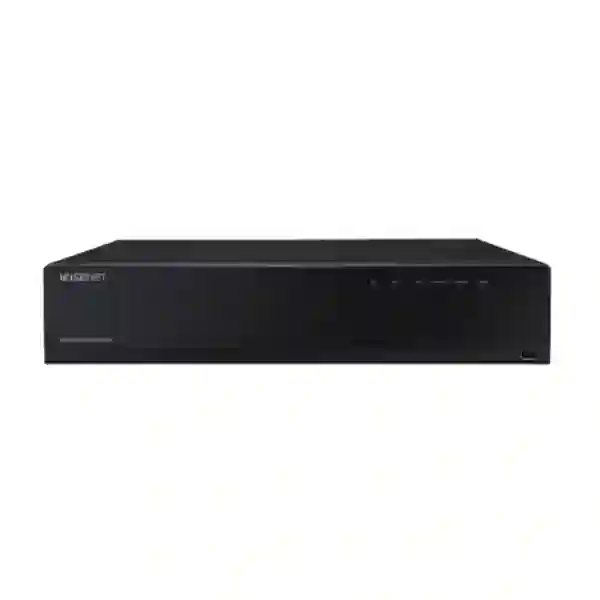
Hanwha WRN-1610S 16-Channel WAVE PoE+ Network Video Recorder
A technical buying guide for a 16-port WAVE recorder: integrated PoE+, recording performance, disk sizing, licensing and lifecycle decisions for surveillance projects in Tanzania.
Important lifecycle notice
Hanwha Vision lists the WRN-1610S as discontinued on regional catalogues and identifies WRN-1632S as a replacement. This information does not confirm Tanzania stock, condition, warranty, price or software support. Verify the proposed hardware and licensing before ordering.
Key manufacturer specifications
| Platform | Wisenet WAVE network video recorder |
|---|---|
| Camera connections | 16 × 10/100 Mbps PoE/PoE+ RJ-45 |
| Power for cameras | 200W total PoE budget; up to 30W per port subject to total |
| Recording performance | Up to 150 Mbps aggregate throughput |
| Storage | Four 3.5-inch SATA data-drive bays; up to 24TB raw |
| Network | Two Gigabit RJ-45 interfaces |
| Software listed originally | Ubuntu Linux 18.04 LTS and WAVE |
| Video output | HDMI and VGA for setup/basic monitoring |
| Alarm I/O | 4 inputs; 2 outputs |
| USB | 3 ports, one front and two rear |
| Chassis | 2U rack mount; approximately 440 × 89.8 × 426.3 mm |
| Unpopulated weight | Approximately 5.2 kg without HDDs |
| AC power | 100–240V AC input |
| Environment | 0°C to 40°C; 20%–85% RH, non-condensing |
| Lifecycle | Manufacturer regional pages mark discontinued |
Published ratings are not proof of a particular unit’s installed storage or WAVE licence package. Confirm the final configuration and supported software before purchase.
Product purpose and buyer fit
The Hanwha WRN-1610S 16 channel NVR combines a network video recorder, integrated camera power ports and Wisenet WAVE software in a rack-mounted unit. It was designed to manage compatible network surveillance cameras while offering operators a structured way to monitor and retrieve video. For a buyer, the important question is whether the complete camera system can operate inside its performance, storage, power and software limits. The presence of sixteen physical connections is only one part of that decision. A small building with a straightforward camera layout may have different needs from a busy commercial location with several high-bitrate cameras and frequent incident reviews. This guide explains the published capabilities, important installation constraints and procurement questions for Tanzania. It does not imply that this discontinued model is currently available, that every configuration contains the same hard drives or licences, or that particular seller terms have been verified.
Manufacturer lifecycle notice
Hanwha Vision marks WRN-1610S as discontinued on regional product pages and identifies WRN-1632S as a replacement in its Canadian catalogue. An existing WRN-1610S installation might continue to operate, but that fact should not be confused with a guarantee of future software updates, support, replacement parts or compatible expansion. A purchaser should establish whether a quotation refers to a remaining original unit, a previously used recorder or an alternative model. Ask for the precise hardware condition, software state and documented support arrangements. For a new deployment, compare the manufacturer’s suggested replacement before investing in an older platform. For an installed deployment, establish the current WAVE version, licence count, storage health and migration needs before deciding to keep or replace the unit. Discontinuation is a buying factor that deserves an explicit answer rather than a footnote in an otherwise attractive specification sheet.
Sixteen channels: what the figure means
The unit provides sixteen PoE/PoE+ camera connectors. This makes it practical to attach a group of compatible IP cameras directly, but it does not mean that any sixteen cameras will always record at any chosen resolution, frame rate or bitrate. Hanwha specifies a separate ceiling of up to 150 Mbps recording bandwidth, and WAVE recording permissions also depend on licences. Camera ports, total encoded traffic and software entitlement must therefore be checked independently. Begin with a schedule of camera models, expected recorded streams and operational roles. Add the anticipated bitrate for each stream, then evaluate the total against the recorder limit. Check how many WAVE recording licences are available before commissioning. This prevents the common situation where all physical connections are occupied but the resulting system does not provide the intended recordings, quality or number of licensed channels.
Integrated PoE+ network ports
Sixteen 10/100 Mbps PoE/PoE+ ports can carry camera data and provide suitable cameras with power. This can reduce the number of separate camera power adapters needed in a directly connected installation. It is not, however, a substitute for checking supported PoE standards, cable condition, maximum link lengths and site topology. Some cameras require accessories or operating conditions that affect their electrical demand. Others may sit in network locations where separate switching is preferable. An installer should confirm the exact port assignment for every camera and check that the recorder configuration supports the planned connection arrangement. When a camera fails to connect, determine whether the issue concerns power negotiation, cabling, addresses, compatibility or WAVE configuration before assuming that the camera itself is defective. Integrated PoE makes a design simpler only when electrical and network engineering remain sound.
The shared 200W power budget
The WRN-1610S has a combined 200W PoE budget. Manufacturer documentation also states that an individual compatible PoE+ port can support up to 30W, but all sixteen ports cannot draw 30W at the same time. That hypothetical group would require 480W, which exceeds the shared limit. For example, eight cameras drawing 8W and eight drawing 12W would total 160W at those assumed values, leaving 40W before other engineering margins. Real equipment should be planned from its specified worst-case consumption rather than illustrative figures. A camera may consume more when infrared lighting, heater functions or motorized accessories operate. A reliable specification lists each camera’s maximum wattage, totals the demands and allows sensible headroom. Never interpret the individual 30W rating as the total power available to every connected device simultaneously.
Camera consumption during day and night
Camera electrical demand is not necessarily constant throughout the day. Infrared illumination may switch on after dark; certain cameras may enable heating, motors or other loads under particular conditions. A set of cameras that starts successfully during a daytime installation could approach the available PoE limit in a different operating mode. Prepare a simple spreadsheet of model, port, maximum wattage and special operating features before connecting a full system. Verify PoE negotiation and inspect any reported over-budget warnings. Where required power exceeds the built-in budget, reconsider the camera selection or use an independently designed powering arrangement compatible with the network architecture. Do not assume that the recorder can safely supply an unverified combination simply because the number of cameras is sixteen or fewer. Power planning protects the recording system from intermittent failures that can be difficult to diagnose after handover.
The up-to-150-Mbps recording limit
Recording bandwidth is the combined video workload handled by the recorder under its documented test conditions. The published maximum for WRN-1610S is up to 150 Mbps. This does not represent 150 Mbps per camera and should not be confused with export speed or the bitrates that remote viewers can consume. Actual camera output changes with frame rate, compression, resolution, scene movement and quality settings. An apparently quiet camera may produce more data when its field of view becomes active. Estimate realistic stream rates across all cameras, then preserve operating headroom. If the system design relies on every camera staying at its ideal minimum bitrate, it is fragile. Test the completed configuration under representative daytime and nighttime conditions. A recorder that is comfortably inside its limit offers a better basis for dependable evidence than one configured to operate continuously against a theoretical maximum.
Video coding and camera quality
Hanwha regional product information refers to support for cameras using H.265, H.264 and MJPEG. These coding formats can affect bitrate, storage demand and playback requirements. They do not prove that every camera implements every codec or that every feature works through a selected WAVE version. Image quality also depends on optics, lighting, exposure, noise reduction and camera placement. Select the stream settings that preserve the details needed for the security task instead of choosing the smallest possible files. Review sample video from a busy entrance, a low-light location and any location with fast movement. Examine the footage at the display size operators will actually use. Lower bitrate can improve retention, but aggressive compression may remove critical details. Quality and storage should be balanced against a defined purpose, with results checked on recorded footage rather than only on a live preview.
Four internal data-drive bays
The manufacturer describes four 3.5-inch SATA hard-drive bays and an upper raw storage configuration of 24TB. Those figures describe the capability of the recorder family, not the contents of an individual listing. A specific unit may have fewer or smaller drives installed. Ask for the number of drives, each model and capacity, total raw capacity, and the space WAVE actually reports as usable. Confirm that the proposed hard drives are compatible and appropriate for video-recording use. Multiple drive positions should not be taken as proof of RAID protection, automatic redundancy or hot-swap capability; those matters require their own documented confirmation. A useful quote distinguishes an empty chassis from a fully configured recorder. Storage specifications should be precise because they affect retention, maintenance planning, replacement costs and the ability to retrieve footage when an incident occurs.
Raw capacity versus usable capacity
A statement such as up to 24TB raw is not a guarantee of 24TB available for recorded video. Storage devices have manufacturer capacity labels, while the formatted filesystem, software and any configured protection or reservation arrangement can reduce space available for recording. The exact reduction depends on the installed drives and system configuration. Buyers should request the usable recording capacity after installation and compare that number with the expected workload. A storage estimate should also leave room for ordinary management behavior and any specific operational reserves. Do not calculate retention days directly from a sales headline unless those assumptions are explained. Equally, avoid assuming a configuration provides drive-failure protection solely because it contains four disks. Where footage has high operational importance, design a separate preservation and recovery procedure. Internal capacity and a dependable evidence-retention strategy are related, but they are not interchangeable.
How to estimate video retention
For an illustrative continuous recording calculation, 1 Mbps of sustained video represents about 10.8GB of decimal data per day, before overhead. A camera group averaging 80 Mbps would therefore create roughly 864GB in twenty-four hours. Multiply the expected combined bitrate by 10.8GB and by the number of required days to estimate the raw volume generated. Compare the result with actual usable storage, not with the model’s maximum theoretical raw capacity. Footage size changes when scenes become busy, camera settings change or event-based schedules differ from assumptions. A practical test records representative video, checks the observed data rate and confirms that the retention policy behaves as expected. These calculations are planning tools rather than promises of a particular number of days. They should be rechecked after camera additions, encoding changes or substantial alterations to recording schedules.
Why retention policy comes first
Different locations can have very different reasons for keeping footage. An office entrance, a payment area, a loading gate and an isolated equipment room do not necessarily require identical quality settings or retention periods. The organization should define what incidents it needs to investigate, how quickly those incidents are usually discovered and what internal policies apply. Then choose camera settings and storage that meet those requirements. Avoid saving space in ways that could create blind spots in the evidence. Motion-based schedules, for example, should be tested against the events they are intended to capture. Establish how an important clip will be preserved before older recordings are automatically overwritten. A responsible design also considers authorized access, retention limitations and secure disposal according to the organization’s applicable obligations. The recorder capacity is useful only when it supports a deliberate and realistic footage policy.
Wisenet WAVE platform overview
Wisenet WAVE is the video management platform associated with WRN-1610S. It provides a client and server environment for organizing video sources and allowing permitted users to monitor and investigate recordings. Hanwha material describes WAVE client, mobile and cloud-related capabilities, but individual functionality must be checked against the installed version and system prerequisites. The important buyer question is how the intended staff will use the system. A receptionist who occasionally checks a camera, a security officer who reviews multiple feeds and a technical administrator need different permissions and potentially different client arrangements. Ask for a demonstration of the actual monitoring, search and export steps. Confirm whether metadata, events or notifications needed by the project appear in that configuration. A familiar software name does not remove the need to validate the exact deployed operating experience.
WAVE licence packaging can vary
An American datasheet and a Canadian manufacturer page describe packages with four WAVE Professional licences. Other Hanwha regional literature notes configurations with or without licences. It would therefore be inaccurate to tell every Tanzania buyer that a bare WRN-1610S contains a guaranteed set of four usable recording licences. The quote should identify the exact licensed entitlement included with the specific unit. Ask how many recording channels will be enabled immediately and what extra licence packages are required to reach the desired total. Existing owners should document their current licence keys and activation state through a secure administrative process rather than sharing keys publicly. If the system incorporates embedded recorders or other device types, confirm the licensing rules that apply to those integrations. A complete bill of materials includes recording software entitlement as clearly as it includes the recorder and hard drives.
Physical ports are not software licences
It is easy to interpret a sixteen-channel recorder as a single all-inclusive licence product, but hardware connectivity and recording software are separate constraints here. Sixteen PoE connectors establish how cameras can be physically attached. WAVE Professional entitlements govern how eligible streams can be used according to the applicable software rules and licence type. The number included in a package may be smaller than the number of connectors. Before installation, reconcile camera count, existing licences and any additional purchases. Then confirm that recording works for the intended cameras over time rather than only during a short live-view test. Record the licence information securely for future service and replacement planning. This distinction is especially important when transferring an older configuration, expanding a site or comparing a discontinued WRN model with a newer recorder whose commercial package may be different.
Wisenet and ONVIF camera interoperability
Hanwha describes support for suitable Wisenet and ONVIF-conformant IP cameras. This is useful in a mixed-camera project, but conformance does not guarantee identical behavior for every feature. Basic video may work while audio, advanced metadata, alarms, motion events or camera controls differ. Compatibility may also be influenced by camera firmware, protocol profile and WAVE version. Prepare an exact equipment list with manufacturer, model, firmware and required functions. Test a representative camera before specifying a large group of the same device. If the design depends on an analytics event or particular control command, demonstrate that complete workflow rather than inferring support from a logo. This is particularly important when connecting older cameras whose firmware and supported protocols may not match the current expectations of the video management platform. Successful interoperability is something to verify, not simply to assume.
AI metadata and what it does not promise
The Hanwha Vision description lists support for AI metadata, which is relevant to deployments that use compatible cameras and video management functionality. It should not be interpreted to mean that the recorder itself performs every form of artificial intelligence analysis for every ordinary camera. The source of metadata, the features that produce it and the methods used to display or search it must all be checked. If a buyer requires person or vehicle filtering, event classification or analytics-based notification, specify the precise scenario. Ask which camera supplies the event, whether that information reaches WAVE and how a user retrieves it. Check the software version and any licence prerequisites before placing AI-related functions in the scope of work. This separates real operational requirements from broad marketing language and avoids disappointing customers who expected functions that were never verified.
Two Gigabit network connections
Alongside the integrated camera ports, the model includes two Gigabit RJ-45 interfaces. These can support planned connectivity between the recorder and the wider surveillance environment, but the physical presence of two ports is not a promise of automatic failover, link aggregation or any particular topology. Follow the supported network configuration for the exact recorder and make site design decisions deliberately. Identify the traffic generated by camera recording, operator clients, exports and any remote sessions. Document addressing, routing, switching responsibilities and network access controls. Avoid placing unnecessary management interfaces directly on an untrusted network. Where the wider network carries ordinary office traffic, assess whether surveillance streams require segmentation or bandwidth controls. A clear network plan can prevent a seemingly simple NVR installation from becoming a difficult troubleshooting problem when many cameras and users are active at once.
Remote viewing and internet reliability
Remote monitoring can be valuable, but it depends on more than the recorder’s hardware specification. Hanwha references WAVE clients, mobile use and Cloud Sync, while actual access also depends on the deployed version, network permissions, authentication and the available internet connection. In Tanzania, buyers should test the connection at the site rather than assume a particular service quality. A single low-bitrate mobile view has different requirements from several operators viewing multiple streams. Calculate expected upstream traffic and assess network reliability, especially where a connection is shared with other business functions. Use a secure, approved remote-access architecture instead of exposing management ports without protection. Test the real user devices and workflows. Recording, remote viewing and exporting each introduce different technical demands, and a successful local playback test alone does not prove that remote operation will meet expectations.
HDMI and VGA monitor outputs
The WRN-1610S has HDMI and VGA video outputs, with earlier manufacturer documentation describing HDMI up to 4K and VGA up to 1080p for local display. The same guidance says the on-recorder client is intended for configuration and basic monitoring. Buyers should not equate a 4K-capable connection with guaranteed control-room performance for many simultaneous high-resolution streams. Consider the number of live camera tiles, the frequency of playback review and whether multiple operators will use the system at the same time. For intensive monitoring, test a dedicated WAVE client workstation and its display capabilities separately. Ensure that routine staff understand which display is for local setup and which is intended for everyday investigation. The right viewing arrangement depends on workflow, not on connector labels alone.
Alarm I/O and auxiliary connections
The manufacturer lists four alarm inputs and two alarm outputs on the WRN-1610S. These may be relevant to a site that needs approved external signals or controlled responses, but compatibility depends on electrical characteristics, supported configuration and the intended system behavior. Document what event should be recognized, what recording or operator action should follow and who will acknowledge it. A qualified installer should verify the correct wiring and ratings before connecting any external equipment. The recorder also includes USB connections and audio output as described by the manufacturer. Those interfaces should be incorporated into a specific use case rather than assumed to provide every desired function. Test alarms under realistic conditions and keep a written record of the configuration. Physical connectivity adds value when it supports a clear, verified process that site staff can operate safely.
Rack dimensions and installation space
The 2U chassis is approximately 440mm wide, 89.8mm high and 426.3mm deep. Hanwha lists its weight at about 5.2kg without the hard drives. Use these figures to help plan a suitable rack, but also allow room for cables, plugs, airflow and service access. Do not rely solely on the enclosure’s nominal depth when determining whether the rear cabling will fit. Check the actual bracket arrangement and support requirements for the unit being supplied. Additional installed drives increase weight. A properly organized cabinet should allow a technician to identify camera and network ports without damaging adjacent cables. Physical layout matters because routine maintenance and fault isolation become more difficult in a crowded, poorly labelled rack. A competent installation plan includes secure mounting, strain relief and an accessible route for servicing the recorder.
Temperature, ventilation and humidity
Hanwha lists an operating temperature from 0°C to 40°C and non-condensing relative humidity from 20% to 85%. These limits are relevant for equipment rooms, cabinets and other installation spaces. A site may be within specification at one time of day and warmer when a rack is full or the weather changes. Ensure the installed enclosure can remove heat generated by the recorder, hard drives and associated networking equipment. Keep ventilation openings clear and consider dust accumulation as a maintenance concern. Do not claim that an outdoor cabinet or unconditioned room is suitable merely because it physically accommodates the unit. Review the conditions expected through normal operation, and assess any environmental protection separately. Good ventilation and appropriate access reduce avoidable service problems and help maintain a dependable video-recording environment.
AC input and UPS planning
The stated input range is 100 to 240V AC. This supports power-supply planning but is not a substitute for proper electrical protection or backup power where surveillance continuity matters. The actual load includes the recorder, installed drives and PoE-powered cameras, which may consume more electricity under some operating conditions. Any external switches, routers or monitoring devices add their own power requirements. A UPS should be sized from a credible measured or specified load and the required backup duration, following the UPS manufacturer’s guidance. Arrange safe shutdown and recovery behavior according to the supported recorder instructions. Test what happens after a controlled power interruption, including camera reconnection, time synchronization and resumed recording. Avoid promising a particular UPS runtime without the complete equipment load and battery specification. Backup power is useful only when the recovery process is understood and verified.
Secure software and administration
The original manufacturer specification identifies Ubuntu Linux 18.04 LTS on the appliance. Because this is an older discontinued model, verify the vendor-supported software and security-update path for the exact hardware before connecting it to sensitive networks. Do not assume a general-purpose operating-system upgrade is authorized or safe for the recorder. Assign named administrative responsibility and apply suitable account permissions where supported by the deployed WAVE version. Separate routine viewing tasks from configuration changes and preserve a secure record of authorised service access. Protect network interfaces and avoid unnecessary exposure to public internet traffic. Review accounts when staff responsibilities change. Security is not a single device setting; it involves the operating environment, application version, remote-access method and local procedures. Ask the supplier to document the supported maintenance approach rather than accepting a vague statement that software is current.
Commissioning steps before handover
Begin with a complete inventory of camera models, expected PoE wattages, WAVE licence entitlements, installed disks and network connections. Check the recorder identity and condition. Connect a representative camera first, then verify stream quality, recorded playback and any required event functions. Continue with the remaining cameras while checking combined recording bandwidth and total power draw. Confirm the correct time settings and recording schedules. Test footage retrieval using the accounts that real operators will use. Check the retention estimate against actual data and ensure the required amount of usable storage is available. Rehearse an outage recovery and a practical incident export. Document configuration settings securely and hand over a support escalation process. Installation is successful when the system repeatedly performs its intended tasks, not merely when the network ports show activity and live camera images appear briefly.
Footage retrieval and incident workflow
A surveillance system should make it possible to identify the relevant event, find the correct recording and preserve the required material with appropriate authorization. Agree on who can search footage, export clips and handle requests from other parties. Test the actual WAVE search and export functionality in the deployed version rather than assuming features from a newer demonstration are present. Pay attention to time settings, camera naming and the clarity of exported video. A file is less useful if staff cannot associate it with the right camera or time period. Establish a process to preserve important recordings before routine cyclic storage overwrites them. Where chain-of-custody requirements apply, implement suitable organizational procedures independently of the recorder’s marketing claims. The practical value of video is established during a real investigation, so the workflow must be tested in advance.
Routine health and disk maintenance
Maintenance should cover camera recording status, image quality, usable disk space, expected retention, time synchronization and any alarm or network faults. Front-panel status indicators can help with local troubleshooting, but they should not replace regular checks through the appropriate management software. Inspect physical connections, rack cleanliness and airflow. Keep a controlled record when drives are replaced or cameras are added. Recalculate bandwidth, PoE demand and licence requirements whenever the system changes. Identify whom to contact when a disk fails or an important camera stops recording. In a discontinued platform, clarify replacement-part sourcing and planned migration earlier than you might for a newly launched device. The goal is to detect declining recording reliability before an incident reveals a missing period of footage. Documented maintenance produces better security outcomes than simply keeping the unit powered on.
Office and commercial building deployments
For an office or commercial building, relevant cameras may cover entrances, corridors, reception areas and access points. The WRN-1610S can be evaluated where compatible cameras and licensing requirements fit its documented limits. Begin with the security questions: which entrances need useful identification, what activity needs to be seen and who reviews incidents? Determine the camera count from those needs rather than filling all sixteen ports automatically. Select settings suitable for each scene and calculate recording bitrate and retention. Separate permissions for security staff, facilities administrators and occasional authorized viewers where supported. Review the available rack space and backup-power arrangements. If the building expects considerable future growth or requires a newly supported hardware platform, compare alternatives early. A useful solution balances physical coverage, readable footage, everyday operation and a clear path for future service.
Retail, counter and stockroom scenarios
A retail location may need coverage of public entrances, transactions, storage areas and staff-only access points. These environments vary widely in motion and lighting, so a single bitrate assumption for every camera may be misleading. Position cameras to capture the details relevant to the intended incident, not merely to show a broad area on a screen. Review recorded examples during busy and quiet periods. Plan who can investigate a loss event and how preserved clips will be controlled. If a store has alarm integration requirements, validate the wiring and supported WAVE event workflow. The integrated PoE ports can simplify direct camera connection when power and cabling are appropriate, but the shared 200W ceiling must still be respected. Where lifecycle support matters, include the manufacturer’s replacement recommendation in the buying comparison.
Warehouse and perimeter requirements
Warehouses, workshops and perimeter locations can introduce longer cable paths, large outdoor scenes and cameras with higher power requirements. Consider each camera’s environmental rating, nighttime image quality and electrical demand separately from the recorder. Large outdoor units or motorized accessories may make an independent powering arrangement appropriate. Plan how network traffic reaches the recorder and where physical security equipment will be installed. If the site spans separate buildings, an integrated sixteen-port switch may not be the simplest topology. Test outdoor scenes at the times when activity occurs, including vehicle movement and changes in illumination. Confirm that the resulting bitrates and storage fit the system. A technical site survey should define the requirement before choosing camera quantities. The recorder should support the security design, not dictate the locations or capabilities of the cameras.
Planning a replacement or upgrade
Hanwha identifies WRN-1632S as the replacement model in a regional listing. That is a useful starting point, but it does not establish that every old storage drive, licence, setting or recording can be transferred without effort. Create a migration plan based on the existing camera inventory and the actual software entitlements. Confirm the new recorder’s camera compatibility, recording throughput, PoE supply and storage configuration from its own documentation. Identify how older footage will remain available, who needs to approve downtime and how to restore normal monitoring afterward. For a new site, compare a fully specified newer platform instead of buying an older recorder only because its physical port count looks sufficient. Any proposal should separate hardware, installed drives, extra licences, client equipment and the work required to put the system into service.
Existing-system expansion checks
An owner of an installed WRN-1610S may wish to add cameras or change existing units. Check the condition of current disks and the WAVE software state before modifying the design. Record the number of active cameras, available licensed channels, measured recording bitrate and PoE demand. For every new camera, confirm compatibility and power requirements and determine whether aggregate recording throughput remains appropriate. A free physical port does not prove that a camera can be added without more licensing or storage. Similarly, adding a network switch should not be treated as evidence of unlimited recording-channel expansion. Review how the new footage changes retention and operator workload. If expansion stretches several limits at once, a planned recorder replacement may be more reliable than incremental modifications to discontinued equipment.
What a Tanzania quote should include
A useful quote identifies the exact WRN-1610S unit or replacement being proposed, its condition and the specific hardware package. It should state the installed hard drives and usable capacity, included WAVE recording entitlements, any additional licences and the accessories required for installation. Ask for a camera compatibility review and a table showing estimated per-camera bitrate and maximum PoE draw. Include the desired retention period and any remote-monitoring or alarm requirement in the specification. Confirm local price, taxes, currency, delivery timing, warranty terms and service arrangements directly with the seller, because these are not verified for this particular listing. For an older model, request explicit lifecycle information and a technically suitable alternative where possible. A detailed quotation is far easier to evaluate than an unqualified price for a sixteen-channel box.
Final technical acceptance checklist
Before accepting a proposal, verify the camera model list and required WAVE features. Confirm that recording licences match the planned recorded channels. Check the aggregate video bitrate against the 150 Mbps manufacturer limit and total maximum PoE demand against the shared 200W budget. Verify installed compatible drives, usable storage and estimated retention. Review whether rack space, cooling, backup power and network security are appropriate. Test local and remote operator workflows, if remote access is part of the requirement. Check alarm behavior where relevant. Finally, document the offered hardware condition, software support and lifecycle plan. Any unresolved question should result in a requested clarification, not a guessed capability. A coherent assessment of all these elements is more useful than a short headline specification and provides a stronger basis for investment and handover.
Why configuration verification adds value
Different buyers can select the same recorder model and experience very different results because their cameras, workloads, disks, software entitlements and networks differ. A useful review starts with a site sketch or camera schedule, the expected number of recording streams and the required retention period. It then identifies the missing information that affects the design: per-camera power draw, chosen codec settings, supported software version, storage arrangement and the needs of daily operators. That process is particularly worthwhile for discontinued hardware, where the procurement and maintenance implications may outweigh a simple comparison of published features. For buyers considering the Hanwha WRN-1610S 16 channel NVR in Tanzania, the next step is to request a configuration-specific suitability and replacement assessment. This avoids treating historical specifications as a guarantee about a present-day unit or service package.
Frequently asked questions
Is the WRN-1610S discontinued?
Yes. Hanwha Vision marks the model discontinued on regional product pages and identifies WRN-1632S as its replacement in the Canadian catalogue. This does not establish whether an individual supplier still has a unit. Confirm condition, support and alternatives before making a purchase.
Are all sixteen WAVE recording licences included?
Not automatically. Some regional packages documented four WAVE Professional licences; other configurations can differ. Count the licences supplied with the exact unit and budget any additional recording entitlement. The number of PoE camera ports is not a substitute for a software licence audit.
Does the recorder already contain 24TB of storage?
Not necessarily. The manufacturer describes up to 24TB raw capacity across four supported SATA drive positions. The actual unit may contain fewer drives or a different capacity. Request the exact installed drive schedule and usable storage shown in the management software.
Can sixteen cameras draw 30W each?
No. The recorder has a 200W total PoE budget even though an individual compatible port may support up to 30W. Add every camera’s worst-case electrical demand and allow margin. Nighttime or accessory power loads should be included when relevant.
What does 150 Mbps recording bandwidth describe?
It describes the published maximum aggregate recording workload under the manufacturer’s test conditions. It is not a per-camera guarantee. Evaluate the expected total camera bitrates, include reasonable headroom and verify the intended configuration with recording tests.
Will any ONVIF camera support advanced searches?
ONVIF conformance alone does not guarantee full metadata, events or control support. Check camera and WAVE versions, supported profiles and the features required. Demonstrate a real event or search workflow before relying on it in the installation.
Are HDMI and VGA suitable for a large control room?
They are intended primarily for configuration and basic monitoring in the manufacturer’s guidance. Consider a dedicated WAVE workstation for heavier monitoring and playback needs. Test the actual number of camera views and operator workflows.
How can I calculate days of video retention?
Estimate the combined average recorded Mbps and use approximately 10.8GB per day for every sustained 1 Mbps before overhead. Compare the projected data with usable storage, then verify against actual recordings. There is no universal thirty-day guarantee.
Should I buy WRN-1610S or a newer model?
A new project should evaluate the replacement model and other currently supported alternatives, because the WRN-1610S is marked discontinued. Existing owners should assess their current software, licences, cameras, stored footage and upgrade costs before deciding whether to migrate.
What should I provide when asking for a quote?
Share the camera count and models, the required retention period, intended monitoring users, network situation, alarm needs and existing WAVE entitlements. Ask for the precise unit condition, installed drives, included licences, support status and a compatible replacement option.
Request a recorder suitability and replacement review
For a Tanzania surveillance project, share the camera schedule, desired recording duration and existing WAVE entitlements. Ask for a detailed quotation specifying unit condition, hard drives, licences, compatibility checks, software support and an appropriate successor model if required.
Contact FourTeck Tanzania to discuss the correct configuration and next step.




Reviews
There are no reviews yet.