
Professional IP video recording • Tanzania buying guide
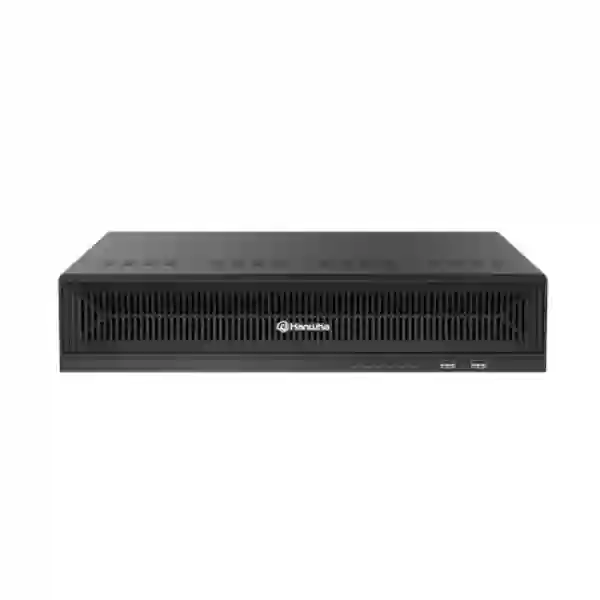
Hanwha Vision WRN-1632S Wisenet WAVE PoE+ NVR
A practical way to evaluate an integrated PoE video recorder: understand the 16 camera ports, four included WAVE recording licenses, 250 Mbps recording throughput and configurable storage before choosing your installation.
Check the complete camera solution, not just the recorder
The Hanwha WRN-1632S is intended for managed IP surveillance with Wisenet WAVE. For customers evaluating CCTV recording equipment in Tanzania, the main purchasing questions are how many cameras must actually record, which storage variant is supplied, whether the site can stay within the shared PoE budget and how recording will be administered. Request a configuration-based quotation with the license and hard-drive details stated explicitly.
The difference between ports and licenses is especially important: this model supplies 16 physical PoE/PoE+ connections but only four included WAVE Professional recording licenses. Other cameras normally require additional licenses before recording. The limits on power, bandwidth, usable storage and channel support must also be evaluated independently.
Verified technical specifications at a glance
The following values describe the manufacturer-published base model rather than the contents of any unverified Tanzania sales package. Disk quantity, installed storage, channel capacity in a specific variant, rack accessories and software version should be confirmed in the quotation.
| Manufacturer | Hanwha Vision |
|---|---|
| Model | WRN-1632S |
| Category | Wisenet WAVE PoE+ NVR |
| Built-in PoE/PoE+ | 16 × RJ-45 10/100 Mbps |
| PoE power budget | 200 W combined |
| Additional network interfaces | 2 × RJ-45 1 Gbps |
| Recording throughput | Up to 250 Mbps |
| Included recording licenses | 4 × Wisenet WAVE Professional |
| Data storage | 4 SATA bays; up to 40 TB raw maximum |
| Operating-system storage | 32 GB eMMC |
| Processor / memory | Quad-core; 8 GB DDR4 |
| Operating system | Ubuntu Linux 22.04 LTS |
| Video output | 1 HDMI; 1 DisplayPort |
| USB | 2 front USB 2.0; 2 rear USB 3.0 |
| Audio | Audio output |
| Power input | 100–240 V AC |
| Listed power consumption | 340 W |
| Operating conditions | 0°C–40°C; 20%–85% RH, non-condensing |
| Weight | Approximately 5.56 kg |
| Physical envelope | Approx. 440 × 89.8 × 426–428 mm; verify exact rack drawing |
Quick pre-purchase checklist
- Confirm the exact WRN-1632S part number and the installed hard-drive capacity, not only the maximum supported capacity.
- Count the cameras that must record and list extra Wisenet WAVE Professional licenses beyond the four bundled licenses.
- Check the total worst-case PoE power demand against the shared 200 W limit, including night-time functions.
- Estimate peak camera bitrates against the 250 Mbps recording throughput and the required retention days.
- Validate the exact camera models, firmware, AI metadata needs and preferred WAVE viewing workflow.
- Check rack dimensions, ventilation, site power, UPS, cabling, administrator ownership and acceptance testing.
- Request locally verified pricing, warranty, availability, and any installation or support terms in writing.
What the WRN-1632S is designed to do
The Hanwha Vision WRN-1632S is a Wisenet WAVE PoE+ network video recorder for organisations that need a centrally managed IP camera recording platform. It combines a video recording server, integrated power-over-Ethernet camera connections and WAVE video management functions in a rack-oriented enclosure. For a buyer comparing several CCTV recorders, its value is the combination of recording infrastructure and software management rather than a claim that every connected camera or every possible recording channel is automatically licensed.
This model can suit an office, warehouse, retail premise, school administrative area or other managed property where several IP cameras need to be recorded and reviewed. The suitable configuration depends on camera compatibility, the expected recording bitrates, power draw, retention requirements, the purchased hard-drive variant and the number of WAVE recording licenses. These considerations determine the practical system more reliably than a simple channel-count label.
Before requesting a quote in Tanzania, identify the number of cameras to record today, their maximum power requirements, the number of days footage should be retained and whether operators will view video locally, from another workstation or on mobile devices. FourTeck Tanzania can use those requirements to discuss a suitable equipment and licensing quotation without assuming a particular storage configuration or local availability.
Read the specifications as four separate limits
Four different numbers matter when specifying this recorder. The chassis provides 16 physical 10/100 Mbps PoE/PoE+ camera-facing ports. The total available PoE budget is 200 W across those ports. The published maximum recording throughput is 250 Mbps, which describes aggregate incoming video recording traffic rather than the speed of each individual camera connection. The manufacturer also identifies four Wisenet WAVE Professional licenses included with the model.
These figures do not mean the same thing. A camera can be physically plugged into a powered port but still need a valid recording license. A set of cameras might draw less than 200 W yet generate more data than the storage plan can retain. Conversely, cameras on external compatible network switches might use separate power infrastructure while still contributing to the recording workload. Design should examine every constraint together.
Some published descriptions of the WRN-1632S family refer to support for as many as 32 channels, while certain retailer listings describe it as a 16-channel appliance. Because these descriptions differ, a buyer should confirm the supported camera count for the exact offered firmware, software version and variant before purchasing for expansion. The 16 direct PoE ports and four included Professional licenses remain distinct, clearly documented facts.
Wisenet WAVE licensing explained before purchase
The WRN-1632S is supplied with four Wisenet WAVE Professional recording licenses according to the manufacturer product specifications. Wisenet WAVE licensing documentation states that one recording license is normally required per camera or recorded video source. For example, a proposed twelve-camera installation would ordinarily need twelve suitable recording licenses in total; four bundled licenses do not automatically cover the other eight recordings.
A Professional recording license is different from a temporary trial license. The WAVE manual describes Professional licenses as non-expiring, while free evaluation licenses are time-limited. The installer should verify the license quantities and type in the actual sales quotation and activate the keys in the correct server environment. An installation with sufficient network ports but insufficient licenses can have cameras visible without the intended recording capability.
Licensing also affects later expansion, replacement and administration. WAVE documentation associates activated licenses with a hardware identifier, so changes to equipment can require attention to license management. Buyers planning several recorders, device migration or later additional cameras should ask how recording licenses will be assigned, documented and maintained. Do not buy only on the assumption that a port count equals the number of included licenses.
Ask the supplier to state separately the price and quantity of the recorder hardware, installed hard drives, included licenses, any additional recording licenses, cameras, switches and professional installation services. Clear quotation line items prevent a seemingly complete recorder purchase from omitting an essential part of the intended surveillance system.
Integrated PoE and camera power planning
Sixteen integrated PoE/PoE+ Ethernet ports can simplify wiring by delivering compatible camera network connectivity and power over one cable. The published total PoE budget is 200 W, but this is a shared maximum rather than 200 W available to each camera. A practical design must total the worst-case power requirements of all attached devices, including any increased draw associated with night illumination, heaters or other camera functions where applicable.
For a starting estimate, collect each selected camera model’s documented maximum PoE power consumption and sum those maxima. Compare the result with the recorder’s total 200 W budget while allowing a sensible operating margin. If a group of cameras would demand more, plan an appropriate external PoE switch or another power arrangement rather than assuming the recorder will sustain an overloaded design. Check supported PoE class and port behaviour for the exact camera models.
The 16 camera-facing network interfaces are specified at 10/100 Mbps. They should not be confused with the two separate 1 Gbps network interfaces identified by Hanwha for wider connectivity. Uplinks, camera VLANs, switch ports and traffic separation should be planned around the actual topology. For externally connected cameras, confirm that the routing and network discovery arrangement is supported by the intended WAVE deployment.
Ethernet cable selection and installation quality also matter. Long cable runs, poor terminations, moisture exposure and electrical interference can create intermittent camera failures that look like software problems. The network installer should validate the cable route and applicable Ethernet distance and safety requirements, label connections, check PoE consumption during day and night operation and document where every camera terminates.
Recording throughput and real capacity
Hanwha lists up to 250 Mbps of recording throughput for the WRN-1632S. This is a platform-level recording performance figure. It is not a promise that every proposed combination of cameras, resolutions, compression profiles and retention policies will deliver the same result. The installer should calculate expected aggregate camera video rates using the exact recording profile selected for each camera.
Bitrate is influenced by resolution, frames per second, scene complexity, illumination, compression settings, motion and quality settings. A static indoor corridor can generate very different video traffic from a busy loading area, even when both cameras have similar megapixel ratings. High-motion scenes, frequent headlights and complex shadows may produce larger real-world files. Manufacturer camera data and a site-specific recording plan are therefore more useful than a universal cameras-per-recorder claim.
Leave headroom when assessing throughput. Consider peak conditions rather than only the average seen during a short demonstration, and review the traffic created by remote clients, administrative tasks and any additional functions. Throughput should also be discussed alongside storage capacity, PoE power, camera compatibility and licensing. The published maximum is a design ceiling, not a substitute for a tested system bill of materials.
Where future camera additions are expected, maintain a capacity schedule showing each camera’s estimated recording bitrate and power draw. Update this schedule when cameras are moved to higher resolutions or frame rates. A simple documented model helps facilities teams understand which expansion will need another license, more disk capacity, additional PoE power or a different recorder.
Storage architecture: four SATA bays and up to 40 TB
The published hardware specification identifies four SATA data-drive bays with support for up to 40 TB of internal storage. That capacity is the maximum installed raw storage configuration described for the model; it does not establish which disks are fitted to the particular unit being quoted. The customer must check the exact drive variant, drive count and raw capacity in the offer rather than assuming that the recorder automatically arrives fully populated.
Manufacturer documentation also specifies a separate 32 GB eMMC operating-system drive. This is distinct from the larger data-drive storage used for video recording. The distinction is useful when comparing appliances because the operating system and recording media are not simply one undifferentiated storage figure. The operating system is listed as Ubuntu Linux 22.04 LTS.
Raw disk capacity should never be presented as an unconditional retention guarantee. Filesystem allocation, reserved space, any selected storage configuration and the actual aggregate recorded bitrate affect footage retention. Before ordering, agree the desired retention period for ordinary operation and high-activity periods. Ask for a written capacity estimate based on camera profiles and confirm whether the target is continuous recording or recording triggered by particular events.
The product name WRN-1632S identifies the recorder family, not a specific installed hard-drive quantity. Storage-suffixed variants may differ in delivered disk size. Confirm the complete offered part number and drive specification. If buying a drive-upgrade or replacement configuration, also verify approved drive models and applicable hardware support arrangements.
How to estimate days of footage retention
Storage planning begins with the camera schedule, not with the biggest disk figure on a product listing. List every camera, the recording resolution, typical and upper-end bitrate, frame rate, compression method and whether it records continuously or under a defined schedule. Calculate the expected combined amount of video written per day, then compare it with the usable recording capacity and the organisation’s desired number of days.
As an approximate unit conversion, a continuous 1 Mbps stream represents around 10.8 GB of data per 24 hours before allowing for recording overhead and other effects. This mathematical conversion is not a prediction of any specific camera’s video rate. Actual variable-bitrate footage can be above or below the assumed value. Recalculate using the selected cameras’ real profiles, representative recording samples and the required safety margin.
An organisation may need longer retention for entry points than for non-critical areas. Decide whether all cameras require the same duration or whether a differentiated policy is operationally acceptable. The technical design should then account for the largest anticipated daily workload, relevant privacy rules, the available storage and the process for retrieving recorded incidents when necessary.
After commissioning, review the system’s observed storage consumption rather than relying permanently on the initial spreadsheet. Seasonal activity, camera repositioning, higher-quality profiles and additional analytics can change usage. A retention plan is successful when the resulting footage meets an agreed operational requirement during real operating conditions, not merely when the capacity figure sounds large.
Camera selection and compatibility checks
The presence of PoE ports does not prove that every IP camera will work with every WAVE feature. The proposed camera model should be evaluated for supported discovery methods, video streams, codecs, audio or event functions, available metadata and any WAVE integration requirements. If an organisation already owns cameras, obtain their exact models and firmware versions before assuming a straightforward migration.
Standard viewing and recording functions are different from advanced analytics. Some compatible cameras can provide additional metadata or events, but those possibilities vary by camera hardware, firmware and software configuration. A recorder that supports AI metadata should not be described as adding AI detection features to every connected camera. Confirm what is produced at the camera, what WAVE can ingest and how the operator will use it.
Consider where image evidence is needed rather than simply increasing megapixel counts. Entrances, perimeter gates, receiving bays and corridors may require different fields of view, lighting and frame rates. Image quality depends on the camera and its installation as well as the recorder. Specify suitable camera lenses, mounting locations and illumination before deciding the recording settings.
For an existing surveillance upgrade, plan a camera-by-camera compatibility trial when practical. Test a representative fixed camera, any intended PTZ device, a night scene and the required search or event function. Document which functions are confirmed and which require different equipment. That approach reduces the risk of buying a recorder with attractive specifications that do not match the live site.
AI metadata: useful, but not automatic analytics
Hanwha lists AI metadata support among the WRN-1632S features. In practical terms, compatible camera-generated metadata can potentially support more informative video management and investigation workflows. However, the exact searchable events, classifications and filters depend on the cameras, WAVE version, integration capabilities and configuration. Do not assume that the appliance itself creates every type of intelligent event.
Before specifying an analytics-led installation, write down the desired operator question. Examples include locating footage associated with an event at an entrance or making it easier to narrow a review window. Then check the exact camera-and-recorder combination against those goals. A demonstration should use the intended camera models and a representative scene rather than a generic marketing example.
Metadata-assisted investigation complements basic image capture, timestamp integrity and human review. Organisations should also establish who may access recordings, how incident clips will be documented and what evidence handling process applies. Intelligent search is most valuable when it fits a clear security workflow, rather than being included without a defined operational purpose.
Local display, WAVE client and remote access
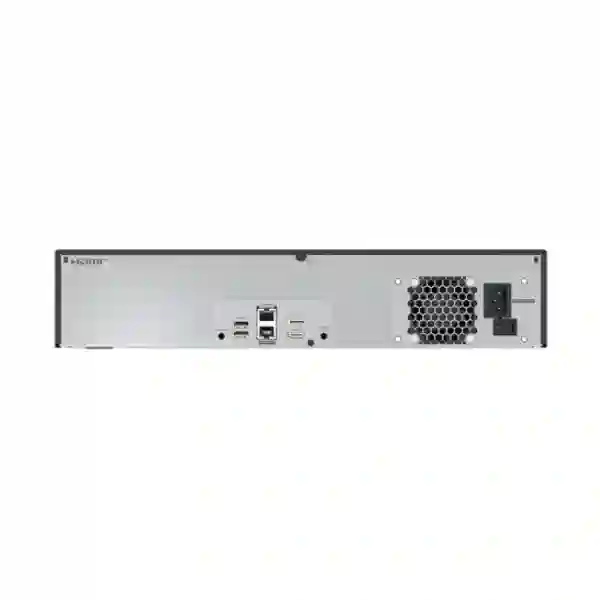
The WRN-1632S provides one HDMI output and one DisplayPort output. Hanwha describes these as suitable for configuration and basic monitoring. That wording matters: buyers planning a full control-room display wall or multiple advanced operator layouts should not assume that the recorder’s directly connected monitor outputs replace a correctly specified WAVE workstation or other display infrastructure.
The product is supported by Wisenet WAVE client, mobile and Cloud Sync capabilities. A suitable client deployment can let authorised users manage video according to the configured system permissions and network environment. The availability and behaviour of particular remote features should be confirmed for the chosen WAVE version, account configuration and network policy. Remote viewing is not synonymous with unrestricted public Internet exposure.
Design the operator workflow before installation. Decide who monitors live video, who searches historical recordings, who exports incident clips and who administers cameras and users. Some sites need an on-site viewing desk, while others require controlled off-site access for specific managers. The correct arrangement will influence endpoint hardware, software configuration, credentials, connectivity and support procedures.
Where Internet connectivity is unreliable, review which functions require an outside service and which are available on the local network. Test live viewing and recording when the uplink is disconnected if local autonomy is important. Ask the installer to explain the distinction between on-site recording, user authentication and cloud-associated functions so that the operating procedure remains clear during an outage.
Network layout: camera LAN versus wider access
Hanwha specifies sixteen 10/100 Mbps PoE camera-facing RJ-45 ports and two separate 1 Gbps RJ-45 interfaces. Treat those interfaces as parts of an intentional network design. Cameras may be directly connected through built-in PoE ports, while supported external network cameras may require additional switching and routing arrangements. A deployment diagram should show every switch, uplink, address range and administrative connection.
A managed network environment should limit unnecessary access to cameras and recorder administration. Use the organisation’s security policies when assigning addressing, VLANs, firewall rules and remote-access permissions. Keep the path for management and live viewing predictable. Avoid ad-hoc consumer network extensions that are difficult to troubleshoot or maintain after the original installer leaves.
Verify bandwidth in both directions that matter: video arriving for recording and video being delivered to viewing clients. Busy sites with multiple viewers can have a different network profile from systems with little live monitoring. If users will access clips across a slower WAN, test their experience with realistic recordings rather than assuming that a fast local network guarantees smooth remote operation.
Document IP addresses and management settings securely, not on a publicly visible sticker. Label physical connections, retain a diagram for maintenance staff and provide authorised administrators with a controlled handover record. This is particularly important when the surveillance network shares premises with other business systems.
Power continuity and environmental limits
The published input specification is 100–240 V AC, while Hanwha lists 340 W power consumption for the appliance. The latter should be incorporated into power and backup planning rather than confused with the 200 W PoE budget. Confirm the site electrical arrangement, protective devices, grounding and any UPS sizing with a qualified installer using the actual connected load and desired runtime.
An unexpected power cut can interrupt recording just when footage is needed. For critical deployments, consider a suitably specified uninterruptible power supply for the recorder and every external component essential to recording, including network switches and upstream equipment where relevant. UPS runtime should be calculated for the complete system, tested under representative conditions and reviewed as batteries age.
Hanwha lists an operating temperature range of 0°C to 40°C and operating humidity of 20% to 85%, non-condensing. These are equipment operating limits, not assurances about the conditions inside a closed cabinet. A poorly ventilated equipment space can run hotter than the room. Check airflow, spacing, fan operation and environmental monitoring where the site has significant dust, heat or humidity.
In Tanzania, a professional installation should evaluate the actual premises rather than infer conditions from the country name. A protected indoor rack, a warehouse plant room and a small unventilated security cupboard can present very different thermal and electrical risks. Do not install outside the documented environmental envelope or make unsupported claims of weather resistance.
Rack placement, dimensions and physical access
The manufacturer publishes a metal enclosure around 440 mm wide, 89.8 mm high and approximately 426–428 mm deep, with a listed weight of 5.56 kg. Its current page and various catalogues are inconsistent in how they label rack height. Because 89.8 mm is close to a two-rack-unit height, check the physical rack space and the exact mechanical drawing before procuring rails, shelves or a close-fitting cabinet.
The product listing identifies rack-mount brackets among its supplied accessories, but does not establish that every chosen rack system, sliding rail kit or installation accessory is provided. Confirm what will actually ship with the offered regional variant. Ensure the cabinet can accommodate power and network cables, service access and unobstructed ventilation.
Choose a location that authorised staff can reach when a drive, cable or power component needs attention. Physical security matters because a stolen or damaged recorder may also mean loss of stored evidence. The rack should be protected against casual access and accidental interference while retaining adequate access for maintenance.
Discuss noise, heat, dust and the position of nearby electrical equipment with the site team. A communications cabinet is often more appropriate than a public reception desk, but the final location should follow the building’s conditions and operational needs. Preserve enough space to identify cable labels, view status indicators and replace supported components safely.
A practical commissioning sequence
Begin with a documented site survey. Count every intended camera and note its mounting point, cable route, scene purpose, camera model, PoE demand and expected recording profile. Confirm whether existing infrastructure can be reused safely. At this stage, the design team should also document any requested remote access and which personnel will administer the system.
Next, calculate the combined recording bitrate, identify storage and retention targets, check total PoE load, and determine the quantity of recording licenses required. Verify the exact offered hard-drive configuration, compatible firmware and WAVE software version. A complete design package should describe the storage assumption, not simply quote a maximum of 40 TB.
During physical installation, inspect rack space, ventilation, cable quality and power protection. Connect cameras according to the agreed topology and keep records of network settings. Commission each camera individually, then verify stable operation with all intended devices running together. Check that the configured recording schedule actually records the footage expected by the buyer.
After deployment, test live view, search, playback, clip export, remote access where authorised, user permissions and recovery from an ordinary network interruption. Review observed camera bitrates and disk consumption. A completion checklist should capture the as-built diagram, license details, critical settings, administrator ownership and any outstanding acceptance items.
Finally, arrange a handover. Show the responsible staff how to locate footage, export a required incident segment, check storage health and report a fault. Agree how software maintenance, configuration backup, drive faults and routine inspections will be handled. A recorder purchase is only one step; a reliable surveillance service depends on a maintained operating process.
Common business deployment scenarios
A multi-door office could use this recorder to keep entrance, reception, corridor and parking-area camera footage under one management environment. Its success would depend on the actual number of recording licenses, each camera’s power consumption and a privacy-conscious access policy. Users should decide in advance who may view public areas and which clips are released following an incident.
A retail premises might place cameras at public entrances, till approaches and delivery areas, with different recording profiles for each scene. Retention requirements can depend on how frequently incidents are investigated. A simple capacity spreadsheet and a clear procedure for exports are more useful than selecting a storage size without considering daily activity.
A warehouse or logistics location may face demanding scenes with moving vehicles, changing light and long cable routes. The design should prioritise robust network cabling, appropriate camera placement, realistic peak bitrates and suitable environmental protection. The external switching arrangement should be evaluated if the built-in ports cannot serve the physical layout.
At an educational or administrative site, staff may require several user roles and a careful approach to permission management. The WAVE software environment can form part of that process, but role design, retention and privacy responsibilities still require institutional decisions. A site should not give broad recording access simply because the software can support remote clients.
At a small industrial or utility facility, continuity can be the priority. The UPS plan should protect not only the recorder but any switch or connection needed for incoming camera traffic. Operators should define which faults create maintenance alerts and how they will confirm that the required footage is still being recorded after an outage.
For a growing multi-zone property, camera additions should be reviewed against physical PoE availability, network capacity, recording throughput, usable storage and extra licensing. A system may have room in one category but be constrained in another. Keeping a cumulative capacity register will make the next procurement decision more predictable.
Security of the video management environment
An IP recording appliance should be treated as part of the organisation’s managed IT environment. Assign unique strong credentials, limit administrative roles and follow the supported WAVE and operating-system maintenance guidance. The security procedure should include a record of who manages updates and how change approvals are handled.
Do not expose management interfaces or camera connections indiscriminately to the public Internet. Remote access arrangements should follow the organisation’s network security design and the supported capabilities of the selected product and software. Where remote users are required, define an authorised access method and test it with the site’s firewall and identity policies.
Review data access as well as device access. Decide which employees may see live footage, which may search historical recordings and who can export or delete data according to available permissions. Keep an incident log for evidence requests, particularly when clips may be used in investigations or personnel matters. Organisation-specific privacy obligations should be evaluated separately from the hardware specification.
Camera firmware, recorder software and client applications can change over time. The service plan should identify a responsible owner who reviews manufacturer advisories, assesses compatibility and schedules updates with an appropriate rollback or recovery procedure. No appliance should be advertised as permanently secure without maintenance.
Backup and continuity deserve a separate discussion. The recorder’s internal recording disks are not automatically an off-site disaster-recovery system. Important incident footage should be exported and preserved through an approved evidence-management process when needed. Test the export file and maintain the chain of custody required by the organisation.
What to verify in a Tanzanian purchase quotation
First, request the full model and storage suffix rather than only the family name WRN-1632S. Ask how many data drives are fitted and what raw capacity is included. If no drives are quoted, determine whether the appliance can meet the intended schedule after the necessary supported storage is installed. Neither the manufacturer maximum nor another retailer’s bundle establishes the storage included in the local offer.
Second, require a written license schedule showing four included Wisenet WAVE Professional licenses and any additional recording licenses needed. Third, specify any required external PoE switches, UPS equipment, rack accessories, cameras, monitors and cabling. Separate recurring services or optional support from the physical product price if those items are part of the project.
Fourth, verify the actual sale conditions for Tanzania. Stock status, delivery arrangements, product warranty, regional support, installation availability and the final price are not confirmed by the recorder’s global specification. Ask the seller to quote these items explicitly. No local stock level, service coverage, shipping commitment or TZS price should be assumed from this description.
Finally, ask for an acceptance checklist tied to the installed configuration. This should include live video from each required camera, confirmed recording licenses, representative playback, a retention check, remote-client testing where requested and administrator handover. It helps both supplier and customer agree on what a complete system actually means.
Compare this appliance with other recorder options
A basic standalone NVR may be attractive when the requirement is limited to a fixed group of compatible cameras and straightforward local recording. The WRN-1632S, by contrast, centres on the Wisenet WAVE software environment and includes four Professional licenses. Buyers should decide whether flexible client access and WAVE workflow capabilities are priorities or whether their actual requirement is simpler.
A recorder with more physical PoE ports may appear more convenient for large camera counts, but port count alone does not determine total recording capacity or licensing. Compare alternatives using the same design worksheet: camera compatibility, aggregate recording bandwidth, PoE watts, usable storage, license cost, software management and support. Never compare only the largest channel or terabyte figure printed on a catalogue page.
A non-PoE recorder used with managed network switches can be a better physical arrangement when cameras are spread across distant parts of a building or where switching must be distributed. The WRN-1632S integrated PoE ports can reduce separate components for clustered wiring, but the topology and building layout determine what is most maintainable.
An organisation with an existing WAVE deployment should also check how the proposed appliance interacts with the current VMS environment and licensing plan. Whether it is a standalone server, another managed recording node or part of a larger design, supported integration should be verified. Similar product names do not prove that different hardware generations or regional variants behave identically.
Questions to ask the installer before signing
Ask for a site-specific camera list with model numbers, mounting details and the intended role of each device. Obtain a recording-profile schedule showing resolution, frames per second, compression choice and estimated bitrate. The installer should explain how these figures were chosen and how they will be tested after installation.
Ask how the PoE budget was calculated, especially for cameras with varying night-time power draw. Confirm whether every camera plugs directly into the appliance or whether external switches and uplinks are required. Review the route between camera networks, the WAVE clients and any remote operators, including how it will be secured.
Ask which hard drives and licenses are included in the quotation. Request a retention calculation that distinguishes raw capacity from expected usable recording days. Clarify the procedure for disk faults and where important clips can be preserved. If a supplier claims more than 16 direct powered ports or automatic licensing for all ports, request the exact manufacturer evidence for the proposed bundle.
Ask who will perform ongoing administration and support. A clear handover should include authorized account ownership, operational training, software maintenance responsibility and fault-reporting contacts. Good system design remains valuable after the installation team has left the site.
Operating checks that protect the investment
Once the system is in service, a designated administrator should regularly verify that every intended camera is online and recording according to policy. Live video alone is not proof that historical footage is being saved. Open recent recordings from representative cameras, check timestamps and investigate unexpected gaps.
Watch storage utilisation and the oldest available recordings as camera settings and site activity evolve. A change from event-based recording to continuous recording, a higher frame rate or an additional camera can affect retention substantially. Recalculate when settings change instead of waiting for an important incident to reveal missing historical video.
Inspect the physical environment and power arrangements during routine maintenance. Dust buildup, blocked vents, degraded UPS batteries and damaged network connectors can undermine a system that worked correctly at handover. Keep approved records of firmware and software versions and investigate repeated device disconnects.
Carry out an occasional controlled retrieval exercise. A staff member who is authorised to export evidence should be able to locate a timestamped event, create an appropriate clip and confirm that the exported file is usable. This operational drill is an important part of turning hardware specifications into dependable day-to-day security procedures.
Frequently asked questions
Is the Hanwha WRN-1632S an IP camera or an NVR?
It is a network video recorder using the Wisenet WAVE video management environment. Cameras are separate devices. The recorder provides storage, recording management, network interfaces and integrated PoE/PoE+ ports for suitable cameras; it is not itself a camera that captures a scene.
How many PoE cameras can be directly connected?
The model has 16 physical 10/100 Mbps PoE/PoE+ camera ports, subject to the combined 200 W power budget and other design limits. Direct connection does not automatically mean that all cameras are licensed for recording. Verify compatibility and power requirements for every proposed camera.
Does the WRN-1632S include 16 recording licenses?
No. Hanwha’s product specification lists four included Wisenet WAVE Professional licenses. WAVE documentation normally requires one recording license per camera or recorded source. Larger installations need an appropriately sized license plan, not merely available PoE sockets.
Can the WRN-1632S record 32 channels?
Some manufacturer-family and distribution descriptions refer to up to 32 channels, while other listings use a 16-channel description. Because this is not presented consistently across sources, confirm supported camera capacity for the exact firmware, WAVE version and supplied variant. The unit has 16 direct PoE ports regardless.
What is the maximum internal recording storage?
The manufacturer’s published configuration allows up to 40 TB across four SATA data-drive bays. This is a maximum capacity statement, not confirmation that 40 TB is installed in every unit. Ask the seller to identify the exact supplied disk configuration and part number.
Does a higher-terabyte version guarantee 30 days of retention?
No. Retention depends on usable storage, camera count, resolution, bitrate, activity, recording schedule and other configuration factors. A practical quotation should provide a retention estimate based on the actual camera profiles and then validate observed storage consumption after commissioning.
Can Wisenet WAVE be viewed from a mobile device?
Hanwha lists WAVE client, mobile and Cloud Sync support among the product features. The exact access method, permissions and dependencies require a supported software and network configuration. Discuss the intended mobile workflow with the installer and avoid exposing management services without proper security controls.
Is a local monitor supported?
Yes. The recorder provides one HDMI and one DisplayPort output. Hanwha positions them for configuration and basic monitoring. More extensive operator environments may require a separately specified workstation, client application or display infrastructure depending on the intended use.
Does the recorder automatically provide AI recognition?
Hanwha says the recorder supports AI metadata, but that does not mean every connected camera supplies AI events or that every analytics function is available. Confirm camera capabilities, WAVE software support and the specific metadata-driven workflow before making an analytics purchase decision.
What PoE power budget should the installer use?
The stated aggregate PoE budget is 200 W. Add the documented maximum power requirement of each directly connected camera and compare it with that shared limit. Include operating conditions such as night illumination and maintain an appropriate engineering margin.
What should be checked for installation in a warm equipment room?
The stated operating range is 0°C to 40°C at 20% to 85% non-condensing humidity. Check the actual rack environment, ventilation, dust exposure, maintenance access and power backup. The published range does not mean the recorder is suitable for unattended outdoor installation.
Is the WRN-1632S supplied with a fixed amount of storage?
Storage-suffixed variants can differ in installed drive capacity. The bare model name does not establish which drive bundle is being offered in Tanzania. Ask for the full quoted part number, the number and capacities of fitted drives, and any approved additional storage options.
Does the recorder have two gigabit network ports?
Hanwha lists two 1 Gbps RJ-45 network interfaces in addition to the sixteen 10/100 Mbps PoE interfaces. The correct use of each port depends on the proposed network topology. A technician should document switching, routing, IP addressing and security controls for the finished system.
What information is needed for an accurate quotation?
Provide the number of cameras, exact or preferred camera models, installation setting, required recording days, expected viewing arrangements, available networking and power infrastructure, and any plans to expand. Ask that the quotation clearly separate the recorder, disk capacity, licenses, accessories and labour.
Can the NVR be used without reliable Internet connectivity?
The ability to record locally and the requirements for cloud-associated or remote functions are not identical. Define what must operate during an Internet outage, then test the chosen WAVE deployment under those conditions. Do not assume that all remote features work offline or that on-site recording requires constant Internet access.
What should happen after installation?
The customer should receive an acceptance test, an as-built network diagram, confirmed recording license inventory, storage and retention checks, authorised administrator handover and basic playback/export training. Agree a maintenance arrangement appropriate for the site and confirm local commercial terms separately.
Request a Hanwha WRN-1632S configuration quote
Contact FourTeck Tanzania with your intended camera count, installation environment, camera list if available, recording-retention target and any remote-viewing requirements. Ask for a quotation that states the exact storage variant, bundled and additional licenses, network equipment and accessories required for your proposed system. Local prices, stock, warranty and installation terms should be confirmed directly rather than assumed.
Next step: request a system-specific quotation and compatibility review.




Reviews
There are no reviews yet.