
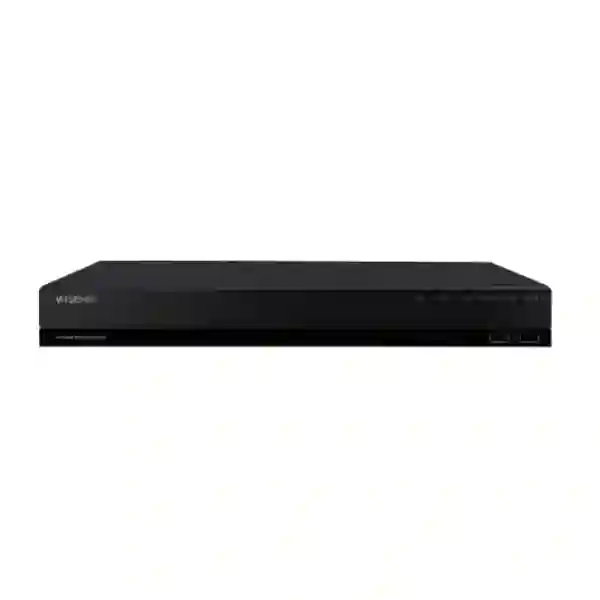
Hanwha Vision · Wisenet WAVE Network Video Recorder
Hanwha WRN-810S 8-Channel PoE+ NVR
An integrated IP recording solution for a well-planned eight-camera installation, with WAVE management, shared PoE+ power and room for two internal SATA drives.
The buying answer first
The Hanwha WRN-810S can be a practical recorder for a small organisation that needs up to eight IP camera channels and wants integrated Wisenet WAVE video management. However, its eight camera ports, 80 Mbps total recording limit, 100 W shared PoE budget and selected storage configuration must be assessed together. Check the exact WAVE recording licences supplied before placing an order; the physical number of ports is not proof of a matching licence entitlement.
Use this guide to decide whether the recorder fits your installation, prepare a camera and retention schedule, and ask for a configuration-specific quotation. The information addresses buyers in Tanzania without implying local stock, price, certification, office coverage or delivery arrangements. Those commercial details need direct confirmation for the specific proposal.
Verified specification snapshot
Manufacturer-published characteristics; confirm revision and exact bundle before ordering.
| Specification | Published detail |
|---|---|
| Maximum camera inputs | Up to 8 channels |
| Recording bandwidth | Up to 80 Mbps total |
| Camera-side network ports | 8 × 100 Mbps PoE/PoE+ |
| Power over Ethernet budget | 30 W maximum per port; 100 W shared total |
| Network uplinks | 2 × Gigabit Ethernet RJ-45 |
| Software | Integrated Wisenet WAVE |
| Internal drive positions | 2 × SATA; up to 12 TB raw capacity supported |
| Video outputs | HDMI up to 4K; VGA up to 1080p, for local basic monitoring |
| Alarm interfaces | 4 inputs / 2 outputs |
| Power input | 100–240 V AC |
| Environmental limits | 0°C to 40°C; 20–85% relative humidity |
| Chassis | 1U, 370 × 50.7 × 324.3 mm |
Who should choose this recorder?
The WRN-810S suits organisations that need a manageable number of IP cameras and prefer an integrated recording appliance instead of assembling a general-purpose server, separate camera switch and video management installation. A typical project may cover a reception, entrances, loading area, stock room, corridor and perimeter position. The eight-channel ceiling is the first sizing question, not a target that every installation should automatically fill. Allow for cameras that may be needed later, and establish whether one central recorder will genuinely meet the operating requirement.
For a small retail business, the practical benefit is simpler coordination of camera connections, power and recording from one location. For a clinic, office or warehouse, operators may value searching for recorded incidents rather than continuously watching every screen. Those benefits depend on selecting suitable cameras, setting useful recording policies and training the people who will retrieve evidence. The recorder itself does not determine camera coverage, image clarity or the outcome of an investigation; those begin with correct scene design.
This model is not necessarily the best choice for a large multi-building estate, a design requiring more than eight recording channels, or a site that will quickly outgrow the stated storage and throughput limits. In those situations compare higher-capacity appliances or a purpose-built WAVE server design. Before requesting a quote, prepare a basic camera schedule that states location, purpose, resolution, target frame rate, recording hours, night requirements and whether each camera needs functions beyond ordinary PoE power.
Understand the eight-channel architecture
The WRN-810S is specified for up to eight video input channels and provides eight dedicated 100 Mbps PoE+ camera ports. A channel is a recording resource, while a physical port is a network connection; it is important not to treat the two concepts as unlimited or interchangeable. A planned camera system should map every camera to a channel and record the expected stream settings. Check the current WAVE release and camera integration details if a deployment involves unusual multi-sensor devices, encoders or more than one stream per device.
The eight integrated PoE+ ports make a compact system easier to cable when cameras terminate near the recorder. They do not remove the need for a proper structured cabling plan. Every long cable run should be designed for distance, routing, protection, weather exposure and service access. Camera cables entering from exposed outside routes may need suitable surge protection and compliant installation practices. Label each port against the floor plan so future technicians can identify equipment without interrupting other cameras.
Do not assume that filling all eight physical ports guarantees that any eight-camera combination will operate satisfactorily. The power draw, stream bitrate, codec configuration and WAVE licence entitlement must also fit. Some cameras may be technically compatible yet unsuitable for a particular viewing or analytics workflow. The preferred procurement sequence is therefore to approve the camera list first, calculate shared resources second, and confirm the recorder bundle third. This prevents avoidable surprises during commissioning.
What the 80 Mbps recording specification means
Hanwha’s published recording throughput for this appliance is up to 80 Mbps. That figure describes an aggregate video ingest limit, not an individual camera bitrate promise and not an assurance that every camera can operate at its highest possible setting. Design with normal scene activity, busy periods and some headroom in mind. Modern scenes can become more complex at night, during rain, in moving foliage or when many people or vehicles appear. Those conditions can change the amount of data that a camera produces.
A useful early exercise is to list the expected average and higher-end bitrate of each configured camera stream. Add them to produce a combined load, then compare that against the recorder’s published ceiling. For example, eight cameras averaging 6 Mbps would produce approximately 48 Mbps before allowing for variation, which illustrates why planning the total matters. This is a hypothetical calculation rather than a promise about a specific camera model. Verify actual values using the manufacturer’s configuration guidance or a representative test.
Recording capacity is only one part of the performance discussion. Local live viewing, recorded playback, indexing and remote clients also consume system resources. The official guidance describes the appliance’s local client as suitable for configuration and basic monitoring, with a dedicated remote client recommended for the best viewing and playback experience. A security desk that constantly displays many demanding live feeds should be assessed differently from a site that mainly records and reviews incidents occasionally.
PoE+ camera power: eight ports, one shared budget
Each PoE+ camera port is rated for a maximum of 30 W, while the recorder has a total PoE budget of 100 W. Both limits apply at the same time. A camera within the per-port limit can still contribute to an excessive total when several devices operate together. Count maximum expected operating power for every camera, including night-time infrared illumination, heaters or other supported accessories where relevant. Work from manufacturer maximum values rather than relying only on attractive typical-power figures.
For illustration, eight cameras each requiring 8 W would have a combined nominal requirement of 64 W, subject to cabling losses and actual operating conditions. Eight cameras each requiring 20 W would require 160 W and would exceed the appliance’s 100 W shared budget even though no single camera violates the 30 W port limit. This is a planning illustration, not a tested bundle. It shows why an eight-port recorder is not automatically an eight-camera high-power supply for every camera type.
If the camera schedule exceeds the recorder’s shared power allowance, revise the camera selection or design an appropriate external PoE switching and network arrangement. Any external switch must be sized and commissioned independently, with its power source and network path considered. Do not improvise by splitting power or connecting unapproved power accessories. During handover, record each camera’s port, power class, measured operation and the response when an infrared mode or other high-demand feature is activated.
Storage capacity and the retention question
The official specification describes two internal SATA hard-drive positions and support for up to 12 TB of raw storage. That is an appliance capability, not a statement that this listing includes twelve terabytes, two disks or any specific installed capacity. Capacity can differ by ordered configuration. Raw terabytes also should not be presented as guaranteed usable retention: file systems, recording policy, frame rates, bitrate variation and system overhead affect the amount of footage that can be retained.
Begin by asking how many days of footage the organisation needs to keep and whether all cameras must record continuously. Record-by-event strategies can reduce data use in some scenes, but they may be unsuitable where uninterrupted evidence is required. The appropriate policy depends on operational risk, approved surveillance procedures and how reliably events can be detected. For a defensible estimate, use each camera’s planned stream and recording schedule, then test the result after installation rather than relying on a generic days-per-terabyte claim.
Consider what will happen when storage fills and how recordings are protected from equipment or disk failure. The available datasheet does not establish that any particular redundancy arrangement is supplied with the listing, so do not assume RAID, automatic backup or hot-swap capability. Ask for the proposed drive models, capacities, replacement procedure, recording overwrite settings and evidence export workflow. Organisations with strict evidence retention obligations may need an additional approved storage or archival plan.
Wisenet WAVE software and everyday operation
Wisenet WAVE video management software is integrated with the WRN-810S. The appeal is a familiar operator environment for arranging views, finding recorded footage and managing a camera system without having to procure and build a standalone software server from the beginning. The software design includes flexible layouts and search capabilities. However, the availability of specific functions can depend on the WAVE version, camera analytics and enabled configuration. A feature shown in a general WAVE demonstration is not automatically supported by every connected camera.
For a practical operator workflow, define common layouts such as entrance monitoring, deliveries, cash handling or general corridors. Set access permissions according to responsibility, so staff do not all share one administrator account. Agree on how employees mark the time of an incident, how they identify a camera and how they export relevant footage. Search can save effort, but only when the equipment’s clock, naming convention and recording policy are consistent. Short operator training is part of a usable security system.
Hanwha’s documentation also refers to client, mobile and WAVE Sync or Cloud Sync access. Those capabilities should be understood as options that require proper account, connectivity, software and security configuration, rather than as an automatic promise that any phone can access the recorder anywhere. Confirm the precise supported WAVE release and remote-access method for the supplied device. If the site has unreliable upstream internet service, local recording and remote viewing should be planned as separate operational requirements.
Check WAVE recording licences before ordering
Licensing deserves explicit attention because eight possible camera inputs do not necessarily mean eight included WAVE Professional recording licences. Hanwha’s original launch materials described four Professional licences in a WRN-810S bundle, but other product documentation indicates that licence options can vary, and some seller configurations present licensing separately. Neither a historic bundle description nor a third-party offer proves the licence entitlement of the exact unit being quoted for Tanzania. Request a written line-item statement for the proposed configuration.
For an eight-camera plan, confirm the number of usable recording licences included, the licence type, activation requirements and any additional licences to be purchased. Clarify whether existing WAVE licences can be used in the intended system and which transfer or activation rules apply. The official WAVE support guidance distinguishes software licence types and identifies licence requirements for recording and uninterrupted viewing. Purchasing decisions should use that current licensing guidance and the actual quotation rather than a generic ‘eight-channel’ headline.
Ask the supplier to specify the WAVE software version delivered, the supported upgrade path and any compatibility implications for the cameras and client computers. Software capability and cybersecurity maintenance may depend on hardware support status and the manufacturer’s current documentation. If an existing organisation already uses WAVE, review how this appliance will integrate with that environment before assigning licences or migrating cameras. Record licence keys through a secure internal process; never place keys in public correspondence or web forms.
Camera interoperability and ONVIF planning
The manufacturer describes support for Wisenet and ONVIF-conformant IP cameras. That is useful for mixed-camera estates, but ONVIF conformity alone does not guarantee identical behavior for every brand, firmware revision and analytics feature. Basic discovery and video streaming may work while proprietary events, object metadata or special controls require more specific integration. Review the supported device list and test important functions in the WAVE version intended for installation. Avoid describing cross-brand compatibility as universal plug-and-play operation.
Start interoperability checks with the exact model number and firmware of each proposed camera. Verify the desired video codec, secondary stream, event handling, audio capability where appropriate, time synchronisation and recording settings. A camera used for detailed incident review should be evaluated with sample daytime and night-time footage rather than judged only by its advertised megapixels. If the system depends on line-crossing alarms or object classifications, demonstrate those events passing into the intended recording and search workflow.
Where a customer already owns cameras, consider a staged integration test before replacing the existing recorder. Collect network configuration, camera credentials through an approved secure process, and notes on any existing recording dependencies. Check whether the old cameras can receive vendor-supported firmware and whether their power requirements fit the PoE budget. Reusing equipment can reduce disruption, but compatibility should be verified rather than sold as a certainty based on an ONVIF logo alone.
Local display, monitoring workstation and peripherals
The WRN-810S provides one HDMI output, specified up to 4K display resolution, and one VGA output, specified up to 1080p. These are display interface capabilities; they must not be confused with the resolution of every recorded camera stream or a promise of unrestricted multi-camera live viewing. Official guidance positions the local WAVE client for configuration and basic monitoring. A demanding security control room may be better served by a properly specified dedicated WAVE client workstation.
Plan where staff will actually review footage. A locked equipment cabinet may be the correct place for the recorder but the wrong place for a monitor and keyboard used every day. In such a layout, separate the recording equipment from the operator workstation and design the required network access. Confirm monitor compatibility, user permissions and practical playback performance. Provide a workspace where evidence can be inspected without exposing account credentials or leaving critical equipment accessible to casual visitors.
The published hardware documentation identifies three USB connections, a stereo audio output, status indicators and a supplied USB mouse in representative manufacturer configurations. Rack-mount brackets are also listed in historical documentation, but the exact box contents should be confirmed against the quote. A handover checklist should identify every accessory supplied and any separately ordered peripheral. The most important outcome is a usable operating station, not merely a display connector on a datasheet.
Alarm inputs, outputs and incident workflows
The technical specification lists four alarm inputs and two alarm outputs. These interfaces can be valuable in a site where recording should relate to another security or building event, but the exact wiring and supported event logic must be engineered for the chosen devices. Do not assume that a door contact, siren, panel output or relay can be connected without checking electrical characteristics and configuration requirements. Integration must use the manufacturer’s installation guidance and appropriately qualified personnel.
An operator may want an alarm event to bring a camera view into focus, flag an incident or trigger an approved output. Before implementing that workflow, identify who needs the alert, what action they should take and what happens during a network or power problem. Events should be tested using realistic procedures, including recovery after a false trigger. A system that creates frequent irrelevant alerts can make security staff less attentive rather than more effective.
Record the input or output number, external device, purpose, wiring owner and the rule configured in WAVE. Keep the interface design separate from any life-safety function unless the whole arrangement has been specifically engineered and approved for that purpose. Video recorders should not be assumed to replace dedicated fire, emergency or safety control equipment. For buyers, the purchasing question is whether these alarm interfaces are genuinely needed and whether the chosen installation team can validate the workflow.
Network layout and secure connectivity
Two Gigabit Ethernet interfaces are listed alongside the eight 100 Mbps PoE+ camera ports. That provides flexibility for a carefully designed network topology, but the presence of two interfaces is not itself proof of automatic failover, router redundancy or a particular segregation mode. Agree on the intended camera network, corporate network and remote-access path with the responsible IT team. Assign predictable addressing and document any needed routing, firewall and name-resolution requirements.
Keep recorder management behind appropriate access controls and avoid exposing administrative interfaces directly to the public internet. Use supported secure remote-access options, strong unique credentials and role-based permissions. Coordinate firmware and software updates with the manufacturer’s support guidance and the customer’s change-management process. Where multiple staff need to access recordings, give each person a suitable account and review access when responsibilities change. Cybersecurity is an ongoing operational responsibility rather than a property guaranteed by an NVR model name.
At sites with limited connectivity, differentiate local operation from off-site monitoring. Local camera recording can have different network demands from streaming multiple channels to a remote user. Estimate upstream capacity for expected viewing behavior and plan the consequences of an internet outage. If cloud-linked functions are enabled, confirm account governance, privacy expectations and the supported configuration. An installation should never depend on an undocumented personal login being the only route to vital recordings.
Power continuity, ventilation and Tanzania installation conditions
The recorder accepts a published 100–240 V AC input and has a stated maximum consumption of 164 W with two drives and PoE in use, compared with 37 W maximum in the cited PoE-off configuration. These values help frame electrical and backup-power planning but are not a substitute for measuring the complete installed system. Include cameras powered elsewhere, network equipment and monitoring devices in the load schedule. A suitable UPS should be selected according to the customer’s required shutdown and outage strategy.
The manufacturer specifies an operating temperature range from 0°C to 40°C and a humidity range of 20% to 85% relative humidity. In warm or dusty environments, physical placement and airflow become particularly important. Avoid enclosing the unit in an unventilated cupboard or near moisture, direct sun and heat-producing equipment. Verify whether the actual equipment room can stay inside the published limits under peak environmental conditions, including periods when normal cooling is unavailable.
For a Tanzanian installation, review the reality of power interruptions, lightning exposure, building earthing, cable routes and the management of the equipment room. These are site-assessment topics, not assertions that any particular location has a specific problem. Use competent electrical and network installation practices and confirm suitable surge protection where warranted. The objective is to protect recordings and make recovery predictable. Request a documented power plan instead of relying only on the recorder’s wide input-voltage rating.
Physical size, rack placement and service access
The WRN-810S uses a 1U rack-mountable metal chassis. The published enclosure dimensions are approximately 370 mm wide, 50.7 mm high and 324.3 mm deep, and the weight is approximately 2.7 kg without hard drives. These figures help with equipment-space planning, but a complete installation also requires room for cables, connectors, ventilation, any rack accessories and safe access to the unit. Confirm the mounting approach with the rack or cabinet supplier rather than judging fit solely by nominal rack height.
A secure but accessible installation area reduces accidental disconnection and makes fault investigation easier. Place power distribution, the network uplink and camera cabling where they can be identified and serviced. Where maintenance staff need to remove the recorder, allow sufficient cable slack without creating exposed loops that can be snagged. If the site uses a wall-mounted cabinet, check its load capacity, internal depth, airflow and ability to accommodate an appropriate UPS and power arrangement.
Label the chassis and power supply with the site equipment register reference. Keep the drive configuration, recording settings and network addressing in a controlled handover document. The purpose of physical planning is continuity: a technician should be able to diagnose a camera port, replace a failed peripheral or inspect recorder status without guessing which cable belongs to which device. Small details in installation often determine whether an incident can be reviewed without unnecessary downtime.
Designing the camera schedule before purchase
A simple camera schedule is one of the highest-value documents in an eight-channel project. For each intended camera, record the scene, objective, installation position, lighting, target identification distance, required recording quality and whether audio is actually necessary and permitted. Then specify the camera model, power requirement, expected bitrate and network port. This makes it possible to evaluate the recorder against real requirements rather than selecting a camera count and hoping the other parameters work.
Separate security goals that sound similar but require different image design. Seeing that a person entered a corridor is not identical to capturing a face suitable for identification. Counting activity in a doorway differs from reading vehicle markings at a gate. The recorder can store the streams that are sent to it, but it cannot restore detail lost through poor lens selection, excessive compression, backlighting or unsuitable mounting height. Validate representative images before signing off the camera layout.
Give special attention to after-dark performance and busy scenes. If some cameras use infrared illumination, their power requirements may rise at night and change the total PoE calculation. Motion within the scene may also increase recording bitrate. A well-designed schedule accounts for these conditions rather than using only daytime demonstrations. Once the camera choices are stable, the recorder’s recording throughput, power budget, storage requirement and licence count can be checked together.
Retail, office and hospitality deployment examples
In a small retail setting, the recorder may support views of entrances, circulation areas, delivery doors and selected high-value merchandise zones. The right camera placement depends on the store’s layout and approved security policy; it should not intrude into spaces where surveillance is inappropriate. Operators may benefit from a simple incident retrieval procedure, clear camera naming and short event logs. The most useful buying conversation focuses on what must be visible during a dispute or stock investigation.
For an office, likely questions include who may view recordings, how reception incidents will be investigated and whether after-hours access is documented. Consider segregated user accounts and a clear retention policy. A receptionist’s live overview can differ from an administrator’s access to historical footage. The NVR’s local monitor outputs may help with initial commissioning, while a separate client workstation can support routine review. This division can improve operational clarity without assuming a specific office size or configuration.
In a guest-facing hospitality environment, camera coverage may be needed in public circulation and service areas while privacy expectations require careful limits elsewhere. A small recorder may suit a limited camera zone, but the full property could need more than eight channels. Assess whether a single appliance is sufficient or whether a broader system design is more appropriate. Always make channel count, operating permissions and retention decisions from actual needs rather than generic recommendations for an industry.
Warehouse, workshop and small facility examples
For a warehouse or store room, buyers may care most about goods movement, loading doors, pedestrian routes and incident review after a delivery discrepancy. Camera placement needs to account for moving stock, high shelves, forklifts and shifting lighting. A camera blocked by stored materials is not useful merely because it appears in an eight-channel schedule. Include site operations staff in the coverage review so that camera views remain relevant when the physical workflow changes.
Workshops introduce their own considerations: dust, heat, vibration, electrical noise and the possibility that cameras require different environmental ratings. The recorder’s own operating limits still apply even when external cameras are designed for tougher conditions. A ventilated protected indoor location may be essential for the appliance. Plan protected cable routes and identify the person responsible for checking recording health. Maintenance frequency should reflect the actual environment and the manufacturer’s recommendations.
A facility with a remote gate or outbuilding may need an extended network design rather than a simple direct cable from the integrated PoE port. Link distance, outdoor exposure and available power must be assessed separately. The eight-channel capability does not solve all transport challenges. Ask the installation designer to document the network medium and power method for each remote position. This makes the final proposal easier to cost, troubleshoot and expand responsibly.
Comparing an integrated NVR with a server-based system
The main advantage of an appliance such as the WRN-810S is that recording hardware and Wisenet WAVE are prepared as one platform. This can simplify the initial equipment list for a modest installation. A purpose-built server design, by contrast, may offer more room to plan substantial channel counts, storage architectures and workstation requirements. Neither approach is automatically superior. The right answer depends on the camera schedule, retention needs, operator activity and expected growth.
An integrated PoE recorder can reduce the number of separate components in a small cabinet, but it does not remove network, power or operational planning. Once more cameras, advanced analytics or strict evidence requirements enter the picture, the total design matters more than the compact chassis. Buyers should compare full system costs rather than the recorder price alone: camera power, hard drives, licences, UPS, network equipment, monitors, labour and ongoing support all affect the deployment.
Consider also what happens when the system changes. Will a later camera addition require a new licence, another switch, a larger disk or a different recorder? Is there an approved way to preserve footage during replacement? How will staff continue retrieving incidents when hardware is serviced? Write these questions into the evaluation before purchase. A transparent design decision makes future costs and operational risks more visible than an isolated headline about eight channels.
Storage planning example without false retention promises
Suppose a prospective buyer wants eight cameras and is considering continuous recording. First calculate a realistic average bitrate for each camera under the proposed settings, accounting for different scenes and operating hours. Then add the streams to estimate the total recording data per day. Convert that daily quantity into a working retention estimate and reserve an allowance for variability and system overhead. That is more reliable than claiming that any fixed hard-drive capacity always provides a fixed number of days.
Consider an example with four lower-bitrate indoor views and four more demanding outdoor views. The combined bandwidth could change substantially when lighting, movement and codec settings change. If the customer reduces bitrate aggressively to extend retention, the recorded image may no longer show the detail needed for an incident. Test both the retained days and the actual visual evidence. The best recording policy is one that meets the agreed security purpose, not merely the longest displayed history.
When the calculation is complete, confirm the offered drive configuration, actual usable capacity and overwrite behavior. Ask how the system reports disk health and who receives that information. Decide how important clips will be exported and stored securely before they are overwritten. If the organisation has a formal retention schedule, reflect it in the configuration and operational procedure. The storage decision should be made together with the people who own the surveillance policy.
Responsible access, privacy and evidence management
Video surveillance equipment should be deployed with clear policies describing why footage is collected, who is authorised to watch it and how long it is retained. These questions matter for a small eight-camera site as much as for a large installation. Confirm the organisation’s applicable legal and internal requirements rather than assuming that a recorder’s capabilities determine what recording is appropriate. Camera placement and any use of audio or analytics should receive particular attention where people have reasonable privacy expectations.
Give operators access appropriate to their duties and establish a documented procedure for obtaining footage. A useful incident record includes the camera location, approximate event time, person authorising retrieval and how the exported file was protected. Check device time synchronisation so that recorded timestamps are meaningful. Avoid allowing multiple staff to use the same powerful account, because shared credentials make later investigation difficult. The purpose is both security and accountability.
An export should be handled as evidence only under the customer’s approved processes. Protect copies against casual disclosure and use secure storage and transfer methods. Do not promise that the NVR alone establishes legal admissibility or evidentiary chain of custody. Depending on the case, additional documentation or specialist procedures may be required. Buyers should confirm that the system’s export workflow supports their actual incident-management needs before accepting the installation.
Commissioning steps that matter
Commissioning begins before the first camera image appears. Verify physical installation, electrical supply, drive status, network addressing, camera firmware, PoE power and the total channel list. Confirm that every camera records with its agreed resolution, frame rate and schedule. Check date and time settings, per-camera names and live viewing permissions. A successful setup is not just one screen showing eight pictures; it is a documented system where the correct video is recorded and can be retrieved.
Perform at least one realistic test for each important operating scenario. Review daytime and night-time footage, trigger configured alarm events, check the effect of a temporary network interruption and verify recovery according to the manufacturer’s supported procedures. Test search, playback and export with the people who will use the system. Observe disk and PoE status indications and resolve any alerts before handover. A short, repeatable test script produces more confidence than an informal demonstration.
At handover, retain the camera schedule, equipment identifiers, approved network settings, installed drive capacities, software version, licence summary and operator instructions in the customer’s secure records. Record the administrator account ownership without publishing passwords in ordinary handover documents. Identify who is responsible for monitoring health warnings and arranging maintenance. These steps support future troubleshooting and help the buyer understand exactly which configuration was accepted.
Questions to put on the quotation
Request an itemised quotation rather than a single line for an eight-channel NVR. The document should distinguish the WRN-810S hardware from the installed hard drives, WAVE recording licences, camera units and all installation-related components. Ask whether the proposed appliance is supplied with any licences, and if so, the number and type. The manufacturer’s historical literature describes different bundle possibilities, so the exact current offer is the only dependable basis for pricing and entitlement.
Ask whether the recommended cameras fit both the recorder’s 80 Mbps aggregate recording specification and the 100 W shared PoE budget. Request the expected retention days based on actual camera settings and state the assumed recording schedule. Clarify whether a monitoring workstation, UPS, cabinet, surge protection and remote-access configuration are included or excluded. These questions help compare different quotes fairly and prevent an apparently inexpensive recorder from hiding essential system components.
Before approving an order, also confirm the offered hardware revision, manufacturer support position, current software compatibility and the delivery or installation arrangements applicable to the specific quotation. Do not rely on website copy as proof of stock, regional warranty, authorisation or a delivery date. Record these commercial terms explicitly in the seller’s proposal. A useful quote is one that allows the customer to see both what is supplied and what remains their responsibility.
Maintenance, updates and operational checks
After installation, recording health should be reviewed routinely. A simple inspection can verify that every expected camera is online, recording schedules are active, disk space and health are acceptable, the system clock is correct and important events are being captured. The inspection frequency should reflect the site’s risk and available staffing. Waiting until footage is needed to discover that a camera stopped recording is an avoidable operational weakness, even with a capable appliance.
Plan software and firmware maintenance using supported manufacturer procedures. Check compatibility between the WAVE release, appliance hardware and connected cameras before applying changes. Document the configuration and schedule work to minimise disruption. Do not assume that every current feature or upgrade can be installed on an older recorder without verification. A product released several years ago particularly warrants a current support and lifecycle check at procurement and during ongoing maintenance.
Keep replacement and escalation responsibilities clear. If a disk alerts or a PoE port stops serving a camera, staff should know whom to contact and which information to provide. Maintain secure records of model numbers, software versions, network details and relevant licences. Periodically revisit retention, camera coverage and user access as business operations change. Good maintenance preserves the value of the original design; the purchase itself is only the starting point.
When to select another recorder
Choose a different platform when the planned number of recording channels already exceeds eight or when credible growth is likely to make that limit unsuitable. Also reconsider this model if the required cameras would exceed its aggregate recording performance or shared PoE supply. Trying to make an undersized recorder fit by reducing image quality below operational requirements is poor system design. It may be more effective to choose an appropriately specified NVR or a WAVE server with a separate network and power architecture.
High-retention projects may need greater storage capacity, a documented data-protection architecture or a managed archive solution. A continuously staffed control room may require dedicated client hardware. Complex analytics deployments should be tested for compatibility and processing demands. None of those needs can be resolved simply by noting that a product supports WAVE or ONVIF. Confirm the entire workflow with manufacturer documentation and a deployment design before choosing a replacement category.
If the customer already owns a WAVE environment, ask how the new recorder will coexist with the current system and whether its hardware and software lifecycle make that sensible. If the application is a straightforward small-site eight-camera system, the WRN-810S remains a model worth evaluating against the exact constraints documented here. The correct recommendation is conditional on the validated bill of materials, not on a generic assertion that one recorder suits every installation.
What to supply for a technically useful quote
To discuss the Hanwha WRN-810S for a Tanzanian project, prepare the number of camera positions, site type, required image detail and any existing camera brands or models. Add the desired retention period, likely recording schedule and whether remote access is needed. If an existing system is being replaced, provide the current equipment model and an approved summary of any compatibility concerns. These details allow the proposed recorder to be evaluated for real fit instead of being quoted without context.
Include a basic site sketch where available. Identify indoor and outdoor camera locations, longer cable runs, the intended recorder cabinet and the location where staff will view footage. Note any practical power-continuity or network constraints. Explain who will manage user access and evidence exports. You do not need to share passwords, confidential recording clips or licence keys in an initial public enquiry. Sensitive configuration details should be exchanged only through an appropriate secure process later.
Ask for confirmation of the exact hard-drive bundle, available WAVE licences, camera compatibility, PoE load calculation and expected recording retention. Request an itemised price and clearly stated commercial terms for the specific offer. FourTeck Tanzania can then be approached for a quotation or suitability discussion without this page inventing local stock, delivery promises or warranty conditions. The objective is a proposal that can be reviewed and signed off against the customer’s security requirements.
Frequently asked questions
Is the WRN-810S an eight-channel recorder?
Yes. Hanwha specifies up to eight video input channels. Confirm the proposed cameras, aggregate stream bandwidth and the recording licences supplied with the exact bundle.
Does every camera port provide 30 W simultaneously?
No. Individual PoE+ ports are rated up to 30 W, but the combined PoE budget is 100 W. Add the maximum requirements of all connected cameras and allow for realistic operating conditions.
Does the listed 12 TB mean hard drives are included?
No. The published figure is the maximum supported raw internal capacity for the product configuration described by the manufacturer. Actual installed drives and usable space must be confirmed in the quotation.
Are four Wisenet WAVE Professional licences included?
Hanwha’s 2020 launch materials and some datasheets describe bundles with four Professional licences. Current or regional configurations can differ. Confirm the licence count, licence type and activation entitlement for the exact supplied unit.
Can this recorder work with other camera brands?
Manufacturer literature describes ONVIF-conformant IP camera support. Confirm model and firmware compatibility and test required functions because ONVIF support does not guarantee every advanced analytics or event feature.
Can I use the HDMI output for regular control-room monitoring?
HDMI and VGA are provided, but manufacturer guidance describes the local client primarily for configuration and basic monitoring. Evaluate a dedicated WAVE client workstation for demanding continuous viewing and playback.
What if the site requires more than eight cameras?
Evaluate a recorder or server design with suitable channel, throughput, power, storage and licence capacity. Do not assume that adding an external switch alone increases the appliance’s supported recording channel limit.
Does remote viewing require internet?
Off-site viewing generally needs an appropriately configured network path. The specific WAVE Sync, client or mobile experience depends on supported software, account configuration and network availability. Local recording and remote access should be considered separately.
Is it suitable for Tanzania’s warm conditions?
The published operating range is 0°C to 40°C and 20–85% relative humidity. Suitability depends on the actual equipment-room environment, ventilation, power arrangement and professional installation.
How many days of video will it retain?
Retention cannot be promised from the model name. It depends on installed usable storage, camera count, actual bitrates, recording hours, footage complexity and overwrite settings. A site-specific calculation and test are needed.
Is this model the same as the WRN-1610S?
No. The WRN-810S is the eight-channel model in the family; the WRN-1610S was introduced as a sixteen-channel alternative. Compare current specifications and availability for the exact intended configuration.
How do I request a useful quotation?
Share the camera schedule, expected recording settings, retention target, power and network constraints, plus the required WAVE licence count. Request an itemised configuration and the commercial terms for the exact offer.
Request a configuration-specific quotation
Discuss the Hanwha WRN-810S with FourTeck Tanzania using your camera list, PoE power requirements, recording-retention target and required WAVE licences. Ask for an itemised proposal confirming the exact installed drives, licence entitlement, compatible camera models and applicable commercial terms. No local price, stock status or delivery commitment is implied by this product guide.
Next step: request a WRN-810S suitability review and quotation.




Reviews
There are no reviews yet.