
Hanwha Vision | Wisenet WAVE recording appliance
Hanwha WRT-P-3102W Network Video Recorder in Tanzania
Evaluating a Wisenet WAVE recording server for an IP surveillance installation? The Hanwha WRT-P-3102W combines a video recording server and client workstation in a compact tower, with four included WAVE Professional licenses, up to 170 Mbps recording throughput and up to 16 TB raw storage across the product family. Hanwha Vision now lists the model as discontinued, so confirm the proposed exact configuration and lifecycle support before procurement.
Technical specifications at a glance
These are model-family and series specifications, not a promise that every remaining or previously used unit contains the same physical disks or accessories. Confirm the delivered configuration against its full part number and supplied documentation.
| Manufacturer / model | Hanwha Vision / WRT-P-3102W |
|---|---|
| Type | Dual-purpose Wisenet WAVE network video recording server and client |
| Video management software | Wisenet WAVE, preloaded |
| Included entitlements | Four Wisenet WAVE Professional licenses |
| Recording bandwidth | Up to 170 Mbps |
| Storage | Up to 16 TB raw internal storage, configuration-dependent |
| System drive | 256 GB SSD (series documentation) |
| Data-drive provision | Three 3.5-inch SATA bays (series documentation) |
| Processor / RAM | 12th Generation Intel Core i3 / 16 GB DDR4 (series documentation) |
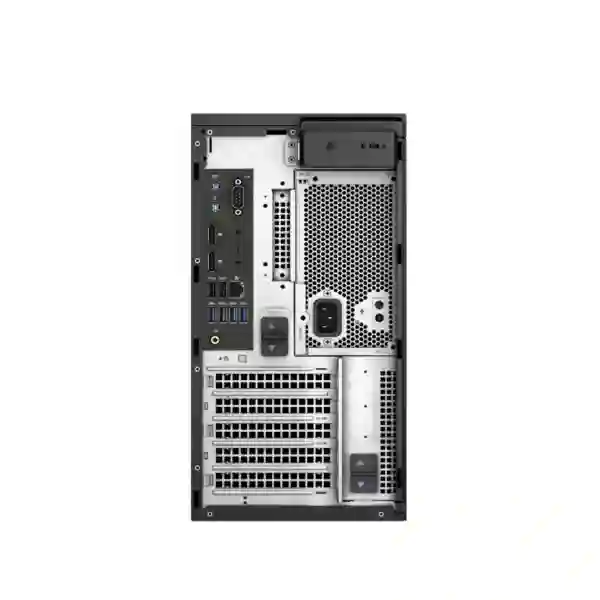
| Network | Two Gigabit Ethernet ports |
| Display | Two DisplayPort outputs |
| Operating system | Windows 10 IoT Enterprise LTSC |
| Original peripherals | USB mouse and keyboard |
| Power supply | 550 W 80 Plus Gold; 100–240 V AC input (series documentation) |
| Size | Approximately 369 × 173 × 420 mm (H × W × D) |
| Ambient operation | Approximately 5–45 °C; 20–85% non-condensing humidity |
| Lifecycle status | Listed as discontinued by Hanwha Vision |
| Tanzania price, stock, local warranty | Not verified; request exact commercial confirmation |
A practical fit for surveillance teams
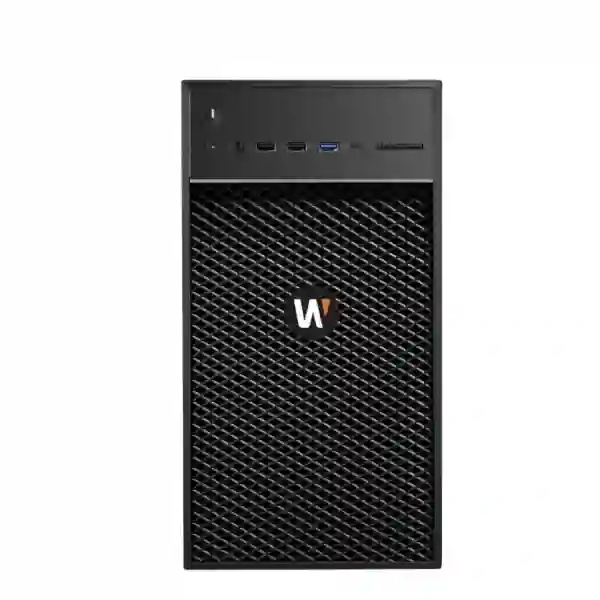
The Hanwha Vision WRT-P-3102W is a mini-tower Wisenet WAVE recording server and local client workstation. It was designed for organizations that need a dedicated computer to receive IP-camera streams, manage recordings and provide a convenient place for an operator to review footage. Instead of selecting a generic desktop computer and assembling every software component independently, the original product combines a defined hardware platform with a preconfigured video management system. That integrated approach can help a technical team describe the intended solution more clearly during procurement, but it does not eliminate the need to design the cameras, storage and network correctly.
For buyers in Tanzania, the most useful starting point is the installation requirement rather than the recorder model alone. List the cameras, expected recording schedule, target retention period, network conditions and number of operators. Then review those inputs against the recorder’s published 170 Mbps maximum recording throughput and its storage configuration. A reception desk viewing several cameras occasionally has a different workload from a security control room running continuous recording and frequent playback. Capacity planning must account for both types of work.
Important lifecycle notice before purchasing
Hanwha Vision marks WRT-P-3102W as discontinued on its official product information page. This is not merely a cosmetic catalogue change. Organizations considering an additional unit, a replacement for an existing installation or hardware for a brand-new site should confirm whether an exact configuration remains obtainable through an authorized route and what assistance will be available after commissioning. A product being discontinued does not establish that every deployed unit has stopped functioning, but it does make lifecycle review a procurement priority.
Ask for a written confirmation of the proposed exact unit, its drive configuration, software version, operating-system status, supported service process and any remaining manufacturer commitments applicable to that specific purchase. Do not assume a warranty advertised in one country automatically applies in Tanzania. For a new installation, it is sensible to compare an actively supported Wisenet WAVE recording-server model against the WRT-P-3102W before committing to a long-life security system. This page is intended to support informed evaluation, not to imply verified stock or local availability.
What the Wisenet WAVE platform contributes
Wisenet WAVE is the video management environment preloaded on the WRT-P-3102W. In a typical setup, compatible cameras send their video streams across the IP network, the recorder stores authorized streams, and an operator uses the client interface to review live and historical video. The server-and-client design is useful when day-to-day operation needs both local access at the recorder and a structured way of managing video across the site. Camera credentials, recording profiles, user permissions and storage settings still require configuration.
The included software is not a substitute for reviewing the current WAVE version and its requirements. Before connecting the recorder to an existing surveillance deployment, identify the VMS version already in operation and determine whether the intended equipment and software versions can work together. Sites with multiple recording servers should also assess how devices and users will be managed and how troubleshooting will be performed. An upgrade plan needs to be based on supported product documentation, rather than an assumption that all generations of hardware have identical compatibility.
Recording capacity: understand the 170 Mbps figure
Hanwha Vision specifies up to 170 Mbps of recording throughput for this model. The figure describes an upper recording-bandwidth capability; it should not be converted into a fixed number of cameras. Different cameras generate very different stream rates. Resolution, frames per second, compression settings, image detail, night-time noise, movement and whether secondary streams are used all change the effective data rate. Cameras that seem modest in a quiet daytime test can produce a different load when the scene changes.
A defensible design begins with the expected recording bitrate from each selected camera. Add the camera bitrates together, account for operating margin and evaluate the total alongside playback, network and system tasks. Record the assumed configuration on the purchase or project specification so it can be checked at commissioning. If the total planned recording traffic approaches the stated maximum, consider a different server or a distributed recording design instead of depending on perfect conditions. The published number is a planning boundary, not a guarantee for every camera mix or feature combination.
Storage: capacity and retention are separate questions
The WRT-P-3102W family is described with up to 16 TB of raw internal storage. Raw capacity is the aggregate disk capacity before accounting for the particular recording configuration, file-system overhead, any reserved space and operational factors. It is therefore not appropriate to promise a particular number of recorded days solely because a storage variant contains a certain number of terabytes. A request such as thirty days of recordings must be calculated from the actual stream rates, schedule and camera count.
The series documentation describes a separate 256 GB system SSD and positions for 3.5-inch SATA data drives. This separation helps distinguish the operating-system disk from disks intended for video. Confirm the exact number and size of installed drives in the offered unit. Some historical variants were sold with different raw capacities, and the model family name alone does not establish which drive configuration a buyer will receive. Ask whether storage is populated, how drive health is monitored, and what recovery process will apply if a disk develops errors.
How to estimate a recording retention requirement
Start by writing down the number of cameras and the video stream actually intended for recording. For each camera, identify its configured resolution, compression standard, frames per second, quality settings, average observed bitrate and expected peaks. Next decide whether recording will be continuous, motion-triggered or scheduled. The resulting daily recorded volume can then be multiplied by the desired retention period, with additional headroom to reflect variation and system overhead. This calculation is more useful than a capacity label taken out of context.
Treat a retention estimate as a design forecast that must be verified in operation. A gate camera with busy traffic may behave differently from a static storeroom view. Day and night operation can also shift the bitrate. Where footage has legal, insurance or incident-review importance, document the requirement and test the oldest available recording after commissioning. The recorder should be selected because a tested configuration meets the required outcome, not because the maximum raw storage figure sounds sufficient.
Four WAVE Professional licenses included
The manufacturer’s product information confirms that the WRT-P-3102W includes four Wisenet WAVE Professional licenses. These should be interpreted as recording-license entitlements, not as a declaration that the server has a universal four-camera hardware limit. WAVE’s licensing documentation explains that recording a camera stream generally requires an appropriate recording license. An installation planning more licensed recording sources should check the exact licensing rules and obtain any additional entitlements required by the current VMS version.
There is an important distinction between live viewing and recorded video. Seeing a camera in a client interface does not by itself establish that recording is licensed or enabled. A commissioning checklist should confirm each camera appears in the system, has the intended recording schedule, uses the appropriate license and produces footage that can actually be played back. Multi-sensor devices, unusual stream integrations and specialized features may have additional licensing or compatibility considerations. Confirm those details before ordering cameras or promising a final device count.
Camera compatibility and ONVIF checks
Hanwha Vision identifies support for Wisenet IP cameras and ONVIF-conformant IP cameras. ONVIF is valuable when evaluating a system containing cameras from more than one manufacturer, but conformity alone does not guarantee that every function will behave identically in WAVE. Basic discovery and live video may work while features such as audio, PTZ control, events, motion metadata or edge analytics need separate verification. Compatibility should be checked for the exact camera model, firmware version and intended VMS release.
Before procurement, create a camera schedule listing manufacturer, model, firmware, network address plan, recording profile and any required advanced features. For existing cameras, verify that credentials can be managed securely and that the intended stream format is available. For new cameras, seek current compatibility guidance instead of treating every ONVIF badge as an unconditional endorsement. If a feature is critical to security operations, require a representative demonstration or bench test before site-wide deployment.
Why the dual Gigabit Ethernet ports matter
The WRT-P-3102W provides two Gigabit Ethernet network interfaces. These ports can offer useful flexibility for network design, particularly where a security system separates camera traffic from management or wider organizational access. Two physical ports, however, do not automatically provide redundancy, failover or secure isolation. Those behaviors depend on the network architecture, operating-system configuration, switching, addressing and associated security controls.
A site design should show which devices connect to each network, which equipment provides power to the cameras, which users need access and which services are allowed across boundaries. If a VLAN or a dedicated camera network is proposed, document it explicitly. Do not connect surveillance devices directly to an unrestricted public network just because a spare interface exists. A well-configured single network can be more reliable than a poorly documented dual-network setup; the two ports are configuration options rather than a substitute for engineering.
Local viewing with DisplayPort outputs
The device is described with two DisplayPort monitor outputs. The series information also lists a DisplayPort-to-HDMI adapter and a USB keyboard and mouse as supplied accessories in the original package. This makes it possible to plan for a local workstation arrangement at the recorder, provided the exact hardware and accessories are present and the connected monitors are compatible. It is useful for a security desk where an operator needs regular access to playback, camera layouts and basic system settings.
Do not assume that two connectors mean unlimited high-resolution live streams can be displayed without impact on performance. The workstation display workload and video decoding requirements depend on the selected cameras and layouts. Confirm the operator’s screen sizes, display inputs and desired simultaneous views during system design. For remote guard stations, also examine how WAVE clients will access the system over the approved network path rather than running unplanned cables from the recorder.
Processor, memory and system disk
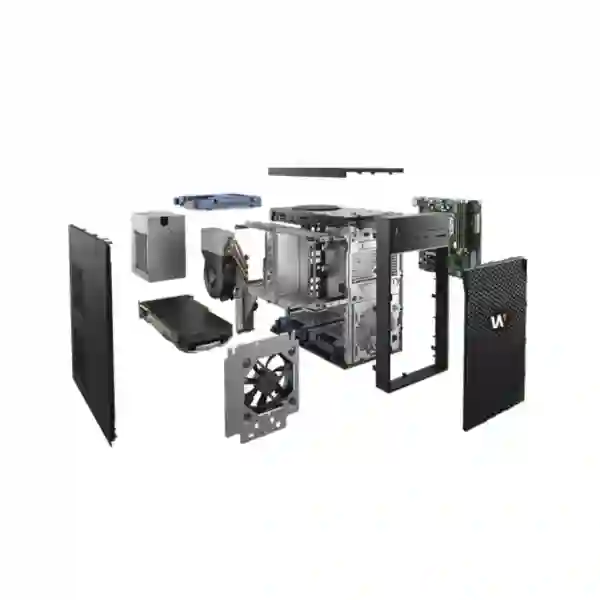
Published WRT-P-3102 series specifications describe a twelfth-generation Intel Core i3 processor, 16 GB DDR4 memory and a 256 GB SSD used as the operating-system drive. These components define the original appliance hardware and help explain its place in a compact site-level deployment. They should not be taken as an open-ended invitation to add unrelated workstation software or analytics workloads to the recording server. Recording stability benefits from a controlled system configuration.
When evaluating a used, refurbished or remaining-inventory unit, confirm that its processor, RAM and system disk match the advertised configuration and are functioning correctly. Ask for evidence of hardware health, drive status and the installed WAVE version. If a system will also display many high-resolution streams, run analytics or perform frequent exports, review the complete workload rather than relying on the CPU model alone. The appliance’s integrated purpose is more relevant than any single component specification.
Windows 10 IoT Enterprise: plan the software lifecycle
The WRT-P-3102W version identified by the W suffix is listed by Hanwha Vision as running Microsoft Windows 10 IoT Enterprise LTSC. This should not be confused with a conventional consumer Windows installation or with the Linux variant of the recorder family. The exact Windows edition, LTSC release, security update eligibility and Hanwha-supported image should be verified for the supplied machine. Avoid replacing its operating-system image without checking manufacturer instructions and recovery options.
Because the recording hardware is discontinued, software lifecycle review is especially important. Ask which WAVE releases are supported on the installed operating system, whether required patches are obtainable, what application changes are appropriate and how the organization will manage backups. A recorder that works on day one but cannot meet an organization’s later cybersecurity policy is a poor match for a long-term deployment. For new projects, compare current-generation supported hardware and software alternatives before making the procurement decision.
Security controls for a surveillance recorder
A recording appliance contains sensitive video and system configuration. Security planning should include strong unique administrator credentials, named operator accounts where appropriate, role-based access permissions and restrictions on who can export or delete footage. The network should limit management access to authorized devices and trusted paths. Keep a documented process for vendor-supported software and firmware updates, and test those updates before broad deployment if the environment is operationally sensitive.
Also consider physical access to the recorder, monitor, keyboards and removable storage. A locked room or secured cabinet can prevent casual tampering, while controlled access to export media helps maintain an incident-handling record. Do not treat video storage alone as a complete evidence-management process. Agree who owns user access, who reviews system alerts, who backs up configuration and who is accountable for responding to recording failures. The right controls depend on the organization’s policies and risk assessment.
A practical network plan for Tanzanian sites
A networked video deployment in Tanzania should be designed around conditions at the actual premises rather than broad claims about connectivity in a city or region. Document the available switches, cabling routes, camera power requirements, rack or cabinet space and any existing IT segregation rules. Check the reliability of the local power supply and determine whether the recording server, network switches and any critical communication equipment need backup power.
External internet service is not the same as the local network that carries camera streams. A properly designed local system may continue processing local camera traffic during an external service interruption, depending on the deployment and its dependencies. However, remote viewing, notifications, licensing tasks or other external functions may be affected. Record these dependencies clearly during design. Never promise cloud connectivity, local support coverage or uninterrupted recording without verifying the specific system and service arrangement.
Power supply, cooling and installation environment
The series specification lists a 550 W, 80 Plus Gold power supply with 100 to 240 V AC input capability. The power-supply rating should not be confused with a claim that the unit continuously consumes 550 W. Actual electrical demand depends on hardware configuration and operating conditions. An installer should determine the expected load for the complete security system, including monitors, switches and camera power equipment, before selecting power distribution or battery backup.
The published operating environment for the series is approximately 5 to 45 degrees Celsius and 20 to 85 percent non-condensing humidity. A compact tower still needs ventilation and protection from dust, unauthorized handling and heat sources. This is particularly relevant in rooms without dependable cooling. Leave appropriate clearance, review the machine’s installation instructions and monitor operating conditions. Environmental specifications indicate tested boundaries, not permission to operate permanently at the edge of every stated limit.
Physical dimensions and placement
Hanwha’s series information describes a tower chassis approximately 369 mm high, 173 mm wide and 420 mm deep. The quoted weight is about 10.68 kg for the chassis without hard drives, so the actual installed unit may weigh more. These measurements matter when specifying shelves, under-desk areas, secure enclosures and service clearances. A tower computer should not be assumed to fit a standard rack arrangement without an appropriate mounting solution.
Before installation, check how the network and video cables will enter the area, whether an operator can access the ports safely and how the machine will be serviced if a component must be replaced. Provide ventilation and leave a realistic path for power and data cables instead of compressing them tightly behind the chassis. Keep food, liquids, frequent foot traffic and easily disturbed power strips away from the recorder. Such details are unglamorous but materially influence everyday reliability.
Choosing continuous, motion-based or scheduled recording
Recording policy affects both storage needs and how effectively security staff can investigate an event. Continuous recording is simple to reason about but generally stores more footage. Motion-triggered recording can reduce unnecessary data in a suitable scene, yet it must be configured and tested to avoid missing the start or end of an event. Scheduled recording is useful where operating hours and risk windows are known. Some sites need a mix of policies across different cameras.
For each camera, agree what evidence the organization expects to retain and how quickly an incident may be reported. A gate, cash-handling point, inventory room and empty corridor may justify different recording choices. Test low-light performance, scene movement and unusual conditions before treating an estimated retention figure as proven. The recorder provides a platform for the policy; the policy itself must come from site security requirements and, where applicable, the organization’s legal and privacy obligations.
A sensible camera-profile design
Camera settings influence recording bandwidth and the usability of exported evidence. Resolution determines how much image detail may be captured, while frame rate changes how smoothly movement is represented. Compression and quality settings affect storage and network load. A very low bitrate might preserve more days of recordings yet make identifying important details harder. The best profile is one that preserves the required evidential value within a tested recording and retention budget.
Instead of assigning identical settings across every camera, consider what each view must achieve. Reading activity around an entrance may require different settings from monitoring general occupancy in a wide room. Verify camera mounting positions, lens selection, lighting and image exposure before trying to solve visibility problems through bitrate alone. Document the final settings and revisit them when a camera is moved or replaced. Any major increase in camera count or video quality should prompt another bandwidth and storage calculation.
Live monitoring, playback and exports
Security teams often judge a system by what happens during an incident, not by its published specification sheet. The operator should be able to find the right camera, navigate the relevant time range, review an event and export required evidence using an approved process. Wisenet WAVE provides the management environment for these activities, subject to the installed version, permissions and configuration. Demonstrate the intended workflow to operators before sign-off.
Create a small practical acceptance test: find an event from earlier in the day, confirm its timestamp, play it at the local workstation, check the recorded quality and produce an authorized export. Agree how footage requests will be approved and where exported files will be stored. If remote staff need to view the footage, verify the supported access arrangement as part of the same test. A successful live view alone is not sufficient evidence of a successfully commissioned recording system.
Remote access and resilient operation
Remote surveillance access should be intentionally engineered, not added by exposing the recorder to the internet without controls. Determine who needs access, from which trusted networks or devices, and for which activities. Consider authentication, network restrictions, access logging and the approved remote connectivity method available for the deployed WAVE release. Network administrators should review any proposed firewall or routing changes before they are made.
Sites that depend on remote monitoring also need an outage plan. Ask what happens if the internet link fails, an operator’s workstation is offline or an external service becomes unavailable. Distinguish between recording traffic that remains on the local network and workflows that depend on services outside the premises. The answer may vary by configuration, so test rather than assume. Document who receives alerts, how incidents are escalated and how local staff can confirm that recording is still functioning during an external connectivity interruption.
Maintenance, monitoring and backup routines
A recorder should be maintained as an operating system, not treated as a box that can be ignored after installation. Assign responsibility for reviewing camera connection status, storage health, recording continuity, time synchronization and system alerts. Periodically check that the oldest available footage meets the agreed retention requirement. If cameras or video settings change, update the system design record and recalculate storage and bandwidth needs.
Separate configuration backups from video retention planning. A copy of settings may help rebuild a system, but it is not a substitute for preserving important video evidence. Likewise, placing all footage on one recorder may create an operational dependency that merits business-continuity planning. Decide how quickly operations must recover from a disk, recorder or network failure and whether extra infrastructure is justified. For discontinued hardware, include the availability of replacement parts and migration options in the maintenance risk assessment.
Expanding beyond the initial installation
The four included WAVE Professional licenses can make the product relevant to a modest starting deployment, but growth should be planned before hardware is purchased. When new cameras are added, recording-license needs, aggregate bitrate, storage consumption and management workloads can all increase. A recorder with unused disk space might still be unsuitable if the camera streams exceed its practical recording budget. Conversely, available bandwidth does not guarantee a requested retention period.
Document an expected future camera count and the likely changes in resolution or analytics requirements. Review whether more recording licenses, additional storage or a separate supported server would be appropriate. For an existing WAVE environment, assess compatibility and migration planning with the system administrator. The goal should be a manageable architecture that meets the site’s needs, rather than stretching a discontinued device beyond its verified design envelope.
WRT-P-3102W versus a generic PC-based VMS build
A self-assembled computer running video-management software may appear attractive because hardware parts can be selected individually. However, the designer must evaluate component compatibility, operating-system support, storage layout, software licensing, thermal performance and ongoing maintenance. The WRT-P-3102W originally offered a coordinated appliance configuration with Wisenet WAVE preloaded, four Professional licenses and defined network and video connections. Those published characteristics can simplify comparison against a proposed custom build.
The appliance advantage should now be weighed against lifecycle risk. A generic platform might be easier to refresh, but it needs careful validation and may introduce support responsibilities that the organization does not want. A current supported recording appliance may be preferable for new deployments. Compare total project requirements, support arrangements, reliability and migration costs instead of looking only at processor speed or the advertised purchase price.
WRT-P-3102W versus a conventional standalone NVR
A traditional standalone network video recorder often provides a focused recording interface and a model-specific set of supported camera connections. A WAVE recording appliance uses a software-driven video management environment that can fit into wider networked surveillance workflows. Neither category is automatically better. The right choice depends on camera compatibility, licensing, required operator features, storage policy, cybersecurity expectations and the organization’s ability to maintain the system.
If replacing an older standalone NVR, assess whether the existing cameras will work with WAVE at the required resolutions and features. Confirm how operators will access live and historical footage, whether dedicated displays are needed and which settings must be re-created. Footage already stored on the old NVR may not simply transfer into a new system. Plan an appropriate retention and evidence-preservation transition rather than assuming that migrating camera connections also migrates historical recordings.
When a newer recording server may be the better option
A discontinued model can still be relevant to maintenance of an established environment, but a greenfield project should normally evaluate current supported choices as well. Hanwha Vision lists newer WAVE recording-server families with different processors, operating systems and performance envelopes. Do not assume a newer model is a direct plug-in replacement; model-specific ports, licenses, raw storage, operating-system versions and supported WAVE releases require review.
Prepare a short comparison table for the intended models using verifiable documentation: camera workload, recording bandwidth, included entitlements, installed drive capacity, client-display needs, environmental limits, maintenance support and estimated project life. A responsible recommendation may favor keeping a functioning legacy unit temporarily, replacing it proactively or deploying a different architecture. That decision should reflect operational impact and confirmed supply terms rather than an unsupported claim that the WRT-P-3102W remains a current production item.
Buying checklist for Tanzania procurement
When requesting an assessment or quotation, provide the complete model designation and intended use. Ask whether the proposed machine is new old stock, refurbished, pre-owned or another explicitly described condition. Confirm the installed drive capacity, number of physical drives, Windows edition, WAVE version, licensing evidence and accessories. Since WRT-P-3102W is discontinued, request clear documentation of available support and any warranty that would apply to the actual purchase. Do not rely on marketing text from another territory as proof of local coverage.
A useful enquiry also identifies the camera list, expected number of simultaneous operators, retention target, site power conditions, network layout and preferred implementation schedule. If a specific technical feature is essential, make it a written acceptance criterion. Ask the supplier to state which services, if any, are included and which are outside the scope. This reduces ambiguity between supplying a recorder and delivering a fully commissioned surveillance installation.
Deployment sequence: survey and design
Begin with a site survey and a requirements workshop. Identify important views, incident-response objectives, future expansion plans and the staff responsible for video operations. Inventory any existing cameras, switches, cable routes, user workstations and storage equipment. Establish a camera schedule and a recording policy before choosing the final server. With that baseline, calculate the required aggregate bitrate and storage against the published capacity and realistic operating margins.
Check the building’s power distribution, grounding arrangements as appropriate to the installation, location for a secure recorder and likely need for battery backup. Agree network segmentation and how remote users will connect. The output of this stage should be a concise system diagram and a list of measurable acceptance criteria. If the model cannot meet the design, reconsider it before purchasing rather than trying to compensate with last-minute compromises.
Deployment sequence: configure and connect
After validating the supplied hardware and software, configure the operating environment in accordance with supported vendor guidance. Establish named administrator responsibilities, secure credentials, an appropriate IP addressing scheme and the correct time settings. Confirm that the recorder can communicate with each intended camera over the approved network. Device discovery is only the first stage: check each stream’s video quality, events and any camera-specific controls required by the security team.
Activate or verify the appropriate recording licenses without exposing license credentials in public correspondence. Set recording profiles and schedules in the VMS. Confirm that each camera contributes to the expected total bandwidth and that storage is available. Test a representative load during normal operations and review system logs for warnings. Record the installed versions and configuration so future technicians can support the deployment without rediscovering basic information.
Deployment sequence: test, train and hand over
Commissioning should include more than a photograph of live camera tiles. Check continuous recording where required, motion or schedule rules where used, the oldest available recordings and a successful playback-and-export exercise. Test common operator tasks on the local display and any approved remote client. If backup power is provided, verify its intended response using an appropriate controlled procedure. Document failures and corrective actions before accepting the system.
Train operators in navigating camera layouts, retrieving footage, escalating faults and handling exports securely. Give the system owner a copy of the as-built camera schedule, configuration records, license details stored securely, maintenance duties and available support contacts. Establish an initial review point after the system has accumulated enough real operating data to compare actual storage use with the original retention forecast. A complete handover is particularly important when the installed platform is no longer in current production.
What to verify on an existing used or refurbished unit
If the WRT-P-3102W is being considered as a pre-owned or refurbished replacement, its condition deserves special attention. Inspect the chassis, cooling fans, drive health information, system SSD, network interfaces and video connections. Confirm that the correct Windows IoT image and Wisenet WAVE application can be operated under valid licensing and that the seller can provide legitimate entitlement documentation. A physical label or model number alone cannot prove the condition or licensing status of a specific machine.
Ask about prior operating hours, data sanitization and whether disks have been replaced. Evaluate the cost of a future failure and the availability of replacement parts. A spare recorder may be useful in a planned legacy maintenance strategy, but it should not become a security or serviceability blind spot. Any existing stored footage should be handled according to the owner’s retention and privacy requirements before hardware changes hands.
Documenting a defensible system specification
A good surveillance specification separates verified appliance capabilities from project assumptions. The WRT-P-3102W model family has published hardware and recording characteristics; the project design adds camera count, video settings, retention needs, network topology, operator roles and operational objectives. Put both sets of information in the same requirements document, but label them separately. This avoids the common mistake of treating a vendor’s maximum number as a guarantee that every configuration will work.
For procurement review, document the exact storage variant, software release, licensing state, manufacturer lifecycle notice, expected power and environmental conditions, and acceptance tests. Also list any uncertainties that must be resolved before order placement. These might include camera integration details, replacement-unit support or local delivery terms. A clear evidence trail helps security managers, IT teams and purchasing officers make a decision based on the actual business requirement.
Frequently asked questions
Is the Hanwha WRT-P-3102W still a current model?
No. Hanwha Vision currently marks the WRT-P-3102W as discontinued on its product page. This does not by itself confirm whether any particular reseller has remaining stock or whether a deployed unit can continue to be supported. For procurement in Tanzania, confirm the status of the precise unit, relevant support arrangements, warranty applicability and available replacement options before making a commitment. New installations should compare current supported WAVE recording servers as part of the selection process.
How many cameras can this recorder support?
The product includes four WAVE Professional licenses, while its published recording-throughput specification is up to 170 Mbps. Neither figure independently establishes a universal maximum number of cameras for every scenario. The actual practical design depends on camera bitrates, recording profiles, stream features, storage retention and software licensing. More recording cameras may require additional licenses, and a carefully calculated workload must remain within an appropriate hardware and network budget. Always size the system using a specific camera schedule.
Does the recorder arrive with Wisenet WAVE?
Hanwha Vision states that Wisenet WAVE is preloaded and configured on the WRT-P-3102W. The exact version and activation state of any individual unit still need to be checked, particularly when the item is remaining inventory or previously used. The buyer should obtain written confirmation of the software configuration, included licenses and supported update path. Preinstallation does not remove the need to set user accounts, camera profiles, recording schedules and secure network access for the actual site.
What storage size does WRT-P-3102W have?
The model family supports configurations of up to 16 TB raw internal storage. Historical variants have been listed with different drive capacities, so the base name WRT-P-3102W does not prove that a particular offered unit contains 16 TB. The procurement specification should state the exact installed raw storage, number of drives and their condition. Usable retention will depend on the selected video settings and actual recordings; capacity alone cannot establish the number of days of footage.
Can I use cameras from manufacturers other than Hanwha?
Hanwha Vision states support for Wisenet and ONVIF-conformant IP cameras. However, compatibility must be checked at model, firmware and feature level. A third-party camera may support basic video streaming while specialized metadata, audio, PTZ or event functions require additional validation. Before placing a bulk order, test a representative camera with the intended WAVE version. Document which features are mandatory so that compatibility means more than simply getting a picture on screen.
Can the WRT-P-3102W act as a local operator workstation?
Yes. Hanwha describes it as a dual-purpose Wisenet WAVE server and client, and the published features include two DisplayPort outputs plus an original keyboard-and-mouse package. Verify the accessories and monitor connectivity on the actual supplied unit. The number and resolution of simultaneous live views should still be tested against the intended workload. For operators in another room, assess a supported client and network design instead of assuming that the local display arrangement is sufficient.
What operating system does the W model use?
The WRT-P-3102W is listed with Windows 10 IoT Enterprise LTSC. Hanwha has also offered related recorder versions with other operating systems, but that does not make the model suffixes interchangeable. On a proposed WRT-P-3102W unit, verify the exact Windows IoT edition, installed release, supported update position and WAVE compatibility. Avoid applying a generic consumer PC upgrade procedure without the manufacturer’s guidance, especially given the product’s discontinued status.
Will two Ethernet ports automatically provide redundancy?
No. The two Gigabit Ethernet interfaces offer network design flexibility, but failover and redundancy are architectural features that require appropriate switches, configuration and testing. The interfaces can also serve different network roles where separation is appropriate. A good design documents where camera traffic goes, who can access management services and which failure scenarios must be tolerated. Do not assume dual ports automatically mean that video recording will survive a switch or network outage.
Does 170 Mbps guarantee a certain number of days’ recording?
No. The 170 Mbps figure is a published recording-throughput limit, not a storage-retention promise. Days of footage are influenced by installed raw capacity, disk configuration, number of cameras, actual bitrates, continuous or scheduled recording and other system overhead. Estimate storage from realistic camera settings, then verify the oldest retained footage in operation. If a minimum retention period is mandatory, include it as a formal commissioning acceptance requirement.
Can the recorder be used without internet access?
Some local camera-to-server and local-client workflows can be designed to function on a site network without depending on continuous external internet connectivity. However, particular software activation, remote access, notification or update tasks can have additional requirements. The exact behavior depends on the deployed WAVE release and network configuration. Plan local and remote dependencies separately and conduct an outage test appropriate to the site. Do not assume every feature remains available without an external connection.
What should I check before replacing an existing NVR?
First inventory the cameras, firmware, recording profiles and important operator tasks. Then evaluate WAVE compatibility, license needs, expected recording bandwidth, storage retention and monitor or remote-client arrangements. Decide how existing footage on the old recorder will be retained or exported in accordance with the organization’s requirements. Compare the discontinued WRT-P-3102W with supported replacement platforms. A successful migration covers evidence availability, training and maintenance responsibilities, not merely reconnecting cameras.
Is a Tanzania price, delivery date or local warranty confirmed?
No Tanzania-specific selling price, stock position, delivery time or warranty entitlement has been verified for this listing. The manufacturer publishes features for the recorder but also identifies the model as discontinued and notes regional availability variation. Any commercial offer should identify the exact configuration and condition of the proposed hardware and state its own current terms. Ask for those details explicitly before budgeting or promising a deployment date.
Do the four included licenses cover all WAVE functions?
The four included entitlements are Wisenet WAVE Professional recording licenses, not an unconditional license to every optional service or feature. The precise license model and activation process should be checked against the software version that will run on the device. Live viewing and recording entitlement can differ. Special camera integrations and optional advanced features can have their own rules. Request a licensing schedule covering each camera and required capability before commissioning.
What information should I provide for a technical suitability review?
Provide the site use case, current and future camera counts, each camera model where known, expected resolution and frame rate, whether recording is continuous or scheduled, and the required footage retention period. Include any third-party-camera functions, remote viewing needs, network diagrams, site power constraints and preferred operator screens. Also specify whether this is a new installation or a replacement for an existing WAVE system. These inputs allow a meaningful suitability comparison without inventing a one-size-fits-all camera capacity.
Request a configuration and lifecycle review
For a planned Tanzania surveillance deployment, provide the number and types of cameras, recording requirements, retention target, existing network and the exact WRT-P-3102W variant under consideration. Request confirmation of the proposed hardware condition, installed storage, WAVE licenses, manufacturer lifecycle status and applicable support terms. If the discontinued model is not the right match, ask for a comparison with a currently supported WAVE recording server. No price, inventory or service eligibility is implied by this page.
Contact FourTeck Tanzania with your project requirements to discuss the appropriate next step.




Reviews
There are no reviews yet.