
Compact video management · Wisenet WAVE
Hanwha WRT-P-3104MW WAVE Recording Server
Build a focused IP surveillance recording system without dedicating space to a traditional rack server. The Hanwha WRT-P-3104MW combines micro-form-factor hardware, preinstalled Wisenet WAVE software and four Professional recording licences, with documented 1TB or 2TB raw video-storage options. It is intended for small, carefully sized camera deployments rather than an unlimited recording estate.
For a Tanzania project, start with the camera count, evidence retention target and environment. Request confirmation of the exact original or MW1 revision, selected storage and current supply terms before purchasing.
At a glance
Product specifications should be checked against the exact part number and supplied revision. Camera count, licensed streams and recording retention are distinct planning limits.
Technical snapshot and buying checks
| Product family | Hanwha Vision WRT-P-3104MW · Wisenet WAVE recording server |
|---|---|
| Included recording licences | 4 × Wisenet WAVE Professional |
| Design guidance | Up to 16 cameras, subject to practical capacity and licensing |
| Recorded video storage | 1 × 1TB or 2TB M.2 SSD, according to purchased configuration |
| Operating-system storage | Separate 256GB M.2 SSD identified in manufacturer documentation |
| Processor and memory | 14th-generation Intel Core i3 and 8GB RAM in accessible WRT-P-3104MW material |
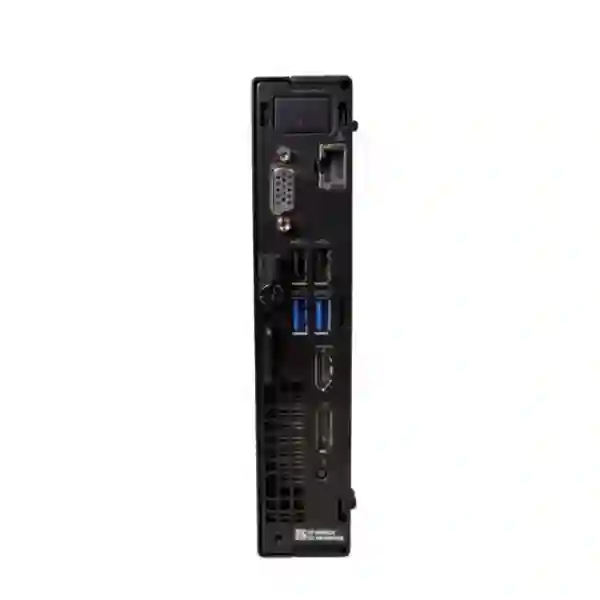
| Network and local outputs | 1 × 1GbE RJ45, HDMI and DisplayPort in original manufacturer sheet |
| Electrical input | 100–240V AC; 65W consumption figure in original sheet |
| Operating environment | 10°C–35°C; 20%–80% non-condensing relative humidity |
| Included peripherals | Keyboard and mouse; optional VESA mount identified separately |
| OS/version caution | Manufacturer sheet lists Windows 11 IoT Enterprise LTSC 2024; confirm offered revision |
These are model-family reference details, not a warranty of the contents of every shipment. Verify the full 1TB/2TB part number, revision and current manufacturer document. Recording bandwidth figures differ among accessible documents and should be confirmed in writing for the offered unit.
What the WRT-P-3104MW actually does
The Hanwha WRT-P-3104MW is a compact, Windows-based recording server for an IP video surveillance system managed in Wisenet WAVE. Instead of relying on an ordinary office computer to collect and manage footage, it provides a dedicated machine with the recording application already installed. It is intended for smaller installations where the operator needs organised access to live and recorded camera video without allocating a full-size equipment rack. The device is the recording component of a wider solution; suitable cameras, network equipment, displays, secure access and an operating plan remain part of the project.
Hanwha positions the micro-form-factor platform for systems of up to 16 cameras, with four Wisenet WAVE Professional recording licences included. The licence entitlement and the physical capacity are separate decisions. A system that starts with four recording streams may grow after an additional licence assessment, but expansion is never simply a matter of plugging in unlimited cameras. Every proposed camera should be checked against available licences, actual bit rate, storage retention and the deployed software revision.
Who should consider this compact recording server
This model is most relevant to an organisation with a modest number of network cameras, limited equipment space and a preference for a desktop-style WAVE environment. A small shop, controlled office, reception building, training room, clinic administration area or individual site office may be a sensible candidate, provided the deployment is within the server’s tested practical limits. It may also serve as an intentionally small node in a wider surveillance design, with the broader architecture planned separately.
It is less suitable when the business expects a large camera estate, high aggregate recording traffic, long retention at maximum image quality or a harsh, unventilated equipment location. Those projects may need a larger recorder, more storage, different resilience measures or a multi-server design. The right purchasing question is not only whether the box is small enough to fit, but whether it can continuously handle the precise footage that the site needs to preserve.
Four included licences: what that means
The package includes four Wisenet WAVE Professional licences. These are recording entitlements associated with the WAVE ecosystem, not a promise that all 16 possible camera positions are licensed as soon as the server is unpacked. Buyers should begin by listing each camera or recorded stream that requires a licence and then establish what licence types and quantities are appropriate to that setup. Special devices, encoders and integrations can have different licensing requirements.
For example, a site planning six independently recorded IP camera streams should not assume that the four bundled Professional licences cover all six. The purchase review should establish the additional entitlements required before recording is commissioned. Likewise, organisations adding cameras later should check whether existing licences can be allocated as intended and whether the recorder still has adequate performance and storage headroom. Keeping licence keys, activation ownership and the installed system details documented makes later troubleshooting and upgrades much easier.
Maximum camera count and real-world capacity
Manufacturer material describes this micro server as designed for up to 16 cameras. Treat that number as a planning ceiling for a qualified configuration, rather than a guarantee that any combination of 16 cameras will perform well. A camera capturing low-motion footage at modest resolution behaves differently from a high-resolution camera recording rapidly changing scenes around the clock. Compression, frame rate, analytics, audio, recording schedules and simultaneous playback can all change the system’s workload.
Before ordering, prepare a camera schedule with model, intended resolution, frame rate, codec, estimated recording bitrate and expected recording hours. Add the figures together and compare them with the correct current manufacturer specification for the exact hardware revision. Leave headroom for peaks, software processing and future changes. If the application is business-critical, ask for an engineering review rather than relying on a single advertised channel count.
Model identification matters before purchase
The wording WRT-P-3104MW identifies the original micro recorder family. Storage configurations are often distinguished by a 1TB or 2TB suffix, and similarly named models with an MW1 suffix have been listed separately. Those identifiers should not be silently treated as the same hardware. Port arrangements, operating-system versions, memory technology and networking may change between model revisions while the product descriptions still look similar.
Ask the supplier to write the full manufacturer part number, selected storage capacity and applicable hardware revision on the quotation. Confirm whether the offered unit is the original WRT-P-3104MW or a newer MW1 variant. Match any datasheet to that exact part, not merely to a photograph or an abbreviated product title. This avoids disputes about whether a particular display connector, operating-system build or network interface was included in the agreed order.
Recording storage: choosing 1TB or 2TB
Manufacturer documentation identifies an M.2 solid-state drive for recorded video, with 1TB and 2TB raw storage configurations, as well as a separate 256GB M.2 operating-system drive. The separation helps distinguish the application environment from its recording data. Raw capacity is not the same thing as the exact capacity available for footage after formatting, application overhead and other files. It is also not a guarantee of a particular number of recording days.
The useful selection is the one that matches a calculated retention requirement. A small number of cameras recording only at relevant times may make a 1TB option practical; continuous higher-bitrate recording can exhaust even 2TB much sooner than expected. Define retention before choosing the drive. If policy calls for footage to remain accessible for a fixed period, verify the configuration with a realistic traffic model and a margin for changes in scene complexity.
How to estimate video retention properly
Retention planning begins with data, not a sales slogan. Estimate the average recorded bitrate for every camera and the number of hours it records each day. Multiply bitrate by recording time to estimate transferred data, then total all cameras and allow for storage overhead and operating margins. Variable bitrate footage can increase unexpectedly when movement, rain, foliage or complex lighting creates more image detail. That is why vendor defaults and a quiet daytime test may understate the storage requirement.
As a planning example rather than a product guarantee, a single stream averaging 2 Mbps continuously generates approximately 21.6 GB of video in 24 hours before overhead. Four such streams generate roughly 86.4 GB each day. Actual usable drive space, codec and bitrate variation determine the achievable history. The best commissioning practice is to measure real recordings over representative busy and quiet periods and then confirm that the configured overwrite behaviour matches the site’s retention policy.
Recording schedules, events and evidence needs
A surveillance system should capture the material that matters to the organisation, not merely produce the highest possible volume of video. Some areas require continuous recording; others may allow event-based or scheduled capture subject to the site’s security policy and legal obligations. Agree those requirements with the people who will actually investigate incidents. An entrance may need consistent coverage even after business hours, while an interior administrative area may have different operational expectations.
Wisenet WAVE provides a management environment through which recording and review workflows can be configured, subject to the connected camera and software version. Never assume that an event rule has been applied successfully simply because it is listed in a proposal. Test the live stream, trigger the relevant event, wait for the archive to be written, then search and export a sample. That is the practical evidence that the design will support an incident investigation.
Image quality and camera settings
The recorder cannot improve footage that the camera never captured. Camera position, lens selection, illumination, backlight, resolution and shutter settings influence whether people, vehicles or activities are recognisable in a clip. The recording architecture must then preserve the chosen level of detail at a sustainable bitrate. For a retail counter, the critical view may be the transaction area; for a doorway, it may be clear movement through the access point rather than a very wide overview.
Choose video profiles according to each camera’s purpose. Where H.265 or other compression settings are used, establish support across the particular camera, WAVE build and any client workstation that needs to play the footage. Avoid changing frame rates or compression simply to make a storage estimate look attractive. Instead, test representative clips in daylight, darkness and the most demanding expected lighting, then make a documented decision about quality and retention.
Camera interoperability and integration
Wisenet WAVE is a video management platform with documented support for a range of camera features. That does not make every third-party IP camera, analytic event or advanced control function automatically compatible with every software version. Even where a camera can present video through a common IP protocol, specialised events, PTZ controls, audio, metadata and configuration functions may need explicit compatibility confirmation.
Build a camera compatibility schedule that lists manufacturer, model, firmware version, intended features and the WAVE release used during testing. Record whether the objective is basic video recording or deeper integration with event alarms and camera settings. If an organisation already owns cameras, testing one representative unit before buying the recorder can reduce costly surprises. New camera purchases should also be reviewed against expected networking, power and viewing requirements, not just the recorder’s nominal channel support.
Network design for dependable recording
The original model’s manufacturer specification lists a 1GbE RJ45 network interface. That describes its wired connection, not a promise that it can record video at anything close to the entire network link speed. The camera traffic budget, computer resources and WAVE processing capability all matter. Place the recorder on a planned network segment with sufficient switching capacity and reliable paths from cameras to the server. IP addressing, DHCP reservations or static addresses should be documented for future maintenance.
Camera streams are particularly sensitive to unstable connections because prolonged loss can create a gap in an evidential recording. Check switch capacity, cable quality, port errors, VLAN design and power to the cameras. Where cameras use Power over Ethernet, ensure the switches provide the right power budget. A recorder network interface is not itself a PoE camera power supply. The device should be connected to suitable network infrastructure, not assumed to replace a PoE switch.
Local access and the monitoring workstation
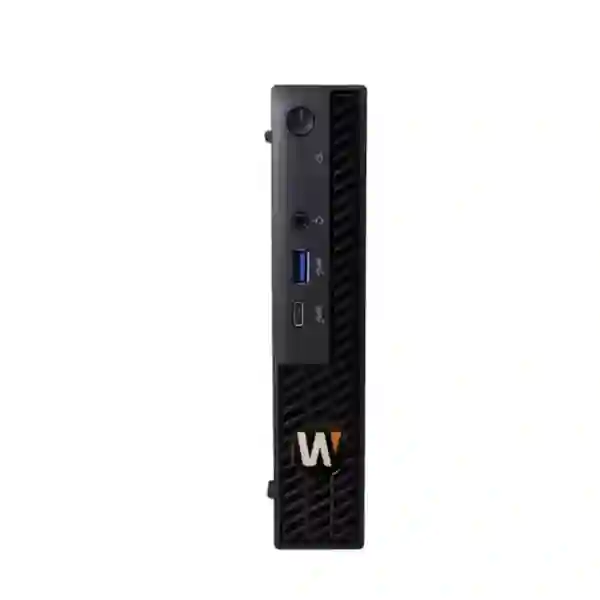
The micro chassis provides display connectivity, and the manufacturer specification for WRT-P-3104MW lists HDMI and DisplayPort outputs. A keyboard and mouse are described as included. These details can help small sites establish a local administration position, although screen requirements, the software interface and physical connector availability should be confirmed on the offered revision. A monitor is not automatically included with a recorder just because the device supports display output.
Decide early whether staff need regular local viewing, occasional evidence searches or a separate monitoring computer. A recording server and a heavily used viewing workstation serve different operational demands, even if the software can provide both roles. A small site may want a straightforward operator position; a busy control area with many large displays may justify dedicated client hardware. The decision should reflect the amount of simultaneous live viewing, playback and export expected.
Remote viewing without careless exposure
Remote access can help an authorised manager review incidents without travelling to the recorder, but access should be designed rather than improvised. Do not expose administrative services directly to the public internet simply to make access easy. Use the vendor-supported remote-access method appropriate to the installed WAVE version, apply strong unique credentials and enable available account protections. Assign users only the permissions they require, and review those permissions when staff roles change.
Internet access may also be unreliable or expensive at a particular site. Confirm which workflows must operate locally if the wide-area link fails, and which remote functions depend on external connectivity. Consider the effects of limited upload bandwidth when several people request video simultaneously. The recorder should remain a dependable local recording system, while remote access is treated as a separately controlled convenience with clear security and operational requirements.
Cybersecurity responsibilities for the whole system
Protecting video does not stop at choosing a recognised camera brand. Cameras, switches, the Windows-based recording server, WAVE software, access accounts and any remote clients need an agreed maintenance process. Change default credentials, use individual administrator accounts where supported and avoid sharing one password among multiple employees. Record the version of the operating system and WAVE installed at commissioning so that later security advisories can be assessed correctly.
Restrict unnecessary network routes, review account privileges and protect access to exported evidence. Establish who is authorised to add cameras, delete recordings, alter schedules or create user accounts. Security updates should be assessed against vendor guidance and the needs of the running system; an unplanned reboot at a critical time can interrupt recording. Effective protection is a combination of reasonable network controls, disciplined access management and regular verification that recording remains healthy.
Physical installation in a compact space
A major advantage of a micro-form-factor recorder is that it does not require the floor space of a traditional tower or a full rack enclosure. The WRT-P-3104MW manufacturer sheet describes a black chassis approximately 36 mm wide, 178 mm deep and 182 mm high, weighing about 1.34 kg. Those dimensions are useful when selecting shelves, cabinets or an operator desk, but they do not remove the need for safe mounting and accessible cabling.
An optional VESA mounting arrangement is referenced in manufacturer material. Treat it as an option to specify separately rather than a bracket guaranteed in every box. Position the device where its ventilation openings are clear, accidental unplugging is unlikely and authorised staff can service the equipment without dismantling nearby furnishings. Allow space for power, network, display and USB connections. A hidden recorder that overheats or becomes impossible to inspect is not a successful compact installation.
Heat, humidity and the Tanzania deployment environment
The manufacturer’s environmental range for this model is 10°C to 35°C during operation, with 20% to 80% relative humidity without condensation. These are equipment limits, not an assertion about the temperature at any particular Tanzanian address. A locked cabinet, sunlit office, communications closet or poorly ventilated room can run significantly hotter than the surrounding space. Measure the likely ambient conditions before selecting the mounting position.
Where power, ventilation or humidity are difficult to control, a compact office-class server may require a better protected environment or an alternative product. Do not mount it in a sealed outdoor box and assume the casing provides weather resistance. Plan for dust management, airflow, protected cabling and periodic inspection. If an installer cannot demonstrate operation within the published limits, the suitability question remains open even when the proposed camera count looks modest.
Electrical supply and continuity planning
The manufacturer’s data for WRT-P-3104MW identifies a 100–240V AC power input and a 65W power-consumption figure. These are useful starting points for electrical planning, but they are not a promise about the consumption of the complete surveillance system. Cameras, PoE switches, displays, networking equipment and backup power have their own loads. A surveillance system that loses the switch or cameras during an outage cannot maintain useful recording simply because the server stays powered.
Assess a suitably specified UPS for the recorder and the equipment on which recording depends. The desired autonomy should be based on the site’s risk assessment, not an arbitrary number of minutes. Confirm shutdown behaviour, safe restart and whether video recording resumes automatically after power is restored. Electrical installation should use appropriate protection, earthing and qualified local practice. The final solution must account for all loads rather than multiplying the recorder’s wattage alone.
Ports and peripheral planning
Hanwha’s WRT-P-3104MW material lists USB connectivity, a 3.5 mm audio headset connection, the wired network interface and local video outputs. It also identifies a bundled keyboard and mouse. These ports are useful for initial setup and administration, but the exact accessible connectors should be checked against the delivered chassis. Similar revisions may have different combinations of VGA, HDMI, DisplayPort or network ports, even when the product naming is similar.
A port list is not a full operating plan. Ask whether monitors need adapters, where cables will route and whether administrators must connect a service keyboard without disturbing other connections. Avoid leaving unattended removable storage connected permanently just because a USB port is available. Decide how authorised footage exports will be handled and protected. For installations with remote operators, the important bottleneck may be bandwidth or client hardware rather than the number of connectors on the small server.
Operating system and version control
The accessible Hanwha datasheet for the named WRT-P-3104MW lists Windows 11 IoT Enterprise LTSC 2024 on a separate 256GB solid-state system drive. Older reseller descriptions and later variant listings do not always use identical operating-system wording. That makes the exact part number and delivery revision important. The operating system should not be assumed from the family name alone, and a buyer should receive a written confirmation for the supplied hardware.
Once deployed, record the installed OS edition and build, the Wisenet WAVE version, firmware versions for connected cameras and the date of each approved configuration change. Operating-system security updates and WAVE updates should follow an agreed maintenance window and be checked against vendor compatibility guidance. Replacing the system drive or reinstalling software without preserving configuration information can increase recovery time. Documented ownership of the software environment is part of the solution.
Designing the recording policy with stakeholders
Different departments may have different expectations of the same surveillance system. Security teams want dependable evidence, operations teams may need quick playback and management may want simple access to authorised footage. Privacy and workplace obligations also affect how video is used and how long it should be kept. The recorder cannot resolve those decisions automatically. A recording policy should identify the objective for each camera and the responsibility for approving access.
Set out whether recording is continuous, scheduled or event-triggered; how a gap in coverage is reported; who can export clips; how clips are handled after an incident; and how retention is reviewed. Assign a named system owner, even for a very small installation. A technically functioning device can still fail the business if footage is overwritten sooner than expected, users cannot find relevant clips or no one is accountable for regular health checks.
Practical camera placement before sizing the server
Begin at the location where an incident may occur. Identify the activities that need documenting and the camera viewpoints that would actually help. A reception counter may need one view of the interaction and another of the surrounding approach. A small warehouse may need an entry view and a separate loading-area overview. The number of lenses or streams should arise from that coverage plan, not from the four included recording licences.
After the coverage plan, specify each camera’s field of view, lighting, target detail and recording profile. Estimate the resulting stream traffic before finalising the recorder. If the plan requires additional devices, the expanded licence count and storage calculation must be updated as well. This order of decisions protects against buying an attractive compact appliance only to discover that essential camera views or desired evidence quality cannot fit within its practical recording limits.
Small retail and shop-floor scenario
For a small retail site, the questions often centre on entrances, customer transactions, stock access and after-hours activity. A compact recording server may offer a neat management point when the planned stream count and traffic are suitable. The important design detail is whether the camera angles genuinely support incident review and whether the retention period covers the usual time between an incident and its discovery.
Retail scenes can become busy at peak periods, increasing recorded data relative to an empty-shop test. Lighting changes at entrances and glare near windows can affect usable images. Plan the network and backup power to protect the recording path, including any PoE switches. Give a responsible manager an evidence retrieval procedure that they can actually follow. The purchase should be justified by a working review workflow, not by a generic promise of higher security.
Office and reception scenario
An office may need coverage of a reception approach, shared corridors, equipment entry points and selected access routes. The privacy implications of filming work areas must be addressed through the organisation’s policy and applicable requirements. For an otherwise low-traffic office, the small chassis can be attractive because it may be placed in a protected communications area rather than a conspicuous tower beside a reception desk.
Specify who can see live images, who can search archives and who is allowed to export evidence. Separate routine operational access from administration. Test whether footage from the relevant entrances is discoverable by a nontechnical authorised user. Decide how office closures, holidays and out-of-hours occupancy affect schedules. If access-control integration or event-based investigation is required, test it against the particular devices and software instead of assuming every integration comes with the recorder.
Education and training facility scenario
A training centre or smaller educational facility may need to monitor limited entrances, shared circulation and equipment storage. Sensitivity around learners, staff and visitors makes governance especially important. Identify each legitimate purpose, appropriate camera viewpoint and authorised viewer before selecting the recorder. The WRT-P-3104MW may fit a modest, carefully scoped camera plan, but a campus-wide deployment would require a much broader system design.
Different parts of a facility may have different recording schedules and access needs. A training lab used for valuable equipment may require a different view or retention approach from a general hallway. Document how incidents are reported and who can request a recording search. Provide staff with appropriate instruction rather than giving broad access to everyone. If expansion is expected, reserve network and licence planning time now so that a future additional camera does not become an improvised change.
Healthcare administration and controlled premises
Some healthcare administration or professional premises need focused surveillance of public reception areas, entrances or access to property. These projects need particular care around patient, visitor or client privacy. A recorder is a technical component; it does not establish whether a proposed camera location is permissible or whether the organisation has a lawful basis for collecting and retaining footage. Those decisions should be reviewed under the relevant local obligations and internal policy.
Small, quiet administration spaces can benefit from compact equipment, but placement must still consider access control, cooling and recovery procedures. Use role-based permissions, limit unnecessary viewing and give authorised personnel a safe evidence-export process. If the proposed solution also monitors clinical spaces or highly sensitive activity, obtain specialist governance and technical review. Suitability depends on the use case and controls, not simply on whether the available channel count is sufficient.
Warehouse, stockroom and loading-area scenario
Warehouses and back-of-house storage areas often combine narrow access routes with large, visually complex scenes. A single wide-angle view may show movement but fail to provide usable detail for a specific event. Plan camera placement around doors, loading activity, stock movement and key control points. Confirm that the intended footage, especially from active outdoor-facing entrances, can be sustained by the proposed compact recorder.
The WRT-P-3104MW is an indoor micro recorder, not a substitute for industrial environmental protection. A dusty or hot storage building may require a controlled equipment enclosure or a different recording platform. Review PoE switch location, cable lengths and whether intermittent network connections could cause recording gaps. When the warehouse operates in shifts, make sure the retention calculation includes nighttime and peak activity rather than assuming that cameras are quiet outside normal business hours.
A branch office or distributed site
A branch operation may want local recording at each site while nominated personnel have controlled remote access. A micro recorder can be one component in such an approach if each branch fits the device’s practical capacity. Local recording reduces dependence on continuously sending every stream to a distant location, but remote access, health reporting and centralised management have their own bandwidth and administration requirements.
Decide how a branch recorder will be monitored when nobody with technical knowledge is on site. Who receives alerts? Who can restart network equipment safely? How are updates coordinated across several locations? What happens if the internet is unavailable for an extended period? Avoid implying that the recorder automatically provides resilient multi-site functionality without the appropriate WAVE design and configuration. The project should describe a complete operational model for branch maintenance and evidence retrieval.
How this differs from a conventional NVR
Some conventional network video recorders present an appliance-centred interface with fixed hardware and an integrated camera channel licence model. The WRT-P-3104MW belongs to a Wisenet WAVE recording-server approach built around video management software and Professional recording licences. That can suit buyers who value a familiar software-based viewing and administration environment, but it also means licences, operating-system lifecycle and server configuration deserve attention.
Neither approach is automatically superior. Compare the actual devices on recording performance, supported cameras, licensing cost, storage, remote access, incident search, update management and operator familiarity. A fixed-channel NVR may be simpler for some very small systems; a software-driven recorder may better fit a particular WAVE deployment. Request a comparison against the same camera schedule and retention target. A comparison based only on channel count or raw drive capacity leaves out the most important operational differences.
Comparing the original and similarly named revisions
Product listings for WRT-P-3104MW and WRT-P-3104MW1 are easy to confuse. Some distributors explicitly describe the MW1 version as a replacement for the original. That is an important purchasing signal, but it should not be interpreted as proof of local stock, identical licensing or a particular regional support arrangement. A newer part number may have revised connectivity or operating-system information, so the original product’s details should not be copied onto a replacement quote.
Where a quote substitutes a new revision, ask for a side-by-side review of the full part number, raw video storage, operating-system drive, memory, software licences, recording bandwidth, video outputs, Ethernet connectivity and power requirements. Confirm whether any mounting accessories or adapters must be purchased separately. The aim is to protect the expected installation experience. If the original version is not obtainable, the alternative should be explicitly approved rather than silently swapped.
Planning for future cameras
A small site may begin with four recorded streams and later want more coverage. The manufacturer describes the platform for up to 16 cameras, but that does not mean growth to 16 is automatically licensed, economical or feasible with every recording profile. New cameras affect at least four variables: licensing, total bitrate, retention and viewing workload. They can also increase PoE power demand and network-switch port requirements.
Keep a documented expansion threshold. When additional cameras are requested, revise the camera schedule and calculate the new aggregate recording traffic. Check whether the new entitlement type is compatible with the existing WAVE system and whether recorded storage still meets policy. If the expansion materially changes the design, a larger or additional recording server may be the more reliable purchase. Treat the upgrade path as an engineering choice, not as a marketing slogan.
What to check on a supplier quotation
The quote should identify the full product name and manufacturer part number, the video storage variant, the four included Professional licences and whether any additional licences are required for the intended streams. It should distinguish the recorder from separately provided cameras, PoE switches, monitors, UPS equipment, mounting accessories and installation services. A product-only price without the surrounding system details is not a complete surveillance solution price.
Also verify the offered operating-system revision, local support arrangement, applicable warranty terms and the way the system will be tested before handover. Do not assume that a manufacturer warranty description for another sales region guarantees identical service within Tanzania. Request written clarification of availability, delivery arrangements and support responsibilities from the supplier, rather than inferring them from an overseas catalogue. No local price or stock promise is implied by this description.
Avoiding common specification mistakes
One mistake is to describe four included recording licences as 16 included licences. Another is to state that a 2TB option holds a fixed number of days of video without measuring the cameras’ actual bitrates. A third is to choose the smallest server based only on how many cameras connect today, ignoring later additions and the processing load of playback. Those mistakes can lead to hidden licence purchases, lost footage or premature replacement.
Other common errors include choosing the wrong hardware revision, assuming a particular Windows edition without checking the delivery specification, overlooking ventilation and failing to power the camera network through an outage. Each has a simple prevention step: check the exact part number, validate the recorded stream plan, test the viewing workflow and document the physical installation. A realistic acceptance checklist is more valuable than any unsupported claim that a recorder is suitable for every environment.
Commissioning and handover checklist
At installation, record each camera’s address, location, intended profile and owner. Confirm that authorised WAVE licences are active and that every required stream is recorded. Check time synchronisation, the system date, recording schedule, live-view permissions and available archive space. Validate network stability while cameras are busy, not merely while the site is empty. Inspect at least one sample playback from every camera and confirm the image meets its purpose.
Test a controlled power interruption and recovery plan when it is safe to do so. Confirm that authorised staff can locate and export a clip, and that the export procedure preserves appropriate access controls. Document who will receive notifications about camera or recorder faults. Handover should include software versions, account ownership, equipment serial details, support contacts provided in the actual sale and a date for the first health review. Only then is the device a working system rather than an installed box.
Regular health checks after installation
Video surveillance often looks healthy until somebody needs a recording from a date that has already passed. Prevent this by scheduling regular checks of camera connectivity, active licences, recording status, usable storage and the oldest available footage. Look for unexplained gaps, repeated restarts and differences between planned and measured retention. Check whether the camera views still cover the areas intended after changes to furniture, stock, lighting or entrances.
Operational owners should also review user permissions and any changes to remote-access arrangements. Plan maintenance windows for vendor-supported security updates and preserve enough configuration information for recovery if a drive or server fails. A simple written monthly review can be adequate for a modest site, provided it is actually performed and exceptions are investigated. The critical measure is whether requested footage can be found and played back reliably when an incident occurs.
Evidence handling and storage limitations
The 1TB or 2TB raw data-storage choice is not an independent archive or backup strategy. As the configured recorder overwrites older material, evidence outside the retention window may no longer be available. A separate incident-handling procedure should specify when authorised staff must export relevant footage, where protected copies are kept and who can access them. Security and privacy requirements can apply both to recordings on the appliance and to files copied elsewhere.
Do not assume that attaching a removable drive, using an external cloud service or enabling an integration is supported by the exact installed configuration without checking vendor documentation. Decide what needs to be retained, where it is stored and how its integrity is protected. Keep a record of who performed an export and why. The recorder is designed to support video management; a deliberate evidence policy gives those recordings practical value after a security event.
Cost of ownership beyond the recorder
The acquisition cost of a recording server is only one part of the system budget. Camera hardware, lenses, cabling, PoE switching, backup power, network design, screen equipment and required WAVE licences may all be separate line items. Installation and training matter too, especially where staff will perform their own video searches. The lower equipment footprint of a micro computer does not eliminate the operational work needed to keep evidence reliable.
Budget for future changes such as adding a camera, increasing retention, replacing failing network equipment and maintaining the Windows and VMS environment. Compare the proposed system with alternatives on a like-for-like scope over its intended service period. Where pricing is quoted in Tanzania, verify the currency, included taxes, delivery costs, warranty and support terms from the actual seller. Avoid drawing conclusions from an overseas reference price or a listing for a different model revision.
The information a buyer should send for a quote
A useful request starts with the exact model family, whether the original revision is essential, and the preferred 1TB or 2TB storage option. Add the number of existing and proposed cameras, their models if known, required recording hours, preferred retention period and whether remote access is needed. Explain if the installation will be at a single site or across several branches. Sharing a basic layout or camera schedule can help the technical team identify gaps early.
Also describe the equipment environment, expected power interruptions, available network infrastructure and whether the project needs configuration or only hardware supply. If the buyer is replacing an existing recorder, identify the current WAVE version and any licences to be reviewed through a secure, authorised process. These details enable a more meaningful technical discussion than asking only for a price. The objective is a configuration that records the right video and remains manageable after commissioning.
A clear decision before placing the order
The Hanwha WRT-P-3104MW is worth considering when space is limited, Wisenet WAVE is desired and the proposed camera estate falls within a verified small-system design. Its compact form, dedicated recording storage and four included Professional licences address a real need for focused IP video recording. The limits are equally important: the licensing entitlement is not unlimited, storage retention must be calculated and hardware revisions need careful identification.
Before approving a purchase, ask the supplier to confirm the full manufacturer part number, storage option, operating-system revision, recording performance and current local supply and support terms. Compare these with the camera schedule, expected activity, installation temperature and target retention. If the result is not comfortably within the design envelope, consider a better-sized alternative. A careful specification today can prevent missing evidence and avoidable upgrades later.
Frequently asked questions
Does this device include licences for 16 cameras?
No. Manufacturer information identifies four included Wisenet WAVE Professional recording licences, while also describing the micro recorder as designed for up to 16 cameras under suitable conditions. Those statements refer to different things. Additional recorded streams may require further licences and a capacity review. Confirm the exact entitlement for every camera or device before treating an installation as ready for recording.
Can I choose between 1TB and 2TB?
Yes, 1TB and 2TB raw video-storage variants are documented for the model family. They should be identified by their complete manufacturer part numbers on the order. Usable capacity will be lower than nominal raw capacity, and the achievable recording history depends on the cameras, their recording profiles and the archive policy. Ask for a storage calculation against the actual project.
Is the WRT-P-3104MW suitable for outdoor installation?
It is a compact indoor recording server, not an outdoor weatherproof camera. The manufacturer’s specified operating range is 10°C to 35°C and 20% to 80% non-condensing humidity. A site with high heat, dust, condensation or direct exposure needs an appropriate protected equipment environment or a different product. An enclosure alone does not establish safe ventilation.
Does it power IP cameras directly?
The specified wired Ethernet interface is used for network connectivity. It should not be assumed to provide PoE power to connected cameras. Plan suitable PoE switches or other camera power arrangements according to the chosen camera models. Include their load in the backup-power budget and check that video continues to reach the recorder during any expected electrical disturbance.
Can I connect cameras from another manufacturer?
Wisenet WAVE supports a range of IP video integrations, but a general interoperability statement is not a guarantee for every camera or advanced feature. Check the exact camera model, firmware and required functions against the deployed WAVE version. If the project depends on motion events, audio, PTZ or analytics metadata, test those features before approving the whole system.
How many days can the recorder store?
There is no defensible single answer without a camera schedule. Retention depends on usable drive space, stream count, image resolution, codec, scene activity, average bitrate and recording schedule. The 1TB or 2TB designation describes a raw storage option, not a fixed day count. Calculate the expected archive window, then verify it with representative actual recordings after commissioning.
Can staff use the recorder to watch footage locally?
Hanwha’s original model documentation describes HDMI and DisplayPort outputs together with an included keyboard and mouse. Confirm the shipped revision and viewing requirements before choosing monitors and adapters. A busy monitoring role may still benefit from separate WAVE client equipment. Local access should use individual permissions and the same evidence-handling rules as remote access.
Is internet required for local recording?
A properly configured local IP video recording design should be planned around communication between cameras and the recording server on the local network. Remote features and some software-related activities may require additional connectivity. The exact behaviour depends on configuration and the WAVE version. Test local recording, alerts and recovery under the network conditions expected at the site.
Is WRT-P-3104MW1 the same product?
No. The MW1 suffix identifies a separately listed revision, and some suppliers describe it as a replacement for the original model. Do not transfer every hardware specification from one suffix to another. Obtain the datasheet and exact complete part number of the actual unit being quoted, then check ports, software, storage, licences and support arrangements.
Is the manufacturer warranty automatically valid in Tanzania?
Not necessarily. Warranty wording found in a manufacturer document for another region does not establish the seller’s obligations, service availability or response time in Tanzania. Request written regional terms for the specific unit and procurement channel. Keep purchase documentation and the actual support contact details with the site handover record.
What should be tested before the installer leaves?
Confirm that each required camera records, that timestamps are correct and that the oldest retained footage is consistent with the design. Search for and play a sample clip from each camera, check at least one authorised export and test recovery after the agreed restart scenario. Review user permissions, software versions and fault-reporting ownership. Record the results so future changes can be compared with a known working baseline.
How do I request a quotation?
Provide the exact WRT-P-3104MW family and preferred raw storage capacity, plus camera counts, camera models if available, expected retention, installation conditions and whether additional WAVE licences or installation support are required. Ask the supplier to confirm the current hardware revision and locally applicable delivery, pricing and warranty terms. A complete requirement produces a more useful proposal than a model number alone.
Request a correctly specified WRT-P-3104MW quotation
Share your camera schedule, desired storage retention, exact model preference and the installation environment. Request written confirmation of the manufacturer part number, licences, operating-system revision, compatible connections and locally applicable commercial terms. This is a non-linked enquiry invitation because no suitable verified Tanzania product or contact-page destination was accessible in the permitted sitemap sources.
Ask FourTeck Tanzania for a configuration review and quote




Reviews
There are no reviews yet.