

HANWHA VISION / WISENET WAVE
Hanwha WRT-P-3104W1 Recording Server for Tanzania
Build a reliable IP video recording plan around a Wisenet WAVE mini-tower server with four included Professional recording licenses, up to 170 Mbps rated ingest and a choice of raw storage configurations. The Hanwha WRT-P-3104W1 uses Windows IoT and should be selected according to your camera list, footage-retention goals, required licenses and local deployment conditions.
Up to 170 Mbps recording
4TB–16TB raw variants
Verified specifications at a glance
| Product | Hanwha WRT-P-3104W1 Wisenet WAVE recording server |
|---|---|
| OS | Windows 11 IoT Enterprise LTSC 2024 |
| Chassis | Mini-tower |
| Recording licenses | 4 Wisenet WAVE Professional |
| Raw storage variants | 4TB / 8TB / 12TB / 16TB |
| Recording bandwidth | Up to 170 Mbps, manufacturer testing |
| Series channel support | Up to 64; licensing and workload constraints apply |
| CPU / memory | 14th-generation Intel Core i3 / 16GB RAM |
| System drive | 512GB M.2 SSD |
| Network | 2 × 1GbE RJ45 |
| Video outputs | 1 × HDMI / 1 × DisplayPort |
| Electrical | 100–240 VAC input / 360W-rated supply |
| Operating conditions | 10–35°C; 20–85% RH non-condensing |
Data describes the manufacturer-listed W1 family. Verify the complete storage-suffixed model and all local supply terms before ordering.
Decide your recording requirements before selecting terabytes
Prepare a list of cameras, expected average and peak bitrates, required days of footage, continuous or event-based recording requirements, authorised users and backup-power expectations. The correct storage configuration follows from this workload. Four included licenses are a starting entitlement, not a promise that every supported channel is already licensed.
Product overview: a recording server for planned IP surveillance
The Hanwha WRT-P-3104W1 is a mini-tower recording server with Wisenet WAVE video management software already installed. Its Windows 11 IoT Enterprise LTSC 2024 platform is intended for recording and managing network camera footage, not for use as an ordinary office computer. It gives an installer a defined hardware base while leaving practical choices such as storage capacity, camera licenses, network infrastructure and recording policy to the project design.
A buyer should first decide how the recorder will be used. Some facilities want continuous evidence from entry points, while others need scheduled footage and straightforward retrieval after incidents. The value of the server depends on making those decisions before installation, rather than selecting a recorder solely by its maximum channel number. Successful deployment combines suitable cameras, a stable LAN, appropriate power protection and staff who know how to review footage.
This model may suit an individual premises or a supported expansion of an existing Wisenet WAVE environment. In either case, request a design covering actual camera models, expected bitrates and desired retention days. The product family offers several raw disk capacities, so the complete storage-suffixed part number should appear on the quotation. A model family name alone is insufficient to identify which capacity will be delivered.
Hardware details that matter in daily operation
The appliance is specified with a 14th-generation Intel Core i3 processor, 16GB RAM and a dedicated 512GB M.2 SSD for the operating system. Data recording uses the chosen surveillance-storage configuration rather than treating the system SSD as its advertised archive capacity. This separation clarifies the distinction between the operating environment and the space available for camera footage. Do not assume raw disk size translates directly into an identical amount of retained video.
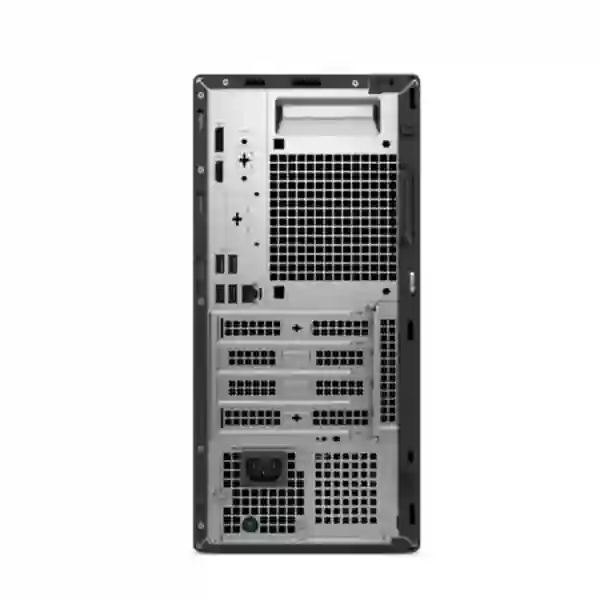
Dual Gigabit Ethernet ports, HDMI, DisplayPort and USB connectivity provide options for integration and local commissioning. The included keyboard and mouse help during setup. Two network connections can support an appropriate design, but they do not provide power to a fleet of PoE cameras. An integrator should identify the required PoE switches, switch power budgets, network uplinks and any approved segmentation between surveillance and normal business traffic.
The compact metal chassis should be placed in a controlled indoor location with appropriate ventilation and physical security. It uses a 360W-rated power supply with a manufacturer-listed 100–240 VAC input. That rating describes the supply, not a promise about constant power consumption or UPS battery life. Design power backup for the recorder and essential supporting equipment using realistic loads and site conditions.
Understanding the available storage variants
The manufacturer identifies 4TB, 8TB, 12TB and 16TB raw-storage configurations for this Windows IoT series. Each selected configuration should be named in the purchase documents using its complete manufacturer part number. The unsuffixed WRT-P-3104W1 designation does not tell a customer whether a proposed unit ships with 4TB or 16TB of raw recording storage. Ask the supplier to make the capacity explicit before comparing quotations.
Raw capacity is not the same as guaranteed days of recording. Retention depends on camera quantity, stream bitrates, video compression, resolution, motion in the scene, schedules and the overhead required by recording software and storage. One heavily used loading-bay camera may consume more space than a quiet storeroom camera with a similar image resolution. A practical proposal should therefore show a retention estimate derived from the actual camera schedule.
Selecting the largest offered capacity may create useful room for longer retention, but it does not eliminate the need to assess recording bandwidth or software licenses. Conversely, a smaller capacity may be appropriate for a deliberately modest system with shorter retention needs. Set the target recording period and record-quality requirements first, then choose the capacity with an appropriate margin for varying scene activity and future changes.
Plan video retention from evidence needs
Define the expected life of ordinary recordings before placing an order. Staff responsible for security, operations and data governance should agree on which cameras require continuous footage, which may use event-based recording and how long information should remain available. Retention should serve a clear business purpose and respect the organisation’s applicable obligations. There is no single retention period that is automatically correct for every Tanzanian business or institution.
For each camera, record the resolution, frame rate, codec, typical bitrate and expected hours of operation. Consider lighting changes, busy periods and whether audio or advanced event information will be captured. A camera pointed at a constantly moving road can behave differently from one monitoring a low-activity door. Build estimates from realistic profiles and then test actual stream traffic during commissioning rather than depending entirely on optimistic calculator inputs.
Preserving an incident is different from ordinary cyclical retention. Define who can export a clip, where that evidence will be held and how the integrity and accessibility of exported material will be managed. Users should know when older footage will be overwritten and how to react if an incident is reported near that boundary. A recording policy becomes useful when it connects capacity, authorised access and real operational procedures.
Recording throughput: what up to 170 Mbps means
Hanwha gives this series a recording-bandwidth figure of up to 170 Mbps, based on performance testing with Wisenet WAVE. That is an ingest data rate, not a statement about image quality or a guarantee that any selection of cameras will work at its theoretical maximum. Video traffic depends on scene activity, stream settings and network behaviour. The installation should be designed against expected simultaneous traffic rather than individual camera nameplate values alone.
Prepare a bitrate budget for all cameras recording at the same time. Include headroom for temporary peaks, additional cameras and foreseeable configuration changes. Viewing recordings, exporting clips or displaying many live streams can introduce other workloads that should be assessed separately. If a site expects several simultaneous operators, the client viewing experience should be tested under representative conditions rather than inferred from the recorder’s advertised ingest capacity.
Do not confuse the 170 Mbps local recording rating with internet download speed. Most cameras send their video through a local surveillance network. The public internet may be relevant to remote viewing or management, but it is not a substitute for sufficient switch capacity and reliable local cabling. Ask the integrator for a network diagram showing camera traffic, recorder connections, user access and any necessary security boundaries.
Four included Professional licenses: what is actually covered
The WRT-P-3104W1 includes four Wisenet WAVE Professional recording licenses. A buyer planning more recorded camera streams should verify the number and type of additional licenses required. For ordinary IP camera recording, licensing is generally assessed by recording channel or stream, although some specialised camera types and integrations can have different rules. The proposed bill of materials should make all relevant entitlements explicit rather than hiding them inside a general software line.
The wider series documentation states support for up to 64 channels. That figure describes a possible technical ceiling, not 64 licenses included at no extra charge. A high channel count must also fit within the recording throughput, storage configuration and viewing workload of the server. Do not assume that satisfying the license count automatically makes the whole 64-channel workload practical. The full system must be sized around actual streams and usage.
Optional video-management functions may have their own conditions. Specialist analytics, external integrations and video-wall features should not be assumed to be covered by a standard Professional recording license. Ask what each proposed feature requires, who will activate it and how future expansions will be quoted. Recording licenses, server capacity and functional add-ons are separate budgeting questions, even though they work together in the finished surveillance system.
Camera compatibility: Wisenet and ONVIF
The manufacturer lists support for Wisenet cameras and ONVIF-conformant IP cameras. This makes the recorder a potential option for a mixed camera estate, but it is not a guarantee that every multivendor camera will expose every function. Live video may work when a specialist event, audio feature, analytics overlay or pan-tilt-zoom control behaves differently from what the customer expects. Compatibility should be checked against exact model and firmware combinations.
For a new installation, ask the designer to list proposed cameras and the WAVE features expected from each one. For an existing system, conduct an inventory and test representative devices before moving recordings. Verify discovery, authentication, live streams, recorded playback, timestamps, camera event handling and exports. Where an RTSP connection is needed instead of a fuller ONVIF integration, confirm which controls or metadata may not be available.
This test becomes especially important when older cameras, unsupported firmware or unusual encoder configurations are involved. The goal is not merely to display an image in the software, but to ensure users can rely on recordings during actual investigations. A short compatibility pilot can reveal limitations before the customer commits to additional licenses, installation labour and a long-term retention plan.
Installing within an existing Wisenet WAVE environment
Hanwha describes the series as suitable for standalone deployment or as an addition to an existing Wisenet WAVE system. That flexibility should be considered a design possibility rather than a guarantee that every deployed software version will combine automatically. Existing systems may have specific versions, camera assignments, licenses, network policies and administrator roles that affect the integration method. The customer should provide these details during the preliminary technical review.
When expanding a system, determine where each camera will record and how operators will locate footage. Agree on user roles and whether any existing client workstations need updating. Think about server-to-server traffic and WAN constraints if locations are separated. A unified monitoring interface can be convenient, but it does not remove the need to understand which physical server stores the archive for each camera.
Before migrating a camera, identify how current recordings will be retained and who approves a changeover. Avoid assuming historic footage will transfer automatically between different recording platforms. Plan and test the desired cutover approach, including time synchronisation and fallback steps. Document the finished architecture so future technicians can determine the relationship between cameras, recorders, software licenses and client access.
Network design for recording reliability
Surveillance networks need consistent connectivity. Calculate the required switch ports, uplink speeds, PoE supply and cable routes for the cameras rather than focusing only on the recorder. If several cameras share one uplink, that connection must carry their combined expected traffic with appropriate headroom. The recorder’s two Gigabit network interfaces should be integrated into a clearly documented topology with proper IP addressing, time synchronisation and access controls.
Separating camera devices from ordinary office endpoints can reduce unnecessary exposure and make network administration clearer. The exact segmentation method depends on the customer’s IT infrastructure and security policy. Avoid exposing camera credentials or management services without a reason. Record switch addresses, camera locations, VLAN assignments where used and authorised support paths so that troubleshooting does not require guesswork.
Commissioning should include tests for packet loss, unstable links, excessive jitter and intermittent camera disconnections. Label the network cables and preserve the final port map. Where cameras are planned for later phases, leave a documented allowance for extra power, ports and bandwidth. Physical network quality is a core part of evidence reliability; no recording software can recover footage that never reached the recorder.
Local monitoring and staff workflows
The appliance provides HDMI and DisplayPort video outputs, making local operation and setup possible with appropriate display equipment. However, the number of physical outputs is not a promise that every high-resolution live layout can be decoded simultaneously at full quality. Display arrangements depend on camera streams, software settings and the overall client workload. Test the actual monitoring layout before declaring the workstation ready for routine operation.
Organise camera names around places that staff recognise, such as main entrance, loading door or reception corridor. Configure permissions according to job responsibilities. Security personnel may need live views and incident playback, while a system administrator needs configuration access. Avoid shared administrator accounts where individual access can be used. Training should include searching by time, locating a relevant camera and preserving a clip through the approved process.
A practical acceptance test asks an authorised user to find a recording from a specified period and export it without help. If that task is unnecessarily difficult, revise the user interface organisation, permissions or training. The recorder’s technical specification matters, but its day-to-day value also depends on whether people can retrieve reliable evidence promptly and safely.
Cybersecurity and responsible access
Surveillance video can contain personal or operationally sensitive information. Protect access with distinct user accounts, suitable authentication, role-based privileges and careful handling of administrative credentials. Decide who can see live footage, who can review recordings and who can export or delete material. Permissions should be reviewed when employees change roles or leave. Keep an audit trail or equivalent organisational record wherever the deployed system and policy support it.
Remote access must be planned deliberately. Determine which people need access from outside the premises and what secure methods are supported by the deployed WAVE version and the customer’s network. Do not expose recorder or camera administration interfaces directly to the public internet merely to make remote access convenient. Coordinate firewall rules, client devices and account lifecycle with the organisation’s IT or security lead.
Set a maintenance process for operating-system and VMS updates, configuration backups and firmware reviews. Test compatibility before major changes and retain a recoverable configuration where supported. Good security also requires physical protection, protected power, accurate clocks and prompt response when cameras or storage fail. No product feature substitutes for a customer-controlled access policy and a clear operational owner.
Electricity continuity and local deployment planning
For a Tanzania installation, assess power reliability at the specific premises without assuming a standard outage pattern for the whole country. Where disruptions are a concern, size a UPS or other approved backup solution for the recorder and the switches, cameras and network components essential to continued recording. A server remaining switched on does not preserve footage if all cameras and their network links have lost power. The power design must cover the end-to-end recording chain.
The listed 100–240 VAC input range and rated 360W power supply help identify electrical requirements but do not tell the buyer a UPS runtime. Runtime depends on actual equipment load, battery condition, chosen battery capacity and site conditions. Ask the responsible installer to document the planned backup duration and how the equipment behaves during power recovery. Surge protection, grounding and safe electrical installation should be specified by qualified personnel.
Test an outage scenario during commissioning where appropriate and safe. Check whether local recording resumes or continues as expected, whether the clock remains correct and how operators are notified about interrupted cameras. Remote connections may be unavailable during internet failures even if the local network stays active. Distinguish local recording continuity from remote viewing availability in the handover documents.
Operating temperature, humidity and physical security
Hanwha lists an operating temperature range of 10°C to 35°C with 20% to 85% non-condensing relative humidity for this series. The recorder is an indoor mini-tower, not a weatherproof camera or an outdoor network cabinet. Evaluate the intended equipment room across daily heat and humidity changes. A small locked cupboard without ventilation can become unsuitable even when the surrounding office is comfortable.
Provide clear ventilation paths, clean power access and a position protected from accidental impacts, dust and casual handling. The equipment should be secure from unauthorised removal while still accessible to authorised technicians. Cable labels and a secure inventory record can speed up fault isolation and replacement work. Do not block vents or add enclosure materials that may compromise cooling.
Where the available room is too hot or dusty, address the environment or evaluate a better-protected location before buying the recorder. Heat-related failures can affect both system availability and video retention. Physical security is also part of protecting evidence: an easily accessible power plug or exposed storage drive may undermine an otherwise well-configured surveillance installation.
Drive bays and the difference between capacity and redundancy
The manufacturer’s series sheet identifies three front hot-swappable 3.5-inch data-drive bays, while the standard 4TB through 16TB product configurations are described with one installed data drive. Multiple available bays are not proof that the supplied configuration includes duplicated video archives. Likewise, hot-swappable hardware is different from disk mirroring or RAID protection. Ask the supplier to document exactly which drives are fitted in the quoted unit.
The published effective-capacity table does not list RAID 5 or RAID 6 capacity for these configurations. A buyer should not advertise fault-tolerant RAID recording based on the enclosure design alone. If the site has strict requirements for recording continuity during a disk failure, compare solutions whose storage resilience is explicitly documented and supported. Decide how critical clips will be protected independently of ordinary rolling storage.
Maintenance planning should explain who receives warnings about drive problems, how a failed disk is diagnosed and whether recording interruption is possible. Confirm the manufacturer’s approved replacement procedures and applicable support arrangements before modifying storage. An equipment purchase should specify not only terabytes, but also expected behaviour during failures and a practical recovery procedure.
Configure recording quality and schedules thoughtfully
Different camera locations may justify different recording policies. A cash-handling point, an entrance and a low-activity storeroom do not necessarily require identical frame rates and retention periods. Identify where usable detail is essential and where a wider overview is sufficient. Choose appropriate camera placement, optics and exposure settings before trying to solve every image-quality issue with a higher recording bitrate.
Increasing resolution, frame rate or image quality often increases network and storage demand. Very aggressive compression may save space but reduce useful detail during rapid movement or challenging lighting. Compare sample recordings under real conditions. Event-driven recording can reduce storage use in some scenes, but busy locations may trigger almost continuously. Base estimates on observed behaviour rather than ideal assumptions.
Review recording schedules after commissioning to ensure they reflect the actual operating hours and risks of the location. Document who may change settings and how exceptional events are handled. The final policy should balance evidence usefulness, retention requirements, available storage, permitted access and the need to find footage quickly.
Commissioning and acceptance before sign-off
Verify the delivered storage-suffixed model, installed raw capacity, operating-system version, WAVE version and included recording licenses against the purchase order. Record the asset details securely. Check the network configuration, power protection, ventilation and connected camera list. Keep the final credentials under customer control. Do not treat a successful first boot as proof that the recording system is ready for operational use.
Test each camera or representative camera group for a stable live stream, accurate timestamp, recording playback and required event or PTZ behaviour. Check that the actual combined recording load is within the approved design. Verify permissions for each user role, a sample export and any relevant alerts. Revisit storage-retention assumptions using real data if camera settings differ from the initial plan.
Finally, perform recovery and continuity checks appropriate to the site: restart behaviour, temporary network loss, backup power and response to a disconnected camera. Prepare an accurate camera map, equipment list and change log for handover. Explain who provides ongoing support and what the customer should do when a camera or disk alarm appears.
System health checks after installation
Recording systems benefit from planned inspection. Assign responsibility for confirming that cameras are connected, recordings are current, available storage is within expectations and the system clock remains accurate. An operator should know what constitutes a critical warning and who should be contacted. A recorder can appear operational while an important camera has stopped recording, so checks must go beyond confirming that the machine is powered.
Include periodic sample playback, network review, storage health, license use and access-right checks in the customer’s maintenance plan. Confirm that software and firmware updates follow approved procedures and do not create avoidable recording gaps. Keep secure configuration records and verify that replacement staff can perform ordinary retrieval tasks. When adding cameras, revise storage, bandwidth and license estimates together.
Define how incident clips are exported, preserved and subsequently handled. Avoid relying on one administrator’s undocumented habits. Practical procedures and training help the organisation use the recorder responsibly. A modest scheduled health check can reveal faults before footage is urgently needed.
Where the appliance may fit
For a retail outlet or office, the server may suit a carefully planned set of entrance, reception and circulation cameras. The four included Professional licenses are useful to consider for an initial four-stream recording design, subject to the exact cameras and current license rules. The buyer still needs to choose retention, determine whether extra cameras are planned and establish who can review incidents. Local placement and camera image quality are as important as the recorder itself.
For a warehouse or workshop, camera traffic may increase with vehicle movement and more demanding scenes. Consider network cabling, camera weather ratings, power distribution and protected indoor housing for the recorder. Estimate storage using actual stream settings and the hours when activity occurs. A loading area that needs continuous evidence may require a different policy from a storeroom or delivery office.
For an educational, healthcare or multi-department environment, the recording platform may be relevant where controlled footage access is a priority. Role-based access, clear retention rules and documented retrieval procedures help reduce misuse. These are illustrative deployment considerations, not claims that any named institution in Tanzania has installed or endorsed this model.
Compare with fixed-channel NVRs and larger servers
A conventional fixed-channel NVR may appeal when the requirement is a small, tightly defined camera system with limited future change. The WRT-P-3104W1 takes a VMS-oriented approach using preinstalled Wisenet WAVE and specified computer hardware. That can be valuable for users who need structured software-based management, but it also means camera licensing and wider network architecture deserve attention at purchasing time.
Higher-throughput or larger-storage recording servers may be more appropriate for demanding systems, even when the camera count is below the stated 64-channel ceiling. Many high-resolution cameras, long retention targets, intensive viewing or resilience requirements can justify different hardware. Compare the full workload rather than a single maximum number. Ask vendors to document how a proposed system meets recording, storage, viewing and failure-recovery expectations.
This Windows W1 model should not be confused with related Linux or micro-form-factor variants. Similar product names do not imply identical operating systems, disk capacity, network connections or throughput. Require the complete part number on every quote and distinguish the appliance from additional cameras, PoE switches, UPS equipment, licenses and professional services.
A structured request for quotation in Tanzania
When requesting a proposal, provide the number and models of cameras, whether the premises already uses Wisenet WAVE, the expected recording days and the desired image quality. Explain whether cameras record continuously or only during defined events and whether staff need local or remote playback. Where possible, include a camera location plan and state which views are critical for incident investigation. These details help distinguish a suitable recorder configuration from a generic equipment quote.
Ask the supplier to identify the exact 4TB, 8TB, 12TB or 16TB variant and show its projected storage retention assumptions. Request separate itemisation of included licenses, additional camera licenses, switching, backup power, network work, commissioning, user training and any ongoing support. Confirm what is included in the price and which components are recommendations rather than supplied items. Keep commercial and technical assumptions in the same written proposal.
For Tanzania buyers, verify current local pricing, stock, supply lead time, applicable warranty coverage and service arrangements directly with the supplier. Hanwha states that availability varies by region, so manufacturer literature alone does not establish local availability. The information here is intended to help buyers ask the right questions without inventing prices, delivery dates, stock positions or local certification claims.
Handover documents that reduce later support problems
A useful handover pack identifies the recorder’s complete model suffix and serial information, installed disk capacity, software versions, camera list and network diagram. Store account credentials securely rather than in a publicly accessible document. Include the recording-policy summary and any assumptions about footage retention. These records help another technician understand the installation without rebuilding the configuration from scratch.
The handover should also explain who manages license assignments, how additional cameras are approved and what to do when a camera stops recording. Specify the agreed inspection schedule, the person responsible for incident exports and the escalation path for hardware faults. Where remote access is enabled, record the approved method and the account administration process without disclosing sensitive secrets in ordinary operating instructions.
Ask for a practical demonstration, not only a statement that the system has been installed. Staff should be able to locate live views, find footage, export a relevant clip and recognise basic alerts. An installation is more valuable when everyday users can carry out these actions accurately and the organisation knows how to maintain them.
Frequently asked questions
What is the Hanwha WRT-P-3104W1?
It is a Windows IoT mini-tower Wisenet WAVE recording server for IP surveillance cameras. It is supplied with preinstalled video management software and four Professional recording licenses. The selected raw storage configuration must be established from the full part number.
How many licenses are included?
Four Wisenet WAVE Professional recording licenses are included. Additional recorded camera streams can require additional licenses. The proposed camera types and software features should be checked against the current licensing rules before an order is confirmed.
Can it record 64 cameras without upgrades?
Not by default. The series supports up to 64 channels as a technical upper limit, while only four recording licenses are included. The real usable camera count also depends on aggregate bitrate, storage requirements, software configuration and client workload.
Which hard-drive sizes are offered?
The advertised raw-storage variants are 4TB, 8TB, 12TB and 16TB. A supplier should specify the exact capacity-suffixed model and the installed drive configuration. Raw capacity should not be mistaken for a guaranteed footage-retention period.
Can I use third-party ONVIF cameras?
The recorder supports Wisenet cameras and compatible ONVIF IP devices. Test the exact model and firmware before purchase. Live video, recorded playback, PTZ, audio, motion metadata and other features may have different compatibility requirements.
Is a PoE switch included in the recorder?
The published hardware specifications identify ordinary Gigabit Ethernet connections, not a built-in multichannel PoE switch. Camera power and network switching should be specified separately according to each camera’s needs and the installation design.
What does 170 Mbps describe?
It is the up-to recording data-rate specification from manufacturer testing, not a storage size or an internet-service rating. Expected simultaneous camera stream traffic should be calculated with headroom, then reviewed during commissioning.
Does the model run Ubuntu Linux?
The WRT-P-3104W1 identifies the Windows IoT configuration. Hanwha’s wider series also contains a Linux variant with a different model code. Verify the full quotation to avoid confusing related products.
Will an internet outage stop local recording?
Local video recording can remain operational when cameras, recorder, local switching and power continue working, but remote functions may be affected. Check the actual installed network and test the expected outage scenario before relying on this behaviour.
Can this server join an existing WAVE system?
Hanwha describes the series as suitable both for a standalone site and as an addition to an existing WAVE system. Software versions, license assignments, network architecture and access permissions still need project-specific compatibility review.
Does the standard configuration include RAID?
Do not assume RAID redundancy. The family specifications identify multiple drive bays, but the listed raw capacities do not establish RAID 5 or RAID 6 support for the supplied variants. Ask separately about drive-failure recovery and any required redundancy.
What should a Tanzania quote include?
The quote should identify the exact recorder capacity, included and extra licenses, projected recording workload, required network and power components, installation scope, local price, supply timing, warranty applicability and support arrangements. None of those commercial particulars should be assumed from a generic model listing.
Request a storage- and license-specific quote
Share your camera schedule, required retention days and current WAVE environment with FourTeck Tanzania. Request the exact WRT-P-3104W1 storage variant, included and additional licenses, expected recording capacity and confirmed local commercial terms. Ask for installation, training and support items to be clearly separated where applicable.
Next step: Request configuration, availability and quotation confirmation.




Reviews
There are no reviews yet.