
Hanwha Vision | Wisenet WAVE | Recording infrastructure
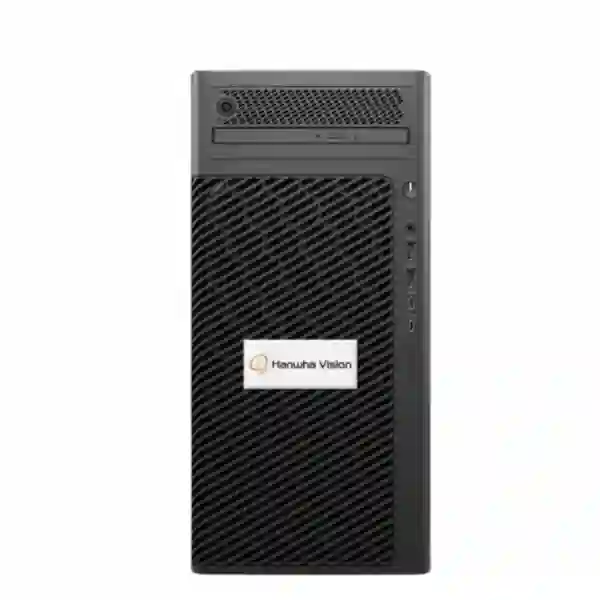
Hanwha Vision WRT-P-3105W1 WAVE Recording Server
Build an IP surveillance recording system around a manufacturer-specified, Windows IoT tower server with Wisenet WAVE preinstalled. The Hanwha WRT-P-3105W1 recording server supports up to 32 channels, up to 170 Mbps recording input and up to 16 TB raw storage, with four WAVE Professional recording licences included. Select the supplied storage variant and any extra licences to match the cameras, retention target and site conditions.
Before you order
The listed channel limit is not the number of included recording licences. The raw storage maximum is not guaranteed retention, and a quoted unit may contain less than the family maximum. Ask for the exact installed storage capacity, licence total, camera bitrate budget and retention calculation. Local availability, pricing and delivery details require confirmation for the specific Tanzania order.
Manufacturer specification at a glance
| Model | Hanwha Vision WRT-P-3105W1 |
|---|---|
| Platform | Wisenet WAVE preinstalled |
| Recording channels | Up to 32 |
| Recording bandwidth | Up to 170 Mbps |
| Included licences | 4 Wisenet WAVE Professional |
| Raw data storage | Up to 16 TB |
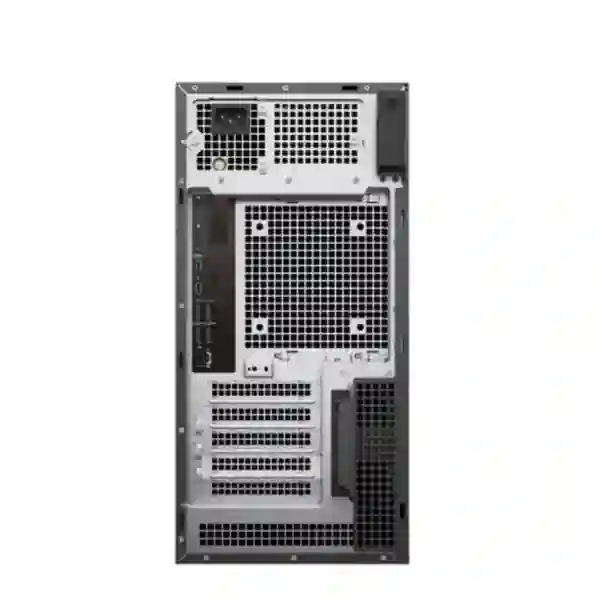
| Data drive bays | 3 × 3.5-inch SATA |
| Operating-system drive | 256 GB internally mounted M.2 drive (per listed specification) |
| Processor | Intel Core Ultra 5 245 |
| RAM | 16 GB DDR5 |
| Operating system | Windows 11 IoT Enterprise LTSC |
| Network | 2 × 1 GbE RJ45 |
| Local outputs | 1 × HDMI, 1 × DisplayPort |
| Power supply | 360 W, 80 Plus Platinum; 100–240 V AC input |
| Operating temperature | 10°C to 35°C |
| Operating humidity | 20% to 85%, non-condensing |
| Form factor | Tower; approx. 324.3 × 154 × 293 mm (H × W × D) |
| IPMI | Not supported |
| Accessories | Keyboard and mouse included; sliding rail kit not included |
Published manufacturer specifications describe the model family and may change. Confirm the configuration and specifications on the exact quotation, particularly the installed storage capacity and licence requirements.
How to choose, size and use this recording server
Built for video surveillance rather than a general office PC
The Hanwha WRT-P-3105W1 recording server is a compact tower appliance for organisations that want an on-premises foundation for IP camera recording with Wisenet WAVE already installed. Instead of planning a computer from separate components, a buyer can start with a specified recording platform, then check camera quantities, stream bitrates, retention requirements and licensing against the project. This approach is useful for a security system that must operate continuously, but it does not remove the need for deliberate design. The recorder is only one part of the complete solution: cameras, switching, cabling, electrical protection, user access and commissioning all influence the end result.
Hanwha Vision specifies a capacity of up to 32 channels, recording bandwidth of up to 170 Mbps and raw data storage capacity of up to 16 TB. Those figures describe upper limits, not a promise that every combination of 32 cameras, maximum resolution and long retention will work simultaneously. Four Wisenet WAVE Professional recording licences are included. Ask for a camera-by-camera bill of materials and a recording calculation before ordering, especially when existing cameras will be reused or future expansion is expected.
Who this recorder suits
This mini-tower may suit a small or medium site that wants centrally managed recordings without allocating space for a rack server. Typical project types include an office with several controlled entrances, a retail premises with sales-floor coverage, a campus administration building, or a warehouse with loading-bay cameras. These are illustrative situations, not claims that this product has been installed at those locations. A buyer should evaluate the actual environment, mounting and security arrangements rather than select the server only from a category label.
It is a less obvious fit when a project needs more than 32 recording channels on one appliance, recording input above the stated limit, a larger raw archive than 16 TB, or server features not specified for this model. It is also worth reviewing alternatives where the recorder must be installed in a rack, exposed to hot or dusty conditions, or operated from a separate monitored server room. In Tanzania, the intended room temperature, stable power and local network arrangement deserve particular attention because they can shape system reliability more than an attractive feature list.
Read the 32-channel figure correctly
Channel capacity and licensed recording capacity are different numbers. Hanwha Vision lists support for up to 32 channels on the WRT-P-3105W1, but provides four WAVE Professional licences with the appliance. A prospective 16-camera installation therefore should not be quoted as fully licensed merely because 16 is below 32. The recording licence plan must cover the streams or devices requiring licences under the current WAVE rules, taking account of the exact camera and stream configuration. The number of live tiles shown on a monitor is another separate consideration.
For procurement, ask the installer to provide three counts side by side: physical camera devices, recorded channels or streams, and included plus additional WAVE licences. Identify any multi-sensor devices, encoders or unusual sources that need specific treatment. Keep a record of the licence order and activation plan as part of the handover. This avoids the expensive surprise of a correctly installed server that does not yet have sufficient licences to record the planned fleet.
Understand the 170 Mbps recording ceiling
The stated maximum recording bandwidth is up to 170 Mbps. This is an input-side planning limit and should not be confused with the speed of an internet connection or the combined nominal capacities of the Ethernet sockets. Each camera produces a stream whose actual bitrate depends on image resolution, frames per second, compression, scene movement, lighting and recording settings. A higher resolution is not automatically better if it creates an unmanageable archive or leaves too little bandwidth headroom.
Build a stream budget using the camera model and proposed settings, then consider simultaneous writing, client playback and network overhead. Avoid designing a project to run continuously at a quoted maximum with no margin for change. A busy entrance at night may generate different data from the same scene in daylight, and a new camera profile can alter the load. The WAVE system planning tools and an on-site bitrate check can help refine assumptions before the equipment is accepted.
Raw storage is not footage retention
The manufacturer states up to 16 TB raw storage for this model, with three 3.5-inch SATA data-drive bays listed in the chassis specification. Raw capacity is the starting point for a storage design, not the amount of usable video that an administrator can guarantee. Actual disk configuration, file-system overhead, WAVE reserved space, recording schedules, bitrate and any redundancy strategy affect how long footage remains available. Ask which disk capacity is physically supplied in the quoted variant rather than assuming the maximum capacity is installed.
A sensible storage discussion begins with the required days of retention for each camera class. Critical perimeter cameras may record continuously while some interior cameras use event-based schedules, subject to policy. These choices change space consumption dramatically. Check the real sustained stream load and use the manufacturer-supported calculator or a trial measurement to estimate the archive. A business requirement such as thirty days of accessible footage should be written into acceptance criteria, not inferred from the number 16 TB in a product headline.
A practical way to estimate storage
Begin by listing each camera’s expected average recording bitrate in megabits per second and its daily recording hours. As a rough planning conversion, a continuous 1 Mbps video stream represents about 10.8 GB per 24 hours before storage overhead and differences in actual encoded traffic. Multiply the expected average camera bitrate by recording duration and by the number of cameras, then apply the desired retention period. The resulting figure is a planning estimate; it is not a guarantee of archive length for a real surveillance installation.
For example, twelve continuous streams averaging 2 Mbps produce about 259 GB of video per day before overhead. Thirty days would therefore require roughly 7.8 TB of raw video data before allowing for practical usable space and changes in scene complexity. That example also needs enough WAVE licences for twelve recorded streams; the appliance’s four included licences do not cover that example by themselves. Test actual codec settings and representative day/night footage before fixing a storage purchase. If minimum retention is critical, include spare capacity rather than sizing to the last available gigabyte.
Licensing and future growth
Four WAVE Professional licences ship with the WRT-P-3105W1 according to the manufacturer. The licence specification distinguishes products that enable one, four or more IP-stream recordings, so the entitlement on the quote matters. For an initial four-camera project, confirm exactly which streams are recorded and activated. For an eight-, twelve- or thirty-two-channel plan, request the incremental licences explicitly. The 32-channel specification remains an appliance capacity, not a licence bundle or an unconditional promise for every high-bitrate camera selection.
Plan for realistic growth. If a building currently has eight cameras but will add entrances and warehouse aisles next year, the design should include spare network ports on the switching side, space for recording data and a defined licensing path. Existing WAVE installation or licence ownership should be checked under the current vendor activation rules before any licence transfer is assumed. Record the owner, software account arrangements and support process in a controlled asset register, not in public documents.
Processor, memory and software platform
Hanwha Vision specifies an Intel Core Ultra 5 245 processor and 16 GB DDR5 memory for the WRT-P-3105W1. The appliance uses Windows 11 IoT Enterprise LTSC and a separate 256 GB internally mounted operating-system drive, according to the published product specification. This combination helps distinguish it from a basic stand-alone NVR or a generic PC assembled without a defined video management workload. The exact current operating-system build, software version and update policy should be recorded during commissioning.
These specifications do not mean that a recorder is suitable for arbitrary additional programs. Installing unrelated desktop software, background services, security agents or analytics workloads can consume resources needed for video recording. Coordinate any endpoint protection or maintenance software with the equipment’s supported configuration. Likewise, avoid assuming the computer includes advanced remote server management: the official specification marks IPMI as unsupported. Arrange local servicing access and monitoring accordingly.
Wisenet WAVE in daily use
Wisenet WAVE is the video management software preinstalled on this server. It provides the software layer for adding compatible IP cameras, organising live views and accessing the recorded archive. A security manager can plan camera naming conventions, role-based operator responsibilities and a straightforward process for locating footage after an incident. The system is more effective when layouts and recording policies reflect the building and users, rather than leaving every camera with a default label.
Hanwha’s WAVE platform also supports desktop and mobile client experiences and a cloud-connected access service. Availability and behaviour of each function can depend on the deployed WAVE version, permissions and network design. Buyers should ask for a live demonstration of their priority workflows, such as switching between a gate and loading-bay view, locating a time range on the timeline, and exporting an authorised clip. A clear operator workflow can be as important as processor speed during an urgent investigation.
Cameras, ONVIF and mixed fleets
The WAVE platform supports a range of compatible network video devices, including supported ONVIF cameras and RTSP sources. This makes the recording server worth evaluating where an organisation owns cameras from more than one vendor. However, a protocol label by itself does not guarantee every camera feature will be exposed identically. Discovery, credentials, video profiles, event triggers, analytics metadata and two-way functions can vary by model and firmware.
Prepare a compatibility matrix for all intended cameras before purchasing. Record the manufacturer, model, firmware, required resolution, primary and secondary stream, audio requirements and intended recording schedule. Demonstrate important event behaviour rather than assuming it from a catalogue. Where cameras are already installed, inspect their network security settings and the availability of current firmware. If a specific camera is essential to the project, a short proof of concept can reveal limitations far earlier than final handover.
How the two Ethernet ports help
The device specification lists two RJ45 1 GbE interfaces, one built into the board and one provided through a PCIe network card. A system designer may use these connections to organise communication among the surveillance cameras, server and administration network, depending on approved topology. They are not a substitute for a correctly sized managed switch, suitable uplinks or a documented security architecture. Nor should the two 1 GbE figures be added together and described as a guaranteed 2 GbE recording path.
Review VLANs, subnet routes, switch power budgets and client access before installation. Many IP cameras receive PoE from external switches; the WRT-P-3105W1 specification does not describe an integrated PoE camera-port bank, so do not assume it powers cameras directly. Configure monitoring for link failures and switching issues, and leave enough uplink capacity for live monitoring during heavy recording periods. A simple network diagram with port assignments is a valuable handover deliverable.
Remote viewing and internet planning
A locally recorded archive and a remote viewing experience have different connectivity requirements. The cameras may continue sending streams over a local network even when internet access is unavailable, but a remote operator needs a working route to the site. WAVE Sync provides a way to connect supported systems with authorised remote clients, subject to account, version, security and firewall requirements. It should not be confused with a promise that the video archive is automatically stored in the cloud.
Assess upstream internet capacity, mobile coverage for the user, firewall policy and who can approve external access. Multiple viewers, concurrent high-quality streams and remote investigations may consume considerable bandwidth. For sensitive sites, use a documented security review before enabling internet-facing access. Confirm whether the intended remote workflow still functions during an internet outage; do not make operational decisions on the assumption that local recording and cloud connectivity are the same service.
Access permissions and evidence handling
Video surveillance frequently involves footage of staff, visitors, customers and contractors. Decide who may view live feeds, who may search recordings, who may export footage and who administers the system. WAVE’s user and permission tools should be configured for the actual roles at the site. A reception operator may require a small set of live views, while an authorised investigator may need access to past events. Shared administrator accounts undermine accountability and complicate incident review.
Create an internal policy for evidence requests, export authorisation and secure storage of copied footage. Identify how dates, camera names and time synchronisation will be checked so that incident records are meaningful. Restrict exported files to approved recipients and keep an audit trail outside ordinary casual messaging. The server is a technical component of a privacy-conscious process; buying it does not establish the organisation’s legal basis for surveillance or satisfy all local policy obligations automatically.
Security updates and network hardening
The appliance is based on a Windows IoT operating system and a video management application, so it requires a deliberate maintenance and cybersecurity plan. Use strong unique credentials, remove unnecessary access paths and keep a secure record of administrator ownership. Change any factory-default camera passwords before onboarding devices. Determine which software updates are supported for the exact product and coordinate installation with recording-critical periods rather than allowing unplanned restarts.
Protect the surveillance network from unmanaged visitors’ devices and general browsing where practical. Restrict administrative access to trusted machines and verify firewall rules for both cameras and remote clients. Review incident response steps for a compromised account or camera. Avoid unsupported claims that an appliance is completely immune to cyberattack or automatically compliant with any local regulatory regime. Confirm the site’s applicable policies and vendor guidance with the responsible security team before deployment.
Image quality versus workload
Resolution is one part of usable video evidence. Frame rate, lens choice, field of view, camera mounting height, exposure and compression also affect what an operator can identify. An oversized stream from a poorly positioned camera may consume storage without improving security decisions. The WRT-P-3105W1 should be sized against the encoded stream the camera will actually send, not merely against the camera’s advertised megapixel count.
Ask the installer to demonstrate recognisable detail at the required distance in both daylight and low light. Check whether moving objects remain legible and whether strong backlighting obscures entrances. Select sensible frame rates and compression profiles for each scene, then verify the impact on recording bitrate. Features such as camera-side analytics, dual streams and event recording may help particular workflows, but the benefit depends on camera and software compatibility. Document settings rather than relying on a one-size-fits-all default.
Continuous, scheduled and event recording
Every camera does not necessarily need the same recording schedule. Continuous capture can make sense for critical entrances or high-traffic boundaries, while an event-driven arrangement may reduce consumption on less active views. The correct choice depends on risk, the organisation’s evidence policy and how reliably the camera or VMS identifies events. It is not enough to select a low storage number by disabling recording during periods when an incident could occur.
Write down the expected recording mode, pre-event and post-event needs, time coverage and retention target for each camera. Simulate real activity and inspect the timeline to make sure the saved material matches expectations. Where investigation quality matters, test a recording rather than just a live image. Any bandwidth and archive savings should be measured under representative conditions, not guaranteed in advance. Keep the system configuration and policy together so future operators understand why a camera behaves differently from its neighbours.
Finding and exporting a recording
A recording server earns its place when authorised people can retrieve useful footage after an incident. During acceptance testing, ask an operator to find a specific time on a named camera, compare views from adjacent locations and export the required evidence using the approved procedure. Verify the time zone and clock synchronisation before treating timestamps as reliable. If several systems are involved, compare a common reference event across them.
Consider where exported clips are stored, how long they are retained and who receives them. A server’s internal recording disk is not necessarily an appropriate long-term evidence repository. Do not confuse an exported incident file with the retention policy for the rolling archive. Clear procedures reduce the chance of accidental deletion, unauthorised disclosure or delays when evidence is requested. Training operators on a few realistic scenarios is more valuable than merely showing that a playback button works.
Power supply and backup strategy
Hanwha lists a 360 W 80 Plus Platinum power supply and 100–240 V AC input for this model, with maximum power consumption of 360 W. Those are equipment specifications; they do not include the electricity consumed by cameras, PoE switches, a network router, cooling or an external monitor. When designing a UPS, calculate the full load of devices needed to keep recording operational and choose the required runtime with allowance for battery condition and startup behaviour.
In areas with variable utility supply, power conditioning and clean shutdown become part of a reliable surveillance design. Test what happens when mains power is lost, including the switch, recorder and cameras. A UPS protecting only the server may not preserve footage if the camera switch powers down first. Verify earthing and electrical installation under applicable professional requirements. Do not promise a specific runtime or uninterrupted recording unless the entire installed system has been tested for it.
Temperature, dust and placement
The official operating temperature range is 10°C to 35°C with 20% to 85% non-condensing operating humidity. These limits matter when planning a surveillance system in a warm room, a security kiosk or a poorly ventilated back office. Temperature can rise inside a locked cabinet even if the room seems comfortable. A tower computer also needs unobstructed airflow and a secure location that protects it from casual interference.
Select a clean, indoor installation site with adequate ventilation, restricted access and suitable environmental control. Avoid placing the unit near a roof space, direct sunlight, water ingress or concentrated dust. If the chosen location cannot remain inside the stated operating range, change the location or assess another form factor rather than treating the limit as optional. Review access for technicians and the route for power and network cabling. Good physical planning extends beyond finding a shelf that fits the box.
Dimensions and serviceability
The published dimensions are approximately 324.3 mm high, 154 mm wide and 293 mm deep. Hanwha lists a tower form factor, with a weight of about 6.11 kg in the product specification. A keyboard and mouse are included, and video output is provided through one HDMI and one DisplayPort connection. These are useful details for positioning a local setup console or operator screen, but they do not imply a full multi-monitor control-room workstation configuration.
Leave room around the chassis for airflow, cable bends, power plugs and maintenance access. Label the two network connections clearly. If physical access is restricted, make sure a support person can still reach the necessary ports without disturbing the recording installation. The published specification says a sliding rail kit is not included; do not assume standard rack mounting accessories accompany the tower. If a rack is mandatory, assess an appropriately designed rack server instead.
Local monitoring and operator workstations
The WRT-P-3105W1 provides HDMI and DisplayPort outputs, so a local display can be attached where the approved WAVE workflow calls for it. However, a recorder is primarily responsible for receiving and storing video; a heavy live-view wall may warrant dedicated client computing resources. The appropriate layout depends on displayed streams, resolutions, decoding requirements and the number of simultaneous users. Do not assume that local outputs guarantee smooth playback of every camera at full quality at once.
Define separate requirements for recording, active monitoring and forensic search. A guard station may need continuously visible priority cameras and a simple method to switch locations. An investigation desk may need higher-resolution playback and clip export. A manager connecting remotely may need only occasional access. Testing each role separately avoids overloading the recorder with expectations taken from an unrelated workstation specification. The supplied keyboard and mouse assist setup but do not replace operator training.
Network capacity and segmentation
Plan the surveillance traffic from camera to switch, through uplinks and into the recorder. Even when the aggregate camera bitrates are below 170 Mbps, a weak uplink, damaged cable or overloaded switch can still cause problems. Check every intermediate link, not only the two network sockets on the server. Reserve capacity for administration and live clients as appropriate, and document the intended subnet and address scheme so future service visits are not guesswork.
Use suitable network isolation to reduce the chance that cameras are exposed to devices that do not need access. Assign camera credentials and addresses under a managed process. Monitor switch port errors and recorder connectivity after installation. If the same link carries surveillance, office applications and internet traffic, assess peak usage rather than average idle performance. An inexpensive network design mistake can undermine the value of a professionally specified recorder.
Analytics and interoperability decisions
WAVE can make use of supported camera analytics and integrates with selected third-party systems through supported connectors and APIs, but each desired function needs its own compatibility check. A buyer may want vehicle notifications, a gate event alongside video or a search workflow based on metadata. None of those features should be inferred solely from the server’s model number. Confirm the camera firmware, WAVE version, plugin, licence requirement and testing scope for the exact requested integration.
If analytics are central to the business case, prepare a short demonstration plan showing what event must be generated, how quickly the operator needs to see it and how the corresponding footage will be found. Distinguish between an event generated at the camera and processing that might require additional compute capacity. The base server specification is not a commitment that arbitrary external analytics software is supplied or can run locally without affecting recording performance.
Considering a distributed or multi-site system
Some organisations want video from several buildings or branches available to a central security team. WAVE offers tools for managing compatible systems, but the topology, server locations, bandwidth and user permissions must be designed for the actual project. A small tower appliance at one site does not by itself provide resilient central storage for every other location. Treat the installed recorder as a defined node in the architecture, then evaluate connectivity, management and operational responsibilities across sites.
Determine whether each site records locally, whether users need cross-site search and what happens if a link goes down. Review the cost of WAN capacity separately from local camera bandwidth. Security policies may require different access privileges for regional staff and central investigators. If a project spans many cameras or high-bitrate links, compare a distributed server design with the limits of this particular 32-channel model before choosing the hardware.
Comparing with a simpler NVR
A traditional stand-alone NVR may be suitable where a buyer wants a fixed number of cameras, straightforward local playback and a modest feature set. The WRT-P-3105W1 is relevant when the planned system benefits from the Wisenet WAVE software environment and a Windows-based recording appliance. The choice should be based on operations rather than the idea that a PC-like device is always better than an NVR. Consider licence cost, training, administration and future changes alongside hardware price.
Ask both candidate solutions to demonstrate the same activities: connect the intended camera models, meet recording and retention targets, manage user permissions, recover footage after a power interruption and export evidence. Document any additional software licences or supporting computers needed. A fair comparison includes ongoing support and the skill available to maintain the system, not just initial capacity. For more demanding applications, consider whether a larger server is appropriate instead of forcing this tower beyond its published envelope.
Comparing with a custom-built computer
A self-built video server can appear flexible, but it requires a carefully chosen operating system, storage architecture, networking and validated software installation. The benefit of the WRT-P-3105W1 is a manufacturer-defined appliance with WAVE preinstalled, four included Professional licences and published throughput limits. That simplifies part of the specification process, but it does not eliminate operational and security obligations. Buyers should still insist on an approved deployment plan and documented handover.
Evaluate the cost of hardware procurement, supported software versions, any additional recording licences, installation and lifecycle maintenance. Understand who is responsible when recording performance degrades: camera provider, network team, system integrator or manufacturer support. A branded appliance may reduce ambiguity about base hardware, while a custom platform may be needed for specialist storage or expansion requirements. Neither choice replaces realistic acceptance testing using the intended cameras and recording profiles.
Growth beyond the current project
An initial installation may contain only a few cameras, but changes to entrances, stock areas and perimeter coverage can add new recording streams. Preserve an expansion schedule that includes the number of future cameras, the expected bitrate profile and target retention. Recalculate all three after each phase. The capacity boundary of 32 channels is only one constraint; recording input and disk capacity can become the limiting factor first in a high-quality or long-retention installation.
Request a phased plan showing what the included four licences cover today, how additional channels will be licensed and when a second server or alternative platform would be considered. Do not assume that a spare SATA bay automatically permits unsupported capacity, RAID configuration or a performance upgrade. Confirm drive support and migration arrangements with the responsible vendor. Planning for growth is less expensive when the assumptions are written down at procurement rather than discovered during a later camera expansion.
A useful Tanzania site survey
For a Tanzania deployment, begin with conditions at the actual premises rather than with a generic regional claim. Ask where the equipment will be housed, how frequently power interruptions occur, which network closets serve the cameras and whether remote staff need to review footage. Check the installation environment against the published 10–35°C operating temperature range. Review internet upload speed for remote users, but remember that local recording and remote connectivity are distinct requirements.
Create a simple site survey covering camera positions, cable distances, PoE switching, recorder location, power distribution, UPS, room ventilation, internet resilience and access controls. Record the business’s footage-retention policy and who can approve exports. These practical questions apply whether the premises are a shop, office, educational building or logistics facility. They do not imply confirmed product stock, delivery coverage, installation services, approvals or a physical FourTeck office in any named city.
Common business scenarios
In an office building, the main design task may be keeping entrances, corridors and equipment rooms recorded while giving reception a limited live view. In a warehouse, lighting changes and moving vehicles may influence bitrate and camera positioning more strongly than the simple number of cameras. In a small retail property, staff may need to locate a transaction-related time range quickly without receiving broad administrative privileges. Each scenario calls for a different retention, permission and operator-workflow decision.
For an educational facility, separate access responsibilities for security personnel and administrators and document when footage may be exported. In a healthcare environment, privacy controls and evidentiary processes should be addressed before staff receive access. In a multi-building site, validate the switching and inter-building links. These examples describe planning methods, not approved sector certifications or completed customer projects. The right recorder is the one that meets the actual recorded-stream plan with documented headroom and a usable handover.
What to ask for in a quotation
Request the exact WRT-P-3105W1 configuration and storage capacity being supplied, not only the family name. The manufacturer’s family-level specification gives a maximum raw capacity but does not identify the disk in an unspecified quote. Ask which drives and accessories are physically included, which recording licences are included and how many additional licences the project requires. Confirm whether cameras, PoE switches, rack or cabinet accessories, UPS, monitors and operator computers are excluded or separately priced.
The quotation should also state the camera count, network assumptions, expected bitrate, target archive retention and commissioning deliverables. If an integration or remote access function is required, specify it as a testable item. Ask for the proposed software version, upgrade responsibility, support escalation route and any relevant vendor terms. Price, delivery lead time, warranty applicability and local availability must be confirmed for the actual transaction; none should be inferred from an overseas listing or an unverified marketing statement.
Commissioning checklist: before recording starts
First, verify the exact appliance identity, delivered storage arrangement and supplied accessories against the purchase documents. Place the server in an environment that meets the operating limits, connect it to protected power and document both Ethernet interfaces. Update the inventory with serial information securely, but do not publish it in the product description. Agree on an address plan, time source, access policy and network segmentation before adding cameras.
Next, confirm the installed WAVE version, create individual administrator credentials and prepare recording licences for the planned channels. Add representative camera models before onboarding the full fleet. Inspect live video, credentials, frame rates, stream profiles and expected events. Set camera naming and recording schedules in a form operators can understand. Make sure that the stored footage appears on the timeline and that the actual aggregate bitrate remains within the agreed design margin. These steps form an acceptance process, not a claim that every function is preconfigured for a particular premises.
Commissioning checklist: prove the system works
Test footage retrieval after normal operation, then repeat the test using an authorised non-administrator account. Check that viewers see only permitted cameras and that evidence export follows the approved process. Compare timestamps among cameras and the recorder. Run a realistic sequence: an event occurs at one entrance, the operator searches the period, follows the scene to an adjacent camera and exports the required clip. Record any discrepancies before practical completion.
Perform controlled tests for network interruption, camera disconnection, restoration of utility power and recovery after planned maintenance. Confirm whether the expected recording and remote-viewing behaviours match the signed design. Examine the first representative day and night of footage for compression and exposure issues. Check archive consumption against the original calculation and revisit the estimate if the real bitrates differ. A successful power-on screen is not sufficient proof of a usable recording system.
Ongoing health and maintenance
Treat recording health as a recurring operational check, not a one-time setup task. Review whether all intended cameras are online, whether their recording schedules remain correct and whether the archive can be searched. Investigate repeated storage warnings, camera authentication failures and unexpected changes in bitrate. Monitor available disk capacity and verify that older footage is recycled according to the retention policy without erasing material that must be preserved for an active investigation.
Schedule operating-system and WAVE updates only after checking vendor compatibility and site maintenance windows. Maintain a documented configuration backup and a record of changes to accounts, camera profiles and network settings. Periodically test a sample export and restore workflow. Keep physical ventilation paths clear and review UPS battery condition under its own maintenance schedule. A proactive routine can reveal lost cameras or failing disks before the missing evidence is discovered during a real incident.
Key limitations to understand
This model has stated limits: up to 32 channels, up to 170 Mbps recording bandwidth and up to 16 TB raw storage. It includes four WAVE Professional licences, not a full 32-channel entitlement. The published operating range is 10–35°C, and IPMI is listed as unsupported. These are not minor footnotes; they should determine whether the model is an appropriate match. A solution that exceeds one of them should be redesigned, not justified by another attractive specification.
Likewise, the chassis has three 3.5-inch SATA data-drive bays listed by Hanwha, but a buyer should not infer unrestricted storage expansion, a particular redundancy configuration or guaranteed days of footage from that fact. Camera compatibility, remote connectivity, local display demands and any analytics features must be validated for the actual software and camera versions. No assertion of in-country stock, price, warranty service, delivery schedule or product certification for Tanzania should be made without transaction-specific evidence.
Preparing for handover and staff training
The final handover should include the camera inventory, site drawing, cable and switch map, server configuration, licence inventory, recording schedule, intended retention, user roles and support contacts. Store credentials securely in a controlled management system rather than printing passwords in a public manual. Record a baseline of approximate stream bitrates and storage growth so future support engineers can distinguish normal behaviour from a problem.
Train at least the people responsible for routine monitoring, evidence export and technical administration. Give each group practical tasks rather than one broad lecture. A security operator should practise locating video and reporting a camera outage; an administrator should know how to review users, storage alerts and update plans. Set an owner for periodic health checks and for responding to an incident. This governance is part of getting lasting value from the recorder, even though it is not a physical accessory inside the box.
Frequently asked questions
Does the WRT-P-3105W1 record 32 cameras without extra licences?
No. Hanwha Vision specifies support for up to 32 channels, while four Wisenet WAVE Professional licences are included. Plan additional licences for streams that need recording beyond the included entitlement. Confirm the current licence treatment of the exact camera types, including multi-sensor or encoded sources, before ordering. Channel capacity also remains subject to recording bandwidth and storage limits.
Is a 16 TB hard disk always included?
No storage configuration was specified in this request. The manufacturer describes up to 16 TB raw storage for the model family, not that every quotation supplies a 16 TB disk. Verify the selected capacity, installed drive count and usable recording space on the actual offer. Ask the installer to calculate retention for the proposed streams, not simply quote the family maximum.
How many days of CCTV footage will it keep?
There is no universal answer. Retention depends on the supplied drive configuration, total camera bitrate, codec settings, resolution, frame rate, recording hours and archive overhead. As an illustration, each continuous 1 Mbps stream generates about 10.8 GB per day before overhead. A project-specific WAVE system calculation and representative measurement are needed for a credible number of days.
Can it work with third-party IP cameras?
Wisenet WAVE can integrate with supported ONVIF devices and RTSP streams, but camera compatibility is not an all-or-nothing label. Test the exact model, firmware and required features, including audio, events or analytics. A camera may show live video while a requested event function remains unsupported. Prepare and validate a compatibility list before purchase.
Does the server include a PoE switch for the cameras?
The published server specification lists two 1 GbE RJ45 network interfaces; it does not describe a built-in bank of PoE camera ports. Plan suitable external network switches and their PoE power budgets where the selected cameras need PoE. Check cable runs, switching resilience and recorder connectivity as parts of one system.
Can staff view video away from the premises?
Wisenet WAVE supports remote-access workflows, including its WAVE Sync service, when configured appropriately. Working remote viewing requires connectivity, supported clients, account permissions and suitable network security. Internet availability and upstream bandwidth can affect off-site viewing even when on-site cameras continue recording. Have the installer demonstrate the exact remote workflow the organisation intends to use.
Can it be installed in a hot or unventilated room?
Do not plan operation outside the manufacturer’s stated 10°C to 35°C temperature range and non-condensing humidity limits. Cabinet temperature can exceed ambient temperature. Choose a ventilated and secure indoor location, confirm conditions during peak use and make provision for safe servicing. If those conditions cannot be met, consider an alternative enclosure or hardware design.
Are a keyboard, mouse and monitor supplied?
Hanwha states that a keyboard and mouse are included, and lists one HDMI plus one DisplayPort output. A monitor is not described as included in the published feature list. Verify the complete accessories schedule on the purchase quotation. Monitoring large numbers of simultaneous high-resolution feeds may call for a separate WAVE client workstation.
Is Wisenet WAVE already installed?
Yes. The official product listing says Wisenet WAVE is preinstalled on the WRT-P-3105W1, running on Windows 11 IoT Enterprise LTSC. The supplied four Professional licences still need to be accounted for in the recording plan. Confirm the delivered software version and the activation state during commissioning rather than assuming all cameras are already configured.
What information should accompany a quote request?
Provide the number of cameras, their models and proposed video profiles, target recording days, expected growth, site temperature, power conditions and network layout. Describe who needs local or remote access and whether analytics or external integrations are essential. Request the exact storage variant, incremental licences, included accessories and acceptance tests. That information allows a responsible configuration to be proposed.
Is this the right recorder for a large control room?
It can be part of a monitored surveillance system, but it is a tower recording server with an upper limit of 32 recording channels and 170 Mbps input. A control room may require independent client workstations, multiple servers or a different recording tier. Size recording and live-display workloads separately. Ask for a demonstrated architecture rather than judging suitability from the presence of HDMI and DisplayPort outputs.
What should be checked before accepting the installation?
Confirm that all required cameras record under the agreed licence plan, the real stream load is within the design, footage can be located and exported, and intended users have appropriate permissions. Test timestamps, retention estimates, local and remote access, and recovery from controlled outages. Collect the network diagram, camera inventory, secure access handover, maintenance plan and technical support arrangements as project deliverables.
Request a configuration-based quote
For the Hanwha WRT-P-3105W1 recording server, share your camera count, target retention period, expected average bitrates, network plan and operating environment. Ask for the exact storage option, total WAVE recording licence requirement and any separate switching or backup-power equipment. FourTeck Tanzania can review a product-content enquiry without this page making an unverified statement about stock, delivery coverage, local service or pricing.
Contact FourTeck Tanzania to request a project-specific quotation and compatibility review.




Reviews
There are no reviews yet.