
HANWHA VISION • WISENET WAVE • TANZANIA BUYER GUIDE
Hanwha WRT-P-5202W Wisenet WAVE Network Video Recorder
Evaluate the Windows-based WRT-P-5202W for existing IP-video systems with verified storage, camera licenses and recording demands. The series offers up to 470 Mbps rated recording bandwidth and up to 36 TB raw disk capacity, depending on configuration. Hanwha Vision currently labels this model discontinued in its United States catalogue, so confirm local availability and consider current alternatives before purchase.
What this Wisenet WAVE recorder is designed to do
The Hanwha WRT-P-5202W is a compact, dual-purpose Wisenet WAVE network video recorder for organizations that need a dedicated computer to receive, manage and store IP-camera video. It runs the WAVE video management platform rather than behaving like a simple plug-and-play television recorder. This distinction matters: the purchasing decision should consider software licenses, camera compatibility, recording traffic, disk capacity and the people who will administer the system.
For a Tanzanian business, an existing WAVE installation may be a more relevant reason to evaluate this model than the headline recording figure alone. A site can use a compatible WAVE appliance as part of a managed surveillance environment, subject to licensing, software-version and network-design checks. Procurement teams planning a new project should also evaluate current-generation recorders because Hanwha Vision’s United States product catalogue marks this exact model discontinued.
Use this page as a specification and planning guide, not as a claim that a unit is presently stocked or supported in Tanzania. Confirm the full ordered storage variant, hardware condition, operating system, licensing entitlement and regional service arrangements before paying for equipment.
Quick specifications and important distinctions
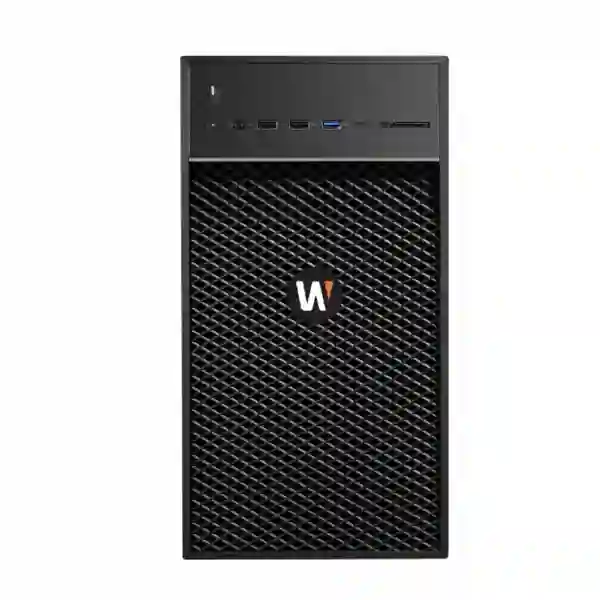
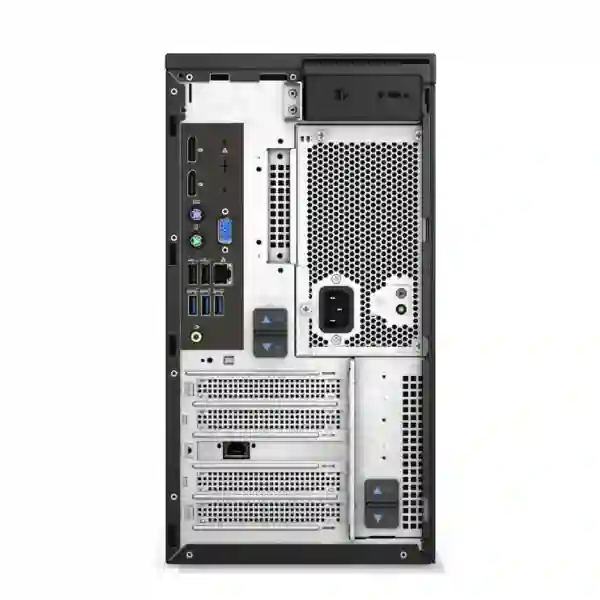
The published WRT-P-5202W series specification identifies a mini-tower design with Wisenet WAVE preconfigured, four included WAVE Professional licenses and a stated recording throughput of up to 470 Mbps. The platform uses a 12th-generation Intel Core i5 processor, 16 GB DDR4 memory, a separate 256 GB operating-system SSD, two 1 GbE RJ45 network interfaces and two DisplayPort monitor outputs. A DisplayPort-to-HDMI adapter, USB keyboard and mouse are described as included.
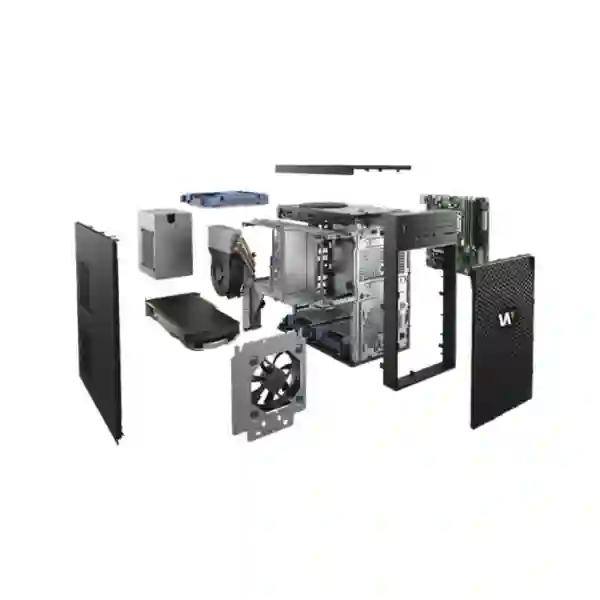
Recording storage is specified at up to 36 TB of raw capacity across up to three 3.5-inch SATA drive bays. That is an upper platform figure, not proof that every unit ships with 36 TB. The exact capacity is determined by the complete storage-specific part number and populated drives. Published power information identifies a 550 W power supply and 100–240 V AC input; 550 W is not a claim about average day-to-day consumption.
Hanwha’s specification lists a tower enclosure measuring approximately 369 by 173 by 420 mm and weighing about 10.8 kg without hard disks. The listed operating environment is 5–45 degrees Celsius and 20–85 percent relative humidity without condensation. Installation conditions and actual performance should be evaluated as a complete system.
Where this model can fit within a surveillance project
This recorder may be relevant to offices, retail buildings, warehouses, institutional premises and other facilities operating compatible IP cameras. The intended role is to receive camera video over a network, retain recordings according to the configured storage policy and provide a WAVE environment for authorized operators. Suitability depends on the project’s requirements, not merely the building type.
An existing Wisenet WAVE user should first ask whether the appliance can be integrated into the current system version and licensing arrangement. A new installation should begin with a camera schedule, a clear retention requirement and a network diagram. A site with demanding analytics, prolonged retention, resilient storage or many simultaneous users might require a different architecture, additional components or a more recent server.
The WRT-P-5202W is not described as a PoE camera switch. Budget separately for cameras, suitable network switches, power distribution, storage variant, any extra software licenses and commissioning services. Check those items before comparing the price of this appliance with an all-in-one NVR package.
Understanding the 470 Mbps recording figure
Up to 470 Mbps describes the manufacturer’s stated recording-bandwidth capability under its test conditions. It is not a guaranteed recording rate for any combination of cameras, codecs, disk conditions and video analytics. Nor is it an advertised internet-upload speed. The physical network and the workload must both be capable of sustaining the streams.
Start with the average and peak encoded bitrate of every camera that will send video to this recorder. Include the expected resolution, frames per second, compression method, motion in the scene, day and night behavior and whether audio or metadata is also being stored. Multiply by the number of similar cameras only as a first estimate; mixed camera fleets need an individual inventory.
Allow headroom for stream bursts, playback, maintenance and growth. The two 1 GbE interfaces create useful design options but do not automatically double every possible application throughput or replace a properly sized switching network. An engineer should measure the proposed workload and document the assumptions before treating 470 Mbps as a procurement criterion.
How to specify the correct hard-drive capacity
The model family is available in storage-specific configurations, and distributors have listed versions including 4 TB, 8 TB, 12 TB, 16 TB, 24 TB and 36 TB. These values describe variants rather than storage supplied with an unspecified base-model request. Ask for the complete product suffix, installed disk count and actual raw capacity in the written quotation.
Raw disk size is only the starting point for a retention calculation. File-system overhead, management reservations, disk formatting, any redundancy arrangement and the recording policy affect the useful space for video. The 256 GB SSD in the published platform specification is the operating-system drive; it should not be automatically counted as video-archive capacity.
For reliable procurement, request the approved drive make and model, number of disks, tested storage configuration, maintenance approach and any constraints on later expansion. If business continuity requires recordings to survive a disk failure, ask for a documented resilience design. Do not assume a specific RAID level or hot-swap capability simply because the chassis accepts several SATA drives.
Work out recording retention before ordering
A useful surveillance quote states how long video must remain available and under what conditions. The recording duration cannot be established from a 12 TB or 36 TB label alone. A camera producing continuous high-bitrate footage uses more storage than a camera recording lower-bitrate or event-based footage; different shift patterns and scene activity also change the result.
Ask the installer to create a camera-by-camera calculation with video bitrate, hours recorded each day, the selected archive policy, permitted loss of retention, reserved disk space and a margin for unpredictable scene complexity. If footage needs to be retained for investigation or operational review, set that obligation before selecting a storage tier.
As a simplified calculation, continuous recording at 1 Mbps produces about 10.8 GB of data in one day before overhead. The same arithmetic applied to all camera streams gives an illustrative daily write volume, but it does not measure actual encoded output. The safest approach is to test representative cameras and confirm observed storage growth after deployment.
Also plan what should happen when the archive is full. Confirm automatic overwrite settings, export procedures, user privileges and any special evidence-preservation process. An attractive capacity figure has little value if the site cannot retrieve the required video when an incident occurs.
What the four included WAVE Professional licenses mean
The published appliance description says that four Wisenet WAVE Professional licenses are preloaded. This is a valuable starting point, but four licenses should not be confused with a guaranteed maximum camera count or a perpetual entitlement to every future feature. Recording and certain other functions are licensed according to the applicable WAVE version and device type.
Count every device that must be recorded, then verify the required license quantity with the software documentation and proposed deployment plan. A project with more than four licensed recording channels should budget for the additional appropriate WAVE licenses. A project combining cameras, encoders, other recorders or video-wall functions may need separate license types.
Confirm that licenses are valid, assigned correctly and transferable only through the approved procedure. Hanwha’s support materials explain that WAVE licenses relate to server hardware identifiers; replacing certain hardware components can change that identifier. Never assume that a previously used server can be reset, rebuilt or reactivated without a licensing review.
Document the WAVE software build, system ownership, license records and support contact. Those details are especially important when purchasing a legacy unit or taking over an existing installation.
Wisenet WAVE management and operator workflow
Wisenet WAVE is video management software used to organize live views, recorded footage and devices within a managed system. Its practical value comes from having an understandable daily workflow for security operators and administrators. Buyers should review user roles, camera naming, event handling, playback navigation, archive search and evidence export in a demonstration.
Plan user roles around the duties employees actually perform. An operator watching cameras may not need the power to alter recording schedules, delete resources or change licensing. Supervisors may need incident review, while the technical team needs network and health-management access. A well-designed permissions scheme reduces accidental disruption without making routine work unnecessarily complicated.
Before handover, test common tasks using realistic scenarios: locate a camera, review yesterday’s footage, export a relevant time interval, verify timestamps and recover after a client workstation restart. Training should include how to report camera loss, storage warnings and clock problems instead of assuming that the software interface alone guarantees effective operation.
Camera compatibility and ONVIF considerations
Hanwha describes support for Wisenet cameras and ONVIF-conformant IP cameras. Its WAVE support resources also discuss discovery of ONVIF Profile S devices and the addition of appropriate network streams. Broad protocol support does not guarantee that every third-party camera feature, audio channel, event type or analytic function will work identically.
Build a compatibility schedule with camera manufacturer, exact model, firmware, stream protocol, video codec, expected resolution, frame rate, number of concurrent streams and any special event requirements. For legacy equipment, check whether authentication methods and firmware remain compatible with the intended WAVE release.
Test at least one of each distinct camera model before committing to a large rollout. Confirm continuous video, playback, time synchronization, event handling where needed and reconnect behavior following a network interruption. Cameras advertised as ONVIF compatible can still differ substantially in their available features.
If an installation depends on licence-plate recognition, advanced analytics, intercom functions or other specialized workflows, make these separate acceptance criteria. Do not assume they are included merely because basic camera video can be recorded.
Network design for consistent video capture
A recorder can only archive video that reaches it reliably. Use a documented IP addressing scheme, appropriately sized switches and a cable layout that separates the physical camera network from general office traffic wherever the design requires. Consider whether uplinks and inter-switch connections have enough spare capacity for normal streams and short bitrate spikes.
The WRT-P-5202W specification lists two Gigabit Ethernet ports. They may support different network arrangements, but the appropriate use must be validated against WAVE software behavior, site topology and administrator policy. Do not assume link aggregation, automatic failover or separate protected security zones without checking configuration and supporting equipment.
Review switch PoE budgets, port utilization, uplink performance, cable length, surge protection and fault isolation. High-resolution video passing through a congested office switch can create recording gaps even when the recorder itself has sufficient rated capacity.
For multi-building installations, pay attention to fibre or wireless backhaul performance, electrical isolation and environmental protection. Design around measured traffic, known path reliability and the recovery process for disconnected cameras rather than around a single maximum Mbps figure.
Segmentation, access controls and cyber hygiene
Video systems handle sensitive operational information, so security planning is part of recorder selection. Identify who may connect to the management interface, how camera passwords are controlled, how remote access is approved and which ports must communicate between devices. Avoid exposing administration interfaces directly to the public internet merely for convenience.
Use unique credentials, least-privilege accounts and a controlled process for onboarding or removing staff. Review vendor-recommended updates for the operating system, WAVE software and connected camera firmware, making changes through planned maintenance and tested rollback procedures. A legacy model deserves particular attention to its current patch and support position.
Keep an accurate asset inventory with serial numbers, firmware versions, network addresses and responsible owners. Protect exported footage with documented handling rules. Where remote contractors need access, use an organization-approved secure method and remove privileges after the task.
A security design should address network compromise and operational mistakes as well as equipment theft. Recording policy, administrator audit practices, backup procedures and incident response are more meaningful than a generic claim that a recorder is secure.
Operating system and software lifecycle planning
The WRT-P-5202W product information specifies Microsoft Windows 10 IoT Enterprise LTSC for the Windows model. The related WRT-P-5202L is a distinct Linux version and must not be substituted under the W suffix. Check the exact installed OS edition, image build, licensing, update entitlement and compatibility with the target version of WAVE.
Windows 10 IoT Enterprise lifecycle arrangements depend on the edition and release; therefore a broad statement about ordinary desktop Windows 10 support is not enough for an industrial recorder. Ask the supplier to identify the installed release and the current authorized servicing route. Confirm whether security updates and WAVE updates are supported on the exact appliance.
Hanwha Vision’s United States listing currently labels the WRT-P-5202W discontinued. This does not establish a local price or stock position, but it is a strong reason to ask about replacement components, firmware, restore media and long-term maintenance. New greenfield projects may be better served by a currently listed alternative after feature comparison.
If the unit will be reused, document a recovery procedure before making any major change. A failed operating-system update or hardware swap can have consequences for recording continuity and software licensing.
Power, site protection and resilience
The published input range is 100–240 V AC with a 550 W-rated power supply. This supports power-planning discussions but does not represent a measured typical load for every disk configuration. A suitable UPS should be selected from realistic operating consumption, starting behavior, required runtime and the protective requirements of the full video system.
Include cameras, PoE switches, network backbone equipment and monitoring workstations when deciding which parts of the surveillance path must remain powered. Backing up only the recorder cannot keep cameras recording if the network switches lose power. Test shutdown and restart behavior with the proposed UPS and local electrical installation.
In Tanzania, utility interruptions, grounding quality and site conditions can affect equipment reliability, but do not assume a particular building experiences those problems. Inspect the actual premises and specify surge protection, stable power distribution and any additional conditioning appropriate to the electrical design.
Provide a documented recovery order after an outage. Verify that camera feeds reconnect, recording schedules resume and operators can detect missing footage. A resilience plan should identify which single failures remain acceptable and which require extra hardware or independent recording.
Temperature, ventilation and placement
Hanwha’s published operating range for the WRT-P-5202 series is 5 to 45 degrees Celsius with 20 to 85 percent non-condensing relative humidity. These are equipment limits, not a promise that performance will remain unaffected in a hot unventilated cabinet. Actual room temperature at the appliance intake and the effect of installed drives should be checked.
Choose a clean, secure location with unobstructed airflow and space to service front and rear connections. Avoid direct sun, leaking roofs, dust accumulation and shared cupboards packed tightly with heat-producing equipment. If the building is naturally ventilated, measure likely worst-case conditions before deciding whether cooling is needed.
The mini-tower form factor makes this different from a rackmount recording server. Confirm a suitable shelf, cabinet depth, physical access control and cable organization. The listed dimensions should be considered alongside connector clearance, airflow and the mass of installed disks.
Maintenance includes removing dust safely, checking fan function and inspecting environmental alerts. Do not bypass ventilation instructions to achieve a tidier installation.
Local monitors, keyboard and operator stations
The specification lists two DisplayPort video outputs and an included DisplayPort-to-HDMI adapter, plus a USB keyboard and mouse. These details are useful for commissioning or a local operator desk. They do not prove support for an arbitrary number of decoded high-resolution displays or every video-wall arrangement.
Check the monitor connectors, native resolution, input selection, cable distance and the display workload expected at the desk. A two-monitor configuration may be convenient for administration and selective live viewing, but the number and quality of simultaneous video tiles depend on the client and overall processing load.
For a remote control-room environment, evaluate whether a separate WAVE client workstation is more appropriate than continuous interactive use of the recording appliance. Separating user activity from server maintenance may simplify support and reduce the chance that an operator inadvertently changes recorder settings.
Ask for an operator demonstration using the chosen monitor arrangement, not only a specification line. Ensure staff can identify cameras quickly and review recordings without excessively reducing system responsiveness.
Single-site installations and existing WAVE systems
At a single site, the recorder can serve as a designated WAVE recording and management appliance for compatible cameras, subject to actual storage, bandwidth and licensing. Keep the installation simple enough to understand: document the camera list, naming standard, system owner, archive policy and maintenance responsibility before bringing the site into routine operation.
For a business already running WAVE, investigate the proposed software-version match, system organization, license status and how video and users will be managed across servers. The manufacturer describes the appliance as suitable for an individual site or as an addition to an existing WAVE installation, but the final design still requires architecture checks.
Multiple sites create additional questions about network links, internet reliability, remote access and operational ownership. Local recording can continue to matter where the wide-area link is unreliable, but do not promise that every remote feature works without connectivity. Decide which activities must function on-site and which may depend on off-site services.
Make the operating model explicit. Someone should know how to tell whether all cameras are recording, who handles failures and where preserved incident footage is stored.
Planning for warehouses, offices and mixed premises
In a warehouse, the dominant questions often involve broad scenes, vehicle movement, night illumination and cameras aimed at entrances or loading zones. Fast motion and changing illumination may increase encoded bitrate, so a nominal recording estimate from a quiet daytime image can misrepresent the required archive capacity. Measure representative streams where possible.
In an office or institution, user permissions, privacy, monitored entrances and clear responsibilities may be as important as the size of the server. Document which cameras are needed, how long footage is retained and which staff may view it. Sensitive areas should receive a specific governance review rather than being included automatically.
In a mixed-use building, network separation and camera inventory discipline can reduce confusion between tenants, departments or contractors. Each stakeholder should understand the recording policy and access boundaries. If several parties require separate archive ownership or independent uptime targets, check whether one server is the correct design.
These are examples of requirements to assess, not claims that FourTeck has installed the model in those sectors or that any feature automatically satisfies a regulatory obligation.
Define a credible technical acceptance test
Before final payment or site handover, agree on tests with measurable outcomes. Confirm that the delivered part number matches the order, the storage disks are identified correctly, WAVE starts after reboot and all included licenses are visible in the management environment. Record the installed software version and operating-system build.
Add a representative camera from each make and model. Test scheduled recording, playback search, event triggers where specified, export and simultaneous operator viewing. During a planned short disconnection, observe how the server reports camera loss and whether it reconnects without an undocumented manual step.
Test storage-health monitoring, available archive capacity, time synchronization and administrator alerts. Perform a controlled UPS shutdown and restart if power resilience forms part of the design. Keep test footage and signed results in the project documentation without exposing actual security-sensitive credentials.
A pass result should demonstrate the customer requirements, not simply that the recorder powers on. If a feature relies on a third-party camera, network component or extra license, state that dependency in the acceptance record.
Maintenance and daily health checks
A surveillance platform needs routine attention after installation. Appoint someone to check that the expected camera count is online and recording, that the system clock is accurate and that storage capacity remains within the planned operating range. Review software and hardware warnings in a predictable schedule.
Watch for changes that affect bitrate and retention, such as a replacement camera, a higher frame rate, a different compression setting or new lighting. Recalculate the archive duration when settings or camera quantities change. Do not wait for a critical incident to discover that the promised retention period has been reduced.
Keep configuration backups, license ownership records and an authorized recovery procedure. When replacing storage or major components, review WAVE licensing and device compatibility before touching the appliance. Maintain change records so a different technician can understand the deployed state.
Plan periodic test exports and recovery exercises. Security footage has operational value only when it is recorded accurately and can be located, played back and preserved when needed.
Evidence handling and retention governance
Recording video is different from managing evidence. Define the reason for surveillance, appropriate permissions, retention expectations and a process for responding to legitimate requests. The responsible organization should evaluate applicable privacy, employment and security obligations rather than assuming that purchasing a recorder establishes compliance.
Set consistent camera and server time sources so exported clips can be placed accurately in an incident timeline. Decide who may export, copy, edit or delete footage and how those actions are documented. Store sensitive exports in approved locations with access controls, not in an uncontrolled shared folder.
An event requiring long-term preservation may need a separate procedure from routine automatic overwrite. Verify that staff know how to secure a clip before the recording window expires. Build these steps into operator training, including who can authorize disclosure of video.
Neither the listed disk size nor the included software licenses guarantees a compliant retention practice. The organization must establish the policy and make sure that the actual recording configuration follows it.
How to evaluate a discontinued model responsibly
Hanwha Vision currently marks the WRT-P-5202W as discontinued in its United States catalogue. A customer should therefore establish whether an offered unit is new old stock, previously deployed, refurbished or simply quoted from an old catalogue. Written documentation should distinguish those cases and identify the exact full model code.
Ask whether the appliance has genuine manufacturer support in the destination market, whether replacement disks and other components are supported and whether a restore image is available. Manufacturer warranty language shown on a regional product page must not be treated as a confirmed Tanzanian on-site response commitment. The actual contract and location-specific support arrangement govern.
Consider the remaining operational life, not just acquisition price. A lower initial equipment cost may be outweighed by unavailable spares, difficult platform upgrades or time spent recovering from a fault. Conversely, an existing maintained unit may remain relevant in a compatible installation after assessment.
A prudent quotation states the delivery condition, verified storage, licensing, commissioning obligations and an alternative currently offered recorder. Do not infer local stock or price from overseas listings.
Compare against a current-generation WAVE recorder
Hanwha Vision lists the WRT-P-5206W as a later Windows-based WAVE recording server. It is a useful candidate for a new procurement comparison, although it is not automatically a drop-in replacement for a WRT-P-5202W. Compare processor platform, operating-system generation, NIC configuration, storage support, physical dimensions, power requirements and current software compatibility.
Focus on the requirements that actually matter at the site. A change in network interface speed or processor family may offer value for some workloads but not for a small, lightly loaded installation. Equally, a newer model could require different cabinet space, UPS sizing or migration procedures.
For replacement projects, ask for an agreed plan covering recorded-video preservation, system database or configuration handling, user permissions, WAVE version compatibility and license deactivation or transfer. Do not assume old licenses or archived footage migrate automatically.
Request a side-by-side technical comparison against the complete ordered storage variants. A product-family name without its drive configuration or software build is not enough to make an accountable buying decision.
Pre-purchase information to request in writing
Start with the exact orderable part number, all storage suffixes, installed hard-drive count and the confirmation that the offered appliance is the Windows WRT-P-5202W rather than the separate Linux WRT-P-5202L. Ask the supplier to distinguish manufacturer’s rated maximum capacity from the disks fitted to the unit being priced.
Provide the planned camera count and a camera model schedule. State which cameras record continuously, which use events, what retention target applies and whether audio, analytics or intercom functionality is required. Ask for a documented bandwidth and storage sizing calculation including spare capacity.
Request confirmation of WAVE version, four included Professional licenses, any additional recording or feature licenses, OS build, warranty jurisdiction and update eligibility. For existing equipment, ask for health status, drive hours where available and information about prior licensing or ownership.
Have the supplier specify network equipment, PoE power budgets, UPS, monitors, installation, testing, end-user training and after-sales responsibilities separately. A precise scope protects both buyer and installer from assumptions hidden inside a headline NVR price.
Implementation sequence for a controlled rollout
First, confirm the recording objective with stakeholders and complete the camera inventory. Second, conduct a network and electrical survey, measuring expected uplink capacity and documenting where the server can be installed securely. Third, approve the exact bill of materials with storage capacity, licences and the intended WAVE software version.
Next, prepare network addressing, time synchronization and administrator credentials. Install and test the operating environment before connecting every camera. Start with representative devices, check basic recording stability and expand in controlled groups while watching incoming bandwidth and archive growth.
After all cameras are added, validate user roles and operator workflows. Test event review, playback, export, alerts, restart and the documented response to loss of connectivity or power. Record any differences between nominal estimates and actual measured behavior.
Finally, transfer a practical handover pack containing equipment identifiers, network diagram, supported configuration, software-version records, license inventory, backup location and maintenance procedures. Agree on who will manage later camera additions and how those changes will be approved.
Questions buyers frequently ask
Is the Hanwha WRT-P-5202W an NVR or a server? It is described as a dual-purpose Wisenet WAVE network video recorder and server/client appliance. Its role depends on the configured WAVE system; it is not simply a passive hard-disk enclosure.
Does it always include 36 TB? No. Up to 36 TB is the family maximum raw internal storage stated by the manufacturer. Check the complete storage-specific part number and installed drives to know the capacity being supplied.
Are all required camera licences included? The product description states four WAVE Professional licenses are included. Additional camera or feature licenses may be needed according to the final system design, software release and connected device types.
Can it work with cameras from other brands? The recorder supports Wisenet and ONVIF-conformant cameras, and the WAVE platform supports additional stream methods. Exact video, audio, analytics and event behavior must be checked against the specific camera and firmware.
Does 470 Mbps mean that internet service of that speed is required? No. It is a rated recording-throughput figure. An installation’s internet needs depend on its remote-access architecture, while local camera video depends primarily on the designed site network.
Can I add an HDMI monitor? The published hardware has DisplayPort outputs and describes an included DisplayPort-to-HDMI adapter. Confirm the actual monitor connectors, cable arrangement and expected live-view workload.
Does the appliance directly power IP cameras? The published specification does not describe integrated PoE camera ports. Plan appropriate PoE network switches or other approved camera power equipment separately.
Is the WRT-P-5202W still a current manufacturer model? Hanwha Vision’s United States catalogue labels it discontinued. Ask for a current availability and support statement for the exact unit, and compare a recent model for new projects.
Can I rely on the warranty described in overseas marketing? Do not assume regional service terms apply to Tanzania. Confirm the warranty provider, geographic coverage, exclusions and process in the actual written quotation.
How many days of video will a particular unit retain? There is no dependable universal answer. Retention depends on installed usable storage, aggregate camera bitrate, recording schedule, policy settings and reserved space. Request a project-specific calculation.
Is a newer Hanwha WAVE recorder better for a new site? It may be more suitable where long-term availability and supported updates matter. Compare exact models, configuration and migration needs instead of assuming compatibility from a similar throughput rating.
Request a specification-based Tanzania quotation
If you are considering the Hanwha WRT-P-5202W for a Tanzanian surveillance system, request a review of the full model suffix and site requirements before ordering. The most useful enquiry includes camera models and quantities, recording schedule, target retention period, operator requirements and whether the project is a new build or an expansion of Wisenet WAVE.
Ask for a written confirmation of current availability, supplied disk capacity, licensing, support terms and the recommended current-generation alternative. An accurate solution proposal should make clear which components and services are included and which are optional.
Contact FourTeck Tanzania for product suitability and quotation guidance. No pricing, delivery time, stock or local installation commitment is implied by this product information.




Reviews
There are no reviews yet.