
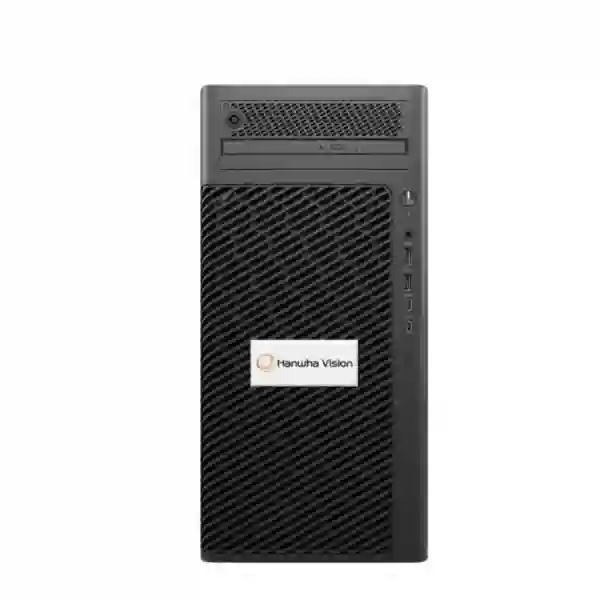
Hanwha Vision · Professional IP video recording
Hanwha WRT-P-5206L Linux Wisenet WAVE Recording Server
Need a dedicated recorder for a professional IP camera installation? The Hanwha WRT-P-5206L combines a Linux-based Wisenet WAVE environment, four included Professional licences and manufacturer-rated recording throughput of up to 470 Mbps in a tower appliance. For buyers planning a surveillance system in Tanzania, the sensible next step is to match the server’s camera, licence and storage capabilities with the actual site design.
Hanwha specifies up to 64 channels and up to 36 TB raw storage, but these are maximum capabilities, not proof that 64 channels are licensed or that 36 TB of drives are included. Request a configuration-specific quotation that identifies installed storage, the required WAVE licences and any installation or support scope.
Key specifications at a glance
Additional manufacturer-listed hardware includes a 256 GB M.2 operating-system SSD, three 3.5-inch SATA data-drive bays, two DisplayPort outputs with a DisplayPort-to-HDMI adapter, and an included keyboard and mouse. The exact shipped data-drive configuration must be confirmed for the quoted variant.
What this recording server is designed to do
The Hanwha WRT-P-5206L is a purpose-built Wisenet WAVE recording server for organizations that need to bring IP camera video into a managed, searchable recording environment. Rather than assembling a generic desktop computer and separately arranging its operating system, recording application and baseline licensing, a buyer starts with a tower appliance that has Wisenet WAVE preinstalled. The manufacturer identifies this model as a Linux recording server and supplies four Wisenet WAVE Professional licences. That makes the product an option for a new installation or a carefully planned extension of an existing WAVE environment.
It is not a camera, a simple HDMI-only viewing box or a promise of 64 ready-licensed recording channels. The advertised upper channel figure describes the platform’s stated capability, while actual recording depends on licensed channels, installed disks, camera stream settings, network conditions and retention requirements. Before choosing this unit for a Tanzania project, determine how many cameras must be recorded, the bitrate of each stream, how long recordings must remain available and what kind of on-site monitoring the users expect.
Who should consider this model
The server is relevant to businesses and institutions planning a professionally managed camera system at a single premises or a site that will be part of a larger surveillance deployment. Typical planning contexts include a workplace with entrances and corridors, a retail property with several camera viewpoints, a warehouse with perimeter and loading-area coverage, or a facility where different personnel need to review recordings. These are examples of surveillance requirements, not claims about installations or service coverage already completed by FourTeck.
The main purchasing question is whether a compact tower with the manufacturer-stated throughput and expansion ceiling can meet the actual video workload. A small property may need only a subset of that headroom; a larger property could require a more deliberate storage and licence plan. A project with strict resilience requirements may call for additional servers or a different platform architecture. Match the recording server to the risk, camera count, viewing activity and expected growth rather than choosing solely from a headline channel number.
How the included Wisenet WAVE software helps
Wisenet WAVE is Hanwha Vision’s video management environment for organising supported IP cameras and their recorded video. The WRT-P-5206L arrives with WAVE preinstalled, reducing the need to choose and install unrelated recording software before system configuration begins. During commissioning, the administrator still has to discover or add supported devices, configure access permissions, confirm streams, set recording behaviour and verify that playback retrieves the footage required by the site.
Preinstalled does not mean preconfigured for the buyer’s network or cameras. Camera passwords, network addresses, clock settings, storage choices and user accounts remain project-specific. A sound acceptance test should show live images, recordings from several time periods, the ability to search for an event and correct access from an authorized workstation. If users expect remote viewing, video export or specialized integrations, those expectations should be checked against the intended WAVE version, connection method and licensing before any order is finalized.
Understand the four included professional licences
The manufacturer’s specification lists four Wisenet WAVE Professional licences with the recording server. Treat these as a defined starting entitlement, not an unlimited recording grant. If the design uses more licensed recording channels than the included quantity supports, the additional licensing requirement must be identified and quoted separately. The right number depends on the camera configuration and Hanwha’s licensing rules for the chosen WAVE environment, including how multi-sensor devices or special functions are counted.
This distinction is especially important when a purchasing team sees the phrase up to 64 channels beside the phrase four licences. The first is an upper platform capability; the second is the included licence quantity. They answer different questions. Ask the installer for a camera schedule showing every planned stream and licensed channel, a summary of existing WAVE entitlements if this is an expansion, and a separate line for any extra licences. Confirm activation and future upgrade arrangements through an authorized process.
Interpret the 64-channel specification correctly
Hanwha identifies the WRT-P-5206L as supporting up to 64 channels. That does not mean every 64-camera design will perform identically. A low-bitrate camera overlooking a quiet corridor produces a different workload from a high-resolution camera recording continuous movement. Viewing multiple streams, recording at different frame rates and running additional workload can affect available resources. Camera specifications and the intended encoding configuration therefore matter as much as a raw count.
For design approval, create a per-camera schedule that includes resolution, compression format, typical and worst-case bitrate, frame rate, recording schedule and expected retention. Add the stream rates to estimate aggregate incoming traffic, then compare that projection with the recorder’s throughput headroom. Preserve margin for changes and avoid designing precisely against maximum advertised figures. If the site has unusual streams, analytics demands or heavy simultaneous playback, seek project-specific sizing rather than assuming a generic channel limit guarantees performance.
What 470 Mbps recording bandwidth means
The manufacturer rates recording bandwidth at up to 470 Mbps. This figure refers to the recording workload the platform is designed to handle under its specified conditions; it is not a guarantee that the site’s internet connection will carry that rate, nor is it an invitation to operate permanently at the upper limit. It should be evaluated alongside the total configured camera bitrates and the traffic used for live viewing, playback, management and any intersite transfers.
For example, a planner should calculate the sum of actual configured streams instead of multiplying camera count by an arbitrary universal number. Video traffic varies with motion, resolution, scene complexity, compression, lighting and camera settings. Record a reasonable busy-scene allowance, document whether cameras send one or multiple streams, and review network switch uplinks before commissioning. Where the project is close to the manufacturer’s throughput ceiling, reassess camera settings, distribute the workload or select a different recording architecture.
Plan installed capacity separately from maximum capacity
The WRT-P-5206L family is specified for up to 36 TB of raw data storage, with three 3.5-inch SATA data-drive bays. Raw capacity is a chassis-level maximum, not necessarily the storage supplied with a particular order. The exact drive configuration can vary by commercial variant. Since the request identifies the base model only, no installed hard-drive capacity can responsibly be stated for this listing without a verified configuration or quote.
Before approving a purchase, request the complete manufacturer part number or quoted disk configuration and check the number, capacity and compatibility of installed drives. Establish how much recording space is actually usable after formatting and any applicable storage arrangement. Do not equate a raw-capacity figure with days of guaranteed footage. A system may have abundant raw space but inadequate retention when camera bitrates, continuous recording schedules or motion-heavy scenes are greater than expected.
Build retention estimates around the cameras
Recording retention is a business requirement that should be agreed before hardware selection. Start with the minimum number of days the site needs for incident reviews, operational checks or internal procedures. Then calculate projected storage from the actual aggregate recording bitrate, hours recorded each day and expected variation in activity. Include a margin for changes in camera configuration and leave sufficient free space for healthy operation.
As a rough planning illustration, a continuous 1 Mbps stream produces approximately 10.8 GB of data per day before overhead, using decimal storage units. A ten-camera installation at 4 Mbps per camera would therefore produce far more footage than the same number at 1 Mbps. Such arithmetic is a sizing aid only; recordings must be measured and confirmed after commissioning. Where the retention target cannot be met, compare compatible additional storage, more efficient camera settings or a larger recorder rather than silently accepting fewer days.
Storage drive selection and recording health
Choose storage drives for continuous surveillance workloads and verify compatibility with the appliance, rather than assuming that any desktop hard drive is suitable. The presence of three data bays creates room for supported configurations, but a populated bay count, fault-tolerance arrangement or hot-swap capability must not be assumed without confirmation. Ask how drive failures will be detected, who will receive alerts and how storage will be repaired or replaced within the operating process.
A useful commissioning record lists installed drives, capacity, serial numbers retained in the customer’s asset register, disk health information, recording paths and the retention result observed during acceptance. It should also identify what happens when a disk becomes unavailable. The WRT-P-5206L specification alone does not establish automatic RAID protection or a particular failover arrangement. Critical sites should have their resilience design documented separately and tested using supported manufacturer procedures.
Processing platform and system memory
The WRT-P-5206L uses an Intel Core Ultra 5 processor and 16 GB of DDR5 memory according to Hanwha Vision’s published product data. These are practical specifications for selecting a dedicated recording appliance, but neither is a substitute for a workload assessment. The processor and memory support the bundled software environment while video ingest, metadata handling, storage activity and client-facing functions consume resources in different ways.
When comparing appliances, focus on the manufacturer-supported workload rather than using processor naming as the only measure of suitability. A server can have a modern processor and still be a poor fit for an installation whose streams, retention and concurrency exceed its tested design. Likewise, adding more cameras is not always equivalent to adding only more disk capacity. Ask for confirmation if the project calls for unusually demanding codec profiles, frequent simultaneous playback, special analytics or integration with other management systems.
The role of the dedicated operating-system SSD
The specification identifies one internally mounted 256 GB M.2 solid-state drive for the operating system. This is separate from the three 3.5-inch SATA data-drive bays specified for video storage. Keeping the system environment and recording-data planning conceptually separate helps buyers avoid counting the operating-system SSD as footage capacity when calculating retention.
The SSD is not an indication that a particular number of days of video will fit on the machine. The installed application, operating-system files and supporting services use that system drive. The video data allocation should be verified during commissioning against the quoted storage configuration. Administrators should also document how system settings are backed up, how updates are managed and what recovery method is supported if the operating environment needs repair. Any replacement media must be selected according to manufacturer guidance.
Why Ubuntu Linux matters in procurement
Hanwha lists Ubuntu Linux 22.04 LTS as the operating system for the WRT-P-5206L. This distinguishes it from the similarly named WRT-P-5206W, which is the Windows IoT variant. For a buyer, the Linux designation is part of the appliance’s identity and should appear clearly on purchase orders, quotations and acceptance documents so that the intended model is supplied.
The Linux operating system does not eliminate the need for administrative ownership. A responsible deployment still has a plan for supported updates, access controls, maintenance windows, configuration backup and recovery. Confirm software-version compatibility and any restrictions before modifying a manufacturer-delivered image. Organizations with Windows-only management policies should assess the support implications in advance, rather than assuming both operating-system editions can be interchanged or converted after purchase.
Network connectivity and practical segmentation
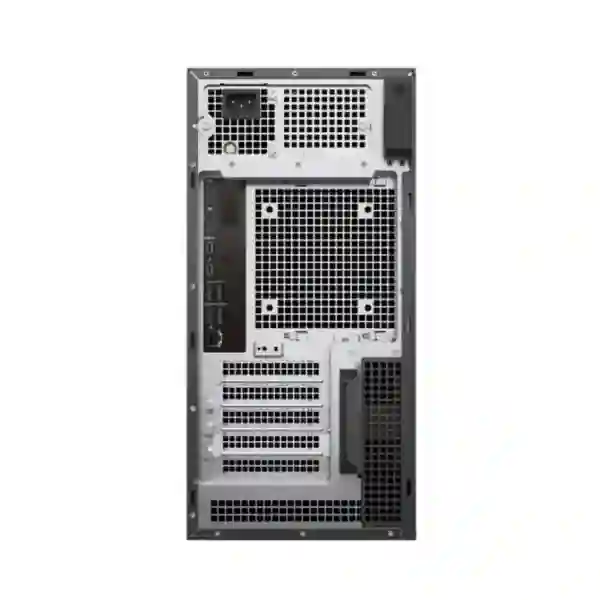
The manufacturer lists two 1 GbE RJ45 interfaces, one onboard and one provided through a PCIe network interface. These ports offer options for connecting the recording appliance to a suitable site network. Their presence, however, does not automatically establish a particular redundancy design, bonding configuration or isolated camera network. Those choices depend on supported software settings and the network architect’s plan.
In a surveillance deployment, it is often useful to separate camera traffic logically from general office activity and to restrict administrative access. Consider suitable VLANs, switch port capacity, addressing plans, DNS and time services, and approved routes for remote clients. Confirm that any planned network separation still permits required camera discovery, video streaming, updates and operator access. If cameras require Power over Ethernet, budget and design the appropriate PoE switches or injectors separately; do not assume the server’s RJ45 ports supply camera power.
Camera compatibility and integration checks
A recording server is only useful when it can receive and manage the cameras required by the site. Wisenet WAVE provides a video management environment for supported IP devices, but successful connection depends on the individual camera model, firmware, protocol profile, supported features and configuration. Confirm the exact camera inventory against current WAVE compatibility information rather than treating all devices with network sockets as interchangeable.
A practical test should cover the required video stream, timestamp, camera identity and playback. For each special requirement—such as event-driven recording, audio, PTZ movement, edge events, multi-sensor presentation or advanced analytics—verify support at the camera-and-VMS level. ONVIF-related compatibility can be useful, but it does not guarantee that every proprietary feature will transfer between products. If a project mixes camera brands, test representative devices before committing to a full-site migration.
Local display, operator desks and control rooms
The product information specifies two DisplayPort outputs and one DisplayPort-to-HDMI adapter. Keyboard and mouse are included. These details make the tower relevant to deployments where a local technician or operator needs to interact with the system, while the broader WAVE environment may support additional client workflows subject to software compatibility. Verify the monitors, connectors and client configuration required for the particular workstation design.
Avoid confusing video outputs with the number of simultaneously recorded camera channels. Monitor output count, on-screen layout capacity and recording capacity are distinct system characteristics. A busy reception desk may require one display arrangement, while a security control room may need separate client workstations and a deliberate monitor layout. Confirm the expected viewing load and workstation responsibilities in advance. Also ask whether the server will be installed in a secure equipment area or in a staffed room, since physical location affects access and maintenance.
Tower installation and equipment-room layout
The WRT-P-5206L uses a tower form factor. Hanwha’s published size is approximately 387 mm high, 187.7 mm wide and 438 mm deep, with a stated weight of about 20.4 kg. Space planning must allow more than the bare chassis footprint: consider cable clearance, servicing access, airflow and the method used to prevent accidental interference with the equipment.
A tower appliance should not be described as rack-mount equipment merely because it serves a professional surveillance system. The manufacturer does not include a sliding rail kit for this model. If the customer requires a locked rack installation, verify an appropriate mounting solution or compare a purpose-built rack server. Document where the equipment will sit, who may reach the power button and connectors, and how technicians will safely access disks, network cables and peripheral ports when service is required.
Temperature, dust and ventilation in Tanzania
Hanwha specifies an operating temperature range of 10°C to 35°C and an operating humidity range of 20% to 85%, non-condensing. These values matter when a server is installed near outdoor entrances, in unconditioned rooms or in premises where ambient temperatures can rise. The appliance should be treated as indoor IT equipment within its stated environment, not as an outdoor-rated recorder.
A site survey should verify the actual room conditions during normal operation and during the hottest or most heavily occupied periods. Confirm ventilation, dust management, clearance around air paths and a method of monitoring room temperature. Do not place the tower in a sealed cupboard without thermal assessment. If air conditioning is required to maintain a suitable equipment environment, include its costs and maintenance in the project scope. Regional climate varies, so use measurements from the actual site instead of generic assumptions about an entire country.
Electrical input and protected power
The manufacturer’s technical specification lists an input range of 100 to 240 V AC and a single 1500 W, 80 Plus Platinum power supply. The published maximum power figure describes the power-system rating or upper specification and should not be interpreted as the device’s typical electricity draw. Confirm actual circuit requirements, plug and cable compatibility and the measured operating load with the installation team.
For a surveillance system, continuity is a site-level design question. Decide which parts need backup power: the recorder, camera PoE switches, networking equipment, internet gateway and any displays needed during an incident. Choose a suitable UPS through an electrical load and runtime calculation rather than sizing it only from the server’s supply rating. Include appropriate protection, safe earthing and shutdown procedures. If the site experiences power interruptions, a tested recovery plan is especially valuable because power alone does not guarantee that every camera, switch and service will resume correctly.
Cybersecurity and account management
Recording servers frequently hold sensitive operational video. Access should therefore be assigned deliberately, with individual authorized accounts where appropriate, strong authentication practices, limited administrator privileges and a clear process for removing access when responsibilities change. Network exposure and remote viewing should be reviewed by qualified personnel rather than opening broad inbound access simply to make the first demonstration work.
Keep an asset record covering the recorder, operating system, WAVE version, cameras, network addressing and responsible administrator. Determine an update and vulnerability-review process supported by the manufacturer and the customer’s policies. Restrict who can export recordings and establish how files are handled after an investigation. Physical protection matters too: a locked room or enclosure can reduce unauthorized access to drives and local peripherals. These measures are part of the deployment design; the server model alone cannot guarantee cybersecurity or compliance with a customer’s policies.
Event review and evidential workflow
Many purchasers buy recording infrastructure because they need to review what happened, not just display a live camera image. Define how authorized staff will locate relevant footage, check timestamps, view multiple cameras, export an authorized clip and record why the material was accessed. WAVE provides the management environment, but the specific review workflow and permissions must be implemented and tested in the customer’s system.
Agree on recording time synchronization before cameras go live; a convincing incident review becomes difficult when devices disagree about the clock. Establish naming conventions that make cameras easy to identify, such as entrance, corridor or loading-bay descriptions, and document the retention policy. Where a recording is exported for an investigation, preserve the organization’s required chain-of-custody controls. The hardware specification does not itself establish legal admissibility, a retention obligation or a privacy policy, so these matters need separate organizational decisions.
Remote viewing and bandwidth outside the premises
Remote access can be useful when supervisors or authorized security personnel work away from the installation. However, remote viewing must not be confused with local recording throughput. A server rated for up to 470 Mbps of incoming recording traffic is not promising the same bandwidth through the customer’s internet connection. Remote use depends on available upstream capacity, the number of viewers, selected video quality, network reliability and secure access architecture.
Before enabling off-site viewing, identify who needs it and what they actually need to see. A manager checking one camera occasionally has different demands from an operations team watching many streams. Select supported secure connection methods and avoid unnecessary public exposure of the recorder. Test performance from the intended client networks and consider what happens when the internet connection fails. In many designs local recording should continue to meet the agreed policy even when remote viewing is temporarily unavailable; verify that behaviour during acceptance.
Expansion beyond the initial camera count
A recording system often changes as a building grows, an access route is added or old cameras are replaced. The WRT-P-5206L’s published channel, recording-throughput and raw-storage ceilings provide useful boundaries for evaluating growth. Yet they do not mean that all forms of expansion are free or independent. Additional camera channels may require licensing, more traffic can consume bandwidth and more footage can require additional compatible storage.
Maintain a simple expansion register that records installed camera count, licensed recording count, used and available storage, average and peak video traffic and the expected next phase. Review these measures whenever adding devices. If the forecast approaches one of the platform’s limits, evaluate load distribution or another server rather than fitting in a camera without assessing consequences. The best upgrade path depends on the configuration of the WAVE environment and should be validated against current manufacturer support guidance.
Reliability, continuity and recovery planning
The base recording server should not be mistaken for a complete disaster-recovery solution. A tower, data bays and an operating-system SSD describe hardware capabilities, but they do not prove automatic data replication, a specific RAID mode, a secondary site or uninterrupted recording during every failure. For important coverage, consider how an incident would be handled if the recorder, a drive, a switch or building power fails.
A risk-based design may include operational alerts, documented recovery procedures, spare capacity or a supported failover arrangement with additional equipment. Hanwha publishes separate WAVE guidance on configuring failover, but that feature requires a correctly designed environment and should not be presumed active on this appliance by default. Determine which disruptions matter most, what footage loss is tolerable and who will respond. Test an agreed scenario before handover so that continuity claims are based on the actual installed solution rather than assumptions.
Commissioning steps that deserve sign-off
Start commissioning with an inventory check: exact model designation, correct Linux edition, supplied drives, included licensing and required accessories. Record the base firmware and software versions. Connect the unit only after the site network, power, cooling and security provisions have been checked. Then configure the agreed camera list, recording schedules, permissions and storage settings according to current supported instructions.
An effective acceptance checklist should include live video from every camera, sample playback from different times, measured disk space, appropriate retention settings, a test export, correct timestamps, alert visibility and user-access verification. Check that cameras recover after an ordinary restart and that approved remote client methods work where required. Keep the acceptance report with the customer rather than relying on a verbal demonstration. If a test fails, record the corrective action and retest before describing the installation as complete.
Maintenance and ongoing ownership
Surveillance video is an ongoing operational service rather than a one-time box installation. Assign responsibility for checking that cameras continue to record, storage remains healthy and users can retrieve footage when needed. Choose a review frequency proportionate to the site’s risk and document who receives alerts. Retention should be verified periodically, particularly after cameras are added or recording quality is changed.
Plan supported software updates and controlled configuration changes, including a rollback or recovery method where appropriate. Keep a current camera list, licence record, credential-ownership process and equipment inventory. Users should know how to report a missing image, incorrect timestamp or failed export. Clarify who provides hardware service and software support under the specific commercial offer. A manufacturer specification cannot be used to promise a Tanzania warranty term, a local service response or a replacement time without an independently confirmed offer.
Comparing Linux and Windows editions
The WRT-P-5206L is the Ubuntu Linux edition of the WAVE recording-server family. The similarly named WRT-P-5206W is a Windows IoT edition. They should be treated as distinct models in procurement even though the manufacturer’s published family data shares several headline performance characteristics. The right choice depends on the organization’s operating-system preferences, supported management practices and the exact proposed configuration.
Do not assume that an operating-system preference alone determines camera capacity, storage supplied or licensing cost. Compare exact part numbers, disk configuration, software support and any additional requirements in the customer’s environment. A company whose administrators have Linux maintenance procedures may view one option differently from a team standardized on Windows. Document these considerations alongside total project cost and support ownership. The product being described here remains the WRT-P-5206L Linux model, not a bundled choice between the two.
Comparing a recorder appliance with a generic PC
A generic computer can sometimes run video-management software, but it introduces more decisions around tested components, software setup, storage compatibility, support and long-running workloads. The WRT-P-5206L is offered as a designated WAVE recording appliance with an identified recording-bandwidth specification, included licences and preinstalled software. That defined starting point can make procurement and technical scoping clearer.
It does not remove the need for careful system design, nor does it establish that this appliance is always cheaper or more appropriate than another server. Compare the complete solution: cameras, licences, disks, storage retention, switches, power protection, cooling, installation, system administration and future expansion. Where several sites or unusually high resilience requirements are involved, a purpose-built rack server or distributed design may be more suitable. The correct selection is the one whose validated performance and support model fit the actual risk and workload.
Questions to settle before requesting a quote
A useful quote request should state the site type, total camera count, camera models where known, desired recording quality, recording schedule and minimum retention. It should also describe the expected number of live viewers, whether remote review is required and the physical location where the server will be installed. These details let a supplier evaluate the appliance against the intended use rather than quoting an unspecified box.
Ask the quotation to identify the exact WRT-P-5206L variant, installed raw disk capacity, any additional WAVE licences, accessories, power-protection assumptions and exclusions. Request clarity on compatibility verification, installation scope, commissioning, warranty coverage and support responsibilities if those services are being offered. Do not treat a public product description as confirmation of stock, lead time, import charges or a Tanzania price. Commercial terms should be supplied in a verified proposal for the specific order.
A practical site-survey checklist
Before procurement, walk through camera viewpoints, cable routes, switch locations and the room intended for the recorder. Identify existing cameras to be retained and any networking constraints. Ask the person responsible for investigations which footage they expect to review and how far back they need to go. Confirm that the recorder location can meet the published temperature and humidity limits and that it has secure access and suitable electrical provision.
The survey should also identify operational dependencies that are easy to overlook: correct time synchronization, stable names for cameras, access approvals, network administration contacts, safe shutdown procedures and who will respond to technical alerts. If the facility has more than one building, note the connectivity and power arrangements between locations. Put unresolved items into the project plan before treating the recording system as fully specified. A clear survey often prevents more trouble than adding excess hardware without understanding the environment.
How to evaluate a storage or licence upgrade
Sometimes the current camera system is satisfactory but the user needs longer retention or more viewpoints. In that case, distinguish the capacity problem from the channel-licensing problem. Increasing disk capacity does not grant recording licences, and purchasing more channel entitlements does not create extra disk space. Both changes also interact with aggregate recording bandwidth and supported hardware limits.
For a proposed upgrade, compare the current camera schedule with the intended future configuration. Record the existing licences, expected additional channels, installed drive layout, required extra days of storage and current recording bitrate. Review supported drive combinations and relevant WAVE licensing rules before ordering parts. If the upgrade would use nearly all available headroom, consider the operational value of preserving capacity for unplanned cameras or higher-quality streams. Final suitability requires the exact as-installed details, not simply the base-model marketing figures.
What the specification does not promise
A responsible product description is clear about its boundaries. The 36 TB raw capacity is a maximum, not an included disk claim. The up-to-64-channel figure is not 64 bundled licences. The 470 Mbps rating is recording throughput, not an internet-service commitment. The 1500 W supply specification is not a statement of everyday energy consumption. The two Ethernet ports do not themselves prove a particular high-availability network configuration.
This model description also does not establish local inventory, delivery coverage, price, tax, installer certification, warranty terms or project-specific compatibility. It does not independently verify access-control integration, advanced analytics or uninterrupted recording under a particular failure scenario. Those capabilities and conditions may be addressed through a broader solution, but they should appear on a quotation only after verification. Keeping these distinctions explicit gives procurement teams a better basis for comparing proposals and helps technical teams avoid preventable assumptions during installation.
Working with a phased camera rollout
For a site expanding in stages, define the first camera group and the intended end-state before selecting server capacity. A phase-one design might cover entrances and essential shared spaces while later phases add perimeter or operational viewpoints. This can be an effective planning approach, but every phase should be checked against the same recording, licence, network and storage limits.
Create a dated expansion plan with expected camera types and retention targets, then revisit it as procurement decisions are made. Avoid promising that spare bays or free processor capacity alone will accommodate every future configuration. New devices might use greater resolution, different compression profiles or additional features that change resource consumption. The value of a defined appliance specification is that teams can evaluate proposed additions against known boundaries. It is not a guarantee that a future project can avoid redesign or added infrastructure.
Documentation for a responsible handover
At handover, the customer should receive a clear asset register and a summary of the installed design. Useful records include the full appliance model and configuration, allocated licences, camera list, recording schedules, disk allocation, network diagram, authorized administration contacts and recovery instructions. The document should distinguish manufacturer-rated maximums from measured, as-installed results.
Also record the evidence used to confirm functionality: playback checks, retention observations, user-permission tests and any relevant fault-response exercise. Store credentials and sensitive configuration information in an approved secure system rather than leaving passwords in a public document. Identify software-version ownership and the process for changes or expansion. These practical records make the system easier to support when staff change, when a disk needs attention or when a buyer later evaluates whether the same appliance can accommodate another group of cameras.
WRT-P-5206L technical specification details
Use this manufacturer-based reference when comparing the requested appliance with a proposed configuration. Values that describe a maximum are deliberately labelled as such. A supplier quote should identify the actual disk installation and any separately purchased licence entitlements.
| Video management software | Wisenet WAVE, preinstalled |
|---|---|
| Operating system | Ubuntu Linux 22.04 LTS |
| Included entitlement | Four Wisenet WAVE Professional licences |
| Maximum channel figure | Up to 64 |
| Recording bandwidth | Up to 470 Mbps |
| Processor | Intel Core Ultra 5 |
| System memory | 16 GB DDR5 |
| Operating system storage | 1 × 256 GB internal M.2 SSD |
| Data drive bays | 3 × 3.5-inch SATA |
| Maximum raw data storage | Up to 36 TB |
| Networking | 2 × 1 GbE RJ45 |
| Monitor outputs | 2 × DisplayPort; 1 × DP-to-HDMI adapter |
| Local peripherals | Keyboard and mouse included |
| Chassis dimensions | 387 × 187.7 × 438 mm (H × W × D) |
| Listed chassis weight | 20.4 kg |
| Power supply | Single 1500 W, 80 Plus Platinum |
| Input voltage | 100–240 V AC |
| Operating environment | 10–35°C; 20–85% non-condensing RH |
| Rack rail kit | Not included |
| IPMI | Not supported |
Source for hardware ratings: Hanwha Vision product information for the WRT-P-5206L, consulted November 2026. Local stock, price, installed disks and commercial conditions are not established by these specifications.
Frequently asked questions
These answers address the points most likely to affect a purchase decision, initial setup or future expansion. They distinguish the base product specification from configuration-specific promises that require a quote or engineering assessment.
Is the Hanwha WRT-P-5206L an NVR or a recording server?
Hanwha identifies the product as a WAVE recording server using Ubuntu Linux. In project discussions it may also be described as an NVR-style solution because it receives and records IP camera video. The important functional distinction is that this is a Wisenet WAVE software-based recording appliance, not a standalone camera. Verify the desired cameras, licences and storage before ordering. Use the full model name on the quotation to avoid confusion with Windows or older WRT variants.
Does it come with 36 TB of installed storage?
Not necessarily. The manufacturer’s published value is up to 36 TB of raw storage, supported by three 3.5-inch SATA data-drive bays. A particular commercial variant may be supplied with a different disk configuration. The request for this listing does not identify an installed-capacity variant, so buyers should request the full quoted part number and a written disk list. Retention should be calculated using usable configured storage, not the upper raw-capacity figure.
How many camera licences are included?
The published specification includes four Wisenet WAVE Professional licences. That is separate from the stated up-to-64-channel platform capability. A design requiring more licensed recording channels may need additional licences. The total also depends on how the planned cameras and any specialist functions are counted under the applicable WAVE rules. Ask for an itemized licence schedule that matches the camera inventory and intended software configuration before approving the purchase.
Can it record 64 IP cameras at once?
The manufacturer states up to 64 channels, but this is an upper capability, not a performance guarantee for every combination of 64 streams. Actual suitability depends on the configured recording bitrate, camera resolution, frame rate, storage, network design, operator usage and the required licences. A high-demand system must be sized against the up-to-470-Mbps recording-bandwidth specification and other operational limits. Ask for an engineering review if the deployment approaches either published ceiling.
What operating system does this model use?
The WRT-P-5206L uses Ubuntu Linux 22.04 LTS according to Hanwha Vision. The final letter in the family model helps distinguish this Linux configuration from the WRT-P-5206W Windows IoT version. Buyers should confirm that the ordered model and supplied operating system match their support policies. OS maintenance should follow supported manufacturer procedures, particularly where the appliance arrives with Wisenet WAVE already installed and configured as part of its intended platform.
Does Wisenet WAVE come preinstalled?
Yes. Hanwha lists WAVE as preinstalled on the WRT-P-5206L, alongside four WAVE Professional licences. That does not mean that customer cameras, users, storage allocations or remote access have already been configured. Commissioning is still needed to attach supported cameras, establish recording policies, test playback, set administrator permissions and document the finished system. An acceptance demonstration should show recorded footage being found and retrieved, not just a live camera picture.
Which IP cameras can I connect?
Compatibility must be checked for the exact camera models, firmware and intended features. Wisenet WAVE can be used with supported network cameras, but ONVIF support or a camera’s IP address alone does not establish full compatibility with every specialized function. Request a supported-device review and test any nonstandard requirements such as multi-sensor layouts, audio, PTZ control or event metadata. A representative camera test is especially useful when migrating from another recording platform.
Can the server power cameras directly through PoE?
The published specification lists two Gigabit Ethernet network ports but does not describe these as built-in camera PoE outputs. Do not plan camera power from the recorder itself. Instead, specify suitable PoE switches, injectors or other approved supplies according to each camera’s electrical requirements. Include power for the network equipment in the UPS and outage-recovery plan. This keeps camera availability from depending on an unsupported assumption about the recorder’s RJ45 connections.
Can I attach a monitor and keyboard?
Hanwha lists two DisplayPort video outputs, a DisplayPort-to-HDMI adapter, and an included keyboard and mouse. These make local setup and operational interaction possible within a properly configured system. Match the display connector, resolution, operator workflow and WAVE client design to the planned use. Having two physical outputs should not be interpreted as a promise about how many camera layouts, simultaneous views or independent remote users the complete deployment supports.
How long can it retain CCTV recordings?
Retention depends on the installed and usable video-storage capacity, aggregate camera bitrate, recording schedule and actual scene activity. There is no universal number of days guaranteed by the WRT-P-5206L model name. For a meaningful estimate, record the number of cameras, their stream profiles and the target retention period, then size storage with margin. After installation, verify the real retention performance and revisit the calculation whenever streams or camera counts change.
Is this recorder suitable for a warm equipment room?
Hanwha states an operating range of 10°C to 35°C and 20% to 85% non-condensing relative humidity. Whether a specific room in Tanzania meets those conditions must be checked on site. A room may need better ventilation, cooling or dust management. The tower should not be treated as weatherproof or installed in a sealed enclosure without thermal assessment. Include space for cooling airflow and maintenance access when planning the installation.
What should be included in a Tanzania quotation?
Request a clear description of the exact Linux model and commercial variant, installed disk configuration, included and additional licences, requested accessories and any separate site infrastructure. If installation or support is being offered, the quotation should state its scope, commissioning tests, warranty terms and exclusions. Stock, lead times, price in Tanzanian shillings, local support coverage and taxes must come from a verified commercial offer; they should not be inferred from a general technical product description.
Can an existing WAVE installation be expanded with this appliance?
Potentially, subject to version, platform, licence and architecture compatibility. The server can be evaluated as a component in a larger WAVE design, but no specific integration or migration outcome should be promised without reviewing the current system. Document existing licences, server versions, camera workload, storage arrangements and the intended division of recording tasks. Then use current manufacturer guidance to plan and test the proposed change before it becomes an operational dependency.
What happens if the recorder or power fails?
The base product specifications do not guarantee uninterrupted recording, automatic backup or instant recovery. The consequences depend on the complete architecture, UPS provision, network design, disk configuration and any separately configured redundancy. Hanwha provides WAVE failover guidance for supported designs, but failover must be planned, correctly configured and tested. A customer with critical surveillance requirements should identify acceptable outage and footage-loss limits and request an explicit continuity design rather than assuming the server alone solves every failure scenario.
Does a 1500 W power supply mean it always uses 1500 W?
No. Hanwha lists a single 1500 W 80 Plus Platinum supply and a maximum electrical specification, but those figures should not be treated as measured typical usage in a specific installation. Actual demand depends on the appliance’s configuration and operating conditions. UPS and circuit selection should be checked by a qualified installer using appropriate electrical calculations and, where necessary, measured load. Include camera switches and other essential networking devices in any continuity plan.
What is the next step before placing an order?
Confirm the camera inventory, target retention, estimated aggregate bitrate, exact storage variant and required WAVE licences. Then request a configuration-specific quote and ask for any outstanding compatibility or environmental assumptions to be stated clearly. This approach is more reliable than ordering by maximum channel or raw-storage numbers alone. For a new project, a concise camera schedule and site-survey summary are usually the most useful starting documents.
Request a configuration-specific WRT-P-5206L quotation
For your Tanzania project, provide the proposed camera count, camera models if known, required recording days, expected viewing arrangement and whether this is a new WAVE installation or an expansion. Specify any additional software licences and the intended installed drive capacity. These details are essential for confirming technical fit and preparing a meaningful proposal rather than treating headline maximums as included features.
Ask FourTeck Tanzania to confirm the exact product variant, supplied storage, availability, commercial terms and any installation or support scope before you order. No local price, stock level, service commitment or warranty term is implied by this page.




Reviews
There are no reviews yet.