
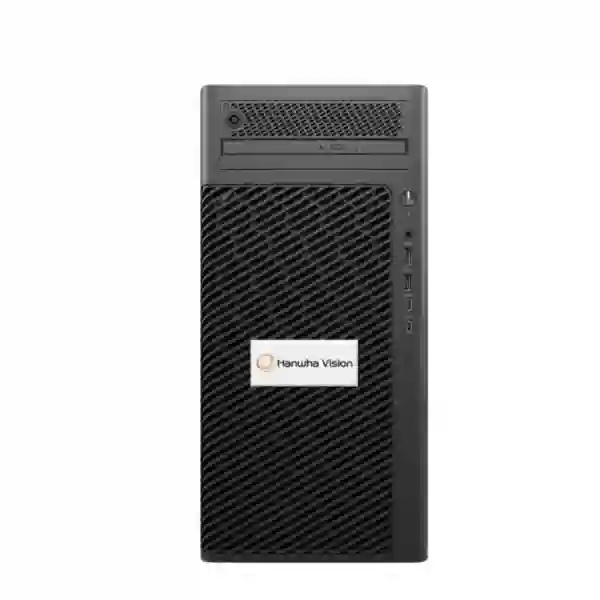
Hanwha Vision WRT-P-5206W Recording Server
A configurable, Windows IoT-based surveillance recording platform for organisations planning a licensed, appropriately sized IP camera system in Tanzania. Up to 64 channels, up to 470 Mbps recording bandwidth and up to 36 TB raw storage, with four Wisenet WAVE Professional licenses included.
Important purchase distinction
Up to 64 channels is a platform limit, while four WAVE Professional recording licenses are included. Up to 36 TB is a raw storage ceiling, not a promise that every capacity variant includes the maximum installed drives. The stated 1500 W is a maximum power figure, not verified typical consumption. Request exact configuration details before placing an order.
Technical specification summary
| Platform | Wisenet WAVE preinstalled; Windows 11 IoT Enterprise LTSC |
|---|---|
| Processor / memory | Intel Core Ultra 5 / 16 GB DDR5 |
| Recording capacity | Up to 64 channels; up to 470 Mbps recording bandwidth |
| WAVE licenses | 4 WAVE Professional licenses included |
| Data storage | 3 × 3.5-inch SATA bays; up to 36 TB raw storage |
| Operating-system storage | Internal 256 GB M.2 SSD |
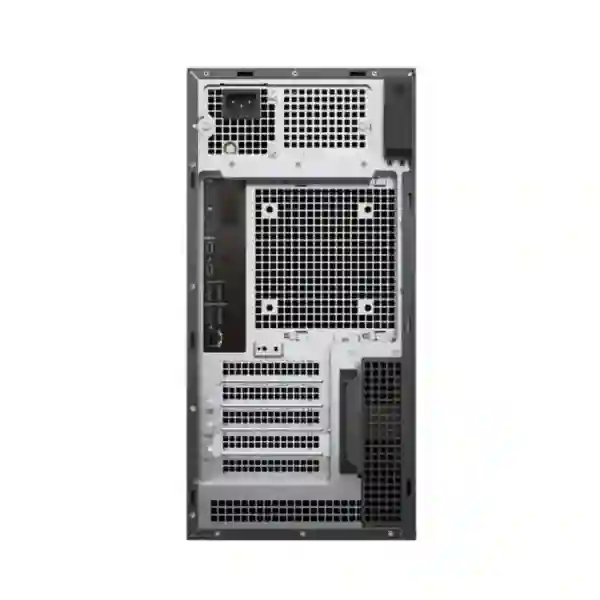
| Network | 2 × 1 GbE RJ45 connections |
| Local outputs | 2 × DisplayPort; 1 × DP-to-HDMI adapter |
| Power | 100–240 V AC; 1500 W 80 Plus Platinum PSU; 1500 W stated maximum |
| Operating environment | 10–35°C; 20–85% non-condensing humidity |
| Dimensions / weight | 387 × 187.7 × 438 mm / approx. 20.4 kg |
| Management note | IPMI not supported; no sliding rail kit |
Specifications represent the manufacturer’s model-level description. Confirm the supplied configuration and regional availability in the final offer.
Why choose this WAVE recording server?
The Hanwha Vision WRT-P-5206W is intended for organisations that need a dedicated computer-based recording platform rather than an improvised office PC or a small stand-alone recorder. Its value is the combination of hardware designed for the Wisenet WAVE software environment, defined recording limits, internal drive options and a familiar Windows operating system. For a project buyer, this helps turn a long equipment list into a more understandable specification with clearly identified components and capacity ceilings.
The primary buying question is not simply whether a server can accept sixty-four cameras. It is whether the selected cameras, resolutions, frame rates, recording schedules and desired history can operate together within the supported resources. This model’s headline limits are up to 64 channels, up to 470 Mbps of recording bandwidth and up to 36 TB of raw internal storage. These are separate limits; reaching one does not establish that the others are sufficient for the project.
For a business in Tanzania, the appropriate next step is a design-led quotation that specifies the camera count, required days of recorded footage, storage configuration, WAVE licenses and site conditions. FourTeck Tanzania can be asked to review these requirements before a purchase decision. No particular local stock level, price, installation service, delivery date or warranty term is implied by this product description.
At a glance: verified model capabilities
Hanwha Vision lists this unit as a tower WAVE recording server with an Intel Core Ultra 5 processor, 16 GB of DDR5 memory and Windows 11 IoT Enterprise LTSC. Wisenet WAVE comes preinstalled, reducing the need to source a separate recording application during initial planning. The vendor specifies a dedicated 256 GB M.2 SSD for the operating system and three 3.5-inch SATA data-drive bays. The maximum quoted capacity is 36 TB raw, subject to the particular configuration supplied.
Network connectivity consists of two 1 Gigabit Ethernet RJ45 ports, one onboard and one installed through a PCIe network card. Video output is provided by two DisplayPort connections, with a DisplayPort-to-HDMI adapter specified. A keyboard and mouse are included. USB and audio connections support practical local setup, but buyers should verify any specialist peripheral or control-room requirement rather than assume every accessory works out of the box.
The chassis is a tower, not a rackmount server. Hanwha specifies dimensions of approximately 387 by 187.7 by 438 millimetres and a weight of approximately 20.4 kilograms. It does not support IPMI remote hardware management, and a sliding rail kit is not included. These details matter where equipment-room space, remote recovery procedures or standard rack installation are design requirements.
A 64-channel rating is not 64 included licenses
The WRT-P-5206W supports up to 64 channels according to its manufacturer specification, but it is supplied with four Wisenet WAVE Professional licenses. These two numbers describe different things. The channel figure identifies a supported scale for the platform; the included license figure identifies the recording entitlements shipped with it. Do not plan a sixty-four-camera project on the assumption that the hardware package includes sixty-four camera recording licenses.
Additional WAVE Professional licenses normally need to be budgeted when the design goes beyond the included entitlements. Hanwha’s licensing guidance distinguishes recording licenses and explains that WAVE Professional licenses are supplied in several pack sizes. The correct quantity depends on the devices and streams being recorded and the currently applicable licensing rules. The final bill of materials should show the server, its included entitlements and all extra licenses separately.
For example, a project that expects several phases of camera additions should document the initial connected devices, planned future devices and licenses available at each phase. This prevents the common problem of buying sufficient computing hardware but not enough entitlement to record all planned video. The licensing review should also cover any specialist cameras, encoders, embedded recorders or additional WAVE features that may use different license types.
Recording throughput and real project sizing
The published recording throughput is up to 470 Mbps. This is an incoming recording-bandwidth specification and should not be read as an automatic guarantee that every combination of 64 cameras will perform identically. Two sixty-four-camera systems can generate very different traffic if one uses lower bitrates and motion schedules while the other uses higher-resolution, high-frame-rate streams with continuous recording.
Begin by listing each camera’s planned recording codec, resolution, frame rate, bitrate mode and realistic peak stream bitrate. Add the estimated recording traffic across all cameras, leaving sensible room for changing scenes, configuration changes and later expansion. Where audio, metadata or extra recording streams are involved, include their effects in the design. A network diagram should also account for traffic used for monitoring, exports, management and other connected services.
The 470 Mbps figure is the manufacturer’s stated upper recording limit; it is not a suggested design target for continuous operation under every condition. Storage-disk write performance, system workload, live viewing and network architecture still influence real results. A prudent integrator validates the intended camera mix, tests the system before handover and documents how recording behaves when multiple cameras are active simultaneously.
Understanding the available data storage
Hanwha specifies three 3.5-inch SATA data-drive bays and a maximum raw data-storage capacity of 36 TB. Raw capacity is the sum of installed drive capacities before allowances for file systems, reserve space, drive arrangements or other overhead. It must not be presented as the exact capacity available for archived video. The specific terabytes shipped depend on the purchased variant and confirmed quotation.
The 256 GB M.2 SSD is the dedicated operating-system drive and should not be added to the advertised camera-recording capacity. Keeping the OS drive separate from the main video archive is useful when planning maintenance and application operation, but it does not remove the need to protect recordings against disk failure or accidental deletion. Ask for a written drive schedule showing the number of drives, the size of each and how the recording archive is configured.
Do not assume that an advertised raw-storage figure provides RAID protection, hot-swappable disks or a guaranteed retention duration. None of those conclusions follows from a capacity headline alone. Discuss fault tolerance, disk replacements, monitoring, export requirements and backup of important incidents as separate operational decisions. Where evidence must be kept for a defined period, plan that requirement explicitly instead of relying on a generic storage number.
How to estimate the days of recorded video
Retention is a property of the complete recording design, not a single specification printed on the server. In a simplified continuous-recording estimate, a camera averaging 4 Mbps uses roughly 43 GB of data per day before formatting, reserve space and other practical considerations. Ten cameras at that average are therefore very different from fifty cameras at the same average. Actual consumption changes with scene movement, image complexity, codec, frame rate and camera configuration.
A usable calculation should separate continuous recording from event-triggered or scheduled recording. It should also identify whether the supplied camera bitrate estimate is an average or a high-water mark. Multiply the calculated daily volume by the intended retention days, then allow for practical storage overhead, reserved free space and future growth. Confirm that any recording schedule matches the organisation’s security policy rather than being chosen solely to save disk space.
Hanwha’s WAVE support guidance states that the application reserves free space and may recycle the oldest recording as available storage approaches the reserve limit. That makes a retention estimate and a verification test more useful than a theoretical maximum. For a procurement request, specify the desired recording duration, camera settings and whether footage must remain searchable or exportable after an incident.
The difference between recording capacity and monitoring
A recording server and a monitoring workstation have related but different jobs. Recording capacity concerns receiving camera streams and storing footage reliably over time. Live viewing concerns rendering layouts for operators, switching cameras and reviewing incidents. Because those activities can compete for computing and network resources, a design should distinguish server duties from the number of simultaneous operator screens expected in daily use.
The WRT-P-5206W has local video connections and is described as a server or workstation, so a display can form part of setup or an appropriately planned operational workflow. However, two video outputs do not imply that the unit can replace every high-density video wall or specialist operator workstation. Where a site expects many simultaneous high-resolution streams on multiple displays, specify the monitoring clients and their performance requirements separately.
For smaller sites, an operator may only need to check a few cameras and search historical recordings periodically. Larger sites may have guards reviewing alerts, supervisors opening incident footage and technical staff making configuration changes at the same time. These patterns should shape the complete WAVE architecture. The right solution provides a stable recording service and an appropriate operator experience without conflating the two.
Wisenet WAVE software and day-to-day use
Wisenet WAVE is the video management software preinstalled on this server. Its role is to bring supported video sources into an organised recording and viewing environment. The server hardware supplies the computing and storage platform; the software controls the system’s cameras, recording configuration and review workflow. An integrator should still perform commissioning, user setup and confirmation of suitable software versions before declaring the installation operational.
Video management is valuable only if staff can quickly find the footage they need. During setup, define camera names that match real locations, sensible user permissions and a predictable method of searching incidents. Decide who may modify recording schedules, export files or access administrative settings. A camera inventory, site map and documented system-owner account help prevent confusion after the original installer is no longer on site.
Software capabilities, cloud-related functions, integrations and supported devices can depend on current WAVE versions, license types and network conditions. Avoid assuming that a particular advanced feature is automatically enabled merely because the application is installed. The procurement review should confirm every required feature against current Hanwha WAVE documentation and include associated costs, dependencies and setup work in the overall plan.
Network interfaces and camera traffic
The server includes two 1 GbE RJ45 network interfaces. These interfaces provide useful connection options for a planned surveillance network, but they should not be treated as a single automatic 2 Gbps pipe. How the links are configured, whether networks are separated, and which switches carry video streams will affect the traffic distribution and management approach. A network engineer should confirm the intended architecture before cables are connected.
A typical site needs to think about camera-facing network segments, management access, video-client traffic and connectivity to other authorised systems. Consider switch uplink capacity, port availability, IP addressing, monitoring of link errors and the impact of simultaneous camera streams. If cameras use PoE, that power is normally a matter for the compatible switches or other power equipment; the WRT-P-5206W specification does not establish that the server itself powers IP cameras.
Dual network interfaces are useful design resources, not proof of automatic network failover, bonding or protection against switch failure. If resilience is required, specify the switching, addressing, software configuration and testing approach. Keep video networks appropriately controlled and avoid exposing the recording environment directly to untrusted traffic. Document ports and permitted management paths so later maintenance does not undermine the original design.
IP camera choice and interoperability
Choose cameras according to the security problem first: image detail at the important distance, field of view, low-light performance, mounting position and environmental conditions. Then verify that the exact camera model and firmware support the intended WAVE recording functions. The WRT-P-5206W is a recording platform; it cannot compensate for a camera that is badly positioned, cannot see the required detail or lacks the features the project needs.
Projects may mix existing cameras with new ones, but compatibility should never be assumed from the presence of an Ethernet port or a broad manufacturer label. Verify video-stream support, authentication, events, analytics metadata where relevant, and any necessary licensing. Use the manufacturer’s current compatibility guidance and test a representative camera before approving a large deployment or changing an established surveillance network.
Specialist devices such as multisensor cameras, encoders and existing network recorders can introduce extra design questions. Camera counts, recorded streams and license classifications do not always map one-to-one across all device families. Record the exact model and required feature for each source, including whether the installation needs video only, event handling or deeper integration. This is more reliable than relying on a generic claim that every IP camera will behave the same way.
Processor, memory and operating-system platform
The specified processor is an Intel Core Ultra 5 and the installed system memory is 16 GB DDR5. Hanwha lists Windows 11 IoT Enterprise LTSC as the operating system. These are defined platform characteristics that help a buyer compare the server with an unqualified generic computer. They do not remove the need to consider real camera workload, WAVE software requirements, system updates and operator viewing demands.
The dedicated M.2 SSD is intended for the operating system, while the SATA drive bays provide recording storage. This separation should be reflected in service procedures and recovery planning. Keep a record of the operating-system version, current WAVE installation, approved device drivers and the process for restoring configuration. Hardware replacement procedures should address licensing and preserved incident footage before an emergency occurs.
Long-term maintenance planning should identify the party responsible for security patches, approved WAVE updates, operating-system changes and scheduled health checks. Never assume that an update can be deployed without compatibility review or a recovery plan. For an organisation with limited local IT resources, a written responsibility matrix and simple maintenance runbook can be more important than an impressive processor description.
Tower form factor and equipment-room placement
This product is a tower rather than a rackmount chassis. It should be allocated a stable, secure indoor position with adequate clearance for airflow, cable routing and service access. Hanwha lists its dimensions at approximately 387 mm high, 187.7 mm wide and 438 mm deep. Those numbers help with planning, but the installation still needs clearance for connectors, ventilation and access to removable or serviceable components.
The manufacturer’s approximate 20.4 kg weight is important when choosing shelving, cabinets or secure enclosures. Do not assume a standard rack shelf, enclosure or sliding rail arrangement will be supplied or fit without checking dimensions and load capacity. The model’s listed lack of IPMI support also means that remote hardware-level management should not be included in a support plan without providing a separate proven method.
A practical installation includes labelled power and network connections, an accessible service path and protection from casual interference. Avoid placing the unit where cleaning water, dust accumulation, direct sun or uncontrolled heat may reach it. If the proposed location is a reception desk or occupied office, consider noise, security and physical access alongside the specification sheet. The equipment location is part of system reliability.
Electrical input and power protection
Hanwha specifies a power input range of 100 to 240 V AC, with a 1500 W 80 Plus Platinum power supply and a maximum listed power-consumption figure of 1500 W. A power-supply rating or stated maximum is not the same as measured average energy consumption in an actual deployment. Avoid using the maximum as an everyday electricity bill estimate or assuming a low figure without site testing.
Where grid interruptions are a concern, plan a suitably selected uninterruptible power supply, safe shutdown procedure and protected network equipment. The UPS design should consider not only the recording server but also the switches, cameras, network links and any other component needed to keep meaningful video recording active. A server staying on while its camera switches switch off may deliver little protection during an outage.
Electrical work should be specified by appropriately qualified personnel based on the local installation and equipment supplied. Confirm earthing, surge-protection arrangements, circuit loading, UPS runtime targets and the method for testing power restoration. Do not imply that the base recorder includes a UPS or that a particular external power-protection product is mandatory. The correct scheme depends on the site’s risk and continuity requirements.
Operating temperature, humidity and ventilation
The manufacturer’s operating temperature range is 10°C to 35°C and its allowed operating humidity is 20% to 85%, non-condensing. These are operational limits for the equipment, not a weather forecast and not evidence that the unit is rated for outdoor installation. The cabinet or room environment should remain within the specified range while the complete system is running and producing heat.
For Tanzanian deployments, practical considerations may include indoor heat accumulation, dust exposure, unpredictable power and changes in room usage. None of these should be reduced to a general claim that the product is suitable for every uncooled location. A sealed or cramped cabinet can become much warmer than the surrounding room. Position vents correctly and consider temperature monitoring where uninterrupted operation is important.
Humidity should be considered alongside temperature, especially where condensation could form following cooling or environmental changes. Keep drinks, leaks and cleaning chemicals away from the chassis. Verify that equipment-room cooling, physical security and backup power are planned together. The buyer should specify the installation environment early enough for the integrator to confirm it against the stated operational range.
Security of the recorder and recorded evidence
Network surveillance footage can contain sensitive operational and personal information. Plan access controls, account ownership and evidence handling as part of the purchase rather than after the cameras start recording. Give users roles appropriate to their responsibilities and avoid shared administrative credentials. Establish a process for adding or removing staff access and make sure the organisation knows who can retrieve footage during an incident.
The recording server should be connected to appropriately secured networks, maintained with supported software and configured using the vendor’s current hardening guidance. Remote viewing, if requested, needs a deliberate design for identity, permitted access and network exposure. No recording server should be treated as secure simply because it is placed in a locked room or runs a particular operating-system edition.
Recorded footage may need to be exported, copied securely, retained under company policy or handed to authorised parties. Plan the evidence workflow, including time synchronisation, camera naming, export access, storage of copies and audit procedures where required. Legal and organisational requirements vary, so the buyer should confirm the applicable privacy, security and retention obligations before commissioning.
Deployment steps for an orderly handover
Start with a site survey and a camera schedule listing the relevant area, image objective, mounting environment, planned bitrate and expected recording hours. Add the required retention period and the location of security operators. The survey should also identify existing switches, uplinks, cable routes, network cabinets and electrical conditions. This becomes the basis for choosing the precise WRT-P-5206W configuration and accessories.
Next, create a camera-and-license worksheet and a recording-bandwidth estimate. Calculate storage from the stream configuration rather than from the camera count alone. Select a drive configuration consistent with the archive requirement and validate the network architecture against the two 1 GbE ports and the intended data flows. Include protection for the recorder and cameras against expected power disturbances.
Commissioning should prove that cameras record, playback works, time settings are accurate, licenses are correct and the storage duration develops as predicted. Test intended alarms or integrations, authorised remote access and recovery after a controlled service restart. Hand over a camera list, license record, administrator ownership, backup and export procedures, maintenance responsibilities and a clear list of outstanding issues.
Scenario: offices and commercial buildings
Office installations may need a mixture of entrances, reception areas, corridors, loading points and sensitive internal zones. Each camera has a different purpose, so a consistent recording policy may not fit the building. Discuss desired identification detail, privacy-sensitive areas, night-time activity and which operators need access. The recorder can be evaluated as a central recording point for a correctly sized camera network.
An office may have long periods of modest movement and shorter periods of high activity around arrivals and departures. Variable-bitrate cameras can produce different amounts of data during these periods. Storage planning should therefore be based on tested or credible camera-stream assumptions, not solely on quiet-room measurements. A business-continuity review should also address weekend or public-holiday power interruptions.
Where multiple floors or departments share a recorder, define user privileges and device names carefully. Facilities teams may need a quick view of an incident, while management or security leads may require controlled access to exported evidence. Specify these workflows before handover and make sure the number of licenses, capacity, operators and network connections is reflected in the final quotation.
Scenario: retail, hospitality and visitor facilities
Retail shops, service counters, hotels and public-facing facilities often care about entrance movement, handover points, stock areas and dispute investigation. Camera placement is more important than using the highest possible channel count. The server can provide a managed WAVE recording platform when paired with supported cameras and a correctly selected storage configuration. Buyers should establish who may see video and who may export it.
A busy retail environment may have high-motion scenes and changing lighting. This can influence bitrates and the clarity of recorded evidence. Design for real operating conditions, including evenings and periods of high customer activity. If the organisation has multiple branches, decide whether each site needs independent recording and what authorised central personnel need to review; do not assume one local recorder automatically supplies a complete multi-site architecture.
Operational ease matters as much as a technical specification. Store teams often need to locate a short event quickly without editing server settings. Agree on camera labels, search procedures, secure exports and access restrictions. Budget for the complete installed system, including camera licenses and network equipment, rather than interpreting the recorder’s four bundled licenses as a finished store-wide deployment.
Scenario: warehouses and logistics sites
Warehouses can involve long sightlines, loading bays, vehicle activity and zones with limited ambient light. A camera that records an entire open area may not supply the same usable detail as a camera aimed at a specific gate, loading event or inventory-transfer position. Start with those security objectives and select lens and camera characteristics independently of the server’s headline channel figure.
Logistics facilities may create sustained recording loads with vehicles, forklifts and frequent movement. Camera stream bitrates and retention periods should be checked under realistic activity. A full shift, night operation and the busiest loading period may produce very different recording profiles. The proposed drive capacity should accommodate the agreed policy and allow a reasonable margin for expansion or seasonal changes.
Physical network infrastructure can be spread across buildings or long distances. Consider switches, transmission links, lightning and surge exposure, power distribution and equipment security. The WRT-P-5206W is an indoor tower device; its installation location should be protected even when cameras are outside. Confirm the entire end-to-end design with the integrator rather than selecting the server in isolation.
Scenario: educational and healthcare facilities
Schools, training institutions, clinics and healthcare premises may have complex access patterns and heightened privacy requirements. Decide which entrances, shared spaces and outdoor approaches legitimately need recording, and whether a specific camera location is appropriate. The aim is a proportionate security system with defined access, recording and evidence-handling policies rather than indiscriminate collection.
These organisations may have many user groups but only a small number of people authorised to view or export sensitive footage. Set permissions and incident workflows accordingly. Document time synchronisation, archive duration and the procedure for retrieving a recording when an investigation is requested. The technical configuration needs to support those operational rules without promising compliance with a specific legal regime.
A site that depends on video during an emergency should consider the reliability of power, network infrastructure and support arrangements. Even a technically capable server cannot recover recordings that cameras never transmitted during an outage. Evaluate the WAVE platform within a complete system design and ensure the product variation, licensing and protected installation environment are specified before ordering.
Scenario: phased surveillance expansion
Some customers begin with a few cameras and expect to expand as additional buildings, departments or risk areas come into scope. The four bundled WAVE Professional licenses can provide a starting entitlement, while the manufacturer-rated 64-channel capacity describes a larger supported ceiling. The actual expansion path must still respect recording throughput, storage, licensing and other operating requirements.
Build a staged plan with the expected number of recording sources for each phase, their probable bitrate and required history. At every stage, revisit disk capacity and software licensing before connecting more cameras. A later switch to higher-resolution imaging can increase storage requirements even when the camera count does not change, so a simple ‘channels remaining’ calculation is insufficient.
Phased procurement can benefit from a stable platform, but avoid paying for unsupported assumptions about future upgrades. Ask which drive capacity, additional WAVE licenses, network ports, monitoring clients and power protections are needed at initial commissioning and at each future milestone. Keep these as separate cost lines and review the completed stages against the agreed design.
A practical comparison with other recording approaches
A small appliance-style NVR may be suitable for a modest, relatively fixed camera system when it meets the required functions, licenses and retention target. A WAVE tower recording server becomes more interesting where a project needs the WAVE software environment, computer-based management and a carefully scoped expansion plan. Neither category is universally better; the useful comparison concerns the exact project workflow and verified device capabilities.
A general-purpose computer running VMS software can sometimes meet a surveillance need, but it requires deliberate hardware selection, drive sizing, operating-system management and validation under sustained recording workloads. The WRT-P-5206W offers a published, manufacturer-specified recording platform with WAVE preinstalled. Buyers should compare the total cost and support responsibilities, not merely processor speed or the initial chassis price.
Rackmount recorders may be preferable where there is established rack space, service access or a particular infrastructure standard. This model is a tower and does not list IPMI support. If those characteristics are hard requirements, select a suitable alternative rather than trying to infer rack and management capabilities that are not stated. In all cases, compare licensed camera capacity, bitrate, usable storage and maintainability on equivalent terms.
Configuration decisions to confirm on the quotation
First, confirm the exact model and capacity variant. The family is described as supporting up to 36 TB raw, but that does not prove the quoted product will arrive with 36 TB installed. Ask for the drive sizes, installed drive count, whether drive protection is configured and how much recording space is expected to be available. Request a separate retention calculation for the proposed cameras.
Second, request a transparent licensing schedule. It should show the four WAVE Professional licenses included with this server, any extra licenses needed for the installation and any device-specific exceptions. Verify the software version, supported camera models and required functionality. If the project includes analytics, encoders or specialist integrations, ensure their dependencies are clearly represented rather than folded into a vague feature promise.
Third, define the surrounding infrastructure: switches and PoE budgets, wiring, UPS, cooling, commissioning, account setup and administrator training. Clarify responsibilities for installation and future updates. A complete quotation should also state the verified local commercial terms, including any applicable stock, lead time and warranty details, without assuming them from a manufacturer’s specification published for another market.
Cost of ownership and long-term operations
The initial recorder price is only one part of a professional video surveillance deployment. Cameras, mounting hardware, cabling, switches, recording licenses, hard disks, power protection, configuration and ongoing administration all affect the overall cost. Compare alternative proposals with the same camera specification, planned recording history and system responsibilities. Otherwise, a lower base price may conceal missing components.
Storage costs are shaped by the retention policy. A demand for longer continuous history can be more expensive than a camera-count increase because it changes the archive volume across every source. Equally, a design that records only at selected times must be assessed against the security policy so important events are not inadvertently missed. Ask the integrator to show how the chosen recording schedule affects the storage estimate.
Operational cost also includes health monitoring, software maintenance, access reviews, drive service and evidence exports. Assign ownership for these tasks at handover. Where staff turnover is likely, written procedures reduce dependence on one individual. An appropriate system is not merely the one that records successfully on the first day; it is the one the organisation can use, maintain and audit responsibly.
Installation checklist for Tanzania projects
Before ordering, prepare a site-specific checklist: intended indoor equipment location, expected room temperature, power source, UPS objective, camera-network layout, estimated peak bitrates, archive period and permitted users. Confirm the exact model and hard-disk configuration rather than relying on a generic online picture or family datasheet. A clear project brief also helps the supplier distinguish required items from optional additions.
Include constraints that might be overlooked in a remote purchase, such as cabinet clearance for a tower chassis, where the operator monitor will be installed, what happens during a network outage and who has authority to reset or reconfigure the server. If the site has existing cameras, supply model numbers, firmware details and sample stream settings for compatibility review. Avoid relying on assumptions about older hardware.
Finally, require a commissioning record demonstrating that every installed camera can be viewed and recorded as intended, that allocated licenses are sufficient and that time and archive settings are correct. Confirm the process for reporting faults and retrieving evidence. Local pricing, stock status, transport charges, regulatory claims and service commitments must be confirmed directly in the actual offer; they are not established by this page.
Buyer questions before choosing capacity
Ask what event the system must help investigate and how much image detail that event requires. Camera placement and stream settings follow from this answer. A large channel limit is useful only when the video produced is relevant and recoverable. The network and storage design then support those recording objectives; they should not dictate surveillance coverage without considering operational need.
Ask how many days of history are mandatory, whether all cameras record continuously and whether the organisation needs to preserve selected incidents separately. These choices are usually more important than a headline terabyte number. A supplier should be able to explain the assumptions used for the expected recording period and identify circumstances that could reduce it.
Ask who will administer the system and who will make incident requests. If the same person is expected to manage networking, licensing, evidence and updates, plan training and documentation. If different teams share responsibility, define those boundaries at the start. This prevents a technically sound server from becoming an operational bottleneck after installation.
Maintenance, testing and expansion governance
Schedule periodic checks that cameras are connected, recording schedules are active and the archive is behaving as expected. Inspect available storage, server health alerts and the condition of connected network infrastructure. A camera being visible in live view at one moment is not sufficient proof that historical recording is complete. Regularly test playback from different times and cameras.
Protect administrative credentials and record the authorised procedure for software updates or license transfers. If hardware is replaced, the organisation needs a documented route for recovering configuration and handling existing footage. Keep critical exports in an approved, secure location separate from routine archive recycling. These steps are operational practices rather than claims about hardware features bundled with the unit.
When adding cameras, review the licensing worksheet, measured recording traffic, archive capacity, cooling load and operator viewing requirements. Maintain an updated system diagram and camera list. Expansion should trigger an intentional capacity check instead of being treated as a simple plug-and-play action. This preserves the usefulness of the original design as the deployment grows.
Frequently asked questions: channels and licenses
Does the WRT-P-5206W come with sixty-four camera licenses? No. Hanwha lists support for up to 64 channels and includes four Wisenet WAVE Professional licenses. Additional licenses may be required for a larger recording deployment. Confirm the exact licensing requirements for each camera or device type and show the extra licenses separately in the quotation.
Can the same server be used for an initial small system and later expansion? It can be evaluated for that purpose within its stated limits. The initial four included recording licenses and the potential 64-channel ceiling leave room for an appropriately planned growth path, but capacity also depends on throughput, storage, compatibility and the licenses acquired for added cameras.
Does Wisenet WAVE need to be installed from scratch? Hanwha lists WAVE as preinstalled on this model. Commissioning remains necessary to configure cameras, activate appropriate licenses, verify access permissions and test recording. Preinstallation is a useful starting point, not a substitute for a completed security design.
Frequently asked questions: storage and networking
Is 36 TB included as standard? The manufacturer describes up to 36 TB of raw capacity. The exact amount of installed storage depends on the purchased configuration. Check the detailed part or quotation and ask for the number and capacities of installed data drives. The stated maximum should not be mistaken for a guarantee of a specific supplied variant.
How long will the server retain footage? There is no single truthful number without knowing the camera streams, recording schedule and usable storage. Retention must be calculated from the real system configuration and then checked in operation. An installation recording many high-bitrate streams can fill its available archive much faster than one recording fewer, lower-bitrate streams.
Does it support Ethernet and a local monitor? Yes. Hanwha specifies two 1 GbE RJ45 interfaces and two DisplayPort outputs, with a DisplayPort-to-HDMI adapter. The precise network design, monitor arrangement and simultaneous viewing workload should still be confirmed against the intended system.
Frequently asked questions: environment and procurement
Can this recorder be installed outdoors? The model is specified as a tower server with an operating-temperature range of 10°C to 35°C and non-condensing humidity requirements. It should be planned for an appropriate protected indoor environment. Any enclosure or cooling arrangement needs separate engineering confirmation; the base product is not presented as an outdoor weatherproof recorder.
Does the server include a UPS or powered camera ports? Neither should be assumed. The manufacturer specifies the server’s power input and network ports, while UPS and camera-power arrangements belong to the full installation design. Ask the supplier to list power protection and PoE switching separately where they are needed.
Is there a confirmed price or stock position in Tanzania? Not from this specification. Ask FourTeck Tanzania to confirm the current quotation, exact capacity variant, license additions and applicable delivery or support terms. Do not use price figures from another country as a local offer.
Is IPMI remote hardware management supported? Hanwha’s specification states that IPMI is not supported. If remote out-of-band administration is a strict requirement, raise it during selection so an alternative platform or approved management approach can be considered.
Request a configuration-led quotation
For an accurate proposal, send FourTeck Tanzania the number and model of IP cameras, desired recording resolution and bitrate, required archive duration, planned viewing locations and any special integration needs. Also identify the proposed indoor location, electrical conditions and existing network equipment. These details allow the configuration to be checked against the WRT-P-5206W’s recording and storage limits.
Ask for an itemised confirmation of the exact server variant, installed hard drives, included and additional WAVE licenses, necessary peripherals and assumptions used for retention sizing. Where commissioning, deployment or support is required, request the scope in writing. This helps avoid the gap between an attractive model specification and the equipment actually needed to operate a dependable system.
The Hanwha Vision WRT-P-5206W is best selected as part of a designed surveillance solution, not from its maximum channel figure alone. Request a tailored product quotation and technical fit review for your Tanzania project, with availability and commercial terms confirmed at the time of enquiry.




Reviews
There are no reviews yet.