
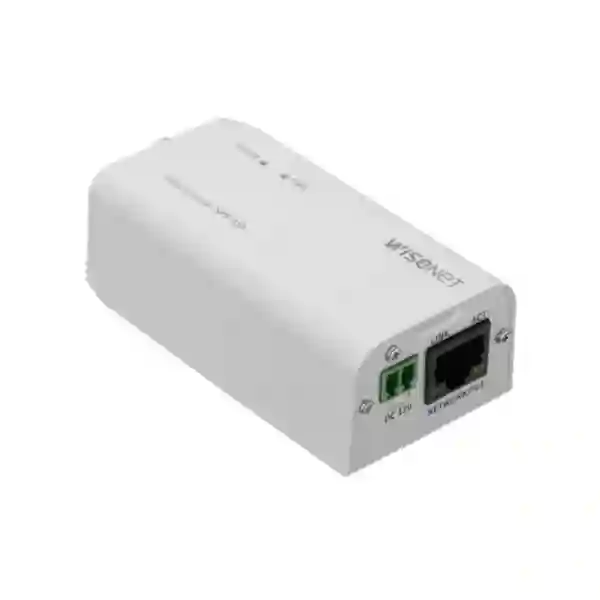
Legacy analogue camera to IP video · Product guide for Tanzania
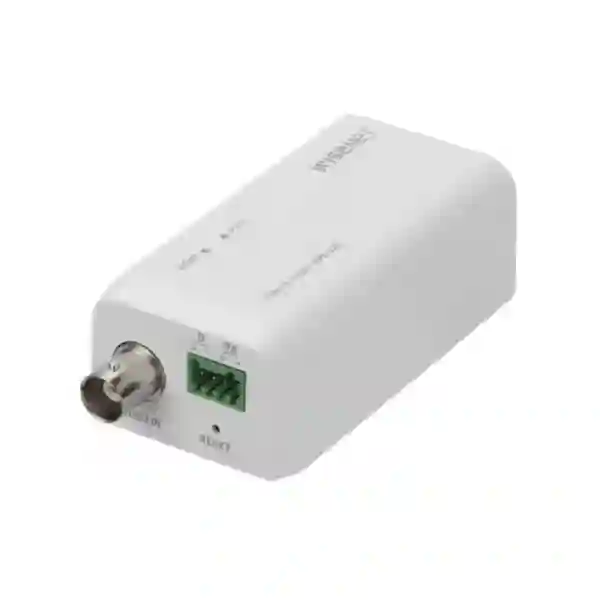
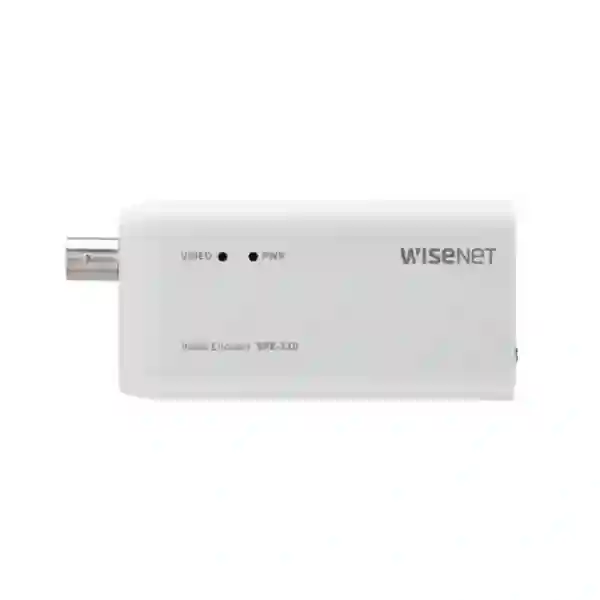
Hanwha SPE-110 1-Channel Network Video Encoder
Preserve a compatible analogue camera feed in an IP surveillance workflow. Review the video input, recorder compatibility and long-term support requirements before purchasing this discontinued Hanwha Vision model.
Important product status
Hanwha Vision marks the SPE-110 as discontinued. This page does not claim verified Tanzania stock, prices, delivery, warranty, or ongoing manufacturer support. Ask for a model-specific availability and lifecycle review, or a current supported alternative.
Verified technical snapshot
| Device class | One-channel network video encoder |
|---|---|
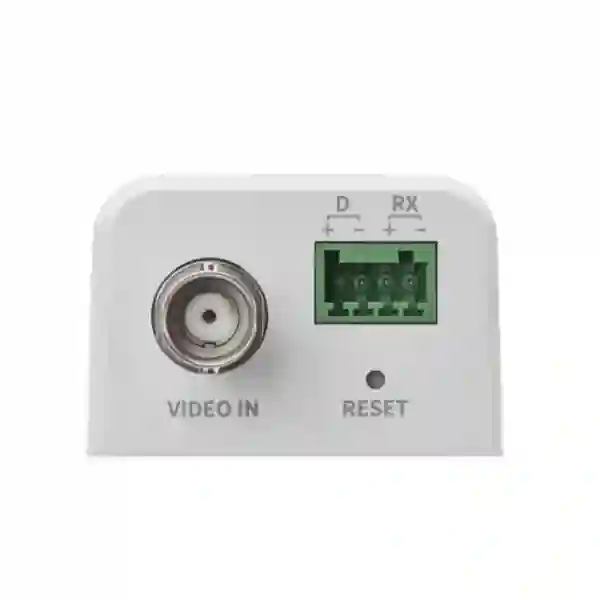
| Video input | 1 × analogue BNC |
| Input signal formats | CVBS; AHD 720p / 1080p / 4 MP; CVI and TVI 720p / 2 MP |
| Maximum encode resolution | 4 MP (format-specific) |
| Maximum headline frame rate | 4 MP: 15 fps; 2 MP: up to 30 fps (N) / 25 fps (P) |
| Video codecs | H.264 and MJPEG |
| Video profiles | Up to 3 profiles per channel |
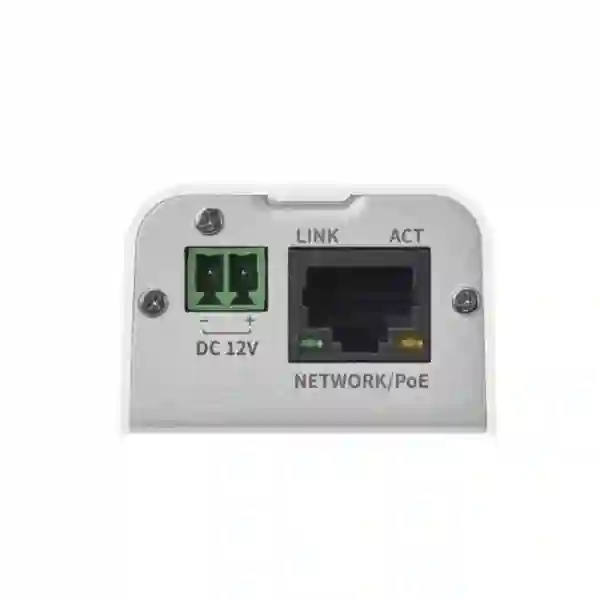
| Network | 10/100 Base-T RJ-45 |
| Integration interfaces | ONVIF Profile S; SUNAPI |
| Camera control | RS-485/422 and documented coaxial-control methods |
| Device power | 12 V DC or PoE (IEEE 802.3af) |
| Maximum power draw | 3.6 W with 12 V DC; 4 W with PoE |
| Operating environment | -10°C to +50°C; 20–80% RH |
| Approximate size | 43 × 29.2 × 94.15 mm |
| Lifecycle | Discontinued per Hanwha Vision |
Specifications refer to Hanwha’s SPE-110 manufacturer documentation. Validate the exact camera mode and regional variant before integration.
At a glance: where this encoder fits
Why choose a single-channel encoder?
The Hanwha SPE-110 is a network video encoder intended to take the video signal from one supported analogue surveillance camera and make it available as IP video. That can be useful where a camera is installed in a good position, its existing coaxial route is serviceable, and a network recorder or video management platform is being considered. Rather than treating every analogue camera as a candidate for immediate removal, a site team can assess whether an encoder offers a controlled transition. The SPE-110 is a one-channel device, so its practical role is a selected camera position, a technical trial or a limited retrofit; it is not a multi-camera rack encoder. Hanwha Vision currently marks this model discontinued. Buyers in Tanzania should therefore treat it as a legacy-model compatibility option and ask about verified sourcing, long-term security maintenance and alternatives before planning a new deployment. A successful project starts with the camera model and the intended recording system, not with the encoder alone.
What the unit changes—and what it does not
An encoder accepts an electrical video signal from a compatible analogue camera and produces a digital network stream. The camera lens, sensor, placement and lighting remain important because the encoder cannot recover detail that the camera did not capture. A poor night image will not become a high-quality night image merely because it is now accessible over Ethernet. Likewise, the unit does not turn an existing camera into a modern analytics camera or automatically provide every feature associated with new IP hardware. Its value is narrower and practical: it can help connect usable legacy video to an IP-oriented workflow. Check the complete path from camera through coaxial cable and BNC connector, into the encoder, through the network and finally into the recorder. Every part must be compatible. This distinction helps buyers compare the genuine cost of retaining one camera against replacing it with an IP camera, a suitable hybrid recorder or a more current video encoder.
Who should consider the SPE-110
A facilities team with one specialist camera it would rather retain may find this type of device relevant. So may an installer carrying out a proof of concept before changing a larger CCTV system, or a maintenance contractor asked to recover a working analogue camera feed for an existing IP viewing environment. Sites with several dozen analogue channels should examine multi-channel solutions instead of assuming one small encoder per camera is the most economical or maintainable design. The model also deserves additional scrutiny when cybersecurity policy requires active manufacturer support, current firmware and a documented replacement path. Buyers should identify who will configure the network, confirm viewing permissions and maintain the recorder. Where those responsibilities are unclear, the operational cost of an encoder can exceed the purchase cost. Since Hanwha Vision lists the SPE-110 as discontinued, request an evidence-based lifecycle review before treating this legacy product as the default choice.
A quick decision before requesting a quote
Begin with four questions. First, what is the exact analogue camera model and which video format and output resolution is it using? Second, will the destination NVR or VMS actually accept the resulting stream with the functions required by the operator? Third, is there a reliable network point, protected power and secure administration at the camera location? Fourth, does a discontinued encoder fit the site’s maintenance and support policy? A positive answer to each question makes a controlled compatibility test reasonable; an uncertain answer means more information is needed. Buyers do not have to know all the networking terminology before asking for help, but photographs of the camera label, its video standard, and the recorder make technical advice much more specific. Avoid ordering solely from an image of the encoder or a generic claim of universal analogue compatibility. This product has distinct input-format and frame-rate limits, and those limits matter.
Camera input and video performance
Check the analogue video signal first
The manufacturer’s SPE-110 technical sheet describes one BNC video input and automatic or manual detection for supported analogue formats. It lists CVBS, AHD at 720p, 1080p and 4 MP, and CVI and TVI at 720p and 2 MP. These distinctions are important: support for a format does not mean support for every resolution that format can carry. In particular, a 4 MP TVI or CVI camera should not be assumed compatible simply because 4 MP appears elsewhere in the encoder’s specification. Confirm the output setting of the actual camera, not only its marketing resolution. Some multi-format cameras permit their video output mode to be changed; that setting must be recorded before installation. If the camera is using standard-definition CVBS, check whether the picture quality will meet the intended purpose after migration. A short live test with the precise camera and signal is more dependable than selecting equipment from a format acronym alone.
Understanding the 4 MP and frame-rate limits
Hanwha states a maximum of 4 MP at 15 frames per second for this model, with up to 30 frames per second at 2 MP in the manufacturer’s headline specification. The detailed sheet distinguishes 30 fps for N-system operation and 25 fps for P-system operation at 1080p and other applicable lower resolutions. Those are ceilings, not guarantees that a particular camera or network profile will achieve every combination. Actual output depends on the input signal, configuration and destination device. When monitoring a moving doorway or vehicle approach, frame rate can influence how smoothly movement is shown. Resolution influences the number of pixels available, but image quality also depends on focus, exposure and compression. Before buying, agree whether the priority is sharper still detail, more fluid motion or lower network demand. Test the settings against recorded evidence rather than comparing megapixel numbers without looking at representative footage.
Compression options: H.264 and MJPEG
The SPE-110 supports H.264 and MJPEG, according to Hanwha’s model information. H.264 is a practical choice for many recording and viewing workflows because it normally uses temporal compression to manage bandwidth. MJPEG treats successive frames differently and may suit a particular legacy integration or technical requirement, but the chosen profile can place substantially different demands on the network and storage. This product is not advertised by Hanwha as an H.265 encoder. If a procurement specification requires H.265 throughout the estate, the buyer should consider another device rather than assuming a firmware change can add the codec. Compression is only one part of recording design: bit rate, scene movement, image complexity, retention settings and viewing frequency all matter. Test the selected codec with the destination NVR or VMS and examine exported evidence. A stream that looks acceptable live but is not reliably recorded is not a successful integration.
Using more than one stream profile
Hanwha specifies multiple streaming with up to three profiles per channel for the SPE-110. A typical deployment might use one appropriately configured profile for recording and another for lower-bandwidth viewing, depending on the VMS and recorder. It is important not to confuse the number of available profiles with the number of physical camera inputs: this remains a single-channel encoder. Different profiles can be configured with different resolution, frame rate and compression settings where supported. That flexibility can reduce unnecessary traffic to a remote viewer, but it also creates room for mistakes if the recording platform silently selects a low-resolution profile. During commissioning, document each profile’s name, purpose, resolution and bit rate. Confirm which stream the recorder requests and which stream an operator views. Inspect playback and export quality, not merely live video. If several users will view the camera simultaneously, test access under realistic load and verify any unicast or multicast settings used in that network.
Recognizing the difference between input and output
A useful commissioning exercise is to write down three separate values: the source camera’s video output setting, the encoder’s configured stream setting, and the recorder’s actual recorded resolution and frame rate. They are not automatically identical. A camera can advertise one sensor resolution while transmitting a lower-resolution analogue output. An encoder can receive an acceptable signal but produce a reduced substream. A recorder can then choose a different profile or recording policy. Without that three-stage check, teams may incorrectly blame the camera, encoder or network for a quality limitation introduced elsewhere. The SPE-110 is best evaluated as one component in that chain. Use test scenes that resemble real work, such as a person walking across the field of view, a door opening or a vehicle moving through the monitored zone. Review footage at the recording workstation. Include night or low-light conditions if those are important to the site’s security purpose.
Network and integration readiness
Ethernet connection and network planning
The model provides a 10/100 Base-T Ethernet connection. This is adequate as a physical interface for the device’s intended class, but network readiness means more than having a spare switch port. Confirm the camera location has an appropriate cable path, managed addressing and access to the recording network. Determine whether the encoder belongs on a dedicated surveillance VLAN or another segregated segment according to the organisation’s security policy. Document the address, gateway, DNS and time source actually used. Avoid connecting a camera network device directly to an unrestricted public network. If the encoder must reach a recorder in another building, evaluate the intervening switches, wireless bridges or routed links and their failure points. A low-power encoder may look simple, but a dependable installation needs coherent network operations. Network administrators should approve the plan before an installer introduces a new host to a production CCTV segment.
ONVIF Profile S and SUNAPI
Hanwha’s portfolio documentation lists ONVIF Profile S and SUNAPI for the SPE-110. ONVIF can help connect equipment from different vendors, while SUNAPI is relevant to Hanwha-oriented integrations. Neither label means that every NVR or VMS supports every feature, firmware version or configuration. Profile-level support is a useful starting point for compatibility testing, not a substitute for checking the destination platform. First ask the recorder or VMS vendor whether the device is supported by model, firmware and integration method. Then test discovery, authentication, live view, continuous recording, event handling and playback. PTZ control, motion events and user management deserve separate validation because successful video display alone does not prove they work. When an installation uses a third-party VMS, preserve a record of the working configuration. If the original project depends on a particular proprietary application feature, ask whether that feature is exposed through the selected integration rather than assuming a protocol name covers it.
Connecting to an NVR or VMS
A sensible integration sequence begins with the recorder and the intended viewing workflow. Identify the application, version, licensed channel count and accepted camera-registration method. Reserve an appropriate address for the encoder, establish secure credentials, and check whether the VMS should use a native Hanwha driver, ONVIF or another documented method. The correct answer is environment-specific. Then add the channel, open live view, record a sample, play it back and export a clip. Test after a restart of the encoder and the recorder, because a stream that works only during initial discovery is not production-ready. Confirm the retention policy and that the device consumes the expected channel licence where applicable. If the recorder stores camera time stamps or overlays, review their accuracy. An integrator should also confirm how loss of network connectivity appears on the operator screen and how the site team will identify a failed encoder rather than a failed analogue camera.
PTZ control and existing camera movement
The SPE-110 has an RS-485/422 remote-control interface in the manufacturer’s specification and supports relevant legacy PTZ control methods. Hanwha also documents coaxial-control functionality, including specified methods for CVBS and AHD environments. This does not guarantee that every analogue PTZ camera will respond correctly. PTZ requires alignment between the camera’s physical wiring or coaxial-control scheme, the selected protocol, its device addressing, and the command path from the VMS. Before purchasing, capture the PTZ camera model, address, baud settings where relevant, and existing control arrangement. During a trial, verify pan, tilt, zoom, stopping behaviour and any presets actually needed by operators. If control is not essential, a fixed-view stream may still be useful; if control is essential, a video-only test is insufficient. Do not rely on a remote-control interface label to promise compatibility with an undocumented third-party camera protocol.
Bandwidth assessment without invented figures
There is no single reliable bandwidth number for every SPE-110 deployment. A stream’s rate depends on its codec, frame rate, resolution, configured limits and visual activity. A camera looking at a quiet storeroom will behave differently from one monitoring moving foliage, traffic or a busy entrance. Before commissioning, establish the available uplink capacity and any limits on the path to the recorder. Measure a representative stream under realistic daytime and night-time conditions, then examine the total demand from recording, live viewing and any additional profile. Allow headroom for routine network activity and failure recovery. If the site uses a constrained connection between branches, decide whether video must traverse that connection continuously or only when authorised users view it. Estimate storage using measured bit rates and the intended retention period, rather than multiplying a generic online figure by the number of days. Document the assumptions so they can be reviewed if settings change.
Security, events and operational control
Motion, video-loss and tampering events
Hanwha lists motion detection, video loss and tampering among the SPE-110’s functions. These features can help operators notice changes, but their real value depends on configuration and the receiving platform. Motion detection should be tested against the specific scene: trees moving in wind, insects near lighting and traffic beyond a boundary may produce unwanted activity. Video-loss detection can help distinguish a missing analogue input from an otherwise healthy network connection if the system displays the event correctly. Tampering detection needs a realistic test rather than being accepted on the basis of a feature list. Establish which events are relevant and which team receives them. Avoid promising automatic intervention or reliable identification of a security incident. These are event signals, not a replacement for a site’s monitoring procedures. Recording and alerts must be tested together because the operator needs usable evidence when an event occurs.
Email and FTP event delivery considerations
The original manufacturer technical sheet describes file upload by FTP and email as event actions. These are legacy integration patterns that deserve careful treatment in a modern managed network. An IT team should decide whether a permitted notification path still exists and whether its security characteristics meet current organisational requirements. Do not open extra outbound access merely because a device provides an event setting. First examine whether the recorder or VMS can collect and route the event through a maintained, centrally managed method. If direct email or FTP functions are considered, validate how the device authenticates and protects the data on the actual network and software version. Make the destination and retention policy explicit. Test a harmless event and confirm where the file goes, who can view it and how it will be deleted when no longer needed. The presence of an alert menu is not evidence that a notification is operational.
Privacy masks and operational privacy
The SPE-110 specification describes up to four rectangular privacy-masking areas. This can be helpful where parts of the visible scene should not be displayed through the selected video feed. Masking must be configured deliberately and reviewed using the actual camera view, especially where a PTZ camera moves or a scene changes. A mask placed for one view can fail to cover the intended area if the underlying camera is repositioned. Do not assume the encoder’s basic masking capability replaces a site’s broader privacy assessment, permissions policy or applicable legal obligations. Operators should determine what they genuinely need to monitor, who is allowed to see live footage, and how recordings are retained and accessed. Where privacy requires irreversible removal of a sensitive area from recorded evidence, verify the actual output and exports. Confirm that masks remain active after restart and that all recorder stream profiles behave as expected.
Passwords, encryption and access restrictions
The manufacturer’s model sheet identifies network security functions including HTTPS-related authentication options, access logging, IP filtering and 802.1X support. Those features require correct configuration and should be assessed against the age of the device and the organisation’s present standards. A discontinued product may not align with a current security baseline even when older documentation lists familiar feature names. Use distinct administrator credentials, restrict management access to authorised devices, and avoid forwarding management ports from the internet. Check protocol and certificate behaviour on the firmware actually installed, without assuming support for current versions of every encryption standard. Place network security responsibility with the organisation’s IT or surveillance administrator. Maintain a configuration backup through approved processes, record who is accountable for credentials, and review account access when contractors change. Technology controls are only helpful when administration and maintenance are organised.
Firmware and model lifecycle review
Hanwha Vision’s current support listing marks the SPE-110 as discontinued and makes historical firmware and documentation available. A file appearing on a support portal is not the same as a commitment to future security patches, ongoing compatibility or replacement availability. Before reusing an existing unit or acquiring remaining stock, ask the responsible technical team to identify the installed firmware version and compare it with manufacturer resources. Any update should follow the relevant model instructions, compatibility notes, backup precautions and planned maintenance window. Do not change firmware casually on a device that carries a critical camera feed. If a security policy requires supported hardware, the discontinuation status may rule this model out regardless of its nominal video capabilities. A purchase decision should consider the remaining intended life of the surveillance system, not simply the immediate ability to display a picture.
Recording continuity and incident response
For a security system, picture availability is part of a process rather than an isolated specification. Decide how staff will notice a lost camera feed, who can investigate and what level of interruption is acceptable. The encoder’s own video-loss indication may not tell operators whether the failure is at the camera, coaxial run, switch, power supply, VMS or storage server. Establish a straightforward triage procedure and confirm that the recorder records the events required by the site. If a segment or switch fails, document whether alternate paths exist or whether the location becomes temporarily unmonitored. Review time synchronisation because reliable timestamps help with incident review. Test exported clips on a separate viewing workstation and preserve evidence according to organisational policy. An encoder may add network flexibility, but it also introduces another component that must be maintained, labelled and included in outage procedures.
Power, mounting and site conditions
PoE and 12 V DC power options
Hanwha documents two power approaches for the SPE-110: 12 V DC and IEEE 802.3af Power over Ethernet. The manufacturer’s portfolio lists maximum consumption of 3.6 W with 12 V DC and 4 W with PoE. That modest device load does not include the separate power needs of the connected analogue camera. An analogue camera should not be assumed to receive power from the encoder simply because the encoder itself supports PoE. Map each power source separately and verify connector polarity, rated voltage and the installation instructions. For PoE, confirm the switch or injector supports the appropriate standard and that its total power budget includes all connected devices. In locations where short power interruptions are common, review UPS or other continuity arrangements for the encoder, camera, switches and recorder together. A powered encoder with an unpowered camera still produces no usable image.
Physical dimensions and placement
The Hanwha manufacturer document lists approximately 43.0 by 29.2 by 94.15 millimetres and a mass of about 104 grams for the SPE-110. The small body may simplify placement in a suitable equipment cabinet, but its dimensions do not imply that it is weatherproof, suitable for an exposed pole or designed for installation inside every camera housing. A secure, accessible, well-ventilated position is preferable to an improvised space where connectors are stressed or technicians cannot inspect indicators. Plan room for the BNC connection, Ethernet bend radius, separate power or control conductors where applicable, and any mounting hardware. Mark both ends of the relevant coaxial and Ethernet cables so the correct channel can be identified during faults. Where the encoder shares a cabinet with power supplies, avoid creating strain or heat problems. The physical survey should also check how the device will be reached for future maintenance, even if it is rarely adjusted.
Temperature, humidity and protection
The manufacturer’s technical sheet gives an operating range of minus 10 to plus 50 degrees Celsius and 20 to 80 percent relative humidity. Those are equipment limits, not permission to expose the unit to rain, condensation, direct sunlight or an unprotected exterior enclosure. In Tanzania, actual installation conditions differ widely between an air-conditioned office, a poorly ventilated security cabinet and a sheltered external box. Assess the specific site rather than making claims based on a city or national average. Heat can accumulate inside small metal enclosures even when ambient conditions appear acceptable. Choose the installation environment and any enclosure based on verified protection requirements, airflow and safe access. The camera and switch may also have different temperature and humidity limits. A dependable plan accounts for the most vulnerable component. If the placement is hot, damp or prone to dust, review whether newer equipment with an appropriate environmental rating is a better option.
Coaxial cables, connectors and signal quality
Existing coaxial cable is often the main reason to consider an analogue-to-IP encoder, but an old cable run should not be treated as perfect without testing. Inspect BNC terminations, mechanical strain, moisture entry, shielding condition and any intermediate joins. Confirm that the signal reaching the encoder is stable in the video format and resolution selected on the camera. A weak or intermittent signal can produce outages that resemble encoding or network faults. If a camera uses video baluns or other transmission equipment, identify those components before assuming direct BNC behaviour. Keep power and signal routing within the installation’s electrical safety requirements. A short bench test with the camera beside the encoder can separate camera-format issues from problems on the full cable route. Repeat the assessment at the installed location because the route itself may be the limitation. A neat network cabinet will not compensate for poor coaxial signal integrity.
Evaluate the purchase and alternatives
Discontinued does not mean the same as available
The SPE-110 is a documented Hanwha Vision product, but the manufacturer currently identifies it as discontinued. A buyer should not infer from an old online listing, catalogue photograph or downloadable manual that new units remain orderable in Tanzania. No current FourTeck Tanzania price, stock figure or warranty terms have been verified for this product content. Request written confirmation of the proposed item’s condition, source, exact model and applicable support terms before committing funds. If a quotation describes new old stock, refurbished equipment or an equivalent alternative, make that distinction explicit. Examine any procurement requirement for currently manufactured and supported hardware. Where a project will operate for many years, lifecycle considerations may outweigh the short-term convenience of retaining one analogue camera. The product can still be a useful point of reference when specifying the technical functionality needed from a replacement device.
Encoder versus a new IP camera
Replacing an analogue camera with a new IP camera can reduce the number of conversion components, but it may also require different cabling, mounting, power, lens choice and camera configuration. Retaining an analogue camera through an encoder can avoid some changes at the camera head, yet adds a network endpoint and a separate point of failure. Compare the complete installed cost and the operational result, not only the purchase prices of two devices. Examine whether the current camera delivers the required night-time image, field of view and evidence detail. If it does not, spending money to preserve that camera may defer rather than solve the problem. Also compare cybersecurity support, feature requirements, analytics, recorder compatibility and replacement availability. The SPE-110’s documented one-channel role makes it easier to examine these options for a single position before deciding how to modernise an entire site.
Encoder versus a hybrid recorder
A hybrid recorder may accept some analogue cameras directly while providing network access for viewing and administration. That can be a practical alternative when several cameras share a central equipment room. A single-channel encoder may be more suitable when one camera is distant from the recorder, when the project needs a network stream at a selected point, or when a particular VMS requires IP input. Neither approach can be selected reliably without understanding the camera formats, channel counts and recording requirements. An existing hybrid recorder may also have limits that differ by camera input type and resolution. Compare maintenance complexity: several stand-alone encoders require individual addressing, firmware oversight and power planning, while a central recorder creates different resilience and capacity questions. Do not assume that every device labelled hybrid or ONVIF-compatible accepts every camera or event type. Confirm the exact equipment before designing the architecture.
When a multi-channel encoder is more logical
For a site with four, eight or more analogue video feeds, the one-channel SPE-110 should not automatically become the unit of design. A current multi-channel encoder may reduce device count, mounting space, power connections and ongoing administration, depending on the available model and network design. However, it may also concentrate failure risk: a fault in one multi-channel unit can affect several cameras. The right comparison includes input formats and supported resolution per channel, total frame-rate capacity, network interfaces, codec options, management tools, security support and future spare capacity. Do not assume a different Hanwha encoder offers identical functions merely because the model names share a prefix. Compare manufacturer documents for the exact proposed models and test a representative camera on the intended platform. Some systems benefit from a staged transition, retaining a small number of critical analogue feeds while replacing the remainder with modern IP cameras. Lifecycle support should remain a deciding factor.
Total cost rather than unit price
The meaningful cost of a retrofit includes more than an encoder. Account for camera inspection, compatible power, Ethernet infrastructure, termination work, secure setup, VMS licences where applicable, recorder capacity, commissioning, operator training and future troubleshooting. A discontinued device can carry extra sourcing and support risk even if a particular unit is inexpensive. Ask who will maintain firmware, preserve configuration and replace the device when it fails. If an analogue camera’s image quality is already marginal, calculate the cost of keeping that camera for another year against replacing it once. In larger installations, ongoing manual configuration can be a significant cost even when individual devices consume little power. Buyers should request a scope that distinguishes supply only from integration and testing. A quotation that identifies what is and is not included is usually more useful than a headline price without an implementation plan. No Tanzania-specific price should be inferred from listings in other countries.
Installation and commissioning workflow
Step one: capture the existing system
Begin with a brief site inventory. Record the camera make and model, its current analogue output format, output resolution, supply voltage, cable route and the location of the recorder. Photograph equipment labels and note the channel name used by operators. Confirm who owns the cameras and has authority to change their settings. Review whether the position is safety-critical or subject to an internal evidence-retention requirement. For a PTZ installation, document how the camera is controlled today. Also capture the recorder or VMS make, software version and available integration paths. This basic information prevents a common procurement error: purchasing an encoder whose general feature list looks right but does not accept the signal produced by the camera on site. Where documentation is missing, use a controlled signal test before selecting hardware. Avoid changing the live camera output while the existing recorder depends on it unless a maintenance window has been agreed.
Step two: define a technical acceptance test
Write down what success will look like before connecting the encoder. The minimum test should include a stable video signal, required image quality, expected frame rate, correct recorder registration, dependable playback and acceptable user access. Add PTZ movement, event notifications, privacy masking and export tests if the project depends on those features. Agree which camera conditions need to be tested, including lighting changes or movement through the scene. Set a reasonable observation period appropriate to operational risk, rather than judging success from a few seconds of live video. Document the intended recording profile and sample bit rate. If the system must recover after power interruption, test restoration with the camera, encoder, switch and recorder. Where the site has a cybersecurity baseline, include an explicit review of device authentication and permitted network traffic. An acceptance checklist gives the buyer and installer a shared basis for deciding whether the device fits.
Step three: install and configure safely
Use the correct mounting method and place the device where it is protected and maintainable. Confirm the power source against the specified 12 V DC or IEEE 802.3af PoE requirements, then connect the supported analogue source and Ethernet link. Follow the model’s configuration instructions and the organisation’s authorised-change process. Establish administrator credentials before exposing the management interface to a wider network. Select the analogue input format only as needed and configure stream settings to suit the recorder. Do not assume automatic format detection solves every signal problem; verify the actual picture and any display of the detected mode. Configure clock and network settings with the administrator’s assistance. Register the unit in the VMS using a supported method and apply the recording and user-access policy. Keep any initial password or installation notes out of public documentation. Record the approved settings so the device can be restored after maintenance or replacement.
Step four: test recordings and hand over
After installation, verify daytime and low-light image quality, recorded resolution, time stamps, retention behaviour and exported clip playback. Check motion or video-loss events if enabled. Test what an operator actually sees during an interruption, and make sure the team knows the first troubleshooting steps. Review whether the chosen stream profile creates an acceptable balance between picture detail and network demand. Repeat critical checks after rebooting network and recording equipment in a controlled window. Then hand over the network address inventory, camera-channel mapping, backup configuration arrangements, documented limitations and responsible support contact within the organisation. Where the product is discontinued, include the replacement plan and the date for the next lifecycle review. The most valuable handover is not a list of technical settings alone; it explains which functions were demonstrated, which were not tested and what the customer should do if the camera feed is lost.
Troubleshooting a missing image
When the operator reports a blank channel, use a methodical sequence. First verify that the analogue camera has power and still produces a compatible signal. Next check the BNC path and any intermediary transmission hardware. Then inspect encoder power and network link indicators according to the manufacturer’s documentation. Confirm the device remains reachable only through authorised management paths and that the recorder has the correct address and credentials. A missing stream can be caused by wrong input format, wrong profile, disconnected cabling, network restrictions or recorder configuration. Distinguish live-view failure from recording failure by checking both separately. If PTZ works but video does not, or video works but events do not, investigate the functions as separate integration paths. Do not reset or update firmware without documenting the existing configuration and assessing the impact on recorded coverage. A clear channel label and equipment inventory shorten investigations considerably.
Planning for Tanzania and longer-term service
Practical deployment considerations in Tanzania
An installation in Tanzania should be evaluated against the real building, climate and network arrangements of that site rather than generic country-wide assumptions. In some premises the most important issue will be a long legacy cable run; elsewhere it will be access control to an equipment cabinet, the reliability of the local power arrangement or the path from a branch office to a central recorder. Survey the exact conditions and establish whether video will remain on the local network or traverse an externally managed link. Keep site security and data-handling decisions with the responsible organisation. Do not assume cloud connectivity, mobile viewing, regional approvals, local stock or installation coverage from the encoder specification. The product’s small form factor and low power demand can help a site planner, but they do not remove the need to protect the installation environment and ensure the full surveillance chain is resilient. Buyers should share the relevant operating context when requesting a compatible solution.
When to plan a replacement instead
A legacy encoder can solve a narrow interface problem while still being a poor long-term procurement choice. Reconsider the plan if the camera already needs replacement, the security policy mandates supported products, the recorder rejects the available streams or the organisation intends to migrate to H.265-only recording. Also reconsider if the camera requires features that the SPE-110 does not advertise, such as modern object analytics or bidirectional audio, or if the existing analogue signal is outside the specified input limits. The manufacturer’s discontinued designation is especially important for projects with extended service expectations. An alternative should be chosen by reviewing exact input compatibility, codec needs, stream capacity, cybersecurity maintenance and the total installed architecture. In some cases the appropriate replacement is not another encoder but a new network camera or a reconfigured recording system. Ask for an option-based proposal rather than a single product substitution made without a site survey.
What to include in a technical enquiry
A useful enquiry can be concise but specific. Supply the camera model and output format, the number of channels to retain, the target VMS or NVR, whether PTZ control is required, and the preferred power and network arrangements. Mention any required frame rate, retention period, remote-viewing conditions, access-control requirements and expected service life. If the enquiry concerns an existing SPE-110, include its exact variant, firmware level and a clear description of the fault or intended upgrade. Do not post usernames, passwords, device public addresses or private surveillance footage in an open enquiry. Share sensitive implementation details through an approved secure channel only when genuinely necessary. State whether an equivalent actively supported model is acceptable, given that Hanwha Vision identifies this one as discontinued. These details allow a supplier or integrator to discuss whether an analogue-to-IP encoder is appropriate at all and what commissioning work will be needed.
A responsible next step
Use the SPE-110 specification as a compatibility reference, not as evidence of current supply. For a legacy installation, request a review of the camera signal, recorder integration, firmware position and replacement strategy. For a new or expanding CCTV project, compare a supported current encoder, a hybrid recording route and an IP-camera upgrade. Ask for written confirmation of the exact proposed model, condition, expected functionality and any applicable commercial terms before placing an order. A responsible proposal will identify what must be tested, who will perform commissioning and which assumptions still require on-site verification. FourTeck Tanzania can be asked for product information or a suitable alternative without any implied promise of availability, price or installation coverage in this page. The buying goal is a stable, supportable surveillance workflow that produces the video evidence and operator access the site actually needs, not simply a successful power-up of an encoder.
Frequently asked questions
What is the Hanwha SPE-110?
It is a single-channel network video encoder designed to convert a supported analogue CCTV camera signal into IP video. Hanwha Vision lists the model as discontinued. That makes lifecycle and procurement checks essential if the device is being considered today.
How many analogue cameras can it connect?
The SPE-110 has one analogue video input. Multiple stream profiles do not increase its number of physical camera channels. A site with several analogue cameras should compare multi-channel encoders or other recording architectures.
Does SPE-110 support 4 MP video?
Hanwha specifies up to 4 MP at 15 fps. Input compatibility also depends on video format: the manufacturer lists AHD up to 4 MP, while the documented CVI and TVI modes are up to 2 MP. Verify the source camera setting.
Will it work with every CVI, TVI or AHD camera?
No universal compatibility should be assumed. The supported output formats and resolutions have specific limits. Confirm the camera’s actual video mode and test the precise camera model and settings with the encoder before relying on it.
Does it use H.265 compression?
The manufacturer’s SPE-110 information identifies H.264 and MJPEG, not H.265. If H.265 is a mandatory requirement in the recording platform, evaluate a different, verified device.
Does the encoder support ONVIF?
The Hanwha portfolio lists ONVIF Profile S and SUNAPI for this model. These can assist integration, but recording, control, events and authentication must be tested with the actual VMS or NVR. A protocol label alone is not a guarantee.
Can the SPE-110 operate with PoE?
Yes. Hanwha specifies IEEE 802.3af PoE as well as 12 V DC power. The analogue camera may still need its own power supply. Verify switch budget and power continuity for the complete system.
Can it control an analogue PTZ camera?
Hanwha lists RS-485/422 control and specific coaxial-control functions. Actual PTZ compatibility depends on the camera’s protocol, address, wiring and the software integration. Test the required movements and presets explicitly.
Is the SPE-110 suitable for outdoor mounting?
The technical data gives operating temperature and humidity limits but does not establish that an exposed, unprotected installation is appropriate. Select protected placement or a suitable enclosure based on the site conditions and manufacturer guidance.
Is the SPE-110 still manufactured?
Hanwha Vision’s current product support listing marks the SPE-110 discontinued. This content does not verify local stock, new-unit availability or warranty coverage. Ask for written sourcing and support details or a supported replacement proposal.
Can the encoder improve an old camera’s picture?
It can deliver the analogue signal over an IP connection, but it cannot recreate detail that the camera did not capture. Assess focus, lighting, lens condition, source resolution and compression before deciding whether retaining the camera meets the security objective.
What should I send when asking for an alternative?
Share the camera make and model, output format, number of channels, NVR or VMS model, PTZ needs, power arrangements and expected support life. This helps identify whether a current encoder, a hybrid recorder or a new IP camera is the better fit.
Request a compatibility review or a supported alternative
Tell FourTeck Tanzania which analogue camera and recorder you use, whether PTZ and motion events are required, and how long the system must remain supported. Ask for confirmation of model condition, supply terms and practical replacement options before making a purchase decision.
Enquire about Hanwha SPE-110 compatibility and replacement options




Reviews
There are no reviews yet.