
Hanwha Vision · Wired PTZ control
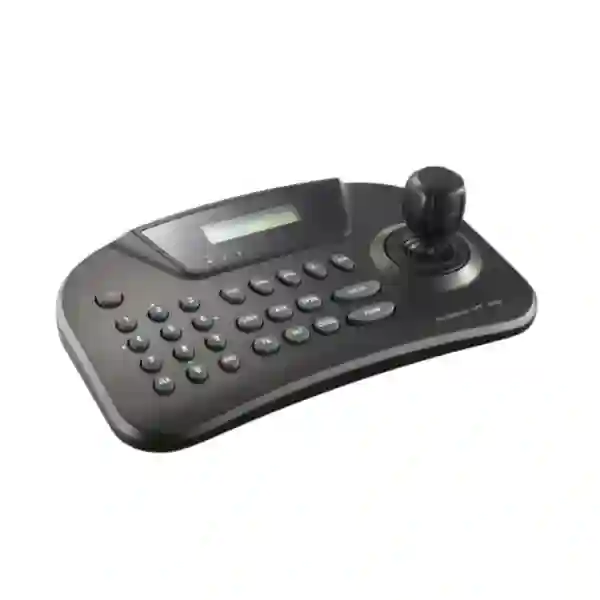
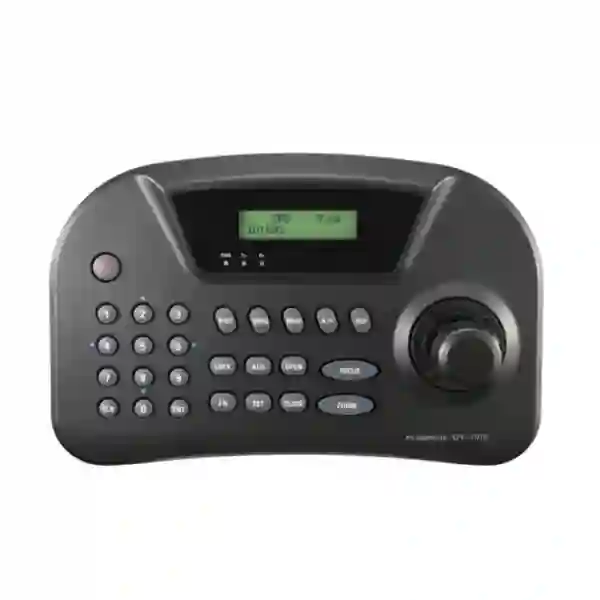
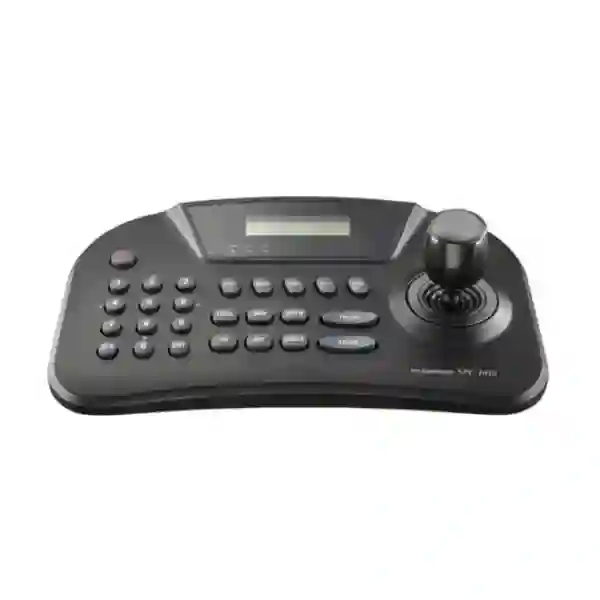
Hanwha SPC-1010 PTZ Control Keyboard
Physical joystick control for supported serial PTZ cameras, with RS-485/RS-422 connectivity and multi-protocol operation. Match this controller to your camera hardware and wiring before purchase.
Is this the right PTZ keyboard for your site?
Choose the SPC-1010 when compatible wired PTZ cameras need a dedicated operator joystick. First check the camera model, supported protocol, serial interface and required functions. This is a controller, not a video recorder or an all-purpose IP camera joystick.
For an installation in Tanzania, share the camera schedule and wiring plan to request a model-specific compatibility and quotation review. Stock, local pricing, delivery and warranty terms require separate confirmation.
Verified technical overview
| Product | PTZ control keyboard |
|---|---|
| Brand | Hanwha Vision |
| Model | SPC-1010 |
| Camera control capacity | Up to 255 supported PTZ cameras |
| Control interface | RS-485 / RS-422 |
| Supported protocol families | Samsung-T/E, Pelco-D/P, Panasonic, Vicon, AD, Honeywell |
| Serial baud-rate range | 2,400–57,600 bps |
| Joystick | Three-axis with twist zoom |
| Display | LCD operator display |
| Reference serial distance | Approximately 1 km under suitable conditions |
| Power input | 12 V DC, approximately 140 mA |
| Operating temperature | 0°C to 45°C |
| Operating humidity | 10% to 70% |
| Dimensions (W × H × D) | 280 × 100 × 180 mm |
| Weight | Approximately 0.7 kg, excluding adaptor |
Source basis: Hanwha Vision official SPC-1010 product and support specifications. Interface, distance and protocol suitability must be confirmed for each installed camera and cable route.
Buyer and installation guide
What the SPC-1010 is designed to do
The Hanwha SPC-1010 PTZ control keyboard is a dedicated operator station for compatible pan, tilt and zoom surveillance cameras that communicate through serial control wiring. Rather than asking an operator to navigate software every time a camera needs to move, the keyboard places directional and zoom control beneath the hand. It is most relevant when an existing or planned security installation already uses RS-485 or RS-422 camera control, and a fixed control desk needs a straightforward physical interface. The product does not itself capture or record video; camera imagery, recording and monitoring still require the appropriate surveillance equipment.
Hanwha Vision identifies the SPC-1010 as a multi-protocol PTZ keyboard capable of addressing up to 255 supported cameras. The model includes a three-axis joystick with twist zoom, an LCD interface and menu-based controls. Its principal buying question is not whether a joystick is convenient, but whether the cameras and wiring in the intended installation can actually respond to this controller. A compatible PTZ head, a suitable serial interface, correctly configured camera addresses and a matching control protocol are all essential to the outcome.
For a Tanzania security project, the practical starting point is a camera schedule and a simple diagram of the existing control connections. Identify which cameras need hands-on movement, the operator’s desk location, the number of addresses in use and the protocols already configured. This makes it easier to assess the keyboard against an actual task instead of purchasing solely on an advertised capacity figure. Request a configuration review if any of these details are unknown.
What the three-axis joystick changes for operators
A three-axis joystick combines horizontal movement, vertical movement and a twisting motion for zoom. When supported by the connected camera, the operator can move a view toward an incident and then adjust the field of view without repeatedly reaching for unrelated controls. The physical form factor is useful where a person spends extended periods monitoring a live scene and needs familiar hand positioning. Performance will still depend on camera movement speed, camera firmware, selected protocol and the connection between the controller and the PTZ mechanism.
The word three-axis describes the method of input; it should not be read as a guarantee of every advanced camera movement mode. Certain PTZ functions are camera-specific, and a protocol may expose only a subset of controls. For instance, basic pan, tilt and zoom may respond correctly while a special camera tour or advanced imaging setting requires another interface. Specify the exact functions the operator must perform, then confirm them using a real device or authoritative compatibility documentation before acceptance.
A good work surface gives the operator room for the keyboard without blocking the monitor, access to the display and a comfortable joystick position. An installer should consider left- or right-handed reach, desk depth, power routing and where the serial line enters the console. These are small details, but they affect daily operation. Training should cover selecting the intended camera before moving it, using gentle joystick inputs and returning the camera to its agreed surveillance position after manual intervention.
Camera capacity: understand the 255-camera figure
The manufacturer states that the SPC-1010 supports control of up to 255 PTZ cameras. This is a controller addressing capacity, not a promise that 255 video pictures appear on its screen or that all cameras move simultaneously. Video display and recording are separate matters. In a site with multiple cameras, the operator first needs a clear way to identify the required camera, select its address and use the available controls. A consistent numbering plan is therefore as important as the headline capacity.
A medium or large deployment may include cameras that never need manual intervention, cameras controlled only by software and a smaller set of serial PTZ units assigned to the keyboard. Count the actual serial-controllable cameras rather than every fixed and network camera on the property. Where different systems share a control topology, establish whether each camera supports the desired bus arrangement and whether its address can coexist with the others. Avoid duplicate addresses on a common control segment because commands may reach the wrong equipment.
Capacity should also be understood alongside cabling and operational workflow. A long list of cameras can be cumbersome if camera labels are inconsistent or the operator has no location map. Prepare a table with camera number, physical position, protocol, baud rate, line segment and installation notes. Keep the table at the console and in the project handover package. The published maximum is useful for initial screening, but actual deployment suitability requires checking all those additional conditions.
Protocol compatibility is the first technical gate
Hanwha Vision lists Samsung-T/E, Pelco-D/P, Panasonic, Vicon, AD and Honeywell among the PTZ protocols covered by the SPC-1010 specification. That list is valuable when evaluating a mixed or inherited security system, but a protocol family name alone is not proof that every camera from that brand or generation will work. Versions, command implementations, supported functions and interface hardware can differ. The correct comparison is between the specific camera model’s control specification and the controller’s supported mode.
Before purchasing, ask for the model number and firmware version of each important PTZ camera. Review the manufacturer’s instructions for its RS-485 or RS-422 control terminal, supported protocol, camera address range and baud-rate choices. If the required model is a newer IP-only PTZ camera without a compatible serial-control path, do not assume that this keyboard can control it merely because both products carry a surveillance brand. The SPC-1010 is specified as a serial PTZ keyboard rather than a general-purpose network joystick.
For a site using several protocol families, plan how camera selection and protocol assignment will be handled and ask the integrator to document the configuration. Where an older camera is supported only through a receiver or additional interface, verify that complete chain as a system. If compatibility cannot be demonstrated on paper, a bench test with the exact camera is the safest decision point. That test should include movement, zoom, stopping response and any required preset commands, not just successful power-up.
RS-485 and RS-422 connections explained
RS-485 and RS-422 are serial communication standards commonly found in legacy and specialist PTZ-control equipment. The SPC-1010 specification lists both interfaces. They are not interchangeable with ordinary Ethernet or USB connections simply because a connector resembles one used in networking equipment. A working installation depends on the correct signal conductors, connection topology, interface settings and equipment designed for the corresponding serial standard. Connection details must come from the actual device manuals rather than assumptions based on connector appearance.
RS-485 installations often use a shared communication path to reach addressed devices, while RS-422 arrangements may use different transmit and receive wiring conventions. The precise supported wiring scheme is equipment-dependent. Before the cabling team starts, confirm the terminal assignments at the controller and every camera or receiver. Note polarity labels and any differences in naming conventions. Reversing conductors, mixing incompatible signal interfaces or treating a serial pair as a power cable can prevent communication and potentially create equipment risk.
Use a connection diagram that includes the keyboard, control cable, any junction points, receivers and the final PTZ devices. Record which lines are shared, where termination is required according to the manufacturers and how protective grounding is arranged by a qualified installer. Keep control wiring identified separately from video and mains-power circuits. This is especially important when adapting an older building, because inherited cables may not be labeled accurately and the operator may otherwise misdiagnose a wiring fault as a defective keyboard.
Cable distance and reliability planning
Hanwha’s published communication specification refers to remote serial control over approximately one kilometre. Treat that as a product reference under suitable installation conditions, not a guarantee that any cable of that length will operate correctly. Cable type, conductor quality, noise, topology, grounding practices and data rate influence the result. An industrial property, multi-building campus or compound may also introduce outdoor cable routes or electrical interference that need careful planning.
Start by measuring the actual path a cable follows rather than a straight-line distance between the keyboard and the camera. Cable trays, building risers, service routes and security barriers can make that path substantially longer. Check the chosen serial communications standard against the camera manufacturer’s requirements and the site’s electromagnetic environment. Where the route is exposed to high-energy electrical equipment or outdoor conditions, ask a qualified installer about appropriate isolation, protection and alternative communication architecture instead of simply extending an uncertain line.
A reliable handover test should operate the farthest relevant PTZ camera, verify movement in both directions, check zoom response and repeat commands while other site equipment is running. If behaviour is intermittent, inspect the actual cabling and settings before replacing parts. Keep as-built cable lengths and route references with the installation records. In procurement discussions, a clearly documented 200-metre reliable run is more useful than a headline kilometre figure applied without environmental context.
Matching addresses, baud rates and command settings
The official SPC-1010 communication specification gives a supported serial baud-rate range from 2,400 to 57,600 bits per second. A common rate must be selected where devices exchange commands, but baud rate is only one element of compatibility. Camera address, protocol selection and any additional serial parameters required by the equipment must also match. Incorrect settings can produce a situation in which all equipment powers on normally yet the camera ignores every joystick movement.
During configuration, create an inventory before changing devices. Document the current camera address and serial parameters so they can be restored if a proposed change does not work. Configure one test camera, confirm that it responds from the intended operator station and only then continue with other cameras. This approach reduces the risk of losing control of an entire installation during upgrades. On a shared line, double-check that distinct cameras do not accidentally use identical addresses.
Label each important camera at the monitor and in the controller reference chart. Use descriptions that make operational sense, such as a gate, entrance or loading area, rather than relying on raw numerical IDs. When a camera is replaced, update the chart immediately because the new unit may ship with factory-default settings. Do not assume previous address assignments are retained. A short commissioning note listing the confirmed protocol and rate can prevent hours of avoidable troubleshooting later.
On-screen menus and function expectations
The SPC-1010 includes an LCD operator interface and supports on-screen-display-related control functions, according to Hanwha’s product overview. This helps operators work with a physical keyboard instead of treating every action as a software task. However, the controller’s own display should not be mistaken for a video monitor, and the availability of a camera’s on-screen menu depends on its supported control commands. An installation must still provide the appropriate viewing screen and video signal route.
When planning daily use, distinguish basic controls from optional controls. Pan, tilt and zoom are the foundation of the product. Focus, iris, presets, patterns, tours or camera menu operations should be checked against the model-specific manual and the selected protocol. Some cameras may interpret a command differently or may not expose a feature through their serial interface. A feature appearing in a controller manual is not, on its own, evidence that it functions on every connected camera.
Write an operator quick guide based on controls that were tested at the site. Include camera selection, movement, zoom, safe stopping, menu access if used and the procedure for restoring the agreed view. If presets are operationally important, test their recall before acceptance and note any camera-specific limits. This practical documentation gives security staff dependable instructions and prevents the site from relying on a generic feature list that may not match the actual installed cameras.
Where a dedicated physical keyboard adds value
A physical PTZ keyboard can be attractive at a fixed desk where staff need to follow movement across an entrance, examine activity in a yard or return a camera to a routine view. The joystick puts common motion controls in a predictable location, reducing the need for an operator to search through unfamiliar software menus. This is especially relevant in an installation that already has a working monitor and camera infrastructure and is looking for a way to improve hands-on control rather than redesign the entire video platform.
The best results come from defining the operator’s workflow. Will one person move a camera only occasionally, or does the role require frequent movement throughout a shift? Are the cameras mostly autonomous, with intervention during an incident? Is a physical operator present whenever the control desk is active? These answers influence whether a dedicated serial keyboard is worth specifying. If staff primarily use network video management software, a software-compatible USB or network controller may be a better integration target.
For Tanzania procurement, compare a proposed keyboard against the actual installed estate and the support skills of the local project team. The country alone does not establish compatibility, product availability or service coverage. Ask for a solution-level proposal with connections and test criteria rather than selecting an accessory in isolation. The SPC-1010 is most persuasive when it solves a clearly identified serial PTZ-control requirement without introducing an unnecessary system migration.
Security control-room desk and display arrangement
A control desk is a complete working environment, not a single keyboard. The operator needs to see relevant cameras, understand their positions and keep movement controls within easy reach. For the SPC-1010, reserve a stable surface area and ensure the wiring can exit without being strained. The manufacturer gives an approximate width of 280 mm, height of 100 mm and depth of 180 mm, so the desk design should allow additional room for the operator’s hands and safe cable routing.
Plan for clear camera labeling and a display arrangement that makes selection intuitive. If a PTZ camera is called number 23 at the keyboard, the monitoring view should make that number easy to identify. Where more than one operator shares a room, define who has responsibility for manual movement to avoid conflicting operational decisions. The manufacturer capacity does not answer these governance questions, yet clear responsibilities can matter as much as the physical interface.
Place the power supply in a protected, accessible position and keep equipment identification visible. If the desk is subject to cleaning, relocation or periodic maintenance, provide enough slack and labels to reconnect it correctly. The keyboard’s approximate 0.7 kg weight excludes its adaptor, so plan for practical handling without treating it as an outdoor enclosure. A simple console sketch that includes monitor, controller, power and serial routes helps the installer produce a tidy and maintainable workstation.
Power requirements and installation checks
The manufacturer lists 12 V DC and approximately 140 mA as the SPC-1010’s input specification. These values are essential when verifying a suitable power arrangement but do not by themselves establish that an adaptor is included in every sales package. Confirm the exact supplied accessories and the power input instructions for the unit being purchased. Avoid reusing an unknown adaptor simply because its plug fits. Voltage, polarity, connection and electrical safety all require checking.
In a security room where mains interruptions are operationally significant, discuss continuity planning for the entire surveillance chain, not just the controller. A powered keyboard cannot move a camera whose receiver or PTZ drive has lost power; equally, a working camera may be of little operational value if the monitor or recording equipment is unavailable. Any backup-power design should be based on the documented loads of all relevant devices and installed by people qualified for the work.
Before handover, verify correct start-up, stable display operation, successful communication and recovery after an approved power-cycle test. Record the supply specification in the equipment register and label the accessory intended for the keyboard. If a project is a refurbishment, inspect existing power wiring and cable conditions before connecting new equipment. These checks are relatively simple but help distinguish electrical faults from serial protocol or camera address faults.
Operating temperature and installation environment
Hanwha specifies an operating-temperature range of 0°C to 45°C and relative operating humidity of 10% to 70% for this model. These are equipment operating limits, not an environmental performance promise for every installation location. A controller placed in an enclosed unventilated room, a sun-exposed guard post or a damp operating area may experience conditions outside that range even when the surrounding district has different typical weather.
For sites in Tanzania, choose a position according to the measured conditions in the actual console area rather than general assumptions about the climate. Pay attention to indoor heat buildup, ventilation, condensation risk, dust exposure and the proximity of liquid cleaning materials. The manufacturer’s listed operating range should be compared with the planned room specification. The available product information does not establish a weatherproof or outdoor enclosure rating, so do not plan to leave this desk unit exposed to rain.
A facilities team can improve reliability by keeping the console clean, maintaining adequate ventilation and inspecting cables during routine checks. If the intended operating location is unusually humid or hot, consider a more suitable sheltered workstation or seek product-specific guidance before procurement. The correct answer may be an environmental improvement rather than changing controller settings. Record temperature and humidity constraints in the purchase specification so they are not lost between design and installation.
What this controller does not replace
The SPC-1010 is a PTZ control keyboard, not a video recorder, network switch, monitor or camera. Its serial-control capability addresses movement commands; it does not replace the video path that carries images to an operator or archive. When evaluating costs, account for the existing or planned monitoring, recording and camera infrastructure. A buyer who expects one device to provide live video viewing, video storage and PTZ control will need to specify a broader system.
Nor should the product be assumed to operate every modern IP camera directly. Its published interfaces are RS-485 and RS-422. Where a camera is controlled only through a network API or a video management platform, the integrator must establish whether an approved compatible intermediary exists, or choose a controller designed for that platform. Do not infer interoperability from brand names alone. A working analog-era serial system and a newer Ethernet-based installation can demand very different control hardware.
This distinction is useful in project budgeting. A serial keyboard may be an economical and operationally sensible choice for a compatible legacy installation; it may be an awkward fit for a new software-centric control room. Ask whether the purpose is to preserve proven PTZ equipment, integrate different generations or build a completely new control architecture. That answer should drive the purchasing decision before comparing headline features.
Upgrading an existing PTZ installation
When replacing a failed controller or improving an existing surveillance desk, begin with a survey of what already works. Record camera models, receiver models where relevant, serial wiring, controller configuration and site-specific operating instructions. An older camera may depend on a protocol or receiver arrangement that is no longer obvious from the current monitor setup. Photographs of safe, clearly labeled connections and a camera schedule can make later compatibility discussions much more productive.
The SPC-1010 may suit a compatible serial PTZ estate because it supports several protocol families and a substantial address range. That does not mean it automatically acts as a drop-in replacement for every previous keyboard. Some proprietary commands, key arrangements or special functions could differ. Identify mandatory operations and test them before removing a working unit. If the site uses camera tours or preset sequences during patrols, verify these exact requirements rather than assuming basic movement proves full equivalence.
Plan migration in manageable stages. Test a representative camera in a controlled setting, document parameters and schedule changes for a period approved by the security team. Maintain a rollback plan for critical monitoring points. Update operator labels and training material if the selection sequence changes. Such preparation may appear more involved than swapping a keyboard, but it protects the surveillance workflow and can prevent a small equipment purchase from producing unexpected downtime.
Planning a new mixed-camera system
A new project often includes fixed cameras, PTZ cameras, recorders, switches, monitors and management software. The SPC-1010 should enter that design only after the control architecture is chosen. Determine which PTZ cameras expose suitable RS-485 or RS-422 control, which protocol they use and where the operator will sit. If a design is entirely IP-based, compare purpose-built network or software-compatible alternatives before selecting a serial controller for convenience.
For a mixed installation, ask the integrator to show how the operator selects cameras from different areas and how serial commands reach each destination. A topology diagram should identify control buses, any interfaces, camera address groups and points of maintenance access. Specify who configures and verifies the protocol assignments. Where future camera replacements are likely, capture that possibility in the design so the system does not become dependent on an undocumented legacy feature.
Procurement should be tied to testable outcomes: select camera A, pan right, tilt up, zoom in, stop movement and return to the agreed normal view. Repeat for cameras representing each protocol family in the project. If the requirements include software integration, remote operator access or unified recorders, treat those as separate design goals rather than implied keyboard features. This approach keeps the bill of materials aligned with the duties of the actual security team.
Pre-purchase technical information checklist
A credible quotation request should contain more than the words PTZ keyboard. Include the exact Hanwha SPC-1010 model, the camera models to be controlled, the number of relevant PTZ units and any receiver hardware in the control path. Provide the current protocol and serial baud rate if known. Identify whether the project uses RS-485 or RS-422, the approximate longest wiring route and the place where the console will be installed.
Also describe the operator’s mandatory functions. Basic manual pan, tilt and zoom may be sufficient for one site, while another needs preset recall, camera menu access or camera-specific lens settings. Distinguish required functions from nice-to-have features. Ask for the proposed configuration to be checked against the current manufacturer instructions and request an on-site or bench demonstration where uncertainty remains. Do not accept an unqualified statement that all PTZ cameras are compatible.
Finally, clarify the commercial boundaries of the offer. Ask whether the relevant power accessory, cabling, configuration, installation, operator orientation and testing are included. Request the current product availability and applicable warranty terms directly from the seller; those details are not established by this general product description. The result should be a specific equipment-and-work scope that can be evaluated fairly rather than a price for an unidentified package of hardware and services.
A practical commissioning sequence
Commission the controller in stages instead of connecting an entire site and troubleshooting all variables at once. First, confirm the correct device and power arrangement. Next, use one known compatible PTZ camera or receiver with a documented, short serial link. Set the intended address, protocol and baud rate according to the relevant manuals. Check that the keyboard can select the camera and issue a basic movement command. Observe whether the camera stops when the command is released.
Once the basic link works, test each direction and zoom response. If the project relies on presets or menus, check those features individually on that camera. Extend the test to the actual installed cable route and then to other cameras on the intended bus. Repeat with a representative device from every supported protocol family used on the property. Record failures with exact settings so an installer can distinguish a compatibility issue from a physical-layer problem.
Close commissioning with an operator witness test. Security staff should demonstrate camera selection, correct response, predictable stopping and return to a normal monitoring view. Give them a concise camera list and recovery procedure. Preserve configuration records, wiring diagrams and any approved changes as part of the handover pack. A successful commissioning report verifies the installed solution; it is more meaningful than a generic declaration that a controller can theoretically address hundreds of devices.
Troubleshooting when the camera does not move
If joystick movement has no effect, first verify that the expected camera is selected and that the video image corresponds to that camera. Confirm the PTZ unit itself is powered and that its movement mechanism can respond through another known-good method if one is available. Then check the serial connection, interface type, cable continuity and terminal assignments against the manuals. These checks should be performed safely by an appropriate technician rather than moving conductors at random.
Next compare the camera address, chosen protocol and baud rate with the controller configuration. A mismatch in any one can produce complete silence. If some cameras respond and others do not, look for differences in their settings, model support or the branch of cabling used. If movement is reversed or irregular, investigate camera configuration and the relevant manufacturer instructions before concluding that the joystick is faulty. Avoid undocumented resets that could remove valuable existing settings.
Intermittent response can require a separate investigation into cable quality, termination, electrical interference or shared-line topology. Reproduce the issue under known conditions and record which commands fail. When vendor assistance is needed, provide the specific models, settings, symptoms and cable details. Good diagnostics are safer and faster than repeated component replacement. Any change to a live surveillance installation should be coordinated so operators understand which cameras may be temporarily unavailable.
Operator training and working procedures
Even a simple physical controller benefits from clear operating rules. An operator should know how to select the intended PTZ camera, move it smoothly, use zoom without losing scene awareness and return it to the prescribed view. The training should be based on the actual supported functions of the installed cameras. Provide examples of what to do when a camera does not respond and whom to contact, rather than expecting staff to alter serial settings during a shift.
Shared workstations also need a common naming and numbering scheme. If a monitor calls a view Main Entrance but the keyboard chart calls it Camera 07, that relationship should be obvious. When security personnel change shifts, handover notes should identify any camera under temporary manual control or awaiting service. Such procedures reduce the chance that a camera remains pointed away from an agreed coverage area after an incident.
Document who may adjust preset positions and who approves configuration changes. For critical locations, require an agreed process to restore the original surveillance orientation. Repeat a brief practical refresher after camera replacements or workstation changes, especially if different protocol behaviour affects the available controls. The keyboard is a tool; reliable operations also require people, labels, training and clear accountability.
Use case: gates, entrances and vehicle movement
At a controlled vehicle entrance, security personnel may need to move a compatible PTZ camera to inspect activity as vehicles approach or leave. A desk-mounted joystick can provide an immediate physical control method while the operator watches the corresponding monitor. This use case depends on the site having an appropriate camera, a supported control path and an operator authorised to move it. It does not imply automatic vehicle tracking or any particular recognition feature.
To plan such a position, identify the normal camera orientation and the places staff routinely need to examine. Ensure camera movement does not unintentionally remove coverage from another important area. Consider whether a fixed overview camera should remain on the entrance while the PTZ camera is moved for close inspection. The SPC-1010 does not replace the need to design suitable camera coverage, lighting and monitoring procedures.
A commissioning demonstration might include selecting the entrance camera, panning to the vehicle lane, zooming for observation and restoring the agreed default view. Record whether all commands respond reliably at the installed distance. If a camera’s preset function is required, test it with the exact protocol and model. This real-world sequence provides a useful purchasing criterion and a practical training exercise for the team.
Use case: warehouses, yards and industrial premises
Large storage areas and service yards may contain PTZ cameras watching equipment movement, loading points or a perimeter. A control keyboard can help a trained operator inspect a particular scene when an event requires closer attention. The SPC-1010’s serial interfaces may be relevant to sites that already use compatible PTZ hardware across a wired control network. The final design must still account for camera positioning, monitoring displays and sufficient video coverage.
Industrial premises can introduce long cable routes and nearby electrical machinery. For this reason, the serial-control distance should be engineered rather than assumed from a brochure figure. Document routes, confirm the interface wiring and test communications with equipment operating under normal site conditions. If there are outdoor sections, plan suitable protected wiring and qualified installation practices. The desk controller itself should remain in an environment within its published operating limits.
When discussing the project with a supplier, give representative operating scenarios: inspect a loading bay, follow activity across a yard, stop movement promptly and return the camera to its routine position. Those examples turn technical requirements into an acceptance test. They also reveal when a different control architecture or additional fixed cameras may be more appropriate than relying exclusively on a single movable view.
Use case: education, hospitality and multi-building facilities
A campus-style facility may have several buildings, shared outdoor areas and a central security desk. A dedicated PTZ controller can be relevant if the installed cameras communicate through compatible RS-485 or RS-422 interfaces. The main planning challenge is not simply the total number of cameras; it is the relationship between building locations, camera addresses, control cable routes and the operator’s ability to select the correct equipment without confusion.
Establish a naming convention that reflects the site’s physical layout. Camera identifiers can include a building or area reference in the documentation, while the controller uses the corresponding numerical address. For distant buildings, inspect the physical path, electrical environment and maintenance access before assuming a serial link will be reliable. Any need for networked or remotely distributed control should be assessed separately, because those functions are not implied by the published SPC-1010 interface specification.
Facilities with varied staff shifts also benefit from simple instructions attached to the workstation. Provide a camera schedule, contact details for the maintenance team and a concise movement test that can be performed after approved service work. Avoid making surveillance claims about a particular site based on the product alone. Suitable camera coverage, privacy procedures and operational permissions are project matters that require their own assessment.
Compare serial keyboard control with software control
A serial PTZ keyboard and a software-based control interface solve related but different problems. The SPC-1010 is a physical controller built around RS-485 and RS-422 PTZ commands. Software control, by contrast, may operate through a camera’s network interface or a video management application. Neither route is universally superior. The better choice depends on the cameras already installed, the operator’s workflow, the required functions and the team responsible for ongoing support.
A direct serial design can make sense when compatible cameras and wiring are already in place and an operator needs a consistent physical control method. A software-based approach may be more suitable when the main requirement is integration with modern IP cameras, video walls, remote clients or centralized user permissions. It is important not to assume that this keyboard provides a native USB, Ethernet or video-management-software connection; such an interface is not part of its published core specification.
Compare approaches using an actual requirements matrix. Include camera model support, movement functions, installation effort, operator training, control location, maintenance and anticipated upgrades. Ask the integrator to demonstrate any required third-party integration before committing funds. The aim is not to choose the product with the longest feature list, but to select the control method that performs the required tasks predictably within the project architecture.
Replacement planning and maintainability
Security equipment is often expected to remain operational over years of maintenance, camera additions and staff changes. When evaluating the SPC-1010, consider what happens if a controlled camera is replaced with a newer model. Will that replacement retain a compatible serial control interface and protocol? If not, the keyboard may no longer reach it directly. This is a planning risk rather than a fault with the controller, and it should be recognised before expanding a mixed-generation surveillance system.
Keep a record of the supported functions proven at commissioning and the configuration of every connected camera. When maintenance staff replace a receiver, move a camera to another address or alter the control bus, update that record and re-test. Make spare-cable and adaptor planning part of the maintenance discussion without assuming that a particular replacement part is included or locally stocked. Availability, service terms and spare-part sourcing must be confirmed for the actual purchase.
For a new project with an uncertain upgrade roadmap, examine whether a serial-only control architecture will remain suitable. If cameras are likely to become IP-only, a controller with verified support for the target software ecosystem may offer a clearer path. For an existing installation with stable compatible cameras, retaining a familiar control method may instead avoid unnecessary disruption. Make that decision using the site’s foreseeable equipment changes, not generic assumptions about technology age.
What to include in the quotation and purchase decision
A purchasing team should request confirmation of the exact Hanwha SPC-1010 model, the offered package contents and the intended Tanzania delivery arrangement. Product availability, local price, tax treatment, warranty and delivery time are not stated here because they require a current verified quotation. A supplier should also identify whether installation and configuration are part of the proposed scope. Compare like with like: a device-only price and a commissioned-control-system price are not equivalent.
Ask for a documented compatibility review referencing the actual camera models. Include any required serial-control cabling, termination or interface work, a suitable power arrangement and operator handover. If the purchase supports a critical site, request acceptance testing rather than relying on a verbal assurance. The test should demonstrate the functions users will perform every day and identify any camera-specific limitations. This makes the outcome measurable before the project is closed.
The Hanwha SPC-1010 PTZ control keyboard is a candidate worth evaluating for compatible wired surveillance systems, particularly when an operator wants hands-on joystick control. Its suitability depends on technical alignment, environmental conditions and a complete installation plan. To progress, share your camera model list, serial settings if known, site cabling notes and required PTZ functions with the quotation team. Request a model-specific compatibility and quotation review before ordering.
Frequently asked questions
Can the SPC-1010 control an IP camera directly?
Its published control interfaces are RS-485 and RS-422. An IP-only camera should not be assumed compatible. Check whether the exact camera offers a supported serial interface or whether an independently verified interface solution exists. If the intended workflow relies on network software, evaluate an appropriate software-compatible controller instead.
Does the controller record or display video?
No video recording or monitoring function is identified as part of this PTZ keyboard specification. It issues camera-control commands. The system still needs cameras, a video path and suitable displays or recorders according to the project’s surveillance requirements. The keyboard LCD is for the controller interface, not live camera video.
What does up to 255 cameras mean?
The figure describes the stated PTZ camera control capacity and address range. It does not mean 255 live video feeds appear on the keyboard or that every camera can move at the same instant. Camera compatibility, addressing, wiring and operator selection still need to be checked for the actual deployment.
Which PTZ protocols are listed by Hanwha?
Hanwha lists Samsung-T/E, Pelco-D/P, Panasonic, Vicon, AD and Honeywell protocol families. The exact model, protocol implementation, camera firmware and function set must still be reviewed. Treat the list as a starting point for a compatibility assessment, not as proof that every camera made by those manufacturers will operate fully.
Is the controller suitable for a long control cable?
The official specification refers to RS-485/RS-422 remote-control communication of around one kilometre. A real installation must account for cable quality, electrical noise, topology and relevant equipment instructions. Long-distance performance should be checked on the actual route rather than promised from the reference distance alone.
What power does the SPC-1010 require?
Hanwha lists 12 V DC, approximately 140 mA. Verify the correct power supply, polarity and exact package contents for the unit being purchased. The published electrical requirement should not be taken as a guarantee that a particular adaptor is provided by every seller.
Can I use it in an outdoor security post?
This desk controller is specified for operation at 0°C to 45°C and 10% to 70% humidity. No outdoor weatherproof rating is established by the referenced product specification. Plan a protected operating location within the stated conditions, and assess heat and humidity at the actual desk rather than relying on regional averages.
Does it work with every Hanwha or Wisenet camera?
No such universal claim is established. Confirm whether the specific camera supports the appropriate serial interface and protocol. A shared brand name does not guarantee that a modern network-only model can be driven directly by a serial PTZ keyboard. Test essential commands before purchase or commissioning.
What should I provide when requesting compatibility advice?
Provide the model numbers of the PTZ cameras, any receiver hardware, the camera count, known control protocol, baud rate, cable distance and required functions. State whether the installation is new or a replacement of an existing controller. These details allow a much more useful technical review than a model name alone.
Can the keyboard call presets and camera menus?
Some camera-specific actions may be available through supported control commands, but their behaviour depends on the exact camera and protocol. Check the manufacturer manuals and test any mandatory preset or menu operation. Basic pan, tilt and zoom response is not proof that every advanced camera feature is supported.
What is the difference between RS-485 and Ethernet control?
RS-485 is a serial electrical communications standard used in many PTZ systems; Ethernet is a different networking technology. The SPC-1010’s published core control connections are serial RS-485/RS-422. Do not plug equipment together or assume compatibility merely because connectors appear similar. An integrator must use the interface specified for the devices.
Can I get a confirmed Tanzania price or delivery date from this page?
A live price, stock level, delivery schedule or warranty offer cannot be established from the technical product specification. Request a current quotation for the exact item and any required accessories or installation work. Confirm the commercial terms directly before placing an order.
Request a compatibility and quotation review
Provide your camera model numbers, serial protocols, camera count, cable distances and required joystick functions. Ask for confirmation of compatibility, package contents and current Tanzania commercial terms before ordering.
Next step: Contact FourTeck Tanzania with your equipment list for review.




Reviews
There are no reviews yet.