
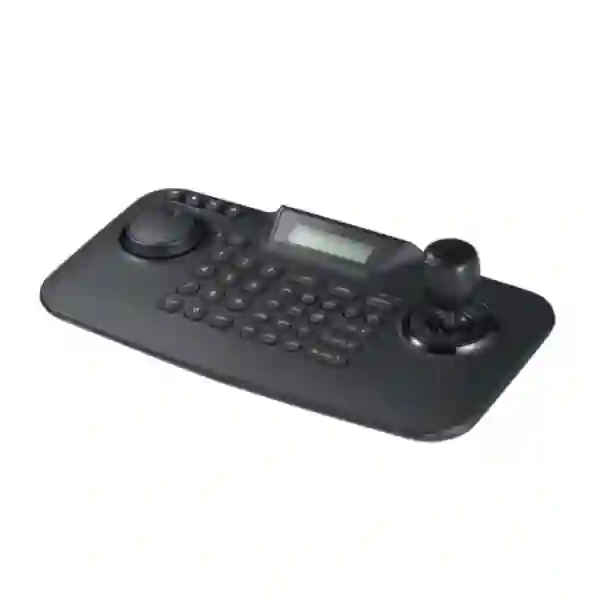
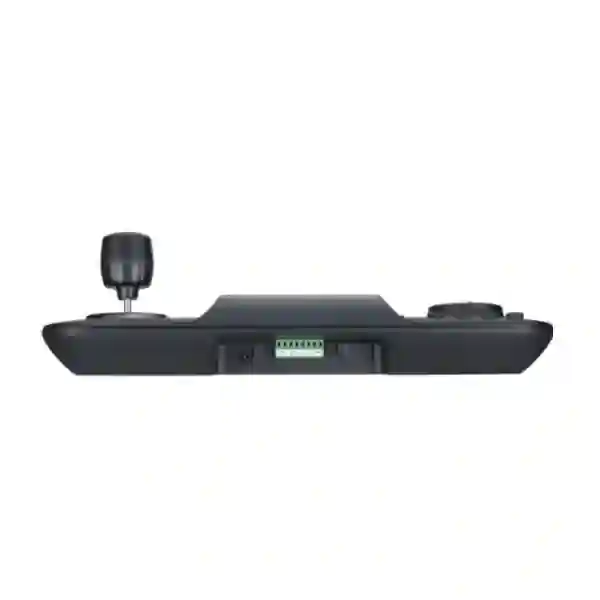
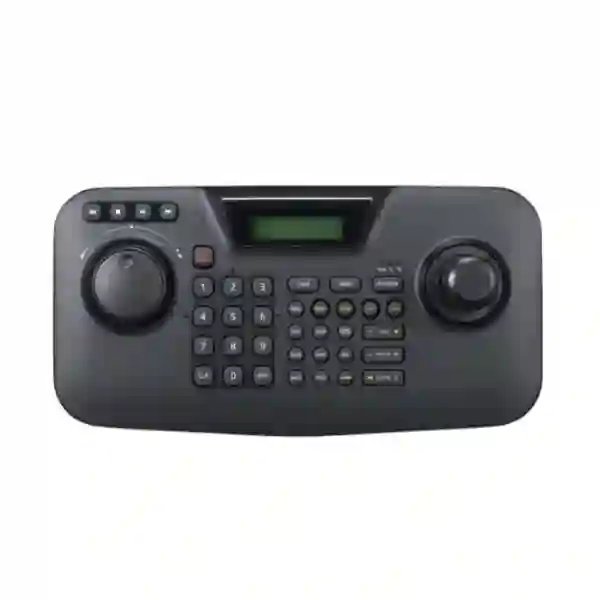
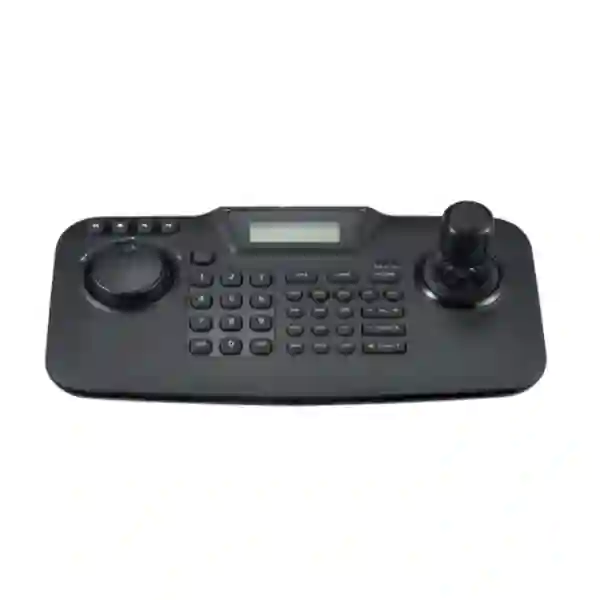
Hanwha SPC-2010 PTZ/DVR Control Keyboard
The Hanwha SPC-2010 is a dedicated desktop controller for compatible pan-tilt-zoom cameras, selected digital video recorders and receiver devices. It combines a three-axis joystick, physical camera keys, an LCD and DVR jog shuttle, giving operators an alternative to navigating every movement through recorder menus.
For a project in Tanzania, the first buying decision is not the joystick shape: it is whether your existing cameras or DVRs accept the SPC-2010’s supported RS-485/RS-422 interfaces and command protocols. Share your equipment models and wiring plan to request an informed compatibility review and quotation.
Key features at a glance
- PTZ/DVR and compatible receiver control through wired serial communications
- Three-axis joystick: pan and tilt movement with twist-to-zoom operation
- Up to 255 addressed PTZ cameras, subject to the connected system and protocol
- Integrated jog shuttle for playback functions on supported DVRs
- English 16 × 2-character LCD with hardware camera and recorder selection controls
- RS-485/RS-422 interfaces and selectable supported camera protocols
- 12V DC operation; manufacturer’s stated 1.1W power consumption
Manufacturer-published specifications
| Product | Hanwha Vision SPC-2010 PTZ/DVR control keyboard |
|---|---|
| Control role | Compatible PTZ cameras, DVRs and receivers |
| Control interfaces | RS-485 and RS-422 |
| Camera protocols | Samsung-T/E, Pelco-D/P, Panasonic, Vicon, AD, Honeywell, Bosch, Elmo, GE (model-specific validation required) |
| Serial rate | 2,400–57,600bps |
| Joystick | Three axes, twist zoom |
| Playback | Built-in DVR jog shuttle, subject to recorder support |
| Display | 16 × 2-character English LCD |
| Input / consumption | 12V DC / 1.1W stated |
| Operating temperature | 0–40°C |
| Published humidity | 0–90% (refer to exact documentation for installation conditions) |
| Dimensions | 334.1 × 171.1 × 105.2mm |
| Weight | Approximately 800g |
| Verified SKU for Tanzania listing | Not provided; do not use model number as a SKU |
These are published hardware characteristics, not a promise that every camera, function or regional configuration will interoperate. Confirm exact firmware, recorder family, serial settings and project requirements before ordering.
What problem does this controller solve?
A security operator may need to follow movement through a loading yard, inspect a distant entry point or recall a camera position while continuing to observe several screens. A keyboard designed for PTZ control puts frequently used actions close to the operator’s hands. The SPC-2010 brings together direct camera selection, camera movement, lens functions and selected recorder controls on one desktop console. That can be useful where the control-room workflow is built around compatible serial-controlled equipment and operators prefer tactile controls to repeated mouse clicks.
It is important to separate the operator’s convenience from the surveillance system’s underlying capability. This controller does not improve camera resolution, add zoom to a fixed lens, increase DVR storage or create network connectivity where none exists. It sends supported commands to equipment that already has the corresponding feature. The value is clearer control of compatible devices and a practical way to keep routine camera movements organised. Before allocating budget, confirm that the intended cameras can actually pan, tilt and zoom, and that your recorder and wiring allow the selected control method.
Who is likely to benefit?
An existing CCTV installation with older but serviceable PTZ cameras is one possible fit. So is an operations desk that relies on a supported Hanwha or earlier Samsung-era DVR series and wants physical playback navigation. Industrial security teams, warehouse monitoring stations, estate gatehouses and commercial security rooms may find direct joystick operation useful when operators regularly reposition cameras. These are examples of suitable tasks, not claims that the controller is certified for a particular industry or deployed at any named site.
The strongest candidate is a site with a documented equipment inventory and a technician who understands serial PTZ setup. A purchaser building a new, fully IP-based surveillance network should investigate controller options designed for the network video management platform instead of assuming the SPC-2010 is the default choice. The right decision starts with device interfaces, communication protocol and the operator’s daily workflow. A physical keyboard is not inherently better for every installation: it is better when its supported commands correspond to the tasks operators perform.
How the three-axis joystick changes operation
The joystick is designed to make pan and tilt movement more intuitive than working through on-screen arrow buttons. Movement direction comes from the direction of the stick; the manufacturer’s manual describes speed response as increasing with greater displacement from the centre. Twisting the stick controls supported camera zoom. An operator can therefore locate a subject and adjust framing without moving between multiple software controls. The result depends on the camera’s mechanical response, firmware and selected control protocol.
This distinction matters in purchasing discussions. A three-axis controller cannot make a fixed camera rotate and it cannot create motorised optical zoom on a camera that lacks it. Some cameras provide additional functions through dedicated keys, but the exact implementation varies. Ask which cameras offer proportional control, which speed settings are available and whether a selected camera supports focus, iris or presets through the chosen protocol. A live demonstration or bench test with the actual camera model is often more persuasive than a broad statement that a joystick supports PTZ.
Physical camera and lens functions
The keyboard includes hardware controls intended for camera selection and common lens adjustments. Depending on the connected equipment, operators can use buttons for zoom wide or telephoto, focus near or far, iris adjustments and camera functions. The numeric keypad and selection keys can help distinguish camera IDs, which is particularly relevant on a system with several similarly positioned domes. The built-in display shows operating and setup information without requiring a large screen on the keyboard itself.
Camera functions are not equally available across every protocol. For example, an autofocus command or auxiliary operation may work with some protocol families and not others. Preset support also depends on what the particular camera has stored and the range of preset numbers it accepts. When developing operator procedures, write down the commands that actually work in your environment. This avoids training staff to rely on a function that the connected device ignores and makes it easier to diagnose whether the problem lies in selection, wiring, protocol or camera capability.
Understanding the DVR jog shuttle
The SPC-2010 includes a jog shuttle intended for playback control on compatible DVR equipment. A jog function is useful for frame-by-frame or controlled review, while the shuttle is associated with moving forwards or backwards through recordings. The manufacturer’s manual also describes recorder-specific playback, menu and channel commands. For a monitoring room that regularly examines short incidents, having these functions on the console can support a familiar review process without constant reliance on a mouse.
Do not interpret the presence of a jog shuttle as universal DVR compatibility. Hanwha’s published compatibility information names SRD DVR models and specifically excludes SRD-480D. Features available through a supported recorder can also vary by DVR type, software and configuration. An NVR, VMS or third-party recorder must not be assumed to recognise these commands merely because it can display PTZ video. Before specifying the keyboard for an investigation or playback desk, test both camera movement and the particular recording functions that operators will use. If the DVR is not compatible, the jog shuttle cannot solve that limitation.
RS-485 and RS-422: what the labels mean
RS-485 and RS-422 are wired serial communication interfaces. In a compatible PTZ installation, the keyboard sends control commands along conductors to a camera, receiver or recorder. They are different from Ethernet networking and do not by themselves provide IP addressing, web access or a video feed. The manufacturer’s materials list RS-485 and RS-422 as supported control interfaces; installation instructions cover both half-duplex and full-duplex arrangements. Exact terminals, polarity and data direction must match the connected device and the chosen wiring mode.
For buyers, the central question is whether the camera exposes a usable serial control connection and a supported protocol. A camera with only a network port might not work directly even if it belongs to a related brand family. Likewise, a recorder with serial terminals may implement only certain external keyboard commands. Never wire the controller according to a generic diagram without checking the manual for both ends. Serial installation requires care with polarity, cable routing, termination, grounding and the electrical environment. The model’s presence in a catalogue does not replace a physical interface review.
Protocols determine what the commands mean
Electrical connections and command languages are separate compatibility checks. The controller may send a signal correctly on RS-485 but receive no useful response because the camera is configured for another protocol. Hanwha lists Samsung-T/E, Pelco-D/P, Panasonic, Vicon, AD, Honeywell, Bosch, Elmo and GE among camera interface protocols in its published specification. This is a list of supported protocol families, not a warranty that all devices bearing those brands will work or expose every feature.
During system planning, record the protocol selected on the keyboard, the protocol configured on the camera or DVR, the baud rate, address and other serial settings. The manufacturer’s manual stresses matching settings between controller and device. Testing simple pan, tilt and zoom first is a useful baseline; preset recall, menus, auxiliaries and special functions should be tested separately. Avoid claiming that a camera is compatible simply because its maker is named in a list. Where the protocol implementation is uncertain, review both manuals and confirm the exact operation before purchasing for multiple sites.
Why an IP camera may need a different solution
Many modern CCTV installations use cameras that are controlled through IP networks and a network video recorder or video management system. The SPC-2010’s published control interfaces are RS-485 and RS-422, not a native IP keyboard interface. A buyer therefore should not assume it can connect to a network switch or directly operate a cloud-managed camera from an Ethernet cable. Even where an IP camera is branded Hanwha, the exact interface and supported integration method are what matter.
If your planned project is entirely network-based, establish the control architecture before selecting a joystick. Some systems offer software PTZ, platform-approved USB controllers or specialised network control desks; the correct choice depends on the particular VMS, NVR and camera family. A gateway or recorder might bridge commands in some designs, but no such integration should be presumed without documented support and a successful test. Treat the SPC-2010 as a serial-oriented controller first. Its strengths are clearest when the system is built around hardware and protocols that the manufacturer explicitly documents.
Addressing a multi-camera installation
The manufacturer’s material describes control of up to 255 addressed PTZ cameras in the applicable system context. This should be read as a control-addressing capability, not a promise of 255 independent physical links, unlimited cable distance or simultaneous joystick movement. A typical operator selects one device by its address and sends commands to that selection. Each relevant device must be configured consistently and the installer must know how the system maps control IDs to physical camera positions.
An address plan avoids confusion. Before installing the controller, list camera ID, location description, model, serial protocol, baud rate and associated recorder channel where appropriate. Keep address assignments unique within the relevant control arrangement. The manual describes selection using a numeric camera ID and a camera selection or enter key. For ongoing operation, provide a concise desk reference: camera 01 may be a main entrance, camera 02 may overlook an internal yard, and so on. These are illustrative labels only; the real map should reflect the site, its privacy rules and the locations of installed cameras.
Check serial speed, parity and mode
Communication settings require more attention than a product photograph suggests. Hanwha publishes a supported RS-485/RS-422 baud-rate range of 2,400 to 57,600bps and provides menu instructions for choosing the relevant values. The controller manual explains that protocol, channel address, baud rate and parity can be configured; its serial setup notes fixed data-bit and stop-bit settings. These values are not optional decoration. If the keyboard and the receiving device disagree, an otherwise correct cable may deliver no usable control.
Create a commissioning record with a line for every configured camera or recorder. Note the manufacturer’s manual revision consulted, the intended interface mode and serial values, and any commands that are unsupported. Save and retest configuration changes rather than relying on values that were only displayed during setup. If a legacy installation uses an unusual setting, do not assume that the default on a replacement device will match. Accurate records simplify future service visits, especially where several contractors have worked on different parts of an older CCTV system.
What to verify before an installation visit
A site survey should establish the model numbers of the cameras, DVRs and receivers; the connector types at each endpoint; the present wiring route; and whether the controller will sit in a suitable indoor location. The manufacturer describes the SPC-2010 as an indoor device. The operator’s desk must provide practical room for the console, power access and a safe cable path that does not put tension on the rear connectors. For existing systems, ask whether serial control already works from another keyboard or directly through a DVR.
Where a new wiring route is required, the installer should consider cable type, length, interference, termination and the manufacturer’s electrical guidance. Do not infer a guaranteed maximum operating distance from the presence of RS-485 alone: actual conditions matter. Confirm the intended control topology, particularly if several cameras share a bus or are accessed through a recorder. Collect drawings or photos of device terminal labels before proposing a solution. This reduces repeated visits and helps avoid buying a keyboard that cannot be connected to the endpoints actually installed.
A practical commissioning sequence
Commissioning should begin with a single known-compatible camera or recorder. Confirm that the camera is functional and responds to control from an established method. With equipment safely powered down, connect the relevant serial wiring according to the device manuals, observing polarity and the appropriate interface type. Power the equipment as directed, configure the controller’s protocol, ID and serial values, then test basic directional movement. Once stable control is demonstrated, check twist zoom, focus, iris and preset operations only where the camera supports them.
Add further cameras gradually, documenting addresses and serial configuration as you go. On an applicable DVR, test channel selection, any planned menu commands and the jog shuttle separately. Walk through an operator scenario: select a camera, move to a point of interest, recall an approved preset, return to the overview position and switch to another camera. Check that the control method remains understandable under normal lighting and shift conditions. Final acceptance should be based on the intended workflow, not solely on the keyboard illuminating or displaying a startup screen.
What to do if a camera does not move
If the joystick appears to do nothing, start with the simplest causes. Verify that the controller receives the correct supply, the camera itself is working, the correct camera ID is selected and the keyboard is in the expected control mode. Check that RS-485/RS-422 wiring follows the manuals and that the signal polarity is correct. Confirm the camera’s configured protocol, baud rate and other serial parameters. Compare them to the values stored in the controller; do not assume the equipment was left at factory defaults.
Next, test one device directly rather than trying to troubleshoot a large system all at once. If basic movement works but a preset or special function does not, investigate feature-level protocol support instead of immediately replacing the keyboard. If only a DVR function fails, review the exact recorder model and its documented external control support. Keep a record of observed symptoms and configuration changes so a second technician does not repeat the same tests. Electrical work and wiring changes should be performed by qualified personnel following the relevant safety documentation.
Power and indoor environmental planning
The manufacturer specifies 12V DC input and 1.1W power consumption for this controller. Those figures help with power planning, but the buyer still needs to verify the exact adapter and accessories supplied with the quoted unit. A small stated wattage does not mean the controller can be powered from any available outlet or an improvised adapter. Voltage, connector and polarity must be correct. Where the surveillance desk is supported by backup power, consider how the keyboard, cameras, recorder and displays will behave during an outage.
Published operating temperature is 0–40°C, and Hanwha’s current product specification lists an operating humidity range of 0–90%. Check the manual applicable to the exact unit and installation before interpreting environmental limits. The controller is not specified as an outdoor weatherproof device. A covered security gate area may still expose equipment to heat, dust, rain splash or moisture. Protect the control desk from those conditions and avoid locating the unit where cables can be pulled or liquids spilled. Environmental suitability is an installation question, not a marketing slogan.
Considerations for Tanzania projects
For organisations evaluating the SPC-2010 in Tanzania, a useful quote should start with the existing surveillance architecture rather than a generic promise of nationwide compatibility. The country of installation can affect project logistics, site power arrangements and the condition of older equipment, but none of those factors changes the published serial interfaces. Confirm the exact cameras, recorder, cable arrangement and working conditions at the premises. Where equipment is being maintained rather than replaced, it is worth documenting which parts of the original serial system remain functional.
No Tanzania stock level, shipping commitment, installation coverage, local certification, warranty term or TZS price is stated here because those details have not been verified for the intended listing. The manufacturer’s regional pages do not present identical lifecycle labels, so availability and support status should be confirmed for this market before an order is placed. Buyers should request an itemised quotation and clarify the supply scope. Treat currency, taxes, import arrangements and service commitments as commercial terms to be established by the seller, not as specifications implied by the model number.
Where a dedicated control desk helps
A gatehouse with a few frequently used PTZ cameras may value fast selection and consistent controls more than a complex interface. A warehouse monitoring desk might need to check a loading area, follow a moving vehicle and return a camera to a saved overview position. A commercial building security room may have a mix of camera groups and one or more approved operators. These examples illustrate operating tasks rather than promises about suitability for every site. Each installation requires an appropriate camera placement, privacy policy and compatible recorder or camera configuration.
The controller also has limits in these scenarios. It does not record events by itself, manage user access across an IP surveillance network or automatically track objects. Operators still need suitable video displays, working cameras, recording equipment and site procedures. If an organisation needs analytics, collaborative investigations, centralised multi-site control or advanced user permissions, those requirements should be evaluated at system level. The SPC-2010 is an accessory in the overall surveillance workflow. It can make certain physical controls easier, but it does not replace the broader system architecture.
Designing an operator-friendly control room
Comfort and repeatability matter when a console is used across long shifts. Position the keyboard where the operator can comfortably reach the joystick and selection buttons while keeping the main video display in view. Leave adequate space for the controller’s published dimensions and for rear cable connections. Avoid crowded routing that makes it difficult to move the keyboard during maintenance. Clearly label the camera list and keep the most useful preset information available to authorised staff.
Operator training should be specific. Teach personnel how to select a camera, understand the LCD, change control modes, recognise a camera that is not responding and avoid disturbing a colleague’s view unintentionally. If a camera’s privacy position or prohibited view is defined by policy, address that in procedures rather than relying on the keyboard to enforce it. Agree on escalation steps for recording faults or unexpected camera movement. A short acceptance checklist, a stable configuration record and a sensible desk arrangement will usually contribute more to daily success than adding features that the camera system does not use.
Security, access and configuration discipline
The hardware controller has setup menus and configuration settings that should not be casually changed by every user. The manufacturer’s manual discusses configuration access and recommends changing the factory password. A deployment team should follow the security instructions in the applicable manual rather than leaving installation credentials unchanged. Protect the console and the connected recorder from casual tampering, and limit service access to personnel responsible for maintaining the system.
This model is not a substitute for recorder accounts, incident procedures or physical access controls. Organisations should define who is allowed to reposition cameras, recall presets, change wiring or modify serial parameters. When multiple operators use one desk, agreed naming and handover procedures help prevent accidental selection of the wrong camera. If a technician changes protocol or device addresses, record the change and confirm that critical views still work. The objective is not to claim the controller provides advanced cybersecurity features, but to keep a straightforward serial control installation controlled, understandable and serviceable.
Maintenance and service readiness
During routine checks, inspect the console’s physical condition, joystick movement, buttons, display legibility, power connection and accessible wiring. Test a small set of representative cameras and ensure that the correct devices respond to their addresses. Where DVR playback is part of the operating procedure, include a brief jog-shuttle test. The manufacturer’s installation material recommends keeping the unit clean and away from unsuitable environmental conditions. Follow its cleaning and electrical guidance rather than applying aggressive solvents or attempting internal repair without authorisation.
Keep an inventory of installed hardware, firmware where relevant, controller settings, cable routes and any spare or replacement accessories. An older surveillance system may have undocumented changes, so a simple configuration sheet can save considerable diagnosis time. Before replacing a failing controller, ask whether the receiving equipment still supports the same interface and whether a different control architecture would now be more appropriate. Serviceability includes availability of compatible components, not just the condition of the joystick. Confirm the current supply and lifecycle position with the seller for the exact market and unit being quoted.
Replacement, retrofit or new build?
In a retrofit, a familiar controller can reduce disruption when the existing serial camera network remains in good condition. Buyers may want to replace a worn keyboard while keeping supported cameras and DVRs in service. The key tasks are to verify interfaces, replicate device addresses and settings, and test every command the site considers essential. If the original controller failed because of wiring or power problems, simply replacing it may not fix the underlying issue.
In a new build, the priority can be different. Design teams may choose IP cameras, NVRs or a VMS whose preferred controller uses network or computer-based integration. In that situation, selecting the SPC-2010 first could introduce unnecessary bridging requirements. Consider the total cost of cabling, training, service, compatibility and future upgrades. A lower-cost hardware quote is not necessarily the best long-term fit if the platform cannot use the keyboard’s commands. Ask for a recommendation that explicitly identifies what the controller will connect to and what tasks it will perform.
Comparison: SPC-2010 or a software PTZ interface?
A dedicated joystick provides tactile controls and a consistent physical location at the desk. It can be attractive when camera selection and movement are frequent, and when the supported legacy DVR or PTZ equipment already uses serial commands. A software PTZ panel may be enough for occasional movement, especially when operators already work inside a compatible video management application. Neither approach is universally faster or more reliable in every context; the outcome depends on operators, interfaces and the actual surveillance workflow.
Compare the two approaches using concrete tests. How quickly can an operator select the correct camera? Are movement and zoom smooth and controllable? Can the system recall required presets? Does a recorder support the chosen keyboard’s playback commands? Can a future replacement camera still be controlled through the same architecture? What happens when communications fail? Where an IP platform exposes only software controls, its supported controllers should take priority. Where the installed system requires documented serial PTZ commands, a dedicated keyboard like this one may be the more straightforward option.
Questions to ask your installer or integrator
A clear technical brief should name every affected camera and recorder, including full model identifiers and available ports. Ask the integrator to show which serial protocol each device uses, how it will connect to the SPC-2010, and whether the intended configuration has been tested. It is also important to know whether the operator needs only pan, tilt and zoom or additional functions such as preset recall, auxiliary outputs, lens control and DVR playback. Every extra requirement creates another compatibility check.
Confirm how camera IDs will be assigned, what cable and terminal arrangements are required, which party will configure the controller and who will train staff. Ask whether setup documentation and a functional acceptance test are included in the project. If the supplier is offering a replacement for an old controller, request confirmation that the model revision and accessories suit the existing system. If the site is expanding, explain the expected future camera types. This is how a product enquiry becomes a usable system specification rather than a purchase based only on a model name.
Creating an accurate request for quotation
To request a meaningful quote, provide the product name Hanwha SPC-2010, the project country, quantity required and whether this is a replacement or new installation. Include the camera and DVR model numbers and indicate whether RS-485 or RS-422 terminals are available. A site photograph of the existing controller and connector labels, taken safely, can help a technical reviewer understand a retrofit. Describe the required functions and whether installation, commissioning or training should be considered as separate quotation items.
Ask the seller to confirm the actual supplied package, power adapter compatibility, current model status, lead time, applicable warranty and local commercial terms. These are quotation questions, not promises made on this page. If there are unknown equipment models, request an assessment before purchasing multiple units. An informed discussion may show that the SPC-2010 is a good match, that additional integration hardware would be needed, or that a different controller is more appropriate. The goal is to match the purchase to the working surveillance system and avoid preventable compatibility surprises.
Buyer checklist: evidence before approval
Before approving a purchase order, gather the manufacturer’s current model documentation and identify the person who will be responsible for integration. Confirm the keyboard’s role in the security workflow, not merely its presence on a bill of materials. Verify whether the camera system is serial-controlled, what commands each camera needs and whether the recorder is among the supported families. Ensure the operator workstation has suitable power and indoor conditions. Check that the installation contractor can configure the selected protocol and test performance at the actual site.
Written acceptance criteria should describe visible outcomes: the specified cameras respond to the correct IDs, joystick movement follows the expected directions, zoom works where supported, required presets can be recalled and recorder functions pass only where documented. Ask for a list of any unsupported functions. Make sure staff will receive a concise quick-reference sheet and that configuration changes are saved securely. If one of these points cannot be confirmed, record it as an open question rather than presenting it as guaranteed. This approach is especially helpful on multi-vendor or mixed-generation CCTV systems.
- Full camera, DVR and receiver model list
- Available physical RS-485/RS-422 ports and wiring topology
- Protocol and serial settings for each addressed device
- Required joystick, lens, preset and recorder functions
- Indoor power, climate, desk space and cable safety
- Accessories, service, availability and quotation terms confirmed separately
Avoid common specification mistakes
A common error is treating a model that accepts multiple protocols as one that universally operates all devices made by those brands. Another is assuming that 255 camera addressing means 255 devices can be installed without assessing wiring topology, termination or controller routing. Buyers should also avoid equating the jog shuttle with NVR compatibility. The SPC-2010 is documented around particular serial interfaces and recorder families; a video management platform or modern recorder may use a different control method entirely.
Another frequent mistake is copying a third-party seller’s stock claim or SKU into an unrelated listing. Product codes, marketplace stock and commercial availability are separate from manufacturer specifications. For the FourTeck Tanzania listing, no independently supplied, exact listing SKU has been provided, so it should remain blank. The model number should identify the hardware model, not masquerade as a confirmed store SKU. The same principle applies to prices, warranties, delivery, certification and installation promises. These should be confirmed for the exact order instead of inferred from a regional brochure or a different seller.
A sensible proof-of-compatibility test
Where project risk is high, ask the integrator to demonstrate the proposed controller with one representative camera and, if required, one recorder before scaling out. Configure the actual protocol and serial values rather than using a substitute device that happens to move under a different setup. Verify power-up, camera selection, proportional pan and tilt, twist zoom and basic lens commands. If the site relies on preset positions, test that they can be recalled reliably. Note any camera-specific differences in speed, direction or command support.
For recorder-related projects, include playback review through the physical jog shuttle on the actual DVR model. Record whether the specific playback controls work as intended and whether operators need access to a separate mouse or monitor interface for other tasks. If the bench test passes, the site installation still needs verification because cable routes and shared communication paths introduce their own variables. A written pass/fail checklist gives a clearer basis for acceptance and reduces uncertainty for buyers, installers and support personnel. Avoid upgrading a whole control room solely on the basis of an untested compatibility assumption.
What this controller does not include as a function
The SPC-2010 should not be confused with a CCTV camera, network recorder, storage device or video management application. It is an operator control accessory. The manufacturer’s specification does not identify native Ethernet control, a built-in video monitoring screen, autonomous video recording or cloud management as functions of this model. The LCD is intended for controller status and menus, not for displaying camera video. The unit therefore relies on the rest of the surveillance system to provide camera images, recordings, user access and incident workflows.
Clarifying these boundaries helps buyers compare like with like. A joystick may make an existing PTZ installation easier to operate, but it does not repair poor camera placement, missing footage or inadequate network capacity. It cannot create functions absent from the receiving camera. If the project brief calls for analytics, storage expansion, remote multi-site management or advanced VMS keyboard mapping, those requirements need separate product evaluation. Keep the quotation focused on the exact role that this serial controller can perform and check additional system components independently.
Handling older Samsung and Hanwha equipment
The SPC-2010 appears in documentation associated with both earlier Samsung-branded surveillance equipment and the current Hanwha Vision product catalogue. This history explains why users may find references to Samsung-T or Samsung-E serial protocols and SRD recorder names. A buyer with an inherited installation should not interpret the older branding as evidence that every related device is compatible. Model-specific documentation and the actual installed firmware remain the practical sources for integration decisions.
Inventory older devices carefully, including rear-port labels and any existing camera addresses. Pay particular attention to recorder exceptions in the manufacturer’s published compatibility list. If the original design used special PTZ menus, receiver units or camera groups, test those functions one by one rather than assuming they will behave identically on replacement hardware. When the site is modernising, ask whether retaining a legacy control path is worth the additional maintenance compared with replacing the camera control architecture. Preserving a working system can be sensible, but only when its limitations are understood.
Supporting consistent shift handovers
A useful controller becomes more valuable when operators have repeatable procedures. Create an approved camera map, list the most important preset positions and define the normal resting view for cameras that are moved frequently. When one shift ends, note any camera left in a special position and any device that failed to respond to commands. The next operator can then distinguish an intentional change from a fault. In a larger room, agree on how control ownership is handed over when several people are monitoring screens.
These operating practices are independent of the particular hardware and should not be mistaken for built-in automation. The SPC-2010 provides manual commands where supported; it does not manage shift logs or enforce camera privacy policies. A short desk checklist and basic training can nevertheless reduce confusion. Administrators should periodically check that the operator reference matches physical camera locations and that access to sensitive views follows the organisation’s rules. Thoughtful procedures make the hardware easier to use and help teams recognise when a fault needs technical attention.
Frequently asked questions
Is the Hanwha SPC-2010 a camera?
No. It is a control keyboard used with compatible PTZ cameras, recorders and receivers. It does not capture video or replace the cameras and recorder in a surveillance system.
How many cameras can it control?
Hanwha describes addressing up to 255 PTZ cameras in the relevant system configuration. Actual deployment depends on protocol, device addresses, wiring and system design; that number is not a guaranteed physical device count for every installation.
Does it work with every Hanwha IP camera?
No universal IP compatibility should be assumed. Published control interfaces are RS-485 and RS-422. Check the exact camera model, its available ports and the intended command path.
What does the three-axis joystick do?
It is intended for pan and tilt movement with twisting to control zoom on supporting cameras. The camera must provide the corresponding motorised features and recognise the selected commands.
Can it control a digital video recorder?
It can control compatible DVRs. The published Hanwha information identifies SRD-series support with an explicit SRD-480D exception. Verify the exact DVR and the playback or menu functions needed.
Is a network cable enough to connect the keyboard?
No. It is documented for serial RS-485/RS-422 control rather than native Ethernet keyboard operation. A proposed conversion or integration method needs independent device-level verification.
Will presets and autofocus always work?
No. Presets, focus and other extended commands depend on camera capability and the chosen protocol. The manufacturer manual notes some protocol-specific functions, so include these features in testing.
What power supply is required?
The published input is 12V DC and the stated consumption is 1.1W. Confirm the correct adapter, connector and supplied accessories for the exact unit before installation.
Is it suitable for outdoor mounting?
The manufacturer describes the unit as designed for indoor use. A sheltered desk is not necessarily protected from moisture or heat, so check environmental suitability before installing it near an open gate or exposed area.
What should I provide to request a quote in Tanzania?
Share the camera and recorder models, required quantity, intended controls, connector information and whether the installation is a retrofit. Request verification of commercial terms, current availability, accessories and warranty for the exact offer.
Does a listed protocol guarantee compatibility with a camera brand?
No. Protocol names describe command families, not blanket compatibility with all products from a manufacturer. A model-level technical check and, where possible, a working test are recommended.
Can the controller be used with an NVR or cloud VMS?
Not on the basis of the published serial controller specification alone. Verify a documented integration path or consider a controller officially supported by the chosen NVR or VMS.
Can the SPC-2010 record or store CCTV footage?
No. Video recording, storage and playback data are responsibilities of compatible camera and recorder systems. The jog shuttle provides control commands on supported DVRs.
Is the product currently available in Tanzania?
The supplied information does not confirm local inventory or a delivery commitment. Ask for an up-to-date quote and confirm the model’s current regional lifecycle and service status before ordering.
Request a Hanwha SPC-2010 compatibility review and quotation
Share the device models, quantity, camera-control requirements and installation context for your Tanzania project. Ask the FourTeck Tanzania team to confirm compatibility, actual supply details, accessories, warranty and applicable commercial terms before a purchase decision.
No price, lead time, stock status or model-specific installation promise is implied by this content. A precise quotation should follow a review of your surveillance equipment and the functions you need.




Reviews
There are no reviews yet.