

HANWHA VISION • CCTV MONITOR
SMT-2431 — Full HD 24-inch security display
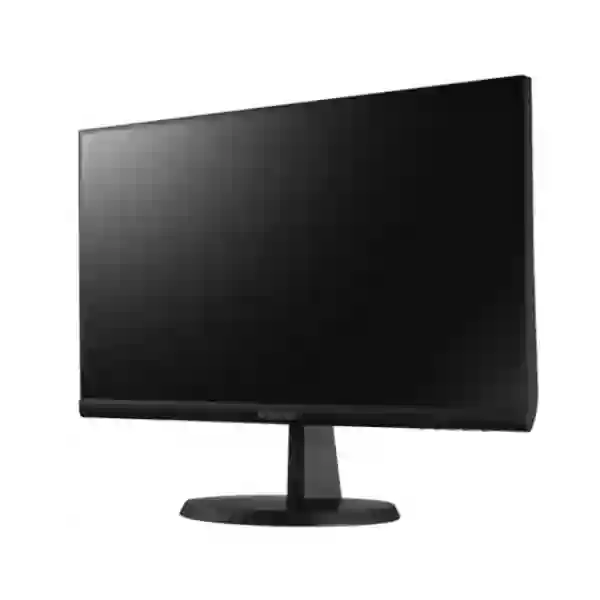
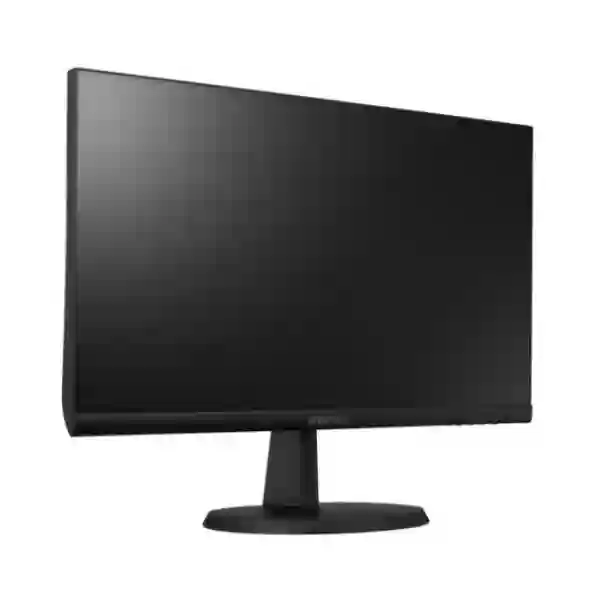
The Hanwha SMT-2431 monitor offers a 1920 × 1080 picture, HDMI and VGA input, a 100 × 100 mm VESA mounting interface and manufacturer-stated continuous-use design. It is relevant to compatible CCTV recorder outputs and local surveillance workstations in Tanzania.
Verified technical specifications
| Model | Hanwha Vision SMT-2431 |
|---|---|
| Type | 24-inch-class LED security monitor; approximately 23.8-inch panel |
| Resolution | 1920 × 1080 Full HD, 16:9 |
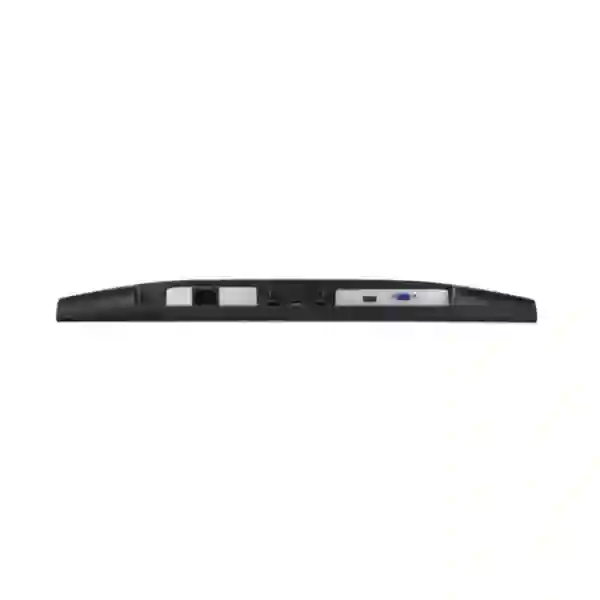
| Inputs | 1 HDMI; 1 VGA |
| Supported maximum format | 1920 × 1080 at 60 Hz |
| Brightness | 250 cd/m² |
| Contrast ratio | 4000:1 |
| Viewing angles | 178° horizontal and vertical |
| Response time | 14 ms |
| Panel life | 30,000 hours, manufacturer rating |
| Power | AC 100–240 V, 50/60 Hz; 30 W published |
| Environment | 0 to +40 °C; 10%–80% non-condensing humidity |
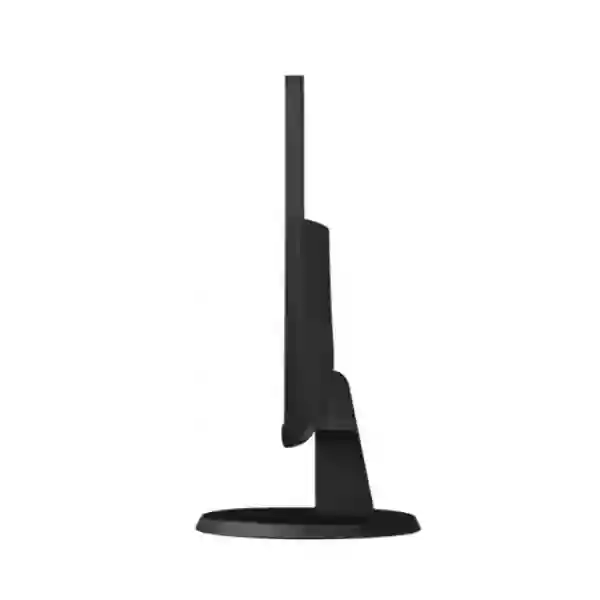
| With stand | 540 × 420.3 × 224.1 mm |
| Without stand | 540 × 324 × 46 mm |
| Weight | 3.5 kg |
| Mounting | VESA 100 × 100 mm |
| Product lifecycle | Discontinued according to manufacturer |
Manufacturer-published values describe the model, not a promise of local supply, price, installation performance or warranty. Confirm the actual item and source-system compatibility.
Product role and buying context
The Hanwha Vision SMT-2431 is a 24-inch-class Full HD LED security monitor intended to display video supplied by a compatible recorder or computer. Its job is to show the output of a CCTV system, not to capture or store footage. A buyer should therefore begin with the source equipment, the operator’s work and the installation location. A display with the right connector but the wrong size or mounting arrangement can still be an awkward choice for daily security work.
The model is particularly relevant when an existing security desk needs a compact screen with HDMI or VGA input. It may also be considered for a simple reception viewing point or a recorder workstation. The widescreen panel and standard mounting interface provide practical options, but the actual outcome depends on video configuration, lighting and viewing distance.
Hanwha Vision marks this exact model discontinued. Any offer must be reviewed as an individual supply proposition rather than evidence that the model remains in production. No current price, stock, warranty or installation service in Tanzania has been established for the listing. Ask for written terms, condition and a technically suitable alternative if supply cannot be confirmed.
How Full HD affects surveillance viewing
The SMT-2431 displays up to 1920 × 1080 pixels. That Full HD resolution can show the normal 1080p output from a compatible NVR, DVR or computer without requiring the panel to work at a different native resolution. It does not increase the detail captured by a camera. A higher-resolution camera can record more information than this monitor shows at once, especially when several camera views share the screen.
The difference becomes obvious in a multi-camera layout. Four, nine or sixteen video tiles divide the available screen space, making small objects and labels harder to see. A guard may use the overview for situational awareness and then switch to a single enlarged camera when reviewing an incident. Those layout and playback controls belong to the recorder or software.
Do not assume that native 1080p guarantees facial identification, licence-plate readability or evidential clarity. Those outcomes depend heavily on camera position, optics, exposure, recording quality and scene distance. A sensible acceptance test uses real footage from the intended system rather than a promotional picture.
Who should consider this monitor
A receptionist who occasionally checks an entrance may prefer a monitor that fits beside ordinary office equipment. An operator working close to an NVR may need a reliable view of menus and camera tiles. A facilities supervisor may want a dedicated display for quick checks rather than a large wall installation. In these situations, a 24-inch-class unit can be worth evaluating as long as the task and distance match its dimensions.
Replacement projects form another important category. If a recorder already supplies a suitable Full HD HDMI or VGA signal, an exact-model or technically equivalent screen may avoid unnecessary changes to the camera network. That does not remove the need to check the physical mount, cable path and condition of the proposed unit.
A different category is needed when the job requires built-in IP camera decoding, 4K native display detail, outdoor weather resistance or a large control-room overview visible from across the room. These functions are not established by the SMT-2431 specification. Selecting based on actual operator needs is more dependable than choosing by screen size or product label alone.
Widescreen layouts and camera tiles
The panel has a 16:9 aspect ratio, a familiar shape for Full HD recorder interfaces. It can display widescreen video naturally when the output device is configured correctly. Nevertheless, security systems may include corridor views, older cameras or specialised crop modes that do not fill a 16:9 canvas without distortion. Preserve the source image’s proportions rather than stretching every camera to the edges.
Decide which cameras deserve the largest share of the screen. At a reception point, a main entrance might occupy the dominant tile while secondary views show a delivery gate and vehicle approach. At a security desk, an operator might prefer equal tiles for routine observation and a single-camera playback mode for investigation. The screen cannot generate these layouts by itself.
Check camera names, dates, timestamps, warning icons and control buttons at the actual viewing distance. A layout that looks spacious in a product picture may become cramped with real information. If staff must lean forward to read overlays, adjust the layout or reconsider the display size. This test often reveals more about suitability than a generic screen specification.
Brightness in everyday spaces
The published brightness is 250 cd/m². This is a useful technical comparison point but not a guarantee of readability in every room. A reflective window behind an operator or overhead light falling on the panel can make a display difficult to use, even when its brightness setting is high. Before purchase, assess the intended desk orientation and lighting.
A guard who watches daytime and nighttime footage has different viewing requirements through the shift. In brighter conditions, make sure labels and important activity remain visible. In a dim control room, excessive display brightness may feel uncomfortable. The appropriate brightness setting is the one that serves the operator without washing out the view or causing unnecessary discomfort.
If night footage appears dark or noisy, check the cameras, scene lighting, recorder output and screen settings separately. The monitor cannot reveal details a camera did not capture. Treat brightness as a display characteristic rather than a fix for inadequate surveillance lighting. Practical testing at the intended site remains essential.
Contrast and difficult scenes
Hanwha Vision lists a 4000:1 contrast ratio for this model. The specification helps describe the panel’s ability to separate light and dark display values under relevant test conditions. It does not mean the monitor can recover a face in deep shadow or correct excessive headlight glare from a camera. Those are capture and processing challenges upstream in the surveillance system.
Use sample footage that includes the kinds of scenes the operator must interpret. Test an entrance with backlighting, a corridor with mixed indoor illumination and an exterior camera showing nighttime movement. Observe whether important on-screen elements remain legible in both overview and enlarged modes. The purpose is to judge whether the complete signal path supports the actual security decision.
Also evaluate recorded playback rather than live images alone. Recording settings and compression can affect detail, particularly during movement. A good panel cannot undo artifacts already present in the footage. A monitor specification should complement, not replace, a review of camera placement and recorded video quality.
Viewing angles and shared observation
The specified horizontal and vertical viewing angles are 178 degrees. This may be useful when a supervisor and guard need to look at the same screen, or when a screen is installed slightly off-centre. However, a wide manufacturer rating should not be treated as permission to mount a monitor in any position. Reflections, fine text and physical comfort still favour a well-aligned viewpoint.
Place the screen so the principal operator can see the full image without repeatedly twisting the neck or looking sharply upward. Where staff use mouse-driven playback controls, the screen should remain close enough for menu labels to be readable. A high wall mount can suit a passive overview but may be poor for detailed investigation.
Invite the intended staff to inspect the proposed installation before fixing the mount. Test from their normal seated and standing positions. If the screen is shared, check whether both users can see the key views. Comfortable sight lines are an operational feature of the workstation, not something guaranteed by the panel’s viewing-angle number.
Response time and live video
The model’s listed response time is 14 ms. Response time describes one aspect of display behaviour and should not be confused with the overall delay between a real-world event and its appearance on the screen. A CCTV system introduces other factors, including image capture, video encoding, network transmission, recording software, decoding and output generation.
For routine supervision, examine moving footage to see whether it remains interpretable for the intended task. Test walking subjects, doors opening and vehicles moving through the actual camera scene. If significant delay is observed, investigate the full system rather than attributing every pause to the monitor. Recorder configuration and client software may play a much larger role.
Avoid marketing a 14 ms display response as a guaranteed real-time reaction or an assurance of incident detection. A security operator still needs suitable alerts, procedures and reliable video sources. The SMT-2431 is one output component in that chain and should be assessed in context.
Using the HDMI connection
The monitor includes one HDMI input with listed support for 1920 × 1080 at 60 Hz. For a compatible recorder or monitoring PC with HDMI output, this is a straightforward starting point. Identify the source port, choose a suitable cable, select HDMI on the display and verify that the source is actually generating a supported output.
If the screen reports no signal, check the selected input and source power first. Then inspect the cable and the recorder’s monitor settings. A physical HDMI connection does not guarantee that a source has selected a usable output mode. When possible, test with a known-working cable or display to isolate the fault before replacing the monitor.
Cable routing deserves attention at reception desks and equipment cabinets. Protect connectors from repeated pulls, avoid placing leads under chair wheels and do not assume an arbitrary long HDMI run will operate reliably. Extension and distribution systems, where needed, require their own compatibility assessment and are not included simply because the monitor has an HDMI socket.
Using the VGA connection
A single VGA video input provides a useful option for legacy recorders and computers. Manufacturer information lists 1920 × 1080 at 60 Hz among supported VGA formats. The connection may be valuable when an existing system cannot conveniently be upgraded to HDMI. Still, output quality depends on the actual source and the condition of analogue video cabling.
VGA is not the same as a coaxial CCTV BNC input. An older camera with a direct BNC signal normally needs appropriate recording or signal conversion equipment before its video can be shown on this screen. A simple connector-shaped adaptor cannot be assumed to translate one signal format into another. Likewise, an IP camera’s network cable is not plugged into the VGA port.
When testing VGA, examine small text, straight lines and colour stability, not only whether a picture appears. If the image is soft or unstable, check source output, connector seating and cable quality. For a new installation, document the intended video route clearly so future service teams do not have to guess why a legacy connection was selected.
Recorder, camera and monitor roles
In a typical installation, cameras feed an NVR, DVR or video management computer. That system sends a prepared picture to the monitor through an appropriate output. The SMT-2431 displays the picture; it does not record footage, administer cameras or independently select IP streams. Understanding these roles prevents a buyer from expecting features that belong to other components.
With an IP system, cameras often communicate over a network with a recorder or software platform. A local screen commonly connects to the recorder’s HDMI output rather than directly to the cameras. With legacy analogue equipment, a DVR may combine several camera inputs into a monitor layout. Either approach can be suitable if the final signal presented to this display is supported.
Before ordering, record the source model, available outputs, intended resolution, number of camera windows and expected operator controls. If the task is to view remote network streams without a local recorder or PC, investigate a purpose-designed decoder or network display instead. A compatible connector does not replace the need for the correct system architecture.
Stand and desk dimensions
The overall dimensions with the supplied stand are listed as 540 × 420.3 × 224.1 mm, measured width by height by depth. Without the stand, the dimensions are 540 × 324 × 46 mm. These figures allow the installer to test the proposed desk footprint, monitor recess or cabinet clearance before unpacking a unit. The manufacturer’s stated monitor weight is 3.5 kg.
For a desk installation, check more than the nominal width. Leave room for video and power leads, ventilation and ordinary operator activities. A monitor that fits exactly between two cabinets may be difficult to cable, inspect or reposition. Position it so staff can use the recorder controls while still observing the principal camera views.
When replacing an existing monitor, compare the full footprint rather than just the advertised diagonal screen size. The base depth may matter on a narrow counter, while overall height may affect sight lines through reception glazing. This simple physical check can prevent an otherwise technically compatible purchase from becoming an installation problem.
Wall mounting and VESA compatibility
The SMT-2431 specifies a VESA 100 × 100 mm mounting interface. That gives installers a standard hole pattern to check against compatible wall mounts and monitor arms. It does not guarantee that every bracket will fit safely, that its fasteners are appropriate or that a chosen wall surface can carry the assembled load. The bracket’s full compatibility should be confirmed.
A wall-mounted screen can free desk space and offer a convenient overview at a security point. Mounting height should reflect the task: passive observation across a room differs from sitting close enough to use detailed playback menus. Test the intended sight line before drilling or final fixing. Staff should not have to strain to view important labels.
Leave adequate space for cable movement, ventilation and future access. A closely recessed display may trap heat or make a damaged cable difficult to replace. Follow the bracket manufacturer’s installation requirements and any applicable building procedures. Proper mounting is an engineering and ergonomics issue, not simply a matter of matching four holes.
Working with more than one monitor
Multiple screens may be useful where operators routinely watch many cameras while also reviewing recordings. One display could hold a steady live layout and another could support playback or administration. The SMT-2431 itself does not manage independent multi-screen views; the recorder or monitoring PC must provide and support the desired arrangement.
Before buying two units, check how many monitor outputs the source has and whether they show independent or mirrored content. Two physical sockets do not necessarily provide separate workspaces. An HDMI splitter may show the same image on multiple monitors rather than giving each one different cameras. The exact behaviour must be confirmed from the source device or a practical test.
Screen placement also affects security and privacy. A display visible to visitors may reveal camera views that were intended only for authorised staff. Decide which layouts can be shown in a public-facing reception and which should remain in a restricted workstation. The monitor does not replace access-control practices in the surveillance system.
Power input and the wider installation
Hanwha Vision lists AC 100–240 V at 50/60 Hz as the operating supply range and 30 W as the product’s power consumption. These are monitor characteristics, not the electrical load of a complete CCTV system. Cameras, recorder, storage, network switch and any video extender have their own requirements. Plan power distribution for all necessary devices.
If a site uses a UPS, consider which components need to remain active together. A powered monitor cannot show live video if its necessary source has stopped. Conversely, recording may continue independently while a local monitor is off. A realistic backup plan maps each dependency and identifies the operational effect of losing one device.
At the chosen workstation, use safe sockets and properly routed cables. Avoid exposed leads that can be pulled from a public counter or damaged by furniture. After an outage, staff should know how to confirm that the recorder is running, the expected screen input is selected and the required cameras are visible. These procedures are as important as the display’s published wattage.
Temperature, humidity and site conditions
The specified operating range is 0 to +40 °C and 10% to 80% relative humidity without condensation. These limits matter in a real Tanzanian installation just as they do elsewhere. A ventilated interior office can present a very different environment from an exposed guard position or a small uncooled kiosk. Evaluate the actual location instead of assuming every indoor space is equally suitable.
The published specifications do not establish outdoor weather resistance, rain protection or suitability for persistent condensation. Avoid treating a standard security monitor as an outdoor enclosure-rated product. If the viewing point is exposed to dust, direct sun or moisture, choose a properly specified arrangement or move the screen into a protected environment.
Keep ventilation areas clear and avoid trapping warm air behind decorative panels. Check conditions during demanding operating periods, not only during a quick commissioning visit. Persistent heat or dampness should be addressed as an installation issue. A monitor expected to run throughout long shifts requires the environment to remain within its intended limits.
Continuous use and panel-life expectations
The manufacturer describes this product as designed and tested for 24/7 operation. It also publishes a 30,000-hour panel-life figure. Those details make the model relevant to security monitoring, but neither should be turned into a promise that a particular unit will operate for a guaranteed duration. Condition, storage, ventilation, use history and maintenance all affect a real device.
For a continuously staffed security point, plan what happens if the viewing screen becomes unavailable. Staff may need a secure alternate display, a permitted client workstation or an escalation procedure. A dark local screen is not by itself proof that camera recording has stopped, but it may interrupt essential observation. The response plan should distinguish local display failure from a recorder or network fault.
This matters especially for discontinued stock. Ask the seller whether the unit is unused, refurbished or previously operated, and confirm its written return and support arrangements. Do not infer local warranty coverage or remaining panel life from the original design specification. A responsible purchase includes both technical fit and a credible contingency.
What the screen does not provide
The SMT-2431 is a Full HD monitor, not a native 4K screen. Its verified video inputs are one HDMI and one VGA, not separate sockets for a bank of cameras. Its image is therefore determined by the connected recorder or computer. It does not independently decide which camera feeds appear or provide the recording functions of an NVR.
The documented model specifications do not establish a direct Ethernet camera input, BNC camera-video input, onboard storage, touchscreen control, wireless viewing or built-in video analytics. Buyers should not assume such capabilities from the phrase security monitor. If a project requires any of them, request a device whose official documentation explicitly states that feature.
Likewise, the monitor’s viewing-angle and contrast figures should not be mistaken for surveillance performance guarantees. Camera placement, lens choice, recorder settings and operator procedures remain critical. Keeping these boundaries clear prevents the display from being purchased as a substitute for a missing recorder, decoder or management workstation.
Commissioning with real camera footage
After physical installation, begin with a known-working video source. Select the correct monitor input and confirm the output is configured for a supported resolution and refresh rate. Check whether recorder menus, dates and camera labels are fully visible without unexpected cropping or stretching. Confirm that the operator can navigate the system comfortably from the intended seat.
Next use meaningful test footage. Include movement, a bright doorway, a dark corridor, and actual on-screen overlays. Switch between a multi-camera overview and a single-camera display if the source supports those functions. Observe whether the operator can recognise relevant activity and read necessary labels. A colourful desktop background alone does not prove surveillance suitability.
Where permitted by site procedures, test normal restart behaviour and document the configuration that restores the correct screen. Keep details of video cable route, selected input and source device in a maintenance record. Commissioning should produce a repeatable working arrangement rather than merely confirming that the panel can turn on.
Troubleshooting an absent image
When the screen is blank, establish whether it is receiving power and whether its on-screen menu appears. Then check the selected input, source status and cable seating. A recorder may be running without outputting video through the port being tested, or it may be set to an unsuitable mode. Work from the simplest checks before concluding that the monitor is defective.
If the display works with a second known-good source, investigate the original source settings or cable. If another monitor works on the original source, investigate the SMT-2431 input and signal compatibility. Document each test so that a later technician can see what has already been eliminated. Repeatedly swapping equipment without a sequence can waste time and obscure the actual fault.
Do not change camera recording parameters merely because a local monitor output is missing. Recording and display settings may be separate. When the system carries operationally important footage, preserve recording continuity and follow approved service procedures while diagnosing the viewing station.
Improving a poor or unstable picture
A soft or flickering picture can have several causes. On VGA, cable condition and the analogue signal route deserve particular attention. On HDMI, inspect the cable, connectors and output mode. In both cases, confirm that the connected recorder or PC is supplying a format supported by the monitor. An intermittent connection does not necessarily mean the LCD panel has failed.
If the image is present but fine security details seem missing, compare a large single-camera view with the multi-camera layout. Check the actual source recording and playback, not just the display. Compression, camera focus, inadequate scene lighting or low-resolution streaming settings can all limit apparent detail. The monitor cannot recover information never included in the delivered picture.
Also inspect room reflections and settings before increasing brightness without limit. An image can look washed out because of glare rather than because the source lacks detail. Use repeatable test scenes and note what changes improve or worsen visibility. That evidence helps determine whether the remedy is a cable, setting, camera adjustment or different display.
Care, cleaning and operator readiness
Keep the panel clean according to the manufacturer’s care instructions and avoid abrasive methods or moisture entering openings. Follow site safety procedures before handling electrical equipment. Cleaning can improve readability where dust and fingerprints interfere, but it should never be used as a substitute for correcting poor camera capture or a failing video connection.
Inspect the workstation periodically for loose stands, blocked ventilation, strained cables and equipment placed too close to the display. Desk arrangements can change after installation as additional phones, papers and computers are added. A sound installation should remain easy to inspect and service throughout its use. For wall mounts, follow the mount supplier’s inspection and maintenance advice.
Train staff on a few reliable actions: identify the correct input, recognise the expected live layout, report a blank screen and verify whether the recorder itself is operating. This avoids unnecessary downtime caused by an accidental input change or loose lead. Good routine practice is inexpensive compared with replacing hardware that was not faulty.
Procurement risks for discontinued equipment
The official Hanwha Vision product information identifies the SMT-2431 as discontinued. That does not prove that all remaining examples have been sold, but it does change the questions a buyer should ask. A seller may offer remaining unused stock, repaired units or previously operated equipment. The quote should say exactly which condition applies rather than relying on a generic product name.
Request confirmation of quantity, included accessories, unit condition, return arrangements and any applicable written support terms. Confirm how a faulty-on-arrival unit would be handled and whether an equivalent replacement can be supplied if the exact model is unavailable. Do not assume that an international retailer’s discontinued status describes inventory in Tanzania, or that an overseas warranty automatically applies locally.
For new projects spread across multiple sites, compare the short-term convenience of an older model with the need for consistent future replacements. A locally obtainable, supported alternative may offer a more practical maintenance path. The correct decision should balance compatibility, operator needs, physical fit and documented procurement terms.
Selecting a suitable replacement display
If the exact SMT-2431 cannot be sourced, first identify the required video connector. A modern NVR may provide HDMI, whereas a legacy recorder may rely on VGA. A replacement with only one of these inputs can still work if the source matches, but should not be called a direct substitute before checking the complete connection. Confirm native resolution and a supported output mode.
Next compare the visible screen area, viewing distance and number of simultaneous camera tiles. A larger monitor could improve a multi-camera overview, while a smaller one may fit a restricted counter. Additional pixels can help with interface space but do not improve poorly captured source footage. Evaluate these decisions with the actual operator workflow.
Finally check mounting pattern, dimensions, power requirements, environmental limits and supplier support. Existing brackets and desk openings should not be assumed compatible with every 24-inch screen. For a site that runs around the clock, documented continuous-use suitability and replacement arrangements may matter more than a cosmetic similarity to the discontinued unit.
Requesting a Tanzania quotation
Prepare a brief description of the installation before contacting FourTeck Tanzania. Include whether this is an exact-model replacement or a new project, the source recorder or PC model, HDMI or VGA output requirement, expected camera layout, viewing distance and whether the unit will sit on a desk or use a wall bracket. These details make a compatibility review more useful.
Ask the supplier to confirm the actual item’s condition, quantity, accessories and written commercial terms. Local price, stock, dispatch timing, installation coverage and warranty have not been verified in this content and should not be inferred from specifications or overseas product listings. Where the exact item is unavailable, request a clearly identified alternative with a point-by-point technical comparison.
The recommended next step is a quotation and suitability review, not an assumption of immediate purchase eligibility. A display is one component of a functioning surveillance installation. Selecting it alongside the recorder output, site conditions and operator workflow offers a better basis for a dependable security viewing point.
A practical final selection checklist
Start with the source: identify its available video output and confirm that 1920 × 1080 at 60 Hz is supported. Then define the activity: routine observation, focused playback, alarm checking or shared supervisory viewing. Count the cameras normally visible at once and test whether their labels remain legible at the planned distance. These details determine whether this screen size is useful.
Check the site next. Measure the available desk area or mounting surface, confirm the VESA bracket if needed and plan safe power and cable routing. Review operating temperature, humidity, ventilation and reflections. If the location is exposed to weather or direct sunlight, do not assume the ordinary indoor specifications are sufficient. Consider the recorder and supporting network equipment when planning backup power.
Finally review procurement. Since Hanwha Vision marks the SMT-2431 discontinued, request documented condition and supply terms for the exact unit. Compare a currently supported alternative when appropriate, especially for new multi-site projects. The strongest purchase is the one that matches a verified signal, a real operational requirement and a sustainable support plan.
Frequently asked questions
Is this really a 24-inch screen?
Hanwha Vision markets the SMT-2431 as a 24-inch-class monitor. Model datasheet information describes an approximately 23.8-inch panel. These are descriptions of the same model; use the cabinet dimensions to plan physical installation.
What resolution does it support?
The maximum native picture is Full HD 1920 × 1080 with a 16:9 aspect ratio. The manufacturer lists 1920 × 1080 at 60 Hz for HDMI and VGA input formats. It is not a native 4K panel.
Can it connect to an NVR?
Yes, when the NVR provides a compatible HDMI or VGA monitor output. Confirm output configuration and cable compatibility. The display does not independently register IP cameras or record footage.
Can several cameras appear together?
Yes, if a connected recorder or monitoring computer builds the multi-camera layout. The display shows that layout as one video output. Practical readability depends on the tile count and viewing distance.
Does it include both HDMI and VGA?
The verified input list contains one HDMI and one VGA connection. The selected source device must provide a matching video output and supported format. A port’s presence alone does not confirm every adaptor will work.
Can a coaxial CCTV camera connect directly?
The verified connector list does not include BNC video input. Coaxial cameras normally need appropriate recorder or conversion equipment before the screen receives HDMI or VGA video. Do not assume a passive adaptor will convert signals.
Can it be wall mounted?
The manufacturer’s VESA mounting specification is 100 × 100 mm. Confirm bracket load, fasteners, clearance and installation safety for the actual location. A matching hole pattern is only one part of safe mounting.
Is it suitable for 24-hour monitoring?
Hanwha Vision describes the model as designed and tested for 24/7 operation and states 30,000 hours panel life. Those are published design figures, not a promise about a particular discontinued unit’s remaining service life.
What environments are supported?
The stated operating range is 0 to +40 °C and 10–80% non-condensing humidity. The specification does not make this an outdoor weatherproof monitor. Evaluate heat, ventilation, glare and moisture at the installation.
Is the SMT-2431 discontinued?
Yes. The current manufacturer product page labels SMT-2431 discontinued. Independent sellers may still advertise remaining inventory, but availability and condition must be confirmed for the exact offered unit.
Can it record or decode network video itself?
Its documented role is a monitor with HDMI and VGA inputs. Recording, camera management and network video decoding require compatible upstream equipment rather than being assumed built-in functions.
What should a Tanzania buyer provide for a quote?
State the desired quantity, source recorder or computer, video output, viewing layout, mounting method and whether an exact replacement is required. Request verified condition, accessories, local commercial terms and alternatives.
Request a compatibility review and quotation
Share the recorder or computer output, preferred connector, viewing arrangement, installation location and whether you require an exact SMT-2431 replacement or a current alternative. Ask for written confirmation of condition, accessories, local availability and commercial terms. A suitable display should match the video signal, the workstation and the planned maintenance approach.
Contact FourTeck Tanzania to discuss your security monitoring display requirements.




Reviews
There are no reviews yet.