
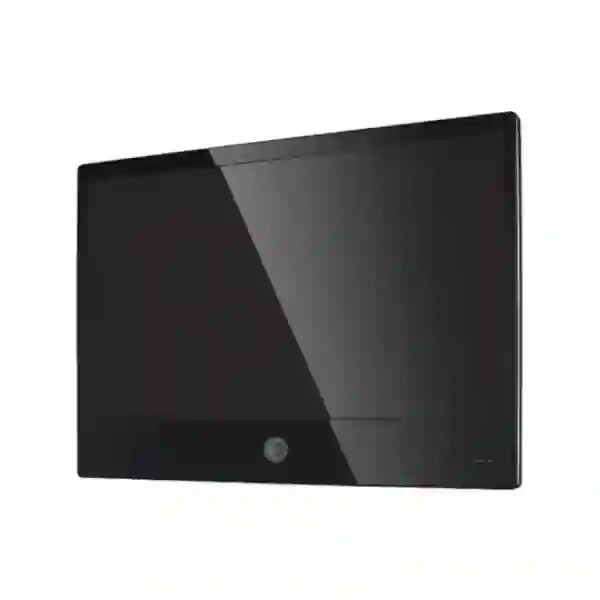
Public-view security display | legacy model
Hanwha SMT-3211PVM-PIP 32-Inch Public View Monitor
A 32-inch Full HD security display with an integrated 2MP IP camera, Picture-in-Picture video and visible face-detection overlays for indoor public-facing environments. Understand how the legacy unit works, what to verify before installation and when to consider the manufacturer’s newer replacement.
Important lifecycle notice: Hanwha Vision marks SMT-3211PVM-PIP as discontinued and identifies SMT-3231PV as its replacement. This page does not represent a stock or support guarantee.
At a glance
32-inch Full HD
1920 × 1080 LED-backlit panel and glare-reduction front glass
Integrated 2MP camera
Fixed 4.6 mm lens with network video functions
Dual-view presentation
PIP and side-by-side layout support on the suffix model
Site-specific installation
24 V DC, network access and VESA mounting need verification
The buying decision in one minute
Choose this exact legacy model only when its documented PIP layout, camera specifications and existing installation requirements genuinely match the project. For new deployments, discuss the manufacturer’s designated SMT-3231PV successor and confirm the required power, mounting, video-input and network functions independently. Start by documenting the site, external video source, recording requirements and acceptable maintenance approach; then request a model-specific technical and sourcing review.
Why a public-view security monitor matters
A public-view monitor shows people that an area is under camera observation. Unlike a conventional back-office CCTV screen, it belongs in a visitor-facing position such as a store entrance, counter queue or reception approach. The visible image can encourage awareness of the security environment without requiring customers to find a notice elsewhere. This is a deterrence-oriented display function; it does not prove that an incident will be prevented, and it should complement rather than replace appropriate procedures, staff training and an overall surveillance design.
The Hanwha SMT-3211PVM-PIP places a Full HD panel and a compact IP camera in one housing. For an operator designing a new site or assessing an older installation, that combination reduces the need to position a separate visible camera immediately above a standalone public display. The actual advantage depends on sightlines, cable pathways, mounting height and whether the camera view captures the area that the monitor faces. Before selecting any public-view monitor, decide whether your primary goal is customer awareness, live status presentation, incident evidence or some combination of these.
Who should consider this exact model
This model is relevant when a specification, installed estate, replacement spare or integration plan explicitly names SMT-3211PVM-PIP. Facilities teams may need to understand its power connector, display inputs or network camera characteristics before moving a unit. Security integrators may need to preserve a similar user experience during maintenance. Buyers considering refurbished or remaining inventory should treat the product as a legacy device and investigate condition, firmware support, accessory completeness and component availability before committing to it.
For a fresh project in Tanzania, the lifecycle question comes first. Hanwha Vision lists this older unit as discontinued and identifies SMT-3231PV as its replacement model. That is a manufacturer product relationship, not proof of a direct mechanical, electrical, software or licensing swap. An alternative design may be more suitable if current firmware support, long operating life, advanced analytics or modern installation practices are priorities. Confirm requirements with the installer instead of treating any catalogue description as a local stock promise.
What Picture-in-Picture adds
Picture-in-Picture, often shortened to PIP, makes it possible to display a second video source in a smaller on-screen window while another view remains prominent. In a public-view application this can provide a live image from the integrated camera alongside content supplied to the monitor through the appropriate video input. The exact arrangement should be tested with the source devices being connected; do not assume that every possible camera, recorder and HDMI source can be arranged in every display position.
The PIP-specific version differs from the similarly named SMT-3211PVM without PIP. Hanwha’s datasheet lists a dedicated HDMI PIP input, another HDMI input and a VGA input for the PIP variant. It also specifies side-by-side, stretch and fit presentation choices. These distinctions are important when replacing an existing screen: a non-PIP version may display a camera image yet fail a requirement to show two sources together. Record the exact suffix on the unit and in all procurement documentation.
PIP and side-by-side are not interchangeable
Picture-in-Picture presents a principal view and a smaller inset view. Side-by-side presents two portions next to each other, which may be better when visitors or staff need both sources to be equally easy to see. Stretch and fit options affect the way an incoming image occupies a display region. Different aspect ratios can make text difficult to read or distort the perceived proportions of a scene, so choose layouts by viewing them at the installed distance rather than by menu label alone.
A typical acceptance test starts with the integrated camera, adds the external video source and then checks the intended on-screen arrangement. Look closely at the edges of the picture, the legibility of notices and whether information remains visible when a secondary source changes resolution or disappears. Where a point-of-sale or digital-signage feed is used, make sure the screen does not reveal confidential transaction information. The purpose of using two views is to increase clarity, not to create unnecessary distractions in a public area.
32-inch Full HD display characteristics
The manufacturer’s specification identifies a 32-inch LED-backlit display with 1920 × 1080 maximum resolution, 16:9 aspect ratio, 300-nit brightness and a 1200:1 contrast ratio. Its stated viewing angles are 178 degrees horizontally and vertically, and response time is 8 milliseconds. The front glass includes glare-reduction coating. These are useful planning figures for ordinary indoor public-view installations, but perceived visibility will still change with overhead lighting, reflections, window placement and how far away a visitor stands.
A 32-inch screen is not automatically correct for every reception or checkout environment. Measure the distance between the display and the primary audience, decide whether people should recognize themselves in the image or read a short message, and choose mounting height accordingly. If a location has intense direct sunlight or requires an outdoor-rated enclosure, a standard indoor public-view monitor may not be the appropriate product. Site conditions and a viewing demonstration matter more than the diagonal measurement by itself.
Integrated 2MP network camera
The built-in camera is based on a 1/2.8-inch 2-megapixel CMOS image sensor with progressive scanning. It produces Full HD surveillance imagery and avoids the conspicuous appearance of a separately positioned camera above the screen. The lens is a fixed 4.6 mm pinhole design with a stated horizontal angle of view of 73.8 degrees, vertical angle of 39.6 degrees and diagonal angle of 86.8 degrees. This field of view is useful for framing a defined public-facing area rather than assuming coverage of an entire large premises.
Because the lens is fixed, an installer should verify the scene before drilling mounting holes. Consider people entering from the sides, counter height, queues that may change shape and objects that could obscure faces. A useful test places a person at several likely positions to see whether the on-screen picture is meaningful from the audience’s perspective. This device can form one component of a surveillance system, but it is not a substitute for carefully positioned overview cameras or purpose-designed forensic camera coverage.
Face-detection overlay and its limits
The manufacturer describes a face-detection display that draws a coloured bounding box around a detected face. The datasheet specifies detection of up to six faces in real time under its defined conditions and a stated detection distance of up to 15.24 metres. Overlay colours are configurable. This is intended as a visible deterrent and a way to draw attention to the displayed camera image; it should not be mistaken for named-person recognition, identity verification, a biometric access-control system or proof that every face will be detected.
Actual detection depends on angle, lighting, occlusion, crowding and how the camera is positioned. A person wearing a cap, turning away or standing at the far edge of the frame may produce different results from a person facing the lens in good light. Before relying on an overlay in an operational policy, test it with realistic visitor movement. Configure any on-screen notices so they are understandable and consistent with the site’s privacy policies and applicable legal requirements.
Wide dynamic range for entrance lighting
The legacy camera’s specified 150 dB wide dynamic range is intended to assist with scenes containing bright and dark areas. A common example is an indoor entrance where daylight through an open doorway contrasts sharply with a shaded reception area. The manufacturer also lists backlight compensation, highlight compensation, contrast enhancement and digital noise-reduction controls. These are configuration options, not guarantees that all details will remain visible under every possible lighting condition or that a poor camera angle can be fixed by software.
During a site survey, inspect the monitor at the hours when lighting is most difficult. Test the view with exterior doors open and closed, with overhead lights operating, and with reflections on the display surface. If a camera points directly into strong glare, reconsider its direction before increasing image processing. The display’s anti-glare front treatment helps screen usability, whereas wide dynamic range primarily concerns the captured camera image. Both should be tested independently.
Video analytics in everyday operations
The product datasheet lists motion detection and a range of video analytics, including tampering, loitering, directional detection, defocus detection, virtual lines, entry and exit events and other configured event types. These capabilities can support event-driven security workflows, provided they are properly set up in the camera and supported by the connected management or recording system. Their presence in a specification does not mean that every event type is automatically active or that a third-party recorder will understand every proprietary event.
To avoid false alarms, define a narrow operational question before enabling any rule. For example, a facilities team might want an alert when someone lingers in a restricted reception-side corridor, not whenever a customer waits normally near a counter. Lighting changes, reflections and legitimate traffic can affect conventional analytics. Test each rule in real conditions and document the escalation process. The objective should be actionable information, not an impressive list of enabled detectors.
Live public view versus recorded evidence
A screen showing a live public view communicates a different purpose from a recording system that stores evidence for later investigation. The monitor can show what the built-in camera sees, while its IP camera features allow connection to compatible infrastructure. However, visible display does not by itself establish that recording is enabled, that footage is retained for a particular duration or that events can be retrieved successfully. These are separate decisions involving storage media, network configuration, recording rules and operational administration.
Make a written distinction between display behaviour, camera streaming, local recording and central recording. If evidence retention is required, test playback and export from the actual configured system. Verify timestamps, access permissions, storage capacity, time synchronisation and what happens when a network link fails. An on-screen message such as ‘Recording in progress’ is configurable on this model, but it should only be used when the associated operational statement is true for the deployed configuration.
H.265, H.264 and MJPEG streaming
The camera supports H.265, H.264 and MJPEG video compression, with multiple streaming profiles. Hanwha also lists WiseStream II among its compression technologies. These features offer flexibility when choosing how the stream will be carried to a network video recorder, monitoring workstation or other compatible client. In general, higher compression efficiency can lower bitrate for a comparable image goal, but the practical result depends on activity in the scene, selected resolution, frame rate, quality settings and the decoding capabilities of receiving systems.
Do not configure the camera solely by selecting the newest codec in the menu. First verify that the intended recorder, viewer and mobile client can reliably decode it, and then test video continuity under representative network load. A lower-resolution secondary stream may be appropriate for a small preview, while a Full HD stream may better suit evidence review. Document the chosen profiles so a future technician can reproduce them without guessing after a firmware change or equipment replacement.
Network connection and IP management
The device has an RJ-45 Ethernet interface specified as 10/100BASE-T. Its camera is IP-network manageable and supports standards and protocols suitable for integration into a managed surveillance environment. The wired network should be planned with appropriate switch capacity, cabling, addressing and access controls. An Ethernet port alone should not be treated as proof that this legacy monitor can receive its main display power through ordinary Power over Ethernet; the legacy unit specifies a separate 24 V DC power input.
Installation planning should include an address assignment method, network segmentation where feasible, secure credentials and restricted management access. Decide who is responsible for changing settings, applying approved firmware and retaining configuration records. Avoid exposing the camera’s administration pages directly to the public internet. Where remote monitoring is required, use an authorised network access design agreed by the system owner. Connectivity tests should include both successful video viewing and recovery after a link interruption.
Compatibility with recorders and software
Hanwha’s technical documentation identifies ONVIF Profiles S and G and SUNAPI support for the integrated network camera. These interfaces are relevant when evaluating integrations, but compatibility must be confirmed at the required feature level with the exact recorder or management software version. Basic stream discovery is a narrower question than reliable event reception, local-edge playback, profile switching or full analytics control. Do not assume that a product bearing an interoperability label will reproduce all manufacturer-specific functions in every third-party interface.
Build a short integration test around the actual jobs the system must perform: discover the camera, authenticate securely, receive the intended resolution, retain the stream, recover after a restart and find an event recording. If an existing site uses Hanwha cameras alongside other makes, check each vendor’s supported functions separately. For a product that the manufacturer has discontinued, validate the software support matrix and firmware servicing policy before using it as a long-term design dependency.
Edge storage and event recording
The camera lists support for microSD, SDHC and SDXC storage up to 256 GB. Local card storage may be useful for specified event recording or as part of a broader resilience design, depending on how the camera is configured. It should not be assumed that the maximum stated capacity guarantees a fixed number of recording days. Recording duration changes with bitrate, motion, capture resolution, event frequency, recording schedule and the health of the memory card.
Choose an appropriate card for surveillance writes, confirm the supported format and perform an actual playback test. Plan for safe replacement and documented retention policies. The datasheet warns that recorded data can be lost through interrupted power, card removal, wear or other adverse conditions. If the business needs dependable evidential retention, include centrally managed recording and backups where appropriate. Local storage can complement an overall design, but it must not be the only measure of the system’s reliability.
Audio and display messages
The monitor includes two built-in speakers rated at 2 watts each and stereo mini-jack audio connectivity. The manufacturer also documents configurable on-screen text, including a predefined ‘Recording in progress’ message. These features can make a public-view presentation more noticeable or informative, subject to the actual signal source and configuration. They do not establish that an automatic public-address announcement, custom audible warning or specific two-way audio experience is available without separate system design and testing.
Use clear, restrained text that can be read from the expected distance. Avoid statements that misrepresent monitoring or retention practices, and coordinate any message with the facility’s policies. Where audio is used, test it at an appropriate level for staff and visitors without creating an unpleasant or distracting environment. If a site already uses a public announcement system or separate digital-signage player, determine whether integration is needed or whether a simpler screen-only deterrent will meet the requirement.
HDMI and VGA input planning
The PIP model’s video-input specification lists a dedicated HDMI PIP input, a further HDMI input and a VGA input. These physical connectors permit several practical layouts, but they should not be read as an unlimited multi-window matrix. Before designing a screen around a recorder, media player or PC, confirm the input resolution, connector availability and which inputs participate in the intended PIP or side-by-side mode. Use sufficiently short, serviceable cable runs or suitable professional signal extension where distances require it.
An HDMI input is for bringing a video signal into the public-view monitor; it is not automatically a camera-video output for a recording system. Camera network streaming uses the network interface and compatible software. This distinction matters because some online summaries loosely describe video connectors without identifying signal direction. During commissioning, label each cable and keep a simple source-to-input diagram. Future maintenance is easier when the purpose of the PIP input is obvious without disconnecting working equipment.
Power requirements and continuity
Hanwha specifies 24 V DC input for the SMT-3211PVM-PIP and maximum power consumption of 55 watts. Design the power arrangement around the exact unit and manufacturer-approved electrical requirements, not a generic monitor adaptor that happens to fit a connector. The inclusion of a power supply may vary by supply package, and historic product listings have treated it as a separate item. Confirm the correct supply, connector, polarity and installation method before energising the equipment.
Where the public-view screen serves a security role, consider what should happen during a local power interruption. A monitored power circuit or properly specified uninterruptible power supply may form part of a site-wide resilience plan, but autonomy depends on total load, battery condition and engineering design. Verify the security system’s recovery sequence after power is restored, including the screen’s chosen input, camera availability, network reconnection and any recording function. Never assume that a camera is recording merely because the screen lights up.
VESA mounting and visibility
The manufacturer lists VESA 100 × 100 mm and 200 × 100 mm mounting patterns and notes that a stand is not included. Select a bracket and fixing method appropriate to the actual device weight, wall construction and mounting position. A public-view monitor often sits in a busy pedestrian path, so protect against accidental impact, exposed wiring and insecure access to the back of the device. Mounting work should follow a site-specific safety assessment rather than rely on a photograph of a similar installation.
Height and angle affect both what visitors see and what the integrated camera captures. A screen mounted too high may allow people to notice that monitoring exists while producing an unhelpful downward camera view. A screen positioned too low may be obstructed by queue barriers, merchandising or passing people. Test with actual human positions, not just an empty room. Leave adequate service access for input changes, memory-card maintenance and periodic inspection without exposing sensitive equipment to customers.
Indoor operating environment
The datasheet states an operating temperature of 0°C to 40°C with relative humidity below 90 percent. These figures should be compared with measured conditions at the final mounting position, including heat from nearby electrical equipment, direct solar gain through windows and seasonal changes. A comfortable room temperature does not necessarily mean the air behind a densely mounted display cabinet stays within the same limits. Adequate ventilation and installation clearance are important practical considerations.
The specified monitor is not described as weatherproof or outdoor-rated. Avoid placing it where rain, wash-down water, condensation or severe dust is expected unless a separate purpose-designed protective solution has been evaluated. For Tanzania installations, actual environmental conditions may vary widely by building type and location; do not assume a single climate profile. Ask the site team for conditions at the proposed display wall and check whether a different enclosure or a more suitable product category is required.
Responsible use of video and privacy
Public-facing surveillance should be designed around a legitimate operational objective with clear responsibility for the resulting images. A visible monitor may help people recognise that a camera is present, but it is not a substitute for appropriate notices, retention decisions, access controls or a legal review where needed. Position the camera to capture relevant public or customer-facing areas while minimising unnecessary views of private spaces, staff-only information and sensitive transaction details.
Agree who may access recorded footage, how long it is needed, when it can be shared and how the organisation will respond to incidents. Activate privacy masking when appropriate to the scene and available configuration. Keep a record of management credentials and ensure that only authorised staff can adjust camera overlays or event rules. This page does not assert a particular regulatory approval or give a site-specific legal interpretation; those matters should be checked against the project’s real requirements.
Before an installer arrives
A productive site survey starts with the intended display position and a simple description of the desired on-screen view. Supply photographs of the mounting surface, measurements to the nearest power and network points, the expected viewer distance and details of existing CCTV infrastructure. Note whether the project is an entirely new build, a like-for-like repair or an upgrade. These details help establish whether the older PIP model is a sensible technical reference or whether current equipment should be considered instead.
Also identify the source of any external HDMI or VGA signal, how it must be presented alongside the camera image and whether recordings are required. The installer should know whether visitor-facing text, face-detection overlays, sound or event integration is in scope. Ask for a component-level quotation that separates the monitor, bracket, power hardware, cabling, recording equipment and configuration work. This avoids treating a combined public-view monitor as though it contains every part of a complete security system.
Suggested installation and commissioning sequence
Begin by confirming the exact model label, physical condition and accessory inventory. With power isolated, assess mounting strength, ventilation, cable routes and service access. Install the approved bracket, position the unit, terminate the required low-voltage power and video leads and connect the Ethernet cable to the planned network. After energising the monitor safely, configure basic screen input selection before changing advanced camera parameters. Where the equipment is legacy or previously used, verify approved firmware and reset procedures with the appropriate technical documentation.
Next, establish the camera’s network identity, update administrative credentials and apply necessary security controls. Set the camera framing and image parameters under real site lighting. Configure the requested PIP presentation, on-screen message and any permitted analytics. If recording is in scope, check both live video and a successfully retrieved recording. Finally, document the settings and train staff on normal operation, fault indicators and who to contact for changes. Commissioning is complete only when real tasks have been demonstrated.
Acceptance tests worth documenting
Record a simple pass-or-fail checklist rather than relying on the statement that a screen has switched on. Confirm that the display starts on the intended source after a controlled reboot, that the built-in camera image is correctly framed, and that the chosen PIP layout stays legible. Walk through the camera’s field of view at the expected times and distances. Test against the brightest likely background and look for reflections that interfere with the display. Check mounting stability, cable protection and speaker behaviour if sound is part of the scope.
For network operation, verify authorised access, a live video stream, event configuration and recorder integration where applicable. If an SD card or central recorder is expected to retain footage, retrieve a sample and check its timestamp and playback quality. Test what happens when the video source, network and power are interrupted one at a time, using safe authorised procedures. Keep photographs and a configuration handover note for maintenance. Those practical records can be more valuable than a long list of unchecked features.
Maintenance of a legacy public-view unit
Routine maintenance should cover visible image quality, camera focus and framing, screen cleanliness, ventilation, mounting integrity, cable strain and correct operation of the chosen display mode. Review user accounts and access permissions at intervals appropriate to the site. If video is recorded, check that the storage path remains healthy and that an authorised operator can retrieve the required clips. Camera event rules should be revisited after shop-layout changes, lighting changes or alterations to queues and entrance barriers.
Because Hanwha Vision marks the SMT-3211PVM-PIP as discontinued, do not assume the same replacement parts, accessories, firmware updates or service arrangements remain available in every market. Keep the actual installed firmware version and serial-number details in site records without placing sensitive information on public pages. For a failed unit, compare repair effort with replacement project costs, including new brackets, power hardware, cabling, integration and staff retraining. A responsible upgrade decision considers the entire installation rather than just the screen price.
SMT-3211PVM-PIP versus SMT-3211PVM
These two model names differ by only a suffix, but that suffix is material. The SMT-3211PVM-PIP is the version for a Picture-in-Picture and side-by-side presentation requirement. The SMT-3211PVM without PIP has similar core display and camera characteristics in the manufacturer’s combined datasheet but does not offer the PIP modes listed for the suffix model. A purchaser seeking a compatible spare should therefore request confirmation of the full part number, not accept a generic description such as ‘Hanwha 32-inch public view monitor’.
Check photographs of the product label and the physical video ports if dealing with older inventory. Also verify accessory completeness and the configured use case: a screen that needs only a live visitor view is a different requirement from one that must combine a live image with another signal. When evaluating a non-identical substitute, record each required feature in a comparison checklist, including mounting, power, video format, network integration and operating environment. Similar screen size alone does not establish interchangeability.
What changes with the SMT-3231PV replacement
Hanwha Vision names the SMT-3231PV as the replacement for this discontinued model. The newer 32-inch product is described by its manufacturer as an AI public-view monitor and lists PIP and Picture-by-Picture capabilities, person- and face-related analytics, configurable on-screen elements and remote monitor-management features. This indicates a direction toward a more feature-rich public-view platform, but specific performance values, input behaviour and integration options differ from the legacy specification. It should not be represented as an identical device with a new part number.
For a replacement project, compare the actual mounting hole patterns, dimensions, power supply requirements, network policy, available connectors, camera field of view and supported analytics. The newer product’s power options and software features should be verified against its own current datasheet rather than inherited from the older model. If the installation uses specialised PIP layouts or management software, request a trial or documented compatibility confirmation. A manufacturer-designated replacement is a strong starting point for selection, not a substitute for an installation-level engineering check.
Choosing a display for a shop entrance
Retail entrances benefit from a screen that can be noticed without blocking pedestrian flow. Place the display where customers naturally look while entering, then check that the integrated camera captures a useful face-on or three-quarter view rather than an extreme overhead angle. Consider the effect of glass doors, sunlight, promotional posters and moving queue barriers. A 32-inch Full HD panel may be suitable for some entrance layouts, but it can be excessive or difficult to read in a very small vestibule.
If a retailer wants to show a second signal, define whether that signal is a welcome message, a permitted CCTV feed or operational information. Verify that the selected PIP arrangement remains clear and that no private screen content becomes visible to visitors. The aim is not to overwhelm a customer with surveillance imagery, but to provide an understandable awareness cue. For stores with multiple entrances or substantial floor areas, additional cameras and central recording may be necessary regardless of how prominently the public-view display is positioned.
Choosing a display for reception and front desks
A reception area often has a different atmosphere from a retail security gate. The display may need to communicate that monitoring exists while remaining appropriate for guests, staff and appointment visitors. Select concise on-screen wording, avoid harsh alert behaviour and choose a camera angle that does not expose confidential paperwork or computer screens behind the desk. Depending on the floorplan, a smaller or differently positioned screen may be more effective than placing this unit directly behind a receptionist.
Where the reception team already uses an IP camera system, coordinate the public-view monitor with the network administrator and privacy lead. Decide whether the integrated camera is simply displayed, centrally recorded or used with specified event rules. If staff need a separate live operational feed, test the PIP arrangement with the actual input source. Record a clear division of responsibilities between reception staff, security operators and IT support so faults are recognised without creating confusion about who manages the device.
Choosing a display for corridors, queues and shared spaces
In a queue, people may spend more time in front of the screen, making legible notices and comfortable image brightness important. A side-by-side presentation could be useful for a carefully selected second feed, but the installer should assess whether simultaneous views serve a real purpose. A congested corridor may introduce frequent occlusion, which can reduce the usefulness of a fixed integrated camera. The screen must not project into an accessible walkway or create a cable hazard.
Shared spaces can contain users with differing expectations about surveillance. Position the unit openly and ensure that monitoring notices match actual practice. Distinguish between conventional motion detection and reliable measurement of crowd behaviour; this legacy camera’s analytics should not be marketed as a modern AI people-counting system. For analytics-led queue management or complex occupancy reporting, evaluate a currently supported camera or the manufacturer-designated successor with the required features, rather than relying on broad terms such as ‘smart monitoring’.
Practical procurement checks for Tanzania
For a Tanzania-based enquiry, begin with the project’s outcome, the required installation location and the exact model reference. Because the manufacturer has discontinued SMT-3211PVM-PIP, a supplier should confirm whether any proposed unit is new old stock, used, refurbished or an alternative. Ask for the precise model label, unit condition, accessory list, firmware status and a written explanation of the product lifecycle. A quote should distinguish the original unit from a newer replacement and should not imply that the two are technically identical.
Next check the correct 24 V DC power hardware, mount, available input signals, Ethernet infrastructure and any expected recording or management system. Confirm commercial details directly through the quotation process, including availability, delivery terms, applicable taxes and support arrangements; none are established by this informational page. Do not assume a local installer, branch, approved reseller status, regulatory certificate or warranty simply because a product is being evaluated for use in Tanzania. These details need separate verification for the intended transaction.
Questions that separate a good quote from a vague one
A complete enquiry explains why the public-view monitor is needed, whether PIP is essential, which camera and external signal should appear on screen, and how many physical locations are involved. Include the mounting surface, power conditions, expected continuous operating hours and whether the camera must communicate with an existing recorder. Request a clear list of included accessories and any exclusions. This makes quotations easier to compare without confusing equipment-only pricing with a configured, tested installation.
Ask the supplier to state how it will address discontinued-product risks, available replacement choices and acceptance testing. If the legacy model is offered, request a reasonable plan for faulty-unit handling and future replacement rather than a blanket assurance of indefinite support. If the newer SMT-3231PV is proposed, require a feature-by-feature comparison against the specific use case. A well-defined scope protects both buyer and installer from discovering after delivery that the intended layout, camera view or network interface was never confirmed.
When another approach is more suitable
A single integrated public-view monitor is not the best answer to every surveillance requirement. If the main need is high-quality evidence covering a wide entrance, a dedicated security camera and appropriately positioned monitor may allow greater flexibility in camera placement. If the requirement is only to show a welcome message or operational schedule, a purpose-built signage display may be a simpler solution. If a project needs advanced people counting, analytics dashboards or long-term vendor support, investigate currently supported products with those capabilities documented.
The decision should follow the required result, not a preference for a particular model number. Compare scene coverage, on-screen visibility, recording, privacy, support, power, mounting and total installation cost. A combined monitor can be helpful when visible deterrence is central, but it cannot replace sound site design. For a new purchase, consider the legacy SMT-3211PVM-PIP chiefly as a reference specification and evaluate current alternatives against your operational checklist.
Verified technical specifications
The values below describe the SMT-3211PVM-PIP as presented in Hanwha’s model-specific product material and combined legacy datasheet. They are reference specifications, not statements about the condition of an individual unit or local product availability.
| Product identity | Hanwha Vision SMT-3211PVM-PIP; legacy public-view monitor with PIP |
|---|---|
| Manufacturer lifecycle | Discontinued; designated replacement SMT-3231PV |
| Display | 32-inch LED-backlit, 1920 × 1080, 16:9, 300 nits |
| Panel characteristics | 1200:1 contrast; 178° horizontal / vertical viewing; 8 ms response |
| Camera | Integrated 2MP, 1/2.8-inch CMOS, progressive scan |
| Lens and view | Fixed 4.6 mm, F2.5; 73.8° H / 39.6° V field of view |
| Image processing | 150 dB WDR; backlight and highlight compensation |
| Streaming | H.265 / H.264 / MJPEG; multiple profiles; WiseStream II |
| Connections | HDMI PIP, HDMI, VGA; RJ-45 10/100BASE-T; stereo mini-jack audio |
| Display modes | Picture-in-Picture; side-by-side; stretch or fit |
| Recording media | microSD / SDHC / SDXC up to 256 GB subject to setup |
| Speakers | Built-in 2 × 2 W |
| Mounting | VESA 100 × 100 mm or 200 × 100 mm; stand not included |
| Electrical | 24 V DC input; up to 55 W |
| Operating environment | 0–40°C; relative humidity below 90% |
| Interoperability | ONVIF Profiles S/G and SUNAPI; validate required functions |
Frequently asked questions
Is the Hanwha SMT-3211PVM-PIP still a current model?
No. Hanwha Vision’s official product information marks SMT-3211PVM-PIP as discontinued and names SMT-3231PV as its replacement. That does not establish whether a particular seller holds remaining inventory. Confirm the exact unit’s sourcing, condition and support arrangements before purchasing it for a new installation.
What does PIP mean on this monitor?
PIP stands for Picture-in-Picture. It presents a secondary video view within the principal display. This exact suffix version also supports documented side-by-side presentation modes. Test the intended combination of the integrated camera and external video source before making it a contractual requirement.
Does the unit contain its own security camera?
Yes. It integrates a 2MP IP camera with a fixed 4.6 mm lens. The camera is intended for public-view monitoring and network video functions. Its fixed angle means installers should check the field of view from the proposed wall position instead of assuming it covers an entire room.
Can it record footage without a separate NVR?
The camera specification includes a microSD, SDHC and SDXC memory slot supporting media up to 256 GB and describes event-recording functions. Actual recording requires appropriate media, configuration and testing. For reliable evidence retention, consider how local footage fits into the organisation’s broader storage and retrieval policy.
Does face detection identify a specific person?
The stated face-detection function draws a coloured box around detected faces for visual deterrence. It is not described as personal identification or face recognition of a named individual. Lighting, head position and camera distance affect detection results, so test it in the installed scene.
Can I connect a recorder or media player through HDMI?
The PIP variant has separate HDMI and HDMI PIP inputs alongside VGA. Whether a particular recorder or player behaves correctly depends on its output signal and the desired display arrangement. HDMI video input is different from the camera’s network stream used by compatible recording systems.
Can the camera work with third-party video software?
The manufacturer’s datasheet lists ONVIF Profiles S and G and SUNAPI interfaces. These provide useful compatibility starting points, not a promise of full functionality in every software package. Validate live video, authentication, recording and event handling with the exact platform and version you intend to deploy.
What power supply is required?
The legacy monitor specifies 24 V DC input and up to 55 W power consumption. Check approved supply details, connector compatibility and the actual supplied package. Do not substitute ordinary PoE assumptions or use an unverified adaptor simply because its connector appears to fit.
Does it have speakers?
Yes. The manufacturer’s specification identifies two built-in speakers rated at 2 W each. Decide whether audio is actually required for the public-view application and confirm the source and control method. Speaker presence does not imply that every audible alert or announcement workflow is supported.
Can the display be installed outdoors?
The datasheet specifies a 0°C to 40°C operating range and does not present the device as a weatherproof outdoor monitor. For exposed locations, high heat or condensation, evaluate an appropriate protective installation or a different product designed for the conditions.
What mount pattern does the monitor use?
Hanwha lists 100 × 100 mm and 200 × 100 mm VESA mounting patterns. The installation still requires a properly rated bracket, suitable wall fixings and safe cable management. The datasheet says a stand is not included, so confirm all mounting accessories in the proposed supply.
What is different from SMT-3211PVM without PIP?
The SMT-3211PVM-PIP variant adds the documented Picture-in-Picture and side-by-side display functionality, including its dedicated PIP video input. The similarly named model without the suffix does not list these PIP modes. Confirm the full model reference before ordering a spare or replacement.
Is SMT-3231PV a drop-in replacement?
Hanwha Vision identifies it as the replacement model, but a model succession is not proof of identical connectors, firmware behaviour, power arrangement or camera field of view. Verify the newer monitor’s current datasheet and test the actual installation requirements before describing it as a drop-in swap.
Can this monitor be used in a Tanzanian shop or office?
It may fit suitable indoor security-display applications when site conditions and system requirements match the device specifications. Local stock, commercial support, installer availability, warranty terms and any required regulatory matters must be confirmed for the actual project. They are not established by the model specification alone.
Is the ‘Recording in progress’ message automatic proof of recording?
No. The message is an on-screen display option and should reflect the actual recording setup. If recording is claimed, verify storage, timestamps, playback and access permissions. An accurate notice is part of responsible operation, rather than a substitute for a working retention process.
What information should I send when requesting a quote?
Include the full model, required quantity, whether PIP is necessary, the planned installation environment, current recorder or display source details, available power and network connections, and whether you would accept the SMT-3231PV replacement. Ask the supplier to verify condition, availability and included accessories in writing.
Request a model-specific compatibility and availability review
Planning an indoor public-view security display in Tanzania? Share the installation location, required PIP sources, existing camera or recorder platform and your preference for a legacy unit versus Hanwha’s SMT-3231PV successor. Ask for a written check of sourcing, lifecycle, accessories and integration before committing to an order.
No stock status, Tanzania price, delivery service, warranty or installation coverage is implied by this page.




Reviews
There are no reviews yet.