

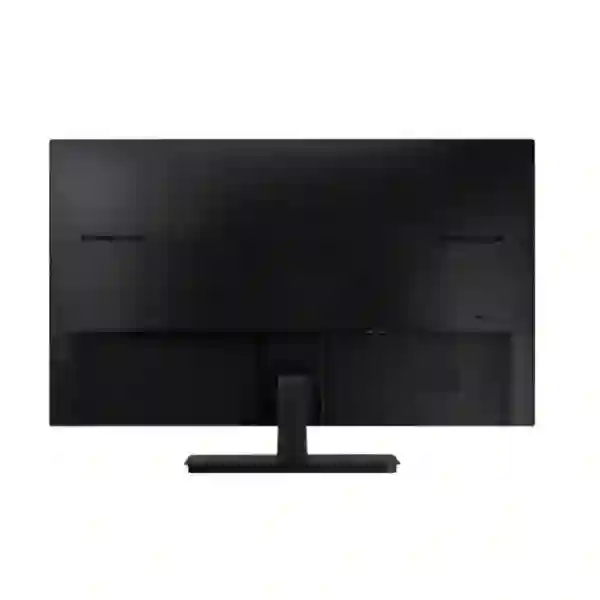
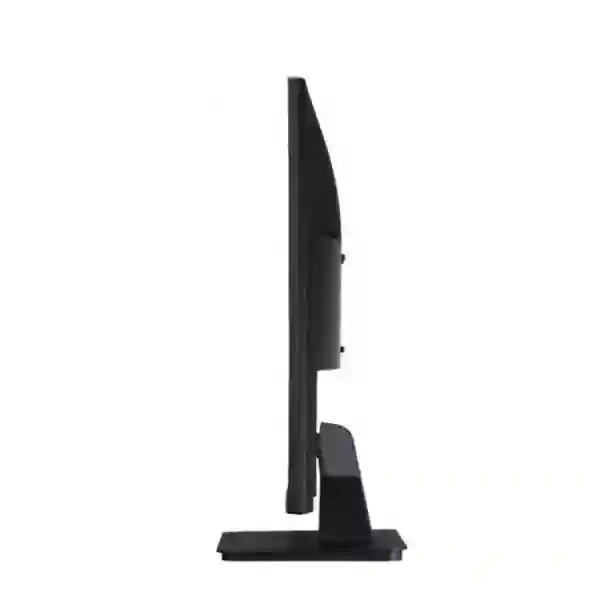
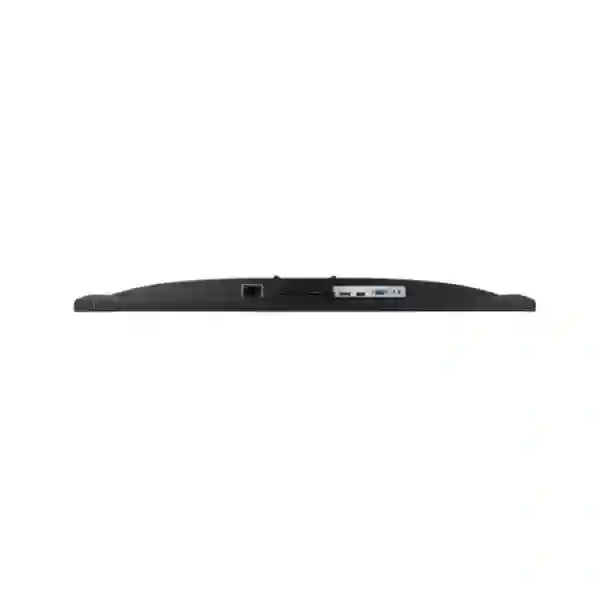
Hanwha Vision | Professional surveillance displays
Hanwha SMT-3215 32-Inch Full HD CCTV Monitor for Tanzania
Need a clear viewing screen for a CCTV recorder, reception security desk or monitoring workstation? The Hanwha SMT-3215 is a 32-inch-class LED monitor with Full HD 1920 × 1080 resolution, 60 Hz input support, HDMI, DisplayPort and VGA connectivity. Hanwha describes it as designed and tested for 24/7 operation, making it a relevant option to evaluate for staffed surveillance environments. Match the monitor to the recorder’s video output, screen layout, mounting space and local sourcing requirements before deciding.
Lifecycle note: Hanwha Vision’s US product listing labels SMT-3215 discontinued. This is not proof of its status or availability in Tanzania. Request confirmation of supply and any current replacement before procurement.
At a glance: verified technical specification
| Manufacturer and model | Hanwha Vision SMT-3215 |
|---|---|
| Display class and resolution | 32-inch class LED; Full HD 1920 × 1080; 16:9 |
| Supported maximum input format | 1920 × 1080 at 60 Hz |
| Brightness and typical contrast | 300 cd/m²; 4000:1 typical |
| Viewing angle and response time | 178° horizontal / 178° vertical; 20 ms typical |
| Video inputs | 1 HDMI, 1 DisplayPort, 1 VGA |
| Audio | Audio input, audio output and two built-in speakers |
| Panel-life specification | 30,000 hours |
| Power specification | AC 100–240 V, 50/60 Hz; 60 W |
| Operating environment | 0–40°C; 10–80% relative humidity, non-condensing |
| Dimensions with stand | 714.0 × 484.2 × 200.8 mm (W × H × D) |
| Dimensions without stand | 714.0 × 423.7 × 53.7 mm (W × H × D) |
| Weight | 7.28 kg with stand; 5.9 kg without stand |
| Mounting interface | VESA 100 × 100 mm |
Figures follow the manufacturer’s published model specifications. Confirm exact hardware revision, included accessories and current availability when requesting a quotation.
Who should consider this 32-inch CCTV display?
Consider the SMT-3215 when a security operator needs a dedicated screen for viewing a network video recorder, digital video recorder or compatible workstation. A 32-inch-class panel provides more physical viewing area than a compact desktop screen, which may help at a reception counter, warehouse control point, building security desk or operations room. The practical benefit depends on viewing distance and the number of feeds shown simultaneously. A larger screen is not automatically better when the operator sits very close, the desk is shallow, or the camera grid contains many small tiles.
The buyer’s first decision is whether Full HD output is sufficient for the actual monitoring workflow. If the purpose is seeing general movement, checking entrances, following activity across several feeds and reviewing incidents on a recorder, a 1920 × 1080 screen may be appropriate. If staff need to inspect many high-resolution feeds at once or read fine details from a distance, compare a higher-resolution display and the available recorder output modes. A 4K camera does not turn a Full HD display into a 4K monitor.
For Tanzania-based projects, practical selection should begin with the equipment already deployed: identify the recorder model, its working video-output resolution, physical monitor location and expected hours of operation. Then confirm the product’s actual procurement status, the seller’s commercial terms and whether a more current supported monitor would provide better value. The right purchase is one that works with the whole surveillance system, not simply one that has the correct screen size.
Why a purpose-designed surveillance monitor matters
Many camera installations end with a familiar problem: the cameras and recorder operate correctly, but the screen is inconvenient for day-to-day monitoring. It may be too small for the selected grid, positioned badly for staff, connected through the wrong adapter or set to a resolution that causes text and image scaling. Choosing the monitor deliberately helps address these everyday issues. The SMT-3215’s Full HD format, familiar connections and published operating specifications make it straightforward to assess against a basic surveillance-display checklist.
Hanwha Vision specifically states that this model was designed and tested for 24/7 operation. That statement is useful for installations in which a video wall position or guard desk stays active beyond normal office hours. It does not mean the monitor is immune to wear, screen retention, power problems or poor environmental conditions. Buyers should still plan ventilation, reasonable brightness, equipment upkeep and a method for reporting display faults. A continuously operated surveillance system also needs its recorder, networking and power arrangements reviewed separately.
A dedicated surveillance display should be judged by legibility rather than entertainment features. Easy recognition of the right camera view, stable physical installation and predictable input selection often matter more than features found on a gaming or multimedia monitor. The SMT-3215 lists a typical 20 ms response time, so it should not be positioned as a high-refresh, ultra-low-latency specialist screen. Evaluate it for observation, live preview and recorder interfaces, not tasks that require exceptional display-response performance.
Full HD detail: what 1920 × 1080 actually delivers
The monitor’s native Full HD resolution is 1920 pixels across by 1080 pixels high, in a 16:9 widescreen format. That matches a common output configuration on many recorders and computers. When the video source is configured to send a supported 1080p signal, the monitor can display its desktop or recorder interface without asking the panel to represent more pixels than it physically has. This helps keep menus, camera labels, timestamps and control icons at predictable sizes, subject to the software layout and scaling selected by the installer.
The key limitation is total screen information. Showing four cameras splits the available display area among four images; a nine-camera grid divides it further. A source that records in higher resolution may retain more detail in stored footage, but the live tile presented on the screen is constrained by the recorder’s layout, scaling and the display’s pixel count. For detailed investigation, an operator may need to expand one camera or use the recorder’s playback controls. Monitor selection and recording resolution are related decisions, not interchangeable specifications.
Before buying, ask which views must be visible concurrently and how far the viewer will sit from the screen. If the operator mainly observes a few priority cameras, this Full HD format may be entirely workable. If the requirement is a dense matrix of feeds with readable fine print, test the intended grid on a comparable 32-inch Full HD display or compare a monitor with more pixels. The goal is to choose appropriate visible detail at the actual working distance, not to overstate what a single 1080p output can show.
Brightness, contrast and sightlines
Hanwha lists typical screen brightness of 300 cd/m² and a typical contrast ratio of 4000:1. These values describe the display’s published characteristics, not a guarantee of ideal visibility in every room. Bright windows, direct reflections, dark room lighting, camera image quality and incorrect settings may all reduce how comfortable a particular scene appears. A monitor can have an adequate published brightness figure while being difficult to read when pointed toward strong light or installed opposite a reflective surface.
The stated viewing angles are 178 degrees horizontally and vertically. Broad viewing-angle figures are helpful when more than one operator may look at the screen or when a security desk has seating to one side. However, color, brightness and perceived contrast can still vary with position and lighting. For a shared monitoring station, test the actual sightlines rather than assuming the maximum theoretical angle will be equally pleasant for every user. Avoid mounting the display so high that staff must continually tilt their necks.
Place the screen with reflections, staff movement and cable access in mind. A shaded indoor control position is normally easier to assess than a bright public entrance with direct sunlight. Where the installation must face severe glare or unusually bright daylight, evaluate the site’s real lighting demands before ordering. The SMT-3215 should not be described as an outdoor-rated or high-brightness signage monitor; the published evidence supports an indoor LED viewing display with a defined operating-temperature and humidity range.
24/7 design, panel-life figure and realistic expectations
The manufacturer’s 24/7 design statement addresses the intended operating pattern, but it should be read alongside the panel-life specification of 30,000 hours. Panel life is an engineering specification, not a promise that the unit will operate for a fixed number of calendar years or remain trouble-free for every hour of that period. Actual service experience depends on brightness settings, ambient conditions, power quality, handling and other factors. A buyer comparing monitors should consider published intended use and the manufacturer’s lifecycle information together.
In a continuously staffed security room, brightness and static user-interface elements deserve attention. Camera grids, logos, timestamps and menus can remain in one position for prolonged periods. Appropriate display management and operator practices may help limit avoidable visual wear, but no monitoring policy can eliminate all aging. Consult the current manual for specific image-care settings and supported power-management behavior rather than assuming a setting exists. The product lists VESA DPMS compatibility; its behavior must still be checked with the connected source.
Reliable monitoring is a system property. If the power feed fails, the recorder stops sending output, the network goes down or the HDMI cable is disturbed, a 24/7-capable panel alone cannot preserve visibility. Include a practical fault-reporting process, recorder health checks and power planning in the wider security design. When choosing between this model and a newer alternative, make lifecycle support and replacement access explicit selection criteria, especially for premises where a blank monitor would disrupt the operator’s routine.
HDMI, DisplayPort and VGA connection choices
The SMT-3215 provides one HDMI input, one DisplayPort input and one VGA input. These three physical options make it worth considering where the recorder or workstation has a conventional monitor output. HDMI is often the simplest choice for an NVR or DVR that already supports the appropriate resolution. DisplayPort may suit a dedicated PC monitoring workstation. VGA can accommodate certain older analogue-display outputs from compatible devices, although its signal characteristics and image quality depend on the equipment and cable run.
Match ports rather than guessing compatibility. A recorder with HDMI output and a monitor with HDMI input is a promising starting point, but the source should still be configured to a format the screen accepts. Hanwha specifies maximum 1920 × 1080 at 60 Hz support for HDMI, DisplayPort and VGA. Some recorders can offer 4K or other output modes that a Full HD monitor cannot display as intended. During commissioning, select a supported 1080p output mode and verify that the image remains stable after reboot.
The three ports are input options, not a promise that the display shows three sources simultaneously. The model should not be marketed as a standalone multi-input video wall controller. If the requirement is to combine several recorders or create picture-in-picture layouts, verify external switching, an appropriate video management platform or a different monitor with the required functions. Likewise, do not treat the HDMI input as a network interface. IP cameras require compatible decoding, recording or workstation equipment before video is delivered to a standard monitor.
Connecting to NVRs, DVRs and monitoring workstations
A practical security-display arrangement often follows a simple signal path: cameras send their streams to a compatible recording or management system, the system prepares the live-view layout, and the system’s graphics or video output connects to the monitor. The SMT-3215 forms the display stage of that chain. It is not itself an IP video recorder, a camera decoder, network switch or storage device. Buyers should not expect to plug an Ethernet cable from a camera into this monitor and obtain a live picture.
For a Hanwha or other-brand NVR, verify the exact recorder’s output connector, supported screen resolutions and selected live-view configuration. Compatibility depends on electrical and signal standards, not just whether the recorder and monitor come from the same manufacturer. If HDMI is available, use an appropriate cable and keep the signal chain as simple as possible during initial testing. If conversion from another connector is needed, confirm the adapter handles the required direction, resolution and refresh rate.
A PC-based monitoring desk can also use the monitor if the computer’s output is suitable. In that case, the video-management application, operating system scaling, graphics hardware and workstation performance affect the final experience. An operator switching between recording software, incident reports and camera views may need more than one display. Plan display count and placement around the work, not merely the number of available video ports. Formal compatibility claims should be limited to tested recorder or workstation combinations.
Built-in audio and what it does not replace
Hanwha lists audio input and output connections and built-in speakers for the SMT-3215. This can be useful when the attached source delivers an audio signal and the monitoring workflow actually calls for audio. It does not mean that every connected camera, recorder or PC will automatically play audio. Camera microphones, recording rights, software settings, source configuration and the chosen connection type all determine whether sound is available at a particular desk.
Before specifying an audio-based monitoring workflow, establish whether audio is collected at all, whether the recorder or software passes it through, how operators control volume and whether headphones or separate speakers are more appropriate. In a shared reception setting, loudspeaker output may create unnecessary distractions or confidentiality concerns. Where operators need reliable voice communication, dedicated communication equipment may be required. The monitor is a screen with audio functionality, not a replacement for an intercom, public-address or two-way security communication system.
Published summaries of speaker power vary between the manufacturer’s short feature description and detailed specification. For this reason, the buying decision should focus on the confirmed presence of built-in speakers rather than a potentially confusing wattage claim. If speaker output is important to the project, request the latest exact-model documentation and test the relevant source. Audio suitability is a commissioning question that should be resolved before the security team depends on hearing an alert or recorded clip.
Desk placement, dimensions and wall mounting
The published dimensions with stand are 714.0 mm wide, 484.2 mm high and 200.8 mm deep. Without the stand they are 714.0 mm wide, 423.7 mm high and 53.7 mm deep. These measurements are useful for checking whether the proposed security desk, reception counter or wall area can accommodate the unit. Leave extra space for cables, ventilation, access and a comfortable view; the bare dimensions do not represent the total installation clearance required on site.
The monitor’s listed weight is 7.28 kg with stand and 5.9 kg without stand. Hanwha provides a 100 × 100 mm VESA mounting interface. That interface allows buyers to look for compatible mounting hardware, but it does not establish that a wall bracket, arm, fasteners or specialist installation is included. Confirm the fixing pattern, appropriate load rating, wall construction and installer recommendations before mounting. Avoid hanging a display from unsuitable partitions or installing it where cables are crushed against the rear housing.
An operator who spends long shifts viewing the same screen needs appropriate height, viewing distance and posture. A wider monitor can be awkward on a narrow desk; a wall-mounted position can create neck strain if it sits too high. Mock up the screen footprint or measure an existing position before purchase. Leave room for maintenance staff to reach the source selector and cabling without disturbing adjacent equipment. Physical fit, cable reach and safe support are just as important as matching the HDMI connector.
Electrical requirements and power continuity
Hanwha specifies AC 100–240 V, 50/60 Hz input and 60 W power consumption for the SMT-3215. That broad voltage range is relevant when evaluating the electrical requirements for a proposed installation, but it does not by itself certify any particular site’s wiring, plugs or protective equipment. The buyer should check the delivered power cable and local connection arrangements before commissioning. Electrical work should follow applicable rules and be carried out by suitably competent personnel.
For security monitoring, power continuity often matters more than a small difference between display specifications. If a guard is expected to see CCTV during a power interruption, consider how the monitor, NVR, network equipment and any supporting computer will be powered together. A backup solution sized only for the monitor may leave a screen lit with no useful video. Battery runtime should be designed from the full connected load, inverter or UPS efficiency, desired duration and battery condition; it should not be promised solely from the monitor’s 60 W figure.
Separate signal-quality problems from electrical problems during troubleshooting. A display that switches off entirely may require checks to the mains supply, protection device and power cable, whereas a lit screen showing no video may indicate the wrong input or an unsupported source format. Keep power and video cables organized and protected from accidental disconnection. For sites with unstable supply conditions, ask a competent installer to assess surge protection, grounding and backup power as part of the broader system.
Temperature, humidity and indoor installation planning
The manufacturer’s published operating-temperature range is 0°C to 40°C, with 10% to 80% non-condensing relative humidity. These environmental limits are especially important for equipment rooms, exposed reception desks and poorly ventilated enclosures. They are not claims of weather resistance. Do not place the SMT-3215 where rain, condensation, direct water exposure or uncontrolled heat could affect the equipment. If the proposed installation is outside the stated range, select a more appropriate display or change the operating environment.
Consider not only the outdoor weather but also the temperature at the monitor’s actual mounting point. Equipment enclosed in a small cabinet may experience higher internal heat than the surrounding room. Sunlight through glass can warm a display even when ambient temperature seems acceptable. Leaving ventilation space and avoiding heat-producing equipment immediately behind the panel are sensible design checks. Confirm any additional clearance instructions in the current installation manual rather than assuming one universal gap fits every mounting arrangement.
Tanzania projects may span air-conditioned control rooms, shaded indoor offices and more demanding warehouse or facility settings. Rather than claim one configuration is suitable everywhere, document the intended room conditions, expected duty cycle and monitoring staff arrangements. A procurement specification should state environmental expectations before purchase. If site conditions include persistent dust, moisture or unusually high heat, choose installation protection and hardware based on verified environmental ratings, not generic language about commercial durability.
How to plan camera grids that remain readable
A single large monitor can show one camera, a small set of priority views or a larger grid generated by the recorder. The number of cameras visible at once is primarily determined by the recording or management system; the monitor simply presents the output. For everyday monitoring, start with the actual tasks operators perform. Entrance control may need a clear primary image and a few secondary views. A loading area may benefit from a balanced selection of wide and close-up cameras. A complex site may require multiple screens or a separate incident-review workstation.
Grid density has a direct effect on how much of each camera the operator can see. Putting many tiles on a 1920 × 1080 panel does not increase total pixel count. Camera names, timestamps and software toolbars also take screen area. If essential details become too small, reduce the number of visible tiles, use a suitable split-screen arrangement or provide an additional display. The most effective grid is often the one staff can interpret quickly, rather than the layout with the maximum theoretical camera count.
Test the intended monitor position with the real camera interface. Ask whether staff can identify the correct camera, distinguish a person from the background, notice activity in peripheral tiles and enlarge footage promptly. Assess the lighting in the monitored scenes as well as the lighting around the display. Poor night-time video, incorrect camera exposure or heavily compressed source footage will not be corrected by buying a bigger screen. Display planning should support camera placement, recording quality and operator workflow together.
Reception, retail, warehouse and facility scenarios
At a reception desk, the monitor may display entrances, visitor access points and nearby public areas while staff also manage calls or visitor registration. The main questions are available desk space, screen brightness at the counter, convenient viewing angle and whether the live view remains readable from the operator’s normal seat. A 32-inch screen can be useful, but it should not obstruct the receptionist’s line of sight or expose sensitive images to unintended viewers. Decide where the display faces before ordering mounting accessories.
In a warehouse or logistics office, a supervisor may watch gates, loading bays, circulation routes and key storage areas. The important design decision is often which few views require attention at a given time. The recorder’s grid, event notifications and playback workflow matter as much as the panel specification. Dust, heat and cable routing should be reviewed carefully where the screen is placed near industrial activity. The published environmental range is a planning limit, not a promise of industrial enclosure protection.
For offices, accommodation facilities and larger buildings, a guardroom or monitoring post may be a more suitable destination than a public-facing desk. Operators may need a stable view throughout long shifts, access to incident playback and a sensible position for keyboards or controls. The SMT-3215 can be evaluated as a display component in these contexts, but no specific premises, installation service or local stock is implied. The final recommendation should follow the site’s security procedures and the capabilities of its existing recorder.
An easy pre-purchase compatibility checklist
First, record the exact NVR, DVR or workstation model and identify its display output. Do not rely on a generic statement that the security system supports HDMI; find the actual port and available signal modes. Second, confirm the operator’s preferred number of camera views and whether 1080p at 60 Hz is an acceptable output configuration. Third, measure the screen position and decide whether it will use a desk stand or a separately sourced VESA 100 × 100 mm mount. These checks remove several common sources of post-purchase difficulty.
Fourth, establish whether sound is needed and what equipment provides it. Fifth, document the room’s temperature, humidity, glare conditions, electrical supply and expected operating hours. Sixth, check whether the screen must remain active during a power outage and whether the recorder and network equipment will also remain operational. Seventh, confirm cable types, lengths and any conversion hardware. Adapters should be chosen by verified supported signal format, not by physical shape alone. Finally, have the person responsible for commissioning test the whole chain.
One more step is critical for this exact model: ask about current lifecycle status and local sourcing. Hanwha’s US listing describes the SMT-3215 as discontinued, while a separate regional product page still provides specifications. That difference is a reason to verify the actual supply channel rather than to conclude that new local units are certainly available or unavailable. Ask the supplier to identify the exact unit being offered, commercial terms, support arrangements and any recommended current-model substitute.
Installation and commissioning: a practical sequence
Before connecting the display, inspect the proposed location and the equipment to be used. Confirm that the surface or VESA mount supports the monitor, the outlet and power cable are appropriate, and airflow is not blocked. Position the monitor so that operators can view it comfortably and cables are protected. Connect a compatible HDMI, DisplayPort or VGA source. Begin with the simplest direct connection possible, because additional switches and converters introduce variables that make troubleshooting more difficult.
Power on the source and display, then select the correct monitor input. Set the source’s display output to a supported 1920 × 1080 mode, with refresh rate no higher than the model’s specified 60 Hz maximum. Check that the full recorder interface is visible and that camera tiles are not cropped. Review aspect ratio, scaling and software display settings if images look stretched. Test both live preview and playback, since the operator may use different interface layouts for each. Confirm that on-screen labels remain readable.
Where audio is required, verify the entire signal path and volume controls. Where unattended operation is expected, observe behavior following a normal restart of the recorder and monitor. Where backup power is part of the design, test the complete installation with an approved safe procedure. Record the chosen input, output setting, physical cable route and any special instructions for operators. A short commissioning record helps a future technician restore a known-good configuration after equipment changes or maintenance.
Avoiding common picture and signal problems
If the monitor powers on but shows no picture, start with the selected input, the source device and the physical connection. A recorder may be running while its HDMI output is inactive, or a computer may be set to another display. Try a supported output resolution before assuming the monitor is defective. A screen configured for Full HD may not accept an unsupported higher output mode. Where a long or converted cable is used, temporarily test a short, direct compatible lead to isolate the problem.
If the picture is present but unreadable, identify whether the issue is with the source or the screen. Small camera tiles may simply be a consequence of the selected grid; enlarge a camera to test. Soft text may reflect scaling, cable or source configuration. Reflections and room lighting may reduce visibility without any electronic fault. When only some cameras look poor, investigate camera focus, exposure, recording settings and network conditions rather than assuming every problem is solved by adjusting monitor contrast.
If audio is missing, confirm that the source actually produces an audio signal and that the relevant software has enabled it. If a wall-mounted display vibrates, sits unevenly or obscures ports, stop and check mounting hardware. If the display frequently loses power or becomes unusually hot, obtain qualified help rather than repeatedly restarting it. Avoid opening the casing or attempting unsupported repairs. The purpose of troubleshooting is to identify the failing part of the system without creating an electrical or mounting hazard.
Maintenance and operator care
A monitoring screen should be easy to inspect and maintain. Keep the area around the display clear, protect connected cables from foot traffic and desk movement, and periodically confirm that the intended source and camera grid are visible. Clean the panel only according to the latest manufacturer instructions and with an appropriate safe procedure. Do not apply excessive pressure, spray liquid into openings or assume cleaning agents used on windows are suitable for electronic display surfaces.
Operators should know the difference between a display fault, a recorder problem and a camera fault. A dark screen is not necessarily a loss of recording; a frozen camera tile is not necessarily a broken panel. Provide a simple escalation route so that staff report symptoms accurately, including whether the monitor power indicator is active, whether menus appear and which views are affected. An incident log can help the responsible technician identify recurring cable, source or power issues without replacing components prematurely.
For a screen intended to remain on for long periods, review brightness, operating hours and static layouts in line with the supported settings. Protect it from untrained adjustments that can leave the input on the wrong source. Keep accessible documentation for the exact installed hardware revision, not just a generic monitor guide. When maintenance is subcontracted, agree who is responsible for the display, mounting, source equipment and cabling. Clear ownership is often more valuable than an elaborate checklist no one follows.
Comparing the SMT-3215 with an ordinary office monitor
An office monitor may provide the same connector shape or Full HD resolution, so the choice is not simply professional versus consumer branding. Compare published operating duty, physical size, connection requirements, viewing characteristics, mounting interface and support lifecycle. Hanwha identifies the SMT-3215 as designed and tested for 24/7 use, which is a relevant differentiator for a continuously operated viewing station. However, it should not be treated as a guarantee of uninterrupted performance or as proof that every ordinary monitor is unsuitable.
A general office model may be attractive if the display is used for only a short part of each day or if its higher resolution and ergonomic adjustability better match the workstation. Conversely, a dedicated security display may be preferable when the operator values a known Full HD input configuration, straightforward connections and continuous-use positioning. Compare products using their actual current datasheets. Do not rely on a comparison where one monitor’s specifications are current and the other’s are merely assumed.
The more important question may be lifecycle. For a system expected to remain in service for years, available replacements, after-sales arrangements and standardized screen models deserve attention. Because the SMT-3215 carries a discontinued status on Hanwha’s US site, ask whether a newer Hanwha Vision monitor is appropriate for the project. A replacement should be matched on resolution, inputs, physical footprint, VESA pattern, environmental limits and operational requirements; do not assume a model number alone establishes equivalence.
What to request in a Tanzania quotation
A useful quotation request should specify Hanwha Vision SMT-3215 by exact model, the requested quantity and the intended use as a 32-inch-class Full HD surveillance monitor. State whether it will be connected to an NVR, DVR or PC, and provide the source’s output type. Include the mounting preference and whether a compatible stand or wall bracket is required. This allows the seller to respond to the real project instead of simply quoting a model name without confirming whether it can be sourced or installed appropriately.
Ask for written confirmation of current supply status, exact item condition, included accessories, commercial price, applicable local taxes, delivery arrangements and support terms. None of those items can be inferred reliably from an international datasheet. Clarify what happens if the model is no longer procurable, and whether a replacement would require different cables, footprint or display settings. If a procurement team uses formal approvals, include the manufacturer’s model description and relevant verified specifications in the internal evaluation record.
Where a screen will become part of a business-critical security setup, involve the person responsible for the recorder and installation before committing to purchase. They can confirm output modes, mounting, power and the intended layout. If the old monitor is being replaced, capture its dimensions, input choice and configuration so the substitute can be assessed efficiently. A complete request reduces the risk of receiving a screen that is technically sound but awkward to use in the existing surveillance station.
End-of-life awareness and alternative selection
Lifecycle information should appear in a buying decision, not be hidden after the technical table. Hanwha Vision’s US product page labels this model discontinued. The manufacturer’s regional page still shows product details, so those two observations should not be expanded into an unsupported global statement. They do, however, justify checking current supply and supported alternatives before a new installation depends on a specific monitor model. The status of the exact unit offered in Tanzania remains a separate verification task.
If the SMT-3215 is available through a legitimate channel and meets the documented system requirements, evaluate it on the terms actually offered. If it is not available, focus the replacement search on functional requirements: at least the needed screen size, suitable native resolution, compatible physical inputs, continuous-use suitability when necessary, safe mounting and acceptable indoor operating conditions. A substitute with more pixels may require a review of recorder output and operator viewing distance; higher specifications are not automatically more useful.
Ask for a current manufacturer datasheet for every replacement candidate and compare it with the existing environment. Check whether the replacement still supports any older VGA sources, whether the desk can accommodate its stand and whether the mounting arm’s rated capacity and hole pattern remain compatible. Confirm any new installation accessories separately. A clearly documented equivalent-product process is preferable to an unverified claim that all 32-inch security monitors are interchangeable.
Printable buyer and installer checklist
Use these questions in a procurement meeting or site survey. They identify the practical details that a datasheet cannot establish about an individual installation. A completed checklist also helps a supplier propose a current alternative if the original model is no longer available through the intended sourcing route.
- Confirm the exact recorder or workstation model and identify the active HDMI, DisplayPort or VGA output.
- Verify a supported Full HD output mode and the required camera-grid layout before ordering.
- Measure width, height, desk depth, viewing distance, mounting position and cable clearance.
- Specify whether sound is needed and test the actual audio path if it is.
- Check indoor temperature, non-condensing humidity, glare and intended operating hours.
- Plan electrical protection and any backup power around the whole CCTV system.
- Confirm the VESA 100 × 100 mm mount, load capacity and accessories where wall mounting is proposed.
- Request written confirmation of lifecycle status, procurement availability and exact commercial terms.
- Test the image, playback, restart behavior and operator usability before sign-off.
This checklist is a planning aid, not a substitute for the manufacturer’s installation instructions or an on-site electrical and mounting assessment. Record the answers alongside the quotation and commissioning notes so that the monitor’s purchase, connection and maintenance decisions remain traceable.
Frequently asked questions
What is the Hanwha SMT-3215?
It is a Hanwha Vision 32-inch-class Full HD LED monitor intended for displaying video from compatible external sources, including surveillance recorders and monitoring workstations. The model provides HDMI, DisplayPort and VGA inputs and has published 24/7 design-and-testing language. It is not a standalone network video recorder or an IP camera. For a CCTV installation, identify the source that will generate the video signal before selecting the display.
Is the SMT-3215 a 32-inch or 31.5-inch monitor?
It is marketed as a 32-inch-class monitor. Detailed specifications may use 31.5 inches for the panel’s measured diagonal. These descriptions are common ways of expressing a nominal product size and do not indicate two different product models. For fitting a desk, cabinet or wall, use the manufacturer’s physical dimensions rather than the rounded screen-class figure.
Can it display 4K video?
Its native display resolution is Full HD 1920 × 1080, not 3840 × 2160. A recorder that captures 4K footage may be able to send a supported 1080p output, but the screen cannot physically show a 4K image at full native pixel detail. Check the recorder’s available output settings and set a compatible format. A genuine 4K viewing requirement should be assessed with a 4K-capable monitor.
Can the monitor connect directly to an IP camera?
The listed video inputs are HDMI, DisplayPort and VGA. The model is not specified as having an Ethernet camera input or built-in IP-stream decoding. Typically, an NVR, compatible decoder or computer first receives and processes camera video, then sends a conventional display signal to the monitor. Confirm the actual system architecture rather than treating a camera’s network port as a monitor connection.
Is it suitable for continuous CCTV viewing?
Hanwha Vision states that the model was designed and tested for 24/7 operation. That supports considering it for continuously staffed surveillance work, but it does not promise fault-free operation or eliminate environmental and power requirements. Review the manufacturer’s published 30,000-hour panel-life figure, operating range, installation guidance and current lifecycle status alongside the actual intended duty cycle.
Which video connectors are provided?
The manufacturer lists one HDMI, one DisplayPort and one VGA video input. It also lists audio input and output connections. This gives installers several conventional source options, but the screen should not be assumed to display all inputs simultaneously. Select the correct input during setup and verify that the attached recorder or computer produces a supported 1920 × 1080 signal.
Does the display include speakers?
Yes, built-in speakers are specified, together with audio connections. Whether sound is heard depends on the source equipment and how audio is carried and configured. Confirm that the recorder, software and selected connection provide the audio needed for the project. Speaker functionality does not replace a dedicated intercom or other communication system.
Can the SMT-3215 be wall-mounted?
The published mounting interface is VESA 100 × 100 mm, with a listed monitor weight of 5.9 kg without its stand. Choose a bracket and fixings appropriate to the actual structure and installation requirements. A VESA interface does not mean that a wall bracket is included. Check cable clearance and viewing height before final placement.
What are its power requirements?
Hanwha lists AC 100–240 V at 50/60 Hz and a 60 W power-consumption specification. Confirm the appropriate supplied cable and local electrical connection. If monitoring must continue during a power outage, size any backup solution for the display and the recorder, network equipment and other essential components. Do not infer battery runtime from the monitor figure alone.
Will it work with a non-Hanwha NVR or DVR?
Potentially, if the external recorder provides a compatible signal through one of the supported inputs. The brand name is less important than the actual output connector, format, resolution and refresh rate. Without a specific recorder model and a successful signal test, universal compatibility should not be promised. A simple direct HDMI test at a supported output mode is often a sensible starting point.
Is the Hanwha SMT-3215 discontinued?
Hanwha Vision’s US product listing marks the model discontinued. A separate regional manufacturer listing continues to show specifications. The available evidence therefore supports a lifecycle caution, not an unverified claim about inventory in Tanzania. Request written confirmation of supply, product condition, support arrangements and any suggested current-model alternative before placing an order.
What is the price of the SMT-3215 in Tanzania?
No verified Tanzania price is provided here. Exact pricing, applicable charges, stock condition, fulfillment arrangements and support terms need to come from a current quotation for the target listing. Avoid copying amounts from overseas sellers or converting foreign prices into Tanzanian shillings as if they were a local offer. Provide the model, quantity and installation requirements to receive a meaningful response.
How many cameras can be shown at once?
That depends on the NVR, DVR or monitoring software that creates the split-screen layout. The monitor displays the incoming image and does not itself determine the number of live camera windows. Larger grids make each view smaller within the available 1920 × 1080 pixels. Choose a grid that keeps the highest-priority views readable at the operator’s normal viewing distance.
Is this monitor intended for outdoor installation?
The available manufacturer’s specifications provide an indoor-style operating-temperature range of 0–40°C and a non-condensing humidity range. They do not establish an outdoor weatherproof enclosure rating. Do not infer that the screen tolerates rain, spray or exposed mounting. If the viewing point has difficult environmental conditions, assess an appropriate protected indoor location or select hardware specifically rated for those conditions.
What should a replacement monitor match?
Compare screen size and physical footprint, native resolution, HDMI or other required inputs, continuous-use suitability, VESA mounting pattern, weight, operating environment and the requirements of the recorder. A replacement may look similar but lack a necessary connector or require new brackets. For a long-term project, also review current manufacturer lifecycle and service information before purchasing.
What information is needed for a useful quote?
Share the exact model name, quantity, site use, source equipment, desired connection, stand-or-mount preference and required operating pattern. Ask for the offered item’s condition, availability, included accessories, support terms and total commercial quote in writing. If the SMT-3215 is no longer available in the intended market, request a documented alternative based on those requirements rather than a generic substitute.
Choosing the right CCTV monitor is a system decision
A useful security display fits its operator, recorder and installation environment. The Hanwha SMT-3215 provides a verified Full HD screen specification, conventional HDMI, DisplayPort and VGA input choices, a 100 × 100 mm VESA interface and manufacturer positioning for 24/7 operation. Those are practical reasons to evaluate it for a CCTV viewing desk. They should not be stretched into promises about camera compatibility, outdoor durability, uninterrupted operation or Tanzania stock.
Before committing, check the exact output format, camera layout, physical mounting requirements, power plan and lifecycle implications. Where continuous viewing matters, ask how a failure will be detected and what replacement equipment can be obtained. This is particularly important because the manufacturer’s US catalogue flags this model as discontinued. A newer display may provide a better supported path if the original unit cannot be sourced on suitable terms.
Request a product and compatibility quotation using the complete site requirements. Ask for confirmation of the exact SMT-3215 offering or a documented alternative, with the relevant datasheet, availability and commercial conditions. This provides a reliable basis for buying a surveillance monitor in Tanzania without relying on unsupported stock, price or delivery claims.
Request a compatibility and sourcing quote
Specify Hanwha Vision SMT-3215, the quantity, your recorder output, mounting preference and intended operating hours. Ask FourTeck Tanzania to confirm whether this exact model can be sourced and, if necessary, recommend a current compatible alternative. Pricing, delivery, accessories and support terms should be confirmed in the actual quotation.
Next step: request a product quotation with your equipment and installation details.




Reviews
There are no reviews yet.