
Hanwha Vision · IP Audio
Hanwha SPA-P100W IP Pendant Speaker – White
Network-powered announcements, SIP paging and background audio for suitable commercial and institutional interiors. Evaluate this suspended speaker for your Tanzania site with a clear plan for cabling, mounting and speech coverage.
10W Class D amplifier · PoE / PoE+ · Two-way audio · 101 dB maximum on PoE+
Essential specifications at a glance
Figures are manufacturer-published specifications; project performance, compatibility and commercial availability must be checked for the intended deployment. This is not a weather-rated speaker based on the published IP-code field.
At a glance: when to shortlist it
Potentially suitable
- Open-ceiling indoor retail and reception areas
- Routine announcements and compatible network paging
- Scheduled or locally stored prerecorded messages
- Sites with designed PoE / PoE+ networking
Needs a different assessment
- Rain-exposed or washdown environments
- Mandatory certified voice-evacuation systems
- Unverified PBX/VMS or proprietary paging functions
- Built-in Swahili text-to-speech requirements
A practical IP speaker for the right ceiling
The Hanwha SPA-P100W IP pendant speaker is designed for spaces where staff, visitors or customers need intelligible spoken information delivered from a networked audio endpoint. Unlike a conventional passive speaker wired back to a central analog amplifier, it combines a speaker assembly, internal amplification and a network connection in one suspended unit. That changes the design conversation: an installer must consider data cabling, network access and PoE power as well as the familiar questions of sound coverage, mounting and room acoustics.
The white pendant body can complement open-ceiling retail, hospitality, institutional and commercial interiors. Its function is broader than music playback: the manufacturer describes scheduled messages, two-way audio, text-to-speech and event-related integration. A good design still begins with the actual communication requirement. The number of units, paging workflow and control system cannot be determined from the model number alone, and one speaker should not be assumed to cover every room or floor.
What this model can and cannot replace
Choose this model when an IP endpoint makes sense, not simply because an existing building needs another loudspeaker. It is an appropriate candidate for network-driven public-address messages, staff paging, routine announcements and compatible background-music workflows. The supported SIP functions and software interfaces make it interesting in buildings that already operate an IP communications or video-management environment, subject to a compatibility check for the actual versions and features in use.
It is not a 100-watt amplifier, and the characters P100W should not be interpreted as an amplifier rating. The specified onboard amplifier is 10 W. This speaker is also not a substitute for a certified fire voice-evacuation system merely because it can play a warning message. Life-safety design requires separate assessment of applicable standards, supervision, redundancy, intelligibility and local approvals. Obtain specialist sign-off for regulated alarm or emergency applications.
Understanding the 10W amplifier and sound levels
Hanwha specifies a built-in 10W Class D amplifier, 91 dB sensitivity at one watt, a frequency range of 130 Hz to 20 kHz measured at minus 10 dB, and a two-way speaker assembly. The listed maximum sound pressure level is 97 dB when powered through regular PoE and 101 dB through PoE+. These are product performance figures, not a promise that a listener at the back of a particular hall will experience either level.
Real speech intelligibility depends on distance, speaker height, reverberation, nearby machinery, background music level and orientation. In an echoing space, adding volume may not fix unclear speech; more appropriately placed speakers running at lower levels may work better. Use the manufacturer figures to shortlist equipment, then assess the listening area and verify it during commissioning. When specifying a project, identify whether regular PoE or PoE+ will power each endpoint because that affects the published maximum output.
Why PoE and PoE+ matter
This endpoint supports IEEE 802.3af PoE Type 1 Class 3 and IEEE 802.3at PoE+ Type 2 Class 4. One correctly installed Ethernet run can therefore supply both network connectivity and power from a compatible switch or injector. That simplifies some installations by avoiding a separate local mains power adapter near every hanging speaker. It does not eliminate the need for a suitable power source at the network equipment rack.
Before purchasing switches, calculate the total PoE budget against the number of speakers and other connected devices. Allow margin for startup and future additions, consult the manufacturer operating-power requirements, and select the intended power mode. Do not treat the switch’s stated total budget as available independently at every port. If the building experiences electricity interruptions, consider whether a properly sized UPS is required for the switching, router, control server and associated equipment. UPS runtime is a project-specific calculation, not a product feature.
Network architecture for reliable paging
The specification identifies a 10/100 Base-T Ethernet interface and common IPv4 services, including DHCP, DNS, NTP and SIP. For a single speaker, the wiring may be straightforward; a multi-zone installation needs an IP addressing plan, switch port allocation, management access and clear responsibility for system configuration. Verify that the chosen controller and network environment support the exact feature set required rather than assuming that sharing a protocol automatically ensures full interoperability.
Site teams should discuss segmented networks, traffic prioritisation where appropriate, time synchronisation, resilient switching and the effect of firewall rules on audio. Paging is often time-sensitive: delayed or blocked messages can confuse users even if a speaker is acoustically capable. Record the final IP addresses or address reservations, device labels, switch ports and zone assignments in handover documentation so that support personnel can troubleshoot later without tracing every cable from scratch.
A pendant enclosure suited to open ceilings
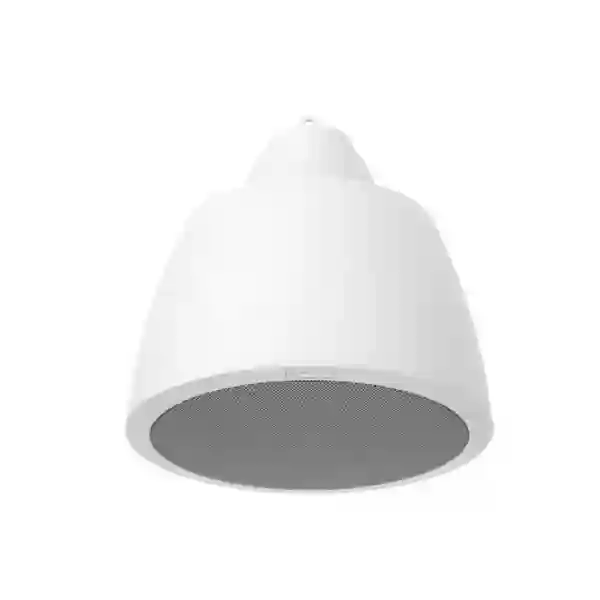
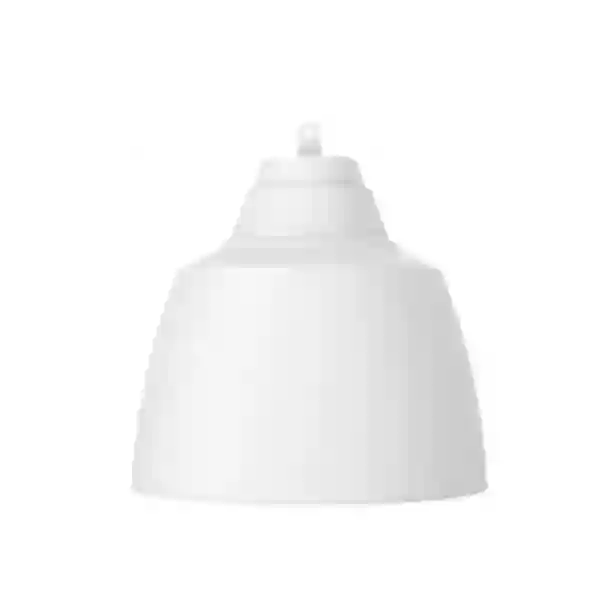
The speaker measures approximately 269 mm in diameter and 256 mm high, with a listed weight of 2.1 kg. Its hanging form can be useful below exposed services or high ceilings where a recessed flush-mount speaker would not fit naturally. Designers can position it closer to listeners while keeping the larger room layout open. White is the colour of this exact SPA-P100W model; another colour variant should be treated as a separate product rather than an interchangeable SKU.
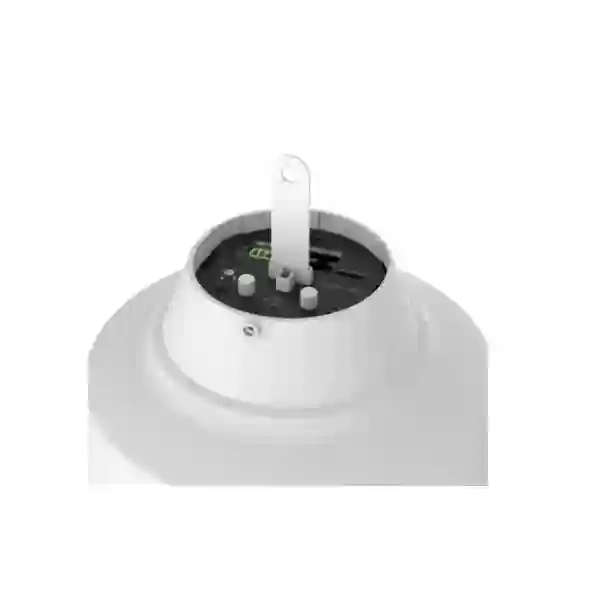
Confirm the approved suspension hardware, structural attachment point and any secondary retention requirements against the current installation manual and the building’s own safety practices. The ceiling grid, cable tray or decorative panel should not be assumed to support the speaker load. Plan for cable strain relief, safe access for maintenance and sufficient clearance from sprinklers, lights, ventilation ducts or moving machinery. Mounting details must be approved for the actual building conditions.
Matching acoustic coverage to the floor plan
The manufacturer lists a nominal coverage pattern of 130 degrees at 1 kHz and 60 degrees at 4 kHz. These are frequency-dependent characteristics, not one fixed cone of perfect audibility. High-frequency consonants contribute strongly to speech clarity, so changes in listener position and distance can matter even when general sound is audible. A coverage study should prioritise the occupied listening plane rather than merely the ceiling footprint.
During a site walk, note suspended ceiling height, partitions, aisles, hard floors, glass, exposed roof sheets and habitual noise sources. Plan for speech intelligibility in the busiest normal conditions rather than only during a quiet test. In wide or elongated areas, distributing multiple endpoints may allow better results than forcing one loudspeaker to operate at maximum level. Build physical zoning around meaningful functional areas, then use network control to decide which speakers receive which messages.
Day-to-day announcements and staff paging
A practical use for a network pendant speaker is making announcements that need to reach a defined audience without requiring staff to move into the room. Examples include opening-hour reminders, collection instructions, meeting notices, queue updates, housekeeping messages and routine operational changes. The content should be short, audible and relevant to the people in that area. Long or frequent interruptions can reduce attention and annoy staff and visitors.
Design a paging policy as well as the technology: who may speak, what equipment they use, which zones they can select, and which message has priority if several sources compete. The product supports SIP and integration-oriented features, but the exact priority behaviour and control workflow should be tested with the chosen software, telephone equipment or Hanwha audio controller. Name the responsible administrator and maintain a simple process for changing users or zone permissions.
Background music without overwhelming speech
The manufacturer identifies background music as a supported application. For a shop, reception area or hospitality interior, this can reduce the need for a separate speaker network when the planned system and audio expectations are compatible. Music listening quality still depends on the source material, speaker location, acoustic environment, equalisation options and operating level. A commercial paging speaker should not automatically be evaluated as if it were a dedicated high-fidelity entertainment system.
Set acceptable background levels during a real site trial and make sure important announcements remain understandable. Establish how a message interrupts, ducks or resumes any music stream within the actual controller workflow. Any music broadcast in a commercial place may require applicable usage permissions or licensing from rights holders; that assessment sits outside the hardware specification. Also define quiet hours and staff controls so that music does not spill into classrooms, meeting spaces or neighbouring tenants.
Two-way audio and SIP conversations
The product family advertises two-way audio, and the specific device lists SIP-related capabilities and an embedded microphone function. This makes conversational paging or communication scenarios worth considering where an operator may need to speak and listen through supported equipment. However, it is important to distinguish a published feature from a complete turnkey intercom installation. Audio routing, registration, codec negotiation, echo behaviour and user permissions are affected by the system into which the speaker is integrated.
The vendor lists testing with certain SIP clients and an Asterisk PBX, plus common voice codecs such as PCMU and PCMA. This is evidence of supported interfaces, not proof that every version of every PBX works without configuration. Before deciding on an intercom use case, test a call in both directions, verify audio quality and confirm the call setup, control permissions, fallback handling and any privacy obligations associated with microphone use.
Integrating with existing business communications
An organisation that already has IP telephony may ask whether a staff extension can page a speaker directly. The answer requires a review of the deployed PBX, SIP registration method, authentication, codec support, routing rules and the requirement for individual versus group paging. The published SIP support gives engineers a starting point but does not replace an interoperability test. Features such as multicast, call transfer or advanced PBX-specific paging should not be promised unless documented for the intended configuration.
Agree in advance whether calls are initiated from desk phones, a dedicated microphone, a softphone or an audio controller. Ask who needs access after hours and how misuse will be prevented. For multi-site organisations, inspect latency, firewall traversal and WAN resilience before assuming that audio will behave like an entirely local LAN. A demonstration of the actual user workflow is more useful than a generic claim of universal compatibility.
Event-triggered messages and dry contacts
The device specification lists one dry-contact input and one normally open dry-contact output, along with virtual-contact and event/preset capabilities. These interfaces can be valuable for projects in which an authorised signal should trigger an informational message or a related action. An installer may use them as part of a more comprehensive supervised control design, but the actual contact wiring, electrical ratings, allowable signal types and programming must be verified in the current installation documentation.
Write down the event source, expected speaker behaviour, message text, target zone, acknowledgement process and test condition before integration begins. If the input remains active, determine whether the message repeats or stops and how the controller handles other priorities. Avoid presenting an ordinary dry-contact integration as a certified emergency alarm connection. Any integration with fire protection, evacuation or other life-safety plant must be separately engineered and approved by the competent specialists.
Using audio alongside video monitoring
Hanwha describes IP audio working with surveillance systems so that selected events may initiate spoken notifications. In a properly designed project, an operator might use a camera-related event to direct people to a reception desk or to communicate an operational instruction. This can complement camera monitoring by providing a voice channel, but it does not transform the speaker into a camera, recorder or automatic threat-detection product.
If the intended design involves a video-management platform, first identify the camera model, event logic, VMS version, licensing and required audio controller. Verify that each component can perform its specific task and that the event mapping is documented. False triggers can create needless noise, so test both genuine and non-actionable events. Consider whether notifications require operator approval and who is accountable for message content. Never assume an audio warning alone will secure a facility.
Scheduling messages to fit operations
The published feature list includes a scheduler function. This is useful when a predictable announcement must occur at a planned time, such as the start of a shift, a service closing reminder, a visitor notice or a scheduled facility message. Scheduled playback can save time, but only when the system clock and time zone are configured correctly and the content stays current. A routine reminder should not conflict with a live announcement that has greater operational priority.
During setup, document the selected schedule, local time zone, source audio, recurrence conditions, exceptions and responsible editor. Test the behaviour after a power cycle and after network connectivity is interrupted and restored. If the deployment relies on a separate controller or server, confirm whether the schedule runs there or on the endpoint. That distinction affects troubleshooting and resilience and must be verified against the installed software rather than inferred from the speaker name.
Stored audio and supported media formats
The product lists 1 GB of built-in memory and a microSDHC slot that supports cards up to 32 GB, with a manufacturer note identifying a supported card type. It also lists WAV and MP3 playback, mono or stereo audio, bitrates from 64 to 320 kbps, and sampling frequencies from 16 to 48 kHz. These specifications support prerecorded messages as well as appropriate music material, but storage capacity does not indicate an unlimited number of simultaneous playlists or scheduled events.
Organise messages with descriptive file names, language labels and revision dates so operators can identify the right recording. Use clear recordings at consistent loudness and test them through the installed speaker, not only headphones. Replace outdated files after policy or operating-hour changes. The file storage and playback workflow should be verified with the chosen controller and firmware, especially if the deployment will depend on local audio during a network outage.
English text-to-speech and Swahili planning
The listed built-in text-to-speech languages are English in US and UK variants, German, French, Spanish and Russian. Swahili is not on that published list. For a Tanzania project that needs spoken Kiswahili instructions, do not assume the device can convert typed Swahili text into natural speech by itself. A suitable alternative may be an approved prerecorded Swahili voice file in a supported format, subject to testing the intended playback and scheduling workflow.
Many organisations need both English and Swahili messages. Prepare language-appropriate scripts, use a skilled speaker for recordings, check pronunciation of place names and technical terms, and have a local reviewer confirm meaning and tone. Decide whether to play both languages sequentially or direct them to different zones. Keep messages brief enough to be understood without overwhelming an audience. Changes to safety-related wording should follow the organisation’s approved communication process.
Security and access administration
The manufacturer lists password-protected roles, access logs and supported authentication mechanisms. Those features are useful only when administrators configure and maintain them responsibly. A speaker connected to an enterprise network should be treated as an IT endpoint with an owner, authorised users, documented firmware version and defined management route. Avoid shared default credentials and restrict configuration access to personnel who actually need it.
Plan appropriate network segmentation, secure password handling, backup of available configuration settings, and a procedure for reviewing security advisories. Do not expose management interfaces to the public internet simply to make remote paging convenient. If the design needs access from another location, assess a controlled network path with the organisation’s security team. Retain a change log for new schedules, audio files, SIP accounts and contact-trigger mappings. An audit trail can help investigate unexpected broadcasts or configuration mistakes.
Monitoring the speaker after installation
The specification includes a built-in speaker-test function using a graphic level meter, connection verification and system logging. These functions can help support staff determine whether the endpoint is reachable and whether audio processing is working as expected. They are valuable diagnostic tools, but they should not be treated as proof that every listener can hear a message or that a loudspeaker assembly is physically sound in every possible failure scenario.
Create a routine operational check that covers reachability, time synchronisation, audio volume, representative announcements and any attached control signals. For installations with several zones, test one endpoint at a time as well as whole-zone playback. Record incidents with the device label, software or firmware version and recent configuration changes. Confirm whether central monitoring or alerting requires separate software. The procurement decision should consider how the customer will support the system after handover, not only its initial features.
Tanzania site survey: what to measure
Before specifying quantities for a Tanzania premises, gather the floor plan, ceiling heights, occupied zones, intended message types and expected ambient noise. Also assess the available copper network, patch-panel capacity, switch locations and practical cable routes. In buildings with exposed structures, the speaker’s pendant form may be aesthetically and acoustically useful, but mounting approval still depends on the actual structural conditions. A photo alone is not enough to calculate speaker spacing.
The site’s power reliability, equipment room ventilation and protection of network switching can materially affect operation. Where there is a risk of humidity, dust or water exposure, check the real conditions rather than assuming a published operating-temperature range makes the unit weatherproof. Confirm who controls the building network and whether devices can receive a dedicated VLAN or IP reservations. Record these details in a design brief so equipment selection can be reviewed before ordering.
Designing speaker zones for clear communication
A zone should represent the audience that ought to hear a given message. For example, a reception area, a warehouse picking floor and an office corridor may need different announcements even within one property. Think through the organisation’s daily activities and map them to independent control groups. The number of zones and speakers achievable with any controller depends on its published capacity, software version and network design, not only the SPA-P100W’s hardware specifications.
Start with a simple zone diagram showing the endpoint label, mounting position, switch connection and expected operator control. Decide which messages should go to one zone, a group of zones or an entire site. During testing, confirm that a targeted message does not unexpectedly play in the wrong part of the premises. Review how new zones will be added later and whether the same network architecture will support future extension without replacing core equipment.
Retail stores and customer-facing spaces
In a shop, showroom or commercial reception, the speaker can be considered for greetings, closing notices, queue instructions and background audio. A suspended form can sit naturally beneath an open retail ceiling while giving designers flexibility over placement. The key requirement is not maximum volume but communication that is intelligible without becoming disruptive. Ask staff where customers gather and where they routinely miss spoken announcements.
A retail design should separate promotional playback from essential operational communication. Configure volume, timing and approval of recorded messages so content remains relevant to the business. If the retailer wants automatic event announcements, confirm what generates those events and who can edit the content. Also check whether music is permitted in the business setting. On delivery, perform listening tests during trading activity because an empty store may not reveal its true ambient-noise conditions.
Schools, colleges and training facilities
Education environments may benefit from scheduled class notices, campus information, reception paging and operational reminders. An IP pendant speaker may be appropriate in suitable common areas with open ceilings, provided its coverage and mounting meet the site design. The ability to store and schedule voice files is useful for recurring announcements, but different parts of a campus often require different communication rules.
Coordinate proposed audio zones with teachers, administrators and safeguarding policies. Avoid placing regular announcements where they disrupt examination rooms or quiet study unless there is a clear operational need. Review whether microphone or two-way features are appropriate and how access will be restricted. If the institution wants the system to deliver emergency instructions, a competent specialist must assess the complete regulated communication system; buying this speaker alone does not establish compliance or readiness.
Hotels, restaurants and hospitality interiors
A hotel lobby, restaurant circulation area or conference venue may want gentle background audio combined with occasional service information. The pendant design can be useful in interiors that expose the building structure, where a flush ceiling speaker is difficult to install neatly. Before selection, determine whether the emphasis is speech intelligibility, low-level music or both. These goals can call for different speaker placement and volume settings.
In hospitality spaces, guest comfort deserves as much attention as the published sound-level figure. Test speech at normal operating levels while staff are working and customers are present. Set schedules that avoid unnecessary late-night messages. If an event room needs temporary zoning, plan how operators will select and confirm the correct recipients. The site should also assess the right to use recorded background music and make sure it is easy to interrupt with approved operational information.
Warehouses and commercial work areas
Warehouse and logistics projects often need staff paging, shift notices and instructions that reach the right aisles or sections. A ceiling-suspended endpoint can be considered in appropriate protected spaces, but warehouses vary widely in height, noise, dust, temperature and structural access. The manufacturer-rated 101 dB maximum under PoE+ should not be interpreted as a guarantee of intelligible speech over forklifts, conveyors or other machinery.
Begin with the noise profile at representative operating times, then assess the speaker height and orientation. Large or tall spaces may need more numerous, strategically placed speakers, and some environments may be better suited to a different Hanwha form factor. Confirm the physical suitability of the enclosure and hardware, especially where objects, moisture or cleaning equipment can reach the device. Functional acceptance should use intelligibility and correctly targeted messages, not just a test that produces loud sound.
Offices, meeting facilities and shared buildings
In offices, the strongest application may be targeted operational paging rather than continuous music. A reception desk could need a short message in a waiting area while facilities staff need a different instruction in a service corridor. Network zoning can help avoid broadcasting every notice everywhere. In open-plan offices, speaker placement should take speech privacy and concentration into account as well as audible coverage.
For mixed-use or multi-tenant buildings, establish who owns and administers the endpoint network. An administrator for one tenant should not automatically have permission to page another. Use agreed naming, roles and configuration controls for building-wide messages and local messages. Where the organisation relies on SIP calling, test its actual business telephone environment before approving equipment quantities. A clear operational design prevents an otherwise capable audio device from becoming a source of unwanted interruptions.
Environmental limits and indoor use
Hanwha lists an operating temperature range from minus 20 to plus 50 degrees Celsius and relative humidity from 10 to 85 percent, non-condensing. Its specification does not give this model an IP enclosure rating. That matters when a designer is comparing indoor pendant use with exposed outdoor or washdown applications. The temperature figure alone is not permission to install the unit in direct rain, spray, persistent condensation or heavy airborne contamination.
For Tanzania properties with open-sided spaces, covered loading bays or humid processing areas, inspect the actual exposure and review the appropriate device class with the project engineer. Protect connections and wiring to the required installation standard. If the site needs outdoor paging or a more rugged position, compare a purpose-specified horn or other speaker with relevant documented protection. Avoid assuming all speakers in the same IP-audio family share the same enclosure rating.
Choosing between pendant, wall, ceiling and horn designs
The SPA-P100W is one form factor within Hanwha Vision’s wider IP audio range. Pendant speakers offer a suspended solution for spaces with open or impractical recessed ceilings. A flush in-ceiling design can offer a different visual result where there is an appropriate ceiling void. A wall-mounted model may better align with corridors or vertical surfaces, while a correctly rated horn-type device may be more appropriate when directional projection or tougher environmental conditions are required.
The right comparison is based on acoustics, mounting geometry, environmental protection, required network features and operational workflow. Do not assume that swapping speaker shape alone preserves coverage or power requirements. For each candidate, use its own current datasheet, check the control-system version and confirm regional supply separately. If buyers need multiple types across one site, prepare a coordinated zone plan so the equipment behaves as one communications system.
Implementation checklist before ordering
Give the project team a concise list of decisions rather than asking them to estimate quantities from pictures. Identify the room and audience, ceiling type and height, operating noise, required languages, message types, intended controller, power mode, Ethernet route, switch budget, mounting method and maintenance access. These inputs will determine whether the SPA-P100W is suitable and how many endpoints may be needed.
Also confirm the authorised speaker operators, network security owner, expected event integrations, whether scheduled audio must continue during connectivity problems and what constitutes a successful installation test. The quote should distinguish speakers from mounting accessories, PoE network equipment, software or controllers, configuration labour and site testing. Pricing and supply are intentionally not stated here because they have not been verified for the exact Tanzania listing or project.
Commissioning sequence for installers
Start with physical inspection and an approved mounting plan. Check the proposed cable route, label both ends of the Ethernet link and confirm the switch port’s power capability. Once installed, verify network link, discover or assign the device address according to the site’s policy, and secure administrative credentials. Record the firmware version and ensure that the system uses the intended local time zone.
Next, configure the relevant SIP or audio-control workflow and load representative audio files where required. Establish zone assignments, playback levels and authorised user roles. Test a routine announcement, any two-way function, scheduling and event trigger separately so errors can be isolated. Finally, simulate realistic operating conditions, record results and correct coverage or workflow problems before handover. Follow the current manufacturer manual for specific buttons, menus, electrical contact ratings and safety instructions, as software interfaces can change.
Acceptance tests that protect the investment
An audio system should be accepted against a written checklist rather than an informal comment that the speaker sounds loud. Test speech from typical listener positions, including places at the edge of coverage. Repeat testing during representative background activity. Make sure the correct language recording plays, levels are comfortable, timing is accurate and zone selection is unambiguous. Verify that an unauthorised operator cannot change settings or broadcast without permission.
Check recovery after ordinary network or power disruptions in a controlled test, remembering that results depend on the wider system and backup arrangements. Validate logs, endpoint naming, administration records, current configuration backups and support ownership. Where an external SIP platform is used, document the exact interoperability configuration. Keep the acceptance sheet with the project record so later maintenance or refurbishment can be assessed against a known working baseline.
Maintenance and lifecycle planning
Routine care for a network audio endpoint combines a visual inspection with simple IT and listening checks. Inspect the suspended unit for damage or looseness, review cable and connector condition where safely accessible, and test a sample announcement at the expected level. Check that scheduled files are current and that accounts belonging to former staff have been disabled. Replace outdated bilingual messages when business procedures or operating hours change.
The organisation should also monitor manufacturer documentation for applicable firmware and security updates, following an approved change-control procedure. Test updates in a controlled way where possible, because software changes can affect integration settings. Maintain spare configuration records and a list of installed models and positions. Procurement teams should confirm the applicable commercial warranty, support process and local supply terms directly at quotation; no particular Tanzania warranty or response time is assumed here.
What to include in a Tanzania quotation request
For a useful quotation, provide the product name SPA-P100W, required number of endpoints if known, site type, ceiling characteristics, approximate room dimensions, typical noise level and current network equipment. State whether the objective is staff paging, announcements, background music, two-way SIP communication or a combination. Include any requirement for pre-recorded Swahili messages so the supplier can distinguish it from built-in text-to-speech.
Ask the supplier to identify all separately required items and services: appropriate mounting hardware, suitable PoE or PoE+ infrastructure, controller or software compatibility, configuration, cabling, testing and training. Request confirmation of current stock or procurement lead time, price in the offered currency, delivery conditions and warranty in writing. Those commercial details vary and are not implied by the product’s technical specification. The goal is an accurate project bill of materials rather than an unsupported promise based on a single component.
Common buyer questions
Is SPA-P100W a 100W speaker? No. The verified product is a white IP pendant speaker with a built-in 10W Class D amplifier. The model designation is not a power rating. The manufacturer lists different maximum sound pressure figures depending on whether the speaker receives regular PoE or PoE+.
Does it need a separate amplifier? The device includes its own amplifier. A complete deployment still needs compatible network power and whatever paging, scheduling, SIP or control elements are required for the intended workflow. A site design may need additional switches, controllers, configuration or licences, depending on the solution.
Can one Ethernet cable carry data and power? Yes, provided the installation uses compatible IEEE 802.3af or 802.3at PoE infrastructure and follows the manufacturer’s cabling guidance. Confirm the switch’s per-port capabilities and total available power budget for all connected endpoints.
Will it automatically speak Swahili text? The published built-in TTS language list does not include Swahili. A correctly prepared and tested prerecorded Swahili WAV or MP3 message may be a suitable approach for announcements, subject to the playback workflow and configuration.
Can it make SIP announcements? SIP is a published capability, and Hanwha lists tested communication clients and a PBX example. Confirm the required features and software versions in a practical test before promising a specific PBX paging experience or deployment behaviour.
Is this speaker suitable for outside use? The manufacturer’s published specification does not show an IP enclosure protection rating for this model. Do not assume it is weatherproof or suitable for exposed outdoor, washdown or condensing settings; evaluate a properly rated alternative where needed.
What is the loudest published output? Hanwha states 97 dB maximum sound pressure level with regular PoE and 101 dB with PoE+. These figures do not tell you the listening level or speech intelligibility at a particular distance within a real room.
Can it play stored audio files? Yes. The listed formats are WAV and MP3, with 1 GB internal storage and a microSDHC slot up to 32 GB. Confirm the exact workflow for upload, playback, file scheduling and failure recovery in the intended controller configuration.
Does the speaker have a microphone? The product advertises two-way audio and lists an embedded microphone function. How that function is accessed, monitored and authorised should be reviewed against the applicable software and local privacy requirements.
Will it integrate with my CCTV and video-management platform? The published interfaces include SUNAPI and ONVIF Profile S, and the manufacturer describes broader IP audio and surveillance integration. Those facts do not guarantee every proposed event, alert or recording workflow. Request a version-specific compatibility test.
How many units are required for one floor? There is no universal answer. Quantity depends on ceiling height, listening area, room geometry, ambient sound, message clarity requirements, available mounting positions and the intended zones. A proper survey is more reliable than a rule based on floor area alone.
Does it work during a power outage? Not without powered network infrastructure. The speaker relies on its PoE source, and the full paging solution may require other controllers and networking equipment. Assess UPS backup and the required operational continuity for the complete system.
What is included in the purchase? The precise supplied accessories, mounting kit, separate controller equipment, configuration services and commercial terms need confirmation against the seller’s quotation. A device datasheet does not establish what a particular local package includes.
Can I use it as the sole fire evacuation speaker? Do not assume that. Routine paging and event notifications are different from a designed and approved life-safety voice-alarm system. Seek professional assessment of applicable requirements, supervised operation and system certification where emergency evacuation is involved.
Where can I buy the Hanwha SPA-P100W IP pendant speaker for a Tanzania project? Request a project quote that states the exact model, required quantity, mounting and network needs, target site, integration requirements and any Swahili announcement workflow. Availability, price and service terms should be confirmed explicitly before purchase.
Request an appropriate IP audio solution
The best result starts with a short conversation about the space and communication workflow, not with an unsupported claim about how far a speaker will be heard. Share the floor plan, expected noise, mounting environment, language needs, intended paging source and existing PoE equipment. Ask for a quotation and compatibility review for the exact white SPA-P100W model.
For businesses and institutions evaluating a Hanwha SPA-P100W IP pendant speaker in Tanzania, confirm technical fit, installation requirements, accessories, commercial terms and testing responsibilities before issuing an order. Where the building would benefit from another speaker form factor, a mixed-zone design or additional control hardware, those decisions should be documented before final selection. Request a product and project suitability quote from FourTeck Tanzania.




Reviews
There are no reviews yet.