
Enterprise indoor wireless · Tanzania buying guide
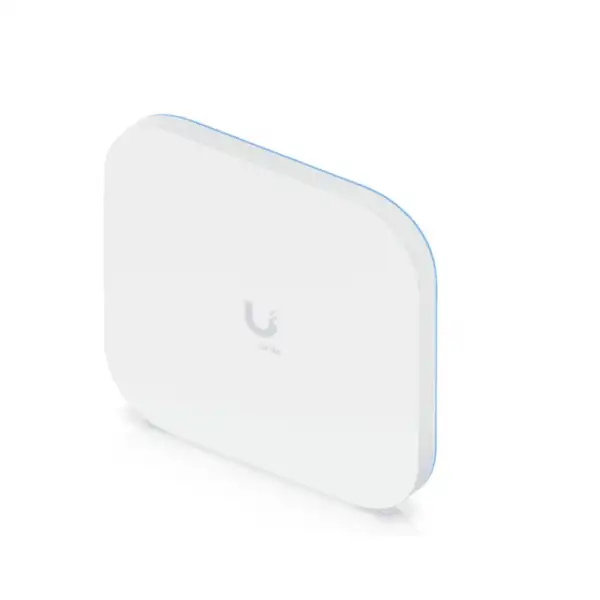
Ubiquiti Enterprise E7 (E7) WiFi 7 Access Point
A high-capacity UniFi access point for demanding indoor networks, with ten spatial streams, 10 GbE primary connectivity, PoE++ power and a secondary port for resilient deployments.
Planning deployment in Tanzania? Check regional radio support, switching and power requirements before requesting a quotation.
Key specifications at a glance
Ratings describe the device under manufacturer-specified conditions. 6 GHz and extended-range functionality require region-specific support and permission; Tanzania operation is not confirmed here.
The buying decision in brief
The Ubiquiti Enterprise E7 is designed for organizations that need more than a basic wireless hotspot. It is a managed, indoor WiFi 7 access point with a high-capacity radio architecture, 10 GbE primary connectivity, and a secondary Ethernet interface intended to support resilient installations. The practical buying question is not simply whether the device is fast; it is whether its capacity, power requirements, management approach and permitted radio configuration fit the building and network.
For a Tanzania office, hospitality property, education building, or another busy indoor site, the E7 can be considered as part of a planned UniFi network. Begin by assessing expected device counts, building materials, existing switches, security needs and local radio rules. Request an exact-model quotation and confirm the intended configuration rather than treating the manufacturer’s maximum ratings as a promise of coverage or speed.
Who should consider the E7?
The E7 is most relevant when many users share a building, when modern client devices place heavy demands on wireless capacity, or when an organization is investing in a long-lived switching and access point design. Possible environments include shared offices, training facilities, larger meeting rooms, hotels, and mixed staff-and-guest networks. Those examples describe technical fit, not a guarantee that one E7 will cover a whole property.
Small locations with a limited number of devices may not need this level of capacity. A simpler UniFi access point could be sufficient if the actual network bottleneck is an internet circuit, older endpoint hardware or weak coverage caused by obstacles. The E7 becomes a more convincing choice when a survey identifies demanding cells, appropriate Ethernet backhaul and a useful reason for the secondary connection.
A purchase decision should distinguish present requirements from future expansion. Ask how many users will be active simultaneously, which applications need stable response times, whether there is already a UniFi management environment, and what service interruption would mean to the business. This yields a deployment plan rather than a specification-led impulse purchase.
Understanding its ten spatial streams
Ubiquiti specifies ten WiFi spatial streams in total: a 2 x 2 configuration on 2.4 GHz and 4 x 4 configurations on both 5 GHz and 6 GHz. The additional streams are chiefly a capacity and radio-design advantage. They allow the access point to work with multiple compatible devices more effectively, subject to radio conditions, client capabilities and software configuration.
Ten streams do not mean a single phone receives ten streams or can combine all published band rates into one personal download speed. Many laptops and mobile devices support fewer client-side streams. Scheduling, airtime contention, retransmissions and the available wired or internet bandwidth also matter. A crowded environment should be evaluated for real application experience, not just a large aggregate headline figure.
Where a deployment uses only permitted 2.4 GHz and 5 GHz operation, plan capacity around those active radios rather than assuming the 6 GHz component will be available. This distinction is particularly important when comparing advertised worldwide hardware specifications with what the installed device can legally and practically enable in Tanzania.
What the three radio bands mean
The E7 hardware supports 2.4 GHz, 5 GHz and 6 GHz radio bands. The 2.4 GHz band is useful for broad compatibility with many older or lower-bandwidth devices, although congestion and interference can be substantial. The 5 GHz band often handles higher-throughput business clients and offers more channel-planning options. The 6 GHz radio is a feature of the hardware, but its availability is region-dependent.
A well-designed wireless network does not place every device on the fastest theoretical band. It matches clients with appropriate signal quality, roaming behavior, security support and frequency availability. Some devices support only 2.4 GHz; others support 5 GHz but not 6 GHz. WiFi 7 equipment still has to communicate with each client’s own supported standards and radios.
For procurement, obtain a representative client inventory: operating systems, WiFi generations, expected device lifecycles and bandwidth-sensitive applications. This prevents paying for advanced spectrum capability that the current endpoint population or local operating environment cannot use. It also helps determine whether separate staff, guest and equipment networks are necessary.
Important 6 GHz guidance for Tanzania
Ubiquiti lists the E7 as 6 GHz-capable hardware, with extended-range performance through Automated Frequency Coordination only in supported regions. Its published list of countries supporting 6 GHz operation did not list Tanzania when checked for this draft. That absence is not a legal conclusion about all spectrum uses; it means the publisher should not promise that this E7 will operate on 6 GHz at a Tanzanian site without additional authoritative verification.
Before ordering around 6 GHz benefits, confirm the current applicable Tanzania Communications Regulatory Authority requirements, the exact regional hardware variant, supported UniFi software region and any authorized operating conditions. Do not rely on a feature shown in a foreign-region product screenshot. Regulatory permission, manufacturer region support and client compatibility are separate considerations, and all can affect deployment.
The strongest buying approach is to design a usable network on verified operating bands first, then treat any approved 6 GHz functionality as a capability to confirm explicitly. Similarly, do not assume that AFC extended-range mode is available locally. No Tanzania-specific 6 GHz permission, certification or AFC availability is asserted here.
How to interpret advertised WiFi speeds
The manufacturer’s technical specification gives maximum wireless data rates of approximately 688 Mbps on 2.4 GHz, 8.6 Gbps on 5 GHz and 11.4 Gbps on 6 GHz under their associated channel-width and radio conditions. These are maximum PHY link-rate figures, not measured application throughput. The wide channels involved may be unavailable, unsuitable or unsupported in a specific regulatory and interference environment.
Real throughput is reduced by management traffic, radio contention, retransmissions, security processing, client limitations and the capabilities of the connected network. An internet speed test can be restricted by the WAN service even when local WiFi is performing properly. A fast wireless association also does not guarantee that a remote application or server can deliver data at a matching rate.
For meaningful acceptance testing, define the applications and measurements that matter: sustained local transfer rate, latency under load, roaming reliability, packet loss and performance at the edge of expected coverage. Test more than one client type at realistic locations and busy periods. Base purchasing on these operational needs instead of summing theoretical radio rates.
Capacity: what 1,000+ clients really means
Ubiquiti publishes a maximum client count of more than 1,000 for the E7. This is a manufacturer capability rating, not a promise that 1,000 users can simultaneously stream video, join calls or obtain a particular download rate. User experience depends on airtime demand, traffic profiles, available bands, channel widths, interference, upstream services and how users are distributed across access points.
A large connected-device number can include many largely idle devices. A few dozen clients performing heavy uploads, video calls or large file transfers may generate more demanding load than hundreds of clients checking messages occasionally. A meaningful high-density design separates associated-device count from simultaneously active, bandwidth-consuming devices and accounts for peaks during meetings or events.
When specifying E7 access points, provide realistic busy-hour estimates and application categories. Consider whether several lower-power cells would give better geographic distribution than a single crowded radio cell. Use client capacity as an initial sizing reference, then validate with survey information and appropriate load testing.
Coverage planning and the 185 m² figure
Ubiquiti gives an approximate 185 m² coverage area for the E7. This should be understood as an indicative manufacturer estimate, not a universal radius or an assurance through concrete, metal shelving, tinted glazing or multiple floors. Indoor coverage depends on access point mounting, building geometry, interference and the ability of client devices to transmit signals back to the access point.
In a multiroom office, reliable two-way communication is more important than seeing a distant network name on a phone. Strong downlink power cannot compensate for a weak client uplink. Walls, corridor turns, ceiling voids, equipment racks and changing occupancy can all influence the design. Different radio bands may require different cell sizes, especially when a location uses higher frequencies.
Request an access point placement plan that identifies critical work zones and expected roaming paths. Where possible, test representative positions with the actual devices used at the site. The correct number of E7 units is a survey decision, and adjacent cells should be planned to complement one another rather than merely overlap indiscriminately.
10 GbE backhaul and network bottlenecks
The E7 includes a 10 GbE RJ45 primary interface. This provides a high-capacity wired path between the access point and the switching infrastructure. It is particularly relevant to busy wireless cells, high-speed local resources and designs expected to grow. The interface speed alone does not create multi-gigabit internet access or guarantee that the connected switch, cabling and services can sustain the same rate.
A 10 GbE access point is most useful when the switch port supports the necessary speed and power, and when upstream links do not become a hidden bottleneck. Check the switch fabric, switch uplinks, routing performance, local servers and internet service separately. A building full of capable access points can still suffer if they share an undersized aggregation link.
Plan copper cabling to the appropriate Ethernet performance requirements for the distance and installation environment. Validate cable termination, connector quality and link negotiation during commissioning. If existing infrastructure only supports a slower uplink, the E7 may still function at a negotiated rate, but buyers should not assume that every advertised backhaul benefit is being realized.
PoE++ power and equipment compatibility
The manufacturer’s specification lists PoE++ power for the E7 and a maximum consumption of 43 W. This means power provisioning should be designed deliberately, especially if several E7 devices share a switch. A PoE switch’s total system budget matters as much as the rating on an individual port. Confirm that the intended port can supply the required compatible power while supporting the desired Ethernet speed.
A compatible injector or switch may be needed, depending on the equipment being purchased and what is already installed. Do not assume that an ordinary PoE or PoE+ port is sufficient simply because its connector fits. Review the exact equipment, power budget, cable run and any redundancy arrangement before deployment. The accessory bundle should be verified on the actual quote.
If power resilience is required, look beyond the access point to switches, distribution units and backup power. Two network cables connected to the same unprotected power source may not address the expected failure mode. Ask the installer to document the power path, cable labeling and what happens during an outage.
Secondary 1 GbE port and resilient architecture
Alongside the 10 GbE primary port, Ubiquiti provides a 1 GbE secondary port for redundant power and data when appropriately connected to separate switches. This can help reduce dependence on a single port, cable or access switch in designs that support the feature. The secondary link is not an extra 10 GbE port, and its lower speed should be considered in a failover scenario.
Redundancy requires intentional architecture. A business may need separate switch power paths, reliable aggregation, suitable network configuration and monitoring of how failover behaves. If both links terminate on equipment sharing the same outage risk, the added cable may offer limited resilience. Redundant wired interfaces also do not make a single wireless access point immune to hardware failure or a local radio issue.
For a critical deployment, define what must remain operational during a failed switch, cable or circuit. Test actual failover with representative traffic rather than assuming a design diagram proves success. The E7’s secondary connection is a useful option within a wider high-availability plan, not a substitute for one.
UniFi management and software readiness
The E7 belongs to Ubiquiti’s UniFi ecosystem and uses UniFi Network for configuration and ongoing management. The official E7 specification lists UniFi Network version 9.2.87 or later as its application requirement. For a new deployment, confirm current supported software versions and the management method that the organization intends to operate, rather than installing old controller software without checking compatibility.
Centralized management can help administrators understand wireless health, connected devices, access point configurations and changes across a site. This is valuable where many access points share network names and policies. It also introduces operational responsibilities: administrator access control, change approval, backups, update scheduling and a clearly assigned network owner.
An E7 is an access point, not a replacement for all routing, firewall and internet-gateway functions. Depending on the design, it can join an existing network, but full UniFi management capabilities require a suitable management environment. Verify gateway and switch needs in the bill of materials instead of assuming the access point alone supplies a complete office network.
Segmentation, guest access and device policies
A business network often carries different trust levels: employee laptops, guest phones, printers, meeting-room equipment and operational systems. UniFi Network features identified for the E7 include guest isolation, client isolation, voucher-based guest authentication, private pre-shared keys and dynamic RADIUS-assigned VLAN support. These are configuration capabilities, not ready-made security protections without planning.
Decide which devices may communicate with internal resources, which should only reach the internet and whether network access must be tied to organizational identity. Effective segmentation normally involves the access point, switching VLANs, gateway firewall rules and consistent management. A guest wireless name alone is not proof that internal systems are protected.
For 6 GHz security, confirm the applicable WPA3 or enhanced-open requirements on the specific clients and enabled software. Legacy devices may need a separate carefully controlled network. Review authentication choices, password rotation, administrator permissions and incident-response needs before launching public or high-density wireless service.
Application fit for modern offices
Offices increasingly mix meetings, cloud applications, calls, remote desktops and occasional large uploads. The E7 can form part of a wireless system intended to support these patterns where backhaul, client capability and coverage are appropriate. Its value is strongest when a survey indicates that airtime capacity and a dependable management environment matter more than simply increasing signal strength.
The most useful office design starts with users and locations. Identify enclosed meeting rooms, collaborative zones, desks at the edge of coverage and areas where visitors gather. Count active devices during peak occupancy rather than relying only on headcount. A person may have a laptop, phone and another connected device, but those devices do not all create equal traffic.
For critical communications, consider whether key desks, conferencing systems or fixed endpoints should remain wired. Wireless capacity should complement sensible cabling rather than replace it automatically. Define thresholds for connection quality, latency and roaming performance so the final configuration is evaluated against actual work requirements.
Application fit for hotels and guest facilities
Hospitality environments need predictable guest access while protecting property systems and staff devices. The E7 may fit busy indoor common areas, conference spaces or mixed-use facilities. However, the 185 m² manufacturer figure should not be used to calculate guest-room coverage without considering walls, corridors, bathroom partitions and floor layouts. Room-by-room testing often changes the number and placement of access points.
A hotel assessment should distinguish guest internet, front-desk systems, payment terminals, televisions and building equipment. Different groups may need different networks and restrictions. Guest portals, vouchers or other access controls must be chosen around the actual property workflow and the privacy expectations of visitors.
A high client-capacity rating is useful at busy times but does not solve inadequate internet bandwidth or poor room coverage. Before selecting the E7 for a hospitality project, map peak occupancy, building geometry and the required operating hours. Determine how networking equipment will remain powered and managed during service interruptions.
Application fit for education and training
Education buildings can experience sharp changes in demand as classes begin and groups open devices at nearly the same time. The E7’s multi-stream architecture and management features may be relevant for large classrooms, libraries, labs or training facilities. Nevertheless, a connected-device maximum is not the same as a validated concurrent exam or video-classroom workload.
Plan around actual teaching activities: learning platforms, timed assessments, collaborative applications, audiovisual systems and guest speakers. Consider whether students use similar client types or a mixed range of older devices. Application servers, DNS, authentication systems and internet access can affect learning experience just as much as access point hardware.
Separating student, staff, guest and specialized equipment traffic may improve administration and reduce unintended access. A deployment plan should include coverage tests, access policies, manageable maintenance windows and an approach to power continuity. These operational details often determine whether an expensive radio platform delivers meaningful value.
Comparing E7 with other UniFi choices
The E7 should not be confused with the E7 Campus or E7 Audience. Those are separate products in Ubiquiti’s enterprise WiFi lineup, with different antenna, environmental and capacity designs. The standard E7 discussed here is the indoor model with ten spatial streams and the dual-port architecture. Always confirm the exact product name on quotes and technical schedules.
Compared with lower-tier UniFi access points, E7 offers a more substantial hardware capacity profile and a 10 GbE primary link. Alternatives such as the U7 Pro Max or U7 Pro XGS may be appropriate when a smaller site, different budget or different feature balance is required. Comparative decisions should be made against current exact-model specifications rather than a broad assumption that every newer or costlier unit is superior.
The comparison should cover active radio availability in Tanzania, per-band client demand, power draw, switch readiness, management requirements, environmental suitability and the financial value of redundancy. An E7 can be a sound choice for demanding indoor cells, but it is not automatically the best choice for every floor, room or project.
Upgrade planning from older access points
Organizations upgrading from WiFi 5, WiFi 6 or earlier UniFi hardware should start by recording the performance issues users actually encounter. If devices disconnect in one location, the problem may be placement or interference. If many devices contend for airtime in a meeting space, the new radio design may help. If everyone is limited by a slow internet connection, an access point replacement alone is unlikely to resolve the bottleneck.
Check whether the existing controller, gateways, switches and cabling support the intended E7 design. Account for PoE++ requirements, 10 GbE connectivity and any mounting differences. Determine whether old network names and security policies can be migrated cleanly, including older equipment that may not support new authentication options.
Use phased testing where feasible. Validate client compatibility in a representative area, verify roaming with adjacent access points, inspect logs and measure actual user tasks before rolling changes across a large site. Keep a documented rollback procedure in case an update or configuration change affects critical devices.
A practical indoor site-survey process
Begin with an accurate floor plan and a list of spaces where reliable service is essential. Mark concrete walls, metal partitions, shelves, lifts, enclosed corridors and major sources of interference. Include access to ceiling or wall mounting points, cable routes, power-backed switches and areas where installation access may be restricted. The survey should be based on the building as used, not only on empty-room dimensions.
Next, identify the typical client device and the service level each space needs. A reception desk may rely on transaction systems, while a training room may host dozens of simultaneous users. Measure signal, interference and performance in representative conditions, and assess expected changes in occupancy. A site with several floors may need a different strategy for each floor.
Finally, document proposed E7 locations, channel planning assumptions, wired links and acceptance tests. Recheck the design after installation because actual antenna positions, construction materials and client behavior can differ from a planning model. This reduces the risk of purchasing access points only to discover that the deployment geometry was incorrect.
Installation and physical considerations
Ubiquiti specifies dimensions of 250 x 250 x 43.5 mm and a device weight of approximately 1.8 kg for the E7. It supports ceiling, wall and VESA mounting, with a Pro Mount identified in the manufacturer documentation. These details matter when evaluating ceiling structure, maintenance access, mounting surfaces and aesthetic requirements in occupied premises.
Use the correct mounting hardware and check the complete installation guide for the exact model. Confirm that the selected surface can support the device and that cable bend radius, ventilation and servicing access are practical. Avoid selecting a location solely because an Ethernet cable already reaches it; that position may be poor for the radio coverage plan.
The E7 is described as an indoor access point. Do not treat it as an outdoor-weatherproof model merely because other products in the enterprise lineup have environmental protection ratings. For exposed, dusty or wet locations, choose equipment with an appropriate verified rating and installation method. Document labeling and cable tests so future support teams can identify each access point correctly.
Commissioning and acceptance testing
Commissioning begins with confirming model identity, software readiness, switch port speed, PoE++ power availability and successful management adoption. Record the installed location and hardware details. Check that desired network names, segmentation, authentication and channel policies appear on the appropriate access points. Verify that no prohibited or unsupported radio settings have been assumed.
Test multiple device generations at realistic locations. Include a throughput test against an appropriate local endpoint, normal internet application checks, packet loss or latency under load and movement between expected roaming areas. If guests and staff use different network policies, validate both. Perform practical failover testing only within an approved maintenance plan and record any impact on sessions.
A useful handover includes a site diagram, switch port map, administrator access arrangements, documented credentials kept securely, firmware and management versions, support procedures and a short list of acceptance results. Clear handover makes the wireless investment easier to operate long after installation.
Ongoing monitoring and maintenance
High-capacity access points still need routine operational care. Review wireless health, client experience, interference, unusual disconnections and switch power alarms. When users report slow WiFi, correlate the complaint with the time, access point, band, client type and upstream network state. A focused investigation is more reliable than changing radio power or channel width at random.
Keep UniFi software and access point firmware under a planned update process. Evaluate new releases for compatibility and known issues, take configuration backups and coordinate maintenance during low-impact windows. Keep an inventory of access points and document any changes to VLANs, authentication, physical placement or cabling.
Business continuity depends on a broader network than the E7 alone. Monitor WAN services, switching, power backup and administrative access as well. Review performance periodically when occupancy or client populations change, because a design that performed well at installation can become congested as the property evolves.
What to include in a Tanzania quotation request
A useful quotation request should identify the Ubiquiti Enterprise E7 as the exact intended model and describe the building, existing network and application needs. Include the approximate floor areas, number of floors, main construction materials, expected total and peak active clients, desired coverage areas and whether a UniFi management system is already in place.
Ask the supplier to itemize the access points, compatible PoE++ switch ports or injectors, intended 10 GbE connections, appropriate cabling, mounting accessories and any design or testing activities separately. Where high availability matters, identify the expected switch and power redundancy design rather than writing only “backup connection” on a request.
Confirm the current local quotation, availability, commercial terms, regional product variant and any applicable compliance requirements through a verified sales process. No Tanzania price, stock position, delivery promise, warranty period or local frequency approval is specified on this page. This protects buyers from relying on commercial details that may vary by transaction.
How to decide if the E7 is the right investment
The best case for the E7 combines several requirements: substantial indoor client demand, suitable 10 GbE and PoE++ infrastructure, a desire for UniFi management and potentially a resilience design that can use its second connection. In this setting, the E7 is not just a high-spec radio; it becomes part of an intentional network architecture.
If the project is small, has a limited number of active clients or has no budget for supporting switching and site design, compare alternatives before specifying the E7. Better placement of a suitable lower-capacity access point can outperform poorly positioned premium hardware. The cost of cabling, power, management and commissioning belongs in the decision, even when an access point’s purchase price attracts most attention.
A sound next step is to share your floor plan, expected user load and existing switch details with FourTeck Tanzania for product matching and a quotation. Confirm the exact model and all regional operating assumptions before committing to a design.
Frequently asked questions about the E7
These answers focus on installation decisions, practical limitations and compatibility questions that matter before procurement.
Is the E7 a router or an access point?
The E7 is an indoor wireless access point. It broadcasts wireless networks and connects clients to an existing wired network; it does not by itself replace the full gateway, firewall or internet-routing design of a business. A suitable gateway, switching arrangement and UniFi management method should be considered as separate elements. Confirm the required network components before buying if the project is a completely new installation.
Does it support WiFi 7 on every client?
The hardware supports WiFi 7, while the connection standard a device uses depends on that device’s own capabilities and the enabled configuration. Older WiFi 5 or WiFi 6 clients do not become WiFi 7 devices by joining an E7. Mixed generations can operate in a properly designed network, but client compatibility, band choices and authentication settings should be checked during testing.
Can I use the 6 GHz band in Tanzania?
Do not assume so from global product specifications. The Ubiquiti supported-country list consulted for this content did not list Tanzania for 6 GHz operation. Local regulatory conditions and regional device support require specific verification before a deployment promises this capability. The E7 can be evaluated using verified operating bands while the 6 GHz question is resolved through authoritative technical and regulatory checks.
What does the 10 GbE port achieve?
The primary 10 GbE RJ45 interface offers a high-capacity wired path to the network. It can support an appropriate high-demand WiFi cell, but it does not guarantee 10 Gbps internet service or a matching speed to one device. The switch, cabling, upstream connections, radio conditions and client hardware must all be considered. Confirm that the switch supplies compatible PoE++ as well as the intended link speed.
Why does the E7 have a second Ethernet port?
Ubiquiti provides a secondary 1 GbE port for redundancy of power and data in a correctly configured design using separate switches. It is not simply a second 10 GbE output for general wired devices. To gain meaningful resilience, plan switch, power and upstream diversity and test the behavior of the complete network during an approved maintenance period. Failure of the access point itself is not eliminated by adding a second cable.
Is a PoE+ switch enough?
Do not assume it is. Ubiquiti specifies PoE++ for the E7 and lists a 43 W maximum device consumption. The intended switch port or compatible injector should be checked against the power requirement, link speed and overall switch power budget. A port with a physically compatible RJ45 connector may still provide inadequate power. Include the necessary power equipment in the quotation and commissioning plan.
Will one E7 cover 185 square metres?
Ubiquiti publishes an indicative 185 m² coverage area, but usable coverage depends on the building, client devices, interference, placement and performance targets. A floor with several solid walls can behave very differently from an open room. Decide access point count through planning and testing, and consider the ability of phones or laptops to transmit back to the access point, not only the signal they receive.
Can an E7 support more than 1,000 devices?
The published manufacturer rating is 1,000+ clients, but connected-client count is not an application performance guarantee. Active calls, video, uploads and other airtime-heavy workloads can stress a network differently from hundreds of idle devices. For a high-density project, estimate peak simultaneous activity and test relevant application behavior. The wired network and available permitted radio bands also constrain the outcome.
Does the E7 work with older UniFi equipment?
Integration depends on the specific network components, management version, required power and Ethernet capabilities. The E7’s listed UniFi Network requirement starts at version 9.2.87. Existing switching may be usable at some negotiated speeds, but PoE++ compatibility and desired 10 GbE operation need direct verification. An upgrade plan should include software, cable, switch and controller checks before ordering.
Can it create separate employee and guest networks?
UniFi supports relevant network-management features such as guest isolation, client isolation, private pre-shared keys and RADIUS-based VLAN assignments. These require deliberate configuration with the switching and gateway infrastructure. A guest SSID alone is not a substitute for access controls. Define which resources each group may access, test those restrictions and keep administration under authorized control.
Is the standard E7 suitable for outdoor installation?
The standard E7 is presented by the manufacturer as an indoor access point. Do not infer outdoor protection from the E7 Campus or E7 Audience, which are distinct products. If the planned location is exposed to rain, dust or outdoor conditions, select an appropriately rated model and installation design. Confirm the precise model and environmental rating on the purchase request.
What should I send when asking for a quote?
Provide the exact model name, floor plan, building usage, expected connected and active clients, existing switch and gateway models, desired redundancy, cable availability and coverage priorities. Ask for all required accessories and a clear explanation of any regional radio limitations. Verify current price, availability and commercial terms through the supplier rather than assuming figures seen in another country apply in Tanzania.
Request an E7 quotation from FourTeck Tanzania
Share the exact product name, your indoor floor plan, expected user load, existing UniFi equipment and PoE++ switching details. Request confirmation of the regional hardware variant, supported operating bands, suitable accessories and current commercial terms.
Ask for an exact-model quotation and deployment suitability review before purchase.




Reviews
There are no reviews yet.