
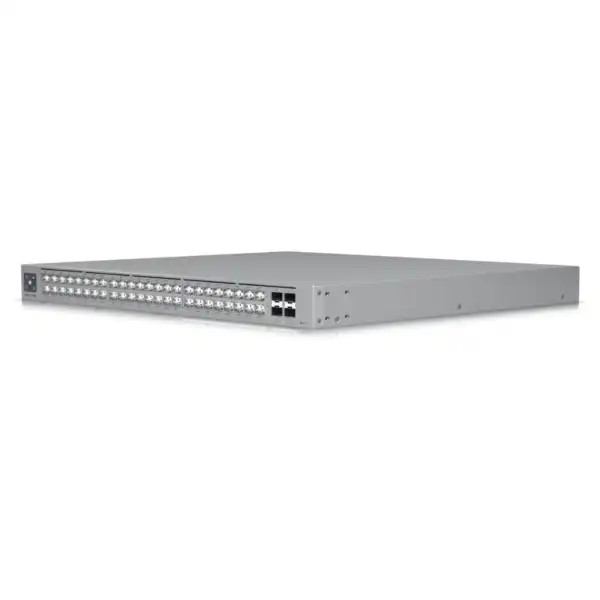
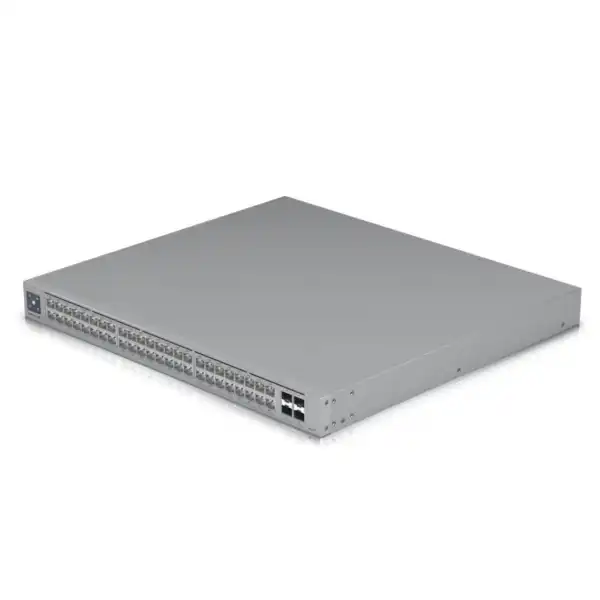
Ubiquiti UniFi Switch Pro 48 (USW-Pro-48)
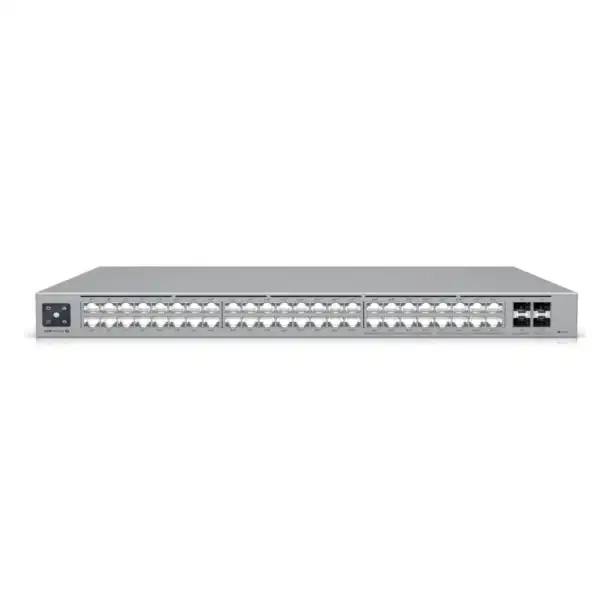
Bring forty-eight Gigabit Ethernet endpoints into a managed UniFi network and connect upstream equipment using four 1/10GbE SFP+ ports. The Ubiquiti USW-Pro-48 combines practical access-layer density, supported Layer 3 functions, a 1U rackmount design, and centralized network administration.
This is the non-PoE version. It is suited to planned data connectivity but does not power connected access points, phones, or cameras. For a Tanzania project, review the complete port, uplink, power, VLAN, and management requirements before requesting the exact configuration.
Verified specifications at a glance
The right switch for the right network
The Ubiquiti USW-Pro-48 is a professional managed switch for organizations that need many conventional Gigabit Ethernet connections under a single management environment. It offers forty-eight 10/100/1000 Mbps RJ45 ports, four 1/10GbE SFP+ interfaces, and supported Layer 3 features. The product fits networks with substantial desk, workstation, peripheral, or other data-only connectivity where the IT team also needs predictable VLAN configuration, monitoring, and faster links toward distribution equipment. The best reason to select it is a documented match between endpoints, uplinks, administration requirements, and the available port types.
The most important limitation is that this exact model does not provide Power over Ethernet. It will transport data to an IP phone, camera, or access point, but does not power that device through the cable. The separately named Pro 48 PoE has different electrical capabilities. A buyer should identify which connected devices have local power and which expect PoE before preparing a bill of materials. This distinction prevents a common mismatch where the port count looks correct but a substantial part of the intended network cannot turn on.
Gigabit access ports and physical capacity
Forty-eight RJ45 interfaces offer a practical way to organize many wired users in one cabinet. They negotiate Ethernet speeds of 10, 100, or 1000 Mbps with a compatible peer. A Gigabit-capable connection still depends on working cabling, sound terminations, and the endpoint itself. Inventory real devices rather than estimating from staff numbers alone: include printers, meeting-room systems, controllers, shared workstations, and network appliances. Allow some spare capacity for additions and changes, and label each physical port with enough detail that another technician can trace it without guessing.
A switch port’s maximum link speed is only one measure of network performance. Internet service, gateway capacity, application servers, the storage system, and upstream links can still constrain a user’s experience. A group of clients connected at one Gigabit each may share a substantially smaller external route. Review the traffic concentration points before deciding whether current uplinks are adequate. In a network with light web applications, link usage may be modest; a department transferring large files or maintaining local backups may have a very different pattern.
What the four SFP+ ports actually do
The four SFP+ slots support 1GbE and 10GbE connections with correctly chosen accessories. They are commonly considered for connecting a switch to a gateway, distribution switch, aggregation equipment, or selected higher-speed systems. They are separate from the forty-eight copper Gigabit access ports. The presence of a 10G uplink does not turn an attached workstation’s RJ45 interface into a 10G connection. It can, however, create a wider shared path when many slower devices communicate with other parts of the network through one upstream switch.
Deciding how to use these slots calls for a physical topology, not just a port-count calculation. The team should identify the peer equipment, supported interface speeds, required link distance, appropriate fiber or direct attach medium, and any compatibility constraints. A matched module and correct connector are necessary for an optical link to operate. Multi-link aggregation and resilient paths require explicit configuration and compatible peers; they do not appear automatically when two cables are connected. Reserve the interfaces for connections that deliver demonstrable value in the intended network.
Understanding capacity figures
Ubiquiti’s technical specification lists 176 Gbps switching capacity, 88 Gbps total non-blocking throughput, and approximately 131 million packets per second forwarding rate. These are architecture and switching-performance figures; they should not be described as a guaranteed speed for an internet subscription or any one application. The standard copper access ports remain Gigabit interfaces, and an individual SFP+ link operates according to its own negotiated speed. Actual traffic behavior depends on packet size, routing policy, congestion, end devices, cables, and upstream design.
Capacity planning starts with likely simultaneous traffic rather than the maximum theoretical rate of every endpoint added together. Think about office activity at busy times, server access, calls, backups, surveillance storage if applicable, and business-critical applications. A network design may benefit from a 10G uplink to prevent aggregation at a single 1G bottleneck, but another installation might be constrained by its internet service or firewall. Measure or estimate realistic demand, review each shared segment, and document the reason for the selected link rates.
Management through UniFi Network
UniFi Network supplies the management environment for the USW-Pro-48. Administrators can organize switch settings, inspect link state, identify equipment, apply intended network configurations, and manage the device alongside other supported UniFi infrastructure. This matters when an organization has multiple switches or when remote IT staff need visibility without tracing every cable in person. The front panel also has a 1.3-inch touchscreen for local information. That screen is useful for identification, but operational configuration and recordkeeping should remain part of the wider network-management process.
Before installation, decide where UniFi Network will operate, who holds administrative access, and how the switch will be adopted. The official specification names version 5.12.11 and later as an application requirement, but production software choices should account for current support and firmware compatibility. Record the switch name, rack location, management network, upstream connection, and a backup procedure. Central management is valuable only when credentials, updates, and configuration changes are controlled. Avoid leaving operational knowledge with just one installer or undocumented account.
Building a useful VLAN plan
Virtual LANs allow different logical groups to share the same switching hardware while retaining distinct network identities. A company may organize staff computers, guest services, managed devices, and internal systems using separate VLANs. This can simplify addressing and enable more deliberate traffic policies. A VLAN alone, however, is not a substitute for an access-control design. Routing between networks and security decisions must still be documented. Determine who owns each network’s gateway, where DHCP is provided, and what communication must cross the boundaries.
Prepare a port schedule that identifies each access port’s intended network and each uplink’s tagged or untagged VLAN behavior. In a mixed-vendor environment, confirm terminology and configuration at both ends of the link. A port can appear physically healthy while an incorrect VLAN setting prevents an application from working. Test expected traffic as well as paths that should be blocked. Record the settings before making bulk changes, since a mistake on one trunk interface can affect multiple departments or services at once.
Layer 3 routing: useful but bounded
The switch supports selected Layer 3 capabilities including inter-VLAN routing for local networks, IPv4 static routing, DHCP server functions for local networks, and DHCP relay. These functions can help move authorized traffic between networks without always sending it through a separate gateway’s forwarding path. Whether that is beneficial depends on the architecture. Local traffic patterns, firewall requirements, visibility needs, and the available upstream equipment all influence the decision. A switch that supports routing is not automatically the best router for every network or security function.
Ubiquiti’s guidance requires a suitable gateway to work with the Layer 3 switching design. Compatible third-party gateways must support the necessary VLAN and route configuration. The documented Layer 3 function does not provide network address translation, and some traffic-identification features are unavailable when the Layer 3 switch owns the routed network. Plan these limitations before assigning VLAN routing to the switch. Organizations needing comprehensive edge firewall controls should retain the appropriate gateway or firewall design and verify traffic flows in a representative test.
DHCP and addressing decisions
When setting up multiple business networks, the addressing plan should be decided before endpoint rollout. Give each segment a clear name, subnet, addressing policy, DNS arrangement, and expected gateway. Decide whether DHCP service belongs on the gateway, a server, or the supported switch function, and identify any DHCP relay requirements. Avoid competing DHCP services on the same network because an endpoint can receive an unexpected address and become difficult to troubleshoot. Record reserved addresses for infrastructure and services that require stable management.
A successful address assignment does not prove the whole VLAN design is correct. Test DNS lookup, access to authorized servers, internet connectivity where required, and restrictions between networks. Keep the management network especially clear so administrators do not lose access while changing other segments. A network diagram showing DHCP sources, routes, and uplinks is useful during outages and later expansion. If applications rely on multicast discovery or specific broadcast behavior, confirm their requirements rather than assuming routing will transparently preserve every service.
Security controls and access policy
The current official specification lists supported tools such as access control lists, device isolation, network isolation, 802.1X control, DHCP guarding, MAC-based restrictions, and traffic-control functions. Availability and behavior depend on the software, firmware, and selected topology. These features can strengthen a documented access policy, but none should be treated as proof that the complete organization is secure. Administrators still need to manage identity, endpoint security, gateway policy, backups, and monitoring. Begin with the flows that business applications actually require.
Applying rules without a traffic plan can interrupt printing, authentication, voice registration, or management access. Define the required connections first, implement the narrowest practical configuration, and test representative devices. Keep a rollback path for changes to important uplinks and management ports. Every significant exception should have an owner and reason. The switch can help enforce network structure, but effective security depends on the interaction between Layer 2 settings, routing decisions, firewalls, application behavior, and operational discipline.
Preventing loops and controlling broadcast traffic
Managed networks with multiple switches require deliberate loop prevention. Ubiquiti lists STP and RSTP support, as well as storm control and broadcast or multicast rate-limiting features. These are relevant when cabling faults or unplanned redundant connections could send traffic around a loop and affect many users. Keep a clear drawing of which switches connect to which upstream devices. If the design uses redundant physical links, define the expected spanning-tree or aggregation behavior and make sure the other device is configured compatibly.
Do not treat extra connected uplinks as an automatic way to double throughput or improve uptime. Without a supported logical configuration, extra cabling can cause instability or blocked paths. Likewise, aggressive traffic controls can interfere with legitimate applications if their use is not understood. Make changes during an agreed maintenance window, verify intended failover or blocked-path behavior, and document the results. The goal is predictable operation under normal conditions and during a single fault, not simply having more cables.
Voice services and quality of service
The technical feature list includes voice VLAN support, DSCP-oriented quality of service, and related traffic management functions. These tools may be relevant where ordinary computer data shares infrastructure with voice or conferencing applications. However, acceptable call quality depends on more than a switch setting. Endpoint configuration, bandwidth, jitter, packet loss, internet transport, gateways, and the communications platform also matter. Test conversations under realistic load instead of assuming a fast switch backplane guarantees clear audio.
IP phones often need Power over Ethernet, and this non-PoE switch cannot supply that power. The deployment must use appropriately powered endpoints, suitable injectors, or a separate PoE-capable switch. After addressing power, confirm the correct voice network, DHCP behavior, traffic markings, call-server reachability, and upstream policy. A change that leaves data users connected may still interrupt telephony if a VLAN or quality-of-service arrangement is incorrect. Include phone registration and real call tests in the handover procedure where voice is part of the project.
Multicast and professional AV requirements
Ubiquiti lists IGMP snooping, advanced IGMP configuration, and professional AV profile capabilities among the model’s Layer 2 functions. These can be relevant for specific audiovisual and multicast-dependent systems that share a managed Ethernet network. They should not be enabled blindly. Different applications have different requirements for discovery traffic, multicast receivers, timing, and the direction of data flow. An installation with conferencing equipment may require a different profile from a network transporting specialist production audio or video.
Gather the endpoints, traffic types, expected bandwidth, multicast groups if applicable, and upstream topology before choosing settings. Test actual media reception and control functions at every relevant location. Multicast problems often arise because of a mismatch between source, receiver, snooping, querier configuration, and intermediate switches. A manufacturer feature list indicates potential configuration options, not guaranteed integration with every AV platform. For business-critical deployments, request an application-specific acceptance test and keep records of the chosen settings.
Non-PoE versus PoE: the buying decision
The model string matters. USW-Pro-48 is the non-PoE switch covered here, while USW-Pro-48-PoE is a separate product with an integrated PoE function and different power characteristics. Both can appear similar when a buyer looks only at port count or 10G uplinks. If the project includes powered wireless access points, desk phones, door controllers, or cameras, identify the standards and wattage each device needs. It is risky to infer the complete power plan from the name of a switch.
A non-PoE unit can be a suitable choice for conventional computers and self-powered equipment, or for a network where dedicated PoE switching already exists elsewhere. When many attached devices require inline power, integrated PoE may reduce the number of adapters, injectors, and electrical outlets. Compare total installed cost and serviceability rather than product price alone. The non-PoE unit’s 60W maximum consumption describes its own hardware, not a power supply available to Ethernet endpoints. Never attribute the PoE version’s output rating to this listing.
Optics, direct attach cables and peer compatibility
Selecting an SFP+ accessory requires more detail than choosing 10GbE as a target speed. Identify whether the connection is short-range within a rack, between racks, or across a longer optical path. Then confirm the remote interface, required cable medium, connector type, optical standard, distance, and any supported module restrictions. The correct choice for a short direct attach connection may be different from the equipment required for an existing multimode or single-mode fiber run. Verify compatibility at both ends.
An optical module that fits a slot physically may still be unsuitable for the link. Module speed, transceiver type, fiber polarity, distance, and compatibility all matter. Do not assume accessories are included with the base switch, and do not promise a particular reach without the complete optical specification. A procurement request should state the intended two endpoints and media, not just ask for an SFP module. That approach helps the seller supply an appropriate component and helps the installer test the link against a clear requirement.
Rack mounting and cable organization
The USW-Pro-48 is a one-rack-unit device measuring approximately 442 by 285 by 44 millimeters. Ubiquiti lists a weight around 4 kilograms, increasing slightly when mounting brackets are included. Plan enough rack space for the chassis, power cord, copper patching, SFP+ connections, and airflow around the unit. Cable management matters because tightly bent patch leads or optical fibers make later maintenance difficult. The site should have a consistent labeling scheme that maps ports to wall outlets, equipment and logical networks.
Before the installation date, confirm cabinet depth, mounting arrangement, cable reach, the intended power source, and access for future servicing. A switch can be rackmountable yet still be awkward to maintain if its cables block adjacent equipment. Identify a safe location for patch panels and any fiber termination hardware. Leave enough slack for proper routing without creating large untidy loops. A clear rack layout saves time when equipment is replaced or when a technician must identify a failed link while the rest of the office remains operational.
Electrical power, heat and location
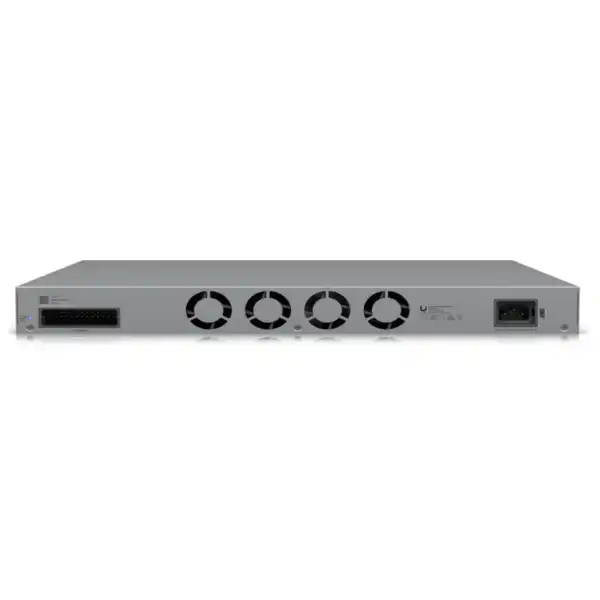
Ubiquiti specifies an internal power supply accepting 100–240V AC at 50/60Hz and maximum device consumption of 60W. The manufacturer advertises fanless cooling for this switch. Fanless does not mean zero heat output: the rack still needs a suitable environment. The current technical specification lists an ambient operating temperature range of -5 to 40 degrees Celsius and 10–90 percent noncondensing humidity. Assess the temperature inside the actual communications cabinet, especially where it is enclosed or loaded with other equipment.
For a site in Tanzania, verify the building’s real electrical and environmental conditions instead of assuming they are adequate. Ask about power continuity, earthing, surge protection, cabinet ventilation, and the existing power distribution arrangement. Installation planning should follow relevant safety requirements and the manufacturer’s guidance. A rack placed in a hot utility enclosure may need different attention from equipment in a properly conditioned network room. Include any necessary power or environmental improvements in the scope before equipment is delivered.
Backup power and realistic resilience
The switch includes a separate USP RPS DC input in addition to its AC supply interface. This gives designers an option to evaluate compatible redundant power accessories, but does not mean a backup system is included in the standard hardware. Verify the chosen accessory, electrical characteristics, and installation plan for the exact deployment. Redundancy should cover relevant upstream equipment as well, because a powered access switch does not preserve connectivity if the gateway or internet termination unit has lost power.
An uninterruptible power supply may provide short-term continuity, but battery runtime must be calculated from the full load and the intended autonomy. Include switches, gateways, any servers, optical equipment, and other essential devices as appropriate. Physical network resilience also requires topology planning. Two uplink cables terminating at the same failed upstream device may not satisfy a business continuity requirement. Identify likely failure scenarios, document what should continue working, and test recovery where feasible instead of promising uninterrupted service without evidence.
A practical office-floor installation
Imagine an office floor with forty data-only desks, several self-powered network peripherals, and a distribution rack containing compatible 10G equipment. The switch can supply forty-eight Gigabit RJ45 access ports while its SFP+ interfaces provide opportunities for an upstream high-speed connection. This can be a sensible shape for a managed access layer, provided the final endpoint count and growth margin fit. The site still needs accurate cabling, a suitable gateway, management access, and a reviewed VLAN design before it is ready for business use.
The same example changes considerably if the desks use power-dependent IP telephones or the ceiling contains several PoE access points. The switch would not power those devices. A separate suitable power solution or another switch model would be needed, and the total cost should be compared accordingly. Testing should cover desk connectivity, correct IP addressing, file and printer access, gateway reachability, and any intended network restrictions. An illustrative layout is helpful for planning but does not replace a survey or promise a particular throughput.
Shared services and departmental segmentation
Some offices place staff computers, shared printers, servers, and building-management equipment on distinct logical networks. The Pro 48 can be considered where many Gigabit data ports and managed VLAN controls are needed. Begin with a simple matrix of which groups must communicate. A staff segment may need to print to a managed printer while a guest segment should not reach internal systems. These are policy requirements that must be implemented across the switch, gateway, and any relevant firewall or application controls.
Do not assume that moving a device to a different VLAN automatically produces the intended level of security. Routing decisions, access lists, and the application’s own authentication remain relevant. During rollout, test an approved user connecting to an allowed service and also test that unwanted traffic cannot pass. Document the exact settings so maintenance staff can repeat or reverse changes. Organizations handling sensitive information should apply the security and legal controls appropriate to their own operations rather than relying solely on a network switch feature description.
Using 10G for local servers and backups
A business with regular large-file transfers or local backups may benefit from carefully planned high-capacity uplinks. The four SFP+ interfaces provide 10G-capable connection options for suitable peers. When many Gigabit desktops access a shared resource, a wider uplink may reduce the chance that the first switch-to-switch connection becomes a bottleneck. Nevertheless, the storage system, server network interface, intermediate switches, and gateway or firewall path all affect the result. The presence of a 10G interface alone does not establish end-to-end 10G performance.
Characterize the workloads before reserving SFP+ ports. Identify whether traffic stays within one VLAN, crosses local network boundaries, or travels to external services. Determine where routing and security policy must operate, then measure performance under meaningful concurrent load. An isolated single-user speed test does not represent a busy production network. Check interface errors, congestion, application response, and backup completion behavior. These observations help justify whether 10G connectivity is necessary and identify issues that a different switch would not solve.
Implementation sequence and acceptance
Start with a site inventory: confirm the exact USW-Pro-48 model, intended endpoints, port schedule, optical accessories, rack layout, power, VLANs, and upstream devices. Prepare the UniFi Network management environment and authorized administrator access. Install and label the hardware, connect the planned uplinks, and confirm interface status. Adopt the device into management, configure network settings deliberately, and apply only the approved access policies. Retain a known-good configuration and a recovery method in case an uplink or management change causes loss of access.
Commissioning should prove the expected network behavior instead of stopping when link indicators turn on. Test negotiated speeds, DHCP, DNS, gateway reachability, allowed inter-VLAN traffic, blocked paths, file access, printing, and voice or AV applications where relevant. Confirm that compatible 1/10G SFP+ links operate at the intended speed and review management alerts. Document results, final port assignments, the logical topology, and the equipment record. Handover should include maintenance ownership and a method for responding if the management system becomes unavailable.
Ongoing maintenance and fault isolation
After deployment, monitor port state, unusual changes in negotiated speed, interface errors, uplink utilization, and critical device reachability. A workstation repeatedly falling back to a lower connection rate may have a cable or endpoint problem. A large group of users experiencing sluggish access might be sharing a congested upstream link or relying on an overloaded gateway. Using a consistent troubleshooting sequence helps avoid unnecessary hardware replacement. Start with the affected endpoint, then move through its cable, switch port, network configuration, uplink, and destination service.
Software and documentation also require maintenance. Review current manufacturer release guidance before changing device firmware or the UniFi Network application, especially when older infrastructure is present. Back up settings and schedule impactful changes at an appropriate time. Keep a list of transceiver models, connected peers, rack positions, and the purpose of each VLAN. A clear support record allows a new technician to understand the installation and reduces the risk that a routine port change accidentally interrupts business-critical services.
When another switch may be better
Choosing a network switch begins with the required interfaces, not the longest specification sheet. This product is appropriate where many 1GbE copper endpoints, several 10G-capable uplinks, and managed UniFi operation are the main needs. A smaller switch may be more economical for a limited number of ports. A PoE-capable switch may be necessary where the access layer must power devices. If clients need 2.5GbE or faster copper connectivity, evaluate alternatives with those exact port speeds rather than assuming the RJ45 interfaces on this unit will provide them.
A dedicated aggregation device may be a better choice when the main requirement is numerous 10G or higher-speed connections rather than forty-eight standard Gigabit access ports. Conversely, a simple network without VLAN or administrative requirements may not need this level of managed switching. Compare total deployment cost, management overhead, power distribution, accessory needs, and the team’s support skills. A correct product decision is one that fits day-one requirements, reasonable growth, and the organization responsible for operating the network.
Tanzania buying and quotation considerations
Prepare a request for quotation that names the exact hardware model and lists the expected network requirements. Include the number and speed of copper endpoints, intended SFP+ connections, needed modules or cables, management system, rack location, and any PoE devices requiring a separate power plan. Ask the seller to identify what accessories and services are included in the offer. This avoids treating the base switch and a complete working installation as the same purchase. A clear scope also makes quotations easier to compare.
Prices, stock, delivery times, warranty arrangements, import costs, and site support terms must be verified for the particular Tanzania order. Do not infer them from a foreign store or an unrelated Ubiquiti product. Review the exact description of what will be supplied and who is responsible for installation, configuration, and acceptance testing. If an organization is upgrading an existing network, list retained equipment and required integrations. This lets the supplier assess compatibility and highlights any additional work before the procurement decision.
Final purchase readiness checklist
Before approving a purchase, confirm that all required wired endpoints fit within the forty-eight 1GbE RJ45 connections, that none requires more copper link speed than the model provides, and that every PoE-powered device has a separate suitable power source. Identify how the four SFP+ slots will be used, including peer interfaces, module types, cable lengths, and intended speeds. Confirm rack space, electrical service, cabinet temperature, redundant-power expectations, and the availability of a supported UniFi Network management environment.
Next, review the logical network: VLAN purposes, gateway ownership, DHCP, routing, access policies, and monitoring. Write down how the installation will be tested and who will support it afterward. Ask for current local price and fulfillment details for the exact model, plus any optics, patching, power accessories, and implementation services. When those items are known, it is much easier to decide whether the Pro 48 is the correct component or whether a PoE, multi-Gigabit, smaller, or more specialized alternative would meet the real requirement better.
Frequently asked questions
Does the USW-Pro-48 supply PoE?
No. This exact model is non-PoE. Devices such as access points, cameras, and phones that need power over their Ethernet cable require appropriate external power or another PoE-capable switch. The Pro 48 PoE is a different model and should not be confused with this listing.
How many 10G connections are available?
There are four SFP+ interfaces supporting 1GbE or 10GbE with suitable cabling or modules. The forty-eight RJ45 ports are Gigabit Ethernet interfaces, not 10GbE copper ports. Confirm transceiver compatibility, link distance, and peer equipment before selecting optics.
Can it route traffic between VLANs?
Ubiquiti lists inter-VLAN routing for local networks, static routing, DHCP server, and DHCP relay features. A compatible gateway and appropriate configuration are still required for the Layer 3 design. The switch is not a replacement for NAT or full gateway security functions.
Does it need UniFi Network for management?
The switch is designed to be adopted and managed through UniFi Network. Plan the management environment, administrator permissions, software compatibility, and backup procedure before deployment. The chassis also includes a small touchscreen for local information.
Can I install it in a standard equipment rack?
It is a 1U rackmount product approximately 442 by 285 by 44 millimeters. Verify mounting space, cabinet depth, cable clearance, power, and environmental suitability. Its fanless cooling design does not remove the need for appropriate heat management.
What is its maximum power consumption?
The manufacturer specifies 60W maximum device consumption. This is not a PoE budget because the switch cannot provide PoE output. A UPS should be sized for the entire protected network load and the required battery runtime.
Does a 10G SFP+ uplink guarantee faster internet?
No. It can increase the capacity of a compatible internal network link, but internet speed also depends on the service plan, gateway, applications, and other network bottlenecks. Proper measurements are needed to identify where an upgrade will help.
Can it work with equipment from other vendors?
It can participate in a suitably designed Ethernet network, but VLAN tagging, optics, link aggregation, routing, and management expectations must be checked for the exact peer equipment. Matching connector shapes alone do not ensure every advanced feature works.
What should be on a Tanzania quotation?
Request the confirmed USW-Pro-48 model, required accessories, current local price and availability, delivery terms, applicable warranty and support details, and any installation services. Include your endpoint count, uplink design, and PoE requirements so the quotation covers the intended system.
Request a FourTeck Tanzania quote
For a useful quotation, provide your device count, uplink requirements, expected VLAN design, and the accessories needed to connect your network. Identify any endpoints requiring PoE and the intended UniFi management environment. This makes it easier to assess the complete installation rather than comparing hardware models without their supporting equipment.
Request a quote for Ubiquiti UniFi Switch Pro 48 — USW-Pro-48 (non-PoE). Ask for confirmation of current Tanzania pricing, availability, compatible accessories, delivery arrangements, and applicable support terms. No local price or stock status is assumed here.




Reviews
There are no reviews yet.