
Ubiquiti · UniFi · Wall-mounted WiFi 7
Ubiquiti U7 Pro XG Wall | WiFi 7 Access Point for Tanzania Networks
A compact, managed tri-band access point with a 10 GbE-capable uplink. Designed for projects that value thoughtful wall placement, reliable PoE+ power, and modern wireless capacity.
Product quick facts
| Manufacturer model | U7-Pro-XG-Wall |
|---|---|
| Wireless | WiFi 7: 2.4 / 5 / 6 GHz |
| Spatial streams | Six, with 2 × 2 MIMO per band |
| Uplink | One 10 GbE RJ45 port |
| Power | PoE+; maximum 22 W |
| Coverage reference | 140 m²; environment dependent |
| Client rating | 300+; not a throughput guarantee |
| Management | UniFi Network 10.0 and later |
| Dimensions | 155 × 108 × 33.5 mm |
| Weight | 505 g |
| Mounting | Wall |
Coverage, radio rates, and client counts are published design references; site conditions and permitted regional settings determine actual results.
A wall-mounted WiFi 7 access point built for serious networks
The Ubiquiti U7 Pro XG Wall Tanzania product brief is for buyers who want managed WiFi 7 without relying on a ceiling-mounted access point. This compact UniFi device combines tri-band wireless service, six spatial streams, and a 10 GbE-capable wired uplink behind a clean wall-mounted form factor. It can be useful where the wireless installation should sit near occupied rooms, meeting areas, corridors, or a planned network outlet. It is not a router, switch, or internet subscription: it is an access point that joins an existing network and receives power through its Ethernet connection. Before specifying it, check the room layout, switch ports, PoE power, cable route, client devices, and management platform.
For a buyer upgrading older wireless coverage, the strongest reason to consider this model is the combination of manageable UniFi features, a 6 GHz-capable radio, and additional wired backhaul capacity. A 10 GbE uplink does not make a laptop download at 10 Gbps, and the advertised client and coverage figures are planning references rather than guarantees. The right design depends on actual application traffic, surrounding walls, neighboring wireless networks, regulatory settings, and how far users sit from the access point. The sections below explain both the appeal and the checks that prevent an expensive mismatch.
Key verified specifications at a glance
Ubiquiti identifies the exact manufacturer model as U7-Pro-XG-Wall. Its WiFi 7 hardware supports 2.4 GHz, 5 GHz, and 6 GHz bands with 2 × 2 MIMO per band, for six spatial streams in total. The manufacturer rates coverage at 140 square metres and client capacity at 300-plus, subject to real conditions. The single network interface is a 10 GbE-capable RJ45 port, with multi-speed connectivity appropriate to the attached infrastructure. PoE+ provides power, and maximum device consumption is listed as 22 W. The compact enclosure measures 155 × 108 × 33.5 mm and weighs around 505 g. Ubiquiti lists UniFi Network version 10.0 or later for management.
Manufacturer maximum theoretical radio rates are up to 5.8 Gbps on 6 GHz at 320 MHz channel width, 4.3 Gbps on 5 GHz at 240 MHz, and 688 Mbps on 2.4 GHz at 40 MHz. These values describe individual radio capabilities in ideal configurations, not guaranteed real-world throughput and not an internet speed promise. Combining them into a single figure would misrepresent what one client can receive. Supported widths and available bands depend on the regional radio profile, client abilities, settings, signal conditions, and permitted spectrum.
Who should choose the U7 Pro XG Wall
The product is especially relevant to an IT team designing WiFi for a premium office, training room, meeting suite, boutique hospitality setting, modern residence, or an enclosed workspace where a wall-mounted access point fits the building better than a ceiling model. It is also a sensible candidate when an existing UniFi estate needs a more capable access point while keeping centralized visibility over clients, radios, and wireless policies. Buyers can plan a consistent family of network devices instead of managing different interfaces for every room, provided their controller and switching environment meet the documented requirements.
It is less compelling when all connected devices use older WiFi generations, the structured cabling cannot support the intended uplink, or the space is too obstructed for 6 GHz to provide meaningful benefit. A much larger hall may need multiple carefully placed access points rather than one high-specification unit. A small internet connection and low client demand may not justify a premium 10 GbE-capable uplink today. Choosing this product should begin with the expected users and applications, not just the largest figure printed on a technical sheet.
WiFi 7 improvements in practical terms
WiFi 7 extends the wireless toolbox with high-capacity channel options and features designed to improve performance with compatible clients. Wider channels can increase link capacity in favorable conditions, while techniques such as multi-link operation may help compatible equipment use radio resources more flexibly. Those benefits depend on the client hardware, device software, access point configuration, and local spectrum rules. A WiFi 7 access point remains useful to many previous-generation devices, but an older phone cannot magically gain the new radio capabilities simply by joining this network.
For a team buying infrastructure expected to remain in place through multiple device refresh cycles, WiFi 7 provides room to accommodate newer laptops and phones over time. Practical experience depends on the entire path: client radio, interference, authentication settings, switch uplink, routing, servers, and broadband or private WAN capacity. A file transfer to a local server can behave differently from a video call hosted outside the building. Make purchasing decisions around the traffic and people the wireless network must actually support.
Three radio bands, three different jobs
The 2.4 GHz band remains valuable for reach and compatibility, especially for basic client devices, though it can be congested and offers less capacity. The 5 GHz band is a common working choice for business notebooks, smartphones, and many productivity applications; it usually provides a useful compromise between capacity and usable range. The 6 GHz band creates another opportunity for compatible devices to use cleaner high-frequency spectrum in regions where operation is permitted and enabled. It is particularly sensitive to distance and building materials, so a favorable result near the unit does not imply identical performance beyond a wall.
A practical wireless policy might keep basic equipment on a compatible network, encourage capable workplace devices toward well-performing bands, and treat 6 GHz as a planned performance tier rather than a universal default. Wireless client steering is a management aid, not a way to force every device to accept any selected band. Avoid presenting 6 GHz as automatically available throughout Tanzania; deployment must use the applicable authorized regional settings and should be checked against current local rules before the radio is enabled.
Why a 10 GbE uplink matters
The U7 Pro XG Wall includes one 10 GbE RJ45 network connection, giving the access point a faster potential backhaul than a traditional gigabit access point. This is helpful when multiple active wireless clients share the same unit and exchange data with fast local services or when the network is designed for future multi-gigabit growth. However, the access point does not contain a built-in ten-gigabit Ethernet switch for connecting desk devices. The single RJ45 interface is the uplink and the PoE power input, so plan the surrounding network accordingly.
A 10 GbE link is only realized when the upstream switch or compatible injector pathway, port configuration, and cabling support that rate. If it negotiates a slower rate, the entire radio population shares that smaller wired path for traffic leaving the access point. This can be perfectly adequate for some deployments. It is better to specify a proven 2.5 GbE design than to advertise ten-gigabit performance over an uplink that was never built to deliver it. Confirm the complete cable run and the actual negotiated speed during commissioning.
PoE+ power is a purchase requirement, not an optional detail
Ubiquiti specifies PoE+ as the power method and 22 W as the maximum power consumption. That means power is delivered through the Ethernet cable from suitable power-sourcing equipment. A compatible PoE+ switch is a common choice, particularly when several access points share a wiring cabinet. A separately selected injector may be appropriate for a smaller deployment, but check both the injector power specification and its supported Ethernet data rate. An injector with a gigabit-only path may prevent the faster uplink from being used even if the radio itself works.
Do not assume that any port labeled PoE can support this device. PoE standards, the switch’s remaining power budget, and the quality of the cable all matter. Budget for the access point along with any power equipment not already available. The manufacturer’s retail materials do not establish that a suitable injector is included in the local FourTeck offer, so confirm the exact package contents before ordering. For a network with several units, calculate the aggregate PoE budget with a sensible margin instead of adding devices until the switch refuses to power the last one.
Planning the cable path and network switch
Start with the wiring location that connects the chosen wall to the network cabinet. Check cable type, total length, terminations, patch panels, and patch cords rather than inspecting only the visible cable segment. Multi-gigabit and ten-gigabit Ethernet performance depend on the quality of the whole copper channel. Verify supported rates and distances against the actual cable category and equipment; do not promise a ten-gigabit link for an unknown old installation. A cable certification or at least a negotiated-link test is particularly useful when reusing wiring across an older building.
Then inspect the switch itself. You need an appropriate Ethernet port speed plus PoE+ output, or a compatible combination that provides both. A switch with fast SFP uplinks but only gigabit PoE access ports does not automatically give the access point a ten-gigabit connection. Likewise, power and bandwidth are separate criteria: a non-PoE ten-gigabit port will not power the radio without a suitable power arrangement. Document the resulting port speed, PoE consumption, VLANs, and controller connectivity before declaring the installation complete.
Wall placement and room orientation
Wall mounting is not merely a cosmetic choice. Access point position changes how the signal moves through the occupied area, which can make a unit placed at an appropriate height more useful than one hidden behind furniture or installed at a convenient but obstructed outlet. Consider where people sit, where they walk, and whether the main working area is in front of the access point. Dense masonry, metal partitions, reinforced surfaces, tinted glass, and equipment cabinets can reduce signal quality. Visual tidiness matters, but it should not override the wireless design.
For an office renovation, reserve a location that gives broad exposure to the target room, allows safe cable routing, and avoids heat-trapping enclosures. In a hospitality environment, consider the actual room separation and not only hallway length. In a residence, place the access point for the rooms with the highest demand rather than assuming a centrally located wall solves every floor. The published 140-square-metre coverage figure is a useful comparison point, not a guarantee across walls, floors, or widely separated spaces.
Coverage and the 300-plus client rating
Ubiquiti gives a 140 m² coverage figure and a maximum client count of more than 300. These are manufacturer capability indicators that help compare products, not a promise that hundreds of people can simultaneously stream high-resolution video at maximum speed. Each client consumes airtime, and the amount depends on signal strength, data rate, traffic patterns, retries, and radio band. A wireless design for occasional messaging differs substantially from one supporting live conferencing, dense classroom assessments, or large simultaneous software downloads.
Capacity planning should therefore estimate active users, the devices per person, the intended applications, and the likely busy hour. Separate an association limit from a usable performance target. In demanding environments, a smaller client group per access point often provides more consistent service than trying to fill the advertised ceiling. Validate coverage and airtime utilization with an on-site survey or practical test, then adjust placement, power, channels, or the number of units rather than relying on headline numbers alone.
Meeting rooms and collaboration spaces
In a meeting room, the user experience depends on consistent application performance, not only peak download speed. People may join video calls, share presentations, update cloud documents, and move large local files during a single session. A wall-mounted high-capacity access point can be useful where an overhead installation is difficult or where the room’s structured cabling is already arranged at the wall. The 10 GbE-capable uplink offers an opportunity to prevent the wired side from becoming the first limitation as compatible clients and local services become faster.
Plan for guest devices joining just before a meeting, mixed generations of laptops, and occasional crowded sessions. A dedicated guest policy can reduce unnecessary access to internal resources while retaining internet connectivity. Authentication experience, roaming from neighboring rooms, and the position of the wireless unit deserve the same attention as peak radio rates. A small practical pilot—one typical meeting with all participant devices—often reveals more than an unoccupied signal-strength measurement.
Offices with varied client generations
Most office networks are transitional: one desk has a current WiFi 7 notebook, another uses WiFi 6, and other equipment may depend on older wireless standards. The U7 Pro XG Wall is designed as a WiFi 7 access point but can coexist with supported earlier-generation clients. The resulting performance must be assessed per client rather than assumed equal across all devices. A modern access point does not eliminate the limitations of an older radio, low-power handset, or poorly positioned device.
An IT administrator should also account for printers, conferencing accessories, barcode readers, and employee-owned phones. Some older devices need a more conservative SSID and authentication configuration. Keeping a well-planned compatibility approach avoids weakening the main corporate network solely to accommodate one legacy device. If the office already uses UniFi management, documented SSIDs and policies can make the upgrade easier to operate; confirm the controller’s required version before attempting adoption.
Hospitality, reception, and managed guest access
Guest WiFi has different priorities from a purely internal staff network. Visitors need clear instructions, dependable access, and separation from back-office systems. The manufacturer’s specification includes UniFi captive hotspot portal functions, guest network isolation, and several authentication approaches. These can be helpful in reception areas, lounges, training centers, and other managed environments, subject to the way the rest of the network is configured. A wireless access point alone cannot enforce every security boundary; routing, switching, VLAN design, and firewall policy must support the intended separation.
For a property with multiple rooms or building sections, plan coverage by occupied zone rather than assuming one powerful access point should serve every guest. Account for structural walls and peak occupancy, and verify roaming behavior on common customer devices. Hospitality managers should also define a practical support process for forgotten passwords, portal issues, and devices that cannot join. Reliable guest service comes from a complete network design, not simply from enabling a portal feature in the access point.
Education and training environments
Training rooms often experience a predictable surge when everyone joins a session at once. Many notebooks and phones may start cloud authentication, access course material, or download updates in a short period. For these spaces, the U7 Pro XG Wall can be evaluated as part of a deliberately sized UniFi wireless system, using its supported wireless bands and high-speed uplink. The manufacturer client rating should not be treated as a classroom throughput commitment. Validate the expected simultaneous tasks before selecting the number of access points.
Where instructors use presentations and participants share files, it helps to identify local network traffic separately from internet traffic. A fast uplink to the access point cannot overcome an overloaded broadband connection or distant application server. Test typical classroom activity, verify channel coordination with neighboring rooms, and limit unmanaged background updates where appropriate. The goal is predictable learning activity rather than a technical demonstration of maximum radio link speed.
Higher-end homes and work-from-home spaces
A home with remote workers, media devices, and frequent large transfers can benefit from enterprise-style wireless management. The compact wall-mounted form may suit a study, large living area, or home renovation with hidden data cabling. Its appeal is strongest where the household already has or intends to adopt UniFi network infrastructure and wants to manage coverage and guests with consistent tools. Buyers should still separate local wireless capability from the speed of their internet service.
Before selecting a premium access point, map the rooms where video calls and work actually happen. If the home has several floors or substantial masonry, multiple appropriately placed units may be preferable to pushing one access point to maximum transmission power. Also consider equipment location, switching noise, network cabinet cooling, and backup power. A sophisticated radio is only one element of a reliable home office connection; stable upstream service and clean network design are equally important.
6 GHz: advantages and deployment checks
The 6 GHz radio is an important differentiator for capable WiFi 7 clients because it offers access to additional channels where permitted. It can improve the experience of nearby compatible devices in a properly planned environment, particularly when existing 5 GHz channels are busy. However, higher-frequency signals generally face more restrictive coverage through obstacles. An office with heavy walls may obtain a very different result from an open training room even when the access point, client, and channel width are identical.
Regulatory availability is a separate buying check. Hardware support for a band is not proof that every channel or channel width may legally be operated in every country. For a Tanzania deployment, confirm the current applicable spectrum rules, official regional configuration, and supported firmware behavior before relying on 6 GHz coverage or any maximum theoretical rate in a network design. If a required band is unavailable, evaluate the device on its permitted bands and the other benefits it provides.
Channel widths and real wireless speed
The manufacturer’s radio rate figures use wide channels, including up to 320 MHz on 6 GHz and up to 240 MHz on 5 GHz. Channel width is one of several factors influencing a theoretical PHY rate. Wide channels require sufficient clean spectrum and appropriate client support; they are not necessarily the best setting in a crowded neighborhood. Two neighboring access points using aggressive widths can interfere with each other and deliver worse practical results than carefully planned narrower channels.
Measure useful application throughput and latency rather than treating the PHY connection number as delivered data. WiFi framing, contention, retries, encryption, interference, and device characteristics consume part of the link. Internet throughput is also limited by routing and upstream connectivity. When choosing between a high headline rate and consistent service, favor the configuration that meets real workloads during the busiest period. Controlled testing should include stationary clients, moving clients, and devices on different bands.
Security and network separation
The Ubiquiti specification lists features including client isolation, private pre-shared keys, dynamic RADIUS-assigned VLAN support, and RADIUS over TLS. These capabilities support different designs, from simple staff-and-guest separation to more structured business access policies. Exactly which configuration makes sense depends on the broader UniFi environment and the organization’s identity, switching, routing, and monitoring requirements. Features are not security guarantees by themselves; they require deliberate configuration and ongoing management.
Begin by deciding which user groups need access to which services. A guest should not normally reach internal file servers just because both groups use the same physical access point. Staff devices may need different rights from shared equipment or contractors. Test the policy from a real client on each network and confirm that network isolation is enforced by the intended controls. Maintain administrative access hygiene, current supported firmware, and a recovery plan for configuration mistakes.
Roaming between several access points
The manufacturer’s feature list includes 802.11k, 802.11v, and 802.11r-related capabilities used in managed wireless deployments. These can assist supported clients with discovery or transitions between access points, but the mobile device ultimately plays a major role in roaming decisions. Adding another unit does not automatically produce seamless calling; correct coverage overlap, authentication settings, radio planning, and client behavior matter. The best placement gives people usable signal where they move without creating needless co-channel competition.
In a corridor-to-meeting-room deployment, walk the normal route with representative devices and test active calls rather than checking whether the SSID remains visible. Record the points where clients change access points or where quality degrades. Avoid raising every transmitter to maximum power as a universal remedy, because clients may cling to distant radios while their own uplink remains weak. A measured, multi-access-point design generally gives more predictable results than guessing from floor area alone.
Wireless meshing versus Ethernet backhaul
The product specification supports wireless meshing, which can help certain deployment layouts. Yet the strongest fit for a model with a 10 GbE-capable port is usually a well-designed wired uplink when practical. A wireless mesh path uses radio resources for the backhaul and may add capacity or placement constraints. A dedicated cable gives the access point a clearer connection to the wired network and makes power delivery and troubleshooting simpler when the switch and cabling are suitable.
Use meshing only after comparing the actual building constraints, available power, and performance requirement. If a cable can be installed neatly and economically, it may be the more predictable choice for a busy business environment. When wireless backhaul is necessary, test the mesh path under realistic load and place radios for a strong backhaul signal, not merely for a convenient electrical outlet. Do not assume that the ten-gigabit port’s headline capacity is available when traffic is carried over a wireless mesh hop.
UniFi Network management requirements
Ubiquiti specifies UniFi Network version 10.0 or later for this model. Check the software and console environment before replacing an existing access point. A network appliance running an older controller may need an upgrade path, and that upgrade can affect other network devices or operating procedures. Do not assume a controller version compatible with a previous U7 model is automatically adequate for the U7 Pro XG Wall. Inventory the gateway, switch, controller host, firmware, and network policies before scheduling installation.
Centralized management can help an administrator examine connected clients, change SSIDs and radio settings, and apply access policies consistently across several UniFi devices. But centralized visibility is only valuable when someone maintains the system, reviews problems, and documents changes. Set an update policy, maintain a recoverable configuration, and test important functions after major upgrades. When purchasing for a business, include controller compatibility and operational ownership in the quotation discussion alongside the access point hardware.
What the wall-mounted form does and does not provide
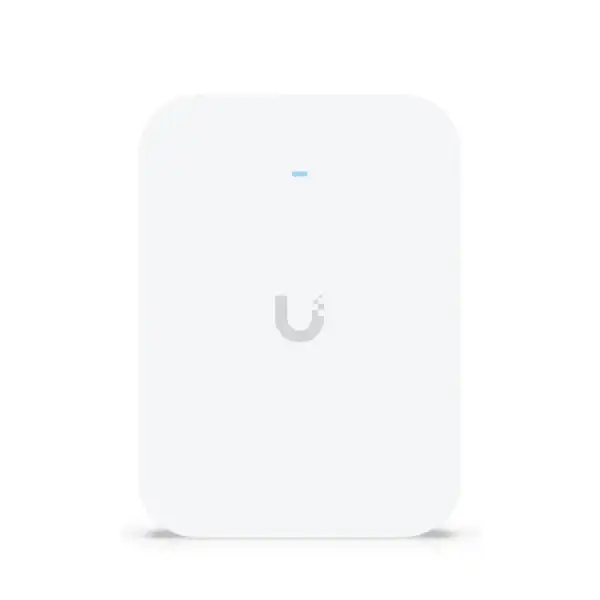
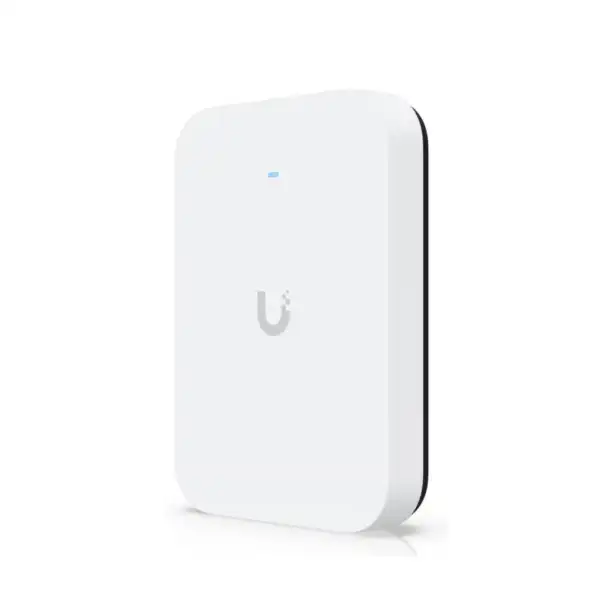
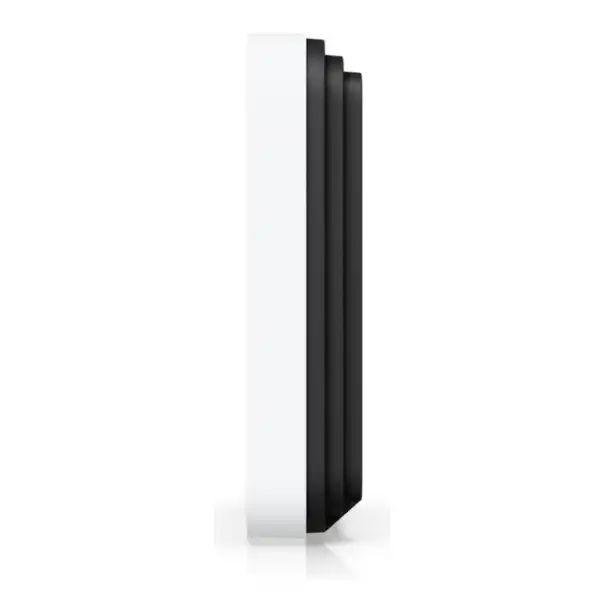
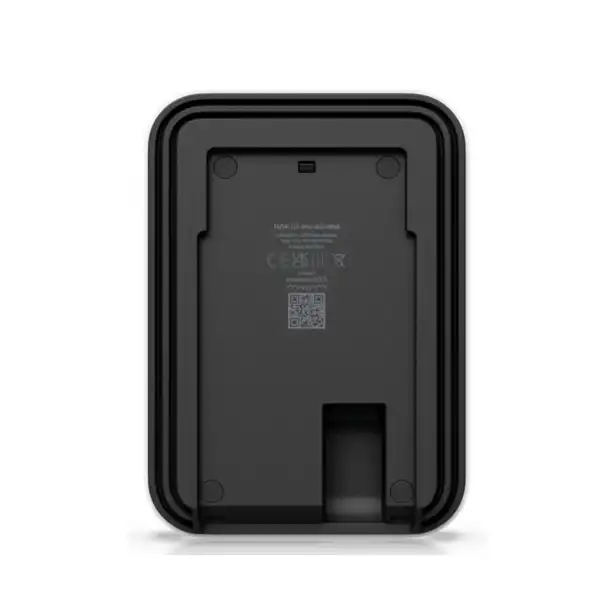
The U7 Pro XG Wall’s rectangular body is different from the circular U7 Pro XG. This distinction matters because similarly named products can have different mounting arrangements, shapes, and accessory needs. The Wall model’s stated dimensions are 155 by 108 by 33.5 millimetres. Plan space for the mounting hardware, the cable termination, and future service access. Confirm that the mounting surface can support the product and that the selected location complies with the manufacturer’s installation instructions.
Do not confuse it with a wall-plate access point that includes several Ethernet outputs for desks or telephones. The U7 Pro XG Wall lists one RJ45 network port. If a room needs both premium WiFi and multiple wired client sockets, design those wired ports separately or choose another form factor with the required physical interfaces. A table stand, flush mount, or paintable cover may be available as distinct accessories, but their inclusion in a Tanzania purchase should be confirmed rather than assumed.
Choosing between the Wall and ceiling-style UniFi access points
A wall-mounted design is suitable when a cable can reach the correct wall location and the intended user area benefits from that geometry. A ceiling-mounted access point can be a better match for some open-plan floors and shared halls where overhead placement provides a more balanced signal pattern. Neither mounting approach is categorically better. Choose according to architecture, cabling, room usage, wireless survey results, and the actual models under consideration.
The U7 Pro XG Wall and the circular U7 Pro XG should not be treated as the same physical product. Confirm the exact model on the quote, purchase order, mounting plan, and delivery paperwork. If the project simply needs a reliable modern access point on a slower existing switch, the premium value of a ten-gigabit interface may be limited. If the site is investing in multi-gigabit switching and newer clients, the Wall model may be the more natural long-term fit.
Comparing with the non-XG U7 Pro Wall
The U7 Pro Wall and U7 Pro XG Wall belong to the same general wall-mounted WiFi 7 category, but the XG model is specified with a ten-gigabit-capable uplink. That difference matters when aggregate wireless demand and fast local traffic justify additional headroom. The buyer should not assume that adding XG to the product name changes the bandwidth of every existing device, or that the faster uplink alone overcomes interference. Compare the exact manufacturer’s current specifications and commercial offers before selecting either model.
A sensible decision framework begins with four questions: what wired speed can the site provide, which clients can use the newer radios, how much traffic is expected at peak, and where will the access point be mounted? If most answers point to moderate demand and a 2.5 GbE infrastructure, a lower-uplink model may satisfy the project. If the design has a credible ten-gigabit path and higher aggregate traffic, the U7 Pro XG Wall deserves closer attention.
A deployment workflow that reduces surprises
Begin with a short requirements survey. Identify expected active users, device types, business applications, rooms, floor construction, existing switches, and broadband or private-network topology. Mark candidate wall positions and check that each has a viable cable path. Next, validate the management platform and whether the intended wireless bands and widths are legal and supported for the deployment. This sequence helps prevent a specification decision from being made before the physical and regulatory constraints are known.
After selecting the candidate position, verify switch port speed, PoE+ power, cable quality, and upstream network policy. Mount the device safely, adopt it into a supported UniFi Network environment, configure appropriate SSIDs and security, then test real client journeys and application workloads. Record the negotiated Ethernet rate, observed coverage, power draw where available, radio channel choices, and any limitations discovered. A handover document with these details is more valuable than an installation note that says only that the unit powers on.
Testing performance after installation
Testing should represent the work people do. Record signal quality and application response at normal desks, meeting seats, reception positions, and transitions between rooms. Test at different times if neighboring wireless activity changes during the day. Use a mixture of compatible WiFi 7 devices and common older client devices so the results describe the likely user population. A test from one recent laptop standing beside the access point will not predict the experience of everyone on the floor.
Separately test the wired link to confirm its negotiated rate and basic stability. If the controller reports a slower rate than planned, inspect the switch port, patching, injector path, and cable run before changing wireless settings. Compare local-network transfers with internet-based workloads to identify the likely bottleneck. If users experience inconsistent video or voice performance, inspect interference, airtime, roaming, and upstream utilization instead of assuming the access point is defective.
Managing heat, power continuity, and operating conditions
Ubiquiti lists a maximum power consumption of 22 W, an ambient operating range from -30 to 40 degrees Celsius, and 5 to 95 percent non-condensing humidity. These figures are device specifications, not permission to install it in a sealed hot enclosure or exposed weather location. This product is intended for an appropriate indoor installation. Leave the housing able to dissipate heat and avoid mounting arrangements that trap warmth against sensitive materials or obstruct normal servicing.
In a business setting, dependable operation also relies on the upstream power system. If the PoE switch loses electricity, the access point loses service even though no local adapter is attached. Where continuity matters, evaluate backup power for the network cabinet, gateway, switches, and upstream internet equipment together. A battery that powers only the access point cannot preserve connectivity if the router and switching equipment have already shut down. Plan cooling, surge protection, and maintenance access as part of the network project.
Understanding what is included in a quote
A good purchase quote should separate the access point itself from any optional equipment or services. Confirm the model U7-Pro-XG-Wall, the physical mounting arrangement, the intended power source, and whether a suitable PoE+ injector or switch is included. Ask whether extra patch leads, cable installation, site surveys, configuration, and post-installation testing are priced separately. This allows buyers to compare complete working solutions rather than only the price of the wireless device.
For a Tanzania purchase, check the specific local offer for price, stock, taxes, delivery terms, support arrangements, and any warranty conditions before committing. None of those commercial details can be established from the manufacturer specification alone, and foreign store pricing should not be presented as a local selling price. The exact FourTeck listing SKU was not supplied, so the manufacturer model designation is shown for product identification without inventing a local SKU.
Questions to ask before requesting a quotation
Tell the supplier whether this is a new network or an upgrade to an existing UniFi environment. Share the approximate floor plan, the wall locations available for mounting, the number of simultaneous devices, and the uses most sensitive to latency or interruption. Include the current switch models, available port speed, PoE capabilities, and the age or tested category of the Ethernet cabling. Explain whether a local server, file-storage system, or multi-gigabit internet service is part of the design.
Ask for confirmation of controller compatibility, suitable power equipment, compatible mounting accessories, the permitted radio configuration, and any installation services required. If you need guest WiFi, separated staff networks, or multiple access points with roaming, describe those requirements explicitly. A detailed briefing helps the supplier recommend the right number of units and avoids assuming that the most expensive access point is always the correct one.
Common procurement mistakes to avoid
One mistake is treating the 10 GbE port as proof of ten-gigabit WiFi performance for a single user. Another is expecting 300-plus clients to receive identical bandwidth at once. Others include overlooking PoE+ power, choosing an injector that limits the data path, installing the access point behind obstructing furniture, or using 6 GHz assumptions without verifying the permitted regional settings. These errors can make a capable access point appear disappointing even when the hardware operates correctly.
Another common oversight is ordering by a shortened name such as U7 Pro XG without the Wall designation. Always confirm the full manufacturer model. Check the room’s required wired outputs as well: a single-port wireless access point does not replace a multiport room switch. Finally, do not schedule a migration without checking the UniFi Network version and the impact of controller changes on the rest of the site. Clear specifications and a realistic commissioning plan reduce all of these risks.
How to size a multi-room network
Start by dividing the building into meaningful wireless zones: shared work areas, enclosed rooms, halls, high-density spaces, and places with unusual construction materials. Estimate normal and peak client activity in each zone, then assess candidate access point locations through a survey. One access point’s 140 m² planning value should not simply be multiplied by the number of units to guarantee a whole-building result. Signal overlap, access point orientation, floors, and wall loss make coverage planning more complex.
Use wired backhaul where practical and select channel assignments that minimize unnecessary competition. For business-critical areas, ensure there is a tested path to support users if their nearest access point becomes unavailable, while recognizing that redundancy depends on the full design. Review client distribution after deployment and adjust capacity if one zone is repeatedly overloaded. A well-spaced set of appropriately configured access points often performs better than a few units installed purely according to the highest published coverage numbers.
A note on internet speed versus local network speed
A buyer may have a 500 Mbps or 1 Gbps internet service yet still benefit from a faster local wireless network when sharing files with on-site storage, media servers, or other systems. Conversely, a ten-gigabit uplink does not increase the contracted internet speed. Internet performance depends on the provider service, gateway, firewall processing, congestion, and remote servers. These are different bottlenecks from the access point radio and wired link.
Decide whether the project is trying to improve internet access, internal file transfers, conferencing reliability, client density, or wireless coverage. The right measurement differs for each goal. For general internet browsing in a small office, stable placement and a sensible power arrangement may matter more than absolute uplink capacity. For large collaborative files and fast local storage, a multi-gigabit network design may justify the additional headroom. Specify the complete path rather than purchasing each component in isolation.
Lifecycle maintenance and operational ownership
A wireless deployment is not complete when the hardware is fitted to the wall. Someone should own firmware updates, configuration backups, security reviews, credential management, and monitoring. The supported UniFi management environment gives administrators a place to manage multiple access points, but it still needs documented procedures. Keep a record of unit locations, model names, switch ports, assigned network policies, and the software baseline at commissioning.
Plan a maintenance window approach for network upgrades and test important functions after changes. Keep enough knowledge within the organization or its support partner to recover a misconfiguration without unnecessary downtime. Monitor user reports along with controller observations, because a healthy status indicator does not prove that an application is working well for every device. Consistent operations protect the value of a premium hardware investment long after the initial installation.
Environmental and local deployment considerations in Tanzania
Site conditions vary by building and use. For a Tanzania deployment, consider room temperature, cabinet ventilation, electrical stability, and the materials used in walls and interior partitions. These factors can shape the wireless layout and the supporting PoE network. A compact wall-mounted access point can be attractive where ceiling access is impractical, but the final placement must still protect airflow, service access, and the intended signal path. Avoid assuming that all buildings or business environments need the same number of units.
Regional wireless configuration also deserves explicit attention. The product is technically capable of 6 GHz operation, yet permission to use a band and channel is determined by applicable local rules and the device’s supported regulatory profile. Procurement should verify these details without claiming a Tanzania-specific certification from a generic manufacturer datasheet. Local availability, installed accessories, and service arrangements require confirmation against the actual offer; they are not inferred from international product information.
When an alternative design is more appropriate
Choose another approach if the project needs multiple physical LAN ports at each room, a weather-rated outdoor access point, a ceiling-centered coverage pattern, or hardware designed specifically for a very high-density venue. A room switch plus a wireless access point may be preferable where several wired endpoints must connect. An outdoor-rated device is essential for exposed locations rather than trying to protect an indoor wall unit with improvised covers. For especially wide spaces, survey-led multi-unit design takes priority over a single access point’s specification.
An existing gigabit or 2.5 GbE network can still use a faster-capable access point, but the value proposition changes. Evaluate whether the extra cost brings a realistic benefit now or merely capacity that the site may never use. Do not disregard a simpler access point if it meets the user load, placement, security, and maintenance requirements. The right choice is the one that delivers a dependable service within the full network budget.
Your practical U7 Pro XG Wall purchase checklist
Before placing an order, confirm the exact U7-Pro-XG-Wall model; an indoor wall position appropriate for the intended coverage; a supported UniFi Network environment; a PoE+ source with sufficient headroom; a suitable Ethernet cable channel; and an upstream switch path delivering the planned negotiated speed. Check whether the required radio bands can be configured legally in the deployment region. Identify the devices that will benefit from WiFi 7, the applications most sensitive to interruption, and the number of active users at peak.
Then verify the scope of the actual quotation, including power accessories, mounting extras, configuration, cabling, and testing where needed. Ask for a survey for complicated buildings or high-density usage instead of relying on a theoretical coverage number. Record the final installation settings and validate performance from the user’s normal work position. These steps turn a list of high-end specifications into a procurement decision that can be explained, budgeted, and supported.
Request the right solution for your project
If you are evaluating the Ubiquiti U7 Pro XG Wall Tanzania for a new or upgraded UniFi network, prepare a short description of your site, floor plan, current switch, controller version, expected client count, and required services. Those details help establish whether this model fits the space and whether separate PoE+, multi-gigabit switching, or cabling work must be included. A useful quotation should distinguish the access point from all optional supporting work and make clear which assumptions need confirmation.
Ask FourTeck Tanzania to review the proposed model, intended installation, compatibility requirements, and quotation scope. Confirm local commercial details directly rather than relying on international catalogue prices or general claims. The objective is a well-sized, maintainable wireless service with an implementation path suited to the building, the applications, and the network team that will operate it.
Frequently asked questions
Is the U7 Pro XG Wall a router?
No. It is a UniFi wireless access point designed to provide WiFi connectivity over an existing network. Routing, firewall services, upstream internet access, and much of the wired policy normally come from other network equipment. Plan for the appropriate gateway or router and switching infrastructure, then connect the access point with a supported Ethernet and PoE+ arrangement. Do not purchase it as a replacement for the full internet router unless the rest of the network role is already covered.
Does it work without a 10 GbE switch?
Its high-speed interface is designed to support multiple Ethernet rates, so a slower compatible upstream link may still operate. However, the negotiated link limits how much traffic can leave the access point over that wired path. Confirm the switch port, PoE+ capability, and any injector’s supported data rate. The presence of a ten-gigabit interface on the access point does not upgrade the upstream port automatically. A verified multi-gigabit design is preferable to an assumed connection speed.
What power supply does it need?
Ubiquiti specifies PoE+ and a maximum consumption of 22 W. Power comes through the Ethernet connection from suitable sourcing equipment such as a compatible PoE+ switch or carefully selected injector. Check the port’s actual supported PoE standard, remaining power budget, and the planned wired speed. Do not assume that a suitable injector, switch, or power accessory is included with a local purchase unless the seller confirms that specific package. Network backup power may also be relevant for business continuity.
Can a WiFi 6 laptop connect to it?
The unit supports WiFi 7 while also listing earlier wireless standards. A compatible older laptop can usually connect using features that its own radio and configured network support. It will not obtain WiFi 7-only capabilities simply because the access point has them. Authentication settings, client drivers, band availability, and radio configuration still matter. Test any important legacy equipment before a full migration and provide a suitable compatible network policy if specialized devices require it.
Is 6 GHz guaranteed to work in Tanzania?
No such guarantee should be inferred from the hardware specification. The product includes a 6 GHz-capable radio, but usable channels and supported operation depend on the current regulatory rules and the device’s configured region. Verify applicable permissions and firmware settings for the proposed deployment. If your business case specifically depends on 6 GHz or a 320 MHz channel, make this a formal prerequisite during design and procurement rather than assuming availability on every installation.
Does 300-plus clients mean 300 people at full speed?
No. The manufacturer client-capacity figure is not a per-user speed promise. Throughput and service quality depend on signal conditions, device types, application demand, interference, access point settings, and total airtime usage. A room full of people on video calls can present a very different load from hundreds of mostly idle connected devices. Determine the peak simultaneous activity and validate the design with realistic workloads before relying on a single access point for a crowded space.
How much area will one access point cover?
Ubiquiti lists a nominal coverage area of 140 square metres. Real coverage depends heavily on mounting location, wall construction, client radio quality, surrounding interference, and the band used. A 6 GHz connection may behave differently from 2.4 GHz across the same rooms. For an open space, the rating can help initial comparison; for a complex building, a wireless survey is the better tool. Multiple smaller coverage zones may be preferable to stretching one unit across thick walls.
Does it provide Ethernet sockets for desks?
The official specification lists one RJ45 networking interface for Ethernet uplink and PoE power input. Do not treat this model as a multiport desk switch or assume additional room-side LAN outlets are present. If an office needs wired connections for computers, phones, or printers in the same room, include a separate network-switching arrangement or evaluate a different access point form factor that explicitly provides those interfaces. Check the exact model and hardware drawing during procurement.
Which UniFi Network version is required?
Ubiquiti lists UniFi Network version 10.0 and later for this exact model. Check the current controller or console before scheduling an installation, because a legacy installation may need a compatible software upgrade. Review the operational effect on existing devices and network policies before changing the platform. A model with a similar name may list different minimum requirements, so reference the U7-Pro-XG-Wall technical specification rather than using requirements for the circular U7 Pro XG.
Can I request a Tanzania price and installation quote?
You can request a quote with the full model name, target rooms, number of users, current switching equipment, and preferred installation location. Ask the provider to confirm local pricing, availability, included power equipment, mounting items, cabling, and configuration services. A local price, stock promise, or installation entitlement cannot be inferred from a manufacturer sheet or another country’s retailer listing. Providing a floor plan and existing network details makes it easier to assess a complete solution.
Request a U7 Pro XG Wall quotation
Ask FourTeck Tanzania to confirm the exact U7-Pro-XG-Wall offer, local commercial terms, and the supporting PoE+ and networking requirements for your site. Include your floor plan, expected clients, and current controller and switch details so the recommendation can reflect your real deployment.
No local price, inventory availability, installation coverage, or product-listing SKU is implied by this technical description.




Reviews
There are no reviews yet.