
UniFi wireless access point · Tanzania product guide
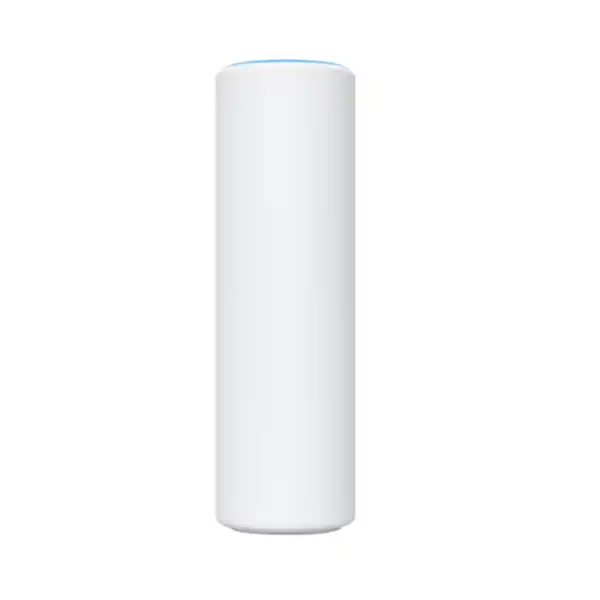
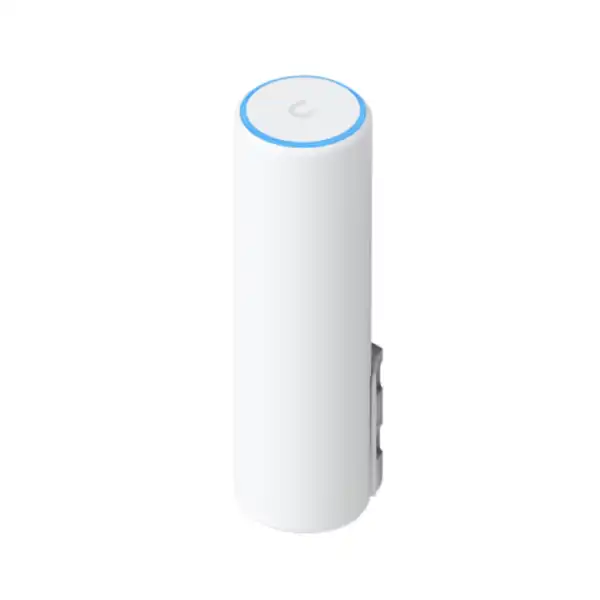
Ubiquiti U7 Mesh (U7-Mesh) Wi-Fi 7 Access Point
The Ubiquiti U7 Mesh Tanzania buyer guide explains where this compact indoor/outdoor access point fits, what its verified features mean in practice and which installation decisions matter before buying. It is a dual-band Wi-Fi 7 unit with flexible placement, a 2.5 GbE uplink and support for UniFi wireless meshing. Choose it for a carefully planned coverage extension, not on the assumption that every Wi-Fi 7 access point includes a 6 GHz radio.
Quick buying summary
Choose the U7 Mesh if you want a compact UniFi access point for a suitable indoor or outdoor position and need a modern dual-band radio system. It can use wired Ethernet or a properly configured wireless mesh uplink; wired connections are the stronger starting point where practical. Ubiquiti quotes up to 140 m² coverage and more than 200 clients, but building layout, interference, occupancy and backhaul change real results. Review software compatibility, PoE, outdoor mount conditions, regional radio settings and accessory needs before purchasing.
Verified technical specifications
| Model | U7-Mesh |
|---|---|
| Wi-Fi generation | Wi-Fi 7 (802.11be), dual-band 2.4/5 GHz |
| Spatial streams | 4 total; 2 × 2 on each radio |
| Manufacturer coverage reference | 140 m² (1,500 ft²) |
| Manufacturer client-count reference | 200+ |
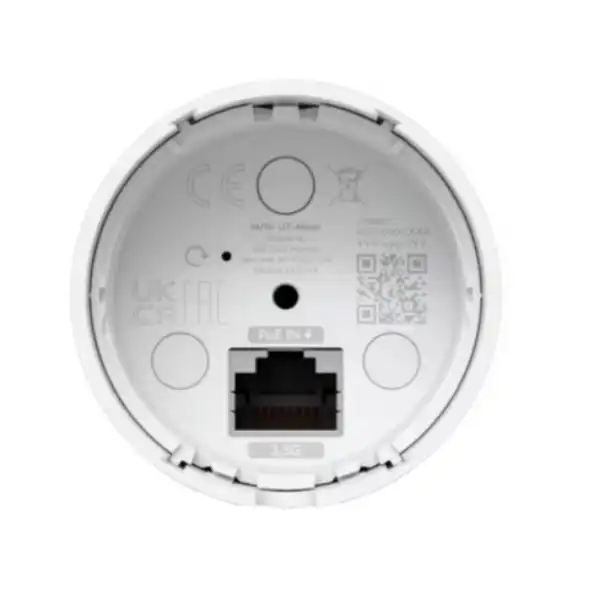
| Ethernet | One 2.5 GbE RJ45 port |
| Maximum 5 GHz PHY rate | 4.3 Gbps at 240 MHz (region dependent) |
| Maximum 2.4 GHz PHY rate | 688 Mbps at 40 MHz |
| Power | PoE; included adapter; 13 W maximum |
| Weather protection | IPX6 with outdoor mount |
| Mounting | Wall, pole, tabletop (mounts included) |
| Dimensions | 48.5 mm diameter × 159.5 mm |
| Operating temperature | -30 °C to 60 °C |
| Management | UniFi Network 10.1.85 or later |
Radio rates are theoretical; coverage, client count and weather protection carry the conditions discussed below. Local channel rules and installation conditions may restrict practical performance.
Who should consider the U7 Mesh?
The Ubiquiti U7 Mesh Tanzania product choice makes sense when reliable Wi-Fi needs to reach a room, work area or outdoor location where a traditional ceiling access point would be awkward. Its slim cylindrical enclosure can sit on a table or attach to a wall or pole. It is especially relevant to businesses extending an existing UniFi network, homes with challenging floor plans and properties with sheltered or exposed outdoor seating. The central buying question is not simply whether Wi-Fi 7 is newer; it is whether this form factor, radio arrangement and mounting system fit the intended space.
Before choosing the U7 Mesh, identify the users, expected applications and backhaul path. A wired Ethernet uplink is preferable wherever practical; wireless mesh is an option when new cable is difficult. Also check whether the wider network already uses UniFi Network and whether its software supports this model. A professional plan considers outdoor exposure, local radio rules and power resilience. FourTeck Tanzania can help buyers discuss the requirements without assuming that one access point will cover an entire building or site.
Understand its dual-band Wi-Fi 7 design
Wi-Fi 7 is the wireless generation used by this access point, but Wi-Fi 7 products do not all have the same radios. The U7 Mesh uses 2.4 GHz and 5 GHz, with two spatial streams on each band for a total of four. It does not provide a 6 GHz radio, so it should not be bought to create a 6 GHz-only network. This distinction matters when comparing models or interpreting a generic Wi-Fi 7 advertisement, particularly where a project requires specific spectrum capabilities.
The 2.4 GHz radio remains useful for compatible legacy equipment and devices that prioritize reach rather than peak throughput. The 5 GHz radio is more appropriate for compatible devices seeking higher data rates, subject to distance, channel conditions and regional settings. Wireless clients also determine what standard and features can be negotiated. Buying Wi-Fi 7 hardware does not turn older phones or sensors into Wi-Fi 7 devices. Plan for the devices that are actually present, including the oldest essential ones.
Put advertised radio speeds in context
Ubiquiti lists a maximum 5 GHz radio data rate of 4.3 Gbps at 240 MHz channel bandwidth and a maximum 2.4 GHz radio data rate of 688 Mbps at 40 MHz. These are theoretical radio-link figures, not guaranteed downloads, internet subscription speeds or simultaneous end-user throughput. Channel width and usable frequencies depend on the regulatory configuration, and client radios have their own limitations. Real application results also reflect interference, signal levels, the network uplink and how many devices share airtime.
For a buyer, the more useful question is how stable the connection remains where users actually work. A device near the access point may have a very different experience from one behind reinforced walls or at the far end of a courtyard. Measure busy-hour activity rather than looking only at one speed test. High-resolution conferencing, cloud applications and large file transfers benefit from thoughtful placement, adequate wired infrastructure and careful management of competing traffic.
Plan the 2.5 GbE Ethernet connection
The U7 Mesh has one 2.5 GbE RJ45 Ethernet port. When connected to a suitable multi-gigabit switch or other compatible network device, this uplink helps avoid constraining a fast wireless cell to a slower single-gigabit link. However, the presence of a 2.5 GbE port does not mean that every switch, router or cable in the building automatically runs at 2.5 Gbps. The negotiated speed depends on both ends of the connection and the cable installation.
For a wired deployment, inspect the switch’s port capability and available PoE power before specifying accessories. Test the cable run and confirm the negotiated link speed during commissioning. Where the wider internet service is slower, internal network performance and local transfers may still matter. If the access point is using wireless mesh backhaul, assess the radio path rather than treating its Ethernet rating as the end-to-end throughput. A network design should identify the true bottleneck instead of relying on a single headline specification.
Choose wired backhaul when possible
An access point with a dedicated wired connection normally delivers the most predictable capacity and stability. Ethernet removes the wireless backhaul traffic from the radio path used by clients and avoids the extra airtime demand associated with mesh hops. For offices that can run cable to a convenient wall or pole, a wired U7 Mesh is often the straightforward answer. A wired connection also simplifies fault isolation because the installer can test the power, port and cable separately from the Wi-Fi signal.
Wireless meshing remains valuable in locations where cable routing is expensive, disruptive or physically difficult. That flexibility comes with a tradeoff: the upstream access point and downstream U7 Mesh must share available wireless capacity, and each extra hop introduces further contention. Ubiquiti recommends limiting wireless hops and using strong parent links. Choose mesh because the site needs it, not because the product name contains Mesh. When maximum sustained throughput is a priority, compare the cost of cabling with the performance compromises of wireless backhaul.
Design a wireless mesh link deliberately
The device supports UniFi wireless meshing, allowing a compatible access point to connect upstream over Wi-Fi while serving nearby clients. That does not make it a stand-alone router or replace the need for a functioning UniFi network. A mesh installation requires a suitable parent access point, controller configuration, electrical power at the mesh unit and an adequate wireless path. Device compatibility and firmware should be reviewed as part of the project design rather than assumed from product branding alone.
For U7 Mesh-to-U7 Mesh links, Ubiquiti advises pointing the U logos toward each other to improve the mesh signal. Its general mesh guidance recommends a strong upstream signal, around -60 dBm or better, and as few wireless hops as practical. Obstacles, vegetation, metal surfaces and seasonal changes can degrade a path that appears clear on a drawing. Position and test the link before permanently fastening equipment. If the design relies on several hops, reconsider whether a cable or dedicated bridge would be more dependable.
Think about coverage, not just floor area
Ubiquiti publishes a coverage figure of up to 140 m², but that should be treated as a planning reference rather than a promise for every building. Brick walls, reinforced concrete, metal shelving, tinted glazing and neighbouring networks can change the useful coverage dramatically. A tall open lobby and a series of small closed rooms may have the same floor area yet require different numbers and positions of access points. Outdoor spaces add weather, foliage and nearby sources of interference.
A practical coverage plan identifies the places where important work happens: reception desks, seating zones, checkout points, offices and service areas. Survey those locations with representative client devices and review signal quality, not only whether a Wi-Fi network name appears. Avoid putting one access point at an extreme edge merely because it is convenient to reach with a cable. The aim is reliable service in occupied areas, with overlap where roaming between access points is required.
Mounting choices for different spaces
The U7 Mesh supports wall, pole and tabletop mounting, with the manufacturer’s listed mounting accessories included. The compact enclosure is approximately 48.5 mm in diameter and 159.5 mm tall, which helps it fit locations where a larger ceiling panel would look out of place. A tabletop deployment may be useful for an indoor test or a carefully planned permanent room installation. Wall and pole installations allow the antenna position and cable route to be controlled more precisely.
Select a mount based on exposure, access for maintenance and the direction of the desired wireless path. A metal pole, thick wall or nearby machinery can affect propagation. Use secure, stable fixing points and preserve the intended orientation. If a unit will be outdoors, use the specified outdoor mount rather than assuming the same weather protection applies to any placement. When relocating or changing the angle of a mesh unit, retest both its client coverage and its upstream wireless link.
Outdoor installation and IPX6 conditions
The enclosure uses UV-stabilized polycarbonate, and Ubiquiti gives the access point an IPX6 water-protection rating when it is installed with the outdoor mount. The qualification is important. IPX6 is not an assertion that any mounting method, exposed connector arrangement or accessory is waterproof. It also should not be read as permission to submerge the equipment or neglect cable-entry protection. Outdoor reliability depends on the complete installation, not just the access point enclosure.
For outdoor locations in Tanzania, consider rain exposure, drainage, direct sun, wind-driven moisture and the physical route of the Ethernet cable. Use suitable outdoor-rated cable and appropriate surge protection selected for the site; assess earthing and lightning exposure with a qualified installer. Keep connectors and power equipment protected in accordance with their own ratings. Inspect pole fixing and cable strain relief, and follow the manufacturer’s installation instructions. These precautions apply whether the access point serves a courtyard, an outdoor counter or an open-air working area.
Power and electrical planning
The U7 Mesh is powered by PoE and has a stated maximum consumption of 13 W. Ubiquiti lists a supported voltage range of 42.5–57 V DC and confirms that a PoE adapter is included. That simplifies planning, but the full design still needs an available AC supply for the adapter or a correctly specified PoE source, plus a safe cable route. Do not assume that every device labelled PoE supplies the right voltage, budget or operating mode; match the power source to the official device requirements.
Where power interruptions are consequential, review the availability of backup power for the access point, its upstream switch or adapter, and the router and internet connection. A powered access point cannot keep an application online when the rest of the network has stopped. For an outdoor mesh device, remember that wireless data backhaul does not eliminate the need to supply power locally. Factor the location of safe, serviceable power equipment into the placement decision before drilling or mounting.
Use the 2.4 GHz and 5 GHz bands wisely
The two radios have different roles. The 2.4 GHz band may offer better reach through some materials and remains essential for many older or simple client devices, but it typically competes with more neighbouring networks and non-Wi-Fi sources. The 5 GHz band generally provides more channel choices and higher potential data rates, though walls and distance can reduce its usefulness. The best channel and width are determined by the site environment and the radio rules applicable to the installation.
A channel plan should account for adjacent access points, nearby businesses and expected client movement. Using the widest possible channel everywhere may reduce rather than improve busy-site performance if there is insufficient clean spectrum. Select appropriate widths after a survey and evaluate performance at peak use. Configure band steering where appropriate, while preserving reliable connectivity for devices with limited band support. Avoid telling users that 2.4 GHz is always slow or that 5 GHz automatically reaches every location.
Capacity planning beyond the 200+ figure
The manufacturer specifies a maximum client count of 200+, which indicates supported association scale rather than a promise that hundreds of simultaneous heavy users will enjoy identical performance. A network carrying occasional messaging traffic behaves differently from one carrying sustained video meetings or large downloads. Airtime, application type, upstream bandwidth and neighbouring interference determine what a site can support in practice. Guest networks and large venues should therefore plan for realistic concurrency rather than simply dividing a headcount by the published client figure.
Start by estimating how many people will be online at the busiest time and how many devices each person uses. Separate ordinary browsing, voice or video calls, payment terminals, background updates and other priority applications. Review upstream WAN and switch capacity, then test representative traffic in the actual space. If requirements exceed a comfortable margin, several carefully placed wired access points can be preferable to one heavily loaded device. Capacity is a network architecture question, not solely a property of the access point.
Roaming when people move around
Ubiquiti lists support for 802.11r fast roaming, 802.11k radio resource management and 802.11v transition management. These features help a properly planned multi-access-point network guide compatible clients between coverage cells. They are particularly relevant for users walking between rooms, service counters or connected outdoor and indoor areas. However, a roaming standard does not guarantee that every phone, tablet or legacy device will switch at the ideal moment; many client devices retain substantial control over their roaming decisions.
Good roaming begins with sensible access point spacing and reasonable signal overlap. Excessive transmit power can cause devices to stay attached to a distant access point; too little overlap can cause gaps. Test movement along routes staff and visitors actually use, especially during voice calls or time-sensitive applications. Apply fast-roaming options with awareness of client compatibility and validate any changes. A consistent SSID, sound network policies and suitable backhaul are just as important as the radio feature checklist.
Guest Wi-Fi and visitor experience
The U7 Mesh can participate in UniFi guest networking features, including captive hotspot portals, customizable landing pages, voucher authentication and guest isolation. These options give a hotel, office reception area or customer-facing venue ways to separate visitor access from operational systems. A guest portal may be useful where access needs to be time-limited or managed, but it should not be treated as the only security control protecting internal devices.
Design the guest service around a clear visitor journey. Test how phones display the portal, how long credentials last, what happens after a device reconnects and whether a visitor can access anything outside the intended network. Apply speed limits if the site needs to preserve capacity for business applications. Where a deployment uses voucher or payment-based access, verify the chosen workflow and supporting system before promising it to customers. Keep sign-in instructions simple and make sure staff know how to assist visitors who have connectivity problems.
Segmentation and network access control
Advanced UniFi features listed for the model include private pre-shared keys, client device isolation, RADIUS over TLS and dynamic RADIUS-assigned VLANs. These capabilities can support a managed wireless design in which visitors, staff devices and selected infrastructure systems follow different access policies. The access point participates in that design, but switches, gateways, identity services and configured networks must also support the intended segmentation. Installing the access point alone does not establish a secure multi-network architecture.
Before deployment, decide which devices should communicate, which should be isolated and who is responsible for administering credentials. Keep finance or operational systems separate from open visitor access where the site requires it. Validate routing, firewall rules and VLAN propagation through the wired or mesh path rather than assuming the SSID setting handles everything. Document administrative ownership and a credential-change procedure. Security is strongest when radio configuration, wired networking and ongoing maintenance reinforce one another.
Hotels, restaurants and visitor properties
Hospitality sites often need wireless coverage that moves beyond a single reception room into corridors, dining areas, terraces or shared workspaces. The U7 Mesh may suit a discreet wall or pole position and can extend a compatible UniFi deployment where routing a cable is inconvenient. The useful design question is where guests actually connect and how much simultaneous traffic their applications generate. Poolside or outdoor seating areas require a particularly careful review of exposure and mounting conditions.
For a guest property, assess coverage in occupied rooms and common spaces separately. The figure of 140 m² does not mean the device will reliably serve a particular number of guestrooms through intervening walls. Evaluate captive portal needs, guest isolation, staff connectivity and backhaul stability before specifying quantities. If a venue has demanding conferencing, streaming or operational needs, prefer wired access points wherever feasible. A guest-facing solution should make access easy while protecting the networks used to run the property.
Offices, shops and shared workspaces
A small office may need coverage across desks, meeting rooms and reception without installing a prominent ceiling fixture. In a shop, users may include staff devices, portable stock terminals, customers and payment-related equipment. The U7 Mesh offers a versatile form factor and central management, but the right position depends on the room geometry and the sensitivity of connected applications. In both settings, equipment that relies on steady connectivity should be tested at the precise location where it will be used.
Design separate wireless policies where business needs call for them, and avoid making every application compete on an unrestricted guest network. Check whether the router and WAN service can sustain busy periods. Where staff regularly walk between access points, test roaming with the devices they use. In a small space, one correctly placed unit may be sufficient; in a subdivided or crowded space, multiple wired cells may be better. The installation should be sized to the work being done rather than the product’s maximum figures alone.
Workshops, stores and semi-open spaces
Workshops and storage environments can be difficult radio locations. Metal racks, moving stock, machinery, large doors and unusual building shapes all influence Wi-Fi behaviour. A compact wall or pole-mounted access point may provide a useful location option, but no manufacturer coverage estimate replaces a survey around the actual obstructions. The objective is to support scanners, tablets, maintenance terminals or ordinary user devices where they operate, not merely to display a strong signal at the entrance.
Where movement is important, survey work zones with the doors and shelves in their normal positions and consider how inventory changes over time. Choose robust mounting points away from accidental impacts and excessive cable strain. If the workspace has high ceilings or long aisles, compare alternative antenna and access point layouts instead of assuming a general-purpose unit will cover every direction equally. Inspect wired uplink options and power availability early, particularly when a wireless mesh parent would otherwise be far from the proposed installation.
UniFi Network setup and management
The U7 Mesh is managed through UniFi Network. Ubiquiti specifies UniFi Network version 10.1.85 or later, with stated minimum versions for the corresponding UniFi mobile applications. This version requirement deserves attention during an upgrade: an older controller or management environment may not be ready to adopt the new device. The access point should be considered part of the wider UniFi system, with suitable network connectivity and administration, rather than a stand-alone consumer router.
Before installation, verify the version in use, administrative access, firmware practices and backup arrangements for network settings. During adoption, confirm that the device appears in the correct site and receives the intended wireless configuration. Review client associations, radio statistics, uplink quality and alerts after commissioning. Keep a record of mounting locations and network names so future maintenance is easier. Changes should be tested thoughtfully, especially if guest portals, VLANs or mesh parent settings are already important to the business.
Upgrading from an older access point
A move to U7 Mesh can be motivated by its Wi-Fi 7 radios, 2.5 GbE uplink, modern enclosure or flexible mounting choices. Before replacing an existing UniFi access point, compare radio bands, mounting methods, wired power and software support. It is not safe to assume that all Wi-Fi 7 units have 6 GHz or that an older mount and injector are interchangeable. Confirm the physical installation and management compatibility of the exact replacement.
Where downtime matters, document the existing SSIDs, authentication settings, VLANs and guest access behaviour before changes. Stage and adopt the replacement under controlled conditions where possible. Test the target rooms and devices after moving it into position. Remember that a new access point may expose an older bottleneck in the switch, router, internet circuit or client hardware. The best upgrade solves a measured limitation; it does not merely swap a model number while leaving the underlying radio and network problems untouched.
Outdoor cable routing and ongoing maintenance
A weather-rated access point still depends on vulnerable supporting infrastructure. Outdoor Ethernet cable should be selected for the installation environment, supported along its route and protected where it passes through walls or outdoor structures. Any surge-protection and grounding arrangements should be designed for the site by a competent installer. The included PoE adapter should be located where its own electrical and environmental requirements are met rather than assumed to share the access point’s outdoor rating.
Build inspection into the network maintenance plan. After severe weather, check physical supports, seals, cable strain and signs of water ingress where it is safe to do so. Confirm that the device remains online and that its uplink and client signals have not materially changed. If landscaping, furniture or another structure changes the wireless path, repeat a practical coverage test. Outdoor reliability is the cumulative result of mounting, cabling, power and maintenance decisions in addition to the unit’s IPX6 condition.
Know when another UniFi model may fit better
The U7 Mesh is not automatically the best answer for every Wi-Fi 7 project. A site that specifically requires a 6 GHz radio should compare an appropriate 6 GHz-capable model, because the U7 Mesh itself operates on 2.4 and 5 GHz. A large hall may require several access points or a different antenna pattern. A long-distance point-to-point link may justify a dedicated wireless bridge rather than asking a general access point to act like one. Demanding indoor ceiling coverage could favour a form factor designed for that position.
Compare candidate models using the project’s actual criteria: required bands, client types, mounting geometry, weather exposure, switch ports, PoE budget, controller compatibility and total installed cost. Include installation labour and suitable cabling in the comparison. For a small outdoor coverage extension, the U7 Mesh may be appealing; for a multi-building campus, network architecture can matter more than the individual product. This balanced comparison helps avoid buying equipment that looks suitable on a specification sheet but fails to meet the site objective.
Tanzania planning considerations
For Tanzania buyers, climatic exposure, building construction, internet reliability and local operational requirements should be discussed before installation. Coastal humidity or open outdoor placement can increase attention to cable and mount protection; dense concrete buildings may reduce the usable radio footprint. Neither circumstance changes the official hardware specification, but both can influence the number and location of access points. Plan around the actual site rather than a generic assumption about a town, region or property type.
Radio channels and transmit settings must follow the applicable local regulatory requirements. The manufacturer’s maximum 5 GHz data rate assumes conditions that may not be available under every country configuration, so confirm the allowed channel widths and settings for the deployment. Also decide how guest access, backup power and ongoing administration will work. FourTeck Tanzania can discuss requirements and a suitable product choice; price, stock, delivery, installation coverage, regulatory approval and commercial terms should be confirmed separately rather than inferred from this description.
A practical site-survey checklist
Begin by drawing a simple floor or site plan with usable rooms, walls, outdoor areas, cable routes and existing network equipment. Mark the places where weak connectivity currently causes problems. Count the main device types and estimate peak concurrent use. Record which systems require low latency or uninterrupted connection, and identify any guest network or segmentation requirements. A brief survey at realistic operating times often reveals more than an estimate based solely on floor dimensions.
Next, select possible mounting points and test signal quality from representative positions. For a wireless mesh plan, measure the parent link strength and investigate obstructions between the proposed units. For a wired plan, confirm cable feasibility, switch capabilities and power budget. Evaluate the outdoor-mount requirement wherever the unit faces weather. Finally, record the chosen configuration, retest the user locations, and adjust placement or channel settings when observations differ from the design. This process makes the product purchase part of a measured solution.
Troubleshooting after installation
If clients report weak or inconsistent service, begin with the basics: verify that the access point is adopted, online and powered correctly. Check its uplink negotiation if wired, and the wireless parent signal if meshed. Compare a poor-performing client with another device at the same position to separate a device-specific issue from a coverage problem. Look for sudden interference, an unsuitable channel width, new obstructions or increased traffic during the affected time.
For intermittent mesh service, reduce unnecessary hops and consider moving the downstream unit to improve the parent link. For a wired unit, examine the Ethernet run, PoE source and switch errors before changing radio settings. Review UniFi’s client and radio information, but avoid making several unrelated changes at once. Apply one measured adjustment and retest so its effect is clear. If a site has frequent latency-sensitive traffic, the longer-term solution may be improved wired backhaul or another well-positioned access point rather than repeated channel changes.
Pre-purchase compatibility and accessory check
Before requesting a quote, verify the exact model name U7-Mesh and the intended mounting arrangement. Check the UniFi Network version, available switch or PoE source, and whether the included adapter fits the planned installation. Confirm that a 2.5 GbE uplink can be used where important, or accept the limits of existing network equipment. List the devices that need 2.4 GHz, 5 GHz or a 6 GHz connection so a band mismatch does not surprise the installation team.
For outdoor mounting, specify the required bracket, cable type, connector protection and any site-appropriate surge measures. If wireless meshing is planned, identify the compatible upstream access point, approximate separation and expected obstructions. Estimate occupancy, peak data demand and whether a guest portal or segmented network is required. These answers make a product enquiry more useful: they allow a suitable access point quantity and topology to be discussed before commercial details are confirmed.
Frequently asked questions
Does the U7 Mesh have 6 GHz Wi-Fi?
No. This is a dual-band Wi-Fi 7 access point operating on 2.4 GHz and 5 GHz. The Wi-Fi 7 name describes a wireless standard, not a guarantee of three-band hardware. If a device or project requires a 6 GHz SSID, compare a different access point with a verified 6 GHz radio. Assess the required network bands before ordering so the chosen hardware matches the planned clients and local settings.
Can the U7 Mesh be installed outdoors?
Yes, provided the installation follows the manufacturer’s conditions. Ubiquiti specifies IPX6 water protection when the product is fitted with its outdoor mount. Use suitable weather-resistant cable routing and protect accessories according to their own ratings. IPX6 does not make every connector or power adapter waterproof. Outdoor placement should be assessed for cable safety, mounting stability, moisture exposure and lightning-related risks.
Is a PoE injector included?
Ubiquiti’s specifications state that a PoE adapter is included. The access point is PoE-powered, with a maximum consumption of 13 W. The installation still needs suitable electrical power for the adapter or a properly matched alternative PoE source. If the power supply is installed away from the access point, plan the Ethernet route carefully. Check that upstream equipment and any backup power arrangements meet the operating requirements.
How many devices can connect?
The manufacturer lists a maximum client count of more than 200. This is not a promise of equal high-speed performance for 200 continuously active users. Actual experience depends on device traffic, radio interference, channel selection, client capability, backhaul capacity and site geometry. Plan around the number of simultaneously active users and the applications they need. A busy venue may require several access points despite the published client association figure.
Will one unit cover 140 square metres?
Ubiquiti’s up-to-140 m² figure is a useful reference, not a guaranteed footprint. Reinforced walls, shelves, neighbouring networks and outdoor obstacles can reduce practical coverage. Measure connectivity in the places people work or gather rather than assuming a simple geometric area. If consistent service is needed across multiple enclosed rooms, more than one strategically placed access point may be appropriate. A short site survey helps prevent both undercoverage and unnecessary equipment purchases.
Does the U7 Mesh work without Ethernet backhaul?
It supports UniFi wireless meshing, but still requires local power and an appropriate upstream UniFi access point and network configuration. A mesh connection can replace the data cable to the upstream network in suitable situations; it does not make the device a self-contained internet service or router. Wired backhaul usually offers higher predictable capacity. When using mesh, ensure good signal between access points and keep wireless hops to a minimum.
Is it compatible with older Wi-Fi devices?
Ubiquiti lists support for Wi-Fi 7, Wi-Fi 6, Wi-Fi 5 and Wi-Fi 4 data rates. An older client uses its own supported standard and capabilities; it will not obtain Wi-Fi 7 features merely by joining the access point. Compatibility should be tested for essential older equipment, particularly specialized sensors and payment-related devices. When upgrading, retain appropriate 2.4 GHz settings for devices that do not support 5 GHz.
Do I need UniFi Network to manage it?
Yes. The manufacturer lists UniFi Network version 10.1.85 or later as the software requirement. Confirm that the site’s UniFi management environment can run the necessary version before an upgrade. A gateway, switch and internet connection may also be part of the overall network, depending on the installation. The U7 Mesh is an access point rather than a stand-alone modem or internet subscription. Adoption and configuration should be planned as part of the complete network.
Can it offer separate staff and guest Wi-Fi?
The product supports guest networking, isolation and several advanced authentication and VLAN-related features through UniFi. A secure separation design also depends on correctly configured switches, gateways, access rules and identity systems where required. Plan the policy before creating SSIDs, then test that guest devices cannot reach protected resources. A captive portal can improve the visitor experience but should not be the only safeguard for business systems.
What is the difference between the 2.5 GbE port and wireless speed?
The 2.5 GbE port is the rated wired Ethernet uplink, while the headline wireless data rates describe possible radio link conditions. They measure different parts of the connection. A device’s internet speed may be lower because of its own radio, the signal, the internet service, client load or other network equipment. A suitable multi-gigabit switch can help with wired capacity, but no port rating guarantees end-to-end application performance.
Is it suitable for hotels and outdoor cafés?
It may be suitable when the coverage zones, number of users, mounting locations and connection method fit the property. An outdoor seating area may benefit from a weather-appropriate wall or pole installation, while interior rooms may need a different placement strategy. For hospitality venues, test guest Wi-Fi, traffic separation and busy-hour capacity. Do not assume one access point will reach through every wall or serve an entire property because the model supports many associations.
Can I order it for a Tanzania project?
The product can be evaluated for a Tanzania network requirement, but this description does not confirm local stock, a selling price, delivery service, installation coverage, regulatory approval or warranty terms. Contact FourTeck Tanzania with the requested quantity, proposed mounting environment and existing UniFi setup. Also share whether wired backhaul is available and how many users need coverage. Those details support a more accurate product selection and quotation discussion.
What should be checked before a wireless mesh installation?
Confirm the upstream parent access point, the software versions, the local power source and the actual path between units. Avoid several wireless hops when a shorter or wired route is possible. Ubiquiti recommends strong parent signals and specifically advises aligning the U logos on U7 Mesh units facing each other. Test the link with expected traffic before final mounting. Keep in mind that a mesh parent is itself sharing radio capacity with downstream clients.
Can the U7 Mesh replace my router?
No. The U7 Mesh is a managed Wi-Fi access point. It broadcasts wireless access for an existing network but does not by itself replace the functions of a router, firewall, modem or internet subscription. A complete system still requires suitable upstream networking and a management arrangement. If the project is starting from no existing network, specify the gateway and switching equipment alongside access point placement and power. This avoids purchasing a wireless device without the infrastructure needed to use it.
Discuss your U7 Mesh requirement with FourTeck Tanzania
Share the building or outdoor coverage area, expected user count, existing UniFi equipment and whether Ethernet cabling is possible. Explain the planned mounting location, guest Wi-Fi requirements and any applications that need consistent performance. FourTeck Tanzania can use this information to discuss product suitability and an appropriate quotation. Ask separately for confirmation of local pricing, availability and commercial terms.
Request Ubiquiti U7 Mesh product and compatibility guidance.




Reviews
There are no reviews yet.