
UNIFI WI-FI 6 · INDOOR & OUTDOOR
Ubiquiti UniFi U6 Mesh (U6-Mesh) Wi-Fi 6 Access Point
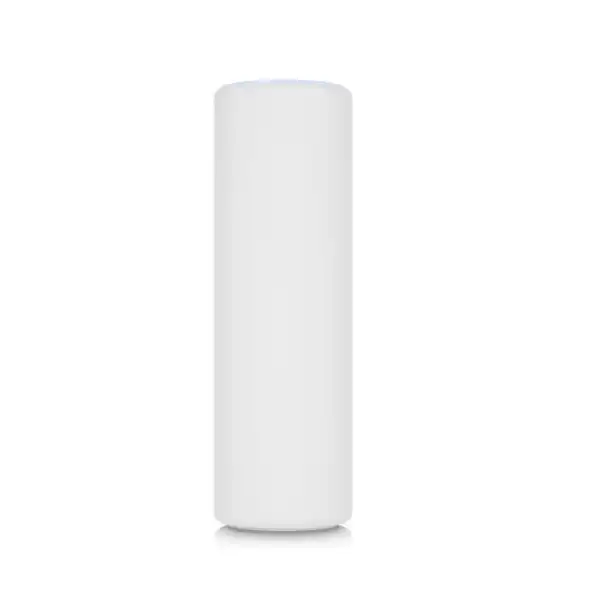
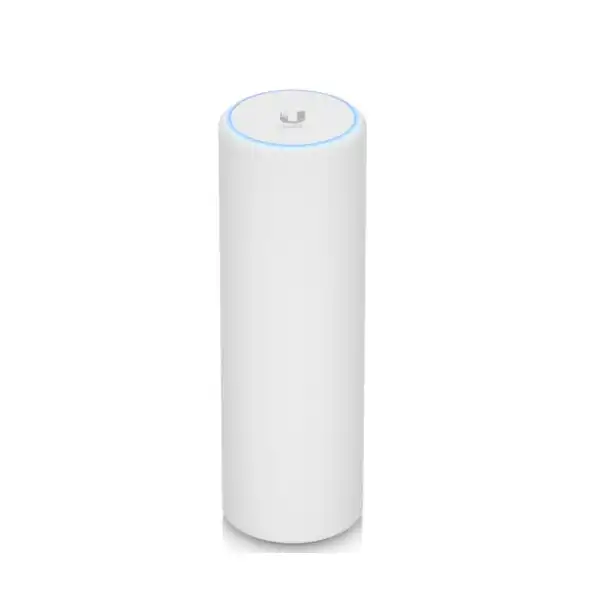
A compact dual-band Wi-Fi 6 access point for carefully planned coverage in Tanzanian homes, workplaces and hospitality settings. The Ubiquiti U6 Mesh supports wired Ethernet or a managed wireless mesh uplink and offers IPX5 outdoor protection when mounted as instructed.
Check coverage, PoE, cabling and UniFi management needs before requesting a quote.
Technical specifications at a glance
| Wi-Fi | Wi-Fi 6; dual-band 2.4 GHz and 5 GHz |
|---|---|
| Streams | Six total: 5 GHz 4×4 and 2.4 GHz 2×2 |
| Radio maxima | 5 GHz up to 4.8 Gbps (160 MHz); 2.4 GHz up to 573.5 Mbps (40 MHz) |
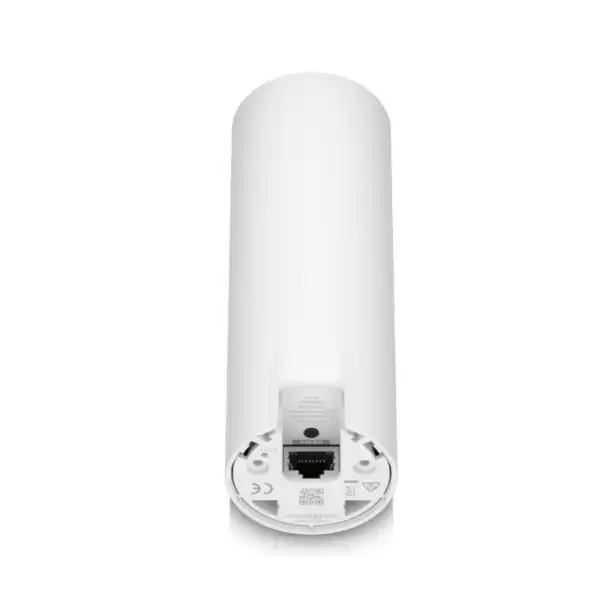
| Wired network | One Gigabit Ethernet RJ45 |
| Power | PoE, 13 W maximum, 44–57 V DC input |
| Reference coverage | 140 m²; 250+ maximum connected clients, subject to site conditions |
| Enclosure | IPX5 with prescribed LED-up wall or pole mounting |
| Size | 48.5 mm diameter × 159.5 mm height; 400 g |
| Management | UniFi Network version 6.0.45 or newer listed by manufacturer |
These are manufacturer specifications, not guaranteed end-user speeds, coverage results or Tanzania price and stock statements.
The U6-Mesh in a practical network
The Ubiquiti U6 Mesh (U6-Mesh) is a compact indoor and outdoor Wi-Fi 6 access point, not an internet modem or a replacement for a router. It creates wireless coverage when connected to suitable upstream networking and PoE power. Its flexible mounting and UniFi integration are useful when the wireless users are located away from the room containing the internet gateway. The buying decision should start with where coverage is needed, what the connecting devices do, and whether Ethernet cable can reach the proposed location.
For Tanzania homes, offices and hospitality premises, the specific room layout matters more than any generic promise about range. A courtyard, open workspace and multiroom concrete building create very different signal paths. Record the zones where users need service and the main obstacles between them. The aim is not simply to make the wireless icon appear on a phone, but to achieve reliable application performance where people actually sit, work or move.
What Wi-Fi 6 changes for connected devices
Wi-Fi 6, technically IEEE 802.11ax, is designed to improve how wireless resources are used in busy environments. The U6-Mesh offers this standard on both supported bands and continues to accommodate compatible older wireless devices. A mixed collection of laptops, phones, business terminals and connected appliances can therefore share a carefully configured network. However, a device without Wi-Fi 6 capability will not gain all Wi-Fi 6 client features merely by joining this access point.
Think of Wi-Fi 6 as part of a network design rather than a guaranteed speed upgrade. Wireless efficiency still depends on radio conditions, device support, channel settings and the number of simultaneous users. A fast access point does not increase the capacity of the purchased internet service or repair poor connectivity at the gateway. Where video calls, payments or work applications matter, measure latency and stability as well as raw download speed. The best result comes from matching radio planning, client demand and dependable backhaul.
Two bands with different strengths
The U6-Mesh has a 5 GHz 4×4 multi-user MIMO radio, with a stated maximum radio data rate of 4.8 Gbps at 160 MHz channel width. That number assumes suitable conditions and is not a promised speed for a single laptop. Many clients use fewer spatial streams and narrower channels. The one-Gigabit Ethernet uplink also imposes an independent constraint on traffic entering or leaving the access point over its wired link. Treat theoretical radio figures as equipment capabilities rather than end-to-end throughput estimates.
The 2.4 GHz radio uses 2×2 MIMO and has a specified maximum radio data rate of 573.5 Mbps at a 40 MHz width. This band is relevant for many older or lower-bandwidth devices, but it is commonly crowded and has limited clean channel space. A wider channel is not automatically a better configuration. Decide which clients should use each band after checking their actual capabilities and local interference. More reliable coverage sometimes comes from a thoughtful narrow-channel plan rather than pursuing the largest number listed in the specifications.
Six streams explained without marketing confusion
The manufacturer lists six spatial streams in total: four assigned to 5 GHz and two to 2.4 GHz. This is not the number of Ethernet ports, six dedicated internet connections or a commitment that every device will run at six-stream speeds. Individual client radios may be two-stream or even single-stream devices. The access point’s multi-stream capacity helps form part of a system capable of handling concurrent activity when compatible clients and network conditions permit.
Some descriptions combine the peak data rates of both radios into an aggregate wireless figure. Such arithmetic can be useful for understanding the product class, but it must not be mistaken for an actual speed test result. Internet throughput passes through the gateway, switches and uplink, and wireless performance involves contention and protocol overhead. When reviewing a purchase request, list the expected applications, number of active clients and relevant wired capacities alongside the radio specification. That yields a more meaningful comparison than one headline number in isolation.
The difference between wired and wireless mesh
Despite the model name, U6-Mesh can operate as an ordinary access point with an Ethernet data uplink. For installations where cabling is practical, a wired connection is usually the preferred approach. It gives data a stable path toward the rest of the network and avoids spending additional wireless airtime on traffic between access points. It can also make support easier because technicians can separate cable, switch and radio problems more readily.
Wireless meshing is useful when a location needs an AP but a new Ethernet data run would be impractical. The remote unit still requires PoE electrical power and a strong wireless connection to a suitable upstream UniFi access point. The meshing feature also depends on the appropriate UniFi Network environment. Each extra wireless relay can lower available throughput, and walls or poor positioning can destabilize the uplink. Place the mesh unit where it can receive a strong parent connection, not only where the weakest clients happen to be.
Understanding the coverage figure
Ubiquiti lists an indicative coverage area of 140 square metres for this model. The figure is a reference point rather than a guarantee that one device covers every square metre in any building. Materials such as concrete, reinforced walls, metal structures and certain windows influence propagation. Installation height, orientation, neighbouring networks and the receiving device also affect usable coverage. A device can detect Wi-Fi while still experiencing unsatisfactory calls, stalls or slow transactions.
Start with a sketch of the site and identify places with operational importance: desks, meeting rooms, seating, service counters or outside working areas. Place a provisional AP, test with real clients and measure the quality of service in the relevant areas. If several floors or heavy partitions are present, consider multiple access points placed closer to users. Do not attempt to replace thoughtful layout design with maximum transmit power. Transmit power cannot make a low-power client speak equally loudly back to the AP.
Client-count specifications versus user capacity
The manufacturer specifies a maximum client count of 250 or more. This describes a listed association capability, not a promise that 250 people can all stream video, upload files or join calls without contention. The amount of time a client uses the radio is as important as whether it is connected. A small set of intensive applications may place more pressure on an access point than many idle sensors.
For an office or hospitality site, estimate active users at the busiest time rather than averaging activity across the day. Consider payment devices, guest browsing, video meetings, smart devices and any local network transfers. Separate critical business requirements from optional visitor traffic when planning capacity. The AP also depends on the upstream switch, gateway and internet service. If the expected demand is high, plan multiple access points with appropriate channel separation and backhaul. Review the whole network before concluding that a higher advertised device limit will solve a capacity problem.
An unobtrusive indoor installation
The cylindrical enclosure measures approximately 48.5 millimetres in diameter and 159.5 millimetres in height. Tabletop, wall and pole positions provide different ways to incorporate the unit into a building. Such flexibility can be useful in reception spaces, work areas or rooms where a conventional ceiling-mounted access point is inconvenient. The neat appearance should not come at the expense of reliable signal or safe cable routing.
Avoid hiding an access point behind metal shelving, large televisions or other obstructive equipment just because those locations conceal cables. Consider people, furniture and the likely movement of wireless devices. An access point beside an internet router in a remote storeroom may leave occupied areas poorly served. When planning multi-floor coverage, test through the actual floor construction. A good installation is one that makes radio sense, receives dependable power and can be accessed for maintenance without disrupting the premises.
Outdoor weather protection and orientation
The U6-Mesh is rated IPX5 and is described by Ubiquiti for indoor or outdoor use. Importantly, the manufacturer’s weatherproofing condition requires LED-side-up installation with the included wall or pole mounting accessory. It should not be mounted upside down. The water-ingress rating does not mean submersible operation or allow exposed electrical components to be ignored. The correct mounting orientation must be preserved when selecting a pole or wall position.
An outdoor wireless project includes more than the access point itself. Assess sun exposure, local rain paths, cable strain, connectors and the route back to protected equipment. Appropriate outdoor cabling and surge protection may be needed for exposed runs; Ubiquiti publishes specific guidance on protecting its installations. Engage a suitably qualified installer for electrical safety, earthing and lightning-related decisions. Confirm the intended temperature, ventilation and physical mounting conditions. Outdoor compatibility is a qualified equipment feature, not a guarantee that every exposed location is safe.
Supplying Power over Ethernet
PoE lets a suitable network cable carry the power needed by the access point, reducing the need for a separate local device power lead. Ubiquiti lists a maximum draw of 13 watts and a supported voltage range of 44 to 57 volts DC. Its current product specification also indicates that a PoE adapter is included. The exact regional package should still be confirmed at order time. A compatible PoE switch can be considered where the switch’s power mode and available budget are suitable.
Do not choose an injector solely because it has an Ethernet socket; confirm the correct PoE standard, voltage and connector arrangement for this exact hardware. Check cable condition and the protected location of power equipment. A remote mesh AP still needs a safe PoE supply even if its data uplink is wireless. Where power interruptions affect business operations, assess how the gateway, switches and upstream internet equipment will remain powered as a system. The access point alone cannot keep a network running if the supporting equipment is off.
The significance of the Gigabit Ethernet port
The U6-Mesh has one Gigabit Ethernet RJ45 network interface. This is a significant purchasing detail when a customer sees a wireless headline rate that is higher than one gigabit. Theoretical radio link speed and the capacity of the physical wired uplink are different quantities. Traffic heading from a wireless client to the internet or a wired server may be constrained by the Ethernet interface and other parts of the path.
A single network port also means the access point is not a substitute for a multiport desktop switch. Additional wired devices in the same area require a separate switching design. Before installation, verify that the intended cable reaches the correct switch or gateway, negotiates at its expected speed and carries the right network configuration. Poor cabling can cause unexpected low link rates, reboots or intermittent service that may appear to users as a Wi-Fi problem. The specification is well suited to many ordinary access-point roles, but a requirement for a multigigabit uplink calls for a different model.
UniFi Network and device adoption
Ubiquiti lists UniFi Network application version 6.0.45 or later in the U6-Mesh requirements. A managed UniFi installation enables administrators to adopt the AP, configure SSIDs and review relevant operating information alongside other UniFi equipment. The interface and feature arrangements may evolve with software versions, so a technician should follow the applicable current setup instructions rather than an outdated screenshot.
Prepare the management environment before fixing the device in a high or exposed location. Confirm IP connectivity, the expected network segment, the administrator’s access and the chosen means of powering the AP. A UniFi Cloud Gateway or other supported management host may form part of the overall solution, while internet routing is a separate gateway function. The access point is not itself the router. A business that expects multiple APs, coordinated policies and ongoing monitoring should plan how management will be maintained after the installer leaves, including secure credentials and software updates.
Standalone setup has limitations
Ubiquiti describes a limited standalone configuration mode for access points using the mobile application. It can be a useful option for a simple wired installation, but it must not be confused with the full managed UniFi Network experience. The manufacturer states that standalone operation has limitations including individual AP configuration, local management and lack of coordinated fast roaming and wireless meshing. These differences matter when deciding whether the equipment is suitable for more than one coverage area.
If the project needs a mesh uplink, consistent staff and guest policies or central visibility across multiple APs, establish a supported managed deployment. A series of individually configured APs with a shared network name does not automatically deliver the same roaming and administration behaviour. During procurement, ask who will manage the UniFi environment, who has the necessary access and how settings will be backed up or documented. Buying the correct hardware without choosing a management strategy can create avoidable operational problems.
Guest Wi-Fi and business separation
The U6-Mesh specification includes support for UniFi features such as guest portal options, speed controls, client isolation and advanced authentication or VLAN-related capabilities. These features are useful to consider when a café, office or lodging property wants to keep visitor access separate from internal business traffic. Their actual operation depends on the management application, gateway, switching and the full configuration, not simply on buying the AP.
For example, giving visitors a differently named Wi-Fi network does not automatically block access to business equipment. A proper design may need VLANs, gateway firewall policies and suitable switch settings. The administrator should confirm that visitors cannot reach resources intended for employees, while legitimate services remain available to staff. A captive portal or voucher workflow may be helpful at some sites, but it also introduces onboarding and support considerations. Test guest access from a real visitor device and make sure the process is understandable to nontechnical users.
Channel planning and interference control
Wireless radios share a finite amount of local spectrum. Other nearby access points, non-Wi-Fi interference and the mix of client devices can influence performance even when the AP itself operates correctly. Crowded 2.4 GHz channels may call for narrower bandwidth settings and conservative placement. On 5 GHz, the largest possible channel width is not always practical, especially where neighbouring networks occupy the same frequency space.
Ubiquiti provides radio-management and troubleshooting guidance, including tools that can help administrators evaluate channels and interference. These aids should inform rather than replace a site survey. Measure performance from typical user positions and consider the interaction between neighbouring APs. Do not automatically turn every transmitter to maximum power, as a client’s weaker return signal can still limit the connection. Regulatory channel availability and permitted power depend on the applicable device region and local requirements. Configure the correct country settings instead of copying a radio plan from another market.
How to plan placement before drilling
A sensible process begins by recording the current network arrangement: internet handoff, gateway, switches, existing access points and the places where coverage is inadequate. Mark where users need reliable connectivity and identify structural obstacles. Decide whether a stable Ethernet route is available to the proposed new location. Where no wired data link is feasible, confirm that a suitable upstream UniFi AP can provide a strong mesh connection.
Test the intended AP at a provisional location before committing to the final mount. Verify that it powers on, can be adopted or configured as planned and provides acceptable service from the occupied areas. For wireless meshing, test the actual backhaul strength and application performance rather than only client signal bars. If possible, take measurements during the kind of busy period the network must support. A little preparation can avoid repeated relocation, unnecessary equipment orders and difficult support work after the building has returned to normal use.
Performance testing after installation
Once the U6-Mesh is mounted, measure whether people can use their real applications in the relevant places. A headline speed test beside the AP is not a substitute for checking calls, browsing, payment devices and local system access at desks or outdoor seating areas. Test both Wi-Fi signal conditions and the wired or mesh uplink. If internet performance is disappointing, compare it with the capability of the upstream gateway and service before attributing everything to the AP.
Where the environment has several APs, observe which unit clients associate with while moving. Roaming behaviour depends partly on client implementation and the managed network configuration. A device that remains attached to a distant AP may experience lower performance even when another AP is nearby. Collect evidence before changing settings. Interference, obstacles, channel plans and overlapping cells can produce similar symptoms, so a structured sequence of checks usually yields a better remedy than repeatedly rebooting hardware.
Small office and shared workplace example
Consider an office with a gateway at the front of the building and meeting rooms farther away. A U6-Mesh connected by Ethernet near the working area can improve local coverage if its position is chosen based on the room layout. Managers should review the number of simultaneous video calls, meeting devices, printing needs and whether staff move between access-point zones. These details are more important than the total floor area alone.
For multiple enclosed rooms, one unit may not be sufficient because walls restrict signal. More access points can be installed with planned channel separation and consistent management. Where a nearby switch has a compatible PoE output, powering the unit can be straightforward; where no such infrastructure exists, the proper adapter and cable plan must be confirmed. Security policies for guests and internal systems should be tested separately. The aim is a predictable working experience supported by an installation that staff can maintain.
Hospitality, café and courtyard example
A guesthouse, restaurant or café might consider this model because it combines a small enclosure with carefully qualified outdoor suitability. The strongest design begins by plotting where visitors sit, where staff terminals operate and which exterior walls or poles can support the prescribed mounting orientation. A courtyard may have relatively clear sightlines, while a room behind masonry can require a different access-point position. Do not assume one unit covers an entire venue simply because a coverage figure appears on a product page.
Staff devices and guest browsing may have different security and service requirements. A managed network can help implement suitable separation when the gateway and switches are configured correctly. The internet connection must still be adequate for expected traffic. If the access point is placed outdoors, include weather-related cable precautions, power protection and maintenance access. An attractive installation is valuable only when it remains dependable and safe in the actual exposure conditions.
Home and remote-working example
For a home where work calls and study sessions depend on Wi-Fi, identify the occupied areas and the existing router position first. The U6-Mesh can serve a suitable location as part of an upstream network. It may be a better choice than repeatedly increasing router transmit power, particularly if the new AP can be cabled closer to users. The goal is consistent connection quality across the spaces used for work, not a large theoretical peak that is available only next to the device.
If a network cable cannot reach a secondary zone, wireless meshing can be investigated, but only with compatible UniFi management and a strong upstream parent AP. The remote unit still needs PoE power. Consider whether the home actually needs one wired AP rather than a larger managed installation. A compact unit is not necessarily the best answer for every room. Real measurements, current equipment and the resident devices should determine the design.
Selecting an alternative when needs differ
The U6-Mesh is a dual-band Wi-Fi 6 access point, not a 6 GHz Wi-Fi 6E model. Customers specifically requiring 6 GHz capability should consider an appropriately specified alternative. Similarly, sites needing a faster-than-Gigabit physical uplink should examine other access points with suitable Ethernet interfaces. A requirement for much larger exposed outdoor areas may call for a different form factor, coverage layout or multiple devices based on a survey.
Do not treat similarly named UniFi models, including variants with Pro or U7 in their names, as direct hardware equivalents. Compare the exact current product specifications, mounting options, power requirements, radio capabilities and upstream infrastructure. A premium device does not automatically solve poor AP placement or deficient cabling. The right purchase is the least complicated design that meets actual coverage, capacity, maintenance and environmental needs with room for reasonable growth.
Checks before requesting a quotation
Prepare a short description of the premises, approximate floor area, number of levels and the places needing wireless service. Note whether the intended location is indoors or exposed to rain and sunlight. Include the likely number of simultaneous users, important applications and any known weak-signal areas. If possible, provide a rough floor sketch with walls, router location and potential AP mounting points. These details can make a product recommendation far more precise.
Also identify existing gateway and switching equipment, the available PoE source, Ethernet cable routes and whether UniFi Network management is already present. If mesh is required, describe the upstream AP and the obstacles between it and the desired remote position. Before buying, confirm exact product variant, current package contents, required accessories and commercial details including price and availability. None of those Tanzania-specific commercial terms can be inferred from global technical specifications, so they should be checked for the actual offer.
Operation, maintenance and troubleshooting
Document where the AP is installed, how it receives power, which port or parent AP provides the uplink and where its management configuration is maintained. Keep the responsible administrator’s credentials protected, and review supported firmware and application updates through an appropriate change process. A venue that relies on Wi-Fi for work or payments should coordinate changes with users rather than applying them at arbitrary busy times.
When a complaint arises, narrow the problem methodically. Does the AP have power? Is the wired link negotiating correctly? Is a mesh parent still reachable? Is interference high, or is the client’s signal weak? Are other areas on the same internet connection affected? A consistent log of observations prevents unnecessary hardware replacement. Reassess coverage when furniture, walls, user density or neighbouring networks change. Sometimes repositioning an access point or adding a properly wired one has more value than repeated configuration changes.
Important limitations and responsible expectations
The U6-Mesh does not supply an internet subscription, fibre termination, mobile-data SIM connection or standalone firewall. Its maximum radio figures are not guaranteed real-world data speeds. The single Gigabit Ethernet port cannot be upgraded by configuration to a multigigabit interface. The manufacturer coverage and maximum client figures are references for planning, not promises of service across every physical layout. A reliable network also requires appropriate gateway, switching, cabling and power.
Its IPX5 rating has a specific weatherproof mounting requirement, and incorrect positioning can invalidate the intended protection. Wireless mesh still needs a power source and a managed UniFi environment; it can reduce available throughput compared with wired backhaul. Do not imply that every global radio frequency is licensed or enabled in a Tanzania deployment. Likewise, avoid assuming stock, local approvals, shipment times or warranties without checking the exact commercial offer. A correctly scoped product page should make these limitations as visible as the benefits.
Frequently asked questions
Is the U6-Mesh a router?
No. It is an access point. It needs upstream networking from a router or gateway and compatible PoE power. It does not create internet access or replace an internet service subscription. The management design should be planned according to whether you need a single wired access point or a managed multi-AP UniFi network.
Can the U6-Mesh use a wired connection?
Yes. The device has a Gigabit Ethernet interface. A wired backhaul is normally preferred because it avoids using wireless airtime for the link between access points and is easier to troubleshoot. The word Mesh in the product name does not mean that a wireless uplink is compulsory.
Does wireless meshing remove all cables?
No. A remotely meshed AP still needs compatible PoE power. Its data link may be wireless to a suitable UniFi parent AP, but it must have a reliable radio connection and the appropriate UniFi management setup. Check signal and expected applications before mounting it permanently.
How far will the wireless signal reach?
Ubiquiti publishes an indicative 140 square metre coverage area, but actual range is not fixed. Concrete, metal, other wireless networks, installation position and device capabilities can significantly affect coverage. A survey and practical tests should determine whether one access point is enough for the premises.
Can it be used in rain?
Ubiquiti lists IPX5 protection, conditional on LED-up mounting using the included wall or pole mount. Do not mount it upside down or interpret that rating as submersion protection. Plan suitable outdoor cabling and protection for exposed network connections.
How many devices can use it?
The listed maximum client count is 250 or more, but that figure does not guarantee good service to the same number of simultaneously active users. Calls, video streams, file transfers, applications and backhaul all affect capacity. Plan for peak active traffic, not only connections.
What speeds are realistic?
Actual speed depends on clients, channels, interference, signal, user load and upstream equipment. The manufacturer states theoretical radio maxima of 4.8 Gbps on 5 GHz and 573.5 Mbps on 2.4 GHz. These are not speed-test promises, and the uplink is Gigabit Ethernet.
Is the PoE adapter included?
The current official specification indicates that a PoE adapter is included. Confirm the exact contents of the regional product package at ordering, and verify power compatibility if you intend to use a PoE switch instead. Maximum AP power consumption is listed as 13 watts.
Can I run guest Wi-Fi?
Managed UniFi deployments support guest-related features, but proper security separation depends on gateway rules, network segments, switching and configuration. A new SSID name alone does not create isolation. Plan and test the intended visitor experience and any captive portal workflow.
Can it work with a non-UniFi router?
A suitable router from another manufacturer may provide upstream networking to a wired UniFi AP, but UniFi management and wireless meshing have specific platform requirements. Check your routing, switching and configuration before purchasing. It does not become a router or an interoperable third-party mesh node.
Is it a Wi-Fi 6E or Wi-Fi 7 device?
No. This exact model is a dual-band Wi-Fi 6 access point using 2.4 GHz and 5 GHz. If a requirement calls for 6 GHz access or a different wired uplink rate, compare other exact UniFi models rather than assuming the U6-Mesh provides those capabilities.
What should I provide for a product quote?
Describe the building, indoor or outdoor exposure, number and types of active users, available Ethernet cabling, PoE equipment and existing UniFi management. Ask for confirmation of the exact variant, package contents and any accessories required. Price, delivery and local commercial conditions must be verified for the specific offer.
Request guidance for your U6-Mesh project
For a better purchasing decision, tell FourTeck Tanzania where Wi-Fi is needed, how many people will use it, which applications matter and whether the device will be indoors or exposed to weather. Explain the router, UniFi management and PoE resources already present and whether wired Ethernet can reach the preferred installation point. This information helps determine a suitable AP position and whether a wireless mesh uplink is an appropriate compromise.
Request confirmation of the exact product variant, included components, optional accessories and current commercial terms before ordering. Pricing, availability, local delivery, warranty and product-specific regulatory approvals are not asserted here. The goal is a properly specified and maintainable wireless network, not simply the highest advertised speed figure.




Reviews
There are no reviews yet.