
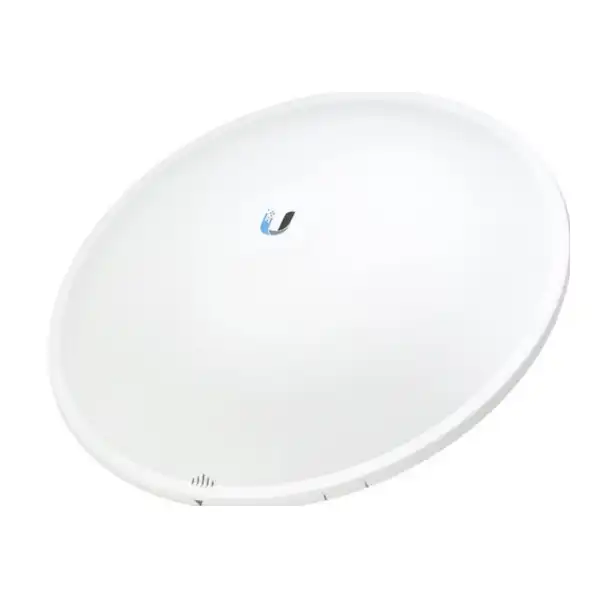
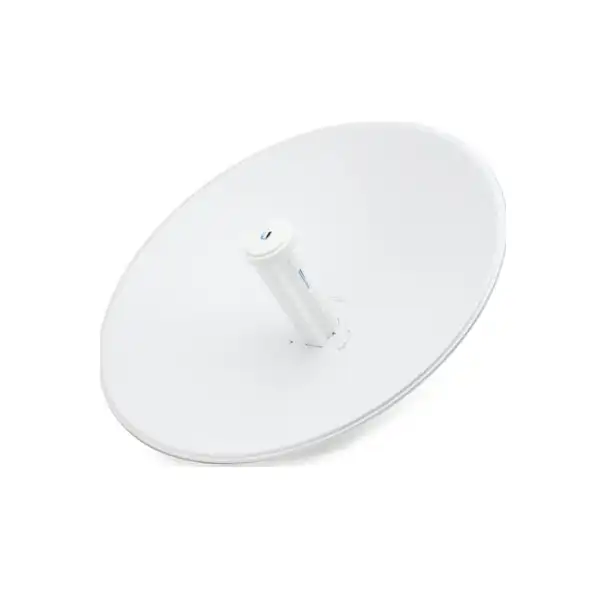
5 GHz · 27 dBi · 500 mm reflector · Gigabit Ethernet
Ubiquiti airMAX PowerBeam 5AC 500 (PBE-5AC-500) in Tanzania
Connect two suitable network sites with a focused outdoor wireless bridge. The Ubiquiti PowerBeam 5AC 500 combines an integrated directional antenna and airMAX AC radio for planned point-to-point backhaul. It is suited to installers and businesses that need a cable alternative across a clear wireless path. Ask for a quotation after confirming site feasibility, the required pair of endpoints and local frequency rules.
Request a PowerBeam 5AC 500 quotation for your planned link.
Technical specifications at a glance
| Model | PBE-5AC-500 |
|---|---|
| Radio band | 5 GHz |
| Antenna gain | 27 dBi |
| Reflector | 500 mm |
| Network port | One Gigabit Ethernet RJ45 |
| Power | 24V, 0.5A passive PoE adapter included |
| Supported voltage | 20–27V DC |
| Maximum power draw | 8.5 W |
| Operating temperature | −40°C to 70°C |
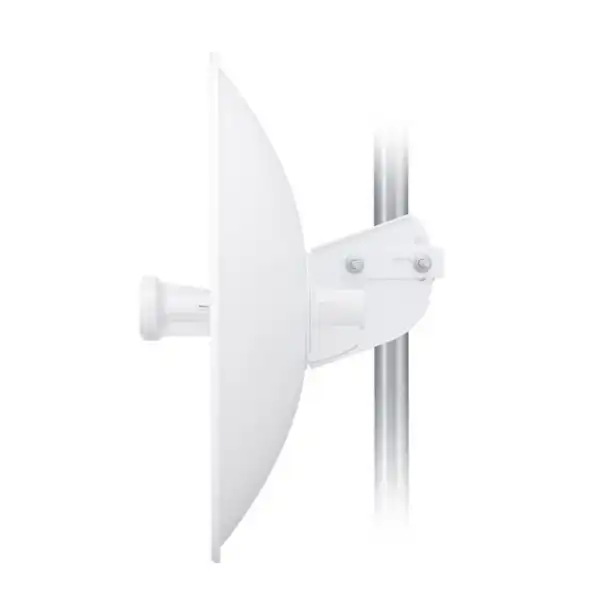
| Mounting | Pole mount kit included |
Figures are manufacturer specifications for this exact model, not guarantees of installed throughput, link distance or regulatory authorization. Verify your installation and order against the current technical documentation.
Choosing the right bridge
The Ubiquiti airMAX PowerBeam 5AC 500 (PBE-5AC-500) is intended for buyers who need to connect two buildings, facilities or network nodes without laying a cable across the entire route. Its directional 500 mm reflector and integrated 5 GHz radio form a focused link to a compatible radio at the opposite end. Typical buyers include network integrators, businesses extending a LAN to a second premises, site operators and service providers planning a dedicated wireless backhaul. Before ordering, identify both endpoints, their mounting heights, desired capacity, existing network equipment and whether the path is genuinely clear.
The 27 dBi antenna gain helps concentrate transmission and reception toward the far endpoint. That benefit depends on accurate alignment: a high-gain dish is not a general-purpose indoor Wi-Fi access point and does not provide broad client coverage. For a site-to-site connection, plan on two suitable endpoint radios and the networking, power and mounting hardware required at each location. Ask for a deployment assessment before buying solely on the basis of a quoted distance or peak data rate.
What the model number means
PBE-5AC-500 identifies this specific Ubiquiti PowerBeam AC model with a nominal 500 mm reflector. It is important not to confuse it with the PBE-5AC-Gen2, PBE-5AC-620, or ISO variants, whose hardware, accessories, radio characteristics and management capabilities may differ. Confirm the exact model on every quotation and on the equipment labels when integrating an existing installation. Matching the product family name alone is not an adequate compatibility check for a replacement or addition.
This product uses airMAX AC wireless technology rather than acting as a conventional Wi-Fi router for phones and laptops. It is commonly used as part of a planned outdoor network link with Ethernet connected to switches, routers or other infrastructure. A buyer evaluating a new link should consider whether both ends will use supported airMAX equipment, whether the chosen firmware provides the required features, and whether deployment-specific configurations have been agreed before shipment.
Performance and capacity planning
Ubiquiti describes the PowerBeam 5AC 500 as a 5 GHz bridge with 450+ Mbps real TCP/IP throughput capability. This is a manufacturer-stated capability, not a guaranteed speed at every site. Actual end-to-end application throughput can be lower because of RF noise, channel width, distance, modulation rate, duty cycle, overhead, traffic direction and the capacity of the devices connected to the bridge. Size the link for real user demand rather than treating the published headline as an unconditional service-level commitment.
Start a capacity plan by estimating busy-hour downstream and upstream traffic, anticipated growth and latency-sensitive applications such as voice or video. For business-critical networks, include a margin for fluctuating radio conditions and the possibility of channel changes. A wireless link may be appropriate for file access, connectivity extension, surveillance backhaul or branch connectivity, but only a surveyed design and commissioning test can establish whether the installed system meets a particular traffic requirement.
Distance and line of sight
Long-range directional connectivity is one of the PowerBeam’s core strengths, but no single advertised distance establishes that a pair of units will work at a particular location. Real path feasibility depends on terrain, antenna elevation, Fresnel-zone clearance, nearby buildings, trees, atmospheric effects, interference and permissible transmit settings. Even when two rooftops are visible to each other, obstructions near the center of the path may degrade the RF link.
Request a path profile that includes GPS coordinates, elevation information and proposed antenna mounting heights. Consider seasonal tree growth and future construction, not just the view during one visit. A link crossing a road, valley, industrial site or open space may be feasible, but its reliability must be evaluated from the actual geometry. Plan on-site alignment and a measured signal-quality test before declaring the installation complete.
Antenna alignment and mounting
The integrated 27 dBi directional dish is built for focused communication rather than wide-area distribution. Each endpoint needs a mount with a clear path and enough rigidity to maintain antenna orientation. Small changes to angle can affect signal level, particularly on demanding links. Choose mounting locations that service personnel can reach safely and where the dish will not be obstructed by nearby walls, metalwork or other rooftop equipment.
The manufacturer includes a pole-mount kit for this model. Structural suitability, pole diameter, fixing method, local wind exposure and rooftop conditions remain installation-specific questions. Do not assume the included bracket alone constitutes a complete mounting solution for every tower or building. Review the structure, fastening hardware, cable path, lightning exposure and applicable safety procedures with the installer before mounting the radio.
Power and Ethernet connectivity
The hardware has one Gigabit Ethernet RJ45 interface. The official product specification lists passive PoE power using a supplied 24V, 0.5A Gigabit adapter, supported input voltage of 20–27V DC and a maximum consumption of 8.5W. These values matter when choosing power distribution and switches: an ordinary standards-based PoE port should not be assumed electrically interchangeable with a 24V passive PoE supply.
Plan a protected Ethernet route from the outdoor unit to the network equipment and power injector. Use an appropriate outdoor-rated shielded cable and grounding or surge-protection arrangement consistent with the manufacturer’s installation instructions and local electrical practices. Inspect connector weatherproofing and drainage points. If power must travel a long distance, assess cable length and losses instead of assuming every available Ethernet run will supply acceptable voltage under load.
Frequency selection and interference
The PBE-5AC-500 operates in the 5 GHz family; official Ubiquiti material specifies a broad worldwide device frequency range, but usable channels and power limits vary by country and regulatory domain. The existence of a frequency in a hardware datasheet does not mean a Tanzania deployment is automatically authorized to transmit on it. The applicable national spectrum rules and any licensing requirements should be confirmed for the particular installation.
A site survey should identify competing networks, strong interferers and channel occupancy at the planned endpoints. Select channel width and power based on the measured environment and the local regulatory settings. Wider channels can support higher capacity under favorable conditions yet may be more vulnerable to interference or unavailable spectrum. Favor a stable, compliant channel plan over the widest selectable option.
What airMAX AC adds
airMAX AC is Ubiquiti’s outdoor wireless networking platform for compatible infrastructure links. A PowerBeam AC endpoint is not selected for household Wi-Fi roaming or direct smartphone connections; it is selected for controlled network transport. That distinction matters when designing a complete solution: the bridge carries traffic between network points, while local routers, switches and access points serve the connected computers or wireless clients.
Check support for the intended operating mode and firmware rather than assuming that every product bearing an airMAX name will work together without restrictions. For mixed-age networks, document existing radio models and versions at both ends before ordering a replacement. When a bridge is part of a larger service-provider network, coordinate its RF configuration with the surrounding infrastructure to avoid channel collisions and operational surprises.
Security and network design
A wireless backhaul should be treated as part of the site’s production network rather than an isolated antenna purchase. Identify which VLANs, subnets and management interfaces must traverse the link and whether the bridge belongs behind a router, firewall or managed switch. Protect device management with strong unique credentials, restrict administrative access and maintain a documented configuration backup so a failed unit can be restored consistently.
Encryption and other protection settings should be selected using the capabilities of the actual firmware and the network security policy. Keep wireless management separate from unnecessary public exposure. For organizations transporting sensitive traffic, apply appropriate network-layer safeguards and monitoring beyond the radio link itself. A reliable physical signal is only one component of a secure deployment.
Environmental conditions
Ubiquiti specifies operation from −40°C to 70°C and 5–95% noncondensing humidity for this model. The enclosure is intended for outdoor installation, but real-world longevity still depends on installation quality, water ingress prevention, cable protection and mechanical integrity. Exposed rooftops and towers can experience high sun exposure, heavy rain, dust and vibration, making site preparation as important as choosing the correct device.
The manufacturer lists wind-loading and survivability data for the product; these numbers describe specified test conditions and are not substitutes for a structural engineering assessment. Mounting brackets, poles and supporting structures must be chosen for the actual site. Routine checks should look for loose fasteners, corrosion, cable damage, damaged weather seals and vegetation encroaching on the line of sight.
Business and campus use cases
A common application is linking a main office network to a nearby warehouse, workshop or annex. A pair of properly deployed directional radios can carry network traffic between buildings where trenching a new cable would be disruptive or expensive. Another application is connecting a security operations location to a distant camera aggregation point, provided the real bandwidth and reliability requirements are verified before installation.
Schools, industrial yards, agricultural facilities and multi-building campuses may also consider a directional bridge when geography and site ownership make a wired link difficult. These are examples of technical suitability, not claims of deployed customers or guaranteed coverage. For each scenario, compare the wireless option with fiber, leased connections and other technologies using service availability, maintenance effort, capacity, resiliency and total installed cost.
When a different product is better
The PBE-5AC-500 is not automatically the best choice for every wireless problem. A short link with minimal interference may be served by smaller hardware; a highly obstructed path may require a different route or technology; and a multi-gigabit requirement may be beyond the practical design target of this model. Likewise, users wanting a single device to provide indoor Wi-Fi coverage need an access point rather than an outdoor high-gain dish.
For a high-density point-to-multipoint environment, evaluate the complete sector-and-client architecture rather than selecting a point-to-point dish in isolation. If uptime is essential, consider whether dual paths, backup access or a different physical medium would offer more resilience. Choosing against this product when requirements do not match its strengths can be the most cost-effective engineering decision.
Installation workflow
Begin with a site survey, endpoint coordinates and confirmation that the selected 5 GHz channel plan is allowed. Record required link bandwidth, equipment inventory and network configuration. Next, select safe pole locations and determine whether structural reinforcements, outdoor cable, surge protection or backup power are needed. Confirm that both end devices and their accessories will be available before booking installation work.
After physical mounting and cabling, configure the devices in the desired supported bridge role, align the antennas and validate link health using suitable management and RF metrics. Test actual traffic in both directions and observe stability under realistic load. Save device configurations and label cables. An acceptance report should describe tested capacity, signal quality, channel settings and any unresolved deployment limitations.
Troubleshooting weak signal
If the link comes up with unexpectedly low throughput, check alignment, path clearance, interference, channel selection and Ethernet negotiation before replacing equipment. A strong signal alone does not guarantee a clean RF channel, and an apparent wireless performance problem can sometimes originate in a damaged cable, mismatched port settings, overloaded router or excessive traffic elsewhere in the network.
Document the baseline received signal and operating conditions once commissioning is complete. Later comparisons become much easier when the original configuration, antenna orientation and measured throughput are known. If the problem occurs only during certain hours, investigate changing interference and network load. If it began after weather or maintenance, inspect mounts, connectors and cable protection.
Maintaining service over time
Outdoor wireless infrastructure benefits from periodic inspection, monitoring and planned software maintenance. Track device reachability, traffic levels, error indications and link performance so degradation can be noticed before the connection becomes unusable. Coordinate firmware updates with the supported Ubiquiti release for the exact model and verify any version-specific prerequisites before changing a production unit.
Schedule maintenance windows when network disruption is acceptable and retain rollback information. Check that mounting hardware remains secure and that vegetation or new construction has not obstructed the path. Where possible, keep documented spares and a restoration procedure for critical connections. A maintained bridge can form a useful component of a broader network continuity plan, but a single link should never be described as inherently fail-safe.
Purchasing checklist
Before requesting a quote, provide the exact manufacturer model PBE-5AC-500, quantity, intended link endpoints, distance, mounting conditions, available power and target capacity. Indicate whether the order should cover only the radio units or the broader installation bill of materials. For a new point-to-point link, discuss the equipment required at both endpoints rather than assuming one radio will create a complete connection.
Ask the supplier to confirm the proposed contents of the package, any required additional cabling or protection, and commercial details including current availability, Tanzania pricing and applicable warranty terms. Those transactional details must come from the seller’s actual quotation; they should not be inferred from international retail listings. Also clarify whether survey, installation, configuration or post-installation support is included or quoted separately.
Tanzania project considerations
For deployments in Tanzania, incorporate local spectrum permission, physical access, electrical protection and installation logistics into the project plan. Rural and remote locations may require additional consideration for backup power, safe tower access and maintenance visits. Dense commercial zones may require more RF survey effort due to nearby 5 GHz systems. None of these conditions establishes a universal performance expectation across the country.
A useful procurement request should identify the actual site and application, not merely say that a long-distance bridge is required. The equipment’s international specifications are a starting point; local regulatory requirements and site-specific installation conditions still determine a responsible configuration. FourTeck Tanzania can be asked for product quotation details without assuming verified stock, delivery coverage, certification or installation service from this page alone.
Frequently asked questions
Do I need one or two radios?
A conventional point-to-point wireless bridge needs compatible equipment at both endpoints. Confirm the full proposed link design before ordering.
Is this an indoor Wi-Fi access point?
No. Its high-gain directional reflector is intended for focused outdoor link applications, not broad indoor client coverage.
Does 450+ Mbps mean guaranteed internet speed?
No. It is a manufacturer-stated throughput capability, not a guaranteed site result or internet service rate. Real performance depends on RF conditions, network design and upstream service capacity.
Can I use any PoE switch?
Do not assume so. This device specifies 24V passive PoE. Check the electrical compatibility of the exact switch, injector or power accessory.
Can I install it at any 5 GHz frequency in Tanzania?
No. Configure frequencies and transmit power only after verifying applicable Tanzania spectrum rules and any relevant licensing requirements.
Will it work through trees or buildings?
Obstacles can substantially impair a high-frequency directional link. Assess line of sight and Fresnel-zone clearance for the proposed path.
Can I link two offices with it?
It is a plausible application when both endpoints have a suitable path and the link meets bandwidth, security and operational requirements.
What if the link is unstable after installation?
Check alignment, interference, mounting, cabling, frequency settings, power supply and connected network equipment against commissioning baselines.
Is a mounting kit included?
Ubiquiti’s product specification lists a pole-mount kit. Site-specific poles, cabling, protection and other installation materials may still be necessary.
Is the PBE-5AC-500 the same as the Gen2 or ISO model?
No. Confirm exact model identifiers; related PowerBeam products should not be treated as identical.
Is there a Tanzania price or confirmed stock?
No verified target-listing price or stock information was supplied for this content. Request a current quotation.
What details help prepare a quote?
Share quantity, link distance, endpoint locations, mounting requirements, bandwidth target and whether accessories or installation are needed.
Request a Tanzania quotation
Send your required quantity, exact model, endpoint details and intended capacity when requesting the Ubiquiti PowerBeam 5AC 500. Confirm price, stock, warranty, shipping and any installation or accessory needs through an actual quotation. For a complete new point-to-point deployment, confirm two compatible endpoint devices and a practical site survey before purchasing.
Contact FourTeck Tanzania to discuss the equipment and quotation requirements.




Reviews
There are no reviews yet.