
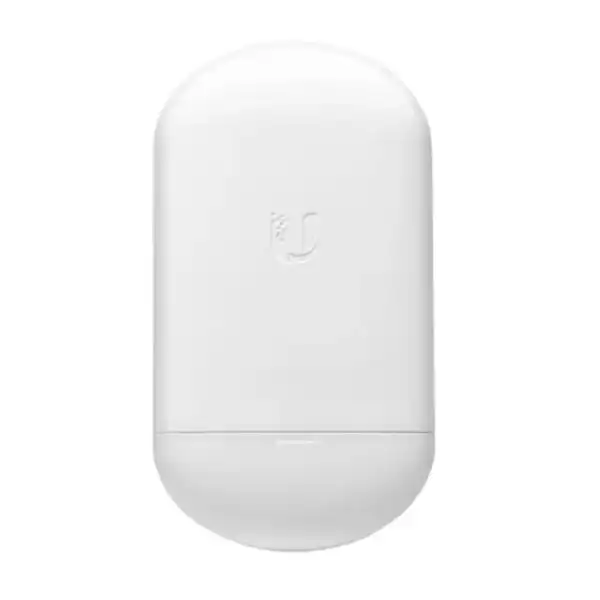
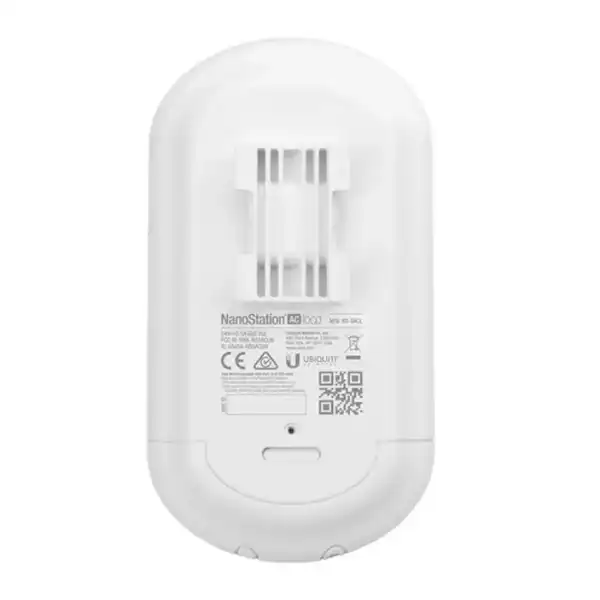
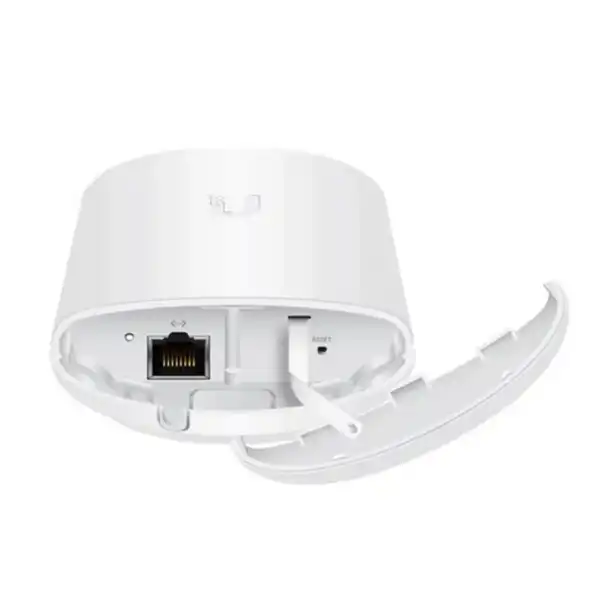
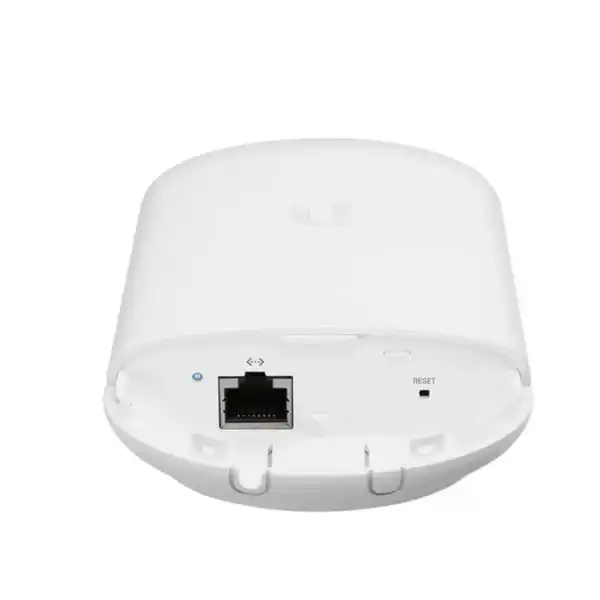
Outdoor wireless bridge and client radio
Ubiquiti airMAX NanoStation 5AC Loco (Loco5AC)
Connect suitable fixed locations with a compact 5 GHz directional radio built for compatible airMAX AC networks. The Ubiquiti NanoStation 5AC Loco is a practical candidate for carefully planned building bridges, customer-premises links, and remote Ethernet network extensions in Tanzania.
Start by checking the radio path, compatible counterpart equipment, and 24V passive-PoE power supply. Ask for an exact-model quotation and site suitability review before ordering.
At a glance
Before you buy: A compatible 24V, 0.3A Gigabit PoE supply is not included. A complete wireless link may also require a second compatible radio, cabling, protection, and local networking equipment.
Verified manufacturer specifications
| Manufacturer | Ubiquiti |
|---|---|
| Model | Loco5AC |
| Network purpose | 5 GHz airMAX AC fixed wireless radio |
| Antenna | 13 dBi integrated directional, dual-linear polarization |
| Antenna beamwidth | 45° horizontal and vertical polarization; 45° elevation, per manufacturer |
| Network interface | One Gigabit Ethernet RJ45 port |
| Power method | 24V passive PoE, two-pair |
| Listed power supply | 24V, 0.3A Gigabit PoE supply, not included |
| Supported voltage | 22–27V DC |
| Maximum power consumption | 7W |
| Channel bandwidth options | 10/20/30/40/50/60/80 MHz |
| Worldwide hardware radio range | 5150–5875 MHz; permitted local settings may be narrower |
| Dedicated management radio | 2.4 GHz management radio |
| Dimensions | 179 × 77.5 × 59.1 mm |
| Weight | 180 g |
| Enclosure | UV-stabilized polycarbonate |
| Mounting | Pole mount included |
| Operating temperature | −40 to 70°C |
| Operating humidity | 5–95% non-condensing |
Specifications identify the hardware capabilities, not guaranteed application throughput, local regulatory authorization, or FourTeck Tanzania stock and accessory bundles.
Where the Loco5AC may fit
Building bridge
Assess a link between an office and a separate building when a wired connection is impractical.
Provider station
Join a compatible airMAX AC point-to-multipoint network under the provider’s approved configuration.
Remote network extension
Carry Ethernet connectivity toward a gatehouse, equipment shelter, or suitable camera site.
Small business link
Connect two fixed locations when the path, security plan, and capacity requirements support it.
A practical outdoor wireless link, not ordinary room Wi-Fi
The NanoStation 5AC Loco is a compact 5 GHz airMAX AC customer-premises radio for moving network traffic between suitable fixed locations. A typical project uses a source-side radio and a remote-side radio to connect two buildings when running a physical data cable is inconvenient. The radio connects to network equipment through its Gigabit Ethernet port, while its integrated directional antenna concentrates radio energy toward the intended link partner. This makes it a purposeful network component rather than a general-purpose indoor wireless router.
Choose this product when you understand where traffic must travel, can identify the equipment at the other end, and can arrange an appropriate outdoor mounting location. It is not designed to replace a household Wi-Fi router serving phones throughout many rooms. A remote building may still require its own switch and indoor access point after the wireless bridge. That separation of roles is useful: the outdoor link carries network traffic between sites, and conventional local access equipment serves users inside the destination building.
Who should consider Loco5AC in Tanzania?
A network installer may assess the Loco5AC for connecting an office to a nearby warehouse, a residence to an outbuilding, or a small business to a remote equipment shelter. Wireless internet service providers may also evaluate it as a client radio in a suitable airMAX AC point-to-multipoint network. In each case, the value comes from a clearly planned network path, compatible counterpart equipment, and a sensible installation method rather than from the product name alone.
For Tanzania projects, establish the actual location and environmental conditions before choosing hardware. Rooftop access, nearby structures, vegetation, local radio congestion, available power, and storm exposure vary from property to property. A compact radio that works well for one clear link may be unsuitable for another route with obstructed sightlines or a much larger capacity requirement. FourTeck Tanzania customers can use the product specification as the starting point for an informed hardware enquiry, not as a substitute for a site survey.
What the 5 GHz directional antenna contributes
The integrated 13 dBi antenna is a central reason to consider this device. Instead of radiating broadly like a general indoor access point, a directional antenna is aimed toward the intended partner. Ubiquiti specifies dual-linear polarization and approximately 45-degree antenna beamwidth in the relevant planes. In practical terms, installers should orient the two radios deliberately and confirm useful alignment with live diagnostics rather than assuming that any general direction will deliver a stable link.
Antenna gain does not create permission to exceed regional transmit-power limits, and it does not guarantee a particular distance. The received signal depends on radio path loss, alignment, obstructions, polarization, interference, and the opposite device. Strong receive levels are useful only when accompanied by acceptable noise, capacity, and link stability. Treat antenna gain as one part of the radio design, and include cable path, height, line of sight, and local channel regulations in the complete deployment decision.
The difference between point-to-point and point-to-multipoint
In a point-to-point arrangement, two appropriately configured radios form a dedicated wireless connection between two locations. This is a common architecture for a building-to-building bridge, a remote office uplink, or an equipment network extension. Both sites need power and suitable Ethernet connections. They also need a clear radio path, secure mounting, and an approved channel plan. The practical objective is to transport traffic reliably between known endpoints rather than provide a public Wi-Fi hotspot.
In a point-to-multipoint arrangement, a compatible airMAX AC access point serves multiple client-side radios. The Loco5AC can be considered for the station role when the provider’s access-point configuration, software compatibility, signal budget, and service design support it. Adding clients to a shared sector introduces airtime and capacity planning considerations that differ from a dedicated bridge. Buyers should identify which architecture they actually need before choosing quantities, channel widths, and the companion equipment.
Check the equipment at the opposite end
One Loco5AC alone does not create a complete link between two properties. A point-to-point design normally needs a compatible radio at the other site, while a point-to-multipoint connection needs a suitable airMAX AC network to join. Confirm the operating family and software support of the other device rather than assuming every radio labelled 5 GHz or every consumer 802.11ac access point is interchangeable. The airMAX AC protocol and management design are distinct from conventional client Wi-Fi usage.
Ask for the model of the existing access point, its software version, its configured operating mode, and any network restrictions before selecting a replacement station. Where a legacy airMAX M installation exists, determine compatibility from current official guidance and the exact configuration instead of presuming a drop-in upgrade. A small compatibility check before purchase can avoid a failed connection, unnecessary travel to a remote rooftop, or downtime during a service migration.
A Gigabit Ethernet connection: what it does and does not mean
The Loco5AC has one Gigabit Ethernet RJ45 networking interface. This port connects the radio to a network device or a compatible passive-PoE injector, depending on the cabling arrangement. A Gigabit port is useful for avoiding a 100 Mbps wired-port bottleneck, but its physical link speed is not the same as the wireless throughput users will achieve. Over-the-air capacity depends on the selected channel, signal quality, network load, interference, and actual application traffic.
Plan the connected switch, router, firewall, and cabling according to the real network service. A remote endpoint may need a separate access point, several wired ports, or network segmentation. The single Ethernet port is not a built-in multiport switch. If your design depends on several attached devices, include the required downstream equipment in the bill of materials. This prevents a radio-only purchase from being mistaken for a complete branch-network solution.
24V passive PoE is an essential purchasing check
Ubiquiti lists a 24V, 0.3A Gigabit PoE power supply for the Loco5AC and states that the supply is not included. The device uses two-pair passive Power over Ethernet, with a supported input voltage range of 22–27V DC and a maximum device power consumption of 7W. Buyers should therefore confirm that they have a correctly specified injector or appropriate compatible power system before installation. The fact that a network switch provides PoE does not automatically establish compatibility.
Do not assume that a standard 48V PoE output or an arbitrary passive injector can be connected safely. Verify the voltage, wiring method, Ethernet support, electrical protection, and local mains arrangements for every accessory. Power arrangements are especially important where the radio is mounted on a rooftop or other place that is inconvenient to revisit. The recommended purchasing checklist includes the radio, compatible 24V power supply, suitable cable, surge protection, and any site-specific mounting materials.
Why an outdoor link needs a proper site survey
Begin by defining the two locations, intended traffic, expected uptime, and the physical path between them. A site survey should look for obstructions at both ends and along the route. Trees, roof edges, nearby structures, cranes, and terrain can affect a directional microwave link even when the remote building seems visible. A survey also helps determine mast height, cable entry points, grounding, available power, and whether maintenance access will remain safe after installation.
Do not use distance alone to approve a design. A shorter route with dense obstacles can be more challenging than a longer unobstructed route. The survey should also establish what network service is required: occasional administration, continuous business connectivity, CCTV traffic, or a larger mix of applications. The answer determines how much throughput margin and resilience the link needs. A thoughtful survey usually saves more effort than repeated adjustments to a poorly positioned radio.
Line of sight, Fresnel clearance, and link reliability
A visible target is helpful but does not fully describe the path available to 5 GHz radio signals. The first Fresnel zone around a wireless link also matters: obstructions close to the direct path may weaken or destabilize reception. This is why roof height and antenna position deserve attention even when both buildings can see one another. The best available mounting point may be above a roof parapet or away from nearby metallic objects that obstruct the directional antenna.
Trees are particularly important to evaluate because foliage changes with growth, weather, and season. A clear-looking route today may become less reliable when vegetation thickens or becomes wet. The installer should estimate the path profile, ensure reasonable clearance, and test the live link under representative conditions. If adequate clearance cannot be achieved, a different mounting location, intermediate relay, or another connectivity technology may be more appropriate than increasing transmit power.
Understanding capacity without promised speeds
Wireless performance figures should be interpreted as conditions-dependent capabilities, not a promise that an application will always receive the same throughput. A link may experience changing capacity as interference, noise, weather-related path changes, and airtime competition vary. Protocol overhead, packet retransmissions, and traffic characteristics also affect usable bandwidth. The Loco5AC’s 5 GHz airMAX AC design can be useful for data bridging, but a buyer should specify the actual minimum service level required.
For example, a link supporting routine office applications has different acceptance criteria from one carrying several continuous high-resolution video streams. Before purchase, write down expected simultaneous use, peak traffic, acceptable delay, and tolerance for interruptions. After installation, test application-level traffic in both directions and observe performance over time. Avoid describing the product as a guaranteed 450 Mbps or guaranteed long-distance service; an achievable result belongs to a complete engineered link, not the radio alone.
Channel width is a design choice, not a free upgrade
Ubiquiti lists selectable channel bandwidths of 10, 20, 30, 40, 50, 60, and 80 MHz for the model. A wider channel can allow a higher potential data rate in suitable clean spectrum, but it also occupies more radio spectrum and may be more exposed to adjacent activity. A narrow channel can sometimes deliver a more consistent result in a congested environment, even though its maximum theoretical capacity is lower. There is no universally correct setting for every site.
The choice should follow an RF assessment, required traffic, companion equipment support, and local rules. Test the channel plan instead of selecting the largest number simply because the interface permits it. A well-designed link balances capacity against interference, stability, and spectrum availability. Keep notes of the selected width and reasons for it so future maintenance teams can distinguish a deliberate engineering decision from an accidental default configuration.
Frequency selection and Tanzanian requirements
Ubiquiti lists a worldwide hardware frequency capability of 5150–5875 MHz, but hardware capability is not blanket authorization to transmit at every frequency or power level. The Tanzania Communications Regulatory Authority published a WLAN and LPWAN frequency band plan in July 2025. Its conditions distinguish available bands and include operating requirements affecting radio systems. A deployment must follow applicable Tanzanian spectrum rules and the correct product-region configuration, rather than copying settings from another country.
Before commissioning, check the current TCRA rules for the intended type of service, outdoor operation, applicable sub-band, allowed power, and any additional technical conditions. Effective isotropic radiated power accounts for antenna characteristics as well as transmitter settings. An installer should not treat an unlicensed or license-exempt band as permission to ignore operating limits. The product page does not assert that this exact hardware variant carries a Tanzanian type approval or that every channel offered by the device interface is authorized locally.
Dedicated management radio versus the traffic link
The Loco5AC includes a dedicated management radio using the 2.4 GHz band, separate from its main 5 GHz airMAX data link. This can simplify nearby initial configuration and servicing using the supported management workflow. The distinction matters because buyers sometimes see two frequency references and assume the unit provides dual-band household Wi-Fi to users. Its management connectivity is for administering the device; it is not a replacement for an indoor access point delivering normal client coverage.
Establish a secure management process before installing radios at inaccessible heights. Use strong credentials, retain approved configuration details, document management addresses, and restrict administrative access to authorized personnel. Device discovery and administration features can help technicians identify and monitor equipment, but they must be used within an appropriately protected network. A clear management plan makes troubleshooting safer and reduces the need for unnecessary visits to the physical mounting location.
airOS, monitoring, and operational visibility
Official Ubiquiti specifications list management and service capabilities including bridging, routing, DHCP, SSH, SNMP, a web server, traffic shaping, ping watchdog, and statistical reporting. The availability or placement of particular settings may depend on the supported firmware and active device mode. These capabilities are helpful for administrators who want to inspect link performance, verify connectivity, and understand how the wireless hop is contributing to the larger network.
Operational monitoring should include more than a quick green status indicator. Record signal and noise measurements, retransmission behavior, Ethernet link state, uptime, traffic levels, and any unexpected configuration changes. Check event history when users report intermittent problems rather than simply restarting the radio. In a managed deployment, define who receives alerts, who can alter channel settings, and how changes are documented. This turns a low-cost radio installation into a maintainable network service.
Bridged and routed network designs
A wireless bridge is often selected when the remote building needs access to the same logical network as the source site. However, extending a network across two buildings also extends certain network risks and administrative responsibilities. Broadcast traffic, addressing conflicts, and weak network separation may become more visible as the remote site grows. Decide whether a transparent bridge is actually appropriate, or whether a routed arrangement and explicit security boundaries would better support the business.
The Loco5AC lists both bridging and routing capabilities, but the right design depends on application needs, upstream equipment, and network policy. Consider IP address allocation, VLAN support in the broader equipment configuration, firewall rules, troubleshooting visibility, and remote access. If the installation carries critical business traffic, document where the security boundaries are enforced. A stable radio signal alone does not replace sound network architecture, even for a small two-building connection.
Network extension for an office and warehouse
An office and its nearby warehouse may need access to stock-control systems, network printers, scanners, or shared services. A pair of compatible directional radios can be assessed where installing a cable between buildings is difficult or disruptive. The design should establish what devices will connect at the warehouse, whether continuous access is required, and how staff will receive local network coverage after the wireless bridge. The Loco5AC would carry the outdoor hop, while separate indoor devices serve the warehouse floor.
Industrial or commercial properties also bring practical concerns: machinery may obstruct the radio path, buildings may have tall metal roofing, and power arrangements may differ between sites. An installer should evaluate interference, antenna mounting stability, surge protection, and the route of the Ethernet cable to indoor equipment. The final acceptance test should exercise warehouse applications during a representative working period rather than relying on an idle wireless-link indicator.
Connecting a remote camera or equipment enclosure
Some sites need to transmit data from a remote camera location, gatehouse, pump monitoring system, or equipment cabinet. A compact directional bridge may be a candidate when the location has reliable power, a suitable matching radio path, and equipment that can connect by Ethernet. The link design must consider sustained traffic, not only whether devices respond to a ping. Continuous video streams or telemetry gateways may place different demands on the network, especially if several systems share the same wireless connection.
Before choosing the Loco5AC, verify the expected traffic rate, camera recording architecture, local network equipment, and consequences of link interruption. Where essential monitoring is involved, plan recording or buffering behavior and suitable redundancy rather than assuming every wireless outage can be eliminated. Outdoor enclosure quality, moisture management, surge protection, and access control are as important as the radio specification. The correct solution is the complete operational design, not just a compact antenna attached to a pole.
Customer station for a compatible wireless provider
A wireless internet service provider may use airMAX AC equipment to deliver a network connection to a customer location. In such an arrangement, the Loco5AC can be evaluated as a station, subject to the provider’s access-point platform and configuration. The customer-side unit needs a viable path to the provider’s sector and correct registration parameters. It should not be purchased on the assumption that it can join any nearby commercial Wi-Fi network or mobile broadband tower.
Provider requirements may include approved hardware versions, specific firmware, assigned channel settings, authentication, addressing, monitoring, and installation standards. Ask the provider to confirm compatibility before ordering. A complete customer installation may require indoor power, a router, local Wi-Fi, cabling, and mounting materials beyond the station radio. The provider’s upstream connectivity and capacity plan ultimately determine the service that reaches the premises; a stronger customer antenna cannot correct every upstream network limitation.
Mounting and mechanical fit
Ubiquiti specifies a compact enclosure measuring 179 by 77.5 by 59.1 millimetres and weighing approximately 180 grams. The enclosure uses UV-stabilized polycarbonate, and a pole-mount method is listed as included. Those characteristics help when available mounting space is limited. Nevertheless, the support structure must withstand the actual site conditions, maintain the selected radio direction, and allow a protected route for the data cable.
Plan the mounting height for both signal clearance and maintenance safety. Avoid unstable handrails, poorly supported masts, or cable runs that allow water to track directly into sensitive equipment. The device should be positioned so installers can secure it properly without blocking its antenna. Mechanical planning also includes the available cable bend radius, mounting access, potential movement during wind, and ability to replace the radio later. A small enclosure is an advantage only when installed on a suitable structure.
Outdoor cabling, earthing, and surge protection
Outdoor Ethernet runs require more care than short patch leads inside an office. Ubiquiti installation guidance recommends shielded cabling and suitable surge protection for outdoor deployments. Cabling should follow appropriate grounding and building-entry practices to reduce electrical and electrostatic risks. An installation involving a rooftop radio should identify where the Ethernet route enters the property and how the network equipment inside will be protected.
Surge protectors and grounding cannot make an installation invulnerable to lightning, and they do not substitute for qualified electrical design. Consult relevant local electrical requirements and an experienced installer for high or exposed structures. Protect the cable mechanically, avoid water traps, and check every connector before commissioning. If the equipment is being installed on multiple buildings, consider their electrical arrangements as part of the design. Reliable data connectivity starts with safe, dependable physical infrastructure.
Power continuity and operating conditions
The official maximum device power consumption is 7W, which can make power planning more straightforward than for some larger network devices. However, the complete system may include a PoE injector, router, switch, monitoring device, and possibly an indoor access point. These accessories have their own power requirements. If the connection supports business operations, assess the need for a properly sized uninterruptible power supply at both ends rather than protecting only one side.
Ubiquiti lists an ambient operating temperature range of minus 40 to 70 degrees Celsius and humidity of 5 to 95 percent non-condensing. These are device specifications, not a reason to ignore local heat buildup, water ingress, or exposed cabling. Carefully examine sheltered wall installations, metal enclosures, and roof locations where direct sunlight and heat may affect the broader system. The design should also consider restoration after power loss and whether remote equipment can resume operation without manual intervention.
Planning for rain, wind, and changing surroundings
Outdoor radio performance is influenced by the entire path and installation. Heavy weather may expose weak mounting, marginal alignment, damaged cable jackets, or insufficient protection. A healthy link should be assessed with realistic performance margin, rather than optimized only for a perfect dry-day test. Inspect whether wind can move poles or whether nearby foliage may gradually encroach on the path. These issues are particularly relevant to installations expected to operate unattended.
Maintenance planning can be simple but should be explicit. Record the mast location, antenna direction, cable route, device identity, management method, and the baseline link measurements after commissioning. Schedule periodic inspection based on site exposure and business criticality. If a link becomes unstable, compare current readings with the accepted baseline before changing channel width or transmit power. This reduces guesswork and helps identify whether the cause is environmental, electrical, radio-related, or on the wired network.
Security across a building-to-building connection
A wireless bridge can make a remote site feel like part of the same local network, but it does not remove the need for network security. Administrative credentials must be protected, firmware should follow an approved maintenance process, and access to management services should be limited. A remote warehouse or gatehouse may have less physical supervision than the main office, so connected switches, cameras, and terminals deserve the same security review as devices installed centrally.
Determine who owns configuration changes, how administrators connect remotely, and how incident access will be controlled. Separate sensitive systems when possible through appropriate network architecture, and use secure application protocols over the link. The product’s radio features do not automatically encrypt or secure every business application and connected endpoint. A sensible deployment plan combines wireless configuration, physical protection, access control, monitoring, and recovery procedures rather than assuming signal strength is the only measure of system health.
Installation preparation before a technician goes on site
A complete installation pack should identify the source and destination sites, radio quantities, compatible counterpart equipment, available network ports, and power requirements. Include the 24V passive-PoE supply, suitable Ethernet cabling, mounting hardware, weather-safe cable routing, and a surge-protection plan. Have confirmed access permissions and a clear method for working safely at the mounting locations. Where local regulations apply, verify the proposed radio settings and any required operating conditions first.
Pre-configuration can reduce time on a roof. Prepare approved device settings, identify management addresses, document credentials securely, and check firmware compatibility in a controlled environment. Confirm that the connected routers or switches can support the planned network topology. It is helpful to test cable continuity and the injector before travelling to a remote site. The installer should arrive knowing what a successful link will look like, including target connectivity tests and the people responsible for final acceptance.
A sensible commissioning sequence
Begin by inspecting the physical installation and confirming the exact power supply. Connect the devices with approved cables, set the intended access-point and station roles, and establish safe management access. Use only radio frequencies, transmit-power settings, and other parameters appropriate for the jurisdiction and deployment type. Align the directional antennas gradually while monitoring signal and link quality. A strong but noisy connection should not be accepted solely because it appears connected.
After association, verify wired Ethernet speed, IP addressing, access to the expected network destinations, and actual data transfer. Test applications under a load relevant to the project. Record throughput, stability, and monitoring baselines so later support has reference measurements. Finally, save a secure configuration record and explain to the site owner how faults should be reported. Commissioning is the point when an installed radio becomes a documented, supportable service.
Troubleshooting a link that will not connect
First separate electrical, Ethernet, configuration, and radio problems. Check whether the device powers up with the correct 24V passive-PoE equipment and whether the Ethernet interface reports a healthy connection. Confirm the opposite endpoint is available and that both ends use compatible modes and settings. An incorrect management address, mismatched channel, wrong security parameter, or unsuitable companion radio can resemble a weak signal even when both units are physically undamaged.
If the radios can detect one another but cannot maintain a reliable connection, inspect alignment and obstruction before increasing power. Review noise, channel conditions, and the approved settings. When a problem occurs after maintenance, compare current configuration with the recorded baseline. Avoid repeated random changes that make the cause harder to identify. Where users report application failures despite healthy radio readings, investigate routing, DNS, DHCP, switching, and upstream service rather than automatically replacing the outdoor device.
Troubleshooting intermittent or slow performance
An intermittently slow wireless bridge needs observation over time. Look for changing signal quality, channel congestion, incorrect antenna alignment, Ethernet negotiation problems, cable faults, or load from other clients. A speed test at one moment may not capture the issue that occurs during busy periods. Record the time and applications affected, then compare wireless and wired metrics. This distinguishes a radio problem from congestion elsewhere in the network or a limitation imposed by the internet service.
Small changes can sometimes produce better stability than dramatic configuration revisions. Recheck physical mounts and cable connections, examine spectrum conditions, and select channel widths according to measured needs. Confirm that both radios operate within the approved regional settings. If a building has added new equipment or nearby networks have changed, the original radio plan may deserve re-evaluation. For critical links, build enough redundancy and monitoring into the wider network that a single device does not become an unobserved failure point.
When a larger antenna or different radio may be better
The Loco5AC is compact and purpose-built, but not every outdoor wireless requirement suits its integrated 13 dBi antenna. A longer path, difficult Fresnel clearance, intense interference, or a particularly demanding capacity target may call for a different radio and antenna design. A larger directional system may improve link-budget options, while a sector-based design may be more appropriate for serving many stations. The right alternative depends on measured conditions, not the assumption that physically larger equipment is always superior.
Compare candidate solutions using the same site survey, traffic target, compliance requirements, and maintenance expectations. Include total installed cost rather than comparing radio prices in isolation. A different unit may require larger mounting structures, different power arrangements, or more specialist alignment. Conversely, a compact unit can avoid unnecessary complexity when the link budget is comfortably adequate. Choose the equipment that solves the specific path and traffic problem with reasonable operating margin.
Comparison with ordinary indoor Wi-Fi equipment
A normal indoor Wi-Fi access point is designed to serve nearby client devices, often across rooms, corridors, or a limited surrounding area. The Loco5AC has a different primary function: a directional outdoor link in a compatible airMAX AC network. This distinction affects where it is mounted, how it is powered, how the network is configured, and what devices can communicate with it. A buyer seeking stronger phone Wi-Fi inside a building should usually start by evaluating indoor access points instead.
An outdoor point-to-point bridge and an indoor Wi-Fi network can complement each other. For example, the bridge may transport connectivity to a second building, where a separate router or access point distributes that connection locally. Each device performs the role for which it was selected. Make this distinction early in the project so the purchase includes the correct number of radios, indoor access equipment, power supplies, and cabling. Buying the Loco5AC alone does not equip an entire building with user Wi-Fi.
Comparison with the larger NanoStation 5AC
The Loco5AC and the non-Loco NanoStation 5AC are distinct product variants. Buyers should not transfer specifications, accessory assumptions, or pricing between them just because their names are similar. Compare official model-specific technical data, including antenna characteristics, interfaces, power method, dimensions, and included accessories. Particularly important is the power-supply distinction: the Loco5AC manufacturer listing states that its 24V passive-PoE supply is not included.
Choose by radio path, integration requirements, and the total installation package rather than by the shorthand NanoStation name. The larger variant is not automatically necessary for every project, and the compact model is not automatically sufficient for every link. If a supplier quote includes a NanoStation 5AC without the word Loco, request the exact model identifier before approving the order. Clear identification prevents an apparently minor substitution from changing the expected installation design.
Buying the correct quantity and accessories
A buyer planning a new two-site bridge should review the entire equipment list, not merely request one outdoor radio. In many designs, the total solution includes a pair of compatible radios, a suitable power arrangement at each end, Ethernet cabling, surge protection, secure mounts, and local networking devices. The precise package depends on what is already installed. A provider-managed station may need only one customer-side radio because a compatible provider access point already exists.
Ask whether the quotation covers the radio alone, includes any PoE injector, and includes the required labour or installation materials. The manufacturer confirms a pole-mount provision, but the particular package should still be checked against the supplier offer. Neither the product model nor this description establishes Tanzania stock, delivery timing, warranty coverage, or a local selling price. Confirm those commercial details on the actual quotation, together with the exact model and region appropriate for the deployment.
How to compare total project cost
Radio purchase cost is only one component of a successful wireless link. Installation may involve a site survey, safe roof access, mounting poles, Ethernet cable, building-entry protection, power supplies, network switches, and configuration work. Ongoing costs can include monitoring, maintenance visits, power protection, and internet service at the source site. A complete comparison should consider these elements alongside expected network capacity, resilience, and the consequences of downtime.
An apparently inexpensive device can produce an expensive project if the selected location requires repeated troubleshooting or unsafe access. Conversely, a straightforward path with available power and mounting can make a compact radio an efficient solution. Ask for a bill of materials and a clear division of responsibility between supplier, installer, internet provider, and site owner. This makes quotations easier to compare and reduces disagreement about what is included in the final network service.
Questions to settle before ordering
Identify the source and destination locations, approximate route distance, obstructions, mounting opportunities, expected traffic, and any existing radio equipment. Confirm whether the goal is a private building bridge or connection to a provider’s access point. State how many wired or wireless devices must operate at the remote site and whether the service supports routine administration or a business-critical function. These answers are more useful for choosing hardware than a single requested maximum-range number.
Also confirm the electrical and regulatory requirements. Who supplies the 24V passive-PoE equipment? Is there backup power at both sites? Who will align and commission the radios? Which team handles future troubleshooting? Does the installation need a network security review or separate routing? With this information, a supplier can evaluate the Loco5AC against a real use case and identify missing accessories or alternative equipment before a purchase becomes a field problem.
Planning a maintainable network over its service life
A wireless bridge may remain in service through changes in staffing, networks, nearby construction, and traffic demand. Document the installation so maintenance does not depend on the technician who originally configured it. Keep a secure inventory of model identifiers, physical locations, firmware versions, management details, power supplies, channel plans, and acceptance-test results. Review backup and restoration arrangements before the equipment becomes essential to everyday operations.
Expansion should also be planned. A link that comfortably serves one small office today may become constrained when additional users, security systems, or cloud applications are introduced. Monitor utilization and error rates so capacity concerns can be addressed before users experience severe disruption. If network priorities or regulations change, reassess the design against current requirements. The Loco5AC is best treated as one managed component in an evolving communications system, not an unattended appliance that never needs attention.
What to expect from a product enquiry
A useful enquiry for the Ubiquiti NanoStation 5AC Loco should include the intended application, approximate path length, existing companion radio if any, expected number of connected devices, and whether installation accessories are required. Where a site survey has already been completed, share the relevant link observations and capacity target. This enables a more meaningful conversation about suitability than simply asking whether the radio can cover a certain number of kilometres.
Request confirmation of the exact Loco5AC model, compatible power equipment, supplied package contents, and current commercial terms. Where necessary, ask a qualified installer to review the local spectrum requirements and the physical path before committing to a deployment. FourTeck Tanzania product content is intended to support that evaluation. No claim is made here about inventory, delivery coverage, installation services, or special regulatory status for the specific listing without independent confirmation.
Frequently asked questions
Is Loco5AC a normal home Wi-Fi router?
No. It is a directional outdoor airMAX AC radio for appropriate fixed wireless links. It does not replace a normal household router or indoor access point for serving phones and laptops throughout a building. A remote site may require additional local networking equipment.
Does one unit connect two buildings?
A new point-to-point bridge normally requires suitable equipment at both ends, commonly two compatible outdoor radios. A single Loco5AC may be appropriate as a station if a supported access point already exists at the far end. Confirm the network architecture before ordering.
Is the 24V PoE adapter included?
Ubiquiti’s current manufacturer specification states that the 24V, 0.3A Gigabit PoE supply is not included. Arrange a correctly specified passive-PoE injector or compatible power system. Do not assume ordinary 48V PoE equipment can safely substitute.
Can the radio work without line of sight?
Do not design around a blocked route. A clear radio path with suitable Fresnel-zone clearance helps reliable 5 GHz connectivity. Trees, roofing, terrain, and other structures can make an apparently short link unreliable. Assess the actual path before purchase.
Does the Gigabit port guarantee Gigabit wireless speed?
No. Gigabit Ethernet refers to the wired network interface. Actual wireless throughput depends on spectrum, channel width, signal quality, interference, link configuration, and traffic overhead. Test the capacity of the finished deployment against its application needs.
Can Loco5AC join any 5 GHz Wi-Fi network?
Do not assume so. The Loco5AC is designed around Ubiquiti’s airMAX AC network family. Confirm the intended counterpart radio, operating modes, and supported software before purchasing it as a client for an existing network.
Can this be used for a remote CCTV connection?
Potentially, where the wireless route is suitable and traffic requirements are understood. Plan camera bandwidth, local equipment, power continuity, security, and failure handling. A video application may need monitoring and resilience beyond simply achieving wireless association.
How do I choose a channel width?
Choose a width using the required data capacity, observed RF congestion, compatibility, and permitted channel settings. A wider channel is not automatically more dependable. An installer should test usable throughput and link stability in the real operating environment.
Is every 5 GHz channel permitted in Tanzania?
No automatic assumption should be made. Hardware frequency support and regulatory permission are different matters. Refer to the applicable current Tanzania Communications Regulatory Authority requirements and use the appropriate region, channel, and power configuration for the installation.
Do I need special cabling or protection?
Outdoor installations should use appropriately rated shielded cabling, suitable surge protection, safe routing, and proper grounding practices as indicated by Ubiquiti installation guidance. Consider the building-entry arrangement and consult a qualified installer for exposed or complex sites.
Can I mount the unit on a pole?
Ubiquiti lists pole mounting as included for the Loco5AC. The actual support must still be secure and suitable for the location. Align the antenna carefully, protect the cable route, and ensure future maintenance access can be performed safely.
What should I ask before buying in Tanzania?
Provide the required link type, location conditions, existing radio equipment, power availability, expected traffic, and installation needs. Ask for confirmation of the exact model, compatible 24V passive-PoE accessory, package contents, and current quotation details without assuming price or stock.
Request a Loco5AC quotation and compatibility check
Share whether you need a two-site bridge, a provider station, or a remote network extension. Include the route conditions, counterpart equipment, intended traffic, and whether 24V passive PoE accessories are needed. Confirm model, package contents, price, availability, and local installation requirements through the actual quotation.
Contact FourTeck Tanzania to discuss the Ubiquiti airMAX NanoStation 5AC Loco (Loco5AC) for your planned network.




Reviews
There are no reviews yet.