
Business communication | Tanzania
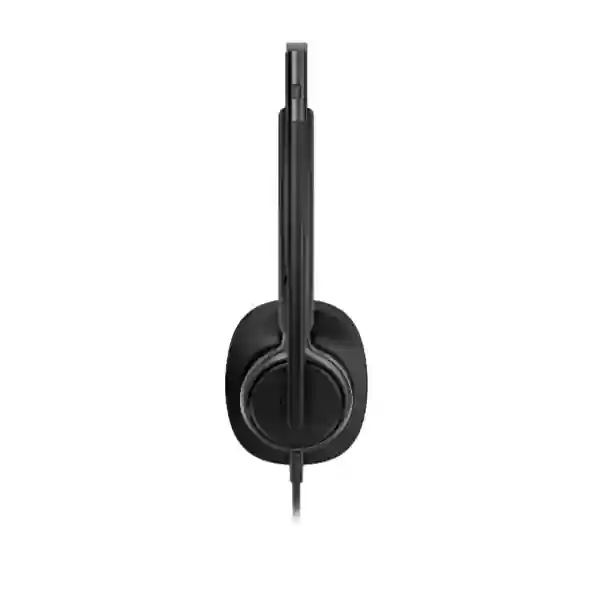
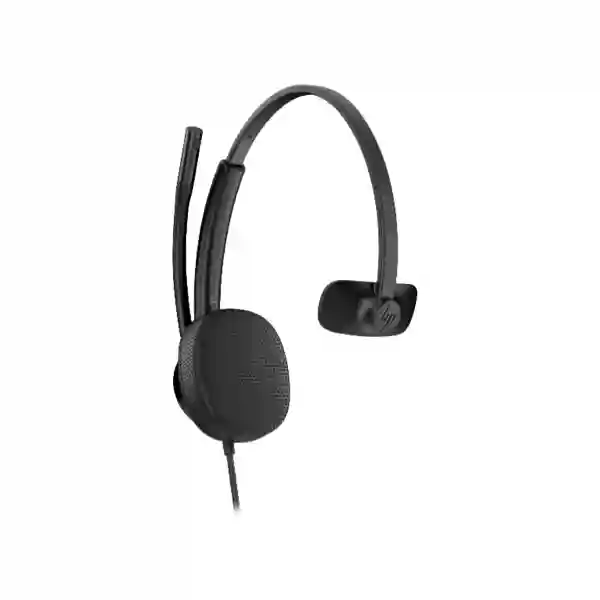
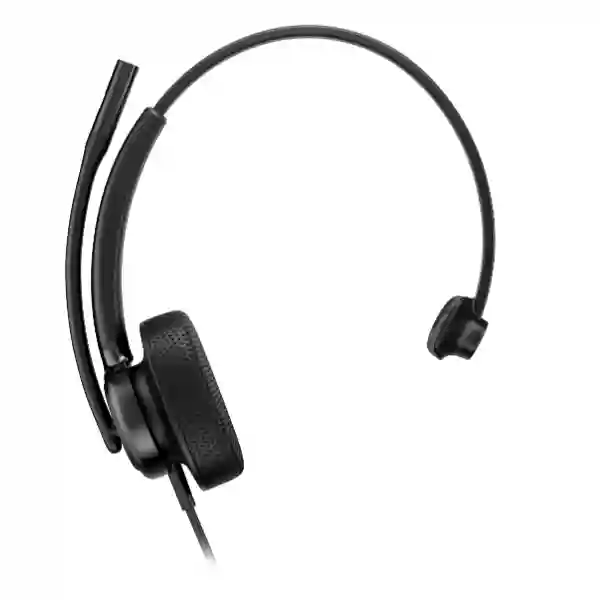
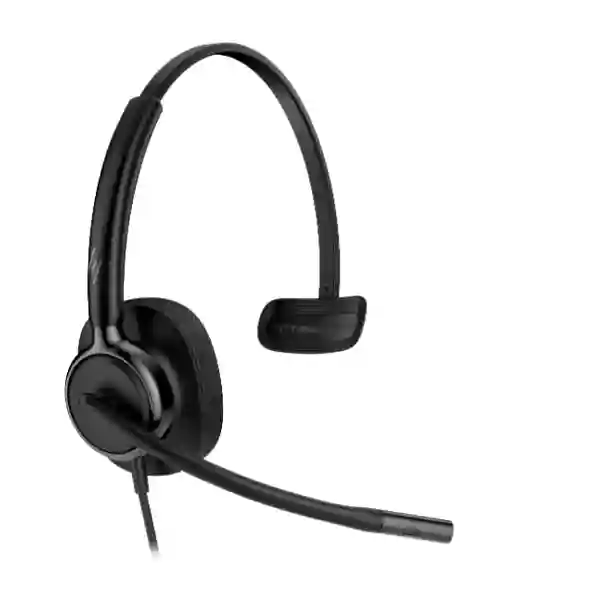
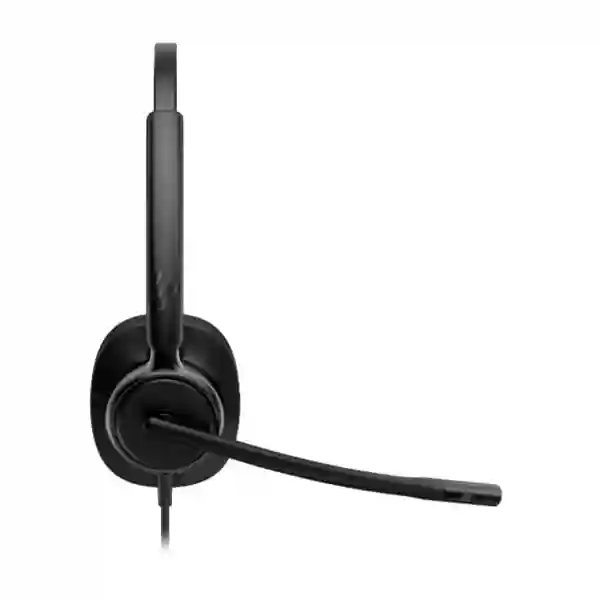
HP Poly Mission 415 Monaural USB Wired Headset
Handle calls and online meetings with a light single-ear wired headset, AI-enhanced microphone noise reduction, USB-C connectivity and an included USB-A adapter. The standard Mission 415 is built for computer-based conversation where clear speech and awareness of the surrounding workspace both matter.
Planning a workplace purchase in Tanzania? Request confirmation of the exact standard-model configuration, suitability for your calling platform and current quotation before ordering.
Key features at a glance
This description covers the standard Mission 415 monaural configuration rather than the Classic foam-cushion version. Software-specific control behavior, pricing, stock and local commercial terms should be verified for the intended purchase.
Who this single-ear USB headset is for
The HP Poly Mission 415 Monaural USB Wired Headset is designed for people whose work depends on clear conversations at a computer. It is a practical choice for customer service agents, reception teams, sales staff, administrators, trainers and professionals who join online meetings regularly. Its one-ear design lets the wearer hear the call while retaining awareness of colleagues, visitors and other activity in the room. That can matter just as much as audio quality in an office where people frequently alternate between a customer conversation and a question from a nearby coworker.
Rather than making buyers compare an extensive list of unfamiliar audio terms, start with four decisions: whether one-ear listening suits the workplace, whether the computer provides a usable USB connection, whether the preferred calling platform supports the required controls, and whether the organization needs a consistent wired headset for multiple users. If those answers align, this model offers a focused approach to daily voice communication without requiring batteries, charging schedules or Bluetooth pairing.
What the Mission 415 does well
At its core, this is a monaural, on-ear, wired USB headset with an adjustable boom microphone. HP specifies an AI noise-cancelling microphone, a 32 mm speaker, super wideband audio capability and intuitive inline controls. The physical connection is USB Type-C, with a USB Type-C-to-Type-A adapter supplied in the standard package. This combination addresses familiar workplace problems: teammates need to hear one another, call controls should be reachable without searching a screen, and connecting the headset should not become a complicated IT project.
These features do not mean that every distracting sound disappears. Microphone noise reduction is aimed primarily at improving what the far-end listener hears, while a one-ear headset still leaves the uncovered ear exposed to the surrounding environment. That distinction is important for honest expectations in busy offices. Buyers prioritizing isolation from local background sound should assess a suitable two-ear option instead. Buyers prioritizing awareness, simplicity and repeatable desk setup may find the Mission 415 a better fit.
A monaural design keeps one ear available
Monaural means one listening earpiece rather than two. For a receptionist, that can make it easier to recognize when a visitor has arrived; for a team leader, it can help preserve awareness of nearby colleagues; and for a shared service desk, it can make short face-to-face exchanges less awkward. The headset does not physically seal both ears, so it is best understood as a communications tool rather than a noise-isolation accessory. Workers who spend most of their day in loud surroundings may prefer the greater coverage of a stereo design.
The right choice depends on how work actually happens. A quiet individual workstation, a collaborative office and a high-noise floor each place different demands on a headset. Teams should test whether users naturally prefer one ear uncovered, whether they need to follow instructions from coworkers, and whether incoming call audio stays intelligible at comfortable volume. Monaural wearing is especially useful when the wearer must switch attention between a call and immediate activity in the room.
AI microphone noise reduction and realistic expectations
HP lists a single AI noise-cancelling microphone with AI-enhanced transmit noise reduction. The aim is to reduce typical background sounds captured during speech, helping the other participant follow the speaker more easily. This is particularly relevant for offices with conversation, typing and other intermittent activity. The microphone is mounted on a boom so its position can be adjusted near the mouth, which remains an important part of achieving clear voice pickup even when noise-processing technology is available.
Noise reduction is not a guarantee of silence at the receiving end. Results can vary with room acoustics, microphone position, background noise intensity, call software processing and network quality. A useful evaluation involves placing a test call from the intended workplace and asking the listener whether speech is easy to follow. Compare the result with another microphone under similar conditions. The Mission 415 is intended to improve communication, but physical workspace management and sensible microphone placement are still necessary.
Voice detail and super wideband communication
The standard headset supports super wideband audio and a microphone bandwidth specified by HP as 50 Hz to 16 kHz. Its 32 mm earpiece has a speaker bandwidth of 20 Hz to 20 kHz in multimedia mode. In day-to-day terms, this equipment is designed to reproduce spoken voices with useful detail, making names, numbers and instructions easier to distinguish than with an unsuitable or poorly configured microphone. Clear speech matters when a mistaken figure or misunderstood request could cause avoidable work.
Audio bandwidth is only one part of call quality. The meeting or calling service, the receiving device, network conditions, codec and app settings can limit the audio that actually travels between participants. A headset cannot repair packet loss, poor network routing or excessive background noise in the remote participant’s room. For best results, use an appropriate input and output device in the app, verify microphone levels and conduct a real call test before handing a headset to someone who will depend on it for customer-facing work.
Wired USB-C connection with included USB-A adapter
The headset uses a wired USB Type-C connection, and HP includes a USB Type-C to USB Type-A adapter in the standard package. This provides a straightforward route for many contemporary computers and older systems that have USB-A ports. The USB cable is approximately two metres long, which is useful for arranging a typical desk, laptop stand or desktop computer without positioning the user immediately beside the port. It is a wired audio device, not a wireless headset.
Before ordering a large quantity, check that the organization’s computers have accessible, functioning USB ports and that the headset will be used through a supported device and platform. A port that looks correct does not necessarily guarantee application interoperability, and mobile-device connections may depend on host capabilities or adapter arrangements. For shared or managed computers, confirm that local security policies permit USB audio devices. The simplest deployment is often a direct connection to the workstation followed by a short verification call.
Inline controls support frequent call handling
HP specifies physical controls for microphone mute and unmute, volume adjustment, answering or ending calls, ignoring calls and a Microsoft Teams function. These controls live on an inline controller, keeping common actions within reach when the user is working in documents or customer records. Recessed buttons are intended to reduce accidental activation. Audible status tones for actions such as muting and volume limits also help users understand changes without constantly opening audio settings.
Control behavior can depend on the calling application, how the endpoint is configured and which integration features the software supports. It is therefore sensible to test the exact workflow used by the team rather than assuming every button will operate identically across every app. A supervisor preparing a group rollout can verify answer, end, mute and volume functions on a representative workstation. Doing so reduces confusion during live calls and helps staff learn one consistent method of managing conversations.
Microsoft Teams and collaboration work
The Mission 415 includes a Microsoft Teams control, and HP presents the headset as designed for modern collaboration platforms. In organizations that spend much of the day in Teams meetings or calls, having a dedicated control on the headset can make the workflow more convenient. Clear voice pickup and a consistent connection are equally relevant for online interviews, project reviews, client discussions and internal training sessions. The headset’s basic audio function remains distinct from software-specific call integrations.
Compatibility should still be checked against the platform, operating system, application version and workplace policy. A device being supported for collaboration does not guarantee that every meeting feature, indicator or button is available in every environment. If a team uses more than one calling service, run a test in each important application. Verify device selection, incoming audio, outgoing audio, mute state and whether call-control buttons behave as expected. That real-world checklist is more useful than a broad claim of universal integration.
Comfort for routine office use
HP specifies a headset weight of approximately 99 grams for the standard Mission 415, with an on-ear monaural form and a soft ear cushion. The standard edition uses a PU-leather surface with memory-foam padding; the separately named Classic version uses a different cushion configuration. Light weight and a padded contact surface can improve the experience of repeated calls, but individual comfort varies with head shape, fit, glasses and the amount of time spent wearing the product.
Comfort assessment should reflect actual work patterns. Someone who takes short calls throughout a day may prefer a different fit from a person attending long consecutive meetings. Ask prospective users to wear the headset during typical work, not only for a brief demonstration. Confirm that the headband sits securely, the earpiece does not create uncomfortable pressure and the boom can reach a useful speaking position. Where hygiene practices require separate accessories for each worker, review the organization’s handling and replacement procedures.
An adjustable boom microphone
The boom microphone is a central part of the Mission 415 design. HP specifies a boom length of 130 mm and a rotation range of 285 degrees. This flexibility helps users position the microphone and adjust their wearing arrangement. The boom is not simply a decorative attachment: placing a microphone near the mouth can improve the balance between the person’s speech and sound coming from farther away. It also helps users maintain similar audio pickup when they move between different tasks.
For dependable voice pickup, start with the headset seated comfortably and place the boom near the mouth without allowing it to rub against the face or clothing. Use the computer’s audio controls or a test call to check input levels. If the caller sounds distant, distorted or unusually quiet, adjust microphone position before assuming the headset is faulty. Users should also avoid forcing the boom past its designed movement. A consistent fitting routine is helpful when a headset is shared across workstations or when new employees join.
SoundGuard Digital and listening protection
HP lists SoundGuard Digital as the headset’s acoustic protection technology. The manufacturer explains that the feature family includes controls designed to address sudden audio spikes and average daily listening exposure. HP also notes that its Poly Studio software is required to enable specific SoundGuard Digital features. These statements describe the manufacturer’s technology; they should not be interpreted as a promise that the headset eliminates all risk associated with prolonged or excessive listening volume.
Workplace audio health still depends on sensible behavior. Users should start at a moderate volume, adjust only as needed, take breaks according to their work schedule and investigate persistently harsh audio instead of compensating with ever-higher output. Administrators evaluating an organization-wide rollout can check software requirements and the audio policies used on managed machines. SoundGuard Digital adds a useful consideration for professional communication, but training and good workstation practices remain part of responsible deployment.
Manage headset behavior with HP Poly Studio
HP identifies the HP Poly Studio App as a management companion for the Mission family. Depending on the connected device, software version and management environment, such software can help with device information and supported settings. This matters to IT teams because a headset rollout is easier to support when administrators understand how to inspect the connected device and which configuration options are available. It can also make troubleshooting more systematic than repeatedly changing unrelated operating-system settings.
The application should be obtained through the organization’s approved software process. Confirm the supported version, permitted installation method and any relevant policy before deployment. Do not assume that every setting shown in documentation for a broader product family applies identically to this particular headset. For personal use, the initial priority is to select the correct input and output device in the preferred calling app. For larger teams, document the working configuration so another technician can reproduce it.
Reception desks and front-office communication
Reception teams often need to balance remote communication with immediate awareness of visitors and colleagues. The single-ear layout helps preserve room awareness, while the microphone and inline mute control can support clearer transitions between speaking to a caller and speaking at the desk. The wired connection also reduces reliance on charging routines for a position where the headset may be needed throughout a shift. These characteristics are practical considerations rather than guarantees of performance in every reception environment.
Before specifying the headset for reception, clarify how telephone calls reach the workstation. If calls are delivered through a compatible computer application, USB audio may be an appropriate option. If the desk relies on a standalone analogue phone, a proprietary handset port or a non-USB telephone system, additional compatibility assessment is essential. The Mission 415 should not be assumed to connect directly to every desk telephone. A simple trial on the actual reception system prevents an expensive mismatch between connector and workflow.
Contact centres and customer service teams
High-volume customer service work places unusual demands on small pieces of equipment. Agents need to hear names, account instructions and changes to an order without repeatedly asking callers to speak louder. The Mission 415 combines on-ear listening, microphone noise reduction and accessible call controls in a form suited to computer-based conversation. The one-ear design can also suit roles where supervisors may need to speak to an agent briefly between calls or during an escalation.
Procurement teams should evaluate the complete service-desk environment rather than comparing headsets on price alone. Consider headset wear time, number of shared seats, workstation port arrangements, cleaning rules, spare accessories and the calling platform’s support for hardware buttons. A meaningful pilot includes several agents, representative background sound and different call types. Record observations about microphone clarity, comfort, durability of the working arrangement and ease of support. An organized test reveals more than a product description can establish.
Sales teams and client-facing staff
For sales representatives who conduct demonstrations, follow-ups and prospect conversations at a laptop, the Mission 415 offers a predictable wired connection and a boom mic positioned for speaking. Inline mute and volume adjustments can make it easier to manage a call while reviewing a quotation, updating a contact record or checking product information. A single ear remains uncovered, which some staff prefer when working in collaborative areas or when switching between a call and a nearby conversation.
Sales teams should consider how and where calls happen. A stationary desk is the clearest fit for a wired model; users who routinely walk around a room or change location during a conversation may prefer another form factor. The headset does not replace a reliable internet connection or an appropriate meeting environment. Before an important customer call, check the microphone, choose a quieter area where possible and verify that the correct device is selected. These habits help make the most of the headset’s communication features.
Hybrid work and shared workstations
The Mission 415 can make sense in an environment where staff sometimes work at the office and sometimes at an approved home workstation. Its USB connection avoids a separate wireless pairing process, and the included adapter broadens the connection options for many computer ports. For hybrid workers, a repeatable setup is valuable: plug in, choose the device, check microphone input and start the meeting. A lightweight single-ear design may also be easier to accommodate at a compact desk than larger accessories.
Organizations should decide whether headsets are assigned to individuals or kept at shared desks. Personal assignment can simplify fit and hygiene management, while a shared inventory may require clear cleaning procedures and storage. Where employees use docking stations, test the headset through the intended dock as well as directly through the computer. Some docking configurations and managed devices behave differently, so a trial is better than assuming identical operation. Work-from-home usage should follow the same IT and security rules as office use.
Training, education and remote consultations
In training sessions and professional consultations, intelligible speech is essential because participants may be discussing instructions, schedules or detailed questions. The Mission 415 provides a boom microphone and single-ear monitoring without adding a battery to maintain. Trainers who need to hear both remote participants and nearby people may find the monaural format useful. Likewise, an administrator or help-desk employee may appreciate keeping one ear available while explaining a process over a call.
The headset is not a substitute for suitable privacy measures, especially during confidential discussions. Choose an appropriate room, follow the organization’s information-security policy and avoid assuming microphone noise reduction prevents people nearby from hearing spoken information. Teachers or trainers who need to move freely around a classroom may also find the wired cable limiting. For screen-based instruction at a desk, though, the setup can be straightforward. Evaluate the working position, microphone pickup and teaching platform before standardizing the device.
Operating-system compatibility
HP lists Windows 11, macOS, Chrome OS, Android and iOS among compatible operating systems for the product family and standard model. This is useful for organizations with mixed computer fleets and a range of supported endpoints. However, operating-system support should not be confused with unconditional compatibility with every handset, tablet, adapter or calling application. The physical USB connection, device host support, application permissions and organization-specific restrictions still matter.
Check the exact devices that will be used. A desktop with USB-C may connect directly, while a workstation with USB-A can use the included adapter. Mobile phones and tablets vary in their USB audio behavior and available connectors, so practical validation remains important. On a managed computer, ask IT whether app permissions or endpoint security affect audio-device access. When a headset appears to connect but no audio is heard, make sure the operating system and calling program both use the intended microphone and speaker.
A straightforward first-time setup
Begin by connecting the headset to an available USB Type-C port or using the supplied Type-A adapter when necessary. Let the host device recognize the audio peripheral, then open the operating system’s sound settings and choose the headset as the desired input and output. In the meeting or calling application, repeat the device selection if the program uses its own audio preferences. Make a short trial call and confirm that the far-end participant hears your voice at a reasonable level.
Next, adjust the headband and rotate the microphone boom to a comfortable speaking position. Test mute and volume controls without a customer on the line, and check the behavior of call answer or end controls in the actual collaboration application. If an IT department manages the computer, use its approved process for installing the HP Poly software where required. Finally, explain to the wearer where the controls are located and what indicators or tones mean. A brief guided setup can prevent many routine support requests.
Troubleshooting when the caller cannot hear you
If incoming audio is clear but the other person cannot hear speech, first inspect the mute state. Verify the inline controller is not muted, and then check the microphone control inside the meeting application. Some programs can mute independently of the hardware control. Confirm the headset is chosen as the microphone rather than a laptop’s built-in microphone or another peripheral. If necessary, disconnect and reconnect the USB plug, wait for device recognition and perform a fresh test call.
Microphone position also matters. Move the boom closer to its intended speaking position and avoid placing it behind the face. Confirm that the host operating system permits microphone access for the selected application. On a shared workstation, previous users may have changed default input settings. If the problem continues, test the headset with another approved USB port or a different supported workstation to help distinguish a headset issue from a computer or app issue. Escalate persistent faults using the organization’s support procedure.
Troubleshooting when you cannot hear the call
Start with the simplest checks: make sure the USB connection is secure and the headset’s volume is not at its minimum. Then check both system output and application output selections. A computer may continue to send sound to built-in speakers, a display or another connected device even after the headset is plugged in. If a docking station is involved, verify the device through the dock and, where practical, through a direct computer port to identify connection-related issues.
Ask the other participant to confirm that they are sending usable audio and that the call service is functioning. If spoken words are distorted or intermittent, look at network quality and application behavior before attributing the issue to the headset. Do not raise listening volume excessively to compensate for poor source audio. A short repeatable troubleshooting checklist helps support teams resolve common configuration mistakes and reserve hardware replacement for faults that remain after reasonable tests.
Why a wired headset can simplify daily work
A wired headset offers one practical advantage: there is no headset battery to charge before the workday begins. Staff also do not need to maintain a Bluetooth pairing relationship between a headset and workstation. For fixed desks, computer labs, administrative counters and predictable meeting stations, reducing those steps can make the equipment easier to issue and support. The two-metre cable provides room for normal desk movement, subject to the layout of the workstation.
The tradeoff is freedom of movement. A user cannot roam away from the computer while remaining connected as they might with a suitable wireless device. Cable routing also needs attention to prevent snagging or pulling on a laptop. Consider these tradeoffs in relation to actual tasks rather than treating wired or wireless as universally superior. If staff remain seated through most calls, a USB wired model may be suitable. If they need to move frequently, explore a different connection design.
Monaural versus stereo: which is appropriate?
The first decision is often the number of ears covered. A monaural headset leaves one ear open, which can support local awareness and quick interaction with coworkers. A stereo headset covers both ears and may be preferred by someone who wants a more enclosed listening experience. Neither format is inherently right for every employee. The intended workplace, task and individual preference determine which design makes sense.
For example, a receptionist who needs to hear the entrance may prefer monaural wear, while someone taking frequent calls in a noisy shared area might favour a two-ear alternative. Noise reduction at the microphone is not the same thing as isolation at the ear. Evaluate both the voice heard by the remote caller and the sound heard by the employee. When purchasing for a department, offer representative users an opportunity to test the wearing style before selecting a standard model.
Standard Mission 415 versus Mission 415 Classic
HP offers related Mission 415 variants, including the standard monaural version and the monaural Classic version. They should not be treated as identical listings merely because their names are similar. According to the manufacturer’s product specifications, the standard C01B2AA model uses a PU-leather surface and memory-foam padding in its ear cushion, while the Classic C01A9AA model uses a foam cushion surface. HP lists approximately 99 grams for the standard version and approximately 97 grams for the Classic.
Both belong to the same broader wired USB headset family, but buyers should verify the exact part number before procurement. Packaging variants also exist, and a bulk package should not be assumed to have the same orderable identifier as an individual retail package. The product described here is the standard HP Poly Mission 415 Monaural USB Wired Headset rather than the Classic edition. If the purchasing team needs the Classic cushion configuration or bulk packaging, specify that separately when requesting a quotation.
What is included in the standard package?
HP’s standard-model listing identifies the headset, a USB Type-C to USB Type-A adapter, a quick start guide, a warranty card and a product notice as box contents. This is useful for teams that want to know whether they must obtain a separate adapter for computers with USB-A ports. The standard package information does not establish that any additional spare ear cushions, carry cases or docking accessories are included.
Check the exact regional offer and package identifier when ordering, since distributor and bulk packaging can differ. If the headset is being issued to many staff, consider how adapters will be tracked and replaced when people change desks. The simplest inventory process records the headset and its supplied adapter together. For individual employees, retain the setup documentation and product notice according to local policy. Procurement should validate the supplier’s actual box contents before acceptance.
Care, cleaning and shared-use practices
Headsets used for daily calls benefit from simple, consistent care. Keep liquids away from the controller and USB plug, avoid twisting the cable sharply and store the headset where the boom will not be crushed. Do not pull the device from a port by the cable. An uncluttered desk layout lowers the chance of accidental drops or connector strain. The ear cushion is a contact surface, so organizations should establish a suitable cleaning practice based on the manufacturer’s maintenance guidance.
Where workers share stations, hygiene and equipment assignment should be considered before a rollout. Organizations may decide to assign individual headsets rather than transfer the same earpiece between users. The standard design has a replaceable cushion according to HP, but replacement items may be sold separately; availability should be confirmed with the supplier. Avoid improvised chemical cleaning methods that could damage the ear cushion. Well-defined storage and handling routines can help a department get more reliable service from its equipment.
Planning a multi-user rollout
An organization purchasing several headsets should first inventory its workstation operating systems, USB port types and primary calling applications. This reveals whether adapters will be necessary and whether endpoint security policies may interfere with USB audio devices. Select a small group of users to test comfort, microphone clarity, button behavior and supportability in realistic conditions. Include a mixture of roles, such as a receptionist, an administrator and a customer service representative, rather than relying on one demonstration.
Document the results in practical terms: how quickly people can connect the unit, whether callers report clear speech, whether users can operate mute confidently, and whether the cable reaches the computer without creating a hazard. Then define deployment guidance, spare accessories, equipment assignment and a support contact. A pilot also helps determine whether monaural wear is suitable for everyone. It is reasonable for one organization to use different headset styles for roles with different noise and mobility requirements.
Tanzania buying and deployment considerations
For a business or institution purchasing this headset for use in Tanzania, the essential questions are not restricted to the product’s technical sheet. Buyers should check the exact configuration offered, the computers already in service, the calling applications used by employees and the practical support requirements of the organization. A single-ear USB headset can be appropriate for a reception counter, an administrative office or a computer-based customer support team, but only when the calling workflow uses compatible USB audio.
Request confirmation of the exact product variant, unit quantity, commercial quotation, availability, delivery arrangements and applicable warranty terms before placing an order. No Tanzania-specific price, inventory status or service coverage is stated here because those details require confirmation for the intended transaction. If procurement is subject to internal purchasing rules, ask for the manufacturer product identifier and clear package description. This reduces the risk of receiving the Classic or bulk variant when the standard version was intended.
How to evaluate microphone performance before buying
A useful evaluation is a live call from a real desk. Have the wearer speak normally while typical office activity happens nearby, then ask the remote listener to describe intelligibility, background sound and changes in volume. Repeat the test with the microphone moved slightly, because position can change the result. Use the same calling application and network route where possible when comparing devices. The goal is not a laboratory score but evidence that the headset helps staff communicate in the actual environment.
Try more than one speaking style, including a soft-spoken user and someone who turns their head while talking. Confirm that the headset remains comfortable and that the far-end user can follow names, dates and numbers. Record whether keyboard typing or nearby discussions distract from the call. This approach can reveal limitations that a marketing feature list cannot. It also gives IT staff clear baseline information in case employees later report a change in microphone performance.
Cable layout and workstation ergonomics
The approximately two-metre cable provides flexibility, but the right cable route depends on the desk. Users should be able to turn toward the screen, reach the keyboard and adjust the microphone without stretching the wire. A cable running across a walkway or around a chair wheel is undesirable. Route it along the workstation edge where practical and avoid sharp bends near the USB connection. A properly arranged headset can be easier to use and less likely to be damaged.
Comfort also depends on monitor position and working posture. A headset cannot compensate for a desk that forces the wearer to lean toward the screen or hold the neck at an awkward angle. Adjust the headband so the earpiece sits naturally, and take brief breaks appropriate to the person’s work. If a desk has a tower computer under the table, check that the connection remains accessible and the cable will not become taut during normal movements. Such small checks matter when deploying equipment across many seats.
Voice privacy and responsible workplace use
Clear outgoing speech is beneficial, but it does not automatically make a conversation private. People nearby may still hear the headset wearer, and a one-ear design allows normal room sound to reach the uncovered ear. For calls involving customer records, personnel matters or other sensitive material, organizations should use suitable spaces and follow established access-control and confidentiality policies. Microphone noise reduction is not a replacement for privacy controls.
Employees should also know when the microphone is muted and should verify that status before discussing information away from the call. Hardware and application mute indications can vary, especially across platforms. A short training demonstration using the actual software is useful. Where calls are recorded, the relevant organization should manage notice, consent and retention according to applicable requirements. The headset is one component of a communications process; privacy and compliance responsibilities remain with the people and systems using it.
Sustainability and service life considerations
HP reports paper-based packaging and at least 25 percent post-consumer recycled plastic for the standard Mission 415 model, expressed as a proportion of the plastic used. These manufacturer specifications can matter to procurement departments comparing equipment materials and packaging. They should not be interpreted as a complete environmental impact assessment or as proof that every component is recyclable through local waste-management channels.
A more complete purchasing decision also considers expected use, replacement planning, user care and the ability to replace wear items. HP describes a replaceable cushion for the standard model, with the accessory sold separately. A reliable headset that remains suitable for the user’s work can help avoid unnecessary replacement, but no fixed lifespan is guaranteed here. When a device reaches the end of its useful life, follow the organization’s approved electronic-waste arrangements and any applicable local guidance instead of putting electronics into ordinary waste without review.
Choosing the right quantity and configuration
A request for one workstation is different from a purchase for dozens of employees. For an individual desk, the most important checks may be USB compatibility, microphone clarity and comfort. For a larger organization, add packaging identifiers, deployment standards, replacement supplies and device-management policies. Because there are standard, Classic and bulk Mission 415 variations, purchase orders should describe the exact configuration rather than simply requesting any Mission 415 headset.
Ask suppliers to identify whether the supplied item is the standard monaural version with the PU-leather and memory-foam cushion or another model. Confirm the quantity of headsets and adapters and whether quoted terms relate to the intended package. Keep the supplier’s part-number confirmation with procurement records. No site-specific SKU is assumed here: a manufacturer’s model code and a seller’s inventory SKU serve different purposes. Accurate ordering information is particularly important when multiple employees must receive matching devices.
Before requesting a quotation
Prepare a concise statement of needs: expected number of users, type of computer, available USB ports, preferred calling service, whether each person has a dedicated headset and whether mono wearing is suitable. Mention any special circumstances, such as shared desks, long call shifts or the need to test on a managed computer. This information helps avoid an unsuitable purchase more effectively than a generic request for a headset with noise cancellation.
Request a quotation for the exact standard HP Poly Mission 415 configuration, and ask the seller to confirm the variant, packaging and commercial conditions. The responsible supplier can then clarify current price, stock, ordering process, delivery and warranty arrangements for Tanzania. Before rollout, plan a small user test if the quantity is significant. The aim is a consistent communications tool that matches the work environment, not a specification chosen in isolation from everyday use.
Technical specifications: standard Mission 415
| Headset format | On-ear monaural, black |
|---|---|
| Connection | Wired USB Type-C; USB Type-C to USB Type-A adapter included |
| Cable length | 2 m |
| Speaker | 32 mm driver |
| Speaker bandwidth | 20 Hz to 20 kHz in multimedia mode |
| Microphone | One AI noise-cancelling boom microphone |
| Microphone bandwidth | 50 Hz to 16 kHz |
| Microphone boom | 130 mm length; 285° rotation |
| Controls | Mute/unmute, volume up/down, Teams, answer/ignore/end |
| Ear cushion, standard variant | PU-leather surface and memory-foam padding |
| Acoustic technology | SoundGuard Digital; software requirements apply |
| Headset weight | 99 g according to HP standard-model specifications |
| Device dimensions | 150 × 180 × 40 mm |
| HP-listed operating systems | Windows 11, macOS, Chrome OS, Android, iOS |
| Standard box contents | Headset; USB-C to USB-A adapter; quick start guide; warranty card; product notice |
| Product identifier reference | HP standard monaural model C01B2AA (manufacturer code, not a FourTeck SKU) |
Specifications are based on HP’s description of the standard model and may not match the separately named Classic or bulk variants. Validate application integration and the exact orderable configuration before purchasing.
Frequently asked questions
Is the HP Poly Mission 415 wired or wireless?
It is a wired USB headset, not a Bluetooth or radio-based wireless model. The cable connects to a compatible host through USB Type-C, with a USB Type-C to Type-A adapter included in the standard package. This means there is no headset battery to charge and no pairing routine to manage. In return, the wearer remains physically connected to the computer or other compatible host. It is best for users who generally remain at their desks while speaking. For staff who frequently walk around during calls, a separately evaluated wireless alternative may be more appropriate.
Does the headset cover both ears?
No. Monaural means the headset provides one on-ear listening earpiece, leaving the other ear uncovered. The design can suit reception, customer service, administration and other jobs where staff need to be aware of activity around them. It does not provide the same physical coverage as a stereo headset. If an employee needs to focus in a very noisy environment, compare one-ear and two-ear options through a practical workplace test. Personal comfort and working requirements should guide that choice.
Does the microphone cancel all background noise?
HP specifies an AI noise-cancelling microphone designed to reduce typical environmental noise sent to the other side of a call. This can help speech stand out, but it does not guarantee that the listener hears no background sound. Very loud or unusual noise, room acoustics, microphone placement and the calling application can affect the experience. Test a real call in the intended workspace and ask the remote participant how clearly they hear speech. A properly positioned boom and sensible surroundings still matter.
Will it connect to a computer that only has USB-A?
The standard package includes a USB Type-C to USB Type-A adapter, so many computers with USB-A can use the headset. Make sure the computer’s port is accessible and functioning, and verify that local IT policy supports USB audio devices. USB connector compatibility alone does not guarantee that every application will support every inline button. After connection, choose the headset in both system audio settings and the meeting or calling software, then complete a test call before depending on the setup for work.
Can I use it for Microsoft Teams meetings?
HP includes a Microsoft Teams function among the inline controls and positions the Mission 415 for contemporary collaboration workflows. It can be a useful computer-audio device for Teams calls and meetings when the host environment supports it. However, exact integration and button behavior may vary with application version, operating system and configuration. An organization should confirm mute, answer, end and any Teams-specific action on its actual software setup rather than assuming all button functions are identical across platforms.
Is the headset comfortable for extended calls?
The standard model uses a lightweight, on-ear monaural design and a PU-leather surface with memory-foam cushion padding. HP lists a weight of approximately 99 grams. These are useful comfort-related features, but comfort is subjective and depends on head shape, fit, glasses and session length. Before selecting a department-wide headset, ask representative staff to wear it during normal working periods. Check earpiece pressure, headband fit and microphone position. Different employees may prefer different wearing styles even when the audio performance is suitable.
What is the difference between standard and Classic?
The standard Mission 415 monaural headset and the Mission 415 Classic are different product configurations. HP specifies PU-leather and memory-foam cushioning for the standard model, identified as C01B2AA, while the Classic model, identified as C01A9AA, uses a foam-surface cushion. Their stated weights also differ slightly. Buyers should use the exact manufacturer identifier when requesting a quote, especially if several devices must match. The content on this page is intended for the standard, non-Classic version.
Does it work with mobile phones and tablets?
HP includes Android and iOS in its listed operating-system compatibility. In practice, mobile use depends on the particular device’s USB audio support, physical port and adapter arrangement. Not every phone or tablet provides the same capabilities, and call-button integration may differ by platform. If mobile operation is an important buying requirement, test the exact handset or tablet before ordering. The most straightforward reference scenario remains a compatible computer with a usable USB-C or USB-A connection.
What is SoundGuard Digital?
SoundGuard Digital is HP Poly’s named acoustic protection technology for managing certain sound-exposure conditions. HP describes measures addressing sudden audio events and daily listening exposure, and states that Poly Studio software is needed to enable specific SoundGuard Digital functions. These features should be used alongside reasonable listening levels and normal workplace practices. They do not mean that every sound exposure is harmless. Follow the manufacturer’s setup guidance and the organization’s audio safety requirements.
Does it need batteries or charging?
No charging routine is required for this wired USB headset. The device uses its physical USB connection rather than a rechargeable headset battery. That simplifies equipment preparation at fixed desks and avoids a headset being unavailable solely because it was not recharged. It also means the user cannot leave the workstation carrying an active wireless connection. Check cable placement and computer ports when planning a desk layout so the physical connection remains comfortable and reliable during calls.
What should IT test before deploying many headsets?
IT should check the organization’s operating systems, USB port types, headset recognition, microphone and speaker selection, calling-app behavior, inline mute and volume controls, comfort and support procedures. A sample trial should cover the real applications used by staff, not just a basic operating-system sound test. If desks use docking stations or endpoint security restrictions, include those conditions in the pilot. Document a successful setup and a simple troubleshooting guide, then confirm the exact product variant and packaging before placing a larger order.
Can it plug directly into any desk phone?
No such universal compatibility should be assumed. The product is a wired USB headset intended for compatible USB audio hosts. Many desk telephones use different headset sockets, adapters or proprietary interfaces, and their ability to operate a USB headset varies. If the workplace uses standalone desk phones rather than computer-based calling software, identify the exact telephone model and supported accessories before purchasing. A connector that does not match the equipment cannot be solved merely by selecting a different calling app.
Is a USB headset enough to improve a poor internet call?
It can help the microphone and listening side of a conversation, but it cannot eliminate network problems. Packet loss, unstable connectivity, application errors or the other participant’s microphone can still make a call difficult to understand. If sound breaks up, test whether the issue occurs in local audio recordings or only during network calls. Check the calling application, device selections and connection quality. A suitable headset is one part of clear communication, not a substitute for reliable connectivity and good meeting practices.
Can I purchase the Mission 415 for an office in Tanzania?
The product can be considered for office procurement in Tanzania, but the specific commercial offer must be verified before ordering. Ask for current availability, the exact standard-model configuration, quantity, quoted price, delivery terms and applicable warranty details. No local inventory, price or fulfillment commitment is stated in this description. If the order supports multiple workstations, include details about USB port types and calling applications so the requested configuration fits the intended use. A clear quotation request helps prevent variant and packaging mistakes.
Request a quote for the standard Mission 415
Share your required quantity, workstation USB ports, preferred calling application and whether staff need one-ear awareness. Ask for confirmation of the standard non-Classic variant and the applicable Tanzania quotation, stock, delivery and warranty conditions. This page does not claim an unverified local price, lead time or supply commitment.
Contact FourTeck Tanzania to discuss the right configuration for your workplace.




Reviews
There are no reviews yet.