
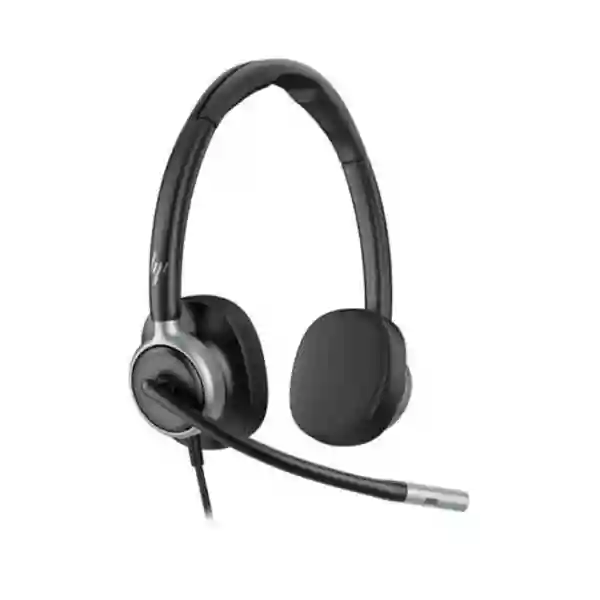
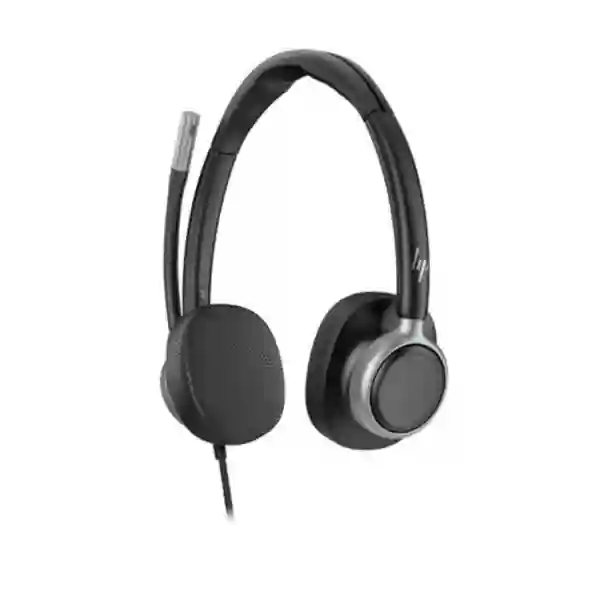
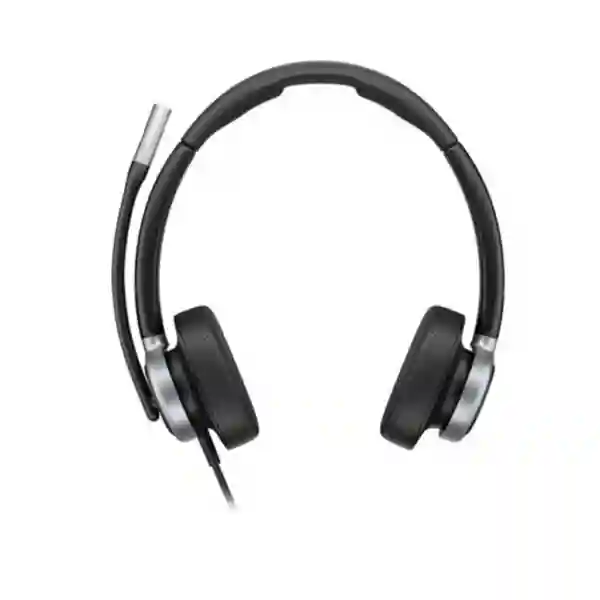
HP Poly Mission 620 Stereo USB Wired Headset
The HP Poly Mission 620 Stereo USB Wired Headset gives call-intensive teams a practical way to communicate using a direct computer connection. It pairs dual microphones with AI-enhanced outgoing-noise reduction, two on-ear speakers, a padded headband and a convenient control layout. It is particularly relevant to desk-based support, remote collaboration and Microsoft Teams meetings. The headset uses USB-C and HP lists a USB-A adapter in the package, so buyers can evaluate it across a variety of workstation generations. The key limitation is equally important: it does not have active noise cancellation for what the wearer hears. Use the verified technical facts and buyer checks below to decide whether it fits your team’s requirements, then confirm the exact model and Tanzania purchasing terms with a quotation.
Key technical specifications
| Wearing style | Stereo, on-ear |
|---|---|
| Connection | Wired USB Type-C; USB-C to USB-A adapter listed by HP |
| Microphones | Two, with AI noise reduction |
| Microphone bandwidth | 50 Hz to 16 kHz |
| Speaker drivers | 32 mm |
| Speaker bandwidth | 20 Hz to 20 kHz in multimedia mode |
| Cable | 2 metres |
| Weight | 147 grams |
| Dimensions | 170 × 180 × 40 mm |
| Boom movement | 285 degrees; boom-up mute |
| Ear cushions | PU leather surface and memory-foam padding |
| Controls | Mute, volume, Microsoft Teams and call handling |
| Acoustic feature | SoundGuard Digital |
| Listening-side ANC | No |
| Operating-system families | Windows 11, macOS, Chrome OS, Android, iOS (device and application checks apply) |
These are published HP technical details for the Mission 620 family and documented configuration. Confirm the precise manufacturer part number and the contents of the model offered locally, since regional or customer-special packages can differ.
A practical headset for daily professional communication
For people whose workday revolves around conversations
When staff handle frequent calls, the best headset is not necessarily the one with the most complicated feature list. It is the one they can connect quickly, adjust comfortably and use without repeatedly searching for call controls. The Mission 620 is designed around that everyday routine. It combines stereo on-ear listening, a wired digital connection and a microphone system intended to keep speech understandable when ordinary workplace noise is present. Its value is particularly clear for support agents, coordinators, remote colleagues and office teams who need consistent voice communications. It is sensible to evaluate the complete working experience rather than selecting from a single specification. Call quality, headband pressure, microphone placement and application compatibility all matter over an eight-hour shift, and an actual trial can reveal differences that a product sheet cannot.
Support desks and customer conversations
A customer support agent may need to explain procedures, confirm names and numbers, and listen carefully while working in another application. The dual-microphone design can reduce typical ambient noise entering the outgoing audio, which may help callers understand the agent. The boom provides a visible, adjustable reference for voice pickup, while the inline controls make it possible to mute during an internal conversation without hunting for a software button. Stereo listening helps some employees focus on the person they are assisting, although it does not remove all surrounding sound. A good procurement test should include common office noises, normal speech volume and the actual help-desk calling software. It should also include the agent’s comfort after an extended period. Those results are more meaningful than an unsupported claim that a headset delivers perfect clarity in every situation.
Hybrid workers and meeting-intensive teams
A hybrid employee might use the same laptop in an office, a home workspace and a meeting room. A wired USB headset can be straightforward in this routine because it has no headset battery to charge and no wireless pairing sequence to repeat. HP lists a carrying case and USB-A adapter among the accessories for its published Mission 620 configuration, making the system practical to move with a laptop. The tradeoff is physical reach: the headset remains attached through a two-metre cable rather than following the wearer around a room. People who regularly stand and walk during calls should take that restriction seriously. For employees mainly seated during Teams meetings, presentations, interviews or remote training, direct connectivity and familiar controls can be a better fit than unnecessary wireless complexity.
Microphone technology and noise expectations
Two microphones with AI-enhanced voice processing
The HP Poly Mission 620 uses two microphones with AI noise reduction. This technology is intended to reduce typical background sounds in the signal sent to the other participants, allowing the user to be heard more clearly in meetings and calls. That description should be understood as an aid to outgoing voice pickup, not a guarantee that every noise will disappear. Very loud speech nearby, unusual room echoes, an incorrectly positioned boom and application-level audio processing can still affect intelligibility. Good results also depend on speaking at an ordinary level and giving the microphone a consistent position. Before a larger rollout, place a test call from the same desks and through the same communication platforms that employees will use. Let the receiving participant evaluate speech quality with the room both quiet and moderately busy.
Understanding the difference between microphone reduction and ANC
The words noise cancelling can refer to different technologies. The Mission 620 applies reduction to the microphone path so that the remote listener hears less background activity. Active noise cancellation, commonly abbreviated ANC, instead uses electronics to reduce environmental sound heard by the headset wearer. HP’s Mission 600 product brief explicitly lists active noise cancellation as absent on this series. The earcups may provide some passive reduction simply by resting on the ears, but that effect must not be marketed as electronic ANC. The distinction changes the buying decision. A team focused on voice clarity in ordinary office surroundings may find the Mission 620 suitable. Someone needing stronger isolation from constant background sound should evaluate a different headset specifically equipped for that requirement, and consider any safety need to hear activity around them.
Positioning the rotatable microphone boom
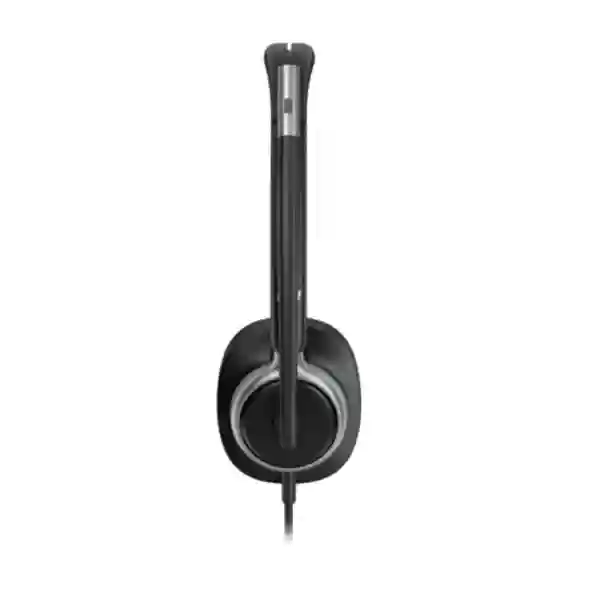
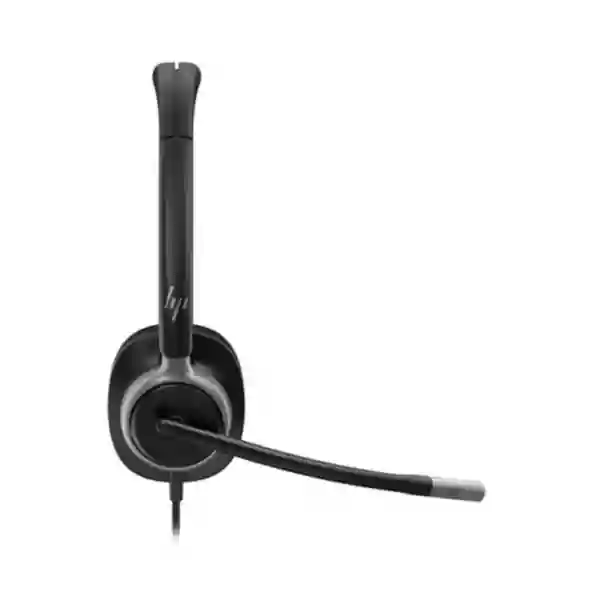
The headset’s microphone boom rotates through a published range of 285 degrees, giving the user flexibility in positioning. HP also describes a boom-up mute action. This is useful for temporarily stopping microphone transmission during a private exchange, but it can cause confusion when an employee forgets that the boom is in the muted position. Begin with the headband adjusted to a comfortable fit, then bring the boom close enough to capture speech without pressing it against the face or clothing. Check the mute indication before speaking. Avoid forcing the arm beyond its intended movement or repeatedly twisting the cable. A one-minute demonstration during staff onboarding can prevent many avoidable complaints about a microphone that appears not to work, especially where employees have previously used a different headset design.
Stereo speakers and listening experience
On-ear stereo for voice and training content
The Mission 620 has two on-ear speaker units. Stereo listening may help workers concentrate during conferences, online learning and customer calls, particularly when they do not need to maintain full awareness of nearby conversation. Unlike a single-ear design, both ears receive the computer’s audio signal. This does not automatically mean complete isolation from the room, since the cushions rest on the ears and the model does not have listening-side ANC. Some people prefer a mono headset precisely because they need to hear a colleague speaking beside them. The correct choice depends on work style and the physical setting. If a department includes both call-intensive specialists and staff who frequently alternate between face-to-face and remote conversations, it may be sensible to evaluate separate wearing styles instead of issuing the same stereo configuration to everyone.
Drivers and audio bandwidth explained
HP lists 32 mm speaker drivers for the Mission 620 and a multimedia speaker bandwidth of 20 Hz to 20 kHz. It also identifies super wideband voice capability. These are useful hardware characteristics, but they should not be interpreted as a promise that every telephone conversation will reproduce the full frequency range. Communication applications, network codecs and the other participant’s equipment shape what reaches the listener. In practice, business buyers should prioritize easy-to-understand speech, comfortable volume and reliable transitions between calls and meeting audio. The wider multimedia capability may be helpful for training videos and presentations, but the model remains centered on professional communication rather than specialist music production. A realistic test through your chosen conference software provides better evidence of suitability than comparing raw driver dimensions without context.
SoundGuard Digital and listening habits
HP includes SoundGuard Digital acoustic protection among the Mission 620 features. The technology is intended to help manage sudden sound peaks and overall exposure during headset use. HP also explains that some SoundGuard Digital functions require the HP Poly Studio App, while a separate default protection feature is described in its documentation. An IT department should therefore check the software and settings required for the exact product instead of assuming that every advanced function is active immediately after plugging it in. Protection features do not replace sound workplace practices: employees should maintain sensible listening volumes, take appropriate breaks and report uncomfortable audio levels. Supervisors should avoid promising complete hearing protection from a headset alone. The overall working environment and the user’s habits remain important.
Fit, comfort and workstation ergonomics
Adjustable headband and memory-foam earcups
HP describes an adjustable padded headband and ear cushions with memory-foam padding and a PU-leather contact surface. These details are intended to support comfort during long communication sessions, but each person experiences fit differently. Someone who wears glasses may notice pressure where the earcups meet the frames. Another employee may be more sensitive to heat or to the headband position. A product demonstration should include several head sizes and a reasonable wear period rather than only a quick initial impression. Encourage users to adjust the headband before moving the microphone boom into position. A well-fitted headset is less likely to shift or place unwanted pressure on one part of the head. Check replacement cushion options with the seller if the headset will be used for an extended period.
Weight and physical dimensions in context
HP publishes a 147 gram weight for the stereo Mission 620 and dimensions of 170 by 180 by 40 millimetres. A relatively light design can be useful to someone who wears the headset for multiple meetings, but weight alone is not a complete comfort measure. Clamping force, cushion condition, headband adjustment and the wearer’s own preferences also matter. When evaluating a product for a department, ask several employees to use it during their normal tasks. Capture feedback about ear pressure, balance, heat, eyeglasses and microphone positioning. This simple step is valuable because bulk purchases are difficult to reverse if the wearing style proves unsuitable for a substantial part of the workforce. Remember that individual comfort and a published manufacturer measurement answer different questions.
Cable routing at a desk
The specified USB cable length is two metres. That is convenient for many laptop and desktop arrangements, provided the cable can travel from the USB port to the wearer’s head without getting caught on equipment. A desktop tower under a desk creates a different path from a laptop positioned next to a monitor. Plan the routing around sit-stand movement, chair wheels, drawers and any docking station. Never pull the cable taut, bend it sharply at the plug or leave it where people will trip. If a shared desk uses a hub, verify that the headset is recognized through the hub rather than assuming that every connected accessory will operate the same way. Cable management is a small but important part of keeping a wired headset comfortable and reliable.
Digital connectivity and device compatibility
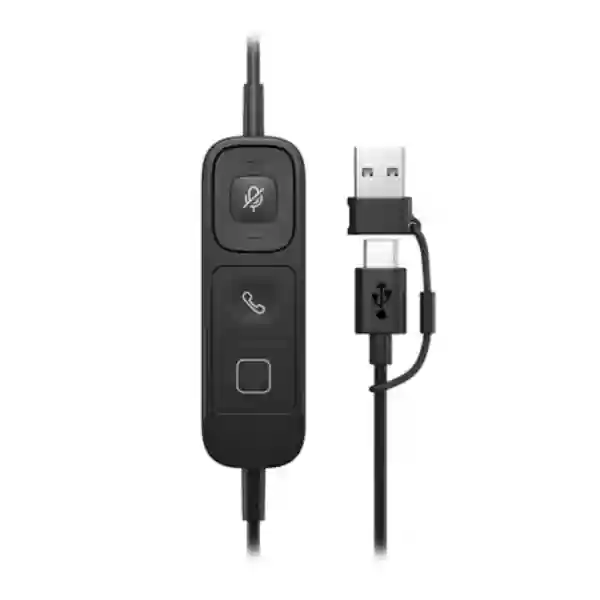
Native USB-C plus a USB-A adapter
The Mission 620 uses a wired USB Type-C connection, and HP lists a Type-C to Type-A adapter in the published package. That provides flexibility for modern laptops with USB-C ports and older desktops using standard USB-A connections. The host must still support the headset as a USB audio device. This is not an analogue 3.5 mm headset, and having a physical connector that fits does not guarantee every software control will function. Before purchasing, inspect the computers and docking stations that employees actually use. Identify which devices have accessible ports, whether IT has restricted USB accessories and whether the calling application permits the headset to be selected. Doing this in advance prevents an otherwise suitable headset from being undermined by an unexpected workstation limitation.
Operating systems and mobile devices
HP lists Windows 11, macOS, Chrome OS, Android and iOS among the compatible operating-system families for the published Mission 620 configuration. That is helpful, but it is not a guarantee that every phone or tablet supports every function. Mobile hardware needs suitable USB audio capability and an appropriate port or compatible adapter, while collaboration software may expose different controls on different platforms. Basic microphone and speaker operation must be distinguished from dedicated Teams actions, mute synchronization and software management. Test one example of each important device and application combination before the headset becomes a company-wide standard. In a mixed computer fleet, record the tested operating systems, port types and any approved adapters so that support teams can reproduce the configuration later.
Why a wired headset can be simpler
A wired device removes the need to charge a headset battery or establish Bluetooth pairing each time employees change desks. That can be attractive for predictable, desk-based workflows and for teams that want straightforward hardware handovers. It also avoids some wireless management questions, although the computer’s own connection and software still need to work. A USB hub can fail, an operating system can select the wrong microphone and a user can inadvertently mute the headset. Direct connectivity should therefore be understood as simpler setup, not a promise of zero troubleshooting. The best implementation includes a clearly labeled connection, the approved meeting application configured to use the headset and a short checklist for employees. People who depend on walking during calls should weigh the restriction of a fixed cable against these benefits.
Inline controls and visible call status
Mute, volume and call handling
HP’s specification lists controls for mute and unmute, volume increase and decrease, Microsoft Teams, and answering, ignoring or ending calls. Physical controls can reduce interruptions because the employee need not locate a small software icon while typing or sharing a screen. Their effectiveness depends on app integration, though. A button that works in one communication platform may not offer exactly the same action in another. During testing, verify the functions staff actually need, including whether mute status is synchronized with the meeting client. Make a short reference card or onboarding demonstration for the approved software setup. Consistency is particularly valuable for customer-facing roles where a mistaken mute or missed answer is more disruptive than a minor difference in audio characteristics.
Boom-up mute and audible prompts
The Mission 620 also supports muting by rotating the boom upward, according to HP’s product information. Its listed voice alerts cover events such as muting, volume limits, incoming calls and call handling. Together, these features can communicate state without requiring the user to monitor the application constantly. They are not substitutes for verifying the actual call status. New users should practice muting with the boom and with the inline control, then confirm how the chosen application indicates each action. When an agent reports that a caller cannot hear them, checking both mute methods should be an early troubleshooting step. Familiarity with voice prompts also helps prevent confusion when an alert sounds during a busy workflow.
Busy light as an office courtesy cue
HP describes a visible busy light on the Mission 620 earcups that can illuminate during calls. In open-plan offices this can help colleagues recognize that somebody is engaged in a conversation. The light has most value when a team agrees on what the indicator means and respects the signal. It should not be treated as a privacy control or a guarantee that every type of computer audio will trigger the same state. Actual behavior can depend on device firmware, communications applications and integration. During a pilot, check the indicator in the organization’s main call scenarios and decide whether it supports normal desk etiquette. A headset busy light works best alongside simple team practices about interruptions rather than replacing human communication.
Microsoft Teams and collaboration software
Verified Teams certification
The Mission 620 is described by HP as Microsoft Teams Open Office certified, and the Mission 620/625 headset family appears on Microsoft’s official USB-device certification list. This gives business buyers a sound basis for considering it in a Teams-oriented environment. It does not mean that headset button behavior will be identical in every app or future software build. Organizations should test answer, end, mute, volume and the Teams-specific button against their actual Teams client and endpoint policies. If a feature depends on desktop software, confirm that it is permitted on managed machines. A certificate is useful evidence about the design; it should complement, rather than replace, a practical compatibility test with the equipment employees actually use.
Zoom, Google Meet and other meeting platforms
HP’s Mission 600 documentation also identifies support and certifications across leading collaboration services, including Zoom and Google Meet. This flexibility matters for employees who attend external meetings as well as internal Teams calls. However, the distinction between USB audio and application-aware controls remains important. Playback and microphone selection may function normally while a dedicated call button or mute synchronization behaves differently. A procurement team should therefore list its most important applications and the exact controls that matter to workers. Test the headset during a real or simulated meeting in each platform. Record any limitation honestly and provide a workable software-control alternative when needed, rather than claiming that every button is universally compatible.
HP Poly Studio App and firmware management
HP describes the HP Poly Studio App as a management and configuration tool for supported Poly devices. Its documentation also explains requirements for some SoundGuard Digital features. IT administrators should check the current supported release, installation rights and update policy for the organization’s computers. Employees do not need to adjust device software independently without guidance. A controlled rollout can establish consistent configuration, document the headset model and help support staff investigate unusual audio or button behavior. Where enterprise endpoints restrict new applications, check whether the needed functionality works under those policies before buying in volume. Firmware and software maintenance should follow the manufacturer’s current instructions rather than an improvised download or an assumption that a new headset never requires updates.
A Tanzania-focused purchasing checklist
Confirm the exact model in a written quotation
A Tanzania buyer should request the precise HP Poly configuration and manufacturer part number being offered, not only the broader Mission 620 family name. HP’s regional material may describe customer-special or region-specific configurations, and accessories or commercial conditions should be confirmed for the offered item. Ask for the exact headset designation, included USB-A adapter, package contents and any relevant documentation. Pricing, tax treatment, stock and delivery terms are matters for the actual local transaction; this page does not guess them. For bulk purchases, state the number of units, target deployment schedule and critical compatibility requirements. A clear written quotation gives the buyer a factual basis for comparing offers and avoids assumptions made from a manufacturer’s page intended for another market.
Plan for mixed-age computers and branch workstations
An organization may operate both newer USB-C laptops and older USB-A desktops, sometimes alongside docking stations or thin clients. The adapter included in HP’s listed package makes the Mission 620 a candidate for such a fleet, but only a trial can show how it works with the actual devices. Check port accessibility, USB audio support, permission policies and integration with the standard calling application. For shared desks, establish whether each user brings a personal headset or whether a cleaned headset is assigned to the workstation. Include technical staff from branches or remote locations in the pilot if their computer configurations differ. An equipment plan based on actual endpoints is stronger than assuming that one operating-system compatibility line covers every workstation arrangement.
Remember the network and power environment
The local USB headset is only one part of a voice call. Internet stability, computer performance, meeting-service quality and the remote participant’s equipment also affect what people hear. A reliable microphone cannot remove network packet loss or restore a failing internet connection. For distributed teams and home-based employees, examine the full communications environment when investigating call complaints. Stable power for the computer and network equipment can matter in business continuity planning, but those provisions are separate from the headset itself. Avoid interpreting the wired connection as a promise of uninterrupted calling. In practical terms, buy the headset for its audio, comfort and controls, then assess network and workstation reliability as their own requirements. That approach produces more credible expectations for managers and employees.
Choosing the right headset rather than the most features
Stereo versus monaural
Stereo listening is valuable for employees who prefer sound in both ears during customer conversations or online training. A monaural design leaves one ear uncovered, which may help staff stay aware of colleagues and the surrounding room. The Mission 620 is the stereo member of its family, so this wearing-style choice is central rather than incidental. Speak to users about whether they must alternate between remote and face-to-face conversations. Consider the effect on concentration, personal comfort and safe workplace awareness. Different teams may reasonably make different choices. A headset that is excellent for a dedicated support agent may be less appropriate for a receptionist who frequently needs to respond to people nearby. The correct product is the one that suits the daily task.
Wired simplicity versus wireless mobility
The fixed two-metre cable is a positive feature for a seated worker who values an uncomplicated connection without charging. It is a limitation for someone who regularly stands up, moves between desks or retrieves files while remaining on a call. Neither wired nor wireless technology is inherently right for every person. Compare the movement patterns of the role, how often the headset changes computers, and any IT requirements for fleet configuration. A wireless alternative introduces its own battery and connection-management considerations, while a wired device places greater importance on desk setup and cable care. Asking these questions before ordering can save the cost of purchasing a product that meets specifications but does not support the employee’s habits.
Deciding whether listening-side ANC matters
If the user works in a moderately busy office, the Mission 620’s stereo cushions and dual-microphone reduction may provide a useful communications experience. In a persistently noisy location, however, the wearer might want active noise cancellation that reduces what they hear. This model does not include that feature according to HP’s published Mission 600 specifications. A buyer should not assume that an AI noise-reducing microphone will make the office sound quiet to the person wearing the headset. Evaluate products according to the direction of the noise problem: outgoing microphone clarity, incoming listening comfort or both. In environments requiring special hearing protection or awareness, obtain the appropriate workplace guidance instead of using a conventional communications headset as personal protective equipment.
Setup and support guidance
First connection on a computer
Connect the Mission 620 to a compatible USB-C port or use the supplied USB-A adapter where appropriate. Wait for the operating system to recognize the device, then choose it as both the microphone and speaker in system sound settings. Make the same selection within the calling application, because meeting software can retain a different preferred device. Check the position of the boom and the mute control. Run a short test call or local recording, checking whether the microphone is clear and whether the playback volume is comfortable. If audio is absent, first confirm that the computer has not reverted to built-in speakers or a different microphone. A simple setup guide for employees makes the initial experience more predictable and reduces avoidable IT support requests.
Troubleshooting microphone or speaker problems
If other people cannot hear a user, check whether the boom has been rotated to mute, whether inline mute is enabled and whether the application has selected the correct input. Review microphone permissions and make a short local test recording. For playback problems, verify output selection and volume in both the operating system and the meeting client. If a headset behaves differently through a hub, connect it directly to a known working USB port and compare the result. A successful direct connection suggests that the dock, hub or its software may need investigation. Avoid assuming that the headset is defective solely because an application button does not work; advanced call controls and basic USB audio have different compatibility requirements.
Maintaining shared or individually assigned headsets
Follow the current HP cleaning recommendations for the headset rather than using excessive moisture or harsh chemicals on the cushions. In shared work environments, an approved hygiene procedure and clear ownership rules can improve the user experience. Avoid crushing the boom, wrapping the cable tightly around the earcups or tugging on the USB plug when disconnecting. Inspect cushions for wear, particularly in high-use support teams. HP describes replaceable headband pads and ear cushions for the Mission 620, but buyers should confirm the availability and exact compatibility of replacement components rather than assuming local stock. Keep basic troubleshooting instructions nearby so staff can check a muted microphone, incorrect audio-device selection or an obstructed USB port before escalating an issue.
Frequently asked questions
Does the headset support both USB-C and USB-A?
HP specifies a wired USB-C connection and includes a USB-C to USB-A adapter in its published box contents. A compatible host computer must still support USB audio. Test docks or hubs that are part of the normal workstation before buying for a large team.
Is the Mission 620 wireless?
No. It is a corded USB headset with a published two-metre cable. Users do not need Bluetooth pairing or headset charging, but they remain attached to the computer. Staff who regularly walk while speaking should assess a wireless alternative.
Does it have active noise cancellation?
No. The Mission 620 reduces typical background noise captured by its microphones but does not have listening-side active noise cancellation. Its on-ear cushions can offer some passive coverage, which is different from electronic ANC. This distinction is important when purchasing for noisy offices.
Is it certified for Microsoft Teams?
Yes. HP describes Teams Open Office certification and Microsoft’s certified USB-device list includes the Mission 620/625 family. The practical behavior of individual controls should still be tested using the organization’s current Teams client, operating-system setup and permissions.
Can the Mission 620 be used with Zoom or Google Meet?
HP’s Mission 600 materials describe support for Zoom and Google Meet as well as Teams. Basic audio and detailed call-control behavior are not identical concepts. Verify the functions that employees actually use on the specific communication platforms deployed by the organization.
How many microphones are included?
HP lists two microphones with AI noise reduction. They are designed to improve transmitted voice clarity under typical conditions. Microphone placement, office acoustics and the communications software remain important to the outcome; two microphones do not guarantee that all ambient noise disappears.
How much does the headset weigh?
HP specifies a weight of 147 grams for its published stereo Mission 620 configuration. The headset also has an adjustable padded headband and memory-foam ear cushions. Individual fit varies, so prolonged comfort should be assessed by users before a bulk purchase.
How long is the cable?
The published USB cable length is two metres. That allows flexibility on many desks, but organizations should examine cable routes around monitors, desktop computers and docking stations. An appropriate layout reduces tugging and accidental disconnection.
Can I mute by moving the microphone?
Yes. HP identifies a boom-up mute action on the rotatable microphone arm, as well as inline mute controls. Users should verify the resulting mute state before returning to a call, particularly when switching between different conferencing applications.
Does it connect to Android or iOS devices?
HP lists Android and iOS among compatible operating systems, but individual smartphones and tablets need appropriate USB audio support. A compatible port alone may not provide every headset control. Test the actual device and calling app before relying on mobile use.
Does the headset solve an unstable internet connection?
No. The headset provides the local audio connection, while the network and calling service determine whether voice data reaches the other participant consistently. Investigate network reliability, software configuration and computer performance separately if calls keep breaking up.
Do I need the HP Poly Studio App?
Basic USB audio may be supported through normal operating-system functions. Some configuration, management and SoundGuard Digital features use HP Poly Studio software. Follow the current manufacturer instructions and your IT policy to determine which optional or advanced functions can be enabled.
What accessories are included?
HP’s published Mission 620 configuration lists a USB-C to USB-A adapter, carrying case, quick-start guide, warranty card and product notice along with the headset. Ask the seller to confirm the actual package for the exact regional item quoted in Tanzania.
How much does the Mission 620 cost in Tanzania?
A verified Tanzania price has not been supplied for this listing. The current quote should specify the exact configuration, price, applicable taxes and commercial terms. Avoid using international retail prices as proof of a local amount or delivery commitment.
What should a business include in its quotation request?
Provide the quantity required, computer types, USB port information, preferred meeting application, expected call intensity and any essential Teams controls. Request confirmation of the exact manufacturer configuration, accessories, applicable warranty, stock and delivery terms before making a purchasing decision.
Request a Tanzania product quotation
Tell the supplier how many HP Poly Mission 620 units you require, the USB ports and calling software employees use, and whether the stereo design fits their work. Ask for the exact manufacturer configuration, included accessories, applicable warranty, price, availability and delivery terms. A written offer and a short device trial are appropriate next steps before a major rollout.
Request availability and a quotation




Reviews
There are no reviews yet.