
Professional USB audio • Tanzania buyer’s guide
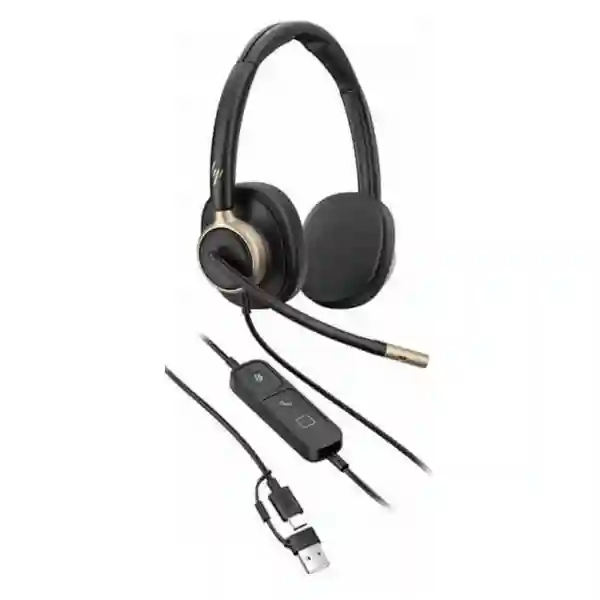
HP Poly Mission 820 Stereo USB Wired Headset
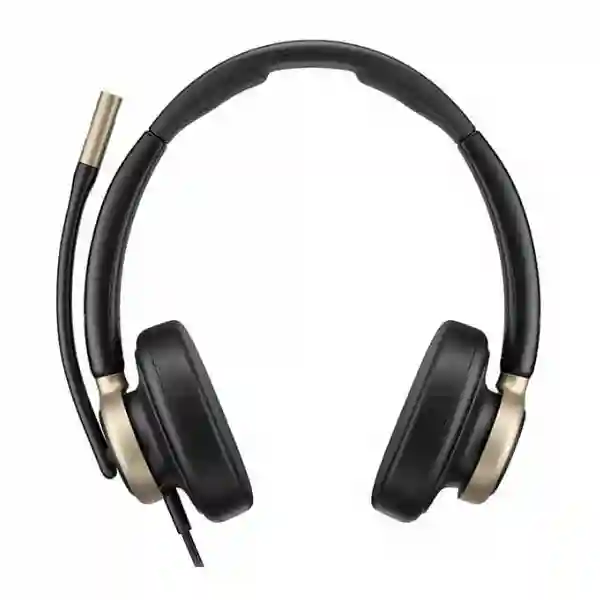
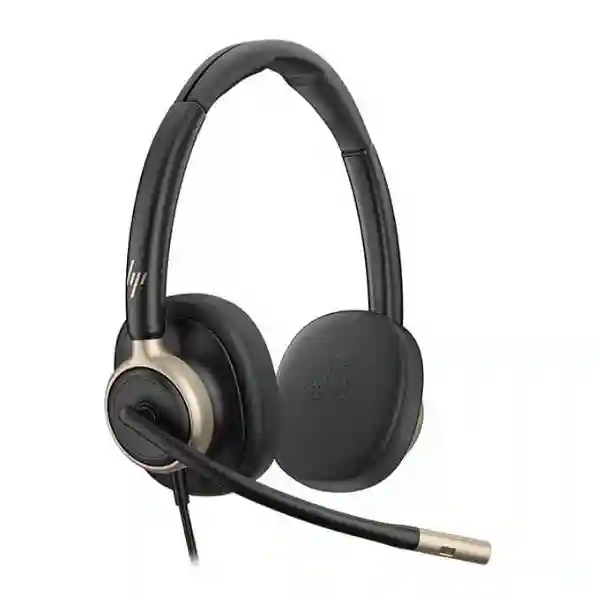
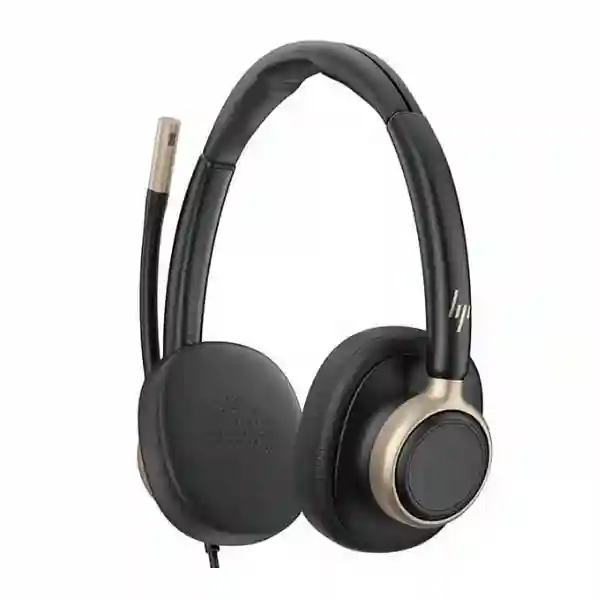
Four-microphone AI noise reduction, listening-focused ANC and a reliable wired USB form factor make this on-ear stereo headset worth evaluating for professional meetings, customer support and desk-based collaboration.
The essential buying answer
For professionals seeking a stable wired headset with clearer outgoing speech and quieter incoming listening, the HP Poly Mission 820 Stereo USB Wired Headset is a relevant option. It offers four-microphone AI processing, active noise cancellation, stereo speakers and practical controls. Choose it when staff primarily work at a compatible computer; evaluate other designs where wireless movement or a single uncovered ear is more important. Request a quotation for Tanzania-specific price, availability and the exact offered variant.
Specifications at a glance
| Connection | Wired USB-C; USB-C-to-USB-A adapter included |
|---|---|
| Listening design | On-ear stereo with active noise cancellation |
| Microphones | Four-microphone AI noise reduction |
| Speaker driver | 32 mm |
| Speaker bandwidth | 20 Hz–20 kHz (multimedia mode) |
| Microphone bandwidth | 50 Hz–16 kHz |
| Cable length | 2 m |
| Headset weight | Approximately 164 g |
| Boom microphone | 130 mm; 285° rotation |
| Ear cushions | PU-leather surface and memory-foam padding |
| Operating systems listed by HP | Windows 11, macOS, Chrome OS, Android, iOS |
| Manufacturer product number | D16LSAA (not a verified Tanzania listing SKU) |
Specifications are based on HP’s standard Mission 820 manufacturer information. Exact commercial configuration and local terms require confirmation.
A headset designed around professional conversations
When work depends on speaking clearly, a headset is more than a computer accessory. Colleagues need to understand project updates, customers need to hear explanations without repeated questions, and meeting participants need to stay attentive even when the surrounding workspace is active. The HP Poly Mission 820 Stereo USB Wired Headset addresses that practical need with a wired stereo form factor, noise-focused audio features and accessible call controls. Its central value is helping the user hear and be heard, not offering an unnecessary collection of lifestyle features.
This model is worth considering for desk-based staff whose working day includes scheduled video meetings, unscheduled softphone calls, remote collaboration and occasional media playback. It combines features that solve different problems: microphones process the voice sent to other participants, while active noise cancellation works on sound reaching the person wearing the headset. That distinction matters because quieter listening does not automatically make the transmitted voice clearer, and a well-filtered microphone does not eliminate noise heard in the room.
Buyers comparing professional headsets should begin with their actual workflow. Identify the calling applications in use, whether computers have USB-C or USB-A ports, how long staff wear a headset and what background noise normally occurs. Then consider whether an on-ear wired stereo product supports those needs. This product should be evaluated as a complete working tool, including comfort, training, maintenance and technical compatibility, rather than judged on a single specification.
Understand the difference between microphone noise reduction and ANC
HP describes a four-microphone design with AI-enhanced transmit noise reduction. This feature focuses on the outgoing side of a conversation: it is intended to help isolate speech from familiar background sounds before the voice reaches the other person. For a customer-service agent, it may help when nearby colleagues are speaking. For a manager joining from a shared office, it can reduce the amount of ordinary room activity sent into a meeting. Actual results still depend on microphone placement, noise type and application settings.
Active noise cancellation, commonly shortened to ANC, serves a different listener. It helps reduce unwanted environmental sound experienced by the headset wearer. The Mission 820 uses feedback ANC, according to HP, and has an ANC on/off control. This can be useful when concentrating on a lengthy discussion in an open office. It does not make the physical environment silent, remove all voices equally or guarantee privacy in a shared room. Passive cushioning and fit also influence how much surrounding noise is noticed.
Understanding the two technologies prevents misleading expectations during purchasing. A team concerned mainly about clients hearing surrounding chatter should prioritize microphone pickup and transmit processing in real calling conditions. A team concerned about user concentration should examine earcup fit and incoming noise reduction. Many workplaces need both, which explains the attraction of this model. A short trial using the organization’s actual software and a representative work area is more meaningful than assuming that any noise-cancelling label will solve every acoustic problem.
Four microphones and the importance of speaking position
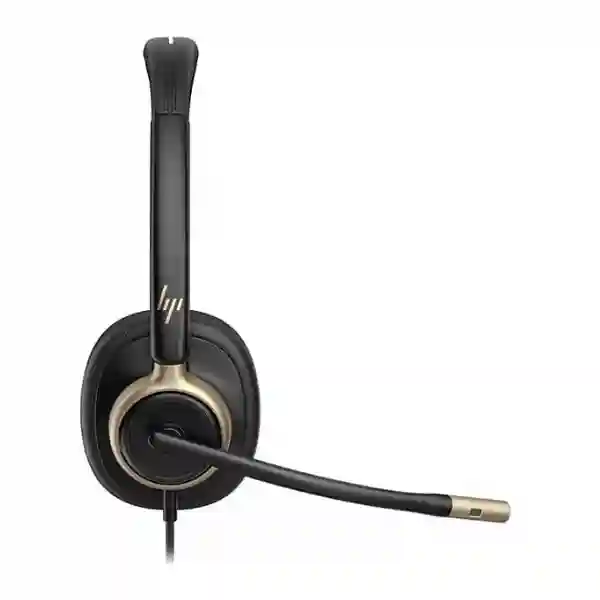
The headset has four microphones and an adjustable boom. The microphone system is designed for speech communication, but the user’s positioning remains important. The boom should be set according to HP’s fitting instructions rather than left far from the mouth or placed where breath strikes the microphone directly. A headset can have sophisticated processing yet still produce inconsistent audio if its boom is pushed away, obstructed by clothing or moved repeatedly while speaking.
Teams conducting an initial voice test should compare normal speech, quieter speech and a call with typical background activity. Ask a colleague at the receiving end whether words remain intelligible, whether the voice sounds natural and whether environmental noise becomes distracting. Avoid using the application’s microphone meter alone as a measure of quality: a level indicator shows signal activity, not the full listening experience. Repeat the test when moving between the organization’s calling applications because their own processing settings may differ.
For shared desks, include microphone positioning in quick-start instructions. Even experienced staff can accidentally mute a device, select the laptop microphone or position the boom incorrectly after a shift change. A simple standard such as checking input selection, speaking at normal volume and making a test call can prevent avoidable support requests. AI-based noise reduction is helpful, but basic microphone handling and sensible room behavior remain necessary parts of a professional call.
What the stereo on-ear design means for daily work
The Mission 820 uses two on-ear speakers rather than a single earpiece. Stereo listening can make it easier to follow application audio, training material and meetings with varied sources of sound. It also means both ears are covered by the headset’s cushioned earcups. Staff who often work with speech and occasional multimedia may appreciate that broader listening experience. However, stereo is not automatically the right choice for workers who must continually monitor nearby conversations or safety instructions.
An on-ear headset rests against the ears rather than enclosing them fully like a large over-ear model. Personal comfort depends on ear shape, glasses, head size, ambient temperature and how tightly the headset is fitted. During evaluation, staff should try the device for a realistic working period instead of only a quick fitting demonstration. Notice pressure around the ears, how easily the headset can be removed between calls and whether the boom can be positioned consistently.
Choose the form factor around the role. A focused analyst may prefer two-ear listening in a shared workspace, while a reception employee who regularly talks with visitors may prefer a one-ear design. This product’s stereo configuration is a clear technical fact, not proof that it suits every department. Buyers planning a mixed fleet can allocate stereo devices to roles where concentrated calling is common and consider other headset formats where environmental awareness is an operational requirement.
A predictable wired connection with USB-C and USB-A options
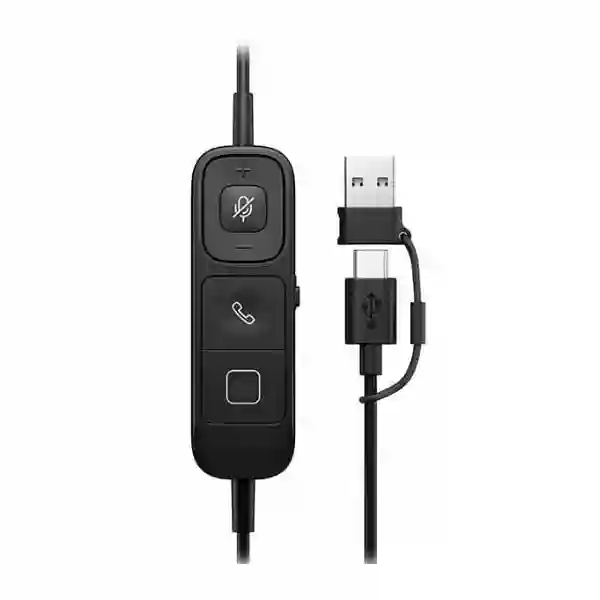
This is a USB wired headset, with a USB-C connection and a USB-C-to-USB-A adapter included in the package. For a compatible computer, that gives a straightforward route to connecting the device without a wireless pairing procedure. Wired equipment may be attractive in managed offices because there is no separate headset radio link to pair or charging routine to schedule. The device still relies on the host computer, its audio settings and the application to deliver successful calls.
The included adapter matters where an organization operates a mixture of newer laptops and older desktop computers. Rather than assuming every workstation has the same port, an IT buyer can check a small sample of computers before deploying the headsets in quantity. USB-C shape alone does not guarantee identical functionality across every phone, tablet, hub or docking station. Confirm that each planned host supports the required USB audio behavior and that the organization allows the attached accessory.
The cable is approximately two metres long. That can support ordinary seated movement such as reaching a keyboard, standing briefly beside a desk or adjusting an office chair, depending on desk layout. It is not designed to provide the freedom of a wireless headset across a large room. A good deployment keeps the lead away from chair wheels, sharp corners and walking paths. Cable management improves everyday usability and reduces the likelihood of a connector being pulled during a call.
Microsoft Teams Open Office certification in context
HP lists Microsoft Teams Open Office certification for the Mission 820. That is particularly relevant to organizations that conduct frequent meetings through Teams and want a headset built with that working environment in mind. A dedicated Microsoft Teams control is included among the available user buttons, alongside mute, call management, volume and ANC. When evaluating the device, confirm the behavior of the controls with the exact Teams client and IT policies installed in the workplace.
Certification should not be confused with a promise that every softphone, browser plug-in, meeting client or legacy desk-phone system will behave identically. Basic USB audio may work in a wider range of environments than application-specific call control or button integration. Functions such as answering a call from the cable control can depend on software support, permissions and current versions. For businesses running multiple communication platforms, an application-by-application check avoids surprises after purchase.
A useful pilot includes joining a Teams meeting, speaking through the boom microphone, changing volume, muting and unmuting, and ending or ignoring a call where supported. The tester should then repeat the core audio checks in any other required software. Document which buttons function as expected and which actions must be completed on screen. That produces a realistic compatibility record for employees and help-desk teams without overstating the meaning of a certification badge.
Operating-system compatibility versus application compatibility
HP identifies Windows 11, macOS, Chrome OS, Android and iOS among supported operating systems. This information is helpful when a purchasing team manages diverse devices, but the operating-system list is only a starting point. Actual use also requires a compatible physical connector, audio-capable host and appropriate communication application. A phone with USB-C may behave differently from a business laptop with the same connector, while an adapter may be required for some mobile devices.
Before ordering for mobile or tablet use, confirm that the intended device can accept the headset’s connection and select the microphone correctly. Check local policies that may restrict USB accessories, as well as whether the app recognizes call controls. For desktop environments, note whether staff connect directly to a laptop, through a docking station or via a USB hub. The simplest setup is often the one with the fewest untested intermediary devices.
Cross-platform compatibility is most useful when combined with a deployment matrix. Record the device model, operating system, connection path, calling application, microphone input, speaker output and control behavior for each relevant workstation type. This may seem administrative, but it turns an abstract compatibility claim into evidence that the headset fits the organization’s actual tools. It also makes later troubleshooting faster because the IT team knows what was tested and what remains unverified.
SoundGuard Digital and sensible listening levels
HP specifies SoundGuard Digital acoustic protection for the Mission 820. Audio protection is relevant to teams that spend many hours listening to calls because sudden volume changes and sustained loud playback can create discomfort. HP describes protection against abrupt high-level sound and additional listening-exposure functions. According to HP’s specification notes, the HP Poly Studio App is required to enable particular SoundGuard Digital features. Buyers should consult current HP guidance for feature details and configuration.
Acoustic-protection technology is not a substitute for good volume habits or an employer’s hearing-safety procedures. Users should begin calls at a comfortable level, avoid raising playback unnecessarily to overcome surrounding noise and report any repeated unusually loud events. IT administrators should understand which safety features are active by default and which depend on software. Do not assume that an unconfigured application provides every optional exposure-management capability.
For procurement teams, ask whether the organization has policies on headset listening levels and whether software can be installed and maintained on managed workstations. Those policies may affect how the full feature set is used. The most dependable outcome combines manufacturer audio protections, correct device configuration, user education and appropriate workspace noise management. This is an especially useful conversation for operations involving extended telephone or video-call sessions.
Lightweight construction and replaceable wearing surfaces
HP gives the stereo headset’s weight as approximately 164 grams. Weight is one input into comfort, but balance and fit can matter just as much during a long workday. The ear cushions use memory-foam padding and a PU-leather surface. Users who regularly wear spectacles or have sensitive ears should check for local pressure after a sustained test. A comfortable fit can support listening and microphone stability, while poor adjustment may lead to frequent repositioning during meetings.
HP also notes that replacement pads and cushions can be purchased separately. That is useful for organizations considering ongoing equipment care, although it does not establish local stock or the availability of every replacement part in Tanzania. Check the correct accessories for the precise headset variant before buying spares. A replaceable contact surface may help extend practical service life when the underlying electronics remain functional and the manufacturer-supported replacement part is available.
Comfort testing is best done with representative users, not only the purchaser. Include people who wear glasses, work extended shifts and move frequently between calls and desk tasks. Ask about pressure, heat, movement and microphone reach. The goal is not to promise all-day comfort for every person; it is to discover whether this particular design is appropriate for the team. An inexpensive fitting and trial process can prevent a much more disruptive equipment rollout.
Controls that reduce interruptions during a call
The Mission 820 includes controls for mute and unmute, volume changes, Microsoft Teams access, call answer or ignore or end, and ANC on or off. These allow users to manage common actions without constantly switching focus between a meeting window and other desktop applications. For busy staff, a readily accessible mute control can be especially useful when a colleague approaches, a door opens or a private conversation begins nearby.
Controls are most valuable when employees know their behavior. Provide a brief demonstration of how to mute, verify the device’s feedback, adjust playback level and recognize a call ending. HP also lists voice alerts for common states including mute on or off and volume limits. Users should still pay attention to the application interface, particularly if there are multiple mute controls at the operating-system, headset and meeting-software levels.
During installation, distinguish the headset’s ANC setting from microphone mute. ANC influences the wearer’s listening environment, whereas mute stops transmission in supported calling workflows. A person can turn off ANC and remain audible, or have ANC enabled while the microphone is muted. That distinction is worth emphasizing in a short desk reference. It addresses one of the simplest ways to avoid embarrassing meeting interruptions or accidental silence.
Super wideband audio and the value of a good call chain
HP advertises super wideband audio for the Mission 820, together with 32 mm speaker drivers. Its published specification lists a microphone bandwidth of 50 Hz to 16 kHz and a speaker bandwidth of 20 Hz to 20 kHz in multimedia mode. These figures describe device capabilities; they do not guarantee the same end-to-end quality in every application or network. Calling software, codecs, hardware and remote participants all affect the sound heard during a meeting.
For spoken-word work, clarity and consistent levels are generally more important than chasing a high technical number. Evaluate how consonants remain intelligible, whether soft-spoken colleagues can be heard and whether listening becomes tiring after a long training session. If a recording sounds poor, the headset may not be the only cause. Application compression, network dropouts, incorrectly selected input devices and extreme automatic gain settings can all contribute.
Organizations that record training calls or provide remote support should test with their own conferencing system. Capture a short sample in normal room conditions, obtain permission where recording is involved and compare the result with the existing headset fleet. Do not assume that a wider advertised frequency range will bypass the quality limits of a narrowband call service. The purchasing decision should reflect the whole audio workflow, from microphone to listener.
Practical use in an office with surrounding conversation
A shared office is a common setting in which the headset’s combination of transmit noise reduction and ANC can be useful. Picture an employee presenting a quarterly update while teammates discuss another project several desks away. The wearer wants to follow the meeting without being distracted, while remote participants want to hear the presenter rather than the surrounding discussion. The Mission 820’s two noise-focused technologies are designed to help with those separate aspects of the situation.
No headset can eliminate all disruption in a busy room. Strong nearby voices, keyboard impacts and sudden sounds may remain audible to the user or reach the remote call to some degree. Seating position, room acoustics, quiet-call areas and respectful call etiquette therefore still matter. A business should view the headset as one component of an effective workspace rather than a replacement for office planning or communication policies.
During a trial, choose the noise conditions that genuinely occur at the business. Test near normal office conversation and compare with a quieter room, rather than manufacturing an unusually loud demonstration. Ask both the user and a remote listener for feedback. This helps establish whether the product improves experience enough for the role and whether any change in desk placement, application configuration or user training would be equally helpful.
Remote and hybrid working considerations
Hybrid workers may connect the same headset to a work laptop at home, in a shared office or at a temporary desk. A wired USB design can make daily setup predictable when the computer recognizes the same audio device across work locations. The supplied carrying case provides a way to transport the headset, although users should protect the cable and connection points rather than packing the device under heavy equipment.
Home environments present their own distractions: family conversations, ceiling fans, street activity and hard reflective rooms. The headset’s outgoing noise processing may help with typical ambient noise, but the best setup still includes a quiet location when confidential calls are involved. Since the headset is on-ear, it should not be treated as physical sound isolation or as a guarantee that bystanders cannot overhear the employee’s spoken side of a conversation.
Before sending devices to remote staff, IT teams should publish a compact checklist covering USB connection, operating-system audio selection, softphone permissions, mute behavior and headset care. Include a method for contacting the help desk if a computer does not recognize the accessory. Confirm any organizational rules governing device use on personal computers. This approach makes the equipment part of a consistent remote-work process instead of leaving each employee to improvise.
Contact-centre and customer-support evaluation
Customer-support teams depend on dependable audio, accessible call controls and equipment that remains comfortable through repeated conversations. The Mission 820 has several relevant attributes: stereo listening, microphone noise reduction, a wired connection and a lightweight headset body. These features make it a candidate for consideration, but call-centre suitability must be established against the precise contact-centre platform and the required call-control integration.
Many contact-centre deployments include browser-based agents, desktop softphones, recording software, quality-monitoring tools and security policies. A headset working for microphone and speaker audio is not proof that an agent can answer every queued call from the inline controller. Test the actual agent workflow, including login, incoming alert, answer, hold, transfer, mute and end where those operations apply. Document which actions occur on screen and which work from the headset.
For a larger support team, a pilot should include typical shifts, representative noise conditions and feedback from supervisors and agents. Ask whether the earcups remain comfortable, whether the cable fits the desk layout and whether support staff can identify errors quickly. Measure practical outcomes such as reduced repeated setup issues or fewer audio complaints only if your organization has reliable baseline data. Avoid assuming performance results before a real deployment.
Meeting rooms, training desks and shared workstations
A headset assigned to a training computer or shared workstation may be used by several employees during the week. In these environments, clear device labeling and predictable audio configuration matter. Users should know where to plug in the USB connector and how to select the headset as both speaker and microphone in the operating system or application. The included USB-A adapter is useful where older machines lack USB-C ports, but it should stay paired with the unit.
Shared equipment introduces hygiene and handling considerations. The PU-leather ear cushions should be cleaned in line with the manufacturer’s care instructions, and individual comfort preferences may differ. If workers frequently rotate through the same station, consider whether personally assigned headsets would better serve hygiene, comfort and accountability. Any allocation decision should follow the organization’s operating practices rather than the assumption that a single headset configuration fits every user.
Training rooms should also account for storage. Leaving cables loosely wrapped around chair arms or pinched under monitors can damage equipment and frustrate the next user. A small labeled storage area, straightforward connection instructions and an accessible support contact can prevent repeated confusion. Buyers planning a classroom or shared-desk purchase should consider those operating details alongside unit specifications, because successful equipment use depends on more than first-day functionality.
A practical first-time connection procedure
Start with the intended computer and verify that the correct USB connection is available. Connect the headset directly via USB-C where appropriate, or use the supplied USB-C-to-USB-A adapter for a compatible USB-A port. Give the operating system time to recognize the audio device, then open its sound settings. Select the headset as the preferred output and input if the system has not done so automatically. Avoid connecting through an untested hub during the first diagnostic check.
Next, open the meeting or calling application the employee actually uses. Review its device settings separately, because an application may retain an older microphone or speaker choice even after the operating system changes. Make a permitted test call and speak naturally. Confirm that the remote listener hears the headset microphone, not the laptop’s internal microphone. Then adjust playback to a comfortable level and practice muting and unmuting.
Finally, check the ANC control, Microsoft Teams button and other call operations relevant to the employee’s work. Some application-specific controls may require supported software or configuration. Record any differences across computer models. If the organization uses HP Poly Studio App for available device settings, ensure installation complies with IT policy and current vendor instructions. Do not download unverified utilities or treat third-party driver packages as necessary without manufacturer guidance.
Troubleshooting when the computer cannot find the headset
If the headset is not visible in audio settings, first confirm the USB connection. Disconnect and reconnect the plug carefully, try a known working compatible port and check whether the adapter is seated properly. Where permitted, test directly on the computer rather than through a docking station. This separates basic connector issues from problems caused by intermediary hardware. Restarting the application or reconnecting after the computer finishes updating may also help.
If audio plays through the laptop speakers instead of the headset, check the operating-system output selection and then the meeting application’s separate speaker selection. If remote participants cannot hear the user, check the microphone selection, mute state and application permissions. On managed systems, privacy or security settings may restrict microphone access. Do not assume that an illuminated button or an on-screen device name proves that the entire call path is configured correctly.
Intermittent sound may originate from a loose connection, strained cable, USB power behavior, application processing or network instability. Try a short local recording to distinguish microphone capture from the quality of a live internet call. Record what changed and whether the issue follows the headset or stays with the workstation. Escalate persistent problems through the organization’s IT process and use HP’s current support information for manufacturer-specific troubleshooting.
Getting the microphone and ANC settings right
Clear outgoing speech begins with selecting the correct input device. A laptop may continue using its internal microphone while the employee hears playback through the headset. In that situation, the purchaser is not experiencing the benefit of the Mission 820’s four-microphone system. A short check at the beginning of the first session can avoid misjudging the product. For ongoing deployments, show staff where to view the active microphone within their usual application.
ANC is an optional listening function with a dedicated on/off control. Some users may prefer it during concentrated calls and choose to turn it off when they need greater awareness of nearby activity. Employees should understand that incoming noise cancellation is different from electronic background reduction in the microphone path. Avoid treating ANC as a hearing-protection guarantee, a privacy control or a substitute for observing workplace safety procedures.
Some conferencing applications also apply their own background noise suppression, echo control and automatic level adjustments. Those features can interact with device processing in ways that vary by application. During evaluation, compare the default settings before changing multiple controls at once. Keep a record of any adjustment that improves or worsens quality. This measured approach makes it easier to maintain consistent audio across a team and reverse an unhelpful configuration.
Care, storage and everyday maintenance
Professional headsets are handled repeatedly, so simple care matters. Store the Mission 820 in a clean, dry location and avoid pulling the unit out of a computer by its cable. Keep the lead away from moving chair parts and sharp desk edges. Use the supplied carrying case for transport when appropriate, and do not crush the boom or earcups under other devices. A predictable storage habit helps prevent accidental damage that could otherwise be mistaken for a technical fault.
Keep the ear cushions and microphone area free of buildup using only cleaning methods approved for the material and product. Do not spray liquids into openings or immerse the headset. For shared desks, establish cleaning responsibilities and allow cleaned equipment to dry according to manufacturer guidance before reuse. Users should report worn pads, damaged connectors or intermittent audio rather than continuing to use a visibly compromised device.
HP refers to replacement pads and cushions being sold separately. Where these parts are available, replacing a worn contact surface may be more sensible than prematurely replacing otherwise functional equipment. Confirm part compatibility and servicing instructions first. When planning a fleet, build in basic asset identification, a way to request accessories and a process for removing damaged units from circulation. Those modest steps can improve reliability over the working life of the equipment.
Technical specifications that matter to buyers
HP lists the device in black with an on-ear stereo configuration, four-microphone AI noise reduction, feedback active noise cancellation and a wired USB-C connection. The included adapter supports connection to compatible USB-A ports. The stereo configuration uses 32 mm speakers. HP gives an approximate headset weight of 164 g, overall dimensions of 175 x 180 x 40 mm and a cable length of two metres. These are useful values for procurement and desk-planning discussions.
The microphone bandwidth is specified as 50 Hz to 16 kHz, while the speaker bandwidth reaches 20 Hz to 20 kHz in multimedia mode. The boom microphone is listed as 130 mm long with 285-degree rotation. The cushions have a PU-leather surface with memory-foam padding. HP identifies Windows 11, macOS, Chrome OS, Android and iOS as compatible operating systems, subject to physical connectivity and the behavior of the particular host and application.
The published manufacturer product number for the standard Mission 820 stereo USB wired model is D16LSAA. That number helps distinguish it from other Mission family designs and special configurations. It is not being presented here as a FourTeck inventory SKU, because no SKU for the intended Tanzania listing has been supplied. Buyers should verify the exact variant and included accessories on their quotation. Technical descriptions should be checked against the product supplied rather than used as substitutes for an order-specific specification.
How to compare the Mission 820 with another headset
Begin with the tasks that are non-negotiable. Does the user need stereo listening, a certified Microsoft Teams experience, useful transmit noise reduction and active noise cancellation? Does the employee mostly work at one desk, making a wired USB connection acceptable? If the answer to these questions is yes, the Mission 820 is a candidate worth piloting. If the worker walks around during calls or regularly switches between distant devices, consider whether a wireless alternative would better fit.
Next compare the less visible considerations: physical comfort, microphone positioning, inline controls, application support, spare cushions and cable routing. A headset with impressive audio features may still be a poor purchase if the organization’s contact-centre software cannot use required call controls or staff find the fit unsuitable after several hours. Compare products using the same application, room conditions and users wherever possible rather than mixing results from unrelated demonstrations.
Finally review commercial and support details separately from specifications. Request a quotation that identifies the exact variant, quantity, local availability, delivery terms, accessories and applicable warranty process. A manufacturer specification does not establish a Tanzania selling price or guarantee that a particular supplier has stock. Procurement decisions become more reliable when feature suitability, support arrangements and ordering information are verified as distinct parts of the evaluation.
Planning a managed rollout across a team
For a department purchasing several headsets, start with a small representative pilot. Select users from the roles that will actually receive the equipment, and include different workstation types. Check recognition of the USB device, microphone quality, ANC operation, Teams behavior, comfort and cable placement. Note the findings in a short test sheet. This turns product selection into an evidence-based decision and helps explain the choice to both employees and management.
An IT rollout should also define responsibilities. Determine who approves audio-device software, who assists with configuration, how headsets are assigned and where employees report faults. Standardize the core setup instructions without assuming every application uses the same menus. Keep spare adapters with the intended units and identify any workstation docks that require a compatibility test. These details are not glamorous, but they often determine whether a new accessory is welcomed or avoided.
After deployment, review recurring support tickets and user feedback. A pattern of selected-input mistakes may call for better training, whereas a concentration of connector problems at one workstation type may call for a technical investigation. Avoid claiming a numerical improvement without measurement. Instead, look for practical signs that workers can connect quickly, manage calls confidently and maintain reasonable listening comfort across their normal working day.
Considerations for purchasing in Tanzania
Businesses in Tanzania may be choosing headsets for a mixture of office collaboration, client communications, administrative calling and remote support. The decision criteria are familiar: clear speech, usable listening controls, compatibility with deployed computers and reasonable lifecycle maintenance. This page describes the product and the evaluation process, not a promise of nationwide supply, on-site installation or immediate stock. Buyers should seek locally applicable commercial details through an actual quotation.
An organization using several communication services should make a list of them before requesting equipment. Include Teams if applicable, other meeting tools, the business’s softphone or contact-centre system and any managed-device restrictions. Add a sample of workstation models and available USB ports. This information helps determine whether the Mission 820 can serve the intended users consistently and what needs testing before a larger purchase decision.
Network quality and reliable electricity also influence remote meetings, but a headset cannot repair a congested internet connection or an unstable call service. Keep audio-device evaluation separate from broadband and collaboration-platform performance. If call quality is poor on several devices, investigate the network and software rather than assuming a new headset will solve the issue. This practical distinction helps buyers spend money on the component that truly needs improvement.
What comes in the package and what to confirm
According to HP, the standard package includes the headset, a USB-C-to-USB-A adapter, a carrying case, a quick-start guide, a warranty card and a product notice. The adapter and carrying case are particularly relevant for mixed-port workplaces and employees moving between work locations. Package contents should still be reconfirmed for the exact offered variant, especially where a regional product code or special configuration differs from the standard manufacturer’s listing.
HP lists a standard two-year Poly limited manufacturer warranty for this model. That describes the manufacturer’s stated warranty, not the specific obligations, claims channel or service arrangements of a Tanzania seller. The applicable warranty paperwork and sale terms should be reviewed at purchase. Avoid assuming that a manufacturer warranty promises a local replacement unit, a particular service turnaround or a specific support location.
Before approving an order, match the quotation to the product name and manufacturer number, confirm quantity and required connection types, and ask how replacement consumable cushions can be obtained if needed. Keep this information with asset records so IT support can identify the right product later. A complete procurement record is as important as a feature list when equipment is managed across an organization.
Environmental information without overstating the claim
HP reports paper-based packaging and at least 25 percent post-consumer recycled plastic for this product. The recycled-plastic statement relates to the plastic content as defined by the manufacturer, not necessarily to the weight of the entire headset or every component. Such figures are useful when procurement teams compare environmental product information, but they should be interpreted according to HP’s actual methodology and the specifications for the offered model.
Environmental purchasing decisions can also consider practical longevity. Careful cable handling, cleaning and the potential to replace worn pads may help avoid unnecessarily discarding otherwise functional equipment. However, the availability of accessories and actual device service life are not guaranteed by a sustainability claim. Ask suppliers for evidence relevant to the exact product rather than accepting broad statements such as completely recyclable or zero-impact.
For organizations with internal purchasing standards, record verified manufacturer attributes in the evaluation alongside usability, supportability and compatibility. Avoid treating one positive material statistic as proof that a product is the lowest-impact option in every circumstance. Responsible buying combines credible product information with sensible deployment quantities, appropriate use and a practical plan for handling electronic equipment at the end of its working life.
Important limitations and realistic expectations
The Mission 820 is a wired headset, so it will not offer the same roaming freedom as a Bluetooth or other wireless model. It has a physical cable that must be managed around the desk, and the computer or other host must support the required USB audio connection. Its on-ear stereo format may be less suitable for staff who need one ear consistently open to surrounding activity. These are design tradeoffs, not defects.
ANC can improve the listening experience but should not be expected to silence every surrounding sound. Microphone noise reduction can help outgoing speech, yet no processing system completely removes all background conversation in every setting. Application behavior also varies; an operating-system compatibility listing does not guarantee full control integration with each calling platform. A realistic pilot should test the demanding cases the business faces rather than assuming that marketing terms describe universal results.
No local price, current stock, delivery time, importer arrangement, on-site support or Tanzania-specific certification is established by the manufacturer specifications used here. The decision to purchase should therefore follow a confirmed quotation for the intended variant. This page deliberately separates verified technical facts from details that only an order-specific commercial response can answer. That separation helps readers understand both the product’s capabilities and the questions they still need to resolve.
A simple purchasing checklist for decision makers
First, identify each user group’s calling tasks and decide whether two-ear listening is appropriate. Next, confirm that the workstation has a compatible USB port and that the intended meeting or call application accepts the headset microphone and speakers. Check that key controls behave as required, especially if teams depend on answer or end functions from the cable. Test the microphone and ANC separately, with background noise typical of the actual office.
Then ask staff to wear the device for a representative period and report on ear pressure, ease of adjustment and cable movement. Confirm that the headset can be stored and cleaned appropriately. If a team uses shared workstations, decide whether the units are assigned to individuals or shared between users. Consider the availability of approved replacement cushions and how a damaged unit would be identified and handled.
Finally, request commercial confirmation of the exact product variant, order quantity, price, availability, warranty terms and any delivery arrangements. Avoid inferring those details from a regional product description. A good purchase decision brings together technical suitability, a user trial and clear procurement information. For organizations considering this headset in Tanzania, these steps create a better basis for a quote than a request based on the product name alone.
Frequently asked questions
Is the HP Poly Mission 820 wireless?
No. It is a wired USB headset. It uses a USB-C connection and includes a USB-C-to-USB-A adapter. A wired connection can simplify use at a desk, but it does not offer wireless roaming or Bluetooth pairing.
Does the headset have active noise cancellation?
Yes. HP lists active noise cancellation and a dedicated ANC on/off control. ANC is intended to improve the wearer’s listening experience in noisy surroundings. It should not be confused with the separate AI-assisted noise reduction applied to outgoing microphone audio.
How many microphones does the Mission 820 use?
HP specifies four microphones for the stereo Mission 820. Their AI-enhanced noise reduction is designed to help keep speech intelligible on calls. Positioning the boom correctly, selecting the right input device and testing with the actual meeting application remain important.
Can I connect the headset to USB-A computers?
HP includes a USB-C-to-USB-A adapter with the standard headset. This can support compatible computers with USB-A ports. The operating system and host still need to support the headset’s USB audio functions, so test your specific devices before buying in quantity.
Is it certified for Microsoft Teams?
HP identifies the model as Microsoft Teams Open Office certified and lists a dedicated Teams control. Confirm call-control behavior with the exact client version and workplace configuration in use. Certification does not by itself guarantee identical behavior in every unrelated calling application.
Does it work with Windows and Mac?
HP lists Windows 11 and macOS among compatible operating systems, along with Chrome OS, Android and iOS. Connector compatibility, software permissions and supported application functions should be checked on each intended device. Operating-system support alone does not verify every mobile adapter or meeting integration.
What is the cable length?
The manufacturer lists an approximately two-metre wired cable. This is suitable for many seated desk arrangements but should be checked against the workstation layout. Route the cable away from chair wheels, walking areas and places where a connector may be pulled.
How heavy is the headset?
HP lists approximately 164 grams for the stereo model. It has an on-ear design with memory-foam ear cushions and a PU-leather surface. Comfort varies between users, so a longer fitting test is recommended for employees who spend substantial time on calls.
Does ANC make the microphone silent to other people?
No. ANC helps the person wearing the headset with incoming environmental sound. Microphone mute stops outgoing audio in supported workflows, while AI noise reduction processes the speech sent to remote listeners. These are different functions and should be explained separately during training.
What accessories are included?
HP lists the headset, USB-C-to-USB-A adapter, carrying case, quick-start guide, warranty card and product notice. Ask the seller to verify the contents for the precise regional or quoted configuration before placing an order. Separately sold replacement cushions are not automatically included.
What warranty does HP specify?
HP lists a standard two-year Poly limited manufacturer warranty. Local seller terms, service handling, exclusions and claim procedures should be confirmed as part of the quotation. This manufacturer statement is not a promise of local stock, instant replacement or a particular response time.
Is this suitable for contact-centre staff?
It may be a suitable candidate for agents who need wired stereo audio, microphone noise reduction and accessible controls. Before purchasing for a contact centre, test the actual agent application, call-control integration, shift-long comfort and headset handling procedures with representative staff.
Can I use it on a smartphone?
HP lists Android and iOS in operating-system compatibility, but actual use depends on the smartphone or tablet, connector, adapter and USB audio support. Test the specific device and application rather than assuming that a compatible operating-system name guarantees all functions.
How can a business in Tanzania request the right model?
Specify the HP Poly Mission 820 Stereo USB Wired Headset, identify the required quantity and share the workstation and calling-platform requirements. Ask for confirmation of the exact variant, current price, availability, warranty arrangements and delivery terms. Do not treat the manufacturer’s product number as a verified local listing SKU.
Request a quote for the HP Poly Mission 820
Share your required quantity, intended computers and communication applications so the correct configuration can be discussed. Confirm current Tanzania pricing, availability, delivery conditions and warranty process before placing an order.
Ask FourTeck Tanzania for a product quotation and compatibility guidance.




Reviews
There are no reviews yet.