
HP Poly · Wired stereo headset · USB-A
HP Poly Blackwire 3220 Stereo USB-A Headset
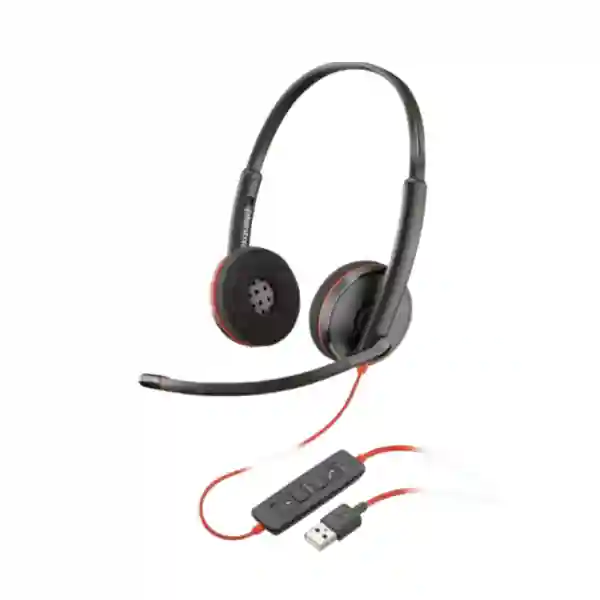
A straightforward headset for business calls from compatible computers: two-ear on-ear listening, a flexible noise-cancelling boom microphone and accessible inline call controls. Check the USB-A connector and your software before ordering for a Tanzania workplace.
Buying next step: Confirm your workstation ports, required quantity and software, then request an exact-model quotation.
Verified technical specifications at a glance
| Product | HP Poly Blackwire 3220 Stereo USB-A Headset |
|---|---|
| Series | Blackwire 3200 |
| Connection | Wired USB Type-A |
| Wearing style | On-ear, dual-ear stereo |
| Microphone | Adjustable boom; manufacturer describes noise cancelling and noise/echo reduction |
| Acoustic protection | SoundGuard |
| Inline controls | Call answer/ignore/end/hold; redial; mute; volume up/down (application support can vary) |
| Drivers | 28 mm |
| Speaker bandwidth | 200 Hz–6.8 kHz speech mode; 20 Hz–20 kHz media mode |
| Microphone bandwidth | 100 Hz–10 kHz |
| Impedance | 32 ohms |
| Cable length | Approximately 161 cm total |
| Weight | Approximately 64 g without cable; 87 g with cable |
| Compatibility documented by HP | Windows 10, Windows 11 and macOS; requires compatible USB-A connection |
| Surface material | Artificial-leather ear cushions |
| Colour | Black |
| Manufacturer reference | HP datasheet product number 80S02AA; verify regional purchase identifier |
| Box contents described by HP | Headset and USB Type-A cable |
| Local price and stock | Not verified; request a current written quotation |
Specifications reflect HP’s USB-A product documentation and should be checked against the exact supplied variant; application-specific controls can differ.
Before you buy: This is the native USB-A version, not a USB-C or 3.5 mm model. Microphone noise cancellation is not active noise cancellation in the earpieces. Confirm the exact variant and the computer’s connector.
A practical headset for computer-based conversations
The HP Poly Blackwire 3220 Stereo USB-A Headset is intended for people who take voice and video calls from a computer and want a straightforward corded audio device. Its two on-ear speakers let the wearer hear a meeting through both ears, while the adjustable boom microphone captures speech close to the mouth. A wired USB-A connection avoids the separate battery and wireless pairing steps associated with Bluetooth headsets.
The most useful buying question is not simply whether a headset has a microphone. It is whether your computer has the correct port, whether your calling application can select a USB audio device, and whether a dual-ear design suits your workplace. For a fixed workstation or laptop with a working USB-A port, this model offers a deliberately simple way to handle everyday calls, training sessions and voice-led work.
Before ordering for a Tanzania-based team, confirm the exact USB-A variant on the quotation, the number of users who need it, and the equipment they use. This page explains the technical facts and the practical checks that help avoid incorrect connectors, unsuitable wearing styles or expectations about features that belong to a different Blackwire model.
What the product is—and what it is not
This version is a wired stereo, on-ear computer headset with a USB Type-A plug. The two earpieces are joined by an adjustable headband; a flexible microphone boom positions the microphone for speech. An inline control module provides common call and volume functions. These characteristics make it a communication peripheral rather than a standalone telephone or wireless listening device.
It is important not to confuse the Blackwire 3220 USB-A with a model sold as USB-C, USB-C with an adapter, or Blackwire 3225. Headsets in a family may look similar but include different connectors or extra analogue functionality. The exact product offered should explicitly say USB-A. Do not assume that a USB-C adapter, 3.5 mm plug, Bluetooth radio or charging case is included with this specific variant.
The manufacturer identifies the Blackwire 3220 as part of its 3200 series. Its distinctive combination is stereo listening, a corded digital connection and a boom microphone with background-noise reduction. A buyer who primarily needs a mobile phone headset, wireless freedom or substantial earcup-based noise cancellation should assess a different form factor before selecting this one.
Quick fit assessment before buying
Choose the Blackwire 3220 USB-A when most conversations happen at a desk, the main device is a Windows or macOS computer, and the user wants two-ear audio without managing a headset battery. It is particularly relevant where teams rely on browser meetings, PC softphones or recorded training material, provided their software can use the computer’s selected audio input and output.
Check the workstation first. A desktop with accessible USB-A ports is a natural candidate. A thin laptop with USB-C only needs a separately verified adapter or a suitable USB-C headset instead. A shared workstation may need a consistent sign-in and audio selection process so the headset is recognized for each user. If the employee must walk around while talking, the attached cable will restrict movement.
Consider the environment as well as the connector. Stereo listening can help a user concentrate on a remote conversation, but it also reduces the amount of nearby speech the user hears compared with a one-ear design. Staff who must constantly hear colleagues or visitors may prefer a mono headset. The right purchase decision depends on real work habits, not on a generic claim that stereo is always better.
The value of a true USB-A connection
USB-A is the familiar rectangular connector found on many desktop computers, docks and business laptops. On this headset, the wired USB interface carries the audio connection to the computer. There is no separate analogue microphone socket to identify and no need to connect an audio cable to the sound-card jacks. The headset relies on the host device’s USB audio support.
Because this particular model terminates in USB-A, physical fit is the first compatibility check. Some modern notebooks have only USB-C. A third-party USB-C-to-USB-A adapter may provide a usable path, but its operation should be tested with the actual host and meeting software before a larger purchase. Do not treat a possible adapter solution as an accessory supplied in the box.
The fixed cable also changes everyday use. It removes wireless pairing, radio interference and charging routines from the headset itself, but it does not eliminate problems caused by loose ports, hubs or operating-system audio settings. In an office roll-out, a short test on each standard laptop image and docking station provides more useful evidence than relying on a broad statement that all USB headsets work everywhere.
Why two-ear stereo matters
The Blackwire 3220 has a stereo on-ear wearing style: sound is delivered through left and right earpieces. For a participant listening to a long presentation, demonstration or training recording, this can provide a more encompassing listening arrangement than a single earpiece. The dual-ear design also allows normal music and multimedia playback from the computer when the headset is selected as the output device.
Stereo does not automatically mean that a voice meeting contains separately positioned voices or that the device blocks environmental noise. Many communication services process spoken audio specifically for intelligibility, and the room around the wearer remains relevant. The earpieces rest on the ears rather than forming a sealed, over-ear cup, so users should not expect the isolation of closed, active-noise-cancelling headphones.
Teams should evaluate whether two covered ears improve attention or create a practical problem. A receptionist who needs to hear someone approaching may prefer one uncovered ear. An analyst who works on calls and audio learning for much of the day may appreciate stereo. Fit and listening level should be assessed by the actual users because wearing preferences differ, even when the underlying audio specification is identical.
The microphone and background conversations
The flexible boom places the microphone near the speaker’s mouth, which is a practical advantage when capturing voice in an office. HP describes a noise-cancelling microphone together with audio noise and echo reduction. In everyday language, the aim is to favour the speaker’s voice over some surrounding sound. This can help in a shared room, although actual results depend on volume, distance, room acoustics and conferencing software.
A noise-cancelling microphone must not be confused with active noise cancellation in the earcups. The former concerns the sound sent to people on the other end of a call. The latter would concern what the wearer hears from the room. The Blackwire 3220 USB-A should not be represented as an ANC headphone or as an acoustic shield that makes a busy office silent.
The clearest practical improvement usually begins with placement. Put the boom near the mouth without touching the lips, maintain a natural speaking volume and avoid aiming the microphone at a nearby fan. If the room is exceptionally loud, improve the environment or evaluate a headset designed specifically for higher background noise. No microphone specification can guarantee that another person will never hear office sounds.
Making the most of the boom position
Microphone positioning is part of setup, not merely a comfort adjustment. The Blackwire series uses a flexible boom, allowing the user to bring the microphone closer to the mouth and move it away when appropriate. Placing the microphone too far from the speaker can reduce the relative level of speech and make surrounding conversations more noticeable to remote listeners.
When testing, record a short spoken sample at normal volume. Listen for distortion, plosive sounds and distracting breathing noises; reposition the boom if necessary. Then repeat the test in the actual call application, since application noise suppression and automatic gain settings may process sound differently from the operating system’s basic recording tool.
For a team, a brief demonstration of microphone placement can prevent avoidable support tickets. Staff should also know that a microphone shown as muted by the headset may not always synchronize its indicator with every software platform. Verify mute state in the meeting interface whenever discussing confidential information, especially in large calls or when changing devices during a session.
Understanding SoundGuard acoustic protection
HP specifies SoundGuard as the headset’s acoustic protection technology. The manufacturer describes it as limiting sudden high-level audio events, with its technical footnote referring to a limit below 118 dBA. This is a hearing-related safety feature within the headset’s audio design, not a reason to listen at high volume and not a substitute for an organization’s own safe-listening practices.
Unexpected loud sounds can happen during calls, from equipment faults, poor line quality or another participant’s audio. A headset with an acoustic-limiting feature addresses one aspect of this risk. Actual listening comfort also depends on the computer’s output level, the calling application’s volume and how long a user wears the headset. Set volume to the lowest level that supports clear speech.
Organizations should include sensible listening habits in onboarding: do not raise volume simply to overcome excessive office noise, take breaks during sustained calls, and investigate repeated audio spikes instead of treating them as normal. SoundGuard should be described accurately as acoustic protection technology, without implying medical benefits, complete elimination of harmful sound, or compliance with an unverified Tanzania-specific standard.
Inline controls without constant screen switching
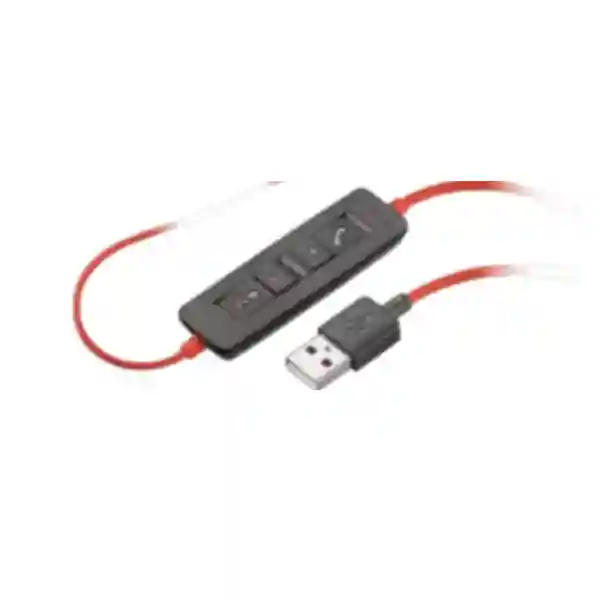
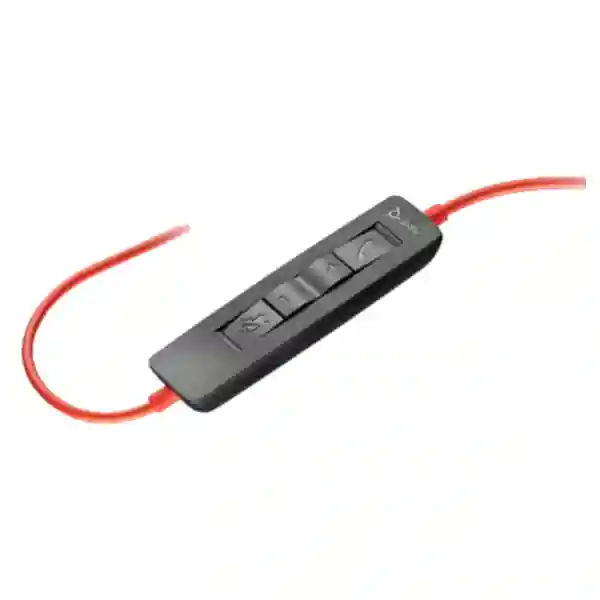
The USB-A cable includes an inline control module. HP lists user functions for call answer, ignore, end, hold and redial, along with mute and volume up or down. Controls close to the user’s hand can reduce the need to reach for the computer every time audio needs adjustment. The device is particularly practical for people who regularly join and leave calls during a working day.
However, a physical control and a supported software action are not always the same thing. Operating systems and communication applications differ in the way they expose call-control commands to peripherals. Volume and mute may work as standard audio controls, while answering, holding or redialling may depend on software integration. Buyers should validate the actual workflow on the version of their preferred calling application.
For example, a team that uses a browser-based contact-centre application should test an incoming call, a mute action and a call end before declaring its rollout complete. If an application requires on-screen answer or end controls, the headset can still be useful for input and output audio. Avoid claiming universal one-button control across all Teams, Zoom, browser diallers and other services without specific verification.
Speech, music and Dynamic EQ
HP’s documentation describes PC wideband voice capabilities, stereo multimedia listening and Dynamic EQ. In practical terms, a headset used for office calls also needs to reproduce ordinary computer audio, such as a recorded presentation or training video. Dynamic EQ is described by the manufacturer as helping optimize audio behaviour for voice calls and multimedia playback.
The specification distinguishes between speaker bandwidth in speech mode, listed as 200 Hz to 6.8 kHz, and media mode, listed as 20 Hz to 20 kHz. Those figures describe audio capability under the manufacturer’s test definitions; they are not a promise about how every video, music recording, meeting or network call will sound. Source quality, application processing and the computer’s audio settings still matter.
Where a user’s working day mixes conversation with learning content, having one headset for both activities simplifies desk setup. It should not be marketed as a studio-monitoring device or a substitute for specialist music-production equipment. It is a business headset whose multimedia flexibility may be convenient. Evaluate speech comprehension first, because dependable conversations are usually the main reason to choose this model.
Comfort across a normal workday
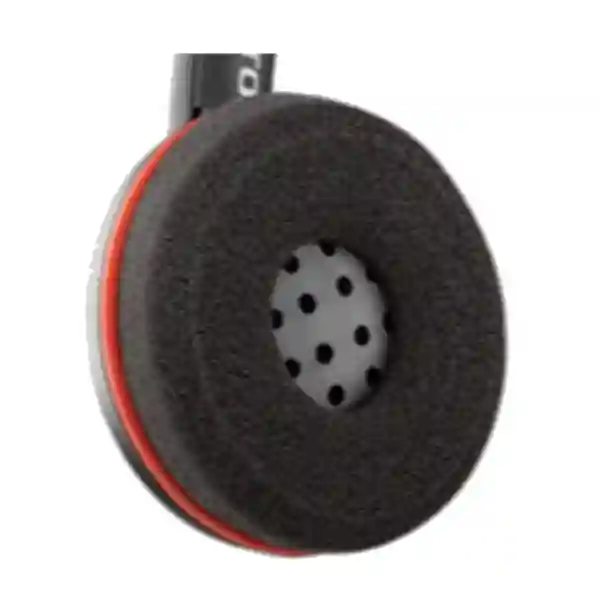
The headset uses an adjustable headband and on-ear cushions with an artificial-leather surface. HP describes a lightweight metal headband and cushions that can fold flat for portability. The manufacturer lists a weight of about 64 grams without the cable and 87 grams with the cable. These figures help buyers understand the physical scale of the headset without promising that every user will find it comfortable for all-day wear.
Fit is personal. An on-ear cushion sits against the outer ear, so the pressure a wearer experiences will vary with head shape, glasses and how long the headset is worn. A light headset can still become uncomfortable if the headband is adjusted too tightly. A short user trial should include realistic call lengths rather than only a few seconds of fitting at a procurement desk.
Encourage people to adjust the headband evenly and keep the boom in a workable position without twisting the earpieces. Build pauses into lengthy sessions, especially when employees spend much of the shift in continuous conversation. Comfort should be evaluated alongside speech performance and cable routing. The best audio specification is of limited value if users remove the headset because its fit does not suit them.
Cable length, desk layout and movement
HP lists a total cable length of approximately 161 centimetres from USB connector to headset, divided into about 90 centimetres from the plug to the inline module and 79 centimetres from the module to the headset. This gives a useful starting point for planning a workstation. It is enough to require attention to where a laptop, dock or desktop tower is placed relative to the seated person.
Measure the route the cable must take, not merely the straight-line distance between the computer and chair. A USB port at the rear of a tower under a desk can consume substantial cable length before it reaches the user. The inline module should be reachable without straining the cord. Avoid running the cable across walkways or tight moving desk mechanisms where it could snag.
A wired headset is best suited to seated or limited-movement work. Standing to reach a shelf, moving between counters or taking calls while walking requires a different workflow. If the host computer sits far away, assess a suitable desk connection or a verified alternative rather than relying on improvised cable joins. Cable routing is a small procurement detail that makes a noticeable difference after deployment.
Windows setup in a few clear steps
On a supported Windows computer, begin with an available USB-A port and connect the headset directly for the first test. Allow the operating system to recognize the audio device. Open the system’s sound settings and identify the headset as the preferred output and input when necessary. Make a short test recording, then join a trial meeting to confirm both directions of audio.
Some computers keep previously used speakers or microphones as defaults. A user may hear colleagues through the laptop speakers while the headset microphone is selected, or the reverse. That is a selection issue rather than evidence that the headset is defective. Check system privacy permissions for microphone use and verify that the communication program has access to the correct device.
HP’s datasheet lists Windows 10 and Windows 11 compatibility for this USB-A variant. Corporate security policies, locked-down USB configurations and specific softphones can still influence real-world operation. For business deployment, IT teams should document the approved port, operating-system build, meeting application and audio-device selection process. That documentation is more reliable than assuming every user will have identical default settings.
macOS setup and device selection
HP also lists macOS compatibility. A Mac that provides a USB-A port or a properly tested USB connection path can use the headset as a computer audio peripheral. After connecting, use the operating system’s sound controls to select the intended microphone and output. Then test in the actual meeting service, because an application’s audio preferences may override the system default.
Many newer Mac notebooks use USB-C connectors without a built-in USB-A socket. Do not overlook that physical distinction. If the organization chooses an adapter, test one with its exact computers before ordering at scale. A purpose-built USB-C version may be a cleaner procurement choice for an entirely USB-C environment, depending on the specified hardware and sourcing options.
During a Mac test, ask a second participant to confirm speech clarity rather than checking only that the device appears in a settings list. Test microphone mute, playback level and a call end action if the workflow needs those features. Keeping a repeatable process helps support staff distinguish a headset problem from an application setting, a hub issue or a user’s selection of the wrong audio device.
Working with online meeting platforms
The headset’s core role in a meeting is straightforward: provide a microphone and stereo audio output through the computer’s USB interface. This makes it relevant to typical web-conferencing workflows where the operating system presents a usable audio device. The meeting service still controls joining rules, participant permissions, background-noise processing and the display of mute status.
Test the precise platform used in your organization, whether a desktop application or browser session. Check that audio can be heard before the meeting begins, that microphone input is strong enough to understand, and that changing from internal laptop audio to the USB headset does not leave the wrong device selected. If call buttons are operationally important, test them independently rather than assuming audio detection proves full integration.
A headset can improve the practical side of meetings without fixing poor broadband, overloaded computers or badly configured virtual rooms. For colleagues in Tanzania taking calls with remote teams, connection stability, quiet space and application settings remain significant. The Blackwire 3220 handles the user’s local audio interface; it does not supply internet access, conferencing subscriptions or a remote-meeting service.
PC softphones and customer conversations
A PC softphone turns a computer into part of a voice-calling workflow. The Blackwire 3220’s boom microphone, stereo speakers and inline controls make it a candidate for users who answer calls through software rather than a traditional telephone handset. The priority should be understanding the exact softphone’s audio settings, supported call-control integration and user expectations.
Some deployments require agents to answer calls rapidly, place callers on hold, transfer conversations or follow scripted workflows. The headset’s buttons do not replace all the functions in the softphone interface. Validate at least one complete call journey: incoming call, answer, conversation, mute, hold where applicable, transfer in the application and end call. Record any action that still requires the screen.
Supervisors should also consider whether staff need awareness of the surrounding office. Stereo may suit employees with dedicated call-handling tasks, while a mono model may be preferable where people must coordinate constantly with nearby colleagues. The correct headset is part of a functioning calling environment; user training and application settings are as important as the hardware’s headline features.
Contact-centre deployment checks
For a contact-centre or service desk, choosing one standard headset can simplify training and spare-unit planning. The Blackwire 3220 USB-A is relevant where agents work at computers with the required port and spend a meaningful portion of their shift speaking. A consistent wired interface can also reduce pairing and battery questions in a stationary seating arrangement.
Before any large order, pilot the device with the real agent application and normal workload. Include a busy-hour test, conversations with different call volumes, microphone checks in the actual room and a comfort trial over multiple sessions. Verify whether the agent can quickly mute, adjust volume and manage calls without losing attention to the caller. Record the accepted behaviour for future training.
Plan for headset hygiene and physical wear in the same way as other frequently handled equipment. Define whether individual users keep their own devices, how replacement units are stored, and how damaged cables are reported. Avoid assuming that a product listed by a manufacturer is locally in stock or appropriate for every desk. A confirmed quotation and a small pilot provide a much safer basis for scale.
Home-office and hybrid routines
At a home workstation, a corded headset can be convenient because it is ready when the computer is ready and does not require a daily charging habit. For people who move between a home desk and an office, it can be packed with the computer accessories, provided the headset and cable are handled carefully. The fold-flat ear-cushion arrangement described by HP may assist with storage.
A wired connection also means the user stays near the computer during the call. That limitation can be useful for maintaining a stable setup, but inconvenient for someone who needs to move through a room. If a workday involves frequent phone calls away from the computer, a different headset category may be more suitable. Choose based on actual mobility needs instead of expecting a desk headset to behave like a wireless device.
Hybrid workers should check both locations before purchase. A desktop at work may have USB-A, while a home laptop or dock may not. Audio defaults can also change when the computer is connected to a monitor, docking station or external speaker. A simple habit—connect, select headset audio, test microphone, join meeting—prevents many avoidable delays at the start of important conversations.
Training, onboarding and multimedia
The Blackwire 3220 is not limited to live calls. Stereo speakers can make it useful for listening to instructional videos, recorded demonstrations, spoken learning material and other computer audio. A boom microphone makes the same device relevant when learners must respond during an interactive session. That single-device approach can be convenient in offices and computer-based training rooms.
Instructor-led learning often involves pauses, questions and the need to change between listening and speaking. Having accessible mute and volume controls supports this routine, subject to the application behaviour already described. Learners should still be taught where the microphone mute indicator appears in the training software, especially when a session includes breakout discussions or recordings.
For a shared classroom or training area, evaluate the cleaning procedure and fitting adjustments for consecutive users. The on-ear form factor may suit many adults, but the organization should confirm comfort for the intended users. If an environment requires listening to safety announcements or in-person instructions, stereo coverage needs deliberate consideration. A training headset should support learning without preventing awareness of what is happening nearby.
Reception, help desks and mixed duties
A reception or front-desk employee often has two audio demands: remote callers and people standing nearby. The Blackwire 3220’s two-ear design can make remote speech easier to concentrate on, but may be inconvenient where staff must continuously listen to visitors. It is therefore not automatically the correct first choice for every reception counter.
Ask the employee to demonstrate a normal ten-minute workflow. Can the person hear an arriving visitor while wearing both earpieces? Is the inline control easy to locate? Can the microphone be moved when speaking to a colleague? Is the cable clear of keyboards, drawers and other frequently used objects? These observations show whether the headset supports the job more effectively than a mono alternative.
For a technical help desk or internal support team that mostly speaks to remote users, stereo may be an appealing option. However, support analysts also switch between calls, screen recordings and collaboration tools. Testing how the headset behaves during those transitions can prevent interruptions. The right answer is a fit decision based on the desk and user, not a universal claim about a product category.
Buying for a small business in Tanzania
Small offices often want equipment that works without specialised administration. Start with a list of how many people regularly make computer calls and which computers they own. Distinguish between USB-A desktops, USB-C-only laptops and employees who mainly call from smartphones. The answer may not be one headset for every employee, even if standardising equipment initially seems simpler.
Where budgets need to cover multiple priorities, compare the complete operational fit rather than looking only at a unit price. A headset that requires unexpected adapters, causes repeated audio selection problems or does not suit the user’s daily work can create additional effort. Verify the exact product version and commercially offered terms before approving a purchase. No price or stock status is assumed on this page.
For procurement in Tanzania, ask the supplier to confirm current local availability, the exact quoted variant, warranty terms applicable to the sale, and any relevant delivery details in writing. Those particulars are order-specific and can change. The technical information here helps define what to request; it does not represent a current commercial offer or imply that a particular unit is already held in local inventory.
Buying for an IT-managed organization
IT teams should make device consistency a deliberate requirement. Confirm the exact connector and model in the bill of materials, identify the operating systems used across the organization, and include any docks or hubs in testing. A pilot should check normal calls, meeting entry, call control expectations, a system restart and reconnecting the device after it has been unplugged.
Create a short user guide with screenshots from the organization’s own approved software. Include selecting the microphone, selecting the speakers, using mute and reporting a physical cable problem. If users rotate between desks, explain what to do when a computer remembers a different audio device. Good onboarding reduces the perception that standard USB peripherals are unpredictable.
Before a volume purchase, request clarity about packaging and product identifiers, especially when multiple Blackwire connector variants are available. Compare the supplier’s model wording with the manufacturer’s description. Plan spare units and the replacement procedure separately from any warranty discussion. This keeps the rollout focused on service continuity rather than on a specification sheet alone.
Blackwire 3210, 3220 and 3225: choose the right form
The Blackwire 3200 series includes variations intended for different preferences. A Blackwire 3210 is a mono, single-ear style, which can suit roles that need to hear the surrounding room. The Blackwire 3220 is a stereo, two-ear style. That difference should be considered before finer audio specifications because it changes how employees experience day-to-day conversations.
The Blackwire 3225 is associated with options that include a 3.5 mm connection in addition to USB, depending on the exact variant. Do not attribute that feature to the 3220 USB-A in this listing. Similarly, newer or alternate 3220 packages may use USB-C or provide a USB-C-to-A adapter; those are not interchangeable descriptions of the exact wired USB-A product requested here.
When comparing, define three requirements: ears covered, host connector, and whether the user genuinely needs an analogue audio connection. A purchasing team should write these requirements into its quotation request and have the supplier confirm the part being supplied. Similar-looking product names are a common reason for incorrect orders, particularly when photographs show only a headset without making the cable end visible.
USB-A versus USB-C models
A USB-A plug and a USB-C plug are physically different. They should not be treated as alternate spellings of the same connection. The Blackwire 3220 Stereo USB-A variant is best matched to equipment that already exposes USB-A. For a laptop estate built around USB-C ports, compare an accurately described USB-C version rather than assuming every 3220 package contains the same connector.
Adapters can be useful in mixed equipment environments, but introduce another component to check. Their physical fit, power handling and USB data support should be adequate for the actual audio device. A connection that works for charging alone is not enough evidence of digital headset support. Test any proposed adapter with the operating system and application used by staff.
For long-term procurement, standardising around the computer fleet’s ports can reduce accessories and user confusion. Employees who work at a dock may connect the headset to that dock, but the precise dock should be included in a pilot. The product’s connector is a basic fact that is easy to overlook and expensive to correct after a large batch has been ordered.
Wired USB compared with wireless headsets
The main practical benefit of a wired USB headset is a direct connection to the computer without maintaining a headset battery or pairing it over Bluetooth. That simplicity is valuable at fixed desks and shared equipment stations. The tradeoff is movement: the user remains physically connected and must manage cable routing around furniture and other devices.
Wireless products can suit employees who walk while talking or regularly switch between mobile and computer calls. They may introduce separate issues involving charging, wireless connections, compatible dongles or device switching. Neither approach is inherently right for all teams. The correct comparison is based on where calls take place, how employees move, and what devices they use.
A USB cable should not be described as eliminating every audio fault. Software, network and physical port problems can still affect calls. Likewise, wireless technology should not be dismissed as universally unreliable. For a stable seated workspace, this Blackwire model provides a clear choice; for active movement away from the computer, a carefully specified wireless product may be the more appropriate investment.
Microphone noise reduction versus headphone isolation
Marketing descriptions of headsets can use the word noise in several ways. The Blackwire 3220 has a noise-cancelling microphone, meaning the design is intended to reduce some unwanted sound captured and transmitted during speech. SoundGuard is an acoustic protection feature affecting audio level. These are different from a headphone system that electronically reduces what the wearer hears from outside.
The on-ear earpieces may cover the ears enough to alter the experience of the room, but the product should not be sold as having advanced active noise cancellation in its earcups. If an employee works near unusually loud equipment, live events or continuous machinery, a more specialised product assessment may be needed. Ordinary microphone noise reduction also cannot correct echo generated by another participant’s loudspeaker.
Clarifying these distinctions prevents disappointment. A buyer who says ‘I want colleagues to hear me better on calls’ has a different problem from someone who says ‘I need to stop hearing the office around me.’ This headset targets the former need more directly. Discuss the room, the computer’s audio processing and the user’s concentration needs before treating one noise-related feature as the answer to every complaint.
Specifications explained in usable terms
HP lists 28 mm speaker drivers and a 32-ohm impedance for the USB-A model. These values identify physical and electrical aspects of the audio system; they should not be reduced to a simple ranking of sound quality. HP also publishes microphone bandwidth of 100 Hz to 10 kHz and distinct speaker bandwidth figures for voice and multimedia modes. They support an informed comparison while leaving real listening performance to a proper trial.
The listed physical size is approximately 155 by 32 by 178 millimetres, with a black finish. Weight is given as 64 grams without the cable and 87 grams with it. The speaker dimensions, frequency figures and weight are useful for equipment records and purchasing comparisons, but personal fit and clarity remain important. No single number predicts whether the headset will meet a particular team’s call expectations.
The manufacturer describes the ear cushions as artificial leather at the surface, and the product as an on-ear stereo headset. The connectivity description is wired USB Type-A. Those facts are much more helpful to many buyers than an unsupported claim of universal compatibility. Check that the quotation and delivered carton match the intended model, because other product pages may present different details for other connectors.
What to verify on delivery
When a headset arrives, compare the item label, the physical USB connector and the purchase documentation. HP’s USB-A datasheet names a headset and USB Type-A cable as box contents. Check the package condition and inspect the cable before deployment. If your purchasing process requires a manufacturer part number, the HP datasheet identifies 80S02AA for one USB-A product listing; confirm the offered regional or bulk identifier on the actual quote.
Do not assume a laptop adapter, 3.5 mm extension lead, carrying case or specialist software license is supplied unless the specific seller confirms it. The packaging used for a retail unit and a bulk deployment may differ. What matters is whether the delivered items match the agreed commercial specification, not whether a separate reseller picture shows an accessory from another configuration.
Basic acceptance testing can be completed at a computer: inspect the plug, connect the headset, select the device, play a sample, record speech and try mute and volume. Record any unexpected behaviour while return procedures are still easy to follow. This small check is particularly useful when many employees will receive units during the same installation period.
Windows microphone troubleshooting
If colleagues cannot hear the user, begin with mute state. Check both the inline control and the meeting application’s on-screen microphone indicator. Then open the application’s device settings and select the USB headset explicitly. If a different microphone remains selected, the call may continue using the laptop’s built-in input even though the headset is connected.
Next verify operating-system microphone permissions and input level. A short recording outside the conferencing application can help determine whether the problem affects all recording or only one service. If the headset works in the system recorder but not the call application, review the application’s settings and relevant permissions before replacing the hardware.
If no input is detected, inspect the USB-A connection and try a known-working port on the same computer according to IT policy. Avoid immediately blaming the headset when a hub or dock may be involved. For a managed fleet, record computer model, operating-system version, application version and connection path so the support team can reproduce the fault and resolve similar reports efficiently.
Speaker and playback troubleshooting
When the microphone works but no sound reaches the headset, confirm that the computer’s playback output is the Blackwire USB audio device. Many systems maintain separate choices for speaker and microphone. A user can unintentionally select the headset for recording while leaving audio output on a monitor or built-in laptop speaker.
Check the computer’s volume level, the inline headset volume control and any per-application mixer controls. A muted tab, low application volume or an output device changed by docking can create the impression of faulty earcups. Test with a familiar system sound or a short recording to determine whether the issue affects every audio source.
If a problem appears only when joining a meeting, compare the meeting application’s audio selection with the operating system’s setting. Restarting the call application after connecting the device may help in some environments, but follow local IT guidance rather than using random driver downloads. A careful order of checks reduces needless replacements and helps users return to their conversations quickly.
When an inline button does not perform the expected action
An inline button is visible and easy to press, but its effect depends on the connected software. A user may successfully change playback volume yet find that the answer or hold button does not control a particular browser-based calling platform. This is not proof that the microphone or speakers are unusable; digital audio and application call-control integration are related but separate concerns.
Test the button with the actual approved calling application and compare its documented peripheral support. If the service requires an on-screen action, tell users explicitly rather than implying that every label on the control module is guaranteed to operate. In shared offices, different softphones may behave differently on the same hardware.
Where button integration is a critical purchasing requirement, include it in a formal acceptance checklist. Record which actions worked in the test environment, how the service indicates mute, and what happens after switching calls. That evidence is more valuable than copying a generic capability list from a manufacturer’s datasheet without checking software dependencies.
Keeping the headset in good condition
The headset is handled close to the face and ears, so basic cleaning and storage matter. Follow the manufacturer’s applicable care guidance and your organization’s hygiene policy. Before cleaning, disconnect it from the computer when appropriate. Use a suitable lightly dampened soft cloth rather than saturating the ear cushions or allowing liquid to enter the microphone and inline control.
Avoid pulling the cable to remove the USB plug, wrapping the cord tightly around the headband or trapping it beneath a chair. Store the device away from unnecessary pressure that could bend the boom or stress the earpieces. In a shared workspace, each user should know how to report damaged cushioning, a frayed lead or intermittent connections.
Replacement planning is especially useful for high-use teams. A visible defect should trigger an equipment check rather than continued use through an important call. Keep any approved cleaning product, spare accessory and replacement decision within the guidance for the exact product. These modest habits help preserve the user experience without inventing service-life guarantees.
Safe listening and responsible use
Comfortable audio should be understandable without excessive volume. Start at a modest level and increase only as needed. The manufacturer’s SoundGuard feature provides acoustic protection, but it does not justify prolonged loud listening. Users who encounter repeated sudden noises should report the problem, investigate the source and review the application or equipment that is creating the event.
An on-ear headset may cause fatigue for some people during very long sessions. Rotate suitable work activities when possible, take sensible breaks and adjust the fit if pressure develops. This is practical workplace advice rather than a medical claim. Managers choosing devices for teams should allow a user trial and consider individual comfort feedback alongside the device’s technical capability.
Also consider awareness of the room. Two covered ears may not suit positions where users must hear alarms, spoken instructions or people approaching. Do not rely on the headset as personal protective equipment for a noisy industrial setting. A workplace’s safety procedures and appropriate protective equipment should be assessed separately from a general-purpose computer communication headset.
A simple pilot plan for decision-makers
Start with a small number of representative users rather than testing only at an administrator’s desk. Include someone who makes frequent calls, someone who attends long online meetings and someone who alternates between meetings and multimedia training. Check USB-A port access at each workstation and note whether an adapter or dock is involved.
Ask each user to complete a standard test: connect the headset, select input and output, join a normal meeting, speak at a natural volume, use mute, adjust volume and finish the session. Collect brief feedback about voice intelligibility, ear pressure, cable reach and confusion over controls. Repeat at different times if ambient noise changes through the day.
Use the results to specify the correct device for each job. A team may decide that the stereo 3220 suits most computer-call roles while mono or wireless headsets suit others. A practical pilot supports a better Tanzania procurement decision than assuming that one model serves every working pattern. Include the accepted model wording and the measured deployment requirements in the eventual quotation.
Questions to send with a purchase enquiry
An effective enquiry should identify the headset as the HP Poly Blackwire 3220 Stereo USB-A model, not merely ‘Poly headset’ or ‘Blackwire 3200’. State the number of units, expected computer connector and primary calling application. If the business uses standard desktops, mention that; if users work on USB-C-only notebooks, disclose the constraint before the seller prepares a quote.
Ask the supplier to confirm the exact supplied product number or regional variant, whether the plug is native USB-A, what is included in the package, and whether any adapter is needed. Request written details of the commercial terms that matter to the purchase, including confirmed price, taxes where applicable, delivery arrangement and warranty handling. Those details are not established by the technical product description.
For an organization, also share whether the order is a small replacement purchase or a larger rollout requiring consistent packaging and replenishment. Keep the customer conversation anchored to verified requirements. The purpose of this page is to make the technical selection easier, while the actual offer must be confirmed through the appropriate sales or quotation process.
Choosing with confidence
The HP Poly Blackwire 3220 Stereo USB-A Headset is a sensible category to evaluate when users need fixed-desk computer calling with two-ear listening, a nearby boom microphone and conveniently accessible controls. Its appeal lies in a simple corded design and the manufacturer’s documented audio features rather than in promises of wireless mobility or silence in a noisy office.
The decisive checks remain practical: does the computer have the right USB port, can the software select the headset, do users prefer two ears, and is the cable long enough for the desk? Buyers should also distinguish the USB-A 3220 from similar-looking USB-C and 3.5 mm-capable Blackwire variants. Those checks prevent misorders more effectively than a vague feature comparison.
For buyers in Tanzania, the next step is to request confirmation of the exact model and current commercial terms for the required quantity. A short pilot is advisable for teams with specialised softphones or intensive calling schedules. Use the specification and FAQ sections below as a straightforward checklist before committing to a larger deployment.
Frequently asked buyer questions
Does this headset use Bluetooth?
No. The requested Blackwire 3220 Stereo USB-A variant connects by a wired USB Type-A cable and should not be described as a Bluetooth headset.
Will it work with a laptop that has only USB-C?
Not by direct plug-in: its connector is USB-A. Evaluate a suitable, tested USB adapter or choose the correct USB-C version instead; an adapter is not assumed to be included.
Is the microphone noise cancelling?
HP describes a noise-cancelling boom microphone with audio noise and echo reduction. Performance in a busy room still depends on placement and environmental conditions.
Do the earpieces have active noise cancellation?
Do not assume so. The documented microphone noise reduction and SoundGuard technology are different from active noise cancellation for the wearer’s ears.
Can I use it for Microsoft Teams or Zoom calls?
It can be evaluated as a computer USB audio input and output in conferencing software. Verify the exact application and button behaviour; universal call-control integration is not guaranteed.
Can it connect directly to a phone’s 3.5 mm headset socket?
No 3.5 mm plug is specified for this USB-A variant. Buyers needing analogue phone connectivity should assess another explicitly compatible model.
Is the Blackwire 3220 stereo or mono?
The 3220 model described here has two on-ear speakers and a stereo wearing style. A single-ear arrangement is a different variant or model.
Does it require charging?
The model is a wired USB computer headset, not a battery-powered Bluetooth device, so there is no separate wireless-headset charging routine.
What is the cable length?
HP lists approximately 161 cm in total, divided into about 90 cm from plug to inline controls and 79 cm from the controls to the headset.
Is it compatible with Windows and Mac computers?
HP documents Windows 10, Windows 11 and macOS for the USB-A model. The computer must provide a compatible USB connection and application settings must be checked.
Does mute work without opening the meeting window?
The inline module has a mute function, but software indicators and synchronized controls vary. Always verify the mute status in the application when privacy matters.
Is it suitable for every call-centre agent?
No single headset is ideal for everyone. Test the required softphone, comfort, cable reach, ambient noise and the need to hear coworkers before standardizing.
How heavy is it?
HP lists approximately 64 grams without the cable and 87 grams with the cable. Individual comfort still depends on adjustment and wear duration.
Is a USB-C converter included?
The USB-A manufacturer’s listing identifies the headset and USB Type-A cable. Do not assume a USB-C converter is packaged unless the exact sales offer confirms it.
What is the price in Tanzania?
This page does not publish an unverified local price. Request a current quotation for the exact USB-A variant, quantity and commercial terms.
Is it in stock locally?
Local stock has not been independently verified for a specific FourTeck Tanzania listing. Ask for current availability before setting a deployment schedule.
What warranty comes with it?
HP’s USB-A datasheet describes a standard two-year limited manufacturer warranty. Confirm the terms, regional applicability and seller handling for the exact supplied unit.
What is the next step for a team order?
Specify the exact USB-A model, quantity, computers, main calling application and any special rollout needs, then request a written quotation and test sample if needed.
Request a quote for the exact USB-A model
Tell FourTeck Tanzania the number of headsets you need, your computers’ USB ports and the application used for calls. Ask for confirmation of the exact HP Poly Blackwire 3220 Stereo USB-A variant, current price, local availability and applicable order terms. A pilot sample is sensible before a larger rollout.
No stock, price, delivery promise or local warranty handling is asserted here.




Reviews
There are no reviews yet.