
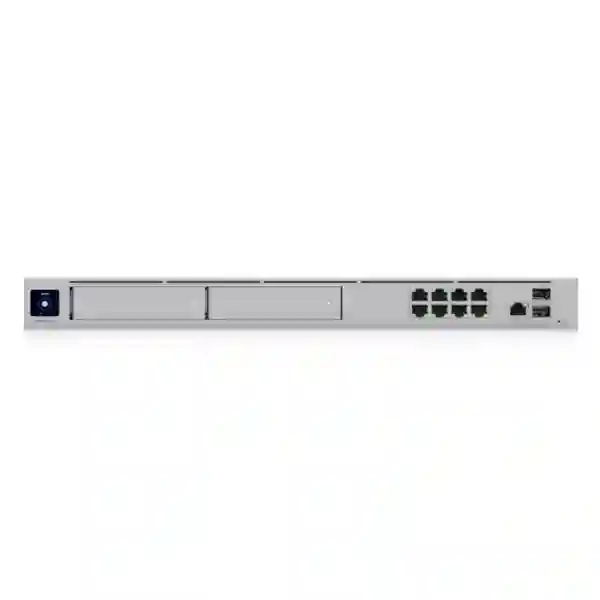
High-capacity UniFi cloud gateway · Tanzania buyers guide
Ubiquiti Dream Machine Beast (UDM-Beast)
The Ubiquiti Dream Machine Beast UDM-Beast is a high-capacity, rack-mounted UniFi cloud gateway designed for organizations that need stronger security inspection, high-speed interfaces and room for a growing managed network. The manufacturer rates the gateway for 25 Gbps IDS/IPS throughput, 750+ managed UniFi devices and more than 7,500 simultaneous connected users. Its 25G SFP28, 10G SFP+ and multi-gigabit RJ45 interfaces support sophisticated wired network designs, while the UniFi application suite provides an integrated management experience.
For a Tanzania deployment, the right decision depends on the entire network rather than a single headline speed. Check the physical internet connection, WAN provider requirements, switching topology, available PoE, video-retention objectives, power continuity and expected workload. This guide explains both the advantages and limits so that IT managers and procurement teams can request an appropriate configuration. Contact FourTeck Tanzania for a requirement-based quotation; this description does not confirm local stock, installation coverage or a selling price.
Technical specifications at a glance
Figures are based on published Ubiquiti documentation. They are not guarantees of actual application performance or confirmation of local inventory, accessories or pricing.
| Form factor | 1U rack mount; 442.4 × 43.7 × 325 mm; 5.5 kg |
|---|---|
| Manufacturer IDS/IPS throughput | 25 Gbps |
| Managed devices / connected users | 750+ UniFi devices / 7,500+ simultaneous users |
| Default WAN ports | One 25G SFP28 and one 10 GbE RJ45 |
| Configurable WAN port count | Up to eight |
| RJ45 data interfaces | Eight 10 GbE and two 1 GbE |
| Optical interfaces | Two 10G SFP+ and two 25G SFP28 |
| Processor and memory | Octa-core ARM v9 at 2.1 GHz; 16 GB RAM |
| Storage | Integrated 128 GB SSD and two 3.5-inch NVR HDD bays |
| Camera capacity profiles | Up to 100 HD, 60 2K or 40 4K, depending on system conditions |
| Applications | UniFi Network, Protect, Access, Talk and Connect |
| Security and routing | Stateful firewall, IPS/IDS, VPN, multi-WAN, OSPF and BGP |
| Redundancy | Shadow Mode (VRRP); compatible DC power-backup input |
| Electrical | 100–240 V AC, 50/60 Hz; maximum 100 W consumption |
| Environment | 0–40°C; 5–95% humidity, noncondensing |
| Wi-Fi / PoE | No integrated wireless access point or PoE outputs |
Why choose the Ubiquiti Dream Machine Beast UDM-Beast?
The strongest reason to consider this model is a concrete need for more processing headroom, faster network interfaces or larger managed deployments. A campus that brings together many wireless access points, security cameras, buildings and operational VLANs has different needs from a small office with one simple internet circuit. A gateway that supports extensive security rules and several UniFi applications can reduce the number of management consoles that teams need to oversee. Yet the device is only one element of the end-to-end design; the ISP, switching and access layers remain important.
A buying team should start with a capacity worksheet. Count UniFi-managed infrastructure separately from active client devices, camera streams, VPN users, internet links and inter-VLAN traffic. Estimate current peak load, realistic growth and the performance expected when security controls are enabled. This helps determine whether the Beast offers meaningful headroom or whether its large capacity would be unused. The aim is not to purchase the biggest available gateway, but to select a device that serves measurable operational goals with a defensible total project cost.
Who is this gateway designed to serve?
Potential applications include larger offices, multi-building environments, facilities with many cameras, businesses moving to higher-speed wired networking and organizations that want to manage UniFi switching, Wi-Fi and security from a common platform. Teams running more than one internet connection may also value the gateway’s WAN configuration and traffic-policy capabilities. The available 25G and 10G interfaces are especially relevant where high-capacity handoffs or switch uplinks are truly part of the design. Each scenario should be validated against its specific architecture before procurement.
The same specifications do not mean every customer will use every feature. A logistics facility might prioritize camera networks and reliable remote links, while an office may need high-throughput security inspection and clear separation of staff and guest traffic. A campus might be more concerned with many managed devices and future fibre uplinks. Document the principal problem, its financial or operational impact, and the feature that solves it. That discipline helps avoid buying complexity that administrators do not need, while reserving sufficient margin for approved future expansion.
When a smaller UniFi gateway makes more sense
Small and medium offices with modest WAN speeds, only a few managed devices and limited video recording may not need the Beast’s capacity. A 25 Gbps IDS/IPS rating does not improve a slow provider service, extend Wi-Fi coverage or make a 1 GbE workstation communicate at 25 Gbps. Those outcomes are limited by other parts of the path. If users complain about weak wireless reception or a heavily loaded access switch, solve the actual access-layer problem rather than assuming a premium gateway will automatically improve the experience.
Compare alternative gateways with the same requirement list used for the Beast. Evaluate actual security throughput, default WAN connections, port types, application needs, recording capability, redundancy support and project cost. Include the price of any necessary optics, switches, cameras, storage and backup power. A smaller gateway may be more economical for a straightforward site; the Beast is more compelling when several high-capacity requirements occur together. This is a design choice rather than a product popularity contest.
What the 25 Gbps IDS/IPS rating means
Ubiquiti publishes a 25 Gbps IDS/IPS throughput specification for the UDM-Beast. Intrusion detection and prevention inspect traffic for patterns that can indicate harmful activity, and these functions may require substantial processing as the network grows. The published figure can be useful when comparing gateways for higher-speed services. It is not a guarantee of 25 Gbps for every application, traffic pattern, VPN tunnel or combination of features. Packet size, security policy, connected interfaces and other system workloads influence measured performance in real deployments.
Performance analysis must consider the entire route between endpoints. A 25G uplink does not make a 2 Gbps internet plan faster; a 1 GbE client still has a 1 GbE physical limit; and an undersized downstream switch can constrain many users at once. Define target performance for actual business services, not only synthetic port speed. When the decision depends on high throughput, use a controlled proof-of-concept or acceptance test with realistic traffic and security settings. Keep measurements as a baseline for later troubleshooting and expansion decisions.
How to use the 10G and 25G ports
The Beast has eight 10 GbE RJ45 interfaces, two additional gigabit RJ45 interfaces, two 10G SFP+ ports and two 25G SFP28 ports. The 10 GbE copper interfaces can negotiate supported intermediate rates, which may help where equipment has mixed port speeds. Ubiquiti’s default WAN assignments use one 25G SFP28 and one 10 GbE RJ45 connection, with other WAN port configurations supported. Since physical interfaces may be allocated to different functions, a network diagram should clearly show which are reserved for WAN and which remain for LAN connectivity.
Do not assume all optics or DAC cables work simply because they fit a cage. Match transceiver type, speed, fibre standard, cable length and the other device’s support requirements. Copper cabling also needs to meet the intended distance and signal quality. List the port allocation in the bill of materials, identify switch uplinks and retain sensible spare capacity. A clean port map is particularly valuable during maintenance, when moving a connection to the wrong interface could interrupt an ISP circuit, a trusted network segment or a redundant path.
Verifying ISP handoffs in Tanzania
Before choosing a 25G or 10G optical connection, request the exact handoff specification from the intended internet provider. Confirm whether the provider supplies Ethernet, fibre or an intermediate managed router, together with speed, connector, optical standard and addressing requirements. Ask about VLAN tags, authentication, static routes and any limitations on connecting a customer-owned gateway. A fast SFP28 port is not evidence that a particular fibre provider will supply a 25G handoff or allow direct connection. Compatibility must be verified for the subscribed service.
For a multi-provider business, also ask where each physical cable enters the building and whether the services share upstream infrastructure or the same local electrical supply. Two commercial contracts do not always mean fully independent routes. Establish service escalation contacts, outage reporting expectations and what happens to public addressing when links are changed. This is a practical Tanzania-specific procurement step rather than a claim about named operators or their current service areas. The actual availability and suitability of any local circuit must be confirmed with its provider.
Designing multiple WAN connections
The UniFi platform supports load balancing, WAN failover and policy-based routing; Ubiquiti specifies up to eight configurable WAN ports on this model. This flexibility helps teams manage primary and backup links, but it does not mean eight circuits are included with the hardware. Decide which connections carry ordinary traffic, which serve as backup and whether particular applications should use a designated provider. Internet quality monitoring can support operational decisions when one connection becomes unstable rather than completely unavailable.
Load balancing should not be mistaken for turning two ordinary connections into one single faster connection. It often distributes sessions according to configured policies. In a failover test, observe what happens to active VPN sessions, cloud services, voice calls, inbound access and applications that depend on a fixed public address. If a backup link is metered, decide in advance which traffic may use it. Recording these rules protects the business against surprises during an outage and makes the behavior understandable to future administrators.
VLANs and network segmentation
A well-designed business network separates traffic according to trust and operational need. Corporate computers, guest clients, cameras, building control devices, management equipment and critical servers should not all be treated as one flat network. The UDM-Beast supports zone-based firewall policy, network address translation and traffic identification, providing tools for controlled segmentation. The administrator still needs to decide which groups may reach which services. A meaningful security rule should have a purpose, owner and test case.
Segmentation must be carried through the switches and wireless access points. Correct VLAN tagging, access-port profiles, DHCP scopes, DNS settings and SSID mappings are required for the intended policy to work. Before restricting traffic, create a simple matrix of necessary flows such as camera-to-recorder communication and staff access to approved applications. Test both permitted and denied paths. A network can look organized in the console yet remain unnecessarily exposed if broad default allowances are never reviewed.
Firewalls, intrusion protection and content controls
According to Ubiquiti’s specifications, the Beast includes a stateful firewall, application-aware filtering, deep packet inspection, zone-based policy, content controls, ad blocking and IDS/IPS functions. These capabilities can improve visibility and restrict inappropriate communication, but they have different purposes. A firewall can restrict paths; an intrusion policy can identify or prevent suspicious patterns; and traffic identification can inform operational decisions. Security requires thoughtful configuration and monitoring, not simply enabling every feature without understanding what it does.
Begin with a minimal set of tested policies that reflect business requirements. Define protected zones, necessary exceptions, logging responsibilities and a process for reviewing events. Watch for false positives after policy changes and avoid leaving temporary broad allowances in place indefinitely. Ubiquiti also offers an enhanced CyberSecure service with additional signatures; any premium service terms and entitlement should be checked separately. The presence of an advertised advanced feature does not establish that all optional subscriptions are included in the base equipment quotation.
Secure remote access for staff and administrators
The gateway supports multiple UniFi VPN approaches, including WireGuard and OpenVPN, with other supported remote-access and site-to-site choices described in the manufacturer’s software documentation. The right configuration depends on the client devices, identity controls, security requirements and type of remote work. A contractor needing a single management service should not automatically receive access to every corporate VLAN. Separate administrative privileges from ordinary user access and record who authorizes each permission.
Remote access may also be affected by the provider’s addressing arrangement. Confirm whether the site has a publicly reachable address or operates behind a provider gateway or carrier-grade NAT. Plan authentication, address pools, internal name resolution, routing and safe account removal. Test remote connectivity from an actual external network, including what happens after a WAN failover. Protect administrator accounts with suitable identity safeguards and retain a documented recovery process. A VPN provides a connection method, while sound policy determines how safely that method is used.
Site-to-site VPN and SD-WAN planning
Ubiquiti’s networking features include license-free SD-WAN capabilities and site-to-site VPN technologies such as Site Magic, IPsec and OpenVPN. These can help connect branches and facilities where selected services need to be shared. The design should identify whether internet traffic breaks out locally or travels through a central location, and which network prefixes need to be reachable from each site. Check compatibility with the gateways at the remote end rather than assuming every topology and VPN method behaves identically.
For multi-location deployments, review overlapping IP subnets, DNS dependencies, application latency, provider reliability and the consequences of link failure. A branch that uses a slow or unstable circuit may still experience poor application performance regardless of the central gateway’s capacity. Avoid extending unnecessary trust between sites and apply clear firewall rules across tunnels. Document route ownership and escalation responsibilities so that a site outage can be traced to the local WAN, a tunnel, a gateway or an application instead of creating confusion between teams.
Shadow Mode high availability
The UDM-Beast supports Shadow Mode gateway high availability based on VRRP. Ubiquiti’s current support guidance requires a matching supported gateway model and an appropriate software configuration; a second appliance is needed for an active-passive pair. This is a different form of redundancy from having two WAN circuits. A backup gateway can address certain failures of the primary gateway, while redundant internet links address other connectivity problems. High availability should be designed as an architecture rather than purchased as a single feature name.
Consider shared risks across the complete path. A single distribution switch, one power circuit, an unprotected fibre entry point or one failed ISP device can still interrupt service even with two gateways installed. The Beast also provides an input for compatible separate DC power-backup equipment; that equipment must not be assumed included. Decide what level of interruption is acceptable and run a documented failover rehearsal. Confirm expected behavior for applications and VPNs after switchover, and keep current diagrams that show power, WAN and switch dependencies.
UniFi Protect camera capacity
The Dream Machine Beast runs UniFi Protect and Ubiquiti publishes camera capacity guidance of up to 100 HD, 60 2K or 40 4K cameras. These are separate indicative scenarios, not totals that can simply be added together. Practical behavior depends on the number of streams, recording and analytics settings, video quality and other workloads on the console. A site should start with camera placement and the video quality needed for security operations before choosing the recording architecture.
Think about more than whether the camera count fits a published number. Determine who needs access to live video, how many simultaneous users will review recordings, which cameras use continuous capture and how long footage must remain available. Check PoE switch power budgets and the uplink capacity that carries video streams. A dedicated recorder may offer useful separation of duties or storage scale for a more demanding surveillance system. Selecting the right recording arrangement is part of protecting evidence and operational continuity, not merely filling empty device slots.
Recording storage and the two HDD bays
The Beast has two 3.5-inch NVR HDD bays along with a built-in 128 GB SSD. Buyers should not confuse the integrated SSD with a complete long-term video-storage plan. Hard-drive selection, recording retention and compatible storage modes need separate consideration. Estimate required capacity from resolution, frame rate, bitrate, motion patterns and the intended number of days. Raw disk capacity and practical retention are not interchangeable, especially where the recording arrangement includes storage protection or reserves.
Specify whether the project requires continuous recording, event-based recording or mixed settings. Establish who can export, delete or review footage and how storage health is monitored. Confirm the current software’s supported drive configurations before assuming that using two disks creates a particular level of redundancy. A disk failure plan, retained recordings policy and tested access procedure are important even when hardware capacity appears generous. For sensitive video operations, discuss the operational benefits and additional costs of a dedicated recorder rather than treating consolidation as automatically optimal.
Using the UniFi application suite
Ubiquiti lists Network, Protect, Access, Talk and Connect as supported applications on the Dream Machine Beast. This can simplify the experience of teams already using compatible UniFi infrastructure. Network supports gateway and network administration; Protect addresses video security; Access supports compatible door systems; and the other applications serve their respective device and communication functions. Availability of a function on the platform should not be read as a guarantee that all endpoint hardware, subscriptions or market-specific services needed to use it are supplied.
Consolidating applications may reduce the number of management appliances, but it also increases the importance of the console’s maintenance and recovery plan. Decide which services are critical enough to need separate equipment or redundancy. Maintain configuration backups, secure administrative roles and coordinate update windows with operational teams. Review the combined workload when adding many cameras or other managed devices. A well-designed system uses shared management where it is practical while keeping clear boundaries around sensitive or unusually demanding services.
No built-in Wi-Fi or PoE power
The UDM-Beast is a wired gateway, not an access point with its own wireless coverage. The many RJ45 data ports also do not provide PoE output to power cameras, access points or other PoE endpoints. A complete network may therefore require compatible access points, PoE switches, injectors and additional switching infrastructure. These are not incidental accessories: they determine whether wireless coverage, camera installation and endpoint power requirements can actually be met at the site.
Design Wi-Fi through a site assessment that considers walls, floors, interference, user density and expected device capabilities. Choose access-point positions based on coverage and capacity rather than only cable convenience. Add up endpoint PoE demands and verify the switch’s total power budget with growth margin. Uplink selection matters too; several fast access points connected to an undersized switch uplink can become constrained before traffic reaches the gateway. A high-end gateway works best when the access layer is designed to a comparable standard.
Rack, power and environmental checks
The manufacturer lists a 1U enclosure measuring 442.4 by 43.7 by 325 mm and weighing approximately 5.5 kg. Account for actual rack depth, access to transceivers, cable bend radius and airflow rather than relying on height alone. Ubiquiti specifies an operating temperature of 0 to 40°C and humidity of 5 to 95 percent without condensation. Those limits apply to conditions around the device, which may be hotter than the rest of a room when several appliances share a crowded rack.
Electrical specifications include 100–240 V AC input, an internal 150 W power supply and maximum device consumption of 100 W. UPS sizing should include the entire critical network stack, not just the gateway. Add switching, modem or optical termination equipment, storage and any second gateway to the load plan. Determine the required battery runtime and provide ventilation appropriate to the environment. Stable power and cooling are especially important in places where internet redundancy could otherwise be undermined by one shared electrical failure.
Migration from an existing UniFi gateway
Before upgrading, inventory the existing configuration: VLANs, static routes, WAN authentication, DHCP scopes, reservations, firewall rules, remote-access methods, port forwards and connected applications. Check current backup status and the manufacturer’s guidance for supported versions and restoration paths. Identify services whose interruption would be expensive, such as payment processing, voice, remote operations or surveillance. Choose a maintenance window and retain a workable rollback strategy. Moving to faster hardware is also a chance to remove outdated or unnecessarily permissive rules.
Commission the new gateway in stages. Confirm the ISP handoff and basic LAN connectivity, then validate switching, segmentation, wireless access, VPNs, camera recording and alerts. Use a written pass-fail test plan so that a working internet connection does not mask a broken internal service. If the upgrade is justified by 10G or 25G networking, run representative tests along the complete end-to-end path. Record the new software version, asset details, configuration owner and accepted test results for future support.
Security operations after commissioning
A central gateway is valuable only if someone maintains the configuration and acts on its information. Set up responsible administrators, appropriate privileges, alert reviews and routine change approval. Track internet quality, unusual traffic, device health, backup status and storage conditions as applicable. Use meaningful names for switches, ports, networks and locations, and keep an accurate topology diagram. These simple practices reduce troubleshooting time and dependence on the knowledge of one installer.
Schedule reviews of software updates and security settings, with an appropriate maintenance process for critical sites. Examine unexpected policy blocks without disabling protections broadly just to clear an alert. Review remote accounts when staff or suppliers change. Monitor downstream components and ISP devices because their health affects users even when the Beast itself remains online. Establish clear escalation procedures so a network fault does not become an unresolved debate between internal IT, connectivity providers and equipment suppliers.
Planning for growth without oversizing
The manufacturer’s 750+ managed-device figure is not the same as the 7,500+ simultaneously connected-user figure, and neither is a promise about video storage or VPN bandwidth. Treat management capacity, user concurrency, camera workloads, WAN speed and security inspection as separate dimensions. Develop estimates for ordinary peaks and unusual busy periods, including business growth over the expected life of the system. Consider how many additional optical or copper connections will really be required and whether the aggregation design has enough physical room to expand.
Future-proofing is most useful when linked to likely changes. Faster provider circuits, extra branches, more cameras or new high-throughput applications each affect the design differently. Maintain an expansion worksheet with current figures, expected milestones and technical triggers for the next upgrade. Budget for additional switches, optics, storage or power where those are likely to be the first constraints. This approach prevents paying for capacity that will never be used while reducing the risk of a costly premature replacement.
Total project cost and compatibility review
A complete procurement plan should include more than the UDM-Beast appliance. Depending on the design, equipment may include suitable optics or DACs, copper cabling, rack hardware, UPS capacity, PoE switches, access points, hard drives and a second compatible gateway for Shadow Mode. Internet provider preparation, installation and testing may be separate service requirements. Ask for an itemized proposal that identifies what is included, what remains to be sourced and which compatibility decisions still need verification.
Confirm the exact manufacturer model, destination handoffs, supported accessories and required storage before placing an order. Clarify optional security subscriptions and any renewal terms. Request explicit local commercial information rather than applying foreign retailer pricing or assuming a particular currency conversion. Warranty, inventory, delivery and after-sales coverage must be checked for the actual Tanzanian transaction. Good procurement eliminates gaps between the hardware advertised and the complete system that end users expect to work.
Implementation checklist for an orderly rollout
Begin by recording project objectives, sites, ISP information, VLAN and access requirements, planned client counts and camera-retention objectives. Produce a simple network diagram and port map, then approve the equipment list. Verify power capacity, rack conditions and cabling standards. Define backup and recovery responsibilities, security administrators and any high-availability test requirements. This sequence provides a practical design baseline before any hardware is mounted or configured, and it makes later changes easier to evaluate.
During rollout, validate each part of the deployment in a deliberate order. Test WAN interfaces, routed LAN segments, access-point connectivity, PoE budgets, firewall policies, VPNs and recording. Simulate agreed failure scenarios under controlled conditions and check alert delivery. Capture performance measurements with security features enabled where required. Document exceptions, open issues and the final configuration owner. A signed acceptance checklist is more valuable than a statement that the device simply powers on and appears in a management dashboard.
How to request an informed quotation
Send a concise design brief to FourTeck Tanzania with the site count, current equipment, ISP speed and physical handoffs, expected users, managed-device count, camera requirements and desired retention. Identify the network services that need the most reliability, any VPN or inter-site needs and whether an existing gateway will be replaced. If your design includes a third-party core switch or provider router, name the equipment so that integration questions can be reviewed before a bill of materials is agreed.
Request an itemized quotation that distinguishes the gateway from optional transceivers, PoE switching, storage drives, rack equipment, backup power, installation and continuing service. Explain whether you require supply only or a separately confirmed configuration and commissioning scope. Ask for the current availability, pricing, warranty and delivery terms in writing. This provides a clear commercial next step without implying that any specific local package, service area, stock level or regulatory approval has already been verified.
UDM-Beast frequently asked questions
Does UDM-Beast include wireless networking?
It manages suitable UniFi network equipment but has no integrated Wi-Fi radio. Plan separate access points for coverage, check their mounting positions and select suitable PoE power equipment. A fast gateway does not replace wireless radio planning or guarantee performance in a difficult building.
Can its RJ45 ports power access points?
No. The gateway’s copper interfaces are data ports, not built-in PoE outputs. Access points, IP cameras and other powered endpoints require a correctly rated PoE switch or injector. Verify individual device power requirements, total switch budget and necessary uplinks before ordering.
Is 25 Gbps the internet speed I will receive?
No. That is the manufacturer’s stated IDS/IPS throughput rating. Real internet speed depends on your purchased service, link negotiation, equipment, security settings and traffic conditions. A 1 GbE endpoint cannot exceed its own physical interface capacity just because the gateway supports faster links.
Does it support multiple internet providers?
Yes. The model supports multiple WAN connections, failover, load balancing and traffic policies. The specific ISP circuits must be compatible with selected ports and configuration. Test addressing, applications and VPN recovery when a preferred WAN fails instead of assuming that the presence of two links guarantees continuous service.
How many security cameras can it manage?
Ubiquiti publishes up to 100 HD, 60 2K or 40 4K cameras as capacity profiles. These numbers should not be added. Recording quality, configuration, storage and other workloads affect planning. Confirm retention, compatible drives and whether dedicated recording hardware is more suitable for the project.
Are two recording hard drives included?
The technical specification confirms two 3.5-inch NVR bays, not the inclusion of a particular drive set in a Tanzania quotation. Confirm the box contents and storage accessories commercially. The integrated 128 GB SSD should not be treated as sufficient long-term storage for a large camera deployment.
Can one Beast provide gateway high availability?
A single gateway does not form an active-passive pair by itself. Shadow Mode uses a second matching supported gateway and the appropriate configuration. Design ISP, switch and power redundancy separately, and test the actual failover behavior. Compatible DC backup power equipment is another separately planned component.
Is it appropriate for a smaller office?
It may work, but the capacity can exceed what is necessary for a small installation. Compare a smaller UniFi gateway against your internet speeds, port requirements, device count, camera needs, security policies and growth expectations. A proportionate design often gives a better use of the project budget.
Does this description confirm local availability or price?
No. Manufacturer specifications cannot confirm Tanzania stock, pricing, warranty, delivery or particular installation services. Request a current FourTeck Tanzania quotation identifying the exact equipment and commercial terms. Do not infer local availability from another country’s store listing.
What information helps obtain the right quote?
Provide your number of sites, WAN handoffs, expected user and managed-device counts, camera specifications, desired retention, switch inventory, PoE needs, optical links, redundancy goals and power-backup expectations. Explain whether the project is a new installation or a migration, and which accessories and services should be included.
Request a Tanzania UDM-Beast quotation
Share your site requirements with FourTeck Tanzania to discuss a suitable gateway configuration, compatible connectivity, switching, recording storage, backup-power requirements and any separately agreed deployment scope. Ask for a current itemized technical and commercial quotation; no local stock, pricing, delivery date, warranty arrangement or installation service is guaranteed by this content.
Request an itemized UDM-Beast configuration review and quotation.




Reviews
There are no reviews yet.