
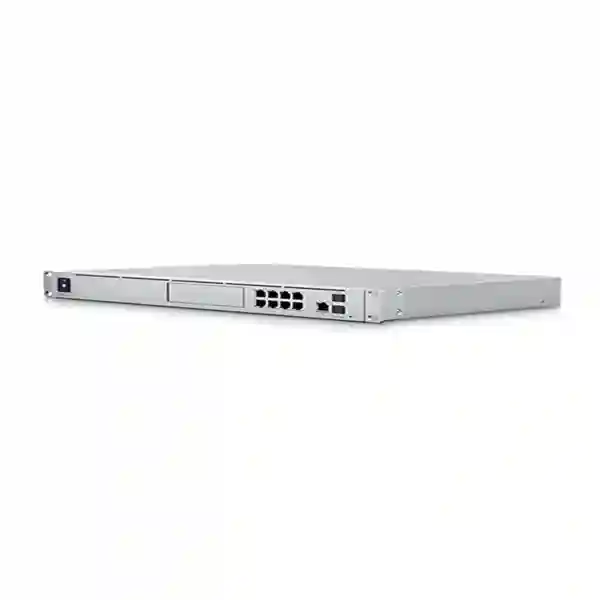
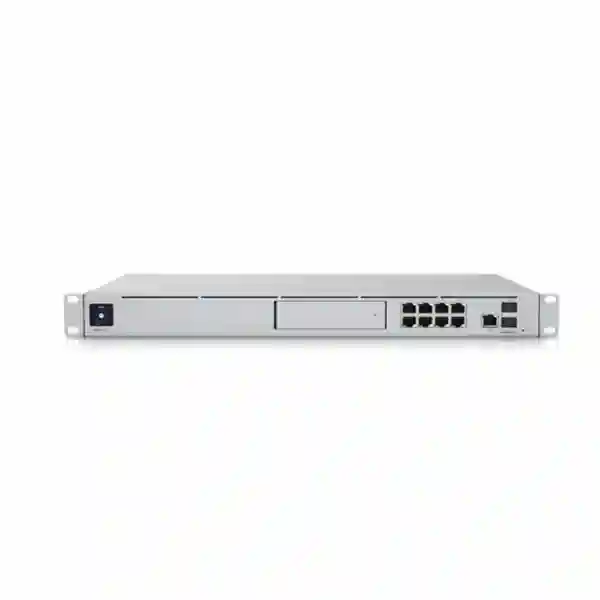
Ubiquiti Dream Machine Special Edition (UDM-SE)
Looking for one rack-mounted platform for secure internet, managed UniFi networks, a small PoE device estate and compatible camera recording? The Ubiquiti Dream Machine Special Edition UDM-SE brings those functions together in a 1U gateway. Its built-in 180 W PoE switch can simplify a compact deployment, while high-speed WAN interfaces and the UniFi application environment create a path for later expansion. This guide explains exactly what the gateway includes, what it does not include and how to evaluate it for a Tanzanian business network before requesting a quotation.
At a glance: verified hardware highlights
Six PoE and two PoE+ Gigabit LAN ports
Manufacturer-listed total PoE budget
Default copper WAN and SFP+ WAN capability
Published IDS/IPS throughput
442.4 × 43.7 × 285.6 mm
Integrated SSD plus one 3.5-inch NVR drive bay
Important: wireless access points, a surveillance recording drive, PoE++ switching, transceivers and redundant gateway hardware should not be assumed included. Check the exact quotation and required accessories.
What the UDM-SE does in a business network
The Ubiquiti Dream Machine Special Edition UDM-SE is a rack-mounted UniFi cloud gateway that combines internet routing, a stateful security firewall, UniFi application hosting, eight Gigabit Ethernet ports with Power over Ethernet, and a local recording platform for compatible UniFi Protect cameras. It is intended to sit at the edge of a wired business network. An internet connection arrives from the provider, the gateway applies routing and security rules, and downstream access points, computers, switches and cameras connect through an appropriate LAN design. This consolidation can reduce the number of separate boxes needed at a smaller site without removing the option to expand later.
The important purchasing distinction is that this is not a wireless router with a built-in WiFi radio for client devices. It manages compatible UniFi wireless access points, but those access points are separate hardware. It is also not an eight-port multi-gigabit switch: the eight powered LAN ports operate at up to 1 GbE each. Buyers should select the UDM-SE when they want an integrated platform and understand which additional devices are required. A requirement for many high-speed switch ports, dozens of powered endpoints or extensive video retention may point toward dedicated equipment alongside the gateway.
Who should consider the Special Edition
The UDM-SE is a compelling fit for an office, professional practice, retail location, educational administration building, hospitality back office or growing multi-room workplace that needs managed internet access and several powered endpoints. A typical design might have a primary internet circuit, a backup service, a few wired computers, managed WiFi access points and a limited number of IP cameras. The gateway offers a single place to manage much of that environment through the UniFi platform, subject to configuration and device compatibility.
It is especially useful when two needs coincide: the site wants advanced gateway features, and it would benefit from connecting a small collection of PoE or PoE+ equipment directly without immediately buying a full-size managed PoE switch. On the other hand, a branch with a large number of endpoints, a demanding 10G access layer, high-power PoE++ devices or extensive video storage should be designed around appropriate additional switches, storage and power protection. Consider current needs and the next phase of expansion rather than only the number of vacant ports on installation day.
A practical reading of the network ports
The physical interface mix is a major reason to choose this model. Ubiquiti lists eight 10/100/1000 Mbps RJ45 Ethernet ports, one 2.5 GbE RJ45 interface and two 10G SFP+ interfaces. The default wide-area network assignments are the 2.5 GbE copper port and one of the 10G SFP+ ports. The remaining SFP+ interface can support a fast uplink in a suitable topology. Port roles can be adjusted through supported UniFi Network configurations, but buyers should plan around the documented defaults before assuming every interface is available for the same purpose.
SFP+ describes a modular interface rather than a ready-made copper Ethernet socket. The correct direct-attach cable, optical transceiver or compatible RJ45 module must be chosen for the connected device, distance and media type. Compatibility, power consumption and link negotiation are worth checking before purchase. For a new network cabinet, draw the proposed connections on paper: mark the internet handoff, backup circuit, PoE endpoints, expansion switch and any recording devices. This simple exercise identifies an incorrect cable choice or shortage of free ports before equipment is installed.
2.5 GbE WAN and 10G uplink planning
The built-in 2.5 GbE RJ45 WAN interface is convenient when a business internet provider supplies an Ethernet handoff faster than 1 Gbps, or when planning for a possible upgrade beyond a conventional Gigabit service. The 10G SFP+ WAN interface adds another high-speed physical option where suitable connectivity and modules exist. A 10G port rating does not mean that every routed or security-inspected internet connection will reach 10 Gbps. Actual end-to-end performance depends on the configured services, remote endpoints, packet sizes, traffic types and the broader network.
Before committing to a multi-gigabit connection, ask the provider what handoff is presented, how addressing is delivered and whether VLAN tagging, PPPoE or other access settings are required. Confirm the service rate in both directions and the provider’s equipment requirements. If high-speed internet traffic needs to reach many users, an appropriately specified downstream switch and cabling become equally important. The eight built-in Gigabit LAN ports remain Gigabit ports even if the WAN link or SFP+ uplink is faster; physical interface speeds and practical routing throughput are different design constraints.
Designing two internet links without false promises
UniFi Network supports WAN failover and load balancing, and the UDM-SE can use its supported WAN interfaces in those configurations. Failover ordinarily keeps a preferred circuit in service and routes traffic through an alternate circuit when the main link is judged unavailable. Load balancing can distribute new sessions across configured connections using traffic policies. Neither mode should be described as combining two links into one faster session. An established call, payment transaction or remote connection may still need to reconnect when the path changes.
For a Tanzanian business assessing more resilient connectivity, a useful first step is to consider whether the primary and backup services have meaningful independence. Two contracts that share the same local upstream path may not provide the diversity expected during an outage. Identify the handoff for each circuit, the authentication method, the public or private address arrangements and the applications most sensitive to interruption. Test failover with real workloads after installation. Choosing different services is a local commercial decision; no particular internet provider, coverage, compatibility or performance is implied for this product.
What the eight built-in PoE ports can power
Six of the eight Gigabit LAN ports provide standard IEEE 802.3af PoE, while two provide IEEE 802.3at PoE+. Ubiquiti publishes a total PoE power budget of 180 W, with a maximum of 15.4 W for an af port and 30 W for an at port. The total budget is not a promise that every port can supply 30 W. Each attached device must fit the capabilities of the specific port it uses, and the planned sum of device power requirements must remain within supported limits.
Power calculations should be made from the actual access point, camera, reader or other device’s published consumption rather than from its category name. Include practical headroom, particularly where future equipment, additional radios or infrared illumination may change demand. Devices that require PoE++ or higher per-port power cannot be assumed to work from the UDM-SE’s built-in outputs. A dedicated switch or approved injector may be required. For procurement, prepare a table of connected devices, their power standards, their maximum watts and their selected ports. This helps prevent surprises during commissioning and leaves an auditable plan for later additions.
WiFi coverage requires separate access points
The UDM-SE operates as the gateway and management console; it does not itself provide room-wide client WiFi coverage. A business that wants a wireless network must choose compatible UniFi access points and place them according to building layout, expected density and site conditions. Good WiFi depends on more than the gateway model. Floor plan, reinforced walls, competing radio networks, client capabilities, channel width and power levels all influence the result. A small office and a multi-floor facility may need very different access point designs.
Plan the access point generation and its Ethernet requirements before assigning PoE ports. Some newer or higher-performance models require PoE+ or greater power and may benefit from multi-gigabit switch connectivity, which the UDM-SE’s built-in eight-port switch does not deliver. The gateway can still manage the wireless deployment while an additional UniFi switch supplies the appropriate power and uplink speed. For guest access, create policies that separate visitors from administrative devices. For staff access, pair wireless authentication with sensible identity management and a change procedure rather than treating one shared password as a complete security strategy.
Using UniFi Protect for surveillance
The Special Edition can host the UniFi Protect application and operate as a network video recorder for supported cameras. It includes a 3.5-inch hard drive bay and a built-in 128 GB SSD, but a recording plan should not assume that the SSD provides the same capacity as a correctly sized surveillance hard drive. Select and install a compatible recording drive as required by the deployment, and confirm the contents of the actual sales package before ordering. Storage needs grow with resolution, frame rate, compression, recording mode, scene activity and the number of cameras.
Ubiquiti’s published planning guidance lists approximately 24 HD, 14 2K or 8 4K cameras as model-specific capacity reference points, not a guarantee that every mix of cameras and workload will perform identically. Other UniFi applications and usage can affect available resources. For each area under surveillance, identify the reason to record, the required image detail, the retention goal, who may review footage and how exported evidence will be handled. A design that needs more cameras, redundancy across recording disks or much longer retention should consider a dedicated recorder or a different architecture.
Recording retention and drive sizing
Recording capacity should be calculated before a storage drive is chosen. An estimate must account for the actual camera models, preferred recording settings and the number of days the organization intends to preserve footage. Continuous recording generally consumes more capacity than event-based recording under comparable conditions, but event-based policies can miss activity if configured poorly. The site should test the chosen capture mode under normal daytime and nighttime conditions instead of relying on a generic number of days printed in a product advertisement.
A single local drive is not the same as a redundant storage array. Drive failure, appliance damage or theft can affect locally stored footage, so businesses with evidence-preservation requirements should discuss off-device export, backup practices, access control and retention policy. The exact legal requirements for a location or industry should be assessed separately; this product description does not claim that a particular setup satisfies Tanzanian privacy or security law. Restricted administrator permissions and recorded procedures for reviewing or exporting footage are as important as the storage capacity itself.
Firewall controls and practical security outcomes
The gateway includes a stateful firewall, application-aware filtering and traffic visibility within the UniFi ecosystem. Administrators can use these controls to restrict unwanted connections, implement segmentation rules and review network activity. Intrusion detection and prevention functions add another layer for identifying or blocking selected network threats. These features are valuable, but they are not a substitute for patching devices, securing accounts, training staff or protecting endpoint computers. No security appliance alone makes a business network immune to intrusion.
Ubiquiti specifies IDS/IPS throughput of up to 3.5 Gbps for the UDM-SE. Treat this as a published performance characteristic rather than a guarantee for every workload. To configure the gateway effectively, define who needs to reach what, identify services that should be exposed to the internet and disable unnecessary access paths. Use administrative accounts with appropriate roles, enable stronger authentication where available, and review rules after business changes. Maintain an inventory of protected systems so a firewall configuration is understandable to the next person responsible for operating it.
VLANs and separating different kinds of traffic
Virtual LANs allow a network designer to create logical groups that serve different purposes. A common office design separates trusted staff devices, guest WiFi clients, cameras, building equipment and administrative management. When the switches and access points are configured consistently, the gateway can route between networks and apply firewall policies that limit unnecessary movement. This reduces the chance that a visitor device or poorly maintained connected gadget can freely contact sensitive business systems.
Segmentation must still match actual application requirements. A printer may need to accept jobs from staff computers; a camera might need to talk to its recorder; a guest network normally should reach the internet without reaching private file shares. Document those intended flows before adding blocking rules. Verify DHCP address ranges, DNS behavior, tagged and untagged switch ports, wireless network assignments and any discovery protocols used by local applications. The design is strongest when it is simple enough to test, maintain and explain. Excessive VLANs without a clear operating purpose can create support complexity rather than measurable protection.
Remote workers, site-to-site VPN and SD-WAN
The UDM-SE supports VPN capabilities within UniFi, including available remote-access and site-to-site options such as WireGuard, OpenVPN, IPsec and UniFi’s supported site-connection services. These tools can help staff reach permitted business resources while away from the office and can connect appropriate branch networks. Which technology is suitable depends on client support, addressing, identity requirements and the level of administrative control needed. It is important to verify the current UniFi software release and intended configuration before promising a particular workflow.
Remote access should be narrower than simply giving an outside device unrestricted access to the whole office. Create access groups around tasks, consider managed devices for sensitive systems and keep records of who has been granted privileges. Site-to-site planning also needs non-overlapping address ranges where practical, clear route advertisements and testing of applications that rely on local discovery or fixed IP addresses. If traffic crosses internet connections with carrier-grade NAT or changing public addresses, evaluate the supported tunnel mechanisms and their constraints in advance. A successful pilot connection is more useful than a vague promise of effortless access.
A single view of the UniFi environment
The value of this gateway is not limited to its ports. UniFi’s application environment can consolidate the administration of compatible networking and physical security components. UniFi Network is used for gateway, switching and WiFi configuration. UniFi Protect handles supported cameras and recordings. The device also supports additional applications in Ubiquiti’s current suite, but those functions depend on compatible hardware, software versions, capacity and the intended use. Buying the gateway does not automatically include cameras, access readers, telephones or every accessory a complete system may need.
For an IT team, a common management environment can make it easier to view devices, identify connectivity issues and apply consistent settings. That does not remove the need for a documented network plan, administrator separation, tested backups and a defined response to equipment failure. Before adding a new UniFi application, check the gateway’s resource headroom alongside existing cameras, users and networking duties. An application that is technically available is not necessarily appropriate to run at unlimited scale on a single appliance.
Understanding capacity figures responsibly
Ubiquiti lists support for 100 or more managed UniFi devices and 1,000 or more simultaneously connected users for this model. These figures help position the product, but buyers should not interpret them as a promise that any combination of clients, applications, cameras and traffic will remain comfortable under every condition. A classroom using basic web browsing and an office moving large engineering files can place very different demands on gateway resources, even with the same client count.
Plan using measured or estimated concurrent traffic, peak business activity and the security features that will be enabled. Video recording adds a different kind of sustained load from ordinary internet browsing. VPN users introduce encryption requirements. Management dashboards also need resources. Where possible, test the intended configuration using realistic devices and applications, and leave room for growth rather than targeting a published limit. Capacity planning should also account for the access switches, wireless airtime, backhaul and upstream service. Upgrading a gateway alone will not fix a congested WiFi channel or undersized access-layer connection.
Branches, professional offices and service counters
A branch office may need reliable internet for cloud business applications, a separate visitor network, protected access to headquarters and a small number of cameras. In that design, the UDM-SE can be a useful network edge provided its interfaces and power capacity meet the equipment list. The branch can maintain distinct user and equipment networks while centrally managing compatible UniFi infrastructure. Internet continuity still depends on available services, correct failover settings and sufficient local power protection.
A professional office may instead prioritize confidentiality, guest isolation and stable conferencing. A service counter may care most about keeping payment and business traffic logically separated from public wireless access. Both examples point to the same method: begin with the business process, identify its critical endpoints, define permitted traffic and then map equipment to the gateway’s actual capabilities. Avoid buying solely on a camera-count headline or the availability of a 10G connector. The more useful question is whether the whole planned topology works when the busiest hour arrives.
Choosing an expansion switch
Eight powered LAN ports are convenient, but they are a modest number for a growing installation. A dedicated managed UniFi switch may be appropriate when additional wired desktops, cameras, access points or building devices are planned. A separate switch can also provide higher-speed access ports, uplink choices and PoE classes beyond those offered directly on the gateway. The Dream Machine can continue acting as the gateway and management console while the switch handles the larger local distribution role.
When choosing an expansion switch, count the devices that must be connected on day one and after expansion. Distinguish between ordinary 1 GbE access ports, multi-gigabit access ports and uplink capacity. Calculate the external switch’s PoE requirements separately, considering every connected powered device. Match the SFP+ uplink medium at both ends and confirm that the chosen switch supports the required VLAN and management features. A well-planned architecture often uses the gateway’s built-in ports for a few critical local devices and the expansion switch for the bulk of endpoint connections.
Comparing UDM-SE with Dream Machine Pro
The UDM-SE and Dream Machine Pro belong to the same broad rack-mounted UniFi gateway family, but they are not identical purchases. The Special Edition adds integrated PoE capability across its eight Gigabit LAN ports, a 2.5 GbE copper WAN interface and a built-in 128 GB SSD. Those differences may remove the need for a small separate PoE switch in a compact deployment and make a faster copper internet handoff simpler. The Dream Machine Pro is worth considering when powered switching is already available and the extra features of the Special Edition would not be used.
Compare complete installed costs rather than the gateway alone. A less expensive gateway may need an additional switch and more cabinet space to provide the same number of powered ports. Conversely, a buyer with a capable existing PoE switch gains little by paying for duplicate powered ports. The correct model depends on the installed environment, desired interface mix and operational design. Confirm current official specifications for every model being compared because similarly named hardware can have different WAN, power and storage characteristics.
When Dream Machine Pro Max may be more appropriate
Ubiquiti positions the Dream Machine Pro Max above the UDM-SE in gateway and video capacity. Its published comparison information includes greater client and managed-device capacity, higher IDS/IPS throughput and two NVR drive bays. Those differences matter when a site is already approaching the Special Edition’s planning limits or wants a more capable recording architecture. However, Pro Max does not offer the UDM-SE’s built-in PoE switching. Buyers who require many powered endpoints may still need a separate PoE switch.
A useful purchase comparison therefore asks three different questions. How much routed traffic needs security inspection? How many cameras will be recorded, and what storage resilience is expected? How many devices need power through their network cable? The product with the highest gateway specification is not automatically the one that minimizes total deployment cost. A small office with a modest number of cameras and access points may prefer integrated PoE. A larger operation may prioritize processing capacity, dedicated switching and multiple recording disks instead.
Rack, electrical power and environment
The UDM-SE is a 1U rack-mount appliance with published dimensions of approximately 442.4 by 43.7 by 285.6 millimetres. It is designed for an equipment rack or suitable communications enclosure, not for casually placing on a crowded desk where cabling and ventilation are difficult to manage. Check usable cabinet depth, mounting provisions, cable bend radius, access to the front ports and room for any connected transceivers. The unit’s published weight is approximately 5 kilograms, so the rack installation must provide appropriate support.
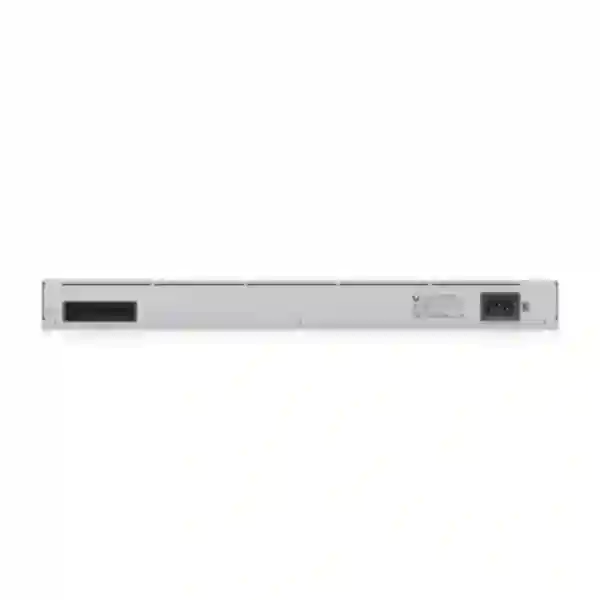
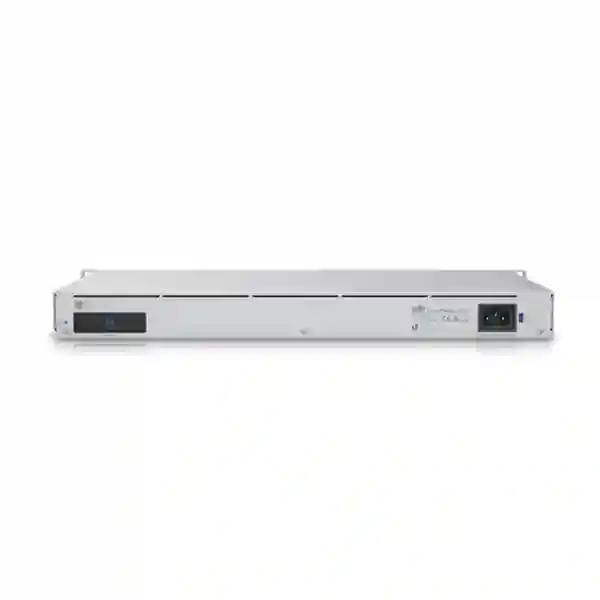
Ubiquiti specifies universal 100–240 V AC input and an internal power supply. The unit’s maximum stated consumption excluding PoE output is 50 W; the PoE budget must be considered separately when estimating the supporting electrical load. A suitable UPS can help protect against brief interruptions, but its required runtime should be calculated using the actual connected equipment rather than the gateway alone. Keep the equipment area ventilated and within the published ambient operating range of minus 10 to 40 degrees Celsius. A hot or dusty communications cupboard deserves an environmental plan before high-value networking hardware is installed.
High availability and what it does not solve
The UDM-SE supports Ubiquiti’s Shadow Mode gateway failover approach when deployed with supported additional equipment and configuration. It also has a connection for a compatible external redundant power system. These features can support a more resilient design, but they do not make a single purchased gateway automatically redundant. A second gateway, suitable links, supported topology and any relevant external power hardware are separate planning considerations. Compatibility and deployment steps should be confirmed against current Ubiquiti guidance.
Resilience is broader than gateway redundancy. If the only internet access route, LAN switch, power feed or cable pathway fails, important applications may still be unavailable. Make a list of likely failure points and determine which require duplicated hardware, alternative routing, UPS runtime or a written restoration procedure. Decide whether a brief interruption is acceptable for ordinary internet access and whether payment, communications or security systems need stronger continuity. Test actual recovery procedures periodically; an untested spare is not a complete business-continuity plan.
Tanzania procurement questions worth resolving
For a Tanzania-based purchasing team, the most useful questions go beyond the gateway model. Ask for the exact hardware variant, what comes in the box, whether the required rack accessories and power lead are included, and how any additional transceivers, recording drive or access points will be sourced. Confirm the seller’s quoted price, tax treatment, delivery arrangements, support terms and warranty coverage for the exact offer. Those details are not specified here because they have not been verified for a FourTeck Tanzania listing.
Network compatibility also depends on the local installation. Confirm the internet provider handoff, available power, cabling routes and the condition of the communications room. For sensitive sites, document the location of cameras, restrictions on who may access footage, the organization’s retention policy and any applicable compliance review. Obtain a written equipment schedule before authorizing procurement: gateway, switch if required, access points, cameras, storage, UPS, SFP+ modules, patch leads and any installation services. A clear schedule makes quotations easier to compare and reduces the risk of receiving a gateway without the items needed to operate the intended system.
A sensible first-day installation sequence
Begin with a site plan and a current record of existing subnets, internet settings and essential business services. Mount the gateway securely, provide appropriate power and connect the primary internet handoff. Complete initial UniFi setup with authorized administrative credentials and review available software updates through supported procedures. Establish the management network before connecting every endpoint. Confirm basic internet access and DNS resolution, then configure additional user and equipment networks according to the approved design.
Add access points, switches and cameras in manageable groups. Label ports and cables while it is easy to identify them, and record each device’s location and purpose. Verify that PoE devices receive the correct power, that VLAN membership is correct and that camera recording is actually occurring. If a second internet line exists, test failover deliberately rather than assuming the configuration works. Close by saving a configuration backup, recording administrator ownership and providing an operating document that explains who to contact and what to check during the first network incident.
Operational checks after deployment
Once the network is working, establish a small maintenance routine. Review firmware and application updates, checking release notes and scheduling changes so that important business applications are not interrupted unexpectedly. Examine security alerts in context, investigate repeated internet drops and keep a record of any firewall or VLAN rule changes. Monitor port utilization, PoE loads and storage health. A recorder that is technically online but has stopped saving footage is not meeting its intended operational purpose.
Make a regular restore test part of the plan. Configuration backups should be protected from unauthorized access and stored according to the organization’s procedures. Review departing employees’ administrative permissions promptly, keep emergency access arrangements controlled and revisit guest policies when the site changes. For a business with limited on-site IT support, a concise checklist is often more valuable than a complicated dashboard: internet available, important applications reachable, wireless coverage acceptable, cameras recording, storage healthy and recent changes documented.
Common design mistakes to avoid
One frequent mistake is buying the UDM-SE expecting built-in WiFi, when separate access points are required. Another is treating all eight RJ45 LAN ports as 2.5 GbE or assuming the presence of SFP+ means every client will experience 10G speed. PoE planning errors are also common: an installer may count eight powered ports without checking which two support PoE+ or may overlook the needs of a newer access point that requires a higher-power standard.
A camera project can fail for different reasons. Selecting a drive by price alone, failing to define retention or overlooking a single-disk risk can undermine the recording design. In security configuration, excessive trust between guests and business devices can create unnecessary exposure, while overly complex rules may interrupt legitimate processes. Avoid these problems with a port schedule, a power calculation, a simple traffic-permissions matrix and a documented acceptance test. These small planning steps are generally easier and less costly than troubleshooting a fully occupied cabinet after deployment.
What to include when requesting a quote
A useful request for quotation identifies the UDM-SE by its precise product model and describes the intended deployment. State the number of wired computers, access points, cameras and other PoE devices; the expected internet handoffs; whether an additional switch is needed; and the proposed recording retention. Mention the rack and power arrangements, required cable lengths and whether the equipment will integrate with an existing UniFi environment. The more accurately the use case is described, the easier it is to check whether the gateway is the right fit.
Ask the supplier to separate the gateway hardware from optional components and services in the quotation. Clarify any hard drive, SFP+ module, patch accessories, UPS and installation work individually. This avoids mistaking a bare appliance quotation for a complete working network. Request confirmation of package contents, seller terms and any applicable support arrangements in writing. When specifications change, compare the updated equipment list against the original business requirements rather than approving substitutions solely because their headline bandwidth is similar.
Technical specification checklist
| Manufacturer / model | Ubiquiti / Dream Machine Special Edition (UDM-SE) |
|---|---|
| Form factor | 1U rack mount |
| Powered LAN ports | 8 × Gigabit RJ45: 6 × PoE (802.3af), 2 × PoE+ (802.3at) |
| Total PoE budget | 180 W |
| Default WAN connections | 1 × 2.5 GbE RJ45 and 1 × 10G SFP+ |
| Total SFP+ ports | 2 × 10G SFP+ (port roles are configurable within supported designs) |
| IDS/IPS throughput | Up to 3.5 Gbps, as published by Ubiquiti |
| UniFi camera planning figures | 24 HD / 14 2K / 8 4K (dependent on workload) |
| On-board storage | 16 GB eMMC and integrated 128 GB SSD |
| Video recording bay | 1 × 3.5-inch NVR HDD bay |
| Processor / system memory | Quad-core 1.7 GHz ARM Cortex-A57 / 4 GB |
| Gateway maximum draw | 50 W excluding PoE output |
| Power input | 100–240 V AC; compatible external RPS DC input |
| Display | 1.3-inch touchscreen |
| Dimensions | 442.4 × 43.7 × 285.6 mm |
| WiFi radio for clients | Not built in; separate UniFi access points required |
Published capacities and features should be verified for the installed UniFi version, connected devices and chosen configuration. The table is a planning reference rather than a seller-specific offer.
Frequently asked questions
Does the UDM-SE provide WiFi by itself?
No. The UDM-SE is a wired rack-mounted cloud gateway and controller, not a WiFi access point. To provide wireless access to phones, laptops and other clients, add compatible UniFi access points. The number and type should be chosen after considering the floor plan, user density, radio environment and required performance. Some access points can be powered directly from supported PoE ports; others may require a more capable switch or appropriate injector.
What is the difference between the PoE and PoE+ ports?
The UDM-SE has six IEEE 802.3af PoE ports and two IEEE 802.3at PoE+ ports among its eight Gigabit LAN connections. Ubiquiti specifies up to 15.4 W for a PoE port and 30 W for a PoE+ port, within a published total 180 W PoE budget. Check the actual powered device’s standard and maximum draw. Do not assume a device requiring PoE++ will work from a PoE+ port.
Are all of its Ethernet ports multi-gigabit?
No. The eight built-in powered RJ45 LAN ports are 10/100/1000 Mbps. A separate RJ45 interface supports up to 2.5 GbE and is assigned to WAN by default. Two SFP+ interfaces support up to 10G with suitable connectivity and configuration. Anyone requiring many 2.5 GbE desktop or access point connections should evaluate an expansion switch. Gateway routing performance and the speeds of individual Ethernet ports are different characteristics.
Can it use two internet connections?
Yes. The gateway supports multiple WAN interfaces and UniFi Network provides failover and load-balancing configuration options. A secondary service can help maintain connectivity when the preferred internet path becomes unavailable, depending on the network design. Individual sessions may interrupt when the path changes, so do not interpret failover as a guarantee of uninterrupted calls or applications. Confirm the connection handoffs and test the configuration with actual business systems.
Does UDM-SE include an SSD and camera hard drive?
Ubiquiti lists a built-in 128 GB SSD and a 3.5-inch NVR hard drive bay. Those are different elements: the installed SSD should not be treated as an unlimited surveillance recording drive. A suitable disk may be needed for the intended UniFi Protect storage plan. Confirm whether a hard drive is included in the exact purchase bundle rather than assuming all resellers supply one. Plan retention based on the cameras, recording settings and required days of storage.
How many UniFi Protect cameras can it manage?
The manufacturer’s camera guidance lists reference capacities of 24 HD, 14 2K or 8 4K cameras for UDM-SE. These are planning figures, and actual usable performance depends on camera mix, recording configuration, concurrent access and other applications running on the console. If the deployment is close to those figures or requires more resilient storage, evaluate a dedicated recorder. The installed hard drive’s capacity also determines how much footage can be retained.
Can I use it for a guest WiFi network?
Yes, when combined with compatible wireless access points and appropriately configured networks. The gateway can route traffic between separate logical networks and enforce policies that keep visitors away from sensitive business resources. The APs deliver the radio connection; the gateway manages the network design and related policies. Test guest internet access, DNS, portal behavior if used and isolation from internal systems before considering the configuration complete.
Does a 10G SFP+ port guarantee 10 Gbps internet speed?
No. A 10G SFP+ port states the maximum supported physical link rate under appropriate conditions. Internet performance depends on the provider service, physical media, transceivers, routing and security workloads, and the speed of downstream links. Ubiquiti quotes up to 3.5 Gbps for IDS/IPS throughput on this model. For demanding multi-gigabit deployments, examine the complete traffic path and active features rather than relying on a single connector’s headline rate.
Is the Dream Machine Special Edition suitable for a multi-site business?
It can be, particularly when the intended branches fit the UDM-SE’s port, traffic and application capacities. UniFi provides supported VPN and SD-WAN capabilities that may help connect eligible sites. Plan addressing, access permissions, link quality, failover and support responsibilities before rollout. Larger enterprises may prefer different gateway models, dedicated recording and separately managed switching according to throughput, resiliency and operational requirements.
Will the UDM-SE work with any internet provider in Tanzania?
Compatibility must be checked for the exact service rather than assumed. Ask the provider whether it supplies a copper Ethernet handoff, an optical handoff requiring a compatible module, fixed addressing, DHCP, PPPoE, VLAN tagging or other specific settings. Also check any router, modem or optical network terminal that must remain in place. This page does not claim compatibility with a named local provider, and it makes no unsupported claim about local coverage or service activation.
What happens during a power outage?
The gateway needs an electrical power source to operate. It accepts universal AC input and can form part of a design with a suitable external UPS; supported Ubiquiti redundant power options require their own compatible equipment and configuration. A UPS runtime estimate should include connected switches, optical network equipment and any other critical devices, not only the gateway. If the internet provider’s local infrastructure also loses power, keeping the gateway running does not guarantee an active internet service.
Can the gateway replace every network switch?
Usually not for a growing office. The eight powered Gigabit LAN ports are useful for a compact installation but can be exhausted quickly by wired endpoints, wireless access points and cameras. Additional managed switches can provide more access ports, higher speeds and different power capabilities. The UDM-SE can remain the routing and management center while a dedicated switch carries the larger local device count. Count present and planned endpoints before choosing the final layout.
How should I choose between UDM-SE and UDM-Pro?
Choose based on the actual equipment mix. The Special Edition offers integrated PoE, a 2.5 GbE copper WAN interface and a built-in 128 GB SSD, which are useful when deploying a small set of powered devices. The Dream Machine Pro may be more suitable if a capable PoE switch already exists and those additions are unnecessary. Compare the complete network cost, including separate switching and storage, against current manufacturer specifications and the desired deployment.
What information helps FourTeck prepare an accurate quotation?
Specify the exact UDM-SE model, internet link types and speeds, number of wired endpoints, proposed UniFi access points and cameras, expected PoE draw, recording retention and any required expansion switch. Add information about rack space, power protection and whether an existing UniFi installation must be integrated. Ask for availability, package contents, price, warranty, delivery and installation terms to be confirmed on the actual quotation. No stock, price or service commitment is implied by this product guide.
Plan your UDM-SE network and request a tailored quotation
Share your intended internet connections, PoE devices, WiFi access points, camera count, storage goals and any existing switching equipment with FourTeck Tanzania. Ask the team to confirm the exact gateway configuration, required accessories, package contents and commercial terms for your project. A clear equipment schedule helps determine whether this all-in-one gateway is suitable or whether a dedicated switch or recorder should be included. Request current availability and pricing directly; neither is represented as verified on this page.




Reviews
There are no reviews yet.